#overclocking
1 messages · Page 106 of 1
 modern walrus
ya but that's at like 2133mhz
 sterile flame
fair

looks like one of these things actually nerfed my timings
either that or running the wrong timings from before caused it to be like that
modern walrus
sterile flame
looks like it's on point now tho no?
sterile flame
yep
 kind walrus
pcbdestroyer it finally
sterile flame
i needa loosen some more timingd

bumping it up to 18 gave me a better result
maybe 16 is the sweet spot
or maybe TWRRD to 10
modern walrus
sterile flame
bumping it up to 18 gave me a better result
what did you bump to 18?
sterile flame
tRWDR
modern walrus
RDWRs?
sterile flame
Yep
modern walrus
ya those seemed really low earlier for sure
can't do 16-19-19-39?
er nvm let's not get greedy
 modern walrus
have you started TM5?
 modern walrus
lower?
sterile flame
lower time
modern walrus
oh good
 modern walrus
btw you may want to check at some point check to see if you're on latest BIOS
sterile flame
good idea
kind walrus
after pcbdestroyer lol
don't wanna find it reset the timings again before you know it's stable 
sterile flame

sterile flame
@modern walrus @kind walrus You guys have saved me an entire day's worth of testing and rewarded me with a stable overclock

I owe both of you guys drink

kind walrus
Lol it can still go a bit faster
Go do a 3dmark run though, compare it to your original cpu score
sterile flame
kind walrus
Lol it can still go a bit faster
the key word was stable folic

its already the same latency as 3200 XMP
kind walrus
Faster and stable 
modern walrus
sterile flame
<@808772530017665024> <@101107951401455616> You guys have saved me an entire day...
Really glad to hear it worked out. I was worried there at the end lol
sterile flame
aye
also
can more power tool cause it to not boot into windows?
it posted
and there wasn't any errors with the ram...
yep
windows wont boot
how do I delete MPT remotely lol
kind walrus
Turn it off, power off at the wall
Come back in 5 minutes
That sometimes works for me with gpu weirdness
If not reseat the gpu or if you can boot into safe mode
sterile flame
its prepping the automatic repair lol
kind walrus
I think there are instructions online to boot into safe mode with no screen
Ah
Well ram tuning so
Expected
kind walrus
So you have video?
sterile flame
I might have set the TDC too high
yes I have video
i reset my gpu back to defaults
anything else I should consider before leaving safe mode?

file corruption in the OS?

it works
I have a feeling smth wasn't uninstalled properly last time
modern walrus
sterile flame
https://media.discordapp.net/attachments/980676251779997746/985325452698734592/u...

GitHub
Contribute to NeweggTechie/Windows-Troubleshooting-Utilities development by creating an account on GitHub.
sterile flame
modern walrus
https://github.com/NeweggTechie/Windows-Troubleshooting-Utilities
yeah I used the DDU
when I first went back in it looked like a windows install without graphics drivers
modern walrus
It was your graphics drivers?
modern walrus
Kinda strange but I guess all's well that ends well
sterile flame
my screen flickered and changed back to the normal resolution
before I installed the GPU drivers
anyways for intensive benching purposes idrm it atm lol
modern walrus
you may wanna run the utility just in case anyway or at least system file checker & dism
sterile flame
fair enough
 modern walrus
Just do 1
sterile flame

all is good
idk what happened to that graphics uninstall tho lol
or the install
boots normally
timings haven't changed
kind walrus
mpt time
sterile flame
mpt is definitely the issue
loving these lighting fast boot times tho

i have a feeling its fclk limits being too high
modern walrus
Fclk?
sterile flame
yeah for the gpu
turns out I was wrong
I just needed to remind my gpu that it could go that high

sterile flame
@modern walrus https://media.discordapp.net/attachments/980676251779997746/985338212098658324/unknown.png?width=776&height=567

looking good
tightened my primaries to 16-19-19-38
10 cycles no errors
also increase DRAM voltage to 1.5
modern walrus
nice those primaries just sound way better lol
modern walrus
13?
sterile flame
yep
modern walrus
for tWR?
sterile flame
CL13
modern walrus
why jump from 16 all the way to 13?
sterile flame
he said you can run it that low if you push 1.55V
I figured i may aswell see if it works lol
modern walrus
tCL for daily at 13 is pretty rare lol
sterile flame
yeah
it didn't even work for me lmao
but 1.55V was within daily limits
so i figured may aswell try it
modern walrus
15 or even 14 might work but 13 is like >1.6v
sterile flame
yeah hahahaah
i think i might leave my primaries at that
and then increase tREFI
modern walrus
you're running 3600mhz?
sterile flame
yeah
modern walrus
Rev E usually scales well on tCL with voltage but the rest of the primaries don't tend to
modern walrus
you could try 15-17-17-38 or 15-18-18-38
on AMD you can do goofy stuff with Rev E like 16-19-16-38 lol
sterile flame
lol
modern walrus
Intel matches tRCD & tRP tho
modern walrus
If you're not sick & tired of doing this already, I'd try dropping the first three by 1 at 1.55v but if you've had your fill I understand lol
sterile flame
lol allg
i'll just try the most unstable stuff first since I'm pretty confident everything else is stable
modern walrus
ya if you start with the likely stable stuff you might end up wondering what if
sterile flame
yeah and that's what I hate most lol
modern walrus
since tCL scales well, I'd drop tCL by itself before messing with the other primaries
modern walrus
cuz if you do like 15-18-18-38 & it fails, tCL 15 might work & tRCD & tRP might be the reason it errored
sterile flame
well thats what the bios says
modern walrus
your motherboard wants to OC your ram without your input lol
modern walrus
I wonder if you set tRAS to like 43 if it would lower tWR
modern walrus
ah okay
sterile flame
yeah it dont wana budge
modern walrus
I think I told you but my Rev E is 4400c19-19-19-46
& that 46 feels wildly out of place but it doesn't play with that requirement lol
sterile flame
I saw that in the OC discord too lol
at 19-19 can't you run 38 based on the guide?
modern walrus
like I have a set of 16x2 DJR DIMMs that are 4400c19-26-26-46
sterile flame
I thought the tests would stunt the speed of everything else
but it's running discord better than my laptop is under load
modern walrus
heck for memory stability throw everything you can at it
modern walrus
Prime95 Large FFTs stresses memory controller really hard
OCCT does a good job too
sterile flame
mmm
modern walrus
eh it might happen
sterile flame
I saw orange mushroom mention it earlier
modern walrus
3600 is a crazy high frequency
sterile flame
I thought 4000+ was
modern walrus
meaning you might be able to run close to flat timings
modern walrus
like I think that same DJR kit runs flat 19s at like 3800
well ya I feel your pain actually
I've been trying to bench this 11600K
& gear 2 is cool on paper & all
but gear 1 performs better
sterile flame
I'd rather run a super high bandwidth and have somewhat loose timings than go through this pain again
oh?
modern walrus
but whether it's my motherboard or the CPU, I'm at a brick wall at 3600mhz
sterile flame
yeah
modern walrus
& I threw the kitchen sink at it
modern walrus
just to see how insistent it would be, I threw 1.5 IO2 & 1.6 SA at it & it still won't POST 3700
even at 1.7 DRAM
sterile flame
the catch is that I feel that you have to experiment with voodoo timings to get the most out of it
danm
modern walrus
I don't get Intel's logic here
sterile flame
that's frustrating
sterile flame
hahahahaha
well intel does make you pay more to overclock
which is counter intuitive given that overclocking was meant to be free performance lol
modern walrus
I can do 4200c15-16-16-36 with daily voltages on 2x16gb bdie on 10900K
sterile flame
danm
modern walrus
eh they do their market research I guess
 left bladeBOT
 Avionix#4365 has been warned
Reason: Bad word usage
sterile flame
b-die must be the bomb lol
isn't that way better than what rev e can do?
and rev e is only 2nd to bdie?
modern walrus
sterile flame
b-die must be the bomb lol
Rev E tends to POST higher frequencies
but bdie does do better timings ya
sterile flame
modern walrus
Rev E tends to POST higher frequencies
yeah defos
33 cycles of PCB destroyer no errors
modern walrus
sounds like you're good to go
anta777 extreme is also a pretty good config
absolut is good too
 sterile flame
modern walrus
anta777 extreme is also a pretty good config
sterile flame
modern walrus
anta777 extreme is also a pretty good config
yeah I have both of those configs but just for a quick and somewhat thorough test I just wanted to run PCB destroyer
modern walrus
ya makes sense
sterile flame
the plan was to run all 3 of those configs in the final test
modern walrus
anta777 goes long enough that you could leave it overnight
sterile flame
yeah definitely lol
I initially used anta777 but 4 hours of testing inbetween tweaks was just too slow lol
modern walrus
oh ya that's why I use ycruncher 2.5b
sterile flame
oh fair enough
yeah I wanted a bit of something inbetween I suppose
which is why i opted for pcb destroyer
modern walrus
1.5 minutes of crazy will usually let you know if you're somewhat unstable lol
sterile flame
yeah
 sterile flame
I fairly confident these timings are solid in stability as I've run around 24 hours of PCB destroyer inbetween tweeks with no errors lol
and roughly 8 hours of anta777 for my initial tweaks
for my last tweek
I was thinking of dialing up tREFI to 50k?
i might just run a y.cruncher and start the marathon of tests over the next 2 days to see where my OC leads me
modern walrus
the higher the better
sterile flame
lol
modern walrus
I wonder what 12th gen's gear 1 limit is on DDR5
sterile flame
how does tuning DDR5 differ from 4?
it has higher bandwidth and tighter timings right?
modern walrus
I think with tREFI you'd get BSOD or straight up like unresponsive & frozen
no it has higher bandwidth but the timings are goofy as hell
it'll be like 6xxxc30 or something
sterile flame
lolll
 modern walrus
I really don't even know tbh
sterile flame
lol fair
modern walrus
hynix makes the best DDR5 supposedly
modern walrus
it just occurred to me that if I'm gonna be stuck at 3600mhz, I should run 32gb instead of 16
modern walrus
ya cuz single rank will usually run at higher frequencies than dual rank but dual rank has the advantage of rank interleaving
sterile flame
ahhhh yeah I heard smth about really fast ram using only a single rank
modern walrus
I couldn't get gear 1 to POST over 3600 even tho stepped all the way up to 1.5v IO & 1.6 System agent
sterile flame
it's used in servers or smth right? but incredibly pricy

passed ycruncher 2.5b
might do a quick benchmark whilst fans a revved
then pcb destroyer
anta777
modern walrus
nice nice
modern walrus
I wish I knew how RTLs worked on 11th
sterile flame
mine?
modern walrus
on 10th you can cut a lot of latency if you can get them to run 60/61 7/7
yours & mine
sterile flame
yeah fair enough lol
modern walrus
I dunno how I'm supposed to tune them on 11th gen
alright time to see if these royals suck
they probably do
one of them's LEDs are out
modern walrus
been meaning to RMA for awhile
sterile flame
lolll
modern walrus
I think you want IOLs no more than two & RTL no more than 1... I forget which one is RTL & which one is IOL but the bigger numbers can be 2 apart & smaller 1 apart
sterile flame
yep
oh
I didn't know it was specific to those two
oh well they don't appear in 12th gen so it wasn't really a concern for me lol
modern walrus
ya don't even bother
sterile flame
also running GPU at 70C on OCCT is a good test for the RAM right?
70C junction
I rarely get to 70C but it seems like a good precaution
sterile flame
yeah
sterile flame
hahahaaha
sterile flame
I mean radeon generally has more vram than rt cards
hahahaaha
I think im gonna be kicking myself for not getting 7900
modern walrus
I've only had nvidia GPUs
I've only been into all this since like February 2021 lol
sterile flame
LOL
modern walrus
all started cuz I was an electrician for 5 years then went back to school & was bored not having anything to build
sterile flame
well you know more than people i know who have been using custom pcs for over 8 years
ahhhh
sparkies are cool people lol
modern walrus
haha nah other people here know way more than I do
sterile flame
I knew an electrician who became a doctor after 5 years in the trade
modern walrus
they're all like studying computer science & all that
I'm a law student with a hobby haha
sterile flame
pffft hahahahaa
modern walrus
hmm electrician to doctor that's probably crazier than electrician to lawyer
sterile flame
danm electricians seems to be the guys who make big $$$ and then go on to study hard subjects just for the fun of it
modern walrus
I mean you can make good money, especially if you work for utility companies
or own your own business
modern walrus
but otherwise you're putting your life on the line pretty much everyday
oh ya for sure
sterile flame
they're often overlooked since it's hard work at times
modern walrus
if I could go back in time & graduate high school tomorrow, I'd probably go to trade school & skip all the loans & craziness
that's one of the reasons trades make such good money nowadays
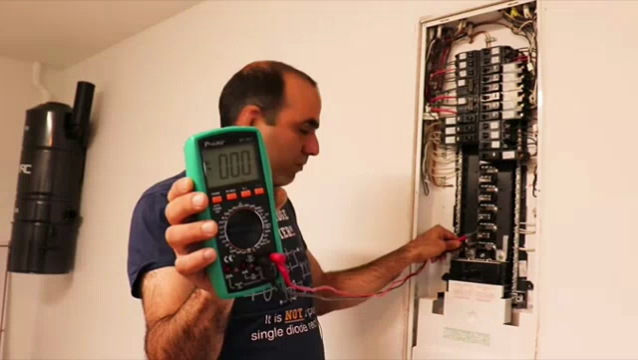 modern walrus
everyone wants to be in an office in front of their mac
no one wants to get their hands dirty
haha I've been zapped more times than I can remember
it always hurts like hell
sterile flame
hahahaaha
left bladeBOT
 chillin#7777 has been warned
Reason: Bad word usage
 potent fiber
oh right, been on some other servers a bunch lately  ... Contractor license or w/e, 4+ years in trade is definitely pretty good money VS a few years of most typical office work or making near min wage for a while. The snapchat generation doesn't really know hard work. I'm personally aiming to be a general contractor who then also knows electrical and some other stuff. Being well rounded isn't a bad thing. Indeed plumbing might be crazy pay at time, but also can get nasty. --enough OT from me.
  Soon I'll be lookin for help tuning my Rev E a bit. Single rank 2x16GB kit.
modern walrus
HVAC is great money
electrical pretty good
plumbing is good but I can't handle all that
sterile flame

sterile flame
potent fiber
oh right, been on some other servers a bunch lately <:Pepe_KEK:83021348508965275...
I just tuned the same kit lik

gonna run 1 hour gpu stress tests leaving it around that 70-80C heat range just to make the case a lil warm
modern walrus
potent fiber
oh right, been on some other servers a bunch lately <:Pepe_KEK:83021348508965275...
definitely get your GC ya
you know who makes great money? elevator installers
pretty sure that's the highest paid trade
sterile flame

modern walrus
sterile flame
turn your fans down haha
sterile flame
modern walrus
turn your fans down haha
I usually have them high lmao
will it affect the test?
or I should say the results
potent fiber
Probably not, just will up the temp a bit. Could show timings later when you get a chance. Knowing 11gen funkyness (Gear 2), idk if I'll aim for 3700-3800, or stick w/ 3600 & just aim for CL15 & such.
modern walrus
sterile flame
will it affect the test?
haha for sure it'll get hot as hell in there
sterile flame
up the temp of the system? Well its what I'm testing for as worst case scenario my PC is usually 70°C junction tems
modern walrus
potent fiber
Probably not, just will up the temp a bit. Could show timings later when you get...
if you're gonna jump from 3600 to 3700-3800, I'd stay at 3600
modern walrus
sterile flame
up the temp of the system? Well its what I'm testing for as worst case scenario ...
nah you don't gotta torture it
sterile flame
modern walrus
haha for sure it'll get hot as hell in there
Yeah I was aiming for that to make sure that my tRFC and tREFI can withstand it lol
modern walrus
it's Rev E, temps are a consideration but they're not major
oh ya maybe do it then
this was me stressing FCLK for my dad's 5600g build
sterile flame
hahahahaha
modern walrus

 lavish tundra
bruh why shirt
modern walrus
to stress the hell out of the system tbh
lavish tundra
Ahhhhh
potent fiber
LOL, that's 1 way to confirm you'd be fine if you teleported PC to Arizona in summer or something. So most people mess around w/ vram at 1.5-1.6v but I wonder how good of tuning can be done around 1.4-1.45v
modern walrus
I overclocked my dad's RAM to a conservative 4000/2000FCLK
lavish tundra
p95+furmark airflow cut off time?
modern walrus
but he does important work related stuff on there
I wanted igpu, cpu, & memory to run as hard as they could but stability was priority 1 thru 10
you could have so much fun with a 5600g if you have a separate GPU
 potent fiber
Them g series can be quite nutty w/ the 2000+ FCLK, nice
modern walrus
once you install igpu drivers the party is over tho
there just isn't enough SOC voltage to go around
my next mission is to get 3600c12-12-12-32 stable on 2x16gb since 11600K wants to be a little... wants to be uncooperative
it has to be a board limit... how can 3600 POST at 1.32/1.35 IO2/SA but 3700 can't POST at 1.5/1.5
meh I'm over it
potent fiber
Perhaps part of 11gen funkiness. I might've heard of some nice tuning going on using Z590 mobo w/ a 10gen cpu, idk.
lavish tundra
modern walrus
there just isn't enough SOC voltage to go around
Wire a 9v battery to those pins
potent fiber
Deca-core goodness.
sterile flame
danm these ram sticks can take a hit
running stress test for 40 mins now
case has a constant ambient temp of 60C lol
modern walrus
good stuff lol
sterile flame
using discord
still faster than my laptop
PCB destroyer running in the background
may aswell just play some games on this pc whilst it runs to see what it does lol
potent fiber
Will be fun w/ less than 2GB available.
sterile flame
yep
I wana see how it reacts to alight game like tf2 lol
I feel like torturing my GPU for the whole duration of PCB destroyer 128 just to see how it would go under the worst situations lol
 potent fiber
Would be interesting to play an old game like that and do a FPS graph & available ram graph in the background.
sterile flame
potent fiber
Would be interesting to play an old game like that and do a FPS graph & availabl...
aye

@modern walrus it survived lmao
modern walrus
nice
now you won't know what to do with yourself
& feel like you have so much free time
sterile flame
modern walrus
& feel like you have so much free time
yeah I'm practically done with my course lol
waiting for it to get marked

is this a livable test?
modern walrus
I think after this the only way left to test it is use it
sterile flame
yep lol
modern walrus
gonna try 65534 at 3600
sterile flame
hmmmmmmmm
yeah no I think that's enough tuning for a few months
its already better than my xmp settings
modern walrus
I've basically messed with RAM in some way 2-7x a week since Christmas lol
sterile flame
danm...
I just wana make sure it's as stable as possible now
bc it's tighter than xmp
and it has more bandwidth
these sticks already feel like mad stonkz
potent fiber
I think I'll shoot for 3600 w/ flat 15's (15-15-15-35ish as a nice in-between of stock & somewhat expensive 3600c14 stuff, or even something like 3200c15. I've only OC'd older cpus & never messed w/ ram much besides lowering a few timings (& OC'd ddr2-1066 to around 1150)  -- o.g. Micron D9 was the shiz
 sterile flame
potent fiber
I think I'll shoot for 3600 w/ flat 15's (15-15-15-35ish as a nice in-between of...
sterile flame
potent fiber
I think I'll shoot for 3600 w/ flat 15's (15-15-15-35ish as a nice in-between of...

this is my test I just ran on my 3600 14-19-19-38
you could drop it to 18 from what I was told
and if you're on 12th gen intel drop 38 down to as low as 12 so I've been told
potent fiber
Nice! What voltage? Well things are deffo different from the past (4-4-4-12, 5-5-5-15, my 1866 stuff is 10-10-10-30). Didn't think the "4th" number could actually be lower than the others.
sterile flame
potent fiber
Nice! What voltage? Well things are deffo different from the past (4-4-4-12, 5-5...
1.5
sterile flame
potent fiber
Nice! What voltage? Well things are deffo different from the past (4-4-4-12, 5-5...
yeah apparently you can do it with 12th gen now
@potent fiber

this some guy at the OC server
man runs timings tighter tha mine and he was a higher freq lol
potent fiber
4100c15, yikes. Well, 3600c14 at 1.5v is pretty solid I think.
sterile flame
potent fiber
4100c15, yikes. Well, 3600c14 at 1.5v is pretty solid I think.
welp we'll find out if it passes 32 cycles of anta777 extreme
i turned my PC into an oven for 7 hours to test for thermal related instability
no errors
not even joking the GPU was pumping out 70C air
junction temps were sitting around 90C and dabbling just below 100C
sterile flame

@modern walrus do you think this is stable enough?
I think this is stable enough
modern walrus
sterile flame
<:dog_kek:614366464245235732>
I'd think so lol
modern walrus
sterile flame
~~time to lower to 18~~
it's Rev E
go for the gold & do 15 or 16 lol
at 3600 14 will likely work if you do like 1.5ish
modern walrus
sterile flame
<@742588277898608713>
oh this is what you're running rn?
sterile flame
no
modern walrus
ah okay
sterile flame
thats someone elses lol
modern walrus
you're at 16-19-19?
sterile flame
apparently 12th gen is able to drop tRAS to as low as 14
sterile flame
modern walrus
you're at 16-19-19?
14-19-19-38
sterile flame
well 12th is pretty weird from what we've seen lol
 sterile flame
whats vermeer?
sterile flame
oh fair
modern walrus
AMD
sterile flame
i wonder what zen 4 will offer
modern walrus
but 5600g is technically Zen 3 & it doesn't have those FCLK limits
sterile flame
a funny tRP was one of them
modern walrus
so not all Zen 3 but it's "Cezanne" not "Vermeer"
I have no idea how they decide these things
modern walrus
I meant to try tRP 14 but I haven't had a system crash in well over a month so I think I'll let sleeping dogs lie
modern walrus
I doubt there would be any noticeable difference
sorry I mean
for me to drop tRP from 15 to 14
modern walrus
you should try to drop tCL as low as you can then mess with those since tCL scales with voltage on Rev E well
modern walrus
what? for real??
sterile flame
yeah
modern walrus
at 16?
sterile flame
i tried training c13 at 1.55V but it never worked and I had a feeling JEDEC was upon me so I killed the power and cleared the CMOS lol
modern walrus
oh you're at 14?
sterile flame
yes
modern walrus
nvm I thought you were still at 16 my bad
modern walrus
I mean... I daily 1.64v on 10900K
modern walrus
1.55v is a conservative daily limit I guess
sterile flame
i need a bit of thermal headroom as I dont have airconditioning lol
modern walrus
go grab a wall unit at Home Depot for like $140 lol
 proven canopy
sterile flame
whats a shurefire way to know what die you have
proven canopy
sterile flame
whats a shurefire way to know what die you have
What kit?
modern walrus
asking @proven canopy is about as surefire as I know
sterile flame
proven canopy
What kit?
ballistix 32gb ddr4
proven canopy
Is it single or dual rank?
sterile flame
dual
proven canopy
Definitely dual? 16GB sticks, then it's dual rank rev.e
sterile flame
how do I confirm that actually 😂
modern walrus
lol you just did
proven canopy
Pull a stick and look at the ICs
modern walrus
you have to take the heat spreaders off no?
proven canopy
You can see if there are chips on both sides without removing them
modern walrus
oh we're not confirming die, we're confirming ranks nvm
 modern walrus
proven canopy
You can see if there are chips on both sides without removing them
modern walrus
proven canopy
You can see if there are chips on both sides without removing them
CPU-Z dependable for that?
 modern walrus
unless Seby rewrote it
modern walrus
proven canopy
Given that it's reading spd - I'd think so
does channel interleaving only apply with 4 DIMMs?
assuming dual channel motherboard at least
proven canopy
Rank interleave? Should apply when >1 rank / channel
modern walrus
gigabyte BIOS has option for both channel & rank interleaving
sterile flame

 modern walrus
turn it so you're looking up under the heatspreaders
sterile flame
camera focus is not the best


 modern walrus
ya DR
left bladeBOT
Avionix#4365 has been warned
Reason: Bad word usage
sterile flame
lol
proven canopy
sure looks like dual rank
I mean, if you can clearly see that there are chips on both sides, yeah
modern walrus
my guess is at 3600 at least 15 will work but stranger things have happened
sterile flame
yeah
bench it in the worst case scenario
if it passes y.cruncher
At least I can use it to bench

if not I'd be more than happy with 15
modern walrus
Haha ya just run like 1.65v for benches
 pliant lava
not sure if this belongs here or in the memory section.. but when i enable XMP profile on my ram i get static in my headphones and the system will randomly reboot do i have faulty ram?
modern walrus
Cpu? What xmp?
pliant lava
Its a Ryzen 5600x
and its just the standard xmp profile
all i did was enable to presetting
modern walrus
pliant lava
and its just the standard xmp profile
sorry stepped away there for a bit
what's the frequency for the XMP profile?
or ideally, the frequency & timings, e.g., 3600c14-15-15-35 (can be found on the label on the ram sticks themselves btw)
 sudden torrent
A link to the sticks you bought would also work
modern walrus
^
pliant lava
modern walrus
or ideally, the frequency & timings, e.g., 3600c14-15-15-35 (can be found on the...
Sorry went to eat dinner,give me a second to find the box but they are ballistix 3600
modern walrus
XMP should work with those but we'll see what we can do
pliant lava
modern walrus
XMP should work with those but we'll see what we can do
im about 99% sure they are CL16
modern walrus
my concern is that the XMP frequency was more than 3800
because 5600x, 5800x, 5900x, etc typically can't run well over 3800 because of some limitations I won't bore you with haha
do you have any other settings enabled or have you played with anything else in BIOS?
pliant lava
nope
so i built the system like 18months ago.. i can swear xmp was on
i went in the other day to turn Resizable bar on as well as 4g encoding or something like that
noticed it wasnt on
turned it on
left bladeBOT
 CrazyCarl39#4106 has been warned
Reason: Bad word usage
pliant lava
and my whole thing was crashing
i would go from 144 fps to 5
and then the system would turn off
i was getting crackling in my headphones
so today i went into the bios and went throught the changes i made 1 by 1 and reverted them back
when i turned off xmp the static sound disapeared
potent fiber
I'm late, but pro tip. Towards the end of ballistix sticker* that said M16 means dual rank. My 2x16kit says M8 & is single rank. @sterile flame I'm surprised yours is from 2022 & still made in Malaysia, nice.
modern walrus
pliant lava
when i turned off xmp the static sound disapeared
do you have HWiNFO or other software downloaded that can tell you what various voltages are running at?
pliant lava
yes i do
modern walrus
I think when SOC voltage is high that crackling can happen
pliant lava
is CPUID ok?
modern walrus
also, in event viewer, can you see what errors occurred?
hmm not sure you can see SOC voltage in CPU-Z
pliant lava
im not sure, doesnt look like anything is in the event viewer
modern walrus
is your GPU overclocked?
pliant lava
hwmonitor ok?
it shouldnt be lol
its a 3080FTW3
so yes technically but not by me
modern walrus
does it only crash during games?
modern walrus
do you have PBO (Performance Boost Overdrive) enabled?
sorry for the 21 questions here but also which motherboard & which BIOS version?
potent fiber
Cpuz mobo tab would be good.
sudden torrent
Sticks are in slots 2 and 4 right?
modern walrus
ah okay. I'm on B550 Master nice
pliant lava
yes
modern walrus
it's kinda strange
on Gigabyte's website they skip from 10 to 12
most current version is F15c
pliant lava
timings are 20-19-19-43
modern walrus
have you done BIOS update?
sudden torrent
F11G sounds like a beta version
pliant lava
thats what the hwinfo tells me it is
and no i havent done one since i first built it
sudden torrent
pliant lava
timings are 20-19-19-43
That sounds like jedec, like xmp off
kind walrus
A bios update might go a long way with some of these issues
modern walrus
you could play with voltages & all that but updating BIOS is probably the easiest approach
pliant lava
sudden torrent
That sounds like jedec, like xmp off
what is jedec?
modern walrus
GIGABYTE
Lasting Quality from GIGABYTE.GIGABYTE Ultra Durable™ motherboards bring together a unique blend of features and technologies that offer users the absolute ...
sudden torrent
Yep. Updating bios will also reset the cmos for you so that'll be the easiest thing to try next
pliant lava
i hate this lol im always scared of the power lol
sudden torrent
pliant lava
what is jedec?
Jedec is the association that sets the standards for things like DDR memory. When we refer to "jedec speed" we usually mean the speed and timings they designate as the "official" speeds.
modern walrus
BIOS update is pretty easy for Gigabyte. Just make sure you use a flash drive that's formatted to FAT32
pliant lava
sudden torrent
Jedec is the association that sets the standards for things like DDR memory. Whe...
ahh ok cool
pliant lava
modern walrus
BIOS update is pretty easy for Gigabyte. Just make sure you use a flash drive th...
ok lemme go find my flash.. its been a while lol
modern walrus
you can also do it in windows with Gigabyte's software
I always thought that was a little sketchy tho
 pliant lava
how can i check how the usb is formatted again? its been a while since i had to do this
sudden torrent
Yes
pliant lava
and this can be the only thing saved on it correct?
sudden torrent
Yes
pliant lava
ok will do that now ty
Hmm so it didn't recognize it
Was i supposed to leave it as a zip file?
sudden torrent
No it should be extracted, but maybe it needed to be the original name
pliant lava
i have another usb i can try too, i just need to change it to fat32, not sure how to do that anymore tho
is exfat ok?
potent fiber
Format it to fat32 is how.
pliant lava
i dont have that choice on the second usb
ill have to swap back
Hmm bios doesn't seem to recognize the file
modern walrus
did you put it in the root folder?
pliant lava
uhh i dont think i have a root folder
ok im gonna ask a dumb question, after i download from the link you post i can just move the zip file over or is there more to do?
potent fiber
Root folder is the flash drive itself, and yes there's more to do after DLing (extract aka unzip, with winrar or winzip or 7zip etc)
pliant lava
oh ok lemme check that out
modern walrus
pliant lava
ok im gonna ask a dumb question, after i download from the link you post i can j...
you need to extract it into the root folder
modern walrus
potent fiber
Root folder is the flash drive itself, and yes there's more to do after DLing (e...
this lol
pliant lava
welp im dumb and forgot to i had an extract button lol.. ended up doing it via the application. i guess thats the webbased way to do it
lol figured out my problem
potent fiber
Nice, and you're using the correct port?
 pliant lava
@modern walrus so do i wanna do the bios under utility that you bracketed or do i wanna use the most recent bios F15c?
pliant lava
potent fiber
Nice, and you're using the correct port?
yea i remembered to move it there 😄
potent fiber
F15c is from where? That's a beta. The one good highlighted is recent enough imo. I've only used beta bioses in older mobos when it was really needed.
pliant lava
how do ik if they are betas? that probably exactly what i did when i first updated it
ok so i ahve to download the appcenter and all that stuff first?
sorry for being a total noob btw..
potent fiber
The version name itself usually(us saying that the "c" after F15 means beta), and in the past they would just tell us they're beta. It's ok, just nowadays often unneeded w/ all the bios updates & how recent the latest non-beta one is.
potent fiber
Flash drive issue or something. Qflash is pretty simple. Perhaps time to watch this once: https://m.youtube.com/watch?v=tvbnNn-9uus

Here's a guide to updating the BIOS on Gigabyte B550 motherboards using Q-Flash. The main advantage of BIOS updates are added CPU support and bug fixes.
WARNING - updating your BIOS is risky. Power interruption during flash can brick your motherboard. Make sure you also update according to all requirements in the description column of Gigaby...
pliant lava
Hmm I did exactly what he did.. it doesn't appear
Could I screen share for some help?
potent fiber
Not near pc for a while. I wonder if the usb itself is just wonky
pliant lava
so when i unzip the file im not getting the 4 files he has im only getting setup and setup.iss
not sure if that has to do with it
ok thinkk i fixed it i downloaded f14 instead of the other one bc it wouldnt read it
now ill go back and try to turn on XMP and see if that worked
pliant lava
potent fiber
Not near pc for a while. I wonder if the usb itself is just wonky
ok i think that fixed it
ram clocks are 1796 = 18 x 99.86 that should be the 3600 right>
 short blade
yes
 finite frigate
301w on a 1080 non ti
 potent fiber
At 120PL and +125 it was maybe 250w. Neat program right there.
finite frigate
potent fiber
At 120PL and +125 it was maybe 250w. Neat program right there.
modded vbios
 static oasis
finite frigate
301w on a 1080 non ti
static oasis
finite frigate
301w on a 1080 non ti
That is almost how much my pc uses at a decent CPU+GPU usage 💀
With 1070 & 3600x
(with undervolt)
finite frigate
i mean my pc uses less normally, like i said, modded vbios
static oasis
Nice but how are you getting only 62C?
Watercool?
finite frigate
i believe my model of cards were somewhat binned
finite frigate
1080 strix advanced
static oasis
 I have a 1070 pny xlr8
finite frigate
 static oasis
<:weggChefKiss:904600580419387413> I have a 1070 pny xlr8
static oasis
static oasis
<:weggChefKiss:904600580419387413> I have a 1070 pny xlr8
And it is factory oc to ~1800mhz
But it was not enough
For me
finite frigate
yeah, all pascal cards should comfortably oc to ~1950mhz or above
static oasis
finite frigate
Can you give me your location do I can appreciate and not stole your pc?
NOT STOLE
finite frigate
im going to take that a compliment
i tried my best with the looks
thank you
lol
static oasis
Nice backplate
Want one, I'm building one in 1 month maybe
finite frigate
does xlr8 not have one?
static oasis
Just waiting for the AliExpress Corsair cable
finite frigate
thats so disappointing
static oasis
It's ugly
Literally the ugly part of the build
finite frigate
 finite frigate
i picked this card up for really cheap
it was nice to discover its never been open
static oasis
How much did you pay the card?
finite frigate
220$ if you account mining profits
static oasis
👀
I made a deal for the 1070, during the shortage, paid it (used) 200€
finite frigate
not bad
i got my card at the beginning of the end of the shortage
so prices were still up just not as bad
static oasis
If I only waited a bit more, a 1070 with modded arctic cooler popped out for 170€
finite frigate
those arctic coolers are pretty loud iirc
static oasis
Just like my actual cooler
finite frigate
LOL
my strix cooler (admittedly after messing with the fan curve) is under the noise floor of my house
static oasis
The sound gets covered by the coil whine
finite frigate
finite frigate
my strix cooler (admittedly after messing with the fan curve) is under the noise...
and is still very, very cool
static oasis
Noticed from the 300w 60C
finite frigate
lol
static oasis
Mine draws about 170w and stays 76C
finite frigate
cpu stays really cool as well, despite looking high at these relatively low wattages
at the peak draw of 225w oc'd it hits 72c max
and i promise you it doesnt get anywhere near that on my normal daily stuff
i think the highest ive seen this chip draw normally on its 5ghz oc is 88w
static oasis
Last oc I made on the 3600x
1.2v, @4.25GHz
Draws 70w and stays under 67C in cinebench
finite frigate
not bad
static oasis
Arctic freezer 34 eSports duo
 static oasis
finite frigate
ah i have one of those
static oasis
finite frigate
ah i have one of those
They're good and nice budget
static oasis
finite frigate
Remember this photo from #build-pics
finite frigate
yeah the rig has changed abit since then
mainly the fact tha ti have liquid metal on my cpu now
on and below my ihs
there is literally 1 layer of thermal paste in my entire pc
and thats on just the gpu, for now
static oasis
Red and black is beautiful, I had a red and black build but wasn't looking good for the ketchup and mustard cables
finite frigate

thats my old rig
lol

there it is with the 7700K and stuff
new case helped a ton you could say
that was with my GTX 980
finite frigate
ah i found my 34 duo lok
finite frigate
static oasis
I had a 950 2GB to match the red and black build
oo very nice
i love red
 static oasis
I had a 950 2GB to match the red and black build
static oasis
static oasis
I had a 950 2GB to match the red and black build
(a friend of mine gave it to me because he changed to a 1660s)
finite frigate
finite frigate
used the fans from it for this oc settup
 finite frigate
static oasis
(a friend of mine gave it to me because he changed to a 1660s)
finite frigate
static oasis
(a friend of mine gave it to me because he changed to a 1660s)
nice! at least it was free
static oasis
finite frigate
nice! at least it was free
Yeah, then he asked me to sell it so he could get a 5600x
Was able to sell it for 115€
finite frigate
DAMN
thats expensive as balls for a card thats about as powerful as me hand drawing out the frames
static oasis
I already had my 1070 so I could sell it at any moment
finite frigate
ahhhhh okay
static oasis
finite frigate
thats expensive as balls for a card thats about as powerful as me hand drawing o...
Yeah, but people were selling them for 150€ (shortage period) (the worst part)
static oasis
Yep
finite frigate
i got a card way more powerful for 60$ mid shortage
static oasis
Italy prices 💀
finite frigate
ooof
 zenith palm
finite frigate
thats expensive as balls for a card thats about as powerful as me hand drawing o...
zenith palm
finite frigate
thats expensive as balls for a card thats about as powerful as me hand drawing o...
1660 super for €115 is very good
finite frigate
nonono
static oasis
No
950
finite frigate
950 lol
static oasis
For 115
static oasis
1660s for 115 I would get 3 of them
zenith palm
Yeah
zenith palm
finite frigate
thats what ~180usd
Also it's like 150 usd because of us including taxes etc so usd : eur in tech is 1:1
finite frigate
i dont add taxes to any of my parts, considering i dont pay sales tax
sudden torrent
How much sales tax do you think we pay lol
finite frigate
and nobody should be paying tax on used parts which is generally what im talking about
sudden torrent
Tell that to ebay
finite frigate
oregon moment
all my best deals are local, but i guess thats the one of 2 perks of a big city
sudden torrent
I've been planning to move there forever... the issue is cali is so expensive unless you're making 75k a year you can't save
finite frigate
come move on over and i'll steal your hardware show you areound
if it wasnt an fx system ti'd be a good deal

CPU: AMD-FX 8370 8 CORES @ 4.2GHZ
RAM: 16GB DDR3
GPU: NVIDIA GTX 1060 3GB
STORAGE: 480GB SSD 1TB Harddrive
PSU: Corsair RM 850X
400$
not a good case or anything but i'd take it if it werent an fx system
static oasis
That would have been a beautiful build already like 5 years ago
It's still good
But the 1060 can't do much
finite frigate
the 8320 is the issue
its definitely holding back the 1060
its about equivalent int gaming to an i5 2400
maybe a 3rd gen i5 if you oc enough
zenith palm
sudden torrent
How much sales tax do you think we pay lol
Well and you guys just get stuff cheaper tax is just part of it but that's how the conversion works
static oasis
Yeah,
Seeing 8cores 4.2GHz will probably make think anyone it is a good CPU but it's not as powerful as you think
zenith palm
finite frigate
and nobody should be paying tax on used parts which is generally what im talking...
Yes but you guys look at retail prices minus tax, we don't also our 2nd hand market is worse
finite frigate
speakng of second hand i need a server
 finite frigate
2050ti LOL
static oasis
First build with broken RGB fans, the photo is ugly af

@finite frigate
Really liked the case but had to change it due to broken fans
Not knowing the one I bought was the last ever produced of that model 💀
finite frigate
LOL
 finite frigate
looks better
ketchup and mustard
CRAP
okay i gotta go to bed
2:52 am
i will talk tomorrow
static oasis
Aesthetic 😎
 static oasis
finite frigate
okay i gotta go to bed
static oasis
finite frigate
okay i gotta go to bed
Bye
potent fiber
 I'm a night-owl to a bad extent, lol. Need to leave phones in another room.
 kind walrus
Did it goes?
lavish tundra
sterile flame
Rev E
Yeah 19 is limit most likely then
 sterile flame
lavish tundra
Yeah 19 is limit most likely then
sterile flame
lavish tundra
Yeah 19 is limit most likely then
fair
lavish tundra
sterile flame
fair
3200c16 kit yeah?
sterile flame
lavish tundra
3200c16 kit yeah?
yep
lavish tundra
19 is the limit then
sterile flame
any idea what the limit is for tWR?
sterile flame
I was thinking about running it at 12 based on the guide
but eliminating the guesswork would be nice 👀
zenith palm
sterile flame
Rev E
Rev e won't go lower than 18 on trcd (wr ), 19 on higher speeds
zenith palm
sterile flame
any idea what the limit is for tWR?
Here's my timings for 3200c16 rev e

Oop it uploaded twice
sterile flame
tCRD is the tWR on amd?
zenith palm
Hmm?
zenith palm
Trcdwr and trcdrd are combined on intel btw
zenith palm
Remember that's only at 3600mhz as well so
zenith palm
As the guide says, tras's has a min value of 2 timings added together can't remember off the top of my head


 sterile flame
someone mentioned it
zenith palm
I don't see why
sterile flame
i saw it on their timings too
and yeah
apparently it makes no difference if it isnt below 21 either
sterile flame
yeah an experienced overclocker said that between 21 and 34 or smth it makes no difference
but tWR for me has made a negligible difference
1s faster here
1s slower there
im at 14 btw
zenith palm
You can also push vdim bit higher than 1.5v btw I'm just stuck at that because of b450
sterile flame
Im pushing 1.55v atm
zenith palm
Safe limit might be 1.53 but 1.55 probably fine tbh
sterile flame
yeah
im gonna drop it back to 1.5
and tWR back to default bc I just saw a crap ton of artifacts when I launched a game lol
modern walrus
sterile flame
<@808772530017665024>
holy crap 20 to 6 lmao
sterile flame
yeah it didn't work at 16 either lol
keeping it at 20
bc it literally made a 1ns difference
modern walrus
usually tWR is kinda high on Rev E from my experience
sterile flame
zenith palm
Here's my timings for 3200c16 rev e
actually no he has it at bloody 10
sterile flame
3600c16
modern walrus
will look at picture
sudden torrent
Pic says 3600 c14 tho
modern walrus
tRCD & tRP won't run below 19??
modern walrus
even at 3600?
sudden torrent
Yes
modern walrus
damn
sterile flame
zenith palm
Here's my timings for 3200c16 rev e
Right
I just read what he wrote lol
also


is windows 11 bad for locked CPUs?
I just lost 200MHz of clock speed when I upgraded
sudden torrent
Windows XP is still best if you're serious about memory OC
Each iteration has gradually used more memory since then
sterile flame
fair enough
My win11 is more debloated than my win10

I think this is good evidence showing how many background processes might be interfering with my cpu results
modern walrus
sudden torrent
Each iteration has gradually used more memory since then
just destroy all the things that use your memory lol
sudden torrent
I have a separate OS for benching. I used Forks' script.
modern walrus
sudden torrent
Windows XP is still best if you're serious about memory OC
my Rev E XMP is 4400c19-19-19-46. I figured at 3600 it could do like 17s at least but I guess not
modern walrus
sudden torrent
I have a separate OS for benching. I used Forks' script.
make Rev E do this lol
 sudden torrent
Yeah Rev.E is great for posting high frequency benches. B-die still gets better timings but not as high frequency.
modern walrus
I'm gonna go back to using SR Rev E on 11600K rn
this CPU kinda sucks tbh
I was able to validate 5400 running one DIMM
that was kinda cool
I've had only mediocre success since then tho
modern walrus
sudden torrent
Windows XP is still best if you're serious about memory OC
can 12th gen run on XMP?
sudden torrent
DDR4 sure, DDR5 is iffy depending on your board/sticks
modern walrus
sudden torrent
DDR4 sure, DDR5 is iffy depending on your board/sticks
do you need any extra drivers & what not?