#overclocking
1 messages · Page 102 of 1
 sudden torrent
DDR5? Or 4?
 modern walrus
4
sudden torrent
Intel right?
sudden torrent
Ah
modern walrus
actually at 4800 (not stable enough to finish 1b ycruncher) my latency was sub-60
sudden torrent
Yeah you might be pressing your imc limit
modern walrus
I think so. I haven't been able to POST 4866 so probably right at it
 proven canopy
You're also largely limited by vdimm without setting a maxmem, but that's not really practical for ycuncher on that chip
Might as well cut it down as close as you can though
modern walrus
I think I'm down to 9gb active. Will check
 lavish tundra
it worth resubmitting my result then?
proven canopy
sure, if it's within the rules
lavish tundra
cool beans
modern walrus
I'll see if my 3060 is worth any points rn then
it might be cuz the highest scores were like 3060 w/ 5950x
who the hell uses a 3060 with a 5950x
damn I wish 7zip could get some respect lol
 short blade
did you try putting out the flames with water?
 sterile flame
short blade
did you try putting out the flames with water?
sterile flame
short blade
did you try putting out the flames with water?
Is gasoline close enough to water?
short blade
they're both liquid, good enough
sterile flame
Okay, just wanted to make sure
short blade
but seriously it's hilarious how many people told me i can't mine on a laptop
sterile flame
Same. I've proven at least 0 people wrong that I can mine on a ti-84
The one with color
 zenith palm
Ayyyyoooooo
short blade
sterile flame
Same. I've proven at least 0 people wrong that I can mine on a ti-84
lol I have pokemon yellow on mine
runs surprisingly well
 short blade
the % at the top left is % of gameboy performance it's running at
it's usually at 100% but occasionally drops to 90s
I should overclock it
zenith palm
Am i blind... I cannot see timespy on the submit screen
Yes i am
@short blade why you sub 3070 before me 


 is already long gone
zenith palm
short blade
it's okay my <:glod:662436472481251370> is already long gone
is already long gone
zenith palm
short blade
it's okay my <:glod:662436472481251370> is already long gone
Jokes on you I'll just have to sub my 3060 ti
short blade
time to buy bacca's 3060ti
zenith palm
short blade
time to buy bacca's 3060ti
Stay back 
 dull ginkgo
I just subbed a 3060ti lol
zenith palm
@short blade there is something tragic..... My og 3070 sub didn't have gpu z so it's not technically legal
short blade
sad
dull ginkgo
crappy score but anyways, half of top 8 is wegg atm
 zenith palm
Sorry mr1 prepped to be beaten
modern walrus
well damn looks like I need to join the cool kids
dull ginkgo
I think mine is the 250w pl one, but you should still be able to beat me, that was a very quick and bad oc
sudden torrent
Guess it's time to toss in my 3080 ti score
zenith palm
dull ginkgo
I think mine is the 250w pl one, but you should still be able to beat me, that w...
Yeah i did by like 600 points but if you do a proper oc you've definitely got me
zenith palm
Yep
lavish tundra
Yeah pato good job
modern walrus
heck I don't have one of those
zenith palm
lavish tundra
Yeah pato good job
Why i do good job
zenith palm
Mm yes
zenith palm
lavish tundra
Because u beat mr1111 with our 3060ti
Btw i found out what top % on timespy it is if you wan know
lavish tundra
Yis tell meh
zenith palm
lavish tundra
Yis tell meh
Top 1
zenith palm
lavish tundra
*Happy stick noises*
 lavish tundra
zenith palm
https://tenor.com/view/tumtum-mikvr-froge-stick-beating-gif-18299903
lavish tundra
zenith palm
https://tenor.com/view/tumtum-mikvr-froge-stick-beating-gif-18299903
No froge is happy here not stick
zenith palm
lavish tundra
No froge is happy here not stick
Yes froge waving happy stick around duh
lavish tundra
 lavish tundra
zenith palm
Yes froge waving happy stick around duh
lavish tundra
zenith palm
Yes froge waving happy stick around duh
Ahhhhhhh makes sense

 lavish tundra
zenith palm
<@122901618369757184> <@499525349109923844>
Wordle 289 3/6
🟨🟨⬛⬛⬛
🟩🟩🟩🟩⬛
�...
lavish tundra
zenith palm
<@122901618369757184> <@499525349109923844>
Wordle 289 3/6
🟨🟨⬛⬛⬛
🟩🟩🟩🟩⬛
�...
why #overclocking
cringe
zenith palm
lavish tundra
why <#610602203849162772>
Crap i thought it was general
short blade
he overclock wordle score
zenith palm
short blade
he overclock wordle score
Wordle more like brrrdle
proven canopy
dull ginkgo
crappy score but anyways, half of top 8 is wegg atm
@humble jay Gonna throw up some scores too?
 proven canopy
Free hardware points
 humble jay
Was having issues with EVC last time though 
Not detecting XDPE132G5
Hopefully I have better luck now
proven canopy
So happy to finally get a functional thermometer at the very least
I should've just ordered two
sterile flame
Soon™️
I'm not getting my thermometer because turns out they didn't have it in stock...
And won't for 6 to 8 weeks
 spice reef
How does one overclock RAM? I'm using some offbrand RAM (it looks OEM and has no manufacturer info) that's 8x2GB @2400hz
And I hear ryzen devices do better the faster the RAM is
I haven't had any performance issues as of late but it'd be nice to break more limits
Also, what is the point of overclocking CPU and GPU if both are already pretty good? I have a 3050 and a 5600x and so far I can only imagine needing to OC on truly insane games like HZD
Otherwise, unless I'm just missing some vital knowledge, it seems like a gimmick that just wastes power and strains GPU, especially if you have a 3060 Ti or better
(HZD is a pretty intense game but the 3060 Ti runs it at 80 FPS on highest settings)
zenith palm
spice reef
Also, what is the point of overclocking CPU and GPU if both are already pretty g...
People overclock because it's free performance
Also because it can be fun
I would be very unhappy with 80fps also - granted i wouldn't be playing at high
But 80fps should be like a 1% low maybe not average imo
zenith palm
spice reef
How does one overclock RAM? I'm using some offbrand RAM (it looks OEM and has no...
Anyway from your first question you do it in the bios, best thing to do before you try oc your ram is figure out what die it has... If you send a pic of the stick here we can probably figure it out
spice reef
I'll do that in the morning after I finish downloading this 115 GB file... At 2 MB/s...
short blade
spice reef
(HZD is a pretty intense game but the 3060 Ti runs it at 80 FPS on highest setti...
some people prefer more than 80 fps
I am unhappy if I see drops below 90
also, overclocking is just fun
sterile flame
im usually fine with 50+ fps
oddly enough i cant be bothered to overclock my own system...
zenith palm
sterile flame
im usually fine with 50+ fps
🤢
sterile flame
x79 is a different story 
sterile flame
zenith palm
🤢
why dont you give me your gpu then 😔
 faint tangle
sterile flame
why dont you give me your gpu then 😔
faint tangle
sterile flame
why dont you give me your gpu then 😔
I'll give you a 710
sterile flame
bet
zenith palm
sterile flame
why dont you give me your gpu then 😔
Currently am using my(selling to rawr when he comes to EU 3060 ti fe) so technically i no have one 
zenith palm
I'm gonna get another
3060 ti-3080 fe /6700xt-6800xt ref
Just needa wait a few weeks
sterile flame
:)
short blade
I didn't buy a 3090 to game at 50 fps
i bought it to play a locked 60 fps game and do physics homework
zenith palm
short blade
~~i bought it to play a locked 60 fps game and do physics homework~~
Does genshin lock at 60fps 💀
short blade
unfortunately yes
for some reason iOS got 120 fps mode but not PC, android, or PS5
hope eventually other platforms will get it
 sterile flame
wow thats insanely dumb
short blade
yeah I have to guess apple paid a lot for it to be exclusive
I dunno
there are fps unlock mods but you can get banned for using them soooo nope not touching them with a 10 ft pole
zenith palm
Bruv
short blade
well yeah, I get 110 mh/s while playing genshin at 60 fps lowest settings
technically using all of it

lavish tundra
short blade
there are fps unlock mods but you can get banned for using them soooo nope not t...
what if i give u 11 foot pole tho
 short blade
me no want
 late moss
How to know when you OC is plenty for your GPU...
only have it at 2200MHz on the core and 9571MHz on the memory
proven canopy
Lol, bench stable? Post a time spy score
 frigid helm
i need help undervolting
lavish tundra
inb4 it crashes while opening overwatch
 tall pelican
its weird seeing nvidia have next to no clock increases from the past 3 generations
short blade
so I heard ryzen master is integrated into the radeon driver now and it actively messes with peoples' bios settings
wut?
tall pelican
that's people being dumb
lavish tundra
not a big problem on public release
tall pelican
software can override bios settings, but it wont alter the bios
short blade
it really shouldn't be integrated in the first place
apparently restoring any gpu profile will mess up your cpu oc
tall pelican
Im installing it rn, pretty sure it isnt actually there
march versions has a download link to RM
lavish tundra
it needs ryzen master installed too
but yeah most of the bugs are ironed out even tho people were pissed when the "feature" was added
short blade
I wouldn't know, I don't use ryzen master and don't have a radeon gpu
just reading about it
lavish tundra
it was so buggy in beta tho
late moss
short blade
I see dips below 2000mhz at 500 watts
It is water blocked if that helps.
tall pelican
so here we are folks, people once again being stupid
short blade
I still doubt you're getting 2200mhz under load
stable
i have the 1000w vbios and I can't get anywhere near that
lavish tundra
short blade
i have the 1000w vbios and I can't get anywhere near that
skill issue 
tall pelican
me:
has radeon gpu
has zen3 cpu
updates radeon drivers to 22.4.1
ryzen master is nowhere to be seen on my system
gpu still allows me to set same overclock as before
lavish tundra
yeah u need ryzen master installed
tall pelican
no you dont
short blade
you'd need to be drawing above 700 watts on your 3080ti assuming you have an amazing sample locked at 1.1v
tall pelican
I literally dont have it installed
short blade
the haswell systems that my radeon gpus are in would probably not react kindly to ryzen master
lol
proven canopy
short blade
you'd need to be drawing above 700 watts on your 3080ti assuming you have an ama...
Not happening at that voltage
lavish tundra
tall pelican
I literally dont have it installed
yeah and do u have the ryzen master/cpu overclocking option?
tall pelican
lavish tundra
yeah and do u have the ryzen master/cpu overclocking option?
its there, with a link to bring me to the download page
lavish tundra
ahhhh yeah makes sens
tall pelican
 lavish tundra
itll allow u to make changes only if u have it installed
tall pelican
literally the same as March versions
lavish tundra
is what im saying
proven canopy
tall pelican
Why not use overdriven?
short blade
proven canopy
Not happening at that voltage
I get 2130mhz with a +135 offset at 1.1v, so 2200mhz would be a stable +210 offset from the strix factory oc, technically not impossible but would have to be a beyond incredible sample to be stable
I still definitely doubt it
proven canopy
I just  in general
short blade
yeah especially for someone running vram at basically stock
questionable
9571 mt/s would actually be a -180 offset for me LOL
assuming his card is not factory oced
tall pelican
decided to try TSE with a +0.1V offset, 780w peak on the gpu
 sudden torrent
Casual 780W
Still only gets "Excellent"
 sudden torrent
That reminds me I still need to run benches on my new pixel 6
lavish tundra
sudden torrent
That reminds me I still need to run benches on my new pixel 6
sheeee
sudden torrent
40 fps on Wild Life
And holy mother of God it looks good on that OLED
Sling Shot Extreme says I'm maxed out on the score lol
zenith palm
lavish tundra
inb4 it crashes while opening overwatch
my oc passed 4 timespys and crahes in 5 mims of low settings overwatch 💀
lavish tundra
zenith palm
my oc passed 4 timespys and crahes in 5 mims of low settings overwatch 💀
Yis i know thats what i refer to
 potent fiber
I might be getting some (old) B-die. - for 11700 setup soon btw.
 dull ginkgo
flat 14s would be fun
potent fiber
Indeed. 3600c14 probably quite possible even, although age no doubt effects things a bit. I need to find a decent cheap ssd & I'll do some benching, or maybe just use an older MX300 I have? Would be fun to gets the "bench" OS & mess around a bit.
dull ginkgo
smol cheap ssd works for bench drive
potent fiber
Yeah the mx300 is "275" GB & not really used, but I probably should get at least 1 other cheapo for this stuff.
zenith palm
potent fiber
I might be getting some (old) B-die. - for 11700 setup soon btw.
what price?
potent fiber
zenith palm
what price?
$99 for ram, $200 for cpu. Not a crazy price but I already have mobo for it & overall the performance will still be huge compared to current. Actually it felt decent when 11400 is $170ish & (new) 10700F is $240ish. I know 6core plenty but fully doubling cores/threads will be fun.
zenith palm
100$ for 32gb b die is niced
proven canopy

You can get 30% off your first month of KiwiCo at: http://kiwico.com/LTT30
We've had some bad ideas before, but hooking a 2.5HP gas powered pump up to a computer has to be the worst.
Discuss on the forum: https://linustechtips.com/topic/1423305-we-hooked-this-up-to-a-pc/
Buy an AMD Ryzen 9 5950X: https://geni.us/nMA6el
Buy an Asus RTX 3090 S...
sterile flame
yea i didnt even watch the whole thing
whyd they have to do that to the sleeper build, that one was actually pretty cool 😔
proven canopy
Check the ddr4 guide in the pins
potent fiber
B die is temp sensitive btw. 

proven canopy
Kinda, it's really not that hard to manage, even at 2 volts
A 1600 rpm 120mm fan is plenty for dual rank at 1.6v daily
sudden torrent
I use a 80mm, fits a little easier
potent fiber
Ah guess it's overblown, good. Heard about it not liking being up near 50c or w/e, but suppose w/ a fan anywhere close would be fine, especially at under 1.5v. Idk how far I'll even try. Still a couple days til I maybe win the old 3200c14 kit.
sudden torrent
It starts erroring at 45-50C but it takes time to get there as long as you have a decent heat spreader on them and a little airflow.
potent fiber
Decent heatspreader me thinks? Starting caseless for a bit so I'll have a 120fan right next to the ram anyways haha.
 sudden torrent
Good enough
 digital dirge
When I go to overclock my RAM.. what procedure do I need to do to test the overclock for stability?
lavish tundra
digital dirge
When I go to overclock my RAM.. what procedure do I need to do to test the overc...
tm5
on the extreme anta config
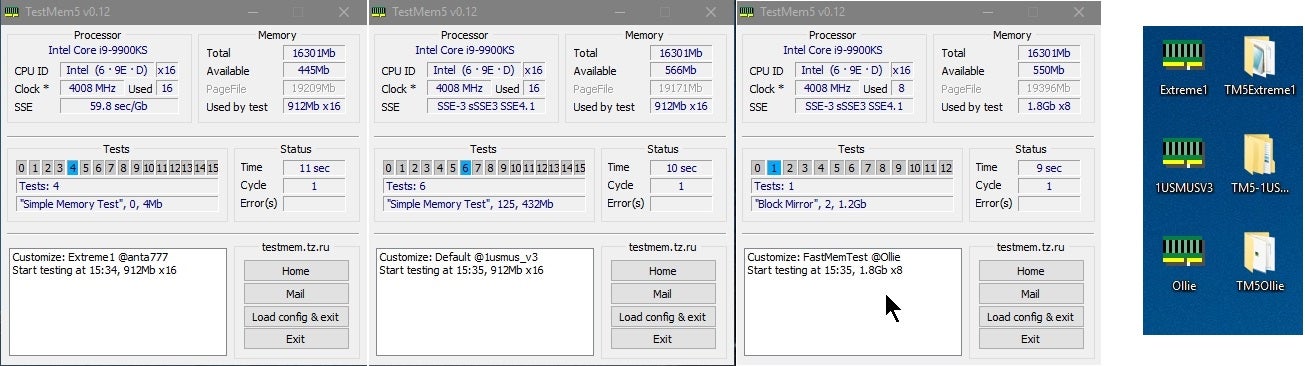
Overclock.net
Hello everybody
I am just making a very light tutorial with a collection of custom config files and a DOWNLOAD LINK for TM5 v0.12
anta777 absolut config Official Intel DDR4 24/7 Memory Stability Thread
None of the work is mine but it seems like a pretty good and fast testing app
digital dirge
Do I just run the test once? Or does it just run until I stop it? If so, how long do I run it?
lavish tundra
digital dirge
Do I just run the test once? Or does it just run until I stop it? If so, how lon...
depends on speed, timings and quantity of ram
digital dirge
Gotcha ok. I will spend this morning checking it out when I get off work.
zenith palm
32gb of 3200c16 would probably take 3.5 hrs for 1 test but 3800c14 might only take 2hrs or something
 restive cargo
proven canopy
#goals https://www.youtube.com/watch?v=m7Pn7_a37W8
restive cargo
proven canopy
#goals https://www.youtube.com/watch?v=m7Pn7_a37W8
What's a great idea
I think an aquarium pump would be plenty for me tho.
proven canopy
Get an Eheim pond pump or Iwaki magdrive for exotic coolant like iso/ethanol @restive cargo
sterile flame
Nice, spi is trolling me now lol

 hearty tundra
I'm trying to learn how to overclock my 3600. I already have Ryzen Master, and have set the OC on that to auto. Isn't there something I need to do in the motherboard BIOS or no?
sudden torrent
hearty tundra
I'm trying to learn how to overclock my 3600. I already have Ryzen Master, and h...
The best thing to do is just enable PBO (precision boost overdrive) which will allow it to automatically increase the boost clocks. The "auto oc" sets a static overclock that's actually lower than the boost clocks, so you can lose single core performance which affects things like games.
hearty tundra
sudden torrent
The best thing to do is just enable PBO (precision boost overdrive) which will a...
On Ryzen Master?
sudden torrent
You can do it in RM but it's best to do in bios
hearty tundra
ASRock BIOS is confusing

 sudden torrent
Yep. Then apply and test in RM
It'll boost higher if it's at a lower temperature.
Keep in mind the rated max single core boost is 4.2ghz
If you're getting 4.2 or so on more than 1 core loads that's a success
 sudden torrent
Is that idle or load?
zenith palm
I'd assume idle
sudden torrent
I assume as well but maybe they have an overkill 480mm radiator lol
hearty tundra
That's idle
And I'm on an air cooler
I don't really do much that's CPU heavy except for gaming and the occasional video editing
sudden torrent
Run the stress test in Ryzen master for 10 minutes. It'll give you an idea of what temps to expect when gaming, but not max.
hearty tundra
How do I do the stress test in RM
sudden torrent
In the settings change the test time, then go back and apply and test
 sudden torrent
Did you save the settings before switching back?
zenith palm
Personally i would just search around bios to find PBO so you don't have to deal with RM being finicky
sudden torrent
Can't be as bad as my MSI having overclock settings in 3 places, and one of them is in hexadecimal
zenith palm
hearty tundra
But as I said, ASRock BIOS is confusing
It wont take too long to look around bios's arent that big
It's probably in the advanced/overclocking section
hearty tundra
Last time I did motherboard OC, I had to pull the CMOS battery
sterile flame
sudden torrent
Can't be as bad as my MSI having overclock settings in 3 places, and one of them...
my x79 extreme9 cant go over 1.8 vdimm 
zenith palm
Pbo won't require that because it's just more aggressive boosting basically
sterile flame
OOOOOOOO guess what
zenith palm
And it takes care of the voltages etc
sudden torrent
Ooh nice
zenith palm
Congrats
sterile flame
i bet itll bsod before i can screenshot it
zenith palm
sterile flame
my x79 extreme9 cant go over 1.8 vdimm <:bert_stare:662437553240276992>
My b450 is locked to 1.5v dimm
sudden torrent
I wish my board let me OC, thanks HP
zenith palm
You have a HP board?
sterile flame
zenith palm
My b450 is locked to 1.5v dimm <:Pepehands:753330115945037838>
ngl ive barely even tried overclocking on my main system, which is on b450 also
sudden torrent
zenith palm
You have a HP board?
On my xeon yeah
zenith palm
sterile flame
ngl ive barely even tried overclocking on my main system, which is on b450 also
I had to... Rev e go brrr
Ahh right makes more sense
sterile flame
i have some rev e mixed with whatever my c*rsair lpx's are
hearty tundra
Why did you say Corsair like that
zenith palm
Probably c die knowing c*rsair
 sudden torrent
Because their company is so awful it might as well be a swear
hearty tundra
Like how?
sudden torrent
Even when they use b-die ddr4 they gimp it with bad pcb
 sudden torrent
I've also seen sticks that can't post when xmp is on
 gloomy solstice
zenith palm
Their fans are mediocre
gloomy solstice
zenith palm
Their fans are mediocre
Fans got way better with the sp120 elites
hearty tundra
I guess I got lucky
hearty tundra
gloomy solstice
Fans got way better with the sp120 elites
And ML120 ELITES
zenith palm
gloomy solstice
Fans got way better with the sp120 elites
Lol nah arctic p12s for a fraction of the price still destroy corsair
gloomy solstice
Ml120 elites are on the high side
gloomy solstice
zenith palm
Lol nah arctic p12s for a fraction of the price still destroy corsair
They are the same price as most rgb fans
zenith palm
Not really lol
gloomy solstice
You pay 50 bux for a 3 pack
Yes that's 10 more then the arctic fans
But most rgb fans are around the 50 to 70 price range for a 3 pack
 zenith palm
The only really good corsair products are the 4000d/5000d airflow and some od their power supplies - which they don't even make they just rebrand
sudden torrent
And most rgb fans lose in performance to the p12, often badly
gloomy solstice
zenith palm
The only really good corsair products are the 4000d/5000d airflow and some od th...
Corsair has gotten their game up in the last year
hearty tundra
Max temp according to iCUE was 66°C
HWInfo was 64°C
And RM was also 64°C
 gloomy solstice
Corsair is moving in the right path like every company they had a time where not all products where good
hearty tundra
Were*
zenith palm
@sterile flame did you emote on falcies message with a fax machine to say facts lmfao
sudden torrent
hearty tundra
Max temp according to iCUE was 66°C
HWInfo was 64°C
And RM was also 64°C
That still leaves it plenty of headroom to boost, so you should get a little more performance out of it now than at stock, and much better than static oc.
zenith palm
gloomy solstice
It has gotten way better
Even if they had still no competition with p12s and idek if corsair makes 140mm fans
gloomy solstice
Same thing with ddr5 corsair ram
gloomy solstice
zenith palm
Even if they had still no competition with p12s and idek if corsair makes 140mm ...
There is basically no competition to the p12s
zenith palm
A12x25 by noctua - excluding the price
gloomy solstice
zenith palm
Even if they had still no competition with p12s and idek if corsair makes 140mm ...
They do make 140s
sudden torrent
gloomy solstice
Same thing with ddr5 corsair ram
Tbf ddr5 is a whole new game. We have to toss out everything we knew before and start from scratch.
zenith palm
Kingston is actually winning at ddr5 atm anyway 😛
gloomy solstice
sudden torrent
Tbf ddr5 is a whole new game. We have to toss out everything we knew before and ...
So far that we know samsung changed to actually good chips
Corsiar
I mean
They moved on from samsung
zenith palm
Mmmmmm not from what I've seen - it seems to be a mixed bag
sterile flame
corsair also made good ddr3, i have about 12 of their dominators
zenith palm
Glad hynix has taken the crown for the moment at least tho
hearty tundra
sudden torrent
That still leaves it plenty of headroom to boost, so you should get a little mor...
I knew AMD CPUs were great for overclocking
zenith palm
They're ok for oc
hearty tundra
gloomy solstice
They moved on from samsung
My Vengeance RGB PRO SL with Samsung dies:

zenith palm
Samsung makes a lot of ddr4 dies... Some are good some are bad
sudden torrent
hearty tundra
I knew AMD CPUs were great for overclocking
At least they're all unlocked so you can use that as an excuse for it to be better lol
zenith palm
Also corsair puts worse timings on their rgb kit for some reason (╯°□°)╯︵ ┻━┻
hearty tundra
The 30 series cards use Samsung made dies
gloomy solstice
sudden torrent
At least they're all unlocked so you can use that as an excuse for it to be bett...
Exept for the 5800x3d
zenith palm
hearty tundra
The 30 series cards use Samsung made dies
Actually a mixed bag
3070 and below all use samsung hynix or micron/crucial
sudden torrent
gloomy solstice
Exept for the 5800x3d
Still unconfirmed but possibly yeah
zenith palm
3070 ti and above only micron /crucial
hearty tundra
TSMC and Samsung seem to be the only chip makers for NVIDIA GPUs
I'm talking the GA chip on the card
zenith palm
Yeah they switch between Gen but that's a different type of chip we where refering to ram chips
gloomy solstice
From lists I could see corsair is in the top 3 of ddr5
So they did improve over ddr4
sudden torrent
So far yeah. It's still early in ddr5 life
gloomy solstice
Indeed
But from the get go ddr4 corsair ram was bad
And personally I wouldn't get ddr4 corsair ram again
sudden torrent
I would only buy it if they hosted another overclocking competition on hwbot
Because that was an actual requirement
gloomy solstice
And after owning the h150i capellix for a month now
I personally absolutely love it
Its a good aio on the high side
But you do get some of the best looking rgb out there and you can even get a lcd for it
hearty tundra
Corsair does have the best looking RGB though
gloomy solstice
Looks are subjective but corsair has balanced rgb
sudden torrent
Can't really argue that, easily top 3 for me. Too bad icue is evil.
gloomy solstice
Best thing is
Corsair is adding support and including adapters so you can connect it to a 5v rgb header
gloomy solstice
I havnt had problems with icue either
sudden torrent
I've seen it use 100% of a single core on a 5800X
potent fiber
You'd hope so.
gloomy solstice
For me it doesn't use anything
hearty tundra
It's in-between for me
gloomy solstice
Yeah sorry like 1% of a r5 3600
hearty tundra
Sometimes it uses a lot but sometimes it doesn't
gloomy solstice
Nice thing is
hearty tundra
Just depends on what else I have running at the same time
sudden torrent
True
gloomy solstice
Exept for fan controll
If you have a commander
The thing I think we can all agree with tho
hearty tundra
I have my fans set depending on CPU temperature
gloomy solstice
Is that the standard 5v rgb header is crap
And it should be replaced by a locking connector
And it probably will change eventually
Considering sata and usb2 used to have no housing
zenith palm
gloomy solstice
It was probably a bad update
Nope.. the more compex the rgb the more of the cpu icue steals
zenith palm
Open rgb better signal rgb bricks some msi boards iirc
lavish tundra
zenith palm
Open rgb better signal rgb bricks some msi boards iirc
Open brick msi
Signal is paywall locked for many things tho
Also openrgb bricking msi mobos is not a big issue any more really
zenith palm
Ahh okey i swore sips said it was different software
 static oasis
Talking about RAM burst length, shouldn't it be measured without a unit of measurement (considering it's just the number of times that data packs are sent to the CPU)
Instead it's measured in bits, is that right? Or am I getting something wrong?
-(I was told to ask the question here)
sterile flame
Here we go again 

 potent fiber
sterile flame
Here we go again <:jermasus:829508276680523846>
potent fiber
sterile flame
Here we go again <:jermasus:829508276680523846>
Haha, that's rad!
sterile flame
bruh...
potent fiber
LuL, I realized the word I used 
dull ginkgo
static oasis
Talking about RAM burst length, shouldn't it be measured without a unit of measu...
Shouldn't have an unit measurement, but maybe it was in the context of the amount of data per burst, say burst length of 8 with 1kb column size or smth, maybe you could say 8kb burst length, referring to the "size" of the burst instead of burst length in general?
static oasis
dull ginkgo
Shouldn't have an unit measurement, but maybe it was in the context of the amoun...
Sometimes I find BL8/16 for DDR ram and sometimes I find BL 8bit/16bit
Literally don't know
In my opinion I wouldn't use any unit of measurement
It makes more sense
dull ginkgo
8/16 is what I see
lavish tundra
@proven canopy I wrote a better TM5 guide than the one thats pinned so maybe u can update the pins using this or suggest changes
GitHub
Contribute to NeweggTechie/Windows-Troubleshooting-Utilities development by creating an account on GitHub.
lavish tundra
rule 3
 mild steeple
potent fiber
mild steeple
potent fiber
yea, anyways here: Also OCing isn't a worry, 3600c16 ram or similar specs would be good for most Ryzen setups.


 stiff condor
Hi. I was wondering.
So far I was just able to hit a 4.4 GHZ OC on my 3700x running at 1.325 vCore
I can't seem to get it any higher.
I have tried 44.25 Core Ratio, however the system proceeds to BSOD. Is that it? Or would I have to pump more voltage into it for more stability?
lavish tundra
stiff condor
So far I was just able to hit a 4.4 GHZ OC on my 3700x running at 1.325 vCore
dont go above like 1.25v on zen 2
unless u fit test and pbo pushes higher
stiff condor
I was in the bios
lavish tundra
💀
lavish tundra
thats lighter than windows
stiff condor
You heard me.
lavish tundra
switch pbo on and use prime 95 small ffts test and see where voltage settles after 15 mins
thats the voltage u dont wanna cross on ur chip
stiff condor
I read that Zen2 is 1.0 to 1.4v no?
stiff condor
Or would it simply be better to undervolt to 1.1
lavish tundra
probably was 1usmus
stiff condor
or even lower?
lavish tundra
stiff condor
Or would it simply be better to undervolt to 1.1
not if u like perf
stiff condor
Then how do you keep within the safe voltage range?
lavish tundra
lavish tundra
switch pbo on and use prime 95 small ffts test and see where voltage settles aft...
if u wanna oc this is the way or just keep pbo on
stiff condor
So a cpu core ratio is not worth it?
stiff condor
Just go straight for a PBO enable?
lavish tundra
lavish tundra
switch pbo on and use prime 95 small ffts test and see where voltage settles aft...
do this
stiff condor
Ok.
lavish tundra
find the voltage
set that as the voltage
push clock as far as is stable on that voltage
stiff condor
The core clock no?
lavish tundra
lavish tundra
switch pbo on and use prime 95 small ffts test and see where voltage settles aft...
u want vcore at what u get from this
stiff condor
and for PBO, are we talking about a manual OC, or just enable?
lavish tundra
put it to auto to find the voltage u wanna set it to
lavish tundra
stiff condor
and for PBO, are we talking about a manual OC, or just enable?
enable
stiff condor
Why would it be reporting such high voltages from bios anyway?
lavish tundra
because those are the voltages its using
stiff condor
So your telling me, just watch if it flucuates?
 kind walrus
Idle voltage is much higher than load voltage
lavish tundra
it uses higher voltages at idle since power draw is low
stiff condor
ah. Ill set PBO to enable to turn off the manual OC.
I noticed that my chip doesn't boost even with PBO enabled
lavish tundra
so even if 1.5v is safe at idle it will kill ur cpu pretty fast under load
stiff condor
I open a demanding application such as prime 95, and it stays at 3.60GHZ
lavish tundra
stiff condor
So your telling me, just watch if it flucuates?
no im telling u to enable pbo, everything else default, run prime95 select the small ffts test, wait 15 mins, see what the voltage is at after 15 mins of running the test
lavish tundra
stiff condor
I open a demanding application such as prime 95, and it stays at 3.60GHZ
doesnt matter at all
u just want voltage
not clock
as long as it is actively boosting
stiff condor
Should fmax enhancer stay on?
stiff condor
Is that not the EDC 1 bug?
I see.
Started Prime95 Small FFT's, and the Core Voltage is alot lower.
Is it normal for the vCore to stay idle at a voltage?
The voltage is not even moving, and I have it set to auto in bios.
stiff condor
lavish tundra
EVERYTHING AUTO
Ok. I got a voltage of 1.056 to 1.067. At the end it stayed at 1.056.
So ideally now should I set the manual voltage as 1.056?
lavish tundra
thats too low
what app u using to check
and what sensor were u looking at
that looks more like soc voltage
@stiff condor
stiff condor
So does that mean PBO scalar is a waste of time?
and it is just better to set a core ratio
and be done with it, instead of adjusting ppt values?

 lavish tundra
how long have u had it running at 1.325V
stiff condor
lavish tundra
how long have u had it running at 1.325V
Basically, not for long
stiff condor
Thats why I was wondering since I read zen2 has safe voltages of 1.1-1.48
stiff condor
So basically, they are safe when PBO is running
but running it at a manually VCore fries it.
lavish tundra
at idle
stiff condor
That makes sense.
stiff condor
Doesn't PBO scale voltages?
So when it boosts, it pumps high voltages but only for a little bit?
lavish tundra
pbo = low power draw high voltage and high power draw lower voltage
to protecc cpu
kind walrus
Manual voltage removes a lot of the protections that auto and pbo keep on to self-manage the cpu from frying itself
lavish tundra
bro do u know the difference between idle and load
ive been trying to tell u many times now
that its not using those voltages under load
lavish tundra
stiff condor
this proves it
literally idle is meaningless
forget idle values
they dont matter
load is what matters
stiff condor
so if load is 1.1
lavish tundra
then it probably needs the 1.1v to do whatever clock its running
sudden torrent
For PBO on my 5800X I find it best to set a negative offset voltage. Forget manual voltage.
The offset takes the voltage the CPU requests and adjusts it higher (positive) or lower (negative).
I do -0.025v offset
stiff condor
Oh. I drr.
sudden torrent
No that's separate
stiff condor
I see*.
1.1 Load
so it might be even lower when idle
The BIOS values are just BS
lavish tundra
sudden torrent
No that's separate
oh ur running static offset?
sudden torrent
lavish tundra
yeah thats core optimiser
It's under the main voltage menu, not CO
kind walrus
stiff condor
so it might be even lower when idle
It idles higher, goes under load lower
lavish tundra
stiff condor
The BIOS values are just BS
all idle values really
but yeah to undervolt ull have to do a lotta testing
stiff condor
and isn't PBO pretty well optimised?
lavish tundra
and make sure while undervolting, it still maintains the same clocks if u don wan lose perf
stiff condor
that even if you do run a manually OC, PBO will probably give you similar performance anyway?
Which is why you should just switch on PBO and forget?
lavish tundra
bro
ive already explained this
pbo is great on zen 3
and later zen 2 chips
on early zen 2 samples not as good as manual
sudden torrent
stiff condor
So then why shouldn't I go the PPT route.
If you want to adjust power limits like PPT in addition to enabling PBO go for it. It will run hotter, but may boost longer or higher.
That's getting dangerously close to the "at your own risk" part of overclocking
lavish tundra
indeed
short blade
I start clock stretching if I try to apply a negative voltage offset at all
on top of PBO
stiff condor
Im noticing something odd
My bios says Enable: allows cpu to run past defined limits
But the cpu will only boost when I have it on Auto
Ok. That makes more sense. I had to enable PE.
stiff condor
Hynix MFR is meh correct?
Ive been trying to tighten the timings on 3800c18 but it won’t even budge
sudden torrent
stiff condor
Hynix MFR is meh correct?
Correct
stiff condor
sudden torrent
Correct
Ah. Im currently working on timings
It seems to be able to tighten a bit more that I enabled cmd1t
So far, no issues posting
Do you think maybe i could try to hit c16?
3800c16

Im lowering every timing by 1
And seeing if eventually it posts with stability
sudden torrent
Is it 8Gb or 16Gb MFR
sudden torrent
Are the chips on one or both sides of the ram stick?
stiff condor
Singe rank
sudden torrent
16Gb then
sudden torrent
Yeah the 8Gb vs 16Gb refers to the density of the die
sudden torrent
Looks like it's really dependent on binning for those, c16 could be possible
sudden torrent
Yeah. There's MFR G.Skill rated 4000c18
stiff condor
I am tighhtening it correct?
Tightening*
Go on each subtiming individually
And lower it?
Im doing this manually because Dram calc does not even support mfr
sudden torrent
One at a time is good but do a quick 15 minute test between so you can see if it's instantly unstable
stiff condor
Ok
Ive finally been able to start tightening after a bios update
Asus screwed up my board and all the ram timings were in hex
stiff condor
sudden torrent
One at a time is good but do a quick 15 minute test between so you can see if it...
Testmem5?
sudden torrent
For a quick test just OCCT works
sudden torrent
stiff condor
Asus screwed up my board and all the ram timings were in hex
MSI did something similar on mine. Overclocking is in 3 different menus and one is in hex.
stiff condor
sudden torrent
MSI did something similar on mine. Overclocking is in 3 different menus and one ...
Ah. Why is cmd1t better then 2y
2t
stiff condor
sudden torrent
MSI did something similar on mine. Overclocking is in 3 different menus and one ...
Also, huh. Didnt know it was not just my board
sudden torrent
2T means commands are processed every other cycle instead of every cycle
stiff condor
Single rank is worse then dual?
sudden torrent
Theoretically
stiff condor
I know for ryzen 5000 dual and single differed in performance
Along with 4 vs 2 sticks
proven canopy
I would go with ycruncher 2.5B for a quick test, occt cpu large is decent for cpu + mem daily, tm5 anta777 extreme or absolute to test overnight
zenith palm
if tm5 make sure its extreme anta profile btw should take like 2.5-3hrs
sudden torrent
It's for a quick sanity check between adjustments but for the full test yeah
stiff condor
kk.
Ill plan a 4 hour test tonight.
I think it won't hurt to do a quick test
and then a run a longer test at night tonight.
stiff condor
sudden torrent
It's for a quick sanity check between adjustments but for the full test yeah
Oh. Also is CHA - CHB the actual timings on each stick?
My asus board has those both, and id assume that those are the current timings.
proven canopy
It means channel A,B
 proven canopy
Those are the timings yes
 proven canopy
watch buildzoid's "rating your memory overclocks video" to see what others are running
stiff condor
proven canopy
watch buildzoid's "rating your memory overclocks video" to see what others are r...
Ok. Ive finally finished my first stage. Ive tightened every main timing
I was wondering your thoughts on them.
proven canopy
Post a zentimings/astc
stiff condor
ok

This is Hynix MFR or Mdie
Running at 3800c18.
Now im going to look to tighten each indivually.
I did them all one at a time to see what would post.
proven canopy
I don't know anything about that die, but that's not running cl18
stiff condor
huh?
proven canopy
 stiff condor
Oh. It must of raised.
So should I start lowering the tCL?
So the timings worsened?
Or loosened*
ugh
sudden torrent
It must have tried training your settings, said "lol nope" and picked its own timings lol
stiff condor
sudden torrent
It must have tried training your settings, said "lol nope" and picked its own ti...
Are those horrid timings?
Im assuming cl26 is no bueno
sudden torrent
very
stiff condor
Im guessing its just worth using default no?
Since as I thought. This is already meh
sudden torrent
Memory overclocking is one of the most time consuming processes
stiff condor
Sadge
sudden torrent
Personally unless I'm benching I just pick some settings that I know will run and go
stiff condor
Are these default timings ok?
Ill post a zen timings
Also how do you get tcl lower
If memory timings is tightening them
Why the hell are mine loosening?
sudden torrent
I'd try a cmos clear, then set 3800 18-22-22-22-44 and see if it'll boot and show the right timings
stiff condor
What are each tertiary timing?
Trap?
Tras?

OOF
This is without even touching timings
Maybe my kit is better run at xmp
then raising fclk, since if i get this much CL loss
sudden torrent
The biggest thing is to get flck and mclk synced on ryzen
stiff condor
Fclk is synced, but not sure about mclk
sudden torrent
They're the same so it's synced in that screenshot
stiff condor
Ah
sudden torrent
Which is a good sign
stiff condor
How would i set 18-18-18?
sudden torrent
You won't be able to get it that tight
stiff condor
Cl22 maybe?
sudden torrent
sudden torrent
I'd try a cmos clear, then set 3800 18-22-22-22-44 and see if it'll boot and sho...
.
stiff condor
Correction* i meant how would i plug in 18-22
Its Tras no?
I remember something like Trc-tras
Etc
sudden torrent
Ah, timings in order are tCL, tRCDRD, tRCDWR, tRP, and tRAS
stiff condor
Okay. Thank you. My bad
sudden torrent
In the format 18-22-22-22-44
stiff condor
I should of clarified
sudden torrent
If that ends up working, what you're probably thinking of is tRC=tCL+tRAS+2
stiff condor
Trp is pre charge no?
sudden torrent
yes
 sudden torrent
Yes it is
stiff condor
And tras is act time?
sudden torrent
I believe so
 sudden torrent
Very nice
stiff condor
Lower it?
Wait.
Am I thinking about this all wrong?
Do I need to dial down every 20 memory timings?
or can I just do these 4
5*
tCL, tRCDRD, tRCDWR, tRP, and tRAS
sudden torrent
The most gains will be from the primaries, but ryzen also likes tRFC as low as stable
sudden torrent
Leave it then
stiff condor
so I should start messing with these timings?
tCL, tRCDRD, tRCDWR, tRP, and tRAS
I don't need to touch Trcpage?
or tFaw/Trfc4
I was reading the OC guide, some of them seem redudant no?
Like trfc4 iirc is temperature
sudden torrent
You don't have to. The primaries are the easiest and most effective.
stiff condor
Ok. That saves alot of time.
Thank you for the advice.
Is there a set rule of tightening?
Like if TCL won't lower, should you raise trp?
etc.
sudden torrent
You don't necessarily need to raise other timings to get it stable though
sudden torrent
Yea that's a sure sign it's unstable lol
stiff condor
Ah lol.
So maybe try changing
tCL, tRCDRD, tRCDWR, tRP, and tRAS
18-22-22-22-44
and instead of that,
17-21-21-21, 43?
and keep going basically
Until I can not.
sudden torrent
Ryzen won't do odd numbered tCL
stiff condor
oh
sudden torrent
Not without GDM off and other tweaks
stiff condor
ah. should I keep geardown mode on?
sudden torrent
It's good for stability
stiff condor
CMD1t, and ignore ProODT
sudden torrent
Yep
stiff condor
okay. So unless I have to, then touch those other settings.
I'd assume these other settings are more for extreme tweaks
Lowering voltage, etc
sudden torrent
Correct. If you get WHEA errors when testing you can adjust resistances like procodt to try to get it stable.
stiff condor
Ok。ill keep trying at lyk. Thanks for the advice
stiff condor
sudden torrent
Correct. If you get WHEA errors when testing you can adjust resistances like pro...
Ok. Bad news lol
It doesnt like cl16
It just turns off clicks on and off
sudden torrent
Thought as much. That's really pushing the limit.
sudden torrent
Some rev.e would be nice. You can go used and save some money, it's not like ram has moving parts to degrade.
stiff condor
Ah
Since cl16 is out of question
Should i change 22-22-22-44
See if i can get that lower?
Since now i cant dial down the cas latency
stiff condor
But doesn’t performance degrade with even?
sudden torrent
No? Lower is better, unless it's a timing like tCL that it just won't like certain values and keeps you from doing it
sudden torrent
Nah that's what GDM is for
sudden torrent
GDM keeps you from setting timings it knows the IMC won't like
stiff condor
Ok.
sudden torrent
So even if you set tCL 17 it'll correct it to 18
stiff condor
Whats the difference between a lower cl18
Like 18-22-22-22-44
Vs 18-40-40-40-60
Etc
Is there performance gain?
sudden torrent
They're all related to how fast it stores and retrieves data. Primary timings more than others.
stiff condor
Ok.
Wow so thats why hynix mdie/cdie are considered meh/awful
Oh hey. It really liked 18-20-20-20-40
stiff condor
sudden torrent
They're all related to how fast it stores and retrieves data. Primary timings mo...
Weird
It hated 18-18-20-20-40
sudden torrent
Not really weird tbh
stiff condor
But like 18-20-20-18-40
sudden torrent
Yeah that looks like it'll be about the limit
sudden torrent
You want weird, my b-die does 3800 14-11-15-13-28
I can't tighten that one timing to save my life
sudden torrent
stiff condor
Or 18-20-20-18?
this
stiff condor
Ok
sudden torrent
Do a full run with TM5 anta extreme, it'll take a few hours
stiff condor
Ok
stiff condor
sudden torrent
this
For fricks sake lmao
I think i jinxed myself
18-20-20-18-40 unstable
Now its become 18-20-20-20-38
Lmao
I hate this ram
Thats honestly fascinating me
sudden torrent
Hey at least you didn't get the bin that tops out at 3466
stiff condor
The last timing is going down alot
stiff condor
sudden torrent
Hey at least you didn't get the bin that tops out at 3466
True true
Is it normal for last timing to go down?
Im getting it to34
sudden torrent
Yeah you could do as low as 32 depending on bin
sudden torrent
But the IMC will probably ignore it and set 38
sudden torrent
Really though, at a point with certain timings the memory controller will just ignore the mobo and decide on its timing internally
stiff condor
Ah
stiff condor
sudden torrent
Really though, at a point with certain timings the memory controller will just i...
Yeah im getting this on 22. As youve said. I really do think the IMC will change it
stiff condor
sudden torrent
Really though, at a point with certain timings the memory controller will just i...
You were correct
I got a Tras of like 8

It decided no bueno
I want 21
I think im finally done. It couldn't post on 18-18-20-20-20, 18-20-18-20-20, and 18-20-20-18-20
sudden torrent
Still a lot better than stock
sudden torrent
Test it for stability, bench it, and call it good I say
stiff condor
How much of an improvement will I see in 18-20-20-20-21?
vs 18-24-24-24.
If primary matters that much
It seems like i won't see much no?
stiff condor
Then is it better to have a faster 2nd timing?
or third timing, etc
I'd assume 18-20 would be worse then 18-18
but 18-20-18?. The loss seems marginal
sudden torrent
That gets into diminishing returns area. Sure it'll be faster but to get it stable will require a lot of time.
stiff condor
Gotcha.
As I said again.
Thank you so much for your help
Ill bench it, and see the stability
sudden torrent
No problem
 sudden torrent
Start loosening lol
stiff condor
Lmao
sudden torrent
Start with tRAS I'd say
sudden torrent
Most of the time a decent kit will do tRAS=tCL+tRCD, give or take 2
stiff condor
Ah
I did exactly as you said, and now on test 4, no errors
Lmao i just keep jinxing myself
Tras 36 unstable
stiff condor
sudden torrent
Most of the time a decent kit will do tRAS=tCL+tRCD, give or take 2
Uhh even tras 44 gives me errors
Which from the looks of it not good
stiff condor
Ok from what im betting. You are right
I had to up the tras to 44 and put middle timings to 22
And now its not failing instantly
proven canopy
Any factorio players here? Give this a try https://factoriobox.1au.us/
dull ginkgo
@hard ice Perhaps you'll want to give this a try when you're around again
 slate walrus
Anyone that knows what they are doing available for a few minutes for some OC Qs?
 cold jolt
Naed appearance when?
sterile flame
Fr, whatever happened to naed
sterile flame
slate walrus
Anyone that knows what they are doing available for a few minutes for some OC Qs...
feel free to ask here anytime
slate walrus
Ok, so I have my current build using the GSkill 128GB DDR4-4000 (pc4 32000) ram, so far I’m seeing a lot of people saying that they can’t get it to clock over 3600 MHz, but at the same time the rest of my hardware should support 4000 MHz, and I still can’t seem to get it there stably. Anything over 3600 and it’ll either crash, or not boot. Anyone have any tips?? All I’ve really done so far is Enable XMP, change the clock, and set Dram voltage to 1.4. Check this out on @Newegg: G.SKILL TridentZ RGB Series 128GB (4 x 32GB) 288-Pin DDR4 SDRAM DDR4 4000 (PC4 32000) Intel XMP 2.0 Desktop Memory Model F4-4000C18Q-128GTZR https://www.newegg.com/g-skill-128gb-288-pin-ddr4-sdram/p/N82E16820374065?Item=N82E16820374065&Source=socialshare&cm_mmc=snc-social-_-sr-_-20-374-065-_-04192022
slate walrus
slate walrus
Ok, so I have my current build using the GSkill 128GB DDR4-4000 (pc4 32000) ram,...
I’m also using Asus ROG Strix Z590-E motherboard, and I’ve got an i9 10900k CPU.
dull ginkgo
Try setting vccsa/vccio at 1.2v
lots of dual rank dimms means imc might need a bit more voltage
slate walrus
Thank you! I will give that a shot when I get home from work today. And will report back with results!
proven canopy
I would guess asus is auto'ing vccsa well over 1.4v, I would check to see what the auto set values are out of curiosity. 1.2/1.2 is usually a good starting point though.
dull ginkgo
1.25/1.25 might work if 1.2 is not enough
proven canopy
vccsa you can daily at 1.5, vccio is the one more likely to cause degradation over 1.35-1.4
static oasis
Is changing the CPU multiplier good to oveclock? Or is it better to make a "full" overclock with a good guide (changing voltages, etc.)
short blade
changing multipliers without setting manual voltage is dangerous
don't overclock unless you're willing to put in the work to make sure you don't damage your system
read guides in the pinned messages
sudden torrent
It's usually better to not use the multiplier to overclock these days. Just adjusting the boost behavior on Ryzen Zen 2 or 3 is best, and using XTU on Intel to change the boost according to loaded cores.
There's exceptions of course, which is mostly all core workloads and benching.
slate walrus
proven canopy
I would guess asus is auto'ing vccsa well over 1.4v, I would check to see what t...
Looks like Asus had it set auto to about 1.312 for CPU VCCIO, and 1.392 for VCCSA. I just bumped both up to 1.4V. About to save and restart
proven canopy
That's high for io daily, also you might see negative scaling on either over some voltage
Most people start at 1.2/1.3 and work up from there
slate walrus
So then should I underclock it to 1.2 then?
It seemed to be ok booting with those settings, switching over to XMP2 from XMP, and upping Ram speed to 3800
🤞
Computer booted! Now to put it under some load and see if it crashes
slate walrus
Computer didn't crash, But I started a game and about 5 ish minutes into it, the game crashed. But the computer never did. trying a couple more boosts, little bit at a time. to see if I can get it to stabilize at this 3800 mhz ram speed.
dull ginkgo
Starting low and going higher can be better, sometimes you'll want more voltage, but there is such a thing as too much voltage and negative scaling, where higher voltage beyond a certain point hurts performance instead of helps performance. I was under the impression above 1.35v is where you might see negative scaling.
 tardy nacelle
Does anyone know the limit for the VRMs on the asus prime x570 pro? My 5950x is currently pulling 225 watts, I hope its not too much.
potent fiber
that's not exactly super high wattage, but I'll say that's probably fine just by some of the threads I've read.
zenith palm
That's fine, you chan check your vrm temps in hwinfo64 if you're worried, if they're ~100c then you might want to ziptie a fan to the heatsink or something but that will sort the issue
 wheat lintel
How are people getting CPU scores of like 15500 with a 5900x on time spy? Mine is only 13000 and I have PBO on
dull ginkgo
wheat lintel
How are people getting CPU scores of like 15500 with a 5900x on time spy? Mine i...
IME TS gives better scores if you do all core instead of pbo
short blade
if you're getting 13000 with 5900x you probably have really slow ram or something
I get 13400 with a really bad sample 5800x
dallas gets 13700 with like 3600 16-22-22 xmp with all auto subtimings
with a 5900x
proven canopy
$5 GPU overclocking competition round 2
https://oc-esports.io/#!/round/CheapaChipsR2
Any cards with the RV710 core are allowed. No restrictions on mods/cooling.
https://www.techpowerup.com/gpu-specs/ati-rv710.g69
 proven canopy
$5 GPU overclocking competition round 2
https://oc-esports.io/#!/round/CheapaChi...
tall pelican
proven canopy
proven canopy
$5 GPU overclocking competition round 2
https://oc-esports.io/#!/round/CheapaChi...
tall pelican
Weekend shenanigans in the works
 tall pelican
https://www.3dmark.com/3dm/74512009 nb for stock testing

3DMark.com
Intel Core i9-10980XE Extreme Edition Processor, NVIDIA GeForce GTX 1080 x 2, 32768 MB, 64-bit Windows 10}
humble jay
pretty card
proven canopy
12900ks overclocking - in French
https://www.twitch.tv/overclocking_com

Twitch
Live découverte du Intel core i9 12900KS ! Le binning est mort ! Vive le binning !

 zenith palm
digital dirge
I'm trying to run TM5, but this keeps popping up. I am running as administrator.
zenith palm
digital dirge
I'm trying to run TM5, but this keeps popping up. I am running as administrator.
Have you tried not running as admin?
digital dirge
had to restart pc, but now it's working without admin
but the tm5 window is saying it's in compatibility mode and that I need to run with admin priv
lavish tundra
digital dirge
ignore