#overclocking
1 messages · Page 100 of 1
 sudden torrent
Or I did, before I borked my bios
 short blade
any clue why CPPC thinks all of my cores are #1 now? lol
sudden torrent
What does ryzen master say?
short blade
i don't have it installed
 proven canopy
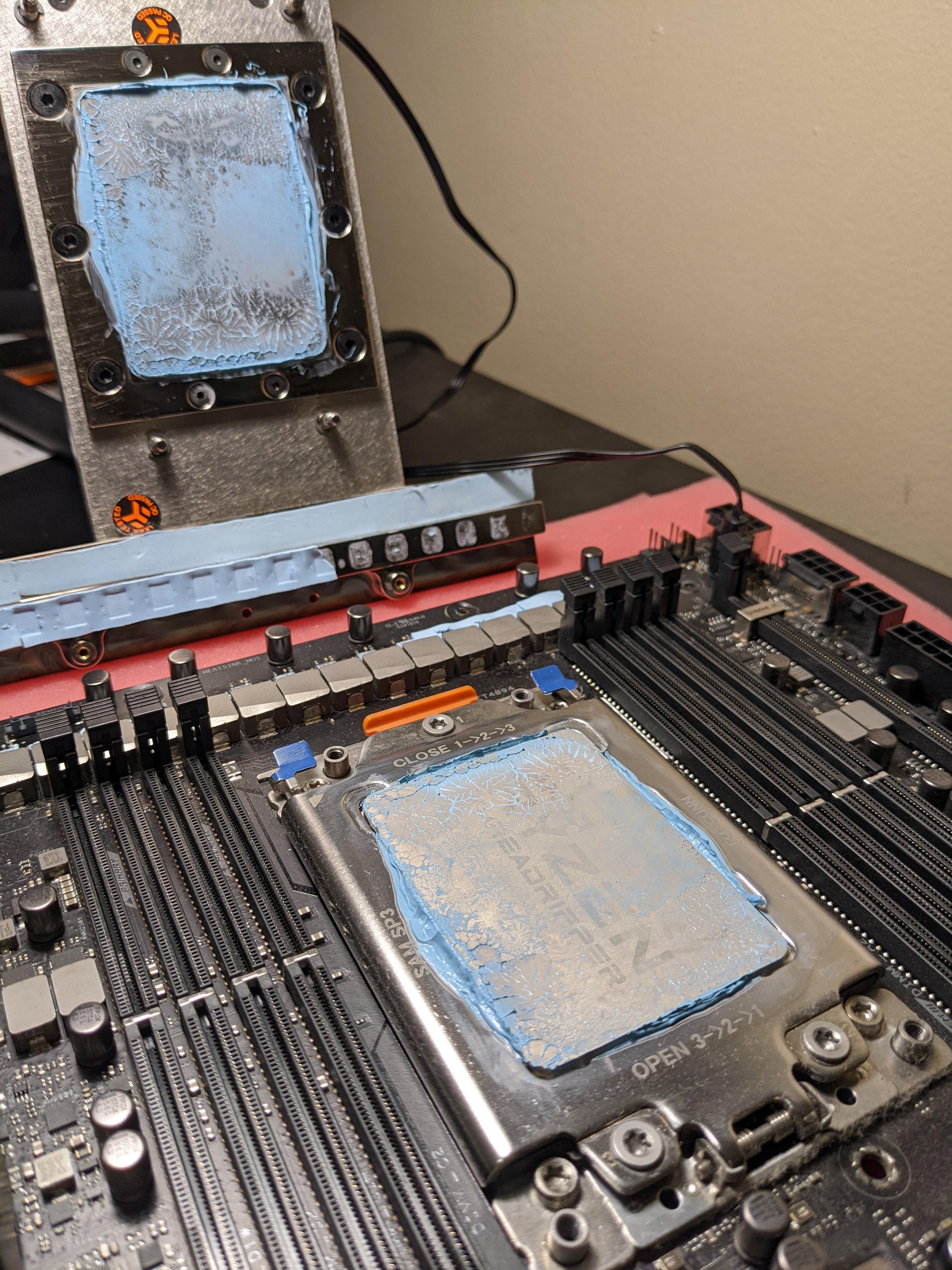
Not the worst mount for such a large ihs https://i.imgur.com/Du1Zkto.jpeg
Was much worse using the 1mm spec pads on the chokes, swapped to .5mm, much better. They don't need cooling anyway
 proven canopy
Don't let bryce see that sub 
 steady inlet

 wheat ether
brrrr
 modern walrus
I need 1.3750v to run 47.75x all core. Did you change LLC?
wheat ether
idk but pbo is fine so idc
modern walrus
just for benchmarks I meant
I never all-core otherwise
but if you end up trying it again set Load Line Calibration to medium, it'll help a lot cuz voltage won't drop as much under load
 sterile flame
You said this one's bdie right?
 tall pelican
I'd avoid it if you want it for overclocking
get gskills so that they have temp sensors on the pcb, because bdie is temperature sensitive
sterile flame
What about this one? https://www.newegg.com/amp/oloy-16gb-288-pin-ddr4-sdram/p/N82E16820821411
tall pelican
tall pelican
get gskills so that they have temp sensors on the pcb, because bdie is temperatu...
.
sterile flame
Well i'm not going to get a kit just because it has built-in temperature sensors
can you send me some bdie g.skill kits?
proven canopy
https://www.twitch.tv/dontdie2fast
FX8350 on LN2
 humble jay
oloy has temp sensors too 
 zenith palm
sterile flame
You said this one's bdie right?
zenith palm
sterile flame
You said this one's bdie right?
Tis b die
sterile flame
do you have a source for that
im just wondering because theres a few people telling me it isnt
i just wanna be sure
sudden torrent
Where are the people saying it's not first?
If it's newegg or amazon they lump reviews from different models together
4000 straight 16 is totally b-die
sterile flame
thats what i thought
zenith palm
It's probably on b die finder too
sudden torrent
Nope not on b-die finder, but it hasn't been updated in a while right?
They do have a viper steel 4000c19 kit that's oddly b-die on there
Wow that c16 kit isn't even on pcpp
sudden torrent
Doesn't say voltage but it's extremely unlikely it's anything else
Even Rev.E has trouble with straight timings like those
zenith palm
sudden torrent
Even Rev.E has trouble with straight timings like those
Rev e cant do under 18 trcd at all afaik
sterile flame
Yea I think I might just go for it anyway
zenith palm
I mean you can always return them if they don't preform well
But they gotta be b die
sterile flame
1 in stock 🗿
sudden torrent
At that price I'm surprised there's even 1 left
zenith palm
Most likely, looks pretty cool tho
sudden torrent
Ye I could live with that
sterile flame
oh yea i saw that one
no thanks
the heatspreader looks nice though
I swear if I put HP ram in my system it would curse my motherboard forever
tall pelican
zenith palm
Rev e cant do under 18 trcd at all afaik
There's 4400 19-19-19 reve, and my 3600c16 dr reve did 3800 14-17-11
zenith palm
tall pelican
There's 4400 19-19-19 reve, and my 3600c16 dr reve did 3800 14-17-11
Ahh right well i highly doubt it could do trcd 16 anyway
wheat ether
I really thing what’s holding me back is my mjr and 3600 c16
sudden torrent
There's b-die kits for $100 or less rn
 worldly wasp
tall pelican
get gskills so that they have temp sensors on the pcb, because bdie is temperatu...
worldly wasp
tall pelican
get gskills so that they have temp sensors on the pcb, because bdie is temperatu...
newer oloys have temp sensors ime
sterile flame

 zenith palm
Enjoy


 lavish tundra
 delicate arrow
https://allah.agency/
delicate arrow
https://allah.agency/
Sus link
proven canopy

HWBOT
The Radeon RX 6800 XT @ 2580/2100MHzscores getScoreFormatted in the 3DMark - Time Spy Extreme benchmark. Forksranks #null worldwide and #1 in the hardware class. Find out more at HWBOT.
tall pelican
imagine being beat in a gpu benchmark by someone who scored 10% lower on the graphics test 
short blade
yeah, we really need time spy graphics only category
current system is broken
definitely not a salty 5800x owner
proven canopy
tall pelican
imagine being beat in a gpu benchmark by someone who scored 10% lower on the gra...
So, this goes both ways - my card's gpu score will be significantly lower using my cpu vs his, yet his faster gpu clocks/better cooling can't outweigh my 25k 64c cpu score.
zenith palm
short blade
definitely not a salty 5800x owner
Definitely not a salty 3600 owner 
 faint tangle
aight ty

sorry for it being blurry
i had them turn xmp off
the one on the right stayed at 3600
is that normal
wrong chat
 potent fiber
zoom out
proven canopy

Link to the Competition here: https://hwbot.org/competition/CheapaChipsR1 GT 218
Thanks for watching!
Comments aswell as Likes/Dislikes are appreciated.
====================================================================
Most of what i do was inspired by Buildzoid and his Channel Actually Hardcore Overclocking
https://www.youtube.com/cha...
potent fiber
 snow jacinth
Can anyone teach me about RAID ?
snow jacinth
Can anyone teach me about RAID ?
https://en.wikipedia.org/wiki/RAID
it generally stands for "redundant array of independent disks", but there's various modes of it. raid 0 basically doubles sequential speeds (for 2 drives)
RAID (; "redundant array of inexpensive disks" or "redundant array of independent disks") is a data storage virtualization technology that combines multiple physical disk drive components into one or more logical units for the purposes of data redundancy, performance improvement, or both. This was in contrast to the previous concept of highly re...
https://en.wikipedia.org/wiki/Standard_RAID_levels
#storage thread probably better btw

In computer storage, the standard RAID levels comprise a basic set of RAID ("redundant array of independent disks" or "redundant array of inexpensive disks") configurations that employ the techniques of striping, mirroring, or parity to create large reliable data stores from multiple general-purpose computer hard disk drives (HDDs). The most com...
faint tangle
snow jacinth
Can anyone teach me about RAID ?
raid shadow legends is an online multiplayer rpg...
snow jacinth
Lmao
Stop
@potent fiber thank you
So ... data redundancy through virtulization of the storage
Or something along those lines
potent fiber
snow jacinth
So ... data redundancy through virtulization of the storage
idk what you mean by that, we're physically using extra drives for raid (bit different than hyper threading on a cpu or something). RAID can provide actual redundancy (see pic). Also an extra link so you can learn how raid "01"/"10" or similar is so neat, but obviously requires more drives afaik. Crossed out raid 2 because it's rarely used
https://en.wikipedia.org/wiki/Nested_RAID_levels


Nested RAID levels, also known as hybrid RAID, combine two or more of the standard RAID levels (where "RAID" stands for "redundant array of independent disks") to gain performance, additional redundancy or both, as a result of combining properties of different standard RAID layouts.Nested RAID levels are usually numbered using a series of number...
lavish tundra
Hmm
 sterile flame
hmmmm
zenith palm
faint tangle
is that normal
Yes
zenith palm
lavish tundra
Hmm
Hmmm
lavish tundra
Hmmm
 sudden torrent
That paste tho
Nice 580
lavish tundra
sudden torrent
That paste tho
Nice 580
LOL I spread it with a plastic set square because I didnt have any other flat plastic object on me
its a 570 btw
Heres a better pic of the pcb after i cleaned off the old thermal cement
 sudden torrent
Ah yeah if I could have seen the power better in the first pic I probably could have guessed right
lavish tundra
Makes sense
sudden torrent
Alright what else should I try for records on before I retire this CPU? All the american #1 records are me. https://hwbot.org/hardware/processor/ryzen_7_2700/
There's a few that I can't beat because they're on LN2
zenith palm
sudden torrent
There's a few that I can't beat because they're on LN2
What are you using? Aio? If so ice bucket it 
sudden torrent
Yeah AIO. Even at 1.4v it hasn't gone above 50C though.
zenith palm
sudden torrent
Yeah AIO. Even at 1.4v it hasn't gone above 50C though.
Well yes but more cold more better
sudden torrent
Exactly. Most of the current records are on AIO or custom loop. I can't beat LN2 records with an ice bucket.
And I really don't want to take my case apart. It was hard enough getting it all in the first time.
proven canopy
Pretty sure 2x8 @ 4500+ is ideal here, but wanted to see how well I could do with 2x16 https://i.imgur.com/6skA7RV.png
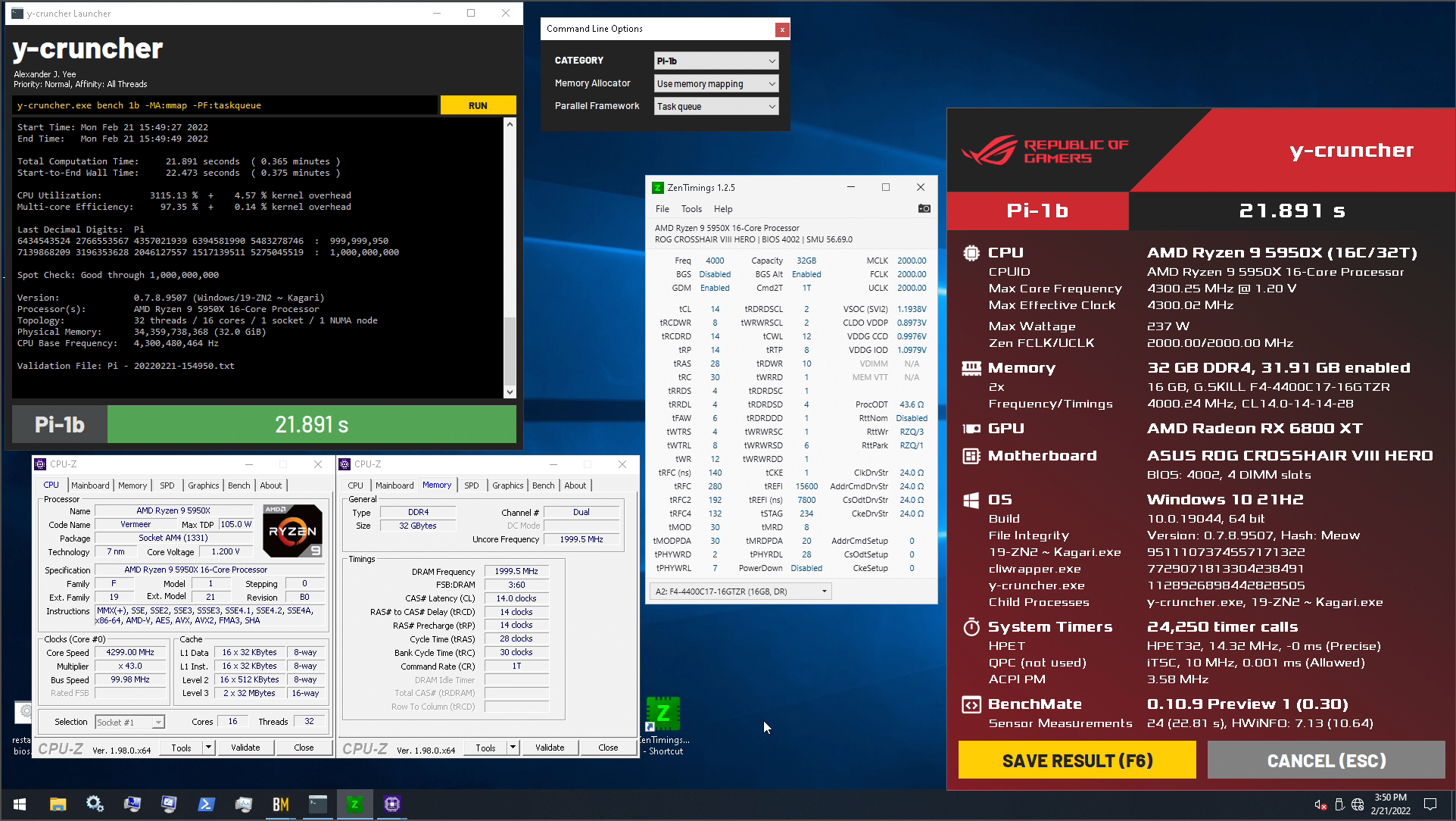
Top score is 20.433 but he's at 4.7ghz / 1.4v. I'll do a run or two at those clocks next time it's cold out and I have the effi sorted.
 wind shore
Opinions? Speed shift disabled and speedstep disabled when ocing cpu?
proven canopy
Probably, yeah, though, depending on mobo brand, you'll have to keep certain turbo related settings enabled for any manual core oc.
proven canopy
speedshift? or turbo
proven canopy
Those are all just power saving options
wind shore
Oh..
Lol
So it can affect my frames in game or not really
Like dropping etc
C state disabled too?
No reason for enabled
 tall laurel
Quick question, I have a MSI B550 Gaming Wifi Edge mobo running trident Z rgb 3600. When in the bios and trying to OC the ram to 3600 and exiting bios, windows crashes to blue screen. I’ve tried running it down to 3400 etc and still crashes. It’s stable at 3200. I checked and my bios is up to date and my board does support 3600
 dull ginkgo
The sticks themselves may not be able to OC to 3600
Probably also have to mess around with voltage and timings
tall laurel
dull ginkgo
The sticks themselves may not be able to OC to 3600
Even tho they’re 3600 stick?
dull ginkgo
What are they rated for
And I mean, sticks sometimes aren't able to reach xmp for whatever reason
tall laurel
dull ginkgo
And I mean, sticks sometimes aren't able to reach xmp for whatever reason
I see what the problem is. I’m an idiot and didn’t check to make sure they pulled the right ram before leaving micro center. The dude brought 3200mhz up to the counter. Explains why it won’t run 3600. Oops
dull ginkgo
Rip, might be able to mess around with timings and voltages to get it to do 3600 though
 barren ridge
wind shore
C state disabled too?
barren ridge
wind shore
C state disabled too?
c state is another power saving feature
it won't reduce perf at all if you have it off
but it would idle at boost all the time
wind shore
@barren ridge what do u recommend
barren ridge
well
up to you really
nothing negative is gonna happen, apart from hotter and hungrier idle
 sterile flame
gamer
proven canopy
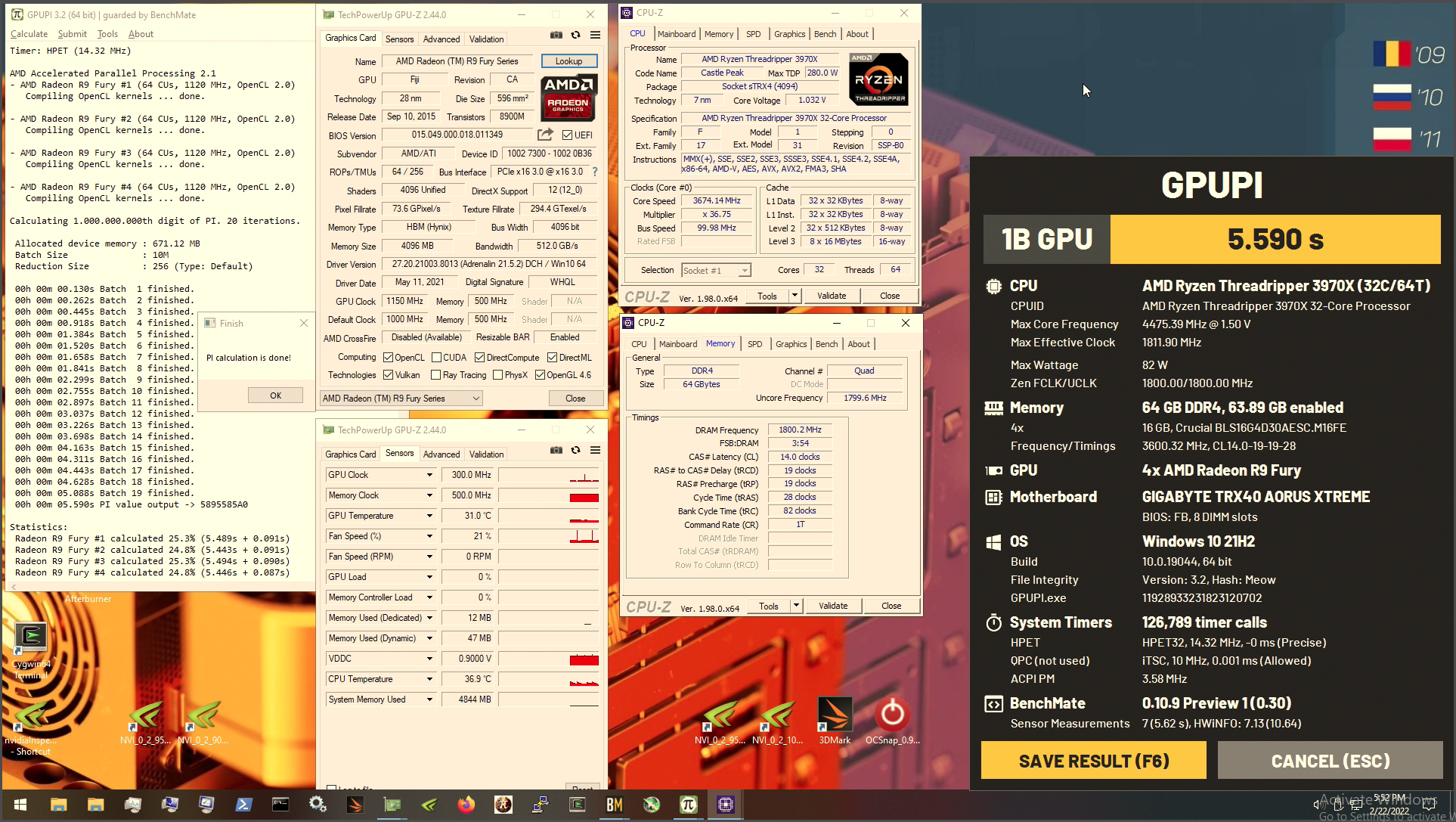
wish I could sub this as 4x fury x, would take  https://i.imgur.com/2YTYpaS.png
 modern walrus
why can't you submit it?
proven canopy
They're s9300x2's flashed to the MI8 bios, I can sub them as s9300x2's
modern walrus
but no first place? lol
modern walrus
ya then you'd be first & last place technically
how old are those GPUs?
would it still get credit for global as 4x GPUs?
proven canopy
You can look them up on the techpowerup database, it's two fury x cores on one card
modern walrus
oh I get it now
proven canopy
And yes, they'll count for globals, but won't be too competitive, that's not why I'm benching them
modern walrus
sorry you know I'm an idiot when it comes to these things
proven canopy
lol, you're fine
modern walrus
delid/LM/direct die seems to have gotten me about 8-11C drop
proven canopy

HWBOT
The 2x FirePro S9300 X2 @ 1080/500MHzscores getScoreFormatted in the GPUPI v3.3 - 32B benchmark. Forksranks #8 worldwide and #1 in the hardware class. Find out more at HWBOT.
 proven canopy
sure
sterile flame
Ok 😂
zenith palm
sterile flame
do i get hwbot role if i hit 2.5ghz on my 1650 forks
Gl with that
sterile flame
A challenge sips told me to take on
after calling me a coward for not removing 15 of the 16 pins on my gt210 to fit it in my pcie 1x lane
😍
proven canopy
Just dremel out the back of the 1x slot
 echo marsh
anyone know how to oc a monitor without a gpu
modern walrus
who dat
 zenith palm
echo marsh
anyone know how to oc a monitor without a gpu
zenith palm
echo marsh
anyone know how to oc a monitor without a gpu
Usually there's little to no overclocking headroom on monitors, you can try do like 75hz if it's a 60hz monitor tho, should be able to apply in the drivers for your integrated graphics/windows display settings
echo marsh
my monitor rn is 75 but was hoping on bringing it to maybe 90
where would i find the drivers?
lavish tundra
echo marsh
my monitor rn is 75 but was hoping on bringing it to maybe 90
not really gonna happen
since 75hz is a factory overclocked 60hz panel to begin with
modern walrus
I couldn't get my monitor to run 75hz
zenith palm
echo marsh
where would i find the drivers?
If you right click the desktop it should say intel something or amd/radeon something
modern walrus
but it's kinda big so maybe that's why
doesn't lowering resolution help with overclocking monitors?
I mean it didn't with mine tbh but that's what I read lol
zenith palm
echo marsh
my monitor rn is 75 but was hoping on bringing it to maybe 90
Make sure it's actually running in 75hz in Windows display settings as monitors default is 60
echo marsh
modern walrus
doesn't lowering resolution help with overclocking monitors?
i just lowered it and was able to bring it up to 83
modern walrus
is it worth pushing an extra like 5mhz on refresh rate? lol
echo marsh
so i went back to native res
proven canopy
https://www.twitch.tv/mickulty
PiFast OC Challenge: Pentium E2220 (me) vs Phenom II X4 940 (Tech Tested) | Stage 1: Air Cooling | Goal: sub-30s | PB: 29.69s

Twitch
PiFast OC Challenge: Pentium E2220 (me) vs Phenom II X4 940 (Tech Tested) | Stage 1: Air Cooling | Goal: sub-30s | PB: 29.69s
short blade
my intel drivers don't let me set custom refresh rate for my laptop screen
it only has 60hz and 240hz, I want a 120hz mode
sudden torrent
short blade
it only has 60hz and 240hz, I want a 120hz mode
Did you try CRU?
 unreal path
Can you overclock the 3060?
dull ginkgo
Yes
 latent wave
Lezzz go
 sudden torrent
Yes, assuming the parts themselves are capable of it
proven canopy
latent wave
Lezzz go
Nice score
 faint tangle
sterile flame
? what to do with this one
faint tangle
sterile flame
? what to do with this one
Don't unless you know what you're doing
sterile flame
:( Ok then
faint tangle
Voltage is very different from core and mem ocing
sterile flame
Is this part of afterburner for undercoating
Undervolting *****
stupid autocorrect
proven canopy

proven canopy
faint tangle
Don't unless you know what you're doing
It's totally safe to just max out that slider
faint tangle
?
proven canopy
If you want to get sweaty, play with tuning the v/f curve then press L with a single point to lock clock/voltage
That slider won't let you set over stock voltage anyway
Just max out the power limit slider and up the core clock offset until you crash more than is acceptable
prebuilt

Even more reason to diy build
I mean, a prebuilt is fine if you have more money than time or patience
But buying a prebuilt to save money is pretty silly
Oh no
Bad idea
Buying a $1100 prebuilt with a ryzen 3600 and 3000mhz memory in 2022 is silly
I would read around build chat and seek advice there if you want alternatives
Something like an Intel 12400
sterile flame
@short blade only made it to 2082mhz gpu clock 😔
proven canopy
Does that have a 12400?
Or better?
Anyway, yeah I really recommend asking around in #building-and-recc-chat for recommendations, the regulars there usually know their stuff
 proven canopy
Use the 3dmark download I posted instead of the steam link
And just buy a key for $5 lol
sterile flame
proven canopy
Use the 3dmark download I posted instead of the steam link
I tried but it wouldnt run for some reason
I clicked run and the test would end automatically
proven canopy
I'm sure you can figure it out
sterile flame
Yes, not today tho. got hw to do
short blade
:/

that is NOT white
aliexpress moment
it did drop my ram temps by a lot though
might actually be able to run b-die
dimms are at 40.0 and 41.5 steady with a 3090 blowing heat over them and running anta x arshia tm5
proven canopy
@sterile flame haha we used to use those channels as the hwbot channel, but this works better
Just nitro to use them again
sterile flame
I see. was confused because i had never been in them before with the HWBOT role, figured some perms got messed up or somethin
sterile flame
short blade
dimms are at 40.0 and 41.5 steady with a 3090 blowing heat over them and running...
did you see my depressing clock speed
short blade
that's not that bad
sterile flame
short blade
aliexpress moment
yea.... never expect cheap leds to shine a clean white lmao
i came across that issue before too lol
proven canopy
sterile flame
I see. was confused because i had never been in them before with the HWBOT role,...
No I had added the roles to those channels a while ago
sterile flame
short blade
that's not that bad
were you serious about 2.5ghz
because there is no way anyone could hit that on a 1650
proven canopy
Should be very easy with ln2 and just a vcore mod
 proven canopy
Here's a gt1030 at 2100 mhz https://hwbot.org/submission/3742167_chilli_man_3dmark___time_spy_geforce_gt_1030_(gddr5)_1748_marks

HWBOT
The GeForce GT 1030 (GDDR5)scores getScoreFormatted in the 3DMark - Time Spy benchmark. Chilli-Manranks #null worldwide and #1 in the hardware class. Find out more at HWBOT.
sterile flame
!!
proven canopy
Australia goes hard for country cup, that was for the 2017 cc
I don't think that card's even epowered
short blade
sterile flame
were you serious about 2.5ghz
lol no
it's possible but i wasn't being serious
sterile flame
inspect element
zenith palm
proven canopy
Buying a $1100 prebuilt with a ryzen 3600 and 3000mhz memory in 2022 is silly
To be fair that's all there is prebuilt wise atm
 sleek igloo
Hi, I want to get more hashrates on my NiceHash miner with my 3090 because I only get 50 ish. Does anyone know what to do? I tried overclocking it. (First time overclocking ever) But then it blue screened and now I dont know what to change in the setting. How can I get it to work better with an higher hashrate?
zenith palm
sleek igloo
Hi, I want to get more hashrates on my NiceHash miner with my 3090 because I onl...
You should be getting like 100mh/s or more, my first recommendation would be to switch from nicehash to trex, also you underclock the core and only overclock the memory
faint tangle
From what I've seen, nicehash does not report hashrate correctly
sleek igloo
zenith palm
You should be getting like 100mh/s or more, my first recommendation would be to ...
Is there any good guide on how to setup trex? I only have experience with nicehash.
zenith palm
sleek igloo
Is there any good guide on how to setup trex? I only have experience with niceha...
There is a pretty decent one in the pins of #846508336543301653 missing the odd thing or too but if you need help i or someone else will be able to help you
sleek igloo
faint tangle
From what I've seen, nicehash does not report hashrate correctly
I get like 1.50 euros a day with my 3090 on daggerhasimoto
sleek igloo
zenith palm
There is a pretty decent one in the pins of <#846508336543301653> missing the od...
Thanks!
Yeah, what do you use?
zenith palm
Trex
sleek igloo
@zenith palm what pool do you use and this guide says I need my etherium address. Is this an adress like from Binance or do I need something else?
zenith palm
sleek igloo
<@!191276897227898880> what pool do you use and this guide says I need my etheri...
Yeah your address is from your crypto exchange, i use coinbase but binanace works too, i use the ethermine pool
sleek igloo
is that ethermine pool the best one too use or are there any better ones? Okay I will use bitvavo then probably
And the adress that I need is the deposit address right?
Sorry for bothering you with this, i have been mining for months without its full potential
Like for atleast 9 months
dull ginkgo
Ethermine is just popular and consistent, there's probably something with a slightly lower fee, but ethermine is just consistent
sleek igloo
Thanks
I am grabbing my deposit address right? This is also what it says. Will this be correct and does it use the ERC 20 network?
It started at 68mhs but then went too 62 and now 59/58mhs
Going to 54mh/s rn
dull ginkgo
Not sure about the network, but edit the file for ethermine on trex and put in your address if you haven't already
dull ginkgo
sleek igloo
It started at 68mhs but then went too 62 and now 59/58mhs
Grab hwinfo64 or GPUz and check temps, maybe vram getting hot
sleek igloo
I cannot send a picture in here but memory is 110 it says here fml
but hotspot is 69 and gpu 54
dull ginkgo
Prob want to get some memory pads and replace the pads, g6x runs hot
sleek igloo
and only 6274mb memory used of the 24gb
sleek igloo
dull ginkgo
Prob want to get some memory pads and replace the pads, g6x runs hot
I have never done such thing. Is that tricky to do?
dull ginkgo
You should do your on research on where on your specific 3090 needs pads, what thickness, and how to take it apart, it can definitely be tricky, but do some of your own research.
sleek igloo
Thanks, I will!
short blade
dropped tRFC from 290ns to 280ns with active ram cooling

 clever epoch


No temperature sensors. I am disappoint
I think I'm already feeling the effects of the lack of temp sensors and questionable cooling. Occasional error deep into stability tests. Sigh
(and yes I have a fan blowing directly on it)
proven canopy
You can roughly guess the temp with an IR thermometer
If you have a 2000 rpm 120mm sitting on top of the ram, that's plenty
proven canopy
Some cool info I found https://i.imgur.com/rbGTceu.png
https://www.systemverilog.io/ddr4-basics
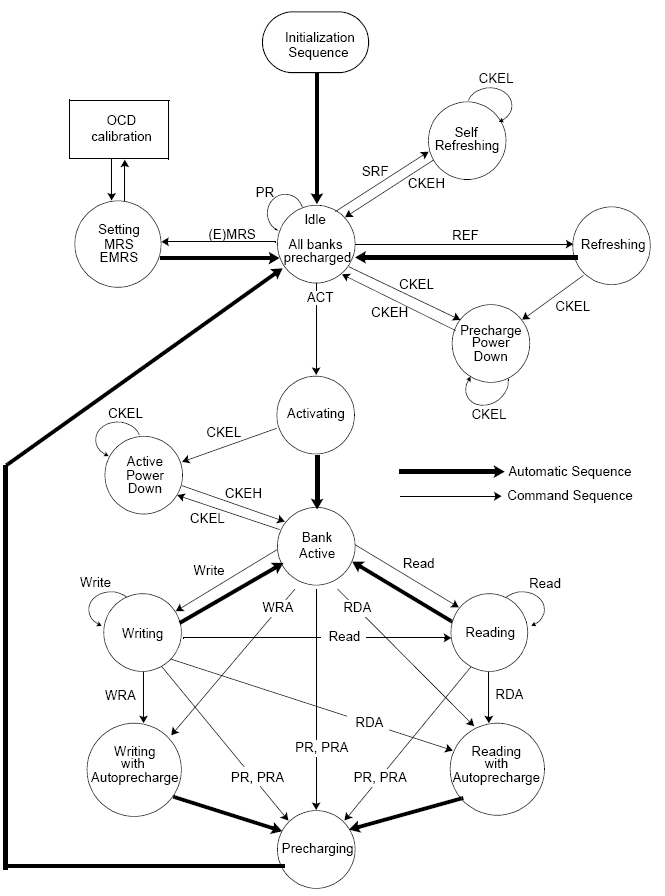

systemverilog.io is a resource that explains concepts related to ASIC, FPGA and system design. It covers a wide variety of topics such as understanding the basics of DDR4, SytemVerilog language constructs, UVM, Formal Verification, Signal Integrity and Physical Design.
sterile flame

3DMark.com
Intel Core i5-9400F Processor, NVIDIA GeForce GTX 1650 x 1, 16384 MB, 64-bit Windows 10}
3DMark.com
1st test is after repasting and the second one is before repasting
CPU dropped 6°C but GPU remained unchanged
Still a W
sterile flame
@proven canopy can you reuse hwbot submission form info for timespy submissions?
proven canopy
Yes
I'm not really sure what you're asking
Just click "hardware from previous submission"
sterile flame

i clicked the submit to hwbot button from the 3dmark time spy result webpage and i want to reuse the info from my last submission
i dont see hardware from previous submission anywhere
oh well i can just type it back in i guess
damn. ggood003 does a ton of submissions
proven canopy
Just sub through hwbot instead of 3dmark
I guess the autofill for subscores is nice
modern walrus
😡
 proven canopy
https://www.twitch.tv/mickulty
PiFast OC Challenge: Pentium E2220 (me) vs Phenom II X4 940 (Tech Tested) | Stage 2: Subzero Cooling | Goal: sub-25s | PB: 29.69s
Twitch
PiFast OC Challenge: Pentium E2220 (me) vs Phenom II X4 940 (Tech Tested) | Stage 2: Subzero Cooling | Goal: sub-25s | PB: 29.69s
unreal path
how do you overclock the 3060?
sudden torrent
unreal path
how do you overclock the 3060?
Download msi afterburner, that's the preferred tool
proven canopy
https://i.imgur.com/RkiCwKc.png
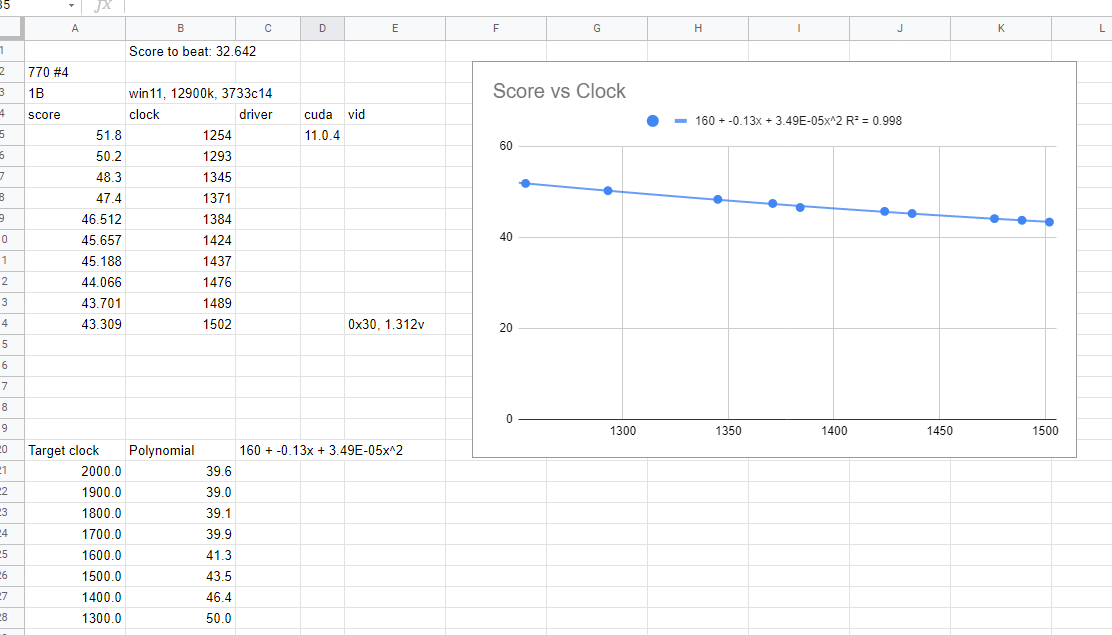
Doing some effi testing on the 770 for gpupi 3.2, sure seems like win11 and current drivers aren't the play here
Koobies @ 2038 core got 32.642 seconds, I'm showing a predicted 39.6 at 2000mhz with this setup haha
 sudden torrent
Assuming the scaling remains linear of course
proven canopy
I didn't use a linear regression
That wouldn't make sense for something like gpupi where the score is the time for 1B calculation
Going to test on win7 now
sudden torrent
Modern drivers probably aren't best for a 770. Clean windows 7 sp1 with older drivers is probably the way to go. No "security fixes" to kill perf.
proven canopy
yeah, the current is on 7 with an older driver https://hwbot.org/submission/4926460_k0obies_gpupi___1b_geforce_gtx_770_32sec_642ms

HWBOT
The GeForce GTX 770 @ 2038.1/1980MHzscores getScoreFormatted in the GPUPI - 1B benchmark. K0obiesranks #null worldwide and #1 in the hardware class. Find out more at HWBOT.
sterile flame
nice, unity is in the top 10
 dull ginkgo
rip
proven canopy
what io/sa
short blade
proven canopy
what io/sa
auto, oem board with zero bios options
it's just a defective memory kit
my friend gave it to me for free knowing that it had defects
different kit works fine at 2133c15
short blade
well turns out only one stick is bad
gonna try to warranty it, it's a 16gb stick, worth a try
zenith palm
Might as well try yeah
sterile flame
Gl
modern walrus
Would this be the equivalent of using gear 1 v. gear 2 on Intel?
 dull ginkgo
yea
modern walrus
So in theory I should be able to set considerably higher frequencies if I use the /2 setting then…?
Acknowledging of course, I’m long desynced from FCLK at that point
dull ginkgo
Maybe
proven canopy
streaming some gtx 770 on ln2, link in #links-and-selfpromotion
sudden torrent
Sure. The only thing that really increases the heat load is going to be the voltage. Most CPUs are given plenty of voltage by default, often more than they need, so you can crank up the frequency a couple hundred mhz without much adjustment.
sudden torrent
If you're lucky it's possible
Probably not with a 240mm though, chances are you'd need a bit more voltage
sudden torrent
Trying for 5ghz? Why not. It's not as simple as just putting in the desired number, you'll need to adjust other things like manual voltage control so it doesn't power limit and load line calibration for stability.
proven canopy
Pretty much every 9900k should be able to do 5.0 core 47 cache at 1.25v or lower
1.4 is very, very high for 5.0 core, that will be impossible to cool even on a custom loop in high load > 200 watts because of the thick die and junk TIM on a 9900k. The 10900k has no such problem.
Go by your load voltage as shown in hwinfo on the vrm sensors, or die sense if you have an asus board
What board
It'll be called something different, look for the vcore monitoring option in digi+ vrm in the bios, not sure if all asus boards have it
But yeah, just apply a load and see how much the voltage droops in hwinfo
Expand the window and send a full screenshot if you need help finding it
I recommend using occt for cpu/mem testing. Maybe drop ring down to 46
Try level 5 LLC
I'd try 1.3
That's only a thing on z490 asus and later iirc
modern walrus
I'm running out of benchmarks. heck
 proven canopy
What do you mean drawing
Lower LLC = more vdroop on asus
Level 5 is a good place to start
Depends on the board
If level 5 crashes - you're either too hot or your voltage is too low for those clocks
LLC is just how much your mobo will try to compensate for vdroop
You can run a higher set voltage and lower LLC or lower set voltage and higher LLC, figure out what combination lets you run the lowest stable load voltages and go with that
It's not, that's why the meta isn't to max out LLC
I like using ycruncher 2.5B to stress test
That's a good strategy
Silicon lottery
You must be running a very low LLC to have vcore droop from 1.421 to 1.305 lol
That's a ton
I usually aim for 25-50mv
I don't know if that board has die sense for vcore, so that might not be an accurate reading. Though, it's definitely not VID
Look at the core_max temp instead of those temps
Sure, yeah, I would icnrease LC a bit
A weaker VRM/board will generally need a higher level of LLC
proven canopy
proven canopy
You can run a higher set voltage and lower LLC or lower set voltage and higher L...
But really - go by this
proven canopy
https://twitch.tv/antitux
LN2 Overclocking - Just Alder Lake Things(tm) - 1/14/2022

 finite frigate
gloppap
 limber marsh
@finite frigate Its atttt... ~1.0-0.95 now
finite frigate
i am assuming no load
 finite frigate
thats normal yeah
limber marsh
I lowered the OC to 4.7ghz to make sure I do not crash from too little power
finite frigate
i run 4.7 core 4.4 cache at 1.3v
finite frigate
cache above 4.4 has never been stsble for me
finite frigate
cool
limber marsh
yeah, that was the goal
finite frigate
xtu is hot trash
limber marsh
this is just much faster to check
but I will set bios when IO find it
lets see my temps now
hot, but not as bad
finite frigate
1.3 should be much more tame
limber marsh
~85
finite frigate
i have an above average cooler though
limber marsh
it was 92 before
finite frigate
as long as it aint thermal throttlign
limber marsh
I am at 1.295V right now
got it closer to 1.3
yeah, you can see the improvement in temps from last test
 limber marsh
alrighty, well I guess if this helps, then it is worth it. I would still like to have one higher clocked core for my music, if possible
limber marsh
I will have to experiment to see if I can get a single core higher
finite frigate
limber marsh
I will have to experiment to see if I can get a single core higher
i show you how in a sec, installing xtu
limber marsh
I can't set per core voltage, right?
finite frigate
no
limber marsh
finite frigate
i show you how in a sec, installing xtu
I know how to, I just need to know voltage
 finite frigate
ye
limber marsh
I have one core that windows severely favors
finite frigate
try 49 on 1 or 2 active cores
limber marsh
and I wanna see if thats my best core to see if it works
time to find out which core is the one it favors
you can see it favors two

but mostly the first
thats the core I had dedicated to my music stuff
@finite frigateI think I have a method of finding which core I need to turn the speed up on
finite frigate
issue is you canrt
its only active cores
you dont get to choose which cores are active unless you do windows affinity
which from what i know
is not somethign that appliest on startup
limber marsh
finite frigate
you dont get to choose which cores are active unless you do windows affinity
I use processor lasso
and I set affinities per app
even process lasso shows the favoritism for the third
 finite frigate
i dont know how the windows graph shows cores and threads
if its how icthink that is
limber marsh
@finite frigateMy idea is to set process lass to have a high performance program use only one thread, and have all the cores different speeds, and then look in HWinfo to see which one is boosting
finite frigate
thats core 1
limber marsh
so doing this I can see which core is boosting at what speed

gonna put a little more voltage in to make sure I stay more stable through this
its working
You can see one core raised its speed while the others stayed low

I now know which core that is in processor lasso
Thats 0, same as in HWinfo

so if I do 0 and 1, that should be core one
and I should see 4.9ghz
finite frigate
make sure to set at least 2 active cores to 4.9
one active core at xx clock generally just doesnt work for me
limber marsh
you're right, these seem like normal speeds
but, 0 and 1 are core 1

or core 0 I should say
which I can see are core and thread 1

so then
2/3 should be core 2 and its thread
yup

@finite frigateOk, so it looks like
0/1 (core 0)
2/3 (core 1)
4/5 (core 2)
5/6 (core 3)
Which means windows, processor lasso, and HWinfo show them in that order
0123
4567
 limber marsh
yeah lol
so interestingly
it looks like windows favors my second core
its on average higher
 finite frigate
interesting but favorite cores are a thing
decided by cpu, not winfows
*windows
fsvorite cores are generally the best on the chip, most efficient
limber marsh
finite frigate
interesting but favorite cores are a thing
Yeah, the core they use for single core cause it can boost longer or higher or whatever
so I guess core 2 is my good core, or is favored
so I am wondering if I should use that core for music, or one of the ones it doesn't favor. Cause I can raise the speed on that core higher theoretically, but also more processes will try to use it
what do you think? @finite frigate
finite frigate
yes
use that core for any single threaded things
use core affinities to stop other things from using
limber marsh
finite frigate
use core affinities to stop other things from using
I figured that was the best bet
thats how I had it before I knew it was my favored core
I wish there was a way to turn off all use of one core
like all apps do not use it and you select the only ones that do
limber marsh
bruh lol
oh, I guess if I set the music app to the highest priority, that should help some as well, right?
trump over some other tasks
finite frigate
yeah
limber marsh
alrighty, I will just do that for now and maybe just disable some big processes from that core
like discord streaming
ok, looks like I got a sneeze more performance in my music stuff
which I mean is better than nothing
@finite frigateThanks for my the help. I will have to test out CP2077 when I get it reinstalled again
the music stuff didn't see much of an improvement, but anything is better than nothing
potent fiber
new 12300 review at anandtech, but I'm just seeing how decent skylake still is (w/ a 2080Ti), eems to close of a group but w/e. https://www.anandtech.com/show/17231/the-intel-core-i3-12300-review-quad-core-alder-lake-shines/8

 finite frigate
floppa
finite frigate
potent fiber
new 12300 review at anandtech, but I'm just seeing how decent skylake still is ...
idk dawg a 40% upgrade isnt decent
6700k is a crap chip
at least for the price you can find it for
peple are paying 180$ for 7700K's
i7 tax is
not good
cheapest actual non ES 6700k
 potent fiber
finite frigate
idk dawg a 40% upgrade isnt decent
potent fiber
finite frigate
idk dawg a 40% upgrade isnt decent
Lol Wtf? I don't tell people to buy a 6700 bruh. It's more showing how good a "quad core still is" (both a 6700 & the 12300 review is about)
proven canopy
https://www.twitch.tv/techtested
XOC Podcast - AM3/AM3+ with Yosarianilives

Twitch
Tech Tested foolin around and destroying computer parts on stream! Matt and Josh goin at it in games! Grab your beer and popcorn and watch the nonsense ensue!
 obtuse adder
Can the 12400 still be overclocked?
zenith palm
With certain motherboards
sudden torrent
You'd need a Z690 motherboard with an external clock generator, which is only found on more expensive boards
lavish tundra
sudden torrent
You'd need a Z690 motherboard with an external clock generator, which is only fo...
some b660 boards can do it too iirc
roman has a vid on it
sudden torrent
Which ones? The only way to overclock it is with bclk overclocking. That's possible on most boards but usually anything above 102-103 makes the system fail to post.
lavish tundra
its the b660 strix
with a special bios iirc

Support me on Patreon:
https://www.patreon.com/der8auer
Save 10% on your iFixit purchase: DER8AUER10
https://eustore.ifixit.com/der8auer
Pro Tech Toolkit: http://bit.ly/2JOFD8f
Find my products at Caseking:
Delid Die Mate 2: htt...
heres the video
sudden torrent
If you have the external clock generator you can separate each section of the board that would be affected by the bclk, so PCI-e still runs at 100 but the SoC and such are at ~120
lavish tundra
yeh
sudden torrent
He says in the video he doesn't know of any DDR4 board that supports it. Highly unfortunate.
proven canopy
Really liking the wallpaper for the $5 gpu comp - not my pic btw https://cdn.discordapp.com/attachments/662356923378696222/950103888042807306/nvidia_profil_erreur.png
 zenith palm
That's cool, what die is that in the pic?
proven canopy
I assume the gt218 die, as that's actually what the comp is on
zenith palm
Looks cool anyway probs to the hwbot artist
proven canopy
You should get in on this comp haha, $5 nvs300 goes fast with a trim pot mod alone. No cold scaling either, so no advantage even at -20
zenith palm
Hmm I'll look, knowing eu prices tho probably like €50
proven canopy
NVS300 seems really solid, FX380 or just the regular GT210 are all the same core as well.
zenith palm
Why so many similar models?
clever epoch

Any way to hit tRCD 14 with this? This was at 1.375 SA, 1.56 vDIMM.
I loosened RRDL, RTP, RAS, RFC, and REFI, increased voltage, but I always end up with a couple errors at the end of the test
It's the viper steels so idk what temps they're hitting, but I have a Arctic P12 literally on top of them so it shouldn't be too bad.
sudden torrent
Some b-die sticks just won't. Usually if they're lower bin like patriot and others typically use.
Mine are the same way, a cheap kit of adata xpg.
proven canopy
Probably more of an IMC limit, that's really good for gear 1 tbh
Tertiaries could probably go tighter
rdwr's to 10, wrrd's to 26/22 maybe. The dr/dg timings don't matter, can set them to 1 to make it easier to read
clever epoch
yeah should have mentioned, it's a 12600k using the viper steel 4400 19-19-19 1.45V kit
modern walrus
thank you, sir
modern walrus
Well far my detective work suggests CJR
Which sucks because that means over 1.44v is a no go
modern walrus
@sudden torrent you get what you pay for & these were free lol
sudden torrent
I'd flip em, take the money, add $20 and buy a better used kit 🙃
humble jay

Crucial
Buy Crucial Ballistix MAX 16GB Kit (2 x 8GB) DDR4-4400 Desktop Gaming Memory (Black) BLM2K8G44C19U4B. FREE US Delivery, guaranteed 100% compatibility when ordering using our online tools.
I would get this for max frequency on ryzen lol
I had I think Rev N? Oloy 1x8GB 3200c16 stick and it did 5000 on my 5950X and dark hero easy, so a proper binned stick should go even faster
B die maxes at 4800
humble jay
humble jay
I had I think Rev N? Oloy 1x8GB 3200c16 stick and it did 5000 on my 5950X and da...
It had A3 pcb with the fat chips but was 8Gb ICs
And micron
modern walrus
sudden torrent
I'd flip em, take the money, add $20 and buy a better used kit 🙃
considering this ngl lol
modern walrus
humble jay
https://www.crucial.com/memory/ddr4/blm2k8g44c19u4b
damn that looks super fire... & $100 ain't bad at all for that
zenith palm
modern walrus
ASUS board doesn't let you go above 1.8v DRAM
Mine can't do over 1.5v 
modern walrus
you think if I enable LN2 mode it will? lmao
it also won't let me set termination to less than 1/2 DRAM voltage
zenith palm
Probably not
modern walrus
bro it POSTs fine
at 3800c12-12-8-12-21
but says coefficient is too large when I hit ycruncher
I need GDM off. Heck
proven canopy
modern walrus
you think if I enable LN2 mode it will? lmao
It might - but you'll want to set some voltages manually first as to keep them out of ln2 range.
modern walrus
oh ya that makes sense. I think I'm gonna try to hunt down a 16gb kit so I can get desync to run at high enough frequency to make it worth it
I can't get DR to go over 4266
zenith palm
modern walrus
oh ya that makes sense. I think I'm gonna try to hunt down a 16gb kit so I can g...
Id do this especially in the next 9 hours
https://www.newegg.com/oloy-16gb-288-pin-ddr4-sdram/p/N82E16820821427
proven canopy
That's the best price I've seen on that bin yet, you should buy that unless you want something stronger @modern walrus
modern walrus
zenith palm
Id do this especially in the next 9 hours
https://www.newegg.com/oloy-16gb-288-p...
Thank you
WHOA
I was not expecting that price
lol
proven canopy
Get the 3dmark bundle btw
proven canopy
Port royal?
modern walrus
like Timespy extreme, Port Royal
proven canopy
The gift edition is a good deal for $5 extra - just sell it to someone who needs it in the future imo
modern walrus
Are these better bin than the ones above? https://www.amazon.com/OLOy-288-Pin-Desktop-Gaming-MD4U0840150BRADE/dp/B097QQ5HQG/ref=sr_1_7_sspa?

OLOy DDR4 RAM 16GB (2x8GB) Blade Aura Sync RGB 4000 MHz CL15 1.5V 288-Pin Desktop Gaming UDIMM (MD4U0840150BRADE)
only reason I'd consider different ones is to get them here tomorrow
proven canopy
Not sure, 1.5v for 4000 15 16 16 36 rating is kinda bad
Just ask in the wegg server if anyone wants to sell you a decent 2x8 kit
modern walrus
proven canopy
Not sure, 1.5v for 4000 15 16 16 36 rating is kinda bad
flat 19s at 4000mhz but at 1.2v? https://www.performance-pcs.com/system-hardware/memory/patriot-viper-rgb-16gb-2-x-8gb-288-pin-ddr4-sdram-ddr4-4000-pc4-32000-pvr416g400c9k.html

stand out from the crowd with the 16GB Viper RGB DDR4 4000 MHz UDIMM Memory Kit from Patriot.
proven canopy
Just buy the original linked kit or better
modern walrus
Ya the 3200c14 probably isn’t gonna do that great at 4000+
proven canopy
Doesn't work like that - but 3200c14 is a lower bin than the 4000c16 initially linked iirc
modern walrus
The 32gb 3200c14 kit on 10900K did 4200c15
I could POST 4400 but couldn’t get it stable. Dunno how much more to expect from SR
potent fiber
modern walrus
Are these better bin than the ones above? https://www.amazon.com/OLOy-288-Pin-De...
$55 more, 1.5v instead of 1.4v just to go 16-16-16 to 15-16-16. 
modern walrus
proven canopy
Doesn't work like that - but 3200c14 is a lower bin than the 4000c16 initially l...
XMP: 4400c19-19-19-39@1.45 https://www.amazon.com/Viper-Steel-4400MHz-Performance-Memory/dp/B07KXLFDL6?ref_=ast_sto_dp&th=1

Patriot Viper Steel DDR4 16GB (2 x 8GB) 4400MHz Performance Memory Kit - PVS416G440C9K
potent fiber
Nice speed, but at xmp 4000c16 is 8ns VS 4400c19 8.6ns 
clever epoch
modern walrus
XMP: 4400c19-19-19-39@1.45 https://www.amazon.com/Viper-Steel-4400MHz-Performanc...
I have this kit. Doing this with it rn

1.58V or so. Haven't floored voltages yet
Can't do tRCD 14 though. Forks thinks it's an IMC limit. It does 3900 14-14-14 just fine
One thing about that kit though: no temperature sensors
zenith palm
modern walrus
Thank you
You're welcome kind sir
sleek igloo
Hi all, I mined a bit with Trex on the Ethermine but I cant figure out how to send it to my wallet on binance or bitvavo? I added my wallet in the Notpad File and on the site itself it says my unpaid balance but when I click on request manual Payout it gives me this:
"It is possible to request a manual payout on the Ethereum Mainnet if your unpaid balance exceeds 0.005 ETH. For manual payouts the transaction fee will be deducted from your unpaid balance.
To validate the withdrawal request you are required to provide either:
The IP of your highest performing mining rig.
A signed message using your connected wallet."
I am not signed in with my metamask wallet btw because I want to send it to my Bitvavo exchange.
lavish tundra
sleek igloo
Hi all, I mined a bit with Trex on the Ethermine but I cant figure out how to se...
Dont ask this here
This channel is for overclocking
faint tangle
clever epoch
Can't do tRCD 14 though. Forks thinks it's an IMC limit. It does 3900 14-14-14 j...
That's crazy
zenith palm
Welcome to b die
sleek igloo
lavish tundra
Dont ask this here
Oops, my bad I thought I was in #846508336543301653
sterile flame
modern walrus
XMP: 4400c19-19-19-39@1.45 https://www.amazon.com/Viper-Steel-4400MHz-Performanc...
lol nice these are the ones i had saved in my list a while back
zenith palm
sterile flame
lol nice these are the ones i had saved in my list a while back
But oloys
sterile flame
yea im prioritizing the
o l o y s
zenith palm
sterile flame
yea im prioritizing the
o l o y s
Giving me bunnyTV flackbacks
faint tangle
aight im finally gonna oc my ram
time for pain
3600 c16-16-16-36 at 1.4v my pc having a seizure
Wait
That actuallt worked first boot
First thing I tried
Wat
Nvm
Ram went down to jedec
zenith palm
faint tangle
3600 c16-16-16-36 at 1.4v my pc having a seizure
What ram do you have?
zenith palm
faint tangle
the crucial 32gb 3200c16 kit
Do 1.5v ram, 1.1v soc, 1.05 cldo vddp, ,1.05 vddg ccd and iod, 3600mhz cl16
Then for this order

16 16 19 16 34
Well do xmp and change those timings
And freq obvs
faint tangle
I'm not sure what half that means
Where do I change the voltages other than the one to 1.5
I've got that
 zenith palm
faint tangle
Where do I change the voltages other than the one to 1.5
zenith palm
faint tangle
Where do I change the voltages other than the one to 1.5
For me it was in overclocking idk on asrock, sips would know tho
Also
 faint tangle
I'm exploring everywhere under oc tweaker
Don't see anything to do with voltages that looks like that
zenith palm
zenith palm
Also
Those values should be at bottom of mem timimfs
faint tangle

Ima try 3600 with stock timings at 1.5v
See what that does
@zenith palm task manager is reporting 2667mhz, hwinfo is reporting 1333mhz. Now my pc is dying
Mouse moving slow asf
Oh it fixed itself now
I'm guessing that's a sign the oc is unstable
I'm stupid
So yeah the oc didn't work
Without even changing any timings, 1.5v
zenith palm
It's okay, first thing to do, turn off pc, clear cmos
zenith palm
run this when you can get back into windows
zenith palm
faint tangle
Slow for a min but I can get back into bios to turn the oc off
just if theres a nuke clear option go for that
faint tangle
If there's a what
zenith palm
also i would highly recommend using a separate ssd/hdd with windows installed on it
zenith palm
faint tangle
If there's a *what*
just clear cmos
faint tangle
I turned voltage back to 1.35 and the speed back to 3200
If it doesn't work I'll clear cmos
I think there's a nuke clear option, if I'm guessing at the meaning right (seems pretty obvious)
Let's me reset uefi bios defaults
Yeah its working now
zenith palm
nuke clear would be cmos clear
zenith palm
zenith palm
run this when you can get back into windows
run this
then if you can make antother win install
faint tangle
zenith palm
run this when you can get back into windows
whats this do?
oh
i have a second ssd with windows on it already
from benching
im outta time tho so ill have to come back to this later
zenith palm
faint tangle
i have a second ssd with windows on it already
use that
zenith palm
faint tangle
whats this do?
hopefully fix anything that bad ram oc caused
faint tangle
im getting this error
 zenith palm
faint tangle
im getting this error
zenith palm
faint tangle
im getting this error
when you try to open it?
zenith palm
faint tangle
I'm running it in dmc
just double click it
zenith palm
np
proven canopy
You'll want to lower vtt with rev.e
zenith palm
proven canopy
You'll want to lower vtt with rev.e
What does mem vtt actually do?
proven canopy
1.6 vdimm .65 vtt is about meta for rev.e iirc
Setting vtt lower than the 1/2 auto can help stability on certain ICs and vdimm ranges
2v vdimm, .9v vtt is normal for b-die
modern walrus
and just one year ago I was in here asking dumb questions & driving you all nuts
 sudden torrent
Further evidence that asking as many questions as possible to learn more is a good thing
dull ginkgo
Clearly none of those questions were dumb questions
modern walrus
haha fine line to walk without driving people nuts
but you're kind to say
thank you
sterile flame
now do x79 with me :)
sterile flame
indeed
proven canopy
Do trx40 with me 🙂
sudden torrent
I'd love to do trx40 but I'd be afraid I'll kill a $3000 cpu lol
modern walrus
sterile flame
indeed
damn gotta buy a whole new setup for that tho
sterile flame
😔
sudden torrent
$200 gets you the whole deal
sterile flame
@modern walrus i could send you an extra board i have
potent fiber
dull ginkgo
Clearly none of those questions were dumb questions
Dumb questions + smart answers > smart questions + dumb answers
modern walrus
sterile flame
<@!808772530017665024> i could send you an extra board i have
if the whole setup is $200, I'm down lol
ah I'd feel bad but I could pay you for it lol
sterile flame
I dont have an extra cpu or ram to give but I do have boards lol
tall pelican
potent fiber
Dumb questions + smart answers > smart questions + dumb answers
dumb question + smart answer = happy customer (happens a lot at work, where explaining how optane is terrible results in customers being happy to get into nvmes)
 pallid scarab
im new and my cpu is at 3.7ghz but it goes to around 4.6ghz without overclocking any idea how i can change cpu ghz
 digital dirge
pallid scarab
im new and my cpu is at 3.7ghz but it goes to around 4.6ghz without overclocking...
digital dirge
pallid scarab
im new and my cpu is at 3.7ghz but it goes to around 4.6ghz without overclocking...
I'm confused.. it is at 3.7, but it goes to 4.6 without overclocking? Wouldn't getting it to 4.6 be considered overclocking?
pallid scarab
digital dirge
I'm confused.. it is at 3.7, but it goes to 4.6 without overclocking? Wouldn't g...
oh mb its a 12600k and its at 3.7ghz how do i increase it i thought it was not considered overclocking
modern walrus
that's probably single core boost
if you download something like Cinebench R23, you can use HWiNFO to see what your clock speeds are when running an all-core load
lavish tundra
modern walrus
haha fine line to walk without driving people nuts
Nah man ur good. Annoying would be the people who ask and waste our time by ignoring our advice and complaining saying we broke their pc
modern walrus
haha thank you
I always tried to stop short of like throwing up a picture of my settings & being like here do it for me
modern walrus
lavish tundra
Nah man ur good. Annoying would be the people who ask and waste our time by igno...
how can I find out when I joined the server?
lavish tundra
modern walrus
I always tried to stop short of like throwing up a picture of my settings & bein...
ive totally not copied all of sippys ram oc settings
lavish tundra
modern walrus
how can I find out when I joined the server?
U ask a mod to s?stats u
lavish tundra
Indeed
Sippy was fuming tho
He had to work hard to do his oc
And my ram was like yep im fine with this
modern walrus
lol did you try to tighten or just be like this is good
pallid scarab
so uh basicly im using a 12600k and using a cheap cooler and my temp is really high and its somehow 4.6ghz and i want it to be the default 3.7ghz how do i change it back so my cpu does not melt like lava
modern walrus
how high is high?
it's not overclocked, it's the boost modern CPUs have
like 90C+?
modern walrus
damn what case?
pallid scarab
o11 dynamic
modern walrus
I mean if you wanna disable boost, it should be a setting in BIOS
but you'll likely see a pretty heavy performance penalty
you could also download Intel's XTU program & reduce it there
or throttle stop
I'd say use Intel XTU to control it
pallid scarab
also like i went into system config on boot and advanced options and in the number of procceors it was 16 before i made it 12 and restarted now its just 12 and i cant find 16 anymore
modern walrus
that way you can do something like reduce the single core performance to 4.4, 4.2, etc. instead of just disabling it entirely in BIOS
oh wow you disabled some of your cores?
modern walrus
unless you have a bunch of other setting set already, you can load optimized defaults in BIOS
pallid scarab
can u teach me as im really new mind coming in dm ?
as i dont think i can send images here
modern walrus
or if that doesn't fix it you can clear CMOS by shorting your CMOS header with any metal object when the computer is off, PSU is unplugged, & you've held down & then pressed like 5x the power button to be sure you've drained any capacitors
you should be able to now that your name is green
pallid scarab
alright
modern walrus
it's only when your name is still white that you can't send any pictures to avoid random people coming into the server & spamming nonsense
digital dirge
 modern walrus
lol I bet
pallid scarab
Im here now do i go o oc settings


 modern walrus
did you set a +1 turbo offset?
pallid scarab
I did nothing except like changing ram speed
And cpu cooler tuning to tower air cooler
modern walrus
also you see there how "1 P-Core Loading Run Turbo Ratio 50"
and "2 P . . . 50"
and so forth
pallid scarab
Yup
modern walrus
by putting +1 you're telling it to run 51, 51, 49, 49, 47, & 47 respectively
pallid scarab
O
modern walrus
same with the E Cores
modern walrus
if you click on [Turbo Ratio Offset] does it give you more options?
modern walrus
damn that's tight. I want a 12thn gen now lol
pallid scarab
 modern walrus
you could leave it on Turbo ration and change it to 0 for now
pallid scarab
It became auto now
modern walrus
that's fine, it will likely regulate itself now
pallid scarab
 modern walrus
ya the CPU itself will basically decide what to run now I believe
make sure you do the same for E Cores
pallid scarab
Should i do same for@e@core?
Alr
Now like can u teach me how to re enable my processes from 12 to 16
modern walrus
what's under those options?
pallid scarab
 modern walrus
I have an MSI board but it's packed up and for 10th gen lol
pallid scarab
Also there is other settings and voltage settings
modern walrus
you may want to change the CPU ratio offset when running AVX to auto if you have that option
digital dirge
Is this the msi z690 board?
pallid scarab
Yup
modern walrus
okay in Advanced CPU configuration
digital dirge
Nice. I'm glad I'm lurking because thats going to be my setup.
modern walrus
what's that say there
pallid scarab
modern walrus
you may want to change the CPU ratio offset when running AVX to auto if you have...
Im lost can u like mark
modern walrus
MSI has good BIOS but they're complex

if you click on that it should expose more options
digital dirge
I think he is lost about the offset option.
modern walrus
oh sorry yo're right
pallid scarab


 pallid scarab
Yee the first image i sent
modern walrus
change it to auto

 modern walrus
yes I believe it should drop down more
oh okay then nvm that's already all the stuff below it then
can you go down more?
modern walrus
oh okay cool haha
pallid scarab
I was right clicking mb
modern walrus
I usually use the keyboard in BIOS so I don't confuse myself

 pallid scarab
Should i leave the bios and recheck?
modern walrus
yes, push F10 to save changes btw
 modern walrus
yes
pallid scarab
Im rechecking wait a bit ig i was wrong
modern walrus

Start to analyze your hardware right now! HWiNFO has available as an Installer and Portable version for Windows (32/64-bit) and Portable version for DOS.
if you want something that will tell you all the readouts, HWiNFO is best imo


 pallid scarab
Instead of the 16 it used to be
modern walrus
next to Number of Processors
pallid scarab
Then?
modern walrus
which CPU again? 12600K?
pallid scarab
Yup
modern walrus
uncheck the box & press OK
pallid scarab
Apply?
pallid scarab
 modern walrus
 pallid scarab
Yea it was 16 now its max 12
modern walrus
just go ahead & hit restart
pallid scarab
Also thanks alot its 3.7ghz
So ig my cpu wont melt
Omg thanks alot
Its 16 again
modern walrus
if you want to check go to task manager
pallid scarab
You have no idea how much u helped me today
modern walrus
ctrl+alt+delete
and performance tab
and click on CPU

oh well if you see it already then don't bother lol
pallid scarab
Thanks alot again
modern walrus
np you can pretty much always find someone to held on this Discord so ye
pallid scarab
 modern walrus
np np
digital dirge
Gold Star for ggood003 :)
modern walrus
haha thanks
it will boost up to more than 4.3 on a single core some times but since everything is on auto, it should regulate itself better
the settings you had before were telling it to boost up to 5000mhz plus another 100mhz with the +1 offset
5100mhz can get toasty quick without a strong cooler
proven canopy
Good to see you paying it forward 
pallid scarab
also just a question is it malware or something like when i open task manager for 1 second its at like 100percent cpu usage and when i do monitor it its at 1 percent ish so is it like being high when i dont monitor it like idk if its something that happens when u open task manager or something
modern walrus
pallid scarab
also just a question is it malware or something like when i open task manager fo...
I wouldn't worry too much. Task manager can use a decent amount of resources & it's going to read sensors when it opens. you can click on CPU or on RAM/memory to sort task manager to see what's using the most resources. if you see something you don't recognize, google it. More than likely it's one of Microsoft's many services. You can also look in Task manager under startup or press start and type "startup" to see if some random crap is running when you get into windows. Don't close or disable anything until you know what it is or you might make a mess
you'd click where I circled to sort it btw

 tight vine
Hi, anyone available to help with memory overclocking?
I just got 3600 corsair B-Die, and I want to know if I am doing it right
zenith palm
tight vine
I just got 3600 corsair B-Die, and I want to know if I am doing it right
Well first thing to do would be actually make sure it's b die , especially with Corsair, what's the xmp of the kit ?
zenith palm
That's not b die my friend, that would be Samsung C die
tight vine
V4.31
tight vine
Ok then, is C-Die good?
zenith palm
It's meh
tight vine
What?
zenith palm
How are you getting it to do 3200c14?
tight vine
By setting 3200mhz
CL 14
tRCD tRP 14
tRAS 34
zenith palm
Uhh that shouldn't be possible with that kits xmp wtf
zenith palm
Omg that actually is b die
That's the worst b die xmp I've ever seen in my life
Okay yeah ehh what cpu are you using? And ocing for daily or benching?
tight vine
What's benching?
tight vine
zenith palm
Okay yeah ehh what cpu are you using? And ocing for daily or benching?
My cpu is a 1390P
zenith palm
tight vine
What's benching?
Overclocking like competitively like to submit to hwbot or something
zenith palm
I don't keep up with xeons so idk how good their memory controller is but you could try 3600 flat 14's
tight vine
How high will this memory clock to?
zenith palm
tight vine
How high will this memory clock to?
Uhhh depends on your ambient and pc temps
B die is very heat sensitive
Ideally want it less than 40c, although should be okay up to 45c
But make sure you stress test the memory, with test mem 5 extreme anta or at least occt memory test
tight vine
How do I check the temperature
I tried to memory test 3600 14-14-14 1.5V and it failed
zenith palm
Uhh their might not be temp sensors on your sticks but you can check hwinfo 64
tight vine
Could I get this ram to 4800?
tight vine
zenith palm
Uhh their might not be temp sensors on your sticks but you can check hwinfo 64
No, there are not I checked thaiphoon burner
zenith palm
Depends on your imc
zenith palm
tight vine
No, there are not I checked thaiphoon burner
I'd check with hwinfo 64 just in case taiphoon is a guesser at a lot of things, i didn't even know it could see if you had ram temp sensors
Otherwise you can stick your finger on them and guess
tight vine
I do not see ram sensors
zenith palm
Shame
tight vine
zenith palm
Otherwise you can stick your finger on them and guess
I am not good at guessing the temperature of thing above 40C, because I only regularly touch things below that
zenith palm
Well you'll know because the ram will just start spewing errors at 45c
tight vine
Why?
zenith palm
Because its a very temp sensitive die
tight vine
I can attach a thermal probe to it
zenith palm
That would work for rough estimate ye
proven canopy
Some pcb's have temp sensors, honestly, just lay a .1 amp or higher 120mm over the sticks and you'll be fine even at 2 volts
Or buy a $15 IR thermometer to get a rough guess. Put some painters tape on the heat spreader, measure the side with chips on it


 short blade
well i did post the clock speed there
6350 is not high
kinda weird cause core can go really high but vram can't
 proven canopy
6350 isn't really true clock haha
I mean, you can divide, but yeah
Easy way is just to look at gpuz or something
nvinspector master race tbh
proven canopy
not really - but when posting clocks/scores on discord, might as well put it in a format that's easily understood
short blade
ngl i feel like "+350" or "6350MHz" is more easily understood than "1587.5 mhz" for most people
but alright
proven canopy
Different cards have different base/boost clocks
Everyone can just look at gpuz
Or the 3dmark sub
short blade
hmm do i need to repaste
 proven canopy
What paste? Is it using a spring tensioned backplate?