#overclocking
1 messages · Page 93 of 1
 humble jay
 proven canopy
Jesus, lol, that's some determination
Did you test before/after with an oscilloscope? What inspired you you to go through all that trouble?
humble jay
someone told me that the top score with 6900xt that was running insane mem had added 200 MLCC to mem
so I added like 500
but nah I didn't
i'm in second with 6900xt, or at least was
but didn't sub any to hwbot
proven canopy
These days I feel like I'd rather spend hours chasing a single hardware  than hundreds of scattered points
x265 32c+ efficiency has been interesting
 proven canopy
server 2022 performs well - but has more variation vs other os
How many threads does tse, fsu use?
humble jay
TSE can use at least 64
humble jay
FSU is weird, i'm actually not sure, it seems to use them all, but also 10900K-11900K don't score too far off
like SMT Off on 5950X suuuuucks
proven canopy
 tall pelican
I want to say 16?
tall pelican
I want to say 16?
Even fse?
tall pelican
yeah
proven canopy
I wish more of this knowledge was organized into a wiki
 lavish tundra
Hmm I should run some firestrike and get points
tall pelican
iirc 7/9/10980xe with ht off and 2 cores disabled was best
proven canopy
Night raid is a hard limit of 12 threads ime
humble jay
how many points are all of the 290X records worth 😛
i might just 5950X past all of them really quick
proven canopy
Part of me wants to just scatterbench all the hardware I currently have access to - but much of it isn't .. interesting to tune/bench
Just very plug and play
And I have mixed feelings on getting lots of hwbot points that way
humble jay
yeah, I was going to try with 5700G first, and actually put the GPU on ln2 to be fair
proven canopy
5600g's are $230 or something now
lavish tundra
Forks how does one acquire the HWbot role?
proven canopy
Buy it on newegg
humble jay
current top score is with 9900K, so 5700G prob fair if I can beat this
 proven canopy
I wish they'd combine 290x, fury x etc with their equivalent server/workstation cards
If it's the same exact core/memory config
humble jay
ah yeah
proven canopy
I have some s9300x2's that are basically dual fury x that I'd love to bench - but it'd be kinda pointless
 tall pelican
 humble jay

proven canopy
If anyone needs a benching gpu https://www.walmart.com/ip/ASUS-GeForce-GT-710-with-4-HDMI-Ports-Graphics-Card/546336617
tall pelican


 sudden torrent
Oh you bought 5
I was about to say...
proven canopy
Lol yes - credit to fitz for finding the deal
tall pelican
yeah, was more of a test to see if they actually will ship them, it says eta oct 24th
look out ladies and gentlemen, we're buying pc hardware from walmart
sudden torrent
Fitting that it's the lowest end GPU that works on modern systems
 short blade
I've already bought a few cases and power supplies from walmart
tall pelican
more of that its a 4 hdmi output, going off a pcie x1
short blade
sudden torrent
Fitting that it's the lowest end GPU that works on modern systems
definitely not
not when the geforce g100 exists
sudden torrent
Oh? What lower GPU is UEFI compatible
short blade

tall pelican
you want to see a non-uefi compatible 3070?
tall pelican
oh ig it doesnt show 3070, but it was
 short blade
fun fact
asrock and msi do NOT like it when you try using a 1024x600 monitor in UEFI
tall pelican
asrock
sudden torrent
tall pelican
oh ig it doesnt show 3070, but it was
That whole thing looks so not fun, USB overcurrent? What happened there?
short blade
asrock will lock up about 1 second after entering bios
MSI will sometimes lock up instantly
sometimes just glitch the graphics to hell before locking up after 5 seconds
sometimes changes itself to chinese on top of that
tall pelican
sudden torrent
That whole thing looks so not fun, USB overcurrent? What happened there?
who knows, came into my shop originally with no display output and no post, found out why its not posting once we got display working
customer is getting a chad b550 master though, so Im not complaining
sudden torrent
Definitely a mobo replacement moment, might be a short on 5v
tall pelican
literally every custom build that comes into my shop with an asus mobo with hardware issues is a faulty mobo
like I had a gigabyte one come in, 5600x with a faulty soc/pcie
sudden torrent
I've seen a lot of flashback issues with them too
tall pelican
no, like I've legit had 5 faulty asus mobos in the past month
and Im at the point of wondering wtf asus QC is doing
humble jay
my friend RMA'd his maximus xii hero 3 times, still not sure if the replacement is working
😛
tall pelican
my current headache: Computer Model: Custom build Asus B550-F
bsods with any sort of cpu stress test
then just gets driver bsods while idle
oh, this one is fun: Computer Model: Prebuilt in thermaltake case | Serial: Asus Tuf on intel platform, according to customer, he heard a pop when he turned it on one day, and it hasnt turned on since
humble jay

sudden torrent
I assume you've already tested the PSU on that one
Because if it's not that there's only one thing it can be
tall pelican
havent gotten to it, but was going to test it while its inside a fire box
tall pelican
no idea, idk cases
 sudden torrent
8c24t?
That'll be a lot of fun I'm sure, assuming you have the new mobo ready too
 sudden torrent
Well you can comment on how large they made the chips at least lol
 short blade
wow
I had to fiddle with so many settings to get 1t gdm off stable
you should test with more than just extreme1 for this though
0.9 cldo vddp for 1900 fclk
3800c14 1t gdm off at 1.5v with flat 24 ohm cad bus 60 procodt and auto rtts
me no understand
lavish tundra
short blade
you should test with more than just extreme1 for this though
Yeah ill leave anta&arshia on overnight
lavish tundra
short blade
I had to fiddle with so many settings to get 1t gdm off stable
Imagine needing to work on ram oc and not having an orange mushroom to copy off of
Couldnt be me
short blade
I'm being bullied
 faint tangle
short blade
I'm being bullied
faint tangle
short blade
I'm being bullied
Deserved
 sterile flame
short blade
I'm being bullied
sterile flame
short blade
I'm being bullied
Good lol
humble jay
sudden torrent
Well you can comment on how large they made the chips at least lol


Quite large
Wanted to delid properly
 weary valley
I hope to be picking up a 12900K when they release
 zenith palm
Ohh I'm jelly, my wallet not tho lol
sudden torrent
Can't... Resist... Dad joke...
Hi jelly I'm peanut butter, we should stick together
short blade
faint tangle
Deserved
what did I do :(
lavish tundra
sudden torrent
Can't... Resist... Dad joke...
*Hi jelly I'm peanut butter, we should stick toge...
LMFAO
Oh btw @short blade gdm off 1t failed anta&arshia
gdm on 1t seems to be passing
short blade
sad
short blade
lavish tundra
Oh btw <@!122901618369757184> gdm off 1t failed anta&arshia
try 1.55 vdimm, -70 MEM VTT offset
copy my clkdrvstr and rtts
lavish tundra
when i copied ur clkdrvstr and rtts pc no boot but im guessing voltage and mem vtt is needed to make it work?
lavish tundra
I need to flip a case fan to blow on my ram before I go for 1.55V tbh
short blade
what are your dimm temps now
lavish tundra
lemme check
lavish tundra
hwinfo gives dimm temps?
short blade
yeah
lavish tundra
It seems my wam no hab temp sensor
short blade
oh
wait I think only the rgb ballistix does
rip
try downloading ballistix MOD and see if it does
lavish tundra
I did
it told me ballistix ram with temp sensor not detected
BUT
I might have a heat gun I can get my hands on tomorrow
one of those ir thingies
short blade
just take a blowtorch to it and see how long it takes to melt
then use that to calculate initial temperature
 dull ginkgo
Hairdryer
short blade

lavish tundra
short blade
just take a blowtorch to it and see how long it takes to melt
Instructions not clear multiple capacitors popped
short blade

sterile flame
apparently the average overclock on air for the 1660v3 on HWBot is only 4.3
we need more xeon overclockers 😔
and a bunch of the top 10 benchmark scores for different benchmarks were only 10 minute configs
sudden torrent
Not a lot of xeon boards that support overclocking
sterile flame
its a wasteland in there
what do you mean lol
well of course most OEM boards wont support OCing, but i mean buying an unlocked xeon to use with an off-the-shelf x79 or x99 board
like what im doing lol
sudden torrent
Off the shelf sure, but those are getting harder to find
sterile flame
not really
There are always x79 and x99 boards selling on ebay, and im not talking about the chinese ones
zenith palm
short blade
wait I think only the rgb ballistix does
 so sad
 worldly wasp
short blade
buildzoid did use a heat gun to blast heat on rev. e
worldly wasp
short blade
buildzoid did use a heat gun to blast heat on rev. e
hair dryer iirc
short blade
yeah
proven canopy
short blade
0.9 cldo vddp for 1900 fclk
Should be .9 anyway, what was it auto?
proven canopy
Yeah I thought .9 vddp was pretty standard
1.03/1.11 or lower vddg ccd/iod has worked well for me
This last week has been my first real experience benching amd anything, lol
worldly wasp
proven canopy
This last week has been my first real experience benching amd anything, lol
how cursed is cezanne

because my cezanne was extremely cursed
my "stability" was weird asf
i'd POST 4933, BCLK up to 5031, bench, then when i restarted, wouldn't POST again
had to clear CMOS every time
proven canopy
I'm on 39xx TR
worldly wasp
but when i benched 5031 it was decently stable
like GB3 stable

this is with vsoc yeeted to 1.5vsoc
i hate amd
proven canopy
Both chips/boards seem to wall at 4200mhz ram, not sure if that's a settings issue on my part
worldly wasp
desynced? could just be a board thing
proven canopy
3990x does 1900fclk no problem, 3970 seems to do 1866
proven canopy
worldly wasp
desynced? could just be a board thing
Of course
 proven canopy
Didn't buy any of this for hwbot - but I'm definitely going to play with it while I can
 proven canopy
genshin, clearly
short blade
proven canopy
1.03/1.11 or lower vddg ccd/iod has worked well for me
all I know is that I had it "stable" at 1.05 vsoc with 1v cldo vddp and vddgs
but was getting audio crackling
raised them all by 25mV and no more audio crackling
and the oc was still stable
proven canopy
My only "stability tests" thus far have been x265 , and sometimes geek3 or 7zip
I think 7zip should get global points, it's actually a useful metric
Limited to one windows core group though, but non-issue for almost anyone
short blade
I've done 6x extreme1, 2x anta x arshia, 1000% coverage/thread HCI memtest, 1 hr occt avx2 cpu, 1 hr occt avx2 mem, 1 hr occt sse mem, 3 hr linpack xtreme, and a lot of prime95 blend

it's for daily
proven canopy
Is there a way to change the min clocks in pbo?
I've been using manual oc for most things
short blade
what do you mean by min clocks
like prevent it from going idle?
you could just disable p-states
or set high perf power plan in windows
some people do that to make it easier for stable undervolt
I had to sacrifice a couple offsets because I didn't want to sacrifice idle
proven canopy
No, like it seems like the highest all core clock is 3600mhz with pbo limits maxed out
Yeah, I already force p0, or just use the ryzen power plan
I wrote this in another discord - figured it'd be useful to share here
Benching tips
Image your os with macrium reflect, there are other options, but I've had a great experience thus far
Use screenshot.exe to screen cap, I often keep the exe in a flash drive and put a shortcut on the desktop, the file saves to the flash drive.
Removing the user account password saves some time, same with the ctrl alt delete login requirement on server os, sometimes you'll need to use gpedit or netplwiz to allow that change
Disable UAC and use techpowerup's ocsnap to save cpuz/gpuz window position and reopen/move them with one click
A batch file with
shutdown /r /fw /t 0
will restart to bios without mashing delete, I also use a shortcut to automatically run it as admin
short blade
proven canopy
No, like it seems like the highest all core clock is 3600mhz with pbo limits max...
on the 3990x?
proven canopy
yes
Also on that chip - hwinfo seems to really underreport the power draw, either that or the vrm/psu/power plane are eating 600 watts
short blade
might just be the turbo limit of the chip
proven canopy
Yes, I think that's the case
short blade
better stick to manual I think
sterile flame
4.7GHz at 1.3V for a 1660v3/5960X is a good bin right? Checked siliconlottery.com and some other articles and it seems that's the case?
Plus Im on air so the cores are getting pretty hot, 76C at the coolest, around 90 on the hottest core
core temp differences are because of my cooler btw, the mounting sucks
proven canopy
Their binning criteria is kinda strange - tbh, for hwbot use case, just see what clocks you can do in r20, x265, ycruncher, the globals etc
sterile flame
btw, would 1866MT/s quad channel be bottlenecking my cpu at 4.7GHz in R15? Looking at scores on HWbot, there are scores for the 1660v3 around 1750-1830 though their CPus are at about 4.5GHz, and the highest score I've gotten thus far is 1814. @proven canopy
proven canopy
Probably not for any bench, cinebench doesn't care about memory at all
sterile flame
hmm so why might my score be lower
temps wouldnt cause that if it's not throttling right?
sterile flame
alright
proven canopy
Are you using benchmate?
sterile flame
No, it wont work with my system for some reason
proven canopy
What OS? Just post a screenshot
proven canopy
proven canopy
I wrote this in another discord - figured it'd be useful to share here
Benching...
sterile flame
Im using W10 right now, but i was actually about to install w7
Im gonna try and see if it works fine on W7 of course
 worldly pecan
proven canopy
What OS? Just post a screenshot
worldly pecan
proven canopy
What OS? Just post a screenshot
pin
proven canopy
benchmate should almost always work out of the box in win10
Did you use the most recent installer?
humble jay
sterile flame
No, it wont work with my system for some reason
need this

TechPowerUp
This archive contains the latest version (May 2021) of all VCRedist Visual Studio C++ runtimes, installable with a single click by running the includ
proven canopy
Just the 2015 x86 I think
The latter is for gpupi on cpu
At least for most chips, some stuff gets better effi in gpupi 3.3 on other versions
sterile flame
Oh yea forgot about that, thanks
for some reason im only just now getting into OCing, even though ive been into computer hardware since 2016 or so, when i was about 13 years old lol
having people who actually know what they're doing to give advice is really great
proven canopy
I only really started getting "serious" about it a few months ago
sterile flame
well hey, even if someone knows at least a little more than me, there's still stuff i can learn from them
sterile flame
@proven canopy benchmate still wont install, it's saying to verify that i have sufficient privledges to install system services
should i run it as administrator or something?
ok that was it, im an idiot
proven canopy
Sounds like your windows install is borked - just start fresh imo - have you gotten any $20 ebay bench sdds?
sudden torrent
I must have degraded my cpu. No matter what I try I can't get 1900 fclk stable. It was before. Should I settle for 1800 or try for 1866?
1800 straight 14 timings is 100% stable
sterile flame
what cpu?
sudden torrent
5800X
sterile flame
dang
sudden torrent
On X470
sterile flame
im no overclocking pro so i wont try to give any suggestions lol
sudden torrent
I've done everything I can possibly think of anyway, including cad bus and all that.
1900 always gets WHEAs but 1800 is rock solid. CL12 won't post. Maybe I could tighten other primary timings.
tall pelican
@proven canopy forgot if it was here or in my discord, but my z77 has 6 pcie slots, so ig I could have gotten another 710 to run 6 way gpupi
proven canopy
Lol, gotta get those 12? global points
Hasn't that one guy with 8 3090s in some supermicro server already wiped out all those rankings?
obscureparadox
tall pelican
I think hwbot only goes to 4 cards at a time though
nvm, looks like 12 2080tis still hold the normal gpupi records
the newer version (v3.3) is the 3090s
 modern walrus
does tREFI matter on as much on AMD as on Intel? I can't find anywhere to enter a value for it on ASUS b500-f wifi & ZenTimings show anemic 14,829
wait nvm... found the answer cannot be changed on AMD
worldly wasp

 prisma arch
sudden torrent
I must have degraded my cpu. No matter what I try I can't get 1900 fclk stable. ...
prisma arch
sudden torrent
I must have degraded my cpu. No matter what I try I can't get 1900 fclk stable. ...
what ram
dull ginkgo
sudden torrent
I must have degraded my cpu. No matter what I try I can't get 1900 fclk stable. ...
I say try for 1866
proven canopy
sudden torrent
I must have degraded my cpu. No matter what I try I can't get 1900 fclk stable. ...
What changed? Did you compare a zentimings screenshot before/after? Are the vddg ccd/iod, vddp, vsoc voltages any different?
sudden torrent
prisma arch
what ram
XPG Spectrix D50 4133 c19 1.45v, b-die in other words.
sudden torrent
proven canopy
What changed? Did you compare a zentimings screenshot before/after? Are the vd...
Nothing changed, I just started having system crashes and tested my gpu, cpu, and memory. Everything passed except I was getting WHEA errors during memory test. Tried increasing voltages and changing bus timings, all that. Still got errors. Dropped down to 3600 straight 14 timings and no more errors.
prisma arch
sudden torrent
XPG Spectrix D50 4133 c19 1.45v, b-die in other words.
do you think i can get similar results with 4200mhz cjr
prisma arch
c19
sudden torrent
prisma arch
do you think i can get similar results with 4200mhz cjr
8Gb or 16Gb?
sudden torrent
It depends
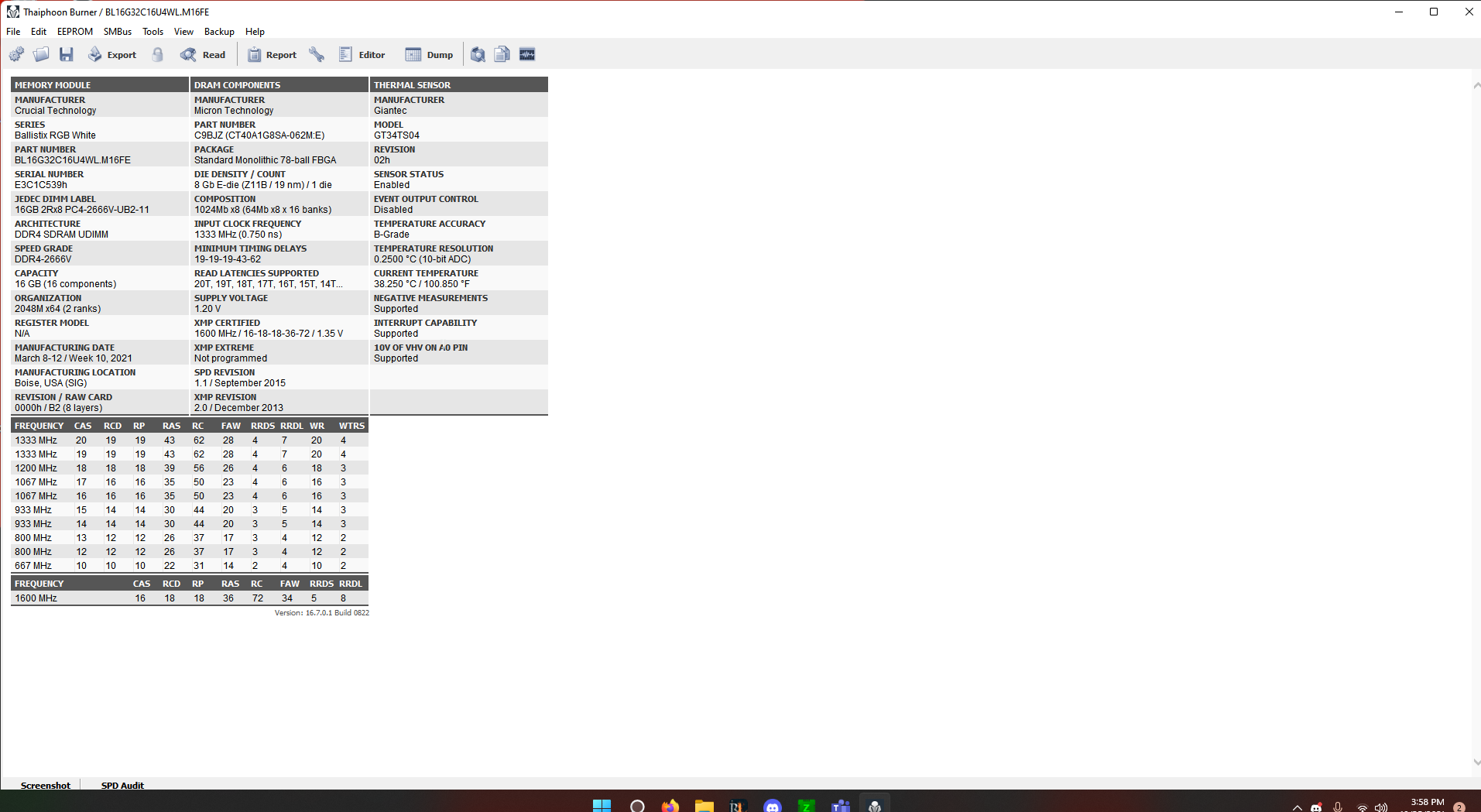
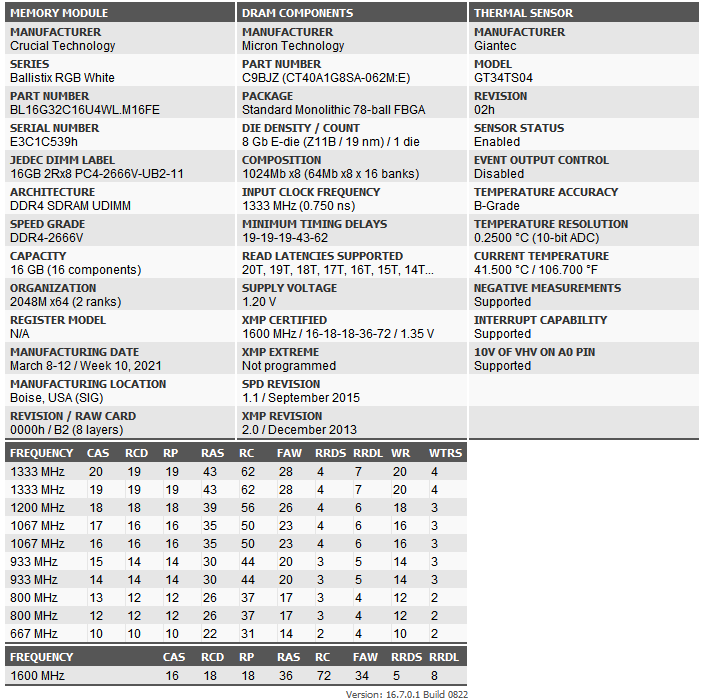
What does thaiphoon burner say? And can you put up a pic of the white label on the sticks?
3800 c16 is quite possibly the best you'll get on ryzen, maybe 4200c18 on Intel
Don't go over 1.45v or you'll degrade it btw, it doesn't like voltage like b-die does
proven canopy
More QoL tweaks
 tall pelican
prisma arch
do you think i can get similar results with 4200mhz cjr
tall pelican
prisma arch
do you think i can get similar results with 4200mhz cjr
Doesn't sound like cjr tbh
dull ginkgo
Djr perhaps
 latent wave
Is it better to let msi afterburner automatically overclock or should I take the time and set an offset
tall pelican
they said its dr, much confusion
worldly wasp
ah
proven canopy
Country Cup 2021 info thread https://hwbot.org/competition/Country Cup 2021/
HWBOT
Level 3 OC-ESPORTS competition running from 11/1/21 12:00 PM till 12/30/21 12:00 PM.
sudden torrent
All this confusion is why I asked for thaiphoon and label pics
tall pelican
thaiphoon tells you nothing that the label doesnt already tell you
sudden torrent
It doesn't hurt to have both so you're sure
proven canopy
Can always delid 
 mellow granite
if i wanted to overclock a 10400f how many more watt psu should i get?
that is build, would i need to upgrade psu to overclock?
proven canopy
No
short blade
mellow granite
if i wanted to overclock a 10400f how many more watt psu should i get?
you can't overclock a 10400f sir
and even if you had an overclockable cpu the mobo doesn't allow overclocking
if you want to overclock focus on your RAM and GPU
I would recommend getting 650W just so you're sitting on a better spot on the PSU efficiency curve if you unlock power limits on the 10400, since it shouldn't cost much extra
but 550W is fine
mellow granite
short blade
you can't overclock a 10400f sir
oh
prisma arch
mellow granite
oh
lmao
lavish tundra
short blade
you can't overclock a 10400f sir
technically
blck
but dont
it bad
can kill system for very lil returns
short blade
I mean yeah but if we want to be technical that's not really overclocking the 10400
that's overclocking the bclk which affects other things and just so happens to affect the 10400

 dull ginkgo
I'm curious how the memory clocks look with that...
 barren ridge
^
humble jay
It was cursed
So hard to boot
I tried 300 BCLK but it wasn’t liking it
I think that was 3466 mem
lavish tundra
humble jay
I tried 300 BCLK but it wasn’t liking it
thats just because 300 wasnt enoughhh send 500 and call it good
/s
 lavish tundra
dew it
humble jay

let's see

300 BCLK not happy

ok yeah i don't think i'm going to do any better
 proven canopy
Why do you have a single qdc on the block?
I see most people put them both on the block itself, I have mine with about 50cm of tubing off the block, zmt is cheap
 proven canopy
Makes sense
I want to just get a distro block + another d5 in series , would be nice to rig it all up on a mora in one piece like keep did
 coarse rapids
proven canopy
coarse rapids
proven canopy
Also, why only one 8 pin? I guess not needed on water, but might as well
humble jay
proven canopy
Also, why only one 8 pin? I guess not needed on water, but might as well
It’s the one 8 pin that concerned you and not the only having 2 out of 4 standoffs in the block? 
Nah I was just unbricking my 6900XT and wasn’t concerned about actually benching
humble jay
Yep
short blade

 humble jay
short blade
<:02think:443257729629290496>
humble jay
short blade
<:02think:443257729629290496>
Don’t make me try and compete 😤
short blade
lol go for it i'm not sure what to expect out of tiger lake
i just oced the included 3200c22 ram instead of upgrading


 humble jay
Let me run it
short blade
i'm thermally limited in that run
throttling to 4.32 all core
need to take the laptop out on a cold winter night
what kind of undervolt did you get?
short blade
oh wow
 tall pelican
I should prob see what my 1165g7 does in aida
short blade
i did 100 mOhm AC/DC loadline, -45mV core, -50mV cache and SA
that's the best it can do
-20mV on igpu
 short blade
my laptop has a button combination that instantly cranks the fans to max
proven canopy
@humble jay So when are you getting a capture card rig?
short blade
11989
humble jay
 short blade
what wattage are you sustaining
humble jay
Right now I use my capture card as my monitor for my bench
humble jay
Let me run hwinfo
 rapid prism
humble jay
Right now I use my capture card as my monitor for my bench
rapid prism
humble jay
Right now I use my capture card as my monitor for my bench
is that normal?
tall pelican
yeah, I do that too
 short blade
oof
proven canopy
humble jay
Right now I use my capture card as my monitor for my bench
Isn't that pretty laggy?
Bench over rdp 
humble jay
Not at all tbh
proven canopy
Do you use passthrough to another monitor? That's what I do, I meant the live view in obs is laggy
short blade
the 11900H is rated for a 300mhz higher turbo
must be a really good bin
i've already been really impressed with this 11800H
humble jay
I don’t, I just use the Windowed projector mode in OBS
short blade
200mhz higher base clock
humble jay
It’s actually perfectly silent
Guess they just optimized it for that instead of perf, which I’m happy with
short blade
lol can't relate
it is not easy to cool 100w sustained in a 15.6" laptop
dual 6600 rpm fans
plus external cooling pad
plus liquid metal
humble jay
short blade
consumes as much power as my old 5600x
humble jay
I tried taking mine apart once but struggled a bit, might try again later to swap the ram
short blade
but smashes it in performance
this one isn't too bad to take apart
my mom's dell laptop is the easiest laptop to take apart ever
it's got 8 captive screws, no hidden shenanigans, cover practically falls off by itself once you unscrew it
no need to pry super hard at dumb clips
this one there's no hidden screw shenanigans but the clips are a little annoying
tall pelican
 short blade
worst laptop i ever had to take apart had proprietary screws
ended up using a precision drill to shatter them
short blade
tall pelican
<:LeoKek:798776990508908594>
jesus
rapid prism
tall pelican
<:LeoKek:798776990508908594>
you have like nothing on your pc
tall pelican
1 its a laptop that I use for work
rapid prism
o ok
tall pelican
and 2 its used solely to access 1 web page
rapid prism
short blade
thats all he needs
and it can run that fast?
tall pelican
its also a 13" with a 4k display
short blade
rapid prism
and it can run that fast?
i... would not call that fast
rapid prism
for a work laptop thats seems fast to me
short blade
my work laptop has a 3070 in it
humble jay
You mean the mem speed
short blade

humble jay
Mine is
short blade
my aida read speed is higher than what the ddr4 oc guide says is the theoretical limit for 3200
wonder why
rapid prism
short blade
my work laptop has a 3070 in it
bruh i seen so much people with work laptop no way you need that 3070
short blade
it's very consistently around 53000
short blade
tall pelican
just slightly <:LeoKek:798776990508908594>
looks like it's just doubled
4267?
short blade
the last version of aida64 was not working very well on this laptop lol

1229 c63
insane 0ns latency
humble jay
New meta
rapid prism
going to cry from seeing a man that needs a 3070 for work
rapid prism
short blade
some work needs much stronger gpus
what do you need to render?
short blade
sometimes 4x 3090 isn't enough
short blade
lmao
dull ginkgo
Yes mining
short blade
i don't render on it
rapid prism
dull ginkgo
Yes mining
frick mining
short blade
this laptop is for work at work and gaming when i'm staying with gf
dull ginkgo
No u
short blade
and mining to pay itself back when i'm not otherwise using it
rapid prism
i got 14508 on cinebench sad
humble jay
Tiger lake is so good
short blade
i had to beat the crap out of this laptop to hit 14757 lol
rapid prism
short blade
my 5800x is not a very good sample and will do 16.2k
what gpu you have for your pc if your latop has a 3070
short blade
3080
short blade
......
humble jay
Wanted alder lake for when I went to college, but at least I didn’t get a skylake laptop
short blade
i would have stuck with my comet lake laptop until alder lake
but i found such a nice used deal on this laptop
literally getting paid to upgrade
i had bought my i7-10750H 16gb 512gb 3070 (130W) 144hz laptop for 1700+tax
was happy with it
found this i7-11800H 16gb 1tb 3070 (140W) 240hz laptop for equivalent of 1265+tax
selling old one for 1600
short blade
rapid prism
MAN RICH
am i still rich if i got the 3080 for below msrp
rapid prism
so you over payed....
short blade
got it at msrp in a newegg bundle with a power supply
$30 bundle discount
proceeded to sell the power supply for full retail price
rapid prism
wish i could do that
short blade
i lost a chance to buy a different 3080 before that one
i got it in my cart
and newegg was like HEY BRO DO YOU WANT TO BUY SOME MASKS
by the time i closed that popup the 3080 was gone
rapid prism
short blade
by the time i closed that popup the 3080 was gone
lol
adds be like
dont you have add blocker?
short blade
i do but it wasn't an ad lol
newegg used to just always ask you if you want to buy masks at checkout
rapid prism
oof
short blade
the thing that made me even saltier was that i clicked "don't show again" on it before
but they still showed it again and screwed me out of an msrp 3080
rapid prism
well they be like that
short blade
cmon newegg i have like 100 masks at home + reusable ones i don't want to buy
just give me 3080
it worked out in the end tho cause if i got that one i wouldn't have gotten the one i have now
and the one i have now is a white model
that one was black
the rest of my pc is white sooo
rapid prism
but problem is
short blade
wonder how well the plastidip would hold up on that hot backplate though
gddr6x gets REALLY hot
rapid prism
or you can do liquid cooling
short blade
nah too expensive
rapid prism
and get white covers
short blade
i am poor
rapid prism
man says to expensive for a cooler when you buy a 3070 laptop and 3080
dull ginkgo
Time to hit hei up for a bykski kit
dull ginkgo
rapid prism
man says to expensive for a cooler when you buy a 3070 laptop and 3080
Custom loop gets very expensive tbf
short blade
i mean yeah id rather spend that money on more 3070s
this is air cooled

46C average in time spy
x)
25c room temp
dull ginkgo
Ln2 for the vram
short blade
im pretty sure i would actually burn myself if i pressed my hand on my 3080 backplate for 1 minute lol
those thermal pads are doing their job...
feels like the same temp as the vram itself
dull ginkgo
I mean, is 3dmark actually hard on vram?
short blade
even with the case closed if i put my hand near the graphics card area i can feel that the glass is hot
short blade
dull ginkgo
I mean, is 3dmark actually hard on vram?
i meant mining for months straight
dull ginkgo
Ah
short blade
3dmark is not that hard on vram but
with the stock pads i still saw vram hit 104c in 3dmark
dull ginkgo
What about aftermarket pads?
short blade
never looked tbh
but the aftermarket pads dropped temps in mining by 42-44C at 100% fan speed
so i have to imagine something of similar proportion
dull ginkgo
Fair
modern walrus
okay so I'm really confused here. Before mem oc, I could push 180 amps for TDC/EDC & stay sub-80c on CB R23. After mem oc, I'm hitting 85c+ on CPU (Tctl/Tdie), Die (average), CCD1, & CCD2 even after reducing TDC/EDC to 155 amps & dropping PPT to 187w. Oddly, voltage stays virtually the same as pre-oc at about 1.288-1.294v under load. The only change I've made to the cooling system (loop) is upgrading a 360x27mm rad to a 360x67mm rad. The coolant temp sensor is reading 37c, about 6c better than before the rad change. Any idea(s) what the heck is going on? Only major change was 0 core offset (PBO still on w/ curve optimizer) compared to pre memOC of -.06250v core offset
 proven canopy
Terrible mount following ek's direction of 1mm pads on both the power stages and chokes, trying again with .5mm on the chokes https://i.imgur.com/Zwe7zLn.jpg
 tall pelican
first 5 words are self explanatory
proven canopy
Mainly pulled the block to remove the jetplate, seems really restrictive.
modern walrus
wait... you can pull the jet plate? well more like, pulling the jet plate is a good idea?
my video card block has this plexi plate that not only seems really restrictive, it gets condensation behind it & looks like trash but it also holds the jet plate in place. I'd end up with a pretty big pool of liquid there but maybe I'd see improvements & not have to worry about condensation creeping back in
freaking looks like there's mold on my GPU
proven canopy
modern walrus
wait... you can pull the jet plate? well more like, pulling the jet plate is a g...
It probably is when the chip pulls 1200w and takes 15 seconds to cool back down to idle temps
modern walrus
haha ya damn I'm nowhere near that
prisma arch
short blade
im pretty sure i would actually burn myself if i pressed my hand on my 3080 back...
lol if i touched the backplate of my gpu while playing minecraft and rocket league at the same time with fans off i wouldnt have a hand anymore
worldly wasp
proven canopy
Mainly pulled the block to remove the jetplate, seems really restrictive.
what pump you running?
no jetplate might affect perfromance
proven canopy
D5
 high grail
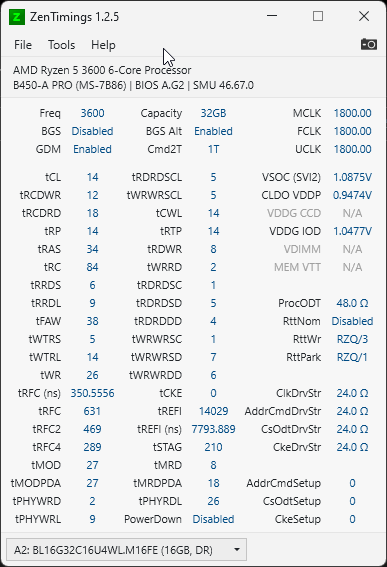
https://i.imgur.com/BWsaHBI.png So, what else can I do to improve my RAM performance? @lavish tundra @short blade
 lavish tundra
Yeah
high grail
You think my B450-A Pro can handle 1.5v on the RAM?
lavish tundra
3600 14 16 18 36
short blade
no
lavish tundra
at 1.5V
lavish tundra
short blade
tRCDRD will not go below 18 lol
you see the 3rd number?
short blade
14-18-18-18-38
short blade
it's tCL-tRCDRD-tRCDWR-tRP-tRAS sir
lavish tundra
short blade
it's tCL-tRCDRD-tRCDWR-tRP-tRAS sir
I WATCHED HORROR MOVIE OK MY MIND SCARED
high grail
Should I also work on my sub-timings? Or just focus on Main timings for now?
lavish tundra
bad sippy
lavish tundra
short blade
it's tCL-tRCDRD-tRCDWR-tRP-tRAS sir
No wait shudup im right
short blade
?
lavish tundra
lavish tundra
3600 14 16 18 36
.
high grail
Gotta do a Windows Update...
I pray that the Steam Deck will make a lot more Steam Games run on Linux...
lavish tundra
3600 frequency
14 tcl
16 tRCDRD
18 tRCDWR
36 tras
lavish tundra
and thats what i said too
lavish tundra
3600 14 16 18 36
short blade
go try it yourself man
lavish tundra
im right
short blade
ive oced 4 rev. e kits none of them ever posted with tRCDRD below 18 at 1.6v
tRCDRD doesn't scale with voltage on rev. e
it's just 18
period
short blade
🗿
high grail
My RAM voltage is already 1.5 I'm dumb
lavish tundra
fair
high grail
Alright, time to boot to Windows
short blade
i did my fclk testing at 3733/3800/3866/3933/4000 14-18-18-18-38
same timings for all
lavish tundra
4000 booted?
lavish tundra
degrade tho?
short blade
yeah
lavish tundra
ahh yep
high grail
I wonder if my 3600 can hit 1900Flck
lavish tundra
I dont degrade at 1900 but 1933 is no boot
short blade
couldn't boot 2033
high grail
What do you perf test with for your ram?
short blade
even when i did full send on imc voltages
intel memory latency checker
aida64 is a meme now tbh
but it's fun
lavish tundra
TBH sippy im pretty sure my latency issue is because degradation
short blade
nah
lavish tundra
screw 1usmus
lavish tundra
probably
short blade
your chip has 2 ccx
lavish tundra
yeah
short blade
so it's bound to have worse latency than 1 ccx chip
lavish tundra
oh right 5600x is single ccx
short blade
5800x
lavish tundra
5800x is double so hot
short blade
5600x = 6 cores @ 100w in single ccx 2 cores disabled
lavish tundra
i think im drunk
short blade
5800x = 8 cores @ 142w in single ccx 0 cores disabled
5900x = 12 cores @ 142w in dual ccx 2 cores disabled each
lavish tundra
yeah no im heading out because my mind is seriously tripping rn
lavish tundra
im saying dumb stuff
short blade
even when you oc the 5900x to have higher ppt it's still lower W/core
high grail
Wtf, how do I use this memory latency checker?
short blade
i see my 5800x hitting almost 20W/core
short blade
lavish tundra
maybe should sleep
short blade
run IMLC with this
short blade
lavish tundra
maybe should sleep
what time is it over there
high grail
it's not even a proper exe or file.
high grail
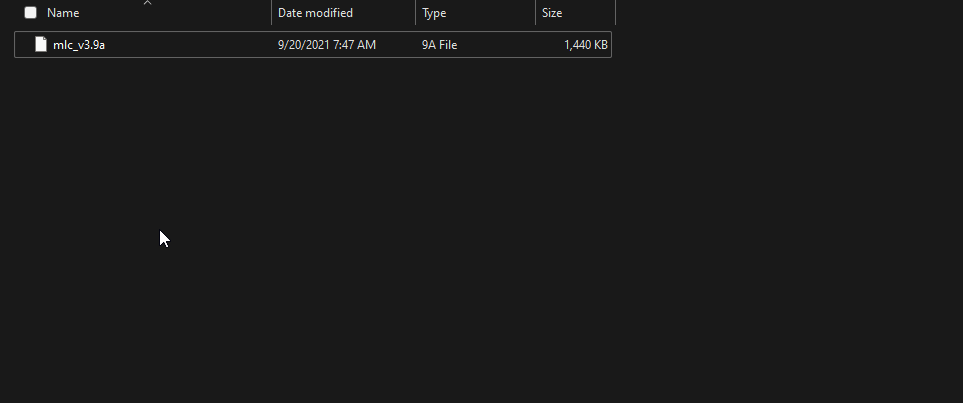 high grail
I downloaded this from the Intel Website
short blade
alright idk what you downloaded lol

 short blade
here
high grail
It's literally on the Intel website so IDK what crack intel is smoking.
high grail
It's the ONLY file
short blade
short blade
here
its right here
high grail
So...
How long of a latency should I expect?
Or should I just post the results over time?
short blade
there's not as good data on imlc compared to aida64
hard to say
just check if your own numbers are improving or not
high grail
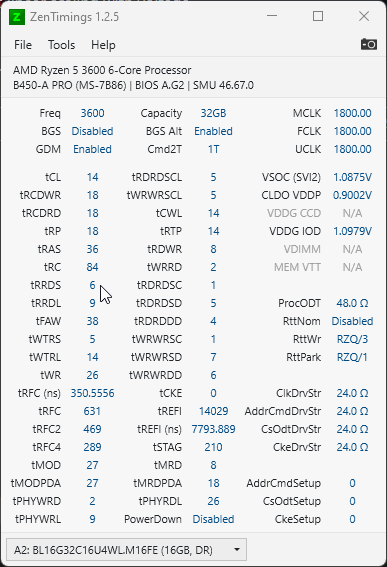
https://i.imgur.com/145K8mF.png That's what I started with after the first change you recommended.
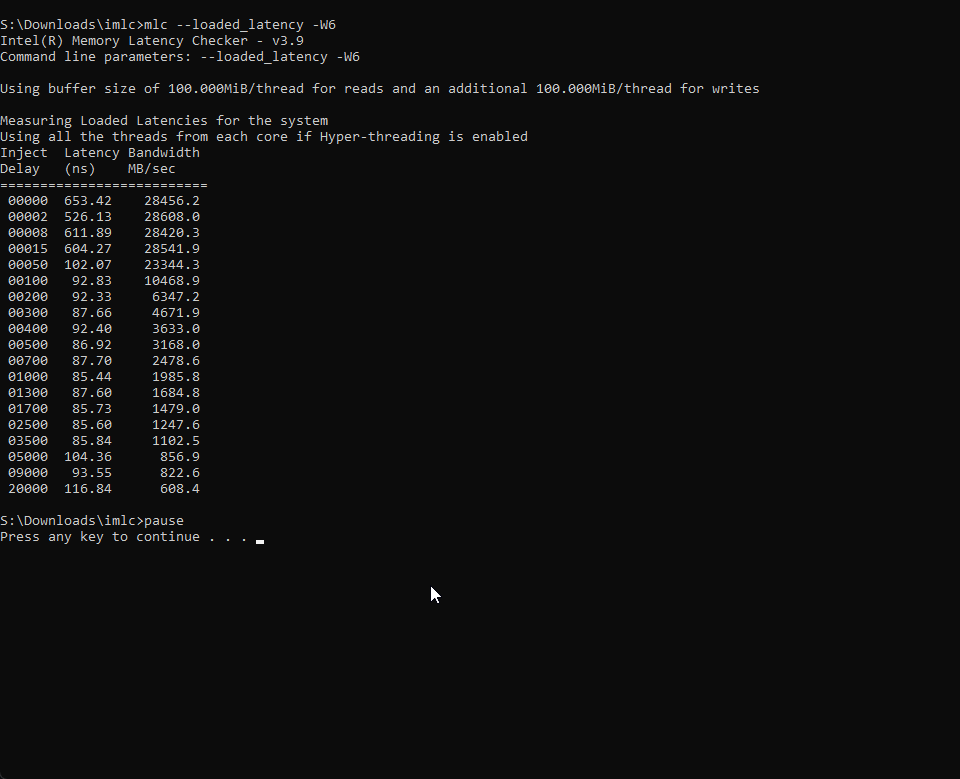
So should I try for DDR4-3800?
short blade
try 3600 14-18-18-18-38 first
 short blade
tras 38 was for a reason, sometimes tRAS below tRCDRD + tRP + 2 can cause performance loss
not always but sometimes
but yeah sure set vsoc 1.1 cldo vddp 1.05 vddg ccd 1.05 vddg iod 1.05 and send 3800 1:1
1.55 vdimm
if that procodt and rtts aren't manual, set them to those values manually (40 ohm, disabled, /3, /1)
high grail
Is vsoc also just CPU SOC Voltage?
I have the janky old-style MSI Bios
Because B450 on Ryzen 3000...
Also 1.55 Dram voltage is red on my bios screen
lavish tundra
high grail
Also 1.55 Dram voltage is red on my bios screen
no matter
1.55 safe on rev e
high grail
It won't make the magic smoke appear?
short blade
it's red because it's not safe on most dies
but rev. e and b-die can handle above 1.55
high grail
 high grail
Eventually I want to get around trying to OC my 3600
short blade
now set 3800 mclk 1900 fclk
short blade
tRAS 38
short blade
you sure they aren't just hidden in drop-down menus
high grail
Yeah
short blade
I've done ram oc on a much older msi board
high grail
 short blade
I even had access to the obscure timings nobody talks about
high grail
I tried clicking on them
short blade
let alone secondaries, tertiaries, and quarternaries
high grail
Nothing
high grail
It wasn't before.
short blade
I had an MSI z170a gaming m5 that let me change everything
high grail
Maybe a Bios update locked it for some ungodly reason.
short blade
try pressing right ctrl + right shift + left alt + F2 at the same time
that unlocks full overclocking bios on my MSI laptop
unlikely to do anything here
but why not
high grail
Nothing.
short blade
unfortunate board then
high grail
Maybe I need to do a Bios update or downgrade. I KNOW I had more than this on an older bios
Like, not joking I've done this before with this board. But with a different kit of ram
short blade
wack
high grail
Hmm
I wonder if the resizable bar update borked secondary timing changes.
Not that I can use Resizable Bar
Oh
short blade
probably not
high grail
It got moved
short blade
found them?
high grail
 high grail
For... 14?
short blade
0E means 14
 short blade
very common to see a "b", "d" or "h" suffix denoting the number base
yup
now try booting
high grail
Forks
worldly wasp
what cursed bios is this
high grail
I got a Black Screen. Which I think is the new Bsod for Win 11
worldly wasp
M16FE, very nice. i wouldnt run rev e over 1.6
high grail
It had the QR code and everything
high grail
I need to do a 2nd boot to make sure Windows wasn't just joshing me
My first boot got a bsod
short blade
gonna let @worldly wasp take over he's more knowledgeable than I am
worldly wasp
i have to go
worldly wasp

high grail
Fork... I think I gotta reset cmos
short blade
try 3733 then
high grail
Uhhh... 3750?
I don't have a 3733
Oh
Nvm
What's the matching IF for that? 1833 or 1867?
Nvm math
short blade
1867
short blade
lol oops
high grail
Oh, I fixed the timing page too

Looks like 3733 also isn't gonna fly.
Maybe?
Its trying to do Windows automatic repair
Lol
Yeah, 3733 isn't flying
3600 is the fastest this kit will go
So, how about delving further into the sub and turnaround timings?
Oh no.
Something else isn't happy now.
Dropped speed down to 3600 and it ain't happy still
Ok, I think Windows is ok now.
https://i.imgur.com/B2KDs9N.png Much faster compared to earlier.
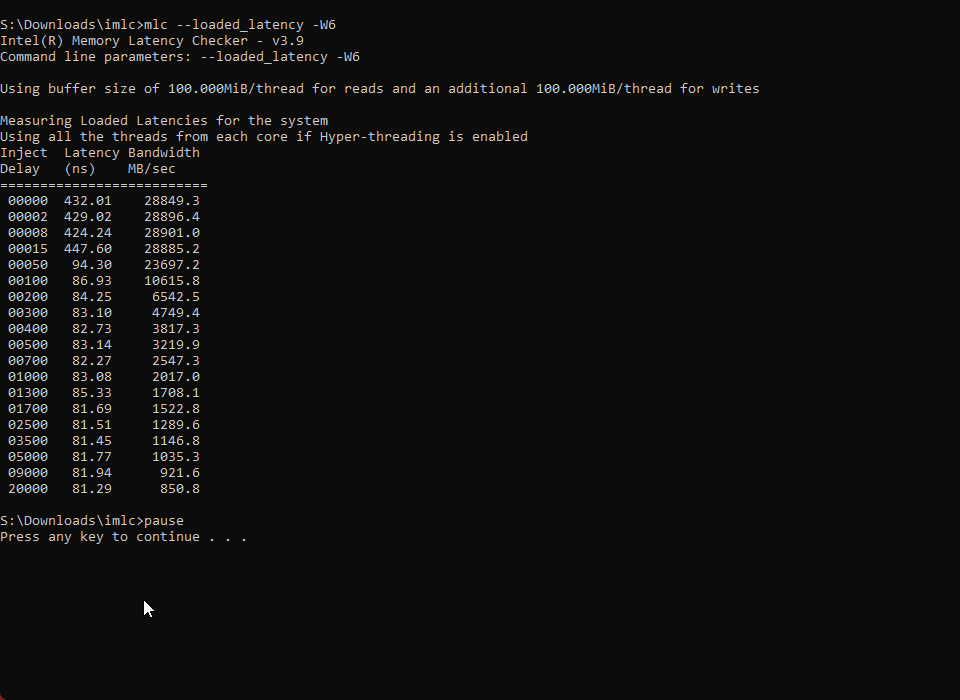 sudden torrent
Make sure to run that repair script if windows failed to load like that
high grail
Which repair script?
sudden torrent
The one in the pins #windows-ios
It'll make sure none of your system files corrupted
high grail
Gotcha
Hopefully once the Steam Deck launches I won't be dealing with Windows anymore.
Looks like there was a little bit of corruption.
I guess for now until an expert comes in to help I'm gonna leave my RAM like this.
sudden torrent
I'm not exactly an expert like fitz but I'm competent. What's the issue?
high grail
I just want to get the absolute most out of my RAM
And right now it's looking like I can't go past 3600Mhz, which is fine. That's already 400Mhz faster than the kit's default.
sudden torrent
Did you figure out the die type already?
high grail
Rev-E
high grail
Which is still better than the AFR I used to have
sterile flame
mmmmmm copper 
 sudden torrent
Rev e should be great for overclocking, but infinity fabric might be your issue
sterile flame
Oh wrong side of the cpu
high grail
I wasn't able to boot at 3733 and 3800
sterile flame
mmmmmmm copper
 high grail
You think my IF can't go past 1800?
lavish tundra
maybe
lavish tundra
thats it
sudden torrent
Yeah higher IF might have some issues, mine's started degrading already with conservative overclocks running at 1900 and it's less than a year old
lavish tundra
falcie older zen 2 cpus struggled to hit 1900
1800 might be the hard limit
recent zen 2 cpus do it no problem usually
sudden torrent
It's zen2? yeah that's it
high grail
3600
sudden torrent
Yeah I had to scroll up to your zentimings screenshot, 1800 is probably the limit
sudden torrent
You should be able to do cl14 at around 1.5v or so, probably not cl12 without a lot more voltage
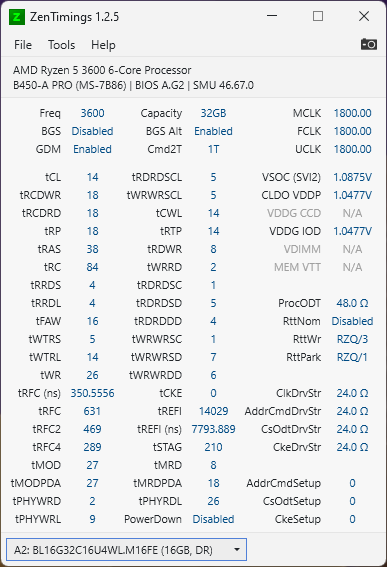 sudden torrent
Should be able to do 14-8-18-14-34 at around 1.5-1.55v even on a bad bin
high grail
That sounds... REALLY tight.
sudden torrent
It might, but there's a good chance it'll work
RCDWR can usually go to the minimum on rev e, it doesn't do much anyway
So 8 isn't unheard of
lavish tundra
14-8-18-14-34 little too tight tbh
try 14-12-18-14-34 first
if stable drop further
sudden torrent
Fair, and like I said RCDWR doesn't have much impact on performance anyway
RFC you can do 540 to start
Can probably tighten that a bit later
lavish tundra
thats again tight for some rev e
sudden torrent
300ns is tight?
lavish tundra
tweaking required sometimes yeah
560
200
150
should be fine and can work down from that
Better bins can do 550 or so without an issue
but yeah best to work down
high grail
So what should be set to 560?
 lavish tundra
560
200
150
should be fine and can work down from that
lavish tundra
lavish tundra
560
200
150
should be fine and can work down from that
those are trfc1, 2 and 4 in order
sudden torrent
tRFC 2 and 4 don't really matter, that's why the 1/2/4 one exists
lavish tundra
eh i never use 1/2/4
sudden torrent
It saves you from needing to calculate all 3
sudden torrent
DRAM calc?
lavish tundra
hes called sips bleach seductively
sudden torrent
lol that works too
lavish tundra
increase all the 3 values by 10
or 20
keep going till you boot and then drop by like 5
sudden torrent
Or leave RFC on auto for now and we'll get there next
Should probably see if it's stable before you get into secondaries like that
high grail
Sadly my Bios is so lobotimized that I can't save settings to the BIOS itself.
sudden torrent
G'night rawr
high grail
I think step 1 is trying 14-12-18-14-34 to see if that boots
sudden torrent
Yeah, and test if it's stable too.
high grail
Yeah... It no boot
sudden torrent
Try 1.55v VDIMM
proven canopy
Switch the rcd's
sudden torrent
Oh hi forks
high grail
So switch 12 and 18?
sudden torrent
Yes
high grail
Nooo, I got a Memory Overclocking Fail error from the MB
I'm a dumb
I forgot to set voltage
lavish tundra
Rev e wont do 12 trcdrd
high grail
Its attempting to boot
lavish tundra
You can try but i highly highly doubt itll boot
high grail
I'm in Windows
high grail
At 14-18-12-14-34
lavish tundra
Send zentimings pic
lavish tundra
Huh
high grail
But then it froze