#overclocking
1 messages · Page 75 of 1
 south sky
 modern walrus
darnit why wouldn't CoolerMaster offer a top mesh piece
I guess a dust filter isn't that important up there since there's constant positive pressure
modern walrus
Once I get somewhere close to stable I'll try it again
Otherwise it's like okay start... 10 seconds... Tj max 7/10 cores & computer frozen
Then I have to hit the switch on the power supply before everything bursts into flames
Btw too bad I don't live in a colder climate. 10900K makes a great space heater
 tall pelican
special gigabyte bios from madlad?
modern walrus
@lavish tundra CB then OCCT for about an hour then RealBench then OCCT for like 5 hours
I mostly just spin wheels & get nowhere
modern walrus
maybe throw a 3d mark in there just to switch it up
 proven canopy
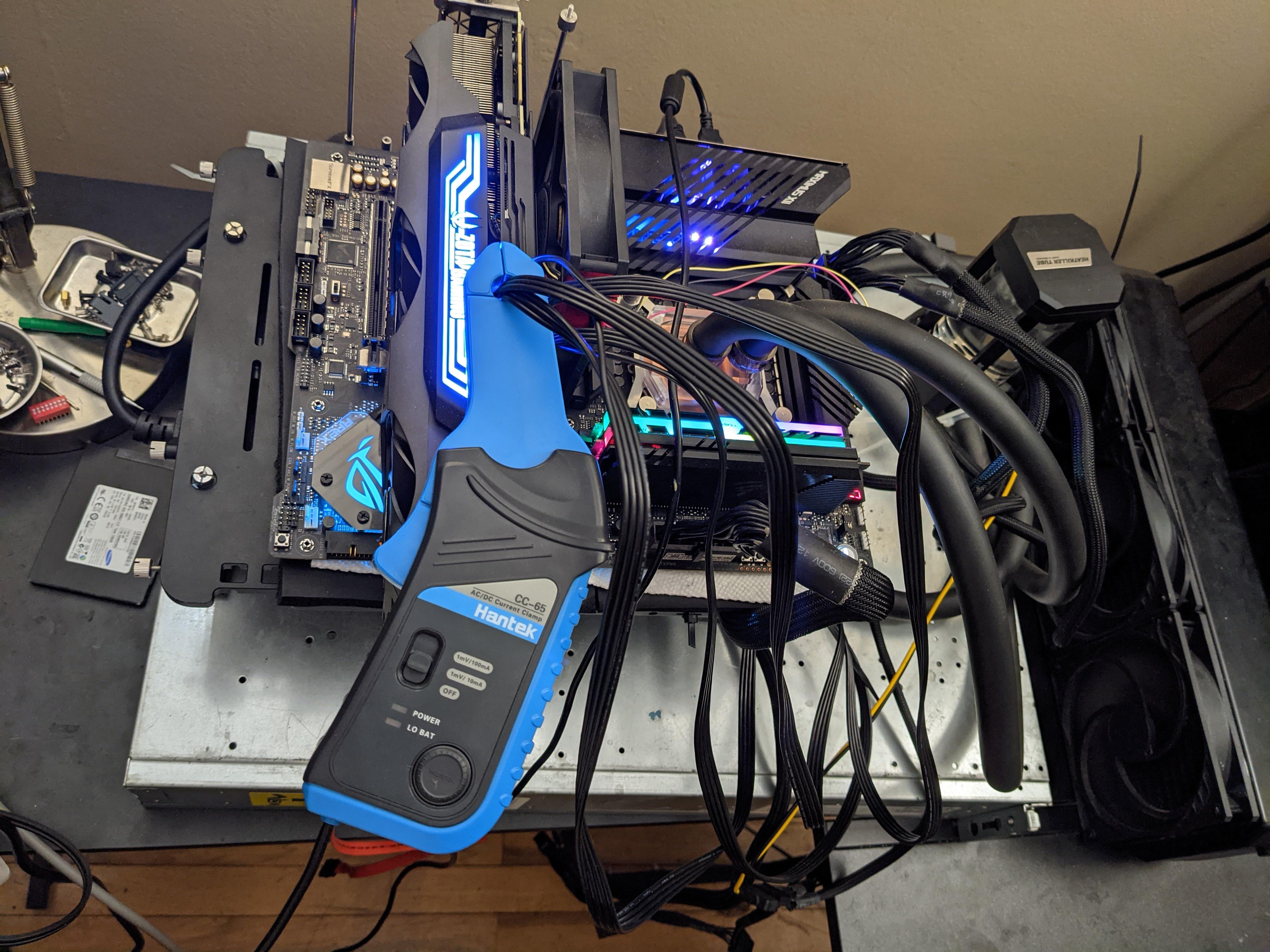
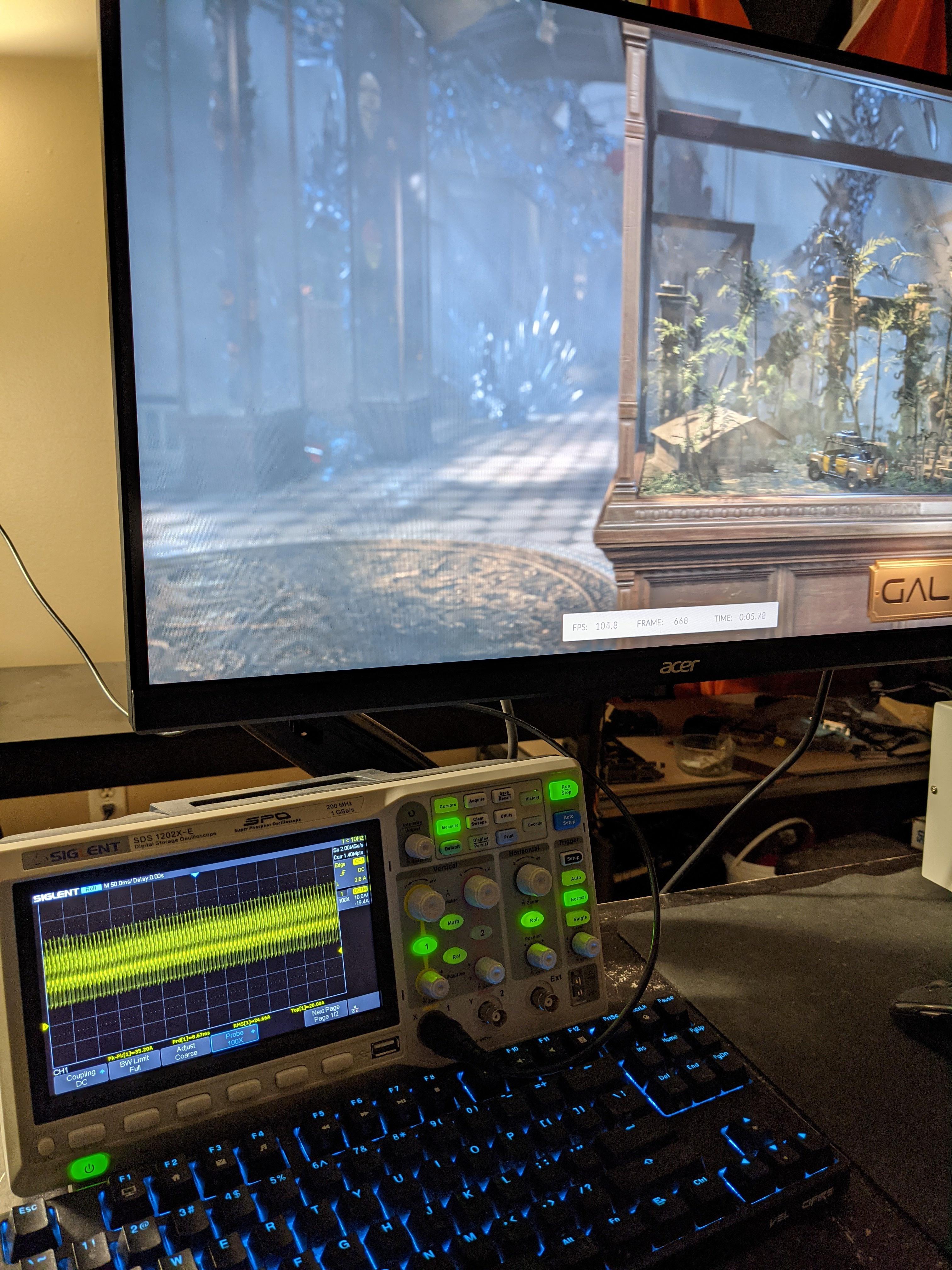
Current probing the 3090
https://i.imgur.com/A4DonsF.jpg
https://i.imgur.com/4DSGfHz.jpg
 lavish tundra
modern walrus
<@!499525349109923844> CB then OCCT for about an hour then RealBench then OCCT f...
lavish tundra
modern walrus
<@!499525349109923844> CB then OCCT for about an hour then RealBench then OCCT f...
Not stress tests
You are running ram tests and benchmarks
Literally 0 of your ocs are stable
 sudden torrent
CB is at least close to a gaming load, so sure it might not be 99.9% rock stable but good enough for gaming
lavish tundra
sudden torrent
CB is at least close to a gaming load, so sure it might not be 99.9% rock stable...
Its like 70-80% stable
Talk to sippy about this
Lemme pong him actually
lavish tundra
modern walrus
<@!499525349109923844> CB then OCCT for about an hour then RealBench then OCCT f...
@short blade thoughts on dis?
proven canopy
sudden torrent
CB is at least close to a gaming load, so sure it might not be 99.9% rock stable...
Doubt
R20 might be close, but definitely not r15 for modern games
sudden torrent
Were they doing R15 though? I didn't see that part. I assumed R23.
proven canopy
If you want something canned - run time spy gt2 looped, or x265 4k for cpu only
Or both lol
lavish tundra
Prime95 for stability, followed by cinebench for comparing perf
lavish tundra
proven canopy
If you want something canned - run time spy gt2 looped, or x265 4k for cpu only
Or an hour of small FFTs
proven canopy
Overkill
You'll lose 100+mhz that way (doesn't really matter in the grand scheme of things)
lavish tundra
And if ya really want true stable, use ycruncher
Forks did ya know small ffts isnt even 100% stable?
Small ffts stable can fail ycruncher
proven canopy
small fft doesn't really touch memory, ycruncher is one of the most memory intensive benchmarks there is
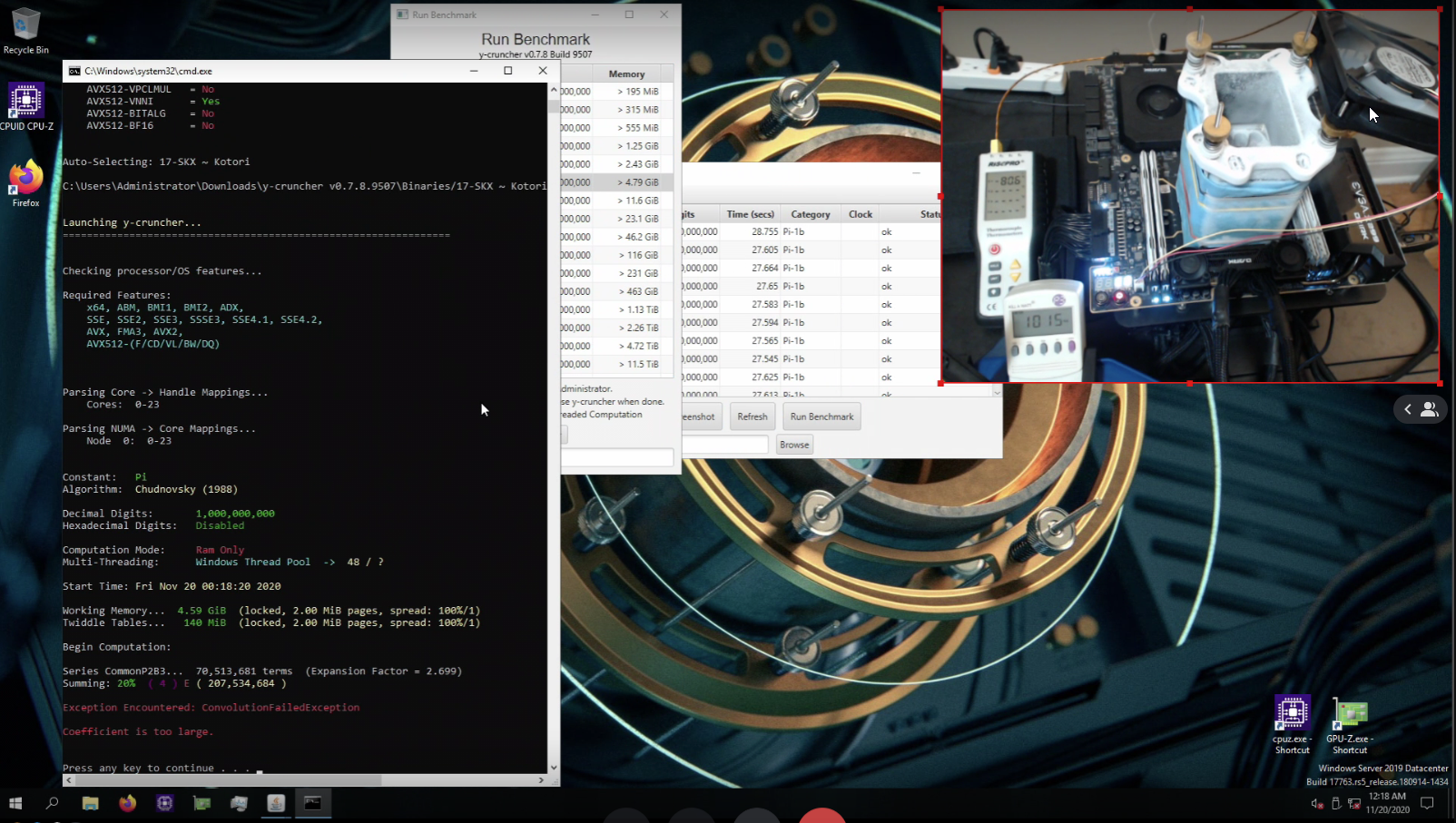
My pfp was a world record ycruncher 1b kek
lavish tundra
Oohhh nice
proven canopy
Was the only ln2 sub to be fair lol, but I took 1st on air before that
lavish tundra
What chip?
proven canopy
10920x
lavish tundra
Oohh cool
proven canopy
1kw power draw https://i.imgur.com/P4ukOVE.png
 lavish tundra
How many power lines were you drawing from?!
proven canopy
Lol, nothing exotic. I'll run 240v for 18c if/when I do that though
Maybe dual 1620w supermicro server psu/pdb
lavish tundra
1kw is more than most outlets can output tho right?
proven canopy
Nope, ~1800watts minimum from any typical built to code american household outlet
 quick rose
Yep
lavish tundra
Ahh i see
sudden torrent
lavish tundra
The max that home circuits go here is 10 amp
That's probably on 240v though right?
lavish tundra
Yep
proven canopy
Where is here
lavish tundra
India
lavish tundra
Yep
modern walrus
oh man sorry everyone
I missed a good lesson
(like for real, y'all know stuff I don't)
It's R23 btw
This I actually do know about. I don't recommend it, but on a 15 amp breaker, you'd have #14 wire.
Unless your wiring is old, it's probably THHN
so rated for 90
the ampacity of a #14 wire is 25 amps
code requires #14 to be on a 15 amp breaker, just like it requires #12 to be on a 20 amp breaker but the ampacity of #12 at 90 degrees is 30 amps
long story short, if you temporarily swapped the 15 for a 20a breaker you wouldn't be doing anythign too crazy
but you should never do that disclaimer
lol
just like #10 is required by code to be on a 30 amp breaker but has a 40a rating
is your 240v on a single phase?
i.e. one hot wire?
 zenith palm
I was debating undervolting my 3070, would the undervolt have to be different for my mining profile or can i just use the one v/f curve?
lavish tundra
zenith palm
I was debating undervolting my 3070, would the undervolt have to be different fo...
For gaming i would undervolt both mem and core
For mining I wouldnt undervolt mem as much and undervolt and underclock the core heavily and slash power limits
zenith palm
lavish tundra
For gaming i would undervolt both mem and core
For mining I wouldnt undervolt me...
So you can set different v/f curves for different profiles in afterburner?
zenith palm
Wasn't sure if the v/f curve applied to all of afterburner or not
But i don't see a mem v/f curve type thingy
 unkempt bear
What's overclocking?
lavish tundra
unkempt bear
What's overclocking?
unkempt bear
Thanks
modern walrus
MSI gaming carbon wifi won't post after BIOS update. I'm sure RMA will take forever. Any suggestions on better/more OC friendly boad for 10900K? Thinking ASUS
lavish tundra
modern walrus
MSI gaming carbon wifi won't post after BIOS update. I'm sure RMA will take fore...
Flash a fresh copy of the bios using bios flashback
modern walrus
I don't have a BIOS flashback button
heck let me check out the manual
I already reset CMOS, removed CMOS battery for about 45 minutes, & reseated RAM including only putting one RAM in A1
I can't even get into BIOS. No Display
 dull ginkgo
any EVGA board is just great for oc
modern walrus
why did you use strikethrough? lol
tall pelican
because only their darks are good for overclocking
modern walrus
okay so EVGA is the best way to go? I was gonna get ASUS to match my graphics card but that's a dumb basis upon which to decide isn't it?
tall pelican
if you're on a 10900k, just get a gigabyte z590 imo
you have elite, ultra and master for your $200, $300 and $400 price points
modern walrus
Z590 > Z490?
tall pelican
yes
modern walrus
dumb questions again my bad
tall pelican
tldr saves you $100 and gives you better memory overclocking
z590 ultra = z490 master, but z590 has better bios support
modern walrus
AORUS elite?
tall pelican
yup, its a good board
modern walrus
Triple M.2 faaancy
tall pelican
only 2 will work with 10th gen
modern walrus
oh. heck
tall pelican
that's with all z590
modern walrus
I see. Ya I think I'm gonna order this AORUS elite then. ASUS TUF looks kinda nice too but I trust your advice over my trying to match parts
Any advantage UD v. Elite v. Master that makes it worth shelling out an extra $200?
tall pelican
UD is trash
modern walrus
okay so Elite at least
tall pelican
elite is cheap, master is high end, ultra is middle ground of both
like elite uses solid vrm heatsinks, ultra and master have finned heatpipes
modern walrus
Xtreme is $850. that's crazy
I'm sure gonna miss DragonCenter
haha
what about Vision?
tall pelican
 modern walrus
ok nvm theh lol
tall pelican
just look up bios pics of vision
modern walrus
oh ya that needs darkmode
Elite is looking nice price wise... Worth the extra $70 for ultra you think?
The other thing is I'm wondering if it's worth going all out for a 10900K. I really don't see myself upgrading to 11th gen & 12th will probably be a new socket if they move to the 7nm AMD is using no?
quick rose
12th gen is going to be a new socket ya. LGA1700 IIRC.
modern walrus
What's the advantage of 590 over 490 then?
modern walrus
ah okay
How long does it take most people not to be clueless all the time? I guess some never get there
quick rose
Not a matter of being clueless, tech is hard to keep up with
Takes a lot of investment
modern walrus
ya I've really only been paying attention since February and already tons of stuff changed
quick rose
Welcome to the tech world XD
quick rose
Gonna do it all again later in the year with new CPU's, new sockets and DDR5
For AMD and Intel
modern walrus
lol just when you think you have the newest crap along comes the next one
quick rose
Ya LOL
I'm not doing Ryzen 5000 series because of that
Depending on reviews of new AMD, I might go that route
modern walrus
oh great. Mine is in the mail
quick rose
That's fine, what I posted is my personal decision
DDR5 might suck at first
Have bugs
etc
modern walrus
ya but they'll fix it eventually
quick rose
Right
modern walrus
I think I'm gonna go with the AORUS ultra Z590
quick rose
Fitz knows his stuff, he won't steer you wrong
modern walrus
I don't see why Master is worth another $80 for me
I'd probably just go with elite but for the heatsinks
like Fritz said
otherwise I'd have no clue lol
If I hadn't come on here I'd probably would've just gone with ASUS not knowing any better
does gigabyte use different RGB headers?
That's mildly annoying
tall pelican
I personally use the ultra, since it has better rear io than master
"different" apart from 3 and 4 pin, 5v and 12v?
tall pelican
you must be looking at the wrong plug then
modern walrus
I just thought of it because when you get a splitter there's usually a different plug for Gigabyte than the one for MSI, etc
let me check I have an extra one around here somewhere
oh you know what I think I'm thinking of ASROCK
is that the same thing lol jeez
the header looks the same to me so whatever. I'll figure it out if anything. It's not a dealbreaker even if it is
 prisma arch
thats bc i changed the all core to 4.2
modern walrus
My motherboard has that extra 4 pin connection I got some extensions but the pack only came with 1 4+4. I have two extra 3x2s. The other 4+4 from the PSU fits in no problem & the wires on the 3x2 stay in a straight line (ie line up to the exact same place on each end terminal. Ya one group of 2 will be not connected to anything but I'd rather that then connect without the extension. & ya I know that extra connection isn't needed. Any reason why I shouldn't use the 3x2?
Wait jk it won't fit right
modern walrus
Who's using these 3&3s? What are they even for?
I have two left over from my last build also
tall pelican
you're going to have to specify what 3 or 4 pin wire, since there's a lot
fans have 3 or 4, rgb has 3 or 4, molex is 3 or 4 (generally never 3, but its possible)
modern walrus


Was hoping I could use the wire in the latter picture to connect one of the 4s from the 4+4 in the former (the one that only one 4 of the 4+4 is getting used)
are you seeing those pictures? I just see blank spaces hmm
Oh well I'm over it
Now for cable management extravaganza (or another picture not going thru who knows?)
 tall pelican
maybe try smaller pictures? Those are 9000x12000
oh, those are EPS and PCIE, you can wire them up properly to be able to use one, but I wouldnt
a 10900k will max out an 8 pin eps, and nvidia gpus are specced for the 6/8 pin pcie
zenith palm
modern walrus
Who's using these 3&3s? What are they even for?
Sorry meant 3rd 4 pin*
 zenith palm
You'd wanna do some extreme ln2 type oc to use the 3rd cpu 4 pin, no need yo plug in anyway
modern walrus
It was totally for the look I admit it
zenith palm
Buy a cable extension and stick it in without connecting to psu XD
modern walrus
Haha damn why didn't I think of that
I was all excited to get this pipe in now I keep avoiding doing it cuz it's such a mission
zenith palm
Lol
modern walrus
What is thunderbolt or thunderwhatever? Is that just usbc for Apple?
zenith palm
Ehh it was developed by intel and apple it just uses the usb c connector it can do data and display signal
And power ofc
modern walrus
Can a TB header be adapter to usb c? I need another connection for the case usbs lol
zenith palm
Ehhh sometimes they are backwards compatible, sometimes not, worth a try
modern walrus
This case has two of those like 19 pin connections but the motherboard only has one
I can adapt usb 2.0 but that's wack
zenith palm
Try the thunderbolt one i suppose
modern walrus
I tried getting a pcie to 19-pin. I guess pcie mini is for laptops cuz it didn't fit the mini pcies on the motherboard
Or the 8x
If they were minis Id be fine
zenith palm
¯_(ツ)_/¯
modern walrus
Have you ever used any fans made by delta?
I saw a 120mm with a max rpm of 5500 lol
The reviews on Newegg are kinda funny
modern walrus
I was researching earlier
The p12 is 2.2mmH2O static pressure.
There's a Delta
Model
AFB1212GHE-CF00 120mm that'll push 27.48 mmH2O & 241cfm
At 5200rpm & 62dB lol
Problem is the fan is 120x120x38 & doesn't fit anywhere. I ordered 3 of another delta 120 that pushes 150.33cfm & 12.43mmH2O at 4000rpm
Darn things still make 55dB
& you gotta get this adapter that reads pwm off the motherboard header but gets power directly off molex
because they draw up to like 50w so they'd fry the header
I'm gonna swap the p12s of the af2 & try those monsters.
They're only like $14
The Noctua industrial will push 7.63mmH2O & 110cfm at only 43dB but they're $38/each
Some review the guy was claiming he put a Delta fan & some unnamed case fan, both at full blast up close to each other & the delta made the other fan start spinning the opposite way
zenith palm
Btw industrial are gonna be load af
modern walrus
I hope my 750w power supply can handle 3 deltas, the 3060, the 10900k, 4 21 led strips, the led strips I put in the 3060, a cm 140 halo, 2 thermaltake riing trios, a 120 riing plus, & other misc crap
Now u got me worried lol
Is the a program that'll tell me total load on my PSU?
because I could be looking at another 150-180w with those fans
I found an adapter that turns 120v into a 3 pin fan header lol
I need pwm with those things tho for sure
modern walrus
I think RealBench has a PSU option but I never even looked at it
Jeez what's an OC 10900k usually push wattage wise?
 sterile flame
modern walrus
Darn things still make 55dB
sterile flame
modern walrus
Darn things still make 55dB
only 55db?
sterile flame
can you give me the source or something because this sounds a little funny in terms of how loud it is but its 38mm
so
idk
probably would end up buying a set too
modern walrus

It's a 25
The ones I ordered
Give me a second I'll find it
Check this out on @Newegg: Delta FFB1212EH-PWM 120mm Case cooler https://www.newegg.com/delta-ffb1212eh-pwm-case-fan/p/N82E16835706032?Item=9SIABXXETN1807&Source=socialshare&cm_mmc=snc-social-_-sr-_-9SIABXXETN1807-_-06152021
sterile flame
prob gonna buy a set
modern walrus
Here's the megladon 230cfm, 21.6mmH20 6300rpm
Check this out on @Newegg: QFR1212GHE Delta 12V 120mm Fan, 12V 2.70A 12038 Cooling Fan https://www.newegg.com/p/2BJ-00KZ-007T2?Item=9SIA4ESF1K7179&Source=socialshare&cm_mmc=snc-social-_-sr-_-9SIA4ESF1K7179-_-06152021
The price on the first one is worth it.
If you end up hating them whatever it was a $50 risk
Wait no sorry
sterile flame
nah i'd be throwing them in a test bench for overclocking
modern walrus
This is the monster
Check this out on @Newegg: Delta AFB1212GHE-CF00 120mm Case cooler https://www.newegg.com/delta-afb1212ghe-cf00-case-fan/p/N82E16835213001?Item=9SIA4RE6HA8719&Source=socialshare&cm_mmc=snc-social-_-sr-_-9SIA4RE6HA8719-_-06152021
sterile flame
don't care about the noise
modern walrus
$16
sterile flame
modern walrus
Check this out on @Newegg: Delta AFB1212GHE-CF00 120mm Case cooler https://www.n...
llloolooloolll not buying that one
"corn electronics"
i really hate the vendor
modern walrus
240.96cfm
Haha that just sounds crappy
62dB lolol
Oh wait I'm looking at my sheet. The 1212DE will push 253cfm, 35.1mmH2O
Check this out on @Newegg: Delta PFC122DE 12cm 12038 12V 4.8A 6500rpm super high wind volume Fan https://www.newegg.com/p/1YF-00B0-001H9?Item=9SIAAES91X3307&Source=socialshare&cm_mmc=snc-social-_-sr-_-9SIAAES91X3307-_-06152021
I think that's the winner of the I don't care about anything else but performance award
$20.98 lol
5% off when you spend $26+
I wonder if you put enough of those on the bottom of a case if it could actually lift off
That fan & anything higher should me measured in pounds of thrust instead of mmH20
zenith palm
modern walrus
That fan & anything higher should me measured in pounds of thrust instead of mmH...
Do you have your ears XD
zenith palm
Still loud for fan
 rough cairn
tall pelican
rough cairn
tall pelican
If you want airflow, get 38mm thick fans
proven canopy
 proven canopy
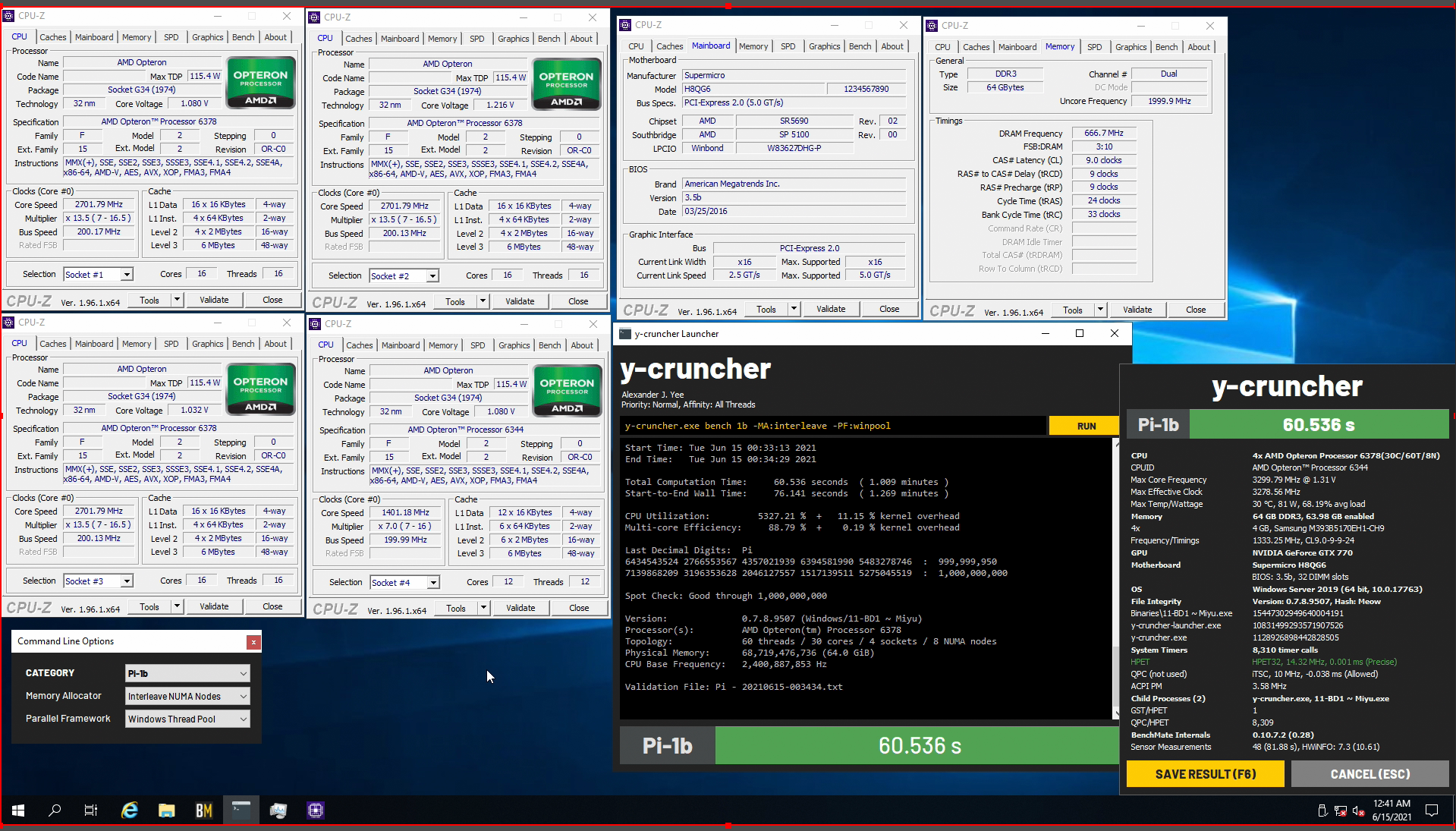
Just running stock rn, will try upping bclock once I flash the bios
lavish tundra
proven canopy
Just running stock rn, will try upping bclock once I flash the bios
Nice
keep us posted
sterile flame
I have a single fan 1650, would overclocking benefit much?
proven canopy
Try it and see, test with time spy
modern walrus
I'd use 38mm but then the Arctic F II wouldn't fit above the motherboard
It's already crunching the CPU power cables more than I'd prefer
what is a noise detection hardware monitor
 modern walrus
This Aorus motherboard has so many more settings than the MSI I took out wow
modern walrus
So anyone know why this Aorus board keeps ignoring my vcore settings? I have it on override 😠
modern walrus
okay I guess I need to use fixed instead of override
tall pelican
Override is very different with gigabyte
 finite frigate
Overflopping
lavish tundra
finite frigate
Overflopping
How much gigaflopps you gainin?
finite frigate
All
modern walrus
I got 51 all core, 48 ring to through 3.5 hours with OCCT, max temp at 89. Not great but way better than I ever did on the MSI board
You know those clowns still haven't responded to my RMA request? What great customer service
Once I get my megladon Delta fans I'll get like all core 51 at 78 degrees lol
I might've gotten like 87 degrees or lower if my AC hadn't automatically changed to 78 degrees because of the schedule I have set up. Taking that acrylic thing off so the heat can escape out the top of the case really helped
modern walrus
is 1.352v too high for system under load?
modern walrus
10900K and yes Aorus Z590 Ultra
tall pelican
is the 1.352 from VR Vout?
modern walrus
that's at 1.198
Good call btw
Once I figured out how to get things rolling, I really like this mobo
tall pelican
vr vout readings, ~1.45 idle and 1.35-1.4 load is 
modern walrus
oh wow so I still have some room to up the voltage if I can keep it cool
modern walrus
I flipped my two rear exhaust fans to blow into the case so now all exhaust goes out of the top
I have it kinda rigged up until I get some 120x120x15mm slim fans so I can cut three holes into the top acrylic & mount them
I used the triple 120mm off the CM AIO I swapped

Gotta love that rig job huh? Haha
Man I gotta take pictures that end up being a smaller file size

No more 108 megapixel
modern walrus
not exactly dust proof haha
tall pelican
Im at 9 intake and 4 exhaust lol
modern walrus
jeez
The Ryzen build I've been slow-stepping has 13 I think
so ya about the same
oh wait I forgot about 3 pull fans. So 16? can it be that many... 4x 200, 1x 140, & 10 120 ya
okay so 15
Why does vcore lie so bad?
btw I had LLC on Turbo. Think it's better to drop it?
tall pelican
yeah, better transients and same level of stability
you should be able to do something like 1.4 fixed with medium, and it'll droop to like 1.3 load
modern walrus
okay cool I'm gonna do that right now. The OS is acting a little goofy during OCCT rn so I'm sure I can use the extra. Like the thermaltake fans will go back to default rainbow colors for a second or two then come back
So though I've made progress, "stable" still alludes me
The only YouTube video I could find using the newer BIOS was some dude doing an adaptive voltage OC
tall pelican
buildzoid has a video on override, but it spikes idle voltages stupid high
modern walrus
I've had so many issues with thermals that I didn't even wanna mess with not controlling voltage directly
I was really only looking for videos to show me how to get override to stop ignoring my voltage input but once I figured out I needed to use fixed I was good
tall pelican
oh, and do not run multi core enhancement, it'll all core to 5.3, with whatever voltage it wants
modern walrus
I disabled that and set all the various core settings to manual & put 51 for all of them so it didn't get any ideas
Aside from prime95, is there another stress test that gets going quick? I feel like OCCT goes easy on it for the first like 4 minutes
That's the only reason I was starting with CB cuz CB just lays the hammer down within like a minute
modern walrus
hmm I'm probably doing it wrong then. I use the CPU: Linkpack and check the AVX capable
tall pelican

 tall pelican
very old
modern walrus
ah crap no wonder
tall pelican
its on vers 8 or 9 now
modern walrus
lmao wow
tall pelican
oh also, I have a bios for you if you get into memory overclocking
modern walrus
lol I see the link I clicked on
2014 release
wow
ya? cool that would be great. I thought I would've been done with CPU weeks ago
I was gonna move to that next
man does that look complicated
tall pelican
I'd get comfortable with the cpu oc first, since mem overclocking changes cpu oc behavior
modern walrus
wow I cannot believe I'm running 4.4.1 & current is 8.2.1
oh man just when I thought I was almost free haha
brooo 7 year old stress tests wthhh
tall pelican
yup
modern walrus
My thermals are probably way worse than I thought
Since I was running stress tests for like a pentium 4
Is there a way to find out how much wattage I'm using? Those Delta fans can run like 50w each or something crazy
modern walrus
oh ya I got molex adapters
one wire to PWM on mobo & other direct to Molex
for power
I'm not trying to break another motherboard lol
 modern walrus
ya I was just worried I'd be only only molex and have to hear 52dB raging all the time
but luckily some dude on the product reviews said something about it
when do you actually need the extra 4+4 CPU connection?
I'm doing AVX3, Large, Extreme, Steady, 560MB, Cycle #1, 20 threads & I haven't gotten past 72 degrees. I cannot figure out why I'm not 90+
AVX2 I meant
maybe flipping that fan did really help. It looks terrible but whatever
If this keeps up I might get greedy & see what 52 looks like
I also rearranged where my AC blows & set it to always have the fan on
tall pelican
modern walrus
when do you actually need the extra 4+4 CPU connection?
do you mean both 8 pin eps?
proven canopy
z390 and on headers are 2 amps, but still plenty for most people
tall pelican
the 8 can split into 4+4 for low end cpus
modern walrus
for extra CPU power
My PSU only has one 4+4 for CPU power
but awhile back I got an adapter to change Molex to a 4 pin
tall pelican
the 8 pin can handle 380some watts
modern walrus
oh so basically you never need the other one unless you're doign some crazy LN thing
tall pelican
so like 300 to the cpu (POUT) for extended use
10900k on water can max it out, but if you're not running the load for hours on end, its fine
gigabyte uses solid pins, which can handle 400some watts
I forgot the exact number, but I want to say 15A?
might be 12A
modern walrus
I really don't understand what needs that
tall pelican
I need to fix my mounting, but there's 370w (which is the max "spec" of an 8 pin)
 modern walrus
basically like .0000002% of users
tall pelican
granted that's p95 small avx
lavish tundra
tall pelican
I need to fix my mounting, but there's 370w (which is the max "spec" of an 8 pin...
Sheeeesh
modern walrus
mine shows 1 and 2 watts
Is it broken? wth
amps are 1.5 & .2
what are you doing to that poor computer? lol
well up top it says CPU package power 202.150 max
tall pelican
cpu package power means nothing
the VR loop, VR vout, Current IOUT etc is the right section
modern walrus
why is does it show so little then you think?
tall pelican
check cpuz, and what bios version does it say you're on?
modern walrus
I gotta download CPU-Z give me a minute
tall pelican
oh, you might also be looking at the igpu section

 proven canopy
hit windows + shift + s
modern walrus
That's weird they both have the same name & show different things

...why are there two?
oh maybe
one is for one 4+4
and the other for the half of a 4+4 I put in

Maybe?
tall pelican
nah, one is igpu or SA power
tall pelican
yes
modern walrus
see those thermals? I can't freaking believe them. I'm about to try prime95 & get thrown off my high horse
LOL! instant page_fault_not in
whatever the rest was
tall pelican
page fault in non paged area
tall pelican
ehhh, bsods on z590 seem to not give any directions
finite frigate
Then probably not ram lol
modern walrus
armoury crate is the biggest pile of trash
finite frigate
Oh yes it is indeed
modern walrus
I used to think MasterPlus was terrible
then I got TT RGB
those are both pretty garbage
but armoury crate is a whole new level
The only thing it every does it make my RAM sticks light up random colors
well partially
tall pelican
giga's fusion whatever has been fine for me lol
but I also only use the 3 and 4 pin headers for rgb
modern walrus
ya it's got decent effects
tall pelican
oh, and the rear io cover is rgb on the ultra
modern walrus
no I have the Thermaltake controller and a Coolermaster controller too
pain in the rear end
tall pelican

modern walrus
it doesn't have as much lighting as the MSI but it also doesn't have as many problems or DragonCenters so I'm good
finite frigate
@tall pelican what do you think of sandwich
 tall pelican
loud and overkill since that looks like some polaris gpu
finite frigate
Anything but overkill and you’d be surprised about the noise
modern walrus
oh that's what that iss
you took off all the coolers & stuff
btw will anyone buy the cooler?
finite frigate
Just the shroud and original fans
finite frigate
modern walrus
btw will anyone buy the cooler?
Nah that card is staying in my collection no matter what
modern walrus
I"m about to pop it on ebay & let some bot buy it by accident
I meant like in general
finite frigate
I mean maybe
modern walrus
I swapped my 3070 to a waterblock
lavish tundra
tall pelican
giga's fusion whatever has been fine for me lol
same
modern walrus
now I have this 80% of a gpu with nothing to do with it
lavish tundra
big advantage is that it comes as a solo app
modern walrus
even tho it's 0% useful
lavish tundra
no need for a large amount of bloat
modern walrus
ya I need to rid myself of a bunch of this crap
ASUS's bloatware that does nothing to make my GPU any better
that's the worst
I downloaded it thinking like somehow it makes my GPU work better
haven't seen any evidence of that yet
Why does Corsair's RGB crap take up like almost 1GB?
zenith palm
Cuz
modern walrus
is afterburner the only decent OC for GPU
GPU Tweak II is about as good as ArmouryCrate
modern walrus
it kinda feels strange using another company's software I dunno y
maaan I cannot wait for those clown Delta fans to get here
the computer case is gonna have its own climate
er weather system
zenith palm
Yeah tis a bit but sure look ¯_(ツ)_/¯
modern walrus
what is this little number/letter readout thing on the top right of the AORUS board telling me?
It used to change now it just says AO all the time
zenith palm
modern walrus
It used to change now it just says AO all the time
Ehh that would be an error code
I'd check the manual for AO
Or A0 or something
modern walrus
I'm on it
A0 | IDE initialization is started
uh what?
A0 = IDE initialization is started Basically means BIOS has finished it's stuff and the system is now running from your hard drive, in other words Windows is now doing it's thing. It's not really an error code, more a status code to let you know everything is working fine.
I'll take it
tall pelican
modern walrus
It used to change now it just says AO all the time
a0 = all 0kay
modern walrus
I found prime95's cousin: run the power supply test on OCCT
tall pelican
(or just the cpu test on small)
modern walrus
I think I hit like 300w before it GSOD
I think I'm gonna need like a 900w PSU to run another 150 on those fans lol
tall pelican
Im on a 1000w for 10900k and 6900xt
modern walrus
holy crap dude
How can all CPUs at 100% vary so much? 160w on OCCT Max everything then 320w with that power supply attack
tall pelican
100% just means the cycles are being used
modern walrus
ohh I see
sterile flame
What should I be able to statically oc a 10850k for reference?
Aio is a arctic freezer II 360mm
Psu is 750w
tall pelican
think of lifting a 1lb weight vs a 30lb
modern walrus
I got it. LIke you're still lifting weight but one is clearly easier
Right?
I think I got it lol
tall pelican
you're still lifting it up and down, and cant do anything else with your arm, so its at "100%" load, but one is exerting a lot more energy and heat
modern walrus
seems straightforward
killin it with the metaphors
So why don't all stress tests blitzkreig your components like that?
isn't that like true stability? if your computer can handle that without GSOD or TJMax?
I guess absolute crazy max everything isn't encountered too often in regular use
proven canopy
Vtune is a good tool to show what your cpu is doing with its clock cycles https://i.imgur.com/uuMgOYN.png
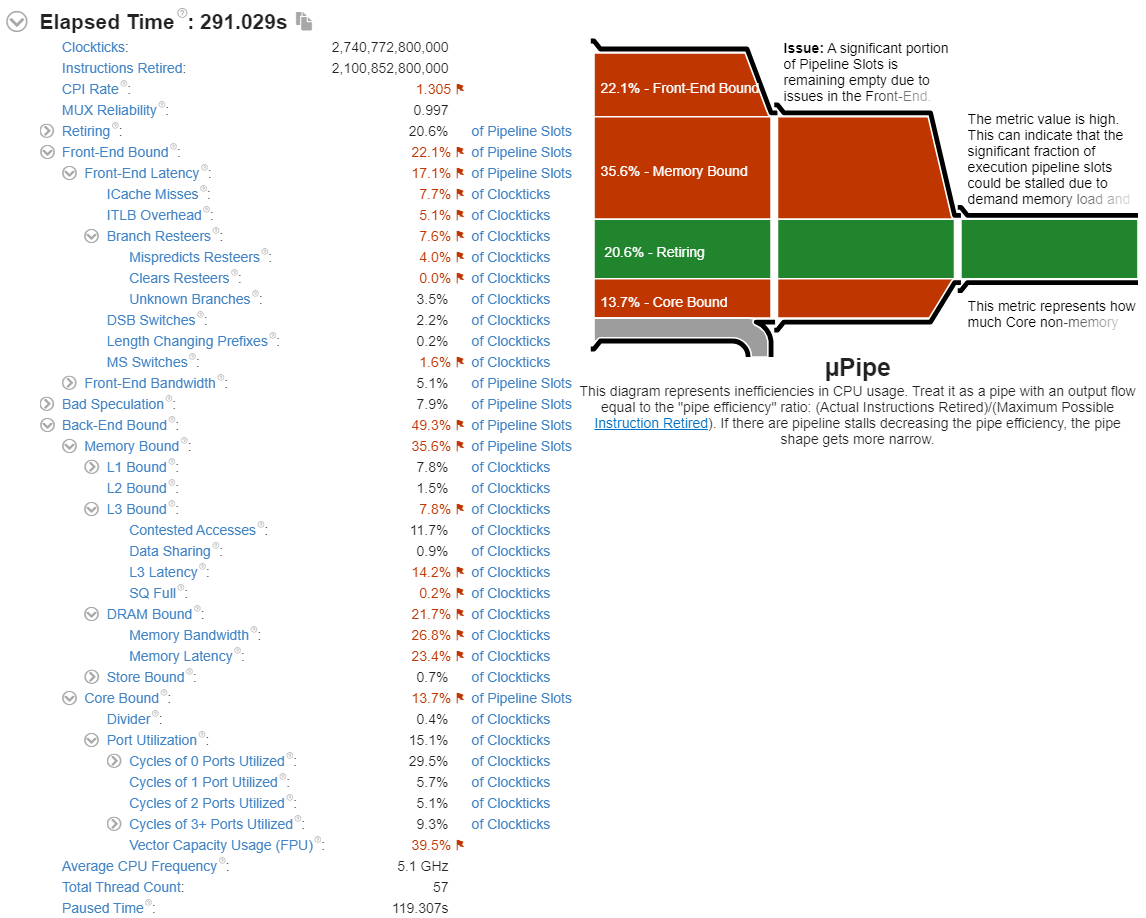 modern walrus
thank you I'll download it now
modern walrus
That seems pretty high no?

 delicate tinsel
looking good go a bit higher
modern walrus
cooling system can't even handle that lol
delicate tinsel
 proven canopy
having some fun
 tall pelican
not having fun 
 tall pelican
guess it was worth it
 modern walrus
I have IOUT and IIN current but I don't see VID current...
How does your CPU survive prime95 & stuff like that at a 54 ratio? wow
tall pelican
IOUT is current
modern walrus
oh right amps
tall pelican
so if you go vid*IOUT, you'll magically have cpu package power
modern walrus
w=av
I just don't see VID current
I'm still trying to figure out if I can handle an additional 150w on this power supply
GPU power maxed at 179.97. so assuming my CPU is around 300 that's about 480, in which case I'm good with a 750w
tall pelican
you wont see vid current
tall pelican
IOUT
modern walrus
how does it compare in terms of accuracy with the ones I do see?
ohh I gotta do the math you mean?
tall pelican
yup
modern walrus
VID is above Core Clocks?
tall pelican
core 1 VID etc
modern walrus
under sensor: CPU[#0]?
jeez it says max 1.599. so 1.599x191.8=306.6882
so almost 500 between GPU & CPU
tall pelican
I thought I've told you to ignore cpu package power 😂
everything cpu power related is here

 tall pelican
click vid and do shift+delete
modern walrus
 tall pelican
on all of them
modern walrus
lol now they're all gone?
tall pelican
yup
modern walrus
never look at their lies again?
 modern walrus
so what's the formula for maximum wattage again? VR VOUT x IOUT current?
modern walrus
Power (Input) isn't accurate?
modern walrus
oh... so it's the combination of the two numbers that equals total wattage use?
Maybe my inability to comprehend stems from fundamental issues like not knowing what exactly VRM even is
tall pelican
lets say 16A at 12V goes into the vrm, and 150A at 1.2v comes out
modern walrus
oh so VRM is a transformer?
tall pelican
there's then 12w of heat that the vrm "used"
modern walrus
heat is energy
modern walrus
I see. So what the power supply actually sees in terms of load is the rating at 12v since that's what's being output by it.
?
tall pelican
power supply only sees 12v, 5v and 3.3v, and how much current from each
modern walrus
I see so it's actually way less than I'd think
 solid nymph
not sure if this fits here but I just built a new system with a i7 11700k with corsair vengence 32gb 3600 ram. I tried to put the speeds at 3600 and says memory crash/fail before it boots and reverts back to 2133 speeds. Would this be because of defective ram or just not having a gpu?
zenith palm
solid nymph
not sure if this fits here but I just built a new system with a i7 11700k with c...
Enable XMP don't just set the speed to 3600
Also nothing to do with no gpu
tall pelican
also make sure the memory is in slots 2 and 4 from the cpu, not 1 and 3 or the closest two
 pulsar flint
tall pelican
also make sure the memory is in slots 2 and 4 from the cpu, not 1 and 3 or the c...
pulsar flint
tall pelican
also make sure the memory is in slots 2 and 4 from the cpu, not 1 and 3 or the c...
2 and 4 are always the best slots for daisies right
?
proven canopy
Not always, but in the last 10 years, almost always
modern walrus
Anyone notice RGB doesn't seem as bright on Aorus board? I swear they seem dimmer...
 modern walrus
I'm still a noob but I use the BIOS
 junior girder
o
modern walrus
Also, I have an intel chip so maybe apples and oranges
junior girder
i like apples
modern walrus
If you hang around the smart guys in here come around eventually lol
junior girder
lol
modern walrus
I know intel has this program that does an auto-overclock for you. I'd think Ryzen does too but I really dunno
have u tried playing with the BIOS?
junior girder
no im scared
modern walrus
There's a couple things here & there but mainly you just deal with LLC, core voltage, CPU ratio, & Ring ratio
I mean that's completely understandable but if it makes you feel any better, I've crashed my computer about 500x trying to get overclocking going lol
you can always load failsafe defaults from bios
junior girder
a
modern walrus
just check around for what the max voltage people say you should be putting into your processor is. My understanding is try to keep it below 1.350 and anything over 1.300 is hard to cool
modern walrus
I'd start by downloading a program called HWiNFO cuz it'll give you like every readout on your computer possible
junior girder
ok
modern walrus
then get some sort of stress tester. Some recommend prime95. It's super hard on the computer but if you survive that you're probably stable
I usually use OCCT or RealBench
junior girder
wym
modern walrus
In my experience, it's a fairly tedious process. Kind of a trial and error over & over lol
modern walrus
I mean if your computer doesn't freeze & what not
junior girder
o ok
modern walrus
I've actually never survived one. Prime95 scares me lol
modern walrus
like bro I'll hit start, my wattage wil jump to like 300+, 6 cores will go into Thermal protection
no problem man. I wish I was more familiar with Ryzen and OC in general so I could give you better advice
pop back in every now & then cuz when these guys are around they're like computer gurus
modern walrus
YouTube isn't a terrible place to start but sometimes they'll give you bad advice
junior girder
and hope the pc gods are here
modern walrus
well I'll get advice from them then come here & they're like no don't even watch Youtube
so proceed with caution lol
junior girder
ok
modern walrus
It's fun once you get the hang of it if you like puzzles
well puzzles that you fail constantly
maybe it's not fun haha
junior girder
haha
modern walrus
the results are cool tho
junior girder
oo ok
modern walrus
download MSI Afterburner. It has a stress test built in called Kombuster
you'll see um hold on let me open it
quick rose
if you want to OC GPU, use 3dMark Timespy after you change settings
modern walrus
oh good here's one of the smart dudes
quick rose
pffffff
modern walrus
with afterburner, put power limit to max, core voltage to max, & temp limit to max
quick rose
There's no magic numbers with overclocking, it's raise speeds and test, raise speeds and test
I gained 2000 points in 3DMark but it took a while XD
modern walrus
then start by raising the Core Clock to like +100 then keep adding like 25 until you freeze on a stress test
junior girder
quick rose
There's no magic numbers with overclocking, it's raise speeds and test, raise sp...
so put number up little by little?
quick rose
Ya
modern walrus
then back it up like 25 & move to Memory Clock
junior girder
what number
modern walrus
same process
quick rose
Put it up a bit, test, up more, test
epends on the GPU
CPU's are a little different........
 quick rose
Power limit maxed
modern walrus
My 3060 is +175 on Core Clock and +675 on Memory Clock
quick rose
GPU core +100, Mem +250 to start.
modern walrus
ya all those other settings hit with max
you may need to go to settings and unlock voltage control
junior girder
core clock?
junior girder
k now what
dull ginkgo
click the checkmark
dull ginkgo
run 3dmark
modern walrus
 sudden torrent
Yes but the demo version of time spy gets you a few runs free
modern walrus
oh here we go, big guns
dull ginkgo
furmark do be power virus
it's so powerful gpus detect furmark and downclock themselves
junior girder
sooo
modern walrus
 junior girder
furmark power hungry
dull ginkgo
3dmark time spy demo will work
junior girder
kk ill do that
modern walrus
Make sure you up the core clock first then move to memory clock cuz if you do two at once you don't know which is the source of the crash if it crashes
oh also I think on the top left of Afterburner there's an auto overclock thing but that's no fun
modern walrus
 modern walrus
The auto-overclock isn't terrible because it can give you like a baseline to start your own
sudden torrent
Auto OC is ok just as a starting point
modern walrus
but these guys may think otherwise & they're the masters
sudden torrent
It could be too low or too high
junior girder
hm
modern walrus
I'm just the homeless guy who hangs out outside the dojo and comes in every now & then
junior girder
imma just stick with +100 and +250
sudden torrent
I've had the auto OC set my core too high and it crashed in some games
junior girder
like the dude told me
well i gtg now
ill be back tmr maybe
im going on vacay so i dont really know if i can talk tmr
modern walrus
set the auto-OC to run when you go to bed so you don't have to wait for it later lol
junior girder
ok
sudden torrent
It usually takes ~15 minutes
quick rose
What aorus board?
quick rose
Do you have 4 pin RGB plugs on 3 pin headers?
modern walrus
no I don't have any 4 pin anything
You know what, I bet it's coolermaster's fault
there was a recent update that coincides with this
quick rose
I've seen it happen with RGB devices plugged into aRGB headers lol
modern walrus
and I set MasterPlus to just do what the motherboard says
maybe it's upset about that
I might be overloading the thing too I dunno
modern walrus
I mean the three biggest power hogs are the riing trio 200mm & Riing whatever 120mm
Ya powered hub
the one that came with the Coolermaster ML360P Silver
and that this has um... 1 pikachu light, 4 argb 21 LED strips, 3x 120 argb fans, 1 140mm argb fan
I think even the graphics card too cuz this board might only have one argb header
oh I didn't show ya'll. I went all sawzall on my top panel
quick rose
Hmmm, IDK if that provides aRGB power or just splits it up. Try unplugging a few aRGB devices, that will give you an answer. If they get brighter it's overloaded
modern walrus


I had to cut that thing up cuz it wouldn't close. Originally I was gonna hole saw but it wouldn't fit
I really need to patch that zip it in that wall lol
wait no I'm lying. This board has two argb headers

uh
that don't look right
oh it's a party now. MasterPlus doesn't detect the argb controller
sinking ship
ahhhhh
k I'm gonna restart
usually cutting power entirely fixes that
someday I'll have dependable RGB
assuming that's even a thing
quick rose
It's not :/
modern walrus
oh the canary version of Microsoft Edge is supposed to have tab grouping. I gotta try that out
Do you do the Microsoft Insider thing? I do it on like secondary computers
Office insider is tight. There's dark mode for word & stuff
sudden torrent
I'd only do that on a VM
modern walrus
you can run windows X on virtual machine
on the 24th Microsoft is doing an announcement thing
about the next windows whatever thing
sudden torrent
You mean the leaked Windows 11 build? 10X was canceled


 sudden torrent
10X was canceled though. Everyone I've seen has a build that says Windows 11.
modern walrus
oh okay well I dunno I guess. But we'll all know on the 24th lol
sudden torrent
Although it's just 10X in appearance the actual leaked build says Windows 11

Get 20% OFF + Free Shipping @MANSCAPED with promo code TECH at
https://manscaped.com/TECH
Use code LINUS and get 25% off GlassWire at https://lmg.gg/glasswire
This week a leaked version of Microsoft's upcoming rumoured Windows 11 was posted on Chinese site Baidu. We were able to get our hands on it and EVEN boot it up with an NVIDIA graphics c...
modern walrus
I don't even know if 10x was supposed to be the main windows. I think it was originally supposed to be for two screen devices like their surface phone thing
sudden torrent
It's supposed to be more fluid between the mobile and desktop versions. Windows 8 was all in for the mobile interface and everyone hated it, 10 scrapped most of the mobile features, now 11 is supposed to be more in between.
modern walrus
Gosh darn it. I'm gonna have to pay like $150 for new windows
sudden torrent
Maybe. They might do a free upgrade like with 10.
That part we won't know until the 24th at least
modern walrus
I'm watching this Linus thing. Ya windows said they weren't gonna replace 10
whatever lol I'm not surprised
I don't like that middle start button thing
sudden torrent
Funny thing is everyone involved in the "no more OS versions" decision doesn't work there any more
I need a tinfoil hat emoji
modern walrus
They're probably jelly that Apple makes more than them
I hate apple
oh no they better not kill right click
this video is making me sad
it is kinda bogus the way there's like two systems on win10
like settings and control panel can't be unified?
widgets... They're moving towards a mobile version aren't they? lol
tablet mode is useless
....I wonder if I can dual boot 10/11 using grub or something lol
sudden torrent
Keep in mind this isn't even a beta release, it's a leak build
quick rose
A leak from India
so just becuase the SHA256 matches just means it matches whatever was released
Doesn't mean it's legit
sudden torrent
11 apparently requires you to have TPM and secure boot on to install this build on a system instead of a VM, rumors of course
quick rose
Not rumors
sudden torrent
Subject to change closer to release
lavish tundra
sudden torrent
11 apparently requires you to have TPM and secure boot on to install this build ...
Can confirm
Didnt install bare metal but did check requirements
modern walrus
oh so installing Linux is really easy like it was on my SurfaceGo2
I have to reboot into recovery mode to even get to Linux
lavish tundra
Installing linux is easy even on a potato
modern walrus
or you can temporarily disable TPM & enter your 48 digit bitlocker key lol
quick rose
That may not carry over to final release though
I'm not surprised it's required in a Dev version
sudden torrent
Yeah this is just a test version, specific requirements aren't unheard of

I made my emoji
lavish tundra
Vintage you think win 11 will hit windows insider channels sometime soon after 24th?
sudden torrent
(copied but you know)
lavish tundra

modern walrus
I was hoping they'd like drop it the night before for insider dev people
no evidence that they will of course
I actually just installed a cumulative update for Insider preview channel
maybe I should check on my other computers with dev to see if there's anything new
sudden torrent
They have yet to even officially announce it, I doubt they'd do an early release on purpose
modern walrus
nothing on this computer
I'll check on a surface. Maybe they'll hook it up for buying their laptop or something
doubtful
eh
security update on surfacebook3
that's it
cumulative update on surfacego2
windows 10 version next KB500413
probably just another whatever update
I ran HWiNFO on my surfacebook 3
that thing throttles the CPU cuz it hits TJ max like very 5 minutes. Aside from windows insider dev, I haven't messed with any settings
zenith palm
Are you comparing 2 laptops?
Also do both laptops have the same specs
And you can't overclock intel cpus that don't end with k
And i don't think you can overclock any laptop cpu really
Is the cyber power system a desktop?
So you are comparing 2 laptops then lol
To my knowledge you cant oc a laptop cpu
You can do the gpu with msi afterburner usually tho
Some gpus don't allow you to increase power limit
That sounds like a likely culprit
proven canopy

lavish tundra
My eyes have seen things my brain is struggling to accept
zenith palm
lavish tundra
My eyes have seen things my brain is struggling to accept
Mee too bud
lavish tundra
zenith palm
Mee too bud
Its surprising to me how much bs people can cram into a statement whilst maintaining utter and total conviction that they are speaking the truth
zenith palm
lavish tundra
Its surprising to me how much bs people can cram into a statement whilst maintai...
I gave up on reading the whole thing my brain hurtt
lavish tundra
zenith palm
I gave up on reading the whole thing my brain hurtt
You read the first part?
apparantly you can turn TJmax in startup apps
and that stops the app from starting up while playing games
because game is what pc startup means
also a little piece of text notification can seriously hamper gaming
and using XTU is bad
even to undervolt a laptop because the laptop is power limited
Oh this is a terrible day to have eyes
sudden torrent
That whole thing read like a r/confidentlyincorrect post
proven canopy
I just assume they're a troll
But who knows e.g. https://en.wikipedia.org/wiki/Poe's_law
sudden torrent
Unless they mixed up tjmax and tj maxx, that's another possibility
(that's a chain clothing store for those outside the US)
lavish tundra
sudden torrent
Unless they mixed up tjmax and tj maxx, that's another possibility
Whats tj maxx
sounds like a lays flavour
lavish tundra
The next step after this one is to ignore everything this guy says and ask someone who actually knows something about a pc
even your average grandma will be of more help
sudden torrent
Even if it was 100% usage it's not supposed to hit tjmax
There's something else causing that, like a blocked vent on the laptop or a bad fan
lavish tundra
Help isnt a living thing to ask for help lol
so help cant ask for anything, anywhere
dull ginkgo
by the way, you can't just adjust power limits or tjmax
that's in firmware
unless you're editting vbios, you can't change gpu pl
lavish tundra
dull ginkgo
by the way, you can't just adjust power limits or tjmax
Technically bios flash
lavish tundra
dull ginkgo
unless you're editting vbios, you can't change gpu pl
yep
dull ginkgo
smh
lavish tundra
I hav flashed edited bios nyehe
dull ginkgo
there's also just flashing a different card's vbios, but may or may not work
and depends on outputs iirc
dull ginkgo
but higher pl
zenith palm
lavish tundra
You read the first part?
I did then cried
dull ginkgo
unless for some reason some laptops have a specific app for additional power limit
lavish tundra
zenith palm
I did then cried
Understandable
dull ginkgo
which is just weird
sudden torrent
lavish tundra
wrong bios = some ports not working
That's where I'm at, I flashed the kingpin bios and lost 2 DP ports 😂
dull ginkgo
lol
dull ginkgo
sudden torrent
That's where I'm at, I flashed the kingpin bios and lost 2 DP ports 😂
1kw pl tho
proven canopy
That bios also removes thermal protection
lavish tundra
sudden torrent
That's where I'm at, I flashed the kingpin bios and lost 2 DP ports 😂
I mean the kingpin bios is very worth it
zenith palm
sudden torrent
Unless they mixed up tjmax and tj maxx, that's another possibility
I was thinking isn't tj maxx a clothing store lol
sudden torrent
dull ginkgo
1kw pl tho
490W limit on the one I used
dull ginkgo
oh interesting
dull ginkgo
proven canopy
That bios also removes thermal protection
is that supposed to fix things for ln2/lhe?
proven canopy
no
dull ginkgo
or just no throttling
sudden torrent
Yeah my original bios would throttle to 300W when mining, KP bios isn't throttling at all
dull ginkgo
I don't think GPUs coldbugs but was just wondering
proven canopy
Almost every modern gpu has a coldbug
zenith palm
sudden torrent
That's where I'm at, I flashed the kingpin bios and lost 2 DP ports 😂
Rip
sudden torrent
zenith palm
Rip
Good thing I only need one, and my secondary is only 1080p75Hz
proven canopy
Yeah losing ports flashing a vbios is common - but doesn't really affect most people
sudden torrent
My card has 6 outputs, very uncommon for most 3090s
zenith palm
sudden torrent
Good thing I only need one, and my secondary is only 1080p75Hz
Would you not just use stix bios or something instead?
So more ports
6 outputs
Holy
sudden torrent
Nah it's fine how it is honestly, at first I was afraid I killed it because I got no video out after I rebooted but I switched DP ports and it was fine
zenith palm
Scary times
quick rose
Snap, I wanted to know what app to delete to get rid of TJMax :/
modern walrus

It's still unclear to me whether I was the cause of this controversy but this is what I was talking about. Surfacebook3 HWiNFO opened right after taking laptop out of sleep. This runs hot as heck
finite frigate
haha cl6 vram on rx 570 go brrr
zenith palm
modern walrus
It's still unclear to me whether I was the cause of this controversy but this is...
Laptops cpus are designed to run at 100c unfortunately lol
zenith palm
finite frigate
haha cl6 vram on rx 570 go brrr
Whatttt?
finite frigate
haha it really do
Benchmark results for an iMac13,2 with an Intel Xeon E3-1230V2 processor.
zenith palm
finite frigate
haha it really do
You mean cl6 ram with rx 570 right?
finite frigate
no
im talking the memory on my card
at cl6
and now im trying 4-5-5
@zenith palm
 modern walrus
I thought the whole detach from the bottom & become a tablet thing would be cool but I don't even think I can use that laptop outdoors. It'll probably melt or something
zenith palm
finite frigate
<@!191276897227898880>
Holy 💩, bios editor?
modern walrus
No if you go to bios there's like 5 things u can change & none are useful

Does that pipe going to the filter look crappy?
I had to get back to the 140 rad somehow
zenith palm
modern walrus
I had to get back to the 140 rad somehow
Looks fine
modern walrus
There will still be one more pipe across so hopefully it'll kinda distract from it
zenith palm
Good luck
zenith palm
finite frigate
Lets see how this goes
We need the before and after timespy or something tho
finite frigate
2 light years ahead
zenith palm
:o
finite frigate
https://browser.geekbench.com/v5/compute/3004740 cl8 (still a crazy timing change over stock but still)
Benchmark results for an iMac13,2 with an Intel Xeon E3-1230V2 processor.
Benchmark results for an iMac13,2 with an Intel Xeon E3-1230V2 processor.

3DMark.com
Intel Xeon Processor E3-1230V2, AMD Radeon RX 570 x 1, 16384 MB, 64-bit Windows 10}
doing cl3 runs now
3DMark.com
Intel Xeon Processor E3-1230V2, AMD Radeon RX 570 x 1, 16384 MB, 64-bit Windows 10}
cl 3
@zenith palm
gonna work on sub timings now i guess but the dumb way
lavish tundra
I too have cl5 mem now
zenith palm
finite frigate
gonna work on sub timings now i guess but the dumb way
Why the dumb way?
lavish tundra
Ahh lol
zenith palm
lavish tundra
because other way wont work
What's the other way?
finite frigate
Manually doing them
Like actually typing in numbers and stuff
But your favorite FLOPPA is lazy
zenith palm
finite frigate
But your favorite FLOPPA is lazy
Isn't that how you supposed to do it lol
lavish tundra
theres 3 yeah?
manually
copyfloppa
and using the auto feature in the bios editey boi
Also my 570 outperforms a 1660now
lol
finite frigate
lavish tundra
Also my 570 outperforms a 1660now
In what lol
lavish tundra
finite frigate
In what lol
heaven
finite frigate
Oh well it’s heaven lol