#overclocking
1 messages · Page 74 of 1
 fierce jungle
I have (4) pny 3070 I need to test and see if they are better LMFAO
 finite frigate
seems floppin
 proven canopy
Would easily beat my graphics score if you flash the msi vbios, my tuf was 100% stock
 quick rose
proven canopy
Would easily beat my graphics score if you flash the msi vbios, my tuf was 100% ...
quick rose
proven canopy
Would easily beat my graphics score if you flash the msi vbios, my tuf was 100% ...
MSI VBIOS on an EVGA card?
Oh, the power limit yeah?
quick rose
might play around with that some day
They're so hard to get I'm not sure I want to tinker without a backup
proven canopy
Not worth it tbh lol
quick rose
Exactly
proven canopy
Not in your daily at least
quick rose
I'm happy with how it is but I might see if I can push it a bit more
I can def push CPU more, that score was just with PBO and stock power limits
fierce jungle
quick rose
MSI VBIOS on an EVGA card?
You have crossbar support?
quick rose
Yeah and that score was also done on a PCI-E 3.0 link
4.0 won't make a difference though
I can't remember if Resize bar was on or not but I don't think it matters for benching either
proven canopy
quick rose
I can def push CPU more, that score was just with PBO and stock power limits
Throw in a 5900x when you need it
With some DR bdie
finite frigate
but cpu go BRRR
quick rose
Ye it does
I'm probably gonna pop for AM5 when it comes out
Rather than go to 5000 series
finite frigate
i hope 1700 has something epic
quick rose
We will see
Rumors have a 20% IPC over 5000 series
Im' more curious to see what DDR5 brings
fierce jungle
What's crazy is that I cut the case open and modified the poo out of it to make the GPU fit

It's literally on the PSU
proven canopy
Can it breathe? lol
 sterile flame
quick rose
I don't think the 5900x is worth $550 TBH
sterile flame
quick rose
I don't think the 5900x is worth $550 TBH
it is if you get a good bin
otherwise stinky
decent bit of chips can get 5.1 maybe 5.2
spicy though
fierce jungle
proven canopy
Can it breathe? lol
That is around back underneath lol

I haven't seen it above 40c
proven canopy
That's very low for full load
proven canopy
sterile flame
it is if you get a good bin
nah, value is good regardless
fierce jungle
I have fans at Max and other pumping. But it was higher at lower fan speeds. Like 44-48c
sterile flame
what case
sterile flame
damn
fierce jungle
sterile flame
what case

 clever epoch
jesus
fierce jungle
I took a Dremel and an oscillating tool and chopped it up internally
sterile flame
3060 or 3070 strix
fierce jungle
sterile flame
3060 or 3070 strix
3070 lol
fierce jungle
It won't move. But temps are great
fierce jungle
quick rose
Rather invest into am5
I want to use them but since Intel sponsored I can't complain
finite frigate
sterile flame
the LGA leaks were supposed to be 1700 something
1716
thats am5
and intel is 1700
sterile flame
ye
fierce jungle
I wish amd would remove the pins though
sterile flame
they are going to next gen
finite frigate
they are
fierce jungle
Really?
finite frigate
yeah
sterile flame
yeah
fierce jungle
Nice
finite frigate
waiting for amd to actually be 1701 lol
sterile flame
probably gonna be some kind of modding to make it work at some point
finite frigate
lol
sterile flame
or try atleast
fierce jungle
I just want my Samsung 980 pro 2tb in triple raid zero LMFAO
proven canopy
No you don't
 tall pelican
fierce jungle
I wish amd would remove the pins though
tall pelican
fierce jungle
I wish amd would remove the pins though
the pga is better on smaller pin count cpus, since they're incredibly easy to clean
fierce jungle
Got to 28 lol
Then to 20. Lol
I'm working my way up there
Damn it's my CPU causing issues of scoring higher. Wonder what I'm missing
proven canopy
You should hwbot
 zenith palm
Wait really? I thought it put it back to stock if you didn't have it open
zenith palm
quick rose
Im' more curious to see what DDR5 brings
That 1st gen ddr5 tax tho gonna be spensive
 dark ferry
Especially if someone figures out how to mine crypto on RAM.
 hardy dune
dark ferry
Especially if someone figures out how to mine crypto on RAM.
hardy dune
dark ferry
Especially if someone figures out how to mine crypto on RAM.
Well if that happens were pretty much screwed
 lavish tundra
hardy dune
Well if that happens were pretty much screwed
lavish tundra
hardy dune
Well if that happens were pretty much screwed
not really
also y react to ur own message lol
zenith palm
dark ferry
Especially if someone figures out how to mine crypto on RAM.
Ram doesn't do computation fyi so unless it was a ram chia competitor lol
 barren ridge
lavish tundra
zenith palm
Ram doesn't do computation fyi so unless it was a ram chia competitor lol
barren ridge
lavish tundra
zenith palm
Ram doesn't do computation fyi so unless it was a ram chia competitor lol
even in that case, only the very high capacity sticks would go out of stock and the very fast stuff
average consumers like gamers shouldnt see too much of a problem
zenith palm
Exactly
 sudden torrent
fierce jungle
Working my way up haha
sudden torrent
fierce jungle
Working my way up haha
Ice water bucket
Thank me later
fierce jungle
sudden torrent
Ice water bucket
Thank me later
Haha I'm working with a 120mm aio in an itx case. I'm impressed at what it's doing already. If I hit top 10 I'm happy 😁
sudden torrent
Especially with you doing a 120mm, ICE BUCKET
Take the fan off the radiator and drop the rad into the bucket, agitate it while benching, and see your score shoot up
fierce jungle
Haha I'm scared lol
proven canopy
Watch your humidity, if the dewpoint is high enough you'll end up with condensation on the electrical bits
fierce jungle
I just swapped it to all core ratio. I am hoping that's going to help
proven canopy
That said - rad in an ice bucket is somewhat common way for people to bench their daily for hwbot points
sudden torrent
Why? You're not even breaking the loop to do the ice bucket
fierce jungle
Yeah I'm in Louisiana. Humidity is stupid anyways lmfao
fierce jungle
proven canopy
That said - rad in an ice bucket is somewhat common way for people to bench thei...
I want true test tbh. Just like it is.
Ooh man
It scored higher
Top 5
😱😱😱😱😱

wait all my speeds/scores are the highest beside cpu score. what the heck lol
proven canopy
Is your cpu running stock
fierce jungle
proven canopy
Is your cpu running stock
heck no. its 5260 mhz all cores all ratios
well atleast what it says its doing
 proven canopy
What is that software
What do you have set in bios
For ratio, bclk, pl1, pl2 etc
fierce jungle
is the cheapo asrock software lol
 fierce jungle
proven canopy
What is this
fierce jungle
proven canopy
What is this
is that bad? lol
sudden torrent
My 5800X beats your 11900k score, you can do better lol
proven canopy
Is this some kind of auto-oc from the asrock software?
fierce jungle
proven canopy
Is this some kind of auto-oc from the asrock software?
no i manually did it. from other videos and forums a little at a time. why? i usually just use asus and let it auto and never have issue lol
you're worrying me
proven canopy
Most of those settings don't make sense to me - why 51 core, 45 cache, 103 bclk, 1.6+v etc, can't be right
fierce jungle
proven canopy
Most of those settings don't make sense to me - why 51 core, 45 cache, 103 bclk,...
i tried looking for some examples of what to use but i have seen any that were good so far. 46/47 cache crashes it. 52 will run but the offset made it higher than i would like.
NEWB sorry.
proven canopy
Leave bclk at 100 for the most part
fierce jungle
ooh that was auto btw
sudden torrent
Examples on the net are ok as a starting point but really doing it yourself is the best result
proven canopy
use cpuz or hwinfo64 to show what you're running
sudden torrent
That said impressive result for auto
tall pelican
uhhhhh not sure what software that is, but sounds like VID
fierce jungle
i have hwinfo running
tall pelican
5.3 on my 10900kf VIDs to like 1.7
proven canopy
vid would make sense, but also wouldn't surprise me if some assrock software auto'd that lol
fierce jungle
i read 11900k loves voltage
tall pelican
if you dont set the voltage, VR Vout reads VIDs
also if its with 3.3v, 5v and 12v, I'm assuming its reading off a superio
fierce jungle
proven canopy
vid would make sense, but also wouldn't surprise me if some assrock software aut...
well there isnt much to it. ill send another ss


that all you can change within it. i assumed i had to use their software to control it? is there a better software to use?
tall pelican
bios
proven canopy
Overclock with the bios alone
fierce jungle
i did that at first but was having ram issues. i guess i start at it again
fierce jungle
i increased the voltage some
i think my mobo is the issue. but due to the only itx with dual NICs it was the only choice at the moment
fierce jungle
proven canopy
Overclock with the bios alone
Thank you
sudden torrent
Nice! Top score for your config! I'd say there's still room to improve it but that's still great
sudden torrent
Yeah 11900k should be able to beat a 5800X, you're a little over 100 points under my CPU score so keep it up, I want to see you beat it
fierce jungle
sudden torrent
Yeah 11900k should be able to beat a 5800X, you're a little over 100 points unde...
haha it should. still worried about the 120mm aio.
no complaints here though. dog poo mobo and cooling
sudden torrent
Yep you make do with what you got, you've done pretty well so far
fierce jungle
this look better @tall pelican @proven canopy ?
 proven canopy
Use cpuz
quick rose
That does look better
sudden torrent
Bjohnson who formerly had the #1 score has a 13734 CPU score, shoot for that
fierce jungle
proven canopy
Use cpuz
sorry, for what? freqs?
proven canopy
Yes
fierce jungle

also i apologize. i have always used auto OC'ing. I just do a good job at building lol
 modern walrus
Anyone actually try doing per core OC?
sudden torrent
Yes on my 5800X, pretty decent results
modern walrus
It's not hard because of the voltage? or can you set per core voltage?
sudden torrent
PBO takes care of most of it tbh, I've got a -0.0125v offset and each core in curve optimizer has a different setting
I get over 5GHz on every core
modern walrus
okay I gotta find where to mess with that in MSI
I put the three hottest cores at 49, 3 medium cores at 50, & 4 coolest cores at 51
so far
haven't tried it yet
sudden torrent
10 cores? You're on a 10900k?
modern walrus

Yes sir. That look about right?

Going based on my little test
I'm just worried about LLC. like how can say Core 9 at 51 have enough voltage to not throw L0s when Core 4 is at 49? Won't 49 have too much voltage and end up running hot?
finite frigate
fierce jungle
and GOT IT. Thanks man
niiiice
modern walrus
I have stable 50 ratio OC at 1.290 on LLC mode 3 but I don't think that's enough voltage for a 51 ratio
ah to heck with it. Let's just boot up & see what happens
I see a GSOD in my future
sudden torrent
You lost me at Intel, sorry man. I mainly OC on AMD.
modern walrus
well time for some good old trial and error
fierce jungle
I have a 10900k on a z490 e gaming from Asus.
modern walrus
weird HWiNFO shows all cores at 49
fierce jungle
I can test some thing tomorrow.
finite frigate
i have an old xeon
fierce jungle
I haven't used msi in years.
fierce jungle
finite frigate
i have an old xeon
Same as well lol
finite frigate
v
 modern walrus
well what in tarnation... all cores show 49 ratio
this is bananas
I did somethign wrong
finite frigate
you could try XTU or smth so you dont have to go to bios
modern walrus
I think I might do that because I'm tired of restarting my computer 899999x
ahh
I think I know why
wait no that's voltage mode. That doesn't help
I'm still gonna try offset mode
sudden torrent
finite frigate
you could try XTU or smth so you dont have to go to bios
That was the problem before though, bios is giving better results
finite frigate
o
fierce jungle
finite frigate
v
 fierce jungle
sudden torrent
That was the problem before though, bios is giving better results
fierce jungle
sudden torrent
That was the problem before though, bios is giving better results
Yes lol
modern walrus
what's a clockgen features? lol
fierce jungle
finite frigate
2620 is like what 6c
Dual 6 cores brand new for 1500 bucks. Dells
sterile flame
What’s best ram over clocking guide/video
modern walrus
still shows 49 on every core. what the heck
sterile flame
Your the guy who told me trident z royal or something was better than a 3600 c14 14 14 1.4v kit
fierce jungle
sterile flame
Your the guy who told me trident z royal or something was better than a 3600 c14...
Gskill is king imo. But I only buy them so. Biased lol
fierce jungle
I have literally bought over 2500 sticks of gskill ram
sterile flame
are you heavily ocing it
fierce jungle
No mostly xmp.
modern walrus
What's Enhanced Intel SpeedStep Technology?
fierce jungle
I'm newb in OC'ing. Building and auto set is what I do lol
fierce jungle
modern walrus
What's Enhanced Intel SpeedStep Technology?
Speedstep off
speed shift on
modern walrus
thanks. That's the default setting apparently
fierce jungle
Speedstep is more a heat/freq factor
modern walrus
For CPU Core Voltage Monitor VCC Sense or Socket Sense?
fierce jungle
sterile flame
I gotta do like 20 different timings
Use auto for everything and then try speed manual.
sterile flame
Yea...
fierce jungle
modern walrus
For CPU Core Voltage Monitor VCC Sense or Socket Sense?
Socket sense must be something MSI?
sterile flame
Is a $300 10850k the best cpu I can get for that price
sudden torrent
sterile flame
Your the guy who told me trident z royal or something was better than a 3600 c14...
Of course the Royals are better lol, there shouldn't be any dispute there at all
modern walrus
Must be I dunno. I'm leaving it on default. Man I just cannot figure out why it only shows the lowest core ratio as the ratio for all cores
sterile flame
sudden torrent
Of course the Royals are better lol, there shouldn't be any dispute there at all
no not royals
Also u don’t even know what speed eathier
So not sure how ur saying that
I’m not even gonna argue with people anymore about the ram in this discord
sudden torrent
Sure but who's buying 3200 Royals
sterile flame
Lol
proven canopy
Royals are just the heat spreader design, decide based on the xmp rating / results reported by others, check out fitz's spreadsheet in the pins
sterile flame
No clue
No
I mis spoke
Not royals
For the third time
But Nevermind that no sense in arguing about it since I have my own opinion and answer
Is a $300 10850k the best cpu I can get for that price
fierce jungle
sterile flame
Is a $300 10850k the best cpu I can get for that price
That's cheap so sure lol
proven canopy
Perfect mid range high fps gaming cpu tbh
fierce jungle
sudden torrent
Of course the Royals are better lol, there shouldn't be any dispute there at all
Everyone else likes dominators lol
fierce jungle
sudden torrent
Sure but who's buying 3200 Royals
4000+ lol
fierce jungle
proven canopy
No
YouTube sorry lol
proven canopy
That said, some of the best b-die is ripjaws v lol, a very plain heatspreader design
fierce jungle
proven canopy
That said, some of the best b-die is ripjaws v lol, a very plain heatspreader de...
😂
sterile flame
fierce jungle
That's cheap so sure lol
Well I can oc it into the 5s, just didn’t know if there’s some ryzen competitor to it or something I’d have to check out but since it’s $100 off probably not yea
 modern walrus
Should I just settle for a 5800x on my other build? I want the 5900x but it's basically $600
proven canopy
Hardly a "settle" lol, especially for gaming
fierce jungle
I always say spend what your wallet can handle
sudden torrent
My 5800X is fantastic, competes with the 11900k nicely
proven canopy
Pretty sure it demolishes everything rocket lake when both are properly tuned
In gaming at least
Maybe not "demolishes" but it should be ahead
fierce jungle
Unless you push rocket lake to 400w lmfao
sudden torrent
If done right 11900k can beat the 5800X, especially in memory tuning, but if you're not an extremophile like us easy AMD win
modern walrus
I'm just going all in with a custom loop build & it feel like I'm holding out on the most important part by not doing 5900x
then again I am using a 3070 so maybe that's about right anyway
fierce jungle
modern walrus
I'm just going all in with a custom loop build & it feel like I'm holding out on...
5950x then
modern walrus
haha that thing is like $1k
sudden torrent
The difference between 5800X and 5900X in gaming is really kinda small for how much price difference there is
modern walrus
the darn EK waterblock for the GPU was $300
fierce jungle
Better use Samsung 980 pro. Dont skimp on them
sudden torrent
Nah bro P31 beats that in random IO
fierce jungle
sudden torrent
Nah bro P31 beats that in random IO
Warranty bro lol
proven canopy
980 pros are cursed lol, lot of firmware issues, do you actually need the write endurance and mixed i/o?
fierce jungle
I've never had a Samsung fail. Still rocking 950s lol
fierce jungle
I've had adata, wd fail
sudden torrent
I've never had a single SSD fail except a couple of second gen Mushkins with bad controllers
proven canopy
Only ssd I've had fail out of 50+ was an OCZ from 2011
fierce jungle
Don't remember if I've used others yet
fierce jungle
sudden torrent
I've never had a single SSD fail except a couple of second gen Mushkins with bad...
Didn't hp ssds use those same controllers? Asking because I have one lol
modern walrus
I put a Sabrent rocket for the NVMe
proven canopy
Just go by windshields's list
sudden torrent
fierce jungle
Didn't hp ssds use those same controllers? Asking because I have one lol
I don't think so? Let me double check
fierce jungle
proven canopy
Run CDM, post screenshot
Damn acronyms lol
proven canopy

Free download page for Project CrystalDiskMark's CrystalDiskMark8_0_2.zip.CrystalDiskMark is benchmark software that measures the transfer speed of media data storage drive such as HD, SSD, USB...
sudden torrent
fierce jungle
Didn't hp ssds use those same controllers? Asking because I have one lol
HP drives are using Silicon Motion controllers yes but an updated version from the ones I had that failed
Old one was SM2246EN that failed, newer HP drives are using SM2259
fierce jungle
proven canopy
https://crystalmark.info/redirect.php?product=CrystalDiskMark
Gotcha lol
fierce jungle
sudden torrent
Old one was SM2246EN that failed, newer HP drives are using SM2259

Need to inspect this one
 sudden torrent
Grab the model number while you're in CDM
fierce jungle
I removed it to install the new one. PC poor over here lol
sudden torrent
Well if it's not in use it won't fail, just don't short it from all the dust when you try to use it again lol
fierce jungle
Haha. I'm going to run cinnamon Linux and compile android from it
So it will get use. Just didn't want to destroy the os until I was done
sudden torrent
Linux is really light on the writes, it'll be fine
 fierce jungle
proven canopy
Run CDM, post screenshot
fierce jungle
proven canopy
Run CDM, post screenshot
i assume you meant on the 980?
proven canopy
yes, and hey, that looks great
Tons of 980 pro users are seeing a fraction of the r/w speeds they should be
fierce jungle
i bet the 970 evo in here is less lol
sudden torrent
Nice iops on that 4k shallow write
proven canopy
Honestly surprised to see 99 rand 4k q1t1
fierce jungle
its kinda strange to see this cheap mobo perform decently lol
sudden torrent
Cheap doesn't have to mean bad. You said it was ITX right? A lot of those are better than ATX boards
sudden torrent
Probably one of the few good Asrock Z590 boards from the look of things
proven canopy
What kind of use case needs dual nics on itx
fierce jungle
they just released the gaming one. thought about getting it.
fierce jungle
proven canopy
What kind of use case needs dual nics on itx
local san drive. but then added two sans lol
so now 10gbe switch will be fine lmfao
i wanted the small form so i can sit the iscsi near it
proven canopy
10g over copper outside of the rack is silly
fierce jungle
its a foot away or two
hell cat8 is out now lol 40gbe haha
It was an office machine build then decided to keep 10900k as the office machine
sudden torrent
I don't know of any user-grade boards that support cat8 lol
fierce jungle
sudden torrent
I don't know of any user-grade boards that support cat8 lol
Me either lol. Fiber cards is what we use
2.5gbe is standard in gaming boards lol
sudden torrent
Well it's becoming standard at least
modern walrus
okay well my searches are finding that per core OC doesn't work on MSI Z490 boards...

Overclock.net
Hi guys I'm new here.
I'm building a new pc for my new Sim Racing Rig mostly I will play Assetto Corsa and Iracing
I'm using the Z-490 UNIFY & I9 10900K I'm not planning to overclock for now as I'm not to a computer savvy for that, so maybe in the future.
I have a few questions as I'm still...
fierce jungle
modern walrus
okay well my searches are finding that per core OC doesn't work on MSI Z490 boar...
All core is awesome lol
fierce jungle
Any beta bios?
modern walrus
still hitting 94 on core 4 & 6 at 50 on CB
fierce jungle
modern walrus
which is lame
Which is weird because I get 5.1 easily
modern walrus
which is ridiculous
ya & I have all sorts of ridiculous cooling going on
I even replaced my CoolerMaster 360 AIO with a Freezer II
and no luck
modern walrus
ya it's bananas
fierce jungle
I'll send you a pic and see if it helps
modern walrus

I took a 4" hole saw to the shroud just to blast air up to the AIO
You leave your AVX offset & Ring Ratio on Auto?
Even if I do that though, at 51 I'm hitting TJ max
or if I'm not hitting TJMAX
I'm dropping L0s
that's IF i get past GSOD
fierce jungle
Damn I'll do more testing on the actual 10900k tomorrow
modern walrus
Thanks. I'm gonna see if I can make sense of Turbo Ratio Mode to try to achieve the same effect as per core
but I don't see where I can pick which cores get the offsets
so my luck if I put 51 it'll assign it to Core 4 & 6 which are my worst for thermals
 modern walrus
must be I just got the shaft in the lottery
sudden torrent
Not exactly the shaft, if you can hit 5 GHz you're above average


 proven canopy
sudden torrent
Not exactly the shaft, if you can hit 5 GHz you're above average
proven canopy
sudden torrent
Not exactly the shaft, if you can hit 5 GHz you're above average
Sure - but only by SL's binning procedures
fierce jungle
Silicon lottery?
sudden torrent
True enough, but they haven't done anything too crazy
sudden torrent
fierce jungle
Silicon lottery?
fierce jungle
Thought so. I benchmark all our cpus and keep the best as well lol
sudden torrent
fierce jungle
Fix that memory, it says you're at 2933 C18
fierce jungle
sudden torrent
Fix that memory, it says you're at 2933 C18
That might be right lol. I built it last year and wasn't too worried. I think it's 3200
finite frigate
feels bad
fierce jungle
finite frigate
ewwwwww
I needed 5 outputs. No gaming on this one
finite frigate
was gonna say wanna have an oc off but with that piece of garb model you wouldbnt compete
 finite frigate
i see
yeah
i thought it was an armor card in your tiktok
but from the vid it looked like a gaming xx
fierce jungle
It's more of a VM/compiling machine
finite frigate
yeah
fierce jungle
Right was gaming. But upgraded
finite frigate
those armor cards were uhh
not good
thermal throttled at stock
even in ideal airflow conditions
 pulsar flint
Mindblown
I came to see what this chat was saying to my guy Milk about the ram kits
proven canopy
pulsar flint
Mindblown
haha who pinged you about it
pulsar flint
No one did
fierce jungle
pulsar flint
I came to see what this chat was saying to my guy Milk about the ram kits
Gskill is best for sure. Imo at least
pulsar flint
He told me and I decided to show up myself no one asked me y I do anything
proven canopy
oh nvm misread
pulsar flint
To do*
modern walrus
good lawd
fierce jungle
Did we (I) do something wrong/bad. I reread and might have missed something?
modern walrus
well apparently I have a BIOS update. Maybe it'll make MSI suck a bit less like when DragonCenter gets updated
fierce jungle
modern walrus
well apparently I have a BIOS update. Maybe it'll make MSI suck a bit less like ...
You using that to OC?
Try xtu as well as bios
modern walrus
I think I'm going to cuz unless I do all core it doesn't even listen to me
fierce jungle
Xtu has the oer core
modern walrus
I saw in your picture. That inspired me to use it haha
fierce jungle
Lol sorry just seen the message. Power settings in windows can cause issues as well btw
pulsar flint
If I catch y'all recommending worse ram for more money you're getting called out no 🧢

pulsar flint
fierce jungle
Gskill is best for sure. Imo at least
G skill ain't it
Ram brands don't matter
You pay for the ic inside of it
And maybe for the rgb design if you care
Give me the B DIE

proven canopy
rev.E/B is pretty fun to manually OC
tall pelican
bdie is boring as hell
pulsar flint
Rev E is for high mhz but timings? Yeah no
tall pelican
reve is fine, its literally just trcdrd
pulsar flint
tall pelican
bdie is boring as hell
B die is the best for someone who buys it and uses it daily. For competitive ocing I can see how it's boring
proven canopy
pulsar flint
B die is the best for someone who buys it and uses it daily. For competitive oci...
eh, I'd say it's best for much of competitive OC aside from freq valid
tall pelican
bdie for daily is terrible since you have to actively cool it to take advantage of it being bdie
proven canopy
Terrible for daily? But a $5 fan on your sticks fixes that
tall pelican
but meh rgb
pulsar flint
proven canopy
eh, I'd say it's best for much of competitive OC aside from freq valid
Boring and best are not the same
B die is tried and true
tall pelican
still havent found a bdie kit do that trp
 proven canopy
So aside from max valid - what other IC would you use for 32m, x265, geek3 etc
@pulsar flint
pulsar flint
Nothing else
Boring because it's tried
Not because it's not the best
B die is the best
pulsar flint
tall pelican
still havent found a bdie kit do that trp
There's xmp b die that can outdo that
Wait
 pulsar flint
I didn't read it right
I didn't see the right
Taiphoon caught my eye
Nah for sure I take that back I didn't see your timings on the right
 pulsar flint
Bro

It's the biggest window on your desktop
You made the smallest window the part you want people.to look at
 dull ginkgo
It's just the default size of the zentimings window...
proven canopy
🤡
 left bladeBOT
 BigM8#0001 has been warned
Reason: Bad word usage
tall pelican
I dont use zen
okay, so you're stuck with trcdrd=trcdwr=trp
pulsar flint
Yep
I'm on a 9900k since 2019
Kind of skipped a whole wave of stuff from both companies because 9900k still goated


 orchid flame
tall pelican
still havent found a bdie kit do that trp
orchid flame
tall pelican
still havent found a bdie kit do that trp
That’s cool and all but Aida dumb
It’s reporting that you have 101% of theoretical max for copy
tall pelican
Yes, let me go back in time and run gb3 for sparky
orchid flame
And that copy is higher
orchid flame
tall pelican
Yes, let me go back in time and run gb3 for sparky
Ew, just run IMLC
tall pelican
Cuz old aida, dual rank mem and dual ccd
orchid flame
Anyways why do low SOC volts?
I assume kit is already maxed out so you just lowered volts
 fierce jungle
zenith palm
How this guy picks which gpu they using today XD
fierce jungle
zenith palm
How this guy picks which gpu they using today XD
lol no they are all the same. we dont need them for high power graphical. just h265 decoding. so they all get either a single gt1030 or dual 1650s
zenith palm
fierce jungle
lol no they are all the same. we dont need them for high power graphical. just h...
Nice, I'm just messing with you dw lol
proven canopy
orchid flame
It’s reporting that you have 101% of theoretical max for copy
What's the equation for that btw
nvm found on google
orchid flame
proven canopy
nvm found on google
Probably not the most accurate version of it
It’s [Channel bit width][Channel count][Data transfers per cycle (data rate)][Frequency][1/Byte length]
Multiply that by [efficiency] and you have actual bandwidth instead of theoretical
The reason you can’t use the popular formula (effective clock x channel count x 64/8) is because a lot of that isn’t constant
Example: DDR5 moves to 32 bit channels with 2 channels per dimm
If you use the old equation your theoretical max will be off by a factor of 2
finite frigate
morning nerds
lavish tundra
Morning flopp
finite frigate
 modern walrus
$565 for 5600x. Decent right? Not great tho
modern walrus
Well I appreciate the info but the ship has sailed. Order is in already
I mean I guess I could cancel but for $15 I'll pick convenience
Does AMD charge shipping? Might be even less than $15
I should finally have all the parts to finish my build in the next 7-10 days. Pretty heckin excited
 frank osprey
does anyone know how to set the ryzen 7 2700x to not go past 4.00 ghz i want it overclocked but i dont want it to go past 4 ghz because unity likes to crash my computer when i overclock it
zenith palm
frank osprey
does anyone know how to set the ryzen 7 2700x to not go past 4.00 ghz i want it ...
Ehh just use precision boost overdrive or stress test your overclocks with something so you know their stable
sudden torrent
zenith palm
Ehh just use precision boost overdrive or stress test your overclocks with somet...
PBO doesn't exist on 2000
Not in any usable form
zenith palm
sudden torrent
PBO doesn't exist on 2000
Ohh yeah
Shhh
Welp they should just do a stable oc under load still lol
sudden torrent
frank osprey
does anyone know how to set the ryzen 7 2700x to not go past 4.00 ghz i want it ...
You can just set a manual overclock, every 2700X can do 4GHz at 1.35v, and you probably don't even need that much voltage.
(That's 1.35v before droop under load for those who might complain)
frank osprey
thx im watching a jaystwocents video on it rn
sudden torrent
I'm going by silicon lottery stats mr doubter

It's pretty much exponential if you want to go higher than that though, 4.15GHz at 1.4v is uh... yeah
tall pelican
Im going off some 2700xs hitting hard walls at 3.9
frank osprey
I have it set to 4ghz at 1.350v rn
I'm going to put it under load with unity
Yup I'm good now thx guys
sterile flame
i did 1.325 @4.2 for 2 yr
modern walrus
So for advance offset mode, it allows you to put a voltage offset for various ratios, which sounds nice but how the heck am I supposed to know the base voltage? Like for instance, if I put -.040v for 51 ratio what will the voltage be? I don't know x - -.040 = how many volts?
what the heck is x? lol
 south sky
modern walrus
So for advance offset mode, it allows you to put a voltage offset for various ra...
south sky
modern walrus
So for advance offset mode, it allows you to put a voltage offset for various ra...
What cpu?
Because generally the 'base' voltage will change depending on conditions such as frequency, temperature, load, and more
@modern walrus
modern walrus
10900K
From what I've been reading the offset is the difference between what the VID is requesting and what you're giving it
south sky
That isn't what the offset is
the voltage offset, offsets the target voltage and the voltage you get is still lower then that
modern walrus
well darn as soon as I think I have a breakthru... lol
south sky
But yeah with the same conditions if you apply a -50mv offset, the chip will request 50mv less voltage
so the best way to find out what voltage you will get is to try it
modern walrus
Is there a "safe" voltage for this CPU & a "max"?
lavish tundra
safe limit should generally be max limit for everyday OC
south sky
What board do you have?
lavish tundra
south sky
But yeah with the same conditions if you apply a -50mv offset, the chip will req...
chip requests more , board cuts it off
south sky
If your board has a current reading just go off of that in max intensity load
south sky
lavish tundra
chip requests more , board cuts it off
What? No
What does that even mean
modern walrus
I tried to get fancy & put 5/10 cores at 51 & the rest at 50 because I cannot get 51 all core to stay under TJmax, let alone somewhere that is reasonable to use all the time
lavish tundra
look at hwinfo
modern walrus
MSI Gaming Carbon Wifi Z490
south sky
I'm fairly sure you'll have a current reading, so just watch that
Max safe is 245A under max load
south sky
lavish tundra
look at hwinfo
look at what
modern walrus
I look at vCore
south sky
Do you have your bios set to vcc_sense mode?
because that'll give you correct voltage readings
modern walrus
I have Core voltage monitor as VCC Sense
south sky
good
modern walrus
but I didn't see that in HWiNFO
lavish tundra
NVM i was tripping
south sky
all good
south sky
what did you get with override?
modern walrus
But override is no good when cores are at different voltage
I wanna say it never exceeded 1.4
south sky
cores can't be at different voltages
south sky
the mainstream chips always have the same voltage for all the cores, unless if the cores are in a sleep state, then it can be at 0V
modern walrus
is to have a voltage that works for both
south sky
yeah
modern walrus
in terms of temps & stability
modern walrus
I think I just need to accept my 50 ratio all core
south sky
per core OC doesn't even work properly though
modern walrus
really? lol jeez
south sky
if you have two cores per core oc'd to 5.1 with all other 5.0, it only ever does 5.1 when those cores at 5.0 are off (in a sleep state)
modern walrus
Do you think I can get better temps using offset mode for voltage than override?
south sky
possibly
modern walrus
or is not worth my time sitting here changing numbers by .005
south sky
though likely not in max loads
modern walrus
filling out excel sheets
south sky
offset mode has a VID boost under AVX, which on some chips can run voltage much higher, which can cause stability issues for AVX but not SSE
(when AVX would have been the limit with override)
modern walrus
I'm not even running any bench/stress & with -0.070 HWiNFO shows max voltage at 1.462 so I guess I'll restart & make it -0.090 or something
then you factor in Vdroop & this is such a mission
south sky
1.462 is fine under idle and stuff
modern walrus
Well let me hit it with CB real quick (I know OCCT & others are better but CB hits it hard quick)
modern walrus
currently my voltage is at .916 with nothing going on
haha cooling is what's freaking problematic for me
I swapped Coolermaster ML360 to Arctic Freezer II & I'm still hot
arctic freezer II 360 I mean
started cb 1.414 instant TJ Max
5/10 cores
always the ones at 50 ratio too but I guess that makes sense
I just bumped from -0.070 to -0.105 in BIOS
& of course froze trying to log into windows
LLC is at Mode 4.
I dunno it seems like this offset v. override is just a different means to the same unreachable end
south sky
not suprising
modern walrus
Maybe I'll try LLC 5 with higher offset
south sky
1.4V is absolutely insane
modern walrus
Where should it be like 1.3?
south sky
1.3 is insane to cool too
modern walrus
ya I'm not doing the whole de-lidding thing so I think I'm SOL
I guess while I'm talking to someone who knows what they're talking about, which causes the computer to just freeze without GSOD or anything: super high thermals or low voltage?
south sky
both can do that
higher temps mean worse clocks/voltage
So high temps induce voltage to be too low (even though voltage may be fine at lower ones)
modern walrus
OC is hard when there's no GSOD cuz sometimes I dunno whether to go up or down on voltage or LLC
It's been total trial & error
GSOD only seems to happen with WHEA errors
which I know means more voltage
or at least I think I know
but now what you're saying makes me think GSOD could be a thermal issue too
south sky
But yeah, if you don't care about reliability there is a fine balance between voltage and temps
Too high voltage can cause instability too
modern walrus
so I just keep tinkering until I hopefully land on something stable like a blind squirrel finding an acorn lol
south sky
Like when I was seeing how high my 9900K could clock, 1.7V was much worse then 1.55V (5ghz vs 5.55ghz)
 robust aurora
Less then 1.3 load should be enough
modern walrus
just shot to 1.398. How the heck do I keep it under control better? Offset it way more or higher LLC?
It's like it doesn't listen to me lol
south sky
1.398v under load or not?
south sky
Also if you are using offset set AC_LL and DC_LL both to 1.1mOhm in bios
modern walrus
okay I gotta look for that setting I've never encountered it
tall pelican
modern walrus
MSI Gaming Carbon Wifi Z490
what's the name of the sensor that you're getting voltage from?
modern walrus
on HWiNFO it's vCore
tall pelican
then its just a superio reading, and its not accurate
modern walrus
BIOS Voltage Monitor is set to VCC Sense
I don't think I have a better reading unfortunately
tall pelican
you dont, just an msi issue
modern walrus
I sent a picture of HWiNFO to someone before & they were confused that I didn't have it
I'm not a big MSI fan these days
The other Option is Socket Sense instead of VCC
tall pelican
pretty much completely ignore the voltage you see in hwinfo
modern walrus
heck okay
south sky
isn't vcc_sense proper voltage though fitz? since it is a vccsense to vss sense reading
modern walrus
is LLC Mode6 getting too crazy here?
tall pelican
MSI Z490 Loadline Values
Mode Socket Vcc
1 0.130mΩ 0.000mΩ
2 0.213mΩ 0.067mΩ
3 0.528mΩ 0.126mΩ
4 0.652mΩ 0.213mΩ
5 0.875mΩ 0.524mΩ
6 1.100mΩ 0.641mΩ
7 1.333mΩ 0.842mΩ
8 1.529mΩ 1.158mΩ
so vcc 5 or socket 3 should more or less be best for llc
south sky
oh wait that's right vcc_sense for VCore reads VCC_sense to socket gnd
so yeah it's wrong
tall pelican
its msi
south sky
don't those boards have a vrvout sensor now or something?
tall pelican
only meg line
south sky
damn
modern walrus
ya mine is MPG
heck
okay well I can't even get into windows with an offset over -0.100
& LLC at 5 I'm still getting wild temps
tall pelican
if you're doing offsets, you shouldnt need llc
modern walrus
The closest thing I got to stable was with Offset+Adaptive Mode with voltage set to 1.330 with a -.035 offset but I had 4 cores 94 degrees+
oh really?
tall pelican
yeah
modern walrus
okay so set it at flat?
tall pelican
no, just leave it auto
modern walrus
oh for real?
tall pelican
yes
modern walrus
Auto is usually junk lol
I'll try that thanks
okay it's now Auto LLC with -0.090 offset
Windows let me log-in...
okay just logging in--not running CB or anything--HWiNFO showed max vCore at 1.454. Even if that voltage is pretty off, seems to me I need way more of an offset before I should even bother hitting start on CB
tall pelican
I mean, it'll drop more under load, but its still a superio that'll always be over estimating
modern walrus
It's hard to know what to put for offset without an accurate voltage read
The 50 all core w/ 48 ring ratio & 0 avx offset that actually works has the voltage set to 1.290
I should like CB that & see what the voltage is. Maybe I can approximate the difference between vCore & actual
tall pelican
I mean, you'll probably be better off with an override or adaptive voltage than banging your head against a wall with offset
modern walrus
Override I can't seem to get stable
and I haven't tried adaptive
What does Adaptive even do?
tall pelican
adaptive is override, but if you have windows set to balanced power plan, it'll lower voltage when the core downclocks
modern walrus
oh no it's on Ultimate Performance
tall pelican
then adaptive = override
modern walrus
which will bring LLC back into play I guess
tall pelican
yup
modern walrus
This is frustrating. How do you deal with this?
tall pelican
I personally just do override, and dont bother with 100% stability
modern walrus
core ratio 51 just isn't in the cards. I gotta deal with it
How crazy do your thermals get?
I mean is the rule, if it doesn't TJmax go for it? lol
tall pelican
if you figure out which core it is, you can do turbo ratios, and set the worst cores to x50 , and everything else to 51 and 52
modern walrus
2, 4, 6, are my worst
tall pelican
Im direct die, but even my 9700k was just game stable
modern walrus
4 & 6 the absolute worst
tall pelican
are you going off temps, or event viewer thread numbers?
modern walrus
temps from HWiNFO
 modern walrus
haha every time I think I've figured something out, it's wrong
tall pelican
APIC ID is the core reporting the error
modern walrus
I see
I'll try to figure it out from there from now on then
I probably have 100 logs by now
200 maybe
when I look for videos explaining they're either 10 years old, not for MSI, or some other form of useless
amazing how 5 milivolts is the difference between stable/not stable & like 10 degrees
I'm gonna go back to trying to get all core. This offset is too crazy for me
I can get 5.1 with a -1 AVX but what's the point of that
tall pelican
none, because even discord will use avx 
modern walrus
Lol gosh darn it
right now 51 ratio vCore is pretending voltage is 1.326. Max temp 94 & I'm only on Pass 1
oh and here's an L0 error
tall pelican
but is it stable for what you use it for?
modern walrus
I've never really tried tbh
what's weird is in override/adaptive with voltage set at 1.315, it shows vCore as 1.33 under load
lavish tundra
lmao good luck
sudden torrent
The world record frequency on liquid nitrogen is 4.19 GHz
Not going to happen
lavish tundra
ok then set voltage to 1.8 and try
since you really wanna kill the cpu
@river relic
wish your CPU a good death while you at it
 faint tangle
Non oc'd my 3600 sits at a max temp of 82 and norm stays at 80 under full load. Is it safe to oc it?
lavish tundra
I wouldnt
faint tangle
Kk thanks
zenith palm
faint tangle
Non oc'd my 3600 sits at a max temp of 82 and norm stays at 80 under full load. ...
Enable pbo and get a gammaxx 400 or id cooling se 224xt or vetroo b5
 stuck token
Quick question. EVGA GTX 1070-Ti, what should go do for intervals while overclocking both core, and memory clock speeds
tall pelican
core clocks in steps of 12.5, so I'd personally do 25, and memory I'd go in steps of 200 (can fine tune it more if you're picky about it)
stuck token
Ok, core clocks were more of what I was unsure of memory I assumed to be about 250. Thanks for the info, been running base clocks since I got it 3 months ago, might as well Overclock it.
south sky
faint tangle
Non oc'd my 3600 sits at a max temp of 82 and norm stays at 80 under full load. ...
no reason not to
You could get better clocks with the same temps or even get the same or a but more with less temps
sterile flame
whats good static clock for an 8950k
aio is arctic freezer II 360mm
asus prime z490a
proven canopy

Twitch
Frosty Friday - First night with the new Streaming machine! - LN2 Extreme Overclocking - 3DMark Port Royal 17692 - 16th In the World!
3090 on liquid nitrogen
south sky
got what

 lavish tundra
orchid flame
lavish tundra
orchid flame
what does that entail exactly
orchid flame
Nothing 
south sky
orchid flame
But you no share so I had to get it myself
I have the ddr6 one
oh that's 79-5A
I'm dumb
interesting that, the samsung ballot is not as long as 79-5
orchid flame
south sky
oh that's 79-5A
You have 79-5A I assume?
Also, do you know why I can’t see the DDR6 one?
south sky
orchid flame
You have 79-5A I assume?
not the final one, but also not that ballot
south sky
orchid flame
Also, do you know why I can’t see the DDR6 one?
What do you mean?
dull ginkgo
lavish tundra
so its a pdf document thats completely useless?
It's just ddr5 specifications in a draft :p
dull ginkgo
It's the kind of documentation you don't slog through and leave it to others to summarize
lavish tundra
dull ginkgo
It's the kind of documentation you don't slog through and leave it to others to ...
makes sense
lavish tundra
any idea why the emails are blured?
dull ginkgo
because they're people that don't want to be doxxed...?
lavish tundra
Makes sense
sterile flame
What’s should I be ocing a 8950k too statically
Cooler is arctic freezer II 360mm
Board is ASUS prime z490
Case is phantex 500a if that matters
sudden torrent
sterile flame
What’s should I be ocing a 8950k too statically
Are you sure that's the model number of the processor? I see a 8950HK but no 8950K on Intel Ark
sudden torrent
Ah well that changes things dramatically lol
Do you want to attempt a per-core overclock or just do all core?
sudden torrent
sterile flame
<@396513761550270464> *10850k
For all core you should be able to do 4.9GHz SSE, 4.8GHz AVX. It'll use over 200W, probably closer to 230W, and you'll need a die sense vcore voltage of at least 1.15v
It's possible also you won't be able to hit these numbers if you got a bad bin chip.
orchid flame
south sky
What do you mean?
I can’t find the download for DDR6 draft on the site
Why...
dull ginkgo
maybe they only give access to specific people, who knows
orchid flame
dull ginkgo
maybe they only give access to specific people, who knows
my account should have full access
its in comitee 42.3
dull ginkgo
¯_(ツ)_/¯
modern walrus
Sooo... if my 10900K is hitting a max of 97 on RealBench stress test that's pretty bad huh? to TJ tho? lol
voltage at 1.302 under load
I thought I had a stable OC at 50 a/c but I tested it again recently & got 1 WHEA error.
Any WHEA errors mean not stable right?
Even then the thermals were hitting 94
I got a bad bin for sure
south sky
orchid flame
my account should have full access
did you actually pay to enter?
modern walrus
freezer II
360
I can't really get much better w/o doing a custom loop
& H500P Mesh isn't a great case for custom loop anyway
Define "stable." Does "stable" mean no WHEA errors or any issues whatsoever
?
cuz if "stable" means Prime95 stable, I don't even think the chips are stable out of the box
I could probably get more stable if I drop the ring ratio. I forgot I had it at 48 on a 50 core ratio
Anyway, I dunno if I can be stable with a 50 ratio at all. btw I noticed after logging all my results in an Excel sheet that 1.285v with Mode 3 LLC, 1.300v with Mode 4 LLC, & 1.340v with Mode 5 LLC all result in a vCore of 1.286-1.288v under load. Is there any difference in using any of those 3 since they have the same practical effect?
orchid flame
south sky
did you actually pay to enter?
not me no
i have a friend who's a google software engineer
south sky
that's cool
orchid flame
yeah, trying to get access to the doc
but its basically impossible to find
could you send a link to it?
south sky
maybe thaiphoon will leak it like they did with one of the early ddr5 ballots
south sky
I don't think it's on the site
south sky
I got emailed it by someone
south sky
I used gmail and google scans gmail emails, so maybe your friend can find it
orchid flame
south sky
I used gmail and google scans gmail emails, so maybe your friend can find it
LOL
you know I have your email
but no...thats not a thing
I'll just look more on the siteto see if Ican find it
south sky
they said they do in their terms! haha
orchid flame
yea but not a normal software engineer
proven canopy
You're a robot
lavish tundra
No IM a robot
sudden torrent
 zenith palm
modern walrus
360
zenith palm
modern walrus
360
Don't think you should be getting temps that high with that cooler
zenith palm
modern walrus
cuz if "stable" means Prime95 stable, I don't even think the chips are stable ou...
Also yes it means p95 stable
lavish tundra
modern walrus
cuz if "stable" means Prime95 stable, I don't even think the chips are stable ou...
P95 small ffts stable isnt even completely stable tbh
Ycruncher is more sensitive
lol
but yeah at all auto all chips should be stable
modern walrus
@zenith palm is there some setting I could have overlooked dis/enabling that could cause temps to be so high?
zenith palm
modern walrus
<@191276897227898880> is there some setting I could have overlooked dis/enabling...
I haven't overclocked on intel so i couldn't tell ya tbh
modern walrus
I got the max temp down to 94 by lowering ring ratio to 47. No WHEA errors running RealBench or CB23 but even I know 94 is hot even on a 10900K
But man, I don't wanna settle on a 49 all core. That sucks
I'm really considering drilling a series of holes in the acrylic top of the case so the air getting pushed out by the AIO escapes quicker
I've ever tbought about cutting 3 3.5" holes & mounting 2-3 120mm fans up there to pull hot air out
Just worried it'll look ridiculous &/or my 4 year old will somehow hurt his hand because of it
Hmm I just thought of this: you think I should remove that top panel & run tests to see how different temps end up?
zenith palm
modern walrus
Just worried it'll look ridiculous &/or my 4 year old will somehow hurt his hand...
No point push pull rads only help by like a degree or 2
modern walrus
Ya but I was more concerned with the hot air having little space to escape because the top is acrylic & restricts air movement to pretty small openings in the side

you see the top panel only has those openings on the side where air can escape
Btw that's an old picture with the AIO I had before the freezer II
I wish they offered a mesh top panel for it
zenith palm
modern walrus
Ya but I was more concerned with the hot air having little space to escape becau...
Ahh, well removing that might help, do you have 3 intake fans?
modern walrus
I hace 2 200mm in the front

I recently cut that in with a 4" hole saw to shoot air up to the AIO
zenith palm
modern walrus
I hace 2 200mm in the front
That should be fine yeah
modern walrus
I mean two AIOs in a row now get really mediocre/bad thermals. Either air can't escape quick enough or the chip sucks

I used to have it like this
Which wasn't good because hot air from the radiator got blown into the case
But then I had another 2 200mm fans up top blowing air in
My last idea is to cut holes in the bottom & use two 70mm fans (40cfm but loud) to pull in cool air from the bottom of the case to feed that 120mm I cut in

I'd probably have to put 2x4" to raise the case so they wouldn't just pull in hot exhaust from the power supply
zenith palm
Hmm yeah, is your front mesh or arcycluc btw?
modern walrus
Mesh
zenith palm
Oh jeez i messes up that spelling lol
modern walrus
I got it no worries haha
zenith palm
Hmm I'm not sure then, is your aio pump to 100%
modern walrus
Ya as soon as cpu hits 50 degrees
zenith palm
Maybe try all the time
modern walrus
Ya that's a good idea. It's not even loud
I am gonna see how it does if that top panel is off so the hot air can escape easy
It's pretty restricted up top like the acrylic front was. That was why GamerNexus tore it a new one
Hmm cases aren't really that expensive. Maybe I should entertain just moving everything to a new home. I really like how the case looks but--assuming my chip just isn't crappy--I'd change it up for decent thermals
Eventually I wanna build my dad a decent computer for work & browsing easy stuff. I could throw the stock 200s back on the front & give it to him
zenith palm
Something like a corsair 4000d/5000d airflow or td500 mesh or p500a is what I'd recommend to move to if you were gonna
modern walrus
Ya that 5000d is beautiful I'd probably do that
zenith palm
modern walrus
Eventually I wanna build my dad a decent computer for work & browsing easy stuff...
Yeah would do just fine
zenith palm
modern walrus
Ya that 5000d is beautiful I'd probably do that
It really is yeah
modern walrus
Ya he doesn't even know what an overclock is
I'll just throw an i5 with integrated graphics in there with the 360 AIO I replaced. Some cheap 16gb ram & like a 500w power supply he'd be good to go
zenith palm
Yep pretty much
modern walrus
Way better than his like 10 year old i7
I don't even know what gen. Maybe 5 or 6?
I put an SSD in there. Made a huge difference
Haha great now this idea is in my head
zenith palm
Haha more time n money XD
modern walrus
My Ryzen 9, gpu riser, & last bit of pipe should be here in the next 5-10 days
I can finally finish my megladon custom loop build

I got the EK Waterblock on Friday. It's gorgeous
zenith palm
Nice
modern walrus
One pipe from the back 140 rad to the reservoir & one pipe from the top 360 rad to the gpu & I might finally turn it on
Thanks. But ya my thermals are nuts. I gotta find the culprit.
Can the 5000d take. 200mm fans up front? I didn't even think of that. I'll check it out
zenith palm
Not 200mm 140 max i think
modern walrus
I guess 200mm fans are kinda gimicky because they move a lot of air but like low static pressure lazily
zenith palm
Yeah they also mean wide af case
modern walrus
Hmm sounds like the 5000d needs to meet my m18 fuel angle grinder lol
Lol ya this thermaltake level 20 gt is 10.25" wide without any panels on
I think it's a fill 12" once it's all suited up
I'm starting to worry about thermals on that but I probably won't mess with the 5900x anyway
zenith palm
Yeah just enable pbo or something
modern walrus
I don't know anything about Ryzen so I'll be back here annoying all of you for that soon
Well hopefully soon. UPS stays clowning on me
zenith palm
Oof
modern walrus
so if I can get thermals under 89 is that about good or should it be lower?
Intel Speed Shift should be disabled?
modern walrus
What about disabling hyperthreading on the cores that are always hottest? like 1-2 of them?
zenith palm
modern walrus
so if I can get thermals under 89 is that about good or should it be lower?
Compare your thermals to gamers nexus on their review of the arctic freezer
I would not recommend disabling hyper threading as hyper threading is greatttt
south sky
zenith palm
I would not recommend disabling hyper threading as hyper threading is greatttt
for some workloads you can get nice bumps
Like in games with 8 core and above cpu's
but yeah I tested 2c3t on my 9900K and it was a mess
can't recommend it
zenith palm
Yeah ht is a godsent XD
modern walrus
what about speed shift?
 modern walrus
I see
I'm gonna try my experiment now
I did two baseline tests with the top panel
gonna try not w/o it
or try w/o it I mean
bro
I'm doing a 2d run just for experiment integrity
the difference is not insignificant

the difference is an average 4.4-5 degrees
orchid flame
south sky
but yeah I tested 2c3t on my 9900K and it was a mess
How?
south sky
that's a secret
orchid flame
Per core HT was CML, no?
orchid flame
south sky
that's a secret
😐
south sky
https://valid.x86.fr/crfkln here is 6c11t though
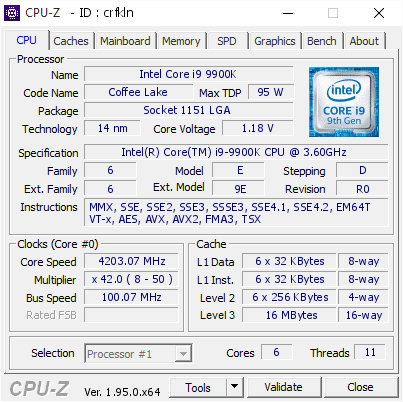
[crfkln] Validated Dump by DESKTOP-CJ9QFUO (2021-04-13 18:43:18) - MB: Gigabyte Z390 AORUS PRO WIFI-CF - RAM: 32768 MB
orchid flame
Was it a hardware of software solution?
south sky
did it two months ago
orchid flame
Like in OS or pre OS
 orchid flame
Like was it changed in OS?
south sky
all I know is Intel doesn't want you to do this
orchid flame
Did you boot into windows at 12t?
south sky
no

 orchid flame
Why are you testing in cinebench