#overclocking
1 messages · Page 63 of 1
 quick rose
 sudden torrent
I bumped the SoC so fclk is stable, should be 1.1
quick rose
Yeah but that's the only one?
sudden torrent
Besides that and the DRAM everything else is auto
Load line calibration to level 3
That's it for power
quick rose
This is from Fitz for an issue on X570 but for a 5000 series CPU. Might be worth tinkering with these, except the high SoC voltage for now.
1.15 soc
1.0 vddp
1.05 vddg iod
1.05 vddg ccd
quick rose
I'm coming up with a lot of blanks with regards to both XMP profiles being the same
Even with different CPU's or same CPU the whole time?
 upper rock
Is fitz some professional overclocker or something?
quick rose
Yes, he competes with Forks on HWBOT
quick rose
I wouldn't call it professional though, they don't get paid
Now, I HAVE read a lot of XMP 2.0 profiles BSOD'ing on that board
sudden torrent
Post fail x2
quick rose
This might be a conversation you should have with someone like Forks
upper rock
 upper rock
I wonder how high my 3070 will be able to go when I put pads on it
sudden torrent
Well time to reset bios again... It won't boot even after reverting changes
quick rose
upper rock
I wonder how high my 3070 will be able to go when I put pads on it
This is Fitz on HWbot https://hwbot.org/submission/4682862_fitvelkiz_vrmark___cyan_room_radeon_rx_6900_xt_22547_marks

HWBOT
The Radeon RX 6900 XT @ 2800/2150MHzscores getScoreFormatted in the VRMark - Cyan Room benchmark. Fitvelkizranks #2 worldwide and #2 in the hardware class. Find out more at HWBOT.
upper rock
How does one join the team?
 tall pelican
upper rock
How does one join the team?
tall pelican
upper rock
How does one join the team?
go to hwbot -> my account on the top, then scroll down to teams
 tall pelican
if you go to the benchmarks tab, you can see the supported benchmarks, and each one has a set of rules that need to be followed
upper rock
nothing against doing a bench at stock settings just for the hell of it, right?
I dont have to be overclocking on HWBot now, right?
tall pelican
you dont have to overclock, just follow the rules for each benchmark
upper rock
alright cool
Ill run timespy or something like that within the next few days when im on my PC
 proven canopy
Please do read the rules and feel free to ask questions here
tall pelican
read the rules twice, bench once 
then realize there's bench variance, and you'll end up running it 5+ times to get the best run
 forest radish
read the rules twice, bench once, open two cpu tabs of cpu z
then don't have the willpower to bench again
 sterile flame
How to overclock 760?
 vernal sail
@sterile flame the nvidia card or the i5?
There were 2 760s you have to be more specific lol
 flint quiver
It’s time to finally punish/push my 3090 strix.


 clever epoch
unigine heaven probably
quick rose
That or 3DMark yes
 uncut shore
Also can i keep my fans on auto if i already have a good fan curve in the adrenaline driver?
clever epoch
auto fan curves are usually fine. If you start hitting temps of 80+C and your fans aren't at full blast, you should take a look at it then
clever epoch

I feel like I can undervolt my 5800X, not just using curve optimizer. Might try negative voltage offset
that's +200 on core and +1100 on memory on the 3070 btw. EVGA XC3 Ultra
clever epoch
Ok voltage offset just reduces my clocks. My temperatures as well, but still. No bueno. Curve optimizer only it is
sterile flame
@tall pelican what ram do you use for that 5800x/5900x whatever?
want a good kit for 5900x when i get it
tall pelican
4000 16-19-19-39 1.4v 2x16
if you're doing just xmp, get the corsair 4000 16-16-16 2x8
sterile flame
thanks
vernal sail

We taking this puppy to 2.6
Thinking of doing some serious Overclocking on a qx9650
A lot of cheap beefy lga775 mobos
Some people can get 4.6 4core on those old core 2 quads
 vague gull
vernal sail
vague gull
vernal sail
i like the stickers on the display
i get some intel stickers from ebay/ali
sudden torrent
DDR4?
 torpid siren
Yes
sudden torrent
For Samsung B-Die I'd call it safe but it will probably degrade quicker
Any other die 1.45 is the max I'd do
torpid siren
Okay.
I'd just got some crazy memory and I just found out that the controller for the RAM is on the CPU
Personally, I have a 3950x now, planning for 5900x/5950x later
sudden torrent
Correct, but the quality of the die and its rated speed determines the RAM capability much more than the controller
torpid siren
Would you like see what I got?
sudden torrent
Sure, lets see
sudden torrent
Nice set, definitely B-Die
CL15 you could probably get to 14
Keep in mind that your 3000 series CPU is going to need the fclk set manually because it won't work at auto for that memory
torpid siren
Maybe, am just skeptical. Am like an overclocking noob.
Was like a stable f clock most likely no faster than 1800, at least with zen 2
???
sudden torrent
With AMD it rounds the CAS latency up to the nearest even number, so it would run at CL16 without any modifications
1800 is definitely attainable on Zen 2, 2000 is likely with Zen 3
You can probably run the XMP profile for this set and manually set the CAS latency to 14 and see if it works
torpid siren
So like 14 16 16 36
sudden torrent
Right, because AMD gear down mode will change a CL 15 to 16
torpid siren
Huh
sudden torrent
AMD had issues with odd numbered CAS latencies, so they started doing the gear down that automatically changed the CAS to an even number
torpid siren
Even for zen 3?
sudden torrent
Yes, even on my 5800X
sudden torrent
Samsung B-Die is probably the highest quality die, and the only one that will ever have 1.5v on a XMP profile
There's lower binned B-Die too but with those ratings there's no way it's low bin
torpid siren
It is shame that you can't tell 100% unless you get it and go to like xmp profile to see what die it is
sudden torrent
Yeah, you can guess with the obviously higher quality sets like this one pretty accurately but mid and low tier sets it's much harder to tell, and they can even use different dies on the same model
sudden torrent
Well lets see, how long ago was AM2? My first chip I overclocked was a Phenom
torpid siren
2006, 07? Welp. 🤣
torpid siren
Again, am new to this. At least more of the idea.
sudden torrent
Well I was a bratty teenager at the time but yep I'm an old fart
torpid siren
I love my first built rig last year with the stimmy checks to help and no regrats so far.
sudden torrent
Nice! I know a lot of people used those to break into PC gaming
torpid siren
And lately, i felt addicted to upgrade my rig
sudden torrent
Definitely, once you get the building bug it itches every time a new series comes out 😅
tall pelican
sudden torrent
AMD had issues with odd numbered CAS latencies, so they started doing the gear d...
amd doesnt have issues with odd cl, gdm just makes it easier to run tighter than 2t
torpid siren
Well honestly, that's the thing. At least with sockets, you're gotta stop at few years at best and may/hopefully stick with it for like 6+ years.
But who knows
tall pelican
you can run cl 13, 2t very easily, but its worse performance than cl14 gdm on
sudden torrent
Really? I was misinformed then but you're definitely an expert over me
torpid siren
With am5 and ddr5 around the corner and that itch could get me hard right there
sudden torrent
Yep we're going to need whole system upgrades then once those are released
torpid siren
But we see. For me and my rig, Get the new parts, and sell the old ones, and not really losing alot of money. At least now, and if you are lucky to get it at MSRP
sudden torrent
I think I'll be ok for at least a year or two, maybe an incremental upgrade. I was just happy to finally upgrade my Ryzen 2700 to something that doesn't suck. Should be set for a while.
torpid siren
We just hope the shuffle gods get us the 5xxx CPUs. At least for me
And RX 6900 XT
Thank you, @sudden torrent
Again, I just hope the memory controller on the CPU goes nuts at 1.5V
sudden torrent
The DRAM controller can definitely handle 1.5v, it's the SoC you have to worry about. Set that to 1.1 if you have problems.
sudden torrent
G'night
 ember rock
guys i need to know if i overclock my cpu or gpu what are the pros and cons pls tell me
im new to this stuff
 left bladeBOT
 𝕵𝖆𝖜𝖘 ⫷⫸#1755 has been warned
Reason: Bad word usage
ember rock
wtf
tall pelican
Im certain google will tell you all the info you need
 dark ferry
10700K 4.90GHz 4.80GHz 4C+100MHz 1.190V 210W 100% <--- can someone break down the 4c+100mhz and 1.19 die sense for me from the historical bin chart? I know the die sense is the VR VOUT so I'm assuming that means I have to test till I find a proper vdroop that falls within that number under load, but what in the hell does the 4c+100mhz mean?
 dull ginkgo
I'm guessing it's how well the chip scales with lower temps, aka. for every 4c you drop, you can get another 100mhz out of it
dark ferry
Interesting. I thought it was referring to specific cores.
vernal sail
vague gull
i get some intel stickers from ebay/ali
gasp cheater!
vague gull
vernal sail
*gasp* cheater!

vernal sail
I have a collection of those stickers mostly from dumpster diveing
Well over 50 i think!
Probably my most valuable is a clear red pentium pro sticker
vague gull
oooh
 steady current
 proven mango
so x1 precision says gpu +131 mem +200 when i did the auto overclock check, will if affect this lifespan of my 1650?
quick rose
That's what overclocking does
quick rose
Yep
proven mango
aight ima try and see how stable it is
proven mango
so does overvolting and overheating kill gpus? i just got into the oc scene
quick rose
Heat and voltage do, not overclocking itself
proven mango
aight so what does overvolting do when done right?
quick rose
allows higher clocks.
quick rose
VOltage won't change the clocks
proven mango
where can i put a pic of it?
torpid siren
Morning all! 👋
proven mango
torpid siren
Morning all! 👋
afternoon
torpid siren
Or simple... good day! 😜
proven mango
good day
yeah so the memory clock straight away changed to 4201 when i applyed it but the gpu clock stayed at 1485 and didnt change
proven mango
quick rose
VOltage won't change the clocks
any idea on why its not changing while the ram is?
quick rose
VBIOS limit probably
proven mango
aight so only mem clock will change prolly or is there a way to fix it?
quick rose
MSI afterburner, all sliders to the right. That's all you can do without a custom VBIOS and it's not worth it for that card
proven mango
ok its appearing now all i needed to do was load into a game
 cold whale
Can overclocking hurt your cpu?
dull ginkgo
any decent cooler, depending on your chip
a 30$ se-224-xt will keep anything below like a 10850k cool
 cold whale
dull ginkgo
any decent cooler, depending on your chip
cold whale
dull ginkgo
any decent cooler, depending on your chip
I have a Ryzen 3 3100
upper rock
you could honestly just go stock with that thing tbh
Ryzen 3 comes with stock coolers, right?
 severe forum
dull ginkgo
a 30$ se-224-xt will keep anything below like a 10850k cool
severe forum
dull ginkgo
a 30$ se-224-xt will keep anything below like a 10850k cool
would it work fine for a 3700x
bc vintage said no
quick rose
I wouldn't
 cobalt rapids
it'll work okay for a 3700x if you don't do any like extended multi core stuff I think
but yeah I wouldn't get one for that purpose
worth trying/testing if you have one though
dull ginkgo
@severe forum stock/pbo, I'd say yes, actual all core oc, or smth all core synthetic, no
torpid siren
@sudden torrent
Like what does it mean on SoC?
Like I was just looking around the BIOS since someone suggest to default the settings except XMP, and I thought the SoC voltage would be affected along with the DRAMS since the controller is on the CPU, but at least current ones right now before my set comes here, doesn't do that.

DRAM voltage is normal since that is what it needs in order to work with this kit.
sudden torrent
The SoC is part of the voltage that goes into the cpu and is partly used the infinity fabric. The f(abric)clk increases along with memory speed, and requires more voltage to work at those higher frequencies. Insufficient voltage will cause system errors and crashing.
1.1v is good for higher frequencies and is well within the safe range.
torpid siren
sudden torrent
The SoC is part of the voltage that goes into the cpu and is partly used the inf...
kk and the DRAM voltages are only applies to the ram sticks, correct?
sudden torrent
Correct
torpid siren
kk
I swear, with voltages. researching can be a real headache for a first timer.
We will see tomorrow for the new set of RAM
sterile flame
sudden torrent
The SoC is part of the voltage that goes into the cpu and is partly used the inf...
Last time I check FCLK doesnt require more SOC unless you are talking about DRAM, ProcDOT, VDDG CCDD & IOD
dark ferry
Nevermind.
 rocky apex
so im trying to overclock my ryzen 5 3600 any suggestion for core voltages I did some calibration already
sudden torrent
sterile flame
Last time I check FCLK doesnt require more SOC unless you are talking about DRAM...
Correct, increased speeds on ram and fclk are typically going to require more voltage, so for stability at fastest fclk speeds you want more SoC
You'd increase all of those when overclocking to 2000 fclk
sterile flame
Weird because I have a 1.1 SOC and managed to find 2000 FCLK stable
Unsure if adding .05 onto that would really make me go up a whole other level

 proven canopy
Looks like 16 gbit rev.b, btw you can right click on the "start benchmark" and test memory only
I would start with aiming for 3800 16 18 18 38 1.4v vdimm , 1.15v soc, keeping 1:1 with fclk
 proven canopy
Those are some high end sticks, was wondering if you bench a lot
sterile flame

torpid siren
Once again, If you're wondering, 4 x 8 GBs, 4000 MHZ, C15, 1.5V
sterile flame
And what CPU are you running that on? lol
torpid siren
3950x. Am somewhat aware about the f clock won't run on 2000 MHz on Zen 2 unless you increase the voltage.
I will be getting 5900x/5950x, if I can find one at MSRP
torpid siren
F clock?
quick rose
At 2000 fclk?
torpid siren
Just 1800 for now
torpid siren
quick rose
oh wow
?
torpid siren
It was set to auto and maybe kept trying 2000 since they are 4000 MHz ram kit
quick rose
Yeah, that's it
quick rose
wat?
sterile flame
torpid siren
<@618616722840223754> no? You busy?
he types in like 3-4 channels at a time lol
torpid siren
Oh lol
quick rose
Yeah, if you were asking about Voice Chat I don't have a mic either lol
quick rose
Yeah, like I said, I doubt you'll get the 3900 to 2000 FCLK, even 1900 may be a struggle
Even the new 5000 series struggle to hit 2000 FCLK
torpid siren
Even forcing the fclk to 1800, no dice
tall pelican
With zen2, see how high IF you can post with auto ram (2133)
torpid siren
@proven canopy @tall pelican you guys mind VC?
proven canopy
can't at the moment
 bright thorn
looking to overclock my 9600k what should i use to stress test, and how do i know at what point to increase the voltage, and whats a temp thats to high to that i should reduce voltage and speed
ping/dm me with answer
quick rose
bright thorn
ping/dm me with answer
Read Pins.
bright thorn
ok can you at least tell me what to use to stress test
quick rose
reddit
r/overclocking: All things overclocking go here. Learn to overclock, ask experienced users your questions, boast your rock-stable, sky-high OC and …
torpid siren
 errant mirage
What software is that?
bright thorn
quick rose
Read Pins.
9600k isnt here
 quick rose
You didn't even read it
bright thorn
?
bright thorn
quick rose
You didn't even read it
what do you mean
quick rose
bright thorn
quick rose
https://discord.com/channels/500085440221806603/610602203849162772/8164415554473...
im not trying to do that
im trying to see the silicon lottery there
quick rose
You're not trying to overclock
bright thorn
but there isnt a 9600k
bright thorn
quick rose
You're not trying to overclock
yes i am?
quick rose
Then read the Wiki
bright thorn
im confused
quick rose
It literally answers all the questions you just asked in one place. How and when to change voltages, what to do first, what software to use, etc
 bright thorn
still why no 9600k?
quick rose
WDYM? Overclocking isn't just plug in numbers and win lol
bright thorn
quick rose
WDYM? Overclocking isn't just plug in numbers and win lol
sigh on the silicon lottery why isnt there any numbers for the 9600k
quick rose
IDK why
sterile flame
because they likely didn't test it or didn't have a big enough sample size?
proven canopy
SL buys chips to bin and resell to enthusiasts with lots of money - 9600k doesn't really fit in there
torpid siren
@sudden torrent Welp. I think 3600 at 14-16-16-36 will do for now.
Hopefully the full 4000 when I get Zen 3 when I have the chance.
Love you all for helping this journey on this.
🙂
 hushed charm
can anyone help me oc my cpu? 🙂
quick rose
reddit
r/overclocking: All things overclocking go here. Learn to overclock, ask experienced users your questions, boast your rock-stable, sky-high OC and …
hushed charm
yeah im looking over the pins rn
do u know how to use gigabyte's ez oc thing?
wat are binning stats?
should I use the bios or the aorus easytune?
hushed charm
I don't understand how the host bclk relates to frequency
clever epoch
wouldn't recommend automatic OC tools
binning stats are statistical trends for silicon quality. EG 100% of a particular model should be able to reach 4 GHz at 1.2 Volts.
Then only 75% can reach 4.1 GHz at 1.2 Volts.
Then only 10% can reach 4.2 GHz at 1.2 Volts.
etc. etc.
the numbers I used are pretty much completely random, but the idea is to figure out how likely it is that your chip can reach a certain speed with a certain amount of voltage, which is a measure of how good your quality is on the chip
I would also recommend doing all your OC in BIOS
idk much about BCLK either, but I understand it as a sort of multiplier for given core ratios. EG with a multiplier of 40x at a BCLK of 100 MHz, you will run at ||40 * 100 =|| 4000 MHz. If you increase BCLK to 101 MHz at the same (40x) multiplier, you will run at ||40 * 101 =|| 4040 MHz
dark ferry
The binning stats page helped me tremendously with finding a starting point.
sterile flame
clever epoch
wouldn't recommend automatic OC tools

 compact delta
should i push my ryzen 7 3700x oc to 4.3MHz at 1350mV or 4.0MHz at 1250Mv
tall pelican
1250mv
clever epoch
1350 is not safe for daily
 native wind
whats a good core voltage for R5 5600x to hit 5ghz
tall pelican
whatever pbo uses
severe forum
lmao
sterile flame
Lmao.
Thats what I mean.
Ryzen master boosts not super hard.
and people usually use PBO
upper rock
whats the max yall have ever gotten on a 3800x
or yall have ever seen at the very least
sterile flame
^
proven canopy
mr1111 does
tall pelican
I have a 3900xt, and stock gave better single core boosting, pbo gives better all core
dull ginkgo
@upper rock 4.4 all core max
vernal sail

eBay
Find many great new & used options and get the best deals for ID-COOLING FROSTFLOW X 360 CPU Water Cooler AIO Cooler 360mm CPU Liquid Cooler at the best online prices at eBay! Free shipping for many products!
is this puppy enough for some serious core 2 extreme 9770 overclocking
like 4ghz+
hoping to get 4.2 on a xfx motherboard
if I had one would use a rampage 2
clever epoch
I know it's the opposite of the channel intent, but I'm looking to underclock my GPU so it's mining more efficiently when I'm not gaming.
Now I've been using MSI Afterburner, but it bottoms out at -502 on my core clock, resulting in a core clock of 1170 MHz on my EVGA 3070 XC3. However, I have a friend with a 3070 TUF OC and he can get his clocks down to ~950.
I'd like to reduce clocks even more, but I'm not sure how I could do that, because afterburner does not allow me to go any lower
and I can't seem to figure out how to enable voltage control (it is enabled in settings), otherwise I'd mess with that
sterile flame
clever epoch
I know it's the opposite of the channel intent, but I'm looking to *underclock* ...
Underclocking does nothing
undervolt
do ctrl + f
flatten the entire thing then drag it down
clever epoch
I see, thanks
tall pelican
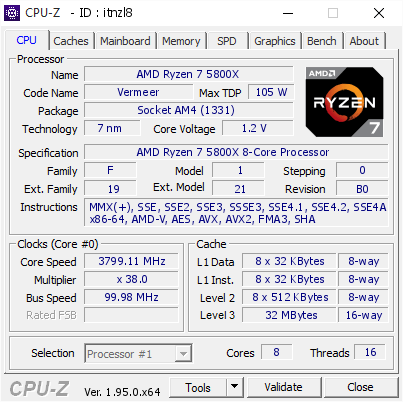
[itnzl8] Validated Dump by Fitvelkiz (2021-03-06 11:39:57) - MB: MSI X470 GAMING M7 AC (MS-7B77) - RAM: 8192 MB
sterile flame
tall pelican
https://valid.x86.fr/itnzl8 <a:BigBrain:797273506098053170>
you made me bite my tongue
i have to stay up for another 6 hours waiting for best buy restock
want 5900x sadge
tall pelican
oh, I was posting it because memory go brrrrrr
I've had the cpu for almost 2 months now
sterile flame
yeah i was wondering why the memory looked odd
 sterile flame
damn
 manic helm
rev e on an oem stick?
Thats a waste. how many volts.
tall pelican
1.38 since I dont have vtt control
 hollow edge
Top noob tip I learned recently. Just because you have 3000Mhz ram, doesn't mean it's running at that. Turns out I'd be running it at 2133 the whole time. Oops xD
sudden torrent
Common mistake, not turning on XMP
 ionic socket
sudden torrent
Common mistake, not turning on XMP
ionic socket
sudden torrent
Common mistake, not turning on XMP
Speaking of that when I have profile at off
The dram voltage saids 1.200v -auto
Then on 1.200v - 1.350 but it’s in red what that mean
I think these are just cheap rams with not that much MHz there not my rams this is from a pc was given to me I’m still building my pc.
I was just curious
is that why or something else ?
sudden torrent
Yeah default voltage for DDR4 is 1.2v, 1.35v is well within tolerance for any die, even the bad bin ones.
I'm assuming that it turned red because it's going up an amount above whatever limit the motherboard maker decided. Nothing to worry about.
proven canopy
dram voltage is stored in the spd data, the xmp profile sets it higher
left bladeBOT
 GOTHBOY#2730 has been warned
Reason: Bad word usage
ionic socket
Oh ayeee I was using 2133 as the default as is but I turned the xmp it’s now using the 3200mhz. So I guess this ram isn’t bad
I thought this ram was in the 2000s
 cunning shard
sudden torrent
Common mistake, not turning on XMP
cunning shard
sudden torrent
Common mistake, not turning on XMP
Should i turn on xmp on profile 1 or 2
sudden torrent
Profile 2 is usually the higher performing one but it depends on a few factors like SPD timings and speed, and the CPU you're using.
Lacking other information I'd recommend starting with 1, test the speed, and then go to 2 and test the speed. Odds are that 2 will be faster, but not by much.
sudden torrent
Ryzen has a trick to it. Up to 3600 speed memory should work fine with other auto settings, but any faster and you might need to play with the fclk to keep it stable.
sudden torrent
That'll be perfect on auto settings
cunning shard
do you know diffrence btw cpu temp and cpu temp Tctl ? @sudden torrent
it shows defrnt results
sudden torrent
Looking at which program?
cunning shard
quick cpu gives me 65 and game booster gives me 48
sudden torrent
The first is the actual temperature and the second is accounting for an offset
cunning shard
aight thanks guys
 balmy kelp


 icy crag
Hey guys, i have a ryzen 1700x and a b450m aorus and uhmn i tried to overclock it and uhh i did this
Cpu clock ratio 40, core performance boost disabled, amd cool&quiet function disabled, svm mode disabled, global c-state control disabled, psu idle control auto, opcache control auto, downcore control auto, smt mode auto.
Dynamic vcore(dvid) +0.102v
Dynamic Vcore SOC Auto
DRAM Voltage 1.370
CPU:
Frequency 4008.80MhHz
BCLK 100.22MHz
Temperature 16.0°C
Voltage 1.416V - 1.428V - 1.440V
tall pelican
voltage is a bit on the high side, what's the hwinfo64 svi2 tfn voltage reading?
icy crag
tall pelican
voltage is a bit on the high side, what's the hwinfo64 svi2 tfn voltage reading?
1.335 average
icy crag
tall pelican
max and mins
Max is 1.344 and Mins is 1.306v
tall pelican
then you're fine
icy crag
So i dont have to change anything right?
tall pelican
nope, you're perfect
icy crag
tall pelican
nope, you're perfect
Thanks
sterile flame
tall pelican
nope, you're perfect
tall pelican
god I wish there was a way to disable reply @ s
 finite frigate
me too
dull ginkgo
tall pelican
god I wish there was a way to disable reply @ s
Only for the person who send it :(
 unkempt temple
 copper fable
Getting a full 30l next week for some fun! Was supposed to be this week....vehicle issues
vernal sail
Unpopular opinion, I liked the old blue on grey
Where you could overclock without a mouse
forest radish
can still do it without a mouse
I never touch the mouse in the bios, works great
little clunkier than it used to be, you're right
 thin rapids
Should I run my ram higher or equal speed to what I can set the infinity fabric clock to?
sudden torrent
There's a penalty in latency running out of sync from the RAM, so unless you can get the RAM significantly higher than fclk it's best to run equal to fclk
thin rapids
so 3866 is not worth if my infinity fabric can only go to 1900
i am using the 5600x if that matters
sudden torrent
It would still be worth it, you can tighten the latencies a bit more running RAM slower than rated speed. I knocked my CAS down 6 notches just running 3866 instead of 4133
thin rapids
Assuming I can't tighten the timings any further. Would the 3866 be worth or should I just run 3800 to match infinity clock
sudden torrent
1933 fclk should be possible unless you're just plain unlucky. I say get the 3866 RAM and try to run fclk higher by bumping voltages, but if it's not stable enough you can always run it at 3800. You absolutely can tighten the timings doing that, even if it means just going from 16-19-19-39 to 16-18-18-38 it's worth it.
thin rapids
What voltages would I have to change for higher fclk?
dull ginkgo
iirc SoC? don't quote me on that though
thin rapids
Would HWINFO be the way to check what my voltages are at right now?
proven canopy
yes
 robust aurora
Is intel extreme tuning utility good for overclocking or should i do it in bios?
proven canopy
Use motherboard specific software like turbov or eleet if anything. Bios always works as well.
upper rock
could just use BIOS, when push comes to shove
robust aurora
I just never oc my cpu before so i dont want to mess something up in the bios
 zenith palm
robust aurora
I just never oc my cpu before so i dont want to mess something up in the bios
zenith palm
robust aurora
I just never oc my cpu before so i dont want to mess something up in the bios
i believe its easy tune for gigabyte but you need to install app center first
sudden torrent
robust aurora
I just never oc my cpu before so i dont want to mess something up in the bios
You'd be surprised how hard it is to actually damage something. Increasing voltage too far is pretty much the only way.
thin rapids
Would I want to push soc or core voltage or some toher voltage to push my fclk?
sudden torrent
There's tons of good info in the pins, like this
https://www.reddit.com/r/overclocking/wiki/index
reddit
r/overclocking: All things overclocking go here. Learn to overclock, ask experienced users your questions, boast your rock-stable, sky-high OC and …
sudden torrent
thin rapids
Would I want to push soc or core voltage or some toher voltage to push my fclk?
SoC to 1.15 to test stability, you can nudge it down a bit if it stays stable. If it's not stable there's other voltages to change like vddp
thin rapids
Would 1.18 V on SOC be fine since that is what my pc was running at on auto?
sudden torrent
If that's the auto it should be ok but when you've tested if it's stable, see if it's stable at lower voltages; .01 volt steps down, test each step down
tall pelican
1.18 is fine, but not because that's auto
sudden torrent
Really? I've always been warned about going over 1.15
You're the best OC expert we've got here though so I'm inclined to believe you
tall pelican
its fine to 1.25v-ish, but generally over 1.2 you see it getting worse
sudden torrent
Well I'm happy that my chip is perfectly stable 1933@1.12v and I can sacrifice a hair of stability to push it to 2000
tall pelican
||its probably not, just error correction in the IF doing its thing||
thin rapids
Maybe I am just unlucky, but my fclk does not want to go to 1933 at all
sudden torrent
Sounds like you might just be unlucky, BIOS is updated? Agesa update 1.2.0.0 helped with stability
thin rapids
yeah everything is updated might just run ram at 3800 and tighten some timings some more
so far I tuned my timings from 16-18-18-38 to 15-17-15-36 at 3800
sterile flame
Can you over clock an i9-7900x
proven canopy
yes
sterile flame
how
quick rose
Read the pinned messages
upper rock
Forgot about the Intel i() (....)x CPUs
thin rapids
so far I got the timings to 15-17-14-34 at 3800. I think I am happy enough
first two timings won't go down any further from what I tested
upper rock
Think I could get 3800mhz on B-Die tridentZ RAM with a 3800x with 1:1 FCLK?
sudden torrent
It'll be tricky on zen 2, if not impossible depending on binning
You could always ask Fitz but he'll probably just say something like "read the pins"
sterile flame
where do i look to find out how to overclock my intel cpu
tall pelican
upper rock
Think I could get 3800mhz on B-Die tridentZ RAM with a 3800x with 1:1 FCLK?
the ram will do it without issue, its down to the cpu's IF
upper rock
Yeah ik
I tried this once before with a R5 3600
Didn’t work great
Had to reinstall windows
tall pelican
1.1-1.2 soc
.9-1.0 vddp
.95-1.1 vddg iod/ccd
sterile flame
what link do i click on to learn how to overclock intel cpu’s
upper rock
Check pins 
sterile flame
which link in pins
sudden torrent

 iron quail
robust aurora
iron quail
robust aurora
Should i try intel auto oc and see what i get before trying it my self in the bios?
vernal sail
@robust aurora i just like reading up and seeing what the normal range is
 dark ferry
What are you using to test it?
 dim plank
hello. I would like to ask what does voltage offset specifically do? Does it switch two fixed voltages or does it change voltage dynamically according to the required voltage?
robust aurora

hi so i did the auto oc and its says its 5 ghz
but when i run cinabench the clock speed are at 4800
 sudden torrent
Cinebench single or multi core test?
It's pretty normal for it to not hit max boost under heavy, constant load.
robust aurora
Multi core
dim plank
Hello guys. Does voltage offset change voltage dynamically or does it only change according to the neagtive/positive offset number set?
sudden torrent
robust aurora
Multi core
That's a "worst case scenario" kind of test, every core is being hit 100%. It won't be hitting the max for long, if at all.
Other multi core benchmarks that don't do 100% load like time spy would be good to watch boost behaviors.
sudden torrent
dim plank
Hello guys. Does voltage offset change voltage dynamically or does it only chang...
It should be dynamic. The offset will adjust voltage after the motherboard and cpu decide what voltage should be at.
I.E. When gaming it might want to go to 1.35v but with an offset of -.05 it'll do 1.3v
Stock voltages do tend to be aggressive and far more than necessary
dim plank
@sudden torrent Thanks for the info.
I would also like to ask, Is the dynamic voltage offset set as a range where the voltage can change any value around the original voltage and the set negative/positive offset? Or does it only change into a fixed value set using the negative/positive offset?
I am trying to understand if the dynamic offset is not just a switch between two voltage values. Say orginal voltage and one specific voltage offset value.
sudden torrent
Normal motherboard and cpu behavior is the board will read what the cpu wants and is rated for in a given load. Once that value is calculated, the offset is added/subtracted.
My cpu, for example, might hover around 1.05v when not under load, and go up to 1.38v in heavy load. Any value between the two would be valid for the motherboard to set. The offset would change the calculated value, wherever in the stock range it falls.
dim plank
I see. So the voltage offset doesn't only set the value typed. But it can also assign a voltage value in between the orginal value and the offset value.
Ex: 1.45v with a negative offset of .5v ; result will not only be 1.4v but can also be with values in between 1.45v - 1.4v?
robust aurora
sudden torrent
That's a "worst case scenario" kind of test, every core is being hit 100%. It wo...
Ok thanks , btw what is a good volt for 10700k 5ghz?
sudden torrent
If 1.45 is the absolute max voltage, the offset -0.05 will make the max 1.4v
 dim plank
"If 1.45 is the absolute max voltage, the offset -0.05 will make the max 1.4v"
@sudden torrent So no in between right?
How can I achieve a votalge with in between values? Not just a fix offset? Is there a possible way?
I guess I will just set it to auto?
sudden torrent
There's only 3 modes, auto, offset, and override. Override will set a constant voltage.
Auto will do fine. It won't usually ask for its max voltage anyway.
robust aurora
i dont understand what is all core die sense vcore, is it core voltage ?
dim plank
I see. For some reasons I thought , the voltage offset treats the value as a range but from what I am learning there is only two sets of values to swtich.
sudden torrent
robust aurora
so thats too high i guess
There's no definite answer. If that's what it's stable at and won't work lower, that's the limit of your bin. The silicon lottery page is more of a guideline of what to test.
robust aurora
i just did the intel auto oc and that is what i got from it . so now i should try and low the voltage till my pc crash?
sudden torrent
Basically, yes. I like to run prime95 and gradually lower the voltage while it's running. Once one or more of the threads crash, increase a hair again and test longer.
robust aurora
👍
robust aurora

@sudden torrent i dont understand all the settings here like what is avx2 ratio offset and core voltage offset. can you please explain to me what do they mean
and if their values rn are ok
dull ginkgo
sudden torrent
That's a "worst case scenario" kind of test, every core is being hit 100%. It wo...
Smh, not really, I believe cinebench doesn't put enough load to simulate frequency you'd encounter under actually heavy load, it's more of a gaming load test imo
robust aurora
Now i did all cores x51 and its working on 4900
So its always 200 less mhz
Might be avx2 ratio offset setting?
Its set for me for x2.0
upper rock
tbh I cant take you seriously with the gravity falls pig in your pfp
robust aurora
😂
dim plank
generally what is the safest min cpu core voltage? 1.25v?
hushed charm
Can someone help me actually change my frequency? I can't get my bios to let me do anything
upper rock
what board, what CPU
upper rock
is it possible for you to go to F7 bios?
dim plank
What voltage does some pc usually run in idle? Is it around 1.25v? Currently I am running around 1.35v
hushed charm
Wait why f7, there's an f15a available
upper rock
F7 is the only one I know for sure works well for overclocking with that board
hushed charm
Ok
hushed charm
Ok? Lol
I'm updating to f7...
Dang, I thought I was actually gonna get some help
I blue screened at 4.5, rip
upper rock
So is it working?
hushed charm
Yeah, I had to use page up and down to adjust stuff
I increased my voltage to 1.3
4.5ghz
Got into windows!
It's working so far let's gooo
upper rock
yay
tall pelican
what load line are you setting?
robust aurora
should i use thermal velocity boost?
hushed charm
load line?
didn't bluescreen in valorant, should be good i think
oh i left load line on auto
should i put it on turbo or something?
tall pelican
hushed charm
load line?
in vrm settings, set cpu vcore load line calibration to high
on auto, 1.3v is dropping down to 1.1-1.15ish, high will keep it in the low 1.2s, and should let you clock higher
hushed charm
ok sick, thanks, if I stay at 4.5 u think it's fine to keep it on auto?
tall pelican
if you want to
 gentle perch
Hello new to overclocking here
I have a 5800x running 4.6 all cores at 1.20625v on ryzen master and have tested it for stability by using cinebench r23 for an hour (two 30 minute tests)
My questions are: is that a good overclock or should I go higher? Max temp it reaches is 79 C
And also would I see more of a difference if I did the overclocking in the bios instead of applying the overclock on ryzen master as soon as I start up my pc
Is there a big difference to overclocking through the app versus doing it through the bios aside from not having to set the overclock manually every time
sudden torrent
gentle perch
My questions are: is that a good overclock or should I go higher? Max temp it re...
A good practice when overclocking Ryzen is to use precision boost overdrive instead of an all core constant overclock. My 5800X will boost to 5 GHz, which will give a good bit of extra performance when gaming since games tend to like faster single cores, and it never breaks 75C (with a decent 240mm liquid cooler).
A good place to look for tips and how-to is the reddit page that's pinned, https://www.reddit.com/r/overclocking/wiki/index
reddit
r/overclocking: All things overclocking go here. Learn to overclock, ask experienced users your questions, boast your rock-stable, sky-high OC and …
vernal sail
Am getting 4.5 on my 5600x
Honestly don’t want to push it too far 4.7 at bace volts is unstable and this is kind of mission critical
Really fun cpu to overclock tho
I mean its no opteron...

sudden torrent
Mission critical stuff you don't want to do much overclocking at all tbh
Just enable PBO in BIOS and call it good.
That should let it boost to 4.7 or more
thin rapids
Is there any way to check if PBO is enabled outside of bios?
zenith palm
I only boost to around 3.9 or sometimes peeking 4ghz on a Ryzen 5 3600 does that sound right? It has stock cooler btw which i will be upgrading soon with a id cooling sse 224
sudden torrent
thin rapids
Is there any way to check if PBO is enabled outside of bios?
Put load on a single core and see if it boosts past stock boost speeds. You can also enable it from Ryzen Master.
sudden torrent
zenith palm
I only boost to around 3.9 or sometimes peeking 4ghz on a Ryzen 5 3600 does that...
Your stock max single core boost is 4.2 GHz. The Wraith Stealth cooler it comes with is probably holding it back. See how it does with the new cooler, it should boost higher and more often with more thermal headroom.
zenith palm
Okay thanks
dim plank
Are the last tile renders in Cinebench more heavier compared to the earlier tiles? I noticed the temp going high in the last tiles.
proven canopy
Ya, the intensity and difficulty of the workload for each tile varies.
gentle perch
so if i pass an hour of r23 i'm stable probably right?
tall pelican
until you give it something more stressful than r23, sure
dull ginkgo
Kinda want to say p95 time, but maybe occt's cpu test?
gentle perch
I’ll try an hour of prime95 later today
proven canopy
Ya, try occt avx2
sudden torrent
Brutal. OCCT showed errors not a single other software could find. It's very stable in everything else, even other stress tests.
Currently I'm at 3866/1933 synced. When I was testing my RAM I was able to push it to 4333 (from XMP 4133) pretty easily, I could go higher loosening timings most likely.
At what point does the latency penalty for having desynced fclk not matter any more? Should I push higher or leave it synced lower?
dull ginkgo
OCCT is great for errors, P95 is great for space heater and crashing
sudden torrent
Yeah I tested a lot more than just p95 but that was one test I did. I find it better for CPU overclock testing than RAM.
Thoughts on this software?
https://www.techpowerup.com/download/ryzen-dram-calculator/

TechPowerUp
DRAM Calculator for Ryzen helps with overclocking your memory on the AMD Ryzen platform.
It suggests stable memory timing sets optimized for your m
dull ginkgo
dram calc can be useful
sudden torrent
Problem I'm having with it is it doesn't like to go over 3866, but seems good for below that
dull ginkgo
@proven canopy looks like when I hit it with a load, it'll sustain the 2133mhz, both cpuz and aida64 reports the c16
 proven canopy
good ram I guess
dull ginkgo
no load, both reports the c10
 proven canopy
idk, I'm unfamiliar with the platform
proven canopy
sudden torrent
Thoughts on this software?
https://www.techpowerup.com/download/ryzen-dram-calcu...
Popular software, but in the past got in trouble for plagiarism without credit and illegally distributing paid memory testing software
sudden torrent
Uh oh, is that the membench thing they got in trouble for?
dull ginkgo
@proven canopy by the way, do you know if it's possible that this ram is physically switching freq/timings? Not just a reporting error?
proven canopy
I don't
sterile flame
is MFR M die?
robust aurora
how much memory clock should i increase when increasing core clock? what is the ratio?
robust aurora
is msi afterburner oc scanner good? should i use it
zenith palm
robust aurora
how much memory clock should i increase when increasing core clock? what is the ...
You want your cpu fabric clock to be 1/2 your ram speed because ddr is double data rate, ie, mem clocks are actually half of advertised, so try get memory speed in ddr 2x cpu mem clock
Id that makes sense
zenith palm
robust aurora
is msi afterburner oc scanner good? should i use it
Just manually OC with afterburner it's really easy
zenith palm
robust aurora
is msi afterburner oc scanner good? should i use it
Here's a tutorial of sorts https://youtu.be/cqshaJTI8FQ
Play World of Warships for free: http://bit.ly/2ldpyOX New players will receive 1 Million Credits, the USS Langley Aircraft Carrier, 3 days premium time, and more by using my code PLAYLANGLEY2019. Big thanks to Wargaming for sponsoring this video.
○○○○○○ Items featured in this video available at Amazon ○○○○○○
► Amazon US - http://bit.ly/1meybO...
robust aurora
Thanks will help alot@zenith palm
zenith palm
Np
robust aurora
Manged to get 1970mhz avg on timespy now adding some memory clock so far 500 is stable
robust aurora
zenith palm
What gpu you running
3070 gaming oc
zenith palm
Nice, you could probs go further on clock tbf
robust aurora
I know but i dont want to push it too far rn, maybe later.
sterile flame
tall pelican
Its mfr
So yes? Hynix M Die
Managed to manually clock em to 3733 however using DRAM calc hasn't given me good results
forest radish
probably because it's dram calc
also the colloquial naming schemes for memory are dumb, but usually x-die means samsung, three letter codes like MFR mean hynix, rev x means micron, etc
ideally we would include the density, like instead of saying b die, you would say S8B
proven canopy
I think the naming convention works well
dim plank
Why motherboard Vcore always start at 1.45v by default? Is there a way to change the base Vcore so that it will make it easier to use a positive offset?
Using negative offset just makes the idle voltage higher than the load voltage.
tall pelican
which cpu? Idle voltage should always be higher than load, but ryzen's idle vs load is more drastically different than intel's
bright thorn
What software should I use to stress test CPU and how long should I run it to be effective
dull ginkgo
@bright thorn an hour of p95 smallfft for really heavy stress, an hour occt avx2 test for heavy stress
bright thorn
What difference between really heavy and not really heavy
dull ginkgo
P95 is crazy
Occt heavy, not as crazy
P95 smallfft made my CPU spike to 180w power draw, occt spikes only around 150w
And also, p95 is lots of heat and stress, occt is better for finding errors
dull ginkgo
bright thorn
What software should I use to stress test CPU and how long should I run it to be...
I mean, this is for rock solid stability, and I doubt you can watch youtube while it's going, 100% load boi
bright thorn
dull ginkgo
I mean, this is for rock solid stability, and I doubt you can watch youtube whil...
:(
sudden torrent
Oh, the new version (7.0) of hwinfo has tooltips for all the sensors. Nice! Maybe we'll get less "what does X mean" questions.
 vapid berry
What does x mean
zenith palm
vapid berry
What does x mean
3rd last letter of the alphabet
bright thorn
i turned on prime95 how exactly do i turn it off
dull ginkgo
Test, stop, stop all workers
bright thorn
dull ginkgo
Test, stop, stop all workers
hwinfo still says 100% usage..
dull ginkgo
it what
bright thorn
?
bright thorn
dull ginkgo
it what
should i restart or smth
well temps are dropping...
was at 69c somewhere around that now im dropping so
dull ginkgo
this
 bright thorn
i did
dull ginkgo
it takes a moment to stop, but should stop in like 10 sec
dull ginkgo
task manager should say what is eating what
bright thorn
 dull ginkgo
click the 100%
bright thorn
My screen shots on my pc just dont work
dull ginkgo
that'll sort it
dull ginkgo
sure
sudden torrent
Task manager sometimes doesn't account for idle time, it's a known bug, and happens frequently with Oculus headsets. Sometimes it will just report 100% usage constantly. If that's happening to you, run these commands:
PowerCfg /SETACVALUEINDEX SCHEME_CURRENT SUB_PROCESSOR IDLEDISABLE 000
PowerCfg /SETACTIVE SCHEME_CURRENT
I had this bug on two separate installations of Windows, and this always works for me.
bright thorn
sudden torrent
Task manager sometimes doesn't account for idle time, it's a known bug, and happ...
hwinfo was reporting 100% usuage as well, and my fans were spinning fast
sudden torrent
Well it never hurts to reboot anyway, sometimes Windows is just weird. If you check later and it still says 100% try those commands.
bright thorn
sudden torrent
Well it never hurts to reboot anyway, sometimes Windows is just weird. If you ch...
I ended the task its fine

 novel cobalt
If anyone can help me with this https://www.reddit.com/r/overclocking/comments/m4y40s/overclock_ddr3_ram_1333_to_1600_3770_i7_non_k/

reddit
1 vote and 0 comments so far on Reddit
I posted all details there so I don't have to spam discord repeatedly
 rough cairn
sudden torrent
Confirmed, I can get my 5800X to boost past 5GHz on at least 3 cores
rough cairn
sudden torrent
Confirmed, I can get my 5800X to boost past 5GHz on at least 3 cores
hey, sorry for a lot of questions in advance. Considering amping my 5600x to 5ghz and trying to figure out how.
is this with pbo on auto voltage? whats the max pbo offset on 5800x? is this with curve optimizer, if so what are the settings? also, which mobo and bios is this?
 royal quiver
How do I turn off the turbo timer
 sleek garnet
hello just wanted to ask what the software is called that tells me what kind of a sample of my cpu I got. The one for Ryzen
quick rose
CPU-Z?
That will tell you what CPU you have as well as Motherboard model and also RAM
dull ginkgo
I think it's a question more about the sample for silicon lottery
quick rose
Well, AFAIK, there is no software to tell that
dull ginkgo
Like Clock Tuner for Ryzen
CTR
the kinda auto-oc thing
that kind of tells you how good a chip you have
sleek garnet
dull ginkgo
I think it's a question more about the sample for silicon lottery
yep exactly
zenith palm
You also need ryzen master with it
dull ginkgo
:)
dull ginkgo
pretty sure it uses RM to edit your clocks
zenith palm
dull ginkgo
pretty sure it uses RM to edit your clocks
yeah it does
upper rock
where does it say how good of a chip you got in ryzen master
dull ginkgo
no, CTR (clock tuner for ryzen) uses RM to auto-oc, and by the end, it'll tell you the best OC it can get that's cinebench stable
quick rose
What is this black magic
upper rock
says the wizard with no cables
quick rose
Of course, wiring is my thing
You should see the custom wiring I do for all my rigs and bikes, never see it and can't distinguish from factory
dull ginkgo
vintage op racer
quick rose
Having OCD sucks
upper rock
rip
quick rose
Then again, I could probably tweak some settings in the BIOS
dull ginkgo
my 3800x is prob going to be like bottom 1% sample
upper rock
3800x is literally just a slightly higher binned 3700x
dull ginkgo
not for early sample against current 3700x's
quick rose
Ye, bad early bins
I might be able to get it better with some LL settings in the BIOS
need to play with it
sudden torrent
rough cairn
hey, sorry for a lot of questions in advance. Considering amping my 5600x to 5gh...
First off, not every chip is going to be able to do 5 GHz, it will take a little luck. My chip can on a few cores, the rest get close but not quite.
I used PBO auto voltage but load line calibration level 4. Max offset is +200. Mine can do +150. The rest is just a minor adjustment with curve optimizer, a couple steps on negative but a little more on my "best" cores because they can go a hair higher.
I'm on a MSI X470 gaming plus, latest bios.
Trial and error are going to be needed to see how far your chip can go.
rough cairn
sudden torrent
First off, not every chip is going to be able to do 5 GHz, it will take a little...
Thanks, yeah I've oc'ed my 5600x to 4.85 with no prob, with negative 15 curve optimizer and pbo +200. Also on auto voltage but it never actually goes above 1.3 volts even on high loads. Gives 12230/1603 score in cinebench23.
Haven't touched the load line calibration this time, but used level 3 when had all cores oc'ed to 4.85. Then had it locked at 1.3125 volts and had 12481/1603 score in cinebench23.
I'm on asus tuf x570 3005 bios. Heard a new bios update will allow offsetting the pbo higher than 200 (as some of the msi boards allow). Wondering if anyone managed to oc it to 5ghz but haven't found anyone yet.
bright thorn
to update hwinfo do i have to delte it and reinstall the new version?
i have the same question but with occt
sudden torrent
bright thorn
to update hwinfo do i have to delte it and reinstall the new version?
i have the...
No, just make sure hwinfo isn't running and copy the "portable" version exe over the one you have and replace it
I haven't played much with occt but you shouldn't have to uninstall to install the new version of anything.
bright thorn
would unistalling it and reinstalling the new one work
cuz like i dont know what you just said so that'd be easier
sudden torrent
rough cairn
Thanks, yeah I've oc'ed my 5600x to 4.85 with no prob, with negative 15 curve op...
I'm pretty sure I got a really good sample for my chip. If I leave everything at its default I still get 4.75 single core boost, and enabling PBO auto gets me 4.85 without any changes.
Ryzen chips seem to tend towards higher voltages at low load, and lower voltage at high load. That's what LLC is for, it keeps the voltage a little higher under load.
I imagine your CPU likes 1.3 max because it's a 5600X, which is a 5800X with 1-2 failed cores that got cut off or didn't meet boost spec, so it needs a little less power.
sudden torrent
bright thorn
cuz like i dont know what you just said so that'd be easier
Do it whatever way you find easiest, it doesn't make any difference really.
sudden torrent
For stability test? It needs to run that long to see if it crashes under sustained load
bright thorn
sudden torrent
For stability test? It needs to run that long to see if it crashes under sustain...
no i was just benchmarking without oc to see what the oc does
5753
multi core
sudden torrent
Well it's good to get an average score to help account for any background tasks
bright thorn
sudden torrent
Well it's good to get an average score to help account for any background tasks
?
i do have youtube and discord open...
sudden torrent
If it runs the same thing 10 times, you'll get a slightly different score each time depending on what's running in the background.
You'll get the most accurate score with as few things running as possible.
bright thorn
yeah but i mean its prolly mostly fine that i have youtube open
dont wanna just sit here for 10min
does it save the score when you exit
sudden torrent
If a youtube video is running it will use probably 5-10% of your processor time, reducing your score.
I think it saves? Not completely sure, I just screenshot it every time I want to keep a result.
bright thorn
Yeah ok next time I'll run it with nothing
 random cave
i bought a 2x8gb kit of 3200mhz cl16 corsair vengeance LPX memory. i currently have XMP enabled, would it be risky to go up to 3600mhz?
bright thorn
random cave
i bought a 2x8gb kit of 3200mhz cl16 corsair vengeance LPX memory. i currently h...
What CPU you have
tall pelican
you generally cant just increase frequency and call it a day
upper rock
random cave
i bought a 2x8gb kit of 3200mhz cl16 corsair vengeance LPX memory. i currently h...
not risky, but it likely wont work
bright thorn
upper rock
not risky, but it likely wont work
Why
dull ginkgo
LPX dies be bad
upper rock
corsair RAM has horrible die
bright thorn
I have lpx
random cave
oh kk
dull ginkgo
generally bargain bin
bright thorn
Buts it's fine cuz its 3200 and I have intel so no need to oc
tall pelican
https://cdn.discordapp.com/attachments/328891236918493184/727241932430114986/sicc.PNG cries in 3200c16 lpx
 bright thorn
?
upper rock
yeah but why would you?
tall pelican
yeah, why would it not be possible?
bright thorn
tall pelican
yeah, why would it not be possible?
Like some sort of glue idk
proven canopy
It can be pretty hard, it'll rip the chips off the pcb if you're too rough
tall pelican
random cave
i bought a 2x8gb kit of 3200mhz cl16 corsair vengeance LPX memory. i currently h...
check the label on the stick, it should say vers #
bright thorn
upper rock
yeah but why would you?
So you could put a low heatspreader on a high heatspreader ram
upper rock
thats...
bright thorn
proven canopy
It can be pretty hard, it'll rip the chips off the pcb if you're too rough
It's a mod...
upper rock
not how that works
bright thorn
Why
proven canopy
?
tall pelican
bright thorn
It's a mod...
and you just @ ed a mod 
dull ginkgo
@bright thorn it's the die inside that's bad
bright thorn
tall pelican
and you just @ ed a mod <:LeoKek:798776990508908594>
Who said I did?
proven canopy
You can upgrade your trident z's to royals with this one simple trick! https://www.amazon.com/Memory-Trident-Change-Improve-Transmittance/dp/B085S6SBNN
tall pelican
Mr111, the heatspreader has nothing to do with the ram inside
bright thorn
dull ginkgo
they don't put anything good in lpx :P
They put a low heatspreader so it can actually fit under a d15
proven canopy
dull ginkgo
they don't put anything good in lpx :P
Do you live under a rock?
dull ginkgo
@proven canopy I think so, yes
bright thorn
proven canopy
Do you live under a rock?
Why
tall pelican
lpx bad, but this is better than 99% of sticks out there https://www.newegg.com/corsair-16gb-288-pin-ddr4-sdram/p/N82E16820236692
dull ginkgo
but that's considering common sense
I don't think anyone will buy expensive lpx
:P
bright thorn
Does crucial use samsung dies
dull ginkgo
@tall pelican also, I thought this was about 3200c16 lpx?
tall pelican
LPX IS JUST THE HEATSPREADER, IT HAS NOTHING TO DO WITH THE ACTUAL MEMORY
random cave
tall pelican
check the label on the stick, it should say vers #
ver 4.32 i think
proven canopy
Is lpx usually a lower bin or lower end IC? sure - but don't make that blanket statement
tall pelican
4.32 = cdie, so dont bother trying to overclock it
random cave
ok
bright thorn
Does crucial use Samsung dies
bright thorn
So thats a no
upper rock
kek
dull ginkgo
Crucial uses Micron dies
proven canopy
Modern crucial memory is almost always micron inside
dull ginkgo
proven canopy
Is lpx *usually* a lower bin or lower end IC? sure - but don't make that blanke...
tbh, I've never seen anyone actually buy a lpx kit that would go against the blanket statement
I mean, who buys high end lpx kits :(
proven canopy
fitz
dull ginkgo
damn it fitz
proven canopy
189 for that kit isn't bad at all
dull ginkgo
For the kit it's not bad
bright thorn
dull ginkgo
I mean, who buys high end lpx kits :(
Theres a lpx clocked at 5000mhz on newegg
dull ginkgo
Yes, just because they exist doesn't mean you should buy them
bright thorn
Who said I would
bright thorn
I guess I shouldn'y have replied to that then
dull ginkgo
there was like a 5,000$ 5400mhz ballistix max kit on amazon at one point
upper rock
good luck sustaining that
bright thorn
dull ginkgo
there was like a 5,000$ 5400mhz ballistix max kit on amazon at one point
Who would buy that
bright thorn
upper rock
good luck sustaining that
Wdym
dull ginkgo
proven canopy
fitz
ahem
tho it seems more like a bryce thing
just splurging on hardware
tall pelican
oi, I buy good ram, not stupid ram
proven canopy
You don't daily 5400mhz in your gamer rig? might as well buy an xbox
dull ginkgo
lol
tall pelican
bryce buys good ram to run it at xmp
upper rock
kek
upper rock
proven canopy
You don't daily 5400mhz in your gamer rig? might as well buy an xbox
me when ddr5
dull ginkgo
@proven canopy what's the point where running decouppled starts giving you benefits in benches?
on zen 2/3
 dull ginkgo
That sounds about right
proven canopy
tall pelican
bryce buys good ram to run it at xmp
we'll talk him into properly oc'ing those neos one day
dull ginkgo
That's what bryce will buy
proven canopy
I should do the same, lol
I just put in a lazy 4300c16 for 3d benching
Still 1 rank/channel so not ideal for time spy
sterile flame
For someone who’s never gotten into overclocking before. How do I get started on overclocking cpu?
dull ginkgo
Forky, check the pin emoji time
sudden torrent
What would you guys call a good, safe SoC voltage max on my 5800X?
I've got my RAM stable 4000@16-18-18-38 and I'm trying to cut down one whea errors. 1.15v isn't cutting it.
proven canopy
1.2v, but that can introduce it's own source of instability
My guess is that >1900 is just not gonna happen
Or you'll see performance regression
sudden torrent
Noted. I'll go a little at a time and see what I get. Then I'll save my settings and try lower clocks, maybe I can get 3800c14 at 1.5v (b-die)
proven canopy
How's the airflow around the b-die? I'd point a fan at it around that voltage
sudden torrent
Good point. I'll run the closest fan higher rpm. My radiator fans directly above it are already running fast because they're rattling at low speed.
proven canopy
Some sticks have temp sensors, check hwinfo
sudden torrent
Mine don't
Also, did you see I got my processor to boost over 5GHz? Must have a good sample
tall pelican
this is what happens when you think you have anything higher than 1900 stable
 dull ginkgo
3866 WHEA errors eh
sudden torrent
Yeah when I was running at 3866 I was getting a few whea but it was still stable for gaming and benchmarks
I dropped down to 3800. 1.18v SoC I got even more errors
0 errors now on 3800
sudden torrent
Looks like my final result tuning is 3800, 14-16-16-36, 1.5v
In quite happy with these results. I've got a mini fan I used to use for a router that has a 3 pin plug I can use for the ram.
proven canopy
Surprised you can't run straight 14's with 28 tras with 1.5v
Have you tuned secondaries?
Use this to display timings https://download.asrock.com/Utility/Formula/TimingConfigurator(v4.0.3).zip
dull ginkgo
28 ras? Really?
sudden torrent
I'll give it a go but I don't expect much more from this set tbh
It refuses to boot under 1.5v so I'm already on the edge of stability
proven canopy
It's b-die, right?
sudden torrent
Yes, according to 2 different utilities
proven canopy
14 16 16 36 is what I'd expect out of rev.e or something
Probably higher rp/rcd, but still
sudden torrent
Umm... Running the asrock utility gave me a blue screen with some asrock driver as the cause. I'm on MSI
proven canopy
weird, that software works on pretty much any platform - never used it on amd myself though
sudden torrent
Asrdrv101.sys def not working on my computer
proven canopy
@sudden torrent Use this instead https://zentimings.protonrom.com/

ZenTimings
ZenTimings is a simple and lightweight app for monitoring memory timings on Ryzen platform.
Idk why I thought the asrock tool would work on amd lol
But it's the goto for everyone on anything modern-ish intel
sudden torrent
I haven't tuned my subtimings since that's about the point it decides to make me clear CMOS
 sterile flame
Should I stick to POB for the 3600 😅
zenith palm
sterile flame
Should I stick to POB for the 3600 😅
Pbo is better than core overclocks on Ryzen
sterile flame
Oh its pbo lool oops
tall pelican
on a 3600, you have to test pbo vs a manual overclock (manual oc at 1.25v)
sterile flame
Im not experienced in manual overclocking 😅
tall pelican
you set vcore to 1.25v, and increase core ratio until its unstable in stress tests
tall pelican
then overclocking might not be for you 🤷♂️
zenith palm
sterile flame
Sounds easier than it looks
I couldn't get my manual over clock to go higher than pbo but mb you'll have a diff experience
sterile flame
tall pelican
then overclocking might not be for you 🤷♂️
Probably not, I’m noob at it 🤷🏽♂️
sterile flame
zenith palm
I couldn't get my manual over clock to go higher than pbo but mb you'll have a d...
Maybe, but I’ll try.
zenith palm
Yeah i think mine was like 1st month after launch so probs not great bin
proven canopy
Facebook
Log into Facebook to start sharing and connecting with your friends, family, and people you know.
11900k benching on cascade phase change cooling
 bleak sable
for BTC mining i have more power limit at 60% and mem clock at max, anything else i should change
its stable
sterile flame
bleak sable
for BTC mining i have more power limit at 60% and mem clock at max, anything els...
no
tall pelican
you probably arent bitcoin mining on a gpu
sterile flame
tall pelican
you probably arent bitcoin mining on a gpu
he means nicehash
bleak sable
I might use firestorm to OC
i can have a max mem of +3000
and true voltage control not a power limit
sudden torrent
You'll need a modified vBIOS for voltage control if your card doesn't support it out of the box...
Unless it's doing pseudo-voltage control adjusting power on the fly
bleak sable
zotac is weird i have it just only on their software

 zenith palm
damm cl16?
sudden torrent
What do you mean?
zenith palm
is it cl16 or like cl20 or something to get 3800mhz stable?
zenith palm
ahh
sudden torrent
I have my RAM and fclk stable at 3800c14 lol
sterile flame
I lost my settings lol
Really should of left it
It was soc 1.1
Cldo 0.950
3800 1900
Vddg and iod 1.05
Booted a few times, now wont lol
sudden torrent
It took 1.5v to get it stable but B-Die can handle it

 faint tangle
Just came here to ask a question, sorry for interrupting: I have a 3600 and 3060 ti on a 1080p monitor, bottlenecks 17%. is it worth it overclocking the 3600 a bit?
my mobo only has a 105w power delivery
sudden torrent
That bottleneck checker thing is garbage
sterile flame
^
tall pelican
sudden torrent
It took 1.5v to get it stable but B-Die can handle it
What's that trfc 
faint tangle
I checked multiple sites
sudden torrent
Does not reflect the real world at all
faint tangle
all said around 15-20%
sterile flame
You will always have a bottleneck lol
faint tangle
17% is a bit much tho
sterile flame
Never have 0 bottleneck
quick rose
Bottleneck calcs are garbage
sterile flame
And where did you get the info from?
sudden torrent
tall pelican
What's that trfc <:mildpanic:597967464927723545>
IK I still need to do my subtimings lol
quick rose
100% of the time
sterile flame
Userbenchmark?
tall pelican
Trfc on bdie is hands down more important than primaries
sterile flame
Bruh
faint tangle
that used real benchmarks
sterile flame
Lol
quick rose
3600 just fine for 3060ti.
sterile flame
It can handle a 3070 quite fine
faint tangle
even at 1080p?
quick rose
There are no benchmarks that calculate bottlenecks.
Only fps.
Reliable ones, anyway
Bottleneck ia such a trash term
faint tangle
the one im trusting the most checked 3060ti fps with a 10700f, and a 3600
sudden torrent
What's getting used more between CPU, GPU, and RAM depends on what you're playing more than what resolution you're playing
quick rose
10700 vs 3600 is bad comparison