#overclocking
1 messages · Page 58 of 1
 cold jolt
 short blade
is anyone else having a weird issue with afterburner overclocking gpu beyond stable settings by itself?
i have undervolt curve set at 1905MHz @ 900mV
after a few days afterburner set it to 1950MHz @ 900mV even though i didn't touch it
only noticed when my game crashed
this is the sixth time it has happened
 tall pelican
why would you limit your frequency, even on intel?
superpi would be the only thing 3200 12s would have a chance of being better at
short blade
i would definitely go for the 3800C14 unless you need an unreasonable amount of voltage to run it
 dull ginkgo
@tall pelican I'm just thinking about the "much lower voltage" bit
tall pelican
shouldnt need more than like 1.5-1.6v
 proven canopy
Dropping cl like that absolutely would need at least 1.5v lol
tall pelican
3200c12 would need less vdimm, but you'll also get ~20% less bandwidth
cold jolt
proven canopy
Dropping cl like that absolutely would need at least 1.5v lol
yeah i ended up running occt, was able run it at 1.48v
plus, 3800cl14 isnt nearly as stable, especially for daily use
i think i was doing 3800 14-14-14-32 2T @ 1.52v
rest of the timings left at auto
 forest radish

HWBOT
The DDR3 SDRAM @ 1712.5MHzscores getScoreFormatted in the Memory Frequency benchmark. davegreenranks #664 worldwide and #116 in the hardware class. Find out more at HWBOT.
 umbral loom
can you oc on a ASRock B365M Phantom Gaming 4
forest radish
No
 open folio
 heavy bramble
Anyone up that can help my optimize my system I just put together
Still don't got windows booted cause idk how but eh
heavy bramble
nvm i got windows now
 sterile flame
So i built my first two PCs and ive always heard of overclocking but dont know what it is and would it benefit me in my situation? I got a XFX RX 580
 sour vortex
Is overclocking through Ryzen Master a legitimate method? I know there's multiple things to change voltage, multiplier, or clock if you're going through BIOS, but RM just has CPU clock and voltage. I can only achieve 4.0 GHz on my R7 2700 at 1.325v.
 humble reef
I have an unlocked rx 560 that when overclocked can pump 70fps+ in warzone at 1080p 70%, so rx 580 can probably do a fair bit bitter imo. Not overclcocked it can do 120+ fps
sterile flame
the AI thats overclocking my cpu overclocked it by 0.01Ghz
 left prawn
humble reef
I have an unlocked rx 560 that when overclocked can pump 70fps+ in warzone at 10...
left prawn
humble reef
I have an unlocked rx 560 that when overclocked can pump 70fps+ in warzone at 10...
My 590 does 80 FPS average with an OC what are you on about?
Lol
Well I have it on Ultra settings sooooo
heavy bramble
No one answered poor dudes message about ryzen master
humble reef
left prawn
My 590 does 80 FPS average with an OC what are you on about?
lmao I said at 1080p 70% low/medium
just added the low/medium
left prawn
LOL
humble reef
its actually an unlocked rx 560d that I got off of ebay
paid like $70 but it wasn't a bad deal tbh
so it has the full fat 1024 cores but with 2 GB of ram. With the oc ofc
left prawn
Nice
heavy bramble
Anyone trying to help me optimize my new build?
I don't know what bios settings to tweak and such
i also want to undervolt
heavy bramble
someone, anyone, you can be my hero baby
 hard mirage
can someone help me
im trying to import a profile from hwbot into intel extreme tuning and it says that it cant import the profile because it is a different cpu
even though i have the same cpu
sterile flame
Can I overclock a 60hz laptop monitor?
 vernal sail
Maybe. Check GeForce experience and and set coustom resolution and edge it up a little and test.
@sterile flame
 delicate arrow
Do you think i could overclock a i7-10700f, 16gb ram, 3060ti with stock coolers? Its a prebuilt
tall pelican
gpu sure, cpu no
vernal sail
The CPU is not a k SKU so it will not go far and prebuilt mobos suck anyway. But, playing around in afterburner for the gpu could not hirt
@delicate arrow and the ram should be at max speed anyway
 vague gull
what do you think would be the best z390 board for overclocking @proven canopy
if money was no object
vague gull
you heard good things abt the msi z390 godlike?
sterile flame
guys does a white keyboard look better with a black mouse or a black keyboard?
 quick rose
White is going to show dirt like crazy
Fingerprints, dust, etc
IMO, both should be black
It does but it's also a pain to keep it clean
It's not a matter of professionals (we aren't)
It's a matter of personal preference
We aren't paid lol
Just pointing out the downside to white. If you're OK with it, looks are entirely subjective
YW
 proven canopy
If anything, the godlike competes with the asus or aorus extremes, all of those 4 dimm boards can't* rarely compete with the 2 dimms like the apex/dark/gene/msi itx's
*fixed
A binned chip is vastly more impactful than having overkill CPU VRM.
But mobo choice matters a ton of memory OC.
I ran 4300 cl17 on my dark
proven canopy
I would middle click down the list of world record scores on a 9900k and see what board was used https://hwbot.org/hardware/processor/core_i9_9900k/
Many will be due to sponsorship,but still the trend is accurate
tall pelican
proven canopy
I ran 4300 cl17 on my dark
and msi itx big pp
https://cdn.discordapp.com/attachments/561323111308328972/669759082319839242/Capture.PNG this was daily on it

https://cdn.discordapp.com/attachments/328891236918493184/727243761716953189/unknown.png and messing around with cjr
 tall pelican
1.5v for the 4400 17s
proven canopy
Ya, dat trfc lol
tall pelican
the cjr was 1.45 cuz I didnt feel like killing it
you can bench cjr at 1.5v, but given it degrades past jedec in 3 months at 1.5v, I was skeptical
proven canopy
lol
 flint quiver
https://www.3dmark.com/spy/16814359 +50/500 on the strix

3DMark.com
AMD Ryzen 9 5900X, NVIDIA GeForce RTX 3090 x 1, 32768 MB, 64-bit Windows 10}
 clever epoch
I got +175/700 on my 3070 XC3 Ultra. Worth tweaking voltage to bump that up? I think I'll just run into power limits
tall pelican
If you're already hitting power limits ||(you are)|| then changing the voltage slider wont do anything
clever epoch
that's what I figured
flint quiver
I haven't done an oc scan just playing but pushed the power slider to the max
https://www.3dmark.com/3dm/55745770? +100/600
3DMark.com
AMD Ryzen 9 5900X, NVIDIA GeForce RTX 3090 x 1, 32768 MB, 64-bit Windows 10}
 fluid sluice
Hi all
Can some one help me to make sure if this product N82E16883360024 in newagg the VGA are 10 gig or 8 gig The VGA card is NVIDIA RTX 3080 in this PC
vague gull
10gb
 devout cairn
can you overclock a i5-9300
 woeful zodiac
I’m currently overclocking my Zotac RTX 2060 and I was wondering what a good memory clock range is, as I want to save some time not having to go up on +25 intervals
vague gull
overclocking zotac stuff is 
quick rose
Theres a reason you go up in +25 intervals
Ah heck with it. Just shoot for 600 and see what happens.
short blade
any good alternatives to MSI afterburner??? it's becoming seriously unusable with this self overclocking bug
causing my games to crash once per day at annoying times
tall pelican
there is no self overclocking bug
update your 3000 launch day drivers so that it doesnt boost as hard
short blade
it keeps adjusting my undervolt curve higher than i set it to
i have it set to 1905 MHz @ 900mV
every day i get a random game crash and i open curve editor and it has increased itself to 1935 or 1950
tall pelican
did you set that when it was at load temps, or when it was cold?
short blade
this happened on both a 1060 and a 3080
on 457.89 and current drivers
i set it at 60C does that matter?
card idles at 60
tall pelican
yes
short blade
turning off fan stop refuses to work for some reason
tall pelican
need to set it at load temps, or else its not set at the right curve
short blade
so it idles at 60 and load at 65
what does that mean
does the 5 degree difference really matter
also fwiw i'm not the only one that's experiencing this
tall pelican
click on the 900mv point and press L
short blade
that locks it to 900
I want it to be maximum 900 not static 900
undervolting like this used to work perfectly fine
until recently
it started pushing the curve up by itself on 2 different cards
 harsh nebula
i'm using a 5700xt sapphire nitro plus and here are my settings if anyone wants to lmk if they r ok or copy them. Frequency = 2060. Voltage = 1095. VRAM = 1770. power all the way up and I don't mind the noise from the fans.
heavy bramble
can anyone here help me undervolt my gpu?
like guide me through the process
preferably through a call
tall pelican

Top GPUs of 2019, check prices below
RX 5700 XT: https://geni.us/WEvHR
RTX 2070 Super: https://geni.us/A5LalBQ
RTX 2080 Ti: https://geni.us/IbuHbUV
GTX 1660 Super: https://geni.us/ay10OtX
GTX 1650 Super: https://geni.us/qfMLIq
RX 570: https://geni.us/NQBfn
Downloads
MSI Afterburner: https://www.msi.com/page/afterburner
HWInfo64: https://www.hwi...
tall pelican
harsh nebula
i'm using a 5700xt sapphire nitro plus and here are my settings if anyone wants ...
every card overclocks differently. You should be able to use 1200mv and do 2150+ on the core, while vram will with top out around 1800 or 1900 depending on if you have samsung of micron ram
harsh nebula
I'm gonna try that out. I just got a score 3088 on heaven (1440p ultra) with 2080 on core with 1129mv and 1810 VRAM. I will try your suggested settings
Hit 3178 nice, tahnks @tall pelican
@tall pelican , is pushing my gpu to the max harmful to it? (I have an aggresive fan curve btw, idc abt the sound)
tall pelican
no, the stock voltage is 1200, and itll throttle if it gets too hot
harsh nebula
okay, thanks!
flint quiver
https://www.3dmark.com/spy/16870326# there we go broke 20k 😄
3DMark.com
AMD Ryzen 9 5900X, NVIDIA GeForce RTX 3090 x 1, 32768 MB, 64-bit Windows 10}
 austere bay
help
tall pelican
you need these fans
 latent pike
my laptop was having problems with screen freezing and doing wierd glitches for a while, so i reset my windows while keeping personal files. So far everything seems to be working fine, but I kinda want to undervolt the CPU and GPU again, for the pros out there I know it is safe, but could that be where the problems came from in the first place?
 short spruce
latent pike
my laptop was having problems with screen freezing and doing wierd glitches for ...
short spruce
latent pike
my laptop was having problems with screen freezing and doing wierd glitches for ...
if the voltage you gave your cpu wasnt enough then, yes, that could have been the problem
just increase the voltage little by little and run prime95 for 1 hour to see if it resists
if it doesnt increase it a notch
and try again
untill it does
voltages are basically guess work
if your cpu can handle prime95 small ftts for 1 hour the voltage is right
latent pike
short spruce
if your cpu can handle prime95 small ftts for 1 hour the voltage is right
could it potentially be due to GPU undervolting as well? The thing is when i first undervolted CPU and GPU I ran stress tests for both for a while. No crashes or errors. And as time goes on I'm beginning to feel like it is a problem with a corrupted windows file cause another exact same model laptop my friend got had the same issue before he undervolted
short spruce
latent pike
could it potentially be due to GPU undervolting as well? The thing is when i fir...
what stress tests did you run
and define 'a while"
latent pike
p95, cinebench, and the built in throttlestop one, then the heaven benchmark for GPU, by a while I mean around 2-3 hrs
also the error i keep running into seems to happen more often when computer is idle
@short spruce
short spruce
huh
if it handled prime95 and heaven benchmark
idk much abt heaven benchmark
but i doubt cpu is the problem
maybe its just a windows problem
try reinstalling windows
see if it works
sometimes the windows it comes with is broken
latent pike
short spruce
try reinstalling windows
I tried already and the issue hasn't appeared yet, but I also haven't undervolted yet so the issue might come back after undervolting idk
short spruce
dont undervolt for a few weeks and see what happens
try to replicate the problem while you are at it
if no problem occurs then do the undervolting
flint quiver
3DMark.com
AMD Ryzen 9 5900X, NVIDIA GeForce RTX 3090 x 1, 32768 MB, 64-bit Windows 10}
 royal quiver
So when you over clock can you up the max clock speed or the minum clock speed
sour vortex
Depends. What are you overclocking?
 opal sinew
The new question is mental.... but under fairly extreme circumstances... say.... crucial ballistic 5100 or ram would it be worth putting a water block on them? cause @ 1.5 stock settings... them gota be hot AF
 vernal sail
@proven canopy I see 2 dvi ports... are those gtx 560s?
 left bladeBOT
 TaleSpin#1312 has been warned
Reason: Bad word usage
dull ginkgo
bad
vague gull
i kno
 fleet bluff
So I read my motherboard is capped at 2999MHz, but my ram is 3200MHz, do I use XMP profiles to bypass the limit? Is this safe? It the 2999MHz a limit?
Please ping me if someone answers :)
quick rose
If your motherboard is capped, XMP won't do it either
fleet bluff
How do I find out?
quick rose
You just said your MB was capped at 2999
fleet bluff
Yeh but I'm not sure I'm right
quick rose
Board?
fleet bluff
Msi mag b460m Bazooka
fleet bluff
Even with XMP?
dull ginkgo
depends on CPU too
quick rose
motherboard limited
quick rose
"2933(Max)/ 2666/ 2400/ 2133 MHz"
fleet bluff
I have 10th gen i5
quick rose
Processor will do it, motherboard won't.
quick rose
B460
Welcome to the MSI Global official site. We are the top Gaming gear provider.
Already checked lol
fleet bluff
It is the i5 10400f
tall pelican
dull ginkgo
it's what I remember intel did with lga1200 low end boards
on non-z its locked to max cpu supported speed
dull ginkgo
@quick rose
dull ginkgo
I mean they have an i5
fleet bluff
2666 for me then?
quick rose
yeah, they need a board to use the faster ram
dull ginkgo
so it wouldn't go above 2666 for them
quick rose
not true
dull ginkgo
According to the specs of the board..?
quick rose
CPU would be 2666, ram could be 2933
People do it all the time with Intel processors
RAM is one speed, CPU is another
fleet bluff
It's a 10400F
quick rose
Right
dull ginkgo
Screenshot from MSI's page again, this is the memory section
dull ginkgo
With the i5 and below, it lists support up to DDR4 2666mhz
quick rose
Sigh
fleet bluff
Is there any way to oc that?
quick rose
No
fleet bluff
Oh
quick rose
Need a new motherboard if you want your 3200 ram to run at 3200
fleet bluff
I mean my old ram was at 799Mhz so I guess an improvement will be noticed anyway
quick rose
Ehm
dull ginkgo
Think I understand you so I'll leave it at that
fleet bluff
Sorry for causing confusion what I asked wasn't clear my bad also
quick rose
Shouldn't have gone into the weeds and just said 3200 isn't possible without a new board XD
KISS
dull ginkgo
but the details are fun :(
dull ginkgo
ahem, "fun"
quick rose
OH yeah, real "fun"
This cpu will only go this fast
This motherboard will only go this fast
But if you put this CPU into this board, CPU is fast but ram isn't
-_-
proven canopy
vernal sail
<@!546791995830566912> I see 2 dvi ports... are those gtx 560s?
465's
vernal sail
ooh ok
harsh nebula
is too much VRAM on my gpu crashing my drivers? (specs: ryzen 7 3700X and Sapphire Nitro+ 5700XT)
not crashing my drivers, crashing the radeon software and games etc
vague gull
harsh nebula
is too much VRAM on my gpu crashing my drivers? (specs: ryzen 7 3700X and Sapphi...
ur problem is buying an amd gpu and expecting even remotely competent drivers
harsh nebula
okay haha
thanks for the heads up
doesn't seem to crash when I only undervolt
idk
tall pelican
too much vram clock will crash drivers...
 valid tide
Ayeeeeee so maybe someone can help me out??
i have an i7 9700f. she runs pretty good i got QuickCPU installed and do some tinkering well what i can, but when im undeer full load like in cinebench, i cant seem to run faster than like 3.2mhz or so. when im not really under any load at all im hitting just over 4.5 i know thats pretty normal for stock behavior but is ther anyway to push a little faster while under load? Ive got a basic B365M DS3H Gigabyte board.
Also got a limited PSU im under its max by a bit but still for safe measure got one coming next week but i wanna see if i can do anything now
 olive portal
valid tide
i have an i7 9700f. she runs pretty good i got QuickCPU installed and do some ti...
olive portal
valid tide
i have an i7 9700f. she runs pretty good i got QuickCPU installed and do some ti...
Did u just assume your CPU’s gender. And I think b365 doesn’t support overclocking. It’s probably the motherboards fault u down clock so much or the cooler.
Probably the cooler tho
tall pelican
Nah, just locked power limits
olive portal
Yea
tall pelican
Cooler wont do anything
olive portal
Well if u thermal throttle u down clock but your oc or cooler must be really bad for that to happen
Oh nvm the 9700f doesn’t support oc I thought it was a k chip
 fallen ginkgo
I need some help please. i Have a Ryzen 5 2600, corsair vengeance pro 3200 32gb and a asus TUF B450M-Plus Gaming MB. I turn on docp set everything to 3200mhz save rest and blue screen i can only run at 2000mhz? anyone have this issue?
fallen ginkgo
Ah ok thank you!
 steel iron
@fallen ginkgo I've run every 1st and 2nd gen Ryzen I've built (which is over 2 dozen at this point) at 3200Mhz or more.
make sure your BIOS is the newest
clever epoch
fallen ginkgo
I need some help please. i Have a Ryzen 5 2600, corsair vengeance pro 3200 32gb ...
is the 32GB in 2x16 or 4x8GB
because 4x8GB especially samsung B die is much more finicky to run
you'll probably have to enable gear down mode
tall pelican
32gb of bdie will be rough on a zen+ imc
if its 2x16 with a 16gbit ic, it'll be easier than 2x16 8gbit ic
fallen ginkgo
Sorry so late it is 4X8gb i got it to go as high as 2133mhz with out blue screen and yes my bios is updated to most recent.
fallen ginkgo
clever epoch
is the 32GB in 2x16 or 4x8GB
4x8gb
clever epoch
yeah that's gonna be tough
you're gonna want to enable gear down mode
probably bump up vSOC
fallen ginkgo
clever epoch
you're gonna want to enable gear down mode
sorry what is that?
VSOC is at 1.325
clever epoch
gear down mode should be an option in your memory OC settings in BIOS
you want to enable it
did you set vSOC to 1.325? because that's too high for a static setting
fallen ginkgo
yes i had it at 1.2 before
clever epoch
I don't think it's safe to put it any higher than 1.2
fallen ginkgo
clever epoch
I don't think it's safe to put it any higher than 1.2
ok ill drop it down and enable the gear down mode and ill let you know, thank you
fallen ginkgo
clever epoch
I don't think it's safe to put it any higher than 1.2
nope no go 2133 is highest i can go.
clever epoch
even with GDM enabled? Set command rate to 2T as well
fallen ginkgo
maybe a MB cant do it? Faulty RAM?
fallen ginkgo
clever epoch
try running 2 sticks at a time
yes did that and they wont run on their own at 3200mhz
clever epoch
sounds like the RAM then
quick rose
4x8GB?
Funny thing, Pinnacle Ridge and B450
4 sticks, double sided ram, 2133 probs the fastest you can go
Your best bet would be single rank sticks
Maybe 2666
clever epoch
I got 4x8GB Samsung B die going on my 1700X. Have to have GDM enabled, but I've got it running at 3333 14-13-13-21
clever epoch
I doubt he's got dual rank per stick on 8 GB
maybe for the very first gens of DDR4, not if he just got his RAM
clever epoch
yeah but dual rank for 8GB? in 2020/21?
quick rose
You'd be surprised
fallen ginkgo
quick rose
Corsair ram?
whats a better ram then for amd?
quick rose
Probs not but, if it's the cheap stuff
Honestly, I would completely forgoe a 4x8 GB kit
2x16 much more likely to OC better to 3200
fallen ginkgo
quick rose
2x16 much more likely to OC better to 3200
should i just stick with the corsair?
quick rose
I prefer Crucial Ballistix myself. Typically better timings than G Skill or Corsair
dull ginkgo
(Micron rev E great die)
quick rose
Yeah but with B450 and Pinnacle Ridge it gets even more oofy.
clever epoch
I mean, if you like tweaking your RAM, it's worth paying for B die. But if you just want to enable XMP/DOCP and forget it, it's not really worth it
dull ginkgo
Rev E is worth paying for
because it's same price as your usual cjr djr kits, except you get great headroom, similar to B die
clever epoch
it's annoying finding the exact die of your kits though.
even comments/reviews might not be accurate
dull ginkgo
I mean, Micron owns Crucial so you're basically guaranteed SOME kind of Micron die in a ballistix kit
good chance it's rev e
sterile flame
I mean you just look at the label on the stick itself
dull ginkgo
@sterile flame research wise is hard asf
Can't tell what you're getting
Once you get it, run typhoon and you'll know
sterile flame
There is the B die checker @dull ginkgo
dull ginkgo
I'm talking from product page to what you're getting
dull ginkgo
not from you have the label in front of you
and I'm talking Micron stuff atm
no micron rev e checker
all mostly random from product page to what you get
esp since there's no specific models with specific dies
sterile flame
Only a small amount of consumers actually would care. Just happens to be us
dull ginkgo
like you KNOW 3200 cl14 is b die
sterile flame
Yeah you would think it would be marketed to memory overclockers
sour vortex
What are safe motherboard VRM temperatures? If I let my R7 2700 run 4.1 GHz at nearly 1.4v for half an hour my VRM MOS temperature reading shows up to 87 Celsius. Is that too high?
tall pelican
that's fine, under 110c is safe
 wet perch
i go to overclock my 3600mhz cl16 kit to 3600mhz in bios and it wont boot into windows i get an unstable error
 lunar mirage
Try just enabling xmp or docp
sour vortex
tall pelican
that's fine, under 110c is safe
Oh okay. I was thinking it would be a similar temperature limit to a CPU or GPU.
 viral pier
Not overclocking but making things run more cooler
I found a tutorial on reddit for 5800x PBO curve adjustment
I have messed around with curve optimizer (-20 all cores) and nerfed PPT/TDC/EDC and noticed my cpu still only boosts to 4.85ghz and only reduction in energy is 18w and 7c cooler
Just bad silicone lottery or am I doing it wrong
15700 score on r23 before and after ppt/tdc/edc changes
/r/Amd/comments/kfpele/5800x_adjusting_ppttdcedc_limits_on_pbo_got_me/
tall pelican
use cuve optimize, dont lower power/currrent limits
viral pier
So set default ppt/tdc/edc and just use curve optimizer?
I guess I expected too much for wanting both higher boost + less current
tall pelican
more clocks = more current
viral pier
right
 flat current
Hey Guys n Gals. I'm looking to overclock my cpu but have no clue what I'm doing. I'm wondering if one of you legends will be willing to help me in a few days time.
I'm running a AMD 7 2700, 32gig of T-force ddr4 delta @short topaz00hz/1.3v on a auros b450m mobo not sure if the rest of my pc spec matters
I have a CORSAIR Hydro Series, H115i RGB PLATINUM on it's way and should be here Wednesday.
please reach out to me if you are willing to help. I have gamed on a pc since 1999 but never looked into over clocking. I have also built a couple pc's but never looked into the oc scene. Thank you in advanced to anyone that replies.
short spruce
We cant really help you that much with overclocking since its more of a guess work thing and its unique for each CPU. 1.3V is usually the default voltage for ryzen, so you should look into how to overclock using AMD'S Tool Ryzen Master.
Maybe after you are done with the guess work and know the right voltages for your cpu (try to lower them down, maybe 1.25V depending on your luck) and your overclock I suggest you move on to your BIOS
But again, it depends alot on your luck on the silicon loterry.
Someone please correct me if I am wrong.
 prisma arch
how do i push my 5800x past 4.7 ghz
im running it at 4625mhz@1.25V
quick rose
Have you tried PBO or are you doing this manually?
tall pelican
that's manual, he should just be using pbo
prisma arch
pbo isnt rly doing it for me
my clock speeds dont go past 4.3 ghz with that on even though i have quite a bit of thermal headroom
quick rose
I'd wager a guess something isn't right then
There are usually two places for PBO settings depending on the board.
One is kinda hidden and gives you a "Warranty void if overclocked" lol
prisma arch
oh
quick rose
You can also tweak things in PBO like max overclock target, wattage allowances, etc
It can go pretty deep
I've got my 3700x at 4.3ghz 1.3 volts
PBO
prisma arch
nice
tall pelican
github guide in the pins
quick rose
I mean, if it's not good ram (3200 CL16 isn't) you probably aren't going to get 3600 out of it
tall pelican
I did 4500 on my 3200c16
quick rose
At what CL though?
tall pelican
uhhh 22 or 23?
tall pelican
if you need the IF, loosen the timings
but saying 3200c16 wont do 3600 is a flat out lie
quick rose
Depends on the chips
prisma arch
quick rose
XMP is 3200 CL16
yes
proven canopy
3200 cl16 could be any IC
prisma arch
ok so what do i do
tall pelican
prisma arch
ok i got 15369 cinebench r23 score on my 5800x. how do i make it higher
short blade
so any good alternatives to afterburner? tried 3 different versions, 3 different graphics drivers, 2 different gpus
it's still setting unstable clock speed by itself
tried setting the curve at both idle and load temps
i'm going to have to uninstall it but i still want to be able to undervolt
aorus engine is garbage
dull ginkgo
There's the EVGA one, forgot the name
 neon rapids
x1
 wheat frigate
proven canopy
short blade
it's still setting unstable clock speed by itself
wheat frigate
proven canopy
short blade
it's still setting unstable clock speed by itself
Are you talking about the nvidia boost algorithm? What temps?
short blade
no
I set a voltage curve
leading up to 1905mhz @900mV and flattening after that
afterburner just randomly adjusts my curve higher by itself
I'll load up a game and crash after 2 minutes and then open afterburner and see it increased my curve to 1935 or 1950 by itself
the worst is when it crashes after 20 minutes and I see it increased to 1920
idle temp 34C, max load temp 65C
I've found several other people having the same issue so I'm not crazy
quick rose
I thought nVidia went in 15 mhz increments? Sounds like 1905 might not be a thing and it's adjusting it to fit?
quick rose
I've just never had Afterburner change settings like that
short blade
I sent a ticket to MSI
they didn't read all the testing I had already done and asked me if it was a pcie issue
lmao
quick rose
-_-
 sand fulcrum
MSI never reads all of it @short blade
had an issue w/ RAM slots on my Gaming Edge AC mobo, tested diff ram, CPU, PSU, had same BSoD issues, but all the same parts on a diff board work fine, they said it was still the RAM simply bc it was not listed on their QVL
vague gull
sand fulcrum
had an issue w/ RAM slots on my Gaming Edge AC mobo, tested diff ram, CPU, PSU, ...
a msi laptop i had experienced a board failure and i had to write them a 2 page email and threaten to cancel a contract to get it fixed
never again 
sand fulcrum
yeah my next build will have Asus board for sure instead of MSI
 mental timber
can i over clock an r5 3600 with a b450m/ac mobo?
quick rose
yes
 sturdy echo
Does anybody roughly know what I can safely oc a i7 9700k?
tall pelican
1.4v, but you can really only cool 1.3v load
vernal sail
Ok, So I have a 5600x on a MSI b550 plus by MSI and an NZXT z63 cooler. Does 4.7 all core sound like it will be stable?
olive portal
pov: u got the good silicon
proven canopy
olive portal
pov: u got the good silicon
Thought this was a high production value meme and got excited
dull ginkgo
more ranks = worse ram oc, but shouldn't really affect cpu
and voltage you set and what you actually get is different
I'm not familiar with llc
tall pelican
not sure why you're doing a manual oc on zen3, but dont touch llc since you need it to droop as much as possible
 flint warren
ryzen master has some weird auto oc button that oc's with a pc restart and its letting my 5600x which hit 4.65 all core out of box hit 4.75 all core, made my pc freak out when i tried to oc manually through it though lol
is it worth trying to clock it higher?
prisma arch
olive portal
Llc is basically the amount of voltage the cpu will drop under like a stress test. I think it’s called vdroop btw
Well if u stress test the cpu and the voltage drops down to a blue screen touch it
Yea
Btw Idk if this applies to ryzen but on intel the llc is usually on a 4
left bladeBOT
 Zžźżz#8227 has been warned
Reason: Bad word usage
olive portal
Asus bios are plain and simple to oc
True but I’m pretty sure the different bios are just worded differently or in different places
Yea that’s a pretty good board
Well if your mobo works fine now I wouldn’t upgrade bc there’s gonna be a new socket for amd
I might upgrade if there somewhat cheap
And I have a better performance boost then 10th gen
prisma arch
How do I get my 5800x to 4700mhz. PBO caps it at 4500 and I got a manual overclock of 4625@1.25V and I tried to push it and got 4650@1.3V how do I get it to 4700mhz
prisma arch
Anyone
lunar mirage
Set it to 4700
olive portal
prisma arch
How do I get my 5800x to 4700mhz. PBO caps it at 4500 and I got a manual overclo...
Look up the safe voltage for amd and I’m pretty sure above 1.3 to 1.4 maybe is safe
And doe it blue screen in windows are when u stress test or something
tall pelican
Zen2 is 1.25v, zen3 would be lower because it pulls more current than zen2
prisma arch
No blue screen it just crashes
I'm using ryzen master for overclocking
In the bios it says that it pulls up to 1.4V
@olive portal
I want to undervolt
Everyone knows that the 5800x runs hot and I don't want my idle temps to be 90+
quick rose
New AGESA update released today, expect an even better BIOS in the coming days
Yes
Supposed to be even better for 2000 FCLK

TechPowerUp
AMD just revealed the top four changes with its new AGESA 1.1.9.0 microcode update, which motherboard manufacturers and OEMs will release via UEFI firmware updates in January and February, 2021. Beta firmware updates with 1.1.9.0 have already been floating around for the past couple of weeks. To beg...
Yeah, new code should help that
with 5000 series
You have 4000 mhz ram?
Ah, good
New AGESA should help
Surprised 1900 isn't working tho
That seems to be pretty reliable in 5000 series
oofs
quick rose
Under load, yes
Well, maybe not
Found this on WCCFTECH
"AMD Ryzen 5 5600X - 1.45V (1.40V Stress) / 8.460A / 101.52 Watts"
left bladeBOT
Zžźżz#8227 has been warned
Reason: Bad word usage
quick rose
Pls don't go around the word filter lol
For reference
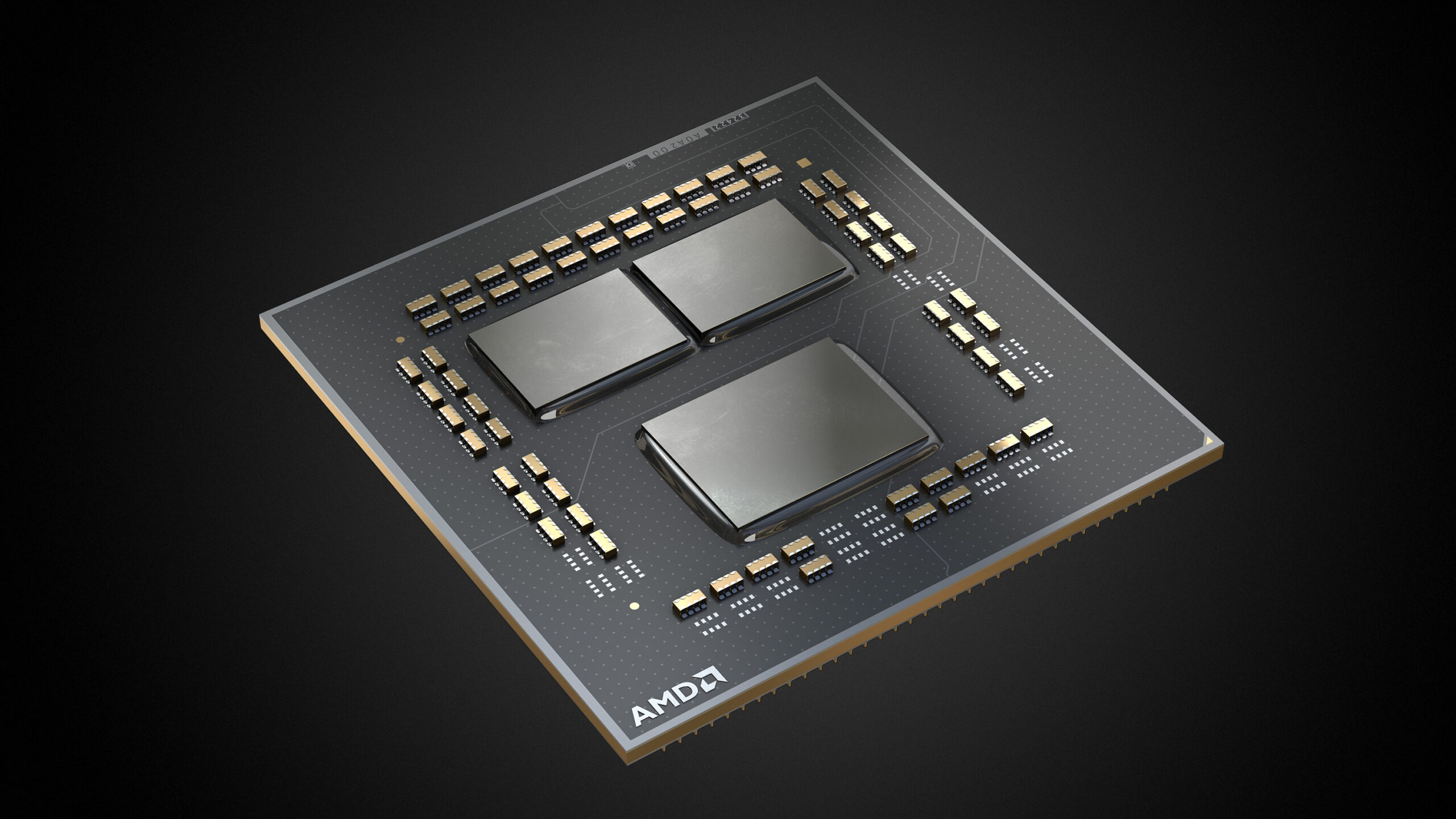
AMD has started sharing more details for the Ryzen 5000 Zen 3 Desktop CPUs undervolting, memory support, and overclocking functionalities.
That's what I thought
I know with Zen 2 that's a no no though
neon rapids
probably just good b die kits
lunar mirage
I know Buildzoid got 6020MHz with his RAM, but im not too sure what the cas latency was.
proven canopy
Did you try 1866 or 1933? I think some asus boards have a clock hole at 1900
royal quiver
On my i7 9700k if I were to increase the max boost would it make a difference
of all cores
sterile flame
Could someone help me OC my 2060 super
lunar mirage
Sure, download EVGA Precision X1 from steam or MSI After Burner from their website
sterile flame
I already have afterburner
quick rose
So now the testing begins
Turn things up, run 3D mark
50 mhz increments
If it freezes, back it down and leave it
sterile flame
I need you to guide me though
quick rose
Literally, turn up Memory frequency
Run benchmarks
if benchmarks fine, turn up again
lunar mirage
And turn up power limit*
sterile flame
how risky is this
quick rose
There's no exact numbers to tell you to plug in and run
It's not
Cuz unless you save it
it won't stick when you reboot
sterile flame
this is what im at rn
quick rose
so don't save it until it tests stable
sterile flame
quick rose
so don't save it until it tests stable
turn up memory or core clock by 50 mhz
lunar mirage
To apply the overclock, you need to hit the check mark, just dont click the windows button with start up above it
quick rose
YES THAT
sterile flame
quick rose
Power limit to the max
you sure ?
quick rose
Yes
FWIW, my 2060 was stable at 400 memory OC and 200 core OC
However
Games that use UNreal Engine don't like GPU overclocks
So remember that if you get game crashes. I have two profiles saved, one with GPU OC and one without
sterile flame
how do i save one without the OC
quick rose
Make your settings, hit a profile number and the disk icon
That saves the profile
Want a different save profile? hit the number then the checkmark
but don't do that until you're done testing lol
It takes some time
sterile flame
ok so 1. turn power limit to max 2. add 50 mhz mem clock 3. run time spy
is that correct
or is it a different 3d mark
quick rose
Yep
Now, the GPU is a bit different. It goes in 15mhz increments so do like, 60 mhz, then 45, etc
sterile flame
oh so 15 not 50
quick rose
VRAM
sterile flame
should i do them at the same time
quick rose
Hit checkbox
Run Heaven if you have it
Shorter than Timespy

Performance benchmarks by Unigine
quick rose
Ye
sterile flame
Bet
@quick rose well why shouldn’t I just add a couple hundred right off of the bat
Get it all done at once ya know what I’m saying
quick rose
Well, you can try
BUt it may not work
and you'll have to back it down
You might also be able to get more and not know it
Up to you
This is how I did mine, 50 at a whack
sterile flame
I’m not saying I don’t trust that you know what you’re doing haha
sterile flame
quick rose
This is how I did mine, 50 at a whack
I’ll just try that then
quick rose
It's a PITA but honestly the least frustrating than randomly punching numbers until it works
sterile flame
Good lord man I thought you said heaven was quicker than time spy
quick rose
I thought it was?
sterile flame
Yes!
sterile flame
Alright haha
quick rose
i can't remember, is there a benchmark button?
It should have just run and then stopped
quick rose
Ahhhhhh
quick rose
Ye
sterile flame
@quick rose let me just say you’re the goat tech guru
sterile flame
😆
sterile flame
Yea
@quick rose quick question does vram overclock or core overclock affect performace more
quick rose
Core clock for the most part
sterile flame
Alrighty
sterile flame
Lol
prisma arch
3200mhz
quick rose
@sterile flame what you up to now?
sterile flame
quick rose
<@456226577798135808> what you up to now?
Uh I’m +1000 on the memory

Haven’t crashed or frozen
sterile flame
Yes sir
sterile flame
Dude I wanna make sure this saves
Kek
@quick rose ok uuuuum I think I hit the peak because now my screen is frozen
If I turn my PC off and back on will it keep the frequency?
Or how can I get it unfrozen
quick rose
Reboot or ctrl alt dlt to see if that works
And yeah, setting will be wiped when you start, just remember the last good setting
quick rose
Sweet
So back the clocks down and choose a profile then click the disk icon to save it
Then start on the GPU
sterile flame
Well I still need to overclock the core remember
sterile flame
Ok
quick rose
and also so the memory OC saves while you do GPU
sterile flame
I’m running +1250 and I think I’m stable
That’s the cap I’m pretty sure
I’m running heaving on 1250
And it hasn’t crashed at least
1300 it did crash
@quick rose so Gpu is the same thing but 15mhz correct
quick rose
Correct
sterile flame
sweeet
quick rose
And so it begins again
quick rose
nDeed
sterile flame
PogU
I thought your color changed but then I thought maybe it is just me being colorblind
Kek
quick rose
Nope, it changed
prisma arch
Ok
sterile flame
It ran successfully at 100
quick rose
Hmmm, I wonder what the actual clock is then?
Anyway, leave it there
Save it to a different profile than just the memory
sterile flame
it was like 2200 something mhz i think
quick rose
so if you run into a game issue you just click and check
sterile flame
for gpu
quick rose
2200 for GPU??
wat
I think that's memory lol
GPU should be like, 1800 or something
Probs more like 1700
quick rose
XD
sterile flame
I don’t remember
quick rose
LOL!
SO now, if you're really brave
Choose the OC profile with both memory and GPU
Hit checkmark
Go to Settings and select the Apply Profile at Startup button
SO it automatically works when you restart
don't have to, up to you
sterile flame
I’m def gonna do it
quick rose
👍
sterile flame
I spend hours overclocking I wanna get all the performance kek
proven canopy
quick rose
Go to Settings and select the Apply Profile at Startup button
I wouldn't do this if it's anywhere near an aggressive overclock
Just save the profile lol
sterile flame
1250*
quick rose
1250 sorry
sterile flame
Yessss
3DMark.com
AMD Ryzen 5 3600, NVIDIA GeForce RTX 2060 SUPER x 1, 16384 MB, 64-bit Windows 10}
3d mark score went up
It was 8550 before OC
quick rose
3700x
sterile flame
i dont think im going to bother overclocking my ryzen lol
quick rose
Nah, I tweaked PBO a bit and let it run
sterile flame
first gen was the best for manual right
quick rose
7787 GPU but mine isn't a super
and no OC
Um, first gen was OK for manual
3100 is god tier for manual
sterile flame
lol
sterile flame
bruh where are you seeing the score for individual components
quick rose
Um, I clicked the Results top right
Then Load
then chose a file
So the 3100 stock boost is 3..9 People are getting 4.4+ out of it
quick rose
Niiiiiice
sterile flame
that was not with by build though
hahaha
thats some random test i ran on a different one
sterile flame
quick rose
So the 3100 stock boost is 3..9 People are getting 4.4+ out of it
never knew it was so good at it
quick rose
I mean it's kind of a crappy CPu anyway but OC's well
sterile flame
quick rose
I mean it's kind of a crappy CPu anyway but OC's well
Yeah, from what I’ve heard the 3600 overclocks terribly
sterile flame
sterile flame
im in the top 1 percent
Also this was top 1% compared to 2060 supers apparently kek
sterile flame
quick rose
All the ryzen do from 3600 on up
Yep
quick rose
I mean my 3700x won't even hit advertised boost
BUt it's an early one
best I got right now is 4.3 at 1.3 volts
proven canopy
Something overclocking terribly just means it runs well out of the box
quick rose
Kinda, be nice if I could hit advertised boost
vague gull
but amd good they never do anything wrong amd perfect intel sucko
 bleak sable
Neither are bad, they just switched roles
proven canopy
I have an early 3700x, best all-core I got was 4.3 something
proven canopy
Bought it on launch
quick rose
I just left it alone
Me too
I thought about upgrading CPU but.....it's still so capable I got a GPU instead
sterile flame
quick rose
I get tired of that
SAME!
Intel has genuinely good products rn
Like 10100 and 10400
quick rose
Ye, 10400 is good rn
clever epoch
No such thing as a bad product, just a poorly priced product.
vernal sail
that... is the smartest thing I have herd today
 restive cargo
I need to do some 18 core non-hyperthreaded overclocking.
restive cargo
I was talking for 3D Mark.
dull ginkgo
Bryce be OCing for hwbot points, not gaming perf
proven canopy
Should turn off smt for gaming on that chip anyway
sterile flame
Also the CPU 5600X score highest score was about 8,678 but that was manual OC set at 4.65Ghz while PBO Advanced was 4.8-4.9Ghz and didn't perform as well. PBO simply set to On performed a little better than Advanced PBO locking in at 4.8Ghz but never topped the 4.65Ghz. Am I simply hurting myself somehow even though the clocks are stable?
TimeSpy score 15,644-15,550 average.
sterile flame
proven canopy
Should turn off smt for gaming on that chip anyway
SMT hurts gaming performance in most titles I've seen. And the ones that "benefit" see worse 1% and 0.1% lows.
 gusty storm
4.49ghz on a ryzen 7 3600x
This is as far as I can go without losing stability
I got a late Gen the base speed is 4.2 but the max oc hasn't changed
sterile flame
gusty storm
4.49ghz on a ryzen 7 3600x
Uhh... come again?
dull ginkgo
Prob single core
Oh wait no 4.5ghz all core seems to be not that uncommon
https://valid.x86.fr/ccydwm
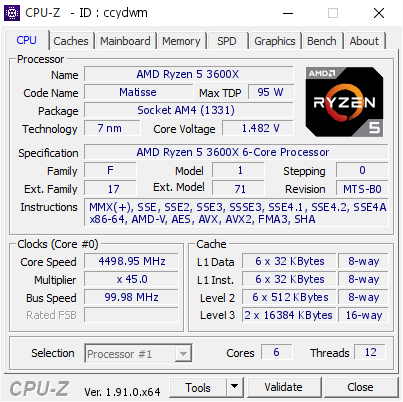
[ccydwm] Validated Dump by claudiohonio (2020-01-24 04:17:09) - MB: Asus CROSSHAIR VI HERO - RAM: 16384 MB
Sips bleach got 4.6ghz on 2 cores HT off
sterile flame
Definitely not worth it
proven canopy
Do it for the bot
 severe forum
silicon lottery XD
sterile flame
Can someone help me with ram overclocking when I get home
Pretty sure I have b die
Can’t confirm though
 vale hazel

 sterile flame

sterile flame
@quick rose do you have knowledge in this area
quick rose
I do not. I have not tinkered with ram overclocking. I know how it works but no real world experience
All I know is, the more the clocks go up the more the timings go up too
I would recommend this tool https://www.techpowerup.com/download/ryzen-dram-calculator/

TechPowerUp
DRAM Calculator for Ryzen helps with overclocking your memory on the AMD Ryzen platform.
It suggests stable memory timing sets optimized for your m
proven canopy
Read the guide by integral in the pins
dram calc is a great tool, but the guy who made it kinda ripped off a bunch of other folks work and rolled it into his product
proven canopy
That was the case a year ago, no idea if things have been remedied
sterile flame
I don’t really care about getting my speed up I’d prefer getting my timings down
I’m at 3600mhz which I’d say is pretty good
But my CL is at 18
tall pelican
proven canopy
That was the case a year ago, no idea if things have been remedied
Its still presets, most of the time there's errors in it too 
sterile flame
NVM
My die is sucky c die apparently
uhm @quick rose so my game is crashing with the gpu OC i did yesterday
but the benches were stable
quick rose
Turn off the GPU overclock and keep the memory
sterile flame
ok
sterile flame
is battlefront 2 an unreal game
tall pelican
swbf2? Its frost iirc
tall pelican
its frost
sterile flame
It was stable with the benches I did yesterday
tall pelican
then you're bench stable, not daily stable
I can do 2675 in benches, but 2600 daily
sterile flame
@quick rose I think removing the gpu overclock did the trick
dull ginkgo
markfur
sterile flame
Does having the vram overclock so high limit my Gpu oc ?
sterile flame
Does the vram OC still help performance
quick rose
Yes
sterile flame
Afterburner is saying that my Gpu clock speed without the OC is in the 1900s
Does that sound right
It was like 2000 something with the oc
quick rose
The auto overclock with that is kinda spoop
Afterburner hasn't been updated in quite a while lol
sterile flame
quick rose
The auto overclock with that is kinda spoop
Wdym
sterile flame
I’d like to keep the manual oc
But if it doesn’t work with my most played game
🤷♂️
quick rose
What game?
sterile flame
BF2
quick rose
I mean, the factory "OC" (boost clock) is pretty substantial already
quick rose
SOme game engines don't like overclocks. You can try backing it down a tad to see if it works
proven canopy
sterile flame
But I like to get my money’s worth
You already are, it seems
Best you can do is arrange the case fans so the gpu gets cool air and exhausts it out away from the cpu cooler
sterile flame
My Gpu runs below 70c during full load @proven canopy
I’ll show you my airflow layout
Front 2 are stock mesh c fractal fans
Seem to be decent quality
The exhaust is a pretty cheap antec one
sterile flame
sterile flame
The exhaust is a pretty cheap antec one
Arctic P12 is your best friend. PWM PST model especially.
Quiet on the level of Noctua and great performance
Also the Arctic Liquid Freezer II is the best performing AIO out there. Also one of the more affordable ones. No RGB nonsense.
sterile flame
gusty storm
4.49 GHZ
I'm still waiting up on people to answer my issue.
Gonna post it again
gusty storm
sterile flame
I'm still waiting up on people to answer my issue.
What's your issue?
sterile flame
Also the CPU 5600X score highest score was about 8,678 but that was manual OC set at 4.65Ghz while PBO Advanced was 4.8-4.9Ghz and didn't perform as well. PBO simply set to On performed a little better than Advanced PBO locking in at 4.8Ghz but never topped the 4.65Ghz. Am I simply hurting myself somehow even though the clocks are stable?
TimeSpy score 15,644-15,550 average.
Copy and pasted
gusty storm
Do you have a clue on what mioght be causing it not to top 4.65?
dull ginkgo
It's just benches don't like boosting for scores :P
sterile flame
Nah that's my problem
dull ginkgo
4.3ghz all core for me did better than pbo boosting to 4.4
sterile flame
So in game performance was better for you at 4.3? I know you have a different chip but you get what I'm saying.
 lyric meteor
Post your Cinebench R23 Scores and your CPUs!
proven canopy
no u
lyric meteor
okie. 17120 With my 10900k at 5.1GHz
dull ginkgo
forky gonna flex with his quad opterons
vague gull
forky boutta opteron their ass
id run cinebench on sanctuary rn but id have to wipe out like 70 vms
proven canopy
The opteron server is ewaste
vague gull
proven canopy
The opteron server is ewaste
did u ewaste it or is it just ewaste in general lul
proven canopy
the latter
tall pelican
lyric meteor
okie. 17120 With my 10900k at 5.1GHz
I want to say Im at 18k with my 3900xt at stock

 dull ginkgo
@proven canopy I mean, what, 500w worth of CPU power, it's gotta amount to something in cinebench, right? >:D
proven canopy
It's more like 800w r20
proven canopy
I only remember the r11 score, 29 fps
dull ginkgo
lol
I would go dig through your hwbot subs to find it but
hwbot is broken on my end atm
proven canopy
iirc I'm the only who who subbed 4x 6378 to hwbot, and I think only for r11
dull ginkgo
lol