#overclocking
1 messages · Page 30 of 1
 sterile flame
 sudden torrent
DDR5 or DDR4
sterile flame
ddr4
 steady lance
Also mind if I ask which fan I should use over my ram? FK120 or X2-GP14?
sterile flame
steady lance
Also mind if I ask which fan I should use over my ram? FK120 or X2-GP14?
Jonsbo NF1
steady lance
Don't have that on hand.
sterile flame
my bad
sterile flame
steady lance
Don't have that on hand.
thought you were in the market for a new one
sterile flame
sudden torrent
DDR5 or DDR4
i got myself some ddr4 samsung b die
steady lance
Nah just trying to reuse what I save on hand for my ram.
Since I am running 1.6v DRAM.
sterile flame
whats a good voltage for 3600 cl14 on amd
sudden torrent
sterile flame
i got myself some ddr4 samsung b die
You can usually do 1.7v with a small fan blowing over it but it'll depend on the PCB and the bin whether that does anything positive
sterile flame
sudden torrent
You can usually do 1.7v with a small fan blowing over it but it'll depend on the...
1.7v??
sudden torrent
sterile flame
whats a good voltage for 3600 cl14 on amd
1.45v or so
sterile flame
sudden torrent
1.45v or so
for 32gbs?
sudden torrent
sterile flame
1.7v??
With a fan yes
sterile flame
sudden torrent
With a fan yes
i heard originally 1.6
now 1.65
now 1.7
like which one?
sudden torrent
It depends like I said
sudden torrent
For daily use I'd go no higher than 1.55v and use a fan just in case
sudden torrent
sterile flame
i just dont want to overvolt
Is it 2 sticks or 4 to get 32gb
sterile flame
4
sudden torrent
You'll have to get pretty lucky and have a very good motherboard and memory controller to run 3600 c14 on 4 sticks
A good starting point for you would be 1.5v 3600 16-16-16-30
Try to get both SCL tertiary timings down to 2, but if you can't then 4 is acceptable.
steady lance
@sudden torrent Is it a bad idea to go over 1.43v on VDDIO voltage?
It seems the higher I put that voltage the higher I am able to get my ram frequency up.
sudden torrent
That's a matter of some debate but remember processors were literally exploding from too much
sudden torrent
sterile flame
4
I managed this with 4 sticks at 1.52v, you can try to copy a few timings at a time to see if you can match it.
 sudden torrent
steady lance
That that was VSOC?
sudden torrent
steady lance
That that was VSOC?
That was never fully confirmed but yes in theory
steady lance
How high would you personally go with VDDIO?
Also, is 6400 synced better then 7000 desynced? I could probably do 7200 with more VDDIO voltage but that's be getting into the 1.5+ range.
sudden torrent
It depends on what you're doing. Some things prefer better latency, some things like raw speed. Same goes for games.
steady lance
For me I have been playing a lot of multiplayer survival simulators as of late and I will soon be getting into UE5 + Blender.
sudden torrent
steady lance
How high would you personally go with VDDIO?
This was an official statement from MSI

Regarding the exploding CPU issues
 kind walrus
steady lance
Also, is 6400 synced better then 7000 desynced? I could probably do 7200 with m...
kind walrus
steady lance
Also, is 6400 synced better then 7000 desynced? I could probably do 7200 with m...
Yes
8000 breaches past the desync penalty
Or I should say
The half-sync penalty
Cos MCLK UCLK 2:1
sudden torrent
By the time you hit 8000, uclk is at 2000 again which is high enough
And a nice round number
steady lance
Well I don't think I will be able to do that due to VDDIO.
I don't think I wanna chug 1.6v into that...
sudden torrent
Not on X3D at least
steady lance
sudden torrent
This was an official statement from MSI
I think this is what killed my CPU then.... Cause I was running 1.6v VDDIO before.
My bios automatically sets VDDIO equal to DRAM.
Do you that was what did it?
kind walrus
@steady lance 32gb or 64gb
steady lance
Well after learning this I am setting 1.4v as my hard cap for VDDIO voltage.
steady lance
kind walrus
<@217356391675985921> 32gb or 64gb
2x32.
kind walrus
steady lance
2x32.
You'll never beat the desync
Put those sticks on sub ambient, maybe
Not daily
steady lance
Gotcha. So stay synced.
Welp seems 6400mhz is my synced limit then.
Should I do secondaries or tertiaries first?
I jut set my tREFI to 65535.
kind walrus
Do all seconds and terts at once imo save trfc/2/pb
Ddr5 is straightforward
Then tune primaries and tcwl accordingly, then clamp down trfc
Freq first
Easiest way to do it
kind walrus
freq
Seconds and terts
Primaries and tcwl
Trfc/2/pb
sudden torrent
I'd do trefi and scl first (after freq) since that'll speed up your testing
steady lance
Just did frequency.
steady lance
sudden torrent
I'd do trefi and scl first (after freq) since that'll speed up your testing
Alright. May I ask why SCL speeds up testing?
sudden torrent
Buildzoid did a video on it I think
kind walrus
SCLs are terts and yes
You can do block sections of terts on D5, Hynix all clock very similarly
steady lance
Btw I am running:
- 1.6v VDD
- 1.6v VDDQ
- 1.4v VDDIO
kind walrus
Seconds are pretty much as straight forward
kind walrus
steady lance
Btw I am running:
- 1.6v VDD
- 1.6v VDDQ
- 1.4v VDDIO
You don't need 1.6
Come back down to earth
1.45
You aren't pushing 7600+
1.6 not needed
steady lance
Helped with timings on my last ram overclocking session though.
steady lance
Secondaries the most, and just a little bit on my terts and primaries.
sudden torrent
That little bit isn't going to be worth running that high, it would help most with stabilizing maxed trefi
kind walrus
steady lance
Helped with timings on my last ram overclocking session though.
I'm doing 6400 on 1.41v
sudden torrent
6200 at 1.35v here
kind walrus
Specific timings you'd need to tell me which or I'll reject the notion lol
steady lance
Speaking of you reminded me that I can't run max tREFI stable below I think it was 1.5 something.
sudden torrent
I'm at 65000 but I'm also on 2x16
steady lance
What do you mean "saves lost data"?
tREFI is how often the ram refreshes itself right?
Does refreshing to often cause it to lose data?
sudden torrent
Yes and if it doesn't refresh the rows in time then it has a chance to lose the data
kind walrus
The further you run trefi the faster it goes yes, however it's known to refresh for data retention
You run it to max it's basically never refreshing
steady lance
oh so higher means less refreshes?
steady lance
I wish BIOs would explain what each thing does...
sudden torrent
That would be too simple though
kind walrus
steady lance
I wish BIOs would explain what each thing does...
If they did that then the ram page would be a wall of maths and harmonics
sudden torrent
They don't really want people touching this stuff or they would simplify it more
steady lance
Hmm fair argument.
I don't recall the exact timings but I do recall when I did the jump from 1.55 to 1.6v in the past that it dropped my secondaries by about 2-4 and my terts by around 2.
sudden torrent
Do you have a fan over the sticks
steady lance
yes.
sudden torrent
You shouldn't run that much for daily use but they're your sticks
steady lance
My ram usually hovers around 30-40s and peaked at about 56c if I recall after a 8hr session of TM5 with pcbdestroyer.
This is on my previous ram oc.
steady lance
My ram is able to do that.
kind walrus
Which is mostly pointless
steady lance
I did 6400c28 on it before when I did primaries first.
When I did terts first it went to 6400c30.
sudden torrent
Funnily enough I've seen 6000c28 perform worse than c32
kind walrus
You get a slight advantage in tcwl, trfc, primaries, over just running a wider 6400 at low voltage
kind walrus
sudden torrent
Funnily enough I've seen 6000c28 perform worse than c32
And yes your imc can struggle if it's a little too unstable
steady lance
The concern with 1.6v is degration right?
sudden torrent
DDR4 PyPrime 2B record: https://hwbot.org/submission/4758130_rauf
DDR5 PyPrime 2B record: https://hwbot.org/submission/4987588_p5ych0
My Patreon: https://www.patreon.com/buildzoid
Teespring: https://teespring.com/stores/actually-hardcore-overclocking
Bandcamp: https://machineforscreams.bandcamp.com/music
Twitch: https://www.twitch.tv/buildzoid
...
steady lance
steady lance
The concern with 1.6v is degration right?
Is there another reason? I am not against going lower just curious.
sudden torrent
Now that the PMIC is on the sticks the only thing VDD can kill is the stick itself
steady lance
frying a $800 cpu scares the 💩 out of me, but I don't mind replacing a $150 kit of ram every 3-4 years.
kind walrus
steady lance
The concern with 1.6v is degration right?
Mainly
kind walrus
sudden torrent
https://youtu.be/pgb8N23tsfA?si=ddm48txsjmsd8rcD
Also this
It's a combination
Between excessive effort and potential risk
steady lance
How long do you think it will last at 1.5v?
kind walrus
Indefinitely
steady lance
Oh okay.
Guess I will try 1.5v and see if it keeps my max tREFI stable.
Any good test for tREFI?
or just run PCBdestroyer.
sudden torrent
Idle is the best trefi test
kind walrus
Drop trefi to 64K
sudden torrent
Yeah it's not that much difference between max and 64k
kind walrus
Go find a ddr5 tune with tight tertieries
Search hwbot
Copy it
Copy all terts
Test
Make sure tcwl is tcl -2
sudden torrent
ycruncher ambient 2x32 subs should be simple enough to find
kind walrus
AM5 ram OC can get done in a day, it doesn't need extreme attention
You're not doing 8000 desync or playing with any lga1700
sudden torrent
I mostly copied the buildzoid easy timings, set 6200 synced, fclk 2133, and called it a day
kind walrus
Synced is almost literally extremely stable/slightly unstable/completely unbootable
There's no middle ground
steady lance
Not sure if it's because 2x32 but last time I tried to copy almost nothing matched....
So I had to do each one by hand.
sudden torrent
The easy timings? Or what are you copying?
kind walrus
What are you copying lol
steady lance
Terts and Secondaries was a hellish nightmare.
sudden torrent
Because the BZ easy timings are made for 2x16
steady lance
it was 2x16 Hynix A overclocks.
sudden torrent
Yeah but you need to be luckier
sudden torrent
You got very lucky then
sudden torrent
I couldn't even boot 6600 desync or 6400 sync
steady lance
fclk is determined by ram or cpu?
kind walrus
Cpu
steady lance
Ahh I might try FCLK later again.
sudden torrent
fclk is the speed the cores talk to each other
steady lance
Cause my last one was meh.
sudden torrent
2100 is usually easy enough on fclk
kind walrus
IF is determined by two PLL's on the cpu io die, and is independent of the memory controller itself
sudden torrent
Make sure you're testing every step to watch for performance loss
kind walrus
The mem controller talks to the ioIF and draws bandwidth through it via the uclk
I guess the u is uplink?
Into the memory controller (MCLK)
steady lance
Well I guess I am gonna start tightening some timings.
Start with SCL you said, @sudden torrent?
sudden torrent
yes
steady lance
and Bacca, you said tcwl should be tcl -2 right?
sudden torrent
You mean felix right lol
sudden torrent
We've had a froge invasion lately
steady lance
but yeah I will brb.
kind walrus
See this


I'm literally saying do this
Fclk auto, uclk mclk auto
Tcwl = tcl -2
sudden torrent
I usually specify uclk=mclk because some boards (like mine) will auto to 2:1 above 6000
kind walrus
Odds are this works at 6400
Sure, we could clamp manual imc
But it should still work
I'm like 80% confident
Work backwards not forwards
kind walrus
The only thing you'll need to check is the DD's
Those are for dual rank double density
steady lance
...... that in particular I recall being hell.
I fiddled with that for like 3 days.
kind walrus
Well lucky for you I have numbers
kind walrus
Idk
Probably
I'm saying take inspiration from someone else for terts and seconds then work your primaries down
You should get something very quick at 6400
And should only take a day or two
steady lance
kind walrus
I noticed in the it's 4 and 2.
kind walrus
If you're going for stable do equal
Write should always be shorter than read though for banks
Have some inspiration
 steady lance
Thanks.
steady lance
So less is better?
steady lance
Gotcha.
kind walrus
Just copy like
steady lance
What does VDDP do?
kind walrus
90% of that
steady lance
Copy then if I am up for it try to tighten right?
sudden torrent
steady lance
What does VDDP do?
Don't touch that, it's a quick way to make everything unstable unless you're doing XOC
It's an input voltage
steady lance
Understood.
sudden torrent
Wait I was thinking VPP
kind walrus
He's using 1.25 vdd
Not 1.6
For 6200 CL26
You really don't need a lot
In fact
Too much can cause negative scaling
steady lance
Sounds like my Hynix A is being limited by my CPU I am assuming?
kind walrus
No I think something else would be fundamentally wrong if you absolutely need 1.6v
steady lance
Gotcha.
steady lance
I don't recall the reddit post but I saw someone who said they dailied 1.7v on 2x16 Hynix A die for a year without degration.
kind walrus
I've met others who've done that and did degrade
Sounds like what people used to say about AM4 vSOC
"Oh 1.25v is fine"
sudden torrent
I would trust a rando on reddit as far as I can throw them, and since they're anon you can't
steady lance
steady lance
I don't recall the reddit post but I saw someone who said they dailied 1.7v on 2...
the person was using a intel 13th I7 or I9 I forget and was running around 7.600mhz or so and very tight timings.
sudden torrent
That changes nothing
kind walrus
Doesn't make a whole lot of difference to me when two of the best overclockers I know say don't do it
sudden torrent
I doubt it was even fully stable at 7600 to begin with
steady lance
Fair. Was just pointing out what the reddit post was.
kind walrus
sudden torrent
I doubt it was even fully stable at 7600 to begin with
The hell unearthed that was first gen ddr5 boards
I miss none of it
steady lance
Well I am a try SCL 5 now cause I know 4 isn't gonna work.
steady lance
Doubt it's going to work now but I guess it's worth a shot.
 kind walrus
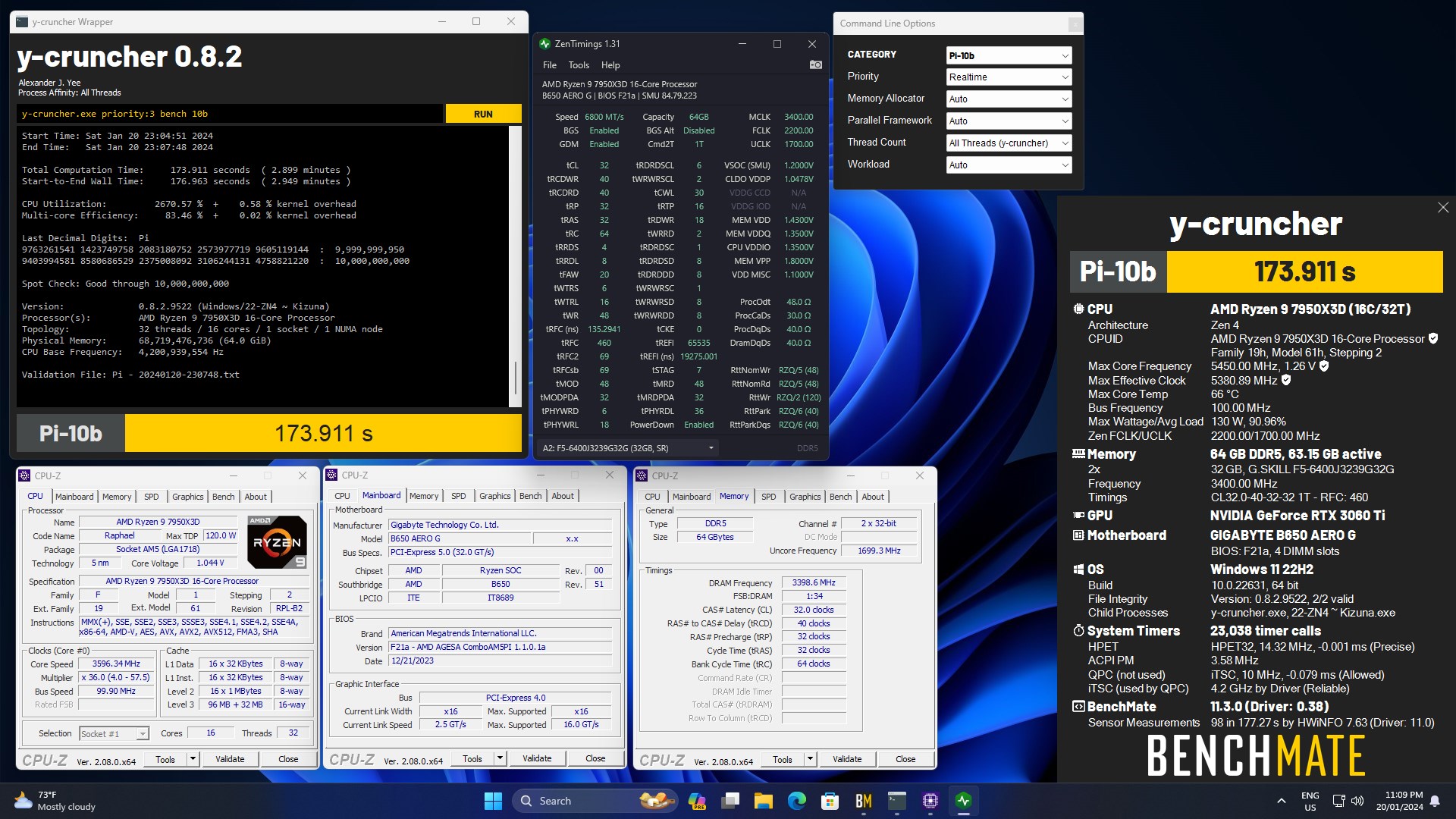
There's a reason why BZ made this post
It quite literally works on almost all hynix configs
SCLs at 4 are the safest fast
Going lower is going below known guaranteed safe lol
sudden torrent
You'll note a LOT of similarities between that sub and the easy timings too, like the primaries are not tight at all
kind walrus
Yes
Because DDR5 is just like this
Seconds and Terts you can dial in almost the same way every single time
Then you play the puzzle with the last few and clamp it to a preferred voltage
When me and ggood were doing this for months on the UX I changed my tertiaries maybe a handful of times over 3 months
Versus the thousands of changes to everything else
It's just expected to start your DDR5 tuning this way
It just works
Otherwise you'll be at this for a looonnngggg time...lol
kind walrus
sudden torrent
https://hwbot.org/image/3078759.jpg
The similarities between BZ's easy timings and what I have to this is almost uncanny
It's almost like they started with the template, shortened a few, expanded a few others in blocks, went for 6800 synced, called it a day
Lol
sudden torrent
Desync but yeh
sudden torrent
ycruncher prefers raw speed
kind walrus
 celest notch
Felix what's an Intel PC stick
celest notch
Felix what's an Intel PC stick
I will get banned for what I want to say
I abstain
celest notch
Someone said they wanted one in the intel server
sudden torrent
celest notch
Felix what's an Intel PC stick

ALADAWN Intel Compute Stick 8GB RAM 128GB ROM with Intel Atom Z8350 and Windows 10 Pro,Mini PC Stick Support 4K HD,2.4G/5G WiFi,Bluetooth 4.2,Auto Power on
celest notch
I was wondering if you could enlighten me
celest notch
Okay, I was thinking the right thing
kind walrus
I was way off
kind walrus
celest notch
Okay, I was thinking the right thing
You should buy one then fill it with a red stick virus then send it to that person free
sudden torrent
It's good for plugging into a dumb tv to make a smart tv+
That's about the only use case I can think of, maybe as a basic workstation plugged into a monitor with USB PD.

 celest notch
"In hell" would be acceptable too
steady lance
I am experiencing hell so far to get SCL even 5 to work.
I tried 4, CMOS refused to clear tried 5, tried 6, and just decided to do a full clear to see if I could even still boot in
sudden torrent
Is that with expo on and everything else on auto after a cmos clear
steady lance
That's with the XMP profile on and everything set on auto except tREFI and SCL.
gonna reboot into windows at 6400mhz and start from the start
sudden torrent
Hopefully that isn't an omen for your IMC quality
steady lance
I found the issue.
@sudden torrent I forgot about this issue with the X670-P's bios.
If I boot up a profile after clearing CMOS I need to manually re-enable high voltage mode otherwise it only gives my ram like 1.2v to work with.
Currently at SCL 6. gonna try 5 now.
Alright I give up on 4.
I got 5 to boot.
In my previous OC when I was doing 1.6v VDD/VDDQ/VDDIO I got it to work at SCL 2.
running pcbdestroyer while I am gone
sudden torrent
Ryzen 3000 or 5000 I'm guessing
3800 can be tricky depending on a few factors
Especially if you happen to run 4 sticks
sterile flame
yup 3733 no work
sterile flame
sudden torrent
Especially if you happen to run 4 sticks
i do
sudden torrent
Best I could do with 4 sticks on my 5800X was 3600
sterile flame
sudden torrent
Best I could do with 4 sticks on my 5800X was 3600
finally i can relate to someone
everyone was telling me "oh 3600 weak af dumbo"
i was trying 3666 3733 3800 and 3866
neither worked
1t 1.5t 2t
sudden torrent
They don't know what they're talking about, I was setting records for ambient temps at 3600
sterile flame
sudden torrent
They don't know what they're talking about, I was setting records for ambient te...
prob cause dual rank
i got 4 sticks b die
sudden torrent
Yeah I do too, a mixed set at that
sterile flame
sudden torrent
I managed this with 4 sticks at 1.52v, you can try to copy a few timings at a ti...
wait i dont get this
you did this with GDM DISABLED?
sudden torrent
Yep
sterile flame
impossible
sudden torrent
If you can't get the clocks might as well go for GDM off
The Ryzen 7 5800X @ 4900MHzscores getScoreFormatted in the 7-Zip benchmark. FalCieranks #228 worldwide and #16 in the hardware class. Find out more at HWBOT.


 sterile flame
sudden torrent
If you can't get the clocks might as well go for GDM off
sterile flame
sudden torrent
If you can't get the clocks might as well go for GDM off
i remember having a cpu previously
which would error my ram at 3200mhz
with gdm on
sterile flame
sudden torrent
https://hwbot.org/submission/5179919_falcie_7_zip_ryzen_7_5800x_111188_mips
thats your pc?
sudden torrent
When I had the 5800X, rest in pieces
sterile flame
sudden torrent
When I had the 5800X, rest in pieces
what happened
sudden torrent
MSI borked my BIOS update and it shoved over 1.4v into the cores under load
sterile flame
sudden torrent
MSI borked my BIOS update and it shoved over 1.4v into the cores under load
recently?
sudden torrent
Yeah a few months ago
sterile flame
cause
my 5700x died on me out of nowhere
after not using my pc for 2 weeks
i was on latest bios
it happened about 3 weeks ago
luckily rma team was helpful
sudden torrent
I was just a week outside my warranty and they flat out refused to do anything
sterile flame
sudden torrent
I was just a week outside my warranty and they flat out refused to do anything
oh dang
now you have a 7900x3d
according to your bio
sudden torrent
Yes I'm one of a whole 12 people that runs it for daily use
sudden torrent
A combination of luck and just the right voltage/impedance
sterile flame
sudden torrent
A combination of luck and just the right voltage/impedance
cause i saw you play with addrcmd
and drive strengths
and odt
how do people play around
like do they just enter random numbers
sudden torrent
Generally the rule is higher values can help with extreme settings but also increases the memory controller load
sterile flame
sudden torrent
Generally the rule is higher values can help with extreme settings but also incr...
so basically just run max safe for all
sudden torrent
No because that can reduce your potential max/min on your timings
It's a balancing act and every CPU is different
sterile flame
sudden torrent
It's a balancing act and every CPU is different
did you ever get that 3600mhz 100% stable
or was it just usability stable
sudden torrent
I got pretty lucky all things considered, some people can't do 3600 without procodt at 60 ohms
It was stable enough for me to run stress tests and benchmarks, maybe one blue screen a month when gaming
sterile flame
sudden torrent
It was stable enough for me to run stress tests and benchmarks, maybe one blue s...
that means instability though
sudden torrent
Correct
sudden torrent
But it was stable enough for my needs
sterile flame
no wheas
like it should be guaranteed stable
as in i put my pc in sleep mode at night and i dont open event viewer and see a bsod
or my windows reset
sudden torrent
If you need it that stable then you shouldn't even run xmp and leave it at jedec
sterile flame
sudden torrent
If you need it that stable then you shouldn't even run xmp and leave it at jedec
wait what
sudden torrent
Every timing you tweak is a potential error in the long run
sterile flame
no but like isnt it possible to stress test every timing
sudden torrent
No
You can have a system that passes every benchmark and test and then crashes at idle
sterile flame
so basically you gotta pray your pc is stable if its OC
sudden torrent
Basically yes. You can root out common errors but there could be that one weird case where it runs a refresh cycle then a CAS write x4 into a read and suddenly it hates you
sterile flame
at this point i considering just jumping on the bandwagon
https://www.microcenter.com/product/677153/intel-core-i5-12600kf-alder-lake-37ghz-ten-core-lga-1700-boxed-processor-heatsink-not-included#tab-reviews-bm and https://www.amazon.com/dp/B09JM7GDVT?tag=pcpapi-20&linkCode=ogi&th=1&psc=1

This motherboard features onboard RGB headers and an addressable RGB header that allow motherboard to be connected to compatible LED devices such as strip, CPU fans, coolers, chassis and so on. Users may also synchronize RGB LED devices across the Polychrome RGB Sync-certified accessories to crea...

Micro Center
Get it now! 12th Gen Intel Core i5-12600KF unlocked desktop processor, without processor graphics. Featuring PCIe Gen 5.0 & 4.0 support, DDR5 & DDR4 support, unlocked 12th Gen Intel Core desktop processors are optimized for productivity, gaming, and overclocking. Discrete graphics required.
should i make the jump to intel
sterile flame
sudden torrent
Intel isn't any more stable
thats with the 13th gen cpus
thats what i heard on the news
sudden torrent
12th gen IMC sucks for both DDR4 and DDR5.
High end 13th/14th gen are sometimes unstable out of the box with a CMOS clear.
Literally the 12th gen DDR4 IMC is worse than 11th gen
sterile flame
sudden torrent
12th gen IMC sucks for both DDR4 and DDR5.
High end 13th/14th gen are sometimes ...
so basically i the customer cannot win
sudden torrent
Not if you want to push things past their original limits
sterile flame
sudden torrent
Not if you want to push things past their original limits
thats what i referring to
sudden torrent
There's always going to be something
sterile flame
i wanna push past limits
i heard there was instability problems on lga 1700 at stock
cause "mobo manufacter profile"
sudden torrent
That's mainly problems for the 13900K/S, 14700K, and 14900K/S
sterile flame
so basically if i get a 14600k i am in the clear
sudden torrent
They crash out of the box trying to load some games because the shader compile hits all the cores
kind walrus
sterile flame
not 3800
Fclk hole
sudden torrent
Don't get a 14600k it's just a 13600k + 100MHz
sterile flame
kind walrus
Fclk hole
yea
sterile flame
sudden torrent
Don't get a 14600k it's just a 13600k + 100MHz
true
but they discontinued the 13600k
so its no longer available
kind walrus
sterile flame
everyone was telling me "oh 3600 weak af dumbo"
Not true, 3600 barely slower
Stable >>>>> highest funny number
sudden torrent
sterile flame
so its no longer available

Intel Core i5-13600K 3.5 GHz 14-Core Processor (BX8071513600K)
kind walrus
sterile flame
i got 4 sticks b die
Yes this would be why if it's 64gb
sudden torrent
32gb
sterile flame
kind walrus
Yes this would be why if it's 64gb
i got a total of 32gb ram
sterile flame
sudden torrent
https://pcpartpicker.com/product/LfNxFT/intel-core-i5-13600k-35-ghz-14-core-proc...
i heard they discontinued the 13600k due to it potentially being victim
sudden torrent
They discontinued production of it but they can't pull it off the shelf
kind walrus
My 5900X does 3666 on 4x16gb b die and 3866 on 4x8
sterile flame
kind walrus
My 5900X does 3666 on 4x16gb b die and 3866 on 4x8
with proper stability?
sterile flame
sudden torrent
They discontinued production of it but they can't pull it off the shelf
makes sense, $289 for a 14600k is ripoff
kind walrus
I've used that system since day 1 with overclocking
sterile flame
kind walrus
I've used that system since day 1 with overclocking
any bsod
kind walrus
It's stable
sterile flame
kind walrus
Like, once 3 months ago
what was the crash error
kind walrus
Radeon graphics driver 💀
sudden torrent
So basically it could be anything
kind walrus
@sudden torrent you remember my 6900xt going mad right
sudden torrent
Yep lol
sterile flame
amd has some instability on gpu side
kind walrus
Replaced everything
sterile flame
in the old days
sterile flame
coming from a 6800 owner
kind walrus
Like nothing happened
kind walrus
sterile flame
is pbo worth it
Meh
sterile flame
i currently do pbo motherboard limits, +200 frequency, zero curve optimizer, 95 degree temperature lim it
sudden torrent
Define worth it
kind walrus
You might get 1 or 2%
sterile flame
i call it lazy pbo
sudden torrent
I'd say personally it's worth a couple minutes of time
kind walrus
Define never
kind walrus
Some chips have cores that want no undervolt
sterile flame
i put 0 all core it was unstable
kind walrus
LOL
sterile flame
i even did positive
it was still unstable
undervolt = stupid
i have a MATX pc not an ITX
kind walrus
I have 1 core that wants 0 undervolt
But I have another 11 that want a range between 5 and 30
The one wanting 0 is my best cppc core
sterile flame
right now a z690m phantom gaming 4 is $99.99
really am considering jumping to train intel
i have some b die ram
kind walrus
sterile flame
thats with the 13th gen cpus
13th and 14th btw
sterile flame
sudden torrent
DDR4 on LGA1700 cuts your performance by 15%
even b die?
kind walrus
You need to obey intel power spec with manual bios limits to eliminate the 13th and 14th degradation
sudden torrent
Yes
sterile flame
sudden torrent
Any one of the CPUs with e-cores
Cmon
kind walrus
Even b die
kind walrus
That's a good combo
sterile flame
it is
ive had my pc since 2020
and have been upgrading
i got my mobo a week after b550 launch
sudden torrent
Your PBO problems sound like your 5700X is a down binned 5800X that couldn't hold the clocks at acceptable voltage
kind walrus
The imc possibly too
sterile flame
sudden torrent
Your PBO problems sound like your 5700X is a down binned 5800X that couldn't hol...
to be fair i only paid like $140 for my 5700x
kind walrus
3600 is fine tho
sterile flame
new on thanksgiving
kind walrus
Just run 3600 tighter than 3800 can go
You make all the loss back
Well, more or less
But it's virtually similar
sterile flame
i only shop during discount season
sudden torrent
If you're having problems you can set PBO on +100 motherboard limits and call it done. That way you still get the increased power budget so it holds clocks better.
sterile flame
sudden torrent
If you're having problems you can set PBO on +100 motherboard limits and call it...
pbo has no problems
unless i enable curve optimizer
kind walrus
You must have a core that is barely meeting spec then
1 core is all it takes
BOOM bsod
"Watchdog_timeout"
sterile flame
also feetlicks
kind walrus
Hi
sterile flame
at what point can you say "yeah i can guarantee this is stable with zero bsod" and "No more work needed just rest and relax'
sterile flame
karhu for 10 hours?
kind walrus
Sure
sudden torrent
If you need it 100% stable you need at least 3 days of testing
sudden torrent
1 day is good enough for most
sterile flame
i cannot afford for my files to keep getting corrupted
sudden torrent
Shout out to Intel CPUs for having a random error once after a week of testing
sterile flame
also this aint oc related but
should i replace my corsair cx650
for a 750-850w psu
kind walrus
You can use iirc 3dmark11 for fclk instead of mlc gui
kind walrus
sterile flame
should i replace my corsair cx650
Is it giving problems
sterile flame
kind walrus
Is it giving problems
no
kind walrus
Then no
sterile flame
will any gpu bottleneck my 5700x
kind walrus
Yes
sterile flame
anything above what
kind walrus
Define bottleneck
sudden torrent
Depends on the resolution you play at mostly
sterile flame
sudden torrent
Depends on the resolution you play at mostly
2560x1440
and bottleneck as in cpu is not allowing for gpu to use full effort
sudden torrent
You should be good for everything up to a 4070 ti super I'd say for most games.
A 4080 or 4090 would bottleneck.
kind walrus
Beyond that you would in a number of situations bottleneck, if not already
And of varying degrees
Bottleneck is a buzzword
sterile flame
i mean it isnt a buzzword per say
kind walrus
It's not the best descriptor for a general term
sudden torrent
There's a very strong level of "it depends" with bottlenecks
kind walrus
You have a wide range of games that are cpu bound or gpu bound
Or even cache or ram bound
sterile flame
does it make sense for me to upgrade my power supply to 750w for future proofing in case i want a better gpu
kind walrus
Generally speaking however, I'd say 3080ti/90/6900xt
sterile flame
even if my 650w is still working
kind walrus
sterile flame
does it make sense for me to upgrade my power supply to 750w for future proofing...
No
sudden torrent
Upgrade the PSU when you upgrade the GPU to something that needs it upgraded
kind walrus
If you intend to upgrade the gpu, upgrade the psu then
kind walrus
What kind
sterile flame
montech
kind walrus
Full name
sterile flame
gamma ii
kind walrus
Don't
sudden torrent
 sterile flame
ok
kind walrus
Anything you can't verify is good with a resource with a psu, is a hard avoid
Best cheapest I know of rn is the focus gx
It's been hovering around 90$ for 750w
kind walrus
What year
sterile flame
kind walrus
What year
for gf1? current
sterile flame
wait really
sudden torrent
They changed the design completely and kept the same model name for some reason
kind walrus
sterile flame
or mwe v2
Bronze apaacg and iirc gold are both decent
kind walrus
Would I pair that with a 4080 tho, prolly not
sterile flame
i can now spend this saved money on good indian food
kind walrus
But it's ok
kind walrus
Those are good ideas
We don't need a fortune on pc's spent
Use it for stuff that matters
kind walrus
And upgrade when you can see you need it
sterile flame
kind walrus
And upgrade when you can see you need it
thats what i did
i started with an r3 3100
now i have r7 5700x
i started at 16gb 3000mhz and now i have 32gb 4000mhz
kind walrus
sterile flame
i be seeing people with 14900ks and 4090
Most people that buy that stuff buy it to mess with or work
Very few game
Those that do often get problems as first adopters
kind walrus
sterile flame
i started with an r3 3100
A good step up tbh
4000mhz?
Were these vipers?
What was the sku I can barely remember
4000 cl19
I think
sterile flame
kind walrus
Most people that buy that stuff buy it to mess with or work
true
kind walrus
4000 B die skus were often vipers and not very good ones
sterile flame
i started at an rx 570
then got a 2060 and returned it after a day for a 6600
then eventually i switched to 6800
sudden torrent
Nice upgrade paths
sterile flame
i am a huge value shopper
kind walrus
I agree with that philosophy
sterile flame
remember how people say you can rip the cpu while taking off the cooler
sterile flame
https://gelidsolutions.com/product/cpu-protection-bracket/ i got myself the solution about multiple months ago
it was like $2
kind walrus

sterile flame
i mean it
kind walrus
That's actually a fantastic solution
sterile flame
kind walrus
That's actually a fantastic solution
got it from thermalright aliexpress shop
kind walrus
@sudden torrent can we pin that link in #building-and-recc-chat
kind walrus
sterile flame
got it from thermalright aliexpress shop
Typical thermalright chads
sterile flame
kind walrus
<@396513761550270464> can we pin that link in <#589689072692494356>
dont
cause you know why?
kind walrus
Why not?
sterile flame
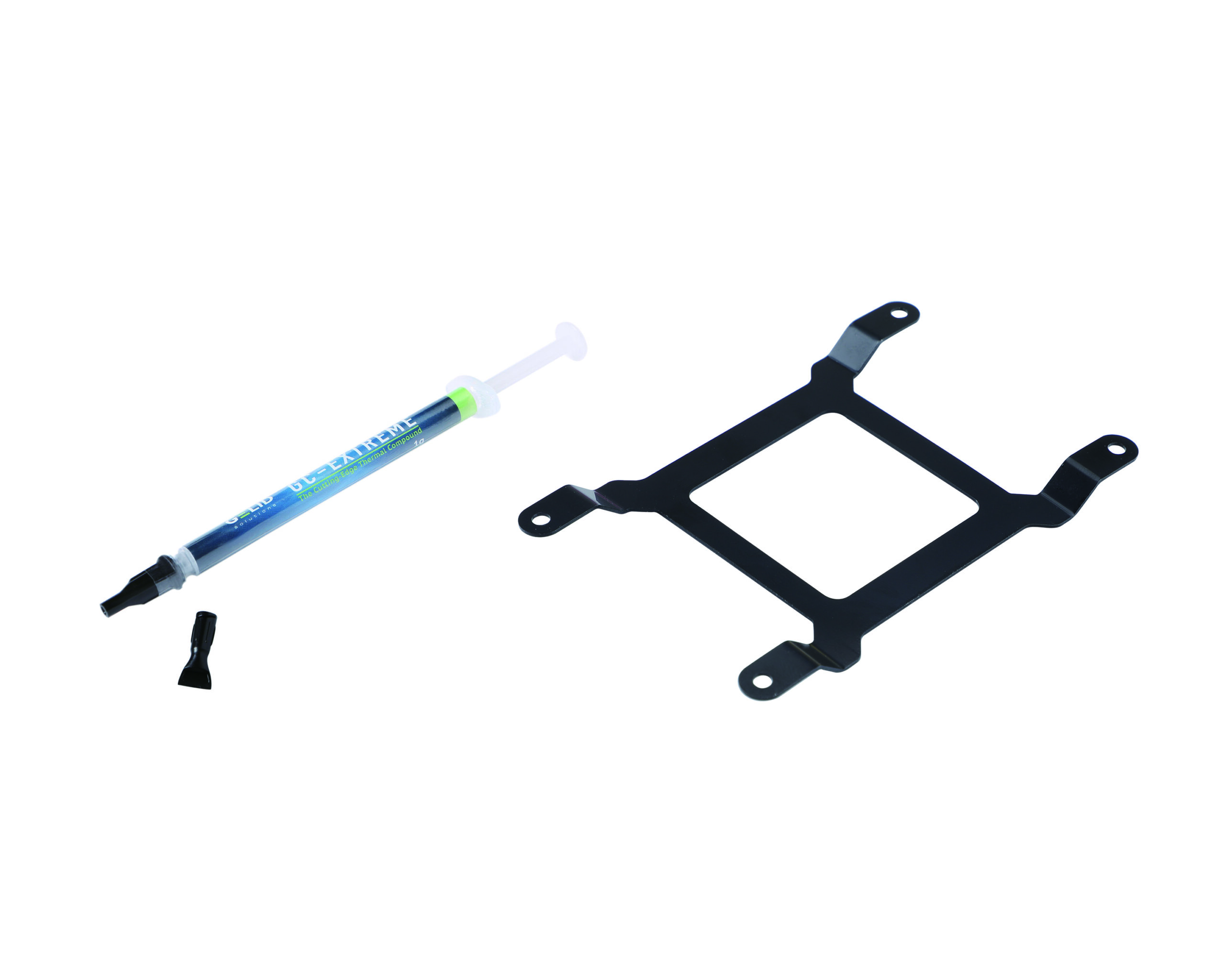
CPU Pull-Out Prevention Compatible with GELID AM4 Mounting Kit Seamless & Easy Installation Socket Integrity Protection Strong & Durable RoHS Compliant Ultra-Thin Thickness
kind walrus
Gelid is alr
kind walrus
Whoa
sterile flame
thats why
sterile flame
i was hearing so many stories about am4 cpus getting damaged and i was like hell nah
so i saw this, i only bought it because it looked like a contact frame
and $2 wont kill me
kind walrus
Works well? Looks like a butterfly frame
sterile flame
its not on amazon
and also, the other protector can be found as low as $0.99 free shipping as a welcome deal on ali https://www.aliexpress.us/item/3256802747071001.html?spm=a2g0o.detail.pcDetailTopMoreOtherSeller.1.18bcmhpDmhpDtj&gps-id=pcDetailTopMoreOtherSeller&scm=1007.40050.354490.0&scm_id=1007.40050.354490.0&scm-url=1007.40050.354490.0&pvid=37e62fc8-c2f8-4cf2-811a-0c52f52b0bc3&_t=gps-id:pcDetailTopMoreOtherSeller,scm-url:1007.40050.354490.0,pvid:37e62fc8-c2f8-4cf2-811a-0c52f52b0bc3,tpp_buckets:668%232846%238114%231999&pdp_npi=4%40dis!USD!5.06!0.99!!!36.56!7.17!%402103146f17169480212714775e8784!12000022863633646!rec!US!!AB&utparam-url=scene%3ApcDetailTopMoreOtherSeller|query_from%3A
kind walrus
Have to go via aliexpress? Damn
sterile flame
kind walrus
Have to go via aliexpress? Damn
i telling you
i all about preservation
and value
kind walrus
Ah yeah I can't see it anywhere there
Damn
Hopefully I manage to get some people to buy it
sterile flame
anyway i gotta do homework
again thanks so much for help
see you all later... or not
kind walrus
No worries
steady lance
Just got back home.
So my ram passed at SCL 5, tREFI max, 6400mhz with no errors in PCBdestroyer.
Also, temps peaked at 54c but averaged about 40c.
 modern walrus
ah heck. I can't even get 6400 to POST if it makes you feel any better
steady lance
Unfortunately I found out it was 6800 desync.
steady lance
modern walrus
ah heck. I can't even get 6400 to POST if it makes you feel any better
I am running 6400 sync currently. Would need like 1.5-1.6 volts on VDDIO to do 6600 but I don't wanna risk that.
modern walrus
steady lance
I am running 6400 sync currently. Would need like 1.5-1.6 volts on VDDIO to do ...
ya that does sound pretty spicy lol
steady lance
1.4v is the most I am willing to put into vddio after Fal showed me a post from MSI.
steady lance
@modern walrus, how much VDDIO voltage are you using for your overclock?
steady lance
I am noticing minor artifacting.
Could that be the result of SCL being to low or tREFI being to high?
sudden torrent
steady lance
I am noticing minor artifacting.
Doing what
sudden torrent
Turn off hardware acceleration so it's only rendering on CPU
steady lance
@sudden torrent is this it? I can't find anything called Hardware Acceleration.
 sudden torrent
Yes
modern walrus
steady lance
<@808772530017665024>, how much VDDIO voltage are you using for your overclock?
 steady lance
modern walrus
steady lance
modern walrus
Did you do ram yet? I forgot.
sudden torrent
That looks pretty tuned to me
modern walrus
steady lance
Did you do ram yet? I forgot.
lol ya
6400 won't cooperate so I settled
didn't wanna reinstall windows again
steady lance
So what exactly does VDDIO affect? I can't seem to find any good answers.
modern walrus
it seemed to affect how high I could get frequency to run
er at the very least, I needed to raise it to run higher frequency with MCLK:UCLK 1:1
modern walrus
iirc even 1.4 wouldn't POST 6400
& I have no idea what's considered high or too high to run for daily honestly
steady lance
Ouch. Well according to a post from MSI that Fal showed me the X3D cpus should not go above 1.4 as it was found that if VDDIO and VSOC were to high at the same time that it might of been the cause of the chips dying.
sudden torrent
MSI blamed VDDIO as one of the voltages that caused the blowups when it's above 1.4v yeah
Especially on X3D you don't want anything that high
steady lance
Oh no... I am concerned. PC just restarted on it's own.
Tuned the ram back to XMP with DRAM at 1.4v and disabled PBO.
sudden torrent
Sudden restart, no blue screen?
That's often CO related
You would typically do memory overclocking before CPU undervolting
steady lance
sudden torrent
Sudden restart, no blue screen?
Yeah just ahppened to me again and I found out I accidentally left PBO on advanced.
Switched it back to just enabled.
Is there a way to check if PBO is disabled from within windows?
I feel like my Bios is acting weird.
sudden torrent
steady lance
Is there a way to check if PBO is disabled from within windows?
Ryzen Master will tell you
steady lance
I keep getting this error:
Ryzen Master failed to initialize. Kindly reinstall the program.
sudden torrent
steady lance
I keep getting this error:
Ryzen Master failed to initialize. Kindly reinstall...
So reinstall it?
sudden torrent
Chipset installed?
steady lance
I believe so. How can I double check?
steady lance
Well since clearing cmos so far no crashes.
 fervent talon
@steady lance anymore crashes
steady lance
fervent talon
<@217356391675985921> anymore crashes
Since clearing cmos thankfully no.
I have XMP enabled still so it was 100% something to do with a unstable co.
For when I OC again I am debating if I wanna keep boost clock at 5.7ghz and just optimize for hitting that frequency more often.
 jovial bluff
do i overclock my 7900xtx
kind walrus
jovial bluff
do i overclock my 7900xtx
That depends. Have you had no issues
jovial bluff
kind walrus
That depends. Have you had no issues
smoothness ithink is going away though or its just bc im used to it being smooth that it doesnt feel smooth lol
kind walrus
@jovial bluff So weird side step here
We spent months trying to help you
You sold the pc
Bought effectively the same one new
Never had a problem ever again
?
💀
jovial bluff
kind walrus
<@511256003485106177> So weird side step here
do u know what stuff to turn off on amd ardrelain software
kind walrus
Turn on anti lag
Turn off radeon overlay
That's the bare minimum and I keep to that as much as possible. Really keeps stability strong
For the same reason I'd say maybe steer clear a bit of overclocking the XTX
Fun for big numbers, not really the best for daily
jovial bluff
gotcha
jovial bluff
kind walrus
That's the bare minimum and I keep to that as much as possible. Really keeps sta...
what about smart memmory
kind walrus
Yea it can help a little
Up to you tho
It's called "Resizable bar" or "Above 4G decoding" in bios
Sometimes SAM

 kind walrus
Yeah that's fine
jovial bluff
so liek side note
kind walrus
iGPU on only makes sense if you want a second screen or be able to diagnose problems
jovial bluff
idk why i bought this pc ngl lol i barely game..
but when id dint have a pc i was bored
LOL
jovial bluff
kind walrus
Once you have it, you lose the motivation
yepp ngl i already posted it for sale lol-
kind walrus
Lol
Well you got it out of your system at least
Maybe next you just stick to a console lol
jovial bluff
prolly wont sell it tbh i just got bored and posted it
not really alot of games that are fun to play
kind walrus
So true
 robust sleet
my overclock is like 2-3 years old now, should i redo it? and should i also undervolt my gpu while im at it
kind walrus
robust sleet
my overclock is like 2-3 years old now, should i redo it? and should i also unde...
Did you think it could go faster back then?
If the answer is anything but yes, I wouldn't
robust sleet
no clue
i didnt have an idea what i was doing back then
and i feel like its running pretty hot
robust sleet
kind walrus
Did you think it could go faster back then?
dont think itd be faster but i do feel like i can get it cooler
robust sleet
should prolly watch a video or two before cuz i havent done it in a hot minute
then again it is pmuch stable rn
kind walrus
If you're not having stability issues
And the work you did to it was safe limits
Then I don't see an issue tbh
But you can have a look around and see
robust sleet
kind walrus
But you can have a look around and see
yeah fair
and for undervolting anything special for ampere gpu's?
kind walrus
It reaches peak perf for the voltage it supplies
But that's all it does
How good it is depends on how stable
jovial bluff
kind walrus
Yea it can help a little
welp the issues are back lmfao
 jovial bluff
nothing
kind walrus
So what happened in the last 24 hours then
Like, what did you do on the pc between when we last talked and now
kind walrus
Set it to 6000 then and set your fclk to 2000
 ruby matrix
Help me to get a gf
 tall pelican
make it to gskill world comp, and hit up a show girl 
steady lance
ruby matrix
Help me to get a gf
What Fitz said.
 signal belfry
ruby matrix
Help me to get a gf
signal belfry
ruby matrix
Help me to get a gf
Step one: figure out what u have to offer, Step two: don’t take gf advice from discord
tall pelican
Step 3: realize that a relationship isn't about "what you have to offer", but what you appreciate in the other person
sudden torrent
It's also not any one thing in particular that you can enumerate to a list
 dull ginkgo

The MPG power supply is designed to provide efficient and reliable power thanks to its 80 PLUS Gold-certified efficiency and 100% Japanese 105° C capacitors. Easily build up your system with its fully modular design and flat cables, which means less cable clutter and better airflow. Game with no ...
 vale nymph
Bros tryna overclock his relationship status
 alpine mantle
😂
 tardy moss
dull ginkgo
alternatively,
https://www.amazon.com/MSI-MPG-Power-Supply-PSU/dp/B08PDZ5ZLT/
tardy moss
dull ginkgo
alternatively,
https://www.amazon.com/MSI-MPG-Power-Supply-PSU/dp/B08PDZ5ZLT/
no way bros relationship is rated by 80 plus
dull ginkgo
My relationship with my PSU is just that good




 cerulean moon

need help on a small boost
as far as i've understand CPU overclocking there's temps, frequency, and voltage that I have to deal with
i tried looking up a few videos on the software but it seems like it's very different compared to mine; and my thought is perhaps it's because of my APU
signal belfry
Your voltage is a little high if it’s at 1.45 @cerulean moon
cerulean moon
everything is default btw
signal belfry
Should be fine then since it’s idle
But for an oc on Ryzen 2nd gen
There’s an auto one amd has and it’s better than a manual oc
I’ll try to look for what it’s called
Pbo - precision boost overdrive

pcgamer
A step-by-step guide to pushing your AMD Ryzen processor beyond its limits.
cerulean moon
signal belfry
Pbo - precision boost overdrive
exactly what i'm trying to find but there's none for some reason
modern walrus
cerulean moon
everything is default btw
LLC is another consideration btw
("Load Line Calibration")
cerulean moon
modern walrus
LLC is another consideration btw
thank you
modern walrus
default LLC will drop voltage considerably under load
cerulean moon
uh what am i supposed to do
modern walrus
you're doing OC in Ryzen Master or BIOS also?
tbh I've never OCed 2600G. I've done 5600G but that was similar to Zen 3
cerulean moon
i prefer not going into bios but as long as i know what to do there i don't mind
modern walrus
if you're on stock LLC, for example, setting voltage at like 1.4 might drop to something like 1.3 under load but if you set LLC higher, it might only drop to 1.35 under load
unless you're doing like LN2 tho, you never want LLC to be set such that it doesn't drop under load
so usually something in the middle is better
because that allows you to keep your set vCore at a reasonable voltage while still having enough voltage under load
cerulean moon
i don't seem to see anything resembling what you mean in ryzen master
modern walrus
in BIOS it's called like DigitALL power settings or something like that
cerulean moon
i'll take a bath and boot into bios, see if there is
modern walrus
can't remember exactly offhand
cerulean moon
alright i'll check a few and send pictures
modern walrus
okay sounds good
sudden torrent
signal belfry
Pbo - precision boost overdrive
PBO didn't exist on the 2400G, it's Zen classic, not even Zen+.
Best results will be from a static all core overclock.
For example, I was able to overclock my 2700 to an all core frequency above the stock boost max at 1.4v, which is safe on those older nodes (14nm).
cerulean moon
sudden torrent
PBO didn't exist on the 2400G, it's Zen classic, not even Zen+.
Best results wil...
ah no wonder
thanks for that
cerulean moon
modern walrus
in BIOS it's called like DigitALL power settings or something like that
i see it

I've researched safe OC is around 3.8GHz
stock heatsink btw
will buy a tower air cooler along with the cpu upgrade
or an aio idk
sudden torrent
A tower cooler would be plenty
AIO is really only needed on the Ryzen 9 parts, "needed" being used loosely
cerulean moon
sudden torrent
A tower cooler would be plenty
recommendations?
sudden torrent
US?
cerulean moon
thinking of the cooler master 512 i keep seeing on pppicker
cerulean moon
sudden torrent
US?
SEA
I've seen that one tower cooler brand that wasn't super known but they also make thermal paste iirc
thermalite i think?
cerulean moon
any other recos?
it's around 20-40 where i live the thermalright
one is considerably more expensive though not sure why, perhaps fans were included
sudden torrent
ID-Cooling SE 214 would be another to consider
cerulean moon
I'll look through a few coolers
cerulean moon
sudden torrent
ID-Cooling SE 214 would be another to consider
dang they cheap
you think it would be future proof for a 5600? with OC maybe
cerulean moon
so with the cooler i get 1 fan and 1 "tower" idk what they're called
no need for the really big 2 towers one with 2 fans
sudden torrent
Yeah the heatsink and pipes are collectively called the "tower"
Dual towers are good for higher power parts, like if you were overclocking a Ryzen 7
cerulean moon
great! thank you
@modern walrus i see DigitALL in the bios, how should I tweak the settings?
cerulean moon
damn do i not have rgb headers on my mobo

@sudden torrent
i might have to buy an adaptor then
eh?
 sudden torrent
cerulean moon
sudden torrent
https://www.aliexpress.us/item/3256806621734515.html
sudden torrent
cerulean moon
sudden torrent
https://www.aliexpress.us/item/3256806621734515.html
cool, but it will arrive in september LOL
cerulean moon
are the ones i sent still viable tho
cus i'm planning on routing all my fan cables at the back instead
rn currently they're just daisy chained to one fan header
sudden torrent
Daisy chaining is fine. It's the same as using a hub.
cerulean moon
alright
i'll get a hub aswell with argb
that works right
even though i think i don't have argb headers on my mobo
sudden torrent
No, it wouldn't. It needs to have the argb controller included since you don't have one.
The bottom right one is an example of a controller
modern walrus
cerulean moon
i see it
what options do you have? typically the middle one is better but I'd start on the lowest you can run & only increase it as necessary. Read the help string in BIOS or check your motherboard's manual to see which LLC [number] is lower or higher because it can vary. (e.g., the highest numbered LLC setting could be largest vdroop or could be the smallest or even no vdroop at all depending on the motherboard--MSI boards sometimes have an LLC setting that increases voltage under load). Unless you're using LN2 or another extreme cooling solution, you should not use the "no vdroop" LLC option because of "transient" power spikes (better to Google that then watch me fumble around trying to explain it lol).

Btw just to be sure we're on the same page, vdroop refers to how much voltage drops when you go from little to no load on the CPU to a heavy load. Especially if your goal is for a daily overclock, you'll want to run the greatest vdroop that allows you to set vCore as low as possible. Bear in mind, vCore at idle does matter to an extent but vCore under load matters far more. I wish I could give you specific voltage numbers for what's "safe" but I don't know much about your specific CPU. TLDR: Be careful to avoid high vCore under load, especially when temps start approaching TJ max because that's when degradation becomes more likely.
also, there's an LLC setting for SOC voltage that may come into play, especially if you start playing with memory timings/frequency
modern walrus
cerulean moon
I've used the Razer RGB controller before. It comes with tons of bloatware but you can control it with OpenRGB to avoid installing all the crap lol
cerulean moon
modern walrus
Btw just to be sure we're on the same page, vdroop refers to how much voltage dr...
oh damn thank you very much I'll work on it in the evening, i have a lot of errands today coincidentally
I'll update you when i get home ggood thanks for that
cerulean moon
modern walrus
I've used the Razer RGB controller before. It comes with tons of bloatware but y...
honestly just gonna buy a v cheap controller and set it to white, first time having lights in my pc lol
cerulean moon
modern walrus
Btw just to be sure we're on the same page, vdroop refers to how much voltage dr...
so what I'm understanding is we'd want the greatest vdrop meaning, having lowest amount of voltage on the CPU when we go under load - in order for us to set vCore as low as possible, and to my knowledge vCore is the actual voltage the cpu is running at under load (or m pretty much how powerful the core is running at(?))
we'd want to balance vCore value that it only reaches below tj max which is just another word for max temps the cpu can handle.
if we can do all that no problem after benchmarking ig, say we reach a good and safe OC (is it oc? lol),
I'd also like to know about LLC and SOC as I'm only presuming, judging by memory timings/frequency you are talking about ram oc, I'd like an explanation of that
question tho, how is the former supposed to help aid in giving me a performance boost
modern walrus
cerulean moon
we'd want to balance vCore value that it only reaches below tj max which is just...
yes, TJ max is when the CPU will start to slow down frequency to lower temperatures
I don't know what TJ max would be on your CPU but more than likely it's somewhere between 85-100C
if you haven't already, download HWiNFO
it'll give you almost ever sensor reading on your CPU, GPU, motherboard, & even storage drives & memory (if they have temp sensors)

Start to analyze your hardware right now! HWiNFO has available as an Installer and Portable version for Windows (32/64-bit) and Portable version for DOS.
seriously like every possible sensor lol

btw what are you setting the multiplier to?
modern walrus
cerulean moon
if we can do all that no problem after benchmarking ig, say we reach a good and ...
RAM OC is an entire monster on it's own. There are many, many more variables compared to CPU OC. The CPU you're using is DDR4 so if you're interested in going down that dark path, this is a great place to start: https://github.com/integralfx/MemTestHelper/blob/oc-guide/DDR4 OC Guide.md

GitHub
C# WPF to automate HCI MemTest. Contribute to integralfx/MemTestHelper development by creating an account on GitHub.
don't get me wrong tho, I've spent countless hours messing with memory OC. It can be fun, or at the very least, give you a sense of accomplishment lol
one thing tho with memory OC especially, you'll want to dual boot a second Windows installation. Trying to overclock memory on your daily Windows install is very risky as it's very likely to corrupt Windows in the process
tbh, even if all you do is OC CPU, it's best to have a second install for testing or at the very least, back up anything you do not want to lose to an external drive or cloud type thing
Windows tends to corrupt itself over time regardless of whether you OC or not anyway lol
btw what are you using to stress test?
cerulean moon
modern walrus
btw what are you using to stress test?
well i downloaded cinebench and 3dmark demo
i also have msi kombustor
but apparently that's not quite great as a benchmarking tool
cerulean moon
modern walrus
btw what are you setting the multiplier to?
i haven't yet actually, just finished errands and arrived home just now
gonna start late at night lol i think that might be your active times here
cerulean moon
modern walrus
what options do you have? typically the middle one is better but I'd start on th...
are you up
christ on a bike this might be more confusing than i thought
sudden torrent
cerulean moon
christ on a bike this might be more confusing than i thought
CPU Loadline level 3
CPU NB Loadline level 2
Don't worry about the rest
modern walrus
cerulean moon
well i downloaded cinebench and 3dmark demo

Download BenchMate for free to measure the genuine performance of your system with professional quality
modern walrus
cerulean moon
christ on a bike this might be more confusing than i thought
Mode 4 or 5 should be good. The rest just leave auto