#building-and-recc-chat
1 messages · Page 1248 of 1
 errant fiber
 stoic island
How did it do beforehand? That bit was left out
 woeful plinth
stoic island
How did it do beforehand? That bit was left out
woeful plinth
stoic island
How did it do beforehand? That bit was left out
it did well, lower temps and no crashes
might be worth trying a new psu?
woeful plinth
Corsair RM Series, RM850, 850 Watt, 80+
i tested with my old ram kit and it did crash
stoic island
Should be fine, and well, might as well just clear cmos
Clear cmos is useful for just resetting all the settings for testing
woeful plinth
to do that i have to pull the lil battery from the mobo for 10 min right?
stoic island
Unplug from wall, take out cmos battery
woeful plinth
yeah, will try thanks!
stoic island
5 min should do fine, you can do 10 if you want to
Also, after you clear cmos, don't turn xmp back on
Xmp is one of the things that could be causing instability here
woeful plinth
sounds good!
 stable tinsel
Why does my pc blue screen after downloading games
I can't figure out why after that it fixes itself
 strong raft
stoic island
What PSU is it
strong raft
stoic island
What PSU is it
100% gpu crashed their pc. Perhaps furmark or similar could duplicate the issue. Of course might still be ram as you mentioned
stable tinsel
The games run no problem after that
 lofty tundra
Alright i put my gpu from my prebuilt into my new build. Do i enable it somewhere in bios?
woeful plinth
strong raft
100% gpu crashed their pc. Perhaps furmark or similar could duplicate the issue....
gpu worked fine on a diferent build, as for the ram i tested with another kit and crashed
am thinking it is the psu
woeful plinth
stoic island
5 min should do fine, you can do 10 if you want to
it reset but didnt fix the issue, at this point i think the psu might be the issue
stoic island
strong raft
100% gpu crashed their pc. Perhaps furmark or similar could duplicate the issue....
It might just be going to 100% on startup and something else crashing it at the same time, I don't really think that's the issue atm
stoic island
woeful plinth
it reset but didnt fix the issue, at this point i think the psu might be the iss...
Its pretty hard to get the PSU to crash the system, but do you have another PSU you can test with?
woeful plinth
stoic island
Its pretty hard to get the PSU to crash the system, but do you have another PSU ...
i do not no
is it possible that the outlet is not giving the pc enough power? i have a few things pluged in the same outlet
stoic island
plug straight into the wall instead of using extenders if possible, and if the PC is drawing too much straight from the wall, it'd trip a breaker in the house
@woeful plinth btw, any other symptoms and anything in event viewer?
lofty tundra
Fk.. help pls
stoic island
?
lofty tundra
I disabled my cpu integrated graphics because i put my graphics card from my prebuilt in and now i can’t get any graphics.
errant fiber
lofty tundra
Alright i put my gpu from my prebuilt into my new build. Do i enable it somewher...
no
lofty tundra
Idk why my gpu isn’t displaying graphics or how to get my cpu graphics back.
stoic island
take the GPU out and clear cmos, that should get you iGPU back
but why your GPU isn't outputting anything, who knows
lofty tundra

Its a 1080 i just put it into the pins on the board and plugged it in. I mean is there anything more to it?
That’s how it was in on my prebuilt.
strong raft
Oh yeah I meant to say that psu could be issue and just doing 100% gpu in a game is partly what did it
strong raft
lofty tundra
Its a 1080 i just put it into the pins on the board and plugged it in. I mean is...
It's in? Looks good, double check the power cable. That's it, clean install of latest Nvidia drivers and you're set
lofty tundra
Ahh could i have needed drivers and stuff first? I thought you had to get it setup and have graphics for it to display.
woeful plinth
stoic island
<@!318967237069504514> btw, any other symptoms and anything in event viewer?
Nope, just reports of the old motherboard drivers and armoury crate crashing, at first i thought that was the issue, I deleted uninstalled everything related to that old mobo but still crashed
Testing pluged from the wall, will see what happens
lofty tundra
Like plugged in and stuff and it would display and then you update drivers.
Wait wtf?
Just shut down and rebooted and now i have graphics coming from it? After the 3rd reboot wtf?
woeful plinth
stoic island
<@!318967237069504514> btw, any other symptoms and anything in event viewer?
weirdest thing, i plugged straight to the wall and everything seems normal so far, not only it hasnt crash. a noice my gpu was doing whenever i tab out of the game is gone. it sounded like a bearing on the gpu fan was bad, but it is gone...
i hope it doesnt crash and that it was the issue
woeful plinth
stoic island
plug straight into the wall instead of using extenders if possible, and if the P...
That worked Thanks!
 rancid lodge
Okay got a weird issue with my build I’m working on rn
Got a M.2 (MP-E 500GB) and whenever I put it into the mobo and try to boot the screen is black
Like not no signal black but just black
Take it out and I boot to BIOS fine
Started happening after I installed windows on it
no matter what I do if I put the M.2 in it goes black screen
Also the computer will start to power cycle a few times before boot light comes on but it doesn’t do this consistently*
 willow crown
Question about a purchase I made for my first build:
I bought 2 of these memory sticks but for an intel CPU. Are these going to be compatible or have I made a silly mistake? I'm a little confused if "for AMD" means only AMD products or not. Thanks. https://www.newegg.ca/g-skill-16gb-288-pin-ddr4-sdram/p/N82E16820232728?Item=N82E16820232728
rancid lodge
willow crown
Question about a purchase I made for my first build:
I bought 2 of these memor...
Should work for Intel
“For AMD” is just a marketing thing, was mostly for AMD 5000’s release iirc
3600 CL18 is a bit meh depending on the CPU though
willow crown
rancid lodge
3600 CL18 is a bit meh depending on the CPU though
Do you possibly have any other suggestions? I need better then meh since i will be streaming and gaming with this PC. First build so Im open to any information
rancid lodge
willow crown
Do you possibly have any other suggestions? I need better then meh since i will ...
What CPU
willow crown
i5-12600k
rancid lodge
Uh yeah you’ll probably want CL16 instead
DDR5 is early adopter funny rn so
Okay yeah that specific kit on Newegg doesn’t do 2x8 3600 CL16
willow crown
Quick question, how do you determine CL18 from CL16? these were the original ones I was going to purchase. Would just the two be sufficient until i could upgrade as well? Thanks. https://www.newegg.ca/corsair-32gb-288-pin-ddr4-sdram/p/N82E16820236699?Item=N82E16820236699
rancid lodge
It’ll say if it’s CL16 or CL18
Lower CL = better
So you’ll want to look for CL16 3600 prob
Not sure about Intel 12th gen tbh but I’d assume it is hungrier for faster memory
 dusty peak
I got some thermal compound in the cpu socket- how bad is it? Its barely even visible and very contained but its in there
rancid lodge
It’s usually non conductive
You’ll be fine, clean it out with something non conductive as well
 thorn trout
does anyone have time to look at some parts i have picked out? Just looking for a couple opinions
rancid lodge
dusty peak
I got some thermal compound in the cpu socket- how bad is it? Its barely even vi...
A qtip with isopropyl will do
Just be careful if it’s a Intel mobo
Don’t damage the pins
rancid lodge
okay yeah should be easier
rancid lodge
rancid lodge
Also the computer will start to power cycle a few times before boot light comes ...
Still could use help with this (read all). Have reseated it, tried diff mobo slots, trying to update mobo bios now.
rancid lodge
rancid lodge
Still could use help with this (read all). Have reseated it, tried diff mobo slo...
Nevermind, I cleared the CMOS and then updated the BIOS and that made it happy
 fossil cedar
 vagrant crest
1300-1700
strong raft
lofty tundra
Just shut down and rebooted and now i have graphics coming from it? After the 3r...
vagrant crest
1300-1700
strong raft
lofty tundra
Just shut down and rebooted and now i have graphics coming from it? After the 3r...
Windows 10 has pretty good built in drivers so that helps
 vague oracle
thorn trout
does anyone have time to look at some parts i have picked out? Just looking for ...
vague oracle
thorn trout
does anyone have time to look at some parts i have picked out? Just looking for ...
Send a PCPP list here
thorn trout
im looking for suggestions and my budget is around 500$
its just for casual gaming
nothing too serious, its gonna be my first pc
but im looking for improvements
I also need a CPU and a graphics card
vagrant crest
fossil cedar
https://www.newegg.com/phantom-blue-lenovo-legion-5-17ach6h-82jy009eus-gaming/p/...
Why would a software suggest not using an AMD processor? And would it be a bad thing if I got a laptop run by AMD?
 mossy venture
vagrant crest
Why would a software suggest not using an AMD processor? And would it be a bad t...
mossy venture
vagrant crest
Why would a software suggest not using an AMD processor? And would it be a bad t...
some softwares have issues with amd cpus
vagrant crest
mossy venture
some softwares have issues with amd cpus
Okay. The software I’m getting is suggesting to use anything but AMD. So I’m assuming it’s in my best interest to get I5+?
mossy venture
11400 is good price/perf
vagrant crest
fossil cedar
https://www.newegg.com/phantom-blue-lenovo-legion-5-17ach6h-82jy009eus-gaming/p/...
Software is suggesting I use something other AMD.
vague oracle
vagrant crest
Software is suggesting I use something other AMD.
What software?
vagrant crest
FSX 2020.
vagrant crest
vague oracle
What software?
FSX2020
vague oracle
As in the golf simulator?
Yeah stick with intel/Nvidia for that
A buddy of mine has a 3700x and has problems with FSX 2020 because of it
 obsidian wigeon
oof
vagrant crest
vague oracle
A buddy of mine has a 3700x and has problems with FSX 2020 because of it
Affirm. I’m just trying to get up and running at this moment. Want decent graphics.
 brittle spindle
So my friend built a computer and his keyboard and mouse are lighting up but no signal to TV. He has a red devil RX 580, which do have a history of not booting up to TVs first try, especially with HDMI. So we are thinking he try VGA first.
We checked RAM, used one stick, moved it to every slot. Checked CPU. No broken pins. No disconnected cables as far as we are concerned. Everything lights up and spins when turned on.
We even re-seated the GPU and M.2
No luck
 flint sapphire
brittle spindle
We checked RAM, used one stick, moved it to every slot. Checked CPU. No broken p...
flint sapphire
brittle spindle
We checked RAM, used one stick, moved it to every slot. Checked CPU. No broken p...
Tv on the correct input and do you have any other monitor to plug into?
And I’m assuming there’s no post code or diagnosis light
brittle spindle
flint sapphire
And I’m assuming there’s no post code or diagnosis light
No lights at all and no post code
I fixed it yesterday I got it to boot to BIOS and we installed Windows...he has a ASUS Prime b560 Plus
but his brothers and dad keep messing with it and every time they do they mess up the computer somehow...both times it hasnt started after they touched it
but now it just doesnt boot at all no signal at least
flint sapphire
Thats weird af. You should see if just plugging into a different video output will make it work (different monitor)
 earnest olive
vague oracle
A buddy of mine has a 3700x and has problems with FSX 2020 because of it
earnest olive
vague oracle
A buddy of mine has a 3700x and has problems with FSX 2020 because of it
does it use TSX or something?
 glacial umbra
would I be able to run a 3070 + 5600x on 550w (seasonic focus GM) or should I play it a bit safer with 650-750?
 sand falcon
Do you already have the PSU?
glacial umbra
yeah received it as a christmas gift
 frank stirrup
glacial umbra
would I be able to run a 3070 + 5600x on 550w (seasonic focus GM) or should I pl...
frank stirrup
glacial umbra
would I be able to run a 3070 + 5600x on 550w (seasonic focus GM) or should I pl...
I would return and get a 650w
 limber isle
yup
sand falcon
I think it'd be fine, but it's tight
glacial umbra
frank stirrup
I would return and get a 650w
alright I'll probably do that then
glacial umbra
sand falcon
I think it'd be fine, but it's tight
ok thanks! just gonna return it and get 650, I'd rather be comfortable PSU wise
frank stirrup
Smart
 limber oyster
What's a good name brand PCIE USB 3.0/3.2 USB hub? Atleast 5 USB-A ports preferabe
Under $50 preferably too, can go lower # of slots or a reputable off-brand as well
fossil cedar
vagrant crest
Why would a software suggest not using an AMD processor? And would it be a bad t...
The only software that will not run on amd cpus is very some very niche engineering software the rest is fine in my experience, those recommended lists for games just test out certain hardware but it will be fine they're just being lazy not testing amd
 dull rampart
Hey, I have a 3070 and 5900x (just got the 5900x on Christmas day) and a focus px 750, do you think I have enough headroom to OC my GPU by a decent margin? My temps on gpu max at 68c rn, and CPU max at 73c under full load. I would assume I have the headroom for it, but I figured I’d ask first so I don’t crash my pc and enter bios.
frank stirrup
Its fine
vague oracle
fossil cedar
The only software that will not run on amd cpus is very some very niche engineer...
It won’t be fine, a friend of mine uses the same program and only has problems because of his CPU
fossil cedar
vague oracle
It won’t be fine, a friend of mine uses the same program and only has problems b...
Fair enough
vagrant crest
vague oracle
It won’t be fine, a friend of mine uses the same program and only has problems b...
So with that being said. Any suggestions on which gaming laptop to go with? 1300-1700 budget
dull rampart
vagrant crest
So with that being said. Any suggestions on which gaming laptop to go with? 1300...
Why laptop? Because of the market, or portability?
vagrant crest
dull rampart
Why laptop? Because of the market, or portability?
Portability, it’s going to be used in my garage which has a greater fluctuation of temperature, building a desktop pc would simply be take to much space in the area I have and harder to move in and out of the garage during summer and winter
dull rampart
Alright, understood. Your choice. That being said, desktops are quite easy to move since they usually only take a few cords, but space can be an understandable issue.
To be honest with you, cyberpowerPC is a great brand.
Very underrated.
Don’t look at more heavily overrated brands such as Alienware, you’ll notice the pricing difference, not to mention, cyber power sends their Pc/laptops bloatware free, unlike dell.

Just an option here even, relatively decent pricing.
The only thing I don’t really like about that laptop is the CPU, not a big fan of the 11800h.
fossil cedar
vagrant crest
So with that being said. Any suggestions on which gaming laptop to go with? 1300...
For lower on budget
https://www.newegg.com/phantom-blue-lenovo-legion-5-17ith6h-82jm0024us-gaming/p/N82E16834645861
https://www.newegg.com/core-black-msi-gp-series-gp66-leopard-11ug-018-gaming-entertainment/p/N82E16834155855 this on the slightly higher end
dull rampart
That also only has 512 ssd, laptop storage expandability is questionable at best, other than that, that laptop is pretty good too.
vagrant crest
I’m very new in the gaming PC world, so I’m very open to ideas, I was suggested Check this out on @Newegg: Gigabyte AORUS 15P Gaming & Entertainment Laptop (Intel i7-11800H 8-Core, 16GB RAM, 512GB SSD, 15.6" Full HD (1920x1080), NVIDIA RTX 3060, Wifi, Bluetooth, Webcam, 1xHDMI, Win 10 Home) https://www.newegg.com/p/2WC-000Z-00AT3?Item=9SIA7ABFEM4022&Source=socialshare&cm_mmc=snc-social-_-sr-_-9SIA7ABFEM4022-_-12272021 from a friend, who isn’t the most tech savvy but knows more than I do.
dull rampart
I have nothing against the 11800h, I just think something like the 11700h would be better if they release it.
Or 12th gen laptop processors when they’re released.
fossil cedar
vagrant crest
I’m very new in the gaming PC world, so I’m very open to ideas, I was suggested ...
This would be better if you're going for slightly cheaper 3060 route
https://www.newegg.com/phantom-blue-lenovo-legion-5-17ith6h-82jm0024us-gaming/p/N82E16834645861
fossil cedar
dull rampart
I have nothing against the 11800h, I just think something like the 11700h would ...
?
Why
vague oracle
How would it be better if it’s not even out yet
As far as I know there wasn’t even an announcement that they are releasing it
dull rampart
There isn’t.
What I’m saying is the MSRP on the 11800h is very high for an 8 core 16 thread chip.
$400
11700h would also be 8c16t if it were released, but presumably more at the $330 price range.
Just as 12th gen will most likely (I’m not 100% sure on this) introduce efficiency cores to laptop processors.
Not saying that the 11800h is a bad chip by any means, just quite a high price point for its class.
fossil cedar
dull rampart
What I’m saying is the MSRP on the 11800h is very high for an 8 core 16 thread c...
Not for a laptop chip really it's a high end cpu for a high end laptop and it's an 8c16t but it's slightly best single core laptop cpu too
dull rampart
You seemingly ignored everything else I said though
It’s a good cpu for right now, and if you need a laptop now, it’s a good purchase, but in the next few months you can (again, presumably) get similar performance for far less money, or greater performance for around the same.
fossil cedar
dull rampart
It’s a good cpu for right now, and if you need a laptop now, it’s a good purchas...
This is always the case, there will always be something new x months down the road that will be better for same price or cheaper
Laptop CPUs don't matter a huge amount msrp wise because only the whole laptop price counts anyway
Also what would the hypothetical 11700h even be?
There's been no leeks of it to my knowledge
I mean if we're talking like that then we could just say the 11900k would be better if it didn't suck xD
dull rampart
Yes that’s true, it’s an endless road of that happening, so saying to “hold out for the next generation” sounds absolutely dumb, but it should be released by February, because CES is coming soon, and they should announce them then.
fossil cedar
Yeah but that's 2 months away
Sure if you have something atm you can wait but it's not fun to wait that long if you don't have anything
dull rampart

Not specifically referring to this article, but an example is this.
6p cores, 8e cores, more threads, all around better.
And it should be released late January.
Never recommended against buying an 11800h, but if someone is able to wait just a few months, they’ll get quite a bit more.
fossil cedar
Too be honest the gaming performance probably wont be a huge jump
Sure multi core and battery life will be better with e cores
But gaming is pretty reliant on single core so core count isn't really a big factor
obsidian wigeon
And e-cores causes issues with older games
The damn drms, gah
I'm sure e-cores will be able to be disabled in bios at least, but still
Painful
limber oyster
Personally, I have a i7-11800H and my 7 3700x has better performance
 rugged sparrow
https://www.newegg.com/asus-ga15dk-ds776/p/N82E16883221675 I know cooling is kind of an issue on this pc and a couple of other things but is there a better pc that has an rtx 3070 for around the same price
That isn’t open box
frank stirrup
rugged sparrow
https://www.newegg.com/asus-ga15dk-ds776/p/N82E16883221675 I know cooling is kin...
Better case and cooler at a cheaper price
This one has an aio
Still cheaper
@rugged sparrow
rugged sparrow
I mean they are open box

This pre-owned or refurbished product has been professionally inspected and tested to work and look like new. How a product becomes part of Amazon Renewed, your destination for pre-owned, refurbished products: A customer buys a new product and returns it or trades it in for a newer or different m...
frank stirrup
rugged sparrow
I mean they are open box
You can still return em if somethings wrong
rugged sparrow
There is that but how hard is it to take care of liquid cooling
rugged sparrow
frank stirrup
You can still return em if somethings wrong
I thought u can’t return open box

 desert gulch
rugged sparrow
There is that but how hard is it to take care of liquid cooling
desert gulch
rugged sparrow
There is that but how hard is it to take care of liquid cooling
If aio, pretty much no maintenance
Just put it in the right orientation and spray the dust out of the fins once in a while
If custom loop then yeah itl have some maintenance, but I'm assuming you're talking aio
rugged sparrow
rugged sparrow
https://www.amazon.com/MSI-Desktop-i7-10700K-VR-Ready-10TD-213US/dp/B09DTHM3WY/r...
@desert gulch
Nvrm
frank stirrup
rugged sparrow
https://www.amazon.com/MSI-Desktop-i7-10700K-VR-Ready-10TD-213US/dp/B09DTHM3WY/r...
120mm aio
Rather have an air cooler
Lol
rugged sparrow
I just found this and idk if this is good it is 400 dollars off

Buy Skytech Gaming Shiva Gaming PC GeForce RTX 3070 GPU AMD Ryzen 3700X CPU 16GB RAM 1TB SSD at GameStop. Find release dates, customer reviews, previews, and more.
It looks like it will be hot
frank stirrup
Yeah its gonna be very hot
rugged sparrow
I am trying to find a computer that has an rtx 3070 and has good cooling
And that isn’t way overpriced
rugged sparrow
Ya I saw
For https://www.newegg.com/abs-ali506-gladiator/p/N82E16883360106R?Item=N82E16883360106R are all monitors supported
frank stirrup
Hdmi or display port
rugged sparrow
Ok
frank stirrup
Id still get the 10700k one
frank stirrup
rugged sparrow
What 10700K
stable tinsel
My pc keeps blue screening after playing games and cannot fix it
frank stirrup
stable tinsel
My pc keeps blue screening after playing games and cannot fix it
Error code?
stable tinsel
none
fossil cedar
I don't that's possible
stable tinsel
on the moba no blinking lights
 stable tinsel
yes
 uncut pelican
Thoughts on the Toshiba N300 for a Nas?
sand falcon
Very good drive
sand falcon
uncut pelican
Thoughts on the Toshiba N300 for a Nas?
You might check to see how much cheaper the X300 is. They're very similar drives, the X300 is just a little bit slower
uncut pelican
I bought one actually
uncut pelican
It was dead upon arrival unfortunately so I returned it
sand falcon
Dang
 hazy wadi
6
earnest olive
don't even think about 1440p with your 1060 3gb
and overclocking monitor is only worth it going from 60hz to 75hz
no point on 144hz
 oblique gull
just build my first pc and everything seems to be running fine. but for some reason there is no input for my monitor. any ideas? (and yes i did see if it was connected to the gpu. it is.)
earnest olive
by running fine you mean fans spinning lights on?
first step is to try unplugging and replugging the monitor cable on both ends
fans spinning lights on does NOT guarantee running fine though - system can fail boot and still have fan spin
oblique gull
earnest olive
by running fine you mean fans spinning lights on?
all the fans are spinning. all the things that are supposed to have rgb are running fine
but imma double check by plugging and unplugging the monitor
does this mean something?
 earnest olive
that's a boot fail
oblique gull
i feel it does but i’m too stupid
earnest olive
which label? it looks like VGA to me
but pic isn't perfectly clear
VGA means it got stuck initializing the graphics card
oblique gull
what does that mean?
earnest olive
graphics card no work
 earnest olive
turn it off, turn the power supply off, pull out the graphics card, plug it back in, reseat the power cables to the graphics card
then try turning it on again
also pray that your graphics card is not dead bc that's the hardest part to replace right now
earnest olive
oh
oblique gull
just need to get this over with cuz i have plans tommrow
earnest olive
well do what I said if it doesn't work take it back
 thin oar
earnest olive
don't even think about 1440p with your 1060 3gb
thin oar
earnest olive
don't even think about 1440p with your 1060 3gb
what would happen if I did tho
just curious
like bumping it up to 1440p on my 1060
earnest olive
expect fps to drop
a lot
lol
even more than usual since 3gb vram
maybe single digit fps in AAA games
I got 20 fps in ac valhalla with a 1060 6gb at 1440p
and the vram was at 100% usage
oblique gull
earnest olive
I got 20 fps in ac valhalla with a 1060 6gb at 1440p
why would you do that?
also yeah btw i tried to get the gpu out but the wires seem stuck on
but everything else a tried didnt work so it seems i might have a dead gpu
earnest olive
oblique gull
why would you do that?
cause I thought it was funny lol
even my 3080 struggles with that game
gets like 80 fps at 1440p high
thin oar
games seem to run quite well
earnest olive
maybe if you're playing league of legends
earnest olive
must be a really old or undemanding title to run well at 1440p on a 3gb 1060
thin oar
I don’t play many AAA games so I should be fine
earnest olive
1440p has higher vram demands
thin oar
I know
I’m on apex legends and I’m getting mid 90’s
Medium settings
High 50’s to low 60’s on gta at high settings
 little osprey
anyone know how many frames a r9 5900hx + 3070 laptop would get in different games
thin oar
If playing at high settings then most likely 60fps+
mossy venture
thin oar
Medium settings
Apex is cpu focused
earnest olive
little osprey
anyone know how many frames a r9 5900hx + 3070 laptop would get in different gam...
just google benchmarks
little osprey
oh alr
oblique gull
now i’m not good at organization but does this management look good?
 earnest olive
if it closes, it's good enough
 jagged hill
not too bad
mine has no management
i use the main side panel to manage my cables instead
hazy wadi
yo guys most m.2 nvme gen 3 ssds (dram cache or not) will be relatively better than a 6 year old sata III 2.5 ssd right?
ofc generally speaking
oblique gull
dam it’s not closing. might of done a bad job lol
little osprey
hi, was wondering which of these is a better pick based on performance and price, or if there’s a better choice
https://www.newegg.com/abs-ali506-gladiator/p/N82E16883360106R
fossil cedar
little osprey
hi, was wondering which of these is a better pick based on performance and price...
the 3060 ti one
lofty tundra
I'm getting these stats on my cpu and I am only running visual studio code, discord, and a few tabs of edge. Isn't this pretty high for the cpu?
 mossy venture
lofty tundra
I'm getting these stats on my cpu and I am only running visual studio code, disc...
mossy venture
lofty tundra
I'm getting these stats on my cpu and I am only running visual studio code, disc...
whats visual studio code
lofty tundra
mossy venture
whats visual studio code
It's for programming.
It's just like a text editor.
lofty tundra
12700k and nzxt kraken z73
mossy venture
odd
im not sure about 12th gen temps but that doesnt sound right
are you sure you applied thermal paste properly?
and do you have decent case airflow?
lofty tundra
I just used the pre applied thermal paste from the cooler.
mossy venture
what?
lofty tundra
and I have 6 fans in my case.
mossy venture
lofty tundra
and I have 6 fans in my case.
how many intake and outtake
though that wont make a huge difference
what do you mean by pre applied
lofty tundra
mossy venture
how many intake and outtake
Uh. They all face in 🙂
mossy venture
lofty tundra
Uh. They all face in 🙂
that means theyre all intake
i would switch 3 to outtake
 topaz kestrel
negative air pressure gonna be oofing ur case 😳
lofty tundra
mossy venture
what do you mean by pre applied
The thermal paste the was on the cooler already. You don't have to apply anymore thermal paste.
lofty tundra
topaz kestrel
negative air pressure gonna be oofing ur case 😳
Idk what that means.
 jagged ember
it means the hot air has nowhere to go
topaz kestrel
^
jagged ember
so it stays all inside your case
jagged ember
preapplied paste is fone
lofty tundra
I just figured it would get pushed out the back.
jagged ember
I'd worry about airflow first
jagged ember
lofty tundra
I just figured it would get pushed out the back.
not if the fans are sucking air from the back
lofty tundra
But yeah did seem a lil toasty in there forsure. I thought it seemed kinda hot in my case.
topaz kestrel
do the 3 on the front as intake and 3 in the back as exhaust
jagged ember
assuming your aio is top mounted
 earnest olive
lofty tundra
earnest olive
lofty tundra
bruh this is gpu-z
lofty tundra
3 on top and 3 on the side.
lofty tundra
earnest olive
bruh this is gpu-z
Yeah
earnest olive
that's gpu temps not cpu temps lmao
lofty tundra
Wut? It said cpu temps.
topaz kestrel
since when did gpu-z track cpu temps
topaz kestrel
just use hwinfo
lofty tundra
Lol oops.
earnest olive
but yes if your gpu is at 83C with nothing demanding running then something is very seriously wrong
what
earnest olive
hwinfo is THE temp monitoring software
jagged ember
actually used hwinfo?
jagged ember
earnest olive
that's like saying you don't think intel sells cpus
obviously they sell gpus
lofty tundra
Is that like hwmonitor?
earnest olive
hwmonitor is trash
jagged ember
idk what you're on about
earnest olive
hwinfo is hwmonitor except it actually works
jagged ember
hwinfo good
lofty tundra
I'm just watching a jayztwocentz vid about what monitoring softwares I should have on my pc.
earnest olive
oh god
jagged ember
oof
jagged ember
he ain't good for info yeah
earnest olive
if you want to watch jay watch his water cooling videos and nothing else
lofty tundra
So hwinfo you said?
 earnest olive
lol what
earnest olive
michaelsoft moment
topaz kestrel
i'd imagine you didnt clear an sdd correctly and installed it with a defaultuser permissions lol
topaz kestrel
earnest olive
..what
it happened to my brother
 ebon fulcrum
🧍apparently i need to reinstall? that’s what other people said
earnest olive
probably yeah
earnest olive
use bios to boot override into windows installer
where that is located depends on what brand motherboard you have
you will need a usb with at least 8gb that you can wipe
ebon fulcrum
earnest olive
where that is located depends on what brand motherboard you have
uhhh

yeah?
earnest olive
I can't tell the capacity from that lol
topaz kestrel
well its a windows install usb so i imagine it already has media tool on it
earnest olive
you'll also need access to another working computer
oh I didn't see the logo in the phone preview
earnest olive
well I've never used one of those but I imagine it's the same
ebon fulcrum
reinstalling windows is my biggest enemy
topaz kestrel
you dont need another pc since you have the windows install on that usb
lofty tundra
CPU is at 84 degrees f. So nvm think it's fine then. Was jw why it was sitting at 106 degrees on the cooler but ig you have to reopen the app for it to start moving again to what it is actually at.
ebon fulcrum
oh
earnest olive
god please never talk about temperatures in F
topaz kestrel
^^^
topaz kestrel
its just wrong and confuses people
earnest olive
nobody talks about PC part temperatures in F
lofty tundra
Literally someone told me the only way to measure cpu temps is in f yesterday in this chat.
topaz kestrel
nothing is wrong with 106f but alot is wrong with 106c
earnest olive
who lol
lofty tundra
Yesterday or two days ago.
topaz kestrel
"who lol"
earnest olive
that's not who
lofty tundra
I don't remember
earnest olive
well they're wrong
literally everyone uses C
except for that person apparently
there's a reason why everything is in C by default
ebon fulcrum
@earnest olive oh my, now it’s a black screen again i sob , i already did a CMOS
what MORE DO YOU EANT FROM ME ARGHHH
earnest olive
you're black screening from trying to get into bios?
topaz kestrel
?
ebon fulcrum
i was about to enter bios but it black screened on me
earnest olive
🗿
ebon fulcrum
it was in the shift + restart place
topaz kestrel
?
ebon fulcrum
it’s blue screen… with troubleshooting etc
topaz kestrel
isnt shift restart for safe mode?
ebon fulcrum
you also enter bios through there
topaz kestrel
:/
earnest olive
sounds like PC is not having a good time
ebon fulcrum
it isn’t
i didn’t go through these issues with my own pc so i’m crying inside
debug lights tho start red with cpu though
and orange with dram
ebon fulcrum
switching em?
ebon fulcrum
switching could also be reseating darn 🙄🙄
 humble rock
Hey I’m throwing a build together with a B560 torpedo and a 10400f with a 6600xt. I have a 550 watt psu a Corsair cv 550 does it matter that there’s only one 8pin for the cpu and the mobo has a 8 and a 4 pin
 worn wave
You only need the single 8pin
humble rock
That’s what I thought it only has a 65 watt tdp for the cpu
flint sapphire
@void raft sorry for the ping we literally got the same tablet for Christmas, twinning. Love the setup btw 
 void raft
I'm so stoked to use it for my CAD work!
 ionic ivy
How do I connect all the pins for the seasonic focus?
 rose breach
https://pcpartpicker.com/list/YDHrJf is this a good pc config? if it isnt what would you change?
stoic island
rose breach
https://pcpartpicker.com/list/YDHrJf is this a good pc config? if it isnt what w...
First impression: Too much Corsair
stoic island
To start, extra fans aren't really necessary, and if you want RGB fans, Corsair is not the way to go if you like your wallet
 stoic island
Next, Corsair ram is just sad for the price, I'd just go ballistix, you can go for ballistix rgb if you want
earnest olive
it's about having to use icue lol
stoic island
Wallet and iCUE eats all of your CPU and memory
earnest olive
corsair rgb is the only rgb that has a serious performance impact on your pc
stoic island
And its just meh in terms of quality and performance
stoic island
rose breach
https://pcpartpicker.com/list/YDHrJf is this a good pc config? if it isnt what w...
Anyways, next, Corsair AIO too mediocre for the price, go galahad if you want more RGB, freezer ii if you're fine without rgb
topaz kestrel
stoic island
Anyways, next, Corsair AIO too mediocre for the price, go galahad if you want mo...
freezer has rgb
😳
earnest olive
corsair ram isn't just sad for the price it's sad in general with how often it can't do a not-very-aggressive xmp profile
stoic island
meant not white but anyways
topaz kestrel
lol
rose breach
i see
earnest olive
corsair in general is just a hard avoid besides a select few cases and power supplies
rose breach
ah
stoic island
rose breach
https://pcpartpicker.com/list/YDHrJf is this a good pc config? if it isnt what w...
Next, storage setup is weird, don't need to have a separate boot drive if that's what the 500gb drive was for, evo plus has a very specific usecase that I doubt you have, if you want fast, P31 2tb as the single drive in the system will be just fine, or something like pilot e for a bit cheaper
rose breach
wow i made a lot of mistakes lol
stoic island
not that Corsair actually makes the PSUs, like RMx is based off CWT GPU, and another CWT GPU PSU, Revolution d.f., is 110$ for 850w, so yaknow
earnest olive
everyone starts somewhere
at least you asked
you don't want to know how many people buy some garbage then ask if it's good then any suggestions for changes are made with "well I already bought it"
earnest olive
stoic island
not that Corsair actually makes the PSUs, like RMx is based off CWT GPU, and ano...
yeah, I'm aware
but sometimes there are some good sales on good corsair psus
like when the txm650 was $50
stoic island
(was pointing out Corsair being overpriced compared to basically the exact same product)
stoic island
earnest olive
like when the txm650 was $50
TXm sale was great until whisper m went on basically same sale lol
topaz kestrel
🥵
stoic island
I mean formula gold
stoic island
one of the bitfenix PSUs, its all CWT GPU PSUs so anyways
stoic island
rose breach
wow i made a lot of mistakes lol
tbf there's no huge mistakes, just a lot of overpriced and a bit of subpar things
earnest olive
lol I remember the guy that hammered a ryzen 7 2700x into z390
stoic island
sad days
worn wave
Did that actually happen?
earnest olive
or the guy that drilled holes into his flagship GPU then made it explode
rose breach
rip
earnest olive
yes i saw it with my own eyes
rose breach
stoic island
tbf there's no huge mistakes, just a lot of overpriced and a bit of subpar thing...
i see
earnest olive
I wish I didn't
earnest olive
yeah but probably not for the same reason lol
worn wave
Couple days ago I accdiently shoved a opteron into a motherboard and bent pins
earnest olive
this guy was trying to liquid cool his 980ti
worn wave
I somehow did not know the pins were bent and I tried to shove it in
earnest olive
and asked on a forum if he could drill new cooler mounting holes cause the cooler he had didn't quite fit
everyone said NO
he did it anyways and complained the gpu was no longer working
stoic island

My Patreon: https://www.patreon.com/buildzoid
Teespring: https://teespring.com/stores/actually-hardcore-overclocking
The Twitch:https://www.twitch.tv/buildzoid
The Facebook: https://www.facebook.com/actuallyhardcoreoverclocking
earnest olive
then he asked if he could use his screwdriver to bridge the hole he drilled
everyone said NO that's dangerous
he did it anyways and it exploded
topaz kestrel
lol
earnest olive
then he posted a pic where he broke it in half out of rage
stoic island
rip
earnest olive
some people are just too stupid to be helped
vague oracle
earnest olive
my txm750 shrugs off a 3080 and a 3070 at the same time
I really got lucky with the PSU I bought, when I bought it I didn’t know anything so I searched into Google power supplies for PCs and bought the first one I saw 
earnest olive
when you ask and 16 people say NO but you do it anyways and what they said would happen happens
imagine if it was an evga w1
vague oracle
I ended up buying an HX750
earnest olive
not too shabby
vague oracle
I didn’t even look at wattage or anything hehe
earnest olive
ngl I did something similar for case and mb
I didn't know the differences between cases and mbs
so I just looked for some with good reviews
vague oracle
Mobo i searched best motherboard for gaming
earnest olive
ended up with an alright mb and a terrible case
vague oracle
Ended up with a crosshair VIII Hero/3700x bundle for $400
vague oracle
Now that I think about it a lot of things I did back in the day were really stupid
earnest olive
same
worn wave
I bought an H500 couple years ago
I never even used it
I ended up just giving it to a friend
stoic island
Looking at google, just gotta hope people don't pick the first option they see
 earnest olive
that case was probably worse than h510
I took off the front panel and gpu temps dropped by more than 10c
topaz kestrel
stoic island
Looking at google, just gotta hope people don't pick the first option they see
or the bottom right 😳
vague oracle
I “upgraded” from 16gb 3000mhz cl16 to 32gb3000mhz cl15
earnest olive
lol I recently learned why so much cheap crap has blue LEDs
vague oracle
What about the smart buy? Isn’t it a smart buy?
vague oracle
earnest olive
lol I recently learned why so much cheap crap has blue LEDs
Cheapest leds to make
earnest olive
apparently way back in the day blue LEDs were the most difficult and expensive to make
mossy venture
Question for yall that is completely unrelated to this, a lot of smart people just happen to be here: are there any speculations on the tdp of next gen gpus?
earnest olive
so seeing blue LEDs on products conveyed a sense of premium-ness
worn wave
Ah yes, epic floppies
 mossy venture
Or any guesses yall have?
earnest olive
mossy venture
Question for yall that is completely unrelated to this, a lot of smart people ju...
wouldn't be surprised if the 450w rumors are true
mossy venture
450w rumors?
earnest olive
we already have AIB models this gen exceeding 450w
yeah I've heard some rumors of 450w tdp on the 40 series flagship
mossy venture
I bought a 650w rmx since it was 40$ cheaper than the 750/850
earnest olive
nothing with substance but I wouldn't be surprised lol
mossy venture
And have been thinking about upgradability
mossy venture
Yeah
earnest olive
30 series is already pushed so far past optimal efficiency level
mossy venture
And then amd will respond
 still roostBOT
 Haze#5259 has been warned
Reason: Bad word usage
earnest olive
why you can decrease power draw by like 100w and still only lose like 5% perf
mossy venture
earnest olive
30 series is already pushed so far past optimal efficiency level
I wonder if they'll make a generation focused on power efficiency
mossy venture
Or a sub generation, if that makes sense
earnest olive
it's so difficult to ban on mobile
earnest olive
mossy venture
I wonder if they'll make a generation focused on power efficiency
they did
it was pascal
lol
mossy venture
I mean with newer advancements
Would be nice to see low tdp cards with 30 series performance
mossy venture
True
earnest olive
quite a few people buying 3080s to run them at like 250w
mossy venture
Before I bought the new psu I would've bought a 3080 if I had the chance
Founders that is, from bb
And just sold mine
I guess I could just power limit it and still be fine
Now that you bring it up
earnest olive
I'm sure the people buying those blower 3090s are undervolting lol
mossy venture
Blower cards 🤮
earnest olive
have seen some blower 3090s being sold at premiums to sff builders
mossy venture
I'm curious as to the tdp of the desktop 3050
Might be a cheaper upgrade option for my SO instead of 6000 series apu
earnest olive
considering how high the 3060 is idk if it's going to be a 75w card
mossy venture
Just depends on their psu, I have yet to have them check it
topaz kestrel
19 😳
mossy venture
I didn't mean that as in I dont believe you
earnest olive
igpu moment
mossy venture
As in I didn't know that
topaz kestrel
potato energy moment
earnest olive
you can push some 3060s above 200w
mossy venture
My 3060 ti can only add 2% on pl lmao
I was surprised when someone said they can do 120%
mossy venture
I forget on what gpu
mossy venture
earnest olive
my 3080 can add +0%
What model?
earnest olive
it's a 2x8 pin card
mossy venture
Ahh
earnest olive
so I am limited to 370W
mossy venture
Rip
earnest olive
vision oc
mossy venture
Would you run a 3600 and 3080 with a 75-80% pl on a 650w rmx?
earnest olive
lol you can do it at 100 pl
mossy venture
Only reason I'd buy it is to sell my card to a miner
 mossy venture
earnest olive
lol you can do it at 100 pl
mossy venture
earnest olive
lol you can do it at 100 pl
I was doing the math and came to that conclusion
But thought it'd be too close
earnest olive
rmx is no slouch it can handle transients
mossy venture
Mm
Thanks
I'd still prolly pl a bit just to be safe, also because Temps on the FE vram isn't amazing
earnest olive
yeah FE kinda doodoo
earnest olive
repad mandatory
mossy venture
Oh sips
Because my psu is having issues
I currently have my case open with a room fan directly next to the pc pointing at the psu lmfao
earnest olive
oh
mossy venture
It's getting replaced by the rmx Thursday
The fan is being weird
Either rattling, off balance, or hitting smthn in the psu
earnest olive
I put a 500 gd in gf's build
mossy venture
I have rhe fan so the psu stays cool enough do the fan on the psu stays quiet
mossy venture
Because the fan noise is better than a ticking noise
Nah its not coil whine
I've verified it
mossy venture
Oh
Thought you meant the issue with hers was prolly the same one as mine
I wanted to buy another evga semi modular
To avoid recable managing
But the rmx was 65$
And no decent semi mod by evga is reasonably priced
earnest olive
gotta be careful... those cables may not be compatible anyways
mossy venture
Yeah
earnest olive
I had to buy a replacement pcie cable for a g3
it didn't list compatibility with b series
so
mossy venture
I had someone tell me they went from a corsair psu to a superflower
And kept the same cables
And it somehow works
earnest olive
unlikely you could keep the same cables between a bq and a g-whatever
mossy venture
That hurt me to hear
earnest olive
the corsair psu might be superflower oem
earnest olive
still not a good idea
earnest olive
cable management isn't that hard better than risking a fire lol
I enjoy cable management
mossy venture
Yeah I just suck at focusing on one thing at once
earnest olive
most fun part of building a PC for me
mossy venture
I'll probably have my brother help me
earnest olive
nothing special about tossing some parts together so that they work
stoic island
G3 is a superflower leadex varient
earnest olive
cable management is where you get to express some skill
stoic island
G2 is also SF leadex
rose breach
i tried making a new part list without the white theme and the price dropped by like $600 lol
mossy venture
rose breach
i tried making a new part list without the white theme and the price dropped by ...
Sounds about right
Oh orange
earnest olive
yeah the cable I bought said g3/g2/p2/etc
mossy venture
I hit 118wpm earlier
stoic island
Most corsair PSUs are CWT
earnest olive
rose breach
i tried making a new part list without the white theme and the price dropped by ...
white theme doesn't have to be that expensive
mossy venture
I also hit 104wpm on a 13in laptop
earnest olive
it's just because you went with corsair
rose breach
man
earnest olive
I have a white build with 9 argb fans, internal monitor, custom laser engraved gpu bracket, RGB cables, the whole works
strong raft
mossy venture
Question for yall that is completely unrelated to this, a lot of smart people ju...
Close or less depending on model, because 3080 ti/3090 is at 400w+ & even the 3060 ti is pretty high.
mossy venture
3060 ti is 220 iirc
rose breach
earnest olive
fit it all in for below $2000
o_o
rose breach
earnest olive
fit it all in for below $2000
gib list
mossy venture
He got the 5800x for below msrp during the 5000 series shortage and 3080 asus tuf for msrp from bb
earnest olive
rose breach
gib list

Check out DAOKOfan's completed build on PCPartPicker! Ryzen 7 5800X 3.8 GHz 8-Core, GeForce RTX 3080 10 GB Vision OC, PC-O11 Dynamic ATX Full Tower, ...
not a tuf and not from bb
when I said same GPU I meant same white model too lol
mossy venture
I wasn't talking about your build
earnest olive
oh
mossy venture
mossy venture
My friends 3080 5800x build cost 1600$
.
earnest olive
yeah
I prob could have gotten it around there if I didn't blow so much money on extras
but I don't mind
 obsidian hull
Sup
mossy venture
I still wish I went custom
stoic island
oh yea the idcooling fans had a pricing error iirc?
earnest olive
every dollar I spent on making it look good was worth it to me
yeah
$3/each
pretty sick price
stoic island
otherwise could prob go for gelid stellas
earnest olive
filled out an o11 with argb fans for less than the price of a single corsair fan
earnest olive
and I can control them all with 0.0% CPU usage and 1.4mb ram
mossy venture
He just needs more fans, he currently only has two stock fans in there
earnest olive
thanks openrgb
mossy venture
It gets to 108c on vram while mining 🤮
stoic island
no rgb best rgb
earnest olive
yikes
stoic island
I feel like rgb is fun for a few days, then its just boring
mossy venture
You can see a bit of the rgb from the gpu through a mesh area lmao
earnest olive
I get 74-86c vram while mining depending on ambient temp
it's usually around 80
74c would be door open on a winter night
86c is midday summer
mossy venture
He should also repad
But he's scared to void the warranty
Which I don't think asus does for repadding
earnest olive
I live in literal hell so my ambient temps are hiiiigh
mossy venture
I got my gpu down to 25c earlier
Coulda gone lower
That was just with my mining settings
earnest olive
that's lower than my ambient temp in winter bro
mossy venture
If I turned fans up and pl down more it probably would've been under 20
earnest olive
I have to open the door sometimes cause it's too hot in my room
stoic island
MSI and EVGA for sure don't care, Asus prob wouldn't
mossy venture
The ac doesn't work in my room
Gets so damn hot in the summer
Currently with my case open with 55% pl 65 on fans -502 core +1250 mem I get 46c on core while mining
earnest olive
last summer we had our AC break during a heat wave
I had to abandon my PC entirely
and hide downstairs
measured 106F room temp
mossy venture
I'm by nyc
stoic island
cali on fire half the time so
mossy venture
In one of the do nothing states
earnest olive
yeah I remember one day waking up and outside was just o r a n g e
stoic island
Orange Mushroom invades California
mossy venture
I can confidently say I've never seen a forest fire
But there is absolutely nothing to do in my state
Not that I'd rather live by forest fires
gender reveal fires
mossy venture
We get very bad blizzards but that's about it
earnest olive
I wish I lived somewhere colder for overclocking purposes lol
stoic island
earnest olive
I wish I lived somewhere colder for overclocking purposes lol
time for canada
earnest olive
put laptop in snow to run benchmark 
mossy venture
Ima prolly move to Canada when I'm older
Not for temp purposes
For reasons I can't discuss in this server
earnest olive
stoic island
time for canada
my friend offered me a free room in quebec
should I take the offer
might have to learn french
lol
mossy venture
Every in CA speaks English
stoic island
just a few places that do speak french
mossy venture
French is more so a second language
earnest olive
yeah but I've heard a lot of quebecois refuse to speak english to people that look foreign
earnest olive
ahh yes
mossy venture
Canadian goose
topaz kestrel
is this general chat #2 😳
topaz kestrel
mossy venture
Yes
drip
mossy venture
This and #graphics-cards
topaz kestrel
lol
earnest olive
branched off from a discussion about temps lol
but nobody actually needs help rn so not a big deal
topaz kestrel
to canada 😳
mossy venture
I need help
With trig
I really should catch up on my math work
But god I hate trig
WHY AM I EVEN DOING TRIG IN PRE CALC
PAIN
stoic island
earnest olive
yeah but I've heard a lot of quebecois refuse to speak english to people that lo...
Ignore them back
mossy venture
I'm taking stats next year
earnest olive
because trig is inseparably woven into calc
mossy venture
Not touching calculus again till college
mossy venture
I hate math
lofty tundra
wrong chat
mossy venture
And im going to need four years of it for what I want to do
topaz kestrel
lofty tundra
wrong chat
no u
mossy venture
In college
stoic island
earnest olive
calc without trig is like pc without cpu
nah its like PC without GPU, sure you can do some stuff with iGPU, but you can do a lot more with GPU
stoic island
sphere
mossy venture
earnest olive
spherical integral moment
Just reading that hurt me
strong raft
mossy venture
3060 ti is 220 iirc
The point of 60 (ti) or lower used be a cooler sub-150w gpu & a couple sub-75w cableless models. Now Nvidia can toss out a 3050, 3040, 3030 or w/e. 
 mossy venture
I currently csnt even figure out how to do cos, sin, and tan stuff
I was good at math until algebra existed
Then I wanted to die
Also doesn't help that I skipped algebra 1
stoic island
b r u h
mossy venture
And didn't pay attention to alg2 and geometry
stoic island
earnest olive
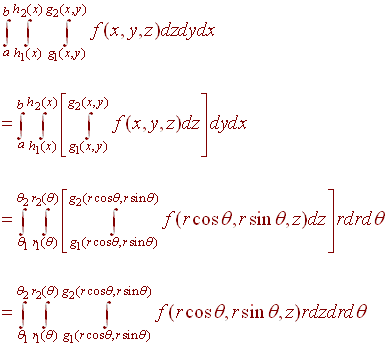
https://ltcconline.net/greenl/courses/202/multipleIntegration/cylind5a.gif
that notation looks fun
stoic island
multivariable calc?
earnest olive
it's pretty much just 3 integrals in a row
mossy venture
earnest olive
it's actually a lot easier than it looks lol
Lies
earnest olive
nah seriously
stoic island
I cannot remember how chain rule works for integrals soooo yea
earnest olive
it's not much harder than a single integral
mossy venture
You speak in tongues, witch
mossy venture
earnest olive
it's not much harder than a single integral
I dont even know what an integral is
strong raft
earnest olive
I wish I lived somewhere colder for overclocking purposes lol
Nevada county has a good mix. Foot of snow once in a while
 earnest olive
wait until you have to find the volume of shapes that don't exist
4 dimensional objects
mossy venture
I can do radius and circumference
And diameter
That is as much geometry as I know
Not really but it's pretty bad
Idk how i passed alg 2 and geometry
strong raft
mossy venture
I currently csnt even figure out how to do cos, sin, and tan stuff
Haven't used that crap in 10 years, lol
mossy venture
You need basic math, yes
mossy venture
Fairly sure I don't need to find the hypotanuse of triangle c to give someone a cast
That came off ruder than I meant it
Sorry
stoic island
mossy venture
Fairly sure I don't need to find the hypotanuse of triangle c to give someone a ...
What if you need to know integrals to calibrate your 3dprinter for making a custom cast
or smth wacky like that
tbh trig itself feels pretty useless, but the functions definitely have uses elsewhere
Identities are good
mossy venture
I currently have 70$ from hannukah to spend
I dont really need anything that I can think of
Maybe i should buy 280 sticky hands
earnest olive
sad
strong raft
A third?
mossy venture
Currently use an internal and external together
Works surprisingly well
Can't use ethernet


 strong raft
Gears are turning in my head. Using 2 wifi adapters at once.
strong raft
Error code, you give us, hmm
stable tinsel
Gpu driver error
mossy venture
strong raft
Gears are turning in my head. Using 2 wifi adapters at once.
One tends to disconnect every few days
strong raft
Hard to give help, it is, with no code
mossy venture
But the internal isn't very good
Together they're probably still not as good as ethernet
stable tinsel
It said something driver error
strong raft
mossy venture
One tends to disconnect every few days
Ah, so 1 at a time. Gotcha. Asus has a few great pcie adapters. Ac or ax is up to you
mossy venture
strong raft
Ah, so 1 at a time. Gotcha. Asus has a few great pcie adapters. Ac or ax is up t...
I was joking about the third
And no they stay on at the same time
stable tinsel
Should I Uninstall gpu driver
mossy venture
I think smthn doesn't like two at the same time and randomly disconnects one tho, not super often
strong raft
Yes, reinstall fresh drivers. Do "clean" installation option
strong raft
mossy venture
I think smthn doesn't like two at the same time and randomly disconnects one tho...
I see. I figured stop using both and try a new one.
strong raft
DDU might be 1 option. I've used revoUninstaller in the past, but lately just the normal way
topaz kestrel
strong raft
DDU might be 1 option. I've used revoUninstaller in the past, but lately just th...
ddu is best way and only way you should do it
a normal delete doesnt always get all the files
and then causes more errors
strong raft
Yeah revoUninstaller is kinda neat has 3 different uninstall options and then shows all the found files/registry stuff before deleting that. I'll try DDU myself next time.
 balmy python
how you manage the cables to make the build clean
flint sapphire
Typically you’d look at the ending locations of cables, then just generally bunch the ones going to similar spots together (you can use cable ties, twist ties etc.) lots of cases if not most come with cable routes.
balmy python
flint sapphire
Typically you’d look at the ending locations of cables, then just generally bunc...
yes this i tried to do but i saw the build without seeing any cables for my side difficult