#building-and-recc-chat
1 messages · Page 1190 of 1
 wheat coral
 glacial umbra
i had that issue with my first build and it was just the 24 pin not being fully plugged in
 stoic island
but yea that was the purpose of me asking for a pic
 fleet pagoda
Yes i even went thru unplugged everything and plugged it back in
stoic island
but yea
glacial umbra
fleet pagoda
Yes i even went thru unplugged everything and plugged it back in
alright just making sure, sometimes its the small things
 topaz kestrel
If you ain’t running a dell optiplex gx620 gx520 gx280 then what are you doing with your life
glacial umbra
stoic island
pics can tell the tale
pictures are for nerds 
topaz kestrel
Watch his gpu be plugged into his dimm slots
fleet pagoda
Whats flashbacka
stoic island
how did you update bios
topaz kestrel
The thing you apparently did lol?
fleet pagoda
With a usb then i plugged it in and help that button on the io for a few seconds then the green light started blinkijg
topaz kestrel
If not just wham it into a laptop or smth lol
stoic island
For msi boards you need to rename it to MSI.ROM
fleet pagoda
It got renamed automatically if I remember right
 plain grove
Back
topaz kestrel
.
plain grove
I plugged in the gpu
topaz kestrel
@plain grove your gpu doesn’t haven’t integrated graphics
stoic island
b550-f has debug leds, what do those say
topaz kestrel
Jokes
fleet pagoda
None show
stoic island
topaz kestrel
<@534948306418270219> your gpu doesn’t haven’t integrated graphics
what
plain grove
It doesn’t ?
fleet pagoda
None light up
topaz kestrel
It was a joke lmfao
 desert gulch
gigabyte.bin
glacial umbra
topaz kestrel
<@534948306418270219> your gpu doesn’t haven’t integrated graphics
no trolling in the official #building-and-recc-chat 
stoic island
oh fun
topaz kestrel
😠
plain grove
It switched from white to green
stoic island
the display cord is plugged into the gpu right
fleet pagoda
Yes
topaz kestrel
@plain grove if it doesn’t turn on then you actually have an issue
plain grove
But it still says boot
topaz kestrel
@plain grove did you plug the cables into the gpu
glacial umbra
the cable to the gpu from the igpu
plain grove
Yes
stoic island
boot can sometimes refer to issues with boot device, could check and/or reseat ssd/hdd
fleet pagoda
Is it weird that none of the debug leds lit up?
plain grove
How do I do that with the hdd
glacial umbra
you know how to go into bios, dallying?
stoic island
a little
topaz kestrel
@plain grove unplug reply
glacial umbra
ok so turn off your PC
topaz kestrel
Replug*
glacial umbra
and then turn it on and spam del on your keyboard
stoic island
fleet pagoda
Is it weird that none of the debug leds lit up?
unplug and then plug 24pin in again
just in case
make sure it's in
fully
fleet pagoda
I did that also
fleet pagoda
I went thru everything multiple times but nothing worked
topaz kestrel
I’m waiting
plain grove
For a sec it was on vga
stoic island
asus documentation is dumb
stoic island
plain grove
For a sec it was on vga
give it a moment
plain grove
Nah it went to boot
stoic island
fleet pagoda
I went thru everything multiple times but nothing worked
can ya take a pic now
plain grove
Yeah it’s not working for me either?
fleet pagoda
Whats not plugged in is to the aio rgb fans its from earlier today ill get better ones ina sec

Thats before i went thru it again but its abt the same
stoic island
sometimes I wish everyone just had great cameras
topaz kestrel
What psu do you have @fleet pagoda
fleet pagoda
Yeah
stoic island
anyways, check eps12v again
topaz kestrel
Jw
stoic island
can't see it
@fleet pagoda oh yea check if you have eps12v plugged into the 8 pin and just ignore the extra 4 pin up there for now
fleet pagoda
Whats eps12v
topaz kestrel
Try 1 stick of ram @fleet pagoda
fleet pagoda
Ill try 1 stick tmr and the 8pin for some reason isn’t split like 4x4 isn’t that usually how it is
stoic island
what
stoic island
fleet pagoda
Ill try 1 stick tmr and the 8pin for some reason isn’t split like 4x4 isn’t tha...
the board has 8+4, the cable from the PSU should be a 8 pin that can split to 4+4, you should plug the 4+4 into just the 8 pin on the board
fleet pagoda
It is just in the 8pin the 4 on the left i didn’t bother with
stoic island
make sure it's fully plugged in
plain grove
What do I do I’m kinda stuck on this
fleet pagoda
It is
plain grove
@topaz kestrel
plain grove
Still struggling with it
topaz kestrel
What now I thought you got a gpu?
plain grove
I did the monitor is still saying boot
stoic island
@fleet pagoda take the stick that's in A2 out for now
topaz kestrel
The monitor or the motherboard
stoic island
and then clear cmos again with the stick removed
topaz kestrel
^could be speed issues or just faulty sticks
Anyways @plain grove what’s it saying boot on your motherboard or monitor?
plain grove
Mb
fleet pagoda
Im gonna gts now but ill try that tmr with you if thats fine
stoic island
plain grove
Mb
checked storage yet?
topaz kestrel
Then unplug the hard drive and replug it in @plain grove
fleet pagoda
Gn thank you for help
topaz kestrel
Gn @fleet pagoda
stoic island
gamers nexus to you too
 plain grove
Unplug it from the hdd or from the mb
topaz kestrel
Both
Make sure to put it back in though of course lol
Where is your sata power cable?
@stoic island I’m not being stupid there is meant to be a sata power cable here right?
plain grove
Yes it’s in
topaz kestrel
No that’s the sata cable
plain grove
Sata 5
topaz kestrel
1 sec this cats being annoying asf
topaz kestrel
@plain grove check your psu for one of these to plug into the hdd

Sorry for flash but it’s a sata power
Hdd and ssd use a sata cable and a sata power cable
plain grove
Does it have a specific name
stoic island
from the power supply, it's just sata
it's usually just on a chain of multiple plugs
just use one
plain grove
Found it
topaz kestrel
Plug that in
And hopefully it will boot
Your hdd isn’t getting any power without that lol
plain grove
Ok got it in
topaz kestrel
Now power your pc on
plain grove
Heard a beeping noise
stoic island
beeping a bit weird but let it do it's thing for a bit
although hdd starting up sound could be described as a beep
plain grove
None of the lights are on
stoic island
give it a moment
stoic island
give it like a minute
plain grove
Alright I’m kinda anxious this took me like 7 hours to put together
stoic island
patience is nice
 still roostBOT
 Muffin#5479 has been warned
Reason: Bad word usage
topaz kestrel
Lol
Woops
If worst comes to worst check your cpu isnt booped
I dbout it tho
Doubt*
plain grove
What does that mean
topaz kestrel
Yeah check nothing is bent
stoic island
bent pins make for not-fun things
topaz kestrel
Make sure ram is seated properly
plain grove
My cpu is brand new I doubt there’s anything wrong with it
topaz kestrel
That’s not always the case
stoic island
accidents happen
topaz kestrel
CPUs are easy to damage lol
topaz kestrel
Even if it wasn’t you it could have came damaged
stoic island
I mean, not that easy to damage, but it's not that uncommon to accidentally bend a pin when installing the cpu
topaz kestrel
@plain grove power it off and reseat your ram
plain grove
Alright
stoic island
usually mobo preferred slot is a2
topaz kestrel
^
stoic island
check manual if you want to doublecheck
topaz kestrel
I hope you don’t have a damaged cpu or mobo that wouldn’t be fun lol
stoic island
tbf bent cpu pins are fairly simple to fix
plain grove
Manual doesn’t work
stoic island
wouldn't recommend tweezers to people like me
hands too shaky
just use a flatedge
plain grove
I mean the manual sucks it’s not specific
topaz kestrel
How does your manual not work…
stoic island
razor can work
topaz kestrel
Ok @plain grove just put 1 ram stick into your second dimm slot
stoic island
plain grove
I mean the manual sucks it’s not specific
what board again
plain grove
MSI B560M PRO-VDH ProSeries Motherboard (Micro-ATX, 11th/10th Gen Intel Core, LGA 1200 Socket, DDR4, PCIe 4, M.2 Slots, SATA 6Gb/s, USB 3.2, 2.5G LAN, DP/HDMI)
topaz kestrel
MSI B560M PRO-VDH
You only need the name not a background check on the motherboard @plain grove lol
stoic island
plain grove
I mean the manual sucks it’s not specific
this is literally on the 5th page for preferred slots >:(
 plain grove
What do I check
stoic island
but yea
topaz kestrel
Ok @plain grove
stoic island
a2 first
topaz kestrel
Go inside your pc
plain grove
I put it in like that
plain grove
Alright
stoic island
I like MSI manual, the manual is good, what you might've read might have just been the quick start guide, not the full manual, btw.
plain grove
Do I take out both sticks and put one back in
topaz kestrel
I’ll be going with gigabyte for my next build so I hope if anything messes up the manual is nice
 obsidian wigeon
I prefer asus cause they have diagnostic lights
Ram problem? dram light lights up
plain grove
It’s on vga now
stoic island
debug leds depend on the board, not the brand
plain grove
Now none of them are lighting up
stoic island
obsidian wigeon
Even near low end these days
so does msi
topaz kestrel
Well that’s good
stoic island
:p
topaz kestrel
Turn it on now @plain grove
plain grove
I did
stoic island
and MSI gets bios flashback much more frequently on lower end
topaz kestrel
You got a hdmi cable you can try?
plain grove
HDMI slot
topaz kestrel
A dell optiplex gx650
plain grove
Just the mb
topaz kestrel
I said what gpu lol
plain grove
Idk your confusing me
stoic island
not mobo
obsidian wigeon
^
stoic island
motherboard can't display what the graphics card is displaying
topaz kestrel
We have already established you don’t have integrated graphics
Now what gpu do you have
Name of the graphics card
Make this easy for us all please
Lol
obsidian wigeon
So you can't even boot and get display if there's no gpu installed
plain grove
GeForce gtx 650
obsidian wigeon
Then connect the monitor to the gpu
topaz kestrel
That card doesn’t have a vga slot…
obsidian wigeon
How so?
plain grove
or a hdmi
obsidian wigeon
I'm sure gtx 650 isn't too new
Unless that model of gtx 650 has only dvi or something
stoic island
it might have displayport
obsidian wigeon
Maybe
topaz kestrel
Only dvi-d and the useless cable
stoic island
mini hdmi
obsidian wigeon
rip
stoic island
sad
topaz kestrel
@plain grove does your gpu say evga on it?
plain grove
Yes
topaz kestrel
If so you are booped unless you have a dvi-d or a dvi-d to hdmi converter
obsidian wigeon
Digital to digital is easiest
 jagged ember
If you don't have an igpu, not plugging into the gpu is why you're not getting a display
topaz kestrel
@plain grove either order a new gpu or order converter cables
obsidian wigeon
kek
topaz kestrel
Lol
 potent portal
I got an old TV that has VGA, DVI conversion is easy for that
jagged ember
Rip time for new cables
obsidian wigeon
So a cable is needed
jagged ember
Or converter
topaz kestrel
Cable or a converter
jagged ember
Or else no display
plain grove
How do Ik my pc will work with new cables
topaz kestrel
That’s the sexiest pfp I’ve seen ever Wideus#1940
desert gulch
you dont
jagged ember
Thank you
topaz kestrel
@jagged ember *
topaz kestrel
@plain grove well currently since you don’t even have a cable that will work I’d assume it’s your best bet
obsidian wigeon
You have to guess before anything
plain grove
Well regardless it should be working with a vga cord did I do something wrong that could be stopping the monitor from receiving a signal
obsidian wigeon
But there's no issues with the ram it seems
plain grove
Can I get a new vga cable
obsidian wigeon
So I'm sure it's just no display issue
desert gulch
if you cant even plug the display cable into gpu it wont work
obsidian wigeon
Just get hdmi to dvi-d
topaz kestrel
Your gpu doesn’t have a vga port…
desert gulch
yeah
topaz kestrel

HDMI to DVI, Benfei HDMI to DVI Cable Bi Directional DVI-D 24+1 Male to HDMI Male High Speed Adapter Cable Support 1080P Full HD Compatible for Raspberry Pi, Roku, Xbox One, PS4 PS3, Graphics Card
plain grove
My mb does tho
obsidian wigeon
Nope
topaz kestrel
You don’t have integrated graphics meaning you need a cable or a new gpu
Please just listen
obsidian wigeon
I think the rig itself is probably fine
topaz kestrel
We aren’t saying this to please us lol
obsidian wigeon
Just no cable to connect to gpu
potent portal
Truth hurts sometimes
topaz kestrel
Anyways who runs a gtx 650 with a 10400f lol
obsidian wigeon
Probably no money for a new gpu
stoic island
plain grove
My mb does tho
All the display ports on the motherboard can do is display an output from the integrated graphics, it can't display an output from your graphics card. To get the display from your graphics card, you need to plug the display into the graphics card.
topaz kestrel
Just get a cable:converter anyways
plain grove
Well like i said I wasn’t planning on using a gpu
obsidian wigeon
^
desert gulch
plain grove
Well like i said I wasn’t planning on using a gpu
then you arent using that pc
period
jagged ember
plain grove
Well regardless it should be working with a vga cord did I do something wrong th...
Didn't you just
Say it doesn't have vga
topaz kestrel
You getting a pc for YouTube or smth lol?
desert gulch
topaz kestrel
You getting a pc for YouTube or smth lol?
if he isnt using a gpu he wont be using a pc ever period lol
plain grove
I said the gpu doesn’t have a vga the mb does
obsidian wigeon
The pc won't work if you can't connect the monitor
topaz kestrel

Rankie DVI to HDMI Adapter, 2-Pack Gold-Plated 1080P Male to Female Converter (Black)
jagged ember
And we're saying you need to plug the display into the gpu to get it to show something
topaz kestrel
I hate Amazon links sometimes lmao
jagged ember
Because your cpu does not have an igpu
topaz kestrel
plain grove
I said the gpu doesn’t have a vga the mb does
Please stop
plain grove
I hate them too and I hate the 8$ I’m about to spend
jagged ember
It cannot display using the motherboard port
topaz kestrel
You are hurting my soul
obsidian wigeon
Converter cables aren't costly at all
stoic island
All the display ports on the motherboard can do is display an output from the integrated graphics, it can't display an output from your graphics card. To get the display from your graphics card, you need to plug the display into the graphics card.
topaz kestrel
Yeah compared to a new gpu or cpu your are lucky
obsidian wigeon
It's needed, and it'll solve yo issue
plain grove
Why so
obsidian wigeon
I'm certain the ram's fine
jagged ember
plain grove
Why so
Literally because that's how it is
obsidian wigeon
Well cause you could connect the gpu to the monitor
jagged ember
Wdym why
obsidian wigeon
Also ye, if you connect to mobo's display ports
It takes signal from igpu
But there's none in this case so you get nothing
jagged ember
I mean, you really don't have to listen to us if you don't believe us
topaz kestrel
Your mobo can’t show your gpu and your cpu doesn’t have integrated graphics because you chose the wrong one, so now you need a gpu which you don’t have wires for meaning you need a cable and the cable is cheaper than new cpu or gpu so please take this answer choose if you want a cable or a converter and stop
jagged ember
It's your pc and your choice after all
obsidian wigeon
Buy the cable and your problem sure gonna disappear
jagged ember
But we're telling you the truth
obsidian wigeon
tru
plain grove
Alright thanks muffin I see it now
plain grove
Ik lol
 obsidian wigeon
Finally
plain grove
Alright I might just buy a new gpu for all of that but what if it still doesn’t work even after I connect it to the gpu?
topaz kestrel
Honestly might buy a ltt body pillow
jagged ember
plain grove
Alright I might just buy a new gpu for all of that but what if it still doesn’t ...
Uh
obsidian wigeon
It's
jagged ember
Wha
topaz kestrel
@plain grove then come back for help
obsidian wigeon
Just an 8 bucks of cable away
jagged ember
That'll cost you more my dude
jagged ember
But yeah, I guess you can do that
topaz kestrel
If you didn’t plan on using the gpu anyways just get the cable
Lol
***You will still need to use the gpu but it cheaper than buying a new one ***
plain grove
Alright thanks guy I appreciate I’ll lyk what happens when I get the cable
topaz kestrel
If you actually want to game etc I recommend buying a gpu though
But it’s your money lol
 kind vortex
is there triple channel ram
obsidian wigeon
na
kind vortex
3 dimm slot
obsidian wigeon
It's like first gen intel core
kind vortex
nice
obsidian wigeon
I think it was 6 slots?
kind vortex
remember those days when a 4 core cpu cost 200$
kind vortex
topaz kestrel
Yeah that was nice
danm 150$ 1660 is normal those days
topaz kestrel
Bro you can see 1660 for like £320 💀
plain grove
@topaz kestrel
My favorite muffin you there
Ig not anyone else tryna help me?

@obsidian wigeon
potent portal
Check your boot settings in bios
plain grove
What’s bios
potent portal
The thing that controls every piece of hardware in the system
obsidian wigeon
Bios is the software that controls your mobo
Well it doesn't detect any bootable drives atm
Gotta assign a drive in the bios, and install some os
plain grove
So how can I fix this issue on my screen?
potent portal
This is a step up at least, you can see a video output now
obsidian wigeon
Or you don't have any drives connected
potent portal
Do you have Windows installed?
obsidian wigeon
ye it's working
plain grove
No
plain grove
How do I do that
obsidian wigeon
Do you have another pc or laptop?
plain grove
Yes
potent portal
You need a USB drive that's been prepared with the microsoft media creation tool
obsidian wigeon
^
plain grove
Any usb or a specific one
potent portal
Anything 8GB+
obsidian wigeon
Any, as long as it's 8 gigs at least
plain grove
Does it have to be completely empty or could it have some files on there?
plain grove
Alright
obsidian wigeon
Then use media cration tool
Just google "get windows 10" or something
Microsoft site should have it
plain grove
I’m gonna back everything up first
plain grove
@obsidian wigeon
Sorry it took so long had to download 30gb worth of files to the computer so I could wipe the usb
plain grove
Alright
Is it a complicated process
@obsidian wigeon
What do I do after I download it
obsidian wigeon
nope
Just launch it
Plug usb drive in, and follow through
Just make sure to choose the save to usb option or something
plain grove
Alright it’s almost done
obsidian wigeon
Then once it finishes, you plug that drive into the pc without os
Get into bios
And assign the usb drive to boot from in boot menu
plain grove
Where’s the bios?
obsidian wigeon
plain grove
Where’s the bios?
Sorry, got distracted. So, the bios is when the pc turns on with its logo
It should say press some keys to enter bios
Or setup
plain grove
Alright so all I gotta do is but the usb inside the pc and press any key to start it up?
@obsidian wigeon
obsidian wigeon
Not really
You turn it on with the usb in, and watch for the first screen, the logo when it first boots up
It should tell you which key to press to enter the bios
obsidian wigeon
ye
Watch the screen closely, and press the key it tells to get into bios
Then show me the screenshot of bios, cause I'm not sure which mobo you got
plain grove
Alright says my usb is ready but it might take a few minutes to clean it out should I unplug I don’t see a loading bar
obsidian wigeon
Just wait for it
obsidian wigeon
Was it finished?
plain grove
Yeah I pressed finished
Alright just want to make sure my pc needs to be off and while it’s off I put in the usb then I turn it on and wait for a key?
Alright
@obsidian wigeon
I’m trying it
Alright let’s see what happens
I see the Msi logo
@obsidian wigeon
obsidian wigeon
Anything?
plain grove
Alright
obsidian wigeon
ye
 obsidian wigeon
yeup
plain grove
Alright easy enough
When will I know when I get to the bios
I guess so
Alright that’s good thanks guys for helping me I wouldn’t have gone this far without anyone here
I have a hdd
Wait
What if I don’t have a activation key do i skip that
 lyric thistle
skip it
you can do that at any time
and you don't need to buy one for a bazillion dollars
plain grove
Yes
I’ll see with them

Which one
Your right they have everything in that store and I got 100 on my card anyways so I’ll go over there and get the key when I get the chance
Idk about that nothings free in America
True
Damn
I’ll go tomorrow
I went to Best Buy to buy it and when they told me 130 I went home with nothing
They got Xbox’s in there I’m sure they have a activation key
 celest sun
I sometimes forget people are discovering computers for the first time here
plain grove
Do I click on “ upgrade: install windows and keep files, setting and applications” or do I press “ custom install windows only (advanced)”
Ik
lyric thistle
university offers free winows yet their students live in basement floor apartments with none
plain grove
For me if I even take off the plastic off the book they only give back 50% refund
Idk what’s up with that
 plain grove
Where do you get them from
 tight sorrel
plain grove
For me if I even take off the plastic off the book they only give back 50% refun...
tight sorrel
plain grove
For me if I even take off the plastic off the book they only give back 50% refun...
university books are a masisve scam
celest sun
You buy your textbooks?
I think i got through 5 years of college with only buying 12 textbooks
plain grove
Bet you still spent more then a thousand
celest sun
saved more than 10
Rent, Buy used
w/e
And pdfs
I can subscribe you to a VERY good domain, mind if i PM?
plain grove
You bought a stat book?
Im using YouTube to get through stat
My professor said we didn’t need a book he says Kahn academy is good
Ngl I do that😂
potent portal
What I hated was when I had a professor that wrote the book for the class, told us we had to buy it from the bookstore because we won't find it anywhere else (because only his class used that book lol) and when I got to the library it wasn't even a bound book, it was literally loose leaf in a 3 ring binder for $600.
plain grove
Bet the bookstore is paying him under the table to tell the students that
potent portal
He's paying himself to say that, he's the author after all
plain grove
Advertising his own book it makes sense
tight sorrel
wtf?
plain grove
But guys
potent portal
Isn't that illegal?
 potent portal
That's a flimsy as hell excuse and he needs to be reprimanded at a minimum. Copyright only applies to others using your work.
Good, as it should be
lyric thistle
i diD wHaT I cOuLD
potent portal
I'm checking that specific error code
potent portal
That's a corrupt installer, try making the USB again
potent portal
One of the required files is corrupt, so it can't be written to the computer without damaging other things
It's either a bad installer or the drive doesn't like the installer
plain grove
The solution is to reinstall windows again on the usb?
potent portal
Typically yes, unless it's the USB itself that is the issue which you'll find out after redoing the installer
plain grove
Professors could get away with anything really
Alright thanks fal I’ll install it again
Someone tryna send the windows installation link?
potent portal
plain grove
Thanks
potent portal
You want the installation media tool
plain grove
So if it fails for a second time what do I do?
potent portal
Then we can try using a third party utility or another USB drive
plain grove
I don’t think it’s working it’s been stuck on 26% for a really long time
@potent portal
@obsidian wigeon
potent portal
Try another USB drive if you have one
plain grove
Alright
potent portal
Unless that's the download stage, in which case it's probably delayed
plain grove
Yeah it says getting files for installation
And it’s been on 26% for like 10 minutes
topaz kestrel
Be patient lol you are literally downloading the thing that makes a pc a pc
potent portal
Getting files sounds like the download phase
It's about a 5GB download so it'll take time, and it doesn't always update every %
topaz kestrel
Like windows updates but better
plain grove
No but The first time I put it it only took 7 minutes and it was the installing features that got corrupted
topaz kestrel
It probably didn’t install fully since it got corrupted lol
potent portal
7 minutes? Geez yeah that sounds like you either have REALLY fast internet or it didn't finish the download correctly the first time
plain grove
I wiped the usb and redownloaded it
Well I’m gonna wake up to this on 26 percent
Because it’s been 20 minutes and it’s still one 26
potent portal
In order to download the file in 7 minutes you would need over 600Mb speed internet
I did the math lol
plain grove
it never gave me the option to put my internet
potent portal
It just goes at the fastest speed you can give it
plain grove
Alright my guess is it might not be corrupted since it’s taking so long
@topaz kestrel
topaz kestrel
Boop
plain grove
There’s my favorite muffin notice I got it working
topaz kestrel
The dvi-d?
potent portal
If it works it works
topaz kestrel
You’re gonna need a sound bar if you want to be able to hear stuff out of your monitor
Or speaker
S
plain grove
Ik
Ffs

I’m getting tired of this
What do I expect if it’s stuck at 26 percent for 30 minutes somethings wrong
potent portal
Oh it was THAT step it got stuck on 26%?
plain grove
Yeah
potent portal
That's probably your USB drive, but if you want you can try a third party app
topaz kestrel
You aren’t downloading some skunked copy of windows right?
plain grove
Is a 8gb usb drive good?
potent portal
topaz kestrel
You aren’t downloading some skunked copy of windows right?
Fresh off the media installation tool
plain grove
Only the ones they give me
potent portal
8GB is fine
topaz kestrel
Oof no clue then
tight sorrel
did you google the error code?
plain grove
Yeah file is corrupt apparently
potent portal
Just hold the power button and get some sleep, it'll be there tomorrow
potent portal
tight sorrel
did you google the error code?
Yes it's a generic corrupt file error
Usually caused by a bad install or drive
topaz kestrel
Yeah sleep will help you get through it tommorow
plain grove
Alright thanks muffin and fal I’ll see if I can go get a activation key from my uni tmr as well hopefully it’s cheap
topaz kestrel
^
fleet pagoda
Pc still isnt posting and i tried 1 stick ram what next
I swapped the ram out still nothin
plain grove
@obsidian wigeon
obsidian wigeon
Try every slots first
plain grove
If I have a corrupt install media what should I do?
obsidian wigeon
Grab windows .iso image
plain grove
How do I do that
obsidian wigeon
And use rufus to make a bootable drive
Well you could do it thru media creation tool
Just choose the other option
Then once it finishes downloading the disc image file, download rufus
plain grove
The update now option?
obsidian wigeon
No
Uh, lemme show you then
Rufus: Create bootable USB drives the easy way
This is for rufus
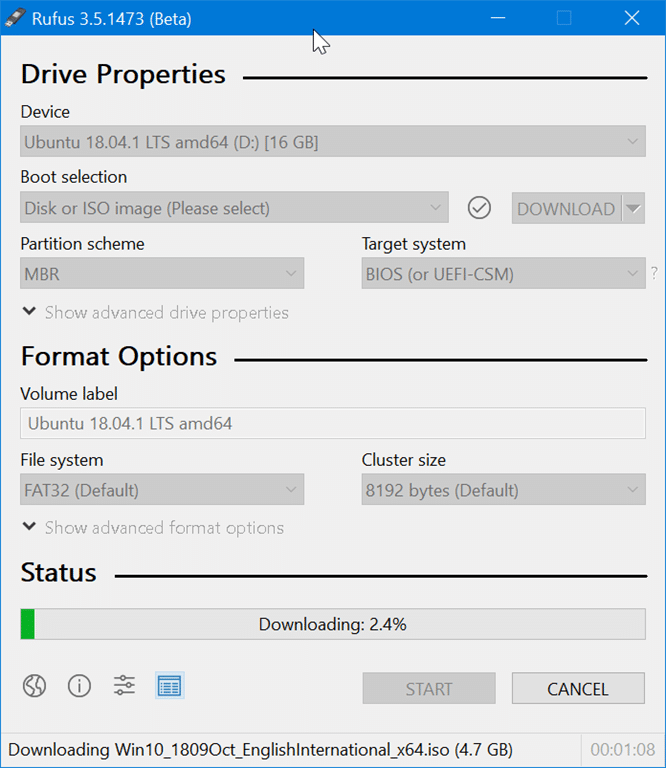
Into Windows
There are dozens of software around to help you download Windows 10 ISO as well as prepare bootable USB. However, only the official Media Creation Tool
plain grove
So basically it cleans the usb
obsidian wigeon
And I believe you only need rufus to do the same thing as media creation tool
But better
plain grove
Alright so it’s the same process like the media creation tool
obsidian wigeon
Not really, it's a few more but the guide helps
plain grove
Alright bet I’ll lyk when it’s done
 tawny violet
Question
Is it worth buying a 5700G now
And pair it with a 3070-tier GPU down the line?
For 1440p gaming and very light content creation
Point being the 5700G for gaming
 cunning shuttle
I need a CPU+Mobo+RAM to play mainly EU4, HOI4, VIC3 and some minecraft and CSGO for 350ish USD. Those are all very singlethreaded games, and I do no productive or creative work, what should I get?
obsidian wigeon
5600X+B550M PRO-VDH (MSI), Something like 3600mhz CL16 ram will do good
Assuming you're in the US
obsidian wigeon
I think that actually goes over budget.. hmn
cunning shuttle
So aliexpress is the way to go
obsidian wigeon
Oh rip, well that's sad
cunning shuttle
I think
obsidian wigeon
Yeah I think there's
3600+B550 combos for 250-260
Lots of room for ram
I suggest buying ram in your country, ali sucks for nice ram
obsidian wigeon
Equal
So just go with whatever's cheaper, but I suggest 3600 due to abundance of combos in ali
Last I've researched
cunning shuttle
The 3600 is oc'able, so it's better in that regard
I have a hyper212
Will I get a good oc with it?
obsidian wigeon
If you plan to oc just mind that it can't push much
Turn pbo on and you're set tbh for oc
It's auto
obsidian wigeon
Good enough cause ocing is a lot of pain to get it actually stable
pbo knows what's safe for the chip
In both temps and voltage
Hyper 212 is definitely gonna do decent on 3600
pbo on too
cunning shuttle
Is a 3600x worth the extra 20 dollars
obsidian wigeon
nope
It's a smidge higher core clock
And better bin but nah
Just leave the money for ram
cunning shuttle
Aight thanks
obsidian wigeon
Only reason I'd get 3600X if price is equal
Cause the X has higher tdp limit, more heat
Or if it's in like a prebuilt or something, like mine
I got a 3600X+1660S prebuilt from asus
fleet pagoda
What does this mean
 stoic island
vga
glacial umbra
VGA is gpu related
stoic island
graphics card/igpu
stoic island
don't think boot is on, just shine from VGA
glacial umbra
oh
fleet pagoda
The gpu fans stopped spinning
stoic island
reseat gpu
fleet pagoda
Ok
glacial umbra
make sure the pcie cables are fully plugged into the gpu, if it requires them
 stoic island
do f1
weird it says vga card is not supported by uefi driver
is it really that old
fleet pagoda
Its a 3070
stoic island
cpu fan is prob just plugged into wrong place
yea okay weird error
but just press f1
setup bios
stoic island
press f1
fleet pagoda
Ok
fleet pagoda
My gpu fans arent spinning
stoic island
as long as it's displaying, just ignore it
fans don't spin if they don't need to spin
fleet pagoda
Okay
stoic island
(if it's not doing work and creating heat, no reason to run the fans to dissipate the heat)
fleet pagoda
Im in bios what now
stoic island
prob something was plugged in wrong inside
fleet pagoda
Ngl i think it was all the same
 little osprey
fleet pagoda
little osprey
fleet pagoda
nice im using the same mobo too
 earnest olive
lmao
EVGA responded to my broken 3070 ticket
and asked me to do all the troubleshooting steps that I already did
thanks for ignoring everything I wrote EVGA
 fossil cedar
earnest olive
and asked me to do all the troubleshooting steps that I already did
fossil cedar
earnest olive
and asked me to do all the troubleshooting steps that I already did
love that 
 flint sapphire
Man back like 2 years ago my brother was trying to send in his evga card to have a fan replaced or just buy a new fan from them… they told him it wasn’t worth it and it was to difficult for him to do it on his own. 
little osprey
flint sapphire
Man back like 2 years ago my brother was trying to send in his evga card to have...
Here I was still in the mindset that 2 years ago was the launch of Pascal...
 unborn shell
yo, upgrade me pretty please :D budget is about 800$
 fossil cedar
@unborn shell can you send the ram kit you have?
Actually can you just send your specs in https://pcpartpicker.com/list
unborn shell
its not the same ram but both are ddr4 2400
fossil cedar
Hmm
fossil cedar
fossil cedar
Actually can you just send your specs in https://pcpartpicker.com/list
@unborn shell can you send your cpu cooler, case , power supply and monitor?
fossil cedar
unborn shell
power supply is 550w
What 550w tho, brand and model
unborn shell
nop and im pretty sure you made me an upgrade that i couldnt buy because israel sucks
._.
fossil cedar
Ahh yeah
fossil cedar
Interesting name
fossil cedar
Private list
unborn shell
yep
fossil cedar
Cuz you'll be getting an matx board, kinda hard to fit a pcie adapter and gpu
Ahh g
So what's the budget in local currency?
unborn shell
fossil cedar
Cuz you'll be getting an matx board, kinda hard to fit a pcie adapter and gpu
im understanding about 10% of what you said
fossil cedar
It's aight lol
fossil cedar
Okay
@unborn shell do you know any local sites where you can get a new power supply?
fossil cedar
Please
unborn shell

Zap
ספקי כח למחשבים - power supplyהספק כח נשרף? ב-zap השוואת מחירים תמצאו מבחר ענק של ספקי כח למחשב של היצרנים המובילים: SeaSonic, Thermaltake, FSP, Zalman ועוד.
little osprey
What is that
 earnest olive
that doesn't look like an atx power supply lol
fossil cedar
@unborn shell https://www.zap.co.il/model.aspx?modelid=1007363 with https://il.pcpartpicker.com/list/zHD4rr

Zap
HCG650 Gold Antec החל מ - 345₪. רק בזאפ תמצאו השוואת מחירים של ספק כח Antec HCG650 Gold, מידע על חנויות קרובות, חוות דעת, מפרט טכני ועוד.
Think thats a bit over actually :/
1 sec
unborn shell
isn't the case same size as what i have rn?
 worn wave
fossil cedar
unborn shell
isn't the case same size as what i have rn?
worn wave
fossil cedar
unborn shell
isn't the case same size as what i have rn?
Same case size but the case you have i think is a hard front panel from what i can tell, bad airflow
 unborn shell
 fossil cedar
Ohh it's not the one you had in the pcpp list
fossil cedar
If you can remove the power supply that came with it then you should be fine with that case yeah
unborn shell
alr
fossil cedar
unborn shell
https://pcpartpicker.com/user/woolspeet/saved/#view=sdDPFT
This one
unborn shell
but it is this one?
fossil cedar
https://il.pcpartpicker.com/list/J8kcJf and this then https://www.zap.co.il/model.aspx?modelid=1007363 you can possibly find cheaper on zap a few things actually lemme look
Zap
HCG650 Gold Antec החל מ - 345₪. רק בזאפ תמצאו השוואת מחירים של ספק כח Antec HCG650 Gold, מידע על חנויות קרובות, חוות דעת, מפרט טכני ועוד.
unborn shell
 unborn shell
alr
but maybe i should get a new case so i could sell this pc? it has an APU
i think thats what its called
a gpu in the cpu
fossil cedar
unborn shell
alr
The 10400 is a bit cheaper that's about it lol
fossil cedar
unborn shell
but maybe i should get a new case so i could sell this pc? it has an APU
Up to you but yeah only thing reused is the gpu lol
unborn shell
Corsair DDR 4 16G (8Gx2) 3200 CL16 VENGEANCE LPX Black CMK16GX4M2E3200C16
will this work? its cheaper in israel than the one you gave me
unborn shell
fossil cedar
Up to you but yeah only thing reused is the gpu lol
welp-
fossil cedar
Yeah the cheapest 3200mhz cl16 kit 2x8gb will be good
unborn shell
alr
so it comes out to 2145
without a case
Antec NX300 Midi Tower is this a good case?
._.
there is a mess with shipping rn so i prefer not to order out of state
fossil cedar
Ahh
 winged lion
unborn shell
Antec NX300 Midi Tower is this a good case?
winged lion
unborn shell
Antec NX300 Midi Tower is this a good case?
not really
airflow looks pretty sus
unborn shell
alr ._.
fossil cedar
Mx 330 air what you mean?
jagged ember
Looks okay at first glance
fossil cedar
unborn shell
Antec NX240
Looks nice
jagged ember
You might need to buy extra fans though
 delicate plume
POV UR ME: gave up on my pc because I couldn’t get a gpu
 fossil cedar
No top exhaust sadge but it's still an okay budget option
jagged ember
Yeah, looks like a nice case
Considering all fan slots are filled
Currently running an nx200m case also from antec lol
A little tight on space, but nice otherwise
As in, my hdd cable is permanently bent while installed lol
little osprey
delicate plume
POV UR ME: gave up on my pc because I couldn’t get a gpu
i would've just waited and bought the parts except for the gpu
fossil cedar
You can always get like a gtx 980 to do you until you can find a new one or something
fleet pagoda
Why arent my gpu fans spinning
potent portal
fleet pagoda
Why arent my gpu fans spinning
If you start a game do they turn on after it heats up a bit? A lot of GPUs have a silent mode where the fans don't spin until it hits a certain temperature
fleet pagoda
Im reinstalling windows rn ill let yk
 wispy matrix
idk about the case tbh
potent portal
wispy matrix
idk about the case tbh
NR200 is a common larger ITX case
 ancient peak
I like the look of it, because it’s clean and it will take up less space on my desk, but it might be hard to build in
potent portal
Any ITX case isn't for beginners, I'll tell you that much
wispy matrix
wrong chat
 limber solstice
nah
ancient peak
That was cringe af
ancient peak
Good
ancient peak
potent portal
Any ITX case isn't for beginners, I'll tell you that much
I’m going to go to my local pc shop and get them to build it for me
potent portal
You could go cheaper on the SSD. The 980 is good but the difference in load times between that and the P31 gold are about 1 second.
That's assuming the P31 comes back in stock of course...
potent portal
Yep
potent portal
Probably the 2TB
ancient peak
Nah, 1tb nvme gen 3
potent portal
I see $115 with a $20 off coupon, and it appears to be in stock sold direct from Hynix https://www.amazon.com/SK-hynix-Gold-500GB-Internal/dp/B08DKB5LWY?th=1

SK hynix Gold P31 1TB PCIe NVMe Gen3 M.2 2280 Internal SSD | Up to 3500MB/S | Compact M.2 SSD Form Factor SK hynix SSD | Internal Solid State Drive with 128-Layer NAND Flash
ancient peak
Your in the us aren’t you
potent portal
Yes, we kinda assume that here unless otherwise stated
Ah I see the AU pcpp link now
ancient peak
Yeah I’m in Australia so it’s of course different, and as I’m writing this the price just went down to 128
potent portal
Well that's much more reasonable lol
potent portal
Oof, yeah get what's available
potent portal
Not a bad option yeah
potent portal
660p got a controller change and it's no longer a good drive iirc
potent portal
Here, get one off this list https://github.com/windshields/Gamezoid-SSD-buying-guide/blob/main/SSD tier list.md

GitHub
Gamezoid SSD buying guide, maintained and updated by the Gamezoid team. - Gamezoid-SSD-buying-guide/SSD tier list.md at main · windshields/Gamezoid-SSD-buying-guide
Most people don't really need more than the budget tier drives. Anything faster won't make any significant change in load and boot times.
ancient peak
All I’m going to be doing is gaming, so I reckon the mp400 is a good choice