#building-and-recc-chat
1 messages · Page 951 of 1
 brittle tinsel
 jovial berry
Okay I think the usb is FAT32
 wise sorrel
@little osprey is that new layout good for primary gaming?
jovial berry
But just in case how can I find how that it is? @potent portal
 potent portal
Do you have another computer running Windows you can check it on? It's easy if so.
jovial berry
Yeah I do
potent portal
Ok go to my computer, right click the drive, and hit properties. It's on that page under file system
jovial berry
Okay thank you
 little osprey
@wise sorrel yeah it's pretty good
 strong knoll
how do you know if the USB is fat 32 format, something in the properties ?
potent portal
Yeah when you go into the drive properties there's a row with "file system: 'X'"
 muted patio
As far as I know you can't format a USB to NTFS can you?
potent portal
You can
 lyric thistle
compresses flashdrive NTFSingly
muted patio
Ye, knew about those for Linux
strong knoll
potent portal
Yeah when you go into the drive properties there's a row with "file system: 'X'"
should i have them in FAT32 for just downloading windows or do i need it for BIOS too
potent portal
BIOS usually wants FAT32. The vast majority of USB installer creator software will do FAT32 by default.
Your hard drive can be any format you want but for BIOS to read the USB it should be FAT32.
strong knoll
potent portal
BIOS usually wants FAT32. The vast majority of USB installer creator software wi...
i can change the name of the USB right and it wont mess with anything when downloading windoes or bios on to it ?
potent portal
Nah the drive label is mostly for easily telling them apart from each other, like if you got a pack of 4 identical USB and they all had different things on them, you'd know at a glance when you plug it in what each has.
strong knoll
ok thx
 eternal igloo
is a 10600kf over powered for a 1660 super?
 worn wave
No
 rancid quartz
I’m not very tech savvy so this may sound a bit weird but does anyone know what would cause a cpu to try and run the burden of graphics in a game at 2k? For some reason whenever I run a taxing game like Valhalla, the cpu seems to be doing more of the work being pushed to about 40-50% and the gpu is only like 1-5%
muted patio
Are yuou using Task Manager?
worn wave
Which GPU and CPU
muted patio
It doesn't report GPU load properly
potent portal
Yeah Assassin's Creed games are very CPU heavy, nothing to be done about that
muted patio
For example, it tells me Cyberpunk is only using 1-2% of my GPU lol
I'd recommend using something like MSI Afterburner with the OSD on to see real GPU useage
rancid quartz
Yea I’m using the task manager and it showed 50% usage, my cpu is a ryzen 7 3800x and my gpu is a 2070 super
potent portal
Vintage is right, task manager bad for monitoring
rancid quartz
I do have afterburner, didn’t think to check that
 fossil halo
LOLZ
potent portal
Ryzen Master only shows CPU though
muted patio
rancid quartz
I do have afterburner, didn’t think to check that
Yeah, there's an OSD setting in Afterburner. Turn it on for the in game overlay
fossil halo
potent portal
Ryzen Master only shows CPU though
true
cam is bad
i should uninstall actually
the temps on cam are just straight up wrong
rancid quartz
Ahh ok I’ll have to check that. So you guys said Valhalla was cpu heavy, would constant game crashes in there point towards a bad cpu?
potent portal
HWinfo has always been pretty accurate for me but not very inuitive
Depends on the kind of crash
muted patio
rancid quartz
Ahh ok I’ll have to check that. So you guys said Valhalla was cpu heavy, would c...
most game crashes are honestly GPU driver related. not all, but most. More rare incidents are RAM or CPU related
rancid quartz
At first the game crashed during the startup screen, so I did some tests with my brother’s help and we thought it was a bad gpu so I filed for an rma and got a replacement one. The game continued to crash, then I learned that a Microsoft driver could cause an issue, so I turned it off and I was able to get passed the start up screen and load into the game but it still ended up crashing like crazy in the game
Before the issues arose, I found out that I had bad ram and so I replaced them with 4 royal ram sticks
 desert gulch
so it works now?
otherwise id check all drivers and temps to make sure it isnt crashing due to overheating
potent portal
With so many issues I'd also be looking at the motherboard as a possible cause, especially if changing other hardware isn't working.
rancid quartz
Sadly no, still crashes whenever I run Valhalla or any other game, been trying to find the issue since November
potent portal
Power and motherboard are what I'd look at next
rancid quartz
I had an assumption that maybe the power supply was bad so I tried replacing that but no luck
potent portal
Then motherboard seems to be the only common factor
rancid quartz
Is there any way to test the motherboard for issues?
fossil halo
usually in one of the corneres of the motherboard
potent portal
There's not really a reliable test for motherboard failure. If you've already swapped just about everything else with no luck, it's either some weird software/driver problem or the motherboard
fossil halo
c l e a r c m o s
try that
it is like
someone needs to pin the blunt instrument fixes
potent portal
True, that's a good first step
 austere herald
i just had to rma a new asus prime cause of that
potent portal
He already got new RAM
fossil halo
turn it off and then turn it on again
potent portal
And GPU
rancid quartz
Not sure if any lights turn on when it crashes, the temps I believe are pretty low. I’ll try to check the lights when it crashes
 sharp osprey
Someone asked if I would do a trade for their 2070 extreme Aorus for a 3070 FE
It’s not huh
 still roostBOT
 Zac'sMyBitch#0189 has been warned
Reason: Bad word usage
muted patio
Why downgrade though?
sharp osprey
I’m just asking if the trade is worth it
muted patio
IMO, no
potent portal
That 3070 is worth its weight in gold right now
fossil halo
deadass
sharp osprey
Lol
 granite lily
I need a case for an ATX mobo and a 3090 RTX. I dont really care if it has RGB or not, im busy gaming not staring at the tower. What you guys think? Is there anything to look for in a case?
potent portal
Fractal Design Meshify C
granite lily
Thanks ill check em out!
still cant beleive external bays are going the way of the dodo
Where do you young whipper snappers put your AOL disc?
muted patio
On a 10,000 RPM angle grinder and watch them explode lol
worn wave
Define 7 has 5.25" bays
rancid quartz
@fossil halo So no lights turn on when the game crashes. Wonder if it’s because the whole pc doesn’t crash just the application
fossil halo
rancid quartz
<@!471737938829639683> So no lights turn on when the game crashes. Wonder if it’...
oh
so its just the application thats crashing
then try and reinstall the game
uninstall and reinstall the game
rancid quartz
I believe so, thought it was just Valhalla, so I tried WoW, the Witcher 3 and no good. I uninstalled it and reinstalled it a few times, even tried on different ssd’s
I even did a reinstall of Windows at the beginning, didn’t completely wipe windows, just did a clean install
 tough beacon
should I start building my PC and wait until I get my graphics card?
I am waiting for my GTX 1650 super to arrive at February 24th.
 austere wagon
How long does it usually take to install windows
worn wave
Not long if on SSD
austere wagon
Ah it’s speeding up now
wise sorrel
The story if my damn life... and there were 3 video cards on it 😭
 cursive wharf
brittle tinsel
well, I dont think I plan on overclocking unless pushing a 3900x to 4.0 will hel...
cursive wharf
brittle tinsel
well, I dont think I plan on overclocking unless pushing a 3900x to 4.0 will hel...
yeah, so it sounds like you dont really need custom liquid cooling tbf. Also wouldnt get it with a 3060Ti and rather just get a better GPU
 wanton cliff
Huh?
 balmy patio
yesterday you said you were gonna make a tier list of sum
wanton cliff
I will
fossil halo
Yea like the ultimate 
wise sorrel
Ok attempt #3 so far...
An original idea was to do a white build. What is everyone's thoughts on this?
https://pcpartpicker.com/list/CG4cj2
The cpu may change unless it's ok
wanton cliff
I don’t see a GPU
Otherwise I wouldn’t change a thing
Either the VISION OC or STRIX WHITE 3070 cards would go well with that @wise sorrel
wise sorrel
Gpu depends on what I csn get my hands on hahaha
But the vision of is my main choice
Oc*
wise sorrel
The white 1?
wanton cliff
Yep
wise sorrel
This 1?
wise sorrel
Oh see I thought you meant the Mob this whole time lol
wanton cliff

wise sorrel
I'm so tired I need to go to bed
 topaz zealot
So liquid cooled is better on the CPU?
wanton cliff
WD Blue
muted patio
Toshiba X300
 still bay
after they ruined my current one
muted patio
backblaze has reported like 0% failure rate for two quarters now with those lol
wanton cliff
He say, in the Newegg discord server
muted patio
It's fine
still bay
u guys arent like employees tho
muted patio
Oh heck NO
still bay
anyone in this dsicord an employee?
still bay
newegg staff
wanton cliff
We support first amendment
Unless you swear, then it’s certain death
still bay
in that case
still roostBOT
 milky#4845 has been warned
Reason: Bad word usage
wanton cliff
Told you
muted patio
Yeah, things happen
still bay
oh hold up
wanna see a magic trick
link = shortened
256mb or 128mb?
6tb sounds kinda nice actually
muted patio
I have a 6TB x300
still bay
im just gonna use it for games honestly
muted patio
Absolutely
wanton cliff
Yep
still bay
whitetail
wanton cliff
Ah
wanton cliff
Never been there
still bay
sucks but we are just gonna drive up for the day
wanton cliff
I’m going to Brecken Ridge in Colorado
still bay
luckyyyyy
austere herald
Trying to figure out what I should do for cpu cooling with a new build . Any opinions
still bay
what cpu is that
austere herald
Was looking at the LL aio 260 rad ?
still bay
260?
austere herald
360
muted patio
I'd go EK 240mm
wanton cliff
austere herald
Trying to figure out what I should do for cpu cooling with a new build . Any opi...
You can temporarily use the stock cooler
still bay
ek is insanely nice
muted patio
Or arctic freezer II
still bay
i have the ek 360mm
still bay
🥶 in my pc with that
muted patio
Yeah
still bay
10900k too so
muted patio
I have the EVGA CLC 360 with different fans
still bay
and it looks sick too
muted patio
Stock fans are HORRIBLE LOUD
sharp osprey
I have r 7 3700x with Corsair pump and cpu block
austere herald
Ek uh ? I was looking at some if the reviews alot of people said they leak?
still bay
never heard of that
muted patio
Never heard of that either
still bay
ek is the best besides arctic
wanton cliff
Me neither
still bay
people jsut dont wanna see u succeed 💯
muted patio
I mean
sharp osprey
I’m pretty sure ek does that on their website so they can get you to buy the leak tester
muted patio
EK makes a lot of water block stuff that's not AIO
Mostly that, actually
Full loop system parts
austere herald
Ya I've seen alot of their kits . Very nice but for the r 3700x I think a closed loop system is a bit over kill
wanton cliff
You can just use stock cooler
wanton cliff
still bay
u can get away with the stock cooler
I said it first
worn wave
Noctua ❤️
still bay
still bay
fake news
wanton cliff
Far from it
sharp osprey
Reason I have a closed loop is because I’m also going to be adding my gpu
Is a 360mm rad good enough to cool 3700x and a 3070?
still bay
all good pimp
 earnest olive
yeah a single 360mm rad should do fine
not sure why custom water for 3700x 3070 though
still bay
yeah that seems kinda weird
worn wave
In my opinion not really worth it
sharp osprey
Wym
still bay
balance ur budget
sharp osprey
Well I’m upgrading my cpu
earnest olive
neither of those components are hard to cool
still bay
to what
worn wave
To what?
sharp osprey
Just waiting for stock
I just got b550 strix to support the 5000 series
Don’t know which one yet though
worn wave
What CPU you waiting for though?
worn wave
I mean the only CPU that I would custom loop is the 5950X
earnest olive
a decent 3070 model would have cost much less and not be noticeably louder, my 3080 is pretty much tied with my 360 rad's noise in gaming
with rad fans at 30%
wanton cliff
sharp osprey
I just got b550 strix to support the 5000 series
Any B400, X400, B500, X500 board on AM4 supports Ryzen 5000 but ok
Just need a bios update
sharp osprey
Yeah but I also wanted pcie gen 4
austere herald
Liane Lee 360 rad or the rog strix 360 rad. Is were im at but I'm stuck between the 2 both have great reviews.
worn wave
Lian li*
earnest olive
could have easily spent that custom loop money on trading your 3070 up for a 3080
worn wave
Full custom loop usually costs 300-600
earnest olive
@austere herald buy whichever one looks better, none of them perform better than an arctic liquid 360 or evga clc 360 to be worth the price on performance alone
wanton cliff
earnest olive
<@!331201662830116865> buy whichever one looks better, none of them perform bett...
Unless you put some cooler liquid in there, such as alcohol or saline, but even then...
earnest olive
nobody buys an aio to replace the coolant
sharp osprey
I was thinking about upgrading my gpu
earnest olive
just custom loop at that point
sharp osprey
But I’m seeing them go for 1400
wanton cliff
I’m talking about custom loop
still bay
aio to replace the tubing is neat
earnest olive
he's talking about aios though
wanton cliff
You were originally talking about custom loops in that message
wanton cliff
Back on topic
earnest olive
rog 360 aio is like double-triple the price of evga clc 360 depending on which of them
wanton cliff
Also my hair rn looks like your pfp
earnest olive
and it's realistically not going to perform a lot better
rog tax is massive
anyways i have open backed headphones (so zero noise cancelling whatsoever) and my pc is like 2 feet away from my right ear
volume is set to 30%
cannot hear air cooled 3080 during any load
sharp osprey
So a custom loop with a 3070 and a r7 3700x is overkill?
earnest olive
100%
and when i actually need it to be quiet (studying) the fans just turn off anyways
and you can't really squeeze meaningful extra perf out of the 3070 with custom liquid due to power limits
sharp osprey
The fans on my 3070 FE are loud asf
earnest olive
set a custom fan curve
sharp osprey
It’s not for performance
earnest olive
i did a 3070 FE build and it was incredibly silent while running full load
sharp osprey
It’s for looks and noise
earnest olive
hit something like 64C after 60 consecutive runs of fire strike ultra
and that was with a rad being used as front intake with an 8 core intel cpu
sharp osprey
Yeah idk my gpu gets really loud
earnest olive
set a fan curve
this was in a microatx case and being fed warm air from cpu
with 1 exhaust fan
and overclocked within an inch of its life
i kicked it up 15mhz more and the entire screen erupted into green artifacts
wanton cliff
earnest olive
and overclocked within an inch of its life
Love doing this
earnest olive
basically
VERY far from an ideal situation
and mesh case so absolutely zero sound dampening
still could barely hear it with no headphones on
earnest olive
wanton cliff
I should set up my other fan as exhaust instead of intake
earnest olive
SIXTY consecutive runs of fire strike ultra btw
 earnest olive
FE
wanton cliff
Huh
earnest olive
3070 FE is 12 pin with an adapter to single 8 pin
 ripe wedge
oh yeah I forgot it has single 8 pin
wanton cliff
Vision OC ik has an 8 pin and a 6 pin
wanton cliff
They won the silicon lottery
wanton cliff
Yeah
Weird proprietary connectors
I can sorta understand for the 3080 but it makes no sense for the 3070
earnest olive
220W TDP, 75W slot power, 150W 8pin spec
well
nvidia is trying to introduce a better connector to the market
wanton cliff
But maybe allow it to use all the pins for no power limits
A full 2x8 or even 3x8 if you want
earnest olive
these standards change very slowly
wanton cliff
Full modular I also kinda don’t understand
Maybe if you are powering a system using 2 PSUs and don’t want it to get cluttered?
Otherwise idk
earnest olive
oldest card i can find with 6 pin pcie power is 7800 gtx
wanton cliff
Which was released in...?
earnest olive
june 2005
wanton cliff
So it’s older than 8 pin
earnest olive
think thats older than you lol
earnest olive
oh oops i found some older
wanton cliff
Oh?
earnest olive
6800 Ultra from jul 2004 has 6 pin
wanton cliff
Isn’t that a Radeon card?
earnest olive
GeForce 6 is the second generation of PCIe cards from NV
but the highest end card of the first generation is only 57W and doesn't use external power
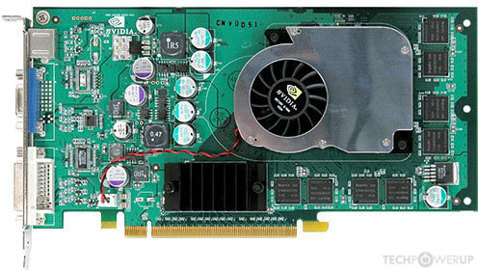
TechPowerUp
NVIDIA NV38, 475 MHz, 4 Pixel Shaders, 3 Vertex Shaders, 8 TMUs, 4 ROPs, 256 MB GDDR3, 425 MHz, 256 bit
earnest olive
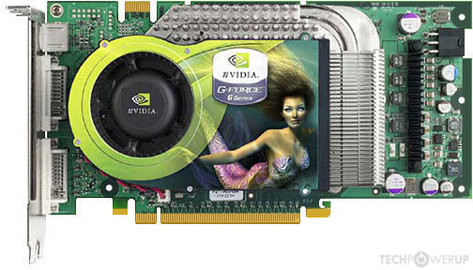
TechPowerUp
NVIDIA NV45, 425 MHz, 16 Pixel Shaders, 6 Vertex Shaders, 16 TMUs, 16 ROPs, 256 MB GDDR3, 550 MHz, 256 bit
wanton cliff
Damn, can’t find it
earnest olive

TechPowerUp
ATI R480, 540 MHz, 16 Pixel Shaders, 6 Vertex Shaders, 16 TMUs, 16 ROPs, 256 MB GDDR3, 590 MHz, 256 bit
wanton cliff
I found an obviously bot-written article about the GeForce 3
earnest olive
oldest from radeon with 6 pin that i can find
wanton cliff
It said “this graphics card may not be compatible with VR. We recommend getting a 1660 super, which is about 16,577% better”
earnest olive
https://www.techpowerup.com/gpu-specs/radeon-x800-xt-platinum.c23 nvm this one is older

TechPowerUp
ATI R423, 520 MHz, 16 Pixel Shaders, 6 Vertex Shaders, 16 TMUs, 16 ROPs, 256 MB GDDR3, 560 MHz, 256 bit
wanton cliff
Old
earnest olive
march 2004
looks like radeon beat nvidia to the punch
now i must look for the first 8 pin
fossil halo
what are we looking at
wanton cliff
Oldest use of current connectors
fossil halo
oo
earnest olive
aha
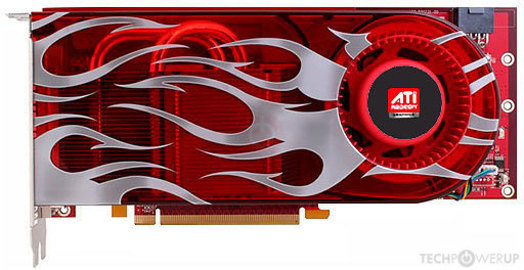
TechPowerUp
ATI R600, 601 MHz, 240 Cores, 12 TMUs, 12 ROPs, 256 MB GDDR3, 800 MHz, 256 bit
the oldest card with an 8 pin
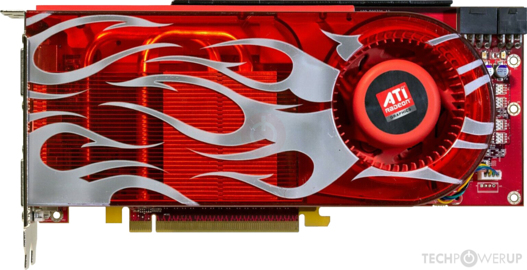
TechPowerUp
ATI R600, 743 MHz, 320 Cores, 16 TMUs, 16 ROPs, 512 MB GDDR3, 828 MHz, 512 bit
the oldest card with 8+6 pin
with a tdp of 215W... 5 less than 220W
must have been a monster in 2007 lol
 celest horizon
They need a new standard
wanton cliff
Dad’s friend had one, still worked fine
celest horizon
6+2 pin connector only has 3 conductor pairs
wanton cliff
celest horizon
They need a new standard
That’s what we were just talking about
earnest olive
https://www.techpowerup.com/gpu-specs/geforce-gtx-470-x2.c3000 first double 8 pin gpu apparently from 2010 but never officially released
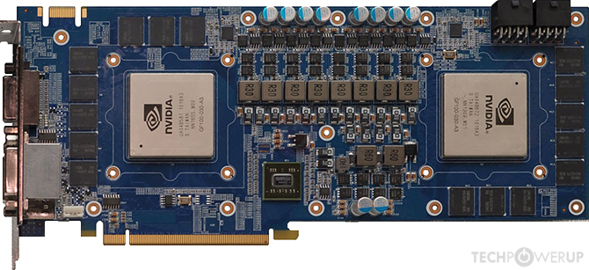
TechPowerUp
NVIDIA GF100 x2, 608 MHz, 352 Cores, 44 TMUs, 32 ROPs, 1024 MB GDDR5, 837 MHz, 256 bit
wanton cliff
That’s what sparked this convo
earnest olive
GTX 470 X2... what an odd card
WHAT
there was a 580W TDP gpu with 4x8pin power connectors in june 2014

TechPowerUp
AMD Hawaii x2, 1000 MHz, 2816 Cores, 176 TMUs, 64 ROPs, 4096 MB GDDR5, 1350 MHz, 512 bit
that is... eye watering
celest horizon
Buildzoid says they only put 4 8 pins on it so you wouldn't try run it on a potato psu
earnest olive
well
earnest olive
580W is technically above spec for 3x8 but should be possible with minor overdraw
168.3W per 8 pin
celest horizon
It can't actually draw that much, the vrm would explode
sharp osprey
How do you set fan curve?
earnest olive
msi afterburner is the easiest
ripe wedge
^
sharp osprey
So what are good temps for gpu:
earnest olive
anything that doesn't throttle
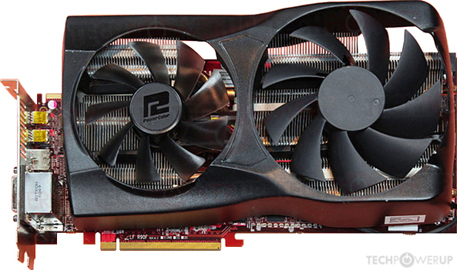
TechPowerUp
AMD Antilles x2, 880 MHz, 1536 Cores, 96 TMUs, 32 ROPs, 2048 MB GDDR5, 1375 MHz, 256 bit
ripe wedge
so basically below 80C max
earnest olive
375W gpu from 2011 with 3x8pin and a cooler that looks hilariously inadequate
ripe wedge
you can probably go a bit above but if you are hitting 80C you need better cooling
earnest olive
looks like something you would find on a 1050Ti
wanton cliff
That cooler looks ghetto as hell
earnest olive
dual slot dual fan
celest horizon
People don't remember, gpu coolers used to all be kinda garbo
wanton cliff
Same
earnest olive
not much to remember
my first gpu was a 1080ti and that was already considered kind of old
celest horizon
I only really got into hardware mid 2019
celest horizon
8 pin EPS uses all four conductor pairs unlike 6+2
wanton cliff
Wow, and y’all are already techies and mods
earnest olive
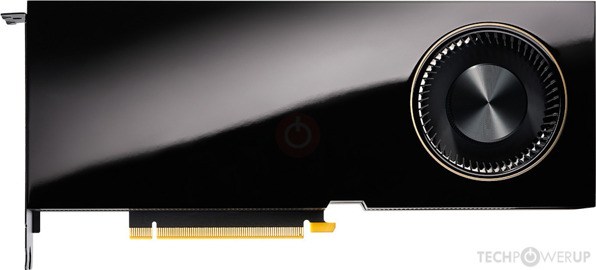
TechPowerUp
NVIDIA GA102, 1860 MHz, 10752 Cores, 336 TMUs, 112 ROPs, 49152 MB GDDR6, 1750 MHz, 384 bit
single 8 pin EPS
300W TDP
interesting
celest horizon
ya, 16 awg wire can handle way more than normal spec
earnest olive
should bring this up to be pedantic next time someone says you physically cannot plug the cpu power cable into the gpu

earnest olive
there are quite a few radeon gpus powered by floppy drive power
celest horizon
I have a soundcard that took molex and I hated it
earnest olive
almost looks like a fan header
celest horizon
Molex needs to die, that connector is awful to plug/unplug
All those things, pumps etc should just go 6 pin
sata can only do 52 watts for the whole chain anyway
earnest olive
i remember seeing some guy whose psu still had a floppy connector and he actually plugged it into a fan header on his mobo and shorted the board
celest horizon
It's three +12v pins that are only rated to 1.5A each
muted patio
earnest olive
i remember seeing some guy whose psu still had a floppy connector and he actuall...
wat
earnest olive
turns out those fan headers are expecting to supply power and not receive it..
muted patio
Did they let the smoke out of the wires?
earnest olive
if i remember correctly
removing the floppy plug from the fan header actually allowed it to boot again
but it was a while ago
so i am not 100% sure on that
muted patio
That's kind of amazing
earnest olive
the motherboard was probably refusing to boot to protect itself
celest horizon
3/the 4 pins on a fan header can be connected to +12 and be fine I think
celest horizon
Floppy is probably 12, 5 ground ground
earnest olive
ah i found the video
i am going to try to rewatch enough of it to see if the system worked or not
yeah he said it was triggering OCP and system worked after unplugging
muted patio
huh, the protections did their job then
earnest olive
perhaps the user thought that you could use that to control the fan curve of the power supply
muted patio
Fan Power!!
earnest olive
which now that i think about it would be an interesting feature
muted patio
MMOAAARRRR POWWEERRRR!
 earnest olive
but yeah modern parts are so user friendly
muted patio
Sometimes
earnest olive
you can make some pretty terrible mistakes and still have a working system
muted patio
That comment doesn't apply to RGb tho
earnest olive
right???
proprietary connectors


i only buy stuff that has the standardized connectors
actively avoid any proprietary stuff
muted patio
of course
but people don't know the difference between RGB and aRGB
Plug 4 pins onto 3 pin headers
wanton cliff
earnest olive
actively avoid any proprietary stuff
Didn’t we just finish talking about 12 pins?
muted patio
it's a nightmare
earnest olive
well i was talking about rgb
wanton cliff
Oh lol
muted patio
Like, Corsair has proprietary RGB connectors for their hubs
earnest olive
i don't mind nvidia's 12 pin being a thing because
- they provide a free braided adapter for it
- it's better than the current standard
earnest olive
there is no reason corsair needs to have their own rgb connectors
and you can be sure they are going to sell you the hub to use them
muted patio
Yup
earnest olive
the only thing i don't like about the current standard rgb connectors
which can be remedied without actually changing the pins
is that there's no retention mechanism like there is for fan headers
it's not a really big deal but it's annoying sometimes
jovial berry
Hi can someone please help me with updating my bios for ASRock B550m pro4? Cause when I tried to download the files this pops up
earnest olive
is it on the root directory of your usb drive?
(not in any folders)
is usb drive formatted to fat32? (this is the default format)
does asrock require you to rename the bios file to something specific?
jovial berry
yeah it is when i check the prop is said that its FAT32
jovial berry
earnest olive
does asrock require you to rename the bios file to something specific?
I actually dont know if it does
earnest olive
did you make sure to unzip the downloaded zip?
usually you only need to rename the file if you are using hardware bios flashback button
but no need if updating from within the bios
also i haven't done an asrock build in a hot minute so i don't remember if they give you bios as a zip
but if they do you must unzip it
jovial berry
I don’t know if this helps?
jovial berry
Oh shoot really?!
earnest olive
you lose a massive amount of performance with single channel memory
and you don't really save any money doing so
jovial berry
I though that 16gb would be good 😖😖
jovial berry
So until then I can’t really do anything??
earnest olive
i mean it'll work you're just losing up to 80% gaming performance
personally observed about 40% less average fps but 1% lows were 80% lower
from using the same system in single channel 16gb vs dual channel 16gb
jovial berry
Can I just use this ram in the meantime to just boot my pc then maybe in a few days put in 2 sticks?
Or will it mess it up?
 pliant lake
You can, no issues
jovial berry
Because my issue that the windows 10 is just won’t boot it just stays on this for a long time
earnest olive
no ryan
earnest olive
it's a 5600x in a b550 board
desert gulch
oh
desert gulch
ok
earnest olive
the issue is that their bios update was not working
desert gulch
ahh i didnt see that lol
 hollow grail
lul
desert gulch
they have bios flashback right?
jovial berry
Yeah but then it just says this
earnest olive
you answered 1 out of my 4 questions so
did you unzip the file?
this is asrock's official guide
jovial berry
No I don’t think I did that or I think I did it wrong?
earnest olive
you need to unzip the file after downloading it
earnest olive
it is the first step on the guide
earnest olive
windows is able to unzip .zip files (as long as they're not password protected)
potent portal
I looked at the CPU compatibility and the 5600X is supported after version 1.20 and he has 1.10 so yes BIOS update required, latest is 1.70
Right click>extract files
desert gulch
yeah so all they need to do it plug it into the working pc and unzip
jovial berry
This shows up...
potent portal
eww winrar
desert gulch
i usually just drag that file in there back to the usb drive
can be quicker sometimes
potent portal
just use 7zip, it's free and more compatible...
desert gulch
both work for this still
jovial berry
It’s the first one right?
earnest olive
you need to pull the file out of the folder and onto the usb
don't do the folder
file only
jovial berry
It’s the one that looks like a stack of books?
desert gulch
no
thats the zipped file
open that first folder
and take the file out of it
and put that file on usb drive
jovial berry
Ooh this one
potent portal
yep
jovial berry
okay did it then after?
jovial berry
Omg it did detect it
earnest olive
yeah now just click update and don't touch it until it's finished
then you're good to go
jovial berry
Okay then after it should get the windows 10 right?
desert gulch
ahh
so yeah do that then boot off that windows usb
then youll follow what the installtion is
jovial berry
Ahh okay I think I got it
Thank you guys so much!! @earnest olive @potent portal @desert gulch
You guys helped me out so much💕
desert gulch
np id-cooling man did most of the work lol
earnest olive

potent portal
Now it's time to update my BIOS for similar reasons 😁
jovial berry
The biggest mood
 vital rover
Lol my computer says “Activate Windows” constantly in the bottom right of my main monitor, nothing can cover it of course
lyric thistle
Rip
There's a way to disable it in cmd or something
Or just buy a cheap eBay key to pray away the activation message
 bitter sapphire
Not sure if I should post this here or not, I’m new to building and this will be my first built pc, I’ve been on a prebuilt for 6 years now. But is this a decent build? Any parts I should swap to save money or better for cheaper? I’m not entirely sure what I’m looking at but I have done minimal research when I’ve found the time.... be gentle. (I know this isn’t the best way to post the build It’s just easiest with what I got while at work(some stuff is purely for the rgb effect. I’m building two of the final build for a friend and myself))
lyric thistle
Lots of things wrong with it :)
fossil halo
10600k <<<< 10400f for price to performance
bitter sapphire
Greaaaat! Any helpful hints to point me in the right direction?
lyric thistle
Storage, gpu are my points of interest in this case
fossil halo
Anyone whose name is yellow should be able to help reliably
Gpu is v v v v v v v underpowered if plan to be a gamer
And with that I head out
lyric thistle
The 1050Ti isn't worth 290
fossil halo
U can get a used 1070ti for that
lyric thistle
I would buy a 1050Ti for 130 max
lyric thistle
Xd
fossil halo
Time to help thid man he is in need
lyric thistle
Storage, I would suggest an NVMe drive; Team MP34, WD SN750, Samsung 970 Evo
Prices for good SATA drives and good NVMe drives are pretty close, and when you have access to NVMe tech, fill that NVMe slot before getting to the SATA drives, NVMe is a much faster storage controller
I think the SeaSonic PSU is a good choice from what I remember?
fossil halo
Yea Satan drives a bit lame
lyric thistle
And if you don't need all the extra features and luxuries of a Z490 board, you can go with a good B460 board
fossil halo
Ywa
Bc really with intel there's no point in getting a really good motherboard with a ok cpu
lyric thistle
Don't get me wrong I love good SATA drives, it just doesn't make sense to go straight for SATA when you have access to NVMe
fossil halo
Bx they change the socket every generation
Then with a b460
Get like 3000 or 320mhz ram
Nvm 2666 mhz
Or get a h410
lyric thistle
I would get G.Skill Aegis 3200 or something similar, cheap :) tho I haven't looked at the prices in a while, might be a different story
fossil halo
Yea
desert gulch
Also that cpu cooler is way overkill
bitter sapphire
i know the CPU cooler is way overkill, its strictly for the other person. But im gonna do my best to make a few changes, my main goal is to be able to game. sorry it took so long, work.
bitter sapphire
do i need to change the 10600k to 10400f? If im trying to game should i change from the intel and get something completely different?
sharp osprey
anyone know how to setup msi afterburner
wait I cant even download after burner wtf
still roostBOT
 MMA#6263 has been warned
Reason: Bad word usage
little osprey
Whats a good mobo for i3 10100f
 uncut pelican
What
 stoic island
@wanton cliff I'd go for a higher placeholder price for 3090, and I'd prob change the PSU to an AXi or RMi
wanton cliff
One sec
stoic island
also, need a priceholder price for 5900x
wanton cliff
Wdym by higher placebo?
stoic island
Tariffs
wanton cliff
Oh yeah
stoic island
so I would assume it'll be closer to 2000$
stoic island
550$
wanton cliff
Yeah I forgot to change PSU
stoic island
I also changed mobo and ssd
wanton cliff
That list is a skew of a list I made way before I knew that much about computers
stoic island
tomahawk wifi is a great x570 board, and P31 is a really good SSD that'll be basically the best PCIe 3.0 SSD other than 970 pro, which is basically twice it's price
wanton cliff
Alright cool
Like I said, that list is a skew of a list I made before I knew as much about computers as I do now
Also before tariffs and all that
stoic island
is ok
worn wave
They do, WD black
potent portal
Blue drives come in 7200 also, and black has 10k too
There's even green drives that are 7200, and red and purple for enterprise
worn wave
The only WD Blue that is 7200rpm is the 1tb model?
potent portal
I think so, and smaller sizes
If you need more go black
And green drives are still being sold but yeah the aggressive power saving kinda sucks
brittle tinsel
Will ddr4 boards run ddr3 ram or only ddr4?
stoic island
only ddr4
brittle tinsel
Damn
stoic island
the slot itself is different
brittle tinsel
Ah ok
stoic island
notch and pin count and location
brittle tinsel
Man it sucks so bad when you fry a cpu and need to swap out your board, everything is so expensive right now
stoic island
sadly
 broken anvil
I got bored and build a pc on newegg if anyone wants the list
tho you might need to change out the gpus
they are dual 1030s
brittle tinsel
What’s up
 sinful moon
With x570 gaming edge WiFi mobO
stoic island
Fun
sinful moon
I have a few questions
brittle tinsel
Ask away
stoic island
VRMs are supposed to be toasty
sinful moon
I put together a pc yesterday with amd r5 1600 x570 gaming edge WiFi, 580xfx , thermal take 600watt power supply
When I benched it
The power supply never turned on
I check all the connections
The 8 pin for cpu 20 pin for mobo
8 pin for gpu
Never turned on
When I used a power supply tester
The test came out perfect
Any idea what could be wrong
brittle tinsel
The power supply never turned on but you were able to bench it?
Maybe someone else will understand enough to help
stoic island
It's just what it's called for whatever reason, but it's CPU power
sinful moon
Yeah so the motherboard has a 8 pin connector and a extra 4 pin for over clocking and stuff according the Manuel I used the 8 pin
stoic island
Yes
sinful moon
I ma try again later today with a new mobo and a cpu
sinful moon
I am on a assumption that mobo is dead
Yes I though of that too
But I ran out of time yesterday
stoic island
try that in case it's just power button is broken or not plugged in correctly
stoic island
It's okay
brittle tinsel
With out freaking out over the cooler and stuff, what is your straight up opinion on this build, I don’t need a gpu better than this because I don’t do high gpu intensive things
brittle tinsel
It was like half the price of Samsung
 small osprey
 blazing aurora
brittle tinsel
With out freaking out over the cooler and stuff, what is your straight up opinio...
blazing aurora
brittle tinsel
With out freaking out over the cooler and stuff, what is your straight up opinio...
64gb of ram is unnecessary
brittle tinsel
I don’t know those brands
stoic island
uh
brittle tinsel
blazing aurora
64gb of ram is unnecessary
I need the 64gb trust me
The 16 gb on my old rig was always the hold back
blazing aurora
brittle tinsel
I need the 64gb trust me
32gb should be good
brittle tinsel
I also host peer to peer games with my brothers while streaming and have ram into issues with ram there as well
Some games I’ve hosted I’ve found using up to 4 gb ram per additional player so another reason for 64gb
@stoic island better? https://pcpartpicker.com/user/broslays/saved/ttfmD3
stoic island
cooler still bothers me
brittle tinsel
The AIO?
brittle tinsel
What’s so bad about it? My best friend uses it and never has an issue with temps
stoic island
Performance doesn't match the scaling in price
 rich helm
Literally costs a lot more because it has a screen
brittle tinsel
I know I’m paying an addition $100 just for the lcd display but I’m ok with that
rich helm
Well I guess
brittle tinsel
But when people react negative about it I assume it’s a PoS
brittle tinsel
But if it will work and keep temps down I’m happy
rich helm
You could do a 4000d Corsair case for a bit more
brittle tinsel
Any case recommendations for around $100 or less? That was on there because I was originally going with an eatx board before deciding I don’t have a need at all and won’t in a million years for a $700 motherboard
4000d? Alright,
rich helm
The 220t rgb is 105
brittle tinsel
What is going to yield a good airflow for front panel fans and top mounted radiator?
Let me boot my brothers pc so I can search the cases faster and easier
rich helm
I don’t know about the other cases but the 220t rgb doesn’t support a 360 mm rad on top
stoic island
TD500 mesh and P500a both support 360mm top
brittle tinsel
Ok, i probably won’t go 220t anyway because I’m avoiding rgb
rich helm
Yeah
brittle tinsel
Damn I was looking into that one too
brittle tinsel
Will most mid towers fit up to a 3090
Say I ever took that path? Just want to have options this is will be my third pc and every time something goes wrong or it’s time for an upgrade I gotta get a new case and it sucks
brittle tinsel
Would a full tower handle anything then?
I just want to better invest in an upgradable path one reason I am finally swapping to amd
potent portal
The FE 3090 is 313 mm long, get a case that says it supports that or larger GPU
brittle tinsel
Alright
potent portal
For an idea, the meshify C says it supports 315 mm so it would be a bit tight with that card
The meshify 2 would have tons of room though, 467 mm
Something that's designed for custom loop liquid cooling would have the most room
stoic island
@brittle tinsel most mid towers will fit large cards
full towers usually just extend upwards to fit E-ATX
brittle tinsel
thoughts on this case actually? This is the one my old system was in, I still have it actually.
https://pcpartpicker.com/product/zFn8TW/deepcool-matrexx-55-v3-atx-mid-tower-case-dp-atx-matrexx55v3
eh, it only supports 360 rad in the front and I heard that was bad because air bubbles would trap in vertical mounted rads and cause alot of noise
worn wave
Crappy budget case
brittle tinsel
and be bad for long living
potent portal
Is that solid glass on the front? No mesh? Terrible airflow
rich helm
@faint forum where did you get your custom 12 pin extension
worn wave
Get a Meshify 2 or a Define 7 or a p500a
brittle tinsel
those are all going a wee bit above budget, Im busting ass trying to come up with $2500 to build one, so the less I go over the better
there is about $120 left in budget currently
potent portal
A meshify C is usually under $100, and pretty well recommended here
brittle tinsel
the fractal case?
worn wave
If you have the money for 64GB of RAM, a Ryzen 9 you have enough money to spend 60$ more on a case
It should not be hard to save a little more
potent portal
Yeah, full name Fractal Design Meshify C, comes in a few varieties too
brittle tinsel
worn wave
If you have the money for 64GB of RAM, a Ryzen 9 you have enough money to spend ...
I dont have the money lol, Im just looking at about what I need to come up with, ive got a half hour before I head to work so i was just seeing how much I needed but was also trying to keep it around $2500, its hard to find jobs with covid
potent portal
 wicked frigate
Does anyone know if you can enter in the Newegg shuffle rn
wicked frigate
Does anyone know if you can enter in the Newegg shuffle rn
Entry time hasn't started yet
wicked frigate
When is it
worn wave
Its worth it to save a little to get a better case
potent portal
I don't think you can in the app but the page is mobile friendly
Usually late morning PST, so give it about 3-4 hours
wicked frigate
Like 11??
muted patio
10 AM PST
potent portal
You have until 2 to enter anyway, it's not first come first serve
potent portal
Not that I know of, but a mobile browser should be able to load the page just fine
brittle tinsel
worn wave
Its worth it to save a little to get a better case
alright then with that logic, what case do you recommend/use?
wicked frigate
K thx
worn wave
Define 7, Meshify 2, P500a
wicked frigate
Wait one more thing
Is it only on specific items
Like can I get an specific gpu
3080 something
worn wave
It will be listed
potent portal
You select which ones you want to be put in the drawing for. The stock varies each day. If something you want isn't available today, try again tomorrow.
I know they just did a bunch of 30 series GPUs yesterday
wicked frigate
Ok cause I want an specific 2080
3080
I meant
The ftw3
I think that’s what it is called
 verbal quarry
thats a beautiful card
brittle tinsel
is the shuffle a giveaway or drawing for the ability to purchase ?
worn wave
Its a reservation for you to buy it
brittle tinsel
ah
wise sorrel
It's not guaranteed though, it's a raffle for a spot
brittle tinsel
yeah
potent portal
Winners of the drawing are selected and notified around 3:30 PST, and it's automatically in your cart. You have a few hours to purchase it.
wise sorrel
I'm hoping there is a ryzen 9 5900x and a 3070 or 3080 vision oc... and that I get chosen today
potent portal
Good odds for the Ryzen 9 being in the list, it has been the last few times I looked
potent portal
Yeah and the 5950X
wise sorrel
Oh nice
brittle tinsel
alright thoughts on the build now? I have swapped out the case and M.2 drive
brittle tinsel
worn wave
Its a reservation for you to buy it
does it have radiator support? their website says nothing about it
 pale gyro
What's everyone's favorite thermal paste?
wise sorrel
@brittle tinsel I like the build but I just learned last night that the 3900 is zen2 and the 5000 series is zen3. So it's newer updated material
 faint forum
@rich helm I got it from CableMod. They just recently started making them!
brittle tinsel
I know
wise sorrel
I dint know how.big of a difference it makes but a few people told me go for the 5900
brittle tinsel
but like a 3900x is soooo much more powerful than the I5-3570 I fried
muted patio
15-20%
rich helm
faint forum
<@!403698294892789780> I got it from CableMod. They just recently started makin...
Oh I looked at cable mod but it looked like for that single cable it was kinda pricey
 kind light
I tried looking up parts and most of them were out of stock
brittle tinsel
so why spend the extra money for little persomance upgrade with zero astetics
plus 3900x is in stock near me if I come up with the money fast enough
muted patio
brittle tinsel
so why spend the extra money for little persomance upgrade with zero astetics
15-20% is little? That'st he 5900 vs 3900 lol
faint forum
rich helm
Oh I looked at cable mod but it looked like for that single cable it was kinda p...
It is a little expensive, but I figured I had already spent so much on my build that it was worth it. I wasn't a big fan of how it looked with the built in splitter cable that came with the 3090
rich helm
faint forum
It is a little expensive, but I figured I had already spent so much on my build ...
Trying to decide whether it’s worth it for a 3060ti or not lol
brittle tinsel
compared to the difference between a I5-3570 and 3900x yes, and besides Im alreeady $100 over budget
rich helm
brittle tinsel
compared to the difference between a I5-3570 and 3900x yes, and besides Im alree...
You have 10 fans in your parts list
brittle tinsel
yeah it has support for 6 fans, and with my experience a few extra isnt a bad thing
faint forum
rich helm
Trying to decide whether it’s worth it for a 3060ti or not lol
ooo I see. Yeah that is kind of a tough call. I just recently built this PC from the ground up, so I'm probably not going to build a new one for a while. So for me, the cost broken out over years made sense. It would definitely still look really good with a 3060Ti, especially with how bright the metal is with the FE version.
muted patio
brittle tinsel
yeah it has support for 6 fans, and with my experience a few extra isnt a bad th...
Your build can be trimmed and economized quite a bit
wise sorrel
@brittle tinsel you're saying the the 9 3900 and 9 5900 aren't far apart?
muted patio
Phanteks Amp 750, $109 PSU. Better than EVGA. Kraken cooler, ditch that and get an EK 240mm or Arctic Freezer 240mm, another $150 less
brittle tinsel
muted patio
15-20% is little? That'st he 5900 vs 3900 lol
hate me if you want but i just cant see myself spending an additional $400 for such little difference,
muted patio
brittle tinsel
hate me if you want but i just cant see myself spending an additional $400 for s...
WHAT
5900x is $550
it's another $50
brittle tinsel
where?
wise sorrel
If you can find one
brittle tinsel
every where I have seen is based price of 800 and upto 1100
muted patio
it's not hard
wise sorrel
The 5950 is like 800 lol
muted patio
I didn't say 5950
brittle tinsel
r9 or r7???
wise sorrel
R9 5900
brittle tinsel
yeah
brittle tinsel
its like 750 on newegg
brittle tinsel
well mircro center has them really cheap but I dont think micro center is in florida
muted patio
Phanteks AMP 750 PSU, $109, EK 240mm AIO, $120, Get the Phanteks P500A case, $100, there's another $80 saced
Ram is slow and a tad overpriced also
brittle tinsel
slow? the cpu only supports 3200, n?
brittle tinsel
according to google and reddit 3900x can support upto 128gb of dual channel ram
and speeds of 3200
ddr4
muted patio
That's incorrect
rich helm
brittle tinsel
slow? the cpu only supports 3200, n?
Cpu technically supports up to like 5000mzh
wanton cliff
The IMC is only rated for a certain speed but can actually go up much higher
Same with most boards
wise sorrel
https://pcpartpicker.com/list/vX7tRT
This is my current white build, pending on if I can find the parts.