#building-and-recc-chat
1 messages · Page 407 of 1
 round flare
Oh nice
 faint thorn
So what are the draw backs to getting prebuilt. Because I was told that since I’m under 18, I should just get a prebuilt by my parents, is it worth it?
round flare
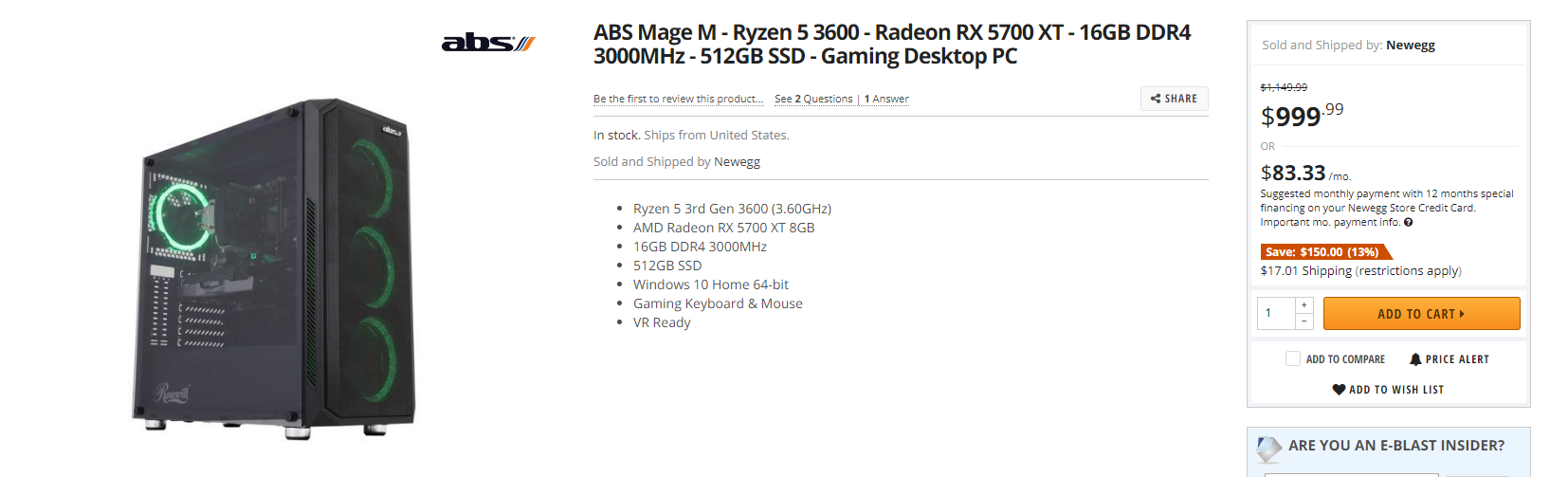
From what I've seen some companies offer really beefy desktops with financing
 deep skiff
usually prebuilts are more expensive
and no, me and zack are under 18 and have built computers no problem
just watch a few videos on it
deep skiff
i just got my gpu super cheap and have a part time job
round flare
nice
make sure you keep checking newegg and other deal sites since sometimes pretty good pc's pop up on sale for lower than custom
 floral parrot
what GPU did you get
floral parrot
yea good card i am gonna get rx 5700XT which is really good
floral parrot
oh yea imma get the pulse one with 2 100mm fans
floral parrot
yea the blower card could heat a house lol
 weak ember
More like cook my food lel
floral parrot
yea its better then the 2070 Super and is 200 dollars cheaper
weak ember
Way better with the bang for buck tbh
floral parrot
yea their making their own raytracing thing
weak ember
Unfortunately I have to go with 2080 Ti for my setup unless AMD releases something on that tier in 2 months
But for anything below that outright 5700XT
Tbh idk why anyone would even go for a 5700 non XT
 pulsar garnet
Strict budget
weak ember
Fair but $50 more for quite a bit more performance is like hmm
floral parrot
yea the 5700 is a pretty good card but not as much value as 5700XT
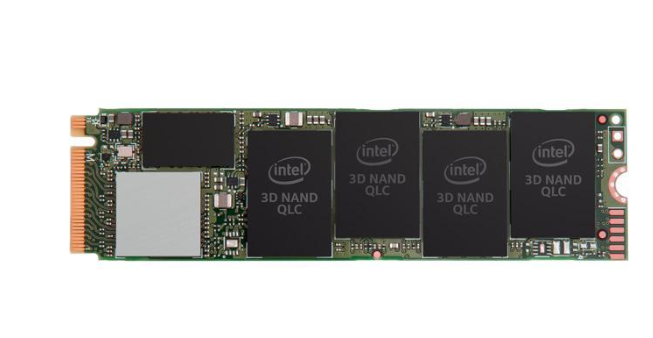
the intel 660p is a good drive but if you want the fastest stuff samsung is the way to go like if you agree
 little osprey
Yes, but there's a lot in between. Eventually optane will get cheap enough that some may consider it for a boot drive. Currently a 380GB 905p is $400.
pulsar garnet
I like my 660p
 nimble osprey
i have the 660p too and i love it
little osprey
TBH, I think the 660p is best used as a game drive. It really does lose a lot of i/o performance when nearing capacity.
But for $85 1TB, that's just a good deal regardless
floral parrot
yea for editing and doing what Mr c does it would not be optimal
little osprey
"for editing" can be broken down further, premier *can benefit from splitting up OS, project file, media cache , scratch, and export etc drives
faint thorn
I wanted to build mine but my dad was like “no, because you’ve never had a pc before”. And I’m here thinking to myself, I’m in computer science, I’m top of my class and I’ve taken apart and rebuilt multiple PCs. But they think that just ordering a prebuilt would be a lot easier.
little osprey
You also have to take into account the ~4GB/s DMI bottleneck to the PCH (on z390 etc) and possible benefits to running m.2's from CPU lane pcie slots via NGFF risers
HEDT platforms usually have native bios support for pcie lane bifurcation letting you put 4x m.2's in an x16 slot to give full bandwidth
floral parrot
@faint thorn its a really good idea to build a pc i mean i had zero experience when I built my first pc and it went all smooth and if you just arnt stupid you should be fine
little osprey
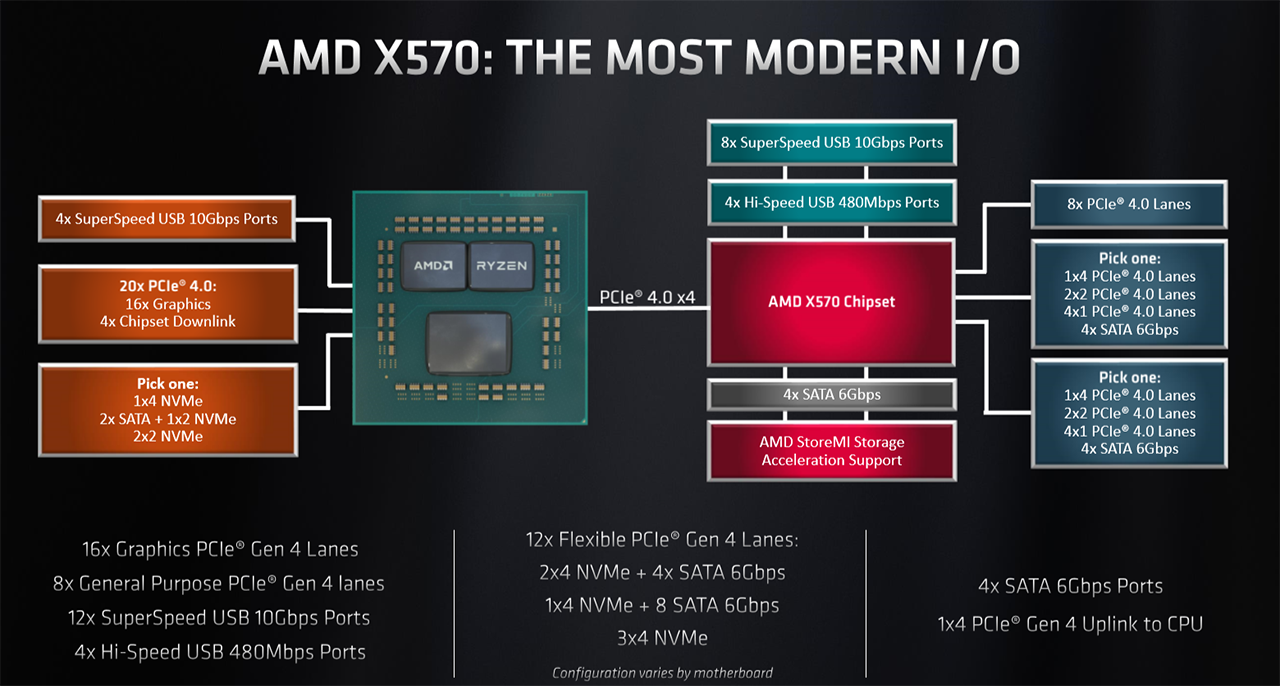
AMD desktop CPU - PCH - NVME bandwidth bottleneck possibilities are a bit more platform specific between b450/x470/x570 and then again for mobo specific implementations within each
This is a general x570 block diagram https://hexus.net/media/uploaded/2019/6/84149e21-86a0-4150-95c7-7bbc48f99b05.png
 faint thorn
@floral parrot I know and I have experience they’re just stubborn
 latent bronze
Just curious but FreeSync should work with this monitor if i was to be using a GTX 1660/1660 Ti https://www.newegg.ca/p/N82E16824025515?Item=9SIAHJN9VT0980
faint thorn
Any cases y’all recommend?
floral parrot
lol mine are letting me build my second one (ive built more then 2 but this is the second one for me)
faint thorn
Just to price compare
latent bronze
The only 2 cases from Cooler Master i liked is https://www.newegg.com/black-cooler-master-masterbox-mb500-tuf-edition-atx-mid-tower/p/N82E16811119351
floral parrot
i like cooler master overall
latent bronze
I used to till i bought the MasterBox Lite 3.1
faint thorn
Thoughts?
floral parrot
not bad but you just need a good GPU now
faint thorn
Yeah I was looking at a rtx 2080. But I haven’t looked at any bottle necking issues
latent bronze
The MasterBox Lite 3.1 has almost no airflow
@floral parrot This is the only other one that was sexy but always sold out in Canada https://www.newegg.com/black-cooler-master-masterbox-q300p-micro-atx/p/N82E16811119332
faint thorn
I’m also gonna get a terabyte ssd
faint thorn
That’s is sexy but I don’t really want my first build to be a micro
latent bronze
ya was always sold out which is when i bought the Deepcool Matrexx 55 which i did like until i found out i had to disconnect the wires from my board in order to clean the dust filters
faint thorn
Actually this one
latent bronze
front panel ports was connected to the removeable front panel
faint thorn
Just for the added cores
latent bronze
That looks like the same one you linked before
faint thorn
It is a 2700x not a 2600x
latent bronze
first image shows 2700X as well
faint thorn
Wait what the heck
That’s not what I chose the first time
Well nvm I had it right the first time
latent bronze
Besides it also depends what you're doing with your system
@faint thorn What do you plan on doing with your system?
latent bronze
If you're just gaming you could just stick with the 2600 instead
latent bronze
higher out of the box clocks
latent bronze
the only difference i notice really
latent bronze
is that parts or already built?
faint thorn
It’s ok
round flare
prebuilt
latent bronze
You're looking at this one arent you https://i.gyazo.com/5e8fde5de585ba817fb325d261fff9cc.png
round flare
I have my setup just giving suggestions
Although I shouldn't since I don't know very much lol
latent bronze
It is a good system with a B450 motherboard in it
faint thorn
Small ssd, and for high resolution graphics and high frames might be tough. That was my gripe with the lower cost systems
floral parrot
gn everyone
round flare
bye
latent bronze
Well 512gb isn't that small and also you could always in the future add in a 2tb hdd
round flare
idk what brand or type the ssd is
because it could be the one notch m.2 right
sorry don't know mame
latent bronze
usually the SSD included are good not the best but can do the job
before i changed my case there was a prebuilt i was thinking of getting
round flare
I got a 500gb samsung evo as a gift
faint thorn
Thoughts
latent bronze
@faint thorn for the games you mainly mentioned you wouldn't need a GPU like that
little osprey
Post the actual link tot he card
latent bronze
and also this was the prebuilt i was thinking of getting https://www.newegg.com/p/N82E16883289032
little osprey
The gaming trio is a top tier GPU cooler imo
latent bronze
But for games like Overwatch and Destiny 2 that is too overkill
round flare
what's the most demanding game in your opinion
little osprey
BTW the Gaming "X" vs Gaming as well as the FTW3 vs FTW3 ultra on 2080 ti's = exact same bin but markup for factory OC
latent bronze
most demanding games right now is like Assassin's Creed Odyssey as an example
little osprey
Most GPU demanding? Warhammer II total war is up there, but these days - depends a ton on what monitor / res / fps target you have
latent bronze
Soon the new Doom will be demanding
faint thorn
Oh I mean I might play the newer acs I have Odyssey on Xbox
latent bronze
It really depends in the end what you play often that might be demanding
The one game i am getting when it comes out that i know will be demanding is Cyberpunk 2077
faint thorn
Idk thought I play a bunch of different games
latent bronze
This is why i upgraded my CPU to the Ryzen 5 2600
faint thorn
Ranging from overwatch to ark to forza to like anything really
latent bronze
Ark can be pretty demanding
with the GPU i have now i was only able to play Ark on like the medium settings
@faint thorn i would say to go for the RTX 2060 Super or 2070 Super instead
Or if you want to use AMD as well for the GPU you can always go for the 5700 XT
performance is on par with the 2070 Super for less of the cost
faint thorn
One thing I’ll say is my goal is to be able to play modded games at the best they can reasonably be. Not like 180 FPS but like a steady 60-90
latent bronze
Also you do know next month Destiny 2 is moving to steam right?
 silver bough
Can someone help me find a SSD for my laptop i want to upgrade it
latent bronze
I believe on steam it will be free to play for a certain level and then buy the expansions after
@silver bough 2.5" or M.2
faint thorn
How big?
silver bough
honestly i have no idea all i know is that i want to upgrade my Laptop which the serial is gl702v
faint thorn
@latent bronze I know. It’s called new light. But I’m gonna buy digital deluxe and link my Xbox account

 silver bough
what do you mean ?
latent bronze
Those are the types
faint thorn
Like want type of slotting does your laptop have
faint thorn
Ram quality I think
latent bronze
Memory right now is DDR4 and GPU Video memory is GDDR5/GDDR5X/GDDR6
round flare
K so it doesn't imply any issues correct
latent bronze
@silver bough click "This PC" and tell me the storages you have now
for memory wise i can not explain that cause i didn't really study it
little osprey
Userbenchmark is a useful tool to have people send their build info
latent bronze
Also if he is just replacing a hard drive for a SSD i would suggest this one https://www.newegg.com/team-group-l5-lite-3d-1tb/p/N82E16820331115
been using that for over a year and no issues and the temps i get on that SSD on load max is 30c
idle 21c to 23c
silver bough
Interesting
latent bronze
ill brb as well going out to get pizza
little osprey
If you're in the market for a new 1TB sata, for boot or storage, why pick that at $90
deep skiff
u can get a nvme for that much
@latent bronze and u forgot hbm2 which is faster than gddr6 iirc
high end workstation cards and vega used hbm2
faint thorn
Thoughts?
MSI GeForce RTX 2070 SUPER DirectX 12 RTX 2070 SUPER GAMING TRIO 8GB 256-Bit GDDR6 PCI Express 3.0 x16 HDCP Ready SLI Support Video Card https://m.newegg.com/product/N82E16814137454?m_ver=1
There is the link
latent bronze
zack don't you have school in the morning lol
latent bronze
Isn't minecraft your break 🤔
little osprey
just received my case & monitor yayee
 strong crescent
What would happen if you add 2 different type of ram but they have the same amount of gb and MHz
pulsar garnet

latent bronze
timings would be off
latent bronze
If you have 4 slots and 1 and 3 is the same and 2 and 4 is the same but different brand it would work but i believe the timings for the memories would like sync up in a way
This is what i am also assuming so
 hearty tree
Sup friends
 agile bear
The sky
 scarlet quarry
Space
floral parrot
the clouds
 pure leaf
Hey all. Looking for some opinions. My build started off as a cheap microcenter "I need a pc cause my laptop died" starter build to a daily task (office apps, photoshop, browsing, live tv streaming) and sim racing (iracing) build. I finally have it at a comfortable spot where everything runs nicely. But I'm always looking for deals, daily, to keep upgrading and improving. I just would like to know some opinions on what I should be looking for and what direction I should go with my next purchases. I'm torn between a GPU, or upgrade CPU/Mobo. I'd like to add an additional monitor. Currently using an old LCD Samsung TV as a side screen to browse. Here are my specs:
CPU: AMD Ryzen 5 1600, 3400 MHz
Motherboard: Asus ROG Strix B350-F Gaming
RAM: 32GB TOTAL
- Corsair Vengeance LPX 16GB (2 X 8GB) DDR4 3000 C16
- Gold Key Tech. NMUD480E8x-2666 [Microcenter brand? Forza] (2x8GB) OC to match other RAM
GPU: ASUS ROG Strix Radeon RX 570 O4G Gaming OC Edition GDDR5
Monitor: Samsung SyncMaster Curved 27" C27F591 (FreeSync) [27" VA LCD]
2 SSDs: ADATA SU635 (480 GB) and Inland SATA SSD (250 GB)
PSU: CORSAIR - CX-M Series 650W 80 Plus Bronze Modular
Case: Corsair Carbide Series SPEC-06 Tempered Glass Mid-Tower ATX Case, White
Cooling: Cooler Master RR-212S-20PK-R1 Hyper 212 Black Edition CPU Cooler w/ DEEPCOOL RF120M 5x120mm (2 on CPU Heatsink, Other 3 + 2 Corsair 120MM in Case).
latent bronze
@pure leaf Go for sapphire
 tough pewter
i got a question for someone that knows to much about motherboards
i got a 1 Tb hdd drive and i'm trying to get it faster, but i'm trying to decide if i should go with optane or if i should just get an m.2 storage rather.
deep skiff
^
 rough loom
arent gen 4 nvme's faster than optane?
rough loom
Im not worried about speed. just curious
 still roostBOT
 MeraTheWolf#1242 has been warned
Reason: Bad word usage
rough loom
I would be happy replacing all my main drives with ssd's
MEE6 is way too sensitive
-.-
 grim juniper
scarlet quarry
grim juniper
scarlet quarry
Hey guys, looking to upgrade my PSU and GPU within the next couple months, as well as rehome my build into a better case, and was looking for some suggestions. Okay so here's my current build specs:
CPU: Ryzen 7 2700x
Cooler: Corsair H115i Platinum AIO
GPU: MSI Radeon RX 570 Armor 8Gb OC
Mobo: MSI x470 Gaming Pro
Memory: 32Gb Corsair Vengeance RGB Pro 3200 16c (4 x 8gb)
PSU: be Quiet 500w 80+ Gold
Storage: 1 - Samsung Evo Plus 500Gb M.2 SSD, 1 - Seagate Barracuda 1Tb 7200rpm HDD
Case: TT v200 TG RGB
Monitor: Currently don't have one, been using my 65" LG 4K TV in the living room till I get one
I already know I want to go with a Radeon 5700 GPU, more looking for a PSU & Case suggestion if possible. TYIA!
 true void
@edgy copper So with the 9900k, you can install it and do your build
Get stuff installed
Etc etc
The GPU can come later
And you can do some light work
But mainly get your setup the way you want it and then operate
@scarlet quarry NZXT has stellar looking cases
Corsair has nice PSUs as well as EVGA
I also can get you an EVGA discount in DMs
 edgy copper
okay cool cool
true void
I can get anyone a discount for EVGA in DMs
scarlet quarry
Yeah that thing is a bit of a beast so it can handle a decent load on it's own, but absolutely wait to be 100% whole before starting full work @edgy copper
scarlet quarry
@true void my hero lol thanks. Was looking at Corsair cases but $ is an issue with me...student loans about to destroy my wallet but I'm throwing this build together so I can start making games and putting my degree to use
*NZXT
edgy copper
lianli 11dynamic case, asus XI Hero, nzxt x62 280mm, 970 evo plus 500gb, evga superNOVA 750 G+, and 2x8gb 3200mhz tridentZ
scarlet quarry
@edgy copper the Kraken was a really good pick...just wish CAM was better
What are you using the rig for?
edgy copper
i wanted to go witth the full radiator so i could have maximum cooling but idk
mainly for coding and rendering
true void
@scarlet quarry Check for sales always, Amazon and Newegg especially
edgy copper
i've limited mysef to not game on it till i get certified in HTML &Python
scarlet quarry
@edgy copper the 280mm is solid, had it in my build originally but mine had the pump die 2 weeks in. Thing is a BEAST lol. But yeah if you can afford the full size, I can only imagine it being worth every penny.
Like I said...I just hate CAM
@true void oh always do, drives the Mrs. insane haha. Hoping for some hella good Black Friday deals, just sorta biding my time till then
@edgy copper you in school now?
edgy copper
How's the software? i thought it was rated good
Yes! im finally in
im doing some math rn
btw do you know if the razer Cynosa keyboard in any good? i picked it up for 50$ since i needed one
it was the cheapest out of all the razer stuff (i only got it bc i already have a razer mouse and firefly)
scarlet quarry
Okay so apparently they just updated the software and it's way better, but it would always give hella bad/wrong temp readings. That, and the RGB doesn't sync with anything other than CAM. Lol not a deal breaker, but annoying. But it kept my 2700x nice and frosty while working in Unity/UE4, VS and Blender for class so performance wise it's 100% worth it
And nah rn I'm super limited for space, using a logitch wireless mouse & keyboard and my TV in the living room as my monitor haha
Just wanted something to handle my work without feeling like it was melting, like my school provided crapbook pro
edgy copper
i got the mouse and fly for free so lucky for me lol
ill be using mine on a 720p tv
until i get a good monitor
scarlet quarry
Niiiiice. Free is always awesome haha. I'd try grabbing a monitor on BF, or maybe right before or after. Gonna be a while for me though, nowhere to put my rig where I could use the set up I want to do till the wife and I get into a bigger place
edgy copper
im waiting to get this and try to generate some money from it so that i can move out closer to the college
scarlet quarry
You with your rents or on your own? Lol not tryna be the typical "random dude offering unsolicited advice" but if you're with your parents and it's a rent free or super cheap situation, I'd say stick it out till you land a gig in the field you're aiming for. Save some $ for future costs
edgy copper
parents, my buddy said i could stay at his place for like 80$ which isnt bad
and when i go to reapply for next years classes id still get full tuition
true void
@scarlet quarry /r/buildapcsales is always good on Reddit btw
scarlet quarry
@edgy copper yeah I'd say do the cheapest you can till closer to your degree goal. Check out Indeed and Glassdoor for internship openings in your area for current students (there are a LOT more than you'd think) that would help bolster your resume & portfolio as well as help familiarize you with various programs and systems you might not have considered before. Bank the extra $ and either invest it into your workspace, or into getting into some of the various indie support programs offered in the industry. Xbox, for example, have a $19 one time fee to utilize their indie support. But yeah man I made two mistakes: moved out into an overpriced apartment (thanks, MD), and got married before enrolling/graduating. Now I pay $1600/mo in rent, and getting married made any/all grants I would
*would've gotten disappear
Lol my wife and I almost got an annulment when they were like "here's how much you would have gotten"...almost half the costs 😂
@true void dude I completely forgot about Reddit! Thanks!
little osprey
Can someone help me out?
 ivory beacon
Is this where i can ask questions?
 lime sigil
I just bought a AMD Ryzen 5 2600 + MSI X470 Gaming Plus with 16GB RAM
round flare
do I take the black bar things off
and put the cooler in
or does the cooler go on it
 lime forge
what cooler are you using
lime forge
yeah take off the black bars
lime forge
yep
round flare
the screws aren't reaching
only two of them did go in
the other two won't reach
even if a push a little
pulsar garnet
Hold up the back plate
ivory beacon
So basically... masterbox k500 . Rog strix x470-f gaming motherboard. This is my first time building a pc and im stuck. Been on youtube all day so thay isnt going to help me. FeelsDeadMan case comes with 2 LED installed fans. 4 pin and 3 pin connectors on each fan. The 4 pin cables connect into another cable that connects into this rgb controller or something like that. That ends up connecting into the psu. The 3 pin connectors go straight into psu. Ive seen on some builds that the 3pin go into motherboard. But these will not reach the motherboard headers. Is this correct?
latent bronze
It's an RGB box
latent bronze
I believe you use that if your motherboard doesn't have the connection for the RGB
ivory beacon
There is like 2 rgbs on the motherboard
latent bronze
does one say argb?
usually when you see 2 one is for solid RGB's and the other is for addressable RGB
ivory beacon
The rgb box connect into the psu
The 3 pin connectors dont reach the headers on the motherboard
And they are also connected into the psu
Im just so stuck here i will try to draw whay is currently setup
 chilly marsh
ew molex
latent bronze
For RGB it is better that then sata to be honest
ivory beacon
It came with the bubdle ok. 
chilly marsh
nowadays sata is better, molex is outdated and is a hassle overall
latent bronze
@warm nova want to jump in and help Rampage out a little busy with a dungeon
 next tangle
Hey, sorry about that @latent bronze But now I am pretty confident with https://pcpartpicker.com/list/rd7v8Y that. I'm sorry if you took this as me tending to troll. I did not mean it like that 🙂
next tangle
wow that hurts my head since I have to turn it pretty far to read it
scarlet quarry
Hahahaha
ivory beacon
Yeah i thought it would be normal
scarlet quarry
@ivory beacon don't listen to him, it's a masterpiece
next tangle
LUL
If you have a samsung, you can go to the photos and press edit on it and it'll let you rotate it
not sure if you can do it on an iphone
I have an S9 so I don't know if it's for the general android software
 ivory beacon
Wat im asking if this is correct wym
next tangle
if it is correct though
ivory beacon
So basically... masterbox k500 . Rog strix x470-f gaming
still roostBOT
 Rampage#9060 has been warned
Reason: Bad word usage
ivory beacon
Idk
next tangle
oh lmao
next tangle
ooo nice
ivory beacon
Fe i think
next tangle
i'm gonna get the 1070 for my build
ivory beacon
Ya my friend sold it to me on the cheap
next tangle
oh wow
scarlet quarry
Nice
next tangle
how much did you get it for?
ivory beacon
2fitty
next tangle
Oh cool!
I'm upgrading my current PC
Trying to stay under 500$ for the upgrade
I'm getting a 1070 for 199.99$
ivory beacon
I feel scamazzed rn
next tangle
oh lmao
still roostBOT
Rampage#9060 has been warned
Reason: Bad word usage
ivory beacon
But all in all... dont use USPS. my stufft was supposed to get here yesterday
next tangle
In my state, USPS is fast
next tangle
Don't think so
ivory beacon
next tangle
If you get it off of Amazon, their shipping does
next tangle
They CAN be accurate
 lilac snow
Hi: I have a question about the Lian-Li PC-011 Dynamic Razer case. I don't have a radiator to install, so I am just using the side mounted fans and top mounted fans for cooling the case. That would make these fans exhaust fans and not intake fans. Does anyone see a problem with that kind of setup for proper cooling? Thanks. John
next tangle
If you have all exhaust fans, I'd say to change a few to intake
ivory beacon
You dont have a fan on your processor?
next tangle
You don't want all exhaust (atleast form what I've seen/heard)
And you don't need a radiator if they're just fans.
If you're using an AIO liquid cooler, then you'll need a radiator
(for the CPU)
But like I said, they're just fans and not used for the CPU cooler
ivory beacon
Wait wah
next tangle
@ivory beacon He probably uses an air cooler
lilac snow
Yes I have a fan on the processor and three fans on my GPU geforce RTX 2070 super.
next tangle
You mean you have a CPU cooler on your processor, correct?
lilac snow
Yes
ivory beacon
Ugh. So much to learn
lilac snow
True
ivory beacon
I like it though it is time
next tangle
@lilac snow Other than what I said to change some to intake fans, you'll be good
lilac snow
Ok. I appreciate the info. Thanks again.
next tangle
Yup!
ivory beacon
I feel like i made a mistake by not letting my friend build it
ivory beacon
Ok i think im good now. Now just waiting on the gpu so i can start troubleshooting
Hopefully tomorrow

 magic vigil
What should i get for the best performance at 3800mhz https://www.newegg.com/g-skill-16gb-288-pin-ddr4-sdram/p/N82E16820232856?Item=N82E16820232856&nm_mc=AFC-RAN-COM&cm_mmc=AFC-RAN-COM&utm_medium=affiliates&utm_source=afc-PCPartPicker&AFFID=2558510&AFFNAME=PCPartPicker&ACRID=1&ASID=https%3A%2F%2Fpcpartpicker.com%2Fproduct%2FMFdrxr%2Fgskill-trident-z-neo-16-gb-2-x-8-gb-ddr4-3600-memory-f4-3600c14d-16gtzn&ranMID=44583&ranEAID=2558510&ranSiteID=8BacdVP0GFs-LWnKBM8VQAisKLUUAPDoXQ
little osprey
The first. But why do you want memory with a 3800 MHz XMP rating
magic vigil
so I can get my infinity fabric at 1900
little osprey
Do you think that 1900 IF is contingent on 3800 MT/s XMP rating memory?
magic vigil
XMP with the memory set to 3800MHz/fclock 1900MHz/mclock:uclock ratio forced to 1:1 (i.e. everything running at 1900MHz), again with everything running at 1900MHz and DRAM timings optimized by the Ryzen DRAM Calculator (primary timings 16-16-16-32)
the second option is what i'll be doing
This is based off of the gamersnexus ram tests recently released
little osprey
I forgot we talked about build options last monday - I remember
magic vigil
yup
little osprey
Why not buy 3200c14 and clock to 3600 / 3800
For 1800,1833,1900 fclk
Or buy 3600c15 and clock up
The second amazon kit you linked is garbo
magic vigil
ok, the timings also matters more than the frequency to a degree
little osprey
The 3600c14 is marked up 3200c14 b-die marked up 200%
little osprey
I've seen it
magic vigil
ok
little osprey
Anyway, didn't mean to so grouchy, but IIRC you're in the market for a no-compromise high end gaming workstation
little osprey
As such, I'd recommend buying 4x8 or 4x16 GB 3200 MHz Cl14 kits
magic vigil
is the 3200 cl14 able to oc to my previous requirement
little osprey
Happy to explain my reasoning if you want, but -long story , will post in #cpus-mobo-and-memory
magic vigil
ok go post it there

 faint thorn
Rosewill ATX Mid Tower Gaming PC Computer Case, Aura Sync Compatible Dual Ring RGB LED Fans, Top Mount PSU & HDD/SSD, Tempered Glass & Steel - PRISM S500 https://m.newegg.com/product/N82E16811147283?m_ver=1
Thoughts?
 winged hollow
i’m just gonna hope this is the right channel. is this a good deal?
Ryzen 7 3700X 3.6GHz, RTX 2070 Super 8G, 500GB SSD, 16GB DDR4 3000MHz, RGB Fans, Windows 10 Home 64-bit, 120mm AIO Cooler, 802.11AC Wi-Fi for $1,499.99
lime forge
ehhh
winged hollow
so yes or no?
lime forge
not that great
pulsar garnet
not really
lime forge
for fifteen hundred you can do better
round flare
anyone have a good guide for cable management and installing graphics card
winged hollow
ok. i’ll keep looking
round flare
because I have no idea what goes to what
winged hollow
what about this one for $1,149.99?
Ryzen 7 2700 8-Core 3.2 GHz, NVIDIA GeForce RTX 2060 6GB, 1TB SSD, 16GB DDR4, AC WiFi, Windows 10 Home 64-bit
pulsar garnet
Are you looking at prebuilts
 zealous pilot
@elfin flicker nice
 elfin flicker
Thanks mate, now I just need to find time to use it 😂
 coarse coral

 paper ermine
Anyone know what a tkg cable is?
 marsh ferry
Is there anyone who's is knowledgeable about processors and help me find out if it's causing my computer to bottleneck ?
true void
@scarlet quarry Look here too! This is sold out now sadly https://flash.newegg.com/Product/N82E16811146298?icid=WP_2_09072019
NZXT H700 - ATX Mid-Tower PC Gaming Case - Tempered Glass Panel - Enhanced Cable Management System - Water-Cooling Ready - White/Black at NeweggFlash! On NeweggFlash.com, you get the chance to save as much as 75% on practically anything you’d like to buy.
Things come up there as well
scarlet quarry
@true void thanks man! Noticed that earlier, but already sold out 😭 lol
winged hollow
@pulsar garnet yes i am looking at a prebuilt
latent bronze
If you're going for a prebuilt system that is too much for one
@winged hollow Building a system is easy and would cost you a lot less
winged hollow
are those parts any good though?
latent bronze
The parts are good the price is very bad
Also if you're planning on 1440p/4K gaming those parts are fine but for 1080p you would want to go lower on the GPU like a 1660 Ti
winged hollow
i was going for 1440p/4k
 short arrow
scarlet quarry
short arrow
scarlet quarry
@short arrow maybe get a more powerful psu in case of future upgrades
deep skiff
drop the case fans, get vengence lpx ram, a 480gb ssd and a 650w/700/750w psu
thats like twice the price
scarlet quarry
Oh really lol nvm. Gonna delete it
deep skiff
here @short arrow https://pcpartpicker.com/list/G6ZryX
little osprey
Used 1080 ti for 490 or new 2070 super for 509
latent bronze
new 2070 super
little osprey
Ok I have a 2060 right now. But want to jump up a bit
little osprey
Well price is the issue. O did the GPU benchmark and the ti shows 11th etc.
latent bronze
2060 to 2070 Super is about a 30% performance boost
little osprey
I have the 2700x right now. Was going to upgrade either my mobo to x570 instead of the b450 or do a graphics card.
Thanks!
latent bronze
30% is still better for todays standards
 open yew
Hello, new here to this chat. I used to be into building laptops years ago and long out of the game. Would someone be able to help look over a build I have ready on NewEgg and see if I'm missing anything?
faint thorn
https://pcpartpicker.com/list/ the build I’m looking at doing. Thoughts?
Nvm that didn’t work
faint thorn
Skytech Legacy Gaming Computer PC Desktop – Ryzen 7 3700X 3.6GHz, RTX 2070 Super 8G, 500GB SSD, 16GB DDR4 3000MHz, RGB Fans, Windows 10 Home 64-bit, 120mm AIO Cooler, 802.11AC Wi-Fi https://m.newegg.com/product/9SIAKMK9VA0160?m_ver=1
Thoughts
 atomic spear
Hi, I want to build in an NZXT H500i with a gigabyte x570 aorus elite and noctua Nh-d15, does anyone know if these will fit?
latent bronze
That is just an overpriced prebuilt
The motherboard they have in that system is this one https://www.newegg.com/p/N82E16813157843
deep skiff
👀
 crystal seal
Ok fellow computer peeps, I have a budget of $2,500 ($2,250 really. explanation below) and wanna build the best possible PC. I will need everything except the monitor, keyboard and mouse. Included in the build must be the Elgato 4K60 capture card. ($249.99) let’s see what you guys can come up with.
deep skiff
any intel/nvidia/amd preferences?
little osprey
I’m currently installing a hyper 212 rgb fan on my motherboard and the pins won’t line up
 dusty peak
Does anyone know what 3rd gen ryzen processor would be needed to run a 5700 XT ?
latent bronze
any
lime forge
3600 or above id say
little osprey
What games do you play, do you prefer competitive advantage/fps or pretty graphics, what model monitor?
latent bronze
You can use a 3400G and still be fine
little osprey
Not on a 2250 budget when gaming is the priority haha
latent bronze
@little osprey You know it is a different person asking right
little osprey
Lol oops
Though, same answer. If you have budget for a 5700, why go with the 3400g
latent bronze
cause it is still not a weak pairing
little osprey
@atomic spear Sup
atomic spear
Hey
little osprey
Want input on parts choice?
round flare
question: when I was putting in the standoffs the screw kind of rubbed against the motherboard
is it possible to suffer permanent damage
it wasn't too severe
nothing noticeable unless you really look
chilly marsh
if it scratched something, that will most likely affect it in some way
lets hope you didnt scratch anything.
round flare
I can't explain it properly
it like when I screwed it in it took a little bit like not even noticeable and pushed it out
but they have shields around the standoff holed though right
*holes
 shy rivet
Quick question tho, gotta Z370 and thinking about buying a 8700k for $280, worth the buy?
Tag me of you reply so I don’t have to scroll!
 fossil hedge

the full edit from all the youtubers who got demonetized and blocked by the verge.
I thought it was funny.
little osprey
Since I needed to image a few OS volumes anyway..
https://www.userbenchmark.com/UserRun/20019814

 drowsy ledge
Option:1 NEW PC
Ryzen 2700x 8 core 16 thread @ 3.7GHZ boost to 4.2GHz = 250$
16gb ddr4 corsair vengeance pro RGB ram = 73$
X470 Gigabyte Gaming Ultra MB = 174$
1TB SSD = 109$
RTX 2080 8GB = 709
H700i case with built in RGB = 72$
Total = 1400$
Option:2 New PC
CPU AMD Ryzen 5 3600 6-Core @ 3.6 GHz = $199
GPU Nvidia RTX 2070-Super = $594
SSD Crucial MX500 1TB = $108
RAM Corsair Vengeance LPX DDR4 3000 C15 2x8GB = $71
MBD Gigabyte X470 AORUS ULTRA GAMING = $130
CASE H700i case with built in RGB = 72$
POWER
Total = $1,103
NEW LAPTOP
Dell XPS 15
Hey guys I want to buy a new pc, havent done it in a long time. What do you think? which is better?
 karmic token
SErver build assistance with alternative RAID adapter:
NORCO RPC-4224 4U Rackmount Server Case with 24 Hot-Swappable SATA/SAS Drive Bays (N82E16811219038)
AMD RYZEN 7 3800X 8-Core 3.9 GHz (4.5 GHz Max Boost) Socket AM4 105W 100-100000025BOX Desktop Processor (N82E16819113104)
Rosewill 1600W Modular Gaming Power Supply, Continuous @ 50 Degree C, 80 PLUS GOLD Certified, SLI & CrossFire Ready - HERCULES-1600S (N82E16817182251)
SAMSUNG 970 EVO M.2 2280 1TB PCIe Gen3. X4, NVMe 1.3 64L V-NAND 3-bit MLC Internal Solid State Drive (SSD) MZ-V7E1T0BW
(N82E16820147691)
G.SKILL Trident Z Neo (For AMD Ryzen) Series 64GB (4 x 16GB) 288-Pin RGB DDR4 SDRAM DDR4 3600 (PC4 28800) Desktop Memory Model F4-3600C18Q-64GTZN (N82E16820232869)
26x Seagate Exos Enterprise Capacity 3.5'' HDD 10TB (Helium) 7200 RPM SATA 6Gb/s 256MB Cache Hyperscale 512e Internal Hard Drive ST10000NM0016 (9SIA2W056A8502)
CableCreation Internal Mini SAS HD Cable, 1.6FT Mini SAS SFF-8643 to Mini SAS 36Pin SFF-8087 Cable, Mini SAS 36Pin to SFF-8643 Cable, 0.5M (9SIAHBU9NM0965)
MAXSUN GeForce GT 710 DirectX 12 GT 710 HH2GM3 2GB 64-Bit DDR3 PCI Express 2.0 x16 Low Profile Video Card HDMI+DVI+VGA (9SIAGKC9V57591)
MSI MPG X570 GAMING PLUS Gaming Motherboard AMD AM4 SATA 6Gb/s M.2 USB 3.2 Gen 2 HDMI ATX (9SIA6KX9H92365)
Out of stock Raid adapter below for system above, any replacement recommendations?
areca ARC-1883ix24-287 PCI-Express 3.0 x8 SAS RAID Adapter:N82E16816151173
latent bronze
You guys know PCPartPicker makes everything so much easier
 carmine dagger
word
 narrow relic
Hey does anyone use the inwin sirius loop
 gaunt plover
Mk
gaunt plover
It’s an phon app
gaunt plover
Ryzen 5 1600
Corsair 16 gb rgb pro, sapphire rx 580 nitro, 250 gb ssd and 2 tb hdd
The case is the NZXT h500i
The leds in the case broke tho so that’s kinda sad
latent bronze
decent system
gaunt plover
Thanks
latent bronze
@gaunt plover What is the problem you are having anyways?
 gaunt plover
Wdu mean
latent bronze
Well seemed like zack pulled you in here for a problem
gaunt plover
Uh. I dunno. We were just talking about the setup. He didn’t want to chat in the build pics channel
latent bronze
His specs are decent but the CPU i would upgrade it to at least a 3600
gaunt plover
Yeah I was planning an 1800x but that would work too
lime forge
2600 budget king for gaming
chilly marsh
ye
i just chose the 2600 X bec, there isnt much i could do with an extra 25 bucks lol
and cause i wont oc it anyways
latent bronze
2600/2600X i believe both max OC is 4.5GHz
The only reason i see people buying the X models is cause they don't overclock but the people that does would get the non X version
gaunt plover
Jeez
latent bronze
When i also say max that is also for a really good air cooling or an AIO
Water loops you might be able to push it a little higher without over heating
@gaunt plover What is your motherboard?
gaunt plover
Asus b 450-f, I think
latent bronze
So you should be able to update your bios and go to a 3600 instead which would be better than the 1800X
Zen is like AMD's prototype which are good CPU's which then they made Zen+ which improved on it and now there is Zen2 which is even better
lime forge
durrrrrrr
latent bronze
People actually use wood boards inside using longer standoffs
faint thorn
Can I get some help y’all?
chilly marsh
ask awaY
faint thorn
What do you recommend for a 1440p res and 120-144htz refresh. Just a general build, I would prefer rgb, it’s for fps and games like ark, along with modded games
I prefer intel btw
chilly marsh
you want an intel build to achieve 120+fps in 1440p res correct ?
chilly marsh
nice
faint thorn
@chilly marsh if you find anything please pm me I’m going to sleep but I read whatever it is tomorrow morning
faint thorn
I said I prefer intel so idk if it’s a go in but nvidia is great btw
deep skiff
so no amd?
fossil hedge
intel is good at certain tasks, in certain applications. but in the long run, amd X570, is going to have support from the chip manufacturer for at least the next line of cpu's from AND, not including the TR4 socket for threadripper. that means that you don't have to buy a whole new motherboard, wants it comes time to upgrade. secondly, if you don't like the price of X570, theres the B450 and X470 motherboards with USB bios flashback. that gives you the ability to flash the BIOS with another computer, without having to buy another CPU to make it work. It is true however that at this time, most of AMDS cores don't all overboost to there stated boost clock, but that will likely be fixed with the next BIOS update for ryzen 3rd gen. Intel did not notably drop there prices, there mostly banking on there new cores, which are bound to be interesting, other then the I9 which is literally the same chipset with better overclocking.
Amd, is at the moment the best choices for desktop computers, and are future proof unlike intel where there motherboard is replaced ever time. but don't get me wrong, if you look at CPU core speed which tends to matter a bit more then core count, intel is pulling ahead in some cases, I would not trust user benchmark, but it does show this point. at the moment, AMD is heavily banking on core count, although there speed is quite effective. if you can find a good motherboard, and a good intel CPU at a low price, go for it. if you like intel, its good in some applications, such as games, and that's pretty much it. the next gen threddripper will perform like a pro in AutoCAD and rendering for video editing. intel, is still lagging behind, and in place's where they do have that many cores, they lack the ability to back it up with a low price.
I would go with AMD, it is futer proof, and at a farily low cost for the price, the ryzen 5 3500X, is a very good chip indeed, and is priced like a I5, there is also the 5 3600, but that gets a slightly lower recommendation, its price to performance is not what I would call that great. so if your going low end, buy ryzen 3rd gen, 5 3500X. if you want to go mid end, the i7 is beat out in nearly everything by the 7 3600X, the 7 3600 is also not that great for the price, but still is a good option for a workstation build.
the ryzen 9 will definitely perform well as a workstation chip, and thats pretty much all you would ever buy it for, other then that its kind of overpowered for the modern AAA class title.
So I would give AMD, the big thumbs up.
 gloomy rock
What about programs like my data base Java programs that are only optimized on single core performance?
fossil hedge
and yeah nvidia is still great.
that would be placed more on something like the 7 3600X, for the price its speed is effective, the 9 3950X is your best bet again, just because of the price, and the future proofing. but it is true that Intel favors core speed, not core count. the thing is, you shouldn't just look for core speed, if you did you would be stuck with something like a I3. Thats because, honestly is more complicated then just core speed, the speed is measured by the amount of times a second it can send a signal, which is pretty much shizer, because thats just counting how simple a signal is on the low end, and how complicated it is on the higher end, what you need to do, is look at signal core performance tests, the 7 3800x is at the top for singal thred perfromince at the momeint, the 9 3900x is right below it, and then it goes to the i9 9900kf proccessor.
thing is, AMD is going to be a lot cheaper for a higgher end build.
don't know if i'm that helpful, I could have just seid that I recommend amd.
faint thorn
If y’all can find an amd mobo and cpu. That can run modded ark(the biggest strain I plan on having) then I’ll try and
Amd*
gloomy rock
Goodluck
edgy copper
@noble mist are you copying me?
 noble mist
Perhaps
edgy copper
we got the same case, I love it so far
I’m having trouble with the atxpwr connectors
little osprey
What PSU?
little osprey
4+4 in the right and you're g2g, don't need the left. https://puu.sh/Eg8Od/3f324b0fcc.png
 edgy copper
The build might have to wait, I don’t like the x62 kraken since it doesn’t fit in the front slot of the case .-.
Thank you!
little osprey
If you want, and the PSU has another 8 pin CPU power EPS 12V, use that on the right, then one of the 4's on the left
little osprey
Perfect, actually
edgy copper
Ou thank you, maybe I should’ve read the manual better. It’s confusing how it has 2 different pwr connectors
little osprey
EVGA has nice cables even on the G3, GQ etc. My seasonic prime ultra titanium 850W aren't braided like those on my G3/GQ, T2. But I think the 1000 prime ultra has them? idk
edgy copper
Do you know how to connect the HDD LED connectors?
I have 2x2pin power SW & HDD LED +-
Then I have two extra pwr led +- cables
little osprey
Mobo manual should have a diagram showing it well.
edgy copper
I still have the extra +- 2x1pin connectors
I’m guessing it’s the pwr button/soft off but it doesn’t tell me where to connect it
latent bronze
On modern motherboards it does tell you if you look hard enough
little osprey
Are both cables labeled CPU on the PSU end?
gaunt plover
Does anyone know any good ways I can diffuse the light from those led strips in the desk? I heard you can use wax paper but I was wondering if anyone knows any other ways.
lime forge
haha i wasnt actually sure if wax paper would work
but i thought it might
seems like it would, if you know what i mean
little osprey
thats badass
you'd probably want to put a layer between the wax paper also.. would be kind of awkward
gaunt plover
Mk. I’ll try a couple layers of wax paper. See where that goes
 restive rain
So, I’m currently in the market for upgrading/building a new pc for gaming and a workstation. This the right spot to ask questions?
little osprey
Fine grit sandpaper over the lens works too, though permanent.
latent bronze
@restive rain You want a 3700X/3800X system
restive rain
@latent bronze I was looking at the 3900x but I will be using it for a lot of CADD programs also. So I’m assuming a 2080ti would be needed?
little osprey
3900x is a great choice, even a 3600 if you want to go budget. A Turing GPU may be useful depending on what kind of work you do. What programs do you plan to use?
restive rain
Revit is the main one and most of the autocad suite
 fair pollen
What would be some goods tips for building a pc
latent bronze
the cost and your budget
fair pollen
I have made a pc part picker list il link it in #links-and-selfpromotion if you wanna see it
latent bronze
for builds it is supposed to be in this chat
latent bronze
decent system but don't get the A400
Also 120gb is not enough trust me you would want at least 240gb minimum
fair pollen
What would be a good sdd instead of that
latent bronze
At least something like this would be better https://ca.pcpartpicker.com/product/zwL48d/intel-660p-512-gb-m2-2280-nvme-solid-state-drive-ssdpeknw512g8x1
fair pollen
ok thanks
 frail zealot
can anyone help me with a new SSd I just got
please
I just recieved my SSD, installed it, it shows up on samsung magician, yet it doesnt show up in my PC and I cant store files on it. Typically I had to format HDD into Fat32 or NTFS but this gives me no option, please help
Do SSDs need to be formatted? If so, what format?
it does show up in macrium, but no where else
 sweet charm
What would case do you guys think would be better?? Phanteks 400a vs fractal design meshify c
coarse coral
meshify c for airflow, but meshify c is hard to build in if you use large radiators/gpu
 south stirrup
Is this the best channel to ask for troubleshooting ideas on a new build, or should I go to the Computer Hardware ones?
latent bronze
maybe on the hardware depending on what hardware problem you are having
if it is a lot you could ask in the general chat as well
south stirrup
board/chip/memory won't POST
south stirrup
Except that I've replaced everything, and I'm still getting the same error.
latent bronze
@noble jewel wanna help out with this one >_<
lime forge
@signal cosmos what headphones are those on your rift?
also do you like the rift s in general?
lime forge
hm
 signal cosmos
Having been a vr owner for 3 days and having no reference to judge against. It's the best vr ever lol
I want a valve index so bad lmao
signal cosmos
I never even tried a vr demo before it arrived.
Jumped in and have loved in there since except to sleep and family lol
lime forge
ok, this is the headset i have right now, it mounts to my head by literally clamping on. After about a half hour or so, i take it off and the back of my head is numb. is the rift s comfortable?
signal cosmos
Did a 3 hour stream today and a few days ago I unboxed and set it up live as well.
lime forge
nice
signal cosmos
Yes very. The halo carries most of the weight.
 noble jewel
@south stirrup Hey, what is installed in the system rn?
lime forge
alright, and it doesnt feel like its clamping too hard to the point where it hurts?
south stirrup
@noble jewel nothing, I took it all apart. The last time I got the code it was all sitting on my desk. MB, CPU, RAM sitting on the static bag in front of me with the PSU sitting next to the board.
signal cosmos
No but I also like it snig AF
lime forge
alright, great
signal cosmos
You can adjust it then slide the eye mount forward or back. Personally I wrench it tight then smush the face plate in as far as I can
lime forge
the headband of my current headset doesnt distribute the part that clamps on very well, so it hurts after a bit
signal cosmos
Oculus rift s
lime forge
asus windows mixed reality
little osprey
Never heard of that
little osprey
What’s the spec
lime forge
BUT
the screen is the best on the market (except for the valve index) and its the whole experience of vr for a fraction of the cost. full controller tracking, 6dof, and you dont have to set up sensors around the room
the tracking isnt the best, and the comfort is okay for short periods of play
you get what you pay for
its like a 95 degree fov
heres what it looks like
noble jewel
@south stirrup Is your motherboard mounted inside a case?
lime forge
oops, sorry for pushing ur chat up steve lol
noble jewel

signal cosmos
I have gotten ok at shooters in vr in 3 days though.. At least the ones in rec room. I'm usually 1-4 place in points or kills.
south stirrup
@noble jewel No, I hadn't gotten that far yet.
deep skiff
3950x
deep skiff
the 3900x is already almost on par with the 9900k in games, and it has more cores/threads, and higher clock speeds
and you could disable some cores/threads
hence the higher price tag
magic vigil
3900x is almost 8% worse in some games others 5%
deep skiff
and the 3900x is nearly 30% faster in productivity
and thats with a 2080 ti on 1080p, so it would be closer for normal users
magic vigil
99% gaming, 1440p
deep skiff
u never said that :l
magic vigil
2080ti but that doesnt really matter
sorry
so gaming in mind on 1440p with a 2080ti, 9900k/kf or 3950x
noble jewel
@south stirrup 2 sticks or 4 sticks of RAM?
deep skiff
https://www.youtube.com/watch?v=CLwbhxckfqc watch this

Check prices below AMD Ryzen 3900X: https://geni.us/ARhEAof AMD Ryzen 3600X: https://geni.us/ODjFiB AMD Ryzen 3700X: https://geni.us/zWkwa AMD Ryzen 3800X: h...
south stirrup
2 sticks, but I'm only starting with a single one in. I looked through the docs, and I have the stick in the right slot for only having a single one.
@noble jewel
noble jewel
What board do you have and what's the error code?
noble jewel
Check for any bent pins, if none attempt to test with another board if possible. if not, RMA 😕
south stirrup
Sorry, posted everything elsewhere. Synopsis. Bought all this a whle back. Wouldn't POST. I didn't hook up the speaker because I didn't know about beep codes. RMAd everything.
Board/memory came in before the label to ship back the CPU, so I tried the old CPU with the new board/memory. Got the Bad CPU beep codes.
Shipped the CPU back and got a new CPU. I'm getting the same "bad CPU" beep codes.
So I've replaced everything, but still get the same error.
noble jewel
what psu are you using?
south stirrup
brand new Rosewill 450
noble jewel
check your connections, and try to test the power supply when you get a chance
south stirrup
I tried a different PSU on my first setup and got the same issue. I haven't tried a new PSU on the new hardward.
noble jewel
CPU?
south stirrup
Ryzen 1600. Checked the specs on the MB, and that CPU is explicitly supported.
I've been doing this since 1996, and this happens the first time I try to teach my daughter how to build a PC.
noble jewel
it always happens when you least expect it. Been there 😕
I'd double check all power connections. It's rare to see a replacement set of parts also fail. It's not impossible, but highly unlikely
 severe oxide
Btw that’s awesome, some day I wanna do the same thing
Teaching ur daughter how to build a pc that is
How old is she?
south stirrup
Thanks. It's pretty exciting for both of us. For her 12th birthday I gave her a budget and we went Newegg shopping.
severe oxide
That makes me smile so much. And also props to her, I don’t think I’ve ever met a 12 year old girl who would like that
noble jewel
Warms my heart, makes me wish my parents would have done something like that with me

south stirrup
and, replaced the PSU. Same issue
I guess I will wait on ASRock support to get back to me.
This is quite frustrating.
Whelp. that was quick. Turns out there are new things since I last did this. I just learned that there can be an HDMI port on the MB, but you only get video if you get a processor with a video card built in.
I didn't even know that was a thing.
noble jewel
Yup, gotta be careful with that. Intel CPUs will have a built-in video card that gives you the integrated graphics portion
Some AMD motherboards support the feature, but if the CPU does not, then you wouldn't get any video
scarlet quarry
Purdy
 maiden eagle
@noble mist
Very nice night light.👍🏻
 balmy igloo
@south stirrup First things first... did ya jump the cmos second Did you update the bios?! Sounds wierd but Asrock boards can be wonky and i loathe that you have to manually upgrade the bios from dos/// not to mention their bios just looks wonky and and aged... from their walkthroughs. But I had an asus board do the same thing the b350m... Honestly i'd use 550W instead of 450... 450 is bare minimum ... i tend to go with minimum 550 for basic amd builds Also check the pins in your power supply and the cord on the power supply could have gotten a bad cord to cpu. Had that happen once or twice in my 20 years of building. i hate to say this but don't buy the cheapest end of the board spectrum every single one i've delt with in the past 7 years of watching folks buy em come back for repair within a year or rma also I tend to stick with gigabyte cause they offer a three year warranty.
if you goy a voltage meter check the pins 😉
south stirrup
@balmy igloo Thanks for the long reply, but ASRock tech support helped me figure it out. It turns out that, despite my decades of experience, things can change in the PC-build world. I had no idea you could buy a board with video port on it that didn't actually have the chips for the video card on the board. The CPU I was running, the Ryzen 5 1600, does not have video on it. I've ordered a better CPU that does have video, and I expect things to work just fine once it arrives.
 gaunt zinc
Proof that PC building doesn't have to break the bank. Check out #build-pics from @austere condor
latent bronze
Well there is still a lot of builds out there that can cost anywhere between 150$ to 700$ and still be able to play most games at high settings
If i was to build a system based off used parts i would use an i7 4790 with a GTX 1070 also 16gb or 32gb memory with a 500gb SSD and a 2TB HDD
The only thing that would be new is the CPU cooler the case and the PSU
There is always use for older parts still that hasn't really died out
 austere condor
pretty dope $530 PC with near exact specs you just said @latent bronze
i7 4770k
Z87
32GB ram"
256 SSD
1TB HDD
GTX 1070
latent bronze
Don't like the case
austere condor
P300 aint known for its airflow, but its the case irecommend for new builders cause its SUPER easy to build in, and most of the things are already laid out and cable managed for you already
other case i tend to recommend for budget builds is the MX330
pretty solid case for the price
chilly marsh
as an owner of that case, id recommend it if you had a lower budget
lime forge
that pc case looks fantastic
latent bronze
Well if i was building a system for a friend or someone i know i would go for airflow over looks
Pretty much something like this https://www.newegg.com/black-thermaltake-versa-h15-micro-atx-tower/p/N82E16811133347?Item=N82E16811133347
little osprey
i'm excited for my gskill trident z royals to arrive
same goes for my venturi hf-14 fans
winged hollow
can anyone tell me how good this is?
AMD Ryzen 7 2700 Processor, 16GB DRAM, 1TB HDD, AMD Radeon RX 580 4GB GDDR5 Graphics Card, Windows 10 64-bit
winged hollow
it’s only $630
 sudden turret
toss in a 480gb ssd and you'd be rocking
winged hollow
how good is the deal for $630
sudden turret
look up each part... and tally the price.
winged hollow
ok. it’s a prebuilt so it’s inevitable going to cost a little more
sudden turret
you have a link?
winged hollow
i can grab one real quick
Dell Inspiron Gaming PC Desktop AMD Ryzen 7 2700 Processor, 16GB DRAM, 1TB HDD, AMD Radeon RX 580 4GB GDDR5 Graphics Card, Windows 10 64-bit, Blue LED, Model Number: i5676-A696Blu https://www.amazon.com/dp/B07Q3G3B67/ref=cm_sw_r_cp_api_i_EFnFDbPBSNA2M
Amazon.com: Dell Inspiron Gaming PC Desktop AMD Ryzen 7 2700 Processor, 16GB DRAM, 1TB HDD, AMD Radeon RX 580 4GB GDDR5 Graphics Card, Windows 10 64-bit, Blue LED, Model Number: i5676-A696Blu: Computers & Accessories
sudden turret
rEEeEEeEeEe amazon.
just read all the reviews, good and bad.,
you can always add in an ssd, and a bigger gpu, but if you're doing light gaming I suppose it's alright.
winged hollow
ok
found another one. it’s got a bit more and it’s about $100 more.
3.2 GHz AMD Ryzen 7 - 16GB Memory - AMD Radeon RX 580-1TB Hard Drive + 128GB Solid State Drive - Windows 10
little osprey
Hey I need help deciding on a cpu for video editing. Any suggestions? I’m stuck between intel or amd
little osprey
Budget? 3600 or 3900x are common picks.
next tangle
Guys guys, look at my new pc https://pcpartpicker.com/list/PkD6nH\
latent bronze
page not found
 quaint terrace
Private 🙄
next tangle
oof
hold on
yeeeeeeeees
there
my new pc





wow i've been watching anime for 3 hours
@winged hollow Why don't you just build it yourself?
https://pcpartpicker.com/list/thKybX you can get that for a similar price as the 3.2 GHz AMD Ryzen 7 - 16GB Memory - AMD Radeon RX 580-1TB Hard Drive + 128GB Solid State Drive - Windows 10 one, and it would be faster
The one I linked (the one if you build it yourself) is cheaper and faster.
If you're going with 850$
Then go with that, it'll be way better than that prebuilt or as a matter in fact, way better than any prebuilt for 850$
You will have to ask AMD for an upgrade CPU and then upgrade your bios
Other than that, you're set.
https://www.amazon.com/upHere-Wireless-Airflow-Adjustable-Radiators/dp/B07DHM6SW9/ref=sxin_1_ac_d_rm?ac_md=1-1-cmdiIGZhbnM%3D-ac_d_rm&keywords=uphere&pd_rd_i=B07DHM6SW9&pd_rd_r=c50ad57c-8ab6-4095-8b07-4dbf933f8c77&pd_rd_w=3tQAi&pd_rd_wg=YoE9p&pf_rd_p=d29bc9bc-49e2-46b8-bc05-387917c341ec&pf_rd_r=7ZNBB6R6Z04FRZ25PS86&qid=1568499144&s=electronics you can also add that for better airflow
And for aesthetics
@winged hollow I know that's a lot of info but yeah 🙂
little osprey

next tangle
@little osprey what is it?
lime forge
holy crap a tornado just hit my area
latent bronze
Did you have a fun ride?
deep skiff
@lime forge u better not die
winged hollow
@next tangle thanks but i have no clue how to build a computer so i think i might stick to a prebuilt cause i really don’t want to screw something up
latent bronze
@winged hollow Building a computer is very simple and there are video's of 5 year old's building them
latent bronze
@winged hollow What do you plan on doing with your system anyways?
winged hollow
gaming and once i get good internet streaming
latent bronze
at 1080p or a higher res
winged hollow
1080
latent bronze
@winged hollow here you go https://pcpartpicker.com/list/BDKybX
This is one with a AIO as well https://pcpartpicker.com/list/cbrznH
winged hollow
that second one looks really good
latent bronze
Well the second one i only added the AIO
Overall if you plan on overclocking you can just use the non X model
winged hollow
ture
latent bronze
and also you would have a 1660 Ti not a 1660
latent bronze
Pretty much what i did was find a more budget motherboard with heatsinks for the VRM a CPU that would perform the same as the X model when overclocked for less and a better GPU
latent bronze
Also i was talking about towards Krayola's build
winged hollow
yeah
pulsar garnet
Is krayola still swapping parts around
winged hollow
but i'll look at them and once i get the money i'll look into it further
latent bronze
@pulsar garnet he did a random 100,000$ build list which has 2 xeon processors
pulsar garnet
But why?
latent bronze
No idea
@pulsar garnet This is what he was suggesting for thurso https://pcpartpicker.com/list/thKybX
i looked at the case alone and was like what the heck
pulsar garnet
In still waiting for my i9-9900K from Robey, Z390 Xtreme, Lian Li PC-O11 AIR, and 6x LL120 fans.
Yeah just don't listen to krayon
latent bronze
Here is the case and it looks like it has almost no airflow for those parts https://www.newegg.com/white-darkflash-dlm-22-micro-atx-mini-itx/p/2AM-008X-00009
pulsar garnet
Yeah looks kinda bricky
latent bronze
I like cases that looks almost like that but for the image saying you can install 2 fans in the front makes me wonder where the air is coming from
at least with my case i did some research on it first
pulsar garnet
I like really square cases but usually they don't come with good airflow :/
I love the NZXT cases designs
latent bronze
Did you see the one i suggested?
pulsar garnet
I did not
latent bronze
This would have good airflow
You would have 2 fans in the front 1 in the rear and the AIO on the top
@pulsar garnet Here is a prebuilt he suggested which i admit the case is nice but it doesn't tell you which Ryzen 7 is in it https://www.amazon.com/2018-HP-Gaming-Desktop-7/dp/B07JHCH9TQ
pulsar garnet
That looks cool
CPU: "AMD Ryzen 7"
Yeah that's stupid.
I hate the obscure advertising of specs on prebuilts
deep skiff
gpu: something with vram
pulsar garnet
Probably a 1700X
latent bronze
i looked at the reviews someone said 2700
But also 820$ for that with no keyboard/mouse and no monitor that is too much money
next tangle
@winged hollow Neither do I, there are tons of tutorials out there and the parts I listed will give you a warranty, nothing to worry about
@winged hollow Imo, I'd go with mine since it's faster than Ecks'
latent bronze
LOL
latent bronze
for 1080p gaming and streaming it is fast but overkill
latent bronze
You do know not every motherboard has the updated bios yet
latent bronze
Also the case you picked is horrible
next tangle
If he doesn't want to, https://pcpartpicker.com/list/8jrznHhe can get that
Oh well I can change that hold up
deep skiff
doesnt show the page again
next tangle
weird.
why does it keep doing that?
Well I switched the 3600 to a 2700
Since he doesn
I mean
Since he might not want to update the bios
latent bronze
Also for someone that kept asking for builds for himself shouldn't really be suggesting builds to others just saying
next tangle
I can do higher budget builds
But not a upgrade
And I'm asking for an upgrade not a build.
latent bronze
an upgrade is the most simplest thing ever
next tangle
Not really
When I try to be frugal it isn't.
Simplest thing ever is getting 1 pc part.
latent bronze
Also when i suggest parts i have pretty much used it in builds i have actually made in person
next tangle
Oh thanks for editing it, couldn't understand it
😅
But there are also some times when there are better parts for the similar price
latent bronze
Reviews are ok but experiencing something first hand is better
latent bronze
All the parts i also suggested has warranties there is nothing different
latent bronze
😆
latent bronze
Just give it up ok
next tangle
no c;
You could even add a CPU cooler to the one I listed and it would be a similar price.
Mine has the similar amount of storage but it's faster
latent bronze
Dude the thing is when most people here has suggested builds for other people they have experienced it first hand to know what to build for said person
next tangle
I've helped people build theirs
latent bronze
some are even using the parts themselves
next tangle
My parents work with some business named BrainWave PC's
I know I said I haven't build a PC before
Because I haven't done it fully myself
I learned all this PC stuff from them, this server, friends and some other servers
Quick question, why did the 2TB Seagate Barracuda shoot up in price for a while?
latent bronze
It hardly budged
next tangle
Oh
latent bronze
You do also know Zovyra also suggested not to listen to your builds
next tangle
How come?
latent bronze
You haven't really built a system and you also said it yourself
next tangle
And wow @pulsar garnet Nice pic
I like that monitor
Yes but I've helped
Like I said, I said that since I didn't do it fully myself
I've helped putting the motherboard, cpu, cooler and GPU together
Not the PSU, case, fans and other parts
rough loom
Theres small little things that can really derail a build if your not careful
next tangle
Who're you talking to? @rough loom
rough loom
Im saying in general. and from build experience
little osprey
Why the 2700 vs 3600?
next tangle
Oh
@little osprey Oh I listed that as a replacement if he doesn't want to upgrade the Bios
My previous lists had a 3600
pulsar garnet
High budget build = pick highest price parts that don't give you a red notification on pcpartpicker
To krayola
next tangle
c;
little osprey
Lol, I think my old daily - which is about to be my new daily - for now, had like 4 of those warnings
latent bronze
I am not trying to be mean but don't just throw random parts thinking it would work
next tangle
If he went with the 3600 it would be good
I just had a little fun and put the xeon and stuff
Because my friend had a competition to see who can put together the most expensive build since we were bored
little osprey
Nvm, just 1 red. https://pcpartpicker.com/user/UCAUCA/saved/B6njpg
latent bronze
besides that the guy said he is only gaming in 1080p and would like to stream in that as well
little osprey
Ya, if people have to question whether or not a pcpp link is a joke or not...
pulsar garnet
Lol
pulsar garnet
Shhh
next tangle
yyyy
latent bronze
You don't even know if the parts will play out well together
next tangle
What do you mean?
latent bronze
You've never experienced them
next tangle
So?
latent bronze
This is why i said you're tossing random parts in the build
next tangle
No, I searched up on google the performances of each ones
Seen what trusted brands are
little osprey
This is a large part of why I really enjoy testing stuff out for people.
little osprey
TBH, those last 4 statements are a great mentality
pulsar garnet
Buy a used i5-4570k and r9 390 for 1080p
latent bronze
If i have never built anything in my life i would only be suggesting prebuilts
next tangle
Thanks @little osprey
@latent bronze You should only do that if you don't know what a PC even is.
pulsar garnet
:(
next tangle
@pulsar garnet it ok zovy
latent bronze
@next tangle You do know i have built over 100 systems right
and i mean actually touch them not google them
next tangle
No I don't since you are a person I met online
Well how'd you start off before building your first system?
little osprey
And I'll encourage you to pursue this hobby and further develop the processes by which you evalutate performance metrics, value, relevance to the user's use case etc.
pulsar garnet
Krayola, just shhh
next tangle
Googling and researching.
@little osprey I want a double major in college, Electrical Engineering and Bio Medicine
little osprey
Haha 100? Really? What are your current PC's?
next tangle
Because I'm interested in working for AMD or NVIDIA or something