#building-and-recc-chat
1 messages · Page 363 of 1
 weary galleon
they don't come with a controller but the theoretical pc doesn't come with a keeb and mouse either
 plucky timber
ok to be fair
keyboard and mouse are generally cheaper
but eh it's not a fair comparison
you can get used controllers for a decent price
xbox one controllers still work on xsx right?
plucky timber
might be able to get a decent used console and a couple controllers for $400
and probably a couple months of gamepass
 hollow gulch
i7-5775C beats the R5 3600 in games
weary galleon
Ok? Cool?
 latent island
Hello.
Is there a section here where I can ask for PC recommendations based on the games I'd like to play? I have 0 knowledge of computers and their components so I have no idea what I'm looking at on Newegg's website.
plucky timber
hollow gulch
i7-5775C beats the R5 3600 in games
I highly doubt that
or at least, as a generalisation
It's like the case with the xeon
it's got good single core but in multi core it just gets absolutely stomped
besides with those old broadwell chips, there's still the matter of actually getting those in the $400 budget
i7 tax is still alive on broadwell
hence why I went for xeons
weary galleon
plucky timber
I highly doubt that
It's a cherry picked example
One-off cpu that has 128mb l4 cache
weary galleon
latent island
Hello.
Is there a section here where I can ask for PC recommendations based on ...
Here works
plucky timber
weary galleon
It's a cherry picked example
I don't think it'll fit in the budget anyways
considering that it's a special cpu
so that defeats the whole point
weary galleon
No shot, I'd imagine they're kinda collectors items
hollow gulch
plucky timber
I highly doubt that
You shouldn't because it is true, though it was moreso just a fun fact it was a disliked cpu when it came out but it aged very well.
 covert vapor
The 5775C is about $85 on Ebay, but you are restricted to DDR3 and a max of 32gb
plucky timber
I'd rather go for a broadwell i7 on X99
likely cheaper too
actually now that I think about it...
I've done a bit more research
and the E5 16xx cpus seems to have better single thread than the 26xx cpus
so what if...
I'm gonna actually make a list out of this for funsies
covert vapor
The 6900k goes for about 85 if you buy from China, 100+ for US. The 6950x you are looking at 150+
plucky timber
yeah I'm looking for a 1680v4 instead
xeons go for a lot less
- they come in bundles
covert vapor
Also I see why AMD skipped 6000 series for desktop. They'dve had to rename their 6950x 
plucky timber
Part List - SAMA 3509 ATX Mid Tower
excluding shipping
technically it's possible...
THIS IS NOT A RECOMMENDATION
DO NOT BUY THIS
It's a bit worse than an XSX
I'd say it's around PS5
or slightly weaker
 upper ore
@weary galleon Finally got my old pc fixed! The bios was extremely outdated and as soon as I bought a new flash drive to do the new update. Everything is working now.
weary galleon
nice, glad to hear it
covert vapor
plucky timber
https://pcpartpicker.com/list/cV8wpK
Also as much for the PSU as the CPU mobo bundle
plucky timber
the miracles of X99 xeons
I should swap out the psu tbh
I was gonna put a TI in this thing
but couldn't fit
there's a blower...
upper ore
Also does anyone know if windows is forcing me to update to windows 11? I was never a fan of windows 11 so I've been sticking to windows 10.
covert vapor
They won't force you but sometimes they'll throw a page asking if you wanna update
plucky timber
650w is too little for a 2080ti right?
Part List - BitFenix NOVA MESH SE TG ATX Mid Tower
honestly the cpu will still gimp it even with a 2080TI
upper ore
covert vapor
They won't force you but sometimes they'll throw a page asking if you wanna upda...
It says they won't be updating or support it anymore.
latent island
If I'd like to play games like Black Desert Online (main goal), Blade & Soul, South of Midnight, Star Wars Jedi: Fallen order, Hades II or Hollow Knight, what should I be aiming for as a PC?
Again, I don't know anything about PCs.  Just that mine is 10 years old, can barely run stuff and it smells like it's burning. And it makes my desk vibrate hard enough to wake my family sometimes.
Thank you for your time and recommendations, if you have any!
plucky timber
latent island
If I'd like to play games like Black Desert Online (main goal), Blade & Soul, So...
Budget?
latent island
plucky timber
Budget?
Preferably under $3 200 CAD. That double tax hurts (and tariffs soon).
 stoic island
bdo can be extremely easy or extremely hard to run depending on what settings you run it on lol
plucky timber
honestly could just for best perf/$ rather than using all $3200
latent island
stoic island
bdo can be extremely easy or extremely hard to run depending on what settings yo...
My settings are on lowest and it's pretty bad.
stoic island
it'll likely be something like 1500cad for everything else and then get your hand on whatever GPU you can
stoic island
latent island
My settings are on lowest and it's pretty bad.
I got bdo to do 20fps ish on lowest setting on an igpu that couldn't hit 20fps on war thunder lol
but at max settings I couldn't hit 60fps on my 3060ti at 1080p
latent island
I don't even know what fps is good or bad, that's how ignorant I am of all this stuff lol
plucky timber
what if we just throw a used gpu in here
seems like a used 6800XT or 7700XT would be a good pick
rather than going for a 5070
Part List - AMD Ryzen 5 7600, SAMA 3509 ATX Mid Tower
no GPU
7700XT for $496 cad
that's $357 usd
the hell?
that is sus
oh I'm on the us site
derp
stoic island
quick start for a ca list
https://ca.pcpartpicker.com/list/DXwXZc
Part List - AMD Ryzen 5 9600X, BitFenix CETO Premium ATX Mid Tower
without a GPU that is
latent island
And then it's just a matter of compatibility with the components yes?
stoic island
example with a GPU
https://ca.pcpartpicker.com/list/b9DNDj
Part List - AMD Ryzen 5 9600X, Radeon RX 9070 XT, BitFenix CETO Premium ATX Mid Tower
pcpp does most of the automatic checking for compatibility
plucky timber
Part List - AMD Ryzen 5 7600, BitFenix CETO Premium ATX Mid Tower
optimised it a bit
7600 is a lot cheaper
stoic island
yea the cl750g is pretty well priced but I wanted 850w to slap in a 9070xt, 7600 is good to save a bit
plucky timber
true
but my mindset is more for undershooting the gpu
say going for a used 7800XT or something
then again the RM850 would work for a used 6950XT
stoic island
$30 usd diff between 7600 to 9600x is fine for the little bit of improvement imo
but can save the money if you want to
latent island
Ok and is there a minimum I should go for GPUs? Like if I wanna run games on medium settings? BDO, Genshin, Star Wars. I don't wanna spend the next 10 years playing games on lowest settings
plucky timber
you should shoot for the best performance/$ gpu
you can always upgrade the gpu
Part List - AMD Ryzen 5 7600, BitFenix CETO Premium ATX Mid Tower
stoic island
I mean mininum is probably like 6800xt/3070 ish, I'd say 9070xt is still a good option right now though
stoic island
950cad 9070xt is 690usd, that's a very good price compared to the US market
and that's a good enough price for me to say just get that instead of used
latent island
Thanks guys. I'll save these lists and see if I can get a local store to order them and/or assemble stuff. And a GPU!
stoic island
latent island
Thanks guys. I'll save these lists and see if I can get a local store to order t...
PCPP has all of the retailers where the price came from on the right side, you can basically do this, with the option to swap the 9600x for a 7600 to save the ~50cad, and/or change the 9070xt for something used if there's a good deal local used
https://ca.pcpartpicker.com/list/b9DNDj
Part List - AMD Ryzen 5 9600X, Radeon RX 9070 XT, BitFenix CETO Premium ATX Mid Tower
latent island
I want everything to be brand new
stoic island
wait a second
why tf does pcpp have the rm850 at 155cad when corsair lists it at 185cad
lemme change that
stoic island
Part List - AMD Ryzen 5 9600X, Radeon RX 9070 XT, BitFenix CETO Premium ATX Mid Tower
core reactor ii price isn't that bad
I'm doing a 9070xt off 700w but I'd prefer giving people a lot more headroom just in case and to prevent any headaches
latent island
I was just going to buy the Legion Tower 7i Gen 8 (Intel) with RTX 4070 Ti Super (90V6000KUS) and hope for the best fingers crossed but someone recommended Newegg and PCPP definitely is cheaper but heck it's like algebra 😔
stoic island
Building a PC yourself is not very hard, it's just following the manual, almost like legos
latent island
Thanks again! I've saved them all
plucky timber
heads up
the market can change a lot in a month
so if you're not buying anytime soon
then you might want to ask for a new list when you're actually buying the parts
so you can get the best performance/$ at the point in time you are making the purchase
stoic island
don't make that rush you into buying anything, but if you won't be buying for a while, the market changes very quickly, and the list can only be good for when it is made
latent island
Yeah I was delaying buying a new PC cause of prices but in that time, the local store/brand that sold me my PC have all shutdown and the prices def went up lol
But it smells like burning rubber/plastic where the power supply? is. I think it needs to be replaced
stoic island
if it really smells like it's burning, you should turn it off and replace it
covert vapor
upper ore
It says they won't be updating or support it anymore.
They set Windows 10 to be end of service in 2025 except for a specific version reserved for companies. Microsoft is also being a bunch of scumbags and are offering a paid subscription service for an extended service program for post EoS updates. Other than no more updates for people not paying for that program, Microsoft is not forcing people to upgrade to 11
Just like they didn't force anyone to upgrade from 7 to 8/8.1 or 10
They'll probably start getting more annoying about requests to upgrade though
 snow dragon
Its been the same one for a while
Tells you to switch over and when you dont another one comes up and has different choices to pick
Maybe one day you slip up and unintentionally do it

weary galleon
Microsoft is also being a bunch of scumbags and are offering a paid subscription service for an extended service program for post EoS updates.
I wouldn't call this a scumbag thing but moreso an extended (paid) grace period for companies to move over to win11
snow dragon
Dont think corpos are on w10 home
covert vapor
They made a bleh OS, saw an opportunity to squeeze the people who don't want to move over and chose to make a temporary subscription service for updates
Companies that need Windows 10 will either be using the version that is going to have continued support or will not be moving to Windows 11 until they have a reason to
covert vapor
They also did the same with Windows 7. Every other OS they made never had a subscribe for more updates service and even Windows 7 explicitly limited it to users of the editions targeted towards businesses
 night aspen
Hey, so I got some help here earlier today picking out a build and I am very happy with how it looks, but I did notice the GPU is out of stock, is there any good alternatives I can look out for this build to have a higher chance to catch one available soon?
(Here is the build https://pcpartpicker.com/list/Rj2NDj)
snow dragon
There is the 9070 which is about 10% worse compared to the xt
night aspen
snow dragon
There is the 9070 which is about 10% worse compared to the xt
hmmm alright, ill save this
any other alternatives that arent a large dip in power?
snow dragon
night aspen
any other alternatives that arent a large dip in power?
Well you can do some cope to get the 9070 to xt levels
night aspen
snow dragon
Well you can do some cope to get the 9070 to xt levels
lol
upper ore
I hated how windows 11 just felt like stuff were extremely buried and alittle harder to get to. And then at the time there was so many bugs it was insane. Has all of that been fixed?
 analog hearth
TIL that people actually use the menu system of an operating system rather than using the search bar to find the setting they need
 dim reef
Can someone remind me of the difference between A-XMP and EXPO
snow dragon
upper ore
I hated how windows 11 just felt like stuff were extremely buried and alittle ha...
Its mostly the same stuff but 24h2 is still messed up
At worst you have to do a couple more clicks for something but its more or less reskinned windows 10 with extra corpo stuff in it
 rocky gull
Can someone cook up a build budget of 1400
 lyric scarab
I’m considering rebuilding my and adding a new case (phanteks NV7) and case fans. I might change the cooler as well. My chip is the 7800x3d. Do you recommend the phanteks AIO or do you guys have another brand in mind?
stoic island
lyric scarab
I’m considering rebuilding my and adding a new case (phanteks NV7) and case fans...
Currently thermalright provides incredible value for the price, nothing else can compete in price while still keeping up in performance
lyric scarab
stoic island
Currently thermalright provides incredible value for the price, nothing else can...
Yeh I currently have a thermal right one.
I’m thinking of changing the fans on this:
Thermalright Frozen Notte ARGB 72.37 CFM Liquid CPU Cooler
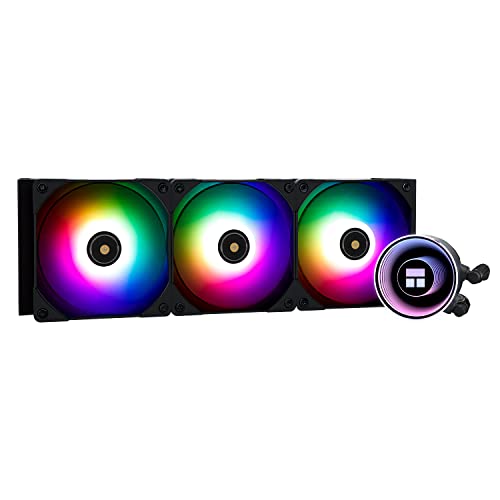
Thermalright Frozen Notte ARGB 72.37 CFM Liquid CPU Cooler (Frozen Notte 360 BLACK ARGB-D1)
weary galleon
keep the fans, thermalright makes good ones
lyric scarab
switching to all phanteks fans tho 
stoic island
t30s are cool but very expensive
lyric scarab
going with the D30
lyric scarab
stoic island
t30s are cool but very expensive
you think im gonna need argb extensions for the nv7?
 formal girder
lyric scarab
you think im gonna need argb extensions for the nv7?
formal girder
lyric scarab
you think im gonna need argb extensions for the nv7?
Thermalright also has an aio with a screen the thermalright warframe argb https://pcpartpicker.com/product/sxP8TW/thermalright-frozen-warframe-argb-7084-cfm-liquid-cpu-cooler-frozen-warframe-360-black-argb

Thermalright Frozen Warframe ARGB 70.84 CFM Liquid CPU Cooler (Frozen Warframe 360 BLACK ARGB)
Tho argb extensions aren’t required but more so if you don’t plan on daisy chaining the rgb
lyric scarab
formal girder
Thermalright also has an aio with a screen the thermalright warframe argb https:...
ah neat. thx
 snow wasp
any techie here?
 fickle bolt
Sup
fickle bolt
snow wasp
any techie here?
U need help?
 snow dragon

plucky timber
snow wasp
any techie here?
Hello
 leaden goblet
what’s the best build for getting a consistent 360fps in fortnite without having to spend a ridiculous amount?
snow wasp
leaden goblet
what’s the best build for getting a consistent 360fps in fortnite without having...
Why do you need that much fps? Just curious to know.
snow wasp
plucky timber
Hello
Hi can you please tell me what is the best SSD (both M.2 or normal SSD) 4tb or more? I want something that's been tested and safe to assume that will last long.
plucky timber
snow wasp
Hi can you please tell me what is the best SSD (both M.2 or normal SSD) 4tb or m...
What can you afford?
What is the use case?
snow wasp
Not sure but maybe £200-300?
snow wasp
plucky timber
What is the use case?
What's that sorry
plucky timber
What are you using the ssd for?
snow wasp
Installing games mainly and record gameplay and maybe store some files too
Do i need to spend more than 300 for a good one? I want one that will last very long time and preferably bigger storage so i don't have to think about replacing it
plucky timber
so you don't need "the best"
although "the best" are all under 300
oh what you can't even get any mediocre ones
the value nvmes are a dollar's difference from the high end ssds
wtf
https://uk.pcpartpicker.com/product/rLqrxr/acer-predator-gm7-4-tb-m2-2280-pcie-40-x4-nvme-solid-state-drive-bl9bwwr120
https://uk.pcpartpicker.com/product/CVWJ7P/teamgroup-mp44-4-tb-m2-2280-pcie-40-x4-nvme-solid-state-drive-tm8fpw004t0c101
https://uk.pcpartpicker.com/product/RKYmP6/samsung-990-pro-4-tb-m2-2280-pcie-40-x4-nvme-solid-state-drive-mz-v9p4t0bw

Acer Predator GM7 4 TB M.2-2280 PCIe 4.0 X4 NVME Solid State Drive (BL.9BWWR.120)

TEAMGROUP MP44 4 TB M.2-2280 PCIe 4.0 X4 NVME Solid State Drive (TM8FPW004T0C101)

Samsung 990 Pro 4 TB M.2-2280 PCIe 4.0 X4 NVME Solid State Drive (MZ-V9P4T0BW)
All these are high end nvmes
snow wasp
One of the techie here recommended me two of the good ones at that time last year butt i couldn't but at that time. They said it's not about brand name it's about that they are at that time, they tested and found the best or better ones.
plucky timber
it is indeed not
there is no such thing as "the best"
only what's best for what you are doing
snow wasp
I see but they said Samsung are doing the worst recently therefore they did not to go for them
plucky timber
https://uk.pcpartpicker.com/product/2BvD4D/silicon-power-ud90-4-tb-m2-2280-pcie-40-x4-nvme-solid-state-drive-sp04kgbp44ud9005
https://uk.pcpartpicker.com/product/79NYcf/msi-spatium-m461-4-tb-m2-2280-pcie-40-x4-nvme-solid-state-drive-spatium-m461-4tb

Silicon Power UD90 4 TB M.2-2280 PCIe 4.0 X4 NVME Solid State Drive (SP04KGBP44UD9005)

MSI SPATIUM M461 4 TB M.2-2280 PCIe 4.0 X4 NVME Solid State Drive (SPATIUM M461 4TB)
here's two mid range nvmes
plucky timber
snow wasp
I see but they said Samsung are doing the worst recently therefore they did not ...
yes but this is a 990 Pro
the EVO and non EVO are the ones you should avoid
990 Pro is overkill for your use case
but I put it here anyways because the price is somewhat reasonable
I wouldn't recommend the M461 because it's within 1-2 pounds of the GM7
UD90 is quite a bit cheaper
snow wasp
plucky timber
990 Pro is overkill for your use case
Could you explain a bit please
snow wasp
Will they last 10 years or more?
plucky timber
that's very optimistic
and not really realistic
lifespan for storage isn't measure in years
but in TBW
but even that is not a given
a 3000TBW ssd has the possibility to die below that rating, albeit unlikely
snow wasp
I kind of read how the lifespan work for ssd
plucky timber
If your really want it to "last"
get the one with the longest warranty
and don't rely on it to keep your data safe
keep backups
snow wasp
Yeah i understand thanks
plucky timber
but for your use case you can easily just get the UD90
snow wasp
plucky timber
but for your use case you can easily just get the UD90
I will check this one out too
Could you recommend something bigger than 4tb?
plucky timber
not unless you want to spend an exponential amount of money
I'd just get multiple 4TBs
you can get 3 4TB UD90s for the price of a 8TB SN850X
snow wasp
I got 2 slot for m.2 i currently have an 1 tb and 500gb and normal ssd2tb
plucky timber
990 PRO 4TB has a 2500 TBW
and 5 years warranty
UD90 4TB has a 2400 TBW and 5 years warranty
like I said
you can pay for the best and you won't see the difference purely due to your use case
snow wasp
So 990 Pro got the highest TBW?
plucky timber
on paper
snow wasp
plucky timber
you can pay for the best and you won't see the difference purely due to your use...
So who would get benefit from using it?
plucky timber
professionals who need to hammer the ssd on a daily basis
they're not only after the durability
but also the sustained write performance
and just the faster speeds in general
snow wasp
I see
plucky timber
In gaming ssd speeds don't matter as much
you'd barely be able to tell the difference between a gen 4 and a gen 5 ssd
snow wasp
Yeah that's true
plucky timber
if at all
The GM7 at 229.99 pounds is a decent middle point
but the UD90 at 189.99 is unbeatable in value
especially if it's just a storage drive
snow wasp
So do those professional have to replace those 990 Pro every few years because of how much pressure they put on them?
snow wasp
plucky timber
but the UD90 at 189.99 is unbeatable in value
Good price
plucky timber
if it's within the warranty period and it's within the TBW
they could get a free replacement from samsung
if the ssd fails outside that period
well
they'll have to buy a new drive
snow dragon
plucky timber
you'd barely be able to tell the difference between a gen 4 and a gen 5 ssd
I dont have a gen 4 drive but I might say the same for 3 vs 4 too
plucky timber
snow dragon
I dont have a gen 4 drive but I might say the same for 3 vs 4 too
in gaming use cases
yes
snow wasp
Thanks for your help, i appreciate it 🙂 @plucky timber
stoic island
snow wasp
So 990 Pro got the highest TBW?
99% of the time you're going to run out the time on the 5 year warranty before you hit 2400 terabytes written, even if you're doing creative work or anything of that sort, anything short of something like chia mining won't do that. 990 pro is a top performer but it isn't the best in a lot of metrics, especially because of the weird 5.0x2/4.0x4 thing
snow wasp
Yeah true
stoic island
I'd say I use my drive more than most people, I'm at 100TB written on my 2tb drive over 2 and a half years
plucky timber
yeah you generally just want a drive that's not hot garbage
snow wasp
Ah i found what the previous techies recommend me, there were two techies and both said these two
 plucky timber
the UD90 manages to be the cheapest drive... and also happens to be good
when was this?
the tech market changes a lot over a couple weeks
snow wasp
It was about 5 months ago i think
plucky timber
yeah that's outdated information
stoic island
z44a7 seems new, are you sure that was what was recommended?
stoic island
mp44 has been and still is pretty decent for the price
snow wasp
stoic island
z44a7 seems new, are you sure that was what was recommended?
Yeah I'm sure
plucky timber
the UD90 is very compelling
stoic island
ud90 is a simple enough drive but qlc and slower
stoic island
4tb is guaranteed qlc, 1tb/2tb can be either qlc or tlc
plucky timber
I mean it's still good as a storage drive
plucky timber
snow wasp
So then 990 it is 😄
well no
snow wasp
I can't find 4tb on Amazon for 990 Pro
stoic island
snow wasp
So then 990 it is 😄
how much does the 990 pro cost you
plucky timber
I've linked other options
the M461, GM7 and MP44 are all good options too
GM7 is only 229
snow wasp
I'll check other sites tomorrow
snow wasp
Can't keep the eyes opened 😄
snow wasp
Thanks and Bye 👋
stoic island
It's slower in terms of peak sequential performance and noticeably worse for sustained if you run out of the pslc cache
But how much that matters depends on what you're doing
plucky timber
the GM7 and the MP44 would be a good middle ground
snow wasp
I might just go for this one so could you please double check if I'm getting the right one? @plucky timber

Silicon Power 4TB UD90 NVMe 4.0 Gen4 PCIe M.2 SSD R/W up to 5,000/4,500 MB/s (SP04KGBP44UD9005)
Should i buy it from Amazon? @plucky timber
Also, what will be a good backup drive? Something to store photos, videos, and other files for a very long time. Or any of them are fine as long as they’re not being written to or deleted often, so the drive doesn’t wear out too much?
stoic island
any are fine as long as you power it once in a while
on the timescale of months that is
it takes a couple of years for it to "degrade" where the change trap slowly loses charge but it'll be fine as long as you power it up and use it at least once a year
snow wasp
stoic island
it takes a couple of years for it to "degrade" where the change trap slowly lose...
Oh i see. I might get this one instead actually.

Get the most out of your gaming PC or high-end ultrabook with Samsung's high-performance 990 PRO NVMe SSDs in a compact M.2 form factor (2280) with blazing read and write speeds of up to 7,450MB/s and 6,900MB/s respectively. Available in capacities from 1TB to 4TB, the SSDs are perfect for both A...
snow wasp
stoic island
that part applies to every drive
Should i pay a bit more and get it with heatsink?
stoic island
if your mobo has a heatsink on the slot, don't need another one
if you do get 990 pro you need to make sure to update the firmware
snow wasp
I got a cheap mobo
stoic island
early firmware on 990 pro is going to destroy itself
stoic island
snow wasp
I got a cheap mobo
it's just a matter of it there will be something on top of the drive to act as a heatsink already or not
cheap mobos nowadays still get something on the m.2 slot
snow wasp
stoic island
early firmware on 990 pro is going to destroy itself
What does it mean?
stoic island
early firmware had a bug where it keeps trying to write until it dies over a couple of days
snow wasp
Omg
snow dragon
I think the firmware came out before that drive did
That was like 2 years ago
Unless that drive came out around that time idk
But there is a high chance that it won't come with that if it did
 simple carbon
Hello i was wondering if anyone would help me find a good pc build for around 700-800$ range? if anyone could help pls dm me or @ me Thank you
snow dragon

snow wasp
stoic island
if your mobo has a heatsink on the slot, don't need another one
I have 2 m.2 drives and they surviving for about 5 years on the same case and motherboard so that means i shouldn't be that much worried about 990 Pro i guess
stoic island
Tom's Hardware
The update fixes the underlying cause of the rapid health declines, but it's not all good news.
snow wasp
plucky timber
there's also the GM7 and the MP44 btw
Do they have dram or pscl?
plucky timber
no but they have HMB
which is what the UD90 also has
(I think)
someone fact check me
stoic island
ye all hmb
snow wasp
stoic island
ye all hmb
This is the heatsink, is it too bad for that drive?
 snow wasp
I don't have Overclocker or anything and i have decent cooling
stoic island
it needs something to act as a heatsink, it doesn't matter that much what exact kind of heatsink you have, it just needs something to act as a buffer for the heat and to increase the surface area to help dissipate heat
snow wasp
stoic island
it needs something to act as a heatsink, it doesn't matter that much what exact ...
Thanks for your help, i will get the one without heatsink then.
 manic cloak
Anyone think 300$ for a 7800x3d in the wrong box is fair? 😭

Looks like Mom is helping her son sell it on Facebook, but I kinda have a sketch feeling about it
weary galleon
They may have bought a 9800x3d and didn't have the 7800x3d box still? A while ago I bought a 5600x that came in a 5900x box and the seller just said they had lost the 5600x box
 fallen sphinx
manic cloak
Anyone think 300$ for a 7800x3d in the wrong box is fair? 😭
fallen sphinx
manic cloak
Anyone think 300$ for a 7800x3d in the wrong box is fair? 😭
It’s a decent deal if you don’t live near a microcenter
manic cloak
fallen sphinx
It’s a decent deal if you don’t live near a microcenter
I do live near the MN one, just I kinda want to save money lol
fallen sphinx
manic cloak
I do live near the MN one, just I kinda want to save money lol
The 7800x3d bundle is better value than that
manic cloak
the 8.375% sales tax still takes a good 40$ out
manic cloak
fallen sphinx
The 7800x3d bundle is better value than that
true, but microcenter has b650 gaming ax2 for 80$, kits of ram from microcenter bundles on facebook for 60$
fallen sphinx
manic cloak
true, but microcenter has b650 gaming ax2 for 80$, kits of ram from microcenter ...
Hm
I mean, that would be good
manic cloak
it'd save me about 100$
just at the risk of not brand new
But then again, microcenter only has a 2 week return policy, and their warranty is extra
I also get the same kit of ram too no matter what
fallen sphinx
manic cloak
I also get the same kit of ram too no matter what
Up to you
manic cloak
fallen sphinx
Up to you
The kid doesn’t have the old box, if any RMA issues/finding serial would be a pain so I dropped the buy
 wanton viper
Hey my computer had an outage occur, my system won't display. Please help.
hollow gulch
manic cloak
The kid doesn’t have the old box, if any RMA issues/finding serial would be a pa...
its on the cpu lol
 vale epoch
Guys any idea on what might be happening?
manic cloak
vale epoch
Guys any idea on what might be happening?
?
vale epoch
vale epoch
Guys any idea on what might be happening?
My desktop is doing this weird blinking whenever i hover over to the change desktop icon in the taskbar
manic cloak
vale epoch
My desktop is doing this weird blinking whenever i hover over to the change desk...
does it do that when you do windows tab?
vale epoch
manic cloak
does it do that when you do windows tab?
Yup
Think i noticed this happening after i installed mhwilds
Dont think this happened before
manic cloak
Could be a drivers thing, I mean when I do desktop 1 with discord open and go into desktop 2 (nothing on there) everything but my task bar goes black for half a second
just a crappy windows transition, but i'd definitely DDU first
vale epoch
Hmm i did update my drivers to the first 572.xx version (4070super) but then rolled back to 566.36 after the blue screen fiasco
I should prolly do a ddu yeah
manic cloak
doesn't hurt anyways, plus it's not too big of a deal but of course we want to fix it
but even then, check all your display settings too
vale epoch
manic cloak
but even then, check all your display settings too
Which ones?
manic cloak
Ik you have nivida, but AMD likes to "recommend game settings" for games I play to increase performance, and sometimes it likes to change my resolution to 1080p instead of native 1440p
manic cloak
vale epoch
Which ones?
driver + windows settings
if you haven't DDU'd yet, check nivida then windows
upper ore
When my girlfriend is playing Palia. The game either crashed or this shows up. I'm stumped and not sure what to do.

 timid bronze
Im planning on buying a new gen 4 nvme 2TB. Currently my os is running on a gen 3 512Gb should i leave it there or install os and games on the new ssd and use the other nvme for other stuff
weary galleon
Assuming the 512gb is decent quality I'd probably just leave the OS on there
timid bronze
weary galleon
Assuming the 512gb is decent quality I'd probably just leave the OS on there
Its the A-DATA SSD 512GB XPG GAMMIX S5 NVMe M.2 228
 alpine horizon
So I’m a beginner, i just upgraded my CPU and I’m wondering if i should upgrade my cooler because my Fans have been going crazy ever since i installed it or maybe i’m just being paranoid and its completely normal
If curious i went from a ryzen 5 5600G to a Ryzen 7 5700X
analog hearth
alpine horizon
So I’m a beginner, i just upgraded my CPU and I’m wondering if i should upgrade ...
Is it might a random fluctuation every few seconds? That’s just a normal Ryzen thing. Is it normal? No. Is it normal for Ryzen? Yes. Why? Idk lol
But if you said your max CPU utilization in your power settings in Control Panel to 99% instead of 100%, the fans will calm down (do this for the Balanced power plan)
I’m working on a program that lets you change power plans a lot quicker than going through Control Panel
upper ore
upper ore
When my girlfriend is playing Palia. The game either crashed or this shows up. I...
Can anyone help please?
fickle bolt
upper ore
Can anyone help please?
looks like the game bugged out. the main thread had an event and it broke.
I'd reinstall the game
 dusky hearth
Make sure all drivers are updated as well (except for GPU if you're on Nvidia)
weary galleon
Or just stay on 566.36
snow dragon
Maybe
weary galleon
That's what I'm doing for the time being
snow dragon
The driver that fixed the 572 issues then introduced its own issue where you put the pc to sleep and whatever temperature the gpu was at when it went to sleep will stay that way when you wake it up
Then new driver came out one hour after jays video and it fixed it
But during those few days, if you had a manual fan curve set, then it wont ram up because it is reporting the temperature it was at when you put it in sleep
However the default curve is controlled by the card itself so not a big deal if you never touched anything
weary galleon
I have a custom curve
I need to work on it though bc it doesn't like starting from a standstill
timid bronze
I currently have this configuration: 512gb for windows and programs, 2tb hdd for games and stuff like videos.
I want to get an m.2 2tb.
Was thinking about the samsung 990 evo plus or the wd sn850x. Also looked at the crucial t500 but saw some complaints about it crashing to lower speeds if u can elaborate on that. What is your recommendation?
stoic island
timid bronze
I currently have this configuration: 512gb for windows and programs, 2tb hdd for...
T500 and sn850x are both top performers, 990 Evo plus is a step below both. T500 is configured a bit weirdly, the pSLC cache is most of the drive, so once you run out, the performance drops to basically 0, and it writes at the speed the pSLC recovers at. The advantage is that it has a bigger pSLC cache so you sustain that higher performance for longer.
stoic island
timid bronze
I currently have this configuration: 512gb for windows and programs, 2tb hdd for...
The behavior for sustained write is something like this:
990 Evo plus writes at 6000mb/s for 40s and then drops to 1500mb/s for the rest of the write,
T500 writes at 7000mb/s for 120s and then drops to 0, and then every few seconds come back to 7000mb/s for a second and then back to 0.
Sn850x writes at 7000mb/s for 60s, and then drops to 1500mb/s for the rest of the write
 tawny violet
I'm fairly sure that the SN850X would be better then
Although, what does the math come out to?
840000 megabytes for the T500 over 120 seconds
510000 for the SN850X over the same 120 seconds
Huh, even with the fixed speed on the 580 it'd need significantly more time to catch up
Fascinating
stoic island
Once you're out, the performance kinda dies and it's basically unusable for anything that requires constantly reading or writing to the drive
tawny violet
Okay something is wrong
There's no way the T500 can write 820 gigabytes in 2 minutes
That does not make sense
I guess that's theoretical performance
stoic island
Also it's not quite 120s, it's ~110, just rounded up
stoic island
tawny violet
There's no way the T500 can write 820 gigabytes in 2 minutes
It can and does
It uses basically all of its TLC as pSLC
Which would be 1/3 the space of 2tb
Well not quite 820 but yea
It writes all of its TLC in the form of pslc
And then runs out and you wait for it to recover
stoic island
tawny violet
I guess that's theoretical performance
Oh forgot to mention this would all be on fresh drives
tawny violet
I don't see myself move 820 gigabytes of data all that often in one go
At least in a consumer/gaming PC setting
Warzone install is what, 200 gigs?
stoic island
If 75% of the drive is full, the pSLC cache would become 166gb
The more full it is the less pSLC you'll have
Applies to the other drives too but yea
weary galleon
keep in mind that nvme speeds really don't matter for gaming
stoic island
They were talking about videos so my guess is part of what they'll use it for is video editing, where it may matter with higher resolution raw footage
weary galleon
oop missed that and just saw gaming, my bad
stoic island
It could be either, if just gaming, it won't really matter
weary galleon
for raw 4k video yeah you might see a difference. For just 1080p or 1440p gaming clips it shouldn't matter
stoic island
Outside of the t500 quirk coming up if you're like >90% full on the drive
weary galleon
I think that goes for most ssds, you wanna leave 10% empty
helps with both perf and longevity
stoic island
Most ssds when you run out of pslc will just have native tlc you can write to and continue using, but with the t500 quirk, once you're out of pslc, it just stops until it recovers pSLC
timid bronze
stoic island
T500 and sn850x are both top performers, 990 Evo plus is a step below both. T50...
Forgot to mention the pc is just for gaming and watching content, no heavy loads and 4k videos and stuff
stoic island
All of them are fine for that, just grab whichever is cheapest
timid bronze
T500 then. Tnx 🙂
timid bronze
stoic island
All of them are fine for that, just grab whichever is cheapest
If you have any cheaper offers that performance wise will be the same for my needs ill happily hear them
stoic island
this is pretty cheap for the US rn
https://www.newegg.com/kingspec-2tb-xg-7000-series/p/0D9-000D-00172
weary galleon
is that the one that techpowerup tagged as having multiple hardware versions?
Ah yeah it is. iirc we talked about it and the 4tb is the one to be wary about, I think the 2tb is ok
stoic island
ye, the 4tb can be qlc, 2tb is only known to be tlc
timid bronze
stoic island
this is pretty cheap for the US rn
https://www.newegg.com/kingspec-2tb-xg-7000-s...
I cant find a lot of information about that one is it reliable? Also they dont sell it in my country is it safe to order from ali express
stoic island
what country
lyric scarab
Anyone can recommend a good case display screen?
stoic island
timid bronze
Is the kingston nv3 a good pick
What's the price like
it's a much more budget drive
timid bronze
stoic island
What's the price like
The nv3 is like 120$ here and the cheapest option of the other 3 we talked about earlier is the t500 is 160$
stoic island
What other options do you have?
 delicate rivet
@stoic island Not sure if you remember but I had the issue where my screen kept having pixels and screen tearing
I switched to normal hdmi cable instead of display port and it seems to be working fine
is the display port on my monitor messed up then or something?
stoic island
could be cable, port on your monitor, or port on your GPU
delicate rivet
Is something fixable if its on monitor
stoic island
Unlikely unless it's just bad contact
timid bronze
Cheapest one i could find is the nv3
manic cloak
Any opinions on 9070xt Asus Prime for 720$?
stoic island
pretty decent for this amrket
stoic island
timid bronze
Cheapest one i could find is the nv3
what options do you have between nv3 and t500?
timid bronze
stoic island
what options do you have between nv3 and t500?
MSI SPATIUM M470 PRO
Western Digital Blue SN580
AGI AI828
Wd black sn 770
Kingston kc3000
stoic island
timid bronze
MSI SPATIUM M470 PRO
Western Digital Blue SN580
AGI AI828
Wd black sn 770
Kingst...
I'd grab the sn770 over nv3 if it's at a similar price
oh and kc3000 over both if it's at a similar price
timid bronze
stoic island
oh and kc3000 over both if it's at a similar price
Kc3000 is just 10$ under t500 should i just get the t500
stoic island
kc3000 is pretty similar performance wise to sn850x
bigger pslc cache than sn850x but recovers the cache a bit slower
doesn't have the same quirk as t500
timid bronze
I think im just gonna buy the t500 thank you for the help
stoic island
alright good luck
 dense pine
Hey guys I have a question my computer turns on but I get now display just black screen this was after it didn't want to turn on at all after disconnecting everything and plugging it back in it comes on but no display just black screen I've swapped gpus and checked ram and it seems all good I just don't know what else it could be
dusky hearth
Swapping GPUs sometimes requires a CMOS reset
dense pine
I did that as well I swapped the batteries
dense pine
Yes rgb comes on fans on seems on the monitor says connection no signal
Just black screen when "on"
fickle bolt
what GPU you have
dense pine
Amd 5600 xt
fickle bolt
and you said the monitor detects the gpu but doesn't output anything?
fickle bolt
ok it's a problem with your monitor then
try this- if you can connect it to another device and access the monitor settings, see which input source is selected.
i would also swap around cables and ports
dense pine
I did do that with the moniter as well
The moniter is just a small TV that I can use a remote to chnage and access
dense pine
Hdmi 2
fickle bolt
I assume that's the one you're using, hmmmmm
dense pine
The gpu only has 1 hdmi slot i haven't tried display ports yet
And yes it is
Like the moniter also detects the cord is plugged in just no signal
fickle bolt
dense pine
The gpu only has 1 hdmi slot i haven't tried display ports yet
if you have a DP cable and a port oin the monitor, I'd switch to that
dense pine
Okay
 old sedge
this is what im using now is there anything i can do to upgrade this? https://pcpartpicker.com/list/JPthXk this is the case https://www.cyberpowersystem.co.uk/spec/getspec.aspx?n=CAS&g=1&sid=CAS&pid=CS_CPONYXIA&v=Cyberpower ONYXIA Mid-Tower Black Gaming Case w%2F USB 3.0%2C Front %26 Side Tempered Glass
upper ore
Can anyone help me with this? This game is still crashing even after I reinstall it. Is it with my old pc or is it just the game

 quiet cedar
Make sure you have no oc or undervolt applied to any of your componenets
 crimson zinc
old sedge
this is what im using now is there anything i can do to upgrade this? https://pc...
crimson zinc
old sedge
this is what im using now is there anything i can do to upgrade this? https://pc...
What’s your budget?
old sedge
crimson zinc
What’s your budget?
not to sure really want to save as much as posible tho
possible
stoic island
Main upgrade is still going to be GPU, whatever you can get for a decent price
crimson zinc
old sedge
not to sure really want to save as much as posible tho
Do you have a ballpark?
plucky timber
old sedge
this is what im using now is there anything i can do to upgrade this? https://pc...
You really can't upgrade on the cpu side
So you're left with the gpu
8700k has a bit of headroom to work with
Upgrading the SSD might be a good idea too
Going from the dramless sata to a gen 3 ssd (or gen 4 but you'll be capped at gen 3 speeds) might be beneficial
 spice hemlock
what you guys think about this as my final build before graphics card?
waiting on a good deal for a good card to show up
fallen sphinx
spice hemlock
https://pcpartpicker.com/list/hjFPYd
Why is 9800x3d that much
plucky timber
Meh value
stoic island
spice hemlock
https://pcpartpicker.com/list/hjFPYd
make sure to get everything at close to msrp prices, that 9800x3d is out of stock at normal prices rn, and make sure to plan out what you're actually doing with that case, you shouldn't really need 3 extra fans, and make sure you pay attention to GPU size and the PSU orientation, since those affect what fans fit where in that case.
since you have a 360mm aio in the list, you're limited to F2.5/F3 layouts in the case, so that you can top mount the 360mm, but that limits you to less room for GPU
 zenith cargo
my entire pc crashes and restarts after exiting a video from fullscreen on yt while running a game in the background
 obsidian wigeon
run ddu and reinstall gpu drivers
snow dragon
This might be an amd thing
I didnt have a crash but I would have a gpu reset if I were to fullscreen a discord video on my secondary vertical monitor
Wouldnt happen every time tho
 tall shard
What’s a good air cooler for a 5 5600 to keep it quiet and cool because the stock cooler is not doing the job
snow dragon
Nothing crazy
You can get a super cheap thermalright cooler
Doesnt have to be the peerless assassin it can be something else even cheaper
Id cooling makes some cheap stuff too
snow dragon
Yeah
tall shard
Some more rgb also
snow dragon
Some matx are smaller but a lot of matx cases are just a shorter mid tower
snow dragon
Yours is like a smaller mid tower so you should be fine
tall shard
Alr
 tall shard
Oh yeah
snow dragon
It will have the measurements for cooler sizes
weary galleon
tall shard
What’s a good air cooler for a 5 5600 to keep it quiet and cool because the stoc...

Thermalright Assassin X Refined SE RGB V2 66.17 CFM CPU Cooler (AX120R SE V2 D6)
Or this, which will be overkill for a 5600 but you can put pretty much any cpu under it and it will keep it cool. Good if you upgrade in the future

Thermalright Phantom Spirit 120 SE ARGB 66.17 CFM CPU Cooler (PS120SE ARGB)
snow dragon
weary galleon
Or this, which will be overkill for a 5600 but you can put pretty much any cpu u...
True at least it would be ultra quiet lol
I love overkill cooling
tall shard
prob jus gonna go with the cheaper one
spent enough money on the pc and still need a activation key lol
weary galleon
the assassin x is still great for a 5600 and will work for a 5700x3d or 7600/7500F in the future
tall shard
How’s it compared to the se 214 xt
weary galleon
I think they're pretty similar performance wise, but I would personally go for the assassin just because it's from thermalright
tall shard
Should I buy like name brand thermal paste
weary galleon
the assassin comes with a small tube of thermalright paste which in my experience is fine
snow dragon
Yeah I would say that they are
Probably not by much but they probably would be better
 crude onyx
ill take it. i just want as quiet of a pc as I can get whlie being moderately cooling efficient
 cloud hatch
Who to fix my pc if it is not downloading
 mystic dune
i believe you need to give just a bit more context so someone can try and offer advice
 frigid jackal
Newly buily pc, turned on the pc with a screw driver earliwe to test and bios shower up, but now with the front panel connector connected it wont turn on

no fans spinning or anything
any help 🥺
snow dragon
I dont think thats the front panel connector
There is nothing plugged into whats labeled pw
So from left to right on the top row, it would be pin 3 and 4
frigid jackal
ohhh alright
snow dragon
snow dragon
I dont think thats the front panel connector
If it is, I guess its one of those that dont have all of the lights or something because I was expecting more wires
What is on the connector
plucky timber
That is the front panel header
However you've got everything plugged into the wrong position
snow dragon
Yeah gotta move it over
snow dragon

 neon condor
cloud hatch
Who to fix my pc if it is not downloading
neon condor
cloud hatch
Who to fix my pc if it is not downloading
Please state what your computer is, a laptop, desktop? Also can you open system info & tell us what some basic specs are on the PC? Is it a Dell, HP, Acer, Lenovo etc... or is it a desktop brand like Oragin PC etc.
Please give more information so your request can further be addressed.
frigid jackal
I bypassed the lets get you connected to a network screen and setup everything, but now I install the wifi drivers but it wont work for my gigabyte b650 mobo

in the device manager this is all I see

i’m assuming i installed the wrong driver?
cloud hatch
neon condor
Please state what your computer is, a laptop, desktop? Also can you open system ...
It is a desktop
spice hemlock
stoic island
make sure to get everything at close to msrp prices, that 9800x3d is out of stoc...
since im not super knowledgeable on layouts should I just go with something bigger you think? or most of everything I have would work exception of the fans and grab a specific GPU?
stoic island
spice hemlock
since im not super knowledgeable on layouts should I just go with something bigg...
Just take a look at the case's site and make sure you understand how you'll be putting it together, it all works together, just that for example you may not be able to put 3 fans up top depending on PSU placement, be careful with details and knowing that you may only have 334mm for the GPU instead of the max listed 415mm

 raven pebble
Is this bad? I'm running occt rn

 plucky timber
That is a cpu yes
raven pebble
I'm talking about the pic on the right, is that bad?
plucky timber
That just looks like different lighting
 plucky timber
Can I steal a core
raven pebble
 snow dragon
Well I will be selling my good ol 5600 if you want
snow dragon
raven pebble
Well thats interesting
raven pebble
Still ok?
raven pebble
snow dragon
Well thats interesting
Yeah lmao
snow dragon
snow dragon
Well I will be selling my good ol 5600 if you want
@plucky timber
 modest iron
Hi
My current keyboard sucks thinking of buying a new one, any suggestions? only thing i care about is that its the best gaming keyboard i can get for my budget ,150-190 $
frigid jackal
usd?
stoic island
Keychron K2 HE will be fine
plucky timber
snow dragon
Well I will be selling my good ol 5600 if you want
I want a single core
 modest iron
frigid jackal
usd?
modest iron
frigid jackal
usd?
Yes
stoic island
modest iron
Would tiger lite be better
It'll be comparable, the stabs will be nicer but it'll end up being more expensive when considering switches and keycaps
Or at least I think Keychron still uses clip in stabs on K series? Supposed to have been updated but generally you're still going to have more and better options with screw in stabs
plucky timber
what about the Königstiger
 mental hazel
snow dragon
One true core
mental hazel
snow dragon
One true core
One core to rule them all, One core to find them,
One core to bring them all and in the darkness bind them
snow wasp
Hi @plucky timber I got the 990 Pro as you advised and i need a bit of help from you please.
i didn't know how else i could check the firmware version so i downloaded Samsung Magician and it showing it got the lastest firmware update, is it the up to date version and does this software show exact version the SSD currently have?


 raven prism
plucky timber
what about the Königstiger
raven prism
plucky timber
what about the Königstiger
boomer i got the computer built
raven prism
stoic island
It'll be comparable, the stabs will be nicer but it'll end up being more expensi...
you too you helped me too i got the computer built
but like i've never used a pc before and idk what steps to take and i started downloading games and stuff but im still very lost
raven prism
NEVERMIND I GOT IT
ILL SEND A PIC OF MY BUILD WHEN I GET EVERYTHING SITUATED
I ACCIDENTALLY PLUGED MY HDMI DISPLAY INTO MY MOTHERBOARD
BAHAHAHAHA
modest iron
stoic island
It'll be comparable, the stabs will be nicer but it'll end up being more expensi...
Hi i got this

 raven prism
plucky timber
what about the Königstiger
raven prism
plucky timber
what about the Königstiger
actually now i have a question boomer do you know how i can change the leds on my case
ill send u the one u rec again
Montech X3 Mesh ATX Mid Tower
Case
this case
raven pebble
snow wasp
i didn't know how else i could check the firmware version so i downloaded Samsun...
it will show it in drive details right under dashboard
stoic island
fair
frigid jackal
im tryna install drivers for my gigabyte b650 eagle ax and when I try to install the wifi drivers from their website it'll say correct install but I still can't access wifi and it doesn't seem to appear on my device manager
raven prism
where do i get an activation key
stoic island
frigid jackal
im tryna install drivers for my gigabyte b650 eagle ax and when I try to install...
Double check which version of the board you have, they have 2 separate wifi drivers since one version of the mobo uses a realtek chip and another uses an Intel wifi chip
stoic island
raven prism
where do i get an activation key
Windows activation key? You either don't put one in if you don't want to activate windows, if you physically bought windows, it's written usually inside the packaging, if you bought it online, usually it'll be emailed to you.
 mossy lion
hello question i made a new pc that come with 6 rpg fans with the case. They are molex connected together is there any way for me to control the color of them or is that out of the question. Here is the case i used
Montech X3 Mesh ATX Mid Tower Case
weary galleon
mossy lion
hello question i made a new pc that come with 6 rpg fans with the case. They are...
If the only connector on them is molex I don't think they're controllable
raven pebble
frigid jackal
im tryna install drivers for my gigabyte b650 eagle ax and when I try to install...
Are u using the antenna lol
plucky timber
snow wasp
i didn't know how else i could check the firmware version so i downloaded Samsun...
sorry this is a bit out of my area of expertise, I'd recommend asking in #storage-devices
plucky timber
raven prism
actually now i have a question boomer do you know how i can change the leds on m...
Are the fans plugged into an argb header on the motherboard?
 dull bloom
I'm having some cooling/aesthetics issue. so i just did a complete overhaul/new build. i bought a lian li 011 evo xl and it came with 6x sp140 and a sp120. they dont have the fastest speed. was a perk of buying the case at such a good price. so im reusing my kraken z63 for my 9800x3d and put the sp140s on the rad. cooling that beast is hard with this aio. its thermally rated for the 9800x3d but i'm seeing temps of anywhere from 85-93c. i went abd bought the deepcool ak620 and it keeps that under any load under 65c. i just hate the giant brick in the middle of my pc. so does anyone have the 9800x3d under water (aio) that is keeping it at decent temps under load. i need ideas
mossy lion
weary galleon
If the only connector on them is molex I don't think they're controllable
Yes only that nothing
weary galleon
dull bloom
I'm having some cooling/aesthetics issue. so i just did a complete overhaul/new ...
Thermalright 360mm aio should handle a 7800x3d fine
They have a lot of different models depending on your asthetic tastes
plucky timber
dull bloom
I'm having some cooling/aesthetics issue. so i just did a complete overhaul/new ...
NZXT AIOs are also notably mediocre for their price
the ak620 is an ok cooler but there are way better air coolers
there are several options available to you
you could get a better air cooler or a better aio
Thermalright Phantom Spirit 120 SE ARGB 66.17 CFM CPU Cooler (PS120SE ARGB)
This would do fine
oh wait I read that wrong
you want an AIO
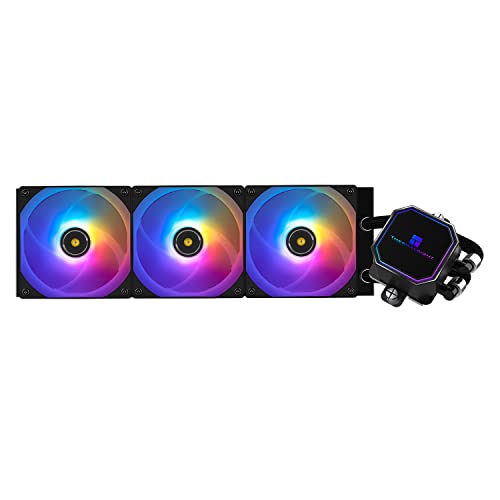
Thermalright Frozen Prism ARGB 70.4 CFM Liquid CPU Cooler (Frozen Prism 360 BLACK ARGB)
raven pebble
dull bloom
I'm having some cooling/aesthetics issue. so i just did a complete overhaul/new ...
I got a thermalright warframe aio on my 9800x3d
dull bloom
raven pebble
I got a thermalright warframe aio on my 9800x3d
whats your thermals under load?
raven pebble
dull bloom
whats your thermals under load?
Hold for 1 sec and I'll run occt
raven pebble
dull bloom
whats your thermals under load?
so running occt for 10 min, 1.11v, pulling 144w, @100% usage at 4700mhz is giving me max about 83. floats between 81-83
one sec and ill send a pic of what the MB tells me the sp and cooler score are
 tawny violet
I wonder if a PS120 SE would be anywhere close to that
raven pebble
only thing that sucks about warframe is the absolute cheek software they used for the led screen lol
for price im not complaining, i also dont have the stock fans on there, i put on ones with lower rpm's to match my case fans as well
under ram and cpu test for 10 min occt is showing 65.2 on cpu at 1.2v, 107W, 100% usage at 5146 mhz.
 merry turtle
I've been having problems with my laptop lately, it seems to disconnect from internet frequently at random times. This is the overview of what's in it and everything. I've tried doing a hardware check, checking my drivers, it happens at home and with other internet wifi sources, I've tried getting a USB wifi adapter as well but no luck. I'm stumped as to what it is unless something is wrong with it internally. Anyone have any ideas? Any help would be greatly appreciated
 snow dragon
tawny violet
I wonder if a PS120 SE would be anywhere close to that
snow dragon
tawny violet
I wonder if a PS120 SE would be anywhere close to that
Probably
plucky timber
yeah that's the thing about aios
they're kinda mid in value
a $40 PS120 can cool most cpus
assuming that the case airflow isn't dogcrap
tawny violet
plucky timber
a $40 PS120 can cool most cpus
what would be the difference in temps?
PS120 wouldn't hit 95 on it right?
frigid jackal
raven pebble
Are u using the antenna lol
yh
installed both realtek + intel
turns out the right wifi drivers arent even on the website for the mobo
had to use gigabyte control center and it installed it

lame ahhh website
 covert arch
ey everyone, iive decided i want to build a pc since im tired of laptops
could someone dm me a top teir gaming pc with a budget of 1.25k? thank you!
 languid nimbus
covert arch
ey everyone, iive decided i want to build a pc since im tired of laptops
could ...
languid nimbus
covert arch
ey everyone, iive decided i want to build a pc since im tired of laptops
could ...
Are you ca? US? With current prices you’re not going to get “top tier” anything unfortunately but a list can be tossed together with the best you can currently get
covert arch
languid nimbus
Are you ca? US? With current prices you’re not going to get “top tier” anything ...
US, sadly
i was asking top tier as in with my budget
languid nimbus
covert arch
US, sadly
i was asking top tier as in with my budget
Gotcha, is that price including peripherals? Do you need WiFi?
covert arch
languid nimbus
Gotcha, is that price including peripherals? Do you need WiFi?
and no, i have a keyboard, mouse, and moniter
languid nimbus
covert arch
i have wifi <@122463331834396676>
Meant are you going to be running Ethernet to your pc or going over WiFi, sorry
covert arch
languid nimbus
Meant are you going to be running Ethernet to your pc or going over WiFi, sorry
I'm in a house hold of 6, sadly I don't have the ability for ethernet
languid nimbus
Part List - AMD Ryzen 7 9700X, Radeon RX 7700 XT, Montech XR ATX Mid Tower
^ @obsidian wigeon what do you think about this build? (double-checking)
obsidian wigeon
looks good
mobo could be cheaper tho
unless that's as good as it gets rn
i haven't been lookin at prices much
languid nimbus
Yeah I think that’s about as cheap as they get with WiFi & without being micro
snow dragon
Asrock my beloved
covert arch
languid nimbus
https://pcpartpicker.com/list/jmFmJn
So this is the pc that's good for me?
languid nimbus
I’d say so, yeah
merry turtle
This is the overview of what's in my laptop, I've been having problems with it disconnecting from the internet frequently at random times. It happens with any internet wifi source, I've checked the drivers, done a hardware scan, and got a USB wifi adapter but it still happens. Anyone have any ideas what I could try to fix it, my guess is it might be bad parts internally or something but I really don't know. Any help would be appreciated.
 quiet cedar
The wifi on it most likely is crap mediatek stuff and usb wifi adapters also aren't usually good unless you get the really nice ones
stoic island
merry turtle
This is the overview of what's in my laptop, I've been having problems with it d...
What specific model do you have? Doesn't list the actual wifi chip on that
 stoic island
That's one of the models where it can have one of 3 or more possible wifi chips, you'll need to make sure you're getting the correct wifi driver, could be an Intel chip, could be a mediatek chip, could be a realtek chip
 runic cedar
Can I unscrew this?

 begging people to buy a pc for u
Bro no1 will buy it for u and anywhere u keep asking u will get banned from those servers
 sullen spoke
no ebegging
covert arch
sullen spoke
no ebegging
Ok
merry turtle
@stoic island I wasn't able to check until just recently because I was at work sorry. It's Realtek chip and driver and it still disconnects
stoic island
merry turtle
<@278694081440251905> I wasn't able to check until just recently because I was a...
would recommend trying to uninstall and reinstall those drivers, realtek drivers, although mainly their audio drivers, are notoriously unreliable
merry turtle
Uninstall the and reinstall the realtek drivers?
Can do
@stoic island Might be a stupid question because I don't think I've had to reinstall the drivers for a long time if at all, where would I be able to reinstall the realtek drivers
stoic island
merry turtle
<@278694081440251905> Might be a stupid question because I don't think I've had ...
Will need to double check which exact model you have, easiest way is to just use HP's tool on their website and go from there
https://support.hp.com/us-en/drivers/laptops
if not, check the bottom of your laptop for the label with model and serial number, and then type that into that site and download from there
merry turtle
@stoic island I used the link, and downloaded the driver it told me to. I then un-installed the driver I had and tried installing the new one and it didn't work, now my laptop can't connect to the internet at all.
stoic island
What exactly does it say when you install the new driver?
merry turtle
I don't think it was the proper one, I went and downloaded a new one onto a USB and then downloaded it from the usb onto the laptop and it seems to be working now
thank you for the help, if it continues to not work I might just look at getting a new one or see if there are any other solutions
stoic island
bit weird but always possible
wouldn't recommend usb wifi adapters in general, would probably look into seeing if you could get it warrantied and fixed for free if problems persist
merry turtle
I think I bought it off of Newegg's website like last year or the year before, so its well past the time I would have been able to get it sent back or anything
I appreciate the help and time you've given very much
 sacred holly
Ello, I think it’d be best to build my own PC, and I know nothing about PCs, I am stuck on console currently, I would hope to make a high performing cheap PC, somewhere near $700-$900, unless there are amazing prebuilts that I have not yet discovered, I maybe be asleep if you message me but if someone could please help me, I’d be grateful, thanks.
old sedge
whats a good price for a rtx 3060 12gb?
crimson zinc
old sedge
whats a good price for a rtx 3060 12gb?
$250-270
But I’d suggest something else
old sedge
crimson zinc
$250-270
But I’d suggest something else
like what?
anything good for 3d work?
 round briar
Thinking of getting an ASUS ROG Strix 27" 1440p XG27ACS, for use with a 7900xt. Anyone that has it or knows it, know if it is a good monitor?
quiet cedar
It is decent
zenith cargo
do oled displays gets dimmer as time goes by?
had mine for about 5 months now and my monitor seems dimmer than it used to be
I remember getting flashbanged at night when loading white pages
I use the pixel cleaning process daily to reduce burn in as well
lately i’ve just noticed it being dimmer
zenith cargo
round briar
Thinking of getting an ASUS ROG Strix 27" 1440p XG27ACS, for use with a 7900xt. ...
get an msi
asus is horrible
round briar
zenith cargo
get an msi
got any good 1440p ones under or around 300$?
I have two 1080p MSI monitor rn, and I love them ngl
weary galleon
zenith cargo
do oled displays gets dimmer as time goes by?
Yes, they get dimmer over time. The anti image retention is basically making sure that all the pixels wear out at the same rate. 5 months seems unusually fast though
zenith cargo
weary galleon
Yes, they get dimmer over time. The anti image retention is basically making sur...
yea I know it would eventually get less bright but it's only been 5 months
I've also disabled every screen dimming feature but its still dim
 barren flint
Hey guys is it necessary to place thermal paste on the cpu cooler?
fickle bolt
no, just cpu IHS
 balmy hornet
Looking to upgrade CPU + Mobo + Ram, looking at AM5, requirements: Optical S/Pdif out, Prefer: 10Gbe Lan port(s), looking at the Gigabyte B850 AI Top currently. Thoughts?
plucky timber
In a sec
stoic island
balmy hornet
Looking to upgrade CPU + Mobo + Ram, looking at AM5, requirements: Optical S/Pdi...
If you need 10gbe, that's about as cheap as you'll get for the mobo, if you're fine with 5gbe, b850-p will do for $100 cheaper mobo wise, but what is your goal for the CPU and ram?
balmy hornet
stoic island
If you need 10gbe, that's about as cheap as you'll get for the mobo, if you're f...
Mostly gaming. Looking at a 32GB kit of ddr5-6000. My old CPU and ram will be used in a Minecraft server. Will probably throw one of my spare 10Gbe nics in there (they're old 8x slot cards that need a full 16x slot)
stoic island
there's some pretty cheap 2x16 6000c30 kits rn
balmy hornet
I say mostly gaming as there'd be some productivity work occasionally.
balmy hornet
stoic island
there's some pretty cheap 2x16 6000c30 kits rn
I mean, even Trident Z isn't bad ATM. $110 for that kit iirc
stoic island
I mean it's $80 for 6000c30
https://www.newegg.com/patriot-32gb-ddr5-6000/p/N82E16820225334
balmy hornet
Also for reference on the parts I'm keeping, 750w gold rated EVGA psu, MSI RTX 4080, and a 1TB nvme boot + 1TB Sata SSD + 2x4TB hdds, case i can't remember the model off the top of my head but I think it's a deep cool CH510
stoic island
balmy hornet
Also for reference on the parts I'm keeping, 750w gold rated EVGA psu, MSI RTX 4...
need more specifics on the PSU
balmy hornet
stoic island
I mean it's $80 for 6000c30
https://www.newegg.com/patriot-32gb-ddr5-6000/p/N82E...
This is going to sound normie of my but I'd actually like RBG to keep with the theme of my case.
stoic island
balmy hornet
This is going to sound normie of my but I'd actually like RBG to keep with the t...
just saying, but ram rgb is tiny when it comes to the aesthetics of a build, it's just such a small part when it comes to the whole PC lol
g2 and g3 are fine though
balmy hornet
stoic island
just saying, but ram rgb is tiny when it comes to the aesthetics of a build, it'...

Oh there's a reason. Lol, it's pretty noticable in my build.
stoic island
oh royals lmao
would just swap to non-rgb since you really don't want 4 sticks on ddr5 rn
balmy hornet
M thought about a 4 stick kit to keep with my theme but I should be fine with a dual kit.
balmy hornet
stoic island
oh royals lmao
I like how you noticed they're royals and not standard lol (they were the cheapest 64GB kit at the time funnily enough)
balmy hornet
stoic island
would just swap to non-rgb since you really don't want 4 sticks on ddr5 rn
Is this cause everyone designs their traces the same where ram runs better in a 2 stick configuration?
stoic island
balmy hornet
Is this cause everyone designs their traces the same where ram runs better in a ...
nah, it's about the CPU IMC currently just not being good enough
and mobos have been doing mostly daisy chain instead of t top for years now, very little difference on the mobo side
stoic island
balmy hornet
I like how you noticed they're royals and not standard lol (they were the cheape...
royals are very sparkley lol
balmy hornet
stoic island
nah, it's about the CPU IMC currently just not being good enough
Ah, makes sense. I know my current MB was one of the few Z390s that used the equal length traces for ram that runs better with 4 sticks but sacrifices some 2 stick potential.
stoic island
I feel that 2 sticks instead of 4 sticks with rgb is just going to make it obvious that it's missing something, might as well make it non-rgb so that it isn't as noticeable
stoic island
balmy hornet
Ah, makes sense. I know my current MB was one of the few Z390s that used the equ...
yea that's about when they stop doing t topology, very few are t top nowadays
but it matters extremely little
balmy hornet
stoic island
yea that's about when they stop doing t topology, very few are t top nowadays
Rip, might look for a kit with matching dummy sticks if I do go RGB lol
stoic island
I'd just do 2 non-rgb sticks, it'll look fine when it's not all sparkley and noticeable lol
balmy hornet
stoic island
I'd just do 2 non-rgb sticks, it'll look fine when it's not all sparkley and not...
Fair, I'm also debating on getting a new cooler cause I need to check and probably clean out my AIO, also would need to get the mounting kit from EK.
balmy hornet
plucky timber
I'd probably just get a 10gbe nic off ebay
My only concern would be GPU cooler clearance running a 10Gbe PCIE card.
stoic island
balmy hornet
Fair, I'm also debating on getting a new cooler cause I need to check and proba...
well uh good luck, ekwb has been going through some problems
balmy hornet
stoic island
well uh good luck, ekwb has been going through some problems
Hence another reason I'm considering getting a new cooler. Might go noctua and just spend a bunch of money.
weary galleon
Thermalright is about as good and way cheaper
covert vapor
Thermalright is better than alright
 snow dragon
languid nimbus
https://tenor.com/view/shady-sips-tea-oop-well-wow-gif-16405754050455669486
snow dragon
languid nimbus
https://tenor.com/view/shady-sips-tea-oop-well-wow-gif-16405754050455669486
Usb 3.0 header


 dusky hearth
More like ◾
snow dragon
dusky hearth
More like ◾

Fellas
Booted first try
But something I have not seen before happened. The power led started flashing quickly the went back to static and did it a few more times
Then it booted to windows instead of linux
Weird
But, I am in
Figure that out later
Looks like ram caused it
Ram is at 5200
All good just some bios tweaking
Main thing is that the computer is functional
dusky hearth
snow dragon
But something I have not seen before happened. The power led started flashing qu...
Oh hey post codes
This is actually how quite a few OEM PCs do it if they don't have a buzzer
snow dragon
dusky hearth
Oh hey post codes
Looks like memory training because it does it every time I boot
Only takes a couple seconds now
manic cloak
snow dragon
Looks like memory training because it does it every time I boot
i'm guessing you didn't let the ram train itself 😭
snow dragon
It does when I change something
It flashes for longer
But on boots after I change something then it just takes a couple seconds
manic cloak
snow dragon
It flashes for longer
it's probably the equalivent to the white vga on boot
Unless that's not normal.. but my motherboard shines it's white vga for like 4 seconds before getting display
tawny violet
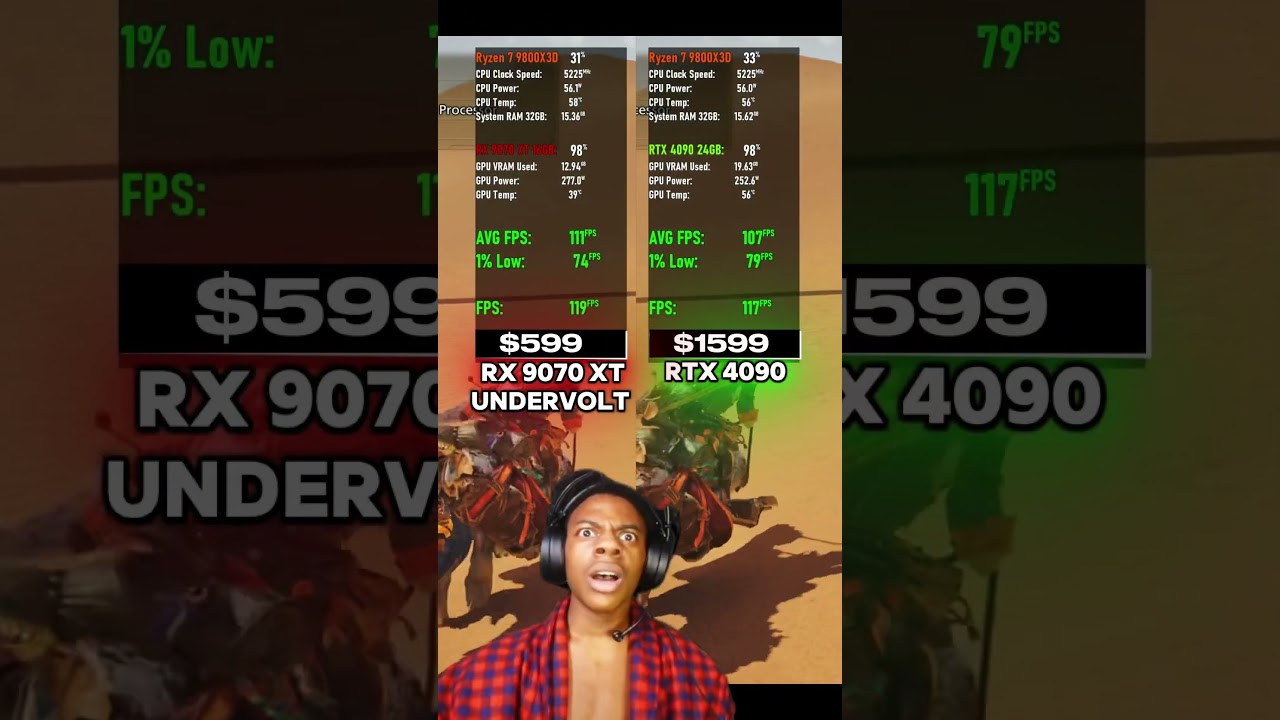
How often does this happen?
https://www.youtube.com/shorts/mZlebmDFouM
 snow dragon
tawny violet
How often does this happen?
https://www.youtube.com/shorts/mZlebmDFouM
snow dragon
tawny violet
How often does this happen?
https://www.youtube.com/shorts/mZlebmDFouM
Beating 5080 I understand
4090 tho?
Idk
Power draw seems legit though
tawny violet
I guess it depends on the game too
snow dragon

 grave crescent
Any atx mobo suggestions for r5 7500f, 32gb ram, 6700xt, and 1tb ssd
Needs WiFi preferable and will probably want storage upgrade ability in the future
Budget is not too high less than 240/250 probably
grave crescent
I have an everything else already my case is atx
stoic island
mATX installs fine in an ATX case, the screw holes are the same
grave crescent
I have a x670 board but the reman job was terrible and I’m pretty sure it’s causing issues and my return windows closed today so I went ahead and put in for return and I’m replacing with a new one
Between the b650 and b850 what is more stable
 sage thunder
would adding a 1050 TI to my build make it gain fps, lose fps or stay the same? (im getting the 1050 ti for free from a friend) heres my current build: https://pcpartpicker.com/list/92jgFZ
Part List - AMD Ryzen 5 8600G, Vetroo M05 MicroATX Mid Tower
 slender furnace
1050ti is probably buns
Are you not using a gpu bro
Well ill be darned 1050ti just BARELY outperforms my gtx 770
weary galleon
sage thunder
would adding a 1050 TI to my build make it gain fps, lose fps or stay the same? ...
I believe the 760M igpu is better than a 1050ti
snow dragon
sage thunder
would adding a 1050 TI to my build make it gain fps, lose fps or stay the same? ...
You wont gain anything unless you use the card for something else while using the igpu or vice versa
Only one gpu will be used by a game
Games dont work this way anymore
Well, for igpu and dedicated card I dont think it ever worked this way
But definitely any type of multi gpu setup is dead nowadays
snow dragon
weary galleon
I believe the 760M igpu is better than a 1050ti
Depending on the game it can beat a 1060
Rare though
Mostly is as fast or a little slower
So I guess you could say it is in between a 1050ti and a 1060
Or best case scenario a 1060
In cyberpunk and rdr2 they are really close to each other
snow dragon
dusky hearth
Oh hey post codes
It does it when memory training
It also does it when I wake the computer from sleep
So is it initializing the ram speeds when waking up or something
Weird if true
sage thunder
snow dragon
You wont gain anything unless you use the card for something else while using th...
so i shouldnt use a graphics card?
plucky timber
That's what I said yesterday
snow dragon
plucky timber
That's what I said yesterday
I just think he doesnt believe it probably because igpu
But igpus have come a very very long way
grave crescent
Igpus impressed me 4yrs ago they for sure impress me now it’s kinda insane
dusky hearth
19 more days 😔
 dusky hearth
grave crescent
Igpus impressed me 4yrs ago they for sure impress me now it’s kinda insane
dusky hearth
grave crescent
Igpus impressed me 4yrs ago they for sure impress me now it’s kinda insane
igpus did not impress me 10 years ago 😔
grave crescent
Intel hd 550 baby
I ran Minecraft on a i5 3470 with intel hd 2500 and got a solid 100fps with default settings
I could even play modded with 50fps

 analog hearth
"why does it look like that"
 plucky timber
snow dragon
I just think he doesnt believe it probably because igpu
plucky timber
snow dragon
I just think he doesnt believe it probably because igpu
I mean it's a modern igpu compared to a decade old gpu
plucky timber
grave crescent
I ran Minecraft on a i5 3470 with intel hd 2500 and got a solid 100fps with defa...
ahh some things never change
I can run minecraft on my 5900HX igpu
with shaders at 35fps
mossy lion
I was wondering if someone could tell what is a good second fan use on the back of this air cooler
Cooler Master Hyper 212 Spectrum V3 71.93 CFM CPU Cooler

Cooler Master is releasing the Hyper 212 Spectrum V3, a redesigned addition to its popular 212 Spectrum predecessor. The 4 heat pipe array has been treated with silver nickel plating for unhindered heat conductivity as well as matching aesthetics. The cooler height is set at 152mm, allowing for a...
Preferably white
Rgb
Please
Sorry wrong one
It's this one

ID-COOLING SE-214-XT ARGB White CPU Cooler 4 Heatpipes CPU Air Cooler ARGB Light Sync with Motherboard(5V 3-PIN Connector) CPU Fan for Intel/AMD, LGA 1700 Compatible for Desktop
weary galleon
mossy lion
I was wondering if someone could tell what is a good second fan use on the back ...
I'd reccomend a thermalright c12c. Though just know that an extra fan won't necessarily improve performance much.

Thermalright TL-C12CW-S 66.17 CFM 120 mm Fan (TL-C12CW-S)
mossy lion
ok thank you
 lucid scarab
I found a used PC that I’m interested in buying. I could use your expertise today. What are your thoughts/evaluation?
Specs:
*CPU: AMD Ryzen 9 5900X
*GPU: NVIDIA GeForce RTX 3090
*Motherboard: ASUS ROG Crosshair VIII Hero (Wi-Fi)
RAM: 32GB G.Skill DDR4-3600 (2x16GB)
*Cooling:
NZXT Kraken Z73 360mm AIO Liquid Cooler
6x Lian Li UNI SL120 RGB Fans (Black)
*Storage:
4TB HDD (WDC WD4005FZBX-00K5WB0)
1TB Samsung SSD 860 EVO
1TB Samsung SSD 980 PRO
*Power Supply: be quiet! Straight Power 11 Platinum 1000W (Fully Modular)
*Custom RGB Cables:
LIAN LI STRIMER 24-Pin Addressable RGB Power Extension Cable
LIAN LI STRIMER PLUS Triple 8-Pin Addressable RGB VGA Power Cable
*Case:
Lian Li PC-O11 Dynamic Tempered Glass ATX Mid Tower
Say I negotiate below $1400 would that be a good deal?
runic cedar
I have an issue
I installed win10 on my brothers pc and used rufus for the usb to make it faster.... 2 hours past installing win 10 and Im still struggling to understand how to get his wifi to work
runic cedar
runic cedar
I installed win10 on my brothers pc and used rufus for the usb to make it faster...
Make it faster by adapting my pc settings over to his (my pc does not have wifi capabilities
slender furnace
Did you install the drivers
Pretty much every single wifi adapter drivers are already built in windows 10
runic cedar
slender furnace
Did you install the drivers
I figured that out myself too i was js confused on the msi website didnt know there was a drop down menu for the drivers section
I already got it a few mins ago but I cant believe I gotta sleepover at my brothers and his dads place because of sth so small
snow dragon
Brother 
snow dragon
Yeah mods don’t like
snow dragon
runic cedar
I already got it a few mins ago but I cant believe I gotta sleepover at my broth...
So the drivers worked?
slender furnace
runic cedar
I already got it a few mins ago but I cant believe I gotta sleepover at my broth...
Lmfao
slender furnace
runic cedar
I figured that out myself too i was js confused on the msi website didnt know th...
If your motherboard has built in wifi unfortunately you will HAVE to go to the motherboard website for the drivers
Arleast from what i know
stoic island
lucid scarab
I found a used PC that I’m interested in buying. I could use your expertise toda...
CPU Mobo Ram are all a socket/slot behind, ~$200 for CPU, mobo would've been worth more before, ~$100 now, maybe more, ram is ~$50, aio only really worth ~$50, 3090 worth ~$700, storage together worth ~$150, PSU worth ~$100, cables don't add much value, case worth ~$50? Prob bit more value added from fans, $1400 should be fine, but it's mainly because of inflated GPU prices rn.
lucid scarab
Very helpful! Yeah for a future cpu upgrade, I would have to replace the older motherboard and ram as well. The gpu seems to have retained value - could maybe even resell it. Sounds like a reasonable price. Would reselling or building new be better?
plucky timber
Depends on how the market goes
Who knows at this point
The pc market pricing trends is usually semi-predictable
Now only god knows what the prices will be in 6 months time
Thanks Nvidia
lucid scarab
May meet the seller today if anyone else has thoughts!
fallen sphinx
lucid scarab
May meet the seller today if anyone else has thoughts!
Seems super solid, just make sure it works and that you don’t get kidnapped
grave crescent
The not getting kidnapped part is optional
 wary tundra
would a corsair cx650m be enough for a 5800x and 5070?
weary galleon
It would be pretty tight I think
If you undervolted the gpu and cpu you could probably get away with it but I'd reccomend 750W to be more safe
plucky timber
If you have a RTX 5070 and a 5800X
there's no reason to cheap out on the psu
the more money you spend on parts
the more you have to lose
from the psu going boom boom
weary galleon
I'm assuming he already has the cpu and PSU with some other gpu and is considering an upgrade to a 5070
plucky timber
I'd still spend the money on the psu tbh
especially with how much gpus cost these days
wary tundra
its my friends computer. he already has the 650w psu but he initially was going to buy a 5060ti and I was just going to give him my spare 5600g but now he wants a 5070 and I was wanting to buy him a 5800x for his birthday.
weary galleon
wary tundra
its my friends computer. he already has the 650w psu but he initially was going ...
Skip the 5800x
Either get a 5600, 5700x3d, or go am5
5600 and 5070 might be a bit cpu bound unless at 4k
snow dragon
Yeah 5700x3d would be the better option
Maybe 5060ti would be the better pick for the two
Nvm I think it can handle a 5070
If not x3d then 5060ti
wary tundra
only reason I say 5800x is because amazon has a 5800xt for $124 and I got a $50 gift card from work. would just do a 5600x but haven't found one on amazon at its normal price.
I just dont know if my 5600g would be good enough for a 5070 at 1440p
hes got a 3500x now
weary galleon
Oh yeah I see a 5800xt for $125
 earnest olive
possibly strange request
anyone know of a white 240mm/280mm/360mm aio where the block has a magnetic top?
stoic island
earnest olive
anyone know of a white 240mm/280mm/360mm aio where the block has a magnetic top?
Iirc ek's higher end aio had that
 cursive wharf
earnest olive
anyone know of a white 240mm/280mm/360mm aio where the block has a magnetic top?
cursive wharf
earnest olive
anyone know of a white 240mm/280mm/360mm aio where the block has a magnetic top?
Magnet is for some like custom clip on display I assume? Prolly just find some way to elegantly embed a magnet into a normal AIO would be my suggestion
manic cloak
messaged this person awhile back on facebook marketplace about their 7800x3d being stuffed into a 9800x3d box, should I buy it? I could probably haggle down to 250-275 as it's sitting at 300 atm
Possible buy 👻
 earnest olive
cursive wharf
Magnet is for some like custom clip on display I assume? Prolly just find some w...
earnest olive
cursive wharf
Magnet is for some like custom clip on display I assume? Prolly just find some w...
any suggestions for a regular white aio then or is the cheap thermalright stuff fine
snow dragon
The thermalright ones seem to get the job done well