#building-and-recc-chat
1 messages · Page 337 of 1
 mossy venture
Mwe bronze v2 is good
 calm dove
right now
mossy venture
Mwe gold v2 is also good
calm dove
7700/4070super/32ram
mossy venture
The 230v version is bad
 cyan ravine
mossy venture
Mwe bronze v2 is good
cyan ravine
mossy venture
Mwe bronze v2 is good
Yeah if you found a higher wattage one of this I'd say it's ok @calm dove
650 mwe v2 is barely good enough
calm dove
mossy venture
The 230v version is bad
 mossy venture
It's better than the ABN at least
calm dove
the one we bought
cyan ravine
Yep not that one
cyan ravine
Lmao
calm dove
using right now one
mossy venture
Doesn't make it good
mossy venture
5060 likely won't be better than a 7700xt
mossy venture
calm dove
its working <:kekw:741678350791081994>
For now
The issue with a mediocre or bad psu is it works until it doesn't
calm dove
mossy venture
5060 likely won't be better than a 7700xt
its different prices here
mossy venture
It could be 5 years it could be 2 weeks
The ABN is better than that one
It would be fine with a 7700xt, not ideal but fine
calm dove
wait for a 4060 ?
mossy venture
Mwe bronze v2, non 230v version is a step above the ABN
calm dove
bad ?
calm dove
i know
mossy venture
Then why downgrade from the 7700xt
calm dove
MSI MAG A650BN 650 W 80+ Bronze + 4060 bad ?
mossy venture
How much is a 6700xt, 7600, 6750xt, and the 7700xt
7600 is slightly worse than 4060, all of the others are 10%+ better
calm dove
mossy venture
How much is a 6700xt, 7600, 6750xt, and the 7700xt
unvalaible except 7700xt 520$
mossy venture
Dayum
calm dove
yes sir
mossy venture
Is there a website you're using or what?
mossy venture
Or maybe a 6600xt/6650xt/6700

 pearl gulch
when you spend your whole weekend trying to build a PC but you changed your mind on what you want so many times... the weekend is over and you got zilch on the PC you want to spend ur tax return on.
mossy venture
What are you looking for?
pearl gulch
i been poking this chat all weekend lol
mossy venture
Ah alr
pearl gulch
just switched to trying to do a different form factor to make my case light enough for myself, but also have the PC still pack more punch than I need for the next 2 years
mossy venture
Oh that's pretty easy, what are you looking to spend and what're you using it for?
pearl gulch
3-4k, gaming, light game development (learning with someone in the industry), a lot of multitasking (2 monitors, often 2-3 games running at the same time)...
and usually about 50-100 tabs of chrome open at a time :X
mossy venture
Wifi or ethernet?
pearl gulch
ethernet, bluetooth availability would be great, but my last 2 PC's couldn't get it to operate at all, so i've gone about 6 years without...
mossy venture
Oh we were talking last night weren't we
Part List - AMD Ryzen 9 7950X, Lian Li A3-mATX MicroATX Mini Tower
Here's a rough idea
pearl gulch
no, I just made the decision like 30 minutes ago to try matx lol
mossy venture
I'm going crazy then
pearl gulch
how does air flow in matx cases fair?
like if I were to run space engineers, my air flow in my current pc can barely keep my card cool enough
calm dove
mossy venture
Can also look at z20 plus, d31, uhh dan a3
HYBROK PSU 750W Gold 80+ didnt find this on the list ?? bad psu ?
mossy venture
pearl gulch
how does air flow in matx cases fair?
It's fine, no worse than an atx case really
mossy venture
calm dove
HYBROK PSU 750W Gold 80+ didnt find this on the list ?? bad psu ?
From a brand I've never seen, so likely
With the lian li a3 id buy 3-5 fans and you're set
Part List - AMD Ryzen 9 7950X, Jonsbo D32 STD MicroATX Desktop
Diff psu because it needs a smaller one
For the fun of it, an ITX option
https://pcpartpicker.com/list/WmP7GJ
Part List - AMD Ryzen 9 7950X, Lian Li A4-H20 X4 Mini ITX Desktop
About half the size of the a3
pearl gulch
man that looks almost the size of the pc's i used to have to setup at people's desks for work
mossy venture
Yeah lol it's tiny tiny
pearl gulch
there's going to be some kind of pride for making a tiny behemoth of a computer.
looks like both those lists use integrated graphics?
mossy venture
Gpu pricing is really wack atm, so I'd go with whatever you can find thats reasonably priced
Some game dev stuff might require nvidia
9070xt has abt another month or so till it's out, that's what I'd be waiting for if I were buying rn
pearl gulch
interesting. I might be building this computer for about a month 😛
mossy venture
Otherwise


7900xt and xtx have come in and out of stock a few times recently at decent prices, but otherwise used/refurb is the best choice rn
You could also build and carry over a current gpu if you have one
pearl gulch
i got my old 1080 ti that I'm planning to put in my GF's old computer, which was my last hand-me-down
pearl gulch
oof, some really old junk from before people decided to universally agree that SLI bridging wasn't much of a performance boost, if any.
was good once upon a time.
mossy venture
I almost was on one recently
pearl gulch
but for S&G's ill check out that gpu
lol, it's 2 1070 Ti's
feels like I could make a few decent matx boxes for cheap if I really tried, using old gpu's
mossy venture
You could definitely hang onto one for either of the builds for now and hold off on a new gpu imo
1070 ti is also pretty solid
Only like 20% below a 1080 ti iirc
pearl gulch
i bought them before prices went nuts too
mossy venture
Her cpus prolly the issue, if its as old as the gpus
Or storage, if she's not using an ssd for windows
mossy venture
pearl gulch
i bought them before prices went nuts too
Used prices are pretty normal now thankfully
pearl gulch
oh no, she's on a 1TB SSD storage with 2 TB HDD, so at least that's fine
mossy venture
New prices were pretty ok too
But stock dried up before new gen launch, amd delayed their gpus and nvidia barely had any 50 series in stock
So now we're here
mossy venture
pearl gulch
oh no, she's on a 1TB SSD storage with 2 TB HDD, so at least that's fine
Thats good
calm dove
mossy venture
Thats bad
its on tier c low end
pearl gulch
man, so many options
mossy venture
calm dove
its on tier c low end
Worse than ABN
And its got really bad voltage control
calm dove
agree
mossy venture
It should be D tier imo
calm dove
but atleast not f/e tier
mossy venture
Not enough for a 7700xt
calm dove
mossy venture
It should be D tier imo
yeah im using one for this purpose 5600g/32 ram
pearl gulch
I have like 10 lists open right now I need to sift through
calm dove
mossy venture
Not enough for a 7700xt
yeah okey i will tell him to get the msi bronze or CM GOLD if its on the budget
👍
Part List - AMD Ryzen 5 5600, Radeon RX 7700 XT, Cooler Master MasterBox TD500 Mesh V2 ATX Mid Tower
@mossy venture
mossy venture
The stock cooler would be fine or a cheaper cooler if possible, but thats abt the only critique I have
calm dove
i can save on the case
calm dove
like 40-50$ cases
but most of these cases have molex fans working 100% cant turn rgb off
mossy venture
Oof
mossy venture
That looks decent
calm dove
Gamdias Aura GC1 50$
Gamdias Aura GC2 50$
Gamdias Aura GC3 Elite Mesh 50$
would you save 30 $ ?
mossy venture
Id put that money towards a better mobo personally
B450m prime or almost any b550
Wait how do yall feel about aliexpress, if its an option
mossy venture
Ah alr
What about a cheaper cooler, or just using the stock cooler
It'll stay around 80c and under
Id say in this case I'd prioritize mobo>case>cooler
Can always add a cooler in later, not really worth it to swap case or mobo later on
calm dove
mossy venture
Id say in this case I'd prioritize mobo>case>cooler
ASUS PRIME B550M-K 130$/ASUS PRIME B450-PLUS 100$
mossy venture
Oof if those are the only options probably the b450, as long as it has bios flashback
pearl gulch
how come the part lists people link here to help me are missing all the other fields that are normally there?
mossy venture
mossy venture
Oof if those are the only options probably the b450, as long as it has bios flas...
Actually the b450 looks pretty decent
The b550 does have 1 more nvme slot tho
mossy venture
pearl gulch
how come the part lists people link here to help me are missing all the other fi...
?
pearl gulch
 mossy venture
You mean os and monitor?
Oh it's because you're not editing the list, you're viewing it
pearl gulch
ohhhh
mossy venture
If you click edit this list at the top it'll show, but the list you're editing gets removed
You can swap back w the history button
pearl gulch
oof, thanks for the warning though
trying to make sense of some things 2 dudes said about memory performance limitations last night...
When I was relaying the info to my friend, he suggested that I wait for them to fix the issues with DDR5 and how more than 48gb would be a performance loss
but from what I can tell, those issues won't get resolved anytime soon if they haven't been fixed in the last 2 years.
cyan ravine
mossy venture
The issue with a mediocre or bad psu is it works until it doesn't
 💯
💯
Sorry had to go for a bit lol
calm dove
@mossy venture https://pcpartpicker.com/list/VWrwyW what do you think of this build my main pc
Part List - AMD Ryzen 5 5600G, Lian Li LANCOOL 205 Mesh C ATX Mid Tower
cyan ravine
calm dove
or im wrong
No, many psus are as cheap as they are because they don't pack the safeties that cause them to cost more
The things that
For example stop a fire
Save other parts
calm dove
 potent portal
Good power supplies will run for 15 years before they die
potent portal
Good power supplies will run for 15 years before they die
but a bronze psu for 50-60 $ if its works for 5-7 years its not bad
no ?
cyan ravine
Switch off to save itself
Those sorts of things are important
And the cheaper units most often don't pack these things
calm dove
but would you care if its 500-600$ build
potent portal
calm dove
but a bronze psu for 50-60 $ if its works for 5-7 years its not bad
Bronze, gold, etc is just an efficiency rating and has nothing to do with quality at all
cyan ravine
So there's like a genuine quality difference beyond it being "gold" or "bronze"
cyan ravine
calm dove
but would you care if its 500-600$ build
The numbers mean little to me if the gpu itself is being given an underwhelming unit imo
 cyan ravine
I don't consider budget as much as I consider an ample unit for the parts used
calm dove
yeah i know that
pearl gulch
whoa
calm dove
but in general gold > bronze
cyan ravine
pearl gulch
whoa
Both me and fal had one of those
cyan ravine
calm dove
but in general gold > bronze
No not at all
In fact many gold units are firebombs
potent portal
cyan ravine
Both me and fal had one of those
I blew up 3 💀
cyan ravine
Like the above gif
And fal's 3 dead psus
Aresgame sells dodgy gold units
There's a reason cybernetics exists, it's to replace the old gold silver bronze system
pearl gulch
i've only ever had one psu kick the bucket on me and it just straight up died after like 8 years.
cyan ravine
cyan ravine
There's a reason cybernetics exists, it's to replace the old gold silver bronze ...
And show people what's actually safe
 covert vapor
80+ is just a theoretical power efficiency standard, not a quality standard
mossy venture
Thermaltake smart white rated
My favorite
Idk how i didn't kill my 3060 ti
I tripped ocp on it so many times
calm dove
psu in consoles are good ?
cyan ravine
pearl gulch
i've only ever had one psu kick the bucket on me and it just straight up died af...
Most of the time this happens yes. But worse quality units won't die quietly, in fact, they'll take other parts with them
 stoic island
Having a working OCP is a good thing
mossy venture
My skytech build was supposed to have a 600w gold and it came with a 500w bomb
cyan ravine
calm dove
psu in consoles are good ?
They're standard units tested extensively and are often loaded with many safeties that these cheap PSUs you've been mentioning actually don't have
calm dove
interesting
pearl gulch
you guys are making me more scared. need to look out for which vendors now...?
mossy venture
Nah just the model mainly
cyan ravine
pearl gulch
you guys are making me more scared. need to look out for which vendors now...?
Just ask in chat which psu you're looking at is good
All brands have good and bad units
pearl gulch
thanks. currently looking for a good wifi m.2 that can give me bluetooth instead (my old mobo doesn't support bluetooth, but has a wifi m.2)
my mobo specs say: Supports type 2230 WiFi/BT PCIe WiFi module and Intel® CNVi (Integrated WiFi/BT)
calm dove
cyan ravine
All brands have good and bad units
wich psu you using on a3 ?
cyan ravine
calm dove
wich psu you using on a3 ?
Focus GX, really expensive at the time I bought it
cyan ravine
pearl gulch
thanks. currently looking for a good wifi m.2 that can give me bluetooth instead...
Wifi kits often have bluetooth included
pearl gulch
aren't most wifi kits usb?
cyan ravine
Intel ax200/ax210 will give you that
cyan ravine
pearl gulch
aren't most wifi kits usb?
They have a usb for the bluetooth lad lol
pearl gulch
all usb attempts to bluetooth have failed in the last 6 years for me. trying out the m.2
cyan ravine
But the cards that go in the m.2 don't need the usb
cyan ravine
calm dove
lets see how my psu will last <:kekw:741678350791081994>
I mean as bacca says, it lasts until it doesn't
Put it this way
$40 to insure a $1000 pc is pretty small
That's basically what the psu suggestion entails
People pay more per year for car insurance per % lol
pearl gulch
wait, insure? since when are we insuring pc's? just in case the psu kills a pc?
calm dove
cyan ravine
$40 to insure a $1000 pc is pretty small
last time my cx600 bronze died after 6 years
but others components still good
cyan ravine
pearl gulch
wait, insure? since when are we insuring pc's? just in case the psu kills a pc?
The psu is the insurance. Because better quality assures it won't die so easily
PSU is the one thing I'm ok with overspending on
cyan ravine
calm dove
but others components still good
The old cx's weren't bad is why
 cyan ravine
Yes
And for older stuff that's fine
When you say 7700XT to me I think "B tier minimum"
And compared to actual PSU people I'm being generous
They'd tell you A tier
cyan ravine
Np
Remember the last time Luke was in here he was suggesting like a 750W A tier psu for a 3060Ti pc
Lol
It was like, a core reactor which is $100 with a 11400 and 3060ti or something like that and even he was worried about issues
I consider that really overkill personally
calm dove
not old on the server
cyan ravine
But I don't use the tier list anymore myself
cyan ravine
It's dated
calm dove
oh okey
cyan ravine
I use cybernetics
Cmaris, the guy who makes it
He's the guy that most of that list is based off of
cyan ravine
He's now making standard tests which appear on all psu boxes
Yep that's the guy
That's luke
cyan ravine
He and the other cultists base most of their opinions of Cmaris or jonnyGURU
potent portal
You're not expected to know him. He's well known but only in a niche space.
cyan ravine
I mainly just use cmaris and cybernetics
Cos cybernetics tests are excellent
Jonny just talks corsair stuff
Or mostly does anyway
He's the reason most corsair psus are good honestly
Very knowledgeable
 vague oracle
Damn I completely forgot that Luke was here
cyan ravine
vague oracle
Damn I completely forgot that Luke was here
I openly bash that cultist list and I've never heard a word from them about it lmao
potent portal
They know their list isn't perfect, but it's better than nothing
cyan ravine
It was last updated like a year ago? In that time a couple fire hazards appeared and I think they're still listed in their old tiers
calm dove
cyan ravine
He and the other cultists base most of their opinions of Cmaris or jonnyGURU
they have youtube channel ?
potent portal
Jonny does iirc
cyan ravine
calm dove
they have youtube channel ?
Hwbusters is cmaris, he posts website articles
As well as vids
Jonny is...idk about vids. I mostly learn from his random discord messages that spread like wildfire lmao
calm dove

YouTube
Support us through Patreon - https://www.patreon.com/hardwarebusters
🐶 🐱 🐭 🐹 🐰 🦊 You will find the items we review through the following affiliate links 🐻❄️ 🐨 🐯 🦁 🐮 🐷
► Amazon US - https://amzn.to/3v4D5IG
► Amazon Canada - https://amzn.to/3vcUleR
► Amazon UK - https://amzn.to/3HRETMR
► Amazon DE - https://amzn.to/3BQAQfQ
► Amazon Spain - http...
this ?
vague oracle
I pretty much just stick with corsair PSUs for the most part because most are solid
potent portal
Super Flower too
cyan ravine
calm dove
this ?
Ye
cyan ravine
vague oracle
I pretty much just stick with corsair PSUs for the most part because most are so...
Their 2025 lineup will be recommended a lot from me ngl. Now full sleeved kit in the price
covert vapor
calm dove
https://www.youtube.com/@HardwareBusters
 calm dove
not from usa i think ?
cyan ravine
calm dove
not popular
I mean he's one of the biggest names in the psu industry idk what else to tell you
No he's european
calm dove
cyan ravine
I mean he's one of the biggest names in the psu industry idk what else to tell y...
yeah my problem im noob hhhhhh
cyan ravine
I use his psu reviews all the time

I think his charts are pretty good to follow


Hardware Busters - MSI MAG A850GL PCIE5 850W PSU Review - PSUs
pearl gulch
https://www.newegg.com/wavlink-675x3-c/p/0XM-00B5-00066
I'm struggling to find the type E 2230 specification. would this work with my mobo?
https://pg.asrock.com/mb/Intel/Z590 Phantom Gaming 4/index.asp#Specification
cyan ravine
pearl gulch
https://www.newegg.com/wavlink-675x3-c/p/0XM-00B5-00066
I'm struggling to find t...
Should do but I'd shop intel specifically tbh
potent portal
pearl gulch
https://www.newegg.com/wavlink-675x3-c/p/0XM-00B5-00066
I'm struggling to find t...
No that motherboard is only M key, E key won't fit
pearl gulch
ohrly
pearl gulch
potent portal
No that motherboard is only M key, E key won't fit
so this doesn't count on that mobo?
1 x M.2 Socket (Key E), supports type 2230 WiFi/BT PCIe WiFi module and Intel® CNVi (Integrated WiFi/BT)
potent portal
No
potent portal
The notch is in a physically different location and it will not fit
If it was M+E key then it would work but it's not
Also CNVi support is pretty poor
cyan ravine
potent portal
No that motherboard is only M key, E key won't fit
There's an e key slot
potent portal
What? Where?
cyan ravine
 pearl gulch
cyan ravine
https://www.newegg.com/p/0XM-0555-00003
pearl gulch
cyan ravine
https://www.newegg.com/p/0XM-0555-00003
this one specifically says it's not compatible with my mobo:
If your motherboard supports type 2230 WiFi/BT module and Intel® CNVi (Integrated WiFi/BT), that Intel AX210 is not compatible with it.
potent portal
Oh it's under "slots" and not "storage"
pearl gulch
potent portal
Oh it's under "slots" and not "storage"
yea that's why i quoted it, because it took me a control + f search to find
potent portal
So yes it does have an E key M.2 then
cyan ravine
pearl gulch
this one specifically says it's not compatible with my mobo:
If your motherboard...
Well this is the other one for that situation then
https://www.newegg.com/p/0XM-01CY-00009
It's one or the other
I would not go wifi 7, not worth and has legacy compatibility issues
Wifi 6E has low latency improvements, it's good enough
pearl gulch
and it's cheap, ill try that one out and see if i can get bluetooth to work on this thing
cyan ravine
Np
Easy return if it doesn't work (I normally just keep them, eventually it's useful lol)
pearl gulch
yea, that's what I did to the half dozen usb bluetooth adapters I had bought over the years to try to get functional bluetooth...
cyan ravine
pearl gulch
yea, that's what I did to the half dozen usb bluetooth adapters I had bought ove...
Those things are horrible lmao
potent portal
Make sure to get a bracket for the antenna connectors and a couple antennae too
cyan ravine
Yeah it has this
I noticed that as well
Or well it should do, the picture shows it
You need antennas or no wifi will happen
Lol
The key E cards are good, they come loaded with bluetooth
So you should be set to go
pearl gulch
Only support Windows 10*64bit;
Antenna Set: 6Dbi Antenna Length: 19.5cm, IPEX MHF4 U.FL Length: 20cm.
comes with the antenna, but says it doesn't support win 11?
cyan ravine
pearl gulch
Only support Windows 10*64bit;
Antenna Set: 6Dbi Antenna Length: 19.5cm, IPEX MH...
It'll support windows 11
Windows 11 is 10 with a reskin
pearl gulch
aight aight, because I have seen some things not support win 11
cyan ravine
They run off the same base code
pearl gulch
well, I've seen some real legacy stuff not work on the upgrade to 11
cyan ravine
pearl gulch
aight aight, because I have seen some things not support win 11
The only way that happens is if they turn around and say "No we won't support 11" which is stupid lol
potent portal
There is an issue with running wifi 7 on windows 10, only Intel chipsets will work on that config.
cyan ravine
All 6E cards came out just before 11 did
pearl gulch
man if i could remember what it was, i'd source it for you
potent portal
Yes I'm just saying
cyan ravine
Think of it like
Plugging in a mouse
Same principle
They talk to the pc just like a usb would
There's nothing that would physically prevent it working
pearl gulch
well, this was a good talk, thanks for the assist
i knew it was a good idea to dig a bit myself before asking
cyan ravine
All good
I enjoy teaching people the valuable sides of pc tech
I learn a little every time
pearl gulch
too bad we aren't talking about application administration, or I'd be more useful here 😛
cyan ravine
pearl gulch
too bad we aren't talking about application administration, or I'd be more usefu...
When you get to administering paste applied over your cpu I'll be ready for it 
pearl gulch
now for my 2nd goal of the night... find and purchase a SSD that will eventually go in my new PC, but I can use in my current PC to test some theories.
cyan ravine
pearl gulch
now for my 2nd goal of the night... find and purchase a SSD that will eventually...
Klevv c910
Always cheap
Decent enough
pearl gulch
and SSD heatsinks heatstink, right?
cyan ravine
If you need one, uh, you can buy a random one from like thermalright
pearl gulch
but i mean, there's almost no point in them unless you're crazy on storage.
pearl gulch
interesting, my current and last GPUs all dumped heat out the back
which I'm actually not a fan of after burning my fingers on a hdmi input...
potent portal
Blower cards? 
pearl gulch
blower?
cyan ravine
Yeah I checked, no reasonable priced one with a heatsink @pearl gulch
potent portal
One loud fan that blows all the air through the card and out the back
cyan ravine
So c910, then a budget m.2 heatsink if your mobo doesn't have one
Like a thermalright one, ek one
pearl gulch
im less worried about reasonable pricing for SSD's. I want reliability, size, and performance
my 980 pro apparently running at half speed on my mobo
cyan ravine
pearl gulch
im less worried about reasonable pricing for SSD's. I want reliability, size, an...
C910 is the pick rn
Here's the thing
Ssd's
If you're not sitting at the pc copying copious data 24/7
Gen 3, gen 4
Dramless, dram
Hot cold
None of that actually does anything you'll notice the difference over
As long as it's a decent enough all rounder with a good price it'll feel the same as the 980 pro
It's only when you are doing those super heavy ssd stuff does it have any effect
Based on a lot of tabulated data, the C910 is a reasonable mid range m.2 and it's a gen 4
But it's also very cheap rn
pearl gulch
for me, it's loading times when I'm trying to game with friends. I'm loading 2x slower than everyone else.
cyan ravine
pearl gulch
for me, it's loading times when I'm trying to game with friends. I'm loading 2x ...
That will be something else altogether
It's a 980 pro right
Did you ever update the firmware
pearl gulch
yea, i've been working through all the posibilities
potent portal
You'd be surprised. A faster SSD doesn't actually help load times much.
pearl gulch
last night, was mucking around the memory
 crimson zinc
A60 is a decent gen 3
It’s the cheapest available 1TB
pearl gulch
but we noticed my memory speeds were way lower than they should be
cyan ravine
On average most games have less than a 5% loading time difference between gen 4 and sata
potent portal
pearl gulch
when running the troubleshooting tests
cyan ravine
pearl gulch
but we noticed my memory speeds were way lower than they should be
I'm guess this was crystal disk mark
Let me guess
10th gen cpu
pearl gulch
it was the vendor utility. samsung wizard something
pearl gulch
Name Intel Core i7 10700KF
potent portal
Nice call felix lol
pearl gulch
ruh roh
cyan ravine
potent portal
Nice call felix lol
It be why I am le techie
pearl gulch
whoa
 pearl gulch
this is mind blowing
cyan ravine
Well I know this cos I learned this in real time back in 2020
And since then I never forgot lmao
pearl gulch
lol
cyan ravine
I will still suggest a gen 4 c910
pearl gulch
so ill never get faster loading times with current pc?
cyan ravine
And also a heatsink
cyan ravine
pearl gulch
so ill never get faster loading times with current pc?
It won't do anything
pearl gulch
that's crazy
 little osprey
cyan ravine
When you get to administering paste applied over your cpu I'll be ready for it <...
little osprey
cyan ravine
When you get to administering paste applied over your cpu I'll be ready for it <...
I like to pour the thermal on the pins and on the cpu for extra thermal protection too
cyan ravine
pearl gulch
that's crazy
Going full gen 4 will make maybe 1% difference
potent portal
pearl gulch
so ill never get faster loading times with current pc?
Load times are not affected by the drive unless it's just a VERY bad drive
cyan ravine
little osprey
I like to pour the thermal on the pins and on the cpu for extra thermal protecti...
Making me hungry for a barbecue lad
pearl gulch
i worded that poorly
cyan ravine
Lather it over like a ranch sauce
pearl gulch
i was wondering why my SSD was only barely outperforming my HDD**
cyan ravine
pearl gulch
i was wondering why even my HDD was slow
HDD isn't affected
 plucky timber
potent portal
You'd be surprised. A faster SSD doesn't actually help load times much.
plucky timber
potent portal
You'd be surprised. A faster SSD doesn't actually help load times much.
It's funny because I use linux and SSD speeds past PCIE 3.0 is completely not noticable for me
cyan ravine
pearl gulch
i was wondering why my SSD was only barely outperforming my HDD**
Ok that would be a larger issue potentially
cyan ravine
plucky timber
It's funny because I use linux and SSD speeds past PCIE 3.0 is completely not no...
As for everyone else as well
plucky timber
the only game where I notice loading time differences is microsoft flight sim
the ONLY game
pearl gulch
when i load old games, i load half as fast as everyone else.
potent portal
plucky timber
the only game where I notice loading time differences is microsoft flight sim
That's because you're streaming textures in real time
cyan ravine
pearl gulch
when i load old games, i load half as fast as everyone else.
Are the games on the hdd
pearl gulch
like call to arms or other RTS
pearl gulch
cyan ravine
Are the games on the hdd
I've tested on both. it's barely different
cyan ravine
pearl gulch
I've tested on both. it's barely different
Is windows on the ssd
little osprey
cyan ravine
Making me hungry for a barbecue lad
Make sure you press the cpu down really hard on the pins
pearl gulch
windows is on the SSD, and it is multiplayer, hence, with friends.
little osprey
Or the cpu won't work
cyan ravine
little osprey
Make sure you press the cpu down really hard on the pins
Mmmm squeeze it all out
little osprey
cyan ravine
Mmmm squeeze it all out
...
cyan ravine
pearl gulch
windows is on the SSD, and it is multiplayer, hence, with friends.
How full is the ssd
plucky timber
RTS games are very cpu heavy
pearl gulch
cyan ravine
How full is the ssd
1 TB / 2 TB
plucky timber
It could also just be that your cpu is being hammered
cyan ravine
pearl gulch
1 TB / 2 TB
Yeah I reckon it's what boeing is implying
plucky timber
also doesn't help if the game is single threaded too
cyan ravine
You either have a really bloated ass install
Or yeah the game is slow cos the cpu is being hammered
potent portal
Some drives slow down a LOT when they're more than 50% full
cyan ravine
Potentially also usb shorts or display cable shorts can cause really slow loading issues
pearl gulch
Intel Core i7 10700KF
you think this would be half as fast at loading over other modern cpu's from the same time?
if not, maybe bloated install?
pearl gulch
how would one identify a bloated install?
cyan ravine
Often times I ask people to wipe and reinstall I see them gain like 10% fps minimum lol
Not reset
potent portal
We have a debloat script for windows 11 pinned in #windows-ios
cyan ravine
potent portal
We have a debloat script for windows 11 pinned in <#657753562247462922>
Also this^
The debloat script is huge alone
pearl gulch
cyan ravine
Often times I ask people to wipe and reinstall I see them gain like 10% fps mini...
i bet the debloat script is similar to what I use for work to 'clean' computers.
cyan ravine
pearl gulch
i bet the debloat script is similar to what I use for work to 'clean' computers.
Likely yes
plucky timber
pearl gulch
Intel Core i7 10700KF
you think this would be half as fast at loading over other...
still possible
RTS games have A LOT of calculations running in the background
cyan ravine
Either way it sounds like something else is prevailing your speed issues rn
Really bloated installs, also unstable ram can lead to really bad load times
pearl gulch
lol
cyan ravine
It's hard to say without investigating
plucky timber
a game like hoi4 can bring even a top of the line cpu to its knees
pearl gulch
well i spent all of yesterday finding out my RAM is in some dire straights
plucky timber
what ram is it?
cyan ravine
pearl gulch
well i spent all of yesterday finding out my RAM is in some dire straights
Do tell
pearl gulch
cyan ravine
It's hard to say without investigating
that's... kind of what I'm doing
pearl gulch
short version, ram was running at default speeds. set xmp profile, it kept failing to boot to OS.
cyan ravine
pearl gulch
short version, ram was running at default speeds. set xmp profile, it kept faili...
Ah
pearl gulch
had to set a speed somewhere between
potent portal
Please don't say it's corsair memory
cyan ravine
LOL
cyan ravine
potent portal
Please don't say it's corsair memory
Wait for it
Wait for it
Sorry inside joke
pearl gulch
Manufacturer G.Skill
Max Bandwidth DDR4-2133 (1066 MHz)
Part Number F4-4400C17-16GVK
potent portal
OH yeah that's a hard kit to run
pearl gulch
i have it set to 3200 now, after last night's troubleshooting
pearl gulch
but the mobo says it supports up to 4800 i think
cyan ravine
Just to be sure
cyan ravine
pearl gulch
but the mobo says it supports up to 4800 i think
Mobo qvl is a meme
pearl gulch
lol
cyan ravine
They do no actual tests
pearl gulch
fml
potent portal
pearl gulch
but the mobo says it supports up to 4800 i think
It's not lying, on a technical level it can support up to that speed. But on a hardware level there's a lot more going on.
cyan ravine
Try running this
See if you have issues
Close everything else down while it runs
It'll take about 90 minutes per 32gb
pearl gulch
so 90 minutes for me
pearl gulch
ill run it before I go to bed, but you guys giving me a lot of info to retain lol
cyan ravine
Either way, you can head off and do something else while it runs
Ye
All good
We normally suggest overnight
If it has ANY errors
Or crashes and reboots
pearl gulch
well, when I work, I'm at my PC anyways, so I can run it pretty much anytime
cyan ravine
It's got a ram issue
Alr
But yeah overnight is easiest
You really want the pc not doing anything mid test
pearl gulch
that's fine.
will do after I'm done picking this SSD, even if the reasoning for picking it was flawed to begin with
cyan ravine
I would aim for a heatsink or two tbh
The 980 pro really needs one
And another gen 4 in general... wouldn't hurt
pearl gulch
the klevv c910 4 TB w/heatsink is nearly 300 bucks, that sound like a good deal?>
pearl gulch
gotta pay for that markup in size
plucky timber
my 4TB was like $240
cyan ravine
$240 isn't too bad
plucky timber
It was before the prices went back up
cyan ravine
XS70 hovers around that
plucky timber
GM7000
mossy venture

Silicon Power UD90 4 TB M.2-2280 PCIe 4.0 X4 NVME Solid State Drive (SP04KGBP44UD9005)
plucky timber
controller got cooked
mossy venture
the c910 is $193 https://pcpartpicker.com/product/Fd3NnQ/klevv-cras-c910-4-tb-m2-2280-pcie-40-x4-nvme-solid-state-drive-k04tbm2sp0-c91
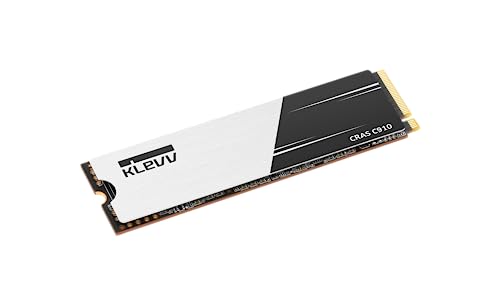
Klevv CRAS C910 4 TB M.2-2280 PCIe 4.0 X4 NVME Solid State Drive (K04TBM2SP0-C91)
plucky timber
or it just died for some reason
I'm leaning towards the ssd literally being cooked
pearl gulch
whoa whoa whoa
cyan ravine
mossy venture
the c910 is $193 https://pcpartpicker.com/product/Fd3NnQ/klevv-cras-c910-4-tb-m2...
That with a 3rd party heatsink is decent
$208-ish
Not bad
plucky timber
I'm not just saying that as a gen z slang I'm saying it literally got cooked
mossy venture
crystaldiskinfo?
pearl gulch
ur name makes me feel like i shouldn't trust you.
cyan ravine
LMAO
potent portal

pearl gulch
lol
cyan ravine
Man's in the newegg server talking to the worst plane company
That's a double whammy
plucky timber
747 was made before the merger
pearl gulch
doesn't change that i might get disappeared for saying you messed up
potent portal
plucky timber
747 was made before the merger
Which is even worse because they're all falling apart now from age and lack of maintenance
plucky timber
doesn't help that the current management is running the company into the ground
pearl gulch
sorry for derailing the conversation, but every time you talk, I think it.
 plucky timber
I blame the MD guys
pearl gulch
I make hardcore characters in games called UnKyrable.
plucky timber
I read that as Ukraine
 pearl gulch
ok so... if i want a third party heat sink for this c910. any examples of what to get and... i probably don't need it for this current PC that is limited to gen 3, right? Just will need it for the next computer I put it in?
plucky timber
yes
cyan ravine
pearl gulch
ok so... if i want a third party heat sink for this c910. any examples of what t...
Thermalright, ez diy fab, ek
plucky timber
pretty sure it won't get toasty if it's capped to gen 3 speeds
potent portal
cyan ravine
Thermalright, ez diy fab, ek
Maybe not EK, you might never receive it
cyan ravine
I'm tryna remember the stupid thermal paste brand
 pearl gulch
an ai generated heat sink
cyan ravine
cyan ravine
I'm tryna remember the stupid thermal paste brand
One that like 30 people like and everyone forgets
potent portal
cyan ravine
I'm tryna remember the stupid thermal paste brand
arctic?
plucky timber
I want a thermalright build now
cyan ravine
potent portal
Maybe not EK, you might never receive it
If it's in stock locally it's ok lol. They're actually incredible
plucky timber
just have chonker heatsinks everywhere
cyan ravine
potent portal
arctic?
No something else
pearl gulch
i thought heat sinks for ssd's were really tiny
plucky timber
cryorig?
cyan ravine
No
plucky timber
pearl gulch
i thought heat sinks for ssd's were really tiny
they can be
pearl gulch
like this one:
https://www.newegg.com/p/13K-001J-00009?item=9SIA68VE5J4156
plucky timber
but for gen4/5 you'd want bigger heatsinks
potent portal
That link 😭
cyan ravine
They make ssd heatsinks
potent portal
Good sink though
plucky timber
cyan ravine
Nice
plucky timber
shortened
cyan ravine
 plucky timber
let that sink in
cyan ravine
plucky timber
https://www.newegg.com/p/13K-001J-00009?item=9SIA68VE5J4156
Yeah that works
pearl gulch
thanks, I fixed mine too
cyan ravine
Gigabyte makes sinks
plucky timber
does it explode
cyan ravine
You wish
plucky timber
I gotta stop the gigabyte slander
pearl gulch
whoa whoa, you shouldn't be asking about exploding products.
cyan ravine
They used to sell full copper ones dude
plucky timber
they're actually making some pretty solid motherboards
pearl gulch
put ur bolts in ur doors first.
cyan ravine
Those are amazing
plucky timber
it's funny how when the Boeing-MD merger happened
Boeing got none of the benefits but inherited all the shenanigans
cyan ravine
One product I miss having, was my old gigabyte copper sink
That thing was stunningly good
pearl gulch
do ssd heat sinks work by just connecting them to the SSD or is it an assembly process like with a cpu
i.e. do i need to put stuff inbetween
plucky timber
they usually come with pads
potent portal
You open it, peel the thermal pad protector, and set the drive in it. Then close it and install normally.
plucky timber
I just do a dot in the middle
cyan ravine
pearl gulch
because my history with applying thermal paste is monstrously bad.
Just sploot all over the cpu dude
Easy
plucky timber
that's what she said
 pearl gulch
is that a what not to do gif?
cyan ravine
I just put stupid amounts on these days
plucky timber
nah it improves the heat spreading
potent portal
pearl gulch
is that a what not to do gif?
Mayonnaise thermal paste
pearl gulch
if you want ur heat to go through the mobo too, don't you just... buy a cheap psu?
plucky timber
no that's an IED
pearl gulch
I had a reverse boeing pre-built computer once. they welded the heat sink to the case.
pearl gulch
it was covering 3 of the ram bays.
plucky timber
bad execution
pearl gulch
so i found out when I went to 'upgrade'
cyan ravine
Lol
pearl gulch
so , If I wanna be lazy and the extra 50 bucks doesn't bother me, this is the pick, right?
https://www.newegg.com/p/3C6-0121-000K8
plucky timber
eh
cyan ravine
No cos it's $193 elsewhere
plucky timber
plus you're getting a worse heatsink
cyan ravine
Klevv CRAS C910 4 TB M.2-2280 PCIe 4.0 X4 NVME Solid State Drive (K04TBM2SP0-C91)
^click
cyan ravine
plucky timber
plus you're getting a worse heatsink
No heatsink
Want heatsink
Oh lmao
The article says heatsink, pretty sure that's just the sticker
💀
potent portal
thicker sticker
pearl gulch
holy what... it's nearly 550 bucks for gen 5
plucky timber
gen 5 is a scam
potent portal
Yeah don't even bother with those
 plucky timber
by the time you can actually utilise that speeds
cyan ravine
Will remember this
plucky timber
you'll have gen 5 ssd a quarter of the price
pearl gulch
lol
cyan ravine
pearl gulch
holy what... it's nearly 550 bucks for gen 5
Not even full on professional servers or workstations can utilise the speed all the way lad
It's gen 5 basically cos OOO BIG SHINY NUMBER

plucky timber
what about one picture of your mother
cyan ravine
plucky timber
what about one picture of your mother
Need a supercomputer
pearl gulch
all good, i was just looking
potent portal
You know what else is a bigger number on those drives? The temp sensor reading
plucky timber
AMD FX ssd
 potent portal
Jet... hehehe
pearl gulch
cya thanks
lol
so is there a reason this wouldn't be good with the c910 / would there be better options I should poke at with a stick?
https://www.newegg.com/p/13K-001J-00009?item=9SIA68VE5J4156
potent portal
The only reason not to get it would be if your motherboard already has a heatsink for the M.2 built in
Which is something to think about when you upgrade
pearl gulch
interesting. didn't think mobos would have that, noice
pearl gulch
intel CPU's have been on a downward trend for a while, right? seems like everyone has switched to AMD for every recommendation
potent portal
Yeah basically
The 12th gen was great, 13th gen was good, 14th gen was just 13th gen +200MHz, and 200 series is worse than 12th gen (for gaming)
pearl gulch
@potent portal I was asking around earlier about changing to matx or the smaller form factor and how much performance loss I'd get and they said it was negligible. would you agree?
they sent me some recommendation lists and I was trying to compare it to what you sent me yesterday.
but some things you mentioned weren't accounted for
potent portal
The only difference between the sizes of motherboards is just that, the size. Larger boards can fit more things like additional M.2 slots.
pearl gulch
well, mostly just the 64 GB ddr5 thing
aight. I'm pretty sure I'm downsizing so my PC is easier to pick up and work on when I need to (I struggle to pick mine up usually, thanks to an injury).
crimson zinc
pearl gulch
aight. I'm pretty sure I'm downsizing so my PC is easier to pick up and work on ...
Jonsbo has some decent cases with handles
Can’t remember if they’re micro or mini atx
pearl gulch
im trying to find a case I like right now but wishing i could see them better than these tiny 4 pic slots
pearl gulch
the pictures on this build im focused on are the case itself and the layout of the hardware.https://pcpartpicker.com/b/8Nz7YJ
what's up with the tape and the ssd that's sticking to tape that looks like the back of the mobo? anyone able to make some sense of that? I don't imagine tape and the heat of your PC work well together.

7900XTX in Dan a4-h2o by Rorodzilla - AMD Ryzen 7 5800X3D, Radeon RX 7900 XTX, Lian Li A4-H20 A4 Mini ITX Desktop
cyan ravine
Kapton tape
He's using it for 1 of two reasons
Some thermal conductivity, and/or emi shielding (for less signal interference)
Either way neither are strictly necessary
pearl gulch
im pretty sure ill need to put a heat sink on my ssd, so unless that ssd is like a paper weight on the back of the mobo, i think that layout might kill that case as an option for me, but i think i need to check mobos as well
stoic island
Most of the time the primary m.2 slot is going to be in the front not the back
And they have a heatsink on the m.2 on the front
cyan ravine
Yes that is always a secondary m.2 slot
Not something you need to worry about
Most have 1 or 2 on the front
Rarely 3-5
pearl gulch
interesting. i might have at least a 2nd m.2 eventually
cyan ravine
Only select few itx have 1 on the back
cyan ravine
pearl gulch
interesting. i might have at least a 2nd m.2 eventually
Some itx stack 2 on the front lad
No need to worry about the back
pearl gulch
being called lad is funny
stoic island
Also, unless you're going for pcie 5.0, you don't really need a heatsink most of the time
pearl gulch
interesting. years ago i was advised not to get one on my 980 lol
but it came with a bad sector or something, so I plan to RMA it as soon as I have a new OS loaded on the other SSD
can i get an eli5 on this?

wait, the OC part didn't register as I read it.
but the DPC part not so much
and blazing m.2 vs hyper m.2 doesn't seem to be very well explained in a quick google search (might be my google fu being bad)... do i need to care about which one I get?
potent portal
1 single rank(chips on one side of the stick) DIMM per channel can run up to 7200 or higher, or default to 4800
1 dual rank dimm per channel can run 6000+
2 single rank dimms per channel can run at 5600+
And 2 dual rank dimms per channel will run at 4800+
The plus depends on how lucky you are, and there are 2 channels on a consumer motherboard.
Blazing M.2 just means it's PCIe 5.0 spec compliant, while Hyper M.2 is PCIe 4.0
For DDR5, 16GB and 24GB sticks are single rank. 32GB and higher are dual rank.
8GB sticks are more like half a rank and should be avoided
pearl gulch
yea, I'm trying to not forget that as I put this together
cyan ravine
So if you wanna use 4 sticks of 16gb, expect 4400 and be hopeful for anything better
pearl gulch
kind of sad that the mobos that look good for what I want are always missing 1 thing I want, but it seems to always be 1 different thing depending on the mobo
potent portal
It can be very tricky finding that one perfect board, especially if you have a lot of wants
pearl gulch
but what about 4 sticks of 24 gb? I thought someone said something about using 4 sticks not working in DDR5
cyan ravine
pearl gulch
but what about 4 sticks of 24 gb? I thought someone said something about using 4...
Equally annoying
cyan ravine
Yeah on ddr5 is always miles better on 2 sticks
potent portal
Then it's 1dpc 2R
pearl gulch
but didn't you say not to run more than 48 gb
potent portal
I said that's the most you can do without compromising speed
pearl gulch
hold on let me back up a sec
compromising which part of speed... the speed of a single dimm or... total speed?
potent portal
The clock speed at which the stick operates, which affects all parts of the memory
pearl gulch
man, memory is convoluted af
potent portal
The chart above is a perfect example of what I was talking about. With 24GB sticks, they're single rank and you can run 2 of them at 7200. But if you go to 32GB sticks, that's dual rank and your speed is limited to about 6000.
pearl gulch
just as a quick factor for myself... I don't bother with OC
potent portal
XMP counts as overclocking for these purposes
pearl gulch
oh
then i guess i will be from now on?
but i won't understand it... ill just let it do its thing
cyan ravine
pearl gulch
compromising which part of speed... the speed of a single dimm or... total speed...
Just in general, on DDR5 once you go beyond 48gb or 2 sticks you cross into higher capacity issues
The memory controller works a lot harder
Then speed expectations need to be lower
potent portal
The harder the memory controller has to work, the slower the work is done
pearl gulch
feels like soon I'll need 64 gb though, which is the only reason I'm trying to understand instead of just taking 48 gb
cyan ravine
2x32 isn't grossly slower
potent portal
What makes you think you'll need 64GB
pearl gulch
i regularly am at 95% ish ram usage on my current pc at 32 gb and I have to shut things down when gaming
potent portal
But it is also slower
With 48GB you can theoretically run above 12,000 speed
Lots of people have done it
potent portal
What you could do, since you have some room in your budget anyway, is get 2 sets of memory. One for speed and one for capacity. Then just switch between them as needed.
pearl gulch
ill probably use the 2nd pc option if it comes to it.
cyan ravine
You can use the extra on a better cpu or gpu
pearl gulch
technically, I got an esxi server that I haven't booted up in 3 years, but it was pristine back then
potent portal
Honestly yeah 64GB isn't so slow that it'll be that noticeable, especially if you tune a few timings.
6000-6400 depending on luck
pearl gulch
i kind of want to try the 48 after your explanations
so you sold me on it. if i need more in the future, it'll be just the cost of me figuring things out
cyan ravine
Alr
potent portal
Memory holds value really well too since there's no moving parts to wear out, in case you needed to sell it later
potent portal
potent portal
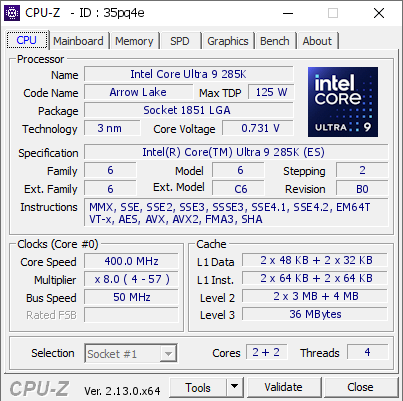
With 48GB you can theoretically run above 12,000 speed
This person did it without even using exotic cooling, just a fan over the stock heatsink and an AIO on the CPU. https://hwbot.org/submission/5758473
The DDR5 SDRAM @ 6027.1MHzscores getScoreFormatted in the Memory Frequency benchmark. speed.fastestranks #17 worldwide and #17 in the hardware class. Find out more at HWBOT.


 potent portal
Granted this was with an engineering sample CPU
pearl gulch
damn
potent portal
But yeah totally doable with the right know-how
pearl gulch
well, considering I just gamed for like 4 years without taking the time to notice i was running on ddr4's default
potent portal
cyan ravine
God over z5's too
Patriot Viper Xtreme 5 is another popular one for the top of the stock cooled list
If you wanted to cringe even more
cyan ravine
Idk how good those are for cooling
I just know z5's are as bad as their predecessors
pearl gulch
Note: Some AMD B650 chipset motherboards may need a BIOS update to fully utilize 24 GB RAM modules.
cyan ravine
Yes
potent portal
cyan ravine
Idk how good those are for cooling
Just look and you'll see https://hwbot.org/hardware/memory?key=ddr5_sdram-patriot-viper_xtreme_5

As bare as possible but also plastic on top to trap heat
This is painful to look at but they got a really good score so...
 pearl gulch
when you get that warning that specs don't know jack about clearance between memory and coolers... and you be like, oh no, maybe I should ... get a... smaller cooler?
pearl gulch
potent portal
This is painful to look at but they got a really good score so...
bro that looks like a modern version of what I had to wade through in a server closet for a hospital once
like a re-imagining of mona lisa?
potent portal
You can move the fan if it's interfering with the RAM and that solves the problem 95% of the time
pearl gulch
like, move the fan off of the heat sink?
potent portal
The other 5% is usually when you're using 4 sticks of RAM
potent portal
pearl gulch
like, move the fan off of the heat sink?
No like you can shift the fan upwards on the heatsink, or move it to the other side
pearl gulch
hope that holds true even on micro atx
potent portal
The motherboard shouldn't have any effect on that
Due to electrical principles the memory slots are more or less in a standardized location
pearl gulch
copy that boss
cyan ravine
potent portal
Just look and you'll see https://hwbot.org/hardware/memory?key=ddr5_sdram-patrio...
Those could have thermal pads tho, you never know
The adata lancer sticks had pads early on, those sticks have thick af sinks either side
The early chips had excellent cooling
Who knows tbh
The Z5's main issue is double sided tape instead of thermal pads honestly
Could argue many ram sticks would be way better if they just bothered for 2 minutes to use thermal pads
Doms really aren't that special otherwise
Nor copper replacements
 potent portal
Easy to disassemble too
 potent portal
ikr what a concept
potent portal
Oh and this is a good opportunity to show @pearl gulch how little difference fast memory makes for gaming https://www.techpowerup.com/review/patriot-viper-xtreme-5-ddr5-8200-48-gb-cl38/8.html
There's some games like Baldur's Gate 3 that like fast memory slightly more, but it's not very significant
cyan ravine
Yeah
 nova coyote
Hey, So I've got a Ryzen 5 5600x CPU and a gigabyte 3070 GPU, I'm looking to upgrade pretty soon but don't know which I should go for achieving greater performance, I'm currently with a B550 Aorus Master, and a 750 Watt Super Flower PSU with 32 GB RAM. Built this PC in 2020 around this time of year. Could use some suggestions and comparisons as I'm not too knowledgeable about parts.
pearl gulch
for a sec i thought i saw 17 fps instead of 75 lol
cyan ravine
nova coyote
Hey, So I've got a Ryzen 5 5600x CPU and a gigabyte 3070 GPU, I'm looking to upg...
5700X3D
pearl gulch
sounds a bit familiar
cyan ravine
Though if you want 1440p gameplay also tack on maybe a 4070 super
Or 7800XT
750W superflower sounds like leadex III but need the actual name
If it's leadex iii you're good
nova coyote
yeah it is leadex iii
cyan ravine
Yeah you could slap a 5700X3D in
Maybe an id cooling a620 se
Then 4070 super for $600 or less
7900xt
nova coyote
and the psu supports the 4070Sup as well?
cyan ravine
7800xt
Yeah
I gotta go cos phone nearly dead but yeah, you can fit most of all gpus on a 750 up to some XTX/all 4090/5090
With a 5700x3d
But I would only consider if going 1440p, if 1080p, just 5700x3d
Ok gotta go sorry
nova coyote
gotcha i'll take this info in consideration thank you
pearl gulch
im almost done with my first full build after all the suggestions and help 😄
potent portal
nova coyote
and the psu supports the 4070Sup as well?
The GPU will come with an adapter for the new standard
nova coyote
potent portal
The GPU will come with an adapter for the new standard
this for the power connectors?
potent portal
yes
pearl gulch
what are the top of the line (or really, the 2nd closest to that) GPU's right now?
nova coyote
instead of this mess i'll be just 1 huge thing?

like all of this plug into it and then that plugs into the card
potent portal
Yep
pearl gulch
silly question i guess, there's benchmarks for that...
is userbenchmark.com reliable enough to the community or is there a more common one for me to peruse?
potent portal
?ubm
 jolly riverBOT
`UserBenchmark is NOT a reliable source of information and has been blanket banned in many hardware communities such as r/hardware and r/intel for what started as an anti-AMD bias but has spiraled into delusion.
In fact, they tried so hard to skew results in favor of Intel's midrange that they even cannibalized Intel's own high end. For example, according to UserBenchmark, the i3-9350K is rated higher than the i9-10980XE.
For a similarly convenient quick-and-dirty hardware comparison website, we recommend using PassMark instead of UserBenchmark.
PassMark CPU comparison: https://www.cpubenchmark.net/singleCompare.php
PassMark GPU comparison: https://www.videocardbenchmark.net/singleCompare.php
Want to know more?: https://youtu.be/RQSBj2LKkWg`
pearl gulch
whoa
potent portal
We get that question a lot if you couldn't guess
potent portal
There's not really any other way to describe it
Everyone knows the 9800X3D is the best gaming processor, and the new Intel CPUs are terrible for that. So what does that site do? It recommends people avoid the 9800X3D and get a 13600K instead. WTH?
pearl gulch
everyone being people who pay attention. those of us who only look once every few years when we need to build our computers... not so much knowledge in that 😛
i would easily become one of the people who fall victim to that
except you guys have been super helpful
ouch, the 4090 is like 55% of my budget on the not conservative end...
potent portal
pearl gulch
everyone being people who pay attention. those of us who only look once every fe...
That's exactly it though, they target their misinformation at people that assume that since Intel was uncontested 8 years ago they still are the best.
pearl gulch
looks like the 4070 is the cheapest higher end option so far
oh and these labels at the end. Ti, or SUPER, etc...
potent portal
Long story on those labels
pearl gulch
lol, should be another bot command
potent portal
Short version is, from least to most performance, they go:
4070 -> 4070 super -> 4070 ti -> 4070 ti super
pearl gulch
ok that helps a lot
i thought prices for gpu's was somewhat leveled off... seems pretty all over the place to me right now
potent portal
Oh no it's all in chaos right now
The Nvidia 50 series just launched and the 40 series was discontinued months ago
And there's very little stock available of the 50 series unless you want to pay 3-5x the MSRP to a scalper
pearl gulch
so what's good and readily available to consumers? lol the 30 series?
potent portal
AMD cards are less affected by the price craze
And they're about to launch their new gen next month too
pearl gulch
oh right. if im patient... get an AMD card in a month...
potent portal
It's also worth adding that GPU prices in general are higher now in response to the tariffs implemented by the current government. Roughly 25% higher than normal at this time.
pearl gulch
guess I'm sitting on this list for now.
Part List - AMD Ryzen 9 7950X, Thermaltake S100 Snow Edition MicroATX Mini Tower
potent portal
If you're just gaming the 7950X is a terrible choice
The 7800X3D beats it by 20-25%
And the newer 9800X3D is another 10-15% on top of that (prices are wack right now though)
pearl gulch
oh
Warning: The ASRock B650M Pro RS WiFi Micro ATX AM5 Motherboard supports the AMD Ryzen 7 9800X3D 4.7 GHz 8-Core Processor with BIOS version 3.01. If the motherboard is using an older BIOS version, updating the BIOS will be necessary to support the CPU.
so from this, I should download the firmware onto a usb before getting started, right?
potent portal
Correct
pearl gulch
hmm, I need a good way to setup my backup cpu as the 7800x3d... just in case
no way I'll remember this, I know you said it yesterday too
potent portal
pearl gulch
hmm, I need a good way to setup my backup cpu as the 7800x3d... just in case
Part List - AMD Ryzen 7 7800X3D, Thermaltake S100 Snow Edition MicroATX Mini Tower
potent portal
I changed the cooler to white too, figured it would look better
pearl gulch
oh yea, I usually do that when purchasing, but good call
pearl gulch
 manic cloak
Is the PSU already owned?
manic cloak
Is the PSU already owned?
you could say I was being lazy and picked the best thing for a placeholder I could find quickly, because I heard some horror stories about psu's here and didn't want to give it much thought until I was ready to purchase
manic cloak
Makes sense, PSUs nowadays are safe, just very very older ones and obviously cheap cheap ones aren’t your best friend
pearl gulch
from the stuff I heard earlier, that's mostly true unless you bring one to near capacity.
then it's up to the mfr or model or something and I don't know enough other than to repeat some warning i heard 😛
im going down for a memory test and sleep. cyall tomorrow and thanks for the heklp
potent portal
Might as well do this one if you've been spooked https://pcpartpicker.com/product/BqYRsY/super-flower-zillion-fg-850-w-80-gold-certified-fully-modular-atx-power-supply-sf-850z12fg

Super Flower Zillion FG 850 W 80+ Gold Certified Fully Modular ATX Power Supply (SF-850Z12FG)
Super Flower doesn't make anything less than B tier
And their only C tier unit is a weird one they don't make any more
cyan ravine
One of those rare examples where  doesn't apply
pearl gulch
always be spooked. that mem test took 5 minutes or something, not 90 like I was told lol
i was laying down and heard it complete...
potent portal
You didn't load the profile then
pearl gulch
2/ Run TM5.exe. All files are now English thanks to @Hequaqua for his idea and Extreme1@anta777.cfg is the default
i ran the simple instructions 😛
potent portal
potent portal
Super Flower doesn't make anything less than B tier
Found a reliable test source. Cybenetics Silver is decently hard to get. Gold for noise. And this is for the 650W model which will tend to be lower quality than an 850W. https://www.cybenetics.com/evaluations/psus/2612/
Cybenetics Test
pearl gulch
so which profile am I supposed to load for this memory test, because it seems like the highest one is set to default according to the forum post or whatever it was I read
potent portal
What test is the window showing it's loading
cyan ravine
pearl gulch
always be spooked. that mem test took 5 minutes or something, not 90 like I was ...
Yeah you didn't load the profile properly
potent portal
The extreme anta profile is usually a good one, pcbdestroyer is another you can run
pearl gulch
ah, looks like when it's running, it doesn't load the profile like the forum says it does.
cyan ravine
 pearl gulch
ok i try this again, shutting everything else down
cyan ravine
Note this:
 pearl gulch
i don't even know what that means