#building-and-recc-chat
1 messages · Page 314 of 1
 proper night
And I guess with the non-conductive stuff a little over spill isn't as much of a concern as before.
 dusky hearth
or you can do the x with dots on the inside of the empty areas of the x, though that is not really required since it's still not a very large ihs
yeah you can empty the whole tube and not worry about anything but a mess
dusky hearth
yeah
proper night
Thank you. You've been most helpful.
dusky hearth
mx6 is good enough for both cpu and gpu if you wanted to repaste the gpu
and nowadays our reccomendation for repasting gpus is to get thermal putty rather than pads so that you dont have to get multiple pad thicknesses and also figure out what those needed thicknesses are
proper night
Is putty different from paste?
dusky hearth
Yes, more viscous
Kinda like playdough vs toothpaste
Maybe not quite to the point of play dough
 little osprey
Hey, I'm thinking of switching to AM5. I want some options and opinions on what specs I should get. My current thought is:
R7 7800x3d
T-Force Delta RGB (2x16) RAM
and I'm not quite sure on what B650 motherboard I should get
 potent portal
little osprey
Hey, I'm thinking of switching to AM5. I want some options and opinions on what ...
potent portal
little osprey
Hey, I'm thinking of switching to AM5. I want some options and opinions on what ...
My recommendation https://pcpartpicker.com/list/Xr8Dxg
You can get a cheaper board if you don't need wifi, like https://pcpartpicker.com/product/FcbRsY/asrock-b650m-pro-rs-micro-atx-am5-motherboard-b650m-pro-rs
Part List - AMD Ryzen 7 7800X3D

ASRock B650M Pro RS Micro ATX AM5 Motherboard (B650M Pro RS)
little osprey
I need WiFi
little osprey
Will that CPU Cooler fit in a Hyte Y60?
potent portal
Yep no problem there
little osprey
my Thermalright AssassinX120 R SE is razor sharp close to touching the glass
potent portal
Maximum height for the cooler by the case spec is 160mm
potent portal
I'm going by the Hyte website so if there's an issue take it up with them
little osprey
I'll get someone else to confirm as well....give their opinions too
Part List - AMD Ryzen 7 7800X3D
Anyone else?
Hold up
I just realized
so
I kinda want RGB on the CPU Cooler
potent portal

Vetroo U6 Pro 58.2 CFM CPU Cooler (VT-CPU-U6PRO-BK)
Seems like a lot of the thermalright stuff is sold out, which is what I'd normally default to

ID-COOLING FROZN A620 PRO SE ARGB 58 CFM CPU Cooler (FROZN A620 PRO SE ARGB)
little osprey
bet
 crimson zinc
Custom lighting
You’ll have to learn how to do it through your RGB software
I suggest openrgb
 weary galleon
Openrgb should be able to control everything I believe
 rain carbon
weary galleon
Openrgb should be able to control everything I believe
rain carbon
weary galleon
Openrgb should be able to control everything I believe
i got fustrated and gave up on openrgb since i didnt even know where to start
so i just use the good ol resource hog signalrgb
god i wanna get off it but idk why openrgb doesnt detect my fans or even if its supposed to without external hardware
i hate rgb

 tawny violet
OpenRGB is so incredibly unintuitive IMO
It's almost criminally difficult for me to use
I bet it's great if you complete a PhD course on it tho
rain carbon
i wish i could use it
apparently markiplier syndrome is a blocked word on this server lmao
but i dont have the free time of a linux user
tawny violet
Aura might be dogwater but at least it is INTUITIVE dogwater
tawny violet
Oh you bet your butt
rain carbon
signal rgb uses TWO gigs passive
tawny violet
It's also awful with stability and having no ability to treat specific headers different
rain carbon
thats lovely
tawny violet
rain carbon
signal rgb uses TWO gigs passive
Not THAT bad tbf
It's like
400 megs for me tops
But that's when experimenting with effects
Normally less
tawny violet
Oof
rain carbon
with the effects it goes up to 3-4
because of course it does
id just use my motherboard but by god asrock rgb software is GARBAGE
i have reversed colours (i think it was red and green) so i had to change the slider to look like puke to be purple
i swear rgb is the least intuitive thing about pcs
probably because its technically free since rgb stuff doesnt want to take accountability for software and rgb software doesnt want to take accountability for software so they all suck
 mystic dune
@short yoke can i use your build for a video i am making?
tawny violet
rain carbon
i swear rgb is the least intuitive thing about pcs
Windows is trying to fix that
 dusky hearth
situation: there are 15 competing standards
15?! ridiculous! we need to develop one universal standard that covers everyone's use cases.
yeah!
[soon:] situation: there are 16 competing standards
rain carbon
(situation becomes outdated) wow we have a new standard, wish there was a way to do this with this standard tho, guess we gotta improve this standard a bit!
Situation: there are 2 competing standards
little osprey
Part List - AMD Ryzen 5 7600X, Radeon RX 7800 XT, Montech XR ATX Mid Tower
thoughts on this build
 mossy venture
Id suggest this instead
https://pcpartpicker.com/list/rvJ6RV
Part List - AMD Ryzen 5 7600, Radeon RX 7800 XT, Montech XR ATX Mid Tower
Cheaper monitor option
https://pcpartpicker.com/product/vyqrxr/dell-g2724d-270-2560-x-1440-165-hz-monitor-g2724d

Dell G2724D 27.0" 2560 x 1440 165 Hz Monitor (G2724D)
dusky hearth
no rgb
weary galleon
True
Less time getting RGB to work, less budget spent on rgb
More time playing videogames and more budget spent on performance

 glossy siren
is there a such a thing as a AMD5 mother board WITH OUT any type of on-board video???
mossy venture
Cpus have integrated graphics
Any mobo should have at least one display output
That changed a good while back
https://pcpartpicker.com/product/Dq4Zxr/asrock-b650m-hdvm2-micro-atx-am5-motherboard-b650m-hdvm2
https://pcpartpicker.com/product/CvcgXL/gigabyte-b650-eagle-ax-atx-am5-motherboard-b650-eagle-ax

ASRock B650M-HDV/M.2 Micro ATX AM5 Motherboard (B650M-HDV/M.2)

Gigabyte B650 EAGLE AX ATX AM5 Motherboard (B650 EAGLE AX)
glossy siren
can not have on-board video and have a video card in at the same time and expect it to work!!! it has not worked that way for the last 30yrs.
why does people keep buy this garbage i have no idea. the number of gaming machines i get not working right cause of this. two video cards can NOT use the same resources.
mossy venture
glossy siren
can not have on-board video and have a video card in at the same time and expect...
Are you ai
glossy siren
i have been working with computer for over 35yrs
mossy venture
And yes you can lmao
glossy siren
and it has never worked
mossy venture
I actively have a 13600k with an igpu and a 3060 ti
The igpu drives my second monitor
glossy siren
and yet i get clients all the time with video crashes with game cause of the dual video
then you are a lucky one
this is why the industry is going down hill morons buying garbage cause of the price instead of buy quality stuff that actually works.
mossy venture
Either AI or someone rage baiting
mossy venture
The wording is what gets me
 plucky timber
maybe english is their second language?
punctuation is too informal to be AI
what confuses me is
why would someone ragebait in a tech server of all places
mossy venture
Someone who's been working with computers for 35 years, id hope they know igpus and dgpus don't cause issues w eachother
Its common
weary galleon
That's not ai
plucky timber
It's extremely unlikely for that to happen
even if you have a driver nightmare
they still wouldn't mess with each other
mossy venture
I mean it isn't impossible, but its not a common thing
plucky timber
the game or whatever application usually just pickes one gpu and runs with it
mossy venture
Nothing that warrants a rant like that lol
plucky timber
It's such a technically improbable thing
the odds of that happening are so low
and he made it sound like a very common occurance
which is very suspicious
 shut rampart
my friend bought ram for his MSI MPG Z490 GAMING PLUS ATX LGA1200 Motherboard and its giving boot leg ram he said
mossy venture
What ram and cpu does he have, and what slots are the ram in
potent portal
glossy siren
can not have on-board video and have a video card in at the same time and expect...
I am typing this message on my secondary monitor, which is attached to my iGPU, while I play a game on my primary monitor attached to my dGPU.
If anything this setup works better than a single GPU
dusky hearth
i use a laptop with an igpu and dgpu and that also works perfectly fine as well
shut rampart
mossy venture
What ram and cpu does he have, and what slots are the ram in
slot 2
and 4

Best Buy
Shop CORSAIR VENGEANCE LPX 32GB (2x16GB) DDR4 3200MHz C16 UDIMM Desktop Memory Black at Best Buy. Find low everyday prices and buy online for delivery or in-store pick-up. Price Match Guarantee.
mossy venture
its always the vengeance
shut rampart
also will 70% isopropyl Alcohol work for cleaning thermal paste
with a micro filber towel
mossy venture
it's recommended to use 90% plus
shut rampart
mossy venture
it's recommended to use 90% plus
thats what I have for now
mossy venture
ive used 70% personally but that isn't a recommendation
shut rampart
well my family work in a nail shop soo 70% is what due
anyways yeah for my friend ram yeah he wanted to upgrade right now so thats why he bought it
but his pc not turning on
mossy venture
vengeance is infamous for having issues
what cpu does he have
he might need a bios update
shut rampart
I will have to go and ask and he takes long to reply
but I told him to re put in his old stick
and that worked so im guessing he does need to bios
potent portal
shut rampart
also will 70% isopropyl Alcohol work for cleaning thermal paste
Don't drip it on anything, use it sparingly, dry it off when you're done, and give it time to air dry. If you do that then it's fine to use.
shut rampart
I just put alcohol on the microfiber and make sure it didn't drip and then put it on the cpu
while the cpu was on the mobo
and wipe it off now I need to find like a case to hold the cpu
and not bend any pins
but I think I threw all of my cpu plasic case away 😦
 cyan ravine
mossy venture
its always the vengeance
cyan ravine
mossy venture
its always the vengeance
Hahahahaha
cyan ravine
shut rampart
https://www.bestbuy.com/site/corsair-vengeance-lpx-32gb-2x16gb-ddr4-3200mhz-c16-...
I'm with bacca on this one. Well spotted from him
Good chance his ram is just cooked
Vengeance always has problems
DDR4 3200 bins are infamously bad quality 
cyan ravine
shut rampart
also will 70% isopropyl Alcohol work for cleaning thermal paste
90+ otherwise you may need to stop and wait a day or two
The higher the % the better it all evaporates
cyan ravine
And the better it evaporates the less likely you'll have water residue in the pc
Ya do that
Put a fan on it for maybe 4 hours
shut rampart
I made sure I didn't touch any mobo parts tho
and then wipe it down with a clean microfiber
shut rampart
the mobo and cpu?
cyan ravine
Ye since we're here
I would encourage getting a 90% bottle at some point lol
Or just more paper towels tbh
I often don't use IPA unless it's really on there
The paste
cyan ravine
You can clean things with water honestly
shut rampart
o
cyan ravine
I just wouldn't put a PSU or anything with a battery in water (mobo battery)
Leave it air dry long enough it's clean again
Usually a few days
shut rampart
thing is I dont think I have the plasic case that amd gives you for cpu
soo idk where to hold it
shut rampart
yeah but I was going to sell it
cyan ravine
Oh
You can buy the trays
They're like $3
Lol
You sell it as a tray cpu used
Send it via mail in a bubble wrap bag
Wrap in fragile tape
cyan ravine
You could tho if you have a tray
If it wasn't a PGA one you could send them just wrapped in a little bubble wrap and tissue paper if we wanted to really MacGyver it
LGA ones are pretty safe overall it's just the PGA ones that kinda need a clamshell for transport
shut rampart
well I got an upgrade from the ram
he said that 2&4 slot doesn't work
but the other works
potent portal
Are they counting starting from the CPU side
shut rampart
yeah
well he said that that combo doesn't work aka slot 2 and 4
but 1 and 4 works etc he also said he put it on 3 4
potent portal
Ok so maybe slot 2 is just bad
1 and 4 should be fine technically as long as it's stable
shut rampart
can you xmp on 1 and 4
 snow wasp
is this okey for fan and led expansion? https://link.gy/cd068
potent portal
Fan yes, but there's no RGB there
snow wasp
potent portal
Fan yes, but there's no RGB there
oh ok, anyway do each fan takes 12v that comes from the sata?
potent portal
Yes, and any fan you plug in will run at full speed without being able to control the speed
snow wasp
also what about this one for led https://link.gy/120bd
potent portal
snow wasp
also what about this one for led https://link.gy/120bd
That'll work in most cases
snow wasp
potent portal
That'll work in most cases
most cases?
if i connect it from the motherboard?
potent portal
Sometimes you can overload the header on the motherboard if there's a lot of LEDs on it, but that's uncommon if it's only fans
snow wasp
yeah only fans, no extra led strips
shut rampart
hello, my friend who was having issue also wants a pc upgrade, I tried to get more info of his part and this is what he has ofc he has an liquid cooler for his cpu and im thinking he also have a hdd not a m.2
Part List - Intel Core i9-10900K, GeForce RTX 3070
budget 2k, for mostly streaming, he also wants to switch to team amd for cpu
weary galleon
For that budget he could basically do a new build. Could keep PSU and case if they're decent
cyan ravine
Need to know cos he might have something so good it's worth keeping and selling his old with something more appropriate
Could save him potentially hundreds knowing what he has
If not thousands for trivial solutions
potent portal
shut rampart
naw just build him a new pc
9800X3D is better if you can find one near msrp, otherwise https://pcpartpicker.com/list/ctFcqH
Part List - AMD Ryzen 7 7800X3D, Radeon RX 7900 XTX, Montech AIR 903 MAX ATX Mid Tower
 sour sage
my windows unactivated by itself????
sour sage
it didn't work , and the key came with the laptop
it was pre-activated
i didn't chaneg any hardware
potent portal
How old is the laptop
You might also try the license transfer function from within the troubleshooter
You can try this command from an admin command prompt as well:
slmgr.vbs /dlv
sour sage
potent portal
How old is the laptop
1 or 2 month
if nothing works out , the store i got it from is walking distance away , i could go ask them
cyan ravine
I would yeah
They'll reactivate it with their OEM licenses
Should cost them nothing, especially since it'll be under warranty
little osprey
I need some help. I need to upgrade from a 1080p Monitor to a 1440p, however, I've really wanted an OLED monitor, but they cost me my family jewels. Should I wait for OLED prices to go down? How soon will that be? Or should I go ahead and get the best non-oled 1440p Monitor now?
dusky hearth
A few years probably
little osprey
you're kidding
dusky hearth
I don't really see OLED prices dropping significantly in the next 2-3 years at least
The prices have been getting lower but fairly slowly
But honestly speaking, a $500 OLED monitor is going to probably be better than a $500 LCD monitor
 sullen spoke
Monitors over the years have steadily dropped as they always do. About 2 years ago or so oleds finally hit the desktop market with prices in the 1k range, now you can get the same for 400-500
mossy venture
little osprey
you're kidding

Acer Nitro XV275U P3 27.0" 2560 x 1440 170 Hz Monitor (UM.HXXAA.302)
Mini LED, a step below OLED
 wide sparrow
dusky hearth
I don't really see OLED prices dropping significantly in the next 2-3 years at l...
wide sparrow
dusky hearth
I don't really see OLED prices dropping significantly in the next 2-3 years at l...
Not true. it was 999 now it's around 600-700
mossy venture
Third of the price
dusky hearth
wide sparrow
Not true. it was 999 now it's around 600-700
I meant dropping to "cheap" prices like 200-300 for a good OLED
Though idk if it even is possible with inflation and such
wide sparrow
Oh.. never happening
dusky hearth
Idk, it may be possible, as long as they can mass produce decent panels well enough
And with good enough yields
Especially if there more competitors
cyan ravine
dusky hearth
I meant dropping to "cheap" prices like 200-300 for a good OLED
Though idk if ...
Happened
Cooler master did it once this year
cyan ravine
$300 1440p 240hz oled
cyan ravine
dusky hearth
Was it good
You tell me they're all LG panels
Oh actually, not anymore
They have Samsung QD-OLED ones now
Same result
dusky hearth
Cooler Master isn't someone I'd expect to have a cheap OLED monitor
Like
I would have expected nearly any other company to do this
mossy venture
cyan ravine
Oh actually, not anymore
The cooler master oled has issues
I forget exactly what they were but it and the innocn one are the worst
cyan ravine
Both are good by OLED standards though
I've looked into that
Just not as good as the others
mossy venture
I could've sworn the CM had physical issues, like build quality wise
cyan ravine
It'd have to be really game breaking
As long as it has the panel that we all know and love it's easy to look past most of it
mossy venture
Oh for $300 for sure
Just worth being aware of
Do you know anything about the koorui gn10? Mini led 240hz
It looks really good but I can't find any good reviews
All i can find is on reddit
 vapid jolt
Whats the best 750$ or cheaper build
dusky hearth
depends on what you're using it for
cyan ravine
mossy venture
Do you know anything about the koorui gn10? Mini led 240hz
I don't but koorui have a decent history to date so worth finding out
 coral wave
I apologize, I'm new here and am not sure where to post this. I just built my first PC, all new components, and I am having some trouble. I am to the point where I can turn on the computer but it won't show anything on my display, and I get a yellow DRAM EZ Debug light. I have the MSI Mag Z790 Tomahawk max wifi, 64GB (2 x 32GB) g.skill Trident Z5 neo series DDR5 6000, and Intel i9 14900k 14th gen 24 core (8p + 16e). All wires are firmly secured; sometimes, on startup, the CPU EZ Debug light will blink about once every 7 seconds in combination with a constant Yellow DRAM light, however, the CPU light stops after 4 or 5 blinks. Other times, it's just the DRAM. I have pressed them into place as hard as I can without breaking anything in the appropriate A2 B2 slots, I have tried using just 1 in A2 and then swapping them to see if that changed anything. I'm not sure what's left to try, aside from assuming that either my new components may be toast out of the box or I am inept at this.
potent portal
coral wave
I apologize, I'm new here and am not sure where to post this. I just built my fi...
What processor
coral wave
potent portal
What processor
I'll add it to my original post as well. It's the Intel i9 14900k 14th gen 24 core (8p + 16e)
potent portal
Your BIOS needs to be updated then
Flashback https://youtu.be/sKMub20CUNI
In this demonstration, we'll show you how to update BIOS using M-FLASH ?
It can take a few tries and it's a little picky about the USB drive you use sometimes
coral wave
potent portal
It can take a few tries and it's a little picky about the USB drive you use some...
I received a flash drive with my components. I assume this is what I need to update. Maybe I am not using post correctly. I get nothing on my display on startup. Will following this video circumvent that?
potent portal
You do not need a running PC to flash the BIOS using this method
 stoic island
btw this is the video with flashback
https://youtu.be/iTkXunUAriE

In this demonstration, we’ll show you how to use Flash BIOS Button with MSI motherboard.
the other video is the normal bios flashing way
coral wave
potent portal
You do not need a running PC to flash the BIOS using this method
Okay, so I went through the whole process, starting with the PC off; the BIOS light is no longer flashing, but it turned on my PC and left it running? The DRAM light is still on but I assume it needs an actual restart to know for sure.
Am I good to power it down manually? Or should something have appeared on my monitor when it turned the PC on?
potent portal
If the light on the button stopped flashing then you can try switching off and on at the power supply
coral wave
potent portal
If the light on the button stopped flashing then you can try switching off and o...
So don't hold the power button and instead flick the power supply I/0?
potent portal
Correct
potent portal
stoic island
btw this is the video with flashback
https://youtu.be/iTkXunUAriE
Oops my bad, that's what I get for trusting a link in the MSI website to be what it said it was
coral wave
potent portal
Correct
How long should I wait to turn back on?
potent portal
A few seconds should do
coral wave
potent portal
A few seconds should do
DRAM light is still on, still no display either...
potent portal
It can take up to 10 minutes to train the memory
Usually less than 5 but worst case 10
coral wave
potent portal
It can take up to 10 minutes to train the memory
From the BIOS update?
potent portal
From this being the first boot, from the perspective of the BIOS
coral wave
potent portal
From this being the first boot, from the perspective of the BIOS
Okay! I'll report back then
coral wave
potent portal
From this being the first boot, from the perspective of the BIOS
No change
 cursive wharf
cyan ravine
As long as it has the panel that we all know and love it's easy to look past mos...
cursive wharf
cyan ravine
As long as it has the panel that we all know and love it's easy to look past mos...
@mossy venture Most monitor quality control issues I see tend to be from poor heat management or firmware (funni bugs), which isnt really tied to panel. Former point being most concerning, cuz the worst of it is cracking screens or front/back plates splitting iirc (either some Samsung of LG display I think?). Latter point means meh HDR (think back to AW3423DF release, HDR kinda sucked. Made the very expensive display kinda pointless IMO [until fixed] cuz it didnt really look much better than cheap OLED), meh VRR, etc.
TLDR: Prolly look into it cuz good panel wont mean issues will be minor.
mossy venture
Thats a good point, you mentioned firmware and iirc that's one of the issues the cooler master oled had
potent portal
coral wave
No change
It can take a few tries, and some boards want you to turn them on before you press the flash button.
Make sure you're copying the right file out of the BIOS update I linked too.
cyan ravine
cursive wharf
<@654444344274845698> Most monitor quality control issues I see tend to be from ...
You know I wasn't thinking about it at the time, you're right about the cracking problems. Hell, I've brought them up myself
It's a fair point, it should be thoroughly vetted

 should I update my drivers? if I do fortnite says its not recommanded
potent portal
should I update my drivers? if I do fortnite says its not recommanded
potent portal
There should be a fairly recent version that doesn't get you the warning
shut rampart
what verison is that
 cerulean plume
can anyone help me decide between two pcs
dusky hearth
!ask
 still roostBOT
 cerulean plume
dusky hearth
!ask
cerulean plume
dusky hearth
!ask
White asrock b550m motherboard
Ryzen 7 3700x
Amd 6600 white 8 gb gpu
Sabrebt rocket 1 tb 4.0 m.2 nmve
32 gb white ram
White cpu cooler
650 msi psu
Montech case with hinged side panel
is this good for $620?
dusky hearth
this is one pc
what is the other option
also for 620... it's not horrible but probably could be better?
especially the gpu
cerulean plume
dusky hearth
especially the gpu
Case: Asus Prime AP201 ( New)
Motherboard: B760M-HDV/M.2 D4 (New)
CPU: Intel i5 12400 (New)
CPU Cooler: Cooler Master Hyper 212 Spectrum V3 (with black Thermalright fan) (New)
RAM: 16GB (2x8GB) 3200Mhz DDR4 Kit - Gray (New)
GPU: PowerColor Fighter RX 6600XT (Used)
Storage: 1TB Teamgroup MP44 Gen 4 M.2 SSD (New) PSU: Thermaltake Smart 500W (New)
this is the other option for 625
mossy venture
cerulean plume
White asrock b550m motherboard
Ryzen 7 3700x
Amd 6600 white 8 gb gpu
Sabrebt ...
Id suggest this
https://pcpartpicker.com/list/3D7Dxg
Part List - AMD Ryzen 5 5600X, Radeon RX 7600, BitFenix Nova Mesh M ARGB MicroATX Mini Tower
dusky hearth
yeah neither are great, between those 2, i would go for the 12400 one, but bacca's list is better for the price anyways
cerulean plume
mossy venture
Id suggest this
https://pcpartpicker.com/list/3D7Dxg
never built a pc before so im a little hesitant
mossy venture
It's fairly easy, id just follow a video tutorial in YouTube
dusky hearth
it's easy
i dont like the msi mech cooler though having used it before (it is a bit loud) but the prebuilts you listed had a cooler design that wouldnt be much quieter
cerulean plume
mossy venture
The thermaltake smart is also a major issue
oh which pc was it in?
dusky hearth
oh i didnt see that since there wasnt a new line for that
yeah i wouldnt buy that prebuilt because of that
dusky hearth
cerulean plume
oh which pc was it in?
intel one
cerulean plume
dusky hearth
intel one
oh yea I see it now
dusky hearth
but yeah, building is easy, and if you ever need help, you can always come back here
mossy venture
cerulean plume
oh yea I see it now
Issue with the other one is the 3700x is fairly old and close to becoming incapable of running new games at 1080p60fps
cerulean plume
mossy venture
Issue with the other one is the 3700x is fairly old and close to becoming incapa...
this is my first pc and its really just to last me untill the 50 series come out then ill go all out
mossy venture
Then I'd suggest an am5 igpu build that you can upgrade when new gpus come out
cerulean plume
oh okay ill look into it
mossy venture
cerulean plume
oh okay ill look into it
Part List - AMD Ryzen 5 8600G, Fractal Design Pop Air RGB ATX Mid Tower
The iGpu is slightly worse than a 1650
And cpu is slightly worse than a 12400, but this means you can drop a far better cpu in there down the line with a gpu, and you have a whole new pc
That mobo either used to hold or still holds the world record oc with a 7950x, so don't worry about whether or not it can keep up with a cpu upgrade
And that psu could handle any 40 series gpu
Plenty of gpu clearance in the case, solid airflow, can add a second nvme down the line for more storage
dusky hearth
wait, what's your budget including the planned gpu you're getting when the 50 series comes out?
plucky timber
mossy venture
The iGpu is slightly worse than a 1650
they're that good now?
mossy venture
Yeah rdna2 igpus are no joke
potent portal
The 8700G is able to play FPS games at 1080p with FSR balanced
crimson zinc
@potent portal what about the 8500g?
plucky timber
mossy venture
Yeah rdna2 igpus are no joke
1650 gddr5 or gddr6
crimson zinc

System Info: 0:00
Alan Wake 2: 1:52
Assassin's Creed Mirage: 2:53
Call of Duty MW2: 3:44
Cyberpunk 2077: 5:23
Forza Horizon 5: 6:20
GTA V: 8:45
Hogwarts Legacy: 10:50
Rainbow Six Siege: 12:17
Red Dead Redemption 2: 14:19
Starfield: 16:27
The Last of Us Part 1: 17:20
End: 18:45
⚾PC Specs:
🥎CPU:
Ryzen 5 8500G 3.50 Ghz (Boost 5.0 Ghz) - 👉https:/...
8500g is the worst of the bunch by a bit
But actually better than I originally thought
weary galleon
Yeah 8500g gpu is cut down a lot
 languid nimbus
Rip
 south cliff
Hello people been a while
What would be a good pc for around 700-800 dollars used for some gaming,editing photos,and some normal use?
 copper fossil
Looking for some opinions here. We tested computer parts on the box and got a post on my friends 9800x3d/ gigabyte aorus elite x870. Now after getting everything instead I get a vga light. Tried a few different known working gpus as well. Kinda at a loss. Reset cmos. Reseated ram and cooler. Tried with one stick and still getting the vga light and sometimes code 05 on the debug led.
dusky hearth
copper fossil
Looking for some opinions here. We tested computer parts on the box and got a po...
05 isnt an error, it's a normal status unless it hangs there
is the system POSTing anymore? or just the vga light being on?
maybe try seeing if you can get to bios by plugging into the mobo's display out rather than the gpu (maybe take that out as well)
actually
how long are you waiting between the boots? ddr5 may take a while for ram training (though i dont think it would be on the vga light) so give it like 10 minutes to make sure it isnt just doing some ram training
also are you getting any other codes on the 7 segment display
copper fossil
dusky hearth
05 isnt an error, it's a normal status unless it hangs there
is the system POST...
It could just be us not being patient. Not used to am5 yet.
I will hook it all back up and let it do its thing for a while
dusky hearth
yeah try giving it 10 minutes, if it doesnt work by then, somebody may be here to help
it's getting a bit late for me so i'll be heading off
copper fossil
Yeah I’m
Off to bed too haha
mossy venture
south cliff
What would be a good pc for around 700-800 dollars used for some gaming,editing ...
Microcenter access?
plucky timber
damn
mossy venture
Part List - AMD Ryzen 5 7600, Fractal Design Pop Air RGB ATX Mid Tower
Part List - Intel Core i5-12600K, Fractal Design Pop Air RGB ATX Mid Tower
plucky timber
did pc prices go up or something
mossy venture
In some aspects
plucky timber
this was my sad attempt
mossy venture
We made the same list lol
plucky timber
did I upload your list
clipboard moment
Part List - Intel Core i5-12600K, Radeon RX 6750 XT, Montech XR ATX Mid Tower
mossy venture
They mentioned used so I figured they could grab a used gpu
plucky timber
yeah it's getting to the point where a used 1080ti might be the best option here
wait
I have an idea
I'm gonna mix parts in fromy our list
mossy venture
mossy venture
https://pcpartpicker.com/list/2y2QqH
https://pcpartpicker.com/list/JYCp8Q
With an $800 budget, could fit a 2080/s/ti, 6700xt/6750xt, 3060 ti, 3070, 6800 or similar with one of these lists
Especially if they went for a used cpu too
mossy venture
Yeah thatd be ideal for upgradability
mossy venture
lol
plucky timber
Part List - AMD Ryzen 5 7600, Radeon RX 6750 XT, Fractal Design Pop Air RGB ATX Mid Tower
tada
mossy venture
I didn't even notice ngl
plucky timber
wait your ram has lower latency
mossy venture
The only thing abt the ram is 6000c30 is hynix while cl36 id samsung
plucky timber
I'm gonna swap that around
mossy venture
And cooler is fine but the 7600 stock cooler is what I'd stick with, at least for now to spend more on the gpu
plucky timber
yeah tbh with the dual towers not available atm for some reason
might be a good idea to just save the money for now
Part List - AMD Ryzen 5 7600, Radeon RX 6750 XT, Fractal Design Pop Air RGB ATX Mid Tower
this is not too bad tbh
slightly overbudget but really upgradable
all you need to go X3D is a cooler
mossy venture
Could do a 7600 or used gpu for cheaper
plucky timber
wait did I paste the wrong list again
plucky timber
mossy venture
Could do a 7600 or used gpu for cheaper
maybe a used 2080s?
oh you had the thing above
yeah a used gpu would probably put it neatly in the middle of the $700-800 range
 broken parrot
Greetings.
I’m wondering if this laptop worth it for academic use only: Dell latitude 7200
Cpu: 15 8eme
Ram: 8gb
Discdur: 256gb(ssd)
Ecran: 12.5p(tactile)
 brittle tinsel
https://www.amazon.com/PNY-GeForce-VERTOTM-Graphics-DisplayPort/dp/B0CS6YS9S7?th=1
Friend is looking at a gpu, will this fit in a Lian Li PC-O11 Dynamic Razer Edition?
Google says the case supports GPU length up to 420mm but the website says anything over 250 will need a vertical mount bracket. I dont know how accurate their site would be since I didnt see anything newer than a 1080 on their list of supported GPU dimensions.

NVIDIA® GeForce RTX™ 40 Series GPUs are beyond fast for gamers and creators. They're powered by the ultra-efficient NVIDIA Ada Lovelace architecture which delivers a quantum leap in both performance and AI-powered graphics. Experience lifelike virtual worlds with ray tracing and ultra-high FPS ga...
broken parrot
broken parrot
I’m wondering if this laptop worth it for academic use only: Dell latitude 7200
...
For the CPU it is i5 8..(no details I thought it is kinda scam), I believe the storage is way low, no?
 broken lake
what would be a logical upgrade from a 12600k right now with all the issues on newer intel chips?
I have realized I am being completely bottlenecked by it when I am playing games
plucky timber
broken lake
I have realized I am being completely bottlenecked by it when I am playing games
what games do you play?
If a 12600k is a "complete" bottleneck it's pretty unlikely an upgrade would improve gaming performance
also what are your specs?
broken lake
ye
plucky timber
it's pretty likely that the game is just that badly optimised
I'd try competitve settings
 plucky timber
you also won't gain much
for the amount of money you're going to spend on an upgrade
broken lake
I see
cyan ravine
broken lake
I have realized I am being completely bottlenecked by it when I am playing games
Yes if your board supports it
Need to know the exact board first tho
I would encourage a 13/4600K/F
Personally
broken lake
cyan ravine
Need to know the exact board first tho
Gigabyte Z690I A ultra lite D4
cyan ravine
cyan ravine
I would encourage a 13/4600K/F
Yeah go stick one of these in it
Make sure the bios is up to date
broken lake
are the issues with the newer ones fixed?
cyan ravine
Check and record any bios settings
cyan ravine
broken lake
are the issues with the newer ones fixed?
The wave of problems stopped after microcode 0.12B
I use intel systems myself
I'd be telling you not to upgrade if it wasn't fixed
Lol
broken lake
just making sure lol
cyan ravine
All good
But you should be able to just drop one of those in there
Cheapest is best
They're all basically the same thing
cyan ravine
cyan ravine
Make sure the bios is up to date
@broken lake just double checking make sure to do this and also record your bios settings with a phone camera
Bios settings don't survive updates
Even when they do they can often be unable to be read properly
So I advise against relying on "Exporting"
broken lake
cyan ravine
<@381205067501666325> just double checking make sure to do this and also record ...
ok, I don't think I changed anything but I will do
cyan ravine
Fans and xmp will change that much I'm fairly sure
Fan settings often can survive a bios update tho but need reloading
broken lake
I haven't touched fan settings
cyan ravine
If you use an aio then it mightn't be running full performance then
broken lake
I do have an aio
cyan ravine
Then the pump may not be configured properly
You want the pump as high as possible without being audible
So usually 100% but some are strong enough to be as good at 60%+
Just flat speed
No curve
broken lake
I'll look into that next time I restart my pc
 flint sapphire
cyan ravine
The wave of problems stopped after microcode 0.12B
flint sapphire
cyan ravine
The wave of problems stopped after microcode 0.12B
Your profile pic and this sentence confused me enough to read “microwave” instead of “wave” and “microcode” 
plucky timber
Felix the intel microcode update
little osprey
Can an RTX 4070 Support a 1440p 240+hz monitor?
 fossil cedar
little osprey
Can an RTX 4070 Support a 1440p 240+hz monitor?
fossil cedar
little osprey
Can an RTX 4070 Support a 1440p 240+hz monitor?
depends on what game and the settings of that game and the cpu youre pairing it with
 analog hearth
@minor garnet yo is that seat from a Golf?
sick setup. I've had my setup for years and I have yet to get it that advanced. I've only recently upgraded to T-LCM pedals
little osprey
fossil cedar
depends on what game and the settings of that game and the cpu youre pairing it ...
I wanna say the most demanding game I have, but rarely ever play is either cyberpunk or Flight Simulator 2020
but I am rocking a 5800x3d
cyan ravine
Prolly 4070 Super in that case if RT means the world to you
Since basically every other 40 series card is horrendous value compared to it tbh
I would grab a 7900XT while you still can for their reasonable price personally, that's about as far as a 5800X3D can go in a reasonable expectation
 vale epoch
cyan ravine
I would grab a 7900XT while you still can for their reasonable price personally,...
vale epoch
cyan ravine
I would grab a 7900XT while you still can for their reasonable price personally,...
I recommend the 7900xt too the rt performance on the 4070 super might be better than most cards on the market but its pretty rare to get playable frames with rt in 1440p without dlss and i’ve used dlss and in rt scenarios absolutely horrid artifacting at times
Not a good experience imo
 manic cloak
Uh oh.

Okay so my current issue is:
Solid white light/VGA with no boot or anything to pop up on screen, monitor isn’t being turned on. I keep pressing the power button ON the monitor and the orange light won’t turn off.
My sapphire pulse has like a red LED flashing at the base of the Pcie, I can’t tell what code it is because it’s flashing twice then flashes randomly.

 visual tundra
hello how can i fix this driver error otipcibus64.sys can anyone help me with this please
 finite drum
I got a b650m pro rs wifi motherboard, and there is no beep to indicate it is posting. Does this have to do with the motherboard, I am not sure if it has an onboard speaker, is there something else it is supposed to do?
Please help
potent portal
Most modern motherboards don't beep
You can add a speaker if you like, the header is by the front panel header
finite drum
How do I read the red lights? The CPU and DRAM lights are on, although we unplugged the ram
Does that mean those are working or not working?
Because the RAM sticks are out
stoic island
The debug LEDs tell you what's wrong
It lights up if there's no ram or there's something wrong with it
finite drum
The CPU light is on, and the RAM light was on before and after I took out the RAM
stoic island
They generally will light up in order during startup, you will want to worry about whatever is staying lit at the end
finite drum
They just started lighting up and were being steady, there were no changes despite waiting several minutes
stoic island
If it's steady then it's an indicator that something is wrong with it and holding it back from booting
If CPU light is still on, check power cables and reseat the CPU
If ram light is still on, reseat the ram
You will still need some ram plugged in to boot, if you have none plugged in right now
finite drum
I put the RAM bakc in, and the RAM sticks are lighting up, how long should I wait for a change
They are physically lighting up and the light corresponding to them are
stoic island
I'd reseat them, and use 1 stick at a time to test
finite drum
I took them in and out, which reseated them
stoic island
Memory training can take up to around 3 minutes for first boot, but generally less, anything taking longer than that is an issue
Use a single stick in slot 2 if you have multiple sticks, leave the rest out
stoic island
Just try to boot with the single stick, give it around 3 minutes
finite drum
Does that matter?
stoic island
Generally recommended, and taking note of which slot you're using can matter if it's something to do with one of the CPUs memory channels
stoic island
It won't boot with no sticks
finite drum
So just try and boot it twice, one with each stick? And what am I looking for when I boot it with one stick?
stoic island
Assuming you have everything plugged in, including GPU and monitor, you're looking for bios setup to show up on the monitor
The idea right now is to get it to boot somehow then narrow down the issue
finite drum
Yeah, will the lights change once it boots?
stoic island
The debug LEDs? It'll cycle through them and turn off if it does fully boot
finite drum
The thing that I don't get is why the sticks are lighting up
stoic island
The RGB on the sticks only need power to do anything, the sticks themselves can be defective and still light up, or have bad contact with the mobo slot for the pins that matter for data and not power, or there can be something wrong with that memory channel on the cpu
finite drum
Ok, so RAM could still be the problem
stoic island
Or maybe in very very unlikely edge cases, the 5v rail of the PSU is providing the correct voltage for 5v argb, but the 12v rail isn't functioning correctly for everything else. Point is, RGB on the ram lighting up doesn't mean the ram is working.
finite drum
If both the RAM and CPU lights on the motherboard are on, does that mean that they are both a problem?
stoic island
Usually just one lights up at a time, dunno anything that does multiple at the same time
If it doesn't boot with either stick, I'd reseat the CPU and check the pins on the motherboard and make sure nothing is bent or preventing you from getting good contact
Also, what exactly are you using? What are the rest of the parts?
finite drum
This tutorial was on a QR code in the manual, but I don't understand what it means. It shows the lights on, so does that mean that they are supposed to be on?
https://youtu.be/T5PTjo8avZM?si=71PN1HdcRQ4LQ_JU
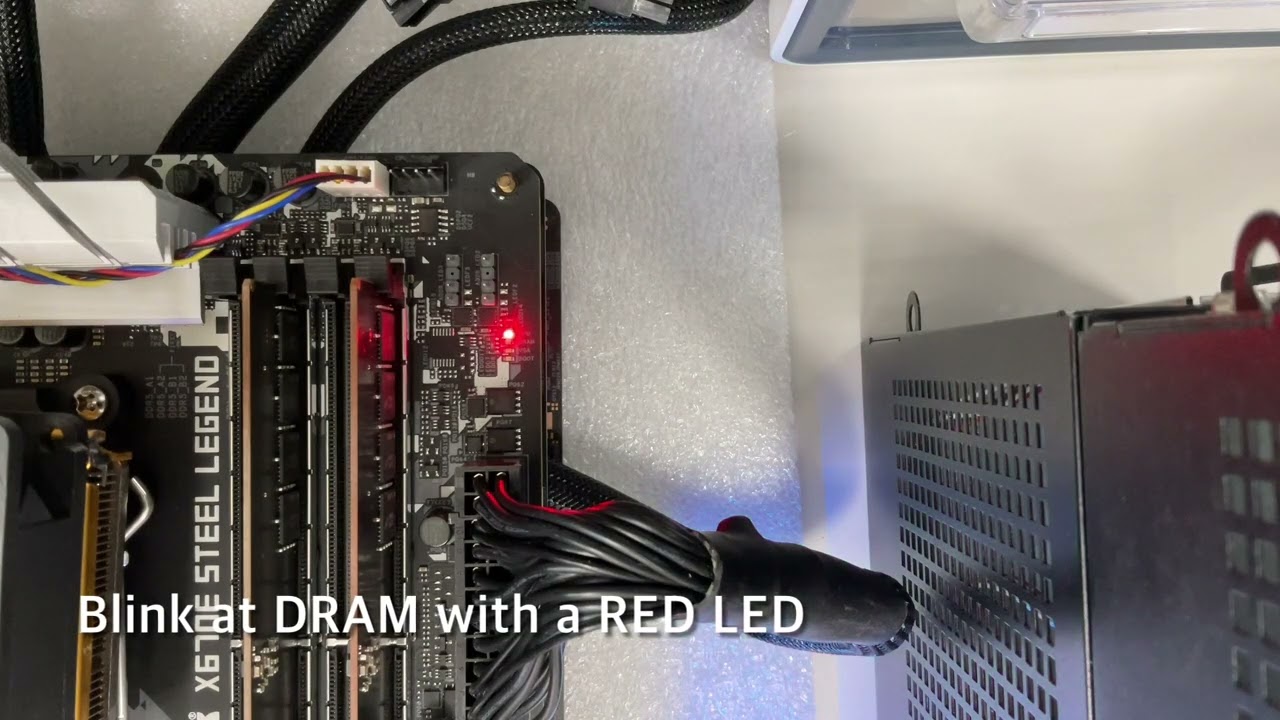
Blink at DRAM with a RED LED: X670E Steel Legend; B650E Steel Legend WiFi; B650 LIVEMIXER
Descriptive transcript: https://download.asrock.com/Script/TSD/ASRock POST Status Checker.htm
finite drum
stoic island
Also, what exactly are you using? What are the rest of the parts?
Part List - AMD Ryzen 5 7600X, SAMA ARGB-Q5 MicroATX Mini Tower
stoic island
What PSU and GPU?
stoic island
finite drum
This tutorial was on a QR code in the manual, but I don't understand what it mea...
They tell you which part of booting it's in, if it gets stuck somewhere, you know that points towards the problem
Dunno why ASRock would make it so dram and CPU would light up at the same time though
finite drum
Part List - AMD Ryzen 5 7600X, Radeon RX 6600, SAMA ARGB-Q5 MicroATX Mini Tower
I am pretty sure about the PSU, it might be a slightly different model
stoic island
Pretty old model but should still work, although it's more likely to be TX-M if you bought it within the last 5 years
finite drum
stoic island
Pretty old model but should still work, although it's more likely to be TX-M if ...
I might not have, it was part of my old computer, although it worked fine for that
stoic island
TX is like a 10 year old model, wear and tear can take its toll but it's not a bad model in general
finite drum
The rgb stick and the cpu fan turn on, so the power works
stoic island
Should be a good time to take out the CPU, check the pins and contact, before remounting the CPU
dusky hearth
(Technically that only shows that the 12v rail is working and says nothing about 5v and 3v)
stoic island
(also technically just shows that something close to 12v is being supplied by the 12v rail, it could be 10v or 14v and fans can work and not much else, but I'd check other stuff before PSU first)
finite drum
It is one of the only parts that isn't new, it was powering my computer earlier today. It is most likely not the problem
I have to go, thanks for the help
manic cloak
manic cloak
Solid white light/VGA with no boot or anything to pop up on screen, monitor isn’...
Reseated my gpu, resetted CMOs, unplugged my power supply cables n etc and changed them, air dusted the crap out of it, any extra suggestions?
stoic island
finite drum
I have to go, thanks for the help
Good luck
cerulean plume
anyone know any budget headsets?
dusky hearth
Depends on the budget
stoic island
manic cloak
Reseated my gpu, resetted CMOs, unplugged my power supply cables n etc and chang...
I'd try switching PSU cables if you can and checking if any debris may be in the pcie slot
shut rampart
should I buy a cpu holder from thermalaright for my 9800x3d
manic cloak
stoic island
I'd try switching PSU cables if you can and checking if any debris may be in the...
I had a loose display port connection on the monitor was all
 potent portal
shut rampart
should I buy a cpu holder from thermalaright for my 9800x3d
potent portal
shut rampart
should I buy a cpu holder from thermalaright for my 9800x3d
Nah AM5 doesn't need a contact frame, unless you're using liquid metal and get the one that stops it from leaking
analog hearth
@cyan ravine remember how we were clowning my gf's setup? I’m surprised her 12100F and RX 5700 are able to keep up with COD 💀

(This is after user-side optimizations)
1080p btw
Game still looks great
Still haven't played a match though lol. I just got home
weary galleon
That BO6? I get like 110-120 fps at 1440p with my 3060Ti
Mostly low settings and quality dlss
Maybe cod liking AMD cards still exists
potent portal
Yes that's definitely still a thing
little osprey
How can I find me a 7600x3d nowadays?
dusky hearth
store
 covert vapor
Go to a Microcenter that has them in stock
That is the only way you'll get one that isn't second hand or on the secondhand market
little osprey
covert vapor
Go to a Microcenter that has them in stock
There is none near me 😭
Closest is 5 hours away
covert vapor
Welp, you'll have to either hope someone has one second hand and is selling or try and go for one of the other X3D chips 
The 600X3D chips are Microcenter in-store exclusives after all
cerulean plume
whats the best budget headset I could get?
snow wasp
cerulean plume
whats the best budget headset I could get?

Win the long game with the Razer Kraken V3 X-the ultra-light USB gaming headset made for gaming marathons. With an upgraded mic and drivers for Ideal sound, improved ear cushions for Ideal comfort, and Razer Chroma™ RGB for Ideal flair, your gaming is set to go the distance.

The HyperX Cloud III is an evolution of our legendary Cloud II, which is known for its comfort, sound quality and durability. With plush HyperX signature memory foam in the headband and ear cushions, it provides a comfortable fit perfect for long gaming sessions. It also features new, retuned 53m...

Hear and sound like a pro. PRO X headset designed with and for esports pros for premium sound, featuring detachable mic, Blue VO!CE microphone technology, PRO-G 50-mm drivers and premium leatherette earpads for passive noise cancellation.
cerulean plume
snow wasp
https://www.amazon.co.uk/Razer-Kraken-USB-ultra-lightweight-HyperClear-Black/dp/...
thanks
cerulean plume
snow wasp
https://www.amazon.co.uk/Razer-Kraken-USB-ultra-lightweight-HyperClear-Black/dp/...
I'm stuck between the first two, which would you prefer?
snow wasp
cerulean plume
I'm stuck between the first two, which would you prefer?
I would go for razer, i won all 3 in pro models and so far i find Razer the most comfiest. Almost all headset will hurt my hear but Razor don't.
cerulean plume
snow wasp
I would go for razer, i won all 3 in pro models and so far i find Razer the most...
ohh thanks, and is the microphone quality good aswell?
snow wasp
cerulean plume
ohh thanks, and is the microphone quality good aswell?
You're welcome 🙂 I haven't tested the mics properly because I use a studio quality mic, but with my past experience I know that Razor got pretty decent mic.
This Razer is more lightweight than the other and the ear cushion is soft and comfy, also it got 52k rating, higher than the other.
cerulean plume
snow wasp
This Razer is more lightweight than the other and the ear cushion is soft and co...
👍
analog hearth
weary galleon
That BO6? I get like 110-120 fps at 1440p with my 3060Ti

Get higher frames, hear more footsteps, and play to your potential with FPS Hub! Use code "ISAAC" for a discount at checkout: https://fpshub.myshopify.com/discount/Isaac
Get the best movement with the new SCUF Envision for PC, Reflex for PlayStation, and Instinct for XBOX: https://scuf.co/isaac
🚨 JOIN THE STREAM: https://twitch.tv/IceManIsaac...
Actually surprising how much performance you gain. Plus the game looks better imo
analog hearth
snow wasp
https://www.amazon.co.uk/Razer-Kraken-USB-ultra-lightweight-HyperClear-Black/dp/...
Bro shorten the links next time
I mean bruh
 plucky timber
not even #building-and-recc-chat is safe from motor's wrath
dusky hearth
those are indeed excessively long links
analog hearth
There are THREE of them and bro didn’t even want to send them in different messages
No bother to close the embeds
dusky hearth
https://www.amazon.co.uk/dp/B0BP2CN1HZ
https://www.amazon.co.uk/dp/B0C3BV19Q3
https://www.amazon.co.uk/dp/B0CYJF4KG7
could have been this short
analog hearth
Not even a "wow those are big links"
plucky timber
do we wanna pick apart the headsets
rain carbon
analog hearth
https://www.youtube.com/watch?v=pQ4x3Mjnr74&t
is black ops 6 even worth getting
dusky hearth
i'm too lazy to
plucky timber
gentlemen are the headsets even that good apart from the cloud iii
dusky hearth
they didnt even specifiy a budget
analog hearth
rain carbon
is black ops 6 even worth getting
Get it when it has a phat discount
plucky timber
feels like the cloud iii is the only good one for audio quality
the rest are overpriced
rain carbon
that sounds like a not worth money to me
analog hearth
Bruh I can't stand headsets
dusky hearth
yeah i probably would have just gotten the cloud 3, but i have no idea what their budget is and if it was higher than this they could have gotten something better perhaps
analog hearth
Sending the longest links directly from Amazon and they're all three big name brand headsets. I just know what kind of person you are
weary galleon
rain carbon
is black ops 6 even worth getting
if you are a cod fan, yes absolutely. If not, it's nothing revolutionary
dusky hearth
analog hearth
Bruh I can't stand headsets
they're kinda useful in some use cases
mainly like aviation or construction comms lmao
plucky timber
some of them are good
rain carbon
analog hearth
Bruh I can't stand headsets
the only headset i think are worth getting is the pc38x
analog hearth
Razer mice are actually good. Everything else is whatever. There's your answer
dusky hearth
gaming you're at a desk and a boom arm with a mic would work equally as well
dusky hearth
well, unless you're playing on console then i guess
analog hearth
dusky hearth
they're kinda useful in some use cases
mainly like aviation or construction comm...
Yeah but this is a tech/gaming server
rain carbon
honestly ironically most people recommend non "gaming" hardware for gaming
plucky timber
if anyone asks for a razer keyboard I'd just link this https://keychron.com.au/

Keychron Australia
Keychron design and produces unique wireless Mechanical Keyboard for Mac, Windows, iPhone and Android.
analog hearth
I will slander you and your Razer, Corsair, or Logitech keyboard
dusky hearth
i would say razer keyboards are on the "ok" range of quality, but for the price it's not worth it
rain carbon
logitech boards are CHEEKS
dusky hearth
especially since you have to deal with synapse to use its features properly
plucky timber
you can literally build a keyboard for cheaper
that has better quality
the keyboard market has gotten to that point
rain carbon
theres some cheap prebuilts you can grab and mod up a bit too
redragon i think is a good easy mod brand
rain carbon
ultra lowbudget hot swappable
plucky timber
yeah
analog hearth
https://rkgamingstore.com/products/r65-wired-gaming-mechanical-keyboard
my brother recently got this and I was surprised he even picked it. Solid keyboard
RKgaming
RK ROYAL KLUDGE R65 65% Wired gasket mount mechanical keyboard featuring hot-swappable linear cream switches for smooth keystrokes, dynamic RGB backlighting, and durable MDA profile PBT keycaps. It supports QMK/VIA programming for full customization, and its metal volume knob with indicator lights adds functional elegance to your setup.


 plucky timber
you can get them for like a hundred if you want
rain carbon
or do what i do and lean into felix convincing you to buy the bridge75 for 110
plucky timber
is that hot swappable?
rain carbon
oh way more than hotswappable
analog hearth
plucky timber
is that hot swappable?
Yes
rain carbon
2.4hz adaptor, aRGB, doubleshot caps, lots of foam, choice of hall effect or princess ultra switches

analog hearth
Comes with factory thocc. Lowkey want one but I have a big keeb problem
plucky timber
I don't need a new keeb I don't need a new keeb
analog hearth
plucky timber
my keeb's not even bad
What is it?
plucky timber
keychron k6
analog hearth
Thank god
plucky timber
I don't buy gaming plastic junk
analog hearth
Thought you were about to say Logitech or something
plucky timber
they cost more and they're trash
analog hearth
I was about to go about as insane as Felix when I asked if I can cool a 13700K with an old Hyper 212 Evo
analog hearth
I got a G502 X sort of recently. I switched back to my Razer Basilisk
Couldn't stand G Hub
plucky timber
at least you can use G hub
analog hearth
Also, onboard profiles don't act as "onboard" as you'd think
plucky timber
proprietary crap doesn't work on linux
analog hearth
Bruh like just let me control the mouse through VIA or something ffs
dusky hearth
the app doesnt launch for me anymore after an update
but my settings still are working
analog hearth
I’m tired of all these goofy name brand mice and their garbage driver that’s as bad as Armoury Crate
plucky timber
I uninstalled that crap right away
dusky hearth
so i havent bothered to reinstall it, but i cant load ghub anymore 
plucky timber
ghelper is way better
ghelper does everything I need with armoury crate
and doesn't eat up my resources
dusky hearth
well, it's not that the window doesnt open anymore, but it opens and loads forever
so yeah ghub is kinda broken for me
plucky timber
I touched G hub like
when I got my mouse
haven't used it since
I'm on linux so I literally can't use it
dusky hearth
plucky timber
ghelper does everything I need with armoury crate
unfortunately it's only for laptops and handhelds, but i only have an asus laptop and i dont think i'll ever buy an asus product again lmao
not that the laptop was bad but it's just kinda not worth it between asus pricing and their default software being so trash
cyan ravine
Today I learned the Razer core X is literally an sff box turned egpu and I wanna convert one back
tawny violet
cyan ravine
Today I learned the Razer core X is literally an sff box turned egpu and I wanna...
I mean it exists...
 cyan ravine
Not that
tawny violet
same tooling methinks
cyan ravine
The predecessor
No
The tomahawk itx sucks
The core X has actual ventilation
@tawny violet they aren't even remotely similar lol

 cyan ravine
Nah
Tomahawk is standard layout
With a rubbish thermal profile
The core X is a double sided ventilating sandwich (almost) config
More akin to that of an old NR200
Core X is made for egpu anyway, it has no mount for a motherboard
But I've never considered the design as closely before, the modularity still exists
The PSU is a repurposed unit, the thunderbolt PCB has two slots as well (you can increase the egpu perf by removing the USB nic)
The gpu mount is standard
A few handy tricks I think I can turn that into an itx case
The space is there to fit everything
If I'm right about this I could potentially solve a several hundred dollar hole in my old OC fun days and also get Reddit karma cos that's apparently worth farming
It really looks like it'd fit though
little osprey
What's a better Linux OS? Fedora or Ubuntu?
rain carbon
Based on name alone there's one I'm too terrified to look at
I don't wanna come off as a tips hat "m'lady"
analog hearth
little osprey
What's a better Linux OS? Fedora or Ubuntu?
What are you doing with Linux?
little osprey
analog hearth
What are you doing with Linux?
gaming
analog hearth
little osprey
gaming
Use Bazzite OS. It's basically a fork of Steam OS and it's made specifically for gaming (based on Fedora). You can configure it to function either like a console (so, the Steam OS interface) or just as a normal desktop
I’m trying to build another computer rn just to run it. I’ve ran it before but I’m looking to upgrade the computer I used to run it on lol
dusky hearth
Or you can wait for SteamOS 3 to fully release for other systems asides from the steam deck, which may be soon
dusky hearth
Which it technically already works but you use the steam deck image
potent portal
little osprey
gaming
Pop!OS is good for gaming too. It does most of the setup for you, and can pre-install Nvidia/AMD packages. The Pop Shop (app store basically) makes installing packages easy too, including Steam.
Oh and it's based on Ubuntu so I guess to answer the initial question Ubuntu would be easier to work with
analog hearth
^^ I agree with this if you're using an Nvidia GPU. Nvidia support is spotting on Bazzite OS
potent portal
Especially since that fixes an annoying Nvidia bug where you don't get any display on startup
That was the only distro that would work with my 2070 out of the box. Other ones needed grub flags.
It's not a bug that affects every Nvidia GPU too, it seems to vary by model, vendor, even luck.
analog hearth
I can't remember. Was it Nvidia that dropped Linux support? It feels like Nvidia GPUs were dropped from MacOS and Linux distros all at the same time
So I guess generally Nvidia that dropped all Unix support?
idk it was weird
potent portal
No what happened was Nvidia open sourced their Linux driver (but took out all the important bits and stuck them into parts that are still closed source)
analog hearth
that's wack
I mean yeah make it open source but why otherwise delete all of the important stuff?
AMD GPUs work fine out of the box
potent portal
The AMD driver is, was, and almost always has been open source on Linux too
Which is why AMD is generally accepted as being the better choice for Linux
analog hearth
True. And it's pretty much already included in most distros (I think?)
I mean at least I've fully used my 6800 XT on Bazzite on a fresh install lolll
potent portal
There's a basic driver in the kernel, you only need the full package if you do more than run youtube
There's a basic Nvidia driver too, nouveau, but it's not great
analog hearth
oh I see lmao. So I should've done that as the first thing after installing Bazzite OS? 💀
idk though. They seem to heavily support AMD GPUs like they're their savior
They almost act like everything will work out of the box (which seemed to be the case for me)
After trying this distro, I think I can trust this thread
https://www.reddit.com/r/Bazzite/comments/1ffpc55/rog_ally_bazzite_how_to_update_amd_drivers/
 potent portal
A well designed Linux distro can be very "it just works" while also leaving customization open enough to break it
cerulean plume
can somenoe help me figure out if I have a ethernet port
plucky timber
look on the back of your pc

do you have one of these on the back of your pc?
if you're a desktop you should have one
my dms are not open
dusky hearth
You 99% do
plucky timber
yeah unless it's a ultra thin laptop
it is extremely likely that you have an ethernet port
cerulean plume
What's first to upgrade
Ryzen 7 3700x
Amd 6600 white 8 gb gpu
32 gb white ram
Sabrebt rocket 1 tb 4.0 m.2 nmve
650 msi psu
cerulean plume
cyan ravine
What model of ram, PSU, case, motherboard, cooler
How do i send a pic?
analog hearth
cerulean plume
can somenoe help me figure out if I have a ethernet port
You gotta be joking
cerulean plume
analog hearth
You gotta be joking
nah man but i figured it out
cyan ravine
cerulean plume
How do i send a pic?
Need to keep talking to send pics
Everything is labeled in the PC tho
cerulean plume
cyan ravine
Need to keep talking to send pics
the ram is 2 sticks called pinnacle
motherboard is
White asrock b550m motherboard
cyan ravine
Timetec pinnacle
cerulean plume
case is Montech case with hinged side panel
cyan ravine
B550m pro4
Montech...probably x3
Is my guess
The PSU and cooler, need to know those
cerulean plume
cyan ravine
The PSU and cooler, need to know those
dont really know those but its a 650 msi psu and idk the cooler unfortunately
cyan ravine
I must have more details for both
Or rather, we do
A 650 watt means only the capacity
Doesn't say how safe it is, what's compatible
They have a label and a complete name
Example
MSI A650GL
A650GF
650BN
A650G
cerulean plume
oh ill go look
cyan ravine
The cooler I can't work with either without at least a basic description
cerulean plume
cyan ravine
The cooler I can't work with either without at least a basic description
Psu is msi mag 650 cpu cooler is custom amd
cyan ravine
cerulean plume
Psu is msi mag 650 cpu cooler is custom amd
I appreciate you trying man but I need the numbers or letters next to the 650
Mag 650 narrows it down to maybe 5
💀
It could be mag abn which basically takes not much more than what you got
cerulean plume
ah dam
cyan ravine
Or it could be mag agl which would do up to a 4070Ti
Like not knowing is a huge range of possibilities
It should be on the psu stickers anyway
I'll check back later gotta go ✌️
 frigid jackal
Can anyone help me figure out if the z790-c is compatible with intel 665p 1.0tb?
frigid jackal
if it's used am I able to access all of the stuff I had on ther ebefore?
if I have a new ssd
analog hearth
yes
frigid jackal
there's no issues having like windows 10 on the old one and window 11 on the new one?
analog hearth
nah
cyan ravine
@frigid jackal Think of it like a usb stick
analog hearth
I personally would install Windows on the new drive first. Then after installing Windows, make sure that you have the correct drive selected in the BIOS
cyan ravine
If it can read the stick, all your dreams come true
Not wealth, not that one
But (almost) all your dreams and possibilities
potent portal
analog hearth
"yes but I need" yeah it's compatible
Darn long distance mind readers. It's like you've answered this a million times or something.
frigid jackal
analog hearth
I personally would install Windows on the new drive first. Then after installing...
I've been using the new one for a while with Windows 11 installed, when I install the old one in, what do I do with it?
the old one was like full of some old files I want to keep
potent portal
You can just pop it in the system, make sure the correct drive is set to boot in BIOS, boot up, and copy what you need. Then I'd wipe the drive so it doesn't cause confusion later with the bootloader during an update or something. M$ is notorious for breaking dual boot.
frigid jackal
there's no issues since it's different hardware?
potent portal
You'd still be booting the new OS
You can just copy the files you want off the old drive unless it's encrypted
frigid jackal
is there a video on copying the files or is it just something simple that I'll see when I get in there?
potent portal
It's as simple as opening file explorer and navigating to the files
frigid jackal
ohhhhh
so I'm booting the NEW ssd and copying the files from the OLD ssd onto the NEW one right?
potent portal
Yes
frigid jackal
and then I can format it or whatever to use it as secondary storage?
potent portal
Correct
frigid jackal
do I need to do anything with that M$ thing you mentioned? is what I'll be doing "dual boot"?
potent portal
It's technically dual booting since there's 2 bootloaders (temporarily)
It won't be there long enough to cause a problem most likely, as long as you wipe the drive properly
frigid jackal
worst case scenario what happens? Fresh install of windows?
potent portal
Worst case scenario you fail to boot and either fresh install or repair the bootloader
frigid jackal
thank you
potent portal
The "properly" part of wiping the drive is important too. I recommend using diskpart's clean command.
From admin command prompt:
diskpart
list disk
(Identify which one is the old drive by size, call it disk X)
select disk X
clean
convert gpt
create partition primary
format recommended
exit
potent portal
It only deletes the partition structure and GPT records
It doesn't zero out the data
potent portal
Nah it'll be TRIMmed out
plucky timber
Does clean zero it?
potent portal
The data would be recoverable until the next TRIM command
potent portal
If a higher level of security were needed then yes you could zero out the data, or better yet write random bits
But this is their own drive
frigid jackal
alright
plucky timber
Oh they're probably gonna overwrite it anyways then
potent portal
Specifically you want the Windows bootloader on the new SSD to be the priority
But it can usually figure it out if you set the drive itself
frigid jackal
Kingston is the new one


 frigid jackal
but whenever I go into advanced and then back to easy mode it switches the first image around and has the intel one first
potent portal
Then don't switch the mode, just hit F10 to save and exit when you swap it
potent portal
plucky timber
What would I need in theory to convert this into a working desktop
Bare minimum? AC adapter and memory. Since it's a Dell they might have an intrusion switch that keeps it from booting with the case open, so you'd have to defeat that as well.
potent portal
Nah you'd probably still spend more after the adapter and memory than you would on a generic raspberry pi
And the pi would be more flexible
frigid jackal
the old ssd would be D: right?
potent portal
Usually yes
 potent portal
Yep
frigid jackal
not sure if that means super fast but only 3% done in two minutes
maybe because it had a lot of stuff on it
potent portal
Hmm, I guess it neglected to include the "quick" command in the recommended format
Ah well, you can definitely still use it while it runs
frigid jackal
Just in case, since it's pretty late for me, what should I do once it's done formatting? restart? is it safe to use just as extra storage?
potent portal
Once it's done formatting you can restart and it should automatically assign it a drive letter to use it as spare space
If for some reason Winblows decides not to do that, it's easy to set the letter through disk management
frigid jackal
potent portal
Once it's done formatting you can restart and it should automatically assign it ...
if I end up dying (falling asleep) before it finishes, is it safe? as in like letting the computer run without restarting it
potent portal
Perfectly fine
little osprey
I updated my drivers, i have an ethernet connection to a booster, my quest 2 is still not connecting to my PC.
I restarted all of my systems multiple times. I have no idea whats wrong
I'm convinced my internet just sucks. what could I be doing wrong?
frigid jackal
little osprey
I'm convinced my internet just sucks. what could I be doing wrong?
I remember I couldn't connect my bluetooth headphones because I didn't have those little antennas on the back of my pc
little osprey
im connected via ethernet
i have two other antennas plugged in though
two in a wifi card two in the motherboard, not sure why but theyre there
frigid jackal
I'm assuming this isn't normal, any idea what's causing the speed to go from 800mb/s to 0mb/s?

could it just be because my storage is pretty full lol
cyan ravine
Normal behaviour
potent portal
Copying from a faster SSD to a slower one can really stress out the controller on the slower one
cyan ravine
SSD's go through burst writes
frigid jackal
that's what I was doing exactly lol
cyan ravine
So they slow down, speed up
frigid jackal
ah
cyan ravine
All solid state is like this if it's not optane
frigid jackal
should I search up to see if there's any like drivers updates?
cyan ravine
Updates might make it slightly better if anything but you'd have to stop what you're doing
The fundamental way it works won't change
potent portal
It'll take you longer to fix than it would to just wait for the transfer to complete
frigid jackal
ah
I'm just moving some things to the old ssd like some games I might not play for a while
I don't mind waiting or anything
was just wondering if it was normal
🙏
also if y'all don't mind me asking
how did you get to know a lot about computers? experience? or maybe taking classes?
 jagged ember
The mothership beams information directly into their brains
But generally experience and keeping up with reviews
analog hearth
A lot of YouTube
And then I went for a degree in Cybersecurity, which taught some computer science in the middle of it
(that's my story anyways)
little osprey
little osprey
I updated my drivers, i have an ethernet connection to a booster, my quest 2 is ...
i still need help with this
analog hearth
little osprey
I'm convinced my internet just sucks. what could I be doing wrong?
Just get a super long USB 3 cable
little osprey
analog hearth
Just get a super long USB 3 cable
shouldn’t i get a cable designed for vr connection?
also what if i wanna use bodytrackers
analog hearth
Idk I thought you'd have a Quest 2 like everybody else
little osprey
analog hearth
Idk I thought you'd have a Quest 2 like everybody else
i do
analog hearth
yeah just get a USB 3 cable
analog hearth
and be absolutely sure that it's a USB 3 cable. Even better if your PC has a USB C that's USB 3.1 or 3.2. In that case, get a USB 3.1 or 3.2 cable
Yes
I believe so
analog hearth
If it doesn't charge, I believe it should slow its discharge rate
little osprey
yep USB C
 analog hearth
What's your exact motherboard? I want to look it up and see what exactly it supports
Could just be a normal USB 3.0 connection
analog hearth
I'm reading that it's USB 3.2 Gen 1. Go for that cable
https://download.gigabyte.com/FileList/Manual/mb_manual_b650m-series_1102_e.pdf?
But what would be even better is if you have a USB C port at the front of your case. Idk what case you have but the internal connection on that motherboard is also USB 3.2 Gen 1. Would be great if the front would have a USB C port just for VR (doesn't make it faster. It would be more convenient than having a whole cable behind your PC, ya know?)
analog hearth
analog hearth
I'm reading that it's USB 3.2 Gen 1. Go for that cable
https://download.gigabyte...
This is what I was looking at in that link btw
 little osprey
analog hearth
But what would be even better is if you have a USB C port at the front of your c...
little osprey
analog hearth
But what would be even better is if you have a USB C port at the front of your c...
oh yea i have one there
i’m still just worried about using body trackers. I’m gonna use slime trackers and i’m not sure if my bad bluetooth connection with VR is gonna make it any worse
analog hearth
What's your case? I'm gonna see what USB version it support
little osprey
analog hearth
What's your case? I'm gonna see what USB version it support
Montech white case, i forgot to the name though
looks like this
 analog hearth
little osprey
i’m still just worried about using body trackers. I’m gonna use slime trackers a...
analog hearth
little osprey
i’m still just worried about using body trackers. I’m gonna use slime trackers a...
I'm sure it would still work. I mean it's just the headset that has to connect to the PC, right? I've never messed with extra trackers on a Quest 2 lol
little osprey
right
analog hearth
little osprey
looks like this
Montech XR I believe
It doesn't say which version of USB on their product page but another page says it's USB 3.2 Gen 2. I'd just get a 3.2 Gen 1 cable if it's cheaper than a 3.2 Gen 2 cable. Try plugging it into the from of the case. Still slow? Try the back and see if it's quicker. If it's quicker, problem solved
little osprey
analog hearth
It doesn't say which version of USB on their product page but another page says ...
good?

16 bucks
analog hearth
Idk if 10 feet is good enough for you but yeah it otherwise looks good
 brittle spindle
My m.2 stopped working. How do I know if it is the drive it self or the slot that has an issue?
dusky hearth
little osprey
good?
10' would definitely not be enough especially if your rear io isn't facing the playspace
little osprey
dusky hearth
10' would definitely not be enough especially if your rear io isn't facing the p...
how long should i get it