#building-and-recc-chat
1 messages · Page 297 of 1
 vale epoch
 crimson zinc
@whole inlet
 broken lake
Got the new riser and it finally works in the case

 karmic crest
For the airflow people, this diy whole mesh filter for the front I did would be better then the stock front panel that came with the case I would assume? Mainly did it so I could see the fans. the holes are smaller(0.03 instead of the stock cases 0.08) so dust is less able to gather inside, but would that bother airflow is a bad way or would it be more negligible?


Before and after pic basically in order^
 dusky hearth
compared to the original solid w/ tiny strip of mesh panel, would be better
 covert vapor
Absolutely better. The degree to which depends on the static pressure of the fans but the og panel is just so constricted it doesn't even matter
karmic crest
dusky hearth
compared to the original solid w/ tiny strip of mesh panel, would be better
Only 2 of the sides allow airflow, the rgb strip does basically nothing lol
karmic crest
covert vapor
Absolutely better. The degree to which depends on the static pressure of the fan...
Is there a way to get the static pressure of the fans? These are the fans I used in that photo if that matters

Thermalright TL-C12C-S X3 CPU Fan 120mm ARGB Case, 4pin PWM Silent Computer Cooler Fan with S-FDB Bearing Included, up to 1550RPM(3 Quantities)
karmic crest
covert vapor
Absolutely better. The degree to which depends on the static pressure of the fan...
Found the static pressure, is that halfway decent for just a mesh filter, where the holes are 0.03 mm?

 jagged ember
Was it static pressure or airflow or both that didn't have a real standardized testing method
 manic cloak
I'm trying to find a 2nd monitor but with 0 desk space for it to sit on and a desk that's not meant to have a monitor arm clamp whatever on it, would it better to just use a portable monitor screen?
Primarily watching youtube, discord on a side tab, etc
 cyan ravine
@manic cloak
Desk stand on desk
Clamp arm to it if you can bolt the stand down
Or desk stand itself can add a lot of space
manic cloak
I would need a solid foot with a clamp arm if I were to get another monitor
but the issue is the desk also has my PC and a lamp on it
So unless I got my monitors like /\ that
a desk stand wouldn't work either sadly 😭
dusky hearth
There are long monitor arms
Or you could wall mount your monitors, though that won't allow for a standing desk in the future
 potent portal
jagged ember
Was it static pressure or airflow or both that didn't have a real standardized t...
potent portal
jagged ember
Was it static pressure or airflow or both that didn't have a real standardized t...
Both
Same with noise
Even comparing fans from the same brand doesn't work
 whole inlet
crimson zinc
<@790063839227019284>
whole inlet
crimson zinc
<@790063839227019284>
?
 raw dove
@mossy venture hey, ive been busy but did some thinking and wanted to know if those lists you provided could be improved at all with an increased budget of $1,100-$1,200
decided to push some other priorities aside
and budget would just be for the pc itself, nothing else
 mossy venture
raw dove
<@654444344274845698> hey, ive been busy but did some thinking and wanted to kno...
mossy venture
raw dove
<@654444344274845698> hey, ive been busy but did some thinking and wanted to kno...
I don't remember what lists you were looking at before, but lemme ask some questions
In what order are your priorities, aesthetics, performance, and upgradability
And how do you feel about aliexpress
Part List - AMD Ryzen 5 7600, Radeon RX 7900 GRE, BitFenix FLOW ATX Mid Tower
If upgradability isn't as important to you
https://pcpartpicker.com/list/WrQC34
Part List - Intel Core i5-12600KF, Radeon RX 7900 GRE, BitFenix FLOW ATX Mid Tower
Part List - Intel Core i5-12600KF, Radeon RX 7800 XT, BitFenix FLOW ATX Mid Tower
 cyan ravine
Barely fits
https://pcpartpicker.com/list/Fs7DDZ
Part List - AMD Ryzen 7 7800X3D, Radeon RX 7700 XT, SAMA IM01 MicroATX Mini Tower
Just something a bit different
raw dove
mossy venture
I don't remember what lists you were looking at before, but lemme ask some quest...
fair enough, and mainly performance, upgradability, and then looks
would like to avoid aliexpress simply just because i wanna order everything from one place IF possible
raw dove
cyan ravine
Barely fits
https://pcpartpicker.com/list/Fs7DDZ
cool itx build
cyan ravine
Pretty much
cyan ravine
Worse but you make some gains in cpu perf
You could swap the 7600 and 7900gre in
It would be basically the same idea
It's just an alternative line of thinking, there's also a white build at this budget
7700XT/7800X3D would be nicer if you played mainly cpu heavy games like r6s, ow2, valorant etc
cyan ravine
raw dove
also since was the gre a thing?
Been out for nearly 2 years iirc
cyan ravine
It was CN exclusive at first yeah
raw dove
cyan ravine
7700XT/7800X3D would be nicer if you played mainly cpu heavy games like r6s, ow2...
most cpu bound game i can imagine me playing is beamng
cyan ravine
7600/7900 GRE probably most ideal from the sounds of it unless you love high car count beamng
Nah
7500f off aliexpress however is really worth it
$123
It's a slightly worse 7600
Which is a slightly worse 7600x
Do the math on that one
mossy venture
cyan ravine
It's a slightly worse 7600
From what I remember it's the same cpu just no igpu
cyan ravine
Yep and a slight downclock
mossy venture
Ehh
mossy venture
cyan ravine
I could try see if a 7900xt fits...
For what he's doing I wouldn't
Hes better off saving the money
cyan ravine
It does fit
https://pcpartpicker.com/list/7CxLh3
Part List - AMD Ryzen 5 7500F, Radeon RX 7900 XT, SAMA IM01 MicroATX Mini Tower
cyan ravine
mossy venture
For what he's doing I wouldn't
Oh
cyan ravine
raw dove
the 7500f?
 mossy venture
This is good value, but it has 6gb less vram than the 7800xt and gre
https://www.ebay.com/itm/387340821706?mkcid=16&mkevt=1&mkrid=711-127632-2357-0&ssspo=_WbF24AfQmC&sssrc=4429486&ssuid=r8em-zv_qyc&var=&widget_ver=artemis&media=COPY
Performance wise it about matches the 7800xt, but at 1440p you'll run into a vram limit fairly soon
$470, 2gb more vram than that one, 10% better and about matches the gre
https://www.ebay.com/itm/387248416303?mkcid=16&mkevt=1&mkrid=711-127632-2357-0&ssspo=_WbF24AfQmC&sssrc=4429486&ssuid=r8em-zv_qyc&var=&widget_ver=artemis&media=COPY
Both open box/refurb
raw dove
mossy venture
https://pcpartpicker.com/list/42MG7R
this list seems like the one i wanna go with
however i would like to swap the board with smth thats a little more blacked out
and i might go with a different case
would you have a board recommendation?
also does that 7900 gre come with an anti sag bracket?
mossy venture
raw dove
however i would like to swap the board with smth thats a little more blacked out
B650 eagle ax
mossy venture
raw dove
also does that 7900 gre come with an anti sag bracket?
I'm not sure
If you see a case you like ping me w a link
I wouldnt spend more than $80 on one
raw dove
mossy venture
If you see a case you like ping me w a link

Phanteks XT View ATX Mid Tower Case (PH-XT523V1-DBK01)
one of these corner like ones
cyan ravine
Montech xr
cyan ravine
Should be fine tbh
raw dove
mossy venture
Cheap dual chamber
https://pcpartpicker.com/product/twYRsY/gamemax-infinity-atx-...
whats a dual chamber?
or whats the benefit of one?
vale epoch
 obsidian wigeon
for a cleaner look
obsidian wigeon
for a cleaner look
From a certain angle
But they’re thickbois
A fishtank styled case like the montech xr or phanteks nv5 have a better balance imo
mossy venture
raw dove
whats a dual chamber?
Yo
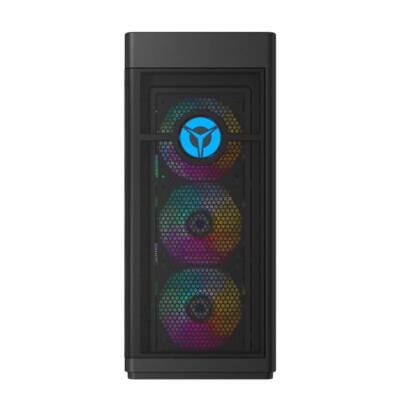
eBay
Smashing through ceilings in a robust 34 L chassis, the Legion Tower 7 is accented by over 16 million colors via an ARGB lighting system with transparent side panel. NVIDIA GeForce RTX 308. 32 GB DDR4.
Great option value wise, but you don't have an upgrade route
$782 after an extra 8% off at checkout
raw dove
mossy venture
Great option value wise, but you don't have an upgrade route
tempting, just a little more lenient towards current gen stuff i suppose
raw dove
vale epoch
A fishtank styled case like the montech xr or phanteks nv5 have a better balance...
does the nv5 come with fans?
out of the box
vale epoch
Dont think so
Wouldn’t be my first pick i’m sure there must be better options for the money
 languid nimbus
mossy venture
https://www.ebay.com/itm/156187814753?mkcid=16&mkevt=1&mkrid=711-127632-2357-0&s...
languid nimbus
mossy venture
https://www.ebay.com/itm/156187814753?mkcid=16&mkevt=1&mkrid=711-127632-2357-0&s...
Geez, that’s wild
raw dove
i see
mossy venture
raw dove
tempting, just a little more lenient towards current gen stuff i suppose
thats very fair
you will def be getting a better pc building yourself
just purely price/perf wise and saving money perspective it'd be a good choice
raw dove
which makes it very tempting for me
but that other part of me wants the personalization and upgradability
i definately appreciate you pointing that out
mossy venture
raw dove
but that other part of me wants the personalization and upgradability
I definitely get that, you'll get better overall quality too
raw dove
mossy venture
Cheap dual chamber
https://pcpartpicker.com/product/twYRsY/gamemax-infinity-atx-...
assuming i got that dual chamber, what would be the best fan intake/exhaust setup if i were to get fans for everything but the bottom?
or would bottom fans be beneficial?
mossy venture
Three fans would be fine, but you could do anywhere from 3-9
Two towards the front or on the side at the front, I forget if that case has space for any towards the front of if it's just bottom, top and back
 brittle tinsel
Dont want to get kicked for mass ping or ping anyone at a bad time. Thanks everyone who helped out with this question the other day.
❤️
raw dove
mossy venture
Two towards the front or on the side at the front, I forget if that case has spa...
i see, might as well buy 9 if they come in packs
im also curious, how would the stock cooler on the 7600 scale to some aftermarket one
 analog hearth
It'll suffice
It isn't great but it'll fit most people's needs (like high 40s to mid 50s C at idle and mid 70s under load)
(Speaking from experience with my 3600 in a second system)
raw dove
i see

PowerColor Fighter OC Radeon RX 7900 GRE 16 GB Video Card (RX 7900 GRE 16G-F/OC)

XFX RX-79GMERCB9 Radeon RX 7900 GRE 16 GB Video Card (RX-79GMERCB9)
same price, but does one excel more cooling wise?
or do either of them have anti sag brackets that you know of?
dusky hearth
xfx doesnt have an anti sag bracket included in the box from what i see on the site
neither does the powercolour
from what i see on the site
it may include it without saying that it does
raw dove
i see, so theres virtually no difference between the 2?
would it be best to do a verticle mount or smth?
dusky hearth
you would need a case that supports it, or else you will have to modify the case a bit to make a gpu vert mount fit
there is a chance that they include an anti sag bracket, but if they dont, you could always 3d print or build something out of lego, or use a disposable chopstick as a support
raw dove
im seeing vertical mount kits from people like lian li, phanteks, nzxt, and cooler master
 weary galleon
raw dove
same price, but does one excel more cooling wise?
weary galleon
raw dove
same price, but does one excel more cooling wise?
I'd probably go for the xfx, the fins look a bit denser and the backplate has some openings for air to flow thru. I'd guess they'll both perform quite close tho
raw dove
i thought so too, theyre just a little larger than the 2 fan options obviously but the extra fan probably helps
raw dove
analog hearth
Just get the Cooler Master one
the v2 or v3?
analog hearth
I think the V3
raw dove
that ones $60 so about the price of the case
but would probably be cheaper than getting a nv5 with a phanteks vertical mount
analog hearth
Yeah I have the V3
Or that
Didn't see that one at the time I was looking around lol
raw dove
i see
analog hearth
Oh that's a case
raw dove
what is?

Cooler Master Vertical Graphics Card Kit V3 – Make of it what you will: The Cooler Master Vertical Graphics Card Kit V3 is an improved version of its predecessor. It maintains high quality and modular features while introducing enhanced compatibility with "flow-through" GPU coolers, premium mater...
analog hearth
raw dove
what is?
The NV5
analog hearth
raw dove
https://www.amazon.com/Cooler-Master-Vertical-Graphics-Holder/dp/B0B7NY5TSY/ref=...
Yeah I have the white version
analog hearth
I mean it's universal
analog hearth
Just as long as your case has seven slots and doesn't have a crossbeam between each slot, it'll work
analog hearth
raw dove
i like the nv5 just a little pricey in my eyes
How much?
raw dove
analog hearth
Just as long as your case has seven slots and doesn't have a crossbeam between e...
i should probably check that, thanks
analog hearth
raw dove
about a $100
About average these days tbh
analog hearth
raw dove
i should probably check that, thanks
Yeah I think Phanteks still does this (for some reason). Quite annoying and it put me off from vertically mounting my GPU when I had my Elite Enthoo Pro back in the day
raw dove
analog hearth
Yeah I think Phanteks still does this (for some reason). Quite annoying and it p...
took a quick peek at the nv5 and i didnt see any, however the other case i was considering i believe has those pull tab like pcie slots
i may be wrong though
analog hearth
raw dove
took a quick peek at the nv5 and i didnt see any, however the other case i was c...
That link is safe btw. It's a service that I self host (it lets me embed photos and videos so I don't have to worry about Discord's file size limit lol)
raw dove
analog hearth
https://zipline.terracasa.cc/u/3atBdQ.mov
ooooh shoot, thanks for that
so whats the white case?
analog hearth
raw dove
so whats the white case?
Lian Li O11 Dynamic. But don't get it. There's a lot of similar options for cheaper (plus you'll be bullied when sending photos of the build lol)
raw dove
analog hearth
Lian Li O11 Dynamic. But don't get it. There's a lot of similar options for chea...
someone here recommended the montech xr when i posted phanteks xt view
only concern is if the pcie slots arent reusable
i also need to get some fans
yk any that are decent with rgb?
analog hearth
oh ew
I can't stand those expansion tabs that you can't reuse
Just don't buy the case if it has those
analog hearth
raw dove
yk any that are decent with rgb?
That's going to come down to the controller you use, which will either be your motherboard or an actual RGB hardware controller (just use the hardware method lol. Suggestions on which kind of hardware? idk. just research it lol)
analog hearth
analog hearth
https://zipline.terracasa.cc/u/3atBdQ.mov
lol I can see how many times people have viewed this video

 rugged quarry
anyone mind reviewing this list?
https://pcpartpicker.com/list/jhD3KX
Using the GPU from a different build and wanting to do a mini setup.
Part List - AMD Ryzen 5 7600X3D, GeForce RTX 3080 Ti, Phanteks EVOLV SHIFT XT Mini ITX Desktop
main things are just considering mini ITX motherboards, cpu coolers, ram and I guess PSU as well
raw dove
analog hearth
That's going to come down to the controller you use, which will either be your m...
i see, thank you
vale epoch
rugged quarry
anyone mind reviewing this list?
https://pcpartpicker.com/list/jhD3KX
Using t...
u have a micro near you? and that 3080ti is absolutely bad value for 100 bucks more you could get a 4080 super with significantly more performance
and an aio is unnecessary
a single tower 20 buck termalright air cooler can cool a 7800x3d very well
also the 7600x3d in the us is microcenter exclusive
could definitely pick a more apprrpriate power supply as well
180 bucks for a 750w is...
but since you want itx as a must your parts selection process is going to be tougher and limited unfortunately
mossy venture
rugged quarry
anyone mind reviewing this list?
https://pcpartpicker.com/list/jhD3KX
Using t...
Do you alr own the gpu?
If not, don't buy it. The 4070 super is $580-600 and performs the exact same, but much lower power usage and nicer features
rugged quarry
vale epoch
u have a micro near you? and that 3080ti is absolutely bad value for 100 bucks m...
yes. ive had the 3080ti for a few years now. upgraded from it so I have it laying around @mossy venture
rugged quarry
vale epoch
also the 7600x3d in the us is microcenter exclusive
yes, got a friend to pick up the 7600x3d so thats on the way 🙂
vale epoch
looks like the case could fit a air cooler
 rugged quarry
so besides the gpu/cpu being locked in, everything else I still need to purchase
mossy venture
rugged quarry
yes. ive had the 3080ti for a few years now. upgraded from it so I have it layin...
Ohh ok
Part List - AMD Ryzen 5 7600X3D, Phanteks EVOLV SHIFT XT Mini ITX Desktop
rugged quarry
is it not worth running a 240 mm cooler ?
mossy venture
Not really
Am5 is incredibly easy to cool
The amd stock cooler can manage the 7800x3d
rugged quarry
ahh good to know, even though its mini itx it should still be fine then ?
vale epoch
@mossy venture when making a list with a 7500f do u assume its bought from aliexpress? i cant find a single decently priced one on amazon
crimson zinc
vale epoch
<@654444344274845698> when making a list with a 7500f do u assume its bought fro...
Yes
mossy venture
vale epoch
It doesn’t come with a stock cooler right?
Yeah it doesn't
raw dove
@mossy venture any final revisions youd recommend? i swapped out the case and the board for the one you recommended since i wanted the blackout look
Part List - AMD Ryzen 5 7600, Radeon RX 7900 GRE, Montech XR ATX Mid Tower
was thinking about getting more case fans, not entirely sure if the rgb would be a headache or not setup wise
 urban galleon
• Windows 11 Home 64 bit
• AMD® Ryzen 7 M 5800X3D Processor o 96MB L3 Cache
• ASRook B550M-C System Board
• AMD Radeon RX 7600
• 16GB DDR4 RAM
• 500GB Solid State Boot Drive
• Integrated 7.1 Channel High-Definition Audio
• Integrated 10/100/1000 LAN
• Wireless LAN 802.11 b/g/n/ac - Bluetooth 4.2
is this good for a prebuilt
dusky hearth
you gotta say the price lmao
urban galleon
i think i paid 700$ usd
dusky hearth
a used system?
dusky hearth
i dont think it's a terrible price then
there may be better deals, but imo it's not a scam price, especially if it's new
dusky hearth
?bottleneck
 jolly riverBOT
"TL;DR Bottleneck calculators take massive generalisations and will cause someone to almost completely miss the entire snapshot of the performance that they wanted to know in the first place.
Bottleneck calculators are a commonly searched tool on the internet to make a generalised comment on a pairing of hardware for things such as games, workstation software, rendering and the like.
Bottlenecks are regarded as a limit for a pc in a given task, and each different workload, each different game, each different task may and will push a pc to a limit in a certain way, and it's never the same way. Some games will push the cpu to a limit, most the GPU, some the ram, etc.
Bottleneck calculators try to generalise this and this is why you should never use them. It isn't a true outlook of the hardware you'd be working with and doesn't give you a real take on the performance, especially when you consider your own individual needs. Some bottlenecks are good for example, a lot are expected and normal, some are caused by the application itself and don't bring out the full pc performance either, the games or apps you use might be very specific and unique in their behaviour and have an entirely different realm of performance altogether."
dusky hearth
not exactly what i wanted there
but there's no pc that has "no" bottlenecks
the prebuilt you have there should be able to run any game you throw at it fine, you may have to lower some settings to medium, especially on newer titles, but it shouldnt suffer too badly
urban galleon
ok that's good to know then
mossy venture
raw dove
<@654444344274845698> any final revisions youd recommend? i swapped out the case...
Looks great, ram did go oos though
raw dove
mossy venture
Looks great, ram did go oos though
nah i checked amazon its still there
will the stock fans included surfice?
raw dove
alright well ill be placing orders tonight
how much better is the 7900 gre compared to the 7800 xt?
mossy venture
raw dove
how much better is the 7900 gre compared to the 7800 xt?
I believe it's around 10%, and the gre overclocks well
 dawn steppe
please roast: https://pcpartpicker.com/user/Hasbinbad/saved/4nRDzy
dusky hearth
500gb ssd?
FOR 65???
you paid for windows 11 pro 
noctua industrials as well for not really much reason
the case is nice though
128gb ram isnt really that great though, for what appears to be a gaming focused pc
2x 24gb ddr5 is the max size you can get before ram perf takes a hit
dusky hearth
if it was more ai focused, it does make a bit more sense
crimson zinc
@dawn steppe purpose of pc?
dawn steppe
all purpose gamering and ws. i do a lot of different stuff, and cannot afford 2 pcs that are purpose built.
dawn steppe
dusky hearth
2x 24gb ddr5 is the max size you can get before ram perf takes a hit
idk about this what is it
crimson zinc
There seems to be a lot to improve
Do you have this built already? Or is this a wishlist?
dawn steppe
wishlist
dusky hearth
what kinda workstation load
dawn steppe
mostly i want no compromise on gamering, with the option to do some fairly serious production and computer science stuff.
crimson zinc
I’d suggest two pcs, with more specialized purposes for each
dusky hearth
well, technically there are comprimises already because of the ram lmao
also the 500gb ssd doesnt need to be in the build
dawn steppe
uh huh
dawn steppe
video, music, 3d, cad
dusky hearth
i dont see any workload that would actually need 128gb ram
 stoic island
prob most fun to get 7950x3d
dawn steppe
dusky hearth
2x 24gb ddr5 is the max size you can get before ram perf takes a hit
can you tell me about this? what kind of performance hit?
stoic island
Too much strain on the integrated memory controller means you don't get to run higher frequencies with more ram
2x48 is prob the actual max before you can't hit 6000
at least for this generation
cyan ravine
stoic island
prob most fun to get 7950x3d
This, though I highly suggest learning process lasso as dual ccd x3d can be annoying as hell with the scheduler at times
cyan ravine
dawn steppe
please roast: https://pcpartpicker.com/user/Hasbinbad/saved/4nRDzy
For nearly half as much you can get virtually better performance
Part List - AMD Ryzen 9 7950X3D, GeForce RTX 4090, SAMA ARGB-Q5 MicroATX Mini Tower
0 performance loss, 0 quality drop
You could push higher ram if you'd prefer, that was the best value kit I could see at a higher density
Capacity varying based on what level of video raw format you work with or what degree of 3d cad simulation you might see yourself doing
Board choice also potentially playing a factor depending on what you see yourself needing, but the one chosen is very strong amongst the B650's
mossy venture
cyan ravine
https://pcpartpicker.com/list/YDr67R
Gv1000 :p
Just for white cables
And tbf extra wattage overhead with a 7950x3d and 4090 isn't a bad thing
cyan ravine
I don't know how good the gv is
mossy venture
Its good
High B tier quality wise
Not sure if it's officially rated on the tier list but I saw some reviews on it a while back
cyan ravine
With the power behaviour of the 4090 I'm inclined against that
I'd want something at least RMe-ish level
mossy venture
Have to have suggested it a dozen or more times by now for a 4090 without hearing of any issues
cyan ravine
Also 850W is fine for this spec btw
mossy venture
Ye I'd just spend the 10 extra for the white cables
cyan ravine
Hmmm
mossy venture
I'll do a deep dive on the psu tmrw
cyan ravine
No need
I just never saw the review
Is the white one atx 3.0?
Yes it is
Wth
@mossy venture not B. Ignore dumb list
It's andyson competing with seasonic vertex

Vertex is like the golden child of current gen rn
I take it all back, good suggestion
@dawn steppe https://pcpartpicker.com/list/YDr67R new suggestion
Part List - AMD Ryzen 9 7950X3D, GeForce RTX 4090, SAMA ARGB-Q5 MicroATX Mini Tower
cyan ravine
cyan ravine
You could push higher ram if you'd prefer, that was the best value kit I could s...
^
cyan ravine
cyan ravine
Capacity varying based on what level of video raw format you work with or what d...
^
cyan ravine
cyan ravine
Board choice also potentially playing a factor depending on what you see yoursel...
^
My choice if you wanted all white (acceptable since this is about a 7% increase over the current baseline and an actually top end 4090 regardless):
https://pcpartpicker.com/product/VtPQzy/msi-suprim-liquid-x-geforce-rtx-4090-24-gb-video-card-geforce-rtx-4090-suprim-liquid-x-24g

MSI SUPRIM LIQUID X GeForce RTX 4090 24 GB Video Card (GeForce RTX 4090 SUPRIM LIQUID X 24G)
Mount the gpu rad to the front, would be unconventional looking, but the build would at that point be faster in every way than what you had earlier
Aorus xtreme pcb is just a pretty regular 20 or 24 phase design with no binning and a very basic radiator and pump
Vs the surprim which has on card vrm cooling, 28 phase pcb and a binned core (One of the only brands that does this for 4090 btw)
stoic island
dawn steppe
wishlist
By the way, I don't think I remembered to note that for a wishlist like this, it will change with time, especially if you think you'll be a few months out from being able to get it, new parts will come, 9000x3d should come Q1 next year, there might be something that changes up the GPU landscape, there could be newer better PSU, ram, cooler, cases etc that could come out or changes things up
 stuck laurel
so i have my gpu but the cord that goes to it does it need to be plugged in straight to the motherboard or into the power supply its self into then into gpu?
 strong raft
@stuck laurel Just curious where on mobo you'd plug it in? Actually, just ignore that. There's a reason 1 item in the pc is called the power supply. it supplies power to other stuff like mobo, gpu, cpu. The port top left of mobo is cpu power (4+4 split end to mobo). For gpu, split 6+2 end. --- required is 24pin (both connectors on psu end), 1 cpu cable, 1+ gpu cables.


 stuck laurel
mossy venture
I'll do a deep dive on the psu tmrw
stuck laurel
mossy venture
I'll do a deep dive on the psu tmrw
One more question i already have my games and stuff imma use downloaded but now when i turn off the pc and turn it back on it shows those mob lights then it goes away after like 80 seconds then I get picture how can I stop that
 odd venture
got my memory running at 6000 MHz, all I did was enable XMP Profile. Turns out there are 2 of them. First one is 7200 MHz, Second is 6000 MHz. I chose the second, and it booted with zero issue. No voltage changes or anything like that were done. 
 potent portal
AMD or Intel?
Nvm silly question
 tawny violet
@minor garnet What monitor arm do you use in this pic? #build-pics message
jagged ember
Left arm
tawny violet
lmao
analog hearth
@minor garnet What monitor is that OLED?
cyan ravine
@minor garnet what brand is that headphone?
crimson zinc
@minor garnet what skin is that for sombra?
languid nimbus
@minor garnet where’d you get that NFT?
 minor garnet
analog hearth
<@842086619955593218> What monitor is that OLED?
minor garnet
analog hearth
<@842086619955593218> What monitor is that OLED?
Msi mpg 321urx
raw dove
stupid question, tried google but didnt get a rlly good answer
minor garnet
cyan ravine
<@842086619955593218> what brand is that headphone?
Corsair
raw dove
how long does it take for amazon to actually process a charge
minor garnet
crimson zinc
<@842086619955593218> what skin is that for sombra?
Jester
raw dove
i got my card spending limit raised just for today and wanna make sure it goes through
minor garnet
tawny violet
<@842086619955593218> What monitor arm do you use in this pic? https://discord.c...
Ergotron LX dual arm
tawny violet
nice
crimson zinc
raw dove
how long does it take for amazon to actually process a charge
It’s when it ships
 cursive atlas
is it safe to play a game like valorant the first day i have the pc setup
or should i play small games then big games another day
mossy venture
cursive atlas
is it safe to play a game like valorant the first day i have the pc setup
Yes
Tech is tech
raw dove
could someone list me some monitors again
1440p for main one and whatever would work for a secondary
just for displaying discord or smth
mossy venture
raw dove
1440p for main one and whatever would work for a secondary
For main
https://pcpartpicker.com/list/WPkJsh
Part List
analog hearth
Man I wish I had the money for OLED
mossy venture
I'm copping one black Fridayish
Have $200 in gift cards and will ahve another $200 by then
raw dove
mossy venture
For main
https://pcpartpicker.com/list/WPkJsh
appreciate it
mossy venture
raw dove
appreciate it
Yo, not sure if you ordered all your parts yet

This bundle contains 2 items as below. (1) TEAMGROUP T-Force Delta RGB DDR5 32GB Kit (2x16GB) 6000MHz (PC5-48000) CL30 Desktop Memory Module Ram (Black) for Z690 - FF3D532G6000HC30DC01 (2) TEAMGROUP T-Force G50 2TB SLC Caching 3D TLC NAND NVMe InnoGrit PCIe Gen4x4 M.2 2280 Gaming SSD with Ultra-T...
This just popped up, ram is worth about $95, ssd is worth about $110 buying separately
 clever lance
same combo is ~$172 on newegg...and u get a flash drive
mossy venture
clever lance
same combo is ~$172 on newegg...and u get a flash drive
Ooh dope
raw dove
mossy venture
Yo, not sure if you ordered all your parts yet
i did but i might be able to cancel
mossy venture
it's up to you, you end up paying more but you get another tb of storage
you can always add more later, you've got 2 extra slots on that mobo
games are pretty big atm though
raw dove
how much more is it
mossy venture
i downloaded warzone the other day, was 150gb
$172 for ram+ssd vs $92+60 if i remember right'
 runic spruce
cursive atlas
is it safe to play a game like valorant the first day i have the pc setup
runic spruce
cursive atlas
is it safe to play a game like valorant the first day i have the pc setup
U don’t have to break in pc parts or anything
They’re already performing as they should out of the box
mossy venture
@cyan ravine do you happen to have a 7900xtx/4080 super solidworks comparison off hand?
 haughty sable
Looking for a micro center build that's max is 2k
 dry junco
is the 16 gig rtx 4060 ti good for a high performance gaming rig? Im planning to get the Gigabyte gefore trx 4060 Ti windforce oc 16g with 128 bit GDDr6
dusky hearth
dry junco
is the 16 gig rtx 4060 ti good for a high performance gaming rig? Im planning to...
"high performance gaming rig" with the 4060 ti 
4060 ti isn't worth it
dry junco
it’s only 300 tho
dusky hearth
What is your full build budget for the pc
dry junco
anything really
dry junco
im getting the ryzen 7 7800x3d with the b650e-f
dusky hearth
4060ti would be hella underpowered for that cpu
dusky hearth
4080 super is better value on the Nvidia side
Or you could get a Rx 7900gre
Or xtx if you want something more on par with the 4080s
The gre is the best value though afaik
dry junco
what is better the rx 7900gre or the 4080 cuz they are basically the same price
dusky hearth
7900gre for raster
dry junco
i just found a 7900 gre for 540$
dusky hearth
Also wait, same price? 4080 technically would outperform it? I don't remember the exact performance details, but 7900gre is the best price to perf currently on the market
crimson zinc
dry junco
it’s only 300 tho
So is a 3070ti
@dry junco what’s your budget and desired purpose?
Let me start you over.
haughty sable
https://www.microcenter.com/site/content/custom-pc-builder.aspx?load=45e2dce5-70d6-4432-86f3-a0d8dbe5b5b0 Here is my current build if someone can look at and tweak it so it will be under 2k and optimized. I also want to try and keep the 3080 in there

Micro Center
Ready to build your own PC? Micro Center is your one-stop source for PC parts and more! Use our PC builder to find the best prices on the parts you need.
crimson zinc
haughty sable
https://www.microcenter.com/site/content/custom-pc-builder.aspx?load=45e2dce5-70...
Do you need to get from microcenter?
haughty sable
yeah
crimson zinc
Alright
dusky hearth
crimson zinc
Do you *need* to get from microcenter?
They're using the build service from them
mossy venture
haughty sable
https://www.microcenter.com/site/content/custom-pc-builder.aspx?load=45e2dce5-70...
4070 super=3080 ti but cheaper, lower wattage, and newer features
Oh at $450 that's a great choice
My bad
Micro Center
Ready to build your own PC? Micro Center is your one-stop source for PC parts and more! Use our PC builder to find the best prices on the parts you need.
The 4tb I'd buy separately, I'm 99% sure you can buy parts not on mucrocenter and bring them in store and they'll use them for the build, which would get you a better value build. If not you can just add the second nvme yourself, it's super easy
I'll grab a list for the parts I'd buy separately
haughty sable
Cool
mossy venture
Included a couple choices for nvme/cooler
https://pcpartpicker.com/list/QRK2t7
Part List - Montech XR ATX Mid Tower
Case is personal preference, there's a lot of other options if you're not a fan of the aesthetic
903 max is also a good choice, just a bit overpriced at microcenter
haughty sable
Could I switch out the 2tb for the 4tb?
mossy venture
Yeah
Could do 2 2tb, 1 4tb, 2 4tb, any array
The gm7000 and g70 pro graphene are both on par with the 990 evo/980 pro and similar
haughty sable
does that motherboard have a second m.2 slot?
mossy venture
Yes, it has three if I remember right but I'll check
Yep 3
4 sata slots if you ever need more storage as well
So potentially could do 3x4tb nvme 4x4-8tb sata ssds, or 8-16tb hdds lmao
Even cheap builds typically have options for tons of storage nowadays
(This isn't a cheap build)
haughty sable
why is the crucial P3 4tb m.2 cheaper than the samsung?
dusky hearth
haughty sable
why is the crucial P3 4tb m.2 cheaper than the samsung?
Samsung used to be the top dog, so they haven't lowered their prices
They even recently had a scandal of a line of their like 980 Evo or whatever dying randomly due to bad firmware from factory
haughty sable
uh oh
dusky hearth
Fixed with a firmware update
haughty sable
Thats good
dusky hearth
Though there wasn't a recall for affected units
mossy venture
haughty sable
so would the 990 pro be fine?
Update the firmware just in case
There's still some old stock mixed in, but odds are it's a non issue either way. 100% safe without the faulty firmware
dusky hearth
haughty sable
so would the 990 pro be fine?
There are better value options if you haven't bought it though
haughty sable
mossy venture
Update the firmware just in case
How would I update the firmware when I get it?
dusky hearth
There's a firmware update tool
You might even be able to ask microcenter to help do it for you
haughty sable
Cool, If my store closes at 6pm and I have to order it 4 hours before closing I'd assume I cant get it today
mossy venture
definitely not
crimson zinc
AHHHHH
 dusky hearth
Wtf
 runic flare
Is I7 14th gen the best CPU for $400 range?
potent portal
Is this for gaming?
strong raft
I7 might be somewhat a waste for that. If trying to spend $200 or so, Perhaps go i5 13600k/14600k, or amd.
runic flare
strong raft
I7 might be somewhat a waste for that. If trying to spend $200 or so, Perhaps go...
Wdym a waste? Will those be enough for 240fps?
strong raft
The extra 2Pcores won't really help fortnite. The Ecores can handle background stuff. It's why I was ok w/ a $200 14600KF, just haven't popped it in yet.
runic flare
strong raft
The extra 2Pcores won't really help fortnite. The Ecores can handle background s...
Alright thank you
raw dove

Samsung T350 22.0" 1920 x 1080 75 Hz Monitor (LF22T350FHNXZA)
would this make for a decent secondary monitor?
mossy venture
That would be fine, there's also this
https://www.ebay.com/itm/145639530809

eBay
City of Industry, CA 91748. 901 Canada Court.
crimson zinc
mossy venture
That would be fine, there's also this
https://www.ebay.com/itm/145639530809
Yeah get this
manic cloak
Big time issue if it’s sitting idle at 50C with memory temp at 63-66C? For gpu btw
Turned on fans, mem temp is at 54C, 33C in just gpu itself, 39C for hotspot
 flint sapphire
What’s it under load? Are you on air or water?
manic cloak
Ran everything at 100% fan speed, mem temp did not budge, hotspot stayed at 56C, cpu and hot spot was 34-40C
manic cloak
flint sapphire
What’s it under load? Are you on air or water?
I just turned it on about 10 minutes ago, hopped on a game that has no problems with my pc running it and it just became a jet engine for a second
Air
flint sapphire
It should be totally normal if it’s air
manic cloak
For a GPU?
flint sapphire
Sure
manic cloak
Alright I just don’t wanna risk it atm
flint sapphire
Radeon tends to run a tad hotter then team green anyways
manic cloak
Ik it’s time for me to repaste n everything just I haven’t gotten it
manic cloak
flint sapphire
Radeon tends to run a tad hotter then team green anyways
The amount of 4070 supers and 4070tis on Facebook marketplace lately been tempting
flint sapphire
7800xt to one of those doesn’t seem like much of a upgrade… have you been experiencing issues with it?
manic cloak
Like a gigabyte 4070ti eagle for 550$
manic cloak
flint sapphire
7800xt to one of those doesn’t seem like much of a upgrade… have you been experi...
Not many issues, just more like heating issues.
flint sapphire
What have games just started chugging?
manic cloak
About 2ish months ago it lost a significant amount of performance from stress tests likely cause of how hot it’s ran
manic cloak
flint sapphire
What have games just started chugging?
Well sea of thieves is certainly one, and I don’t max out settings. Counter strike I noticed a little bit along with AFOP funny enough
flint sapphire
66 isn’t bad. My 3080ti hits 68 cuz I haven’t repasted it. You can always down clock it or lower some voltages if you need too
manic cloak
Avatar frontier
manic cloak
flint sapphire
66 isn’t bad. My 3080ti hits 68 cuz I haven’t repasted it. You can always down c...
This is idle though
flint sapphire
What’s was it under gaming load
manic cloak
No clue, I can’t see radeons hot bar with Roblox
Usually Roblox doesn’t run hot or much either
flint sapphire
Don’t have hwinfo? Or msiafterburner
manic cloak
Nope 😭
potent portal
Alt-R should open the radeon overlay that shows temps, if not you need to enable it in settings
manic cloak
flint sapphire
Those games you mentioned tend to be cpu bound btw
I know which is strange
flint sapphire
 cpu self destructing from bad code incoming
manic cloak
potent portal
Alt-R should open the radeon overlay that shows temps, if not you need to enable...
I have my keybind set to windows shift o for the overlay in the top right corner
manic cloak
flint sapphire
<:KEKNervous:1032348843410468955> cpu self destructing from bad code incoming
Doesn’t help if I got a meteor lake waiting to be updated 
I haven’t heard much about Asus’s testing with the x129 or whatever
Cause I remember it was Felix or somebody here I was talking with the night before they released testing for the x125 for asus boards
And asus had the download available, next day apparently the update killed 35% of the performance
potent portal
A 13600K should be ok as long as you didn't push it and it's not a really bad bin
manic cloak
potent portal
A 13600K should be ok as long as you didn't push it and it's not a really bad bi...
Ya no I haven’t touched with any of the voltage
Only issue is I got 2-4 bent pins
potent portal
Ground pins?
manic cloak
But it hasn’t affected my PC from what I can see..
manic cloak
potent portal
Ground pins?
CPU pins, idk which pins
 potent portal
Bad bin is still fine, I'm talking bottom 3% being not fine
manic cloak

Back during the time I managed to get thermal paste inside my socket but managed to get everything out w/o bending..
Also bad bin, could somebody tell me what that is..
potent portal
manic cloak
Also bad bin, could somebody tell me what that is.. <:kekw:741678350791081994>
Every CPU that passes validation is able to hit the advertised speeds, but some with more defects than others may require more voltage to be able to hit those speeds. That would be a bad bin. Conversely, a good bin requires less voltage.
manic cloak
Ahh
With my luck likely a bad bin
And I’ve been rocking DDR4 so my 13600k is currently been held back
flint sapphire
Some mobo companies just jack up voltages out the gate… 👀 msi (my current mobo)
manic cloak
I should have bought that 45$ z790 ddr4 msi towahawk refrub from newegg awhile ago..
Would of been a field day regutting my pc
flint sapphire
That’s not that bad, imo new psu’s are the worst especially with different pinouts 
manic cloak
I have a very old psu technically
750GT, got it from GameStop
I’m telling you, the amount of dust it had on top of it when I got it back in late late 2022 was scary
flint sapphire
It’s probably fine 
manic cloak
flint sapphire
It’s probably fine <:Shruge:1021470871216463965>
I haven’t blown up
Not just yet though
potent portal
manic cloak
Good news, one of the pins that has the most paste on it is not used since you're using DDR4.
Bad news, other ones with paste on them are VDD2, aka core voltage, which can cause instability.
manic cloak
potent portal
Good news, one of the pins that has the most paste on it is not used since you'r...
that photo is over a year old fyi, and I made sure there was 0 thermal paste left'
but..
that's very concerning
flint sapphire
Btw what’s going on right there
 manic cloak
now how would I figure out if i've been cooked
manic cloak
flint sapphire
Btw what’s going on right there
long story short, I had to pay microcenter 30$ to bios update and the dude took care of my barebones like a pinata.
flint sapphire
Ah fun so just bent pins?
manic cloak
just bent pins that was packed into a mobo box, he couldn't even fully close it because the ram was sticking out
brute force at it's finest on that box
idk where I put it but I know there's a crease in it
Anyways how would I check if the core voltage is unstable?
potent portal
I just realized that pic is upside down, I need to recheck the pinout hang on
manic cloak
😭
potent portal
Bent pins looks like a sensor and ground pins so they're probably fine
And the paste managed to only hit the ground pins as seen on the left
Smaller smudge on the right got ground and an ODT pin (memory related)
manic cloak
Oh that’s less heartbreaking
potent portal
Larger glob on the right mostly hit memory pins
As long as you're not having memory problems I'd say you're in the clear
manic cloak
Not that I’ve noticed
I did a really damn good job cleaning the thermal paste with a sewing needle
potent portal
Then I think we can chalk it up to you being one lucky SOB
 manic cloak
potent portal
Then I think we can chalk it up to you being one lucky SOB
manic cloak
potent portal
Then I think we can chalk it up to you being one lucky SOB
Luck isn’t my thing personally
No joke I gamble on Roblox and ive gone “home” many times 🤑🤑🤑

PRO Z790-A MAX WIFI offers a simple design with a harmonious silver color scheme that perfectly matches white and black PC builds. It is engineered with many exclusive features of MSI, a convenient Wi-Fi 7 solution, and DDR5 optimization for Intel next Gen and 13th Gen Core processors.
Wait that deleted the sellers..
potent portal
I say if you plan on doing a mobo swap wait until next gen is out at the end of next month
manic cloak
Wait already?
flint sapphire
That’s how it goes
manic cloak
😭
potent portal
Current gen will go down in price shortly after launch of next gen
flint sapphire
One day you’re ontop of the gen then seemingly the very next day you’re behind 2 generations and missing out on a 20% perf bump
manic cloak
I mean the 13600k itself is a powerhouse atm
15th gen it better not rip a 750w psu
Hopefully they go for the trend of “power efficient”
potent portal
I'd consider 13th gen to still be current since Intel decided to play stupid games
manic cloak
14th gen doesn’t exist
potent portal
It does, but only when it's cheaper than 13th
potent portal
I've seen it a couple times already
manic cloak
actually?
potent portal
14th gen sales were bad, but bad in the way that made it good for us
flint sapphire
Sounds about right
manic cloak
Sounds like the 9000s screnario atm
Got me wondering is it believed that the 15th gen is going to be 20% better with more power usage?
Or is it about the same
I know it’s got a bigger socket now but no clue if it’s a difference
potent portal
The thing with next gen Intel is that it's supposedly 20% better on "p-cores" but no hyper threading
So they might compete with the 7800X3D in gaming finally but in multi core you might see times where it loses to last gen
manic cloak
Soooo basically switch to AMD when the new gen of intel comes out
Or stick with the 13th gen, doesn’t sound half bad rn
potent portal
AMD isn't doing so hot either right now
We still don't know what the 9800X3D will look like
flint sapphire
Oh right I forgot about that laughs in 5800x3d
manic cloak
Oh I hope it’s as bad as the 7600x3d..
They’re just throwing the x3d on everything now
flint sapphire
X3d is fine on whatever they throw it on
potent portal
The 7600X3D is made out of 7800X3D and 7900X3D chips that failed validation on one or more cores or CCDs
It's a way to reduce waste
manic cloak
I thought it was just a 7600x with the 3D slapped on it
I have not seen a single good review
potent portal
Some people delidded their 7800X3D to find that it had 2 CCDs on it, and they were made from failed 7950X3Ds
covert vapor
You won't see many reviews because they are microcenter exclusives, but they are essentially most of the performance of the 7800x3d
covert vapor
5% less perf for something like 130 less dollars
potent portal
They're $300 rn, and the 7800X3D just keeps going up because of demand
Last I saw it was approaching $500
Oh pcpp has it at 501 now
potent portal
If you're near a microcenter yes
manic cloak
Even if the 7800x3d was at 350
manic cloak
potent portal
If you're near a microcenter yes
Luckily I am

Micro Center
Get it now! Find over 30,000 products at your local Micro Center, including the AMD Ryzen 5 7600X3D, ASUS TUF Gaming B650 Plus WiFi, G.Skill Flare X5 Series 32GB DDR5-6000 Kit, Computer Build Bundle
Not bad tbh
potent portal
manic cloak
Even if the 7800x3d was at 350
Even in this case, it's 95% of the performance for 85% of the cost
potent portal
The lowest the 7800X3D got was $335, if it was that close then it would be worth it imo
But as of now the 7800X3D is $390 at microcenter
30% premium over the 7600X3D
manic cloak
Plus you gotta add on the various new customer coupons they offer
Though idk if I’m reading this right
Techpowerup saying the 7600x3d is 1% worse than the 13600k
Unless I’m on the wrong page
potent portal
That's the forum
manic cloak
I love websites on mobile
potent portal
TPU charts always slightly favor Intel too
Just the way they do the reviews
Here's the source on that image btw, it's a german site
https://www.pcgameshardware.de/Ryzen-5-7600X3D-CPU-280796/Tests/Benchmark-Release-Preis-Effizienz-GPU-Grafik-1455138/

PC Games Hardware
PCGH hat den AMD Ryzen 5 7600X3D getestet. Was der kleine Bruder des 7800X3D leistet und wie effizient die CPU dabei ist, hat uns sehr überrascht!
That seems to be what everyone is referencing in their news too
 strong knoll
is there someone that can help me out rq im tryna buy a computer and i wanna make sure im getting a good price for what it has
mossy venture
strong knoll
is there someone that can help me out rq im tryna buy a computer and i wanna mak...
Hey! I could help
 restive halo
Hey guys. Got a weird issue I have never ran into. Anyone have time to help?
flint sapphire
restive halo
Hey guys. Got a weird issue I have never ran into. Anyone have time to help?
I have no time but I’m intrigued explain 👀
restive halo
flint sapphire
I have no time but I’m intrigued explain 👀
Built the PC and it boots. Hooked up the usb windows boot and it will go to the blue screen but nothing but a blue screen.
dusky hearth
Don't ask to ask, just write your issue so if anybody has any idea, they can pop in and answer yeah
dusky hearth
restive halo
Built the PC and it boots. Hooked up the usb windows boot and it will go to the ...
Blue screen like bsod? Or just a blue coloured screen with no text or anything
You may want to try making your windows installation media again
restive halo
Just blue screen with nothing on it
dusky hearth
Yeah I'll try reflashing the installation media again and see if that fixes it
crimson zinc
What’s a gpu with similar performance to a 5600g cpu?
crimson zinc
Trying to find something I can buy used for around $40.
Just for a parts list for a marketplace listing.
1030 sells for frustratingly higher than a 970ti
mossy venture
crimson zinc
1030 sells for frustratingly higher than a 970ti
960, 770, 780, 1050, rx 550 are fine too
I've also seen 580s and similar under $60
 severe dove
how to only enable x3d cores?
severe dove
I don't know what I'm looking for honestly, I just heard someone say enabling only 3d gets u more fps
obsidian wigeon
that problem wouldn't exist if you get the 8 core sku
like the 7800x3d
basically all you would ever want for gaming
cyan ravine
severe dove
how to only enable x3d cores?
Via bios or using process lasso for specific apps
odd venture
manic cloak
I did a really damn good job cleaning the thermal paste with a sewing needle
a quick blast of break cleaner will also work but be careful
i can't recommend this, and i've only done it once
sometimes chemicals like that can interact with different plastics, and make it literally fall apart
i know im late to that discussion but anyway
Has Intel fixed their processor issues yet? 0x129? has anything really been solved? Should I buy a 13900K? Should I wait? Will it ever be solved?
dusky hearth
odd venture
a quick blast of break cleaner will also work but be careful
I wouldn't recommend using brake cleaner
Electrical contact cleaner is a better choice, since they're pretty much just aerosol cans of isopropyl
analog hearth
jagged ember
Or which to block
Like if it's a 7900X3D you can block a whole CCX, blocking four of the cores and basically turning it into a 7800X3D
jagged ember
Brake cleaner on a CPU is something I've never heard before
odd venture
dusky hearth
I wouldn't recommend using brake cleaner
Electrical contact cleaner is a better...
I tried that, didn't work
I was trying to get thermal paste out the cpu socket. Worked great btw
I just don't recommend it.
It could literally disintegrate the plastic used on the cpu socket if there's a reaction
dusky hearth
Yeah I don't think anyone should, unless you know for sure that the specific formulation you have is safe for the specific plastic the socket is made of
Also how did you get thermal paste in the socket anyways
cyan ravine
jagged ember
How would you even know which core to use?
Agesa labels each core specifically 0-15
You can very easily identify which ccd is 3d and which isn't and it's recurring from boot to boot
In bios you can target ccd's as well
restive halo
anyone have time to help me for a minute?
potent portal
What's the problem?
restive halo
@potent portal So I finished this pc put windows on it but it will not allow me to open edge so I cant really do much else?
restive halo
Mot running slow just wont open
cyan ravine
Maybe stuttering?
If it's stuttering - not just edge not opening then it could be hardware related
But edge on it's own being the only weird one might just be a bug of the install
sfc /scannow
Might help
restive halo
potent portal
If so it might want you to update it
I updated but nothing
restive halo
cyan ravine
Might help
Do a fresh install?
cyan ravine
cyan ravine
sfc /scannow
Try this in admin command prompt
potent portal
Ok, in addition to sfc /scannow in an admin command window, also run dism /online /cleanup-image /restorehealth
cyan ravine
If it finds anything, reinstall, maybe a fresh usb that wasn't the victim of some corruption like I read earlier
Starting fresh on a positive sfc install is sus
potent portal
I have seen the USB be the issue for the installer as well
cyan ravine
Me too
jolly riverBOT
How to clear CMOS (works for AMD and Intel)
https://www.intel.com/content/www/us/en/support/articles/000025368/processors.html
Intel
Defines CMOS technology and how to clear CMOS using the jumper or battery methods.
jagged ember
SFC dism first
Then CMOS
Then new USB
Funny how Edge is the thing to fail tho lol
cyan ravine
Corruption manifests in interesting ways
jagged ember
The one thing Microsoft tries to force down their users throat
cyan ravine
My i/o issues on ryzen 7k were with explorer dying
 potent portal
Yeah that's not good for a fresh install
restive halo
Checking now power went out
restive halo
 stoic island
Power went out and it gave you that? It sounds like you gotta get a new installation media again, likely borked itself
restive halo
no this was after
stoic island
Either way it looks like you need to remake the installation media
 stoic island
Should be straight from windows, may have to download it again and discard the previous one
restive halo
Also its taking like 20 mins to make a usb boot drive at 100mb sec?
stoic island
That's weird, it usually takes like 5min on random USB sticks
stoic island
Download this thing over again
https://support.microsoft.com/en-us/windows/create-installation-media-for-windows-99a58364-8c02-206f-aa6f-40c3b507420d
Learn how to create installation media for installing or reinstalling Windows 7, Windows 8.1, or Windows 10.
manic cloak
odd venture
a quick blast of break cleaner will also work but be careful
BRAKE CLEANER?
ngl, with how Asus builts their motherboard's, I got a feeling something will just corrode.
manic cloak
odd venture
Has Intel fixed their processor issues yet? 0x129? has anything really been solv...
but ya I should probably remention his comment because I need to know this aswell for my 13600k 😭
manic cloak
odd venture
Has Intel fixed their processor issues yet? 0x129? has anything really been solv...
It's likely solved but i've been told 15th gen drops next month or so. So don't buy just yet.
restive halo
stoic island
Download this thing over again
https://support.microsoft.com/en-us/windows/crea...
Gave me this again
@stoic island#building-and-recc-chat message
I have been trying to get this to work for 2 hours
stoic island
It appears windows just really hates you
Assuming you've tried different USB sticks and redownload the installation media at this point
May want to check the health of the drive through cdi in windows if at all possible
restive halo
stoic island
It appears windows just really hates you
lol thank you haha
restive halo
stoic island
May want to check the health of the drive through cdi in windows if at all possi...
I used 3 different drives
potent portal
restive halo
I used 3 different drives
I'm thinking the drive you installed to is bad
stoic island
I'm talking about suspecting the m.2 drive you're installing windows on, not the USB drive
 analog hearth
Are you putting just the ISO file on the USB drive?
potent portal
If that's an entirely different target to install Windows on, then you might have a memory problem. Are you using slots 2 and 4, counting from the CPU?
cyan ravine
restive halo
New install?
Sorry I'm back, being 16 hours overseas, I had to close my eyes for a bit

restive halo
cyan ravine
New install?
Yes
When I go to list the volume on my disk the only thing that comes up is the flashdrive?
 cyan ravine
That should be expected behaviour
potent portal
That means there's no partitions on disk 0
cyan ravine
But on a new install and you have the true bsod? That's not expected behaviour
I would consider a windows ram test tbh or swap to a temporary different drive
cyan ravine
Anta777 tm5 is a strong candidate
However windows seems out of the question so we try plan Z
The one no one normally suggests
Memtest86+
restive halo
?
cyan ravine
Memtest86 also works but less reliable
cyan ravine
restive halo
?
Download and install either of these to a usb, and set them up to run a test, they will test the ram
You should look into the settings of the tests right before they begin to run "Parallel" (All cpus)
potent portal
potent portal
If that's an entirely different target to install Windows on, then you might hav...
I don't think this was answered either. Are you using slots 2 and 4?
cyan ravine
Worth answering that too yeah
restive halo
All 4 slots
restive halo
Should I take them out
cyan ravine
Speed and capacity pls
potent portal
Are all 4 sticks from the same package, aka kit
cyan ravine
Well hold on let's learn what they are first
restive halo
TForce. Let me check because he already had them
potent portal
If they're from the same kit then the serial numbers should be in order
cyan ravine
They come with batch numbers, usually listed as year and month
restive halo
All 4 are the same and worked before the motherboard and cpu upgrade
cyan ravine
Same in appearance probably
restive halo
Yes
restive halo
Ok one sec
cyan ravine
If it's also high capacity, an assumed setting may in fact be the source of the issue
e.g 128gb at 3600MHz
Or 128gb ddr5 at any normal ddr5 speed
potent portal
Ideally here you would take out all 4 sticks and line them up so all the labels fit in a picture so we can decode them
cyan ravine
@restive halo for clarity a picture for us would be solid, of the sticks and the sticker on the back
I didn't read your message fal lmao
Brain's in sync
Using mixed capacities can also have a dramatic effect on stability


 cyan ravine
Matching pcb's not sequential serial
See the serial number
Try 21 and 22
Last 2 digits
potent portal
^ in slots 2 and 4
restive halo
Ok one sec
cyan ravine
I suspect same manu, similar pcb, different ic if this leads to a working system
potent portal
ditto
cyan ravine
Serials are VERY similar, so it could even be same batch, bad stick
He probably bought them maybe a day apart
potent portal
Mixing memory kits like this sometimes causes SERIOUS problems, like in this case.
mossy venture
I had two months of non stop blue screens from mixing two 3600c18 kits
potent portal
They likely use different memory dies, and the old system was happier running the mixed dies enough to where it was stable. The new system does not like it.
mossy venture
Didn't realize the correlation and almost got my account banned on valorant for dcing so often lmao
restive halo
OMG i was working on this for 4 hours. I took my ps5 apart and tried that drive. I took my PC apart and tried that drive

cyan ravine
Yep so we say this a lot
Even buying the same kit a day apart can result in a completely different set of ram
They look the same, run to the same speed
Different underneath
potent portal
It is a pretty unusual problem. Something most people wouldn't ever think of, let alone encounter.
cyan ravine
In this case, the serial numbers are so close together this will be the same batch
But one of the sticks is kicking the can
That OR
The motherboard has disgusting channels 1 and 3
/gone bad
What really gave it away was the true BSOD
The bsod that happens from too broken of a windows, asking for a fixed boot device
Usually lines it up to ram (dram/ssd) stability or cpu stability
potent portal
Yep the checksum mismatch. That would mean either A) the checksum was miscalculated [CPU issue] or B) it was stored incorrectly [RAM or SSD issue].
cyan ravine
@restive halo I would suggest obtaining a separate kit of 2x16gb ddr4
You can test and sell the 4 sticks you have rn
Or trade, tbh, if they all work
Would trade in acknowledgement of your issues of running all 4 together though to cover anyone saying they have issues later
If you find nothing wrong with them in 2 sticks each configurations
3200 2x16gb goes for a pretty stable $50-ish these days new, or $30-ish used
potent portal
3600 is also often the same price as 3200
crimson zinc
So wife’s fo4 was crashing non-stop for days.
Yesterday, I decided it was time for me to sit down and see what was going on
Her 1660s was attempting to run her games in upscaled 4K by default
Needless to say, her games now run very smoothly
restive halo
Thank you all so much
cyan ravine
Np
restive halo
Anyone have a good 12v to 5v inverter cord? His PC 9nly has 1 5v and 2 12 volt
potent portal
Huh
potent portal
OH yeah rgb. Those aren't compatible. At all.
They're totally different signaling patterns, even if the voltage were transformed correctly it wouldn't work.
stoic island
If you have 1 5v argb header and you need 2 or (sometimes) 3, you should just use a splitter
potent portal

ARGB Splitter Cable, 1-to-4 Female to Female 5V 3 Pin Addressable RGB Splitter Extension Cable ARGB LED Sync Cable for Computer Chassis CPU Cooler and 5V ARGB Fan (2 Pack) Specification: Product Name: 1-to-4 Female to Female ARGB Splitter Cable Total Length: 30cm / 11.8 inch Voltage: 5V DC Color:...
stoic island
Yea random image for demonstration

 that has nothing to do with rgb
potent portal
that has nothing to do with rgb
potent portal
Probably just didn't know the "proper" term but I think we figured it out
stoic island
Logically if you know one is 12v and 5v and don't know much more than that it sounds like you just need to step it down
dusky hearth
true, but inverters arent step down/buck converters
ah well
good old lack of standard pc rgb implementation
well, somewhat lack
stoic island
Argb is cooler than RGB, but it's unfortunate it's 5v, need something else for it in 12vo systems
potent portal
stoic island
Argb is cooler than RGB, but it's unfortunate it's 5v, need something else for i...
In 12VO the motherboard is in charge of power conversion to 5V and 3.3V as needed
potent portal
12VO should be the standard by now tbh, it's just so much more efficient even if the motherboards would be more expensive.
All you would need is a hub with a step down built in
stoic island
It is kinda funny how the 5v and 3.3v rails can be more efficient than 12v on modern PSUs though
But 12vo only would be more efficient in general
potent portal
Power supplies would be cheaper and smaller too
stoic island
Imagine flex ATX as the standard PSU form factor
potent portal
Flex ATX and every PSU hits 80+ platinum or titanium because it's so much easier to convert just one voltage
That's how Dell does it
SFX power supplies would be so much better too
 lean anchor
Anyone have experience with the Lian LI Uni Triple 120's by chance?
I realize the irony of asking that here. Forgive me it's um early.
cyan ravine
Yes. After tons of experience with the software, the price, the quality, albeit their earlier models
Don't buy them
Extremely expensive, bloaty software, short cables which cause more management issues than fix, poor thermal performance
lean anchor
Basically they are just for looks then...
cyan ravine
The only thing good is the fan controller, that thing is genuinely good, but needs bios control
Yes
And even then, sama has them beat
One second
I'll show you the same thing for a fraction of the price
 lean anchor
Got you beat, already looking on amazon XD
cyan ravine
Same thing, like a third or* fifth the price
lean anchor
You aren't kidding though
cyan ravine
If you want looks like this, sama is gonna be the better pick, also no proprietary software needed
And you won't feel bad spending a gpu upgrade's worth on the look
Sama btw, lian li oem
So uh, you don't lose out on quality either
Lmao
lean anchor
Okay, so what's the difference between reverse and normal fans. One is for pulling in and the other blowing I'm, assuming?
lean anchor
I have a fish bowl 😛
lean anchor
Not terribly worried about the cage, I have one intake and two exhaust, currently
But was looking to change it up when I got new fans.
Currently have a black exhaust that came with my case, 3 white on my rad as exhaust and 2 intakes that are white and look atrocious because I had to flip them around to use them as intakes since I apparently just learned to read yesterday 😛
So I figured get all white to match the build, but really didn't know what to buy to start me off. So it seems I need 3 regular and 3 reverse. Do they by chance make fans with the LCD to display temp info?
cyan ravine
Nah if you want the funny lcd business you got two options
lean anchor
Infinity LCD it is then...
cyan ravine
#1 buy into the big brand gimmicks, only really thermalright has budget lcd aios, the rest are yucky expensive
#2 get an old phone, and a usb, mount it to the case, use that
Or, better still, stream deck mini tbh is great for this
I would pick that over gimmick fans, you can do other things as well as seeing temps
lean anchor
I mean it's not a huge deal to be honest. Thought it might be nice, but in all honesty I would rather have the looks rather than the LCDs
cyan ravine
Yeah, imo really not worth it
For the price of a whole set of lcd unifans, you could almost afford an oled monitor
And oled is kinda, buy once, never buy again kinda levels of amazing
lean anchor
You aren't wrong
I could get an ultra wide for around 399 right now if I really wanted it, but I would lose out on desk space. Also I have another odd question.
cyan ravine
Sure hit me
lean anchor
So I have a 32" TV right, and I wanted to mount it over my main monitor, by chance you wouldn't happen to know if a monitor mount would work with it would you?
cyan ravine
That depends on a ton of factors, how handyman are you lol
lean anchor
Listen, the extent of my "handyman" skills begin with hammer, and end with duct tape.
All jokes aside, I'm decent
cyan ravine
Haha
lean anchor
Not great, but I can get by
cyan ravine
So give me an idea whats below and behind the tv in this fantasy position
lean anchor
Below is a 28" Gigabyte monitor and behind it is empty wall, just no studs otherwise I would use the mount I have.
lean anchor
Not that I have found, tbh it's not a load supporting wall. My office is a closet, that boarders another closet and has no electrical outlets. Well actually now that I look they have a stud, but that's a full 16" from where I need the TV to be, and that's a long way to stretch that mount lol
cyan ravine
Yeah that's uh
I mean there are ways
But probably all very undesirable
Is the desk fixed?
lean anchor
No, but limited on space 😛
cyan ravine
That's fine
lean anchor
Actual closet
cyan ravine
Does the desk have overhangs on the edges
cyan ravine
Perfect
lean anchor
It has a metal bar that goes under the wood
lean anchor
Meets the edge perfectly
cyan ravine
That's concerning
lean anchor
I already have desk mount and it works just fine there
cyan ravine
If you could find the right clamp to mount there then yeah
Large pole to go above the m28u
Mount tv to that with gigabyte
32" needs a vesa adapter on the back
100x100
400x400 is for tv mounts, monitor mounts iirc don't normally carry 400x400
For context, 4"x4" vs 16"x 16"
Roughly
I would get some furniture feet that you can stick on legs, to slap that onto where the clamp is on the back of the desk
That will stop the desk hitting the wall
Instead hits chair felt feet
Should be relatively cheap to do
$50 ideally?
lean anchor
Hmmm
cyan ravine
Very simple dual monitor mount, one on top of the other is very common
You just want the right clamp
For weight, I wouldn't really be worried with a clamp unless the whole thing was cheap plastic or the monitors are both curved
lean anchor
The TV is a TCL 32" so not terrible.
cyan ravine
You could still do wall if the mount was wide enough and you used butterfly bolts