#building-and-recc-chat
1 messages · Page 131 of 1
 runic spruce
 cyan ravine
Man, imagine getting wailed on for being price conscious 
 earnest olive
being price conscious about $15 but when it comes to adding $300 to the monitor it's nothing?
cyan ravine
There's no other IC to buy on DDR5, if you can get hynix, then you'll be able to later run it well beyond 6k
Yes
Because you may as well downgrade the gpu
 rough loom
just buy the ram at XMP you plan to keep it at
cyan ravine
Don't kneecap your pc with a low spec monitor
earnest olive
the top 5 best selling memory kits are all corsair vengeance
cyan ravine
And?
earnest olive
you really think people care about ram oc and ICs?
cyan ravine
What you think I spend most of my time here for
To sell vengememes?

I'm here to educate on value
earnest olive
sure, but i don't think ram oc can ever be used in a value argument for casual users
cyan ravine
If you aren't going to maximise your performance where it counts then don't buy it
runic spruce
cyan ravine
Don't kneecap your pc with a low spec monitor
Don’t look in #build-pics then
cyan ravine
earnest olive
sure, but i don't think ram oc can ever be used in a value argument for casual u...
My guy, it's literally 400 MHz, a setting right below xmp
And 99% guaranteed to run on all current platforms
rough loom
are you talking about buying a higher than chip/mobo rated XMP ram and just running it auto at a lower frequency?
earnest olive
hope you are prepared to take the blame then when the 1% does it and loses their data to OS corruption
cyan ravine
I will
runic spruce
Os corruption is kinda rare
cyan ravine
Cos frankly AMD's chips were cracking dies first for way different reasons
rough loom
I had a stick of ram litterally dieing before my eyes and it didnt OS corrupt
cyan ravine
You're different sips you took 3 damn months to run 4000 💀
earnest olive

 flint sapphire
cyan ravine
On DDR5 I've had like, as many as 2 or 3 in the weeks I've done this
rough loom
thats mildly worrying
earnest olive
meh, you can tell me i have skill issues as much as you want, there's something genuinely wrong with this b-die
flint sapphire
That unsafe shutdown number is peak btw 
earnest olive
i can finish other tunes in 1-2 days
cyan ravine
rough loom
I had a stick of ram litterally dieing before my eyes and it didnt OS corrupt
That can happen to literally anyone, at any time.
Ask me how many vengeance sticks have died on my watch, it's long and far #1
cyan ravine
rough loom
thats mildly worrying
That's what happens when you OC
Aand at near 8000
At that
cyan ravine
I'm not babbling on like a dummy I genuinely know this stuff will work
earnest olive
i think i'm up to 14 windows kills at this point
flint sapphire
I’ve only killed windows once 
 vague oracle
flint sapphire
I’ve only killed windows once <:PepeRealizes:1024543017949986856>
vague oracle
flint sapphire
I’ve only killed windows once <:PepeRealizes:1024543017949986856>
I killed the wifi part of ny windows
earnest olive
only
cyan ravine
If I can sign off on 99% assurance I have more assurance than anything that could simply happen just from RDNA drivers going on the fritz 💀
flint sapphire
Tbh it wasn’t even my pc I killed it on
cyan ravine
vague oracle
I killed the wifi part of ny windows
Windows itself is just bad with wifi drivers
Like, universally
flint sapphire
And printers 
cyan ravine
There isn't a PC I haven't tried to work on with wifi that doesn't break somehow
earnest olive
windows is just bad
vague oracle
I had to reinstall windows to get my internet working again
rough loom
cyan ravine
If I can sign off on 99% assurance I have more assurance than anything that coul...
what is the Memory module hierarchy in good to bad? in terms of chip on ram modules?
earnest olive
for ddr5?
rough loom
yea, DDR5 will be my next build
cyan ravine
rough loom
what is the Memory module hierarchy in good to bad? in terms of chip on ram modu...
H24M>H16A>H16M>>>>>S16B>>>>>>M16A
earnest olive
hynix-a > hynix-m, everything else is e-waste
cyan ravine
24gbit is the new meta
vague oracle
cyan ravine
H24M>H16A>H16M>>>>>S16B>>>>>>M16A
What’s M16A?
earnest olive
from an overclocking perspective anyways
earnest olive
vague oracle
What’s M16A?
micron 16 gbit rev. a
cyan ravine
vague oracle
What’s M16A?
Micron's death
vague oracle
I forgot micron moved to DDR5
cyan ravine
LMAO
rough loom
hmmn, wonder what next gen ryzen will clock to memory wise
flint sapphire
vague oracle
I’m guessing you’ll only find it on Crucial sticjs?
earnest olive
micron really went from making some of the most beloved ddr4 to having everyone just spit on their ddr5
cyan ravine
vague oracle
I’m guessing you’ll only find it on Crucial sticjs?
Anything crucial yeah. Also basic 4800 cl40 kits roll the dice on micron
vague oracle
I really don’t want to sell my RevE but I should
cyan ravine
rough loom
hmmn, wonder what next gen ryzen will clock to memory wise
Another reason to grab hynix now in case AM5 can suddenly clock to the moon
vague oracle
I wish it was going to someone who actually could take advantage of it being RevE
earnest olive
i regret that my rev. e is spending the rest of its life at XMP
it really deserves a better fate
vague oracle
Indeed it does
cyan ravine
To put it in raw terms, all Hynix goes way over 10K, Micron dies at 5600-ish, sammies die at 6800-ish but go higher on ln2
vague oracle
I have a feeling mine is going to someone who won’t even know XMP exists
cyan ravine
A good 30% in that bandwidth by just picking the right kit carefully
That's an upgrade in itself
earnest olive
i put it in a flip and my OC wasn't stable without active cooling/good case airflow, figured i wasn't getting paid enough to redo it
cyan ravine
A die can run 8800 in binned ambient scenarios
earnest olive
i lowkey think nanya f-die might be better than rev. e on AM4
flint sapphire
vague oracle
I have a feeling mine is going to someone who won’t even know XMP exists
Knowing how many peoples screen refresh rates I’ve had to fix it’s not looking great…
earnest olive
lol
i went to my friend's place
decided to check out her pc while i was there
her 240hz monitor was set to 60hz
flint sapphire

vague oracle
Yo Felix, you think this is any good? https://www.microcenter.com/product/665474/corsair-vengeance-rgb-48gb-(2-x-24gb)-ddr5-5600-pc5-44800-cl40-dual-channel-desktop-memory-kit-cmh48gx5m2b5600c40-black

Micro Center
Get it now! CORSAIR VENGEANCE RGB DDR5 memory delivers DDR5 performance, higher frequencies, and greater capacities optimized for Intel motherboards while lighting up your PC with dynamic, individually addressable ten-zone RGB lighting.
vague oracle
I know it’s c*rsair but it’s 2x24
cyan ravine
vague oracle
Yo Felix, you think this is any good? https://www.microcenter.com/product/665474...
Nope
Two reasons
flint sapphire

cyan ravine
- Locked pmic
- Dice roll
earnest olive
i did ram oc on her pc and performance in valorant multiplied by 4
vague oracle
Locked PMIC?
cyan ravine
There's no resale value in a hynix kit that can OC but limited to 1.41V
earnest olive
i really do not know how her ram got set to run at 1600 MT/s auto timings
she didn't even know what a BIOS was so
cyan ravine
A cheaper 80$ vulcan kit will sell for more on confirmed hynix
earnest olive
i guess her friend built it and was uhh.. not very smart?
flint sapphire
earnest olive
i really do not know how her ram got set to run at 1600 MT/s auto timings
Maybe they thought they were setting the inf fab to 1600
flint sapphire
cyan ravine
@vague oracle oh wait, 48gb?
earnest olive
should be 1800 fclk
cyan ravine
My bad I thought it was a 32gb kit
vague oracle
Damn the only 2x24 kits of DDR5 microcenter sells are those two Corsair kits
flint sapphire
Thought it was a 3200 kit maybe 
cyan ravine
It's bleh
flint sapphire
earnest olive
it was just 1600 auto timings
cyan ravine
Dominator ddr5 heatsinks are hands down insane
But they ruin it with everything else
flint sapphire
But what if you got Corsair dominators cuz they are pretty
vague oracle
This vengeance is so pretty but I probably shouldn’t buy it right?
vague oracle
Guess I’ll stick with that 64Gb Adie TridentZ kit
cyan ravine
For like 220?
vague oracle
$280 iirc
vague oracle
Which is expensive but 64Gb will help with CAD a good bit
vague oracle
96Gb kit for $330
earnest olive
flint sapphire
But what if you got Corsair dominators cuz they are pretty <:pepehmmm:9033350973...
alright
big brain moment
vague oracle
👀
flint sapphire

cyan ravine
@vague oracle white or black
vague oracle
Doesn’t matter really
cyan ravine
vague oracle
96Gb kit for $330
Better but what brand
vague oracle
Black is preferable tho
vague oracle
cyan ravine
Better but what brand
Also Corsair 
flint sapphire
earnest olive
toss the heatspreaders on good ram
But like if you mess up the rgb might not work
cyan ravine
vague oracle
Black is preferable tho

G.Skill Ripjaws S5 64 GB (2 x 32 GB) DDR5-5600 CL30 Memory (F5-5600J3036D32GX2-RS5K)
vague oracle
Needs to be MC sadly
earnest olive
I'm running my 13700K with totally legit DDR3
 cyan ravine
Oof
vague oracle
Because imma be trying to pull strings with the bundles
vague oracle
flint sapphire
earnest olive
this is definitely real DDR3

earnest olive
my school's tech grant literally let me use ebay/hws invoices
vague oracle
For just XMP, this ram should be fine I guess?
Because 96Gb of ram would be insane ngl
earnest olive
💀
flint sapphire
earnest olive
toss the heatspreaders on good ram
What if the dominator kit was around this price https://www.ebay.com/itm/304817776132?
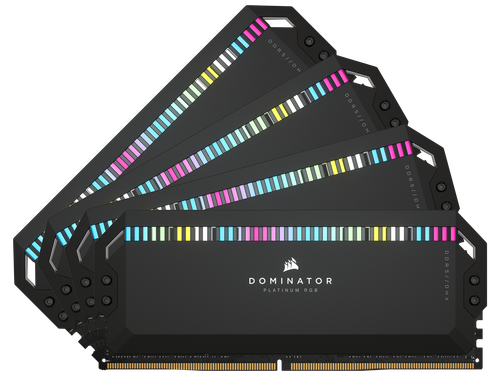
eBay
Find many great new & used options and get the best deals for CORSAIR Dominator Platinum RGB 64GB (4 x 16GB) 288-Pin PC RAM DDR5 6600 (PC5 528 at the best online prices at eBay! Free shipping for many products!
earnest olive
$395 💀
flint sapphire
 flint sapphire
Nah the doms are sexy tho 👀
cyan ravine

Micro Center
Get it now! For the T-FORCE VULCAN DDR5, TEAMGROUP has adopted a gorgeous streamlines design with multi-angular to overall outline for visual aesthetics and showcase VULCAN DDR5's unique features, delivering a sleek OC gaming memory that packs a powerful performance.
Probably hynix
6000 64gb is stupid hard for sammies
 potent portal
At least Corsair ddr5 isn't total trash (so far)
vague oracle
I was looking at that one but I’m a bit sketched out by it
Because in the tech description it says it’s 4800MHz
cyan ravine
PC5-48000
vague oracle
So that I’d need to check out in person first
cyan ravine
That's just the speed in jedec lingo
vague oracle
 cyan ravine
Oh it does
potent portal
I assume this is for an Intel system and not AMD
vague oracle
Yeah, that ram I’ll check out in person so I’ll put it on my list
cyan ravine
But then it says pc5-48000
vague oracle
potent portal
I assume this is for an Intel system and not AMD
Yeah
potent portal
Ok good because you can't do 64gb at 6000 on AMD lol
cyan ravine

Micro Center
Get it now! CORSAIR VENGEANCE DDR5, optimized for Intel motherboards, delivers the higher frequencies and greater capacities of DDR5 technology in a high-quality, compact module that suits your system.
cyan ravine
potent portal
Ok good because you can't do 64gb at 6000 on AMD lol
You absolutely can
potent portal
With an expensive board and 1dpc yeah
earnest olive
as long as it's 2x32 shouldn't be too hard
vague oracle
I miss when I knew nothing about ram and went on Amazon and bought the first ram kit I saw
cyan ravine
Lol
earnest olive
i almost bought vengeance lpx
flint sapphire
4 sticks of dom’s at 6600 on am5?
vague oracle
earnest olive
i almost bought vengeance lpx
I did
potent portal
Really? Because I was looking at MSI boards and none of them have 64gb higher than 5400 on the QVL except the top ones
earnest olive
flint sapphire
4 sticks of dom’s at 6600 on am5? <:pepehmmm:903335097305034783>
maybe if you replace the leading 6 with a 3
vague oracle
My first ram upgrade was a 3000C15 32Gb LPX kit
cyan ravine
potent portal
Really? Because I was looking at MSI boards and none of them have 64gb higher th...
QVL is a meme
earnest olive
you know
cyan ravine
I've seen so many tuned zentimings screnshots now
cyan ravine
6000 is easy on AM5
earnest olive
it's an H270 board.
flint sapphire
it’s already running at those speeds in that config
earnest olive
think about it for a bit
cyan ravine
I've seen 5600 running at 128gb on AM5
potent portal
Alright I should specify then, can't do 64gb 6000 XMP without tuning
cyan ravine
Like properly
earnest olive
asus advertises DDR4-3300 support on it but the QVL goes up to 3866
earnest olive
H270
vague oracle
I’m guessing Intel can handle a lot higher rams?
potent portal
Yes*
potent portal
(at around 7200-7600 you might randomly lose stability on a system that passed all the tests)
flint sapphire
cyan ravine
About a whole snow peaks worth
Would that be in the north?
vague oracle
flint sapphire
Would that be in the north?<:pepehmmm:903335097305034783>
Nah, South Pole
 flint sapphire
The fractal north?
flint sapphire

 vague oracle
earnest olive
i wonder what speeds i can run in this H270 board
vague oracle
earnest olive
i wonder what speeds i can run in this H270 board
6000 definitely
earnest olive
surely
 earnest olive
just put the PMIC in SLI with the mobo power delivery
 vague oracle
13900k on a Z790 TUF should be able to OC pretty well I think right?
earnest olive
okay but please tell me yall saw the issue with the H270 board advertising up to 3866
cyan ravine
vague oracle
13900k on a Z790 TUF should be able to OC pretty well I think right?
Yes, I hope you get it at a good price tho
Z790 tuf is usually a gross price
vague oracle
cyan ravine
Yes, I hope you get it at a good price tho
Coming in a bundle
cyan ravine
Asus z790 is in general pretty good with ram
flint sapphire
Okay let’s say you build a crazy sleeper pc but you try to use mostly Corsair parts
cyan ravine
flint sapphire
Okay let’s say you build a crazy sleeper pc but you try to use mostly Corsair pa...
Are you tryna give me nightmares
flint sapphire
cyan ravine
Oh wait, I know what you're talking about
vague oracle
I think imma get that 96Gb Corsair kit
cyan ravine
Hey btw tell ur brother to change his fans
potent portal
vague oracle
I think imma get that 96Gb Corsair kit
Make sure to put it on an AMD board so you can hate it better
flint sapphire
cyan ravine
Hey btw tell ur brother to change his fans
I already did, he trolled me and bought THE MOST expensive Corsair fans he could
cyan ravine
flint sapphire
I already did, he trolled me and bought THE MOST expensive Corsair fans he could
Haunt his dreams
vague oracle
cyan ravine
2 sticc or 4
2 Stick
cyan ravine
Nice
earnest olive
get 4 sticks for 192gb and put it in am5 you'll have a lot of fun
vague oracle
LOL
earnest olive
ddr5-3600 cl46
vague oracle
If I’m not happy with it I can always return it
potent portal
AM5 still doesn't really like the 24Gb dimms
cyan ravine
24gbit hmbd is like, actually a lot easier to run than 16gbit
They already have 48gb 8200 kits
flint sapphire
@potent portal the cursed mostly Corsair pc with some nice water cooling stuff
 vague oracle
At 1.4V I probably could get to 6500 MHz right?
vague oracle
Yeah I know
 pliant shale
Message
 languid nimbus
Massage
pliant shale
i am trying 2 upload a image of the pc part list i have for help but it seems i cannot upload images/videos
 dense brook
Newbie question.:
Aio also acts as case exhaust fans?
runic spruce
Yes
 analog hearth
dense brook
Newbie question.:
Aio also acts as case exhaust fans?
analog hearth
dense brook
Newbie question.:
Aio also acts as case exhaust fans?
it’s possible, but it’s recommended only for a push-pull config. however, it’s actually best for the air outside of the PC to be pushed onto the AIO’s radiator (somebody correct me if I’m wrong)
there’s nothing stopping you from using them as exhaust though
runic spruce
Push pull doesn’t make much difference in temperature
analog hearth
got it thanks
runic spruce
Just make sure you have proper intake fans in your case
 little osprey
Can someone help me with a power source for my PC build? It is back ordered and I don’t want to wait. What info do you need to help me pick a new power source?
 mossy venture
little osprey
Can someone help me with a power source for my PC build? It is back ordered and ...
mossy venture
little osprey
Can someone help me with a power source for my PC build? It is back ordered and ...
Country, budget, computer case, and what gpu and cpu
little osprey
USA, any budget, case: Cooler Master MasterCase H500M ARGB Airflow ATX Mid-Tower with Quad, CPU: AMD Ryzen 5 5600G - Ryzen 5 5000 G-Series Cezanne (Zen 3) 6-Core 3.9 GHz, GPU: ASRock Radeon RX 6800 Phantom Gaming D Gaming Graphics Card. I am new to this so if any of these are wrong let me know
mossy venture
If you haven't bought the cpu yet, get a 5600 instead
It's far better

Corsair RM750e (2023) 750 W 80+ Gold Certified Fully Modular ATX Power Supply (CP-9020262-NA)
Also if that case is anywhere north of $120 it's an awful price
little osprey
mossy venture
Also if that case is anywhere north of $120 it's an awful price
Thank you!
mossy venture
Happy to
Have you bought all the other parts yet?
If not I can take a look at the list for you, a 5600 6800 build shouldn't cost more than $1100 or so
little osprey
mossy venture
Have you bought all the other parts yet?
Yes I have. I will send the build. I could probably return some of it
little osprey
mossy venture
Can you also let me know what prices you paid for everything?
Yes I just messaged you, if that is okay
mossy venture
Yep, that works
 weak yarrow
Ik this is stupid but I’m thinking about getting a soft tube loop kit now so I’m the future when I upgrade my cpu in 5-6 years all I probably need to do is change a block in the loop and maybe enlarge the radiator
cyan ravine
You'd be committing yourself to years of regular draining, flushing and refilling the loop with fresh fluid
when you don't really need it rn lol
invest in a loop when you upgrade to a system that really can use it
 lyric thistle
I'd just get a bigger and bigger air cooler 
cyan ravine
Ya stick to conventional stuff imo
weak yarrow
cyan ravine
You'd be committing yourself to years of regular draining, flushing and refillin...
So basically a yearly oil change
I work on cars this isn’t a new concept
weak yarrow
Yes but the aesthetics
lyric thistle
Yeah that's why I'd go with an air cooler
weak yarrow
Yea but I’ve always wanted a custom loop man
cyan ravine
weak yarrow
I work on cars this isn’t a new concept
I mean if that doesn't worry you alr but still, I'd have the pc worthy of needing it first 💀
and even then that would only be like some 13900K or threadripper
high end gpus have air coolers better than water these days
weak yarrow
Like I said, when I have more money in the future it would be worth of custom loops
weak yarrow
But aesthetics
cyan ravine
talking to the wrong guy if you want aesthetics approval 💀
weak yarrow
@earnest olive what ur opinion on this
earnest olive
you've been asking about this for how long now?
we're never going to tell you it's a good idea, but we can't stop you from doing it
weak yarrow
Fair point
earnest olive
you've clearly made up your mind about it anyways
just do it
you don't need approval we're not your parents
cyan ravine
lol
weak yarrow
Fair enough, also what little screen is on the back of ur case shroom?
earnest olive
you've already been warned that it'll be louder than air cooling on low power hardware, requires maintenance, and makes no financial sense
we have nothing more to say
it's just a 7 inch raspberry pi monitor
weak yarrow
earnest olive
it's just a 7 inch raspberry pi monitor
I see is there a way to hook one into my pc?
earnest olive
if you can run cables from the inside to the outside and have physical clearance then yes
weak yarrow
Cool
 gentle pollen
Would there be any issues if I take my AIO pump off then plop it right back on? Gonna rewire all my cables into the new fan hub and such.
 frigid night
gentle pollen
Would there be any issues if I take my AIO pump off then plop it right back on? ...
frigid night
gentle pollen
Would there be any issues if I take my AIO pump off then plop it right back on? ...
may as well repaste since you are taking it off.
gentle pollen
Needed or not? The paste has only been on it for about 2 weeks.
earnest olive
it could introduce air bubbles into the paste that make your temps worse
if you have paste on hand, doesn't hurt to try not repasting and see if there is an impact on temps, then repaste if you must
if you're lucky the paste is fresh enough to just re-form properly with enough mounting pressure
gentle pollen
Ahh alright. I can wipe off the paste with some paper towels correct?
earnest olive
should be fine, i prefer using alcohol
gentle pollen
Will repaste if I end up needing to take the pump off.
gentle pollen
earnest olive
should be fine, i prefer using alcohol
Forgot I bought some. Do I put the alcohol onto the paper and wipe off the paste as such?
earnest olive
👍
little osprey
hey, im new to building, but i really need something new (mostly to handle the god forsaken elden ring lol), i have a budget of 1200ish USD, can anyone help me out please? I heard about brands like intel and ryzen differentials from a friend, and tbh, as long as it works ill take either.
 mossy citrus
@little osprey https://pcpartpicker.com/list/dcRvpH
Part List - Intel Core i5-13600K, Radeon RX 6700 XT, Fractal Design Focus 2 RGB ATX Mid Tower
runic spruce
I changed up the parts of the list above so a faster gpu can be put in but you can change it to a 6800xt to reach 1200 bucks, it has less ram that is slower bc its ddr4 but it shouldnt make to much difference in gaming and the cpu might be a little slower cause of it being a non k https://pcpartpicker.com/list/H6cR2m
Part List - Intel Core i5-13500, Radeon RX 6950 XT, Fractal Design Focus 2 RGB ATX Mid Tower
 obsidian wigeon
why 13500 lol
runic spruce
does the 4 small cores make a difference?
obsidian wigeon
not in games, no
anyway that ram is gonna be slower than ddr5 6000
3600 would be nicer for similar price
there's silicon power and team group kits
runic spruce
Part List - Intel Core i5-13400F, Radeon RX 6950 XT, Fractal Design Focus 2 RGB ATX Mid Tower
i changed the cpu and ram
obsidian wigeon
that's good
can change gpu for 6800 or something i suppose if the budget is strictly 1200
but as is this looks good
runic spruce
that guy could maybe go second hand for the gpu
i saw some good deals for 3070s selling for 300 on ebay
with evga warranties as well on some
runic spruce
obsidian wigeon
3600 would be nicer for similar price
btw a 3200 ram at cl 16 runs about the same as ram with 3600 cl 18 bc of the cas
i just remembered that
runic spruce
true, though i dont think ram speed and timings arent really noticable besides benchmarks and some work stuff, i might be wrong
obsidian wigeon
it is noticeable in gaming too, such as 1% lows
that fps value is where smoothness is dictated
but nothing helps better than tuning the ram, tho that takes work
an unstable tune and windows can get corrupted, needing a clean install
runic spruce
Yea I corrupted windows cause of trfc before I think
and artifacted the bios a couple times
It’s pretty easy though to do a simple ram oc with that GitHub guide
obsidian wigeon
true
runic spruce
Just wouldn’t do anything extreme
obsidian wigeon
just cranking speed up is easy
or mess a bit with subtimings
that's where the massive fps boost comes
in cpu intensive games especially
frigid night
runic spruce
Rev e is the best budget overclocker
Except there is a DDR5 hynix kit for $90 right now.
little osprey
runic spruce
https://pcpartpicker.com/list/dqqPRv
is there a big difference between the old cpu and the new one you added? I font really know, but 1 GHz seems like kind of a big different especially when it only have 3.5 total to begin with
little osprey
oh ok
obsidian wigeon
it can boost to 4.6ghz
little osprey
how do i get it there though
obsidian wigeon
just use the pc
it will automatically do that
expect it to run about 4-4.6 depending on workload
it's normal behavior
little osprey
is it worth getting a lesser cpu for?
obsidian wigeon
it depends on your resolution target
little osprey
as in going down to the 13400F
little osprey
ok because i run 1080p
obsidian wigeon
then step back up to 13600k
little osprey
ok
obsidian wigeon
you could also save a bit of money buying asrock z690 pro rs
but you will need to do a bios update
little osprey
is the 6800 better?
obsidian wigeon
which cpu?
little osprey
the 13600k
obsidian wigeon
if 13600k, you will need to buy a cooler, yes
little osprey
are there any youd reccomend?
obsidian wigeon
give me a moment
you can get thermalright PS120
or phantom spirit 120
se version is similar, you can get that too
little osprey
can you send the link? i dont see it on pc part picker
mossy venture
Ps120 se, pa120 se, ag620, ak620
little osprey
which though
obsidian wigeon
@little osprey https://pcpartpicker.com/product/hYxRsY/thermalright-peerless-assassin-120-se-6617-cfm-cpu-cooler-pa120-se-d3

Thermalright Peerless Assassin 120 SE 66.17 CFM CPU Cooler (PA120 SE-D3)
gentle pollen
@viral ore, great job on the cables.
Wish my EVGA cables weren't so thick and stiff.
gentle pollen
earnest olive
👍
Managed to get everything done without needing to detach my pump. Will send pics tomorrow.
earnest olive
nice, that's ideal
gentle pollen
I also got a exhaust fan setup.
Decided to reuse one of the 140mm fans that came with my Fractal Torrent as a exhaust.
 viral ore
runic spruce
little osprey
is there a big difference between the old cpu and the new one you added? I font ...
viral ore
runic spruce
little osprey
is there a big difference between the old cpu and the new one you added? I font ...
There’s not a really big difference run the cpu besides the cores, tho u only need the extra cores for task like editing, streaming and gaming and demanding things on the cpu
U can still do the exact things with the 13400 ofc but it will be slightly slower in editing and task similar to it, will be the same tho in gaming
And streaming too at the same time
Btw since your gaming at 1080p u could just get a 3070 2nd hand for like 300bucks and get 144fps on most games
Part List - Intel Core i5-13400F, GeForce RTX 3070, Fractal Design Focus 2 RGB ATX Mid Tower
This build saves you like 200 bucks
Assuming u get the gpu 2nd hand
frigid night
runic spruce
This build saves you like 200 bucks
Can save another $15
https://www.amazon.com/gp/aw/d/B07PV7GL6C?psc=1&ref=ppx_pop_mob_b_asin_title

Render in higher resolutions. Witness realistic pictures and smooth transitions. End choppy animation and catastrophic lag. Handle complex tasks with ease. Browse unlimited tabs and multitask like a pro. Do what you love faster with confidence. Sound like a dream? The new XPOWER Turbine DDR4 make...
gentle pollen
earnest olive
nice, that's ideal
Heading to bed now but here's the updated system. #build-pics message
gentle pollen
To all you RGB fans, what's your thoughts on this almost RGB to the max setup consisting of around 16 ARGB light sources?
earnest olive
needs rgb cables
replace the back fan with rgb
and get a custom rgb backplate for the gpu
and rgb gpu support
try routing the fan cables to the back to hide them
also screw that ssd in lol
~~then put an rgb “heatsink” on it ~~
need rgb ram too
and/or rgb ram cooler
and upgrade the mobo for more rgb
gentle pollen
Lmao, sure one step at a time.
gentle pollen
earnest olive
try routing the fan cables to the back to hide them
gotta get some ARGB extenders later. I barely got these to fit.
gentle pollen
Out of curiosity, how hard would it be to setup a simple loop for a 140mm rad in the Fractal Torrent to cool ram, and possibly SSDs and VRMs?
earnest olive
none of those components need nearly that much cooling
vague oracle
gentle pollen
Out of curiosity, how hard would it be to setup a simple loop for a 140mm rad in...
I feel like that’s a waste of money for not much benefit
potent portal
Quite difficult tbh.
You'd want a monoblock for the motherboard to cool the VRM, so you also need a motherboard that supports that.
RAM cooling is risky if the memory came with heat spreaders already since you can rip the ICs off.
Finding a SSD block that isn't just a glorified pipe that doesn't do much cooling and allows unrestricted flow is hard.
gentle pollen
vague oracle
I feel like that’s a waste of money for not much benefit
Just curious.
gentle pollen
potent portal
Quite difficult tbh.
You'd want a monoblock for the motherboard to cool the VRM...
Ahh so it isn't as simple as buy a cheap pump, rad, tubes, and water block and stick it on.
potent portal
Yeah there's a reason most people don't add these things to loops, too hard for little benefit
gentle pollen
Also only specific motherboards would support water cooling the VRMs?
Are those the same motherboards with a built in CPU water block?
potent portal
The board needs a monoblock designed for it or the holes won't fit to mount it
Some boards have aftermarket ones
earnest olive
i mean theoretically with enough effort you can make your own block for vrms on any board
potent portal
Sure, got a CNC?
gentle pollen
Not yet, though I do have a lot of drills, saws, and a lapidary machine.
earnest olive
that might take a while
potent portal
CNC mills are NOT cheap
gentle pollen
How much are they? 1k?
earnest olive
if you don't have the equipment to get the precision within microns, you're going to get worse results than just air cooled vrm heatsinks
gentle pollen
earnest olive
if you don't have the equipment to get the precision within microns, you're goin...
Because of uneven contact correct?
potent portal
gentle pollen
How much are they? 1k?
Try $7500 for a basic tabletop one
earnest olive
gentle pollen
How much are they? 1k?
well into the hundreds of thousands for a good one lol
gentle pollen
potent portal
Try $7500 for a basic tabletop one
......
earnest olive
like the setup derbauer uses to fab stuff for videos is definitely into the millions
but that's owned by thermal grizzly so yeah 
gentle pollen
Yeah it's gonna be a good year or two before I got that saved up from my current gig if I still wanna do other things.
earnest olive
gentle pollen
Because of uneven contact correct?
yes
potent portal
And that's only for a basic tabletop one yeah, not even a self contained unit
vague oracle
Welll actually, there are CNC services that you can submit a CAD file to
But usually can be expensive
potent portal
They have to recoup the cost of the machine after all
gentle pollen
potent portal
And that's only for a basic tabletop one yeah, not even a self contained unit
I just found like 6 table top ones for like 2-4k.....
vague oracle
gentle pollen
I just found like 6 table top ones for like 2-4k.....
Used and pretty bad
gentle pollen
Well then, seems I won't be picking up a CNC machine for a few years.
vague oracle
An actually good CNC machine will run you A LOT
And not much use for the average person ngl
potent portal
Or spend a lot less on a board and a monoblock lol
gentle pollen
potent portal
Or spend a lot less on a board and a monoblock lol
Lmao, probably gonna do this option first.
 wheat coral
earnest olive
like the setup derbauer uses to fab stuff for videos is definitely into the mill...
wheat coral
earnest olive
like the setup derbauer uses to fab stuff for videos is definitely into the mill...
his lab is somewhere in the like 100 million euro range
earnest olive
unsurprising
wheat coral
der8auer has a LOT of money off thermal grizzly business
 buoyant junco
from what I can tell , my Z590 LGA 1200 ATX doesn't have hdmi audio for hooking it up to surround sound for something like dolby atmos. if there's a sound card that I could get that would do that, does anyone have any recommendations? using optical audio now but not getting true 3d audio
earnest olive
the man deserves his success
wheat coral
very much so 💀
earnest olive
buoyant junco
from what I can tell , my Z590 LGA 1200 ATX doesn't have hdmi audio for hooking ...
your graphics card?
graphics card has integrated DAC for HDMI audio
earnest olive
happy to help
wheat coral
wheat coral
very much so 💀
he’s spent a long time doing this, he deserves everything he’s obtained
 weary galleon
gentle pollen
How much are they? 1k?
weary galleon
gentle pollen
How much are they? 1k?
Depends on the size and precision you need. My HS robotics team got a kit (we had to assemble) for ~6k.
Could probably get a smaller one for cheaper but idk how precise it would be
vague oracle
weary galleon
Could probably get a smaller one for cheaper but idk how precise it would be
The basic of the basic ones start at around 8k ish
We just bought probably the most barebones CNC we could find for my electronics lab and it ran us 7.5k iirc
weary galleon
Huh. Maybe we got some sort of deal on ours
vague oracle
Also probably HS discount

 north echo
Part List - Intel Core i7-13700KF, Radeon RX 7900 XTX, Fractal Design North ATX Mid Tower
how does this feel? Budget is around this price and using this for a mix of premier pro work and gaming. For the monitor, I like the USB c and size of the gigabyte for my laptop too.
potent portal
weary galleon
Huh. Maybe we got some sort of deal on ours
Probably a deal like this https://www.cncmasters.com/max-cnc-mill/
The CNC Max is a table top milling machine specifically designed for the machinist who needs higher spindle speed and longer Y-axis travel.
potent portal
north echo
how does this feel? Budget is around this price and using this for a mix of prem...
I'd do a different cooler so you can get a 2TB drive. Samsung 980s are really bad right now. https://pcpartpicker.com/list/sP3s9r
Part List - Intel Core i7-13700KF, Radeon RX 7900 XTX, Fractal Design North ATX Mid Tower
earnest olive
I was wondering if you shouldn’t just go nvidia for premiere pro but
wow the 7900xtx actually does pretty well in premiere pro
also why are there 2 coolers in the original list lol
cooler SLI
earnest olive
potent portal
I'd do a different cooler so you can get a 2TB drive. Samsung 980s are really ba...
huh there’s still 2 coolers in this
is this a bug
potent portal
wat
earnest olive
 potent portal
Yeah it usually replaces the cooler wtf
earnest olive
or am I just losing it
 jagged ember
Pcpp is losing it
potent portal
Corrected https://pcpartpicker.com/list/nrVLzf
Part List - Intel Core i7-13700KF, Radeon RX 7900 XTX, Fractal Design North ATX Mid Tower
 gentle pollen
weary galleon
https://media.discordapp.net/attachments/484611773064937472/842175407741730819/i...
gentle pollen
weary galleon
https://media.discordapp.net/attachments/484611773064937472/842175407741730819/i...
I saw one that looked just like this for about 5k USD.
 slender whale
potent portal
Corrected https://pcpartpicker.com/list/nrVLzf
slender whale
potent portal
Corrected https://pcpartpicker.com/list/nrVLzf
I'm in the middle of pretyt much building this exact list, is this where i might be able to ask for help on the wiring
The wiring has been driving me nuts for last 2 days and im getting more frustrated on it than I care to admit
slender whale
So have 9/10 lian Li 120 fans / getting those properly wired
potent portal
The uni fans?
slender whale
I honestly feel extremely overwhelemd with so many wires and I'm unsure of how to put everything in. I've watched several videos and its just not clicking for me
yea
120's
I can take some pictures 1 sec
potent portal
Yeah funny how those were supposed to reduce cables isn't it
slender whale
Its been 7 years since I built one and I just feel overwhelmed if im being honest
potent portal
I don't blame you, between the rgb and the controller stuff
slender whale
Yea my brain just isnt functioning and there are just so many damn wires everywher I frankly feel overwhelmed lol
slender whale
Okay AIO cooler lets start there I have a 6 pin that from what videos have shown I'm supposed to be inserting somewhere on the top
but cannot find the right verbage thats being said in any video
potent portal
Which AIO
slender whale
Ls 720
earnest olive
probably gonna make things a lot easier if you assemble the groups of 3 fans together outside of the case first
slender whale
All fans are assembled / wired and in the case
It's just the pure overwhelming of all the wires I see are frying my brain and caus8ng much frustration , am I allowed to post pictures
slender whale
Either of yall mind me dming.
earnest olive
(permission was implied)
potent portal
Ok looks like that 6 pin is only if you're using the original fans that came with the cooler. It's not used since you're replacing with the uni fans.
You will still use the 3 pin fan header for the pump
slender whale
Okay then I guess I had this right
Okay pcie is for graphics card which I don't have in yet
potent portal
Right
slender whale
Let me straighten couple of these cords up
potent portal
Oh wait I read a little further on the 6 pin connector. It is still used for the RGB connection to the motherboard.
 slender whale
I look at that and I just get total co fusuon
So 6 pin needs a power source but what would that be called
I have z790 board
I see a the- c1 that looks like it fits 6 pins
potent portal
The power goes to your power supply SATA power
slender whale
Okay don't think I have sata cables plugged in to power supply let me find those
I feel like a 5 year old trying to work through wires
I almost said fk it try to find someone to just wire it but $200 price I got for wiring seemed crazy so time to struggle till it works
Okay have to run out for a couple of hours I'll be back thanks for the quick help I'll get those cables in and be back
Is anyone typically here later at night
 slender whale
I'll be back Ina couple hours have to go to local meet up
 maiden trellis
Hello. What’s an acceptable amount of RAM for a gaming PC?
potent portal
32GB is the sweet spot right now
16GB is still enough for most games but more and more need at least 24GB (which is a thing on DDR5 now)
maiden trellis
I have a legion T5 and it currently has 16g of DDR5 at 4800 mhz. I have heard they are finicky with RAM upgrades.
potent portal
It can come with 32GB 3200 memory from the factory so I imagine upgrading to that will be no issue
maiden trellis
Any recommendations on which one to go with?
frigid night
potent portal
It can come with 32GB 3200 memory from the factory so I imagine upgrading to tha...
There is DDR5 3200?
potent portal
frigid night
There is DDR5 3200?
No? It's a Ryzen 5000 model from what I'm seeing
frigid night
potent portal
No? It's a Ryzen 5000 model from what I'm seeing
I Was just curious because the guy said he currently has DDR5 4800
potent portal
Ah that was added in an edit and I didn't see it
Which CPU did it come with @maiden trellis
 south cliff
I got a z97i plus motherboard for free and used on eBay it goes for around 200 dollars
Was it top of the line 8 years ago
little osprey
Hey I have a question, I'm on the PC builder and I have everything set up, however I'm not sure how many cooling fans this comes with
This is the link to my build
Can someone let me know rq pls
potent portal
The 4000D Airflow comes with 2, one front and one rear
little osprey
Does it come with anymore included with my build?
Like the CPU cooling for example (Making it 3)
potent portal
The CPU fans come with a splitter to make it count as one fan
If it's headers you're worried about
potent portal
Honestly you could do a lot better parts for a $1500 budget
little osprey
How so?
potent portal
You could do a 5600/6950XT build
little osprey
Is that better than what I currently have added?
potent portal
I think what you had on there was a 5800X and 3060? Yes it's far better.
little osprey
potent portal
You could do a 5600/6950XT build
wait, you talking about a Ryzen 5?
little osprey
What can the Ryzen 7 5800x do that a Ryzen 5 5600 can't do?
potent portal
The 5800X has a couple more cores so it'll be better at workstation tasks and certain emulators like RPCS3
little osprey
what about vise-versa?
maiden trellis
potent portal
Which CPU did it come with <@816836788340654090>
I’m not 100% sure.
potent portal
little osprey
what about vise-versa?
The 5600 is half the price
potent portal
maiden trellis
I’m not 100% sure.
Intel or AMD then?
 formal mica
Hey I love getting blue screens anyone know the cause of this
 maiden trellis
It’s a 12th gen intel i7 12700.
little osprey
potent portal
The 5600 is half the price
So pretty much when it comes to gaming the Ryzen 5 does the exact same but if I want something a little bit more than gaming then I should stick to the Ryzen 7?
potent portal
formal mica
Hey I love getting blue screens anyone know the cause of this
Could be memory or a failing drive
potent portal
little osprey
So pretty much when it comes to gaming the Ryzen 5 does the exact same but if I ...
Yep. And even then the 5700X is just a 5800X but cheaper and cooler.
formal mica
Well the system is brand new so doubt that I've been getting different reason for blue screens for about a week now
little osprey
potent portal
Yep. And even then the 5700X is just a 5800X but cheaper and cooler.
Alright. So going back (and sticking with the Ryzen 7 for now), do I require 6 cooling fans? How much do I currently have in total with my build?
potent portal
There's 2 fans plus the ones on the CPU cooler which don't normally count
south cliff
formal mica
Hey I love getting blue screens anyone know the cause of this
Try just one stick of ram
I got that with my bad ram
little osprey
potent portal
There's 2 fans plus the ones on the CPU cooler which don't normally count
So does that mean my PC gon need more fans or else it burns? 😬
formal mica
Yea but I don't really wanna think it's my rame since the computer was build 2 weeks ago
south cliff
little osprey
So does that mean my PC gon need more fans or else it burns? 😬
What are the specs
potent portal
With a 3060 in there? No
south cliff
formal mica
Yea but I don't really wanna think it's my rame since the computer was build 2 w...
Well try
little osprey
little osprey
https://newegg.io/a12b6da
@south cliff
maiden trellis
potent portal
Intel or AMD then?
It’s a 12th gen intel i7 12700.
little osprey
potent portal
With a 3060 in there? No
Cause my friend has a similar build and his PC kinda goes up to 80 degrees Celcius sometimes
south cliff
Nah your good
little osprey
although he does render with Unreal but still
south cliff
Yeah your good
potent portal
80 is perfectly safe temps
little osprey
....but that's with 6 fans
south cliff
But you could buy a pack of 5 p12s refurbished for like 20 dollars
little osprey
Although his cooler is low-grade
little osprey
Is there a case that's better than what I selected that carries more fans?
potent portal
P400a maybe
little osprey
How many fans does that come it?
potent portal
maiden trellis
It’s a 12th gen intel i7 12700.

G.Skill Ripjaws S5 32 GB (2 x 16 GB) DDR5-5600 CL28 Memory (F5-5600J2834F16GX2-RS5K)
maiden trellis
potent portal
https://pcpartpicker.com/product/4bPQzy/gskill-ripjaws-s5-32-gb-2-x-16-gb-ddr5-5...
Thank you
little osprey
potent portal
P400a maybe
I can't seem to find that on the PC builder 🤨
potent portal
I need to go actually, I'll be back on in a little while
little osprey
alr
potent portal
little osprey
I can't seem to find that on the PC builder 🤨
I do recommend pcpartpicker.com over the newegg builder btw, finds better prices from more stores
mossy venture
little osprey
https://newegg.io/a12b6da
I would not buy most of this
little osprey
Why's that?
mossy venture
it's not good value, hold up ill make you a list
little osprey
'preciate it
mossy venture
this is a ton better https://pcpartpicker.com/list/JV8x4s
Part List - Intel Core i5-13400F, Radeon RX 6950 XT, Phanteks Eclipse G360A ATX Mid Tower
6950xt comparable to the 3090
mossy venture
the brand of cpu does not change the experience in using the pc whatsoever
little osprey
....anyone wanna confirm that for me rq
mossy venture
if you really want amd https://pcpartpicker.com/list/bpv2hk
Part List - AMD Ryzen 5 7600, Radeon RX 6950 XT, Phanteks Eclipse G360A ATX Mid Tower
little osprey
Mk better
mossy venture
7600 is a bit better in single core loads anyways
mossy venture
7700x not worth it for gaming
little osprey
I just need to know what's better than the other
mossy venture
the 6950xt is fine at 1440p with even a 5600
little osprey
I got the 8000x
mossy venture
the 7600 is better than the 5800x in gaming
little osprey
and just gaming?
mossy venture
theyre very similar in non gaming loads
mossy venture
what?
mossy venture
there isn't
if youre gaming, the 7600 is better
if you're doing workstation tasks, the 13400f is better
little osprey
Wym by workstation?
mossy venture
coding, VMs, etc
little osprey
I'll definitely be doing some coding, not now but in the future cause so far I'm doing web design
MAAAAAAYBEEE 3D modeling but eh
not so much of it
mossy venture
then i'd def go 7600
little osprey
...fair enough
Now lets see the rest of the specs you sent....
and with this that you sent me, how many cooling fans does this have?
mossy venture
3
mossy venture
no, that case has great airflow
frigid night
If you want more go for more
mossy venture
however they will not do much
little osprey
I'm need to figure out what case my friend has cause he has 6 fans but sometimes his PC goes up to 80c
mossy venture
fans do not dictate temperatures
mossy venture
fans will not help when a case is awful
little osprey
So lets say I'm gaming and possibly render some 3D objects....not big, but character models. Along with web design and maybe actual gaming code in the future...
will this be fine?
mossy venture
rendering you might want a nvidia gpu, depends on what softwares
little osprey
Blender
mossy venture
def nvidia gpu, one second
little osprey
...this website does deliver the PC built right 😶
mossy venture
no, neither does newegg
little osprey
...is there an option for that where I can pay extra for it?
mossy venture
give me a few
little osprey
bet
mossy venture
https://www.cyberpowerpc.com/system/Esports-Essential-Gaming-PC this build these specs is an option


Esports Essential Gaming PC - AMD Ryzen™ 5 5500 Processor - 16GB DDR4/3600MHz RAM - GIGABYTE B550 UD AC ATX Motherboard - 1TB Kingston SNV2S/1000G PCIe NVMe M.2 SSD - Windows 11 Home
little osprey
only $985?
mossy venture
have to change the specs
little osprey
Which one was that one again?
earnest olive
formal mica
Hey I love getting blue screens anyone know the cause of this
unstable memory
little osprey
mossy venture
mb, i typed out a message then deleted it
It's fine
little osprey
mossy venture
https://www.cyberpowerpc.com/system/Esports-Essential-Gaming-PC this build these...
Change the specs to this?
mossy venture
yes
earnest olive
I’ve seen that bsod many times while doing memory overclocking
frigid night
little osprey
Windows 11 🤢
windows 11 is amazing
little osprey
bro wut
mossy venture
you can downgrade to w10 easily
frigid night
little osprey
bro wut
especially with 12/13th gen intel cpus.. dem ecores 
little osprey
mossy venture
https://www.cyberpowerpc.com/system/Esports-Essential-Gaming-PC this build these...
Is this case good?
I noticed it says "No Fan"
mossy venture
the case i chose is. Adding fans is a matter of a single small cable and 4 screws

ARCTIC P12 PST 56.3 CFM 120 mm Fans 5-Pack (ACFAN00137A)
 frigid night
little osprey
frigid night
little osprey
I like that case.
mossy venture
that case is good, just expensive
frigid night
I also like the Lian Li O11D Evo
little osprey
mossy venture
that case is good, just expensive
Eh...just an extra $50
But question is....
functionality wise.....
frigid night
the cool thing about that case is...
that front glass panel that's diagnonal.
can be replaced with a addon screen
little osprey
It does look nice
little osprey
frigid night
can be replaced with a addon screen
ooo
But yeah
functionality wise
frigid night
it's a good case funtionally
little osprey
yey or ney?
frigid night
just spendy because aesthetic
just like the lian li o11d evo
Which case was recommended to you?
 frigid night
little osprey
frigid night
little osprey
no
mossy venture
idt thats the one i chose
little osprey
Yeah, although for an extra $50.....
frigid night
little osprey
This
 little osprey
Better case, I'm guessing since it doesn't say "No Fan" anymore it means it comes with fans?
frigid night
This
little osprey
Nice
little osprey
little osprey
Alright, going for this one
frigid night
south cliff
What is a push pull radiator setup
fans on both sides facing same direction
1 set is pushing air through rad, the other set is pulling air through
hence push/pull
frigid night
south cliff
I was thinking one set of fans was facing the other way
well no that would either be both pushing air through rad or both pulling air through rtad
frigid night
🙂
south cliff
Thanks
obsidian wigeon
Push pull is just a waste of fans and money lel
south cliff
Looks kinda cool tho
frigid night
obsidian wigeon
Push pull is just a waste of fans and money lel
so is aesthetics in general though
sometimes a push/pull can look good
obsidian wigeon
Fair enough
little osprey
If I want 32gbs of ram what should I get?
mossy venture
upgrading ram is super easy I'd just do that yourself, It's much cheaper
little osprey
Why is there a video capture card option? Can't I just use something like OBS?
mossy venture
yes
little osprey
is the GeForce RTX™ 4070 12GB good for my use that I mentioned earlier
obsidian wigeon
it's plenty
 little osprey
See that's the thing
earnest olive
I can personally say as someone who owned a 5600x and a 5800x
little osprey
I'm not so much worried about the money when it comes to this price range...
earnest olive
if you swapped them while I was asleep, I wouldn't notice
little osprey
I'm just looking for the performance
earnest olive
there's no performance gain
if you wanna burn money go for a 7600 or 4070ti
then you'll actually gain some performance for the money at least
little osprey
What about the processor tho?
little osprey
Cause as you can see the Ryzen 5 I currently have selected....I'm still skeptical on whether or not I should get a Ryzen 7
obsidian wigeon
No need lol
earnest olive
like i said
little osprey
Is the Ryzen 5 7600 similar to the Ryzen 7 5800x?
obsidian wigeon
Don't buy into the marketing tbh
earnest olive
everyone has told you it's a bad idea, if you still want to do it then just do it
it's your money not ours
earnest olive
little osprey
Is the Ryzen 5 7600 similar to the Ryzen 7 5800x?
it's better
obsidian wigeon
5800x is better, but if it costs more to get it, don't tbh
little osprey
In what way is it better?
earnest olive
(the 7600)
obsidian wigeon
^
little osprey
Alright bet
little osprey
With less cores what does it affect?
earnest olive
are you purely gaming?
little osprey
In a way
earnest olive
there tends to be about zero scaling above 6 cores in gaming
little osprey
Well the highest game I can think of that I might possibly play is MSFlight2020
earnest olive
current gen consoles are using 8 much weaker cores, but 1 is reserved for OS anyways, so more like 7 much weaker cores
obsidian wigeon
Some games like over 6 but it's not significant enough
little osprey
little osprey
Well the highest game I can think of that I might possibly play is MSFlight2020
With this set up will it run?
obsidian wigeon
Yes
little osprey
what about the ram I selected...
32GB (8GBx4) DDR4/3600MHz Dual Channel Memory [+75] (Team T-Force Delta RGB)
earnest olive
you'd need ddr5 if you went for a 7600
obsidian wigeon
7600 only takes ddr5
little osprey
for an AMD?
runic spruce
little osprey
I'm not so much worried about the money when it comes to this price range...
U could buy parts and pay a local computer shop to build it
Or watch a tutorial
frigid night
Or come here and ask us for help
little osprey
Thing is I don't have enough time to build it and I'm not sure about taking it to a PC shop
1 cause I'm lazy and 2 eh....
more money to spend
obsidian wigeon
Do you have a microcenter near you?
little osprey
I wish
obsidian wigeon
rip
runic spruce
Building it yourself should take 5-6 hrs tops for a new builder
obsidian wigeon
I mean if you don't wanna build, it's understandable
frigid night
is fun though
obsidian wigeon
My first pc is too a prebuilt, but that's mostly because I was in the height of pandemic
GPUs were absurdly priced lol
little osprey
little osprey
Alright...
I'm looking at the RAM cause idek what I just selected
all I know is that I want 32gb
obsidian wigeon
It has to be ddr5
little osprey
oh yeah
hold up
Although someone told me for DDR5 I need Intel...
AMD runs DDR4 is what I've been told
runic spruce
Nah it just had to be the later generations
Both amd and intel can run ddr5
And ddr4 on intel
obsidian wigeon
Uh, AM5 only takes ddr5
runic spruce
Oh
obsidian wigeon
And 7600 is on AM5


 obsidian wigeon
AMD usually names their socket according to the ram standard it uses
If we were to still run ddr4, the 7600 wouldn't have been this much faster
earnest olive
AMD FX/A: don't even think about it
Ryzen 1000-5000: DDR4
Ryzen 7000: DDR5
Intel 6000-9000: DDR3 or DDR4
Intel 10000-11000: DDR4
Intel 12000-13000: DDR4 or DDR5
earnest olive
also, on ryzen 3000 and later, it's not enforced, just a suggestion
obsidian wigeon
Ye
runic spruce
Yea but doesn’t it increase delay in ram or something
obsidian wigeon
You can run off sync to an extent and gain perf
little osprey
Welp.....
earnest olive
I ran 4800 ram with 1900 fclk on my 5800x for fun
earnest olive
well maybe the configurator you're looking at is for am4
obsidian wigeon
Bump down on the chip or get Intel
runic spruce
little osprey
So since this website doesn't have a DDR5 option....
Weren’t u looking at a 5600x for the cpu?
obsidian wigeon
Or look at a different configurator available
runic spruce
That only runs ddr4
little osprey
runic spruce
Weren’t u looking at a 5600x for the cpu?
Originally the Ryzen 7 5800x but got down to a 5600x
cause apparently they're the same
runic spruce
Those only run ddr4
earnest olive
I've never gone prebuilt configurator shopping before I dunno how it works
little osprey
runic spruce
Those only run ddr4
Exactly that's what I'm saying
little osprey
runic spruce
Those only run ddr4
so the current one I have selected is the AMD Ryzen™ 5 5600X 3.7GHz [4.6GHz Turbo] 6 Cores/ 12 Threads 35MB Total Cache 65W Processor
However the GPU
GeForce RTX™ 4070 12GB GDDR6X