
#building-and-recc-chat
1 messages · Page 121 of 1
 potent portal
 formal mica
why does the AMD ryzen 7 7700x cost so much more compared to intel i5 13600kf
potent portal
Motherboards cost more too
That's just how it is for AMD, they did some major changes so we have to pay the price of their re-tooling and engineering
formal mica
formal mica
im trying to make a cart for microcenter
 obsidian wigeon
As long as it has heatsink it will be fine
AM5 has high standards for mobos
But honestly, Z690 boards offers more and doesn't cost a lot
potent portal
formal mica
https://www.microcenter.com/product/643824/montech-x3-mesh-tempered-glass-atx-mi...
That would be ok
potent portal
obsidian wigeon
or the $125 B760 asrock hdv
B650?
potent portal
And is A620 out? I haven't seen any yet but I haven't been keeping track
obsidian wigeon
they are
potent portal
Ah cool
obsidian wigeon
newegg had some
formal mica
is this monitor bad if so should I get the gigabyte off of newegg?
https://www.microcenter.com/product/634763/Ultragear_27GL83A-BAUS_27_2K_WQHD_2560_x_1440)_144Hz_Gaming_Monitor;FreeSync-_G-Sync_Compatible;_HDMI_DisplayPort;_3-Sided_Frameless
potent portal
That would be a little better than the G27Q actually

RTINGS.com
Although the LG 27GL83A-B and the Gigabyte G27Q score similarly for gaming, the LG comes out ahead because it has a better response time, particularly at 60Hz. The Gigabyte has a black frame insertion feature to improve motion clarity, which the LG lacks, but it isn't usable while VRR is active, and some people might be bothered by the flickerin...
formal mica
ok then is the only thing microcenter do deals on is the motherboard cpu and ram
potent portal
As of this minute yes.
OH but they might still have the "free SSD" deal just for walking in and registering
Could use that as a boot drive and the 2TB for games
formal mica
yea I believe they I still see the ads for it lol
Do i need to buy a new windows if I end up going windows?
potent portal
Microsoft wants you to but you don't technically need to buy it at all
formal mica
Yea I didnt know about the key thing
potent portal
If you wanted to you can find keys around $25 easy
formal mica
wanna pass me your key
potent portal
My key is digitally tied to my MS account so no lol
formal mica
I have two computers with windows is there no way for me to just transfer or something
potent portal
Keys can only be active on one PC at a time, but retail keys can be transferred if you won't be using the other one much/at all any more
OEM keys cannot be transferred
formal mica
whats OEM
potent portal
If you got a prebuilt PC with Windows installed you probably got an OEM key
 flint sapphire

potent portal
Well there's always the free way of using Windows
Which is to just not activate it
formal mica
Whats the difference?
potent portal
You can't use the personalization menu (easily bypassed) and might get a watermark on the corner of your screen
If the watermark bugs you enough keys are $25 like I said
potent portal
11
formal mica
why?
potent portal
Your CPU of choice has Intel E-cores and the necessary thread scheduler isn't in 10
formal mica
Im using it right now and I feel like its worst than 10
potent portal
You can strip out the useless features and tracking pretty easily
Even reskin it to look like 10 lol
formal mica
also if I go to microcenter this is the deal im getting
 potent portal
But really 10 will not get along with an Intel chip with e-cores, things will crash or just be slow, sometimes anti-cheat gives false bans
 cyan ravine
formal mica
also if I go to microcenter this is the deal im getting
cyan ravine
formal mica
also if I go to microcenter this is the deal im getting
Solid
potent portal
If you did AMD then you can go for 10 no issue
Or there would be no issue if MS hadn't turned off the activation service
But you can install it lol
formal mica
all im missing is power supply
 potent portal
Or there would be no issue if MS hadn't turned off the activation service
potent portal
potent portal
Or there would be no issue if MS hadn't turned off the activation service
I mis-remembered, they're only stopping sales of keys so any existing keys in the wild will work still
formal mica
surprisingly microcenter dosent have any good deals for power supplys
unless im blind
potent portal
If you're going AMD you can do a 750W, Intel is a power hog
potent portal
formal mica
thatll work
should I save me 30 bucks and order this one https://www.newegg.com/corsair-rm750e-cp-9020262-na-750-w/p/N82E16817139307?Description=750 watt&cm_re=750_watt-_-17-139-307-_-Product
 cyan ravine
Am4 is compatible with am5
potent portal
It'll work with AM5 they probably haven't updated the page
formal mica
oh
obsidian wigeon
AM4 can mount with AM5
formal mica
didnt know that
potent portal
And in the strange case where you get one that's been on a shelf for over a year you can get the AM5 bracket free from Deepcool
 cyan ravine
OOOO
formal mica
that would bring me under 2k for the build
potent portal
XTX is more than you need tbh, more of a 4k target and you'd need the 850W PSU again
formal mica
oh xtx is in the build now fal
potent portal
Alright then go for it lol
formal mica
https://pcpartpicker.com/list/vD9fQ6#compatibility_notes I was going off of this one for microcenter
Part List - AMD Ryzen 7 7700X, Radeon RX 7900 XTX, Phanteks Eclipse G360A ATX Mid Tower
 potent portal
Hope it's still there for you then
formal mica
me to its not that big of a deal if not my dad probably wouldnt let me buy it since its opened anyways
potent portal
It's still under warranty though
potent portal
What do you mean?
formal mica
what things should I get a warranty for
I usualy dont get none with anything didnt know if its different with computer compenonts
potent portal
Oh extended warranty, maybe the monitor if anything. Screens can die unexpectedly.
 obsidian wolf
Extended warranty GPU if it makes sense for you even though I would say psu would make a lot more sense
Since psu are so expensive
That's what I did
and it's like 10$
at micro obviously
formal mica
psu is getting ordered off newegg
potent portal
PSU already has a 7 year warranty tho
obsidian wolf
is based most on what you feel like changing to future
obsidian wigeon
I don't think a psu needs warranty lol
obsidian wolf
potent portal
PSU already has a 7 year warranty tho
For micro is more
like price
you get to return
obsidian wigeon
A good psu already has long warranty
formal mica
obsidian wolf
formal mica
https://www.newegg.com/corsair-rm750e-750-w/p/N82E16817139300?Description=750%20...
no
Could though
potent portal
For the XTX yes
obsidian wigeon
The psu is gonna outlast the warranty
obsidian wolf
unless you are overclocking
formal mica
No i think overclocking is stupid in my opinon
obsidian wigeon
Especially on sfx psu
obsidian wigeon
SFX psus are more sensitive to transients
obsidian wolf
:V
potent portal
Much smaller bulk caps yeah
obsidian wigeon
ATX psu is more resistant to the same situation
You risk instability more with an sfx
 obsidian wigeon
yeah the rm is atx
obsidian wolf
Yeah I didn't recommend something else
formal mica
where we get sfx from?
obsidian wigeon
the form factor
potent portal
I thought foxy wanted to shift the topic lol
formal mica
lol
obsidian wigeon
find psus that says sfx
obsidian wolf
obsidian wigeon
the cm gold sfx is one of the best ones however
dunno about segotep's sfx quality

potent portal
obsidian wolf
https://www.newegg.com/segotep-750w-sfx-750-w/p/1HU-00Z0-000B5?Item=9SIBGX1JA268...
Tier C
obsidian wolf
talking about
obsidian wolf
potent portal
Tier C
I'm not recommending it
obsidian wigeon
oh it's tier c
obsidian wolf
Again I only recommend
obsidian wigeon
not bad
formal mica
CM?
obsidian wigeon
cm is cooler master
formal mica
ok
obsidian wolf
For my build I went tier A, wouldn't expect anyone going under that with a 6700 and above
obsidian wigeon
b tier is just fine
potent portal
Too many abbreviations and acronyms, I get it
B tier is fine at the 70/700 level
A tier is more for 80/800 and up
obsidian wolf
Well
I just gotta make sure
since I am keeping it close between psu limit
and comsumption
don't want no short circuit
formal mica
should I just go 850 to be on the safe side @potent portal
potent portal
obsidian wolf
don't want no short circuit
Worst thing that happens is it shuts off and you have to flip the power switch. C tier or better won't die for no reason.
potent portal
formal mica
should I just go 850 to be on the safe side <@396513761550270464>
I would personally but they are right that 750W would be ok if you're not planning on pushing it
obsidian wolf
- it saves you 50$
potent portal
$30 but yeah
obsidian wolf
a tier
formal mica
which would you reccomend for 850
potent portal
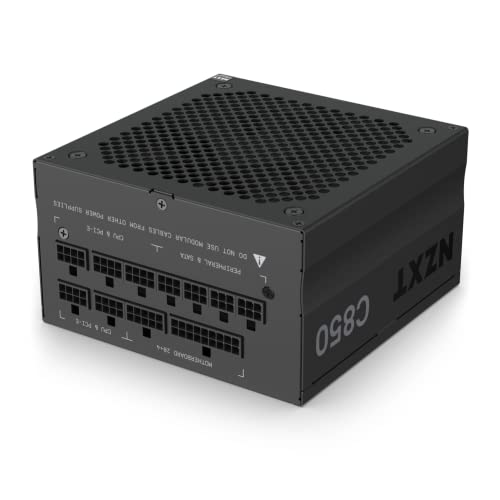
NZXT C850 (2022) 850 W 80+ Gold Certified Fully Modular ATX Power Supply (PA-8G1BB-US)
formal mica
about to be a shllshocker
 obsidian wolf
A
potent portal
That's an A tier too
potent portal
Check early, good stuff sells out fast
formal mica
well about to be up in 45mins
potent portal
That MP33 2TB might also be worth looking at if it's under $80
Man I need to check these again more often
formal mica
what the shellshockers?
potent portal
That was for me lol
obsidian wolf
ah
lol
soon enough ssd will keep going down in the price so low
That HDD will become just big houses of data
like big
i would think 12 and 16 up
potent portal
That 8TB is $13.75 per TB, I don't see SSD getting near that any time soon
obsidian wolf
to make it competition viable
Not close to 8tb
but soon enough to 4tb
that is a good price spot
for the 4tb hard drive
at 40 something dollars
potent portal
I'm thinking we're bottoming out at $40 per TB right now, I don't see it going much lower for a bit
But that's just my opinion
obsidian wolf
Yeah I understand
I mean it will also be a lot of part on the price of the components and if companies can make it more cheap than that per piece make/revenue
I can see it
potent portal
Yeah that is what's keeping those lower capacity HDDs at higher cost still
All those moving parts cost money
obsidian wolf
The small things are the things that make up the most prices in a lot of computer parts crazily enough
potent portal
Magnets aren't cheap either now
obsidian wolf
mmm
potent portal
If you wanted to scrape the bottom of the barrel here's what you get https://www.amazon.com/dp/B00DXOJJQQ

WD 2 TB WD AV-GP SATA III Intellipower 64 MB Cache Bulk/OEM AV Hard Drive WD20EURX
obsidian wolf
actual bruah
potent portal
That drive makes me want to gag
obsidian wolf
Imagine one day
cyan ravine
Minimum barracuda or wd blue imo
cyan ravine
Don't cope with sub tier hdd
potent portal
The targets are the people that don't notice the 1 yr warranty
formal mica
potent portal
If you wanted to scrape the bottom of the barrel here's what you get https://www...
lol
 obsidian wolf
Why do they even exist to the public market at this point, where this overproduced? And the changing market created this products that can not be sold anywhere.
I can see that happening that way
potent portal
I think they made a bunch of trash that couldn't sell ages ago and they're re-labeling them
obsidian wolf
but any other way, such as a company saying that they are making it to target an audience in 2023 so specifical, that 64 mb of hdd is enough, must be crazy.
obsidian wolf
potent portal
I think they made a bunch of trash that couldn't sell ages ago and they're re-la...
Sounds like the 'new' gaming computers
in amazon for 300$
potent portal
lol yeah "Amazon renewed  "
"
formal mica
4mins
 frigid night
I too have been watching the clock xD
formal mica
lol
just wanna see if the psu is worth buying or the ssd
does it not open all the deals at once???
frigid night
hm?
formal mica
it says another hour }:
potent portal
pass
frigid night
How much does this say for you?
potent portal
$150
formal mica
120
frigid night
says 115 after promo
potent portal
Oh yeah now it shows $115
formal mica
now it does yea
potent portal
That's good then
formal mica
the 2tb worth buying or no
frigid night
it's $80 so ya
potent portal
It's a good drive and that's a good price
formal mica
so i shouldnt get the other drive then?
potent portal
Yeah save some money and get the MP33, you won't see any difference for gaming
formal mica
ok
potent portal
obsidian wolf
for 130$ where
formal mica
lol
told him
how fast will these go
you think
or will they at all
I still got to wait till later to buy
potent portal
They'll be in stock for a few hours, maybe til 6 AM if past trends follow
potent portal
Maybe you'll get lucky though
frigid night
yeah the psu and ssd will likely be the first 2 go oos
frigid night
xD
formal mica
d***
potent portal
At least I didn't put the SSD lol
frigid night
To bad that z590 is 10th/11th.. I need a good mobo for 9th gen that can support 3200+ RAM lol
formal mica
I cant even buy till probably 10 to noon
potent portal
Put it in your cart and you'll get a notice if it goes out of stock
potent portal
Ok, g'night then
formal mica
2,020.48 total cost of build if everything panes out
potent portal
I'll stay up with the aussies as usual
formal mica
lol
frigid night
@potent portal sorry to bug you, but what would be a cheap board new/used for a 9600k that I could run at least 3200 ram?
potent portal
3200 eh, so you'll want a Z390
potent portal
frigid night
<@396513761550270464> sorry to bug you, but what would be a cheap board new/used...
First thing that popped up, I'll look for cheaper https://www.ebay.com/itm/144875460628

eBay
Find many great new & used options and get the best deals for GIGABYTE Z390 UD LGA 1151 Intel Z390 SATA 6Gb/s 300 Series ATX Intel Motherboard at the best online prices at eBay! Free shipping for many products!
Low rep seller and no description if you want to take a chance https://www.ebay.com/itm/144981623477

eBay
Find many great new & used options and get the best deals for ASUS Prime Z390-P LGA 1151 Intel Motherboard at the best online prices at eBay! Free shipping for many products!
frigid night
hm
potent portal
frigid night
<@396513761550270464> sorry to bug you, but what would be a cheap board new/used...
Here we go this one looks good https://www.ebay.com/itm/334683063067

eBay
Find many great new & used options and get the best deals for ASUS PRIME Z390-P Socket 1151 Intel Motherboard -=USED EXCELLENT=- at the best online prices at eBay! Free shipping for many products!
frigid night
will z370 not support 3200"?
potent portal
Most Z370 on the market are OEM trash
frigid night
oh ok
frigid night
potent portal
Here we go this one looks good https://www.ebay.com/itm/334683063067
quick q on this.. it says DDR4 SDRAM, I'm not sure what the difference is between that and just DDR4?
potent portal
Same thing
frigid night
Oh ok, I've never seen it put that way xD
potent portal
Yeah all the Z370 I see are OEM or have a tiny heatsink (if they have one at all)
 tawny fiber
It's also a 9600k 🤷♂️
potent portal
True enough
Most of them also ship from china though
I don't trust customs with my socket
frigid night
I just need something that isn't the b360m.. that way I can sell a solid Battle Royal PC xD
potent portal
Oh it's for reselling? In that case...
obsidian wigeon
for reselling it doesn't matter much
frigid night
I figure marketing it with an i5 is better than building a pc with my 12100 and marketing it as an i3 😛
potent portal

eBay
Find many great new & used options and get the best deals for GIGABYTE Z370P D3 ULTRA DURABLE DDR4 MOTHERBOARD at the best online prices at eBay! Free shipping for many products!
frigid night
obsidian wigeon
for reselling it doesn't matter much
yeah but with the b360m.. I'm cutting ram perf by up to 20%
frigid night
I feel like it does a little at least.
potent portal
Scummy as it may sound, all you have to do is not specify the motherboard in the listing. Answer honestly if asked but you don't have to specify.
obsidian wigeon
^
frigid night
so the -/+ 20% ram perf hit won't really affect gaming to much?
potent portal
Not as much on 9th gen no
frigid night
oh, well then I'll just save the money.
obsidian wigeon
9400f was a decent cpu for its time despite being only able to run at 2666
frigid night
Since it can only run 2666.. What ram should I get?
obsidian wigeon
was a decent contender for 3600, just lacked ht to make it a strong competition
frigid night
That's all I need left.
obsidian wigeon
any cheap ddr4 kit will work
frigid night
like cheapest of cheap?
obsidian wigeon
but tbh 3200 kits are like only less than 40 bucks
yeah cheapest of cheap that still has heatsink
having naked ram ain't gonna look good
frigid night
alright
well then..
I also didn't know that 9600k didn't have ht
I thought it did, but it seems like only i7+ had it in those gens
potent portal
Yep that was an i7+ feature for a long time
AMD forced Intel to change that when Ryzen got big
obsidian wigeon
8700K funnily enough lacked ht
potent portal

TEAMGROUP T-Force Zeus 16 GB (2 x 8 GB) DDR4-3200 CL20 Memory (TTZD416G3200HC20DC01)
obsidian wigeon
cl20, dem average 2018 ram specs
potent portal
Or spring the extra buck for cl16 https://pcpartpicker.com/product/P4FKHx/silicon-power-sp016gxlzu320bdaj5-16-gb-2-x-8-gb-ddr4-3200-cl16-memory-sp016gxlzu320bdaj5

Silicon Power GAMING 16 GB (2 x 8 GB) DDR4-3200 CL16 Memory (SP016GXLZU320BDAJ5)
(even though it won't run nearly at that)
obsidian wigeon
it'll be 2666 cl whatever anyway
potent portal
Yep whatever jedec bin it has
obsidian wigeon
jedec fun
frigid night
potent portal
Or spring the extra buck for cl16 https://pcpartpicker.com/product/P4FKHx/silico...
hm, I wonder if that's better than the patriot viper kit I have
potent portal
What's your kit's specs?
frigid night
potent portal
What's your kit's specs?

Patriot Viper 4 16 GB (2 x 8 GB) DDR4-3200 CL16 Memory (PV416G320C6K)
potent portal
Nope that's the same
frigid night
alright
actually has me thinking though because it could be this
https://pcpartpicker.com/product/pZfmP6/patriot-memory-pv416g240c5k

Patriot Viper 4 16 GB (2 x 8 GB) DDR4-2400 CL15 Memory (PV416G240C5K)
Let me just go pull the stick from my other PC rq
I really don't remember what it is xD
I just know it looks like that and is that brand/name
potent portal
Well if you wanted to you could upgrade your personal kit to this and just chuck the old 16GB kit in the 9600k https://pcpartpicker.com/product/2LMTwP/silicon-power-xpower-turbine-32-gb-2-x-16-gb-ddr4-3200-cl16-memory-sp032gxlzu320fda

Silicon Power XPOWER Turbine 32 GB (2 x 16 GB) DDR4-3200 CL16 Memory (SP032GXLZU320FDA)
frigid night
and it's 16gbn
lms rq. I'm gonna be upgrading my girl from a 6500/580 to a 12100/1080 in a couple days when it all shows up.
so if the ram is already fine then I'll just get that cheap stuff
frigid night
potent portal
Well if you wanted to you could upgrade your personal kit to this and just chuck...
 potent portal
2800 c16
I'd jump on the upgrade, $58 for 32GB and it's faster
Then slap those on the B360 board where they can be mediocre in peace
frigid night
potent portal
I'd jump on the upgrade, $58 for 32GB and it's faster
the PC is only used for MMO/COD games. Does it really need 32gb? My girl doesn't really play to many games.
potent portal
It's less about the 32GB and more about the Dual Rank
Dual rank memory is noticeably faster at that speed than single rank
frigid night
Alright. Is ballistix 2x16 3200c16 dual rank?
potent portal
Should be, but you can tell from the sticker
 potent portal
Possibly micron rev.b which would make it single rank
frigid night
potent portal
Possibly micron rev.b which would make it single rank
it's rev e
potent portal
That was the other possibility yes
frigid night
so still single rank?
potent portal
It could be either tbh rev.e has 8Gb and 16Gb dies
 potent portal
You'd be able to tell from looking at the sticks themselves, if they have chips on both sides or only one
And I'm guessing that 2206 means it was manufactured in 2022 which is after 16Gb started production so no help there
Thaiphoon burner could also tell you
 dense brook
For ddr4 3200 8Gx2
Crucial ballistix or cosair vengeance?
potent portal
DDR4? Crucial every day of the week
dense brook
potent portal
DDR4? Crucial every day of the week
Coollll thx
frigid night
potent portal
Thaiphoon burner could also tell you
potent portal
yes
frigid night
chrome is blocking te download lol
potent portal
I can zip up my copy for you and send it here
frigid night
I'd appreciate that.
potent portal
Once you load it up hit read and select a slot. They're in order counting from the CPU.


 potent portal
Right click and run as admin
frigid night
I did
flint sapphire

potent portal
Weird it works fine on my computer
frigid night
I've only seen this error once before
and it was just a random pop up. I didn't even try to load anything
about 3 or 4 months ago
flint sapphire
 potent portal
It might be some weird driver signature enforcement
You've got your chipset drivers installed?
frigid night
could this be stopping it?

 coarse coral
frigid night
could this be stopping it?
coarse coral
frigid night
could this be stopping it?
that lowers performance so much
i always have it off
frigid night
coarse coral
that lowers performance so much
Fr?
Would having this off allow me to tighten my timings more then?
potent portal
No but you'll get more throughput
So it'll just "feel" faster which will be measurable in fps
coarse coral
frigid night
Fr?
it makes my games stutter and lowers my 3dmark scores by a lot  you might have diff results.
potent portal
It has been a known issue, especially on AMD, since it was introduced
frigid night
that's crazy. turning it off didn't have an affect though
potent portal
restart
frigid night
I'm pretty sure I updated my chipset when I reinstalled windows, but I'll check
potent portal
Once you restart make sure it stayed off

PCWorld
We tested Intel's 4th- to 11th-gen Core processors and AMD's Ryzen 5000 CPU with Microsoft's Virtualization Based Security feature to see how much performance was hurt.
 potent portal
Ah that sounds more like it
frigid night
should I always have this off as well??
potent portal
Maybe just when you're using things that it would block, and turn it back on when you're done

 potent portal
I don't even have those options since I have TPM and SVM off lol
coarse coral

frigid night
Ok. If my chipset wasn't up to date.. it is now. Restarting now.
Also with that memory integrity off. My PC boots so much faster lol
coarse coral

potent portal
Cool, once you read the stick data you'll be looking for something like this
 frigid night
 frigid night
also, HWBOT.
 potent portal
Never hurts to have more than one person confirm it
frigid night
yep 🙂
well that's cool.
Thank you for helping me figure this out.. all the while speeding up my pc xD
potent portal
coarse coral
me being reckless


 frigid night
lol
I turned my driver block thing back on just because
kinda trips me out
I only did so because of that random error blocking a driver a couple months back from who knows what.
I was just sitting here on discord and it just popped up
potent portal
Funny how that all worked out in the end. Doing something barely related and you end up better off for it.
frigid night
and it all started with looking for a mobo for the 9600k xD
frigid night
alright I went ahead an ordered that 32gb kit for muh girly. I wanted to make sure it wasn't better than mine.. not that I don't want her to have something better than me, but if I can upgrade my PC first.. I will. Only because I use it 90% more than she uses hers.
potent portal
That's all good and fair sounding to me
tawny fiber
What is the gpu
frigid night
btw, is there any OC potential on that ram?
tawny fiber
With a 9600k gpu options are plenty
frigid night
tawny fiber
What is the gpu
which pc?
frigid night
tawny fiber
With a 9600k gpu options are plenty
the 32gb kit isn't for the 9600k.
potent portal
It'll be a grab bag of ICs, no idea what the potential is until it's in a system. The labels won't even help with that brand.
At least it'll be better than a C*rsair grab bag
frigid night
heh right?
Also, that same brand, but 16gb kit.. isn't dual rank?

Silicon Power XPOWER Turbine 16 GB (2 x 8 GB) DDR4-3200 CL16 Memory (SP016GXLZU320BDA)
potent portal
Correct that'll be single rank since it has half the memory banks
frigid night
alrighty
only because I am unsure..

There are 2 listings
same thing? just 1 links to scamazon and the other to wegg
potent portal
Yeah they look the same
frigid night
ok cool
tawny fiber

How does the new Call of Duty Vanguard perform on an RX 6800 XT? Here's some beta gameplay starting with 4K Ultra settings, then backing off to High, Medium, Low and also render scaling down to 1440p and 1080p.
Donate to help fund tech/games to test or produce the channel content: https://www.paypal.com/donate?hosted_button_id=4G7D2YRVT9EDG
In...
That cpu seems pretty pog
frigid night
yeah, tbh, it's looking like a 1660 will be good enough for battle royal games. 1080p ultra + fsr ultra 100+ fps.
and it's seeming like the market around here is people looking for pc just to play those style games.
potent portal
That all sounds about right
frigid night
alright.. says it'll be here by Saturday. Looks like I'll have her new pc up and running on Sunday then
as well as the battle royal PC 😛
I excite
Thanks for the help guys
formal mica
@potent portal whats a ups I should get/
 little osprey
Yo could someone help me price my build?
I wanna sell it for a decent price where it’ll sell quicker than usual but also have enough to buy a 6750 XT new or used
It’ll be a bit before I can throw the parts list together
little osprey
little osprey
It’ll be a bit before I can throw the parts list together
Part List - Intel Core i3-12100F, Radeon RX 5700, Phanteks Eclipse P300A Mesh ATX Mid Tower
 earnest olive
probably $600-700
add some rgb fans and take a good picture maybe you can get 700-800
probably gonna take a while to move
prebuilt buyers don't like to see i3 or radeon
little osprey
earnest olive
prebuilt buyers don't like to see i3 or radeon
🗿
Just add some fancy fans and it’ll sell 💀
little osprey
True
little osprey
earnest olive
but it won't make it an easy sell
I mean I was thinking $400 at most TBH
I dropped like $500-$600 or something on this build
earnest olive
400 is undervaluing it a bit
i sold a pc with a 10 year old quad core xeon and 1060 3gb for 400
little osprey
earnest olive
400 is undervaluing it a bit
Yeah but it’s used
earnest olive
you think my 10 year old hardware wasn't used?
little osprey
earnest olive
400 is undervaluing it a bit
I also want it to sell quicker, so anyone with a brain would know that’s somewhat cheap for the parts in it
Obviously not the best build, parts performance is inconsistent
little osprey
Meh
earnest olive
i think you can get a lot more than 400 if you're willing to wait
wasn't that long ago that i sold a 3600x/5700xt pc for 1k
little osprey
earnest olive
i think you can get a lot more than 400 if you're willing to wait
I mean, I’m gonna try to sell it to buy a 6700 XT/6800 XT
Rest of my next build I’ll pay for by working
 fleet heron
6700 gang nice
little osprey
TBH I feel like I’m creating a bottleneck by wanting to do a 5700X/5800X with a 6700 XT/6800 XT
obsidian wigeon
nope
little osprey
I forget how much 32GB DDR4 is
obsidian wigeon
it ain't a bottleneck lol
earnest olive
me running i3-12100 with 3090:
little osprey
I’ll be happy none the less if I can squeeze like $500 off my build by selling it on Facebook Marketplace or something
$600 would be super nice too
More than half my next build
earnest olive
me selling my old build for more than the cost of my new build:
little osprey
You just know how to market 😔
But yeah I’ll slap some RGB fans on the build later and decide from there
 gentle pollen
My Mobo just arrived ai plan to upgrade my system later today and I was wondering if it'd be as simple as just swapping out the CPU and Mobo then everything will be up and running? My current SSD is on a Intel system I am switching to a R7-5700g.
 paper summit
I would do a fresh install
Far had alot of issues using his old windows install
But other than that yes you should be fine aslong as your mobo doesn't need a bios update
(It shouldn't)
gentle pollen
Should I do a Bios flash just Incase before I put the CPU in?
gentle pollen
paper summit
I would do a fresh install
Does that mean I need to buy yet another windows activation key?
gentle pollen
One more question, would doing a fresh install wipe my drive? If so I am gonna need to reinstall everything...
gentle pollen
paper summit
Let me dm you rq
Kay.
paper summit
gentle pollen
One more question, would doing a fresh install wipe my drive? If so I am gonna ...
Yes and no
You can back it up
If you have anything important on it
paper summit
If you alr have Dropbox yea that prob works dont quote me on that tho I don't usually back my stuff up💀
You can also do a windows reset
Which keeps your files but it may include the intel files sooo...
gentle pollen
What would happen if the Intel files are kept?
paper summit
May interfere with amd's drivers and cause issues/crashes
gentle pollen
Ooof so your saying it'd be better to just backup whatever files I want to keep and do a fresh Install then.
paper summit
Correct
gentle pollen
Ooof okay, I better prep myself for like 2 hours of backing up files.
paper summit
🗿
gentle pollen
Thankfully I have 3 drives and all I need to do is just wipe one of them and setup windows on it correct?
paper summit
Yep preferably your fastest one
gentle pollen
I have a Samsung 980 and MSI 370.
paper summit
Wait if you have multiple drives why not transfer your files to that instead?
gentle pollen
The other one is a hybrid SSD.
gentle pollen
paper summit
Wait if you have multiple drives why not transfer your files to that instead?
That's what I am gonna do.
Transfer the files to another drive.
paper summit
gentle pollen
I have a Samsung 980 and MSI 370.
980 for sure
gentle pollen
Wait, just realized isn't the 980 drive have a firmware issue?
gentle pollen
I haven't experienced it myself but just checking.
Been using the drive for my games for weeks now but didn't experience any issues/dieing drives.
Will just update the firmware for the drive later today after I upgrade my computer.
.
So to sum it up, move the files I want to keep to my Samsung 980 then wipe my 370 drive and install windows on it correct?
paper summit
Oh i was gonna say use the 980 as boot since it's quicker
But honestly
Won't be a big difference if you can even notice it lol
gentle pollen
It's just boot speed correct?
Not like moving it to my 980 drive would affect the speed my games load up would it?
paper summit
Nah prob not
Even the new gen 5 drives don't make a noticeable difference in game load times lol
gentle pollen
Would it make a difference in workstation tasks?
Because I plan to start doing blender soon.
Okay, so
- backup files
- fresh windows install
- flash bios
- install CPU, drives, etc.
potent portal
formal mica
<@396513761550270464> whats a ups I should get/
Most people don't need a UPS but if you really need one amazon basics is ok for most people
formal mica
I live in the middle of no where and power goes off and on alot
I have already had a drive fail me becuase of the power flickering
potent portal
How long is it usually out for?
potent portal
formal mica
I have already had a drive fail me becuase of the power flickering

Amazon Basics Line-Interactive UPS 1500VA 900 Watt Surge Protector Battery Power Backup, 10 Outlets - Black
formal mica
depends longest its been is a week
potent portal
Oof
Well that UPS will keep you running even if you're in the middle of a game, and give you a good few minutes to shut it down safely. Maybe 30 or so.
formal mica
awesome
well this is the build hopefully when we head to columbus I can snag that card


 potent portal
Looks like that open box is still there
Got lucky that they had enough SSDs and PSUs too so they're still in stock
formal mica
Ive never seen them go out of stock on a shellshocker
potent portal
That's an embedded CPU, basically a mobile chip
potent portal
You'll need to change your nickname for this server btw
obsidian wigeon
the shop is very legit it seems
97.6% ratings
with lots of followers
and the reviews looks legit
i don't see why it would be fake
could be fun for some cheap wacky builds, but idk about the quality of the mobo. it's questionable long term
earnest olive
the support will be limited
obsidian wigeon
yep that too
potent portal
Yeah the board looks super basic
earnest olive
probably no warranty
potent portal
And what's up with the bottom M.2 slots
obsidian wigeon
you can get a 12700h board for about 300 bucks
now that looks interesting, but the mobo remains basic af
earnest olive
also want to note that it's actually downclocked compared to a real 11800H
since it's an ES
base and boost are both 100mhz lower
obsidian wigeon
oddly enough the 12700h one is not es
earnest olive
still seems like an interesting option if you're feeling adventurous
obsidian wigeon
nvm it said es too
earnest olive
similar price to an 12100f + cheap board
earnest olive
obsidian wigeon
nvm it said es too
was about to say, maybe harvested from a dead laptop that still had a working cpu
obsidian wigeon
it probably is
earnest olive
12500h should beat 11800h
obsidian wigeon
due to how little p cores it has
obsidian wigeon
4p yep
earnest olive
might still be better depending on the game
this board says it supports xmp which is nice
earnest olive
but the thing in the description about crashing under load is not confidence inspiring
obsidian wigeon
fair enough
earnest olive

probably ES stability issues that they're trying to blame on the cards bc their excuse sounds like total crap
why would a video card vbios ever affect the frequency of a cpu
potent portal
That sounds like they're blaming the crashes on the GPU to me
Not even mentioning the CPU
earnest olive
but that shouldn't affect cpu loads like r23
potent portal
Exactly, they're just trying to pass blame
earnest olive
up to you, I wouldn't be confident in daily driving this
potent portal
Could be a fun project but yeah I wouldn't make this my daily
earnest olive
could be fun for hwbot, are ES chips allowed?
my 11800H is cooling limited
would be fun to strap a desktop cooler to one
potent portal
earnest olive
could be fun for hwbot, are ES chips allowed?
No they're not
earnest olive
sad
even with liquid metal my 11800H is limited to 135W
with cold ambient around 10C
 plain grove

My monitor is supposed to be 240 but I noticed that it’s been stuck at either 60 or 120 and it’s shaded in grey so I can’t edit it either
potent portal
4k 240?
potent portal
Oh, because it says 4k is the native resolution
plain grove
It’s not a 4K monitor
potent portal
Do you have DSR on?
plain grove
What’s that
potent portal
It renders at a higher resolution than the monitor supports
plain grove
Is it in the bios
plain grove
Most likely
potent portal
Anyway scroll down to the PC resolutions
plain grove
It’s weird because it doesn’t let me edit the display settings
potent portal
The PC 1920x1080 option should let you set the higher refresh rate
plain grove
For pc it doesn’t show that
potent portal
Here?
 gentle pollen
I am about to start switching my mobo/cpu and I wanted to double check, do I need a USB stick to do a fresh install of windows?
potent portal
Ideally yes, technically no
 flint sapphire
gentle pollen
Where's the triangle I should be looking for?
flint sapphire
gentle pollen
Where's the triangle I should be looking for?
Top left
gentle pollen
Got it in.
All the pins fit in thankfully.
And the bent ones straightened out.
 formal mica
gentle pollen
And the bent ones straightened out.
formal mica
gentle pollen
And the bent ones straightened out.
potent portal
gentle pollen
CPU, storage installed, now in the case it goes yes?
Plug in CPU power now before it goes in the case, it'll save your fingers
Or route the cables before you place the board and plug it in before placing the board down
gentle pollen
Sorry just got back took a lil break.
gentle pollen
potent portal
Or route the cables before you place the board and plug it in before placing the...
So put in the PSU then mount the Mobo with the cables pre-routed?
frigid night
potent portal
Or route the cables before you place the board and plug it in before placing the...
Big brain. I've always just suffered xD
frigid night
gentle pollen
So put in the PSU then mount the Mobo with the cables pre-routed?
Just push the CPU cables through the top part first. Plug into board then you can position board in to screw down. Don't have to have the CPU cables plugged into the PSU at that time.
gentle pollen
Gotta undo this to get my PSU out first.

My fingers are in so much pain from digging it out.
potent portal
You don't have to do the whole PSU, as long as the cable is in the board. That's the hard part.
potent portal
frigid night
Big brain. I've always just suffered xD
Tech tip for today 
gentle pollen
potent portal
You don't have to do the whole PSU, as long as the cable is in the board. That's...
Oh just the 24pin?
potent portal
The 8 pin for the cpu
That connector always ends up pressed against the top of the case so it's hard to get your fingers in there
You can do the 24 also
gentle pollen
I think I will do both since I am at it.
8 pin retrieved
Now to retrieve the 24pin.
Got both of em.
Which screw do I use to mount my Mobo?
 formal mica
non of them
gentle pollen
NVM found it, Fractal lists the mounting screws.
4-11 of them.
Now I am confused as to which screws are which.
This guide does not give much info.

Mounted.
 dry tinsel
5xxx series Ryzen, @gentle pollen ?
i like AM4 so much
but AM5's LGA sockets are really so much safer to work with
see: easily bent pins
gentle pollen
Would my arctic fans work with the built in fan hub?
dry tinsel
fans is fans, usually
gentle pollen
 potent portal
gentle pollen
Would my arctic fans work with the built in fan hub?
potent portal
gentle pollen
Would my arctic fans work with the built in fan hub?
The fractal hub needs 4 pin fans in order to control the speed. 3 pin will just run 100%.
gentle pollen
potent portal
The fractal hub needs 4 pin fans in order to control the speed. 3 pin will just ...
So it's a no then got it.
potent portal
Well you could still. P12 fans are still really quiet even at 100% lol
gentle pollen
Falcie you have the torrent right?
paper summit
Thought you meant the software at first 
 empty pollen
gentle pollen
How in the world do I remove the bottom fans on the Fractal Torrent?!
gentle pollen
Please could someone tell me how to remove the bottom fan bracket.....
I am honestly at a loss.
potent portal
gentle pollen
Please could someone tell me how to remove the bottom fan bracket.....
There's 2 thumb screws and it slides off
gentle pollen
......
Now I feel like an idiot....
Thank you!
How should I orientate my AIO?
Doing a push pull config.
Tubes on the bottom or top?
frigid night
@potent portal I'm seeing a 10fps increase in my main game just from disabling that memory integrity 
gentle pollen
These bloody fans are driving me crazy.
Can someone give me some advice on how to route these cables?

 regal shard
gentle pollen
Gotta undo this to get my PSU out first.
regal shard
gentle pollen
Gotta undo this to get my PSU out first.
That’s one thing I’m never looking forward to doing
I hope I never have to change my psu
formal mica
potent portal
It might get caught on the front fan
Falcie could you reccomend me a case? atx mid tower
regal shard
I need 850 watts to last me lol
regal shard
plain grove
You still having this problem?
plain grove
No
regal shard
Sounds like one
 potent portal
formal mica
Falcie could you reccomend me a case? atx mid tower
potent portal
formal mica
Falcie could you reccomend me a case? atx mid tower
MX330-G Air is the budget option at $60. Fractal Focus 2 is good at $70. Fractal Pop Air is $90. 4000D airflow is $95. G360A at $100.
formal mica
ok thx
gentle pollen
 gentle pollen
I am confused which is for am4?
gentle pollen
 stoic island
Prob daisy chain argb
stoic island
Prob daisy chain argb
Where does it go on my Mobo? B550M DS3H.
potent portal
The one on the right for AM4
gentle pollen
potent portal
The one on the right for AM4
Thanks.
stoic island
Both are used, one is on one side, the other on the other side of the pump
gentle pollen
Oh ok.
stoic island
gentle pollen
Where does it go on my Mobo? B550M DS3H.
D_led near the bottom of the board or above the 24pin
gentle pollen
stoic island
D_led near the bottom of the board or above the 24pin
D_LED1 I see on the bottom left.
I can't seem to find the second argb plug.
stoic island
You could do that or see if the one above 24pin is easier to get to
formal mica
potent portal
MX330-G Air is the budget option at $60. Fractal Focus 2 is good at $70. Fractal...
Only reason I ask is becuase the case I chose did not fit my gpu
 gentle pollen
stoic island
D_led near the bottom of the board or above the 24pin
gentle pollen
stoic island
D_led near the bottom of the board or above the 24pin
I only see male ports no females what should I do?
stoic island
gentle pollen
I only see male ports no females what should I do?
You plug the connectors into the header, if the fans have the male pins, it's probably for daisy chaining into another fan
gentle pollen
So in other words your saying I daisy chained them the wrong way....?
potent portal
gentle pollen
Where does this go?
Looks like a VDG cable. Most people wouldn't use it.
potent portal
gentle pollen
So in other words your saying I daisy chained them the wrong way....?
RGB signals work no matter which way the electricity goes on the chain
Just make sure a female end goes to the board and call it good
gentle pollen
My head hurts from all these cables.
I am starting to understand why people who use LianLi usually prefer it.
potent portal
RGB does make it 3x as complicated
gentle pollen
I have been at it for 6-7 hours.
potent portal
And uni fans are nice... If you have less than 8 fans and don't care about performance or noise
gentle pollen
The end of my 6 fans daisy chained are both female.

So I need to rechain them all so they become male?.....
stoic island
One will have the connector hanging out still, and that one is connected into the motherboard
potent portal
Wait, are you saying one of the fans has 2 female ends? I'm lost
gentle pollen
I connected all the males to the females and the end connector is a female and the male is at the rads.
gentle pollen
My bad the ending connector is male
Not female
So to my understanding I need to redo the daisy chaining so I have a female connector for my Mobo correct?
gentle pollen
..... I am gonna hate reconnecting the AIO tomorrow.
I am gonna call it a night for now I am exhausted.
When are you guys available tomorrow if you don't mind helping me?
I'd really appreciate it.
potent portal
I pop in and out throughout the day when I can
That's why my pfp is Schrodinger lol
obsidian wolf
Aio Mania
New disease found among computer hardware consumers where an aio is bought for no reason other than looks
(Joking)
potent portal
I've seen some of those, symptoms are contagious too
obsidian wolf
Almost felt to it
potent portal
"What AIO is good for my 12100?"
obsidian wolf
The sickness is so contagious that I almost myself got the Msi Aio with pump problems
potent portal
Phew, dodged that bullet
obsidian wigeon
those 120mm aios too..
funnily enough lazada has a mesh rgb case that comes bundled with a 120mm aio
ez for flips and stuff
 manic cloak
potent portal
"What AIO is good for my 12100?"
manic cloak
potent portal
"What AIO is good for my 12100?"
a 120mm aio with the 90mm lian li uni fan
obsidian wigeon
loud cooling noises
earnest olive
potent portal
"What AIO is good for my 12100?"
shoutout to the guy on hws selling a hardline 10100 build + no gpu
when you insist on having a $300 loop but your budget is $600
 fossil cedar
earnest olive
when you insist on having a $300 loop but your budget is $600
fossil cedar
earnest olive
when you insist on having a $300 loop but your budget is $600
Have a look at this balanced build
https://www.reddit.com/r/HardwareSwapUK/comments/121rl8k/sg_gaming_pc_w_950/

 boreal horizon
im wanting to bld a computer for my aunt sompel word prssing light gaiming as well as internet she loves wathing stuff on pecock and tubi
[3:11 AM]
any ideas
fossil cedar
Country, budget? How light of gaming are you talking about?
obsidian wolf
https://pcpartpicker.com/list/dD6nxs
Tier C PSU
Can definitely catch deals out there for better case or for better looking ram in case more rgb is wanted, the 6600 is good for it's price and capable of standing it's place in 1080p gaming, CPU is what the name says, and good space, an actual aunt build
Part List - Intel Core i3-12100F, Radeon RX 6600, DIYPC ARGB-Q8-BK MicroATX Mid Tower
@cyan ravine
 analog hearth
potent portal
"What AIO is good for my 12100?"
analog hearth
potent portal
"What AIO is good for my 12100?"
12th gen kinda hot nevertheless though
coarse coral
 earnest olive
fossil cedar
Have a look at this balanced build
https://www.reddit.com/r/HardwareSwapUK/comme...
earnest olive
fossil cedar
Have a look at this balanced build
https://www.reddit.com/r/HardwareSwapUK/comme...
lmao
earnest olive
analog hearth
12th gen kinda hot nevertheless though
uh... no?
stock cooler does perfect on a 12100
fossil cedar
earnest olive
lmao
Very balanced right, guy even said in comment that he thought he was being generous with the price
earnest olive
delusional
 haughty void
 manic mango
Has anyone used fractal design ridge case?
formal mica
What kind of connector is this for a floppy disk drive
 gentle pollen
Would it be fine if I plugged 9 fans into one header? I have a B550M DS3H board wondering because I only have 2 fan headers and I am pretty sure my AIO pump is gonna use one of them. The fans I want to daisy chain are 3xP14 and 6xP12 pwm pst argb.
obsidian wigeon
formal mica
What kind of connector is this for a floppy disk drive
looks like ide
obsidian wigeon
gentle pollen
Would it be fine if I plugged 9 fans into one header? I have a B550M DS3H board...
gigabyte gives 2A header
it'll be fine
but even if it's 1A
9 is fine
gentle pollen
obsidian wigeon
9 is fine
Got it. Any issues with connecting P12s to P14s?
obsidian wigeon
i would use p14 on another header
fossil cedar
gentle pollen
Got it. Any issues with connecting P12s to P14s?
Nah the daisy chain is literally just pwm anyway
Although if you had 9, I'd split to 2 headers
gentle pollen
What would be the damage concerns? Wondering because I only see CPU_FAN and SYS_FAN2.
fossil cedar
If there's a sys_fan2 there's a sys_fan 1
gentle pollen
I don't see SYS_FAN1 anywhere.
fossil cedar
@gentle pollen
 gentle pollen
How big of a USB stick do I need for windows installation just Incase I need it?
fossil cedar
I think it's 8 gb but it'll say if you look it up
paper summit
Yea its 8
gentle pollen
Ty, @fossil cedar
fossil cedar
No prob
formal mica
gentle pollen
Ty, <@191276897227898880>
just get you a big usb stick and download ventoy
for multiple isos
paper summit
Real
This is in fact the method
im using a hdd tho cause my flash drive is mad slow
potent portal
Ventoy new meta
potent portal
ISO is the format that most disk images use
Ventoy lets you simply copy ISOs to the USB drive and selecting the one you want instead of having to extract each individual one and configure GRUB for multiboot
obsidian wigeon
that's cool
potent portal
It's super cool. It doesn't work for everything but usually does.
obsidian wigeon
for me i just have multiple usb drives
potent portal
Now you know, and you can put 20 images on a single 32GB drive so you don't need to track which drive has what
fossil cedar
oh @gentle pollen i have a stripped version of win 11 pro if you dont want all the junk that comes with it by default if you planned on going 11
gentle pollen
fossil cedar
oh <@217356391675985921> i have a stripped version of win 11 pro if you dont wan...
What do you mean by stripped?
And yes.
I plan on going Win11.
fossil cedar
gentle pollen
What do you mean by stripped?
without all the junk apps like candy crush, clipchamp etc that auto preinstall
formal mica
fossil cedar
oh <@217356391675985921> i have a stripped version of win 11 pro if you dont wan...
gimmme
fossil cedar
formal mica
gimmme
Google Docs
formal mica
thx mate
formal mica
potent portal
Now you know, and you can put 20 images on a single 32GB drive so you don't need...
I would get 256gb flash drive its about 20 bucks if you get usb 3.2gen.
alot more Iso's
fossil cedar
np
formal mica
https://pcpartpicker.com/list/ Im going to microcenter tomrrow and buying most of these parts I just notice my build isnt going to look nice lmao
Choose Your Parts
fossil cedar
formal mica
https://pcpartpicker.com/list/ Im going to microcenter tomrrow and buying most o...
btw you need to send the link in the box here

not the one from the url bar
formal mica
Part List - AMD Ryzen 9 7900X, Radeon RX 7900 XTX, Corsair 4000D Airflow ATX Mid Tower
thats stupid
fossil cedar
its because it uses cookies
formal mica
those cookies
fossil cedar
youd want a better cooler btw
formal mica
they sound kinda good to eat
fossil cedar
ak400 is not enough for a 7900x
obsidian wigeon
at least ag620 or better cooler
gentle pollen
fossil cedar
without all the junk apps like candy crush, clipchamp etc that auto preinstall
Those preinstall?!
obsidian wigeon
ak400 ain't gonna cut it
formal mica
why not tho
obsidian wigeon
too much heat
formal mica
I dont see ag620 at this store
paper summit
To much heat to dissipate
obsidian wigeon
ak620 works too
paper summit
Do you want a pc that works like it should?
obsidian wigeon
or you'll have to jump cpu way down to 7600
formal mica
lol
obsidian wigeon
to make a fully working pc
formal mica
Danny calm down
fossil cedar
formal mica
I dont see ag620 at this store
why not buy online too?
formal mica
im messing with him
paper summit
Bruh
obsidian wigeon
cooler can be bought online ya
fossil cedar
youd want at least a dual tower cooler bare minimum for a 7900x
formal mica
ive bought the power supply and storage already so planned to buy the rest in person with cash
paper summit
formal mica
im messing with him
Well there's some people that are actually serious when they ask questions like that😭
fossil cedar
id save money on the motherboard and get a better cooler tbh
gentle pollen
Thanks pato for the iso. Just to check, you didn't strip anything else did you?
formal mica
its in a combo
fossil cedar
gentle pollen
Thanks pato for the iso. Just to check, you didn't strip anything else did you?
nah just unneeded stuff you could reinstall anyway
gentle pollen
Or is it just the junk apps. Cause ai don't mind keeping anything security related.
formal mica
 gentle pollen
fossil cedar
nah just unneeded stuff you could reinstall anyway
gentle pollen
fossil cedar
nah just unneeded stuff you could reinstall anyway
Great thanks!
Once I am home I am gonna finish the cable routing than boot the PC and do a clean install.
formal mica
which should I get then
 obsidian wigeon
the 7700x
fossil cedar
obsidian wigeon
that bundle isn't very good in price
its decent if you actually need the 12 cores for workstation but yeah gaming 7700x
obsidian wigeon
ya that's the thing here
formal mica
I wanted to mess with davinic reslove in 4k
obsidian wigeon
you can use gpu for that
formal mica
I dont know whats a good match with my gpu so I dont know?
obsidian wigeon
for gaming the best cpu rn is actually 7800x3d
just get 7700x and be done with it
formal mica
yea but no bundle for it };
obsidian wigeon
it won't make a noticeable difference paying $100 extra
7700x can handle any gpus
formal mica
Ive always used intel so the price of that cpu for the amount of cores I get dont make sense
What does this mean by memory type?
 formal mica
does O.C. mean overclocked?
 fossil cedar
yeah but you can safely ignore the board frequencies they dont mean much
formal mica
So I cant use DDR5 6000 with this motherboard unless its overclocked
fossil cedar
you can use 6000mhz, as XMP and EXPO count as OC
formal mica
https://www.microcenter.com/product/662951/Vulcan_32GB_2_x_16GB)DDR5-6000_PC5-48000_CL38_Dual_Channel_Desktop_Memory_Kit_FLBD532G6000HC3-_Black https://www.microcenter.com/product/662287/Z790_UD_AC_Intel_LGA_1700_ATX_Motherboard so are these two compatiable?
fossil cedar
ye
formal mica
So I dont need to do anything special to make it work?
fossil cedar
nope,same with the micro center deal tho