#building-and-recc-chat
1 messages · Page 78 of 1
 shut rampart
 cyan ravine
Oh so you've bought it all
shut rampart
yup
shut rampart
but..
cyan ravine
You need to make sure the bios is up to date on the mobo
shut rampart
I have it all running right now..
cyan ravine
Ah it has a bios switch neat
shut rampart
but
I bought the cpu from micro center and it was doa
and I thought I broke a pin or something
so I got a replacement
cyan ravine
Same cpu and now it works?
shut rampart
yup
shut rampart
ok which one
cyan ravine
G27Q/X27Q are regular favourites here depending on price
Hmm 
I might poke around a bit neither are at a good price rn
 south snow
cyan ravine
You need to make sure the bios is up to date on the mobo
south snow
cyan ravine
You need to make sure the bios is up to date on the mobo
how u update bios?
shut rampart
one person said this
https://pcpartpicker.com/product/HYZ9TW/hp-x32-315-2560x1440-165-hz-monitor-2v7v2aaaba
https://pcpartpicker.com/product/cB3gXL/hp-x27q-270-2560x1440-165-hz-monitor-2v7u5aaabu

HP X32 31.5" 2560 x 1440 165 Hz Monitor (2V7V2AA#ABA)

HP X27q 27.0" 2560 x 1440 165 Hz Monitor (2V7U5AA#ABU)
 mossy venture
x32 is good
cyan ravine
X32
 upper ore
This plugs into atx power1 on the motherboard right? Just wondering because I'm kinda struggling to get it in rn.
 mossy venture
just a bit hard to get used to if you're used to smaller monitors
cyan ravine
Yeah I just saw X32 is at a good price
cyan ravine
shut rampart
one person said this
https://pcpartpicker.com/product/HYZ9TW/hp-x32-315-2560x14...
Go for X32
shut rampart
so get two of them?
cyan ravine
upper ore
This plugs into atx power1 on the motherboard right? Just wondering because I'm ...
That might be the psu end
I see the 4 sense pins
 weary galleon
24pin is pretty hard to get in
shut rampart
I might need a new desk if im getting two of them..
cyan ravine
shut rampart
so get two of them?
Imo a good primary then any old secondary is good
Use one of your current screens as a secondary
shut rampart
ok
upper ore
cyan ravine
That might be the psu end
 cyan ravine
And if you need space get a dual mount
cyan ravine
weary galleon
24pin is pretty hard to get in

shut rampart
actually I think I need a desk cuz my desk is small
upper ore
I hate how it's upside down but I need the fan to go out the bottom.
 cyan ravine
GF1 my love
upper ore
weary galleon
*that the text is oriented fan-up
Fan is facing down out the bottom of the case
weary galleon
Yeah that's how you want it 👍
 weary galleon
Just weird how the text is printed to be right side up when the fan is pointing up
 woven horizon
Mine is also upside down when fan is pointing down. I was not happy about it
south snow
how many fans is too many fans
woven horizon
N/A
 jagged ember
Also depends
cyan ravine
south snow
how many fans is too many fans
Depends on your use case
jagged ember
Usually filling all fan spots is too many though
weary galleon
woven horizon
N/A
Well technically you can cause turbulence and more noise
cyan ravine
More fans≠more better
cyan ravine
A good layout for mesh is probably 3 front intake, 1 rear exhaust
weary galleon
On "normal" cases, 3 front intake 1 rear exhaust with a mesh top is great
south snow
cyan ravine
More fans≠more better
friend wanted to ask if he should put fans on the top of the case you suggested
upper ore
weary galleon
Just weird how the text is printed to be right side up when the fan is pointing ...
Its pretty difficult to read where things go lol
south snow
jagged ember
But usually doesn't help or hinder
thought so
weary galleon
Rear is good to help directly exhaust the CPU air
south snow
where does a gpu blow?
cyan ravine
Up and out
south snow
ℹ️ 🇨
weary galleon
GPU fans pull in air, exhausts out the sides and sometimes top
upper ore
Where does this 10 pin go?
 woven horizon
top right
jagged ember
"24 PIN ATX"
upper ore
Does this require 3 PCIe connections? Sorry this is kinda weird I haven't had a gpu that has had 3 connection points.

 potent portal
Highly recommended to use 3 separate cables but if you have to you can use a daisy chain
upper ore
potent portal
Highly recommended to use 3 separate cables but if you have to you can use a dai...
PCIe right? Or has it changed?
upper ore
potent portal
Yeah 8 pin (6+2) PCIe
Also i just realised that my GPU has only 1 HDMI port and then it has 3 Display ports. Why is that?
potent portal
Most modern gaming monitors prefer the DP because it's higher bandwidth so you can hit higher Hz more consistently
There's cables to convert DP to HDMI if you really needed
upper ore
potent portal
Most modern gaming monitors prefer the DP because it's higher bandwidth so you c...
This is my main monitor and i was wondering what it would prefer. https://www.amazon.com/gp/product/B093MTSTKD/ref=ppx_yo_dt_b_asin_title_o02_s00?ie=UTF8&psc=1

27” UltraGear Full HD (1920x1080) IPS Display, 16:9. Beauty in every battle with IPS and Full HD resolution. Reimagine every scene with vivid, responsive IPS. At 27" and 16:9 screen ratio, LG's UltraGear™ Full HD IPS Display features realistic, true color, enhanced contrast, clarity and detail, w...
upper ore
potent portal
Definitely DP
Can you tell me how you find that out so that i know for the future?
mossy venture
I think hdmi 2.1 can do 144hz 1440p
potent portal
Is it 2.1 or "2.1" that's really 2.0 though?
mossy venture
it comes with a dp cable anyways
that's pretty overpriced though, no?
even m27q-x is cheaper https://pcpartpicker.com/product/TxddnQ/gigabyte-m27q-x-270-2560-x-1440-240-hz-monitor-m27q-x

Gigabyte M27Q-X 27.0" 2560 x 1440 240 Hz Monitor (M27Q-X)
regular m27q is $270
potent portal
mossy venture
I think hdmi 2.1 can do 144hz 1440p
It's 165Hz though
upper ore
mossy venture
even m27q-x is cheaper https://pcpartpicker.com/product/TxddnQ/gigabyte-m27q-x-2...
Already own it Bacca and i got it when it was on sale
mossy venture
ah ok
cyan ravine
2.1 can do like, 360Hz 1440p
potent portal
upper ore
Can you tell me how you find that out so that i know for the future?


RTINGS.com
The LG 27GP850-B is an impressive 27 inch monitor with a 1440p IPS screen. The first true replacement to the very popular LG 27GL850-B and LG 27GN850-B, it deliv...
cyan ravine
Or something ridiculous with dsc
potent portal
DSC has some quality loss to worry about too though
mossy venture
fair enough
upper ore
Im trying to figure out why its only at 144hz rn. Is it because its connected via HDMI?
 mossy venture
yeah
potent portal
Correct sometimes you need to toggle that on, but in this case it's definitely the HDMI
potent portal
potent portal
https://www.rtings.com/monitor/reviews/lg/27gp850-b
As shown here
It does 180Hz over DP even with OC
upper ore
Well ill change them out when i finish my new pc
cyan ravine
Ah
 full elk
@potent portal alright I jus received my new cpu cooler today, I’m about to install it

I was thinking of hanging the pumps around the side instead of through the top because of the awkward angle it has, plus it’ll be easier that way
full elk
I’ve tried lol but it wouldn’t fit
 fossil cedar
You don't want to bottom mount that anyway
potent portal
So my suggestion was to cut a hole in the top 120 vent to put the block through and put the rad on stilts so it can breathe
As a temporary fix
fossil cedar
Yeah sounds good tbh
full elk
Does the fans sit up or down?
fossil cedar
Depends where you put it
potent portal
If it's sitting on top you want it how it comes in the box, so the frame of the fans are against the rad blowing through it
full elk
I was thinking of hanging the pumps around the side into the case temporarily, it was already a pain to fit that motherboard in the case lol
I might have to leave the case open but it shouldn’t be that badd
potent portal
If it's outside the case it won't really matter tbh
full elk
oh wordd bet ima try that
potent portal
Just make sure the top of the radiator is above the cpu block so you're not killing your pump
full elk
Alright, I’ll try to find something to stilt up this rad lol
potent portal
Don't worry about supporting the middle, just the ends are fine
upper ore
Man why do they have have to make the PCIe heads 6 and 2 separate instead of having them connected? Because holy crap when im trying to put them in at the angle i am. I only get 1 of the 2 parts in and then i have to take it out to try and get the other one in aswell.
fossil cedar
Because you can have just pcie 6 pin
You can make them 8 but then they won't fit the 6 pins ones
Custom cables or cable extensions are often 8 pin one block
Also you can put the 2 pin under the 6 pin to anker it
full elk
it seems pretty stable
full elk
potent portal
Don't worry about supporting the middle, just the ends are fine
ngl this might work 😂
potent portal
Yep just don't bump it lol
full elk
potent portal
Yep just don't bump it lol
or what about this lol
potent portal
Yeah all it needs is an inch
full elk
Alright perfect, plus it’s more stable than those boxes lol
it also came with thermal paste, do I apply it to the cpu cooler itself or the actual cpu?
potent portal
CPU
I do an X pattern but spreading it out works too
And you have the bracket for the Ryzen 3000+ screwed on right? There's 2 sets of holes
 turbid blade
full elk
it also came with thermal paste, do I apply it to the cpu cooler itself or the a...
turbid blade
full elk
it also came with thermal paste, do I apply it to the cpu cooler itself or the a...
sorry to jump in, but before putting thermal paste on, just make sure that there is no thermal paste already applied to the plate of the cooler. Sometimes they have that and if it does, you don't need both.
full elk
Is it the X bracket that came with the cpu cooler?
potent portal
No there's a couple metal pieces that screw onto your backplate
full elk
turbid blade
sorry to jump in, but before putting thermal paste on, just make sure that there...
It’s all good, it came with a mini syringe of thermal paste, it has a plastic cover over the cooler tho
potent portal
They've got 2 sets of holes, one says Ryzen 3000+

Liquid Freezer II – Multi Compatible All-In-One CPU Water Cooler
00:00 Liquid Freezer II 240/280 on AMD AM4
00:03 In the box
00:07 What you need
00:15 AMD AM4 Installation
00:38 Liquid Freezer II 240/280 Installation
02:15 Radiator Installation
02:43 Outro
Let ARCTIC take you through the step-by-step installation process for the Liquid Freezer...
mossy venture
potent portal
They've got 2 sets of holes, one says Ryzen 3000+
hmmm
potent portal
 potent portal
 full elk
 potent portal
potent portal
potent portal
And make sure you've got the correct one on the top and bottom, they are different
The video shows the board upside down for some reason
full elk
I’ll hav to lay the case horizontal and install it then flip it back up to put the rad on top
upper ore
That middle 2 pin is being a pain! Does it look in enough?
 potent portal
Is it clicked on? If you pull it does it come out?
upper ore
potent portal
Is it clicked on? If you pull it does it come out?
Honestly man it looks kinda crooked what do you think? I've been trying and trying to get it snug like the other but idk why this one is just being a pain.

 stoic island
Take it out, clip the 2 pins to the 6 pins, and then try to put them in together again
upper ore
stoic island
Take it out, clip the 2 pins to the 6 pins, and then try to put them in together...
It doesnt really have a clip tho just little tab that i have to try and overlap with the other side. But it just gets un done when im about to put it in
potent portal
Well those are only ground pins so if it turns on then the main 12v lines are good and it won't melt
If it doesn't turn on then it might not have detected the extra 2 pins
stoic island
upper ore
It doesnt really have a clip tho just little tab that i have to try and overlap ...
Gotta just hold them together
full elk
potent portal
So it goes in like this? I couldn’t really see the placement of the screws in the video
 potent portal
Switch the brackets, it was upside down in the video
full elk
Ah alright hol on
potent portal
Then it'll be the top set of screws on both
turbid blade
potent portal
Then it'll be the top set of screws on both
Are the two sets of screws not for the offset mounting on AM4? Ah I see what you mean now, my bad
potent portal
potent portal
You want the #2 set of screw holes in this pic
full elk
potent portal
You want the #2 set of screw holes in this pic
how’s this?
 potent portal
That's the #1 set of holes
full elk
ah I had it backwards
full elk
potent portal
That's the #1 set of holes
These the #2 set right?
 potent portal
Yep that's right
full elk
Ah gotcha, ima try to install the rest from the vid
upper ore
I can't remember for the life of me. Do I need to have both of those plugged in?
 full elk
potent portal
Yep that's right
full elk
potent portal
Yep that's right
for the other part of the vid the secondary brackets were already on the cooler, but is it correct this way aswell?
 potent portal
upper ore
I can't remember for the life of me. Do I need to have both of those plugged in?
potent portal
upper ore
I can't remember for the life of me. Do I need to have both of those plugged in?
Just the 8 pin is fine
upper ore
potent portal
Just the 8 pin is fine
CPU cable right?
potent portal
full elk
for the other part of the vid the secondary brackets were already on the cooler,...
Yes but you'll screw it onto the block first
potent portal
upper ore
CPU cable right?
yes
turbid blade
I have a question about CPU installation cycles on mobos and whether I should buy a dummy cpu or risk my daily-driver; would that go here? Or would it go in #cpus-mobo-and-memory?
potent portal
Here's fine
What do you mean by installation cycles? Like how many times you can install a CPU to a board?
turbid blade
Yes, that
potent portal
If you're careful that's an infinite number
turbid blade
potent portal
If you're careful that's an infinite number
and if I'm worried that I'm careful but not careful enough for infinite, would one or two cycles not be a concern?
full elk
potent portal
Yes but you'll screw it onto the block first
do I use the small screws to secure the secondary brackets onto the cooler with the middle hole?
potent portal
turbid blade
and if I'm worried that I'm careful but not careful enough for infinite, would o...
Nah that'll be fine
potent portal
full elk
do I use the small screws to secure the secondary brackets onto the cooler with ...
Yes
upper ore
Any tips on getting this to fit? My cooler is making it really hard to be able to plug it in.
 potent portal
I plug it in before I put the motherboard on the standoffs
upper ore
potent portal
I plug it in before I put the motherboard on the standoffs
Oh well its way to late for that lol. I guess I'll just keep trying 😅
upper ore
potent portal
I plug it in before I put the motherboard on the standoffs
Do you think I could try and start it up?
 potent portal
Yeah go for it
upper ore
potent portal
Yeah go for it
I'm gonna leave the back off for now to make sure it starts lol
 potent portal
That's good practice yes
upper ore
cyan ravine
<@329463470703771648> hey you got it mounted to the gpu
Wdym? Lol
turbid blade
upper ore
I'm gonna leave the back off for now to make sure it starts lol
absolutely. Don't forget to sacrifice a small mammal over a stone alter too
cyan ravine
upper ore
Wdym? Lol
The vert mount, you were having trouble ye?
Or was that someone else
upper ore
cyan ravine
The vert mount, you were having trouble ye?
Oh yeah i cheated the system i think lol
upper ore
cyan ravine
Nah it's just a bit finicky
What does this do? Do I turn it on?
 full elk
@potent portal So I apply the thermal paste onto the cpu and then screw on the cooler then I’m done?
potent portal
Leave that off while testing but you can turn on the smart fan once you know it works so it's quieter
potent portal
full elk
<@396513761550270464> So I apply the thermal paste onto the cpu and then screw ...
yep
full elk
sweet!
upper ore
Good start so far lol
 full elk
I’ll try and finish the processing
 analog pulsar
upper ore
I'm gonna leave the back off for now to make sure it starts lol
analog pulsar
upper ore
I'm gonna leave the back off for now to make sure it starts lol
Just put back panel on and never look at it 
 still roostBOT
 Naz#9092 has been warned
Reason: Bad word usage
analog pulsar
UwU
 full elk
potent portal
yep
full elk
potent portal
yep
welp it didn’t come with much paste but is this good enough?
 upper ore
Crap no post 😑
 analog pulsar
upper ore
Crap no post 😑
analog pulsar
upper ore
Crap no post 😑
Make sure you plugged cable into gpu and make sure display is plugged into power
I failed at both
I tuned pc on one time and cable was not plugged into gpu and other time monitor was plugged in but my monitor was not powered
potent portal
upper ore
Crap no post 😑
It can take up to 5 minutes first time
turbid blade
full elk
welp it didn’t come with much paste but is this good enough?
That seems like too much to me. Shouldn't be too bad though, thermal paste application is not picky
upper ore
potent portal
It can take up to 5 minutes first time
The monitor flashed no signal
potent portal
upper ore
The monitor flashed no signal
Right it can do that if it's training memory
analog pulsar
potent portal
Right it can do that if it's training memory
🤔
upper ore
That's the only thing I can see
 analog pulsar
What mobo
full elk
Alright I’ll try it out
potent portal
Code d7 means no keyboard detected
cyan ravine
Lol.
upper ore
The gpu and it's mount takes up so much room lol
 potent portal
analog pulsar
Imagine a pc no boot bc keyboard
potent portal
analog pulsar
Imagine a pc no boot bc keyboard
PS/2 be like
cyan ravine
Steel legend looking lit
analog pulsar
cyan ravine
Steel legend looking lit
You think my pcs ugly
cyan ravine
Yes cos you didn't cable manage
analog pulsar

cyan ravine
Cables over ram 
 analog pulsar
cyan ravine
Hmm ok I guess you did a lot better this time
analog pulsar
cyan ravine
Hmm ok I guess you did a lot better this time
I told you it was temporary
cyan ravine
I see zip ties 
analog pulsar
I have none
upper ore
Still no post.... 😑
 analog pulsar
Also the ones I habe keep breaking
potent portal
upper ore
Still no post.... 😑
You plugged a keyboard in and restarted?
cyan ravine
What's the readout say now Naz
upper ore
potent portal
You plugged a keyboard in and restarted?
I GOT A POST!
 potent portal
hit Y
upper ore
What did that mean?
potent portal
It's resetting the TPM module in the CPU
upper ore
 potent portal
It's just warning you that doing so will break bitlocker if you have it, which you don't
 potent portal
Yes
upper ore
potent portal
Yep now you'd put in your Windows install usb
Where to now?
 potent portal
Boot tab, make sure your usb is detected and at the top of the load order
full elk
@potent portal when I place the cooler above the sockets of the brackets it’s not wide enough for some reason
potent portal
You've got the bracket on with the legs in the right orientation?
 potent portal
Hit boot option number 1 and see if you can select the usb
full elk
potent portal
If not you might need to make some adjustments
full elk
yes I have the extensions underneath
upper ore
potent portal
Hit boot option number 1 and see if you can select the usb
I also didn't want to use that drive as my boot drive. But anyways what now?
 potent portal
The usb isn't detected
full elk
potent portal
If not you might need to make some adjustments
Is it fine if only half of the brackets fit?
upper ore
potent portal
The usb isn't detected
So what now?
potent portal
full elk
Is it fine if only half of the brackets fit?
You have them on backwards, legs go out not in
full elk
potent portal
You have them on backwards, legs go out not in
ohhhh alright thank you so much I was confused lol
potent portal
upper ore
So what now?
How did you make the install usb? With the Windows tool?
upper ore
potent portal
How did you make the install usb? With the Windows tool?
Honestly I don't remember. It was back in 2018. But I plugged it into my other pc and it shows everything still inside of it
upper ore
potent portal
Ah you'll want to update the usb anyway
And how will I do that? Lol
potent portal
You want the second option, create installation media
upper ore
potent portal
You want the second option, create installation media
The create one?
 potent portal
yes
upper ore
potent portal
yes
Do I put it in the drive?
potent portal
Run the program and it'll walk you through it
full elk
ayeeeee it fits thank you again!
potent portal
Awesome! Glad to help
upper ore
potent portal
Run the program and it'll walk you through it
Alright so I'm guessing this is the basic stuff?
 analog pulsar
@potent portal is this okay to buy
 upper ore
Do I hit create installation media? @potent portal
 analog pulsar
i rember you saying something about voltage how many fans can 1 pin for do again
turbid blade
analog pulsar
<@396513761550270464> is this okay to buy
just FYI, their speed control will all be controlled by the one mobo header you plug it into
woven horizon
upper ore
Do I hit create installation media? <@396513761550270464>
Yes
upper ore
woven horizon
Yes
What now?
 woven horizon
Next
upper ore
64 bit good?
full elk
the new gpu is massive
 tawny fiber
We only go up from there
upper ore
full elk
the new gpu is massive
You should see the 4090 strix I'm pretty sure that's the biggest card on the market. Lol but yeah these new gpu's are getting pretty big.
 upper ore
That's not what I heard but okay lol
cyan ravine
it really is the biggest
Strix is not quite the biggest
it's the heaviest? iirc
but not the biggest
 cyan ravine
@upper ore look up 4090 master derbaurer
I'd link the vid but it has a title I can't share here
upper ore
potent portal
I need to get off so someone else can help
Alright
It's probably the bios thing
upper ore
cyan ravine
<@329463470703771648> look up 4090 master derbaurer
Felix are you able to help me? Lol
cyan ravine
I have 0 experience with Asrock bios'
sorry
I'm not gonna throw myself at something I'm not slightly scratched up on
upper ore
Know anyone who has that is a techie like yourself? Lol
cyan ravine
not sure tbh
upper ore
cyan ravine
I'm not gonna throw myself at something I'm not slightly scratched up on
All good and if you can't think of anyone who can help tonight. I might just take a break from it tonight.
cyan ravine
Techie is just a role, there are plenty of smart people in here
upper ore
That's true lol
upper ore
Lmao alright 😆
cyan ravine
when rommy ask to pour the LN2 the cats say yes
Team wegg captains, sparkles and sprinkles
hey I'll join the day after tomorrow
I legit was intending

then XTX later
kekw
I'm legit about to preorder it
I might talk to my friend getting a pc from me and ask him for a bit more for a 3090
I'm half serious half not
lolol
upper ore
Hmm it looks like it's from 2022/3/8. Do I just update to the newest version?


Supports AMD AM4 Socket Ryzen™ 3000, 3000 G-Series, 4000 G-Series, 5000 and 5000 G-Series Desktop Processors*; 14 Power Phase Design, Digi Power, Dr. MOS; Supports DDR4 4733+ (OC); 1 PCIe 4.0 x16, 1 PCIe 3.0 x16, 2 PCIe 3.0 x1, 1 M.2 Key E for WiFi; Graphics Output Options: HDMI, DisplayPort; AMD CrossFireX™; 7.1 CH HD Audio (Realtek ALC1220 Aud...
full elk
My pc doesn’t turn on after replacing the gpu and cpu, what else could be the issue that’s causing it?
Low voltage?
 desert gulch
Outdated bios if you went to a newer chip without making sure your bios is up to date
upper ore
Well probably gonna just get off for the night ill be back tomorrow to hopefully get some help. Lol
full elk
hmm so how do I fix that
full elk
desert gulch
Outdated bios if you went to a newer chip without making sure your bios is up to...
do I have to take everything out and put in all my old stuff to update it
 frigid night
full elk
do I have to take everything out and put in all my old stuff to update it
frigid night
full elk
do I have to take everything out and put in all my old stuff to update it
Just the CPU.
full elk
frigid night
Just the CPU.
Nvm I found the issue, the tiny plugs at the bottom of that motherboard got unplugged when I tried to move around the radiator of the cpu cooler
full elk
desert gulch
Outdated bios if you went to a newer chip without making sure your bios is up to...
Is the bios still outdated if there’s nothing that pops up on the screen but the pc Is on?
frigid night
full elk
Is the bios still outdated if there’s nothing that pops up on the screen but the...
There will never be a popup telling you to update your BIOS. It is something you do when you need to upgrade to the next gen CPU on that socket, you are experiencing odd issues and nothing else seems to work or if your BIOS is missing certain features that later BIOS versions have.
full elk
frigid night
There will never be a popup telling you to update your BIOS. It is something you...
If I put back on the old cpu do I still have to put on the cooler? Or is it fine since its temporary?
frigid night
full elk
If I put back on the old cpu do I still have to put on the cooler? Or is it fine...
You'll want your cooler on. I thought your PC turned on with your new CPU though?
full elk
frigid night
You'll want your cooler on. I thought your PC turned on with your new CPU though...
Yeah the pc turned on with the new cpu but nothing signaled on the screen
so I might have to use the old cpu to go into the bios to update it
or could I jus clear CMOS?
frigid night
full elk
or could I jus clear CMOS?
Definitely worth a shot. Also, are you plugging your monitor into your mobo or your GPU?
frigid night
full elk
ohhh could that be the issue?
No, You want it plugged into your GPU.
full elk
ohh alright, I’ll try to clear the cmos then
frigid night
@full elk , what motherboard do you have?
full elk
frigid night
<@435166470859653131> , what motherboard do you have?
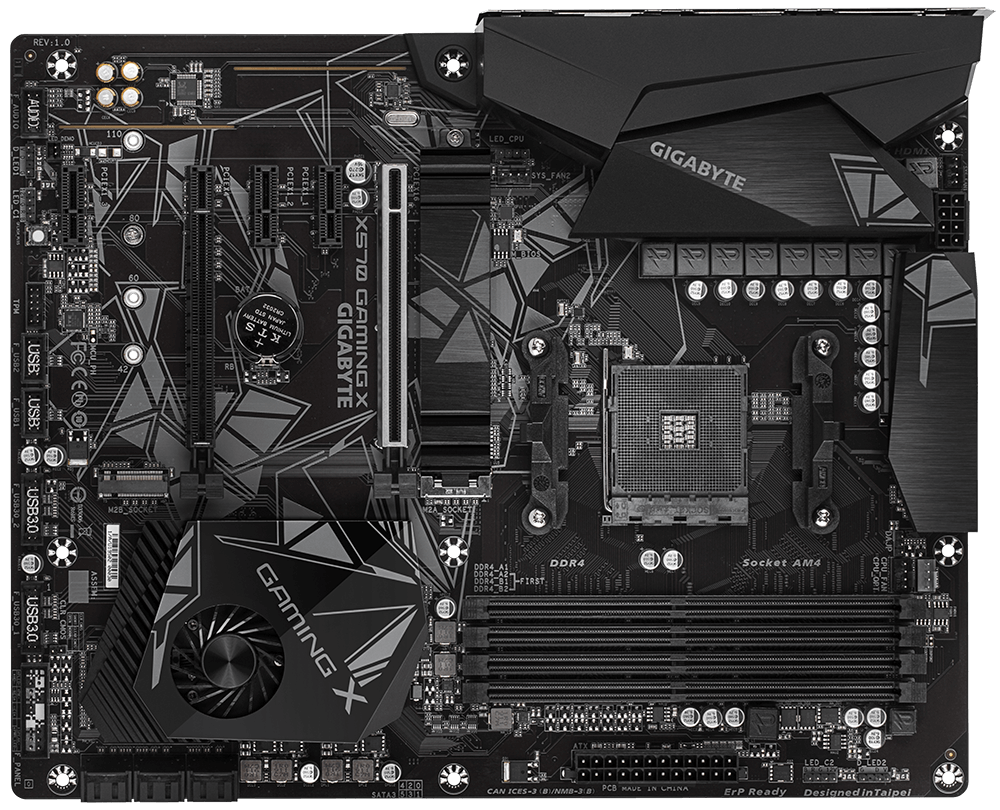
I have the gigabyte x570 gaming
frigid night
full elk
I have the gigabyte x570 gaming
Do you have a "Q-FLASH PLUS" Button?
It'll be somewhere on the mobo.
 wary pasture
Hello! I just finished a custom built pc but I have ran into a big issue. Everything has been plugged in the way it should be but every time I try to turn it on, the psu makes a clicking sound every second as the fan spins once and stops for a second than starts off again (everything else is off btw). Do I need to share my specs to help this situation out more? sorry I am new to this :')
frigid night
full elk
I have the gigabyte x570 gaming
Do you have this button?
 full elk
frigid night
Do you have this button?
full elk
frigid night
Do you have this button?
Nah mine is the gaming X version not the aorus, but the clear cmos button is built into the case instead of the side of the mobo
frigid night
full elk
Nah mine is the gaming X version not the aorus, but the clear cmos button is bui...
Don't pay attention to the name of the board. I'm asking if you have that button.. There may be another button somewhere ON the mobo itself that will say "Q-FLASH PLUS". It'll look a tad different than the one that I just sent in the pic.
full elk
 vague oracle
Built into the case?
frigid night
vague oracle
Built into the case?
frigid night
I'm trying to see if he has bios flashback
full elk
ohh I was wondering what that button was
vague oracle
Don’t think non Aorus X570s did
frigid night
The webpage for the mobo says it does.
full elk
I’m tryna find the q flash but I don’t see it
frigid night
full elk
I’m tryna find the q flash but I don’t see it
Might look like this.
 frigid night
vague oracle
Don’t think non Aorus X570s did
frigid night
vague oracle
Don’t think non Aorus X570s did
His I/O panel even shows he has a BIOS USB port.
That's why I am trying to figure out where his bios flash button is.
vague oracle
 frigid night
vague oracle
frigid night
vague oracle
Thanks
 frigid night
cyan ravine
https://static.gigabyte.com/StaticFile/Image/Global/4e3be82eeb81320213d126dcfa2c...
frigid night
cyan ravine
https://static.gigabyte.com/StaticFile/Image/Global/4e3be82eeb81320213d126dcfa2c...
I do now yeah
cyan ravine
 full elk
OHH I found it
frigid night
That way he doesn't have to tear apart his PC in order to update his BIOS
full elk
I had to take out my gpu to see it
frigid night
full elk
OHH I found it
Good. Now watch this video and update your bios.. ,but instead of the Qflash button on the IO panel, just use that button you found on your motherboard.
https://youtu.be/449N8h2GdlU
 full elk
frigid night
Good. Now watch this video and update your bios.. ,but instead of the Qflash but...
full elk
frigid night
Good. Now watch this video and update your bios.. ,but instead of the Qflash but...
Alright, thank you so much
full elk
frigid night
Good. Now watch this video and update your bios.. ,but instead of the Qflash but...
So I basically jus plug in the power supply and press the button?
frigid night
full elk
So I basically jus plug in the power supply and press the button?
If your PC is already put together, then yeah, just make sure PSU is on with PC OFF. Plug the USB into the port that says BIOS and then press your BIOS flash button. You'll want to wait a good while to let it install the BIOS. I don't know if the button on your MOBO has any indication that it is doing anything like the button in the video. That's why I say to let it sit a good while, even if it seems like nothing is happening.
full elk
Alright I’ll give it a shot
frigid night
Make sure you follow that video to a T though
You gotta download the right BIOS for your board and make sure it is named exactly what the video says to name it.
full elk
Gotcha
full elk
frigid night
That would be de way. Also, make sure the USB is formatted to FAT32
for the files, which one do i rename?

on the vid it only showed one
I’d assume it’s the bottom one right?
frigid night
full elk
for the files, which one do i rename?
Yeah the bottom one.
name it GIGABYTE.BIN
full elk
frigid night
name it GIGABYTE.BIN
Alright done and done, also in the vid it says “without installing cpu or gpu” do I have to take out the cpu and gpu? Or should it be alright
frigid night
full elk
Alright done and done, also in the vid it says “without installing cpu or gpu” d...
You'll be ok. Also make sure that the file is in the root directory of the USB drive.
And the USB is FAT32 right?
full elk
Yeah I made sure the only thing in the usb is that file, and it’s a FAT32
frigid night
full elk
Yeah I made sure the only thing in the usb is that file, and it’s a FAT32
Ok, good. Now just plug it into the BIOS USB port on your mobo and then press and hold that button for about 5 seconds. Then wait for a while.
full elk
alright time to testt it out
 frigid night
by a while.. I'd say 30 minutes is safe.
frigid night
full elk
sounds goodd, thanks again
Have any blinking/solid lights on your mobo indicating that it's doing anything?
full elk
ye the pc lit up
frigid night
full elk
ye the pc lit up
PC lit up?
full elk
like it turned on
full elk
yea everything turned on after the flash
does that mean it’s done or should I wait 30 minutes
frigid night
full elk
does that mean it’s done or should I wait 30 minutes
You have no display?
full elk
frigid night
You have no display?
should I turn it off and turn it back on?
frigid night
full elk
should I turn it off and turn it back on?
No harm in doing so. If the BIOS isn't done flashing, then you'll just have to do the process over again. I myself haven't seen a PC turn on like that after a flash though so that's trippy.
full elk

yeah it’s weird
I’ll wait around 30 minutes and then I’ll try and restart it
just incase
frigid night
full elk
I’ll wait around 30 minutes and then I’ll try and restart it
30 minutes was the long end of things. Probably get away with more like 15 or 20 min. I just know that my own bios takes close to 10 min.
You can probably restart it now and see what it does.
full elk
ah true I’ll restart it now
Wait there’s a red light coming from the flash button what does that mean?
frigid night
full elk
Wait there’s a red light coming from the flash button what does that mean?
Then it's most likely still flashing. That's why I asked if there was any indicator that it was flashing.
full elk
frigid night
Then it's most likely still flashing. That's why I asked if there was any indica...
full elk
yeahh
what could be the issue?
Should I just keep the standard name? Instead of renaming it
frigid night
full elk
what could be the issue?
Wait until that red light is gone.
full elk
Alright
frigid night
full elk
Should I just keep the standard name? Instead of renaming it
No, because the bios won't recognize that file name. That's why you are renaming it to GIGABYTE.BIN
frigid night
Red light is telling me it's still flashing the BIOS. IF your PC still doesn't work after it's done.. Do it again since we ended up touching the power button while it was doing it.
full elk
Yeah since it’s acting a bit weird
full elk
frigid night
Red light is telling me it's still flashing the BIOS. IF your PC still doesn't w...
It’s still stuck on and it’s not flashing, should I shut it off and turn it back on?
it’s just a solid light
frigid night
full elk
it’s just a solid light
Leave it until it turns off.
if in an hour or so it hasn't turned off then we can try again.
full elk
alright
wary pasture
update: the power supply is completely working but everything else is not turning on
full elk
frigid night
if in an hour or so it hasn't turned off then we can try again.
I did some research and it said that q flash has problems if you use a usb over 16gb, could that be the issue?
frigid night
full elk
I did some research and it said that q flash has problems if you use a usb over ...
I don't see why it would be. Go ahead and see if your PC will turn on.
@full elk Alright so with your Mobo.. It looks like in fact you do have to take your CPU and GPU out.
That means you only want the 24pin and your CPU EPS cables connected.
full elk
frigid night
<@435166470859653131> Alright so with your Mobo.. It looks like in fact you do h...
ohh alright, can we pick back up on this tomorrow? I have work in the morning lol
frigid night
full elk
ohh alright, can we pick back up on this tomorrow? I have work in the morning lo...
Yeah, no problem. What you'll want to do is unplug your PSU and take your CPU out completely. Take out your GPU and RAM. Make sure the 24 pin and cpu cables (top left of your board) are plugged in and everything else is unplugged. Turn PSU back on. Put the flash drive into the BIOS USB port and then hold the BIOS flash button down until the light turns on. The flash will be done once the light turns off. When the light turns off, put it all back together and try and turn it on.
screenshot this so you can quickly find it tomorrow. I can't guarantee I will be around tomorrow when you have the time to continue this.
full elk
Alright sounds good, I knew something was wrong since the light didn’t flash it was a solid light the entire time for almost 2 hours lol
frigid night
full elk
Alright sounds good, I knew something was wrong since the light didn’t flash it ...
It may not flash. It may be a solid light the whole time. It's when it turns off that you'll know it's finished.
 strong raft
If some say use 8-16GB drive, that's obviously worth a try. I've actually heard something like that.
frigid night
yep. GIGABYTE.BIN
The gigabyte video shows it in capitals so that's what we are going with.
 gentle pollen
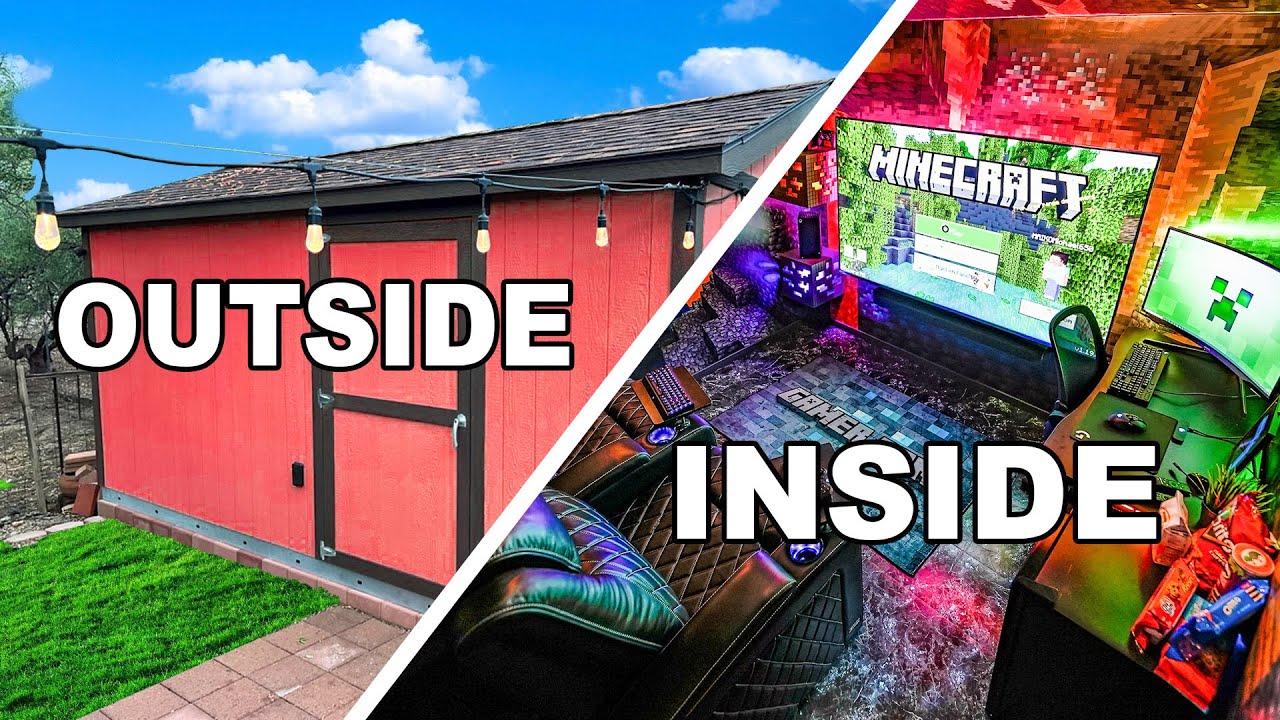
Epic setup somebody else made, thought I'd share it.
https://www.youtube.com/watch?v=YQpRU_LcrS0
$5000 Giveaway! I was hanging out with MrBeast last year and he asked me if I had any more ideas like my Home Theater Shed Build Video and I told him that I was going to build the Ultimate Gaming Room. He told me that was boring and that I should build an Epic gaming room in a CAVE! (true story).
So instead of building a gaming room inside of ...
frigid night
👍
even the bin was capped xD
Well I guess my kneecaps are head level with you.
You are so weird
😮 for some reason the chefs kiss reminded me that I have pizza I got from work.
 elfin flame

 obsidian wigeon
inb4 sag
cyan ravine
IT'S HHUUUGGEEEE
vague oracle
cyan ravine
IT'S HHUUUGGEEEE
That’s what he said
 vague oracle
Send me the suprim X cooler but forget to take it off the card
obsidian wigeon
slab of pure cooling
cyan ravine
That finish tho

Not very smooth
But done with the center in mind
It works it's way outward instead of just flat lines

 cyan ravine
vague oracle
I wonder if I could slap a 4080 suprim X cooler onto a 2080 super
cyan ravine
vague oracle
I wonder if I could slap a 4080 suprim X cooler onto a 2080 super
The 4090 coolers will work with 4080's
Same pcb just stripped
vague oracle
Reread my message
vague oracle
Ahh ok, thought you misread
strong raft
Still no pc setup. Lots of work & stuff since selling gtx 1080 last month. While people upgrade to 40 series or sell mining stuff I'm scouring Ebay. Going 3080/3070, or 1080 ti. No in between, lol. 30 series pricing getting pretty good. 
cyan ravine
You could try this cooler on a 2080S
vague oracle
Wait a minute
cyan ravine

vague oracle
Why does the font look different
I feel like this might be doable


2080s on the bottom
4080 suprim X up top
cyan ravine
i feel like maybe
vague oracle
Probably would need a bit of cooler modification as filling down and building up parts of the cooling block to get better contact
Maybe retapping screw holes for mounting
Ahh the power connectors probably would get in the way too
I could technically build the power connectors into the cooler then just solder wires to the contacts
cyan ravine
ok
problem
or rather
no problem but pain
it won't fit vertical
I can run from the cpu block to the gpu block directly to fit it and then run 90 degree connectors
but this will be painful to install
I think it'll fit horizontal tho
rather, horizontal without any pain either
I think I'll do Horizontal
frigid night
cyan ravine
I think I'll do Horizontal
easy way out. smh
vague oracle
Damnit now I want to custom loop my studio PC
Doesn’t make much sense to custom loop a 11900k 3080 tho 
cyan ravine
eh
it does actually
11900k isn't the hottest but there are plenty of those water looped
vague oracle
Is the kraken G12 any good? Thinking about it for my 2080 super
cyan ravine
which 2080s is it

 cyan ravine
that don't sound like it's worth doing
vague oracle
Apparently the G12 brought a 2080ti down from 75C to around 40ish

Check prices below
NZXT Kraken G12: https://geni.us/2mCfx
NZXT Kraken X52 240mm AIO: https://geni.us/lKTUQl
iFixit Pro Tech Toolkit: https://geni.us/r1Y9zb
Thermal Grizzly Kryonaut: https://geni.us/Fkt3oW
RTX 2080 Ti FE: https://geni.us/RE3KUbw
RTX 2080 Ti FTW3 Hybrid: https://geni.us/ZJNLMe
NCASE M1 Mods: https://optimumtechmedia.wixsite.com/o...
cyan ravine
oh yeah it'll bring temps down but whether it's actually better I'm not sure
vague oracle
If temps are down, why wouldn’t it be actually better?
cyan ravine
not necessarily
vague oracle
Also would be quieter which would be a big plus considering this is going into a studio
cyan ravine
depending on the card and silicon it's either a buttload of frequency or nothing
for example if I keep the 4090 temps under 50C I get 30MHz
on my 3080? good 45MHz plus
3090? nothing
it's actually slightly worse LOL
vague oracle
LOL
cyan ravine
I don't have experience with turing much tho
vague oracle
On my 3080 I got an extra 150mHz from having it in the 50ish range
vague oracle
Lol I remember my 80C RX480 
cyan ravine
over 50 the card is designed to clock down
vague oracle
That was an interesting card
cyan ravine
but for turing it'd be different
vague oracle
That’s also if I decide to stick with that 2080 super and not take back my 3080
vague oracle
How well would a 2080 super do at 1440p165hz?
vague oracle
cyan ravine
it runs at 80C but how much does it downclock?
No clue
vague oracle
Definitely not as good as a 3080
Rn this is all just speculation until next Monday when I get home from college
If I keep the 2080s I can be lazy and keep the PSU that’s already in the build. If I go for the 3080 I need to swap the PSU out with my dad’s pc and take back my HX750
cyan ravine
swapping the psu out as well doesn't sound bad
you're thinking about watercooling a card that sounds like an equivalent amount of work LOL
vague oracle
Less work than undoing a whole lotta cable management and redoing cable management on two PCs LOL
desert gulch
Be a Chad and literally don't cable manage
Even tho it's modular, plug everything in and just leave it there
vague oracle
Ahh yes
 honest timber
Worth getting a 7900xt over a 6950xt? For a 100 price diff
cyan ravine
XTX over that if you do it at all
(EDIT: At least one of the two have demonstrated this with aib versions) that said the two new cards seem to have some insane overclocking ability
fossil cedar
Go 6900xt for 700$ if in the US or wait for 7900xtx
tawny fiber
The uplift with 7900xtx seems worth waiting
If already have card with better perf then 6600
 nimble needle
when entry level low end ryzen 7000 release
cyan ravine
released
not worth it
all ryzen 7000 top to bottom is expensive
because the motherboards aren't cheap
fossil cedar
And ddr5
Get a 13th gen low skew or something when they come out in January and get ddr4
obsidian wigeon
besides im certain 13400 will still be cheaper than 7600
but have e cores to bury it in the ground
gaming is probably gonna be similar tbh
just gonna have massive win over the 7600 in multi core
tawny fiber
Mc doesn't matter much to people imo buying in this class
obsidian wigeon
It doesn't, but price to perf ratio is still a lot better on Intel side
Intel x400 series usually costs around 150-170
That's already lower than 7600's 229
Not to mention the ability of using ddr4 on Intel
cyan ravine
it doesn't if you're specifically gaming
core counts matter a bit tho and long term it will play somewhat of a role
for mc perf
obsidian wigeon
It's great value for even someone who doesn't game
Leaks suggests that it's like 50% or so faster in multi compared to 12400
cyan ravine
next-gen btw all the chips below 13600 are said to be alder lake based
obsidian wigeon
ye
cyan ravine
I can't remember if cache boosted or not
cyan ravine
it won't be gross
cyan ravine
13600K/KF is just over 300 rn
really doubt 13400/F is over 230
fair bit of a step-down there lol
strong raft
Nah, 12600K is already below $250 a lot.
obsidian wigeon
if it comes out at 160 im screaming in happiness
cyan ravine
is it?
oh yeah
well, would they put 12600K over 13400?
probably not but depends on how much L2 cache they both have
oof supposedly 9.5 vs 16
that's kinda big
hmm
I guess the clock difference maybe puts them pretty close
fossil cedar
cyan ravine
oof supposedly 9.5 vs 16
9.5 on 13400 or 12600k?
cyan ravine
12600k
strong raft
Count cashback it's $225 on Amazon currently, yea. My main idea for the "old" K is getting the unlocked vccsa to oc ram better, although 3600c16 might be possible as is. I'll post my results soon enough. 13400 does seem "literally" a lower clocked locked 12600K.  (edit:also much lower max wattage though, incl boost)

 fossil cedar
cyan ravine
12600k
fossil cedar
cyan ravine
12600k
Oh that's a huge boost then

 cyan ravine
strong raft
Count cashback it's $225 on Amazon currently, yea. My main idea for the "old" K ...
cyan ravine
strong raft
Count cashback it's $225 on Amazon currently, yea. My main idea for the "old" K ...
and this
fossil cedar
Yeah but eng samples can change
Also a jump from 20mb on 13600 to 9.5 on the 13400, f
strong raft
Indeed. What's interesting is 13500/13600 maybe gets 8Ecores. Those could be great for some programs.
fossil cedar
Hmmm idk i feel more likely to be 4/6
cyan ravine
E cores are tiles of 4 no?
fossil cedar
cyan ravine
E cores are tiles of 4 no?
Yes but what if don't work they'll just disable those 2
cyan ravine
not sure tbh
nimble needle
why hating on ddr5 it's almost the same price as ddr4 now
cyan ravine
uhh
no?
cheapest decent ddr5 is like $128
for 32gb (you should never get 16gb)
for cheap ddr4 you spend $70
for the same 32gb
16gb is not any better (and again, shouldn't do it)
fossil cedar
nimble needle
why hating on ddr5 it's almost the same price as ddr4 now
It's like double the price
And the pricing is even worse outside the US
nimble needle
extra 30 bucks aint double the price
cyan ravine
70 vs 128 is almost double
nimble needle
where for 70 bru
cyan ravine
silicon power gaming 2x16
nimble needle
its 80 min on newegg
nimble needle
cyan ravine
silicon power gaming 2x16
out of stock
cyan ravine
nimble needle
out of stock
uhhh
 nimble needle
cyan ravine
and actually 70.47 on newegg
nimble needle
cyan ravine
and actually 70.47 on newegg
team group for 80 something
cyan ravine
ummmm
 nimble needle
im not in the us
cyan ravine
well where are you?
analog pulsar
Bruh
cyan ravine
well not very convincing if you are just gonna call me wrong but won't even tell me your country
analog pulsar
He means do you live in like US or something
nimble needle
analog pulsar
He means do you live in like US or something
I already said I dont
analog pulsar
Bc certain prices here in US are not gunna be same in the UK and so on
analog pulsar
nimble needle
I already said I dont
Okay but we are gunna need what country your in to be able to find the best pc parts for your price
Huh
nimble needle
aight
fossil cedar
nimble needle
im not in the us
Outside the us the difference between ddr4 and 5 is even larger price wise
potent portal
cyan ravine
for 32gb (you should never get 16gb)
Never say never https://www.youtube.com/watch?v=IstA56IAeVA&t=723s
Support us on Patreon: https://www.patreon.com/hardwareunboxed
Join us on Floatplane: https://www.floatplane.com/channel/HardwareUnboxed
Buy relevant products from Amazon, Newegg and others below:
GeForce RTX 3050 - https://geni.us/fF9YeC
GeForce RTX 3060 - https://geni.us/MQT2VG
GeForce RTX 3060 Ti - https://geni.us/yqtTGn3
GeForce RTX 3070 - ...
upper ore
@potent portal Alright I got it to recognize my flash drive with windows. What now?
 potent portal
F10 to save and exit
Let it boot to the installer
upper ore
potent portal
F10 to save and exit
Let it boot to the installer
Okay but it gives 2 options. Do I pick the UEFI or USB option?
 upper ore
potent portal
UEFI
upper ore
potent portal
UEFI
What the heck? It should already have everything on the flash drive.

 potent portal
Most people want regular home, unless you got a pro key
Pro features won't work without a key
upper ore
potent portal
Most people want regular home, unless you got a pro key
What happens if I don't have a key?
potent portal
On home? You can't use the personalization menu (just use wallpaper engine lol) and you might get an "activate windows" watermark
On pro? You can't use extra features like bitlocker on external drives
upper ore
I might just buy a windows 10 pro copy then.
upper ore
Honestly idk I had it on my other pc because I got a key from a friend.
potent portal
Are you going to be using that PC still? What kind of key was it originally? If it's a retail key or a key off a sticker on an old PC then you can reuse that key.
upper ore
Yeah he sent a pic of it through our dms ages ago and I'm trying to find it.
potent portal
Sticker key then? That's usually a retail key and has 3 activations
upper ore
potent portal
Sticker key then? That's usually a retail key and has 3 activations
Rip can't find it sadly
potent portal
If the old pc works still you can extract the key
Or if you were signed into your MS account you can pull it off the cloud later
upper ore
potent portal
If the old pc works still you can extract the key
Old pc still works and I believe it's signed into a ms account.
potent portal
Ok so for now pick pro and you can change it later if needed
Once you sign into the MS account you can run the activation troubleshooter and it'll let you activate
upper ore
potent portal
Ok so for now pick pro and you can change it later if needed
What now?
 potent portal
custom
upper ore
potent portal
custom
Is this were I pick the drive I want it on? I want my OS and boot on my mp33 drive
 potent portal
Looks like 2 drives, it's a little blurry but seems like a 1TB and a 2TB?
Whichever one is the MP33 click it and hit next
upper ore
I believe it's the one TB so I should pick the 953GB one right?
potent portal
Yes
upper ore
Yeah nvm dumb question lol 🤦♂️
upper ore
potent portal
Yes
Well this is gonna be awhile lol
 upper ore
potent portal
Nah faster than you think
upper ore
potent portal
Nah faster than you think
Well I stepped away and came back to this.
 potent portal
Yep that's about right. It's basically done with the usb at this point and it's setting up the core system drivers and apps.
upper ore
potent portal
Yep that's about right. It's basically done with the usb at this point and it's ...
Hopefully I didn't need to do anything in the bios. I missed it
 potent portal
Nope bios is fine. UEFI lets the OS manage some of the settings like boot order and secure boot keys.
upper ore
potent portal
Nope bios is fine. UEFI lets the OS manage some of the settings like boot order ...
Haven't had this pop up before
 upper ore
potent portal
That's for special cases, nice for accessibility
upper ore
potent portal
That's for special cases, nice for accessibility
Alright just got and ethernet connected
 potent portal
It'll download a few critical updates and drivers now
They'll be basic drivers that just work for the most part but you'll still want to install chipset and gpu drivers
upper ore
Alright so now I just sign in right?
 potent portal
Personal use yeah
upper ore
potent portal
Personal use yeah
Honestly idk why I'm asking how to setup windows because I've done it a million times lol
But this is new lmao

Wait I don't think I should click those right? If I do I will get alot of ads won't i?
frigid night
upper ore
Wait I don't think I should click those right? If I do I will get alot of ads wo...
Correct.
 upper ore
potent portal
What platform are you on and what GPU?
upper ore
potent portal
What platform are you on and what GPU?
Msi rtx 3080 trio
upper ore
potent portal
What platform are you on and what GPU?
Amd ryzen 7 5800X3D
Motherboard is the B550 Steel Legend if you need to know that aswell.
potent portal
Download drivers for NVIDIA graphics cards, video cards, GPU accelerators, and for other GeForce, Quadro, and Tesla hardware. US / English download.
upper ore
potent portal
https://www.nvidia.com/content/DriverDownloads/confirmation.php?url=/Windows/527...
I'm gonna have to install discord on here first for that lol
I'm on my phone
potent portal
Or download on your phone and copy off
While it downloads you can use Edge for it's sole purpose of downloading another browser
upper ore
potent portal
Or download on your phone and copy off
Alright im in
Do i just download the drivers
potent portal
Once you have both those sets of drivers installed you're basically done. You can verify by opening device manager that everything was installed but then you just... enjoy your new pc. Install what you want.
You can activate now or later.
upper ore
potent portal
You can activate now or later.
What was that way you were talking about getting windows 10 pro from my other pc?
potent portal
Open the start menu and type "activation"
You'll get a shortcut to the settings menu
You want the activation troubleshooter
It'll check for keys associated with your currently signed in MS account and you can tell it to transfer
 potent portal
I changed hardware
upper ore
potent portal
I changed hardware
Windows 10 professional
 potent portal
Yep looks like it might deactivate the old pc in the process though
upper ore
potent portal
Yep looks like it might deactivate the old pc in the process though
Crap what do I need to do with the old one?
upper ore
potent portal
Do you need the old one to stay activated?
Not really but will I be able to still save files and stuff to move things over?
potent portal
It'll still work 100% except for pro features like bitlocker and customization menu
upper ore
potent portal
It'll still work 100% except for pro features like bitlocker and customization m...
Okay good!
upper ore
potent portal
It'll still work 100% except for pro features like bitlocker and customization m...
Do I just check the box and hit activate?
potent portal
Yep
upper ore
potent portal
Yep
Is it all done?
 potent portal
Yes it's done
upper ore
Sweet
 upper ore
potent portal
Yes it's done
upper ore
potent portal
Yes it's done
Will I need to update my motherboard bios. And my cpu drivers?
potent portal
CPU driver is included in the chipset package
If you've gotten this far you probably don't need to update bios but you can
upper ore
potent portal
If you've gotten this far you probably don't need to update bios but you can
Alright and for the fun part. What do I download to do all of the rgb configuring for everything? Lol
potent portal
Here's the bios if you want it. You should be on at least 2.20 if it's working but this is 2.40 https://download.asrock.com/BIOS/AM4/B550 Steel Legend(2.40)ROM.zip
You could use the Asrock Polychrome software but I'd use OpenRGB personally
upper ore
potent portal
Here's the bios if you want it. You should be on at least 2.20 if it's working b...
Alright downloaded this what now?
potent portal
Extract the zip to your usb drive and you can update from inside the bios
upper ore
potent portal
Extract the zip to your usb drive and you can update from inside the bios
It says this when I try to
 potent portal
Not that one, you just put that on the usb
upper ore
potent portal
Not that one, you just put that on the usb
So i just hit extract all and save it to my flash drive?
potent portal
Yes
upper ore
potent portal
Yes
Also why is my 1tb drive the only showing?
potent portal
The other one isn't formatted yet
You can do that first if you want
Right click the start button and select disk management
Then you can select the unallocated space and select new simple volume
 upper ore
Hit ok?
potent portal
yes
upper ore
potent portal
yes
Now what?
 potent portal
Then you can select the unallocated space and select new simple volume
potent portal
potent portal
Then you can select the unallocated space and select new simple volume
.
Right click brings up the menu
 potent portal
Relic of the old days
upper ore
potent portal
Relic of the old days
So i just hit next now?
upper ore
Okay
potent portal
Yes just next through the menus, you can change the name if you want
 potent portal
Volume label would be what you change
upper ore
potent portal
Volume label would be what you change
Just about to ask if thats where you can name it?
upper ore
potent portal
Volume label would be what you change
What are the 2 Disk 1 volumes?
 upper ore
potent portal
EFI and Recovery
upper ore
potent portal
EFI and Recovery
Makes since but does this look setup correctly?
 potent portal
Yep looks perfect
upper ore
potent portal
Yep looks perfect
Alright what were we about to do?
potent portal
bios update
upper ore
Bios right?
upper ore
potent portal
bios update
What now?

 potent portal
instant flash right
upper ore
potent portal
instant flash right
Do I click that?
potent portal
yes
upper ore
potent portal
yes
 potent portal
It should bring up a menu where you can pick the file you extracted
You don't have bitlocker so yes
upper ore
potent portal
You don't have bitlocker so yes
So click yes?
potent portal
yes
upper ore
potent portal
yes
 potent portal
update
upper ore
Update?
upper ore
potent portal
update
 potent portal
yes
upper ore
potent portal
yes
After this should I put my ram to the speed it's supposed to be?
potent portal
Yes you can enable the xmp once it's done
upper ore
potent portal
Yes you can enable the xmp once it's done
I don't need to update the cpu stuff at all right?
potent portal
Like overclocking the cpu? You can if you want but shouldn't be necessary
upper ore
potent portal
Like overclocking the cpu? You can if you want but shouldn't be necessary
Nah, I heard that it would be wise not to overclock the ryzen 7 5800X3D. I meant like what I had to do to my other cpu a few weeks ago where I had to update the drivers or whatever.
potent portal
Sort of locked but undervolting can be good. Again not really needed.
cyan ravine
Good if you need it
upper ore
So where do I need to go for xmp on this board?
 potent portal
But cpu "drivers" aren't really a thing. It'll be packaged with the chipset.
upper ore
upper ore
So where do I need to go for xmp on this board?
@potent portal
potent portal
I'm not too familiar with asrock bios but I assume it's under the oc menu
upper ore
potent portal
I'm not too familiar with asrock bios but I assume it's under the oc menu
DRAM Frequency?
 upper ore
potent portal
load xmp setting
upper ore
potent portal
load xmp setting
 cyan ravine
Yes
potent portal
Once you pick profile 1 just F10 to save and exit
upper ore
Alright all done
full elk
frigid night
It may not flash. It may be a solid light the whole time. It's when it turns off...
Alright I’m back home and took everything out and held the Q flash, now it’s flashing
Ooo it turned off after about 3 minutes
time to test it
cyan ravine
That sounds like it worked
full elk
cyan ravine
That sounds like it worked
Do I take out the usb before I start it up or is it fine?
cyan ravine
Honestly doesn't matter
 livid nacelle
Can someone help me with a question?
cyan ravine
You can leave it in if you find it won't start properly after a couple times
cyan ravine
livid nacelle
Can someone help me with a question?
Sure
Depends on the difficulty but go for it
livid nacelle
Should I dm you?
livid nacelle
So I currently have a Asrock X570 Steel Legend Amd, and I wanted to test my fans and Rgb to see if they are working but when I turn on the psu the motherboard lights turn on but not Rgb turns on. Also I don’t have a cpu currently, do I need one to test the rgb lights? I’m buying a cpu soon anyway.
cyan ravine
Cpu and cpu cooler
Just to be clear
Don't go turning on the pc without a CPU cooler
frigid night
full elk
Alright I’m back home and took everything out and held the Q flash, now it’s fla...
Pog. You got it to boot?
 jagged hill
my giant x86 tablet works without wall plugs now!!
upper ore
This is definitely 1000 time better then my first build cable management! Kinda proud of myself rn. 😁
 potent portal
Nice, it's good to have separate channels like that for the cables
upper ore
potent portal
Nice, it's good to have separate channels like that for the cables
Crap! I just realized I never bought a rear exhaust fan! Is there a nice white one that lian li or phanteks makes that I could get?
full elk
frigid night
Pog. You got it to boot?
YOO IT BOOTS
wait so which option boots to the ssd?

I haven’t done this in a long time lol
potent portal
Windows boot manager
fossil cedar
Boot manager should be first ye
full elk
Alright
potent portal
upper ore
Crap! I just realized I never bought a rear exhaust fan! Is there a nice white o...
Lian Li ST
full elk
Do I jus press save & exit then I’m done?
fossil cedar
upper ore
Crap! I just realized I never bought a rear exhaust fan! Is there a nice white o...
Deepcool fc120 are good too
fossil cedar
full elk
Do I jus press save & exit then I’m done?
Yes
cyan ravine
FC120, LL ST120, P12 ARGB
 south cliff
This might sound confusing but I’d I was to return my gpu do I have to be the first owner to return it even tho it still has warranty
I bought it off eBay
potent portal
Do you have the original receipt
upper ore
Alright so im feeling pretty dumb rn because i forgot how to do this. But how do you change where files on your desktop when you have 2 monitors? I set up my main to be number 1 but all the files are still going to the number 2 monitor.
south cliff
potent portal
Do you have the original receipt
No
upper ore
I had it right before i changed pc's out
south cliff
Move them with your mouse
south cliff
potent portal
Do you have the original receipt
My cat puked on my gpu 🥲
upper ore
south cliff
Move them with your mouse
Ik i can do that but i dont want to keep doing that. Ik there is a setting for it but i cant find it
potent portal
south cliff
No
Then they won't take a return and warranty will probably be denied due to CID (customer induced damage)
south cliff
Well I told them it just went black and I cleaned the puke op
potent portal
Many brands require you to have original proof of purchase to claim warranty
south cliff
potent portal
Many brands require you to have original proof of purchase to claim warranty
I could tell them since it’s Christmas ya know
potent portal
And I will not condone warranty fraud either
potent portal
You could resell it as parts only on eBay
south cliff
Well I’m not eighteen
So I’m screwed unless I try some other stuf
Like use a heat gun
potent portal
I do not recommend that
frigid night
full elk
YOO IT BOOTS
Awesome man. Glad we got it workin.
potent portal
Only professionals should do repairs involving extreme heat
south cliff
Well I got nothing else
potent portal
Or self proclaimed professionals
Did you take it apart completely and clean the pcb with isopropyl alcohol?
south cliff
Yes
potent portal
95%+ preferred
south cliff
But also when I looked at the metal tiny pieces 2 of them weren’t silver they were kinda blak