#building-and-recc-chat
1 messages · Page 50 of 1
 mossy venture
 cyan ravine
Ages 14+
 fossil cedar
mossy venture
i've over 800 hours of playtime
fossil cedar
mossy venture
i've over 800 hours of playtime
Jesus
 reef moss
mossy venture
i've over 800 hours of playtime
reef moss
mossy venture
i've over 800 hours of playtime
Bro I got like 289 hours
mossy venture
mossy venture
i've over 800 hours of playtime
for how much i play I'm still terrible
peak gold 2
reef moss
mossy venture
for how much i play I'm still terrible
I'm streaming later. We should play
mossy venture
though it is my first tac shooter
mossy venture
reef moss
I'm streaming later. We should play
depends on the time, i work tn
 flint sapphire
I was LE in cs with like 1400 hours 
reef moss
What time is it for you rn
reef moss
Same here
 upper ore
Nope but been trying to get back into ow but now the new ow2 makes my support life much more difficult.
fossil cedar
Bacca you have like half my csgo hours and i started playing like 7 8 years ago although tbf i didn't play it for at least like 3 of them and a good bit more only here and there
If you wanna self promo do it in #links-and-selfpromotion
Not here
reef moss
Then ill word it differently
mossy venture
fossil cedar
Bacca you have like half my csgo hours and i started playing like 7 8 years ago ...
i started playing like a year and a half ago
may of last year iirc
fossil cedar
Lol
reef moss
mossy venture
east coast gang
I'll be on valorant from 4 30 to 6 30
fossil cedar
Jesus
reef moss
2nd shift sadge
mossy venture
ill send you my tag though
reef moss
Sick
fossil cedar
7950x costs amd roughly 69$ to manufacture..... Nice
upper ore
Well this is awesome just tried to do the cyberpunk benchmark and everything froze. 😅 And I have the spinning wheel of death next to my mouse.
I can't wait until I build my new pc
 frigid night
One of the biggest mistakes for my wallet was building a PC. Now I can't stop buying PC this and PC that
upper ore
My pc just decided to completely freeze the only thing I can do is move my mouse around...
frigid night
restart it lol
upper ore
I did just wanted to see if it could fix itself.
frigid night
cyan ravine
ah well, giving up on the new speaker idea
quitter
frigid night
cyan ravine
couldn't find 4cm of girth
smaller things just don't please you eh?
I'm gonna build a desk PC some time in the future.
 proper nova
Hey does anybody know of the performance difference in using 4 sticks of DDR5 (16 GB 6000mhz) vs 2 sticks of ddr5 memory (32gb 6000mhz). Ive been going crazy trying to find an answer to this question, since I am planning on building a new system soon.
mossy venture
proper nova
Hey does anybody know of the performance difference in using 4 sticks of DDR5 (1...
2 sticks is far better with 12th gen
we don't know about with 700 series mobos and 13th gen
idk about am5 either
proper nova
thanks for the confirmation
cyan ravine
proper nova
Hey does anybody know of the performance difference in using 4 sticks of DDR5 (1...
13th gen can handle 4 sticks seemingly better apparently, but you'll still take a perf hit over 2
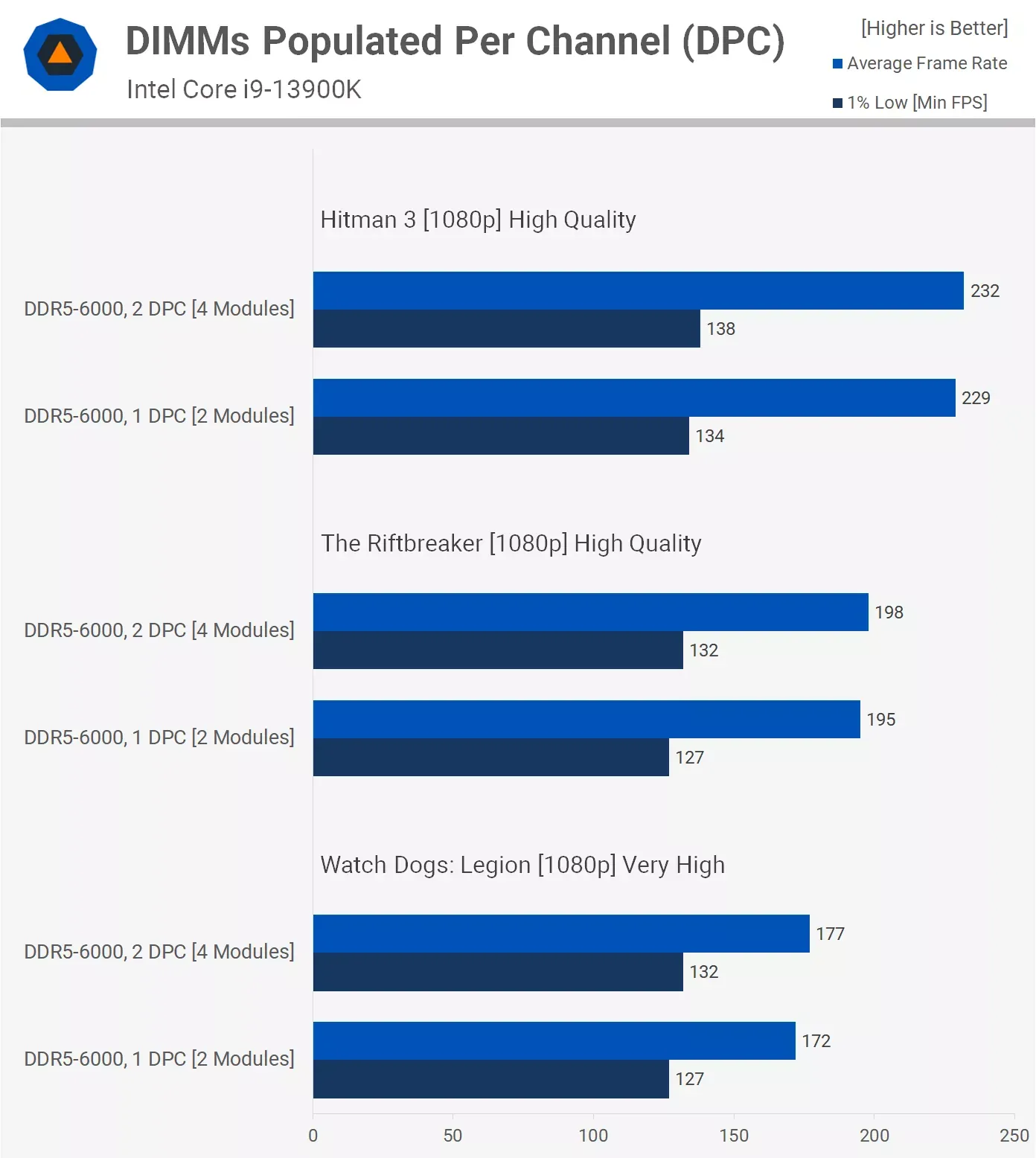
 obsidian wigeon
so the point stands, ya
cyan ravine
if this holds up across most of 13th gen then it'll be back to the old norm mostly
 tawny violet
1400 bucks for a 4k-capable PC should be good, right?
obsidian wigeon
Meh, not quite
But something like 12400F and 6900xt is doable
If you really insist on 4k
cyan ravine
I would do 4K if you have the room for something more than 32"
cyan ravine
1440p is really nice at 1400
obsidian wigeon
ye
tawny violet
obsidian wigeon
But something like 12400F and 6900xt is doable
2080 Ti for 4k not good enough?
obsidian wigeon
hm
cyan ravine
2080 Ti is a very comfortable 1440p card these days
for older games sure, 4K is fine
obsidian wigeon
4k is kinda pushing it if you aim for latest titles
cyan ravine
totles
tawny violet
tbf 1440p is all I really need honestly
obsidian wigeon
lol
tawny violet
cuz 4k monitors are unobtainum here
 analog pulsar
cyan ravine
1440p is really nice at 1400
analog pulsar
cyan ravine
1440p is really nice at 1400
1440p boring we need 8k plz
cyan ravine
again, consider 4K over 32"
like, TV size
below that you won't notice the difference
cyan ravine

obsidian wigeon
wha
analog pulsar
4k sorry
tawny violet
27" 1440p good middle ground then, gotcha
cyan ravine
ye
obsidian wigeon
even 4k is good for 34 inches
analog pulsar
Well ig it might depend if it's used for that panel
obsidian wigeon
hell i have even saw 50 inch 4k tv
analog pulsar
But I did 4k on 1440p monitor and it was baf
obsidian wigeon
and they look great
cyan ravine
analog pulsar
But I did 4k on 1440p monitor and it was baf
lol
obsidian wigeon
yeah and that's not native res
cyan ravine

obsidian wigeon
so you can't apply that to native 4k
analog pulsar
obsidian wigeon
hell i have even saw 50 inch 4k tv
Yea bigger screen better for 4k
tawny violet
but yes, the bones will be there, and I can upgrade it with a 5950X and a 3080 Ti once the prices permit, and happily truck along
analog pulsar
What would happen if I try to run 4k on 6600
cyan ravine
analog pulsar
What would happen if I try to run 4k on 6600
it'll probably run fine on older games
like Sea of thieves? no prob
obsidian wigeon
^
tawny violet
I don't know if the 5800X3Ds will make it out to the used market because they're so good for gaming
obsidian wigeon
Roblox on 4k 
cyan ravine
tawny violet
I don't know if the 5800X3Ds will make it out to the used market because they're...
not for a while unless you get lucky
analog pulsar
I saw 4k monitor on Facebook market place I was tempted
obsidian wigeon
Kenzie moment as usual
tawny violet
Hell, most used ads here are for freaking 4770Ks and 970s
tawny violet
yeah, that's my point
obsidian wigeon
then non x3d is not too shabby
tawny violet
but yes, once 5000 series Ryzen get out to used market with solid pricing, I can snag one, along with a 3080, and maybe a higher-watt PSU
cyan ravine
depends more on the unit quality than the wattage really
cyan ravine
5700X plus a 3080 could do 650W but I'd pick a high tier for that
obsidian wigeon
eh even b is fine
cyan ravine
even if there are people here who've done it on worse
obsidian wigeon
the transients aren't gonna exceed 650w whole system lol
tawny violet
Corsair RM850 should do, right?
cyan ravine
rm850 usually expensive af
tawny violet
This version specifically
 tawny violet
84 bucks from the seller
cyan ravine
obsidian wigeon
the transients aren't gonna exceed 650w whole system lol

even the 2x8 eagle could very well push the system past 650
tawny violet
it'd be almost 160 brand new
obsidian wigeon
hm
cyan ravine
tawny violet
it'd be almost 160 brand new
lemme have a look rq
obsidian wigeon
even with transients i'd still feel confident enough, but that's just me
tawny violet
I screwed up the conversion
145
brand new
84 used, with valid warranty for 7 years
obsidian wigeon
yeah definitely worth goin used
cyan ravine
this is the floor:
https://hu.pcpartpicker.com/product/qbK2FT/seasonic-focus-650-w-80-gold-certified-semi-modular-atx-power-supply-focus-gm-650

SeaSonic FOCUS 650 W 80+ Gold Certified Semi-modular ATX Power Supply (FOCUS-GM-650)
tawny violet
4 year warranty from the original Hungarian shop
And 6 years additional warranty from Corsair
cyan ravine
nvm
wait no
132 AUD

it's actually 83 usd for the focus
you could technically get away with that
obsidian wigeon
used is good choice if the unit is good
tawny violet
tbf the 850 would be good too, and it's upgrade potential later
obsidian wigeon
good way to save
tawny violet
and the RM850 should be good maybe even for a future 4080
cyan ravine
alright lemme look again
cyan ravine
obsidian wigeon
even 4090
technically yes
obsidian wigeon
4090 only peaks at 500w, its transient behavior is good lol
it never spikes like 3090
something to do with boost being tensor driven or something
escanor talked bout it
it's not a technical yes imo, as long as you don't have a cpu that consumes like 350w
cyan ravine

MSI MPG A850GF 850 W 80+ Gold Certified Fully Modular ATX Power Supply (MPG A850GF)
131usd
you'd save a few $ with this unless you find better used
tawny violet
that's almost double the price of the used Rm850
obsidian wigeon
that's new price
obsidian wigeon
used price is 84
tawny violet
84 bucks used, yeah
That can't really be topped assuming it works as advertised IMO
 tawny violet
Turns out used PSUs aren't a bad deal if you know what to look for hehe
 fleet bolt
is ryzen 5 5600/6700 XT better than a 12400F/3060
fossil cedar
fleet bolt
is ryzen 5 5600/6700 XT better than a 12400F/3060
Yes much better, cpus are about the same but 6700xt is about equivalent to a 3060 ti(roughly 30% perf increase)
fleet bolt
fossil cedar
Yes much better, cpus are about the same but 6700xt is about equivalent to a 306...
some people say 12400f/6700xt better than both
 earnest olive
well yes, picking the better cpu and the better gpu produces a better result than picking one better and one worse
shouldn’t be too surprising
fossil cedar
fleet bolt
some people say 12400f/6700xt better than both
But 5600 and 12400f are fairly close in perf plus 5600 cheaper if you're buying parts that is
fleet bolt
fossil cedar
But 5600 and 12400f are fairly close in perf plus 5600 cheaper if you're buying ...
whats a good board for that combo
 weary galleon
5600 shouldn't bottleneck the 6700xt anyways
earnest olive
they end up being pretty much the same price if you compare 5600 + 3600mhz ram and 12400f + 3200mhz ram, but the 12400f still wins with the slower ram
fossil cedar
fleet bolt
whats a good board for that combo
country?
earnest olive
you can also run the 12400f on h610 with 3200mhz ram with no losses
fleet bolt
fossil cedar
country?
us
fossil cedar
earnest olive
they end up being pretty much the same price if you compare 5600 + 3600mhz ram a...
nah 5600 has been 130 for a good while
vs 12400f 190
fossil cedar
fleet bolt
us
whats your budget for the total pc?
fleet bolt
fossil cedar
whats your budget for the total pc?
1k-1.5k
usd
i heard you can get a decent pc with that
earnest olive
pcpp has the 5600 at 145 and 12400f at 170
not sure where you got 130 and 190
at current prices 12400f is the better buy every time imo
earnest olive
mossy venture
Now run a 5600 on an h610
just solder the pins to each other surely it will work
fossil cedar
earnest olive
pcpp has the 5600 at 145 and 12400f at 170
ahh prices where diff yesterday or day before
but also 5600 build comes out cheaper
earnest olive
well
earnest olive
I'd still get the 12400f, but I feel like you're just not trying hard enough
it's not that hard to get a 12400f build cheaper/equal to equivalent 5600 build
earnest olive
you lose nothing with h610 + 3200c16 vs b550 + 3600c16
fossil cedar
i mean yeah you could go like 90$ b660
fossil cedar
fair
earnest olive
there is an argument to be made for in slot upgrade to 5800x3d/13th gen
earnest olive
but it doesn't cost that much to get decent vrms on either platform either
earnest olive
I think 5600 needs to be about $50 cheaper than 12400f to be worth buying it
 stoic island
They're just various aib models, same chip, different heatsink and pcb
stoic island
Anything that's not mech or random crappy dual models
earnest olive
you can just buy the cheapest one if you don't care, it will still perform like a 6700xt
but personally I'd avoid msi mech too
fleet bolt
earnest olive
but personally I'd avoid msi mech too
how about "powercolor"
fossil cedar
fleet bolt
1k-1.5k
for 1k https://pcpartpicker.com/list/NWnW6r
for 1.5k https://pcpartpicker.com/list/CC2tsL
middle ground https://pcpartpicker.com/list/LTbF3y my choice imo
earnest olive
which model
fleet bolt
fossil cedar
for 1k https://pcpartpicker.com/list/NWnW6r
for 1.5k https://pcpartpicker.com/li...
did u put this together?
anyways tysm ❤️
fleet bolt
earnest olive
which model
uh "PowerColor Red Devil AMD Radeon RX 6700 XT"
earnest olive
red devil is good
fossil cedar
fleet bolt
did u put this together?
yes
fossil cedar
earnest olive
nzxt mobo
ik but its fine for 13600k and cheapest mobo atm with flashback 🙄
earnest olive
msi z690-a pro d4 for $10 more is so worth
fossil cedar
loose wifi tho which is nice
earnest olive
I think nzxt boards are rebrands of asrock phantom gaming
fleet bolt
earnest olive
msi z690-a pro d4 for $10 more is so worth
whats that?
earnest olive
a motherboard
fleet bolt
oh i see
earnest olive
pato
fossil cedar
this one here https://pcpartpicker.com/product/GvmmP6/msi-pro-z690-a-ddr4-atx-lga1700-motherboard-pro-z690-a-ddr4

MSI PRO Z690-A DDR4 ATX LGA1700 Motherboard (PRO Z690-A DDR4)
earnest olive
imagine a corsair motherboard
fossil cedar
nono i understand but like its decent for 13600k for the moment
earnest olive
has a big shield over everything like nzxt but instead of solid plastic it's icue rgb and takes 105% of your cpu
fossil cedar
both decent options imo
earnest olive
built in commander core that marks up board msrp by $100 whether you want it or not
 wide sparrow

analog pulsar
earnest olive
imagine a corsair motherboard
best
earnest olive
would you buy it kenzie
cyan ravine
earnest olive
imagine a corsair motherboard
Oh god no
analog pulsar
earnest olive
would you buy it kenzie
I mean i bought this
 earnest olive
it gets worse felix
wide sparrow
I would buy it if the reviews are good
earnest olive
it has 8 dimm slots but only 4 are actually for ram
analog pulsar
wide sparrow
I would buy it if the reviews are good
Screw reviews
People are just jealous
earnest olive
the other 4 are only there for vengeance rgb light kits
wide sparrow
That's not how I work
cyan ravine
earnest olive
it gets worse felix
Thankfully I just woke up so you can hit me with more nightmare fuel
wide sparrow
I need thorough reviews to buy something
analog pulsar
wide sparrow
That's not how I work
Look at nzxt everyone saying not to buy it
cyan ravine
earnest olive
the other 4 are only there for vengeance rgb light kits
AAAAA STOP-
earnest olive
the extra electrical noise makes it so you can only run up to ddr4-3000
analog pulsar
HATERS HATERS HATERS
 earnest olive
it gets worse felix
 earnest olive
it includes 2 vengeance rgb light kits whether you want them or not
wide sparrow
It's the apple of PC parts
analog pulsar
wide sparrow
I agree on the hate
I mean yes they had issues like cough fires but that wasn't on there other cases only 1 case and was fixed plus other stuff
earnest olive
it also comes with RGB over the vrms instead of heatsinks
cyan ravine

 hallow glen
wide sparrow
It's the apple of PC parts
hallow glen
wide sparrow
It's the apple of PC parts
Isn't apple the apple of pcs
fleet bolt
fossil cedar
yes
do you think that if i use the 1k build but use 32 gb ram sticks instead would that make a significant upgrade
analog pulsar
@earnest olive I'll take 1 corsair motherboard
earnest olive
the z690 version has an msrp of $950 and thermal throttles with a locked i5
analog pulsar
earnest olive
the z690 version has an msrp of $950 and thermal throttles with a locked i5
Z790
cyan ravine
Sounds like some assrock
wide sparrow
hallow glen
Isn't apple the apple of pcs
- windows PCs? Lol?
fossil cedar
fleet bolt
do you think that if i use the 1k build but use 32 gb ram sticks instead would t...
do you mean as in 1x32gb stick of ram? yes that would significantly hurt performance
hallow glen
earnest olive
the z690 version has an msrp of $950 and thermal throttles with a locked i5
... 950 dollars for a motherboard?
earnest olive
it's corsair
fleet bolt
fossil cedar
do you mean as in 1x32gb stick of ram? yes that would significantly hurt perform...
uh i meant the 2x16 sticks you gave in the mid range build
hallow glen
Ah
earnest olive
it includes a built in commander core and 2 vengeance rgb light kits, that's great value
fossil cedar
fleet bolt
uh i meant the 2x16 sticks you gave in the mid range build
they all have 32gb ram
cyan ravine
earnest olive
it includes a built in commander core and 2 vengeance rgb light kits, that's gre...
Omg I can see the corsair discord now raving about it 
earnest olive
a year later they release the z790 refresh featuring the all-new bendable pcb
msrp goes up to $1200
cyan ravine
They really truly fanboy hard* in there
cyan ravine
earnest olive
a year later they release the z790 refresh featuring the all-new bendable pcb
m...
Lol
cyan ravine

earnest olive
actually
what's more cursed
they forget to ever make more than one bios
or
they make bios updates, but you can only do bios updates through icue
earnest olive
imagine icue auto updating your bios
fleet bolt
fossil cedar
they all have 32gb ram
would you recommend a powercolor red devil? (sorry if im asking too many questions)
stoic island
Imagine if it gets 8 dimm slots, but it's actually just 2 dimms and 6 for the dummy rgb kits
earnest olive
stoic island
Imagine if it gets 8 dimm slots, but it's actually just 2 dimms and 6 for the du...
said that already
and the extra electrical noise drops the max ram frequency to ddr4-3000
cyan ravine
Haha you know speaking of dummy kits
stoic island
earnest olive
said that already
nah, I mean single channel daisy chain
earnest olive
...oh
cyan ravine
I found out v color does dummy kits too
stoic island
like the rest electrically would be dimm slots
but corsair just like scrapes off the data pins
so you could only use the rgb
earnest olive
rgb m.2 covers instead of heatsinks as well
not only does it not offer any cooling, it adds heat to your m.2
stoic island
lmfao you know the rgb ssd that overheats because of the rgb?
earnest olive
yeah
 stoic island
it's just that, except there's just rgb next to the slots, so no matter what SSD you use, the RGB will make it overheat
cyan ravine
Is this like an xpg one or something
earnest olive
iirc it is
stoic island
hyperx rgb
fossil cedar
earnest olive
the other 4 are only there for vengeance rgb light kits
beautiful
cyan ravine
Hahaha i just looked it up
fossil cedar
cyan ravine
Sounds like some assrock
biostar is only capable of doing that
hallow glen
If you read it as an acronym
earnest olive
instead of isolating the built in audio they surround it in rgb leds so you can hear your rgb for ultimate immersion
stoic island
lmao imagine if the rear io only has the corsair link thing
fossil cedar
earnest olive
they make bios updates, but you can only do bios updates through icue
definitely this one
fossil cedar
fleet bolt
would you recommend a powercolor red devil? (sorry if im asking too many questio...
i would reccomend exactly the lists that i sent lol i wouldnt bother spending more on a 6700xt if thats what you mean
stoic island
earnest olive
instead of isolating the built in audio they surround it in rgb leds so you can ...
imagine if it has no expansion slots and has preinstalled soldered in random corsair crap
earnest olive
lol
no dimm slots
the corsair vengeance rgb is just soldered in
and corsair ssd
cyan ravine
Soldered connections exclusively for those LL120's 💀
earnest olive
comes bundled with a corsair rgb psu that's soldered into the mobo connectors
cyan ravine
Everything is soldered like a rat's nest
fleet bolt
fossil cedar
i would reccomend exactly the lists that i sent lol i wouldnt bother spending mo...
would it be fine if i used the cpu from the middle ground build for the 1k build and vice versa?
cyan ravine
Fans psu cooler
stoic island
RGB CABLES
cyan ravine

earnest olive
comes with no fan headers so you have to use corsair controller
stoic island
soldered into the motherboard
cyan ravine
New heatspreader on the cpu so it shoots out rgb from all directions under the cooler
fossil cedar
fleet bolt
would it be fine if i used the cpu from the middle ground build for the 1k build...
eh yes but youd also wanna swap the cooler and theres not much point as 12400f will still be bottlenecked by 6700xt in most situations
stoic island
heatspreader? more like rgbspreader
earnest olive
corsair gpu waterblock welded to the motherboard right above the lone pcie x16 slot
cyan ravine
3 layer pcb
fleet bolt
fossil cedar
eh yes but youd also wanna swap the cooler and theres not much point as 12400f w...
oh that makes sense
cyan ravine
But rgb backplate
stoic island
5 layer pcb, but top and bottom layers are just rgb
fleet bolt
so if i want to upgrade the cpu im better off just going to the mid range build since it all works together?
fossil cedar
fleet bolt
so if i want to upgrade the cpu im better off just going to the mid range build ...
they will all all work together but youd just be spending your budget unoptimally
fleet bolt
fossil cedar
they will all all work together but youd just be spending your budget unoptimall...
so it would just be a waste of value?
earnest olive
the real question is what do you want to upgrade the cpu for
fossil cedar
youd be better spending your money elsewhere like on the gpu
fleet bolt
fossil cedar
youd be better spending your money elsewhere like on the gpu
o so like the gpu in the middle one? or just a different version
fossil cedar
As in if spending more you'd be more likely better off getting a better gpu or something
Also yeah like what would you need the upgrade for?
fleet bolt
fossil cedar
Also yeah like what would you need the upgrade for?
idk i was just curious -- ig it was just a dumb question lol
also would you think it would make sense if i got the Thermaltake Toughpower GF1 power supply instead of the super flower for like later upgradeability
cyan ravine
Considering chips are just getting more power hungry I don't feel like that's the best idea if you just have future proofing in mind
If you mean upgrading with the current gen just releasing rn then yeah? But we got no idea about next gen stuff
Could have 450W+ intel chips and 800W nvidia cards for all we know
fleet bolt
oh ok
fleet bolt
fossil cedar
Also yeah like what would you need the upgrade for?
is there anything you would recommend upgrading from the 1k build that isnt as drastic as like 400$? or will it just "bottleneck" my parts
 strong raft
Stop using that term dang it, lol. Would be more like a 9700K w/ 4090
fossil cedar
fleet bolt
is there anything you would recommend upgrading from the 1k build that isnt as d...
Eh you could do something like this (all upgrades being optional ofc they all work together)
https://pcpartpicker.com/list/WZc3Bj
PC Builder - Intel Core i5-12400F, Radeon RX 6800 XT, Phanteks Eclipse G360A ATX Mid Tower
fossil cedar
strong raft
Stop using that term dang it, lol. Would be more like a 9700K w/ 4090
Uh maybe at 4k lol
But 1080p/1440p gpu is usually bottleneck unless they're playing like csgo exclusively
strong raft
Yea it's already proven 4090 basically bottlenecks itself at under 4k in most games. It's hilarious. Sure faster cpu and ram would help, but stil. At least (used) 30 series is getting more and more reasonable priced. 
cyan ravine
I feel bad for the people buying for 1080p
Cos you know they exist, we called that out before release lol
Only to use like, 30% of the gpu
fossil cedar
I bought 3070 for 1080p originally
cyan ravine
||already have had a said person through here||
 limber oyster
My second video card arrived
wide sparrow
Nice
hallow glen
wide sparrow
Nice
Bro look at build pics they put a 1050 ti with a 3080
hallow glen
limber oyster
My second video card arrived
Why
||WHY DOES HE SAY THAT RVERY 3 SECONDS||
wide sparrow
|| Kenzie won't ||
limber oyster
hallow glen
Why
Why what?
hallow glen
limber oyster
Why what?
Why did you buy a 1050 ti for a 3080
limber oyster
1050ti for anime, Netflix, running twitch, etc while I max out my 3080 when gaming
Each has their own dedicated monitor
hallow glen
Mk
weary galleon
Because the 3080 is watercooled that 1050ti shouldn't get in the way airflow wise so that's nice
frigid night
When you need an overhead lamp and you have a perfectly good monitor arm not being used. XD

Little bit of Velcro and some zip ties to ensure it doesn't fall 😛
strong raft
Sacrilege with the 1050 ti in same room as a 3080. 
limber oyster
strong raft
Sacrilege with the 1050 ti in same room as a 3080. <a:pepehide:99566186451410133...
I actually have two 1050TIs in the same room
weary galleon
1050ti is (ok maybe was) a great card
what was the msrp? like $150?
for a card that could run AAA titles at 60fps
strong raft
This is what cost me $160  (& sold for that much)
 cyan ravine
||It's not Kenzie I'm talking about ||
stoic island
But can it run crisis remastered
stoic island
Aw
reef moss
fossil cedar
Uh maybe at 4k lol
The build you sent me isnt compatible :<
PC Builder - Intel Core i5-13600KF, Radeon RX 6800 XT, Phanteks Eclipse G360A ATX Mid Tower
This one
stoic island
reef moss
The build you sent me isnt compatible :<
Look at the compatibility note, it's just the board might not have the right bios, but since the board has bios flashback, that's a relatively simple fix if that's necessary
reef moss
I dont know what that means but ill find out after I start building it haha
stoic island
Indtructions should be in the manual if it's necessary
analog pulsar
thats one thing i wont do is run a high end gpu at 1080 if i have 1080p screen ill just get 4050/4060 haha i only dfid run 1080p on 3090 for a few days bc it was pc i won and then i got upgraded monitor for the workload bc i think i was being cpu bottleneck
but also why run 4090 with 1080p

 ripe spear
The Divider 370 TG ARGB is an ATX mid tower case that comes with three preinstalled 120mm ARGB PWM fans, one tempered glass window on the left side, and can support up to a 360 mm radiator at the front and top.
 upper tusk
do most games need to use the full pci 4.0 channel or using the pci 3.0x16 will work just fine?
strong raft
Most games barely max gen 3 & it allows around 2-3% less performance than gen 4. In a few certain games and/res the difference might be bigger. Check techpowerup pci express scaling reviews.
upper tusk
i have i5-4670k, 16 gig ram and rx560 2gb. if i just replace the gpu with a 6600 xt i know there will be a bottleneck will it allow me to play games at 1080p60 low to medium settings?
weary galleon
Yeah
And if there does turn out to be a cpu bottleneck you can go up to high or ultra settings without losing fps
upper tusk
weary galleon
And if there does turn out to be a cpu bottleneck you can go up to high or ultra...
do i need to replace my motherboard and cpu and ram at a latter date or can i keep it for a few years?
strong raft
Do the gpu, see how overall games improve, then later on swap mobo+cpu for at least 12100 or w/e. 3060 (ti) would be a good idea. Edit, for pcie 3 like Bacca mentions.
mossy venture
6600, 6500xt, and 6400 would suffer on pcie 3.0
All other semi modern gpus are fine
upper tusk
6600xt will work fine?
mossy venture
I'd get the 6650xt if you're in the US
It's normally cheaper
Also a bottleneck isn't that bad
upper tusk
i can afford the 6600xt and yes i live in the us
mossy venture
Just limits your max fps, which isn't a huge issue at all
Not if the fps you're getting is enough for you
mossy venture
upper tusk
i can afford the 6600xt and yes i live in the us
The 6650xt is cheaper and better
upper tusk
i really care only for a stable 60fps on my jrpg and single player open world games. i play my shooters on my series x
 upper tusk
its around the same price for 6600xt on newegg
@mossy venture i have a i5-4670k 3.40 ghz and a z87a motherboard
strong raft
Keep an eye for how cheap a 4770 is. 2x cpu threads & extra cache helps at least lower overall cpu util quite a bit. Also here's an idea how anything over the 6600 is indeed a good upgrade from 570.
 mossy venture
upper tusk
its around the same price for 6600xt on newegg
mossy venture
upper tusk
its around the same price for 6600xt on newegg
The 6650xt is better than the 6600xt
For the same price
Why not
upper tusk
strong raft
Keep an eye for how cheap a 4770 is. 2x cpu threads & extra cache helps at least...
where u get this and its 560. gives me around 300 percent improvement though gpucheck could have been referring to 4 gig version lol
mossy venture
Check passmark
strong raft
Google rx560 specs then hit the techpowerup page, scroll down and you'll find that quick comparison list. Most of these have 8GB but also just outright better. Able to crank gfx settings and/or anti-aliasing a ton vs the old gpu. That 60ish fps goal means the cpu currently really won't be too crazy of a bottleneck overall imo.
upper tusk
strong raft
Google rx560 specs then hit the techpowerup page, scroll down and you'll find th...
its like close to 400 percent difference rx560 to rx 6600xt/6650 xt
strong raft
Yea that's partly based on fps in various games & with probably a 10700K or something, lol. Still, a solid 60+ fps won't be hard in anything besides msfs or w/e.
upper tusk
 upper tusk
strong raft
Yea that's partly based on fps in various games & with probably a 10700K or some...
upper tusk
strong raft
Yea that's partly based on fps in various games & with probably a 10700K or some...
so i will be fine in just swapping out the gpu and leave the rest as is for the time being
im really not a pc guy. im mostly a console player. i use pc for pc only games/sony pc ports etc
as well for modding games
strong raft
For sure, yea. Perhaps just uninstall gpu drivers then get latest ones for new gpu.
This is funny, found sort of a knockoff strix. Just has rog mark replaced with arez. Seems like a respelling of."ares" but idk.
 upper tusk
strong raft
This is funny, found sort of a knockoff strix. Just has rog mark replaced with a...
upper tusk
strong raft
This is funny, found sort of a knockoff strix. Just has rog mark replaced with a...
like a 4gb gpu can actually game in 4k give me a break it needs at least 8gb min
 zenith cargo
If I have a pigtail on my psu cable, is there a way to add another one?
strong raft
1 pigtail is the max you should ever use for a gpu.
 zenith cargo
Yeah but my psu only has one gpu cable
upper tusk
strong raft
For sure, yea. Perhaps just uninstall gpu drivers then get latest ones for new g...
i thought since its amd its just plug and play?
 potent portal
upper tusk
like a 4gb gpu can actually game in 4k give me a break it needs at least 8gb min
potent portal
upper tusk
like a 4gb gpu can actually game in 4k give me a break it needs at least 8gb min
6gb can do 4k low detail in most games
potent portal
upper tusk
i thought since its amd its just plug and play?
If you're going AMD card to AMD card it is... sort of. You still might get weird issues and/or low fps that are only fixed after running DDU.
strong raft
zenith cargo
Yeah but my psu only has one gpu cable
Which psu and gpu?
zenith cargo
Ima get a 6800xt
But my currently have a 3060 which only uses 1 cable
Unless I have another pcie hiding in the back
Idk cuz it’s prebuilt
 spice swallow
Anyone know how long an usb Bios flash should take? The led is still on after 10 mins. I bought a z690 mobo and needed to flash it before using the i9 13900k. My previous build was amd 3900x
potent portal
zenith cargo
Idk cuz it’s prebuilt
Prebuilt usually gets the cheapest power supply they can fit in the system and I wouldn't trust one with a top tier GPU
 echo wyvern
Ever get one of those questions you can't just decide where to ask it? Got a wierd one, with my new build, that's a bit of a stumper with Windows 11. I finally got around to reprogramming my rogue Asus router, set both Ethernet and wifi adapters, locking the Ethernet to one, which is what all my game servers use, and set the WiFi to one digit higher, like Ethernet 192.168.1.200 and wifi 192.168.1.201. doesn't matter if set private or public, my system won't show up in the network at all, but the links to it work fine, almost like it's hiding the network for some reason. I refused the same router IP so I didn't have to reconfigure all my servers settings.
frigid night
echo wyvern
Ever get one of those questions you can't just decide where to ask it? Got a wie...
#windows-ios be more likely the place to get better answers.
Or a networking discord serv
cyan ravine
echo wyvern
Ever get one of those questions you can't just decide where to ask it? Got a wie...
Sounds like network discovery is playing up a bit, I forget how to do it but I believe it has something to do with this
fossil cedar
reef moss
The build you sent me isnt compatible :<
It is you will just need to use bios flashback to update the bios
echo wyvern
Pato, if it's the type of bios upgrading I'm thinking of, they may need to download internet drivers to a USB stick, or they won't be able to access the internet wifi or Ethernet. Had that issue with all 3 Z690, so modified my windows 11 install, with an extra partition to hold all the extra needed drivers, mainly Intel internet.
fossil cedar
That isn't bios updating
Bios is firmware for the motherboards, drivers are for the OS
echo wyvern
With me, my guess the drivers that came on the windows install DVD and ones with the latest install image I downloaded from Microsoft, didn't work with the Aorus Master Z690. Couldn't get the Motherboard to connect as it didn't see Ethernet or WiFi adapters until I loaded the new Intel drivers, then everything else downloaded and installed like a charm.
Going to look into that network issue now. Got sidetracked watching the new Doctor who episode, that this year dragged waiting for lol.
frigid night
echo wyvern
Pato, if it's the type of bios upgrading I'm thinking of, they may need to downl...
Just curious.. how come you did that vs just having the drivers on a USB stick that you could have installed the drivers after installing windows?
echo wyvern
Because during fresh install of Windows 11, when it got to the internet connection, where it is supposed to give you an available list of network connections, unlike 10, I saw no means to bypass that screen. I got the Intel drivers before I went to the trouble of making a new install USB install drive, did shift-F10 and ran taskmgr, browsed the drive till I got to the drivers partition, and loaded the install for Intel. After that, the connection screen showed all the hotspots and connected to mine, and Windows finished the install and both app center and Windows updated everything else.
frigid night
echo wyvern
Because during fresh install of Windows 11, when it got to the internet connecti...
It should have let you bypass it. In all the windows 11 installs I've done (which is many) I've been able to bypass it.
echo wyvern
I wasn't able to. There was no option to move forward for me. This is Windows 11 pro just in case.
frigid night
echo wyvern
I wasn't able to. There was no option to move forward for me. This is Windows 11...
Thats odd because windows 11 pro specifically has that option whereas home does not.
echo wyvern
My guess, something wasn't loading or running that needed to be with this specific motherboard. I have never touched windows 11 till I did these rebuilds
frigid night
@echo wyvern if you find yourself in this position again. When you get to the network screen, press Shift+F10 to bring up CMD. Then enter
OOBE\BYPASSNRO
The system will restart, but then will allow you to bypass the network part of setup.
echo wyvern
Thanks NR, I'll make note of this. Especially if I end up doing another fresh format. So many updates got posted this week, both Windows and App center, I have no clue if my server was messing up before I made the connections static, or after. Every one has connected and still can. It just doesn't show up.
I can now see what's at least part of the issue. Just checked the registry and see references to network names I haven't used in two years. Bet Windows copied those settings over when I first logged in.
Even when I said not to, it's a new PC with new license, it still copied my desktop over.
I use an NVME for os install btw. It's so much better and faster than DVD or USB stick.
frigid night
echo wyvern
I use an NVME for os install btw. It's so much better and faster than DVD or USB...
I honestly suggest a fresh install of windows that doesn't copy your old stuff over. You are likely to start running into more issues because of that.
That means, install windows without internet.
echo wyvern
This was a 100% fresh install.. Moment I log in, that's when the other things seem to copy over.
Doing an image backup first.
The other annoying thing, is Windows using the other NVME to put the efi partition. Love to find a way to stop that happening.
frigid night
echo wyvern
The other annoying thing, is Windows using the other NVME to put the efi partiti...
Have you tried installing with ONLY the nvme being used as boot in the pc?
cyan ravine
No no what reo is saying is, you could have carry over issues due to not doing it via usb
i think
upper tusk
What is the ballpark cost 4 a pc using amd cpu and gpu for 4k60 gaming at medium settings
cyan ravine
upper tusk
What is the ballpark cost 4 a pc using amd cpu and gpu for 4k60 gaming at medium...
About 1400 usd
Also why specifically amd cpu
Just choose whatever is fastest lol
upper tusk
cyan ravine
About 1400 usd
Thats is in my price range
cyan ravine
AMD gpu you get a pass cos they're cheaper 
Can't make a list rn but it'd be like, 5600, pro vdh wifi, stock cooler, mp33, 6900xt, a good psu at 750W and a 65 to 95$ case
If anyone else can make a list at least close to that for me I gotta run
upper tusk
Im doing my first build. Have a series x might as well build a new pc. Current pc is 10 years old with an rx560 2gb
potent portal
echo wyvern
The other annoying thing, is Windows using the other NVME to put the efi partiti...
You and me both, I create a partition exactly how windows wants it... and it uses my GD Linux EFI partition on a different drive
Kills my Linux in the process
upper tusk
So will a ryzen 5 5600x rx 6800 xt with 32 gig ram 650psu cost like 1k to 1400 usd plus im adding a 1tb nvme ssd
echo wyvern
frigid night
Have you tried installing with ONLY the nvme being used as boot in the pc?
What happens during install, is windows installs to drive 0, but adds an efi partition to drive 1. I think the best way to stop that, and it's just an idea, is for me to delete those efi partitions during install, without doing an actual install the first time, then try a reboot and then try a fresh install and see if it creates an EFI on drive 1 again. Taking out the NVME isn't a great idea, there has to be an option to disable it. I also don't have any SATA drives connected during this process.
upper tusk
Its my bday in early december. Plus i got a 10 percent raise in august
frigid night
echo wyvern
What happens during install, is windows installs to drive 0, but adds an efi par...
It is recommended to only have the one storage device in your system when you install windows. This is to combat issues like what you are experiencing.
echo wyvern
Reason I say I'm not going to install first attempt, it's easy to delete those efi partitions using the install USB, without having to type a mess of commands in. After I delete those and verify the drives NVME are not in use, I'm doing a hard shut down. This will stop windows from saving efi info back to the drive during a normal shut down.
frigid night
echo wyvern
Reason I say I'm not going to install first attempt, it's easy to delete those e...
Sounds like a whole lot of extra work when you could just simply onlynhave the 1 nvme in.
echo wyvern
I don't like removing NVME from motherboard. I had to get my rocket replaced because third time I removed it, the pins or lans came up. Their not that strong.
frigid night
That sounds like a fluke.
potent portal
upper tusk
So will a ryzen 5 5600x rx 6800 xt with 32 gig ram 650psu cost like 1k to 1400 u...
PC Builder - AMD Ryzen 5 5600, Radeon RX 6800 XT, Phanteks Eclipse G360A ATX Mid Tower
frigid night
You do you though. If you like doing things the hard way, then more power to you.
echo wyvern
I just went to look up , how to turn an NVME to read only, to find out, thousands are having an issue where they are stuck in read only mode, and can't write to them. Funny how what I want, everyone else is trying to prevent lol.
potent portal
It's pretty easy to set a disk to read only using diskpart
select disk 1 attributes disk readonly
Then to set back to normal
attributes disk clear readonly
echo wyvern
Thanks Fal. Always a great help.
potent portal
It's why they keep me around
Oh and yes you can use diskpart in the preboot environment during install
echo wyvern
That was opposite for me. Before the Troll name existed, and believe me, I was a thorn in Electronic Arts side, I was one heck of a troll for them. Did they ban me? Nope. They hired me to shut me up lol.
potent portal
lol nice
echo wyvern
Or at least that's what my old boss used to say
potent portal
Reminds me of the guy that kept complaining about a feature he wanted fixed in a MMO until one day they said "fine see if you can do better", so they hired him and he fixed it in a week. Then quit lmfao.
echo wyvern
That's the problem when you work for a company that makes a game you love. You see the other side, and it loses its magic.
They used to have thousands of volunteers nicknamed smurfs. One kid, lied on the application and used an id with false info. Most likely knew someone in the DMV. They fired him, he sued, and they let all volunteers go.
potent portal
Huh. Nowadays a smurf has a very different meaning...
I've been accused of being one before lol
frigid night
potent portal
Huh. Nowadays a smurf has a very different meaning...
Uh. What meaning is this?
potent portal
Someone who creates a new account after getting good at a game so they look like a low level noob but are actually there to stomp noobs to feel good about themselves
frigid night
Oh.
echo wyvern
In Ultima online, Black robed were the game designers, red robed GM managers, blue robed, season player volunteers.
Am amazed the games still alive 22 years later.
potent portal
There's few games that can claim that life span, especially online ones
echo wyvern
Club caribe aka habitat for the C64 which was actually the first online game, got carried over to the PC and is called Vzones today.
cyan ravine
potent portal
I've been accused of being one before lol
I get accused of being a smurf in racing games cos I rarely go online lol
I'll pick up the game after like 3 weeks of nothing, dominate a lobby and no one knows me at all
frigid night
I just tell everyone I'm a nub, then proceed to stomp people
cyan ravine
frigid night
I just tell everyone I'm a nub, then proceed to stomp people
Smurf in a nutshell in one sense
The other is a new account route yeah
It depends on the game tho
frigid night
Hey, I am a nub though
potent portal
It's just the new evolution of pool sharks
cyan ravine
frigid night
Hey, I am a nub though
They're just worse?
potent portal
"Go easy on me I don't play much uwu"
Final K/D: 15:1
echo wyvern
My brother when he was a kid, accidentally crashed the entire AOL network, proving C64 and MSDos machines can talk. To be honest, the crashing was his supervisors fault. He didn't wait for my brother to remove the code and cut his connection which crashed the entire network. Four years lator, they hire him to manage all the Vzone servers.
frigid night
cyan ravine
They're just worse? <:DogKek:588267292316532736>
Exactly haha
frigid night
potent portal
"Go easy on me I don't play much uwu"
Final K/D: 15:1
I do this all the time in FF14. It'll be my first time healing that particular raid/dungeon and we'll get through it 1st try, no deaths with tank topped off the whole way. All while I'm dpsing.
Never said what I'm a noob at :D
potent portal
I've done similar with a healer in ESO
echo wyvern
Final Fantasy IX will always be my favorite. My favorite scene is when the princess falls to her death as the balcony collapses, and Zydane rescues her.
frigid night
potent portal
I've done similar with a healer in ESO
I liked healing in ESO. I actually made enough gold from selling ambrosia to pay for my FF14 sub for a whole year lol
potent portal
I have a cp900 account in ESO but I didn't make a healer until cp750
"Hey guys just made this new healer and got some basic gear, lets go run a veteran dlc trial"
My team after a no death run: shocked pikachu face
echo wyvern
I ran vendors on every hot spot on the Pacific server, and sold gold for $240 per million. Then the dupers came in and couldn't even get $18, so sold both my accounts for 5k while I still could.
potent portal
Healing in ESO just felt so weird to me after weaving attacks for so long
"Here's my heal stick, it does damage"
"How much does it heal?"
It doesn't
frigid night
Runescape is my all time fave mmo though. Been playing since I was 10. My account is worth $24k the last I priced it. No mutes/bans and never been hacked.
echo wyvern
That just sound so bad lol.
frigid night
Oh and never botted
potent portal
Right? It was a tricky concept to grasp after using healing staves in other elder scrolls games where they actually held healing spells
But no, in ESO it's only the skills that heal and the staff increases your healing skills
echo wyvern
One of my accounts got hacked through ICQ. Because I had developed characters on almost every shard, they didn't find the main one I use, so was lucky.
potent portal
frigid night
Runescape is my all time fave mmo though. Been playing since I was 10. My accoun...
My brother in law is way into runescape classic. He'd have like 5 windows open doing afk work while watching youtube lol.
frigid night
potent portal
My brother in law is way into runescape classic. He'd have like 5 windows open d...
Old school runeacape? Classic servers were shut down years ago.
echo wyvern
Did you know, from 1998 to 2004, UO had a bug that you could just drop a bag on you, and it bypasses the weight and 125 item check. I'd go with 5 dragons to the lich lord dungeon, let my dragons kill them while I healed, then gated to my castle, had my guildies kill me so we could unload hundreds of bags.
frigid night
potent portal
My brother in law is way into runescape classic. He'd have like 5 windows open d...
Probably making pures to sell :P
echo wyvern
I'll post a picture shortly on the last server war. Brought 100 dragons and white wyrns and released them at brit cementary. Almost got me fired for crashing the server
potent portal
frigid night
Old school runeacape? Classic servers were shut down years ago.
Yeah that, not much of a player myself clearly lol
frigid night
potent portal
Yeah that, not much of a player myself clearly lol
You are forgiven.
frigid night
potent portal
Oop F bomb in the pic
And its front and center LOL
potent portal
And discord is being discord so I can't delete just the pic
echo wyvern
The annoyed message is warnings I need to feed them or they will go wild and attack me
Want me to delete it?
potent portal
Nah I just took out the whole message, it was short at least
Usually removing embeds is easy though, maybe it's bugged
echo wyvern
When I released them, the AI couldn't handle the overload and crashed the server. I got a message that morning, please dont do that again.
potent portal
If you want to re-up it with the last 3 letter censored that would be fine I think
echo wyvern
Imbeds?
potent portal
Links that show pictures or previews. Discord runs like a big webpage.
When you upload a picture and share it, it's actually a link you're sharing
So if a mod (or you) were to click the remove embeds button it deletes the link only
frigid night
Fal, sometimes when you start talking techy, I just wanna marry you xD
potent portal
Sadly I'm spoken for but my wife shares your sentiments lol
frigid night
Yeah so is @fossil cedar . I hate it.
echo wyvern
That server war and my April fool's joke led to the restrictions of one dragon per player rule. They call it game balancing. I call it an eye opener. My inbox was filled with death threats for weeks.
echo wyvern
frigid night
Fal, sometimes when you start talking techy, I just wanna marry you xD
Love to know your mind then with David Tennant and Weebly wobbly timey wimey stuff.
I'll fix picture later. Server is doing an image at the moment.
fossil cedar
Lol sorry
analog pulsar
frigid night
Fal, sometimes when you start talking techy, I just wanna marry you xD
Lol
frigid night
@limber oyster the pump hoses for sure.
echo wyvern
I'm definitely doing a format, then changing out both admin and connection passwords. Was trying a few tricks to see if I can get my system to show up, and noticed one of my kids connected, but not a computer icon. It's some wierd tethering device that's stealing bandwidth, under my kids system name. They have their own share set up, and saw a lot of image files all in Spanish. Was about to take a screenshot when they dropped.
Tempted to put Mac address invite back on, but with so many new devices I haven't entered yet, it also bogs the network down.
upper tusk
Need someone opinion about my first pc build. Can i post a newegg build list here?
weary galleon
upper tusk
Need someone opinion about my first pc build. Can i post a newegg build list he...
Yeah go ahead
upper tusk
Shared List https://newegg.io/a1604191
What u think? Im buying parts sometime next month
My bro anyways build the pcs. I have i5-4670k 3.4ghz 16 gig ram and rx560 2gb. Terrible. 10 year old pc. I have a series x and a 4k144 hz hdmi 2.1 monitor might as well go 4k
 frank stirrup
upper tusk
What u think? Im buying parts sometime next month
frank stirrup
upper tusk
What u think? Im buying parts sometime next month
ask next month
weary galleon
You might consider a slightly higher wattage PSU. 650W would probably be ok but doesn't leaveuch room for upgrading components in the future
Also you do not need a $70 cooler for a 5600
upper tusk
So what 750? So how much a cooler would i need?
weary galleon
For a 5600 I'd aim for $20-40 range
It's a 65w chip so don't need that much cooling
Yeah 750 would probably give a bit more headroom
upper tusk
Any recommendations for cooler i dont know much about coolers
weary galleon
Here's one option: https://pcpartpicker.com/product/q6H7YJ/thermalright-assassin-x-120-refined-se-6617-cfm-cpu-cooler-ax120-se-d3

Thermalright Assassin X 120 Refined SE 66.17 CFM CPU Cooler (AX120 SE-D3)
upper tusk
So evga or cosair are good companies for psu right? Gold right?
weary galleon
There's a list lemme grab it for you

PSU Tier List will help you to choose the best PSU out of hundreds of models on the market. From budget to the highest end Power Supplies.
Get something from A or B tier
Here's a second cooler option if you want it to be quieter or are planning to OC: https://pcpartpicker.com/product/hYxRsY/thermalright-peerless-assasin-120-se-6617-cfm-cpu-cooler-pa120-se-d3

Thermalright Peerless Assasin 120 SE 66.17 CFM CPU Cooler (PA120 SE-D3)
Both of those coolers have rgb versions for $2-5 extra if you want that
fossil cedar
weary galleon
Here's a second cooler option if you want it to be quieter or are planning to OC...
The se has a terrible mounting system gets worse perf on lga1700
Would pay the extra 5$ for non se
Or go straight to ak620
weary galleon
He's doing am4 though
fossil cedar
Still
Idk what cpu needs more than a se 214xt or might as well get an ak620
What cpu?
Oh wait they're not buying for another month anyway
mossy venture
upper tusk
4k60 medium high gaming?
total budget?
upper tusk
mossy venture
total budget?
1k to 1600 usd
fossil cedar
Come back when you're about to order rumbly
upper tusk
fossil cedar
No point recommending
4 rn will it do 4k gaming
fossil cedar
upper tusk
4 rn will it do 4k gaming
Eh 1.6k for 4k is a low budget
Also 4k monitors are quite expensive
Why not go 1440p?
upper tusk
fossil cedar
Also 4k monitors are quite expensive
I already own at 4k144hz monitor
Have xbox series x
fossil cedar
Ahh
Well anything less than 3090 ti imho is gonna struggle on 4k but i guess you might be okay with 60ish fps or lowering settings
upper tusk
I dont care as long i could get 4k60 or 30 at low to medium settings
fossil cedar
Okay
Oof you do not wanna play 30fps

But again no point putting a list together now if you're not buying now because prices and availability will change a good bit in a months time @upper tusk
upper tusk
Especially during black friday month
fossil cedar
Maybe but usually it's stuff you don't want to buy or last gen stuff on sale
upper tusk
I really dont care 4 the upcoming amd 7000 cpus
mossy venture
am5 isn't worth it
weary galleon
mossy venture
am5 isn't worth it
Unless we see some good motherboard bundles
Well even then Intel might have amd beat
fossil cedar
upper tusk
I really dont care 4 the upcoming amd 7000 cpus
They're grossly priced and everything but 13th gen is very nice
Anyway something like this but in a months time you might be able to do a good bit better that's why we are saying not much point in giving a list now
https://pcpartpicker.com/list/B7LCKp
PC Builder - Intel Core i5-12600K, Radeon RX 6900 XT, Phanteks Eclipse G360A ATX Mid Tower
@upper tusk ^
reef moss
How do I upgrade a bios lol
 paper summit
Yea make sure noones in the room to shut off power or what not aswell
echo wyvern
It all worked!!! Didn't have to take out the other NVME!!. Deleted the efi partitions, then added the space to the partition already made, then used diskpart to make the drive read only, exited disk part and shut system down. Booted up and did fresh install and made sure it did not copy info from the image it showed me. Efi is where it now belongs, and family share works, with my system showing up fully.
 steady canyon
Hey Guys Just wondering, can u move ur systems tray to another monitor?
echo wyvern
You mean if your using two monitors?
steady canyon
echo wyvern
You mean if your using two monitors?
yes
echo wyvern
Windows 11?
steady canyon
yes
changing main displays makes everything show up on second monitor but i just want the system tray on the second one
echo wyvern
To be honest, I haven't tried yet. 10 is yes, 11 is unknown as the task bar options are just horrid, to me at least. I'm planning to edit the registry so I can use my old task bar shortly, after all updates finish. Just formatted like 8 minutes ago so can't check. Someone else might reply soon enough, but as for what I seen so far, it's questionable
obsidian wigeon
Windows doesn't allow that
steady canyon
echo wyvern
To be honest, I haven't tried yet. 10 is yes, 11 is unknown as the task bar opti...
well thank u anyways. ive established i can move the system tray to the second monitor but it also now opens all games and web browsers on second monitor to. some games wont let me change displays so its annoying. thnk u again
obsidian wigeon
You can only either hide taskbar for all monitors or have it on all
Second monitor only gets to choose displaying just empty wallpaper or copying the main
And yeah, only main monitor gets the taskbar
steady canyon
obsidian wigeon
You can only either hide taskbar for all monitors or have it on all
why would windows do this?
obsidian wigeon
I don't know really
It's probably a limitation in the os or that they've never seen the need to add such feature
The best way to this is to try setting secondary monitor as main
At least windows allows that

wikiHow
Are you running into trouble with your Windows dual-monitor setup? Some video conferencing and screen-sharing software prioritizes monitor numbers over your display settings, which can lead to accidentally sharing the wrong screen. While...
Just follow this guide if you're clueless about it
steady canyon
obsidian wigeon
I don't know really
thnks
upper ore
I have no idea what wrong with my pc now. So on Saturday I did a dusting and cleaning of my pc. I took my cpu, gpu, and ram out. I put new thermal paste on my cpu. Got the dust out of my gpu. And just did an all around cleaning of my pc. But ever since then my pc hasn't been running the same. It's almost running slower and games that normally never crash, crash now.
I have no idea at all what's happening...
It looks like temps are fine
GPU and CPU are sitting right around 100 degrees Fahrenheit while not playing anything
mossy venture
upper ore
GPU and CPU are sitting right around 100 degrees Fahrenheit while not playing an...
That's very normal
Now if it were 100 celsius, we'd have an issue
upper ore
Ik thats why i said im not over heating lol
mossy venture
Oh mb
upper ore
I just dont know what the problem is
upper ore
Like switch them with each other? Like move the one in the 4th channel to the one in the 2nd? And then 2nd to the 4th?
mossy venture
Like, from 2nd to 1st and 4th to 3rd
upper ore
mossy venture
Like, from 2nd to 1st and 4th to 3rd
Is that alright to do i thought you had to follow the guide for your motherboard to run the best duo channel or whatever its called cant remember rn.
mossy venture
It doesnt matter
earnest olive
mossy venture
It doesnt matter
it does actually
upper ore
I knew it did thats why i havent done anything yet lol
earnest olive
if slots 1 and 3 have traces daisy chained off of slots 2 and 4 then youre adding extra latency putting them in slots 1 and 3
and in some cases that will introduce instability
upper ore
Mine are in 2 and 4 and thats what they were before
upper ore
earnest olive
if slots 1 and 3 have traces daisy chained off of slots 2 and 4 then youre addin...
Do you have any guesses on whats wrong with my pc? Because im stumped
upper ore
Just completely freeze
earnest olive
is all of your memory still being detected
upper ore
I can occasionally get other stuff to open but that freezes right after
earnest olive
whole PC freeze or game freeze
upper ore
Im pretty sure
 upper ore
earnest olive
whole PC freeze or game freeze
upper ore
earnest olive
whole PC freeze or game freeze
Closer to pc but some stuff are still useable
earnest olive
hm
upper ore
earnest olive
2133c15
Explain please
earnest olive
do you see what the errors are in event viewer
earnest olive
upper ore
Explain please
your ram is at default speeds
if it has xmp, you never turned it on
so we should be able to rule out ram instability (although you should really turn on xmp after you figure out what's going on here)
upper ore
earnest olive
if it has xmp, you never turned it on
Alright now how would i do that? Because if i did that before i dont remember
upper ore
So i have event viewer open now. What do i look for?
earnest olive
application error, display error, nvlddmkm or whatever the heck it's called, or if you have radeon it's amd something
 still roostBOT
 Naz#9092 has been warned
Reason: Bad word usage
earnest olive
whea corrected, whea uncorrectable
upper ore
Yeah im looking at admin events and there are alot of warnings and errors showing up
earnest olive
most are benign
look for the ones I specified
having 50,000+ random warnings/errors is normal
tech support scammers use this to make people think something is wrong with their completely fine computer lol
upper ore
Would it be possible for us to go into the chat so i can show you by streaming it?
earnest olive
I'm outside
upper ore
Okay
upper ore
earnest olive
application error, display error, nvlddmkm or whatever the heck it's called, or ...
I got something around the time of the crash saying warning Disk 3 has been surprise removed.
stoic island
do you have crystaldiskinfo or like hdsentinel installed?
upper ore
stoic island
do you have crystaldiskinfo or like hdsentinel installed?
Pretty sure i dont
stoic island
Probably good to grab cdi real quick to check drive health through smart data
upper ore
stoic island
Probably good to grab cdi real quick to check drive health through smart data
Would seagate disk wizard help with that because i have that installed
stoic island
no idea
upper ore
Wait thats probably not the one im thinking of
stoic island
You can get cdi from
https://osdn.net/projects/crystaldiskinfo/downloads/77877/CrystalDiskInfo8_17_8.zip/

Free download page for Project CrystalDiskInfo's CrystalDiskInfo8_17_8.zip.CrystalDisklnfo is disk utility that supports some types of USB connections, Intel RAID, and NVMe. If anything abnorm...
stoic island
It should look something like
 upper ore
As soon as I tried to run a diagnostic scan on my drives my entire pc crashed
stoic island
lmao what
stoic island
well, on restarting, you should try putting chkdsk /r into an admin command prompt
upper ore
I was running a diagnostic scan with Samsung magician and 13 seconds in my entire pc froze up. This has never happened before
earnest olive
try reseating them first maybe
what did you dust with? I wonder if you caused ESD damage to your drive
upper ore
I never touched my ssd's or hard drive
earnest olive
worth a shot anyways
upper ore
I just used the data vac to blow away the large stuff ion the case and some of the other bigger areas
upper ore
stoic island
well, on restarting, you should try putting chkdsk /r into an admin command prom...
It keeps saying access denied
Literally what the heck is going on this has never ever happened before
mossy venture
earnest olive
it does actually
Oh I didn't know that, my bad
earnest olive
well now you do
upper ore
stoic island
It should look something like

So is that bad?


@earnest olive Is this bad? How do i fix them?
earnest olive
idk ive never seen caution before
but it says it's reallocating sectors
so i assume it's doing so because sectors of your hard drive are failing physically
upper ore
616
earnest olive
time to buy a new drive and move your files off while you can
upper ore
earnest olive
time to buy a new drive and move your files off while you can
Do you think thats causing all the crashes?
It is the drive with all of my games after all
How long do i have would you guess?
frigid night
I wanna say not long.
 frigid night
I'd get a new drive asap and get your stuff transfered over while you can.
better safe than sorry,
upper ore
Right as im building a new pc
frigid night
I'd even go as far as unhooking the drive until you get a new one to transfer the stuff to.
upper ore
Well crap okay
frigid night
is all you have on it games?
earnest olive
upper ore
Do you think thats causing all the crashes?
yeah probably
just buy a new drive lol you can move the drive to a new pc no problem
upper ore
Nah but majority of it
ANy good deals on some fast reliable drives? Because ill just transfer it over to my new pc when i build it
frigid night
have any empty flash drives big enough to hold the important stuff? (games don't classify as to important since you can redownload them easy enough)
upper ore
Ill get back to you on that lol
earnest olive
budget?
can you go m.2?
cause my default answer is gonna be 1tb mp33 for bang for buck
mossy venture
Seconded, or a60
A 2tb hdd really isn't much cheaper
Ssd much faster and 99.9 times out of 100 will have a much longer life span
upper ore
earnest olive
budget?
No im kinda building a semi beast pc
https://www.newegg.com/team-group-mp33-1tb/p/N82E16820331417?Item=N82E16820331417 This is the boot drive im getting for my new pc.
I currently have an 860 evo aswell
earnest olive
thats what i recommended lol
i wasnt asking if your pc is budget
i was asking what your budget was for new drive
since you're replacing a hard drive
upper ore
Sorry misunderstood
upper ore
earnest olive
i was asking what your budget was for new drive
Let me figure that out 1 sec
cyan ravine
You can bump that up to an Adata Swordfish 2TB if you can afford a bit more, I believe it's $129USD
upper ore
earnest olive
since you're replacing a hard drive
Would it be better to do all ssd's? Or should i continue with a single hdd?
mossy venture
I would get an ssd
upper ore
mossy venture
I would get an ssd
Alright "it doesnt matter where your ram goes" lmao
earnest olive
it depends on your needs lol
upper ore
All jokes xD
mossy venture
Lol
earnest olive
no need to be rude, most people don't know that
earnest olive
i'm sure i could quiz you about the intricacies of memory traces and you would not pass
upper ore
mossy venture
No it's fine, he's just messing with me
100000%
earnest olive
and then there are much smarter people than me that could quiz me and i would not pass
upper ore
Orange i was just messing with him alittle
mossy venture
Sips one of the smartest people in this disc, def one of the most knowledgeable pc nerds I know
upper ore
mossy venture
Sips one of the smartest people in this disc, def one of the most knowledgeable ...
Bacca you know im messing with you right? If not im sorry i was just trying to bring alittle joking around to this chat
You know alot more then me after all
mossy venture
Yeah I know lol, you're fine
cyan ravine
earnest olive
and then there are much smarter people than me that could quiz me and i would no...
Where was I born

upper ore
Hopefully orange didnt leave after that
mossy venture
cyan ravine
Where was I born
Australia
earnest olive
cyan ravine
Where was I born
inside the inlet tube of a corsair h150i elite capellix
i didn't want to leak your darkest secret
but you asked
mossy venture
Yeah, honestly your fault felix
mossy venture
LMAO
upper ore
earnest olive
it depends on your needs lol
To store majority of my files and some of my games
Im thinking 2tb
mossy venture
Mp33, a60, adata swordfish
cyan ravine
Adata swordfish 100%
earnest olive
my friend gifted me a 6tb hdd
cyan ravine
Or two MP33's
mossy venture
How's it compare to mp33?
earnest olive
figured it would be good for mass storage
cyan ravine
Same tier iirc
earnest olive
6 months later i realized i was using 30gb out of 6tb
cyan ravine
But price wise it's best 2tb
earnest olive
so i just put in a build for someone else
earnest olive
my storage needs are very small

and this is with a ton of games installed that i don't have time to play
upper ore
So many different ones lol can yall just give me one 😂
earnest olive
i could easily cut this down to 1/6 of what it is now
mossy venture
Adata swordfish
cyan ravine
Adata Swordfish 2TB
Or MP33 1TB
That should make it easy based on how many TB you plan to buy lol
upper ore
https://pcpartpicker.com/product/BYBhP6/asrock-b550-steel-legend-atx-am4-motherboard-b550-steel-legend Will 2 m.2's work on this board?

ASRock B550 Steel Legend ATX AM4 Motherboard (B550 Steel Legend)
cyan ravine
Are you buying a b550 or is that your current board?
upper ore
Thats the new board for my new pc
cyan ravine
Did you get the list from here?
Not my first choice is all, if you haven't ordered anything we can help make the budget work better
upper ore
Kinda i work with fal on my new build
cyan ravine
Ok fair enough, just making sure
upper ore
I already have it
cyan ravine
Yes it should fit 2 nvme's
upper ore
PC Builder - AMD Ryzen 7 5800X3D, GeForce RTX 3080 12GB LHR, Phanteks Eclipse P500A D-RGB ATX Mid Tower
cyan ravine
Yeah that's a good layout, I see the picture a lot better now
upper ore
Heres my new build but im reworking it rn because the color scheme is alittle janky rn
cyan ravine
Yeah it should fit two m.2's
upper ore
I didnt realize that board wasnt whit
cyan ravine
It's not?
upper ore
And alright
cyan ravine
Should be white camo
upper ore
Its a steel color
upper ore
One sec ill take a pic and ill post it
cyan ravine
Gaming Z and trident Z neos will probably help blend that steel in a fair bit I think
upper ore
 upper ore
I was planning on going with the white case to with the white board then the liquid cooler to tie it all in
upper ore
cyan ravine
<Never owned an Asrock
Same i like mainly Asus but Fal said this is a pretty good board to go with my cpu and everything
cyan ravine
Yeah it's a decent board
upper ore
cyan ravine
Yeah it's a decent board
 mossy venture
upper ore
Heres my new build but im reworking it rn because the color scheme is alittle ja...
mossy venture
upper ore
Heres my new build but im reworking it rn because the color scheme is alittle ja...
You might be better off with a 13600k and b660/z690 now btw
Also it's a good board, especially for the price
upper ore
mossy venture
You might be better off with a 13600k and b660/z690 now btw
I have the board, cpu, and gpu already
mossy venture
Ah ok
upper ore
What are you talking about
upper ore
I might have to move to the black version of the phantex case im looking at
mossy venture
G360a?
mossy venture
There's also some nice looking lian li ones, also a deep cool ck560 I think it is
Ah
Could also check out the 5000d airflow and add more fans
upper ore
I will never ever get any deep cool again lol
mossy venture
Don't let Felix see that

 upper ore
My deepcool case freaking sucks!
Alright the bad drive has been removed
I'm just gonna re-download all my games on the evo I have
 ornate condor
any decent psu with pcie5 cable ?
cyan ravine
ornate condor
any decent psu with pcie5 cable ?
Suggest you read this first
https://cablemod.com/12vhpwr/
I'll have a look and see if any of the new psu's are added yet
MSI Ai1000p or Ai1300p will be good if you can find them
But make double sure you reed that guide so you know how to run the cable
ornate condor
I mean is it safe to use 8pin to pcie5 adapter ?
ornate condor
so if I use 4x8pin to pcie5 it will not spike on one cable right ?
cyan ravine
Nvidia signed off on the 16 pin connector being safe but now new issues are arising again, and it seems cablemod was pretty on the ball about it
cyan ravine
ornate condor
so if I use 4x8pin to pcie5 it will not spike on one cable right ?
It wont spike. It actually is 2x overspec
strong raft
Main thing is not bending 12pin end too much. Plus get the nice 90defree adapter cablemod has asap.
cyan ravine
If you have the 16 pin power supply, then not bending on the psu side either
Since it's the connector/terminal resistance causing issues
ornate condor
I just scared of power balance between cables . since it not direct plugging to gpu and somehow daizychaining in adapter cable I wonder if power balancing equally between cables
cyan ravine
So yeah the 90 degree adapter or maybe Derbauers wireview with a cablemod 8pin to 12vhpwr is probably looking like the safest thing
cyan ravine
ornate condor
I just scared of power balance between cables . since it not direct plugging to ...
Don't daisy chain them, use separate cables for each adapter point if you can
But again, it's twice the spec it should be
So it can be half functioning and still ok
ornate condor
I think my psu do have 4x8 pin so I can actually do that
cyan ravine
Then you're fine
ornate condor
my evga gt 1300w have 6x8pin for gpu so
cyan ravine
Honestly I have a lot of faith in cablemod rn as they picked up on the horizontal bending problems where Nvidia didn't
I figured that was just a given that it meant all directions but apparently not, potentially it's worse with horizontal bending lol
ornate condor
I mean bending cable from very next to connector never was good idea actually lol
cyan ravine
8 pin and 6 pin has been fine with it
Well, mostly fine
Can never give 100% assurance on these things
ornate condor
waiting for 7000series gpus to see if sapphire does some white cards again 
cyan ravine
But itx 40 series is looking like a pipe dream rn
ornate condor
and hoping amd will not launch a joke as 7000series cpus
cyan ravine
7000 series I'm convinced is good
Nah it won't be
They've had leaks now
We know it'll be close to 4000 series raster
ornate condor
I will stick with nvidia for my gaming build but I can go to amd in my work build
amd is alright for working
ornate condor
I just need white card lol
cyan ravine
Lol do a black build
ornate condor
if no white , I will go to 4090 surprim
ornate condor
cyan ravine
Lol do a black build <:kek:573911326942822406>
I don't want to fully replace my aio , mobo and stuff lol
cyan ravine
Ok fair enough
ornate condor
but if I can't find white card, I will go to z790 + new aio + 64gb ddr5 kit
cyan ravine
I got tired of white limited availability tho so my next build is black
ornate condor
yeah all beautiful stuff gone on this gen
trident z royals gone .. white strix gpus gone ..
cyan ravine
I can see a new white strix coming, just not yet
Iirc the last gen one wasn't the same time as the regular card
Tho I would take a suprim over strix this gen, better design, stronger vrm
Cheaper
ornate condor
isn't 7000series gpu launch 3th november ?
its worth to wait to see if sapphire does white card or not lol
at gaming I dont think amd can keep up with 4090 but at raw performance , maybe
cyan ravine
Launch but they go on sale in mid December
ornate condor
dlss3 is sick tho
ornate condor
cyan ravine
Launch but they go on sale in mid December
ouch
cyan ravine
ornate condor
at gaming I dont think amd can keep up with 4090 but at raw performance , maybe
As I said there's already been a leak of the raster performance. They're about the same
ornate condor
oh I'll check it out later