#building-and-recc-chat
1 messages · Page 20 of 1
 earnest olive
 stoic island
Don't you want 1.1-1.2v vccsa
earnest olive
with 0.946
but not everyone can do it
therefore it is irresponsible to recommend anything higher than 3200
 broken lake
Is this only if I’m using a sata drive?
 earnest olive
I'm thinking about doing an everyone ping in the techie channel about this
seems like still nobody knows about it somehow
 fossil cedar
broken lake
Is this only if I’m using a sata drive?
fossil cedar
broken lake
Is this only if I’m using a sata drive?
Yes
broken lake
Ok cool
earnest olive
should I do it
fossil cedar
earnest olive
should I do it
Yes
fossil cedar
earnest olive
I remember being able to before
Can you ping the techie role as techie?
earnest olive
nope
fossil cedar
Sad

 earnest olive
seems that your board has omitted that header
so you won't be able to use front audio
fossil cedar
broken lake
Can you send a pic of what the e_audio looks like
broken lake
Where is that?
broken lake
I think that’s under here

So it’s probably for the headphone jacks on the back
Also is the second cord on my aio just for the rgb?
Because if it is I’m probably just not gonna plug it in
broken lake
@fossil cedar @earnest olive where do I plug in POWER SW
fossil cedar
broken lake
Where is that?
looks like under the heatsink :/
fossil cedar
broken lake
<@191276897227898880> <@122901618369757184> where do I plug in POWER SW
on f_panel, there will be a breakdown somewhere in the manual
fossil cedar
fossil cedar
looks like under the heatsink :/
might just not be on the board and have to use motherboard back audi
broken lake
fossil cedar
on f_panel, there will be a breakdown somewhere in the manual
Ok thanks
Ok I think I have a working pc now
 mossy venture
Alright, the best thing to test is if a pc is waterproof
Pour a bucket of water on it (don't actually do this)

 rich void
I guess just caulk up some gaps and you could have a PC/raft
fossil cedar
mossy venture
Now i know what nzxt was going for
Lmao
broken lake
Am I doing this right?
 fossil cedar
Yep
broken lake
Cool
fossil cedar
Make sure it's turned on too to make sure the water has some electricity 
mossy venture
Yeah otherwise the water can't turn on
broken lake
Ok so it’s not turning on
mossy venture
As in part of the water joke or actually won't turn on
broken lake
No it actually won’t turn on
 leaden mauve
I love hoses for cleaning cases
fossil cedar
Did you make sure the power is on the right header
 fossil cedar
broken lake
It goes to pw right?
fossil cedar
broken lake
It goes to pw right?
Yeah make sure you match the + and - tho
broken lake
Is the arrow + or -
 vernal surge
arrow is positive
fossil cedar
Send a pic of it?
broken lake
 fossil cedar
Weird never seen that, nothing on the other side?
I'd guess arrow is positive then ye
vernal surge
really? I've always seen them marked
broken lake
This is the other side
 fossil cedar
vernal surge
really? I've always seen them marked
fossil cedar
vernal surge
really? I've always seen them marked
Only seen with + and -
broken lake
But I just tried plugging it in again and it didn’t turn on still
leaden mauve
pretty sure it doesnt matter which way the power switch connector is plugged in
vernal surge
some will have the positive and negative printed, but the arrow is always there in my experience
fossil cedar
Uh start checking power cables possibly
fossil cedar
leaden mauve
pretty sure it doesnt matter which way the power switch connector is plugged in
Probably not but no harm
broken lake
Can’t really get the ram out at the moment lol
fossil cedar
Not enough room?
broken lake
Nope
fossil cedar
Try other connections first then
 potent portal
Buttons are dumb switches that don't care about polarity, it's the LEDs that care
fossil cedar
Figured no harm checking placement
broken lake
So what cables do I need plugged into the psu for a pc to work?
vernal surge
potent portal
Buttons are dumb switches that don't care about polarity, it's the LEDs that car...
be that as it may, I think new builders should still follow best practices lest they assume it doesn't matter for things that do
vernal surge
broken lake
So what cables do I need plugged into the psu for a pc to work?
CPU and motherboard for it to power on
are you sure the switch on the PSU itself has been flipped to the ON position?
fossil cedar
broken lake
So what cables do I need plugged into the psu for a pc to work?
24 pin, cpu, gpu
vernal surge
I'd want to rule out the simplest causes first when troubleshooting, but I guess it's up to you
broken lake
With the circle and the line on the switch the line is the on position right?
fossil cedar
broken lake
The line is on right?
Line(1) should be up or down so I'm guessing your psu is sideways?
Uhh
We need to know if the 1 is pressed in or not
potent portal
People have mixed up the power and reset buttons a lot. I may or may not have at one point.
broken lake
Those all seem to be plugged in
fossil cedar
broken lake
Those all seem to be plugged in
Press down on them
broken lake
I did
fossil cedar
Maybe send a pic of your front panel header
broken lake
What’s that?
fossil cedar
broken lake
It goes to pw right?
This
potent portal
Have we tried jumping the pins yet?
broken lake
This is the best picture I can get
 broken lake
potent portal
Have we tried jumping the pins yet?
broken lake
potent portal
Have we tried jumping the pins yet?
Don’t think so
potent portal
Take the wire off and touch the power pins with a screwdriver
If it turns on the issue is something with the wire
broken lake
That didn’t do anything
fossil cedar
Time to start checking ram n stuff then

 broken lake
I haven’t taken the ram out since it last worked
fossil cedar
broken lake
I haven’t taken the ram out since it last worked
Might be easiest to take board out of case to check stuff
 empty pollen
well, its an i3... maybe k versions can do 3600 on gear 1
earnest olive
even with a higher clock at the same timings, the latency penalty of gear 2 is heavy enough to incur a significant loss
fossil cedar
@broken lake you do have your display cable connected to your gpu and not motherboard tho right?
empty pollen
i think
earnest olive
empty pollen
well, its an i3... maybe k versions can do 3600 on gear 1
well of course
i've only said this for non-k cpus
empty pollen
oh, gotcha
earnest olive
this result is valid even for the popular 12700f
earnest olive
but for a K cpu you can even do 4300 gear 1 if lucky
broken lake
fossil cedar
<@381205067501666325> you do have your display cable connected to your gpu and n...
The only thing plugged in right now is the power cable
earnest olive
i've been saying for a while that you should not recommend higher than 3200c16 with a non-K cpu
i was asked to prove it today
so i did
fossil cedar
broken lake
The only thing plugged in right now is the power cable
You sometims need a display cable plugged in
broken lake
It worked without one before I put it into the case
 smoky lark
Hey guys,
I need support for building a PC
Mainly for life trading
With 12 monitor screen
 jagged ember
12?
earnest olive
12 isn't that hard
smoky lark
Yes !
earnest olive
you can do it with 2 gpus
jagged ember
are you sure?
fossil cedar
I just mean how do you see 12
earnest olive
there's a b660 board with 4 display outs for igpu
jagged ember
that sounds like too many yeah lol
earnest olive
pair it with 2 4x hdmi gt 710s
yall never seen day trader setups?
12 is on the higher end but it's not outlandish


 earnest olive
heres some 12 screen setups prob closer to what this guy actually wants
 jagged ember
ah
broken lake
What about the Samsung odyssey ark XD
smoky lark
earnest olive
heres some 12 screen setups prob closer to what this guy actually wants
Can i get the full component and what i need ?
earnest olive
why doesn't pcpartpicker let us filter motherboards by number of display outs
annoying
earnest olive
smoky lark
Can i get the full component and what i need ?
working on it
smoky lark
jagged ember
just use an ultrawide
Each monitor will be independently so it’s not worth wide one
jagged ember
mm I see
earnest olive
are you serious enough of a trader to pay for the 12900KS for the maximumm single core perf?
cause i know that's a thing a lot of them do
smoky lark
earnest olive
are you serious enough of a trader to pay for the 12900KS for the maximumm singl...
Sorry not that good for the pricing and components with regarding trading pc,
Mainly what’s the minimum cost ?
Locally here they give me one for 8000 SR and the issue is I don’t trust on them.
earnest olive
SR? what currency is that
smoky lark
Saudi Riyal
earnest olive
ah
jagged ember
that may change things
earnest olive
what are the specs of that local pc?
shipping fees to saudi arabia are huge
so may be hard to beat that with online stuff
smoky lark
What if i get the minimum spec ?
earnest olive
i'd call this the minimum to drive 12 displays, that's the cheapest gpu that can drive 4 displays that's in stock

oh wait
that ram isn't available in saudi
one sec
smoky lark
Kk
fossil cedar
earnest olive
Dayum
earnest olive
PC Builder - Intel Core i3-12100, 2 x Radeon RX 580, Fractal Design Focus 2 ATX Mid Tower
alright here's the bare minimum
5004.75 SR
fossil cedar
broken lake
It worked without one before I put it into the case
Start checking connections or something 
smoky lark
earnest olive
5004.75 SR
Fare enough for the pricing, with regarding this do i will face any slowdown while moving from one mont to another one ?
earnest olive
https://sa.pcpartpicker.com/list/XhRbyK now here's what i would actually recommend
PC Builder - Intel Core i9-12900KS, 2 x Radeon RX 580, Fractal Design Focus 2 ATX Mid Tower
8377.39 SR
high single core performance, relatively low latency memory
stuff traders tend to care about
but if you're a beginner list 1 is fine probably
earnest olive
smoky lark
Fare enough for the pricing, with regarding this do i will face any slowdown whi...
nah, all 12 monitors should handle fine
i'm not a trader myself so not an expert on it, but i've had trader clients tell me that maximum single core performance and low latency are both important for being the first to grab something
smoky lark
Second option looks fine for me, will consider it
earnest olive
so much so that intel has made high clocked SKUs specifically for traders
limited edition i9-9990XE
they didn't say it was for traders but traders were jumping on it like the holy grail lol
smoky lark
What if i upgrade the rams will change things ?
earnest olive
https://sa.pcpartpicker.com/list/3MJHpH well, here's 32gb b-die if you can afford it
PC Builder - Intel Core i9-12900KS, 2 x Radeon RX 580, Fractal Design Focus 2 ATX Mid Tower
broken lake
I am about ready to break this thing
I unplugged everything
Took the ram out
Plugged it all back
Put the ram back in
And nothing
jagged ember
you sure you're shorting the right pins right?
broken lake
Yea I’ve tried like 50 times
broken lake
I feel like such an idiot right now
The stupid power cable extension on the inside wasn’t fully plugged in
🤦♂️
 forest briar
 empty pollen
broken lake
Thank you to anyone who helped me try and figure out my issue
empty pollen

broken lake
I finished building this just in time to go to work and no be able to use it for like 6 hours XD
broken lake
It is now time to fix this mess of cables I made while trouble shooting
mossy venture
broken lake
The stupid power cable extension on the inside wasn’t fully plugged in
Dude I broke my pcie lock because I didn't undo it the whole way
 mossy venture
Pog
broken lake
Is it normal for my cpu to idle at like 12-25%?
mossy venture
Probably just normal windows bloatware
Could run rawrs debloating script, idk where it's pinned
broken lake
Is it something I can find by just googling it?
broken lake
Also should my fans be blowing air out or bringing air in?
Probably something I should’ve asked a long time ago
fossil cedar
broken lake
Is it normal for my cpu to idle at like 12-25%?
Uh no
Open task manager sort by high to low, what's using it
mossy venture
broken lake
Also should my fans be blowing air out or bringing air in?
Depends on where they are
Front fans should be intakes, bottom should be intakes
Top and back should be exhaust
Atleast with most builds, sometimes will vary
fossil cedar
broken lake
Also should my fans be blowing air out or bringing air in?
Depends on which ones you're talking about
broken lake
fossil cedar
Open task manager sort by high to low, what's using it
It was just steam running in the background
broken lake
It’s between 0 and 1% after closing steam
broken lake
I’m using 10
broken lake
Also my fans are top mounted on a radiator
lol
I ordered new keycaps the other day XD
rich void
broken lake
The stupid power cable extension on the inside wasn’t fully plugged in
Stuff happens, main thing is you stuck with it and got it sorted out. And now it runs yeah?
broken lake
I was actually about to just say screw it and rebuild it all tomorrow
rich void
broken lake
Also my fans are top mounted on a radiator
You likely want them blowing out for that, but kinda depends on overall system airflow patterbs
broken lake
I was just thinking it made sense to have air flowing over everything
But I can switch it later
fossil cedar
You'll want to draw where you have fans on the case atm maybe
rich void
Yeah that'd be best
It depends on location and your case. I have a p400a so I had to mount a rad in front and because of that I have my fans on intake there. Normally I'd prefer to top mount the rad and do exhaust
rich void
Yep 100%
I was thinking exhaust may be better for itx as you have a smaller space where you could really be trapping hear
If the fans aren't too inaccessible they could always try both though
broken lake
Something like this
 fossil cedar
What bout the rest of case fan's tho?
broken lake
That’s it
fossil cedar
Oh
Might wanna grab a few p12 slims or something
If that's your only fans, for the monent you want intake assuming there's a mesh filter there anyway
rich void
What case?
fossil cedar
Lian li ah20 or something
 cyan ravine
Dan a4xh20 iirc
fossil cedar
That's the one
cyan ravine
Who's Dan, anyway?
I'm always reminded of that when I think of the case like who even
 fossil cedar
DON'T TEXT AND DRIVE
jagged ember
danger
broken lake
Sorry pato
broken lake
I’m parked now XD

 cyan ravine

empty pollen
fossil cedar
You should be using 11
this is a nice question, win11 automatically handle the e-cores? or a program is needed for those?
potent portal
Windows 11 has the task scheduler built in, no extra anything needed
potent portal
Yes
empty pollen
sweet
potent portal
12600k+ you basically need 11
empty pollen
yeah i have 12700f on my sis machine, runs like a breeze
so, in win 10 you cant see the e-cores? or they just dont behave as e-cores?
potent portal
Windows 10 doesn't yet know the difference between e-cores and regular cores
So you'll get tasks being shuffled around normally, which wreaks havoc in things like gaming
empty pollen
so win10 can potentially assign heavy loads to e-cores just by default and you can feel the frequency penalty right?
potent portal
If a game has anti cheat it can get you banned, because the sudden change in cores can trigger it
jagged ember
simply perish
fossil cedar
potent portal
So you'll get tasks being shuffled around normally, which wreaks havoc in things...
Fun playing games on e cores 
earnest olive
potent portal
Windows 10 doesn't yet know the difference between e-cores and regular cores
windows 10 has been updated with the new scheduler as well
potent portal
Oh has it? I missed that news, figured it would be in a GN weekly recap or something
mossy venture
Means I can go 13th gen and stick with 10
earnest olive
i'm having a hard time finding the source but i remember reading about it
 desert gulch
Eww
earnest olive
all the results i'm getting are from 2021
desert gulch
earnest olive
i'm having a hard time finding the source but i remember reading about it
I know the source
"trust me bro"
earnest olive
you should move to 11 anyways as it seems to have some benefits beyond the scheduler
fossil cedar
earnest olive
windows 10 has been updated with the new scheduler as well
When did that happen? I didn't hear anything about that
earnest olive
i am trying really hard to find the source right now
potent portal
As of June it appears to still be an issue
fossil cedar
mossy venture
Means I can go 13th gen and stick with 10
Will still need to reinstall 10 but ye
earnest olive
alright, i can't find a source so i'm going to retract that statement
i distinctly remember reading about it
but i can't find anything now
earnest olive
fossil cedar
Will still need to reinstall 10 but ye
wouldn't be so sure about it
my windows install survived 5800x > 12100 with no issues, just changed a few drivers
potent portal
Thread director doesn't appear to be coming to 10 any time soon according to Intel. They gave it the basic "hardware guided scheduling" instead
cyan ravine
I remember splave still recommending win 11 recently
earnest olive
i still recommend 11 as well
just heard that 10 was able to use e-cores by now
like, correctly
fossil cedar
earnest olive
my windows install survived 5800x > 12100 with no issues, just changed a few dri...
i went from 6300 -> 3600 and for like 8 months I had no issues, then one day when I opened the minecraft launcher everything else would freeze for 5 mins, I tried uninstalling and reinstalling everything else related to do with MC nothing else worked but reinstall and the only thing I could put it down to was windows install being the same, reinstall fixed it
fossil cedar
cyan ravine
I remember splave still recommending win 11 recently
splave :/
 earnest olive
well i'll wait and see if i have any issues
did you do anything manually driver-wise?
i clean uninstalled amd chipset drivers, installed intel chipset drivers, removed old ethernet driver and installed new one
zero unknown devices in device manager
all benches are good
fossil cedar
i installed the ryzen ones, never had the fx ones manually so only what might have been in device manager, didnt know that at the time
 twin sedge
So i should get 3200 instead
earnest olive
it probably had some residual chipset drivers
fossil cedar
probs
earnest olive
twin sedge
So i should get 3200 instead
3200c16 gear 1
 fossil cedar
but PITA
earnest olive
3600c16 gear 2
 fossil cedar
twin sedge
So i should get 3200 instead
fossil cedar
twin sedge
So i should get 3200 instead
yes
earnest olive
why pay more for less?
twin sedge
I really want to get trident z but i know its not worth it
earnest olive
fossil cedar
but PITA
meh, uninstalling chipset drivers is much less of a pain than doing a fresh windows install
twin sedge

earnest olive
especially if you do more than just game
earnest olive
twin sedge
I really want to get trident z but i know its not worth it
i mean if you're willing to pay more for aesthetics don't let anyone stop you
twin sedge
Its $115 rn
earnest olive
nobody stopped me from spending almost $100 on rgb cables
twin sedge
Is that ok?
earnest olive
for 32gb?
twin sedge
Yeah
twin sedge
Yep
earnest olive
that's like what a $20 premium over the cheapest 32gb 3200c16?
if it makes you happy, go for it dude
custom pcs are meant to be custom
you do you
twin sedge
Nvm its $118

G.Skill Trident Z RGB 32 GB (2 x 16 GB) DDR4-3200 CL16 Memory (F4-3200C16D-32GTZRX)
But still probably fine
twin sedge
Alright
earnest olive
if you can justify the extra cost then do it
twin sedge
Im so exited for this build
 twin sedge
Going from a 7 year old laptop to a 3060ti and 12400
earnest olive
G.Skill Trident Z RGB 32 GB (2 x 16 GB) DDR4-3200 CL16 Memory (F4-3200C16D-32GTZRX)

G.Skill Trident Z RGB 32 GB (2 x 16 GB) DDR4-3200 CL16 Memory (F4-3200C16D-32GTZR)
is there a difference here?
i see a different part number
fossil cedar
Rgb
earnest olive
they're both rgb
earnest olive
one of them is $5 cheaper but i don't see any real difference
it's still 2x16gb 3200 16-18-18-38
cyan ravine
earnest olive
3600c16 gear 2
These graphs are pin worthy tbh
fossil cedar
earnest olive
it's still 2x16gb 3200 16-18-18-38
They look identical
earnest olive
oh
lol, wow

they hid it well enough that pcpp scraper doesn't see it
oh wait
derp
 fossil cedar
Free shipping if you spend over 75$
earnest olive
https://www.newegg.com/g-skill-32gb-288-pin-ddr4-sdram/p/N82E16820232748 @twin sedge get this one instead
it's $5 cheaper for identical product

fossil cedar
110$ products
5$ delivery
Free delivery if you spend over 75$ 
earnest olive
yeah idk why they even put the shipping fee there then
twin sedge
earnest olive
https://www.newegg.com/g-skill-32gb-288-pin-ddr4-sdram/p/N82E16820232748 <@65840...
So its $5 cheaper for the exact same product?
twin sedge
Lol what
twin sedge
Well i get to save $5
jagged ember
that's one kitkat
fossil cedar
jagged ember
that's one kitkat
I'm what world is a kitkat 5$
jagged ember
uh
rich void
fossil cedar
I'm what world is a kitkat 5$
A movie theater
fossil cedar
rich void
A movie theater
Lol dw tho it would be the equivalent of 2 bars in a 80g kit kat bites bag or something
I don't think they do that but they should
cyan ravine
They sell big kit kats here for $5
No way could I finish one of those
Like a whole chocolate block
fossil cedar
cyan ravine
Like a whole chocolate block
Like large kitkat?

Dammit I'm hungry now
cyan ravine
Ya
cyan ravine
 fossil cedar

 fossil cedar
cyan ravine
fossil cedar
cyan ravine
 fossil cedar
cyan ravine
Hey I proved a kit kat for 5 dolla
fossil cedar
cyan ravine
Hey I proved a kit kat for 5 dolla
Tbf that's like 3 us dollas
cyan ravine
fossil cedar
Tbf that's like 3 us dollas
- starts searching for bigger ones *
fossil cedar

cyan ravine

Where can you buy a giant KIT KAT® bar? Try the World’s Largest KIT KAT® Box filled with two pounds of individually-wrapped snack size KIT KAT® Bars.


fossil cedar
cyan ravine
Stopp i just got un hungry then came back to chat
potent portal
2 lb KitKat 🤤
That's a misrepresentation though, it is not in fact the largest KitKat.

“This whole thing cost us around $600 bucks, whew.”
Subscribe to Tasty: https://bzfd.it/2ri82Z1
Tasty
The official YouTube channel of all things Tasty, the world's largest food network. From recipes, world-class talent, and top-of-the-line cookware, we help connect food lovers in every way they interact with food.
Connect with Tasty:
Shop the...
leaden mauve
that would literally kill me
cyan ravine
I was thinking Fal'Cie was gonna out themselves as the creator of the world's largest KitKat 
potent portal
I would have diabetes if I made/ate that thing. I can feel my insulin spiking just looking at it.
leaden mauve
my body doesnt even produce insulin 
twin sedge
leaden mauve
that would literally kill me
It would kill anyone
leaden mauve
@strong raft why do you react with that emote lmao
 strong raft
You diabetic or just making nonsense? Can't tell on this server sometimes. I feel like eventually I should have diabeetus myself actually. 
leaden mauve
yea i have type 1 lmao
broken lake
Ok so now that I have a new pc I’m excited and I wanna get new ram and a new ssd lol
What would you guys recommend for a 2tb m.2 and 32gb of ram?
cyan ravine
Mp33/Adata swordfish for the ssd rn
For the 32gb ram def silicon power 3200's
PC Builder
For the swordfish you may have to take off the heatsink to get it to fit on the mobo if the mobo has it's own heatsink where you're installing it
/take off the mobo heatsink and use the swordfish as is
The mp33 though you don't have to worry about that
 bright dome
hey peeps have a memory upgrade "?"
currently running DDR4 3600 CL16, just got a huge raise at work was thinking of going to 64Gb ram from my 32 but thinking about getting all new ram whats faster then what I have currently running i7/12700k with MSI tomahawk DDR4 wifi MB
my son has the "ditto" of my system and was gonna give him my 32Gb if I do go with totally new RAM
Saved Part Lists
current build
potent portal
bright dome
currently running DDR4 3600 CL16, just got a huge raise at work was thinking of ...
Memory upgrades past what you have become very diminishing returns. Maybe 2% more fps unless you do some manual overclocking.
Also, upgrading memory capacity doesn't improve performance at all and can actually hurt it in some cases.
bright dome
so no sense going to 64?
potent portal
Not unless you're doing workstation tasks that will actually use the extra memory
potent portal
You could get a kit of 32gb 4400c18 memory or something but you'll need to do manual tuning to actually get anything out of it
Btw that parts list is set to private
bright dome
so if i get that and give my son mine, without doing any "tuning" I wont get worse but I woint get really any better?
potent portal
Basically yes
bright dome
 potent portal
The main purpose of getting those faster kits of memory is the sub timings tune really well
bright dome
okay then once again thank you
then I'll probab;y do that and give my son my memory and have him come show me how to "tune" it. my knowledge is out dated lol
potent portal
There's some basics pinned in the #overclocking channel
potent portal
bright dome
I'll read-up on it and play around with it.
This would be an excellent kit to get. It's b-die which is the overclocker's dream die. https://pcpartpicker.com/product/mdxRsY/gskill-ripjaws-v-32-gb-2-x-16-gb-ddr4-4000-cl17-memory-f4-4000c17d-32gvkb

G.Skill Ripjaws V 32 GB (2 x 16 GB) DDR4-4000 CL17 Memory (F4-4000C17D-32GVKB)
bright dome
ok thank you
in over clocking there are 2 diff DDR4 "pinned" which one would be more beneficial for me?
both labeled as ddr4 guide
potent portal
Probably the memtesthelper one is better since it gives you a few values to try
bright dome
ty
potent portal
You should easily be able to set 1.5v on those sticks with no risk of overheating them, possibly more
bright dome
kewl beans man thank you
strong raft
Also afaik not a lot of setups can do much over 3600 on ram w/o going to Gear 2, which we don't normally like.
 high yew
this may sound stupid, but if i were to get a new motherboard and keep the same ssd - how does that work? what process would i have to go through?
forest briar
If it’s m.2 be aware it is not plug and play to transfer as far as I am aware
high yew
yeah my 1tb m.2
forest briar
I’m pretty sure you cannot plug it back into a new board and have it work
I may be wrong though
high yew
so a new m.2 is required?
forest briar
I don’t think so
 obsidian wigeon
chipset drivers might vause confilcts and lead to unoptimal performance
forest briar
There’s just a process for it iirc
jagged ember
you need to wipe it and reinstall windows
obsidian wigeon
^
forest briar
Ah ok
jagged ember
unless you want unstable windows lol
obsidian wigeon
just wipe it and you're good
high yew
no i do not lmfao
forest briar
obsidian wigeon
you can do that
You should have clarified and said that because in reality it won’t work, not in the way he would intend it.
So I wasn’t wrong :p
obsidian wigeon
i mean, it would work but probably not so good
i did the same thing just to test a laptop
wasn't good kek
jagged ember
fb marketplace
high yew
facebook marketplace?
jagged ember
yeah
strong raft
or r/HWS
obsidian wigeon
r/hardwareswap is also good
jagged ember
hardwareswap ye
jagged ember
still meet in a public place where you can test it
 leaden mauve
hmmmmm i wonder if hwswap has any good lga2011 stuff deals
potent portal
Not that I've seen but I'll help you look
leaden mauve
nah you dont need to lol
potent portal
Most recent is 6 days ago. It's an Asus x99 board, 1630 v3, and 16gb 2133 memory for $250.
leaden mauve
I think I've seen most of the posts, but could I get a link to that one since you're already looking at it
potent portal

reddit
2 votes and 5 comments so far on Reddit
leaden mauve
oh its not a trash x99 board nice
"included for free" lol sure
just that board for 250 is an awful deal
potent portal
Exactly, that's like selling a car and saying "I'll throw in the tires for free"
leaden mauve
lol
I got my rampage 5 edition 10 for 160 bucks shipped
plus original box and accessories
 little osprey
 still roostBOT
 Shrekqsqurus Rex#5876 has been warned
Reason: Bad word usage
little osprey
still roost

 dense stirrup
little osprey
https://www.bestbuy.com/site/hp-victus-gaming-desktop-intel-core-i3-12100f-8gb-m...
dense stirrup
little osprey
https://www.bestbuy.com/site/hp-victus-gaming-desktop-intel-core-i3-12100f-8gb-m...
Bro that computer is so bad omg, where did you even find that? I wouldn't let my dog play on that in fear of her dying from radiation leaks
little osprey
dense stirrup
Bro that computer is so bad omg, where did you even find that? I wouldn't let my...
😭
I can imagine some would take that seriously 💀
potent portal
You won't be able to upgrade anything on that system ever, except maybe adding more memory
HP loves to make proprietary parts that won't work with any off shelf parts
dense stirrup
potent portal
HP loves to make proprietary parts that won't work with any off shelf parts
That probably won't be an issue for the owner since @little osprey probably doesn't even know how to open a computer. I opened up her computer and I thought I was gonna suffocate with the amount of dust inside that machine. Also, her mouse broken and comes apart like lego
potent portal
I'm assuming you know her personally then
little osprey
😭
little osprey
potent portal
I'm assuming you know her personally then
He does, hes capping 💀
But I'm also not who this is for and the actual owner does in fact probably not know how to open a PC or replace/upgrade components of one
high yew
would it be stupid to have a gigabyte mobo, but have an asus or msi gpu? or stay with gigabyte for gpu's? i've heard nothing bad about gigabyte, but my friend informed me that he had one at a point and it blew up on him lol
 somber knot
Can someone rate this build please and thanks. https://pcpartpicker.com/list/rfk3W4
PC Builder - Intel Core i5-12400F, GeForce RTX 3060, Phanteks Eclipse P300A Mesh ATX Mid Tower
little osprey
potent portal
You won't be able to upgrade anything on that system ever, except maybe adding m...

2022 ASUS ROG Strix GL10 Gaming Desktop Computer, AMD Ryzen 5-3600X Processor (Beats i7-9750H), 16GB RAM, 2TB HDD+256GB PCIe SSD, GeForce GTX 1660Ti Graphics, Win 10 Home, Gray, 32GB SnowBell USB Card
This is just basically the same thing as what someone else recommended but with the "needed ram and storage upgrades" already done
nvm thats a 300$ price hike for 100$ worth of an upgrade
potent portal
Prebuilt prices are stupid right now. $900 for a 3600+1650? Hell no
potent portal
little osprey
https://www.amazon.com/ASUS-Computer-Processor-i7-9750H-Graphics/dp/B09SFRV8JT i...
Try this one, 3700X, 16gb, and 5600 XT (comparable to a 2060) plus WiFi.
https://www.newegg.com/msi-aegis-zs-3cr-052us/p/N82E16883151027R
potent portal
Oof, you'll only get an iGPU build out of that if you're lucky
The 5600g is fairly capable at that, avoid Intel their iGPU sucks
somber knot
little osprey
budget is 530 max
If you're looking for a gaming pc with a budget of 530 your better off buying used parts and building it on your own especially with the market rn.
little osprey
Not applicable to the situation
 vivid saffron
I am at the end of my rope, is this where I can maybe get help? I was getting ignored in genchat 🙄
still roostBOT
 vivid saffron
I got a new GPU which windows acted funky with aka wouldn't properly load drivers... ended up resetting windows... and now my mouse and keyboard don't work on boot
I could get the keyboard to work in recovery after resetting cmos, but legacy usb is enabled already, and once I leave recovery, the keyboard doesnt work anymore
Yes fresh windows install
That's gonna take a sec 😂
Intel i5 2500k, Asus P8Z68-V/GEN3 mobo
Not really sure what other specs you may want 😂
Evga rtx 2060
vivid saffron
F****k yes!!! Even though I thought I had tried all usb slots with the keyboard/mouse... I missed one... literally one... and it allowed me to do more safe mode troubleshooting... that at least opens more doors to find a fix...
potent portal
Sheesh that thing is ancient, 11 year old CPU
leaden mauve
hey dont talk bad about sandybridge :(
little osprey
Theoretically
broken lake
is your cpu socket still broken? lol
little osprey
Could a cpu/motherboard work without the plastic clamp part since it'd just clamp down?
🤔
potent portal
What "plastic clamp part"?
potent portal
Are you maybe talking about the retention bracket?
potent portal
This thing?

 potent portal
Oh, that's 100% necessary for multiple reasons
little osprey
Why?
potent portal
The pins don't just sit in there, when you bring the lever down it clamps on them and holds it in place
potent portal
And without that part, when you screw down the cooler it's extremely likely you'll break pins or it'll miss contact on the pads
Ohhhh you mean the clips holding the socket in place?
potent portal
Yikes
potent portal
There's a decent chance if it wobbles at all that it'll be off center
little osprey
Explain?
Is it worth a shot or should I just refund and save up for a new board to go with cpu(my cpu is at newegg rn)
potent portal
It needs to be exactly placed, if it rotates even 2 degrees pins won't contact properly
If you want to take the risk of damaging the CPU you can try to run it
little osprey

What intel board/cpu combo do you rec with wifi included on board
I dont like amd rn
potent portal
Depends on the budget but I'd personally wait for 13th gen
little osprey
For 200
Usd
Preferably all on one site
I'd like the cpu to be atleast 6core on par ith 3600
With*
potent portal
PC Builder - Intel Core i3-12100F
At $200 your options are limited
But the 12100 does beat the 3600 in most games
 little osprey
?
potent portal
Ignore the shill lol
leaden mauve
lmao
potent portal
leaden mauve
read my nickname
What x99 CPU beats a 3600 in gaming pray tell?
little osprey
potent portal
Ignore the shill lol
The board doesnt include wifi
leaden mauve
most of them
little osprey
Im talking without card
leaden mauve
plus lga2011-3 chips are hella cheap
little osprey
2011-3?
leaden mauve
dont actually get an x99 board and cpu
for you it probably wouldnt be the right move lol
potent portal
little osprey
The board doesnt include wifi
The cheapest option with WiFi is $40 more
little osprey
I plan on warzone and mc
leaden mauve
I just like X99 because multi-core and super cheap for the performance you get
little osprey
leaden mauve
1660V3 goes for 38 bucks right now, unlocked haswell 8 core 💪
Is it good for gaming tho
potent portal
leaden mauve
most of them
I'll respond to your meme with another https://cpu.userbenchmark.com/Compare/Intel-Xeon-E5-1650-v3-vs-AMD-Ryzen-5-3600/m16320vs4040

Based on 877,602 user benchmarks for the AMD Ryzen 5 3600 and the Intel Xeon E5-1650 v3, we rank them both on effective speed and value for money against the best 1,358 CPUs.
leaden mauve
little osprey
Is it good for gaming tho
if you're just gaming, get a 12100 or something
leaden mauve
potent portal
I'll respond to your meme with another https://cpu.userbenchmark.com/Compare/Int...
what cpu is in your daily
potent portal
5800X
leaden mauve
hmmmmmmmmmmmmmmmmmmmmmmmmmmmmmmmmmmmmmmmmmmmm
little osprey
I want amd but I dont think I could get a board that supports 5000 series under 60$
My cpu at newegg rn is 5600
I sent back by mistake to realize was board
Straight out of box I mean
cyan ravine
little osprey
I want amd but I dont think I could get a board that supports 5000 series under ...
Not for what you need I'm pretty sure
Since bios update is needed
little osprey
What would be cheapest?
cyan ravine
I think it's the msi pro vdh wifi
little osprey
For out of box support
cyan ravine
It's like 139 or something iirc
potent portal
You can get a refurb B550 board for $90
little osprey
I heard from someone running a 5800x it ran it fine out of box
On a b550
Was a b550 steel legend
little osprey
oof
little osprey
Im probably best off refunding the cpu and saving $
cyan ravine
So any old board isn't guaranteed you either want a new one with bios flash or a 2nd hand/refurb/renew that has been updated to the latest bios
little osprey
Until can afford
potent portal
Next gen is coming in October so we'll see price drops on current stuff, or you can jump on a newer one
 cyan ravine
Around there. Next gen ryzen launches in less than 2 weeks apparently
potent portal
It's not even announced yet so maybe that's what's in 2 weeks
little osprey
I get 50 a month
For myself
Assuming my compulsive ahh doesnt spend it immediately
Was a struggle saving for the 5600
potent portal
The upgrade itch is tough to ignore
little osprey
I love to have the latest tech
The only problem is its usually $$$$$
Which I dont have lmao
potent portal
At least CPU upgrades you can typically go longer between than GPU upgrades
little osprey
Meaning?
potent portal
Games tend to use more graphical power than compute power
cyan ravine
potent portal
It's not even announced yet so maybe that's what's in 2 weeks
Maybe I'm remembering wrong but all those articles a few days ago about the 29th is what I'm talking about 
broken lake
so I upgraded to windows 11 like you guys recommended
broken lake
and now my task bar is gone
cyan ravine
My left brain said days but my right brain said weeks 
potent portal
little osprey
My rx570 works a charm still
If you get a solid midrange CPU you can typically go 5+ years without upgrading it, but in order to keep up with the latest games at decent settings you'll be upgrading the GPU more often.
little osprey
Right frontal lobe is memory, cognitive, and motor functions
I know cause I have damage there
cyan ravine
Oh no
 broken lake
do you guys know where my task bar went?
broken lake
lol
little osprey
I just thought of something
broken lake
I got windows 11 and now there is just an empty grey bar at the bottom of my screen
broken lake
...
potent portal
broken lake
do you guys know where my task bar went?
Press Windows + R > Run control > Go to uninstall a program > go to installed updates > and uninstall Security Update for Microsoft Windows (KB5006674)
potent portal
Except when it's not
little osprey
What if the taskbar
Is hiding from you

Said this man updated me
Heck nah
"I thought I was perfect"
I need counceling.
Oh wait
Nvm
broken lake
I am confused lol
little osprey
I had over 100 in like 5 years
As a kid
I want to say it was like 100 in a year but Im not 100% sure
Most gave up on me
Or was that therapists
I forget, they seem the same to me
I think it was therapist
Like I literally had 100 of them in a really short time frame for that many
broken lake
woo I have a task bar again
potent portal
Cool. Check that the apps show properly. If not I have a PowerShell command you can run.
broken lake
they seem fine
little osprey
potent portal
Cool. Check that the apps show properly. If not I have a PowerShell command you ...
My taskbar on my phone isnt showing
Im joking
I dont have one
I have slide display
Or gesture navigation
broken lake
whenever I open valorant on windows 11 it throws me an error saying that tpm 2.0 and secure boot need to be enabled
and both are
but I can't play
little osprey
Double check
potent portal
little osprey
My taskbar on my phone isnt showing
That's because it's a genetic lgmotosam and you need to install cfw
broken lake
is that even english
little osprey
potent portal
That's because it's a genetic lgmotosam and you need to install cfw
Igmo what
Im using a pixel phone
potent portal
Simple, LG, Motorola, Samsung
Lgmotosam
little osprey
I dont use lg moto sam
potent portal
Generic garbage name I made up lol
potent portal
little osprey
Igmo what
This is just asking for a ligma joke btw
broken lake
little osprey
<@381205067501666325> mr bad name how old are you
why?
broken lake
I can tell you that I am definitely not 12
little osprey
Are you atleast 16?
broken lake
yes
little osprey
You must be atleast 16 yo to understand my stupidity
Also use of bad jokes sometimes
broken lake
I see
little osprey
Nsfw jokes*
broken lake
I know what you mean
little osprey
Fun fact: I only make nsfw jokes, no other kinds
broken lake
I am too lazy to make jokes
little osprey
Unless Im feeling extra braindead
I actually will be braindead eventually tho
When my right frontal lobe fully corrodes
broken lake
sounds like a wonderful time
little osprey
Pretty sure it works like that but idk
potent portal
The clock's ticking on me too, almost every one of my family gets dementia before 50
potent portal
My poor great grandma, in her final years, thought the intersection outside the hospice was a race track. At the red light she said so excitedly, "look, they're lining up for the races!"
little osprey
Personal belief: our original civilization died off, and we were left with primitive until we started advancing
Kinda like dr stone but alot slower and past was alot more advanced
potent portal
little osprey
Personal belief: our original civilization died off, and we were left with primi...
 little osprey
Also nobody turned to stone
Tbh I wonder what did happen tho
For a civilization reset
broken lake
Where can I find tpm 2.0 in bios?
broken lake
z690i aorus ultra lite
little osprey
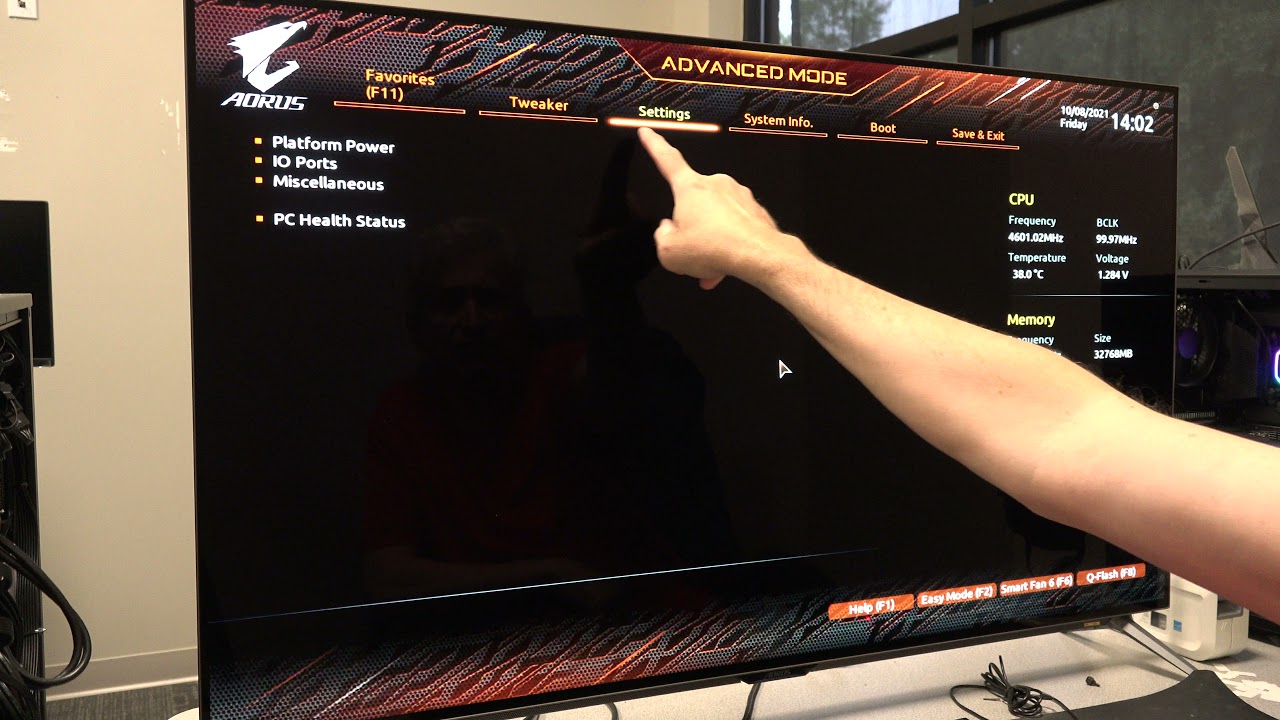
Enabling TPM 2.0 on Gigabyte Aorus Intel motherboard:
"The company (Gigabyte) has officially announced motherboards with chipsets from both Team Blue and Red that will support Windows 11 by default down the line by flipping on the PTT (Intel) or fTPM (AMD) feature within the BIOS settings and among them are the X299, C621, C232, C236, C246, 200,...
little osprey
broken lake
You can’t upgrade to windows 11 without it iirc
They changed that
You just get some features disabled if no tpm
Like the android function
potent portal
little osprey
Tbh I wonder what did happen tho
One of our greatest mysteries is how the great pyramid of Giza is exactly opposite the Mayan pyramid of the sun. If we could figure out how they knew that, we'd solve SO many things.
broken lake
Ok apparently restarting my pc is all it needed
potent portal
There's a reason that's always step 1 for troubleshooting
broken lake
I already did that tho
And it didn’t work the first time
But I did it a second time
And voila it worked
potent portal
In the words of every phone support ever, "do it again with me on the phone"
broken lake
Fair enough
also I just realized I ordered a mouse pad literally bigger than my desk
that is gonna be great
potent portal
Bigger desk time 
little osprey
broken lake
also I just realized I ordered a mouse pad literally bigger than my desk
 broken lake
I do want to get a bigger desk at some point
but I am going to college next week so I will probably get a new desk next summer
broken lake
little osprey
https://tenor.com/view/why-huh-but-why-gif-13199396
because it looked cool
little osprey
potent portal
One of our greatest mysteries is how the great pyramid of Giza is exactly opposi...
Supposedly found underneath the pyramids was ancient tech
What if we ourselves are the aliens
We invaded this planet
broken lake
look how cool it looks
 little osprey
Aesthetics
potent portal
little osprey
What if we ourselves are the aliens
We could be, in a sense. You could even line that up with evolution theories. Where did the first bacteria come from? Maybe we hitched a ride on an asteroid, and adapted to our new surroundings. Archaebacteria is extremely hardy and could survive being frozen in a vacuum.
little osprey
I H A T E that every game is going pay to cosmetic
broken lake
I think most people hate it
little osprey
potent portal
We could be, in a sense. You could even line that up with evolution theories. Wh...
Exactly, another question, how did the dinosaurs die but we didnt?
broken lake
because we built different
little osprey
It killed 90% of life on earth
potent portal
Simple answer is there were no people then
Primates were barely a thing
They survived in caves mostly
little osprey
Yea
 little osprey
broken lake
https://tenor.com/view/reject-modernity-return-to-monke-monke-gif-19167526
little osprey
broken lake
https://tenor.com/view/reject-modernity-return-to-monke-monke-gif-19167526
Same
broken lake
I have monkey brain
little osprey

#shorts #randyfeltface #comedy #tiktok
Merch: https://randyfeltface.bigcartel.com
Instagram: https://www.instagram.com/randyfeltface/
Tour Dates: https://www.feltface.com
TikTok: https://www.tiktok.com/@randyfeltface
Facebook: https://www.facebook.com/randyfeltface
Official Website: https://www.feltface.com
© Randy Feltface
@potent portal
True or nah?
jagged ember
little osprey
I H A T E that every game is going pay to cosmetic
would be fine if there were still skins that you could only get through achievements or something
obsidian wigeon
^
 analog hearth
honestly, I would prefer to pay for DLCs, rather than have that be released for free and then it's only cosmetics that you're paying for
because if it's neither of those, it's just pay-to-win you're dealing with
but the company has to make money somehow
I would love it if games had DLCs you had to pay for rather than those other two options. I mean, look at COD's golden age (basically MW2 to BO2)
 drowsy zodiac
just ordered some ram lol
 obsidian wigeon
yes
 humble fossil
thx :)
humble fossil
and even games like rdr2 and cod warzone?
humble fossil
ok thx
 glacial basin
can someone offer any ad.vice. Currently got a macbook pro 14 with 8-core CPU, 14-core GPU, 16gb RAM and 512gb SSD. Its only 2 months old and i am having issues with it. Can someone help me find a desktop PC that will be a better overall machine and more powerful as i paid around £2000 for this laptop.
fossil cedar
glacial basin
can someone offer any ad.vice. Currently got a macbook pro 14 with 8-core CPU, ...
what will you be doing with the computer
glacial basin
day to day use (multiple chrome tabs, emails, discord), coding on VScode, using it for work related things so microsoft applications and maybe the odd bit of gaming on the side
smoky lark
earnest olive
https://sa.pcpartpicker.com/list/3MJHpH well, here's 32gb b-die if you can affor...
Hey, just i change some staff, could u please check the components
 ornate condor
Looking for decent 1300w psu
I see evga ones are dirt cheap but idk if they're any good
potent portal
Which EVGA ones? I'll check it against the tier list

 ornate condor
Looks like tier list I been using is outdated. Would you mind link recent tier list pls
potent portal
P+ isn't on the tier list but all the other P's are B

PSU Tier List will help you to choose the best PSU out of hundreds of models on the market. From budget to the highest end Power Supplies.
potent portal
Looks that way, everything under $200 is
ornate condor
Which evga ones are A tier 
potent portal
P2
ornate condor
But expensive 
potent portal
You could get the P+ 1600W for $200, the higher wattage should make up for lower tier
potent portal
It's also worth checking b stock
ornate condor
Evga having good sale on psus yeah I will look for it
potent portal
ornate condor
Evga having good sale on psus yeah I will look for it
This one is speculative A tier https://www.newegg.com/thermaltake-toughpower-gf1-series-ps-tpd-1200fnfagu-1-1200w/p/N82E16817153431
ornate condor
Yeah this is what I currently using. It's good one . But it's 3th part seller with 2 reviews 
earnest olive
smoky lark
Hey, just i change some staff, could u please check the components
https://sa....
i'd keep the i9
cooler change is unnecessary
you're mostly using a single core load
 fossil cedar
glacial basin
day to day use (multiple chrome tabs, emails, discord), coding on VScode, using ...
fossil cedar
glacial basin
day to day use (multiple chrome tabs, emails, discord), coding on VScode, using ...
how much gaming? cuz if youre only doing a small bit of gaming maybe a 6700xt or 3060 ti would be as far as you should go, maybe less, definitely not something you should spend near 2k on. I would do something like this assuming youre talking prebuilt this one looks like the best value
https://www.awd-it.co.uk/awd-patriot-intel-core-i5-6-core-nvidia-rtx-3060-ti-8gb-desktop-pc-for-gaming.html?config=12069-163347,12193-149421,12317-151366,12441-153229,13135-159437,13476-180186,13479-165549,13482-165564,13485-165573,13488-165594,13963-168464,14272-170952,16376-185681,17616-197774,23521-255839,23596-258718,24463-266996
if you are talking about building yourself https://uk.pcpartpicker.com/list/Q8DsMb

PC Builder - Intel Core i5-12600KF, GeForce RTX 3060 Ti LHR, Phanteks Eclipse G360A ATX Mid Tower
high yew
i have the option of getting a 6800xt or a 3080. which one should i go for? i’m leaning more towards nvidia currently for the ray tracing and shadow play, but there has to be some upsides with amd no?
fossil cedar
high yew
i have the option of getting a 6800xt or a 3080. which one should i go for? i’m ...
Amd has way better pricing atm, and ray tracing just tanks fps for barely any difference i wouldn't bother with it
 fossil cedar
That's really bad pricing
high yew
for being in canada? all 6800’s are like that
fossil cedar
Oh canada
high yew
yuppers
fossil cedar
I'd get this tho
https://ca.pcpartpicker.com/product/VDRYcf/sonnet-technologies-radeon-rx-6800-xt-16-gb-video-card-s-rx6800xt-16g

SONNET Technologies Radeon RX 6800 XT 16 GB Video Card (S-RX6800XT-16G)
80$ cheaper
drowsy zodiac
welcome to canada where the prices are high for everything lol
fossil cedar
Nah converting cad to usd it's pretty similar
drowsy zodiac
fr?
i just remember taking out 500$ usd and it was like 650 i think cad lol about two months ago
and like in the us food is so cheap
in Ontario the tax rate is 13%
high yew
fossil cedar
I'd get this tho
https://ca.pcpartpicker.com/product/VDRYcf/sonnet-technologies-...
i’d want to order from newegg only bc they have the zip BNPL service which i might use
that one i sent, is it good or no?
fossil cedar
Yeah that would work, although personally I'd highly recommend against that, would get a weaker gpu you can can actually afford now, financing for something that small is not a good financial decision
glacial basin
fossil cedar
how much gaming? cuz if youre only doing a small bit of gaming maybe a 6700xt or...
want to get into pc gaming and also would like 16-32gb ram
fossil cedar
glacial basin
want to get into pc gaming and also would like 16-32gb ram
Both i linked had 32gb
 fossil cedar
 analog pulsar
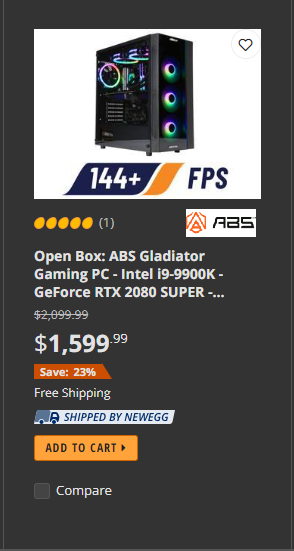
https://i.imgur.com/5DLFgYY.png how is 9900k
analog pulsar
https://i.imgur.com/5DLFgYY.png how is 9900k
That's a horrible price
Robery
analog pulsar
lol
ornate condor
any decent pcie4 riser cable ?
analog pulsar
https://i.imgur.com/82YvYzd.png looks like pc i can go with is this but
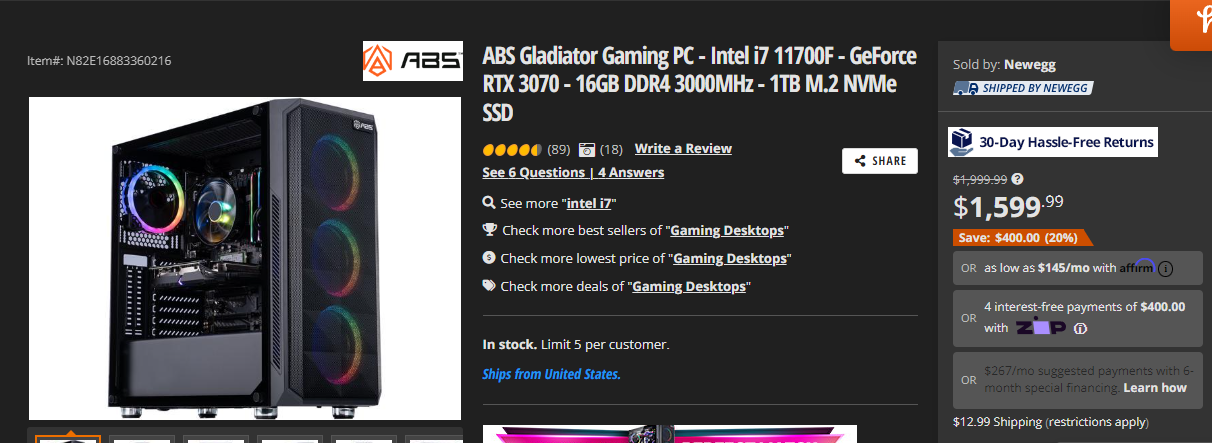


PC Builder - Intel Core i7-12700, GeForce RTX 3080 12GB LHR, Lian Li O11 Dynamic EVO ATX Mid Tower
 thorny sparrow
can anyone explain to me why my m.2 ssd ddoes not show up when i installed it?
potent portal
Does it show in BIOS?
ornate condor
you have to format it from disk managament
potent portal
You probably just need to open disk management to initialize it and create a partition
analog pulsar
How much performance increases would be from mobile 3070 to 3080 12GB desktop I saw 3070 vs 3070 would be 30% 👀
thorny sparrow
But that's the thing it does not show up in disk management
Where would I go in bios to see if it shows up
potent portal
Should be the first screen that comes up
Some m.2 slots conflict with other ports like SATA
thorny sparrow
Ok so it does show up in disk management as disk 1. But it's unallocated
potent portal
Right click and create a volume
If you're using the whole disk as one partition you can just use the defaults in the window that comes up
little osprey
For 250USD
What intel board and cpu(6core) could I get @potent portal
For gaming
desert gulch
12400(f) and a b660/h670
desert gulch
Sometimes can be a good option depending on prices