#storage-devices
1 messages · Page 41 of 1
 red jay
I have to get controller for nas ...
red jay
I cant they have no nas there
 untold grove
then dont buy from them?
red jay
you like generating random words ..
I said 3 times Im not buying them
you dont want to hear )
 subtle stream
Check to make sure they're actually connected? Double check the power cables?
 jaunty elm
Okay
I plugged it into a random SATA port in my mobo
The manual didn’t say to prioritize
subtle stream
It shows up now?
subtle stream
Shouldn't have to be. Unless you have an M.2, then it might
Sometimes if you have an NVMe drive, the motherboard will disable some SATA ports
You may also have a bad cable, so if you have another one, it's worth giving it a shot
subtle stream
Try a different SATA port then. Check your mobo manual to figure out which one to use
jaunty elm
What should I try
subtle stream
Is this a brand new drive?
jaunty elm
Yeah
jaunty elm
But not showing up because I haven’t formatted it
subtle stream
Yep. Hang on
jaunty elm
Okay
subtle stream
Let me find the program
jaunty elm
HD sentinal
subtle stream
Disk Management
jaunty elm
Oh like an internal program okay
subtle stream
There are 4 methods allowing you to successfully format external hard drive to NTFS in Windows 10/8/7 computer.
jaunty elm
Can I run my pc with the front and both sides off
subtle stream
There ya go
jaunty elm
That’s ~4tb
subtle stream
Is that the new drive?
If so, format to NTFS and give it a drive name and letter (D probably makes the most sense)
subtle stream
Did you format it?
jaunty elm
Now how do I within disk management
subtle stream
There are 4 methods allowing you to successfully format external hard drive to NTFS in Windows 10/8/7 computer.
Follow this guide
subtle stream
Yeah it would be the same
I think you just right click on the 4tb drive and hit "format" and follow the instructions Windows gives you from there
Right click “My Computer/This PC” on the desktop, select “Manage”>“Storage”> “Disk Management” to open Disk Management.
Right click on the external hard drive to format and click on “Format…”in the drop-down menu.
Select “NTFS” in the “File system” box and then tick “Perform a quick format”.
Click “OK” to format the drive and wait until finished.
So yes, right click on the drive
Hit format
Give it a name
Format type NTFS
check perform quick format
hit ok
Let it run for a bit. Might take a minute or two
jaunty elm
format isnt in the drop down
subtle stream
Click on the drive, then I think format will be under the Action menu
 obsidian steeple
What are they supposed to right click?
 dusk turtle
new SImple Volume
jaunty elm
ayyye got it thanks guys!
jaunty elm
every time i try to move stuff into my new drive it just says "Copy to"
how can I just move stuff on there but still keep the desktop shortcuts
i feel like its acting as an external
untold grove
move what?
 minor sun
You could just make new shortcuts
 ashen aurora
untold grove
ashen aurora
untold grove

ashen aurora
untold grove
jaunty elm
lili goes to town on the indicators
 pale marsh
Looking for a ssd for a mid-range gaming pc. Is sata or m.2 better? Looking to stay around $50
 thick mulch
@pale marsh m.2 is better and faster, would recommend
And good idea to pair with an old HDD
pale marsh
Why is that?
thick mulch
It is just limitations of the interface that make sata slower
The samsung 970 evo 500gb would be my choice @pale marsh
The only good thing about sata is it is cheaper per gig so keep that in mind, but compared to a small m.2 paired w a HDD it is the jack of all master of nada
pale marsh
Would the os be installed on the ssd?
ashen aurora
thick mulch
<@585711172649746443> m.2 is better and faster, would recommend
?
M2 is a form factor
There can also be sata M2s
thick mulch
And then the less mission critical stuff can be thrown on a hdd
ashen aurora
Lol
ashen aurora
Nobody does that nowadays
thick mulch
Well

Just get the 970 evo its fast, reliable, big enough, good value, tried and true, in budget
ashen aurora

thick mulch

pale marsh
Noted, thanks for help
jaunty elm
untold grove
is there an easy way to move all the according files https://prnt.sc/x9e96i
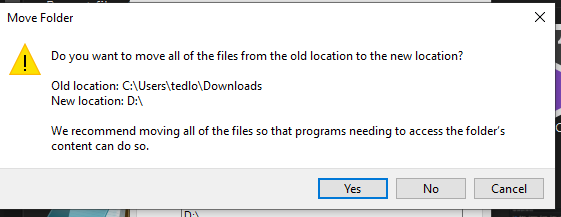
 olive wadi
thoughts on seagate exos for my unraid server?
seem to be priced better than WD red pros
olive wadi
thick mulch
Just get the 970 evo its fast, reliable, big enough, good value, tried and true,...

cease
"good value"
tried and true shouldn't even apply to SSDs anymore, longevity in general isn't really a concern for any half decent SSD combined with normal consumer use.
 upper quiver
500gb 970 evo is like, 65 dolla tho
best priced, no reason not to get it, unless you for some reason need more than 500gb of ssd
untold grove
olive wadi
thoughts on seagate exos for my unraid server?
exos nice
unraid less nice 
untold grove
do u at least have ssd in there
olive wadi
too dumb to figure out how to set up a server the proper way
Yes.
I mostly use it for virtual machines though
untold grove
oh OOF
untold grove
you running lame hardware or enterprise?
olive wadi
When my main array gets slow enough I'll enable the cache
olive wadi
untold grove
you running lame hardware or enterprise?
dual xeon e5 2683V4 engineering samples on an asrock rack ep2c612ws
untold grove
olive wadi
dual xeon e5 2683V4 engineering samples on an asrock rack ep2c612ws
use esxi
unraid is uh
not meant for vms lul
i mean itll work
and to answer you
exos are nice
where u getting them?
and for how much?
olive wadi
untold grove
where u getting them?
Not getting them yet, I was looking on newegg.ca, the 16tb was available for 480 cad
olive wadi
untold grove
not meant for vms lul
i dont know how to do vms and nas at the sametime 😩
untold grove
fat brain maneuver is shucking
olive wadi
untold grove
fat brain maneuver is shucking
i dont want to put nail polish on pins 😩
olive wadi
untold grove
never buy drives from wegg
why not
untold grove
olive wadi
i dont know how to do vms and nas at the sametime 😩
i have a freenas vm on my esxi host
that just has storage passed thru
untold grove
olive wadi
why not
their shipping is ass
untold grove
olive wadi
i dont want to put nail polish on pins 😩
IF it affects you (any semi ok psu is fine) kapton tape and 2 seconds with an xacto knife saves you uhhhhh
$200 per drive
olive wadi
CAD?
 untold grove
check uhhhhhhhhhh
seagate backup 16tb
the externals
they have exos in there
also what backplane u got?
olive wadi
untold grove
also what backplane u got?
I was gonna get the sata ones and just use my motherboards sata ports 😎
untold grove
oh lol
olive wadi
i dont have a backplane
untold grove
thought u were in server chassis
untold grove
untold grove
i dont mess with things that arent delll
olive wadi
untold grove
i dont mess with things that arent delll
so I should buy alienware backplane?
😎
untold grove
fr tho dell emc SLAPS
recently retired my baby
but i love dell servers
well if ur soft raid
then i guess
can ur mobo handle 16tb per drive?
olive wadi
there is no RAID 😎 it's all Unraid
 untold grove
because no one expects the end user to be dumb enough to use onboard controller for this stuff
90% it does
im just looking out for u in case its that 10%
untold grove
so like
some controllers
are like
haha i cap at 8tb
some cap 2
some 4
im just making sure
olive wadi
As in per drive?
olive wadi
I'll shoot them an email
olive wadi
considering its marketted as both a server and workstation board i doubt it'd have a major cap
untold grove
olive wadi
untold grove
id also grab a nice nvme drive or two
why tho
i have an a2000 laying around
untold grove
u can pass through individual drives
olive wadi
but my board doesnt have an NVME slot
untold grove
vms like high iops
olive wadi
i could get a card
untold grove
pcie riser
untold grove
will boost perf depending how many vms ur running
olive wadi
unsure what the bifurcation on this board is like
right now I'm just running two
going to add some more in the future
untold grove
cause once u use more
then ur wd ssd is gonna ouch
u want something with good random
olive wadi
do you not have faith in the Marvell 88SS1074?
olive wadi
might look into something for that when I fire up a fourth virtual machine then
untold grove
yeah
just to consider
and
u want 1x ssd for cache
1x for vms
when u upgrade
untold grove
move vms to nvme
olive wadi
or i guess i can add them to the array and just make it so they aren't used by my storage shares
 olive wadi
This is the sata controller specs but unsure if it means anything
untold grove
unless ur 10gbps ur all good
olive wadi

If the controller can't do 16tb will the drive just not be detected?
or will it appear as smaller?
Or will it be something that I can only see after it's reached the cap of the controller
untold grove
ur fine
itll only let u format it as cap
im not 100% but i dont see why u wouldnt be fine
i stopped using unraid like 3 years ago lol
olive wadi
untold grove
im not 100% but i dont see why u wouldnt be fine
i mean i want to use the amount of drive i paid for
i just want to see when i get it if there is a cap
can you like
use a raid controller without being in raid and just use it as a sata expansion card 
or should i just get a sata expansion card
untold grove
just raid 0 each drive
make new raid 0 array with only that drive
then pass it thru
olive wadi
sounds like too much effort 😎
why not just buy a sata pcie card which supports larger caps if im limited?
untold grove
its like 5 mins
then when u use a real nas os its easy to swap
exos are fine but i wouldnt buy newegg
id see if can shuck
olive wadi
im already emailing asrock about how to get this boards ipmi to work properly 😩
I can get into the IPMI but not the remote bios control
it uses java SOL and its not playing nicely
untold grove
lol
 keen lantern
Ok so I have an older Intel 535 series SSD and while plugging it into my computer it isnt recognized didnt know if anyone knew the solution to this
keen lantern
Not even an option due to the fact that it doesnt show up in my file explorer
 bitter vault
even on disk management?
keen lantern
In BIOS you mean? if so then yes
bitter vault
are you on windows?
"Disk management" will show whether your SSD is connected at all or not, it could be connected, but not show up on your file explorer if you haven't allocated a directory to it
keen lantern
Yes running windows 10 pro atm
bitter vault
if it doesn't show up, likely your ssd isn't being recognized at all, which at that point i can't help you!
gl !
keen lantern
Yea hoping it isnt a connectoin will attempt with Disk management
olive wadi
untold grove
lol
😎
olive wadi
now i can finally store my favorite episodes of everybody loves raymond
olive wadi
Does it matter what PCIE to m.2 adapter I go with? I was looking at the sabrent one since it seems like the elegant solution 
 clear heart
Hey y’all, what should I buy for gaming I have a budget of $1,500 and want at least 2tb, what ssd should I be looking at?
olive wadi
clear heart
Hey y’all, what should I buy for gaming I have a budget of $1,500 and want at le...
You in the states?
what country
clear heart
Mhm USA
olive wadi
Solid SM2262EN based high end nvme ssd
upper quiver
clear heart
Hey y’all, what should I buy for gaming I have a budget of $1,500 and want at le...
are you talking 1500 for the whole system?
like, tower, keyboard mouse monitor
clear heart
I don’t remember the brand but it’s 1080p at 144hz and my other monitor is 1440 at 165hz
upper quiver
oh nice
olive wadi
clear heart
I don’t remember the brand but it’s 1080p at 144hz and my other monitor is 1440 ...
buy mushkin pilot E 😎
reject samsung jamba juice
upper quiver
when are you looking to order all your parts?
olive wadi
embrace silicon motion sm2262en
olive wadi
upper quiver
lol, on 1500, he doesnt have the budget to afford 2tb of ssd
Uh...easily?
With a $1500 budget you do have a good amount of room to afford 2tb of SSD?
clear heart
upper quiver
when are you looking to order all your parts?
Well I was thinking as soon as I get my hands on a 3060ti or possibly a 3070
olive wadi
Fairly easily?
Even with a 3070 it isn't much at a problem as long as you can get it at MSRP 
olive wadi
upper quiver
its a matter of being cost effective
Meh, it's a QOL feature that's worth it IMO if your budget is $1500
upper quiver
@clear heart cpu and gpu availability is, as you are probably aware, really bad rn
intel 10th gen widely available tho
olive wadi
With some games you can see frametime issues with regular spinning rust drives
upper quiver
if you are able to get your hands on an ampere card, i would suggest something like a 5600x, so you should try to get one of those as well, but thankfully thats not as hard
olive wadi
10600k or 5600x it doesn't matter both are fine performers at their respective pricepoints.
upper quiver
or, if it ends up taking too long to get an ampere card, 11th gen intel is right around the corner
clear heart
Yes my thoughts were a ryzen 5 5600x 3060ti or 3070 which ever one is available at MSRP.
upper quiver
yeah, 10600k is also an option, but its worth the hunt for a 5600x
clear heart
Also a b550 mobo... not sure if that takes any storage options out
olive wadi
clear heart
Also a b550 mobo... not sure if that takes any storage options out
No it doesn't make a difference.
clear heart
Ok
olive wadi
Not for what you are asking for.
And with a $1500 budget with a 5600x/10600k and a 3070 you definitely have room for 2tb of solid state 
upper quiver
once you get an order in for a new gpu, definitely come back here, because 11th gen intel might just be really good
olive wadi
If you want to spend that extra money on storage and not something else
But if you're just gaming at 1080-1440p jumping to the 3080 doesn't have much point imo
upper quiver
https://www.newegg.com/gigabyte-b550-aorus-elite-v2/p/N82E16813145249
this board is god teir at 150
olive wadi
wouldn't say god tier but its good
clear heart
That’s the exact board I was thinking of
upper quiver
olive wadi
wouldn't say god tier but its good <:KEKWAIT:748710011831713912>
"at 150"
olive wadi
upper quiver
"at 150"
That's pretty regular for the aorus elite?
clear heart
... better than my fried b250m a asus board lol
olive wadi
It's fine, Elite V2 is also good if you want to utilize front type C but you bought a meshify-C so no support
Only main complaint is that the board has no type-C but that probs isn't a big deal for you
upper quiver
regardless, I would wait until you get your hands on a card, then come back for help
we can't really help all that much now, because we don't know when your gonna be able to get a card
clear heart
True I will definitely come back
upper quiver
back on da pc lol
olive wadi
kek he got the ssd recommendation
clear heart
Thank y’all both for the input
upper quiver
np
keen lantern
Looking for a 4tb 2.5" drive don't know what happened to the prices for these but is there any ones that are specifically on sale?
untold grove
keen lantern
Looking for a 4tb 2.5" drive don't know what happened to the prices for these bu...
sata or ?
oops sorry am tired
meant hdd or ssd'
keen lantern
All good preferably HDD dont need anything too fast
untold grove
why does it need to be 2.5?
keen lantern
Server only has 2.5" bays
untold grove
i see
well i wouldnt get any consumer ones
anything over 1tb on 2.5 inch hdd is gonna be smr
its why sff bay servers are cheaper than lff
because ssds are really the only viable option
keen lantern
Yea getting this server with 2x Xeon X5650 and 32gb of ram for $270 but I'll need to throw my own storage in it.
It has 200gb is not enough (has 2x 100gb runnin in Raid1
 keen lantern
Is that not 3.5"
untold grove
oh my mistake lol
keen lantern
Perfectly fine
untold grove
ok so from what im seeing rn
looks like cmr will cap at 2.4 tb
for some reason it seems to be the magic number
keen lantern
That would work 2x 2tb
untold grove
the other issue is
the enterprise 2.4tb drives
cost more than ssds
because theyre still viable
since its max size
the question is
how would you feel about a jbod?
you have 3 options right now basically
keen lantern
Not toally against RAID
Server does come with a RAID controller and battery so it was something I was considering
untold grove
600gb sas drives (dime a dozen), all SSD (literally cheaper than hdd right now lmfao), and an external jbod (like a netapp or whatever) that lets you throw cheap 3.5in drives in there
basically youd pay like $2-300 for the netapp but youd save so much on drives
like $100 per 8tb drive
throw a couple of these puppies in there https://www.ebay.com/itm/353322616179

eBay
Format: Sector size 4Kn. Capacity: 8TB. Data Buffer: 128MB. Interface: SAS 12Gb/s. Hitachi P/N: 0F25727. EMC P/N 118033295.
@keen lantern so i guess i should ask how much storage you want, as well as budget
because we have a few ways of doing this
keen lantern
Yea looking for around 4tb right now and I have 500gb HDDs that will go in for the OS and whatever. Idealy around $100 maybe $150 for the time being. I have max of 8x 2.5" to work with.
untold grove
honestly i might go SSD for now
you can get 600gb sas hdds for super cheap though
id boot from ssd though
night and day difference
what os you running?
keen lantern
Linux most likley
untold grove
anything specific?
keen lantern
I'm new to everything server related other than networking so looking into more sepcific OS later but most people have said Linux makes the most sense.
 hehe
keen lantern
hehe
keen lantern
Yea I have a 500gb SSD to run OS and programs for the system itself
untold grove
also i wouldnt run anything baremetal but thats another can of worms lol
keen lantern
Then the extra 4tb will be for what I'll be using the system for
untold grove
one that i dont feel like getting into atm
well
also i assume youre using a PE 720 or something like that right?
as the actual server
keen lantern
Its a Dell PowerEdge R710 with 2x Xeon X5650 and 32gb of ram
untold grove
how much did you pay?
keen lantern
Havent yet but it will be $270 and they will install the OS and also get two drives setup on RAID1 (2x 100gb)
untold grove
oh dear
keen lantern
The price for the system or the drive size?
untold grove
both

eBay
Dell Poweredge R710 | 2xX5650 | 96 GB RAM | Rails | 8 Bay SFF & HDDs | iDrac Enterprise (2 OF 3 Available)Note: Monitor & Keyboard Not IncludedCondition is "Seller refurbished"Free Shipping with FedExProduct Details:Model - Dell Poweredge R710Form Factor - SFFRails - Included, fully functional (no cable management arms)Processors - 2x Intel Xeon...
bid rn
literally rn ends like 30 mins lol
keen lantern
Well um yea I'll watch that until it ends
untold grove
because 270 for r710 is a svam
scam
if u can get this one for like 225 or whatever
ok deal
keen lantern
Yea and has 96gb of ram so cant go wrong with that
untold grove
or you can ask @plush crag if they can find you one and what shipping would be but thatd be in dms
just cause theyre near a recycler and can get them cheap
otherwise theres ebay or local deals
was shipping included in that 270 @keen lantern
keen lantern
Local pickup so yes kinda
untold grove
id talk to forks and see if they can do anything
but honestly i would pay over 150 for a r710
thats just me though
the ebay one i linked u is prolly best bet, free ship too
keen lantern
Yea and has 3x the ram give or take with everything else the same.
untold grove
plus rails
keen lantern
The one I had has rails
keen lantern
Yea this one is since its 8x 2.5"
keen lantern
Is there something better that I should look for around $200
untold grove
oh hell yes
one of the sellers i love just posted this

eBay
RAID Card: PERC H710 Mini. 1x Dell PowerEdge R520 Server. Number of CPU / Processor: 2x. Competitive Prices. Bookmark Us. Our great team provides refurbished technology; digital literacy and vocational training to as many qualified humans as possible.
youre lucky im broke rn
this can go up to 16 cores per socket if i recall
but this is sandy bridge
vs like 1st gen core
and lff
keen lantern
Yea well I found a gaming computer that I can flip for around $250 and I've wanted a system for a long time. The computer is very low priced for what it is they don't seem to know much about comptuers so didn't price it properly
keen lantern
Yea its the same as I was going to pay pretty much but slightly cheaper for double ram and better CPUs
untold grove
and
keen lantern
its 3.5"
untold grove
that thing sips power vs the r710
r710 SLORPS power
like expect very noticeable increase in power bill with 10 series
 plush crag
710 is dual nehalem lol, > 10 years old arch at this point
plush crag
👋
keen lantern
Welcome to the conversation
untold grove
im saying that r520 is a great deal
u think you can beat it shipped?
vs r710 for same price and half the ram lul
and sff
keen lantern
Yea so $250 but you can always get a 3.5" -> 2.5" drive bay if you needed it
untold grove
sff = use jbod or its literal garbage
untold grove
keen lantern
Yea so $250 but you can always get a 3.5" -> 2.5" drive bay if you needed it
easier to convert down than to convert up
keen lantern
Wdym by "beat it shipped"
untold grove
seeing if forks can find anything that beats that r520
keen lantern
Gotcha
untold grove
its a really solid deal so i doubt it tho
plush crag
Ya, just go for it
untold grove
yeah
forks u heard of that seller before?
like half my lab is from them because i like their mission
keen lantern
I mean hes got 14k reviews so...
untold grove
no i love them

Shrinking the digital divide, one piece of technology at a time. We work with corporations, government entities, nonprofits, & general public to achieve this goal.
this is their site
theyre so good i always try to get stuff from them when i can
plush crag
tam's solutions is another great old server seller
untold grove
forks i like them because of their charity
they use sales to fund free isp for poor communities
as well as to give hardware to poor families and underfunded schools
keen lantern
Well to catch Forks up looking for a server around $200 - $250 with 32gb+ ram with 12c preferably. Idk if there is anything else you would recomend looking for outside of the R520.
untold grove
super cool company and their prices are great too
also forks you can lowball them like a mf
have gotten 1k knocked off of price of some stuff before
i mean dont im sure its bad karma or whatever to lowball charities
but u can
i got r410s for like $30 shipped from them lol
keen lantern
Do you think its good to see if they would do $200 ($50 shipping)? Worst case $300 is still pretty good.
untold grove
yeah theyll probable be cool with that
throw an offer
and remember this way
u can get this bad boy
or maybe a couple
eBay
Format: Sector size 4Kn. Capacity: 8TB. Data Buffer: 128MB. Interface: SAS 12Gb/s. Hitachi P/N: 0F25727. EMC P/N 118033295.
$110 for 8tb sas
keen lantern
Yea I was planning on around $100 for the drives
untold grove
also @plush crag this is a good price if u wanted to check them out too
keen lantern
And then just partition them out if need be
 keen lantern
My old "server" isnt anything grand but it did the job and will cover the cost of the drive
Yea for the time being just 1 will be fine but I'll add on as time goes on
untold grove
yeah
at least 3 is the sweet spot
because 1 is risky, 2 is less risky but u lose half the storage capacity, 3 is nice cause 2 drives can get protected
keen lantern
Yea I'm not going to be storing anything too important. The most impotant thing would be I hate to say this but my 1.7tb emulation folder. I'll still have it backed up on my desktop that I use primarily but the ability to have it accessable over a wifi network from any device would be nice.
keen lantern
Oh ok so its not just me
keen lantern
See and I thought my 1.7 was big
 keen lantern
Yea fair enough
 loud estuary
 keen lantern
Coming back for a quick question @untold grove. Was looking around at more of human-I-T listings, and found a Dell R410 with 2x Intel X5650, 4x 3.5" bays, and 48gb of ram. It's $100 less for pretty much the same from what I can see is there something that I'm missing? https://ebay.to/3cd7Y5R (shortneed the link cause it was like a paragraph long)

eBay
CPU / Processor Model: X5650 (Hexa-Core). 1x Dell PowerEdge R410 Server. Size and Type: Rackmount 1U. Parts not included: Software, User Guide, Accessory Cables, Rails, Mouse, Keyboard, Hard Drives, HDD screws, Front Bezel.
keen lantern
Gotcha
untold grove
also
Intel® Xeon® Processor E5 v2 Family product listing with links to detailed product features and specifications.
these will work on the r520
looks like u can have 24 cores and 48 threads max
 lean quest
@untold grove so I've run into another problem for my server and I wanted to get some advice here. I've discovered that I also need hot swap bay caddies to actually hold the drives that I bought and I don't really see a way around that based on the dimensions of drives and bays. Is there anything else that I might need so I don't keep having to do this "buy things one at a time" thing
untold grove
lean quest
<@!730975292755279933> so I've run into another problem for my server and I want...
what drives what server?
lean quest
3.5 lff R720
was going to get this https://www.ebay.com/itm/6Pcs-3-5-Inch-Hot-Swap-Hot-Plug-Hard-Drive-Tray-Caddy-For-Dell-PowerEdge-R720-/362705958191

eBay
Dell PowerEdge R230. Dell PowerEdge R330. Dell PowerEdge R730. Dell PowerEdge R730XD. Dell PowerEdge R710. Dell PowerEdge R520. Dell PowerEdge R510. Dell PowerEdge R420.
untold grove
check if u have it
that is important
u should
all else u would need is idrac (maybe) and rails if u are rackmount
lean quest
I've already had to buy rails and the drive adapter
untold grove
faceplate if u want it to look cute
lean quest
I think it's built in?
lean quest
but is it a thing I'd have to buy more hardware for
untold grove
eBay
Find many great new & used options and get the best deals for Dell Idrac7 Enterprise for POWEREDGE R320 R420 R520 R620 R720 R720xd R820 R920 at the best online prices at eBay! Free shipping for many products!
yea
u need idrac port
lean quest
I know I have that
untold grove
but
it is not essential
all u rly need is server, raid card, caddies, drives
and ur good
lean quest
missed 2 of those things rip
untold grove
have u considered cpu upgrade also
i put link here
just scroll up a teeny bit
all of those should be ok with r720
lean quest
the e5 ark ones
lean quest
ehh I'll probably stick with what I've got for that right now
I have the E5 2620 right now
I'm not quite understanding idrac yet
what is it actually used for
lean quest
Hmm makes sense sorta
So one thing I’m running into now is my house like doesn’t have the power outlets/circuits for more than 2 servers/computers in the same room
Is that like the point to move to collocation or something
untold grove
yeah where do u live
untold grove
ah kk
yeah cause i do colo for like 200/m or so in LA
depends on speeds and whatnot tho
lean quest
How much are you getting for 200
Like half a rack? Or is that the #LA premium ans getting like just a few u
untold grove
1 server
i sell colo lol
mostly its the tier A traffic
1gbps tier A with 10tb/month
i do half a rack but its 1k/month
20u and 100tb @ 1gbps
lean quest
Ahhh ok makes sense
untold grove
yea lol
the datacenter i use is one of the best too
i think you can get sketchy hosting for not too much though
min id pay is like 150/m
for 1gbps
 rugged mist
I'm looking for a small NAS, I've been looking at the QNAP TS-932PX-4G 5+4 Bay High-Speed NAS with Two 10GbE and 2.5GbE Ports or building my own and using FreeNAS. Any thoughts? This is my first time at it. Looking for some advice as far as building my own, here is what I had come up with. https://newegg.io/5dc8856
dusk turtle
@untold grove
untold grove
rugged mist
I'm looking for a small NAS, I've been looking at the QNAP TS-932PX-4G 5+4 Bay H...
no qnap
new extreme vulnerability is found monthly as well
rugged mist
Any advice on a good option other than the Qnap?
untold grove
synology
theyre the apple of the nas world
you pay for the software but its damn good software
if truenas and u want prebuilt

TrueNAS Open Storage | ZFS for the Home to the Data Center
they make their own nas
rugged mist
I'll check it out. Thank you
 teal stirrup
is it possible to get more than 1 terabyte of ssd (m.2 or 2.5") storage for $100 or less
teal stirrup
do you have any links
everything i can find is 500gb for 50 minimum and 1 tb for about 100
obsidian steeple
Probably not, unless you find a really good deal
teal stirrup
damn
ashen aurora
teal stirrup
do you have any links
ashen aurora
obsidian steeple
Probably not, unless you find a really good deal
Misread his message
teal stirrup
lol i asked if its possible ot get more than 1 tb
teal stirrup
just seeing options, im probably going to end up getting a 2tb hdd + 500gb nvme
obsidian steeple
ashen aurora
Misread his message
Lol
untold grove
 slate abyss
is this good enough for a boot up drive https://www.amazon.in/Kingston-240GB-Q50...
slate abyss
is this good enough for a boot up drive https://www.amazon.in/Kingston-240GB-Q50...
its almost as bad as the a400, a bit more reliable
red jay
Could I use an older PERC 6/i as a storage controller in a workstation?
untold grove
yeah
you can @red jay but what are you trying to do?
that controller can only hit 2tb max drive size
red jay
untold grove
you can <@456226577798135808> but what are you trying to do?
2x1TB 7200RPM secondary storage
red jay
or more, whatever is available, just what I have on hand right now.
Hot swapping, less work the CPUs have to do, performance.
red jay
yeah, 2tb sas is cheap now
untold grove
lmaoooo
 small steppeBOT
 windshields#9982 has been warned
Reason: Duplicated text
 crystal bluff
@olive wadi nah surely not it didn't actually get 0 MB/s 🤣
How can it be that bad lol
untold grove
speed
crystal bluff
I knew it was bad but didn't realise that bad
red jay
untold grove
a good raid card
like?
lean quest
I’m also curious what @untold grove do thinks is a good raid card
untold grove
i like those LSI cards
lililabs runs on perc h710 and h730
the LSI 9211-8i is great
good homelab raid card
i use perc because lililabs runs almost entirely on 
lean quest
👍👍
Would 710 be a good choice for my pc also
Or would it be better to get something different
red jay
how much RAID card memory is needed?
red jay
how about 256MB?
untold grove
reliability
untold grove
honestly speed cant be understated tho
hw raid can push ike 2 gb/s while soft might do 40mb/s
untold grove
lean quest
I’m able to push 3gb/s with my pc so idk
im saying hdd array
my hw raid does several gb/second
untold grove
my unraid box did like 50
mb/s
but thats no cache
ur an idiot if you let writes hit array directly
lean quest
Yea I was going to say no cache =bleh
untold grove
but that array i just mentioned
thats also no cache
imagine hw rad controller as dram in ssd
red jay
PCI 2.0 x8 can do up to 4GB/s, probably no 6GB/s link from the drives to the CPU
untold grove
yep
olive wadi
@untold grove installing magnetic dust filters next to server hard drives good idea ???
or will all my data be sent to the shadow realm because something something magnetics bad for hard drive??? 
untold grove
i mean how close
olive wadi
untold grove
i mean how close
meh
i mean modern cases put a magnetic dust filter by the drive cages
generally by the intake
untold grove
ur fine lol
 radiant root
What doe raid 0 do nvm
red jay
radiant root
What doe raid 0 do nvm
To storage? Splits data between two drives. Physical two pieces, but are one digitally. The main reason to do this is simplicity for the petty, but much better read/write for most.
untold grove
radiant root
What doe raid 0 do nvm
makes drives fast but doubles fail rate since if one drive fails both do
 mild sluice
I like living dangerously 
mild sluice
dangerously running 2 1tb 860 evos in raid 0
oh right its sorta important but not to important... depends on what youre doing
yeah you'll barely notice a diff
yessir
its prob okay for gaming
untold grove
 drowsy apex
So just stop
drowsy apex
So just stop
im just messin around silly
olive wadi
sequentials are unimportant for general users
Random and mixed IO performance is what makes applications/games load fast and be snappy
which is why you shouldn't buy pcie gen 4 SSDs
lol
untold grove
its worth if all you care about is big number on benchmark
then gen 3 is fine
i like the p31
and the 970 evo
evo good, mp34 good, p31 good, sn750 good
what happened lol
o lol
 open gazelle
If you're keeping the PC for a while, RT and DLSS will 97% chance be quite developed by then. I'd go Nvidia if long term upgrade, like 3+ yrs
Or recording/streaming cuz afaik AMD encoder still bad
untold grove
why is this in my storage channel

and @open gazelle correct amd's encoder is still absolutely pathetic lol
 covert echo
anyone have any ideas how to get some wonky eSATA PCI-E cards to recognize the drives? I have an Orico and and some no name brand. no name had an ancient driver. updated it, but still nothing. at least orico had a win10 one, supposed to work w/64 bit. but nada. can anyone help?
covert echo
Oh, and it's a DELL XPS running latest win10 updates. two different enclosures, both with Seagate 4TB drives....
Well, newegg sells them but won't offer tech support, so her ei am...
on the bois boot-up, it sees the PCI-E but no devices found
untold grove
ewwwww seagate
wew u made all the wrong choices here i see
so let me get this straight
covert echo
i also tried western digitial, that's not the issue
untold grove
well seagate is a garbage tier brand
but besides that
you have 2 drives and you're trying to run them off of a pcie sata card because why?
untold grove
wait so these are usb drives
not over actual sata
oh my mistake i didnt read esata on your original message
covert echo
the enclosure have both usb 3.0 and esata outputs
untold grove
get usb3 expansion card
use usb3
also dont use externals like that
how many are you using at once?
covert echo
two different enclosures, different cables, different cards. same result....
radiant root
untold grove
makes drives fast but doubles fail rate since if one drive fails both do
So it doubles the rate it fails bs if one breaks the other doe to, so if I use nvme it won’t be as likely?
untold grove
radiant root
So it doubles the rate it fails bs if one breaks the other doe to, so if I use n...
not actually break, but the data will be lost if one drive in raid 0 fails
covert echo
i've tried them by themselves and togehter, same result
untold grove
so basically if one drive fails they all do
radiant root
Wait so doe it break the drive or just lose data
untold grove
just loses data
untold grove
get 3 drives
raid 5
get the perf of raid 0 with redundancy of 1
raid 0 is for stupids that need high sequential
and most nvme raid solutions are software
which will bottleneck it anyways
radiant root
I need fast window boot
untold grove
you will experience 0 difference
and @covert echo i am genuinely concerned about what you are doing with so many external drives
covert echo
i have a massive amount of audio and video files; was trying to use the esata for backup. i guess not. should just stick with usb 3.0 , got lots of open ports...
untold grove
if its just for backups then thats ok
sorry i just saw a person who was running like 6 external drives
once
and its scarred me to this very day lol
covert echo
lol indeed
untold grove
and yeah theres a reason esata died
was just making sure i didnt have to yell at you to build a nas lol
covert echo
i mostly jst run off three internal drives
untold grove
just try to find any seagate in your backup system
covert echo
didn't know esata died, guess i should have researched...
covert echo
seriously, what's the issue w/esata?
untold grove
usb3 became able to do basically the same thing bandwidth wise
with almost no downsides
and im not kidding @covert echo i trust seagate drives about as far as i can throw them
i mean dont ever trust a drive but id actively avoid seagate
covert echo
ok, thanks, i don't really trust any of them, hence all the backups
guess i wasted my money on the esata cards
untold grove
yeah i just manage pretty decently sized arrays
imo hgst > wd > toshiba > most random drive brands > seagate
covert echo
hgst?
untold grove
yeah
they merged into WD
cant buy them new anymore so imo a no go
lililabs runs almost entirely on hgst/wd
covert echo
well, i guess i won't waste anymore time getting these cards to work. maybe i'll see if newegg will exchange them for more usb3.0 cards....
red jay
stuck with seagate 7200RPMs on the storage server
untold grove
red jay
stuck with seagate 7200RPMs on the storage server
lol rly
wgat drives?
pls no barracuda
covert echo
thanks LiliLabs, over and out....
untold grove
ehhhhh not worst
also hell yea r610
i like those
i was terrified it was gonna be barracudas lol
smr in raid is uhh

red jay
def going to upgrade soon, 1TB is not going to be enough if I start datahoarding
untold grove
100%
i like the easystores from wd
i also have this one seller
idk if u wanna upgrade now
but uhhh
eBay
Format: Sector size 4Kn. Capacity: 8TB. Data Buffer: 128MB. Interface: SAS 12Gb/s. Hitachi P/N: 0F25727. EMC P/N 118033295.
can offer 99 per drive
red jay
nice, I have a PERC6/i right now in the server. Maybe a disk shelf + different RAID card.
olive wadi
untold grove
imo hgst > wd > toshiba > most random drive brands > seagate
👏 whats with the seagate hate 👏
red jay
olive wadi
👏 whats with the seagate hate 👏
Quality control f em
olive wadi
red jay
Quality control f em
or is it all just prejudice left behind from their older days

red jay
Older how
olive wadi
red jay
Older how
iirc seagate just had a few bad products back in the day with reliability concerns
and that the reliability of their modern hard drives is completely fine
minor sun
Tbh Seagate higher end drives do look decent
But consumer drives wise, it seems the failure rate are fairly high
And there's still negative connotations with the barracuda 3tb with the excessive failure rate
minor sun
And then more recently with Seagate slapping smr on a bunch of consumer drives, and not coming clean about it
Like WD has came clean with which drives are cmr and which drives are smr
Seagate hasn't to my knowledge
untold grove
minor sun
But consumer drives wise, it seems the failure rate are fairly high
this discord is consumer so i focus on consumer
will happily use exos
minor sun
Yes
Need to check later, but I think backblaze does use some higher capacity consumer drives without much problems
red jay
The barracudas have terrible reliability compared to anything else. Every single one that was given to me died after a month.
untold grove
red jay
The barracudas have terrible reliability compared to anything else. Every single...
also smr
untold grove
omega cringe
minor sun
HGST is big rip
red jay
so just used HGSTs nowadays?
untold grove
u see link i sent here
red jay
Are those 4KB sector drives supported by the 9211?
untold grove
should be
olive wadi
minor sun
And then more recently with Seagate slapping smr on a bunch of consumer drives, ...
Uh...probably because it doesn't really matter lol
WD got in trouble for putting it on NAS drives where it's a real issue
Seagate never did that
olive wadi
red jay
The barracudas have terrible reliability compared to anything else. Every single...
seagate barracuda 120 review when
SMR SSD time
untold grove
true wd did that with nas drives
imo anyone whos too poor to get 8tb+ drives deserves a bad time with their array
based wd
radiant root
So if raid 0 fails will all the data just be deleted and I can reinstall windows on it or do I have to do something with the drive to reuse it
mild sluice
Solution don’t run raid 0 on your boot drive 
olive wadi
untold grove
imo anyone whos too poor to get 8tb+ drives deserves a bad time with their array
SIR MY WD RED PRO 4TB IS CMR SIR
mfw im too poor to not just have U.2 drives
and does it really count as an array if its an unraid array 
radiant root
mild sluice
Solution don’t run raid 0 on your boot drive <:steveconfused:722597717465104414>
But I want fast asf boot
mild sluice
Just leave your pc on 24/7
slate abyss
lmao
lean quest
Why not just use an ssd for your boot drive
minor sun
Has dram, therefore decent, but ADATA
@olive wadi I mean, doesn't it impact writes a lot for consumer drives? (Smr)
olive wadi
minor sun
<@261617855257116672> I mean, doesn't it impact writes a lot for consumer drives...
CMR caching is good enough for generic consoomer use
olive wadi
red jay
Are SU800s good drives?
They are fine, not good, but fine
olive wadi
minor sun
Has dram, therefore decent, but ADATA
bad mentality but ok gamer
minor sun
@olive wadi bad mentality but I don't like changing controller and nand :p
Also, I mean putting smr in consumer drives instead of cmr
olive wadi
minor sun
Also, I mean putting smr in consumer drives instead of cmr
Uh yea, SMR consoomer drives still have a CMR cache
red jay
thought silicon motion controllers were better than some other ones found nowadays?
minor sun
Ah
olive wadi
minor sun
<@261617855257116672> bad mentality but I don't like changing controller and nan...
referring to you saying "dram so good"
olive wadi
red jay
thought silicon motion controllers were better than some other ones found nowada...
Controller is one part of an SSD
NAND in the SU800 isnt great
minor sun
Uh? It's sata, it's either dram or dramless, no hmb
red jay
Heard about it, because TLC?
olive wadi
red jay
Heard about it, because TLC?
There's a lot more to NAND than just being SLC/MLC/TLC/QLC lol
SU800 uses older 32 layer nand iirc
olive wadi
oop its samsung 64 layer now
not great not terrible
its fine, wouldnt pay more than $85 for 1tb though
red jay
Are the 860 EVO good? Got a W540 with one in it.
minor sun
@olive wadi yea, looks like Micron 32L for su800, and then su850 changed to Samsung 64L, according to SSD sheet
at least that's how I read it
red jay
i'll look into those
Using a SU800 as a workstation boot disk for Debian, may not need the best performance.
red jay
https://www.ebay.com/itm/EMC2-EAE-Hard-Drive-HDD-Disk-Storage-Array-w-2-303-137-000D-FFT-690003/193697978485 are these 3.5" or 2.5"?

eBay
NO HDD OR HDD CADDY INCLUDED WITH THIS UNIT . We appreciate your patience while we continue to serve you. Storage unit only. Back of unit has only minor signs of wear. We are unable to claim your item is a 'gift' or understate its value in order to circumvent such fees.
 wraith monolith
uh
my ram is cl15
but some apps say its CL latency is 16
like cpu-z
and others like ryzen master say its CL15
wat
and yes I have XMP enabled
dusk turtle
Because the RAM itself is C15 but the bIOS is using C16 with Gear Down Mode at Auto