#old-monitors-and-tv
1 messages · Page 51 of 1
 livid pollen
im gonna run valorant and fifa only mostly
 wintry loom
wait
wintry loom
livid pollen
i built this pc for like one year usage and then give it to my dad
so are you gonna upgrade soon?
livid pollen
like in a year time
wintry loom
oh
if you only play light games
and are gonna upgrade soon
get a 120hz monitor and watch your fps
if you see its not stabling 120fps lock it at 100 or 90
until its stable
livid pollen
alright
wintry loom
cause when you upgrade your probably gonna be able to fulfill the 120hz monitor
 visual pilot
wintry loom
stable 60 fps >>>>>>>>>>>>>>>>>> unstable 90-120fps
visual pilot
wintry loom
stable 60 fps >>>>>>>>>>>>>>>>>> unstable 90-120fps
tbh I really disagree with this, average 100fps on a 144hz panel looks much better than just having stable 60fps max on a 60hz panel
and adaptive sync is a thing
wintry loom
i was kind of exagerating a bit to make a point, but you get it
i prefer a stable lower fps to an unstable higher one
not all games have adaptive sync
livid pollen
Rx 570 has freesync
wintry loom
yeah
visual pilot
with freesync, there's no downside to a higher, slightly less stable fps
wintry loom
i forgot about those
livid pollen
my friend has a i5 4th gen and rx 580 8gb
livid pollen
he said his pc could run 100+fps for valorant
visual pilot
99% of modern monitors have freesync but yea
livid pollen
That means, 144hz and freesync
livid pollen
120hz okok
livid pollen
damn right it is
wintry loom
but it need to be freesync capable
visual pilot
wintry loom
visual pilot
What monitor
samsung S23D332
visual pilot
lol
visual pilot
google translate is fun
visual pilot
ah yes, food
wintry loom
samsung LS24D332HSXZD
visual pilot
rip
wintry loom
?
visual pilot
looks old
wintry loom
eh
good monitor for the price where i live
bought it 3 months ago
good color scheme and ghosting
there

Samsung Electronics America
Discover the latest features and innovations available in the 24 inches SD332 Fast-Response FHD Monitor. Find the perfect Monitors for you!
@visual pilot
thats the monitor
livid pollen
ACER NITRO VG240Y 23.8" IPS 75HZ
so guys, i searched for 144 hz
its way over budget
probably will go for this one
 opal sinew
just get whatever makes you happy. everyone has an opinion. Go with your own
visual pilot
eh, numbers and specs are fairly objective
livid pollen
thank you guys
 ionic panther
What’s a good sorta Cheap 244hz monitor
 steel mountain
cant wait for this to come in the mail https://www.newegg.com/black-asus-tuf-gaming-vg24vq-90lm0570-b011b0-23-6/p/N82E16824281027
ionic panther
visual pilot
240?
srry meant 240hz
 drifting imp
Viewsonic VX2758-2k-MHD or Gigabyte G27Q?
Or the AOC CQ27G2
Which one should I get
visual pilot
M27q :p
drifting imp
@visual pilot I heard that one has bgr and that makes it bad
visual pilot
unless you're extremely picky, no difference
 indigo raft
Let me know if there's a better place to post: I'm trying to create a 3-display workstation running 3 independent displays, right now I have 2, 1 a TV, plus the laptop display. I was planning to buy a docking station first to determine which displays are compatible, is there a smarter way to build from scratch?
visual pilot
So, are you just trying to run 3 displays via a single PC? @indigo raft
drifting imp
Is a VA vs IPS panel a big difference?
visual pilot
all depends on the panel
drifting imp
Sorry for asking so much but what is the difference between rgb and bgr?
visual pilot
as it sounds, upside down
Tiny Red-Green-Blue leds in that order on the panel
vs
Tiny Blue-Green_Red leds in that order on the panel
 spice vault
visual pilot
So, are you just trying to run 3 displays via a single PC? <@!72052669311012046...
spice vault
visual pilot
So, are you just trying to run 3 displays via a single PC? <@!72052669311012046...
Correct, 1 laptop, 3 displays.
visual pilot
@spice vault Do you want to build from scratch another system to drive a new system of monitors, or do you just want a new array of monitors from scratch?
First option wise, prob some cheap optiplex plus a gt710 or smth, could move that convo to #building-and-recc-chat
Second option wise, I'll go find some triple VESA mount arms, and I can look for a displayport/hdmi hub if you need those
(might be afk for a bit, so might be a while until response)
spice vault
visual pilot
<@!568195433357377578> Do you want to build from scratch another system to drive...
I'm looking to build a new array from scratch. Right now I'm running the small laptop display and a TV as my current 3 display setup, I'd like to set up a more professional configuration--smartly. You nailed it! Looking at an arm to mount the three displays, I have a Dp, a MiniDp, and VGA, so I thought the docking station was required for a more effective setup.
visual pilot
@spice vault Alright, sorry for the delay in responses, but to start off, decent looking triple vesa mount:
https://www.amazon.com/MOUNTPRO-Triple-Monitor-Desk-Mount/dp/B07YWKQ873/
Plus a decent looking DP hub:
https://www.amazon.com/Cable-Matters-DisplayPort-Splitter-Compatible/dp/B08B44D3FB/
That'll be a pretty good start to a new array. (There may be alternatives that are better, these are just what I found on amazon) New monitors wise, if can you tell me anything about what you will be using the monitors for, I could find you some new monitors.
If I misinterpreted anything, or if you have any other requirements, please tell me and I will take those into consideration.
spice vault
visual pilot
<@!568195433357377578> Alright, sorry for the delay in responses, but to start o...
You're the best! I work in GIS and CAD, I don't need gaming specs, but something that can handle aerial imagery and visual data well.
visual pilot
Alright, how much screen real estate are you looking for? And would you prefer to have 3x27in 1440p panels, or 3x24in 1080p panels?
spice vault
As much as I'd love to go to 27", I think my budget is better geared toward the 24".
visual pilot
Alright, I'll be right back.
@spice vault Oh and by the way, do you do work that needs to be color accurate on top of gis/cad?
Well, either way, this should be good for you, 110$ per monitor, or do you need cheaper monitors? @spice vault
spice vault
That's perfect!
visual pilot
Anything else you need?
spice vault
Is the splitter going to give me a mirror image or will this allow me to have three different images running on the three different displays? Otherwise, I'm golden now! I feel a lot more confident making purchases. Thank You so much!!
visual pilot
That hub should let you mirror and extend (Basically having 3 different displays, but all on the same system) in windows.
ionic panther
240hz monitor sorta cheap??
visual pilot
ionic panther
Can u fine me one that is 27incg please
ionic panther
Oh
visual pilot
@dusty shale G7 is 1440p, and more than double the price...
ionic panther
Yeah it’s not wee but more expensive but thanks tho
 lilac cove
im looking for a monitor i dont care how much it is my budget is really big right now whats the best gaming monitor 144hz minimum btw
also curved would be nice
 dusty shale
Use case? @lilac cove
lilac cove
idk
dusty shale
are you actually buying a monitor?
visual pilot
Prob g7
 timid hazel
is the g7 the one with the display that ranges from canada to italy?
I remember LTT reviewing one.
dusty shale
thats the G9
timid hazel
oh
Have fun playing csgo when you have to spin around 180*, just to see your guy
lmao
 desert fable
 velvet niche
hey newegg, my monitor just stopped powering on, i literally cannot turn it on anymore, i have no idea what the problem is. i have tried different outlets and different cables, its an aorus cv27q, i reallyyyyy need to work again and im worried
:(
 stiff birch
Does anyone here know how to activate AOC g menu?
 ionic vector
I want do buy a monitor arm for my 2 monitors and i want to use one of them in vertical/portrait mode. both of them are 24''. Any suggestions?
 wicked vault
I just got a VX2758-2KP-MHD from Viewsonic, which is supposed to offer Freesync Premium. I have an NVidia card and the option to enable G-Sync Compatible monitors is not showing up. Does anybody know a solution to this?
dusty shale
HDMI or Display port?
dusty shale
stiff birch
Does anyone here know how to activate AOC g menu?
Check the manual, if you cant find it send me the model # and i'll take a look.
velvet niche
anyone? :(
dusty shale
can you not access the OSD?
wicked vault
dusty shale
HDMI or Display port?
I am using DisplayPort and have enabled freesync in the OSD
dusty shale
Check drivers are up to date, and you are using the Nvidia control panel correct? @wicked vault
velvet niche
no nothing is turning on, no lights, no screen so no osd
dusty shale
im 99% sure its dead, contact for RMA
velvet niche
how would it just suddenly die?
dusty shale
idk, things happen, i had a mobo that died for no reason before.
velvet niche
i bought the monitor like 2 years ago, can i rma at any time?
dusty shale
check the warranty, many are 3 years.
wicked vault
dusty shale
Check drivers are up to date, and you are using the Nvidia control panel correct...
Yes, I’m using the Nvidia panel
dusty shale
It is 3 years, you should be able to RMA i check Gigbytes website
under monitor technology it doesn't pop-up?
is there a set-up Gsync section under display in Nvidia control panel?
velvet niche
WHERE CNA I CHECK WARRANTY? IT DOESNT SAY ANYWHERE ON THE BOX
oh whoops sry for caps
dusty shale
The website tells you about it, just contact customer support and give them the information about the monitor
wicked vault
dusty shale
is there a set-up Gsync section under display in Nvidia control panel?
Nope, that section isn’t in the control panel, even after downloading the viewsonic drivers
dusty shale
Im not too sure, maybe contact their customer support to see if they have any other ideas.
wicked vault
dusty shale
Im not too sure, maybe contact their customer support to see if they have any ot...
I have no idea why, but I literally left to go get dinner and the option was there when I got back
 versed bridge
@fickle stag If it's a secondary monitor, do you really need the full frame rate?
versed bridge
Ah, okay. I thought you had said you were using it as a secondary
 fickle stag
I have a secondary monitor to switch to
thats what i meant
XD
changing to overdrive picture quality and switching to 50 contrast and 90 brightness
it goes away
fickle stag
@versed bridge it goes away and comes back randomly so im just gonna deal with it
versed bridge
Oh, nice
dusty shale
wicked vault
I have no idea why, but I literally left to go get dinner and the option was the...
lol, maybe you just needed a clear head. Glad everything is good now.
 analog coral
oop
https://www.microcenter.com/product/510224/acer-kg251q-245-full-hd-240hz-hdmi-dp-freesync-led-gaming-monitor https://www.microcenter.com/product/624421/acer-aopen-27hc5r-zbmiipx-27-full-hd-240hz-hdmi-dp-freesync-curved-led-gaming-monitor

Micro Center
Get it now! Find over 30,000 products at your local Micro Center, including the KG251Q 24.5" Full HD 240Hz HDMI DP FreeSync LED Gaming Monitor

Micro Center
Get it now! Find over 30,000 products at your local Micro Center, including the AOPEN 27HC5R Zbmiipx 27" Full HD 240Hz HDMI DP FreeSync Curved LED Gaming Monitor
if i wanted a 240hz monitor, out of these two which would be the better buy?
dusty shale
I would pick the 27HC5R but there are not many reviews covering this panel so you may be better off with one that has a professional review
dusty shale
analog coral
if i wanted a 240hz monitor, out of these two which would be the better buy?
this panel would be close to your budget and gets good reviews VG259QM
dusty shale
is it in your budget?
dusty shale
what GPU do you have?
dusty shale
you could get a Odyssey G7
analog coral
isnt that 1440p 240hz
dusty shale
yes, but a 6900xt can drive that many pixels
analog coral
im aware
dusty shale
k
 spring sequoia
I like the panel but the casting looks like its from 07
spring sequoia
I am a VS fan generally
analog coral
viewsonic elite monitors are sexy
spring sequoia
Free sync can be rigged on non fresync monitors
analog coral
oooooooooooh baby
spring sequoia
My favorite is the RGB aorus one
Well thats from gigabyte but you know what i mean
spring sequoia
Niice
dusty shale
analog coral
the asus monitor looks like it doesnt support freesync
ASUS Global
TUF Gaming monitors are ideal for competitive gamers on a budget, delivering a carefully selected set of high-end gaming features at palatable prices. Immaculate visuals are now within reach.
analog coral
oh awesome
ill probable be going to mc tomorrow or sunday but im trying to get an idea of what i want
so far i have 3 choices i like btu hopefully display models will be out
spring sequoia
Omg lucky your near a MC
analog coral
dman bro i mgetting pretty good at typing fast
eexcept i mistype alot lol
microcenter is a 30 minute drive
analog coral
seems legit
i like to go to micro center sometimes just because i like the people, i dont even know what im getting but i walk out with sum every time lol
analog coral
road trip time
the monitor im going to buy has to be at least above 144hz, preferable 240 or above but if i can find a well priced 4k monitor ill buy it
ill have to buy another of my currrent monitor so that i dont have mismatched monitors
3 different ones
analog coral
acer predator
spring sequoia
Scored a sweet deal on a 4k 144hz Oc monitor
dusty shale
27GN950 if you can find it in stock
spring sequoia
God i hate your pfp lol
analog coral
me o
too
well it looks like if i am to buy any monitor its going to be the asus one, its the size i want and has a very high refresh rate
spring sequoia
Go for it
 terse moth
analog coral
ill have to buy another of my currrent monitor so that i dont have mismatched mo...
terse moth
analog coral
ill have to buy another of my currrent monitor so that i dont have mismatched mo...
Lmao you're probably the type of guy to buy a 240hz monitor for discord and other non gaming things
 terse moth
Keyword "probably"
dusty shale
Yes, but what is your GPU? @maiden wedge
 maiden wedge
Don’t have it yet
In the process of making my first pc
I’m planning on getting a better second monitor later on
dusty shale
what would the GPU be?
maiden wedge
3060ti
dusty shale
You might be interested in a 1440p 144hz or 100hz panel with a VRR technology as it would suit the GPU better.
maiden wedge
True
But I’m using most of my money on the components so I’m finding something that will work for now and then I’ll buy a better suiting one later on
dusty shale
Sounds good, what would the budget be for the first panel btw?
dusty shale
Good price, would you like me to recommend a panel for you?
maiden wedge
Yes please
dusty shale
I would recommend this panel ViewSonic XG2405
maiden wedge
Thanks
dusty shale
np
 muted cosmos
Anyone know a good display combo. 2 monitors $300 each is my price range. need one 144hz 1ms monitor this is on one i have on my list: https://www.amazon.com/dp/B08LCPKS6G?tag=pcpapi-20&linkCode=ogi&th=1&psc=1
opal sinew
I have the LG LG 32GK650F-B. It was 299 at microcenter. I play games on it every day and it is a pretty decent unit. Whatever you buy, let your own eyes do the review. Not someone else.
spring sequoia
@opal sinew well, i do like what you are saying for most things
But a monitor is all about the pannel, and there are facts and figures about how much coverage they have and how smooth they are
And if you dont like factory settings, if its a decent panel you can tweak it to your likening
So i would argue just get the best reviewed by professionals monitor and you will be happy
 dry trout
 dire axle
does anyone have a recommendation on vesa wall mounts?
 near estuary
does anyone have any recommendation for curved monitors?
spring sequoia
@near estuary what size/ speed/ budget?
near estuary
27” 144hz no more than $400
visual pilot
m27q great panel but flat
spring sequoia
@near estuary https://pcpartpicker.com/product/m3K2FT/samsung-lc27g55tqwnxza-270-2560x1440-144-hz-monitor-lc27g55tqwnxza is a renowned pannel
Samsung makes some seriously good monitors
And 165 hz
But I prefer the Samsung
 dusky nebula
 pale brook
anyone know of a good 1440p ips 27" 144+hz with decent colour accuracy and brightness for cheap?
 shrewd falcon
great
steel mountain
 cunning glade
https://pcpartpicker.com/product/DPYQzy/asus-tuf-gaming-vg27wq-270-2560x1440-165...
cunning glade
https://pcpartpicker.com/product/DPYQzy/asus-tuf-gaming-vg27wq-270-2560x1440-165...
That’s a really good monitor
It has elmb something
 loud patrol
This is viable right?
https://www.viewsonic.com/ph/products/lcd/VA2432-h.php

The ViewSonic VA2432-h is a 24” Full HD IPS monitor with HDMI and VGA input for business or home usage. With SuperClear® IPS technology and Full HD resolution, images are clear and detailed from a wide range of viewing angles. The VA2432-h’s three-sided frameless bezel design delivers a seamless viewing experience. This monitor provides six View...
For a 10100f + 1650s
pale brook
 fading wyvern
As mr1111 would say, m27q is the go to
fading wyvern
As mr1111 would say, m27q is the go to
looks good, thanks
maiden wedge
whats perfect sitting distance from 32" 1440p
 gleaming snow
slm
 knotty zephyr
https://www.amazon.com/dp/B07XV1519W/ref=cm_sw_r_cp_apa_fabc_QM5CA71XW87MFMPCTVWF
Thoughts on this monitor? I run a ryzen 5 3600x, rtx 5700 xt
Is there anything thats a better bang for the buck? Trying to get anymore expensive
 mint nest
Does anyone know if the Alienware aw2518h monitor supports display scaling for stretched resolution?
I can’t get it to work but I might be doing something wrong.
 dusty island
https://www.google.com/amp/s/amp.reddit.com/r/Monitors/comments/hx9idf/display_scaling_alienware_aw2518h/ I’m not exactly sure, but this may help you some

reddit
Ok so im trying to figure out how to use display scaling on my Alienware AW2518H when using stretched resolution. Ive had some people tell me i...
dusty shale
PA32UCX-PK @maiden wedge
maiden wedge
looking for affordable 3-1 DP multimonitor Splitters. https://www.amazon.com/Adaptermvp-Switcher-Splitter-Supports-Projector/dp/B07WZTKPM8/ref=sr_1_34?dchild=1&keywords=displayport+multi+monitor+splitter&qid=1612217574&s=electronics&sr=1-34 looking for something like this but for DP ports
 misty gyro
@maiden wedge You won't find a good 3 way+ splitter for under $100.
What did you need it for (specifically, what GPU and monitors) and maybe we can work around the problem.
maiden wedge
@misty gyro gpu is a xfx raw 2 ultra and I'm trying to do the triple monitor setup where you play one game across all three
I'll settle for hdmi, but really want DP. I am playing at 1080p
misty gyro
So mirrored displays (all the same picture), or extended?
maiden wedge
Extended
misty gyro
Gotcha. Give me a minute to look them up.
maiden wedge
Rn if I do extended it just splits it up, game on one screen, browser on the other. I can't extend my game.
misty gyro
You should have 3 DP on that GPU, so it's likely a settings or game compatibility issue
maiden wedge
Ahh ok
I've seen people do it with some of the games I play. Borderlands 2 and 3, for example
Thought you needed like a splitter or something
misty gyro
Get the steps for setting up dual monitors on your Windows 10 PC.
maiden wedge
I've done that
Do both cords need to be DP or can it be one DP the other HDMI
If both need to be DP, ik where I'm going tomorrow
 river edge
You mean Extend them?
maiden wedge
Yeah
misty gyro
In theory, you can mix and match but in practice it gets buggy
river edge
Right click desktop, extend displays. It'll be weird though because the resolution will be odd
Also, you'll need a beefy GPU for all those pixels
misty gyro
misty gyro
Yeah the game itself needs to either support multiple monitor resolutions or needs to be modded in some way, usually .ini edits
river edge
If you extend it across all 3 monitors it will be 5760x1080
maiden wedge
True
Great....gonna go to best buy to get DP port
Hdmi 1 cuts out, HDMI 2 is grainy and cuts out
river edge
That probably has to do with the vertical orientation
Try it in landscape and see before you go buying more cables
misty gyro
Like I said... mixing and matching can get buggy lol.
maiden wedge
@river edge hdmi one won't work at all
misty gyro
Sometimes it works, sometimes it doesn't. I tried mixing on my 1060 and got refresh rate issues, but my 2070 works fine 🤷♂️
maiden wedge
It worked earlier just fine even in vertical
Landscape still won't work fyi
Gonna get a DP port from best buy, just put it on my credit card
misty gyro
Still cheaper than the splitter would be lol
maiden wedge
$20, plus another $20 when I get my 3rd monitor
river edge
You said 5700XT?
maiden wedge
The port is on the monitor
river edge
Because people troll with hardware names
maiden wedge
Not the card
maiden wedge
I have only one hdmi on the gpu
I'm trying to get rid of this monitor anyways
It's a 55" samsung 4k monitor set to 1080p
Which looks very very ugly
I normally have it set to the 4k setting
misty gyro
$20 for a cable? No they shouldn't be that much
maiden wedge
Best buy
river edge
Ick
misty gyro
Crap buy is more like it. A cheap eBay cable will work, like $6-8
maiden wedge
Biggest local competition is Wal mart
misty gyro
Insignia is always overpriced, on everything
maiden wedge
I need it tomorrow
The snow/static is very annoying especially with netflix
Plus I've had bad luck with ebay
Our best buys biggest competition is a) Amazon and b) Microcenter which is 3 hours away
misty gyro
You don't have any local shops?
Even with a 20% markup over wholesale they're still cheaper
maiden wedge
So they literally have a monopoly and can charge whatever they want. Looked around/called around and almost none have any stock due to scalpers and bots
There's a shop that I frequent, and they actually closed their doors yesterday due to scalpers in the area
All the others only have vga cables
And tech as old if not older
misty gyro
Sheesh. I mean, the shops in my area aren't even stocking any tech because of not just scalpers, but rioters and looters. Not even Best Buy.
maiden wedge
Like I recently went out to replace my b450-f and all that was available at small shops were the a320s.
misty gyro
Maybe look at Goodwill or other thrift stores that take tech?
maiden wedge
Ended up having to pre-order a x570 which cost as much as best buy
Who were sold out of x570s
maiden wedge
misty gyro
Maybe look at Goodwill or other thrift stores that take tech?
I'm already running an insignia DP cord, I'd rather they match
Same reason I'm selling my 55" 4k monitor to get 2 more 24" 1080ps
misty gyro
It's literally just a few wires stranded together in a very specific way, there's no difference except appearance because it's all one spec.
maiden wedge
Couldn't that be said about hdmi and DP?
misty gyro
Even the "premium gold plated" etc etc is just to charge more for the same quality
Yeah it goes for cables in general, all kinds
Even networking cable. Sure, some of them have higher tolerances but it's all the same spec.
misty gyro
No, but a cat7 from the premium retailer brand with all the fancy buzz words will not be faster than cat7 off a generic spool
maiden wedge
misty gyro
https://www.amd.com/en/support/kb/faq/dh2-014
Tried and it failed and couldn't complete it. Gonna try again after I get the DP cable
loud patrol
Viewsonic VA2432-H or Acer EG220Q?
ik eg220q is tn and is 21.5", but i'll mostly play competitive games such as league, valo, and pubg so ig that should still work well?

The ViewSonic VA2432-h is a 24” Full HD IPS monitor with HDMI and VGA input for business or home usage. With SuperClear® IPS technology and Full HD resolution, images are clear and detailed from a wide range of viewing angles. The VA2432-h’s three-sided frameless bezel design delivers a seamless viewing experience. This monitor provides six View...
loud patrol
 misty gyro
For competitive games, I'd go for the 144 hz at least. 75 is ok but... not really.
 granite sluice
Anyone know of a good monitor with a budget of $150? USD
misty gyro
Monitors are shooting up in price right now too. They have the same stock issues since more people are working from home.
 silent epoch
spring sequoia
silent epoch
spring sequoia
I just buy all monitors used 
misty gyro
Well... I buy darn near everything used except storage, CPU, and motherboard
I'm still using a secondhand keyboard included with a HP from 2006
maiden wedge
@granite sluice LG 24GN50W
About $150 at walmart
I have it myself, about to get a second
 delicate swift
@dreamy thunder hey every this guy says that having your aio tubes at the top of ur radiator is the right way to mount it. can someone explain to him that, that isnt the correct way to do it
visual pilot
tubes up front mount is not incorrect, just sub-optimal, as long as the pump isn't the highest spot
 astral trellis
really the only "wrong" way to do it would be rad at the bottom, correct?
visual pilot
basically
maiden wedge
delicate swift
<@!482626897940054046> hey every this guy says that having your aio tubes at the...
Some people, me, don't have an option of top or bottom. So yes by saying tubes at top is the incorrect way is a wrong statement. For example, I have to have my tubes at the top.
Also, wrong channel
granite sluice
Thanks
maiden wedge
👍
maiden wedge
granite sluice
Thanks
And I might be getting a third
steel mountain
my monitor just came in and it had 5 dead pixels : ( they were small asf dead pixels tho so i shouldnt be able to see it while gaming tho.
dusty shale
You could RMA
misty gyro
There's a certain number of dead pixels each brand considers "acceptable" and they'll only accept RMA if it's above that number
steel mountain
I suppose I could do an rma but the pixels are barely noticeable unless there with a bright background and with me look directly at it
steel mountain
misty gyro
There's a certain number of dead pixels each brand considers "acceptable" and th...
PROCEEDS TO BREAK MONITOR
maiden wedge
Lol, @misty gyro got the DP cord and that snow/static I was seeing along with the flashing in and out stopped
Even on vertical and vertical flipped
misty gyro
Nice! Glad it worked out for you
maiden wedge
I'm also getting a new LG 24" 1080p 144hz to replace it friday.
 night night
So, I got a serious doubt. I use a 40 inch LED TV as my monitor which supports 240hz. Since, I've connected using HDMI I can use up to 60hz. So, if I use a dual link DVI-D to HDMI converter, would I be able to use the 240hz refresh rate?
 solemn vine
im getting the lg 27gn750b 27inch 240hz minitor
river edge
night night
So, I got a serious doubt. I use a 40 inch LED TV as my monitor which supports 2...
Need DP for that I think
night night
river edge
Need DP for that I think
My TV ain't got a DP
night night
So I need to buy HDMI 2.0 cable?
river edge
Lemme check
So the GPU needs to support HDMI 2.0 also
SO if the GPU has HDMI 2.0, and you have a 2.0 cable, should be good
 ripe pelican
Are there any 1440p VAs with dp 1.4 that compete well with the aorus cv27q at the $300-500 price range? The closest I could find was the g27qc but the backlight bleed and inverse ghosting issues I heard about it turned me away from it
 wary nimbus
RGB 0-255 is meant to be darker than 16-235 right, if so how come when I set my RGB Range to 0-255 on the monitor it looks washed out, did they mix up the settings maybe?
dusty shale
it is supposed to be the same darkness, check that your color settings are correct with your GPU control panel.
also make sure your monitor supports full 8bit color.
 flint grail
I’m looking at purchasing a new gigabyte aero laptop with the oled screen for my CAD program. I have heard the oleds have burn in issues. Can anyone confirm if this is true?
 light bay
Guys is this a very good monitor https://www.amazon.co.uk/ASUS-Gaming-VG27AQ-Monitor-Adaptive-Sync/dp/B07VTPKCLS
visual pilot
@ripe pelican I mean, is there a specific reason for asking for a VA panel?
I'd like to suggest a M27q that has an IPS panel
ripe pelican
I like it curved
visual pilot
But G27qc if you need va
light bay
Guys is this a very good monitor https://www.amazon.co.uk/ASUS-Gaming-VG27AQ-Monitor-Adaptive-Sync/dp/B07VTPKCLS
spring sequoia
i would say so
 dreamy birch
!play senorita
river edge
we don't have a music bot
 rain rover
Is there any good desks that i could put multiple monitors on that's not overly sized?
spring sequoia
Well
That doesn’t really make sense
Because area is area
And there are a lot of different monitor configs
rain rover
Just an average monitor size
dusty shale
i think your question is better for #peripherals-and-displays
 elder mantle
 chilly rapids
literally any 100m x 100m vesa wall mount
 young sail
I need a replacement screen for my msi laptop gf63 8rc-248us-bb7875. The screen model # is: 8156MAN02.1 and I am having trouble picking it out on newegg
 limber shoal
Does anyone have a Asus tuf VG259Q
 sick pivot
Is there a portable monitor under 70 bucks
dusty shale
limber shoal
Does anyone have a Asus tuf VG259Q
i do not, but it is a good monitor.
limber shoal
@dusty shale Yeah trying to get 144hz but can only get 120 some people say I need the display port instead of HDMI
dusty shale
You probably do, that is very common with monitors
What version HDMI cable do you have?
@limber shoal what GPU do you have?
river edge
limber shoal
<@!428004325001003018> Yeah trying to get 144hz but can only get 120 some people...
MOnitor, GPU and Cable need ot be HDMI 2.0 capable to use HDMI
Otherwise, Displayport wins the day
limber shoal
@dusty shale r9 280 till I get a 3060 tomorrow hopefully
 mossy idol
anyone know what replacement screens can be used for an elukronics MB15
dusty shale
limber shoal
<@!428004325001003018> r9 280 till I get a 3060 tomorrow hopefully
What version is your cable?
limber shoal
Q: Does hdmi support 120hz? also, is this hdmi 2.0?
A: Yes it does support 120hz and yes it is a 2.0. Don bear in mind though using the HDMI cable will cap you because at 120fps because it isn't an HDMI 3.0 so you should use the DisplayPort for max fps.
This was on the review questions
guess that answers that
dusty shale
HDMI 3.0 doesnt exist
limber shoal
amazon lied!
dusty shale
above 1.3 it should support 144hz 1080p, but if your cable is too old it may not work.
what HDMI cable version do you have?
@limber shoal ^
dusty shale
check your drivers, also in your radeon settings see if you can force 144hz.
 vital snow
anyone use or check out those VIOTEK ultrawides? figured id ask around before pulling the trigger.
dusty shale
send what panel you are looking at and ill tell you if its good or recommend you another monitor. What is the budget and use case btw?@vital snow
vital snow
VIOTEK GNV34DBE was going to use it for some racing games when im not playing MMO's and such. I also do some video editing here and there so having stuff on one monitor seems like a plus. Budget at most id spend 600 maybe 700 if it just is that much better for the price.(i just like having a lot of screen real-estate)
Ive been using 2 monitors of differing brands for some time and my Asus one finally gave out about 2 years outside its warranty date.
the high refresh rate isnt a must but it is nice when i do play the occasional shooter
dusty shale
how much is the VIOTEK for you?
vital snow
that one in particular is $399.99 US
was just a brand ive never heard of or dealt with so was unsure of the quality.
dusty shale
Its usually best to judge individually by panel than by company, it seems that the VIOTEK is good for the price but the G34WQC would be better out of box as the viotek isn't well calibrated. The issue with the gigabyte being its availability. There's no other that compete in that price range and for any real improvements in panel quality you need to go over budget.
vital snow
gotcha. I was also looking at the LG 27GL850-B if I had decided I didnt want to deal with the getting used to the ultrawide
dusty shale
the getting used to it is about 1 hour, after that its great to have the extra space.
vital snow
Ahh, I think a buddy of mine just got that monitor actually. said hes been waiting a long while for it to come into stock. but finally got it. and is very pleased with it.
the gigabyte one
dusty shale
thats good to hear, hopefully you can find it in stock if you decide to go with it.
for calibration on the viotek you might be able to borrow a calibrator from a nearby photography store.
vital snow
oo possible
thanks for the help, i'll think about it some more before making a final decision xd
dusty shale
sounds good, hope you enjoy your monitor when you get one!
 solar ivy
spring sequoia
solar ivy
spring sequoia
Check used first
 green sleet
I am looking for a good 300$ monitor in the USA... Need it for gaming/editing/coding, 2k pref but 1080p will do too
27 pref, no TN panel
dusty shale
@green sleet M27Q or VX2758-2KP-MHD
green sleet
Let me check thank you
 charred zinc
dusty shale
charred zinc
dusty shale
May be difficult to see in bright areas, pixel density is ok. @charred zinc
charred zinc
alr
astral trellis
i remember people were reccomending against that monitor earlier because its so cheap
charred zinc
cheap doesnt equal bad tho
green sleet
dusty shale
<@150488196587716609> M27Q or VX2758-2KP-MHD
Which one lmao
Both are good
And like what about this one
If it's nearly the name, I would go for the curved one
dusty shale
green sleet
Which one lmao
i prefer the VX2758-2KP-MHD because of 8bit+FRC which reduces color banding but if using it for coloring footage it might bot be the best. M27Q only has 8bit but is better for gaming.
green sleet
dusty shale
i prefer the VX2758-2KP-MHD because of 8bit+FRC which reduces color banding but ...
What about the 2 I just sent
dusty shale
What of your 3 usecases is the most important?
visual pilot
@green sleet G27qc is a VA panel with a lot worse pixel response and color than the M27q
VG270u is decent, worse than M27q
green sleet
dusty shale
What of your 3 usecases is the most important?
Gaming mainly, then editing (video/photo) and editing
dusty shale
get the M27Q then
green sleet
So basically clear text for editing, which is not that hard to get
Ohhh
Because of the color thing?
dusty shale
no, because its the best gaming monitor out of those above.
dusty shale
np
dusty shale
it is
 honest fern
Yo guys should I get the LG 27GL83A or the ASUS TUF Gaming VG32VQ1B
dusty shale
@honest fern budget and use case?
 sturdy prism
Hello all,
I use a relatively low end monitor with the highest input being a DVI.
Using a GTX 970, would a DVI to DVI cable be the same as a DVI to HDMI cable in terms of picture quality?
Thanks!
spring sequoia
They should be about the same. Seeing as that is an active adaptation I believe that might have some latency but not noticeable
steel mountain
honest fern
Yo guys should I get the LG 27GL83A or the ASUS TUF Gaming VG32VQ1B
Asus shrexyier
Idk which one is better but asus is shrexy
fading wyvern
LG is typically the go-to
 umbral imp
Hello, is this monitor worth the money? Check this out on @Newegg: GIGABYTE M27Q 27" 170Hz 1440P KVM Gaming Monitor, 2560 x 1440 SS IPS, 0.5ms (MPRT), 92% DCI P3, HDR Ready, FreeSync Premium, 1x DisplayPort 1.2, 2x HDMI 2.0, 2x USB 3.0, 1x USB Type-C, Height Adjustable https://www.newegg.com/p/N82E16824012018?Item=N82E16824012018&Source=socialshare&cm_mmc=snc-social-_-sr-_-24-012-018-_-02062021
I want it for my first pc https://pcpartpicker.com/b/jT7TwP
Also does it support gsync
I want to upgrade from a crappy Element 32" 720p tv lol
opal sinew
27 inch is nice I have both 32 and 27 and I prefer gaming on a 32. But that monitor looks nice
fading wyvern
umbral imp
Hello, is this monitor worth the money? Check this out on @Newegg: GIGABYTE M27Q...
It’s gsync compatible and is typically highly recommended. The price is great and the build you posted can handle 1440p no problem
umbral imp
fading wyvern
It’s gsync compatible and is typically highly recommended. The price is great an...
Thank you! I was considering the nano ips lg vs that one but the gigabyte is nearly 200$ less!
And it's almost as good
And the higher hz is probably also better for my only gaming use
 jovial gull
what is a good $200 144hz monitor?
jovial gull
ok and whats a good 75hz? im trying to run a combo
dusty shale
ASUS VA24DQ
misty gyro
I've never had good experiences running mixed refresh rates. I tried it a few times and I kept getting locked to 60Hz. You might have better luck than me though.
dusty shale
i havent noticed any issues, maybe it was a buggy driver or somethin.
misty gyro
🤷♂️ It was the latest nvidia driver at the time, I tried several versions. No matter what, I kept getting locked to 60Hz on my game monitor with my other (actual 60Hz) monitor. I tried it with both a 75Hz and a 144Hz, same result.
jovial gull
what monitor combos were you doing?
also wouldnt it be from which one is your true primary monitor?
i would think that would affect it but idk for sure
dusty shale
it wouldnt affect it
misty gyro
It was kind of a known bug with nvidia back when I was trying it a couple years ago. The workaround usually recommended was to use your iGPU for the 60Hz display but of course AMD doesn't do that. I don't know if that's been addressed.
dusty shale
things should work fine now, both off of the GPU, i've been using a 100hz and a 60hz for the past 3-4years without an issue.
misty gyro
Anyway it's a moot point now, the 60Hz display is being used on my wife's vintage game computer and I'm using the 144Hz.
Good to know it might work now if I try it again though.
 gray marsh
what is a good quality 1440p monitor above 60hz for elatively cheap?
does that question make snese?
I am looking for a 1440p monitor that is above 60hz, but I don't have a ton of cash to shell out for the best quality I can find...
preferably $350 or less
steel mountain
gray marsh
preferably $350 or less
there are many that are good for 350$
look for one with an ips panel and your good
dusty shale
@gray marsh M27Q or VX2758-2KP-MHD
 earnest ether
best monitor for a 3070 rig?? budget is 600 usd but i can go over
 rustic basin
m27q
earnest ether
ok ty
 sleek prism
Ladies and gentlemen may I have your attention?
What is the very best 144hz monitor to date
Buying 2 so would prefer cheaper
fading wyvern
like we talking 1080p? or 4k.
sleek prism
1080p/1440p will be suffice
fading wyvern
okay what kinda games are you playing and on what gpu
sleek prism
2060 Super, GTAV, Squad, and CSGO
fading wyvern
g27q by gigabyte
sleek prism
Appreciate it
fading wyvern
m27q****
steel mountain

Animation on Blur Busters UFO Motion Tests for testing displays and monitors.
Compared 60 htz to 144htz. 144htz is way smoother
 lusty wasp
Looking at these monitors is murdering me
I'm playing on a 720p 60hz 32" TV that makes most still objects look like bees are flying around in them
but it was only like $120 so what am I going to do 🤷♂️
misty gyro
For that same $120 I got my 27 inch 1080p TV in 2012, it was an open box display model from best buy 😩
It's about time to replace that I think

 maiden needle
**anyone know of good tests to test quality of laptop displays? to compare with desktop display
**what are tests to test quality of laptop displays
to compare with desktop display
desktop has specs but lap doesnt tell display specs so comparing to see if laptop has better worst specs
spring sequoia
umm
that was an odd sentence but generally when you buy a laptop you can see the screen type and there are no real difference from that and a normal desktop ips display
look for 1080p-1440p resolution and 60+ hz on the high end
lusty wasp
 trail sparrow
720p
trail sparrow
720p
I really hope I can save enough money before this monitor burns my eyes out
 tawdry canyon
whats the best i could get for $150 max? i have a 1660 super and a 10400f if that matters

 mossy tendon
Impressive price
misty gyro
Refurb, I personally don't trust Amazon refurbs
But yeah impressive specs for the price
trail sparrow
misty gyro
Refurb, I personally don't trust Amazon refurbs
theyre backed by their return policy
i have complete trust in amazon refurbished stuff tbh
more so than anyone else's refurb program
misty gyro
But a 90 day warranty... Again just me I think
trail sparrow
probs just u lol
 halcyon sapphire
Is an MSI PRO MP241 any good?
 cyan chasm
Any good 1440p 240hz monitors?
cyan chasm
Yeah I figured it would be pricey but just didn’t know which or what to get
visual pilot
lemme check for some others
cyan chasm
I know Alienware has one
cyan chasm
Hmmm, kinda want an ips panel so maybe I’ll just wait to see if prices drop or not
visual pilot
If possible, that'd be nice
dusty shale
idk if there are 1440p 240hz ips
 covert solstice
might be worth it to get a 165-170hz ips one instead
most likely wont be pushing 200+fps in demanding games on ultra settings
 hot tendon
I have a problem where I can boot successfully to BIOS but when I boot in to windows 10 it looks alright for like 3 seconds and I get a blue screen saying "HDMI unsupported", tried switching cables not sure what I should try
Using hdmi ofc
 wraith surge
Would it be dumb if I got a triple monitor setup with 1 4k probably 60hz and like 2 1080s, for something like a racing game. Would it look bad and would I have to put performance down for the 1 4k.
And if I got 3 4k’s at 60hz would that also be kind of dumb if I supposedly have a 3080
dusty shale
3080 can play 4K 120fps+
The issue with surround gaming on different resolution monitors would be scaling.
The visuals are all up to your personal tolerances.
3 4K 60s isnt a terrible option but VRAM issues may become prominent. @wraith surge
wraith surge
So 3 4k 60s would be better for the looks but may run worse because of vram
dusty shale
yes
misty gyro
If you're going for triple 4k you might consider a 6800XT for the vram
halcyon sapphire
visual pilot
<@!220554477092995072> for what?
Well for using on an xbox 1 mainly and maybe a pc if I build a new one after selling mine
visual pilot
How much would it cost you
Because that panel would be worth like 100$ max imo
Just a very average (in a bad way) 1080p 60hz panel
 heavy junco
hey guys would there be any issues with dual setup mounting a 100x100 and 75x75 together ?
dusty shale
nope, just make sure the monitors and arms support it. @heavy junco
heavy junco
dusty shale
nope, just make sure the monitors and arms support it. <@!431943647529926666>
kk thank you
dusty shale
np
trail sparrow
i havent slept in a while
maiden wedge
hello
which one?
worried the gaming IPS 144hz might be low quality which may lead to eye strain
 kindred umbra
maiden wedge
hello
kindred umbra
maiden wedge
hello
im not sure but i can vouch for the aoc g24g2 and pixio's 144hz ips monitor
kindred umbra
i doubt the panel will be so bad that itll cause eye strain tho
visual pilot
@maiden wedge G241 is supposed to be like <200$, it used to be around 190$, and no, it's not low quality, and no, it shouldn't cause eye strain
maiden wedge
@visual pilot which one would you buy?
maiden wedge
im buying in the local store so just got these links to see the reviews
visual pilot
Then G241
visual pilot
I was trying to figure out if you were going by amazon pricing
if not, G241 all the way
maiden wedge
alright
 stiff thicket
CRT > *
spring sequoia
true
 arctic zinc
is there a way to have my switch display as a window on my computer i have it set up to my monitor but i want to be able to alt tab out of it
 sick leaf
can you specify
arctic zinc
i want to display my switch screen as an app window on my computer
 upbeat sorrel
h
sick leaf
arctic zinc
i want to display my switch screen as an app window on my computer
alt + tab or windows + tab
wait
idk
arctic zinc
they serve the same purpose?
sick leaf
idk man
misty gyro
So wait, you want to be able to see both the switch and windows and be able to swap quickly as needed? You'd want a monitor with PIP (picture in picture) for that.
But if you want to be able to see the switch output on your PC as an app, you will need something that accepts HDMI input like a capture card that you can monitor.
 pastel dock
 misty gyro
Is it only that game that's doing it? Some games just don't play nice with multiple monitors.
opal sinew
change the display in options on fortnite to fullscreen
not fullscreen borderless or windowed
it has to be put on FULLSCREEN then that will lock the mouse to the one display
for whatever reason those games think your running in a window of some sort telling the mouse it can veer off screen
maiden wedge
Does anyone know of a decent $200 monitor that uses DVI
spring sequoia
Try this on for size @maiden wedge https://pcpartpicker.com/product/vdvbt6/acer-ed242qr-abidpx-236-1920x1080-144hz-monitor-ed242qr-abidpx
maiden wedge
Thanks
 tribal glen
looking for a good 1440p 144hz monitor, preferably trying to stay less than or equal to $400, but i can stretch the budget a lil if need be
any recommendations?
visual pilot
no
spring sequoia
visual pilot
M27q
spring sequoia
Whar
visual pilot
fading wyvern
visual pilot
M27q
Saving the day yet again.
visual pilot
M27q op
fading wyvern
I’m still a fan of LGs ips panels tho
visual pilot
M27Q
fading wyvern
Lol I’m running a good old XG270QG
 dull solar
what is the best budget monitor for second use
dull solar
24inch plz and not for gaming only for surfing and streaming
dull solar
THANK YOU
maiden wedge
I cannot get to 165hz and it doese not show up in the windows settings. I am using a displayport to usbc cable since my laptop only has a usbc dipslay port hole.
river edge
Laptop doesn't support 165hz then
visual pilot
Usb c might not have enough bandwidth also
dusty shale
maiden wedge
I cannot get to 165hz and it doese not show up in the windows settings. I am usi...
if you know it should support 165Hz on both ends and the cable, you can force a refresh rate in Nvidia control panel (im sure theres a way to do it on AMD too).
river edge
visual pilot
Usb c might not have enough bandwidth also
It should have the same capability as DP from what I read
visual pilot
Like non-thunderbolt
river edge
visual pilot
Like non-thunderbolt
Ah, only 3.2 does
3.1 is DP 1.2
Should still do 165hz tho
visual pilot
Well, maybe not 165hz 1440p
dusty shale
^ USB 3.1 is 10Gbps and 1440p 144hz is 14.08Gbps idk how much less data is actually sent, but 4:2:2 or 4:2:0 is probably necessary.
maiden wedge
Anyone have suggestions on a reputable Ultrawide 1440p 144hz monitor?
maiden wedge
No real budget cap, but definitely concerned about VA vs IPS. Gaming and light office work.
I currently use an IPS monitor and have no experience with VA, so I'm not sure if I would be bothered by VA ghosting or not.
dusty shale
depends on your personal tolerances, any other specific features you want other than 1440p 144hz?
maiden wedge
34+ inches, 21:9, g-sync compatible would be ideal for my 3070.
Oh, and height adjustment stand.
dusty shale
LG 34GN850-B maybe?
maiden wedge
Seems like a worthy contender. Pricewise, would it be wiser to move up to a G9?
dusty shale
idk if a 3070 would be that great for a G9
maiden wedge
Fair point. Thanks! I'll probably look into that LG
dusty shale
check out the XV340CK as well for a cheaper option
maiden wedge
Will do
maiden wedge
whats a good 144hz+ 1440p monitor thats around or under $#00
dusty shale
M27Q or VX2758-2KP-MHD
 solar flax
Any thoughts on this monitor?
https://www.amazon.com/dp/B07H8MQ2Y1/?coliid=I11GA5024U4A97&colid=25MZSYBQ8EFIB&psc=1&ref_=lv_ov_lig_dp_it
opal sinew
looks nice. good price
check whether it works with gsync
32 inch, to me, is the sweet spot. I own a 27 inch lg and a 32 inch lg. 32 inch is nice to game on. but 27inch is good too
 sand crystal
Good monitor. I have the blaack version and it is great.
 tribal zephyr
guys i need a 144hz 1ms ips n24" monitor around 200 gbp is the msi optix a good option
visual pilot
G241 is a great panel
tribal zephyr
thank you
tribal glen
visual pilot
https://www.newegg.com/p/N82E16824012018
does that monitor support g-sync?
visual pilot
Should be
 fiery slate
Best display around 1500 and go
 supple mesa
Any recommendations for a monitor with a pivot function for around or under $200?
dusty shale
fiery slate
Best display around 1500 and go
CP7271K or odyssey g9
dusty shale
supple mesa
Any recommendations for a monitor with a pivot function for around or under $200...
XG2405 assuming it’s for gaming.
cb272u for office
 toxic harbor
Looking for a video display that can work in temperature environment of 30-110 deg F
visual pilot
Well, most monitors are usually operational from 0 to 40 deg Celsius (32-104 F), but can vary depending on the monitor
@toxic harbor what is the budget for a monitor, and what is the use case?
Random examples, dell ultrasharp u2417h, (YOU DON'T NEED TO BUY THE SPECIFIC ONE, JUST LISTING OUT THESE FOR REFERENCE)
Gigabyte M27q
Samsung G7
toxic harbor
Thx.it will be used to show video in a closed space on the USS Yorktown Museum in Charleston.......I would hope it would be in the $500 to $1000 range but have no back ground
visual pilot
Well, how large does it need to be?
I'm assuming you want a large TV for that kind of budget (and use-case)?
toxic harbor
probably 48-60 in
visual pilot
Any mounting requirements? Like if you have a VESA 100x100 mount installed into the wall, or do you have a place you could just put a TV with a stand on?
toxic harbor
mounted on interior bulkhead
visual pilot
Ah, wall mount then, I'll do some quick checking for some possible displays
toxic harbor
thx so much
By the way.it will be operating in a more benign environment around 75 deg.......max temperature ar in the Off condition
visual pilot
Alright, this might be the right display for you, it's compatible with a 300x300mm VESA mount (for wall mount), 55 inches, with good pricing. @toxic harbor
https://www.bestbuy.com/site/lg-55-class-un7000-series-led-4k-uhd-smart-webos-tv/6417300.p?skuId=6417300
And as according to this page, with an operating temperature of 32F - 104F, with storage temperature (For when it is off) of -4F - 140F
https://www.displayspecifications.com/en/model/10f620cc
toxic harbor
Thx for doing this👍
visual pilot
:)
 austere belfry
Anyone have any good suggestions on a 2k monitor under like $150? Also gotta have a wall mount
visual pilot
austere belfry
Lol, that was the one I was looking at, i found a refurbished one for 109 on ebay
Lmao, we aren't allowed to send links from ebay?
misty gyro
You need to be level 3 to post links/pics
austere belfry
Huh
misty gyro
Helps minimize the bad eggs
austere belfry
Makes sense
fiery slate
dusty shale
CP7271K or odyssey g9
That is what I was thinking with the G9
loud patrol
dusty shale
XG2405 assuming it’s for gaming.
damn this is what i'm looking at. sexy body 
i think this is what jayztwocents used for a 144Hz budget monitor review
 whole cloud
Can anyone honestly tell me if it matters to have a gsync monitor for an nvidia gpu? From what I’ve read only slightly but I don’t have real world comparisons.
misty gyro
Gsync has a lot more strict certification requirements, but a freesync panel will still work with a nvidia GPU. Cheap ones will be obviously cheap still, and have artifacts/tearing, but you can force it to work.
cyan chasm
Idk if I wanna go 1080p 360hz or 1440p 240hz, I wanna go 240 but the only monitor that would satisfy me is the Alienware one but that costs quite a bit so idk. Is it worth the 1440p for that much?
misty gyro
It really depends on what you're playing. If you're doing competitive CS:GO you'll want all the refresh, but if you just want games to look good 1440p is the up and coming new standard
There's more than just the alienware for sure, but don't really know what's in stock.
misty gyro
Samsung Odyssey G7 and G9 (ultrawide) are fantastic monitors
cyan chasm
They are TN panels though right?
misty gyro
VA panel
This one comes out tomorrow
https://www.newegg.com/black-samsung-odyssey-g7-lc27g75tqsnxza-27/p/N82E16824022815
And the 32 is on sale for the price of the 27 it seems
misty gyro
Any time
whole cloud
misty gyro
Samsung Odyssey G7 and G9 (ultrawide) are fantastic monitors
Been looking at the 27 of this one for a while.... thx guys!
@misty gyro was there an older version of this same monitor? One I had seen was like $400 or something. I’m sure it’s not as good...
maiden wedge
hello
visual pilot
@whole cloud they had 1440p144hz panels before, not 1440p240hz panels
 steel garden
misty gyro
And the 32 is on sale for the price of the 27 it seems
steel garden
misty gyro
And the 32 is on sale for the price of the 27 it seems
Yeah that is a little strange to me. The 27 releases tomorrow but the 32 is currently discounted to match that price.. hmmm
 tired mesa
is the E320-B0 1080p
dusty shale
@tired mesa this one? If so, no it is 720p https://www.cnet.com/products/vizio-e320-b0-e-series-32-class-31-5-viewable-led-tv-hd/

CNET
VIZIO E320-B0 E Series - 32" Class (31.5" viewable) LED TV - HD overview and full product specs on CNET.
misty gyro
I haven't owned a 720p since before the PS3 was released
I'm surprised they still sell them
tired mesa
Same but i got it for free my friend gave it to me it was just laying around
misty gyro
It seems like an ok entry level tv
 livid axle
Should I get a curved monitor ?
kindred umbra
ips>
 warped stirrup
Okay guys, I bought a monitor from newegg yesterday at 12h. Right now, it's 11am and purolator just delivered the monitor.
23h total for my order, WTF that's epic
 spring sequoia
Where the heck do you live
warped stirrup
montreal
 chilly arrow
warped stirrup
Okay guys, I bought a monitor from newegg yesterday at 12h. Right now, it's 11am...
chilly arrow
warped stirrup
Okay guys, I bought a monitor from newegg yesterday at 12h. Right now, it's 11am...
why newegg no.1
warped stirrup
There was an option to pay 50$ more for priority shipping. At that price I think by the time I pressed "order" I would have heard the delivery guy knocking
Anyhow, first time trying GSYNC. Never tested that before and honestly not sure yet of the difference
I'll use it for a while then turn it off
and see if I can notice anything
misty gyro
What you'll mostly notice is reduced tearing at lower refresh rates. If you got a 100Hz panel but your game is only running at 50 fps, normally there's quite a bit of tearing.
warped stirrup
I've been playing a game that has a lot of dips below the monitor's refresh rate so I'm hoping that it helps
usually getting around 100fps ingame and panel is 165hz
misty gyro
It will definitely help, it makes the monitor wait to refresh until the GPU sends a frame, making it appear much smoother
opal sinew
you want gsync on all the time. do not turn it off on the monitor or in your drivers. its a GOOD thing
that being said you need it on, gsync in both your nvcp and the monitor
warped stirrup
Yeah I've messed around with the gsync menu a bit earlier and it seems on in both
looking awesome btw
The button on the monitor that opens an app on your desktop that allows to change the screen menu is SO awesome
first time I have that man that's a game changer
 subtle dew
Good curved monitor for a 3070 gpu that won't burn my wallet.... and....go! Lol
warped stirrup
that msi monitor I just bought has the best reviews for non-curved and is 550cad
other than that you have to get those samsung VA panel monitors for 800cad
 serene pilot
Is this a good display? I have it on my wishlist, thinkin it's a suitable screen that can do 1440p144hz and has G-Sync:
https://www.newegg.com/black-asus-tuf-gaming-vg27aq-90lm0500-b013b0-27/p/N82E16824236987
subtle dew
dusty shale
subtle dew
Good curved monitor for a 3070 gpu that won't burn my wallet.... and....go! Lol
budget?
visual pilot
@serene pilot if you're in the US, get a Gigabyte M27q
Extremely good monitor for the price
serene pilot
And now apparently Gigabyte is a reliable monitor brand.
JFC, everything's upside down here.
dusty shale
serene pilot
And now apparently Gigabyte is a reliable monitor brand.
we only look at model, not brand.
serene pilot
Yea, that's been discussed.
checks specs
Not a G-Sync monitor. I don't care if Freesync does the same thing, I would've gotten something else otherwise.
misty gyro
Freesync on Nvidia just kinda works. Cheap monitors are going to show how cheap they are. Freesync premium is close to gsync standards.
serene pilot
Kinda.
dusty shale
if you really care for Gsync - under type do G-sync or G-sync ultimate if you want real Gsync https://www.nvidia.com/en-us/geforce/products/g-sync-monitors/specs/
serene pilot
There's three types of G-Sync?
serene pilot
Is that what "G-Sync Compatible" is?
dusty shale
yes
visual pilot
@serene pilot g-sync compatible just works, and hw unboxed checked it. About 3:30 in this video
https://youtu.be/uNIqwxAZ-MQ

Support us on Patreon: https://www.patreon.com/hardwareunboxed
Join us on Floatplane: https://www.floatplane.com/channel/HardwareUnboxed
Gigabyte M27Q - https://amzn.to/39Fdfl7
AOC AG273QXP - https://amzn.to/38NwecL
MSI MAG274QRF-QD - https://amzn.to/3lrh5Sb
Dell S2721DGF - https://amzn.to/36DHd7P
LG 27GL850 - https://amzn.to/2He30s2
Pixio PX27...
I think he also did some g sync testing, too lazy to check tho
dusty shale
yeah, also this does not have g-sync https://www.newegg.com/black-asus-tuf-gaming-vg27aq-90lm0500-b013b0-27/p/N82E16824236987
serene pilot
Only G-SYNC Compatible.
visual pilot
serene pilot
And now apparently Gigabyte is a reliable monitor brand.
Rule of thumb, when you have access to more information, just ignore the brand :p
serene pilot
I care for brand consistency.
I don't care if none of you do.
I just want to know if the product link I showed is a good display. That is all
visual pilot
Welp, all we can tell you is the information, the decision is yours
And the information I want to give you is the M27q performs better in response time, overshoot, feature set, and for about 70$ cheaper.
misty gyro
There's a difference between that and brand loyalty. I've owned 3 MSI motherboards, but I'm avoiding their X570 because I did my research and thermals on the VRM are terrible
serene pilot
It sucks that certain models can fault on you.
misty gyro
That's why 
visual pilot
Just take performance and testing into consideration, whatever decision you make
serene pilot
heavy, malicious sigh
visual pilot
Here's the review on the vg27aq, the review was before the M27q, so the M27q isn't in the charts. @serene pilot
https://youtu.be/5b2cwbWbDmo

Join us on Patreon: https://www.patreon.com/hardwareunboxed
Disclaimer: Any pricing information shown in this video was accurate at the time of video production, and may have since changed
Support us on Patreon: https://www.patreon.com/hardwareunboxed
Merch: https://crowdmade.com/hardwareunboxed
Asus VG27AQ - https://amzn.to/2TgeQpg
ViewSonic ...
serene pilot
In other words, when it comes to display recommendations, stick to Youtube.
visual pilot
Eh, not exactly, I only recognize hardware unboxed for youtube reviews
misty gyro
Or other third party reviews
visual pilot
@serene pilot rtings is a great website for reviews too, but they don't test too many monitors
serene pilot
I'm aware of rtings, that's a good site.
visual pilot
rtings headphone review scoring is weird, but their monitor reviews are good
dusty shale
subtle dew
https://www.newegg.com/metallic-black-msi-optix-mag342cqr-34/p/N82E16824475103?i...
That panel doesnt have many reviews, only one by tech spot being an 8.8. maybe check out the G34WQC
subtle dew
Ty
 keen nebula
does anyone have a 34 inch monitor mounted on an arm and can recomend ?
(the arm that is)
serene pilot
reads rtings review of Gigabyte M27Q
This monitor doesn't pivot.
That's unfortunate. Apparently this and the Asus TUF monitor share the same review stats, save for HDR grading being a couple points higher on Gigabyte.
visual pilot
I mean, look at their pre-calibration color testing @serene pilot
that's one place M27q just wins
Better color gradient since M27q is 10 bit when vg27aq is 8 bit
And M27q just has a flat out sexy 0 overshoot error

compared to VG27aq

One issue the M27q does have is the BFI doesn't work with VRR on.
But most people won't use BFI anyways
Point is, @serene pilot both panels are very good in general, but M27q has better specs/performance. No real problem going with either monitor in the end though.
dusty shale
visual pilot
Better color gradient since M27q is 10 bit when vg27aq is 8 bit
my question about the m27q is why does gb say its 8bit and rtings say 10bit? am i missing something? https://www.gigabyte.com/us/Monitor/M27Q/sp#sp
GIGABYTE
Features Multi-Platform built-in KVM SS IPS panel with 0.5ms & 170Hz 8-bit color with FreeSync & HDR Black Equalizer & Aim Stabilizer GameAssist & OSD Side...
visual pilot
I need to check, I believe it's 8 bit native with the thingy (forgot name) that gives it software 10 bit
serene pilot
I'll give you credit for Gigabyte on color gamut, while the Asus excels at black levels.
That said, I want a monitor that pivots. Personal reasons
dusty shale
monitor arm?
serene pilot
Please don't.
visual pilot
8 bit dithering, that's what it was called

@serene pilot Fair, but personally I only see real use for pivot as secondary monitors for discord and such, so not as important to me as it might be for you
serene pilot
If I can find a similiar Gigabyte model that has more flexible monitor position options at matched price, I would give it a look.
keen nebula
anyone have a 34 inch ultrawide monitor on an ARM and can recommend ?
visual pilot
@keen nebula do you want an arm or a monitor on the arm...?
visual pilot
@serene pilot eh, the M27q is the best, that's why I suggest it, they don't offer much else.
The price to performance you get with M27q just as a monitor is pheromonal
serene pilot
If it could pivot, I would swallow my pride and take it under serious consideration.
visual pilot
Well, not much else if pivot is a requirement and monitor arms are not an option
M27q is vesa 100x100 compatible though >:D
serene pilot
That's why I'm on the lookout.
I'm upset that 144hz options are very limited as of late.
serene pilot
Which is why I want to easily transition from an old monitor to a new one that has equal features but higher resolution. Anything going against the grain makes me angry.
Nearly equal, correction. I have a 3D monitor, and I know that's a discontinued feature now.
serene pilot
Screw it, maybe I should aim high and look into the ViewSonic ELITE XG270QG.
visual pilot
Eh, arms aren't that popular generally
@serene pilot eh, I'd prob go vg27aq over spending too much on that lel
dusty shale
keen nebula
good heavens.
have you tried searching on amazon? https://www.amazon.com/HUANUO-Monitor-Mount-Stand-Adjustable/dp/B07X48X4KM/ref=sr_1_6?dchild=1&keywords=34"+monitor+arm&qid=1613685377&sr=8-6
serene pilot
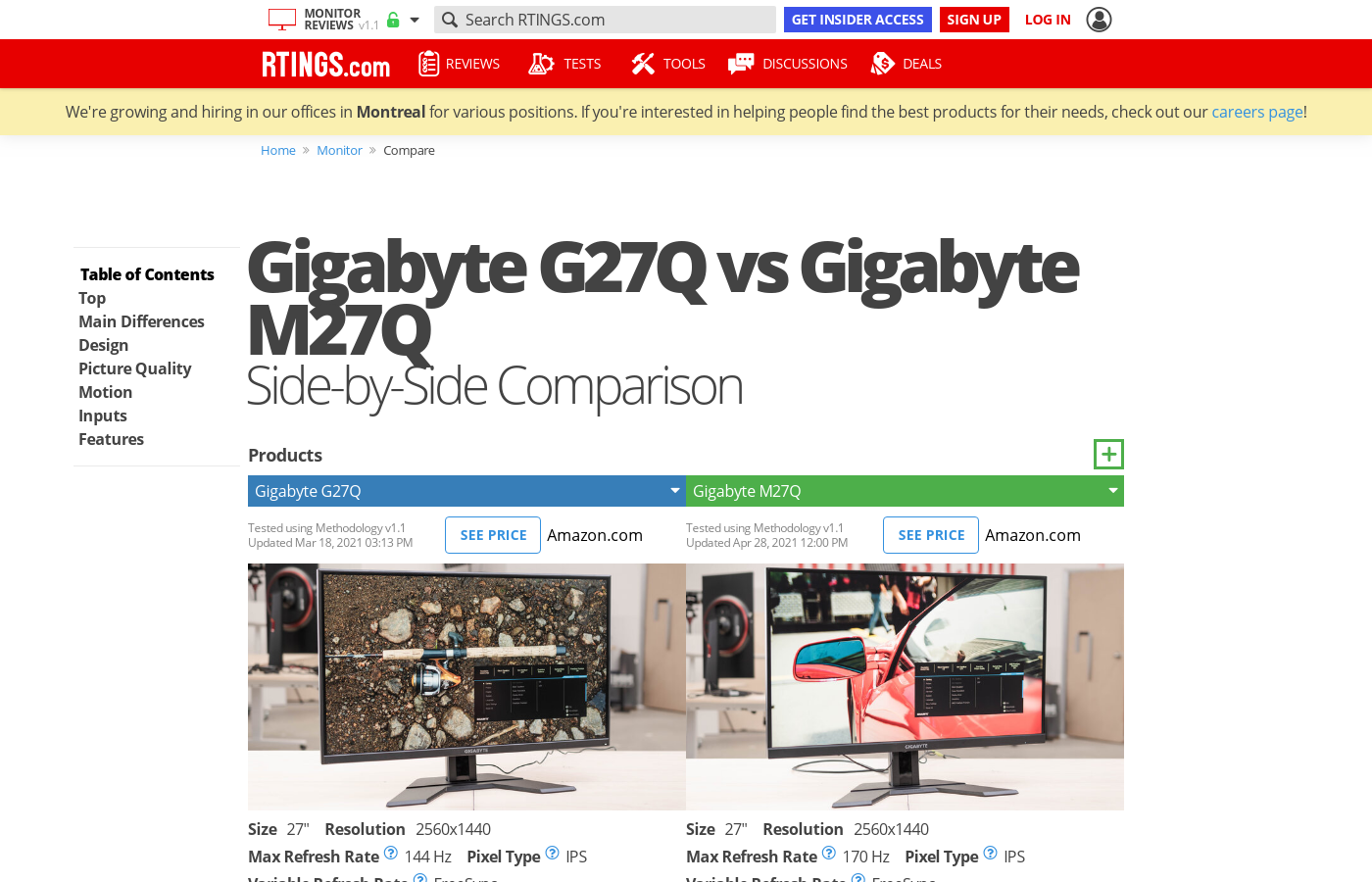
This is a nice compare sheet:
https://www.rtings.com/monitor/tools/compare/asus-tuf-vg27aq-vs-gigabyte-m27q/1640/19668
RTINGS.com
The Gigabyte M27Q and the ASUS TUF VG27AQ perform very similarly. They're both 27 inch IPS monitors with a 1440p resolution. The Gigabyte has better response times at max refresh rate and 60Hz. Its refresh rate is slightly higher, 170Hz compared to the ASUS' 165Hz, but this isn't noticeable. Although both monitors have a Black Frame Insertion fe...
fading wyvern
serene pilot
Screw it, maybe I should aim high and look into the ViewSonic ELITE XG270QG.
I quite like mine 

 cedar nebula
My asus tuf vg27bq does not have normal brightness and night light settings. I can’t find a way to fix this even after several different strategies to fix this
basically my monitor is frying my eyes pls help
misty gyro
Windows has night light built in, open notification panel bottom right and it's one of the buttons on the bottom
cedar nebula
No no, it’s there but when I release the slider to adjust it the monitor goes back to its normal brightness and saturation
And in windows settings brightness is not even an option, and the nvidia control panel doesn’t have a wide enough brightness range to not hurt my eyes as it is
misty gyro
Me too, I was confuzzled
river edge
Weird!
cedar nebula
Changing the refresh rate also resets the night light
After digging through lots of settings I can’t change the brightness except for nvidia control panel though
that’s still an awkward thing about this monitor
 upbeat crown
Y’all I need some help
I need some help with my monitor not working...it says “no signal” even tho I’ve plugged hdmi into PC and Monitor but it still says no signal...I’ve also tried using a display port cable in case the hdmi port/cable wasn’t working but neither have worked.....
What would be the cause? I also replaced cables today so I don’t think it’s that
And can DP port and HDMI port both get messed up if one gets messed up?
Any answers greatly appreciated