#old-monitors-and-tv
1 messages · Page 2 of 1
 sage trail
 visual pilot
Dunno if 6700xt will have fun with 4k144 depending on game
But I agree m32u based
sage trail
how far away he sitting from 32 inches of 1440p?
better be a bit of a distance, like 2-3 ft
even 4
wild
he should stick the monitor inside his eyeballs
 cerulean jackal
I have a pic of my setup that l sent a little bit ago so you guys can look at it if you want
visual pilot
@sage trail @modest palm
 cerulean jackal
sage trail
2x27 would b chill
cerulean jackal
sage trail
2x27 would b chill
I just don’t think l would really multitask that much on two monitors
sage trail
cerulean jackal
I just don’t think l would really multitask that much on two monitors
its not about multitasking

its about having more usable real estate
cerulean jackal
If l had a dual monitor setup l would have the secondary monitor vertical
sage trail
eh
maybe if you pushed it waaaaay back into the corner
but usually vertical monitor is just inefficient
 old arch
I usually do, & it's 1440p w/ my primary 1080p. 
visual pilot
sage trail
but usually vertical monitor is just inefficient
But ma discord scrolling
sage trail
lol
most desktop websites and applications are designed for 16:9 or wider
so i found it to be more of an inconvenience
plus i have a scroll wheel so
¯_(ツ)_/¯
i mean, if all it does is hold discord, then sure
 old arch
Although Irony saying vertical is inefficient w/ what your pic showed. Vertical 1440p can do youtube and 1 or 2 other things pretty well. Don't need to see all the "other vids" next to a video.
sage trail
old arch
Although Irony saying vertical is inefficient w/ what your pic showed. Vertical ...
playing yt vids in the corner of your screen just sounds inefficient to begin with lmao
but also i rarely watch yt nowadays
so i wouldnt get it
old arch
I'm talking having it be the top 1/2 or 1/3, not a "corner". Idc.
sage trail
no i meant like, corner of your eye
seems so off and away from your focus
off in the corner
old arch
Sounds like a literal skill issue.
old arch
Ya just don't notice how horizontal secondary makes you look left way farther, lol 🤷♂️
 queen creek
Is there any way to make a secondary curved monitor look good with a flat main?


 small warren

 frosty cedar
I want to get a new monitor ASAP.
First my PC specs.
Windows 11 Home
AMD Ryzen 7 5800 8-Core Processor
AMD Radeon RX 6800 XT
32GB Memory
1TB SSD
The current monitor I have is an ultrawide LG 34UC89G.
I purchased it when ultrawides were the thing and it was cool at first as I was playing a game that horizontal (side to side) was more important. The problem is now the game I am playing vertical view is just as important. Therefore an aspect ratio of 21:9 just doesn't seem to work for me. Add to that my recorded videos are in 21:9 aspect ratio and in a lot of platforms I end up with black bars above and below my video. Alos the current monitor is only 1080P with 144 FPS, not even 2K.
Therefore I have been looking at some of the larger 16:9 monitors, mainly 32 inch and even a few 39/40 inch.
Along with improving my vertical FOV I would like to improve my graphics quality since I seem to have a decent graphics card.
I have been looking at a few 2k 16:9 monitors, the Sceptre Curved 40 inch, and the Deco Curved 39 inch, both 2k.
They both have good reviews and seem to have a lot of good functions, including Freesync for graphics card. What worries me is that because of the size of the screen, the DPI will actually decrease by about 10 or 12. The LG has about 85 DPI and the larger 16:9s have about 75 DPI. The last thing I want to do is buy a new monitor and have a worse visual experience.
I have also been looking at a few 165hrz 4k monitors in the 32 inch size. Some people say that's just too much. I was looking at the Dell one and it has AWESOME reviews.
For the record I play War Thunder, not the fastest pace game but not a slow role-playing game either. Thought that might be important. Any help would or advice would be greatly appreciated.
Or if anyone has any size or resolution suggestions I'm open to anything.
 misty gyro
frosty cedar
I want to get a new monitor ASAP.
First my PC specs.
Windows 11 Home
AMD Ryze...
misty gyro
frosty cedar
I want to get a new monitor ASAP.
First my PC specs.
Windows 11 Home
AMD Ryze...
I think the one thing you didn't say was what budget you were looking in
visual pilot
M32q might be fun, 1440p 32in
I dunno how well war thunder runs at 4k, it does have dlss but that makes things blurry and weird
frosty cedar
misty gyro
I think the one thing you didn't say was what budget you were looking in
1k
 clear temple
do colour accurate moniters give a better image quality or is it just a thing for creators
misty gyro
clear temple
do colour accurate moniters give a better image quality or is it just a thing fo...
It's mostly for creators, since you'll want to calibrate the color to your liking anyway. If it's really low accuracy it can impact your experience but that's like sub-80% accuracy or so.
clear temple
80% at srgb? or what
but that peobably meams my laptop moniter is bad
i heard that its 60% of srgb or smthn
 vale coral
good next gen gaming monitor? prefer 27-32" in size and usb c to use with my mbp too
misty gyro
clear temple
80% at srgb? or what
No that's related to color gamut coverage, not accuracy. Accuracy out of the box is a separate category entirely and few outlets bother measuring it. Rtings does though.
The idea is you want the color that's sent to the pixel to match as close to what's displayed as possible along this yellow line, using FV43U as an example. https://i.rtings.com/assets/products/cxGlMleU/gigabyte-aorus-fv43u/pre-gamma-large.jpg

That one is for color gamma
This is for color balance https://i.rtings.com/assets/products/FPYdR5F1/gigabyte-aorus-fv43u/pre-white-balance-large.jpg
 clear temple
ok
misty gyro
There's a lot that goes into it and you don't need to pay much attention to the details of it. Rtings is good for putting a number to it for ranking, 1-10. Nothing ever gets a 10 in any category.
An 8 in a given category is pretty good
 mellow fossil
Opinions on this? https://www.amazon.com/MSI-Z690-ProSeries-Motherboard-Socket/dp/B09KKYS967/ref=asc_df_B09KKYS967/

PRO series helps users work smarter by delivering an efficient and productive experience. Featuring stable functionality and high-quality assembly, PRO series motherboards provide not only optimized professional workflows but also less troubleshooting and longevity.
 quartz sandal
mellow fossil
Opinions on this? https://www.amazon.com/MSI-Z690-ProSeries-Motherboard-Socket/d...
quartz sandal
mellow fossil
Opinions on this? https://www.amazon.com/MSI-Z690-ProSeries-Motherboard-Socket/d...
Good motherboard , terrible monitor/tv

mellow fossil
Wait that’s the wrong link 

Made for intense, fast-paced games, the ASUS TUF Gaming VG27WQ1B is a 27” curved display with a 1ms (MPRT) response time and blazing 165Hz refresh rate to give you super-smooth gameplay. With ASUS ELMB and FreeSync technology, VG27WQ1B eliminates ghosting and screen tearing for an impeccable imme...
quartz sandal
Decent, might be on rtings /hw unboxed for better in depth, tuf have too many monitors with similar name to remember them all
mellow fossil
Other than the Gigabyte M27Q line are there any decent 1440p 144hz monitors around $350 or under?
 sick plume
quartz sandal
Good motherboard , terrible monitor/tv
sick plume
quartz sandal
Good motherboard , terrible monitor/tv
Do u not like gaming on motherboard ked strip?
Must be skill issue
quartz sandal
LG 27GN80-B
LG 32GP750-B
Are also decent options
quartz sandal
mellow fossil
Compared to the M27Q how is it?
Not exactly same as m27q p is better so here's a m27q p review with it too
https://www.rtings.com/monitor/tools/compare/gigabyte-m27q-vs-lg-27gn850-b/19668/14623?usage=3623&threshold=0.10
https://youtu.be/Zjr7VGjnweo

RTINGS.com
The LG 27GN850-B and the Gigabyte M27Q are both great 1440p IPS gaming monitors. They perform very similarly gaming-wise; the Gigabyte has a higher refresh rate of 170Hz, but the LG has a better response time. The Gigabyte offers more features, such as a USB-C input that supports DisplayPort and charging, a Picture-in-Picture mode, and a KVM. It...

TeamGroup “Evolving Invincibility” Giveaway: https://bit.ly/3HlM0eq
Support us on Patreon: https://www.patreon.com/hardwareunboxed
Join us on Floatplane: https://www.floatplane.com/channel/HardwareUnboxed
Buy relevant products from Amazon, Newegg and others below:
Gigabyte M27Q P - https://geni.us/LWELXZ8
Gigabyte M27Q - https://geni.us/eJxa0...
mellow fossil
Huh I thought the P was a downgraded M27Q
quartz sandal
mellow fossil
Huh I thought the P was a downgraded M27Q
Nope it's better, you're thinking of the g27q
quartz sandal
 tidal hatch
200-250 euros
tidal hatch
200-250 euros
What country?
visual pilot

MSI Optix G242
But does amazon.de really ship to Lithuania without fees when they don't ship to Poland without fees?
quartz sandal
tidal hatch
Lithuania
For 1080p I'd go
https://www.amazon.de/dp/B08XJP4P42
For 1440 I'd go
https://www.amazon.de/dp/B08XNJG9BZ
MSI Optix G242

LG 32" 32GN600-B UltraGear 165Hz IPS black
quartz sandal
visual pilot
But does amazon.de really ship to Lithuania without fees when they don't ship to...
They ship to Ireland but shipping is like 8-12€ i would assume it's same for most of eu
tidal hatch
visual pilot
But does amazon.de really ship to Lithuania without fees when they don't ship to...
Just shipping
I think
Its cheap
Like 10 euros
quartz sandal
Yeah sounds right
visual pilot
quartz sandal
They ship to Ireland but shipping is like 8-12€ i would assume it's same for mos...
I know there's annoying fees/shipping for Poland/Hungary/Romania that makes it not viable there but dunno
tidal hatch
Idk ive shipped to lithuania and poland and didnt have to pay alot
visual pilot
Been told upwards of 30-40 euros of fees total for Poland, dunno
quartz sandal
Oof
mellow fossil
Is a low contrast ratio a normal thing for IPS monitors?
Seems like that’s the con for most IPS monitors I’m seeing on Rtings
sick plume
mellow fossil
Is a low contrast ratio a normal thing for IPS monitors?
afaik ips not great at showing dark blacks
ips to va for me was massive jump in blacks
mellow fossil
Is that worth getting a VA panel over IPS?
sick plume
blacks are better on va but everything else is better on ips
sick plume
pretty good
mellow fossil
I think I’m going to get the LG 27GP850-B
It’s on sale for $326
Then put it on my current monitor’s stand to make up for the lack of adjustability
I’m coming from a TN panel so I think it’ll be an improvement
misty gyro
mellow fossil
And what’s considered a good DCI-P3?
Generally this only matters for content creators and you can always tune it to be better
sick plume
it also helps that i went from ips 75hz to va 144hz
clear temple
do quantom dot oleds look better in general or is it just about a reduced chance of burning
quartz sandal
mellow fossil
I think I’m going to get the LG 27GP850-B
Use pcpp it's 300 somewhere iirc
quartz sandal
clear temple
do quantom dot oleds look better in general or is it just about a reduced chance...
Think they look a bit better too
mellow fossil
quartz sandal
Use pcpp it's 300 somewhere iirc
Amazon will have it to my dorm tomorrow
quartz sandal
Fair enough
mellow fossil
…I’m literally buying this monitor just because my current one can’t do 4k 75hz over HDMI
And my laptop only has a HDMI port
quartz sandal
Oof
queen creek
Is this a good monitor for the price? LG 24” UltraGear FHD 1ms 165Hz Gaming Monitor with AMD FreeSync™ Premium https://www.walmart.com/ip/301215684
mellow fossil
So final opinions? Yay or nay on that LG I sent earlier (LG 27GP850-B for $326)?
mellow fossil
Bought it
quartz sandal
queen creek
Is this a good monitor for the price? LG 24” UltraGear FHD 1ms 165Hz Gaming Moni...
I'd get the msi g242 in #tech-deals for the same price
 remote basin
M27Q-P for 279.99 or G27Q for 239.99?

GIGABYTE gaming monitors pack upscale performance into a streamlined package. The M27Q-PRO provides an immersive experience through fluid gameplay and great color accuracy and compatibility with graphic card software.

27” 2560x1440 IPS Display with 144Hz Refresh Rate (OC 165Hz), 1ms (MPRT) Response Time Improved Gaming Experience with G-Sync Compatible Ready Smooth Gameplay with AMD FreeSync Premium Studio Grade VESA Display HDR400 and 92% DCI-P3 (120% sRGB) Color Gamut GIGABYTE Classic Tactical Features with ...
quartz sandal
remote basin
M27Q-P for 279.99 or G27Q for 239.99?
https://www.amazon.com/dp/B09Z6VRX8F/?co...
both great choices, depends on how much you wanna spend
remote basin
Yeah I’m willing to spend more, but I was wondering if the two are really so different that it justifies the price difference
remote basin
Nvm the sale for G27Q is gone and was short-lived lol
 surreal quarry
remote basin
Nvm the sale for G27Q is gone and was short-lived lol
surreal quarry
remote basin
Nvm the sale for G27Q is gone and was short-lived lol
I have an m27q, it's great, my only complaint is very bad bleed on the edges during very dark scenes
idk about the p variant though
remote basin
Ahh gotcha alright sounds good, thanks
quartz sandal
remote basin
Nvm the sale for G27Q is gone and was short-lived lol
its not gone?
quartz sandal
surreal quarry
I have an m27q, it's great, my only complaint is very bad bleed on the edges dur...
thats kind of an ips thing
also m27q -p has better panel
remote basin
quartz sandal
its not gone?
Ohh I meant it was on sale for 239.99 briefly, it went back to regular price
remote basin
quartz sandal
also m27q -p has better panel
Yeah so I might go for this instead since it’s cheaper than the g27q now
quartz sandal
remote basin
Ohh I meant it was on sale for 239.99 briefly, it went back to regular price
shows 240$ for me
remote basin
That’s odd, it only shows 291 for me
quartz sandal
 quartz sandal
remote basin
That’s odd, it only shows 291 for me
quartz sandal
remote basin
That’s odd, it only shows 291 for me
maybe check seller
remote basin
Alright seems like it shows 239.99 again…yeah that might’ve been it
It does seem like the m27q-p offers more actually, so I guess I’ll still go with it
quartz sandal
remote basin
It does seem like the m27q-p offers more actually, so I guess I’ll still go with...
it does, if you want more info this might help too https://youtu.be/Zjr7VGjnweo
TeamGroup “Evolving Invincibility” Giveaway: https://bit.ly/3HlM0eq
Support us on Patreon: https://www.patreon.com/hardwareunboxed
Join us on Floatplane: https://www.floatplane.com/channel/HardwareUnboxed
Buy relevant products from Amazon, Newegg and others below:
Gigabyte M27Q P - https://geni.us/LWELXZ8
Gigabyte M27Q - https://geni.us/eJxa0...
 rose fractal
Can someone please recommend a wfh monitor under 200$
quartz sandal
rose fractal
Can someone please recommend a wfh monitor under 200$
Wfh?
rose fractal
Work from home
quartz sandal
Oh
rose fractal
By that I just really mean that it does not need to be a gaming one
quartz sandal
Gotcha
rose fractal
Really no need for high refresh rate and such things
quartz sandal
Will you be gaming on it? Any preferences? And what country?
rose fractal
No gaming and in the us
quartz sandal
Any preferences over curved wide screen size etc
rose fractal
Either 24 or 27 inch flat
It’s really for a friend who has never gamed or done any sort of content creation
quartz sandal
rose fractal
It’s really for a friend who has never gamed or done any sort of content creatio...
This is at a really good price atm, it's 32" but if they can fit it I'd recommend, also has the nice advantage for high refresh rate 
https://www.bestbuy.com/site/hp-31-5-ips-qhd-amd-freesync-gaming-monitor-black/6483573.p?skuId=6483573
quartz sandal
rose fractal
I’ll see if they can fit it in
This is also another really nice option
https://pcpartpicker.com/product/dP4Ycf/acer-vg281k-bmiipx-280-3840x2160-60-hz-monitor-umpv1aa001

Acer VG281K bmiipx 28.0" 3840x2160 60 Hz Monitor (UM.PV1AA.001)
It's 28" and 4k
No problem
 deep fern
hello friends, before I go insane I wanted to know what monitors are out there that have higher than 120hz or better refresh, 1440p or better res, and color decent enough to do some photo editing and color grading. kvm switch would be a bonus
small warren
Jinx
quartz sandal
Depending of if you want big boi monitor
 errant flax
What are some good 4K monitors around 30-42in in size.
deep fern
How good is color with the q-p
small warren
deep fern
How good is color with the q-p
TeamGroup “Evolving Invincibility” Giveaway: https://bit.ly/3HlM0eq
Support us on Patreon: https://www.patreon.com/hardwareunboxed
Join us on Floatplane: https://www.floatplane.com/channel/HardwareUnboxed
Buy relevant products from Amazon, Newegg and others below:
Gigabyte M27Q P - https://geni.us/LWELXZ8
Gigabyte M27Q - https://geni.us/eJxa0...
9:21
small warren
errant flax
What are some good 4K monitors around 30-42in in size.
FV43U is really nice imo
quartz sandal
errant flax
What are some good 4K monitors around 30-42in in size.
gigabyte m32u
misty gyro
errant flax
How are the colors on them and response times?
RTINGS.com
The Gigabyte M32U and the Gigabyte AORUS FV43U use different panel technologies, each with strengths and weaknesses. The M32U has a smaller IPS panel, which delivers wide viewing angles. The M32U has a much faster response time at 60Hz. The FV43U, on the other hand, has a larger screen with much better contrast and better uniformity, so it's a b...
Seems the M32U has great color but the FV43U has great HDR, so compare them and see which features you like more
misty gyro
HDR is an increased brightness, contrast, and color space for supported media. Better rated HDR panels also have much better local dimming, so dark scenes look much better.
Both have excellent response times and SDR color out of the box
So it's really a matter of how big you want the screen, the difference between 32 and 43 inches is massive.
small warren
Personally I find 43 inches with 4K is worth doing, but it is a VA panel so it has a few VA quirks
Does that mean I'm unsure about it? No, I bought a second one
Lol
One for the consoles one for the main pc
misty gyro
Oh that definitely makes an excellent 4k120 console screen
small warren
It's a Samsung QLED stripped of the smart TV features* and repurposed for a pc monitor essentially
errant flax
Mhmmm, I am having a tough time deciding.
deep fern
small warren
https://youtu.be/Zjr7VGjnweo
Looks decent I might give a try
errant flax
What’s the difference between IPS and VA?
small warren
IPS, better response better viewing angles
VA, can be better colour, def better contrast (for both this is bolstered by qled here)
IPS contrast can be as bad as like, black is grey
But not on these two panels
M32u is much better than that
small warren
FV43U will be very close to nearly perfect blacks
errant flax
Oled*
errant flax
Hmmm. Gosh this is a tough choice.
I can’t pick between better timings, and pixel density which I love Vs better colors which ai also love.
small warren
Pixel density you shouldn't worry about
errant flax
I noticed, that the M32U has 42% better density.
 errant flax
I tend to notice really small things.
errant flax
small warren
Personally I don't see a difference between 4K and 1440p at 27"
Interesting. For me ai can notice it once it’s at around 30in.
small warren
So to me an M32U is nice but I'd rather M32Q and save the money difference
errant flax
small warren
So to me an M32U is nice but I'd rather M32Q and save the money difference
Fair.
What about the the Samsung G monitors?
small warren
G7?
I know next to nothing about the new G7
Lol
The older G7 was nice but the price was oof
errant flax
The Samsung arc monitor is like 900 yes?
Asking cause, the M32U I saw was asking for as much as bloody 800$....
Why the heck did Samsung Ark get interpreted as Intel Arc.
small warren
Samsung arc is like 55 inches lol
small warren
Apparently 3.5 grand
 wild coralBOT
 Apex Genesis#3792 has been warned
Reason: Bad word usage
small warren
Lol
errant flax
Oh snikies!
Maybe not then.
I will consider getting it at a later date.
Maybe.....
small warren
The arc???
errant flax
Yea.
small warren
I'd get an LG C2 before an arc
errant flax
Would work nice in a multi monitor setup as the center piece.
errant flax
small warren
I'd get an LG C2 before an arc
Picture please.
errant flax
Hmmmm.
Does the M32U have really good near perfect blacks?
Thinking that might be better in a 3 monitor config.
small warren
No the fv43u does
M32u is IPS, it will never have perfect blacks
What I said before is it won't be as bad as grey lol
misty gyro
FV43U also has full array local dimming instead of edge lit
small warren
All g
errant flax
Is there a smaller version of the FV43?
small warren
Qled go brrrr
Nope
That's the smallest version of Samsung's qled
Well that specific kind of qled panel
misty gyro
There's going to be more reasonably sized OLED panels for gaming monitors soon. Samsung kicked things off with the odd decision to make a 20 inch one.
 misty gyro
Yeah that's a really weird size
errant flax
Hmmmmm.
misty gyro
Too small for desktop, too big for laptop
errant flax
3*43in = 129in of screen.....
misty gyro
Measuring diagonally and separately yes
small warren
43" is so big I think you'd be overwhelmed at a triple setup
errant flax
Can the Fv43 be used vertically?
small warren
It's like 4 screens slapped together
errant flax
Or triple stacked utop each other.
small warren
Idk if a mount exists that could hold that size
misty gyro
43 inches is the size of my first flat screen TV
misty gyro
1080p? Or 720p
errant flax
MY EYES
misty gyro
Yeah that was rare enough at the time
PS3 supported 1080p before any TVs supported it lol
My mom still uses a 720p with a big line of dead pixels lol
I had to tell the cable guy "no it doesn't support 1080p, leave that disabled"
 dense wyvern
Hey, I am currently looking at getting a Monitor arm That can hold 3 Monitors. Currently, I have 2 Monitors which will be upgrading to 3. However if they are all 27 in and I get a Monitor Arm that can hold 27 In Max. Will I be able to angel my Left and Right Monitor?
Ping me once respond. Thanks.
deep fern
Damn the shipping time on the m27q p is really long
deep fern
I checked b&h first and it said they took off back order because they don't know how long it will be and amazon says sept 20
errant flax
Is B&H trust worthy? I've never used them.
deep fern
Ye they are, they are mostly for film and photo people but they also sell consumer electronics
mellow fossil
So I bought that LG monitor but just found out it only does 144h on HDMI instead of the advertised 165hz yall think it’s worth finding a new monitor with HDMI 2.1 or should I just stick with the 27GP850-B?
mellow fossil
I’m thinking maybe I should return the LG and get an Asus Strix XG27AQ
old arch
Keep in mind if the port on the gpu or anything else in the chain is hdmi 2.0 then it doesn't matter. 144 to 165hz is a pretty small change/improvement though. I use DisplayPort and both mine can run 165hz but I set at 144 currently for no real reason. 
mellow fossil
It’s the port on the monitor that’s the limiter here
Nevermind I think my laptop also is HDMI 2.0b
Y’all think the strix is worth the better contrast for an extra $50 or so?
old arch
Tough to say. I'll let someone else possibly answer that.
 twin oasis
a i3-12100 and RX 6600 for 120hz good or bad
misty gyro
1080p? That's fine
misty gyro
Yep 1080p
errant flax
I forgot I3 even existed.
 woeful badge
I have a red stuck pixel on my ips monitor.. does anyone know how I can fix this?
surreal quarry
woeful badge
I have a red stuck pixel on my ips monitor.. does anyone know how I can fix this...
https://www.jscreenfix.com/ try this
Repair stuck pixels using the JScreenFix algorithm.
 sly spruce
Hello group. I am new here and I have purchased a Dell 34 Curved Gaming Monitor - S3422DWG but my Acer Aspire TC-885 PC does not give me the resolution of the monitor (3440 x 1440) I only get 1920 x 1080. The image looks very wide. I connected it by HDMI.
misty gyro
sly spruce
Hello group. I am new here and I have purchased a Dell 34 Curved Gaming Monitor ...
What GPU is in the PC?
sly spruce
My PC is an Acer Aspire TC-885 and has an integrated card, according to the manual, UHD Graphics 630; but it only recognizes up to a resolution of 1920 x 1080. The monitor I just bought is 3440 x 1440, so the image is distorted.
misty gyro
Ok, so you got the model with the i5 9400?
sly spruce
My PC's processor is a Core i7 - 8700
misty gyro
sly spruce
My PC is an Acer Aspire TC-885 and has an integrated card, according to the manu...
The HDMI on that is severely limited. It can only do 4k at 24hz. You'll need to lower the refresh rate and/or use displayport instead.
You might get it to do 60hz with HDMI at the full resolution if you're lucky
old arch
Yea probably should just use DP. Even hdmi 1.4 might not hit over 30ish hz for 4k
 sly spruce
I do not have a displayport output on the PC. The monitor does have a displayport connection and a usb connection.
misty gyro
Then your only option is to lower the refresh rate until it lets you pick the correct resolution. Adding a basic GPU will let you use higher modes, like a gt 1030.
You still won't get the full refresh rate even with a 1030 though. It's only HDMI 2.0
There's some 1030 models that have displayport 1.4 that would let you use the full resolution and refresh rate though.
sly spruce
Then your only option is to lower the refresh rate until it lets you pick the correct resolution. Adding a basic GPU will let you use higher modes, like a gt 1030.
You still won't get the full refresh rate even with a 1030 though. It's only HDMI 2.0
There's some 1030 models that have displayport 1.4 that would let you use the full resolution and refresh rate though.
I am thinking about buying an ASUS TUF Gaming GeForce GTX 1660 Ti EVO OC Edition 6GB GDDR6 PCI Express 3.0 Video Card TUF-GTX1660TI-O6G-EVO-GAMING, because I have two monitors with HDMI output and a portdisplay output, which would be what I need; but I do not know if my PC supports that card.
Sorry, I sent you the same thing you wrote me because he doesn't speak English and I'm using a translator.
misty gyro
You would probably need a different power supply if you're going with anything over a 1050. Check what wattage the power supply is.
sly spruce
300 w
misty gyro
Does it have a 6 or 8 pin power connector for a GPU?
sly spruce
I don't know, in the manual it only says the following:
Number of PCI Express x1 Slots - 1
Number of PCI Express x16 Slots - 1
I'm not a PC specialist, I'm just a daring user.
misty gyro
It looks like this

It would be coming out of the PSU
If the computer doesn't have one then you can't install a GPU that needs additional power. Certain models of 1050 would be the limit. Most 1030s don't need it.
Some RX 6400 models could be used as well but they are probably more expensive.
sly spruce
I would have to review this tomorrow, in daylight. I'm an old man, I'm 63 years old and I don't see very well at night. But it seems to me that the PC doesn't have that power supply. In that case, could I change the power supply?
This is the photo, I don't see that it has any extra connections.
misty gyro
Looks like your PC uses a standard power supply so it would be easy to upgrade it
sly spruce
I don't know how to put the photo here.
misty gyro
You would need to level up but I get the idea
sly spruce
Thank you for your help. It was very helpful, because I had no idea what I really needed.
misty gyro
Happy to help
sly spruce
👍
 severe dirge
Hey guys, I'm looking for a 24"/27" 1080p 60hz monitor that can tilt in the $90-$120 range. This is for someone who will be watching disney+ and playing Diablo 3/World of Tanks. She has a 580 gpu so don't really need anything to extravagant. She was looking at this | https://www.amazon.com/dp/B07H8P9QX2/ |, but it's curved and I feel like curved at 24" is not good?

24" Curved Full HD LED Monitor 1920 x 1080 FHD Resolution Up to 75Hz Refresh Rate Adaptive Sync Supported 1500R Curvature Built-In Speakers
quartz sandal
severe dirge
Hey guys, I'm looking for a 24"/27" 1080p 60hz monitor that can tilt in the $90-...
It's personal preference tbh
severe dirge
quartz sandal
It's personal preference tbh
I see. Well then I'll let her get that one then.
 fading wyvern
 there haven’t been many whales through recently, I need to recommend more oled
quartz sandal
fading wyvern
<:pepehmmm:903335097305034783> there haven’t been many whales through recently, ...
Last i checked it was hard for whales to use discord tbh
fading wyvern
 severe dirge
quartz sandal
Last i checked it was hard for whales to use discord tbh
severe dirge
quartz sandal
Last i checked it was hard for whales to use discord tbh
I use discord just fine.
 sturdy kindle
Hopefully there's smaller, less expensive OLEDs in the future so you can recommend them to non whales
small warren

aliexpress.com
Smarter Shopping, Better Living! Aliexpress.com
 untold umbra
errant flax
untold umbra
errant flax
What's a good budget 4k monitor? Looking for sizes 27-42in. preference is somewhere in the range of 32in.
Requirements:
- Within $500
- 144hz+
- Good Color
- Good Response times
Note, if the monitor isn't to big like within 32in for 16/9 or a bit bigger for a ultra wide I'd be fine with 1440P/2k if 4k is not possible.
My current monitor is being to die out, and I'd really appreciate the help.
Please ping me, when responding.


 errant edge
Yeah, 4k isn't exactly doable for that price within those restrictions
And 4k gaming kinda a meme
I'd just go 1440p
@errant flax
errant flax
errant edge
<@217356391675985921>
For 1440P what are the best monitors? 27-32in.
errant flax
small warren
M27Q-X
What is the difference between the QP and QX?
small warren
Q-P is an updated M27Q, Q-X is a 240hz variant
Q-P gets like 170Hz over 165 or 144 of the M27Q iirc
small warren
X32 is also nice
errant flax
errant edge
This also nice https://www.bestbuy.com/site/hp-31-5-ips-qhd-amd-freesync-gaming-...
Doesn't deliver to Mexico unfortunately.
errant flax
small warren
X32 is also nice
lemme check that out real quick.
small warren
that's the best buy one
errant flax
Okay, someone please explain how this works?

How can I watch 4K videos on a 1440p monitor?
small warren
4K at 32 inches is a meme
we went over this
consider 4K at bigger sizes
the pixel density is thick enough that you'll barely notice anything different
errant flax
Okay.
small warren
and again, FV43U is a good idea if you want a full 4K experience
errant flax

Sceptre’s U275W-UPT monitor is the perfect candidate for productivity and entertainment that are dependent on vibrant images. Whether it’s for photo-editing, watching movies, light gaming or web-browsing, this monitor has you covered. Powered by an IPS (In-Plane Switching) Panel that delivers con...
this the fv42u?
small warren
no?
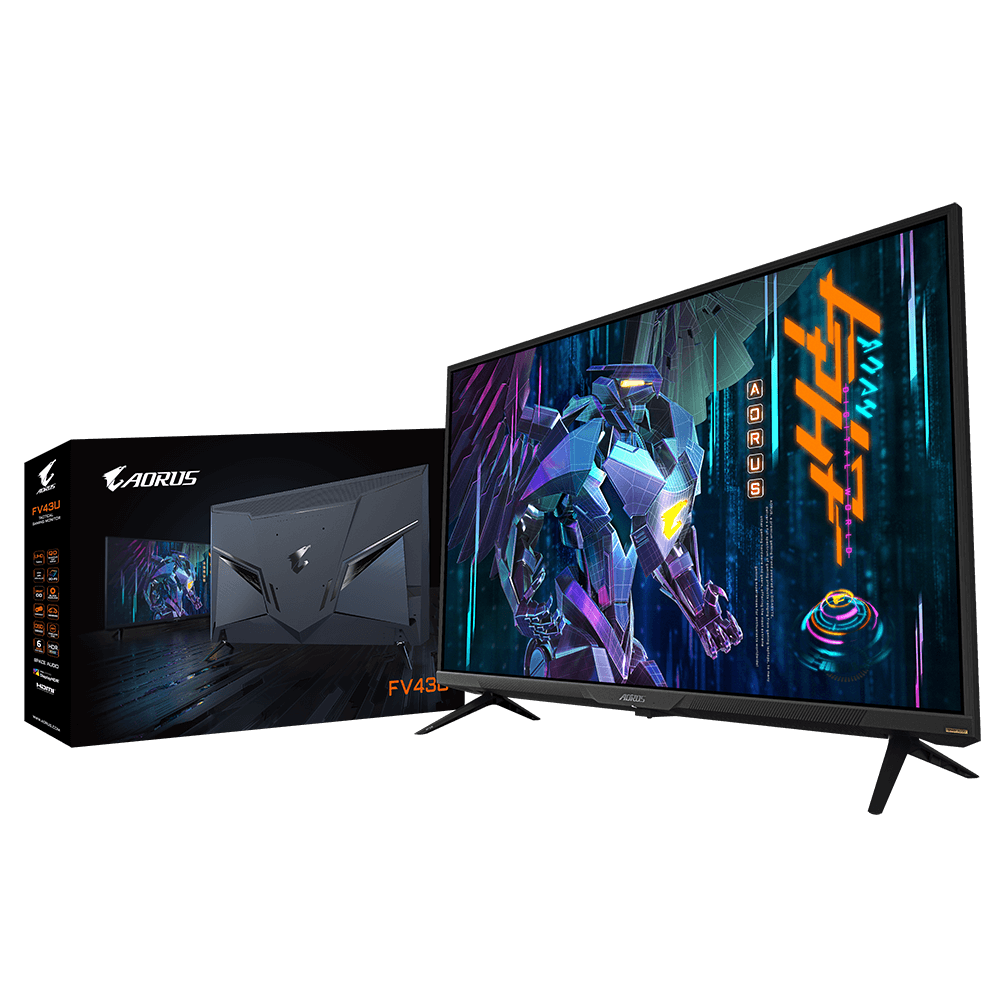
GIGABYTE
Features 43" VA with QD Display 4K UHD 144Hz & HDMI2.1 10-bit Color with HDR1000 6 Axis Color Control with 97% DCI-P3 Space Audio & OSD Sidekick Black Equa...
errant flax

47.53" OLED 3840 x 2160 4K Display Gaming Monitor 120Hz Refresh Rate, 1ms (GTG) Response Time, Supports FreeSync Premium Detailed color presentation with 10-bit color / 98% DCI-P3 / 130% sRGB OSD Sidekick, PiP /PbP, Dashboard, Black Equalizer, Game Assist Space Audio (5 modes of melodic sound exp...
No way in hell can I afford that rn, but just curious.
Is this good?
small warren
FO48U is the LG OLED stripped* variant
vs the FV43U being the Samsung QLED stripped variant
both are great, but the FO48U will suffer from OLED burn-in inevitably if you use it as a PC display
errant flax
Got it.
small warren
newer OLED's are getting much better though
so a new generation FO48U would be absolutely worth it if it ever comes along
errant flax
Out of curiosity since all the monitors I've been shown thus far, are all gonna cost me about $500, what are my 4K options?
errant flax
small warren
so a new generation FO48U would be absolutely worth it if it ever comes along
That'd be cool.
small warren
M32U is about it really
twin oasis
AOC 24G2U/Bk, 24 Inch (61 cm),1920 X 1080 Pixels, Fhd IPS Display Gaming LCD Monitor with 144Hz Refresh Rate, 1 Ms Response Time, Built-in Speakers, AMD Freesync, Height and Tilt Adjustment, Black https://amzn.eu/d/aLyPywz is this good

The AOC 24G2U's 144 Hz refresh rate, 1 ms MPRT and FreeSync Premium support eliminate stuttering and tearing. Its 23.8" IPS panel with Full HD resolution delivers colour-accurate images. Expand your view with multiple monitor set-up. The narrow border and frameless design offer the minimal bezel ...
small warren
and honestly won't be any different to a M32Q
errant flax
Something I'd definitely like to check out after I get my PC upgraded is possibly saving up for 3-4 months for a Samsung Ark, surprisingly I CAN'T BUY ANY GPUS, CPUS, OR HARDWARE at the local walmarts, and etc but I can somehow buy a Samsung Arc at MSRP if I wanted to.
twin oasis
twin oasis
AOC 24G2U/Bk, 24 Inch (61 cm),1920 X 1080 Pixels, Fhd IPS Display Gaming LCD Mon...
I getting this on discount, is their something better from AOC?
small warren
24g2 is good
twin oasis
Ok it is good i think ty for the halo
errant flax
small warren
you really should consider an LG C2 if you like Arc
What's that?
HOLY $#!T the delivery fees on the M32U is out of this world.
Amazon wants $,1230 USD to ship it.
misty gyro
errant flax
What's that?
C2 is an OLED TV that happens to be one of the best all around displays in the market
errant flax
Got it.
misty gyro

RTINGS.com
The LG 42 C2 OLED is a TV that's popular to use as a PC monitor, especially for gaming. It replaces the LG 48 C1 OLED, and it's available in a smaller 42-inch si...
misty gyro
Yes, just double check that it's in stock and not backorder
twin oasis
twin oasis
AOC 24G2U/Bk, 24 Inch (61 cm),1920 X 1080 Pixels, Fhd IPS Display Gaming LCD Mon...
Man is it good i am getting it for 11k IND
errant flax
misty gyro
Yes, just double check that it's in stock and not backorder
How would I check that?
misty gyro
It'll say in the product listing near the price
Either in stock or backorder with an ETA
misty gyro
Good to go then
errant flax
I just need to double check real quick that it'll ship to me, if so I will probably get that.
 raw ingot
twin oasis
Man is it good i am getting it for 11k IND
raw ingot
twin oasis
Man is it good i am getting it for 11k IND
someone already said it's good
why gotta this be so complicated
 carmine bloom

Samsung Electronics Unveils Odyssey OLED G8 Gaming Monitor at IFA 2022 Odyssey OLED G8 delivers incredibly low 0.1ms response time for high-speed gameplay Samsung Electronics will unveil the Odyssey OLED G8 (Model Name: G85SB) — another premium addition to the Odyssey lineup — at IFA 2022 in Berlin, Germany, further reinforcing the Odyssey’s ind...
Weird choice in ports though. Probably cause smaller profile
small warren
Ooo another QD-OLED panel
 maiden wedge
Does anybody have the Acer vg281k?
I don't see how a $200usd 4k monitor can be any good, but it's supposed to have a 90% color gamut and 300 nit brightness. I don't care about HDR
 errant edge
Cheapest 4k high refresh rate, or cheapest 4k
quartz sandal
Cheapest 4k monitor non high refresh is like 200$
carmine bloom
If you're going to do PS5 or XSX get something with HDMI 2.1 as well.
Aorus has a 43" QLED and a 48" OLED that are usually on sale these days and are pretty good.
I use the 43" for my PS5 for games and movies, and XDK for work.
That one you posted is good too of course but pricey for an IPS panel imo
carmine bloom

Groundbreaking LG OLED Flex Delivers Personalized Gaming Experience with Fully Adjustable Screen Curvature, Superb Picture Quality and New Gaming Features SEOUL, Aug. 31, 2022 — LG Electronics (LG) is
The future is here
You've heard of folding phones and laptops, now there are folding(bending more of) TVs
 warped sand
raw ingot
4k is honestly a meme
warped sand
raw ingot
4k is honestly a meme
🤔
misty gyro
4k gaming is still a meme. You need a top tier GPU to get close to 60 fps on 4k high
Not even ultra
And no ray tracing
warped sand
Depending on the game.
carmine bloom
The Steam Deck can do 4k L4D2 on high settings at over like 80fps
so it just means "modern AAA games" when you say that.

 tribal citrus
what a good 1080p monitor
tribal citrus
misty gyro
4k gaming is still a meme. You need a top tier GPU to get close to 60 fps on 4k ...
well 4090 
i heard stuff
tribal citrus
warped sand
Depending on the game.
yea ik someone who places elite dangerous at 4k on a 3060 ti
misty gyro
4090 is not a gaming card, even more so than the 3090 was. The ridiculous power draw means you practically need to rebuild your PC to run it in most cases since most power supplies don't have 5-6 8 pin power for the GPU.
old arch
Any more than 3x8pin is a meme in itself.
tribal citrus
misty gyro
4090 is not a gaming card, even more so than the 3090 was. The ridiculous power ...
haha
carmine bloom
misty gyro
4090 is not a gaming card, even more so than the 3090 was. The ridiculous power ...
I'm telling ya, we're approaching the point where aibs should give you external power supplies for your GPU's so you don't have to upgrade the power supply in your pc.
misty gyro
Just get a slim 12VO 600W unit and run that as the external GPU power. It would be easy enough.
tribal citrus
misty gyro
4090 is not a gaming card, even more so than the 3090 was. The ridiculous power ...
Fal dont you know 16 pins exist and companys making power supplys
16 pin can do 600W
so all you need is new power supply thats all
misty gyro
I'm perfectly aware of this. Practically speaking most people won't be doing that.
errant edge
I dont think you understood what fal said
It's not only that, but the 4090 is going to be another titan card.
Not a gpu aimed at gaming, though nvidia might market it like that because of how many stupid rich gamers bought the 3090
misty gyro
Yep. It's basically the 4080 with the power dialed up to ridiculousness
misty gyro
The only reason the 3090 sold as well as it did was the shortage
errant edge
I'm not sure about that
There's a lot of uneducated and uninformed people buying and building pcs
misty gyro
It was absolutely not meant to be a gamer card at more than double the price of the tier below it.
errant edge
100%, but people say they want "the best of the best" for an extra 5fps
While also spending 200% as much
Same people who buy a 12700k for a b660 because it's "better"
misty gyro
This is also true but that's a minority. People that would not have otherwise purchased a 3090 were effectively forced to due to lack of options.
errant edge
Maybe I just see too many idiots
carmine bloom
They said the 3090 was for people who did both production and gaming which is perfectly fine.
And for productivity purposes, the 3090 is a great alternative to workstation cards, especially if your PC is for both productivity and gaming. Or if your productivity is gaming related such as rendering in Unreal Engine.
 quick blade
yo guys question, which one of these 2 is better: the aoc q27g2 or the msi mag27cq? both are pretty similar at 350usd on my country and that is pretty cheap here (used of course)
sadly 2k monitors around here start at 500usd for 144hz new 😦 so 350 seems like ok if they are in pristine conditions as the sellers claim
quartz sandal
carmine bloom
And for productivity purposes, the 3090 is a great alternative to workstation ca...
Yeah but a lot of ppl bought for just gaming
raw ingot
It's usually dumb people who does that
I can understand if the 3090 has any use at all outside of games
Otherwise heck no
3080ti is the absolute highest one need to get
for gaming
quick blade
i think the cheapest one around is an xc3 model at 800usd
not the best cooling but with a lil undervolt i think it will run fine
quartz sandal
raw ingot
It's usually dumb people who does that
Nah it made sense in the shortage, also 3080 ti only released just over a year ago
quartz sandal
Now yeah but in shortage it made sense
 hexed bramble
The store near me has a overload of 3090 ti
misty gyro
Yep. Welcome to big business. It took them over a year to catch up to the spike in demand, then demand crashed, so now they have too many lol.
raw ingot
business 101
cerulean jackal
Anyone have an idea of what monitor mount like the one here can be?

 indigo berry
cerulean jackal
Anyone have an idea of what monitor mount like the one here can be?
indigo berry
cerulean jackal
Anyone have an idea of what monitor mount like the one here can be?
To me it looks like the HUANUO Single Monitor Mount from Amazon
Based off the "clamp" and the lower part of the stand
cerulean jackal
indigo berry
To me it looks like the HUANUO Single Monitor Mount from Amazon
Ok thank you
indigo berry
np
cerulean jackal
Can you send the link?
indigo berry
HUANUO Single Monitor Mount, Articulating Gas Spring Monitor Arm, Adjustable Monitor Stand, Vesa Mount with Clamp and Grommet Base - Fits 13 to 30 Inch LCD Computer Monitors 4.4 to 14.3lbs https://a.co/d/ct7o2AO

HUANUO Single Monitor Mount, Articulating Gas Spring Monitor Arm, Adjustable Monitor Stand, Vesa Mount with Clamp and Grommet Base - Fits 13 to 30 Inch LCD Computer Monitors 4.4 to 14.3lbs
@cerulean jackal
cerulean jackal
Thank you
 chilly dawn
I always think about getting an ultra wide
But I dunno
Hear they have issues
Dunno if I can power it well on my gpu
Seems like a mess
Anyone have experience with em?
misty gyro
chilly dawn
Anyone have experience with em?
If you're gaming an ultrawide isn't advised because many games have scaling issues or don't support the proper resolution and FOV.
misty gyro
If you're only playing Minecraft or something that does correct scaling like that it can be nice
 muted talon
I have been looking for a monitor stand, but cant find the right one. I have a LG 34" ultrawide and a 27inch AOC gaming monitor. I want to use the UW for work and AOC for gaming, but i want them to be able to swap positions. For work, UW on bottom, AOC on top. When time to game AOC on bottom and UW on top (or vertical on left/right). Anyone with anything similar or know of any mounts that can be this flexible?
 golden ravine
The GIGABYTE G27Q 27" failed twice on me in under 30 days. Anyone else have the monitor fail to display picture after turning on?
visual pilot
Is the PC working fine with other monitors?
golden ravine
visual pilot
Is the PC working fine with other monitors?
OSD didnt even work. No issues other monitors
visual pilot
Wacky
 kindred umbra
is gigabyte still the go to for any budget oriented monitor
small warren
Rn yeah
errant flax
Can I use a monitor arm on the M32Q?
small warren
Yea, it'll have a vesa 100x100 screw pattern on the back
errant flax
Thanks.
severe dirge
errant flax
Can I use a monitor arm on the M32Q?
Be aware that huano brand vesa mounts come with screws that are to long for gigabyte style monitors. You can use the original screws that came with your monitor.
errant flax
severe dirge
Be aware that huano brand vesa mounts come with screws that are to long for giga...
Thanks for letting me know.
 runic pagoda
Is there any way to get the ugly black bars on ultrawide monitors on many old games without using mods on the games that stretch the resolution making it still look ugly
small warren
Custom resolution might work at the right ratio
runic pagoda
3440x1440 isn't even possible on a lot of them
at least as far as custom resolution goes
 rose kelp
Should I get a. Curved monitor or a flat panel
quartz sandal
rose kelp
Should I get a. Curved monitor or a flat panel
It's personal but i prefer flat
small warren
You should really go to a tech store and see what you prefer instead of asking
Imo
Then maybe come back here later and find out the objective benefits of going either way once you have an idea
severe dirge
rose kelp
Should I get a. Curved monitor or a flat panel
Get both
errant flax
What are the best monitors I can get within $500?
I am currently considering the M32Q but questioning if I should land on that.
Preferably 1440p or higher. Screen size 32-43in.
Refresh should be at least 144hz.
severe dirge
I am having an issue with one of my monitors that started yesterday. The Sharpness seems to have been put on full blast, but when I hover over a link in my browser the Sharpness goes back to normal. None of my monitor settings have been changed and my Nvidia Control Panel still has all the same values I set them at weeks ago.
This only happens on my 1080p monitor. My other 2 1440p monitors are unaffected.
severe dirge
severe dirge
I am having an issue with one of my monitors that started yesterday. The Sharpne...
The monitor only seems to be affected when it is the active monitor (where my mouse currently is). If my mouse is on another monitor it goes back to normal.
I would take a video, but I don't know how to
severe dirge
Welp, I'm not exactly sure what was causing it, but I went into my Nvidia Control Panel and selected a random option and hit apply to force refresh the monitor (where it goes black for a second and then pops image back up). No more issue with the super sharp image. I put that random setting back to what it was and hit apply and I'm still golden. Why do PCs have to be funky sometimes lol
fading wyvern
errant flax
What are the best monitors I can get within $500?

RTINGS.com
The best monitor under $500 that we've tested is the Gigabyte M28U. It's a versatile monitor that's great for a variety of uses, whether you want it for the office or gaming.
errant flax
fading wyvern
https://www.rtings.com/monitor/reviews/best/by-price/under-500
Thank you very much!
fading wyvern
npnp
errant flax
Sorry to be such a problem child though can someone send me a link or recommend me the best 4k, high refresh rate monitors with really good color like true blacks, blues, etc?
I've decided to wait and save up for one really good monitor rather than break it down into two upgrades over time.
visual pilot
errant flax
Sorry to be such a problem child though can someone send me a link or recommend ...

RTINGS.com
The best 4k monitor that we've tested is the Gigabyte M32U. It's an excellent monitor with a 32-inch, 4k screen.
basically m32u :D
errant flax
What about the FV43U?
small warren
FV43U is great
I liked it so much I bought a second one
It's a samsung QLED without the smart TV stuff and has a KVM
errant flax
Interesting.
Can it be used on a monitor arm?
If you don't mind, could you send me a picture of your setup with the FV43U so I can get a idea for what they'd look like in person?
errant flax
small warren
https://discord.com/channels/500085440221806603/574740748801540107/1014383986669...
Great setup btw.
small warren
Lol thanks
errant flax
And hmmm, how hard would it be for a 4090 to run 3xFV43U?
small warren
Very
errant flax
Because at the end of the day, I'll eventually have 3 monitors.
small warren
1 fv43u will probably be enough to comfortably run 1 4090
Within the monitors limits
errant flax
Hmmmm.
small warren
Especially for difficult AAA
errant flax
In my case.
I'd only run games on 1 of them.
the 2nd and 3rd are for other use cases.
small warren
For just desktop then it's fine
I've run triple 4K 144 off a 3080 for the memes, no issue
It's like, 100W power for idle lol
errant flax
(1, Game usage). (2, Moderation like monitoring and background tasks and the such). (3 for when I'm having something render).
errant flax
Let's see.
 errant flax
So that's 3x44in=132 inches wide of screen.
errant flax
I plan to repurpose the basement once I am back in ShangHai and turn it into a wood walled studio.
So space isn't a issue.
But yeah, I'm now considering maybe just two of them would be enough.
small warren
2 would be more than enough I think
Consider it like this
FV43U = 4 small but normal sized monitors
Like 4 22" monitors stuck together
errant flax
Oh I see.
errant flax
yeah, 2 should be about perfect then.
You think the 4090 will have a hard time running that?
The most intensive thing I'd do on occassion would be running like a render on the 2nd monitor while gaming a triple A title on the 1st one.
errant flax
small warren
It's a lot of display
Can the 2nd monitor be set to portrait mode? Would be handy if it can.
small warren
Yes
errant flax
Nice.
Yeah, I think I will get 1 while I am still in MX after I finish building my next PC.
small warren
errant flax
You think the 4090 will have a hard time running that?
It won't be
errant flax
Then get a 2nd one, once I am back in ShangHai.
small warren
It's a really nice monitor imo
errant flax
Agreed, it looks nice.
 stark plank
How do I vesa mount a monitor with only two screw holes on the back
It’s weird how my cheap Walmart monitor has holes for a Vesa mount but a mf sceptre monitor only has two screw holes
 dark garnet
Alright guys. Question. I recently built my son a gaming pc. 11600k/RX6600/16gb ddr4
He doesn’t really care for resolution, says 1080p is more than enough. He values frames and smoothness. He plays some AAA titles, a few indies and also wants to use it for digital drawing on a tablet.
On an impulse, I purchased him this monitor https://www.bestbuy.com/site/samsung-27-odyssey-g40b-fhd-ips-240hz-1ms-g-sync-gaming-monitor-black/6507926.p?skuId=6507926&ref=app_ios&loc=pdpShare
It has a fast refresh rate and even at 27” the reviews say the pixel density is good. It does 240hz so if he upgrades his cpu/gpu he will make use of it.
Should I return it and get something cheaper? Or do you think this is a good buy?
visual pilot
It's 27in 1080p so I doubt the pixel density is good, it's just a 24in 1080p panel except the pixels are spread out further.
But this is cheap rn if you want basically the same thing but cheaper
https://www.walmart.com/ip/LG-UltraGear-27GN750-B-27-Full-HD-WLED-Gaming-LCD-Monitor-16-9-Black/976061290
dark garnet
visual pilot
It's 27in 1080p so I doubt the pixel density is good, it's just a 24in 1080p pan...
I need it by Saturday that’s my problem
visual pilot
Eh, it's a fine panel in general, just a bit on the expensive side ig
vale coral
good deal ?
 misty gyro
vale coral
good deal ?
misty gyro
vale coral
good deal ?
At 27 inches you're much better off with a 1440p monitor, you won't be able to tell the difference unless you're 2 inches away from it.
vale coral
misty gyro
At 27 inches you're much better off with a 1440p monitor, you won't be able to t...
Any good 1440p high refresh monitors that work well with mac ?
quartz sandal
vale coral
Any good 1440p high refresh monitors that work well with mac ?
Any monitor should work fine are you looking for specific features or something? Usb c input on display or something?
vale coral
quartz sandal
Any monitor should work fine are you looking for specific features or something?...
Any good ones that you have seen ?
errant edge
m27q-p
 normal mulch
I just ordered this monitor. Anyone else have one? YouTube reviews were few and far between.
 quartz sandal
It's decent iirc
normal mulch
Couldn’t pass up 1440p @ this price.
 restive carbon
What are some good midrange 1440p monitors?
errant flax
What are curved monitors like?
small warren
restive carbon
What are some good midrange 1440p monitors?
M27Q-P, G27Q
misty gyro
errant flax
What are curved monitors like?
They can be good in larger sizes, maybe 32"+, but it's all personal preference
errant flax
Do they mess with say drawing?
I know they're good for like gaming/video immersion.
But not sure about other workloads.
misty gyro
Typically I'd avoid them for work like that
It can be hard to tell if an image is warped or the colors are slightly off on the sides if you're looking at it just 10 degrees off
errant flax
Ahh got it.
Might be a bad idea for me to try them out just yet then. I tend to sway my head from side to side a lot.
chilly dawn
Kinda thinking of ultra wide again
Dunno if a flat or curved would be better
Dunno if I could even fit a flat tbh
 lost sphinx
visual pilot
lost sphinx
visual pilot
M32u
 pure kraken
looking to get a 1440p monitor the games that i play are most apex and cod with a little of destiny 2. will be using a 3080 ti strix oc with a 5800x. (with some streaming but dont think that matters with monitor)
misty gyro
pure kraken
looking to get a 1440p monitor the games that i play are most apex and cod with ...
Budget?
$250 gets a decent one, $300-350 gets more features
pure kraken
misty gyro
Budget?
maybe around 500-600? i was looking at this asus strix xg27aq
but that was like around 400
misty gyro
Sticking around 27 inches or would 32 work too?
pure kraken
id like to stay around 27 cuz i plan to get a 2 screen later
think 2 32in would be alot
misty gyro

Bringing the same 240hz refresh rate, 1ms response times, G-Sync and FreeSync Premium Pro support and Infinity Core lighting of the G9 - the G7 is the perfect choice for those who want the future of gaming monitors, in a more traditional size.
Review here, one of the best in that size class for HDR and gaming performance https://www.rtings.com/monitor/reviews/samsung/odyssey-g7-lc32g75t

RTINGS.com
The Samsung Odyssey G7 LC32G75T is a high refresh rate gaming monitor. It's part of Samsung's 2020 Odyssey gaming lineup, and it's one of the few monitors availa...
pure kraken
misty gyro
Review here, one of the best in that size class for HDR and gaming performance h...
thank you so much
visual pilot
misty gyro
https://www.amazon.com/gp/product/B088HJ4VQK
I mean M27q-x kinda has a nice sale relative to that
https://www.newegg.com/p/N82E16824012048
misty gyro
Yeah but the HDR isn't as good
RTINGS.com
Compare the Gigabyte M27Q X and Samsung Odyssey G7 LC32G75T monitors
visual pilot
misty gyro
Yeah but the HDR isn't as good
Barely matters tbh, neither are particularly good at HDR, and that's a 150$ difference
Like M27q-x is really good for being HDR400 and G7 pretty bad for being HDR600
their peak brightnesses are pretty similar if you look at the data
pure kraken
lol compared to the asus rog strixx xg27aq the samsung is good lol
only reason looking at the strix was because i realize i had a lot of rog pc parts lmao
misty gyro
That Asus would be much better for creators but wouldn't be a bad option either
visual pilot
misty gyro
https://www.rtings.com/monitor/tools/compare/gigabyte-m27q-x-vs-samsung-odyssey-...
And also, if you're going to do HDR, M27q-x is more consistent with HDR performance


Rtings just doesn't like how contrast on ips panels is worse than on va panels
ofc m27q-x has much nicer color accuracy out of box
misty gyro
Contrast is key to HDR though, that's why OLED is king if it gets bright enough
visual pilot
misty gyro
Contrast is key to HDR though, that's why OLED is king if it gets bright enough
yea and the G7 can't get bright enough comparatively
Either way, I really don't see it as enough of a turn off for HDR when M27q-x is 150$ cheaper
misty gyro
It all comes down to preferences really. M27Q-X is great for the price, and the G7 is good for spending more money on slight improvements that may or may not be noticed based on the individual. (I'd notice lol)
visual pilot
There's also how in other categories like response time M27q-x will win, better pixel response time and less overshoot
visual pilot
misty gyro
It all comes down to preferences really. M27Q-X is great for the price, and the ...
I feel it's a downgrade in some of the ways lol
pure kraken
also the asus only 170 and looks has to be oc to be so dont think that is good to pair with 3080ti
visual pilot
that overshoot error

Compared to M27q-x

And that motion blur
https://www.rtings.com/assets/pages/BAovqpV1/bfi-max-freesync-on-large.jpg
https://www.rtings.com/assets/pages/mXrNo92Z/bfi-max-mbr-large.jpg


Oh and I didn't even know M27q-x came with speakers lol
I thought rtings made a mistake but no, it actually has speakers

 noble current

Support us on Patreon: https://www.patreon.com/hardwareunboxed
Join us on Floatplane: https://www.floatplane.com/channel/HardwareUnboxed
Buy relevant products from Amazon, Newegg and others below:
Gigabyte M27Q-P - https://geni.us/LWELXZ8
Gigabyte M27Q-X - https://geni.us/0EOLg
Gigabyte M32Q - https://geni.us/wpqumWs
MSI MAG274QRF-QD - https://...
vale coral
is the Gigabyte m28u Monitor a good choice for both macbook and ps5 ?
quartz sandal
I'd recommend a 1440p at that price instead, either gigabyte m27q-p (for kvm and better panel)or g27q (more budget)
4k at 28" doesn't really make much sense
severe dirge
quartz sandal
4k at 28" doesn't really make much sense
In your opinion (or experience) what is optimal size for 4k?
quartz sandal
Never actually used 4k (longer than seeing it in shops) but i can see it being worth for some users at 32" but that's the starting point I'd say like 34" plus
severe dirge
That's the only type of monitor I need now lol.
I'm almost thinking just nabbing a 4k TV, like 50"+ or 60"+ just to watch movies and stuff on since you can find good deals on them.
I'll most likely never game 4k unless they really make it doable at much higher fps than even ada is boasting.
quartz sandal
severe dirge
I'm almost thinking just nabbing a 4k TV, like 50"+ or 60"+ just to watch movies...
Would not recommend using tv as monitor btw not sure if you meant for pc or actually a tv in living room etc
severe dirge
quartz sandal
Would not recommend using tv as monitor btw not sure if you meant for pc or actu...
Yeah as a monitor specifically for watching movies.
Or tv shows.
quartz sandal
Using tv as monitor can be annoying btw
severe dirge
How come?
quartz sandal
First few mins of this should explain nicely iirc
https://youtu.be/bxya-divayE

Thanks to ASUS for sponsoring today's video! Check out ASUS ROG OLED Gaming Monitors here: https://bit.ly/3QQ5omI
Buy an Asus PG42UQ 41.5" Monitor: https://geni.us/6iSnql
Buy an Asus PG48UQ 48" Monitor: https://geni.us/cxq4w
The 42" C2 that Linus JUST installed is great, but it's not a monitor. ASUS has released their PG42UQ based on the same ...
severe dirge
quartz sandal
First few mins of this should explain nicely iirc
https://youtu.be/bxya-divayE
Use your own words like a man.
Just kidding. Love you Pato.
I'll give it a gander.
quartz sandal
severe dirge
Use your own words like a man.
But effort
quartz sandal
severe dirge
Just kidding. Love you Pato.
 severe dirge
quartz sandal
First few mins of this should explain nicely iirc
https://youtu.be/bxya-divayE
severe dirge
quartz sandal
First few mins of this should explain nicely iirc
https://youtu.be/bxya-divayE
If thats the only issues, then I'm golden. I just want to be able to watch my stuff in 4k and since I'm only watching stuff on it, I don't wanna spend an insane amount on a 4k monitor that's smaller than a half the price maybe even 1/3rd price bigger tv
quartz sandal
Fair enough
restive carbon
Should I get msi mag274qrf-qd or rog strix xg27aq
I saw rtings and it both are good with asus being a tad bit better
The only thing is that the sdr brightness is not as good as Mai
Msi
normal mulch
This is what I bought and I have no complaints.
https://www.rtings.com/monitor/reviews/samsung/odyssey-g5-s27ag50

RTINGS.com
The Samsung Odyssey G5 S27AG50 is a mid-level 1440p gaming monitor. It's part of Samsung's 2021 Odyssey gaming lineup as an updated version of the Samsung Odysse...
quartz sandal
restive carbon
I saw rtings and it both are good with asus being a tad bit better
Gigabyte m27q-p or m27q-x for 240hz if you're in the US
restive carbon

indigo berry
Does anyone know if the LG 24GN600-B is a good monitor? I was thinking of getting this one used, I'm upgrading from another LG 144hz TN, imma give the TN to my brother and I keep the IPS 24GN600-B
I've seen some reviews of people saying that it has a bad color blending, i think my TN also has this problem where colors don't blend nicely...
Should I go for another option?
I'm used to the bad color blending but I guess not having any problems would be better
 grim swift
coming in again i need a cheap 1080p monitor
on a tight budget rn
quartz sandal
grim swift
coming in again i need a cheap 1080p monitor
on a tight budget rn
Country and what budget because some 1440p monitors are getting v close to 200$
Although if you won't have a good enough gpu 1080p is the better option anyway
grim swift
i usually stick to 1080p
budget isnt that high, probably US$100 - US$125
tryna get something around 20-22 inches so it fits

 quartz sandal
Ew 21.5"
quartz sandal
grim swift
i usually stick to 1080p
budget isnt that high, probably US$100 - US$125
tryna ...
If you care at all about playing games I'd recommend this instead
https://pcpartpicker.com/product/TRqPxr/viewsonic-vx2468-pc-mhd-240-1920x1080-165-hz-curved-monitor-vx2468-pc-mhd
Or
https://pcpartpicker.com/product/Yzzkcf/lg-24gl600f-b-236-1920x1080-144-hz-monitor-24gl600f-b

ViewSonic VX2468-PC-MHD 24.0" 1920x1080 165 Hz Curved Monitor (VX2468-PC-MHD)

LG 24GL600F-B 23.6" 1920x1080 144 Hz Monitor (24GL600F-B)
severe dirge
quartz sandal
Fair enough
I guess I better start checking out 4k monitors instead 
quartz sandal
severe dirge
I guess I better start checking out 4k monitors instead <:PepeLmao:5511546161721...
Hm?
severe dirge
Well, seeing the increase in 4k rt performance..
quartz sandal
Ohh
misty gyro
severe dirge
Well, seeing the increase in 4k rt performance..
You mean those cherry picked graphs where they combined turning on 2 different things vs last gen with them off?
50-75% better in RT is believable to me, not quadruple
quartz sandal
misty gyro
50-75% better in RT is believable to me, not quadruple
4x in one singular game that nv helped a crap tun developing with dlss 3.0 on probably xD
misty gyro
Better yet, it's a new benchmark that they designed
quartz sandal
Lol
misty gyro
So ofc there's no comparison data
 severe dirge
Hm ok, but our resident nvidia shill is saying that is the true performance gain over the last gen.

misty gyro
Never trust first party data, that goes for all the tech companies
They'll use whatever settings and such they need to make themselves look good
severe dirge
I get that, but would Escanor lie to us?
Hm. I mean, I'm gonna sit back and watch benches first of course before I buy
misty gyro
I doubt it, not much reason to after all. But still, take it with a grain of salt.
Another fun thing I saw pointed out was all the DLSS 3.0 demos were driving in a straight line. We already know AI has issues with motion vectors so that's probably intentional.
severe dirge
misty gyro
Another fun thing I saw pointed out was all the DLSS 3.0 demos were driving in a...
I noticed that myself.
Hm. Well even then, I'm hoping it's a good enough performance boost.. I'm also thinking about the way the physics looked too though. I'm not like super into wanting to game at 4k. 1440p is enough, but I was looking at 4k for movies and stuff already.
misty gyro
Why not one of each, if you're spending you might as well spend
severe dirge
misty gyro
Why not one of each, if you're spending you might as well *spend*
One of each of what?
A 4k monitor and 4k tv?
Or a 1080p/1440p and a 4k monitor?
If so, I already have a 1080p and 2 1440p
misty gyro
Nah I mean a 4k and a 1440p monitor
severe dirge
Oh ok. Yeah I've already got that. I was looking into cheap 4k tvs just for my movies and whatnot, wasn't planning on gaming. I'll hold off on looking at monitors though until we know for sure.
quartz sandal
Unless you get the 4090/ 7900xt I don't see 4k being viable above like 90fps
severe dirge
quartz sandal
Unless you get the 4090/ 7900xt I don't see 4k being viable above like 90fps
Oh yeah, I am most likely grabbing a 4090
quartz sandal
(3090 ti supposed to beat 4080 16gb or 4090 can't remember in a lot of older games)
severe dirge
quartz sandal
(3090 ti supposed to beat 4080 16gb or 4090 can't remember in a lot of older gam...
How do we know that?
quartz sandal
severe dirge
How do we know that?

►Visit https://brilliant.org/GamerMeld/ to get started learning STEM for free, and the first 200 people will get 20% off their annual premium subscription.
Nvidia's RTX 4000 cards are even more expensive, First Ryzen 7000 review, RTX 4000 performance is worse and Ryzen 7950X beats records with regular cooling!
PC Hardware Suggestions: https://...
severe dirge
quartz sandal
https://youtu.be/xQf_4ZhrqOA 2:22
Hm. It was very hard to get over that voice and focus on the video. Thats only for RT perf though right?
quartz sandal
Ah okay
quartz sandal
severe dirge
Hm. It was very hard to get over that voice and focus on the video. Thats only f...
Yeah voice bit annoying but condensed form of vid so eh honestly can't remember if rt or raster
sage trail
hate gamer meld
but also perf being worse than the marketing bs they gave us a few days ago should be a given
 rustic pebble
I just uh.... dropped my monitor and it smashed to pieces
any recommendations for a new one?
vale coral
Please can someone recommend a good monitor that can handle 120hz MacBook Pro aswell as next gen ps5 gaming at 120
errant edge
vale coral
Please can someone recommend a good monitor that can handle 120hz MacBook Pro as...
budget and country
errant edge

Gigabyte G27Q 27.0" 2560x1440 144 Hz Monitor (G27Q)

HP X32 31.5" 2560x1440 165 Hz Monitor (2V7V2AA#ABA)
vale coral
Thankyou !
pure kraken
might be a stupid question but are you able to have a 1440p and 1080p monitor hooked up to same computer with no problems?
errant edge
yes
old arch
I sure like my 1920x1080 monitor. 1080p = 2K, some people just had to slap that label onto 1440p aka 2.5K stuff.
 crystal pollen
Going to be upgrading the TV and wondering what I need to look for to avoid issues. I need a hdmi 2.1, 2.2 or what's the current need one? Hdr ( 10) (25) or seen a few others as well am I looking at this or Dolby, atmos, also a few others I have seen, what am I looking for to not get the green or pink s reen when watching some download movies? Looking for min of 120 refresh rate not sure theirs to many higher options on 75 or 85+ screens. Refresh rate is pure number that my pc will use right? Not what ever fake stuff the TV brand uses liie 240 motion or what ever right?
quartz sandal
 honest crane
my gpu is burning rn
honest crane
my gpu is burning rn
That's just bad case/gpu cooler/gpu fan curve (stock ones are terrible)
Also yeah chillin is right 2k is dumb naming
quartz sandal
No wonder 1660 super is not a 1440p card lol
quartz sandal
honest crane
No
Then don't complain lol
severe dirge
quartz sandal
Then don't complain lol

 errant lava
Anyone have their own experience of the Gigabyte M32UC (VA version of the M32U) looked up RTINGS and seems to be a beast on paper and I picked up a 9/10 B&H Photo used on for $396 which seems like a steal (still waiting for delivery)
quartz sandal
Sounds good although of course different than the non curved
errant lava
They’re both curved 32” 4k 144hz the only difference is the IPS vs VA panel, wasn’t gonna dish out I think $200 more for the IPS. Have had them for a long time wanted to switch things up and go 4k. Just curious what owners thought of the VA panel and/or IPS panel
errant lava
Oh it is also non-curved
quartz sandal
Would believe everything they say
errant lava
My apologies
errant lava
Yeah I only use RTINGS for most purchases hahaha
I hope someone who does have the M32UC can chime in for their experience with the VA panel quality, seems like I’ll need to calibrate color for the VA much more so than if I had gone IPS
errant lava
quartz sandal
The c stands for curved
Apparently my logic in the early morning was not awake lol
quartz sandal
errant lava
I hope someone who does have the M32UC can chime in for their experience with th...
Ehh that's fine i just copy rtings colour ratings usually
Max 1 or 2 ticks off ime
vale coral
With 4K resolution, a high refresh rate and AMD FreeSync Premium, this Acer Nitro monitor gives you lightning-fast gaming on PC and consoles.What we l
Perfect for next gen gaming at 120 and MacBook Pro at 120hz right ?
errant edge
vale coral
https://www.currys.co.uk/products/acer-nitro-xv282kkvbmiipruzx-4k-ultra-hd-28-ip...
Unless you're buying a 4080, 4090, 7800xt or 7900xt, do not get 4k
vale coral
errant edge
Unless you're buying a 4080, 4090, 7800xt or 7900xt, do not get 4k
How come ? You recommend any 1440p ones then that will pair with my latest MacBook and next gen console which can handle 120 on both ? Would need to have usb-c
errant edge
4k is very demanding, and it's not really a reality at decent fps
Even a 3090 struggles to get 60 fps consistently in some titles at high settings
Especially at 28", won't see a big difference compared to 1440p
https://uk.pcpartpicker.com/product/HYZ9TW/hp-x32-315-2560x1440-165-hz-monitor-2v7v2aaaba
Or https://uk.pcpartpicker.com/product/TXTzK8/asus-tuf-gaming-vg27aq1a-270-2560x1440-170-hz-monitor-vg27aq1a
Are rhe two that stick out to me atm, though I am on mobile so pcpartpicker is annoying to sort through
HP X32 31.5" 2560 x 1440 165 Hz Monitor (2V7V2AA#ABA)

Asus TUF Gaming VG27AQ1A 27.0" 2560 x 1440 170 Hz Monitor (VG27AQ1A)
I'd check m27q and g27q pricing
vale coral
errant edge
I'd check m27q and g27q pricing
Thanks !
vale coral
errant edge
https://uk.pcpartpicker.com/product/HYZ9TW/hp-x32-315-2560x1440-165-hz-monitor-2...
For the ASUS TUF that is HMDI 2.0 does that affect next gen , also what adapter would I need to run my MacBook at 120
errant edge
I'm not completely sure on that, wdym by next gen
If you mean if it'll be compatible with new gpus, yes it will
vale coral
Ps5 I think is hdmi 2.1, I’ll look into it
errant edge
I believe it'll still work
Just won't be able to run 4k 144hz I believe, which is a meme anyways
tribal citrus
 turbid star
assuming you have a 3000 series
tribal citrus
1000
turbid star



 old arch
vale coral
Ps5 I think is hdmi 2.1, I’ll look into it
old arch
vale coral
Ps5 I think is hdmi 2.1, I’ll look into it
Ps5 might have hdmi2.1 but remember if monitor is 2.0 then 2.0 is the max used. Here's a graph showing how things compare.

 neat cosmos

Tom's Hardware
The new Alienware AW3423DWF undercuts the previous AW3423DW by $200
hhmmmmmmm
sage trail
waiting for normal sizes
quartz sandal
neat cosmos
https://www.tomshardware.com/news/alienware-rolls-out-more-affordable-34-inch-qd...
I read this as foldable
neat cosmos
sage trail
waiting for normal sizes
34" great for UW what you talking about
neat cosmos
quartz sandal
I read this as foldable <:pepehmmm:903335097305034783>
Anything foldable if you are brave enough
quartz sandal
Lol
quartz sandal
16:10 underrated
restive carbon

sage trail
errant edge
I like my monitors 10:10
you mean 1:1?
or, dare i say
298374928374:298374928374
sage trail
i dunno either
im fairly certain that 16:10 is the golden ratio
and so it might be because thats how they do it in math or something
nope, totally wrong
but its close tho
quartz sandal
errant edge
Also I dont understand why 16:10 isn't 8:5
My guess is for ease of understanding like ppl will be like oh 16:10 that's 1 unit taller than 16:9 or something
chilly dawn
Might get this

On sale
From what I hear it's pretty good
Or save up for this

Alot of monitors in the range

Don't work today so probably will just shop
sage trail
ultrawide lame tho
fading wyvern
Eh they are fine
sage trail
at those prices you could get a 1440p 240hz ips
fading wyvern
Just the fact that you’re stuck with va panels kinda sucks
chilly dawn
I mean I'm already at 1440p, and UW seemed interesting
sage trail
no 1440p monitor can be described as "meh"
chilly dawn
compared to other 1440p monitors
sage trail
bruh
fading wyvern
How’s your peripheral game? If you’re looking to spend some money I’d personally start there
sage trail
thats a good idea
chilly dawn
Really like my mouse, won't change that for a while
sage trail
nothing improves your game like a nice mouse and headphones
fading wyvern
👀 headphones
chilly dawn
Just got a new KB, quiter keys then my old one
If I'm buying headphones they'll be nothing "gaming" related lol
sage trail
what cpu/gpu you got atm?
chilly dawn
Just buy some good bose or sony's
chilly dawn
sage trail
what cpu/gpu you got atm?
5600 with a 6700xt
fading wyvern
Yeah I’m using some drop senny’s
chilly dawn
Upgrading cpu seems kinda pointless with my gpu so
sage trail
oh ok, so expensive monitor would be rational
chilly dawn
From what I've been told a better cpu wouldn't help much
sage trail
yeah it wouldnt
unless game is just not cpu optimized at all and youre trying to hit 240fps
chilly dawn
Probably better 1% lows but not worth the investment
fading wyvern
Mean you could just max out your cpu quick and grab a 5800x3d
sage trail
lol
chilly dawn
sage trail
unless game is just not cpu optimized at all and youre trying to hit 240fps
So tarkov
Lkl
sage trail
:P
chilly dawn
fading wyvern
Mean you could just max out your cpu quick and grab a 5800x3d <:kekw:74167835079...
was tempted too but decided not too
sage trail
theres nothing wrong with ultrawide, but they just arent versatile imo
you play racing games on em
thats pretty much it
chilly dawn
I might need to do ram tinkering or something
Would probably be better then buy a new cpu
fading wyvern
Eh you could pick up speakers tbh
chilly dawn
I haven't touched ram settings besides making it 3200mhz
fading wyvern
Some nice bookshelves speakers are great 
chilly dawn
chilly dawn
~~was tempted too but decided not too~~
 sage trail
best gaming cpu on the market atm
sage trail
it wouldnt
fading wyvern

If you're looking for affordable and versatile bookshelf speakers with uncompromising sound, Studio 1280T is your go-to 2.0 speaker system. Featuring a 4-inch bass driver and a calibrated, flared bass reflex port, this bookshelf speaker system delivers robust, rich bass notes that are full of pre...
Ahhh whoops
sage trail
you gain practically nothing, and lose 400 dollars
chilly dawn
So gambling
sage trail
so yeah lol
chilly dawn
I love gambling
fading wyvern
I say speakers
chilly dawn
You can only lose 100% of your money, but win 400%
fading wyvern
You could step up the price range and go for something like klipsch
chilly dawn
I've never been too audio sensitive speakers wise, then again I've probably never had top end or heard top end before
fading wyvern
It’s pretty I must say, also fills a ton of desk space that might let’s say have been used by a ultrawide
chilly dawn
If I were to get either Uw or new speakers I need to re arrange my desk lol
fading wyvern
Ah rip
chilly dawn
Messy
 fading wyvern
Maybe time for a new desk? 👀
fading wyvern
Ah k
chilly dawn
40 inches I believe
I wish oled monitors were more common/affordable I love oled
OLED ultra wide would probably be the best of both
You have the extra screen real-estate when needed
And when you want 16:9 the extra pixels just turn off
For some reason it ain't here yet so
fading wyvern
My bro and I basically trade off setups, can’t say I’m too much of a fan of his UW, it’s fun for cod and racing I guess
chilly dawn
A total pain for games that don't support it
I guess if I wanted one thing better then my current monitor
Much better colours
fading wyvern

 fading wyvern
Oh the x27q is great
chilly dawn
That's what I have yeah
Was my first 1440p monitor cause it was on sale
I don't use hdr cause it sucks on it
fading wyvern
Yeah I’d stick with it for a minute, that’s a solid monitor.
chilly dawn
Fair enough
fading wyvern
Until the newest best thing comes out whether it’s qoled or oled
chilly dawn
Yeah I'm waiting for oled
Probably won't upgrade gpu for a while
Really good for the games I play
fading wyvern
Maybe a chair upgrade? 👀
fading wyvern
Lol I’ll stop trying to get you to spend
fading wyvern
The staples hyken is great at under 200