 fierce geyser
#old-monitors-and-tv
1 messages · Page 1 of 1 (latest)
 errant edge
seems reasonable
 nimble patrol
 mystic nexus
Anyone have an idea what might cause this to occur?

 unkempt ocean
Yo I have a question about mounting my monitor. So I have the Gigabyte g34wqc and I want to get a monitor arm for it so that I can raise it above another monitor, but I saw on some reviews that some monitor arms/mounts won't align properly with the Vesa mount on the back of the monitor because of the odd shape/size or something. Does anyone know any good mounts or monitor arms that are compatible with the g34wqc? My max budget is 100 USD
 misty gyro
unkempt ocean
Yo I have a question about mounting my monitor. So I have the Gigabyte g34wqc an...
misty gyro
unkempt ocean
Yo I have a question about mounting my monitor. So I have the Gigabyte g34wqc an...
Worst case you just need to sand it down a bit. Sometimes the VESA mount isn't perfectly square.
 topaz harbor
Want to set up an external monitor over usb c but my board apparently don't do that
How can I hook it up to a displayport port?
My idea is to get a reduction, plug that into the dp on my pc and connect the display to the type c end
But where would the power come from?

 severe dirge
topaz harbor
But where would the power come from?
severe dirge
topaz harbor
But where would the power come from?
AFAIK, you plug the displayport into monitor, then plug the USB C into pc. As far as power is concerned.. You're monitor should have it's own power source (plugs into wall or battery powered).
topaz harbor
The problem is that the type c ports don't work with displays on my pc
It's a portable monitor
severe dirge
I don't think it works the other way around unfortunately.
severe dirge
topaz harbor
The problem is that the type c ports don't work with displays on my pc
Ok so, you can, but it requires a bit of work.
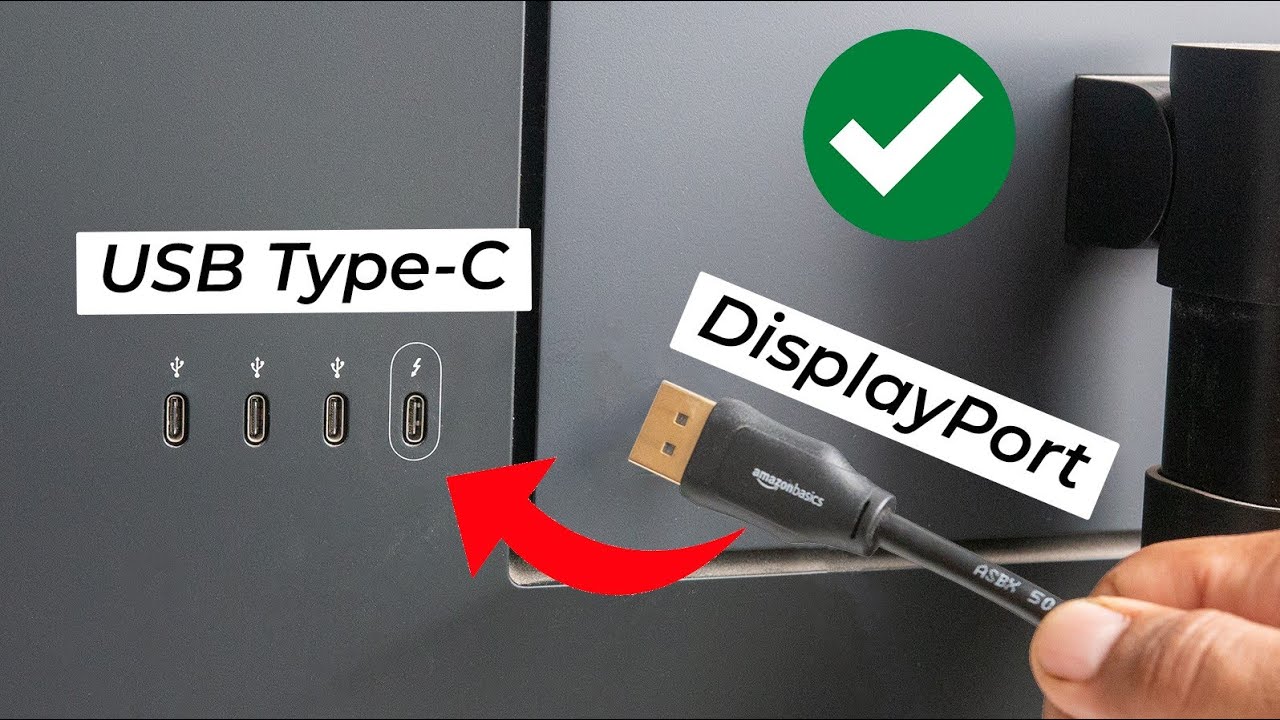
In today's video, I'll be showing you how to connect your laptop or desktop to a monitor which has USB Type C input.
➡️Thunderbolt 3 Expansion Cards: https://bit.ly/2UWFiHV
➡️Type-C to DisplayPort Cables/Dongles: https://bit.ly/3BMBFoE
➡️Wacom Link Plus: https://bit.ly/3f1skzr
➡️DisplayPort to mini DisplayPort Cable: https://bit.ly/2VdgI5s
➡️LG ...
You'll need a little bit more than just that dongle you posted a picture of.
@topaz harbor
severe dirge
No problem.
topaz harbor
Exactly what I thought basically
severe dirge
Glad I could help and learn something new in the process. 🙂
 quartz sandal
Asrock is making monitors 
 small warren
Yeah I saw that earlier. Probably not gonna go well 
 sick plume
quartz sandal
Asrock is making monitors <:worrythink:398047795119915010>
sick plume
quartz sandal
Asrock is making monitors <:worrythink:398047795119915010>
Work only if attached to amd gpu
If attached to intel igpu, heat up and die
quartz sandal
Lol
severe dirge
Nah, I'm actually excited for mine.
Like I'm so anxious my stomach is nauseated lol
sick plume
I have a pato
severe dirge
Noo. I have a Pato
quartz sandal

sick plume
No my pato
sick plume
Get ur own pato
quartz sandal
 sick plume
This pato is my pato
severe dirge
Well. Your Pato has been claimed by me.
sick plume
Ive had this pato for over a year
quartz sandal

sick plume
I had called dibs
severe dirge
sick plume
Ive had this pato for over a year
Which makes you old news. I'm something new. 
sick plume
You cant disrespect another mans dibs
quartz sandal

small warren
I have come to claim the pato
sick plume
severe dirge
Sound fair?
Nope
small warren

severe dirge
small warren
I have come to claim the pato

sick plume
small warren
I have come to claim the pato
Cant i had dibs

 sick plume
small warren
I'll see your dibs at the end of my sword! Hiya! <:Reeeee:646233862971719711>
sick plume
small warren
I'll see your dibs at the end of my sword! Hiya! <:Reeeee:646233862971719711>
Amateur
points bazooka
severe dirge
sick plume
Cant i had dibs
No.. I has dibs...
 small warren
 quartz sandal

sick plume
severe dirge
No.. I has dibs...
Not on pato
small warren
Ew Reo
severe dirge
Sorry

 severe dirge
Nothing
 severe dirge
I deleted. I didn't mean to make it sound that bad.
small warren
Ur fine lol
severe dirge
It looks like Rawr didn't see it though. Good lol
severe dirge
"Pro"
small warren

 small warren
Pato gonna need a 2nd shower 
sick plume
@severe dirge YOUR MOVE
 severe dirge
sick plume
<@913267599779971133> YOUR MOVE
severe dirge
sick plume
<@913267599779971133> YOUR MOVE
I already won, you just didn't get to see it.
sick plume
severe dirge
I already won, you just didn't get to see it.
Cant prove it if it don exist
You won nothing
severe dirge
sick plume
You won nothing
Its ok to be wrong. 
sick plume
severe dirge
Its ok to be wrong. <a:rainbowsheep:482237605803720715>
Ita always important to tell urself this
small warren
||Silently sneaking Pato away...||
severe dirge
Fail
severe dirge
small warren
> ||*Silently sneaking Pato away...*||


 severe dirge

Wow. We really held #old-monitors-and-tv hostage just to dibs on pato.
And yet, Felix still manage to get away with our beautiful man.
 severe dirge
Assrocks? When I eat cheese, I have those.
small warren
quartz sandal
sick plume
<@191276897227898880> i made art

quartz sandal
small warren
Pato gonna need a 2nd shower <:kekw:741678350791081994>
Hmm?
severe dirge
quartz sandal
Hmm?
That comment correlates with my deleted one and the pic with the dibs on you.
 old arch
quartz sandal
Hmm?
old arch
quartz sandal
Hmm?
Hmm, indeed. I keep thinking there monitor info here then I check & it's basically gen chat number 2.
severe dirge
old arch
Hmm, indeed. I keep thinking there monitor info here then I check & it's basical...
Degen chat

 visual pilot
I am true potato
sick plume
visual pilot
I am true potato
POTATO FOR THE POTATO GOD
 visual pilot
sick plume
POTATO FOR THE POTATO GOD
visual pilot
sick plume
POTATO FOR THE POTATO GOD
POTATOES FOR THE POTATO THRONE
 fading wyvern

small warren
Hey Darvan, care to spend 5 minutes to know about our lord and saviour Potato schwink?
quartz sandal
severe dirge
That comment correlates with my deleted one and the pic with the dibs on you.
I don't get why shower tho
quartz sandal
visual pilot
I am true potato
LIES
quartz sandal
NO U
visual pilot
Uno
quartz sandal

visual pilot
Onu


 indigo berry
 oh yes a 2k monitor
 indigo berry
Itek taurus GGF TN 144hz 1ms
small warren
Oh yeah you mentioned earlier my b
indigo berry
It's just bad from every point btw
It looks like to have a yellow/green filter on the screen and ofc I'm pissed since I paid 130€ for a scam
Why everything has to go wrong?
quartz sandal
small warren
To clean off the dibs! <:rozasadhic:637306257237082122>
Oh but they in a box lol all good
quartz sandal
indigo berry
<:Bruh:598228546980151316> oh yes a 2k monitor <:PepeHands:968900943368319007>
Technically 1080p is way way closer to 2k than 1440p
indigo berry
N O
Don't say that
""Yeah but the 16 of 16:9 is 1920 which is almost 2k pixels, meanwhile the "2k" monitor is 2560pixels which is definitely not similar to 2k pixels""
quartz sandal
1080x1920 -> 1.9k =) 2k
1440x2560 -> 2.5k =) 2.6k
2160x3840 -> 3.8k =) 4k
indigo berry
Just NO 
quartz sandal
But yes
indigo berry
Yes
But from "standard" 2k = 1440px2560p monitors
small warren
Did it say FHD anywhere in the article?
quartz sandal
But 1080p is 2k
small warren
quartz sandal
1080x1920 -> 1.9k =) 2k
1440x2560 -> 2.5k =) 2.6k
2160x3840 -> 3.8k =) 4k
It'd be painful if this person who sold it knew this then, is what I'm thinking
indigo berry
AaaaHHH
quartz sandal
1440p being called 2k hurts me
small warren
Not a pleasant thought
small warren
quartz sandal
1440p being called 2k hurts me
Imperial vs metric system
indigo berry
quartz sandal
1440p being called 2k hurts me
That's the standard
Literally everyone that doesn't say 1440p uses 2k to refer to 1440p
quartz sandal
If anything it would be
1080p 2k
1440p 3k
4k
small warren
quartz sandal
indigo berry
That's the standard
Literally everyone that doesn't say 1440p uses 2k to refer ...
Not really it's also entirely wrong
Ppl say 1440
Less technical ppl might say 2k
small warren
I personally prefer QHD
indigo berry
Yes really, I know it's wrong but that's what they use
indigo berry
@quartz sandal i checked many monitors off Amazon, by searching "2k monitor" I got 1440p's as result (QHD) or watherver
All had descriptions like QHD 2k (1440p)
1440p 2560p... WQHD 1440p....
So basically 2k is what they use to define 1440p
quartz sandal
I guess it's just wrong tho
sick plume
indigo berry
It looks like to have a yellow/green filter on the screen and ofc I'm pissed sin...
I mean idk why u expected a quality monitor for that much with all the features it lists
sick plume
indigo berry
That's the standard
Literally everyone that doesn't say 1440p uses 2k to refer ...
Wrong
2k is 2048 × 1080
indigo berry
It wasn't even that btw
It's just wrong and it is 1080p 1920
indigo berry
sick plume
I mean idk why u expected a quality monitor for that much with all the features ...
I thought it was a decent price for a "1440p" monitor and I guess the seller set 130 as price on purpose, for a 1080p 130€ is a scam (for used) because you can find better ones for 90€
sick plume
Oh used
indigo berry
In my opinion he's a scammer
sick plume
In my opinion ur salty because didnt see review on rtings before buying tbh
unless he gave you a wrong model number on listing
and a wrong one actually arrived
If you got what he said he was selling thats not his fault
indigo berry
There are not reviews and ratings, on this site people just put a product they own, could be used, new, broke, perfect or bad conditions and just sell it to you
Only one article for one person
sick plume
indigo berry
There are not reviews and ratings, on this site people just put a product they o...
but like who said you have to look at reviews on that site only
you can just
google the name of the monitor
and then add in review at the end
indigo berry
That's not the point of reviews, on this site you can't set reviews for products, only for customers
sick plume
Bro no one talking about that site
leave that site aside
did the listing for that monitor you bought have the name of the monitor
yes or no question
just answer with a yes or a no
dont send a sentence
indigo berry
The description said "selling itek 2k 144hz monitor"
And as 2k I expected 1440p, itek only sells 1440p IPS example
It's not 2k, I got 1080p
And NO, 2k ≠ 1080p
I assume everyone writes 2k as 1440p
sick plume
indigo berry
The description said "selling itek 2k 144hz monitor"
And as 2k I expected 1440p...
thats all it said?
No model number or anything?
sick plume
So you bought something without knowing what it was
and now ur mad because its not waht u wanted
indigo berry
I actually googled based on 1440p (since description said 2k) and 144hz itek monitor
Got results for a itek 1440p IPS 144hz 1ms
I was expecting a 1440p
Because literally everyone says 2k intended as 1440
severe dirge
 sick plume
indigo berry
I was expecting a 1440p
sick plume
indigo berry
I was expecting a 1440p
did it say 1440p?
indigo berry
Yeah search up for 2k monitors online and check for how many 1080p's pop out
sick plume
indigo berry
No
Then why were u expecting it
 sage trail
nobody actually uses the term 2k
if it doesnt say 1080p, 1440p, or 2160p/4k, you are being misled for sure
i wish people would use the term 2160p...
severe dirge
indigo berry
Yeah search up for 2k monitors online and check for how many 1080p's pop out
I googled 2k monitors and it showed me listing for 1080p....

Bruh. You're gonna have to accept that you didn't do your due diligence and make sure you knew what you thought you knew.
sick plume
You tried your luck with a vague listing and it didnt pay off
quartz sandal
indigo berry
In my opinion he's a scammer
Putting a price on something higher than competitors doesn't make you a scammer lol, if they deceived you by giving you wrong model, saying it wasn't broken etc sure but not if it's a bad price
quartz sandal
indigo berry
The description said "selling itek 2k 144hz monitor"
And as 2k I expected 1440p...
And he wasn't wrong with 2o because 1440p isn't 2k, if they said QHD then that would be a scammer sure but why didn't you check the model first
quartz sandal
sage trail
i wish people would use the term 2160p...
2160x3840 is actually very close to 4k because it refers to the 2nd number
indigo berry
Amazon gave me 1440p as a result for 2k monitors and also descriptions say 2k 1440p

I've always thought 2k is always meant as 1440p
quartz sandal
Ok Amazon will also give you random things nowhere near your search tho
indigo berry
Almost all Amazon 1440p monitor say 2k in their description.
I thought 2k was the standard to refer to 1440p ok?
sick plume
indigo berry
Almost all Amazon 1440p monitor say 2k in their description.
Ah yes marketing terms and actual standards are the same thing
quartz sandal
Here's an example that ik of off the top of my head
 sick plume
indigo berry
I thought 2k was the standard to refer to 1440p ok?
sick plume
indigo berry
I thought 2k was the standard to refer to 1440p ok?
dont make the seller a scammer
quartz sandal
indigo berry
I thought 2k was the standard to refer to 1440p ok?
No 1440p or qhd is
indigo berry
Nvm I'll just say I bought the wrong product and hope I can get refund. Because spending 130€ on a 1080p horrible monitor is just a waste of money for me.
Btw ok it's my fault, I should have asked the seller if it was 1440p/qhd, for me 2k has always been 1440p til now
sick plume
indigo berry
Nvm I'll just say I bought the wrong product and hope I can get refund. Because ...
You didnt buy a wrong product tho
You would be a scammer if you did that
indigo berry
I could say I bought from a seller with a similar product
I know it doesn't sound right but I'm not letting my money wasted on such monitor
Btw 130 for 1080p is extremely bad price considered it's used
And not perfect condition
sage trail
quartz sandal
2160x3840 is actually very close to 4k because it refers to the 2nd number
they are identical. they refer to the same resolution
quartz sandal
sage trail
they are identical. they refer to the same resolution
Yeah but 3840 is actually close to 4k pixels

 small warren
The photography people will have our back with megapixels 
sage trail
bc "4k" ultrawides are no longer 4k
but they are still 2160p
so we should just use 2160p
because thats what it is :(
small warren
Most of the conventions in general have conflicting issues because it's number and ratio restrictive
Imagine a 1440p monitor wide enough to have the same pixel count as 4k
sick plume
indigo berry
I could say I bought from a seller with a similar product
I know it doesn't sou...
it sounds like u salty and tryin to scam seller
quartz sandal
small warren
Maybe we should start calling it 8.3MP

quartz sandal
sage trail
bc "4k" ultrawides are no longer 4k
That's a fair point
indigo berry
sick plume
it sounds like u salty and tryin to scam seller
Uuh
No
Many websites give you the option to return if you buy the wrong product, I basically bought a wrong one since I expected 2k as 1440p...? 
Nvm I'll just try to return it, I don't give a.... I just want my money back from this guy
sage trail
small warren
Hey you can't deny if we go by true pixel count it's easier
i think the ideal way to market monitors would be with pixel density, h/v dimensions, and aspect ratio
resolution is actually so irrelevant its not even funny
yet it seems to be all that matters
sick plume
indigo berry
Uuh
No
Many websites give you the option to return if you buy the wrong product,...
ur affecting his rating on the site because of ur mistake lmao
small warren
Yeah aspect ratio is a big dependency when stating 1440p, 1080p etc
sick plume
thats scamming him
sage trail
technically, aspect ratio is irrelevant too if you provide both h and v dimensions lol
indigo berry
sick plume
ur affecting his rating on the site because of ur mistake lmao
Not if I don't rate him, nothing changes, the person who buys can leave a review, I won't
If he wants to give me a 1star review it's ok... I'll stick with that
small warren
Where's VESA to overrule all these other standards lol
sick plume
indigo berry
Not if I don't rate him, nothing changes, the person who buys can leave a review...
you are the one who deserves the 1 star review lmao not him
stop crying and deal with ur mistake tbh
indigo berry
sick plume
you are the one who deserves the 1 star review lmao not him
Re read the message
If HE wants to give ME a bad review
He can
It's ok
sick plume
indigo berry
Re read the message
If HE wants to give ME a bad review
He can
It's ok
"the person who buys can leave a review"
You are the person who bought
indigo berry
The person (referred to any person) who buys CAN
But I won't, I won't leave any bad reviews for any reasons, I won't affect his ratings
indigo berry
Yeah ok
I may be wrong but he should have specified more in the description
Considering many people use 2k as 1440p
End of the conversation. I understand
indigo berry
Btw I was able to give the monitor back, I told him it didn't match the description since I personally assume 2k is 1440p and you won't change my mind, I know it's wrong calling it that way but that's what everyone does.
He ended up saying that he messed up the product description since he also knew 2k is 1440p (another user made him notice the error in the description as he said) but apparently he didn't change the description after that? Sus
So he just told me I can send it back and get refund
Not changing the description after someone told him about the mistake/error sounds like someone who is trying to scam people in buying a non 1440p monitor
What makes me think he's a scammer even more is the fact that he had just created his account few weeks ago
 oblique belfry
can someone help me rq

MSI Full HD Gaming RGB Non-Glare Super Narrow Bezel 1ms 1920 x 1080 165Hz Refresh Rate Adjustable Height Arm FreeSync 27” IPS Gaming Monitor (Optix MAG273R2).
does this have Gsync??
Please ping me in response so i dont forget
indigo berry
It is not gsync compatible
quartz sandal
Not officially but any semi recent monitor with display port has freesync built into that standard which gsync basically is
They're the same thing
indigo berry
On MSI website it is listed as gsync compatible 🤨 
Huh?
oblique belfry
Illl js get a different one or something
Im getting it in acouple of months just wanted to research
old arch
99% of freesync monitors can be used w/ gsync. "Legit" gsync monitors are not common, & extra expensive.
indigo berry
One of the reviews of the MSI monitor said it didn't work with is 3070
No gsync ig
 raw ingot
indigo berry
One of the reviews of the MSI monitor said it didn't work with is 3070
No gsync...
raw ingot
indigo berry
One of the reviews of the MSI monitor said it didn't work with is 3070
No gsync...
for nvidia you're required to use displayport
no hdmi
amd cards work with freesync hdmi
 true monolith
Hey guys is there a huge difference between a 144hz and 165hz monitor?? I want a 1440p 32" monitor
true monolith
thx!!!!
 winged lava
Which is better for gaming: IPS or VA?
errant edge
ips
quartz sandal
They're both decent tho there's some va's better than trash ips's etf
winged lava
This is the monitor I’m looking at with VA

Best Buy
Shop Samsung Odyssey 27” QHD IPS 165Hz 1ms FreeSync & G-Sync Compatible Gaming Monitor with HDR Black at Best Buy. Find low everyday prices and buy online for delivery or in-store pick-up. Price Match Guarantee.
And here’s the other monitor I’m looking at with ips
Is local dimming that big of a deal
Also, what is contrast ratio?
quartz sandal
@winged lava if you're in the us I'd just go gigabyte g27q
severe dirge
gigglebyte G27Q is bae
severe dirge
Whats a good monitor someone can get in Singapore thats 27" curved 1440p 165hz around the S$500 mark?
Has to be these specs.
I suggested M27Q/G27Q/G32QC, but those are all apparently $800+ over there.
quartz sandal
severe dirge
I suggested M27Q/G27Q/G32QC, but those are all apparently $800+ over there.
Try msi g273qf
severe dirge
quartz sandal
Try msi g273qf
Is that curved?
@quartz sandal these are the 2 he is looking at.

 quartz sandal
severe dirge
Is that curved?
quartz sandal
severe dirge
Is that curved?
Nope
That must be the curved version they're looking at
Sorry didn't see curved
severe dirge
quartz sandal
Sorry didn't see curved
Its ok. Its just a friend and I wanted to help him save as much as he could for a good monitor.
If you don't know of one, which out of the 2 would you suggest?
quartz sandal
Could go the msi one out of those 2 anyway
severe dirge
That was my thought. They seem comparable with msi one being cheaper.
raw ingot
good ol lazada
 river ginkgo
Hey so question so I recently got a new motherboard a Gigabyte b550 aorus elite and like the of boots and stays on but it says “an incorrect DisplayPort version settings will cause the screen to be blank. If this occurs, make sure the DisplayPort version setting matches the device it’s connected to.” But I had a gigabyte b450 Aorus elite and dp worked fine never had issues with it and I’ve changed my version from 1.4 to 1.2 1.1 judt to see if for some reason it went to an older version and it didn’t work any ideas?
Like it worked a few hours before I got the new motherboard it’s the same gpu it just shows a blank screen with that message
I found a hdmi cable I’m gonna try that
quartz sandal
river ginkgo
Hey so question so I recently got a new motherboard a Gigabyte b550 aorus elite ...
You have the motherboard connected to the gpu right?
river ginkgo
Yeah I got the video but windows won’t boot wne I have a close friend in it with the error codes we think windows corrupted we tried many many different things lastnight and it just didn’t work
 lime moat
Thinking of buying a new monitor, pairing with a 3070. Not wanting to spend the G sync money. read a bit about G sync compatible and free sync and so on. what is the best options?
1080p or 1440p, 144hz
fading wyvern
https://www.amazon.com/gp/product/B093MTSTKD? This is a excellent option, The M27q p or m27q x is also great

27” UltraGear Full HD (1920x1080) IPS Display, 16:9. Beauty in every battle with IPS and Full HD resolution. Reimagine every scene with vivid, responsive IPS. At 27" and 16:9 screen ratio, LG's UltraGear™ Full HD IPS Display features realistic, true color, enhanced contrast, clarity and detail, w...

RTINGS.com
The LG 27GP850-B is an impressive 27 inch monitor with a 1440p IPS screen. The first true replacement to the very popular LG 27GL850-B and LG 27GN850-B, it deliv...
quartz sandal
lime moat
Thinking of buying a new monitor, pairing with a 3070. Not wanting to spend the ...
I would go for gigabyte g27q if you're in the US atm really good price
quartz sandal
fading wyvern
https://www.amazon.com/gp/product/B093MTSTKD? This is a excellent option, The M2...
Description says 1080p for some reason lol
fading wyvern
quartz sandal
Description says 1080p for some reason lol
lol thats weird nice job LG
 fading wyvern
the 850-b is rated higher by rtings and about the same price 
quartz sandal
But 
fading wyvern
ik lol
quartz sandal
fading wyvern
the 850-b is rated higher by rtings and about the same price <a:Elmo_Burn_Hell_F...
Rtings don't have m27q-p :(
fading wyvern
quartz sandal
Rtings don't have m27q-p :(
 point stands
quartz sandal
fading wyvern
<a:KEKYou:962839995620683826> point stands
How dare you
 indigo berry
I'm starting to change idea for the 1440p upgrade, considering some games I play (like warzone and war thunder) average respectively 125 & 170 FPS with high settings/ custom. Looking at some benchmarks online i saw the FPS drop from 1080 to 1440 goes from 25 to 30%. That'd mean 90 & 125 FPS (in the best scenarios) from the two games i usually play the most... Lowering textures? No,,... There would be no reason for the monitor upgrade then... Dlss? No... Warthunder dlss could be called "blur with high FPS" and warzone's quality dlss is just... Meh... Won't look good on a 2k (1440p).
I'll probably stick to a used 1080p for 90 bucks, and if I want I upgrade later
misty gyro
There's a program to change the version of DLSS a game is using, that often helps a lot
indigo berry
Is rtx 30 & 20's dlss different? Except for the better results in FPS you get with 30 series?
indigo berry
misty gyro
There's a program to change the version of DLSS a game is using, that often help...
But should I use this because of games that use older versions of dlss?
misty gyro
indigo berry
Is rtx 30 & 20's dlss different? Except for the better results in FPS you get wi...
Yes 30 series has better DLSS
indigo berry
I mean the image quality...? Is it better?
misty gyro
indigo berry
But should I use this because of games that use older versions of dlss?
Sometimes upgrading or even downgrading the DLSS version helps, it depends
indigo berry
Warthunder's ig is the worst one I've ever seen
misty gyro
Give it a try, or look for someone that has
 misty gyro
You can test with DLSS quality and balanced modes in 1080p
It should translate to 1440p pretty well
indigo berry
Yeah I know but warthunder's quality is still super blurry
Warzone's is ok, just a bit blurry but I guess it's not workt for 1440p
If I set 1440p as my screen resolution I can try how the game frame rate is
Big brain moment 🧠
misty gyro
Set 1440p using DSR and then DLSS? Hmm
indigo berry
Idk, wasn't there a settings that allowed you to get up to 4/8k Res in windows monitor settings?
Just need something that allows to set my GPU output resolution to 1440p even if my current monitor is 1080
misty gyro
indigo berry
Idk, wasn't there a settings that allowed you to get up to 4/8k Res in windows m...
Yes, dynamic super resolution, DSR
It allows you to choose higher render resolutions in game but not the desktop
indigo berry
Yeah, just wasn't sure if that was the option in control panel that allowed you to set higher res
misty gyro
You'll set a multiplier, I think 1.78x was the one closest to 1440p native
indigo berry
But that's not really the point where I want to get to
Dsr renders to higher res and shrinks the image back to your monitor res right?
I guess it won't give the same result as 1440p native
misty gyro
It'll still be rendering in the higher resolution so your fps will reflect that
indigo berry
Or will it work about the same?
Because the image "shrinking" takes up some GPU work ig
misty gyro
You're right it's not quite the same but it's close enough for testing
visual pilot
indigo berry
Yeah I know but warthunder's quality is still super blurry
Warzone's is ok, just...
War thunder dlss is just blurry in general, best to run it natively, it's not hard to run anyways
indigo berry
Ok
misty gyro
I started running out of system memory playing war thunder, 16gb isn't enough lol
visual pilot
Bit weird, shouldn't need that much ram
misty gyro
On cinematic quality preset?
indigo berry
visual pilot
War thunder dlss is just blurry in general, best to run it natively, it's not ha...
Yeah I know but sometimes I get the "city" map and that's a good <70 FPS for 1080p, 50-60fps in 1440p would just make my eyes explode
visual pilot
What how
indigo berry
For my 2080 that's it, a nice 70fps average on that map
visual pilot
indigo berry
Yeah I know but sometimes I get the "city" map and that's a good <70 FPS for 108...
Try turning down physics for that map, other than that, I can run that map just fine w a 2070
Max with turned down tree range and grass range I get around 140fps
indigo berry
Maybe there was something wrong..? Because I don't think such a map lowers the FPS by that much
misty gyro
My "commit" memory hit 18gb at one point before it crashed in game.
I was getting plenty of frames before the crash lol.
indigo berry
Maybe reflections
visual pilot
Lol
indigo berry
Since it's all skyscrapers
visual pilot
Maybe, I also have reflection quality turned a bit lower
indigo berry
G L A S S
misty gyro
Classic raster issues with reflections, dx11 games are notorious for that
indigo berry
Yeah probably that... Since it was the first time I was setting up the game graphics and I hadn't lowered reflexion quality

Sorry for the blurry image but that's it
indigo berry
indigo berry
Pov: dlss
indigo berry
misty gyro
Classic raster issues with reflections, dx11 games are notorious for that
Is it a dx11? Ah
indigo berry
Is there a big difference right? Between 11 & 12...
But ig they used 11 because there are no benefits for dx12
11 is like 2006
12 is 2016
*2009 for dx11
misty gyro
There's benefits for 12, it leverages the CPU threads more and takes some load off the GPU for physics, lights, etc
WT was 2014 iirc
I do remember 11 came out near the launch of win 8
Maybe you're thinking of 10 for '06
Ah I'll just look it up
Yep 10 was '06
11 was '09
12 was '15
And of course it takes a couple years for games to start getting the new feature sets
And WT was 2012
indigo berry
I did say 2009 after for 11
 eternal elk
What would be a good secondary and third monitor?
The main monitor I have decided to go for is a Gigabyte M27Q-X 27” 240z
So something that would compliment that would be nice
old arch
Perhaps G27Q. I'm not which other 1440p monitors have similar looks for the M27Q(X). at the very least should skip 1080p for secondary obviously.
eternal elk
Ok, they are about the same thing just different hzs
quartz sandal
I'd honestly just grab a cheap va or ips 1440p monitor and not care about hz
severe dirge
I like having 1440p as a secondary and 1080p as my third.
eternal elk
I might just use my current secondary monitor as my third
 buoyant prism
Is there really any difference between m27qx and mag274qrx performance wise or is it mostly the same since they use the same panel?
errant edge
buoyant prism
Is there really any difference between m27qx and mag274qrx performance wise or i...
Neither is worth it
240hz is useless unless you're playing very competitively, in which case you'd want 1080p 240hz
 zealous jetty
How much watt does a normal aoc 19" lcd monitor with 1366x786 nativ res consumes?
sage trail
zealous jetty
How much watt does a normal aoc 19" lcd monitor with 1366x786 nativ res consumes...
look at the power supply
or the part where the barrel plug goes in
or if the power supply is internal, then the power ratings should be on a sticker on the back somewhere
quartz sandal
errant edge
240hz is useless unless you're playing very competitively, in which case you'd w...
I meannn
Games that can do 240hz on 1080p will most likely be cpu bound anyway
true monolith
This is my first and I just bought a monitor that comes with a 2.0 hdmi cable and a 1.4 displayport cable. Which one should I use? This is my first time using a displayport, do both look the same?
misty gyro
DP is preferred over HDMI usually since it usually has more bandwidth, which can allow better resolution settings
true monolith
thx @misty gyro
quartz sandal
Also dp offers gsync/freesync which hdmi doesn't always
misty gyro
HDMI can but not at high res like 4k or 1440p 144hz+
HDMI 2.1 is great, but they screwed up the standards so they can call 2.0 ports 2.1
true monolith
ohh that's another question since I have a 3070 and my monitor offers freesync, I will not be able to use ir?
misty gyro
What monitor
true monolith
sansumg Odyssey G5 32" 144hz
misty gyro
Yeah you'll want to use DP or it might either keep you from using freesync or limit you to 120hz with it on
true monolith
Nice! thank you!! I was trying to read a post from reddit and everyone had different opinions and I got confused
👍
misty gyro
The reason there's so much different info is because there's things like display stream compression that totally changes how it works but reduces quality... There's another rabbit hole to fall into for that
fading wyvern
quartz sandal
Games that can do 240hz on 1080p will most likely be cpu bound anyway
There’s also the added benefit of less perceived input lag, its super minimal but you know
 maiden wedge
hello i have a weird specific question. hopefully this is clear.
i have 2 monitors and when i play a game in borderless windowed on my main one, but want to keep it minimized when i do stuff in the background on my desktop (drag and drop a file somewhere or open something on either of the 2 monitors), how do i keep the game from popping back up and blocking everything on my main monitor?
i guess in borderless windowed the game kinda acts as the desktop, so you cant really get around this?
old arch
Click it's taskbar button to minimize, or just run normal windowed for a bit to easily hit the minimize button. Idk, all I can think of .
quartz sandal
Windows key + D also shows desktop but ime game will try pop back up once you click something on the desktop
Can just navigate to desktop in file explorer tho
old arch
I often alt tab from a windowed game and do a bunch of stuff w/ no issues, so idk.
quartz sandal
old arch
I often alt tab from a windowed game and do a bunch of stuff w/ no issues, so id...
Yeah but you can't alt tab to desktop
From borderless fullscreen*
Only regular fullscreen
old arch
Yea I can, alt tab then click it's task bar button, lol. Although of course I generally don't bother minimizing the game. 
quartz sandal
Or just put it on 2nd monitors desktop, gotta have one otherwise why would you play borderless windowed anyway
old arch
Oh any idea to have games not stuck at 20 fps when alt tabbed? Could just be apex, I'm not even sure. I mean simply when game isn't "focused". No big deal though
quartz sandal
Not really, ik cod has a max menu fps thing which i have set to 30 because i don't need 300fps my gpu boing brr in menu
 clear temple
why do people buy 8k pannels now , like there is no way u will game on it , and almost no media to watch at the res
i think buying an 8k panel in the future when 8k should be cheaper
misty gyro
"bUt It'S FuTuRe PrOoF"
4k is only now getting cheaper, and that's mostly because they're all smart TVs that push ads
They take a loss on the hardware and make it back and then some over the life of the product
eternal elk
What’s a good budget 144hz monitor
 sturdy kindle
eternal elk
What’s a good budget 144hz monitor
sturdy kindle
eternal elk
What’s a good budget 144hz monitor
What resolution are you looking at?
eternal elk
It don’t matter
errant edge
g241
eternal elk
Ok thx
sturdy kindle
only drawback with this one is it's a VA panel so the viewing angles aren't as good as an IPS
sick plume
sturdy kindle
https://www.newegg.com/black-samsung-odyssey-g3-s24ag30a-24/p/N82E16824022994?De...
g241 better
clear temple
samsung g8 or alienware qd-oled, which is the best moniter
clear temple
what i belive is that the alien ware has better colours and blacks , and the samsung is 240 and 4k , is that true
sturdy kindle
personally I think the Alienware would look better
haven't seen one in person but I have seen Samsung's QD-OLED TV and it's gorgeous
raw ingot
qd-oled is good
errant edge
clear temple
what i belive is that the alien ware has better colours and blacks , and the sam...
no
raw ingot
very good
errant edge
alienware makes overpriced monitors
raw ingot
well some of their stuff are good
like the qd-oled
aka quantum dot
oled with no burn in
sturdy kindle
errant edge
alienware makes overpriced monitors
no arguing with you there. MSI has a QD-OLED coming out so we'll see what the price difference looks like
 vale coral
could someone pls reccomend a good monitor for macbook pro 14 (27"/30", 4k, usb c)
fading wyvern
clear temple
samsung g8 or alienware qd-oled, which is the best moniter
Just gunna mention, any qd oled panel is a Samsung panel repackaged and resold with slightly different tuning. Might as well go with the original or who ever is selling the cheapest one.
eternal elk
So uhh my monitor froze and is stuck on discord and windows won’t detect it anymore and even when I unplug it and plug it back in it’s still frozen
Does that mean my monitor is dead
It’s a 60hz Asus gaming monitor
Don’t remember the name
misty gyro
Plug something else into it to test
eternal elk
I tried switching from the vga to the hdmi port and it’s still frozen
misty gyro
Does the on screen display show if you push the menu button?
eternal elk
Yes
misty gyro
It sounds like something made it get stuck in the buffer. How long did you leave it unplugged?
misty gyro
Weird. And it's the same screen it got stuck on?
eternal elk
Yes
misty gyro
Try factory resetting from the menu
eternal elk
I don’t know how to control the menu I forgot how
misty gyro
How many buttons does it have
eternal elk
6 including the power button
Ok I figured out how to get to the system setup
Do I turn on all reset?
misty gyro
Yes whatever option resets it completely
It should blank the screen as part of the process, clearing the buffer
eternal elk
All it did was reset the settings
misty gyro
I love when they don't have a real factory reset 🙄
eternal elk
Im trying to send the menu screen rn
misty gyro
The only other things I can think of are plugging in another device or leaving it unplugged overnight
 indigo berry
@misty gyro remember when we were talking about DSR to "simulate" 1440p res performance in game? Do i just set 1.78x DSR (not DLDSR since it is supposed to give only better image quality "without" performance drops) 1.78x is 1440p for DSR. But there is also DSR smoothness... What percentage should I use and what's the main difference, just smoother or sharper image?
Do i also need to change my resolution in windows settings or is it already doing what he needs to without me having to touch anything else
sick plume
indigo berry
<@396513761550270464> remember when we were talking about DSR to "simulate" 1440...
enable dldsr
indigo berry
No, that's not the point, I'm just trying to see the performance I'd get with 1440p monitor by basically using 1440p res (using DSR)
DLDSR should give no FPS drop but slightly better image quality
Maybe...
sturdy kindle
I don't think you can use it at native res
unless I'm misreading what you're aiming for
you can use it in combination with DLSS to basically downscale and upscale to native
but not just on it's own
indigo berry
Dsr renders images at higher res, you choose which one in Nvidia control panel... Then it downscales it to your monitor resolution and I guess if I set DSR to render 1440p images and downscale them to my 1080p res monitor it'll approximately give me 1440p native res frame rate
I do this just to see what frame rates I'd get with 1440p, considering the 1440p upscaling and then 1080p downscaling of DSR should give about the same fps
sturdy kindle
Ok. Yeah, it'll work for that
sick plume
indigo berry
No, that's not the point, I'm just trying to see the performance I'd get with 14...
if thats ur only goal smoothness and stuff dont matter
indigo berry
Don't they give different frame rates at higher values?
sturdy kindle
Yes
The game will be rendering at a higher resolution
So it'll be like playing at 1440p
misty gyro
The smoothness can be thought of as AA
indigo berry
Yeah but I mean the smoothness, will it change FPS...
So basically a smoother image (with DSR smoothness) will give me lower FPS probably
sturdy kindle
Yes, it'll drop the performance
misty gyro
Yes but not significantly
sick plume
indigo berry
Yeah but I mean the smoothness, will it change FPS...
not enough to worry about
indigo berry
Like AA does
Basically same thing?
misty gyro
It'll be within a few percent
indigo berry
Yeah, I mostly prefer sharper images btw
sick plume
pretty much margin or error
sturdy kindle
A little heavier than most modern AA
sick plume
indigo berry
Yeah, I mostly prefer sharper images btw
Ur just testing what fps ull get at 1440p
indigo berry
I'll see what frame rates for "1440p" I'll get
sick plume
no other setting matters
just use the settings u usually play
and simply set dsr to 1440p
sick plume
indigo berry
Do i have to change anything in games? I guess not
unsure how dsr works but you might have to set 1440p in game if it works like the amd alternative
sturdy kindle
Just set the res to 1440p in game
misty gyro
In game you'll just set the resolution like you would normally
indigo berry
What about windows screen resolution? It's set to 1080p but with DSR I could set 1440p
misty gyro
It doesn't work for desktop
It still has to output in 1080, it's just rendering higher
sick plume
misty gyro
It doesn't work for desktop
smh my head what if he wants to test fps while dragging windows on 1440p
misty gyro
You're just testing monitor response at that point
indigo berry
misty gyro
It still has to output in 1080, it's just rendering higher
Ok. But why does windows let me use 1440p if it's just rendering 1440p and downscaling to 1080
misty gyro
Just ignore that
indigo berry
Okk
misty gyro
Set the in game resolution to 1440 and that's all
sturdy kindle
Windows doesn't really use the gpu on the desktop anyway so it's not a stress test
indigo berry
So u sure 1440p DSR (1080p x1.87) ≈ 1440p native frame rates
misty gyro
It'll be pretty close
indigo berry
misty gyro
Set the in game resolution to 1440 and that's all
If I don't set (keeping 1080p) it'll just work like it usually does with completely normal 1080p res?
sturdy kindle
Yes
indigo berry
Ok
misty gyro
Yes, it'll just render in whatever resolution you set
misty gyro
Right since that's native
sturdy kindle
If you're interested in better image quality though I recommend DLDSR
It cleans up pixel integer from uneven resolutions
misty gyro
Just testing frame rates to see if upgrading to 1440 monitor is viable
indigo berry
Yeah
I saw this video where it shows DLDSR giving better FPS but in all other games it doesn't, it's just better image quality and much lower FPS https://youtu.be/yp8a_ICYk8w
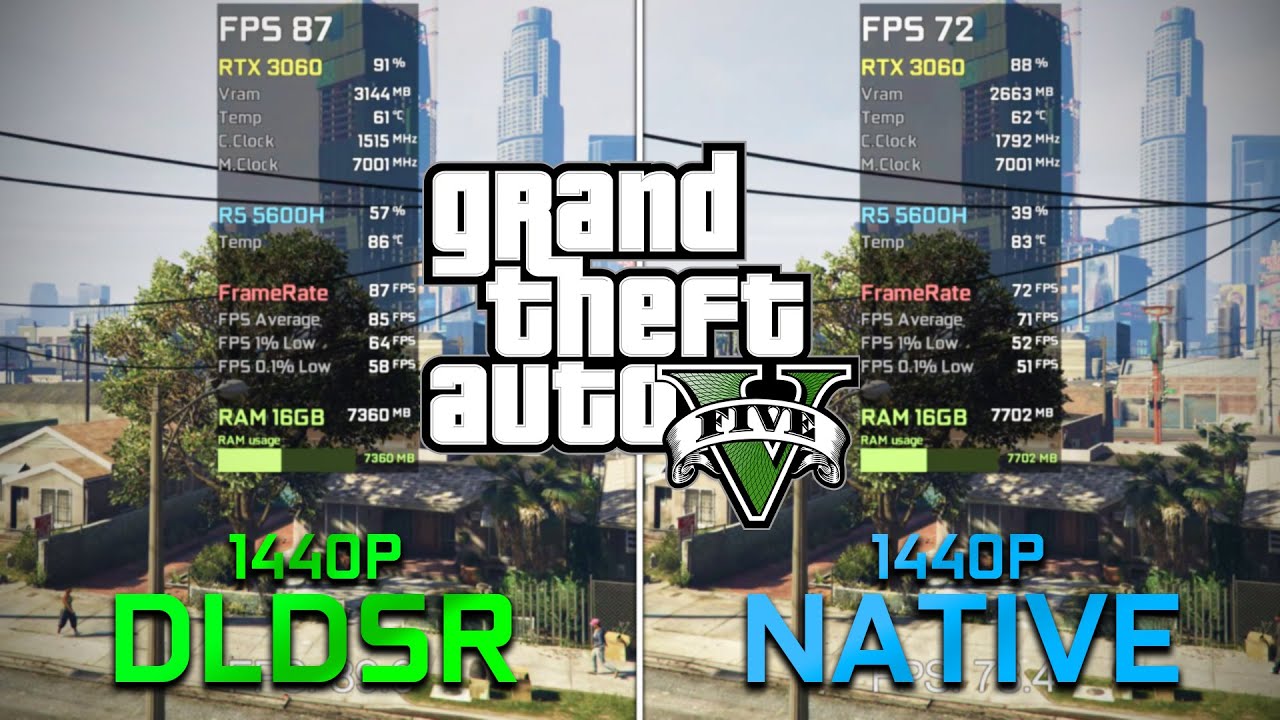
BUY CHEAP GAMES HERE:
https://www.instant-gaming.com/?igr=edwardstudio
DISCORD:
https://discord.gg/64pKqEs5FQ
DLDSR and NATIVE - 0:00
Graphics Settings - 0:07
COMPARISON DLDSR vs NATIVE 1440p - 0:19
► Recorded with a Capture Card ( Elgato HD60S+ ) which is connected on another PC without losing FPS 📽️ ...
Also what happens if I chech more than one box for DSR/DLDSR? Do i just get more res options in game?
I mean the upscaling: 1.87x, 2.00x, 4.00x...
sturdy kindle
Yes
indigo berry
indigo berry
Yeah
I saw this video where it shows DLDSR giving better FPS but in all other ga...
I guess this video has something wrong... Because DLDSR should give much worse performance compared to native res
indigo berry
Tested 1440p DSR (0% smoothness) in Beamng drive:
1080p native: Min-117 max-149 FPS
1440p DSR (1080 1.87x): min-124 max-157
Uuuhhh
That looks like it did nothing
Nvm
The game just didn't apply 1440p res
I'll test it again
Actual results:
1080p native: Min-117 max-149 FPS
1440p DSR (1080 1.87x): min-124 max-157
Min-117 max-128
For some reason the image quality is really really bad
Why does it look like this? Look at the edges...

Eeew
 sick plume
indigo berry
Actual results:
1080p native: Min-117 max-149 FPS
~~1440p DSR (1080 1.87x): min...
sick plume
indigo berry
Actual results:
1080p native: Min-117 max-149 FPS
~~1440p DSR (1080 1.87x): min...
U arent testing imague quality
ignore and move on
indigo berry
Yeah but I thought DSR should have gave me a better image quality too considering its downscaling a 1440p image
Don't really like the 20fps max drop... I guess I'll stick to 1080p
sick plume
indigo berry
Yeah but I thought DSR should have gave me a better image quality too considerin...
You arent applying any smoothing and overall quality will be higher. Either way tho it is still a 1080p screen not a 1440p one, dont expect wonders
quartz sandal

Check prices on Amazon below (monitor recommendations)
Best 1080p 240Hz: https://geni.us/F5F3N3
Best 1080p 360Hz+: https://geni.us/akp9
Best budget 144Hz: https://geni.us/3vxfQA
Best mainstream 1440p: https://geni.us/P2AkjDr
A quick-fire guide for getting the best settings out of any gaming monitor.
UFO Ghosting Test: https://www.testufo.com/g...
vale coral
120hz 4k monitor for macbook pro ?
misty gyro
What budget and size, that's going to be very expensive
vale coral
27inch, unless you can use gaming monitors with macbooks?
misty gyro
27 inch 4k is pointless unless you'll be 6 inches from the screen or you're editing 4k video
vale coral
best all rounder 27inch then ? maybe one from dell or lg
misty gyro
You still haven't said a budget. The best $300 monitor is very different from a $500 one
misty gyro
vale coral
best all rounder 27inch then ? maybe one from dell or lg

- Predator GameView technology - 400 cd/m brightness - Built-in stereo speakers - 4 USB 3.0 ports - HDMI and DisplayPort inputs - G-SYNC technology for smooth gameplay - 1 ms response time
That one has good Mac compatibility, variable refresh rate support and all
vale coral
thank you
 remote basin
Is gigabyte 27” g27q or m27q better?
remote basin
Okay sounds good 👌
I bought a pixio px277 27” and I’m not happy with it and the g24F (which I love) but I’m thinking of maybe just returning those for a single good quality 27” or maybe even 32” but that may be too pricey
misty gyro
Personally I think 1440p at 27 inches is perfect, 32 is a little too big for me (and my desk)
remote basin
Yeah I’ve never tried a 32 before, but 27 is a great size
misty gyro
I really need a bigger desk lol, mine is only 40 inches wide and my computer barely fits under it. My monitors are laid out weird too.
remote basin
Oof yeah same here, I think my desk is slightly longer but the monitors take up most of the space and I would have preferred to have my pc on the desk too but it’s not possible
sturdy kindle
I feel like 32" is too big for 1440p. The pixel density starts to show
When I move to 32" I'm going to have to move to 4k
old arch
1440p on 32" is actually nearly the same ppi as 1080p on a 24". It's just a large screen either way
misty gyro
If you're sitting really close to the screen the pixel density matters more, but if you're a good 2-3 feet from the monitor it's fine
misty gyro
Oh you never said anything about an adapter. That's why I was suggesting trying it with another device.
eternal elk
Ah
sturdy kindle
old arch
1440p on 32" is actually nearly the same ppi as 1080p on a 24". It's just a larg...
I used the 32" LG Ultra gear at work and it didn't look as sharp as my 27" at home
 stuck idol
im looking at this for my office. daytrading and light gaming. running from macbook pro. will be my first monitor. wht are yalls thoughts?
visual pilot
stuck idol
im looking at this for my office. daytrading and light gaming. running from ma...
It's fine, just don't expect MacBook pro being able to run games well at 1440p
stuck idol
@visual pilot understandable. I’m going to upgrade down the road. Recommend another one? I do prefer 32in curved
visual pilot
Then that's going to be fine
IPS panels are gonna be flat unless you splurge
And well, other monitor things don't really matter for day trading
stuck idol
i purchased this one, hooked it up and it looked awful.
thats when i realized i dont know the first thing about monitors. ha
visual pilot
Never heard of them, and 1080p 16:9 at 32inch would be pretty bad pixel density
visual pilot
It should, and high refresh rate shouldn't really matter to you
stuck idol
hmm. thought it was better for the eyes? im staring at charts all day.
i could do 4k with a 60hz and stay around the same price point
visual pilot
Stuff like blue light reduction with windows settings and stuff would actually be helpful, higher refresh rate don't matter much outside of gaming
4k60 does give you more pixels and would look a bit nicer
visual pilot
You're welcome
 verbal spear
is pixio px7 prime good?
im getting it for like 200 just wanted to know if its good
 twin patrol
Best cheap 144hz
sick plume
Go on newegg search pcs and buy one
fading wyvern
winged lava
Is the HP X32 monitor good?
 surreal quarry
how much of a difference in picture quality is it going from 27in 1440 --> 32in 4k
fading wyvern
surreal quarry
how much of a difference in picture quality is it going from 27in 1440 --> 32in ...
108 pixel's per inch vs 137.68 (4k)
fading wyvern
Not really worth it imo. 1440p is plenty unless you're doing some professional work
surreal quarry
ok ill think on it
maybe if i find a good deal
thinking about the Gigabyte M32U
fading wyvern
Great cheap option if youre going for 4k.
surreal quarry
rtings says its the "Best 4k Monitor" https://www.rtings.com/monitor/reviews/best/by-resolution/4k-ultra-hd-uhd

RTINGS.com
The best 4k monitor that we've tested is the Gigabyte M32U. It's an excellent monitor with a 32-inch, 4k screen.
the contrast is meh but not much differnt than my m27q so thats fine
misty gyro
surreal quarry
rtings says its the "Best 4k Monitor" https://www.rtings.com/monitor/reviews/bes...
If you ignore OLEDs maybe.
For the price M32U can't be beat though.
winged lava
Does it matter if I get the G27Q or the G27QC?
visual pilot
g27qc is va, g27q is ips
winged lava
Ah ok
misty gyro
27" curved is a little ridiculous, it's not big enough that you need the curve to improve viewing angles
quartz sandal
Personal preference tho some ppl prefer curves even at 27"
winged lava
What’s the benefit to VA that it’s cheaper but has lower response
quartz sandal
Mainly that it can be curved for cheap when ips cant
visual pilot
VA is cheap, that's the main characteristic, better contrast but typically worse everything else compared to ips
winged lava
So the gaming monitor y’all recommend is the G27Q?
old arch
Besides M27Q, yes
misty gyro
For the under $300 price range yes G27Q
 ornate bronze
Will this ever be in stock again in Newegg Canada? https://www.newegg.ca/p/N82E16824716004

 solemn grottoBOT
:8ball: | It is decidedly so, Fal'Cie
indigo berry
𝑙𝑒 𝐶𝑎𝑟𝑙
 fossil sluice
hi is anyone available?
well i have an issue with my MSI Optix Mag321qr, after being off for a while it shows a foggy white border that slowly fades away. the problem just appeared about 2 days ago. The monitor is just outside the 30 day return window for newegg. I have confirmed it is the monitor by using another monitor and cable. Online searching only points to laptops and none of those solutions worked. I am hoping i dont need to send it in since it is my only monitor. any ideas?
clear temple
to make self lit pixels, why do they need organic matterials
raw ingot
oled?
clear temple
yea
raw ingot
well because it's easiest to do so
there's non organic version of oled, called quantum dot
but right now it's only reserved to expensive monitors
and tv's
clear temple
ik about quantom dot, but i dont think the pixels are self emiting like oled
the point of oled that the pixels can like turn off
and have perfect blacks
raw ingot
quantum dot does the same thing too
clear temple
i dont hear people saying that quantom dot got perfect blacks, just like oled,
raw ingot
it does tho
if it doesn't then that's fake qd
samsung tends to do this on cheaper "qled" monitors
they just like put a layer on top of ips panel
vale coral
Has anyone seen the new lg ultragear monitor
errant edge
fossil sluice
well i have an issue with my MSI Optix Mag321qr, after being off for a while it ...
Should still have a warranty
As in, through msi
fossil sluice
It does. Tech support st MSI says backlights are malfunctioning. It's being RMAed and thankfully they are going to cover shipping since it was 300 plus to send to California.
errant edge
Nice
fossil sluice
I figure it's just a fluke. Good customer service too so I'll find a loaner screen
I'm guessing they send me a new one. They seemed interested in the issue and I bet they study what caused it.
raw ingot
They either try to fix it or send whole new unit
Whatever's cheaper
But I doubt they're gonna fix it and just send another one instead considering how they seem to want to investigate into this
misty gyro
vale coral
can anyone help with a good monitor with usb c 4k preferably 27"
Gigabyte M28U
Since no budget was stated I just went with the best option in the parameters given
quartz sandal
For productivity you mainly want multiple monitors or an ultrawide
Also imo 27" at 4k id pretty pointless would just do 1440p
 chilly dawn
I kinda wanna delve into ultrawide
But idk
Seems like a hassle
And expensive
And some games don't wanna work with it
Plus I don't wanna go under 144hz
And I dunno if the XT can run it well
I would hope s9
So
chilly dawn
To yall who use ultrawide, is it worth the hassle to yall
Really tempted to save up for one
But I don't really do productive stuff
misty gyro
chilly dawn
To yall who use ultrawide, is it worth the hassle to yall
Unless you want to watch widescreen movies with minimal black bars I'd say no personally. There's very little gain in my eyes.
chilly dawn
I wanted more screen real-estate for games but ehhh
Alot of games don't support it the best
misty gyro
Most games don't do a proper FOV adjustment and just stretch the textures
old arch
multi monitor is best for gaming while multitasking. can full screen game then 2nd monitor has youtube , discord, or w/e. Plus 2nd monitor can go vertical, very nice sometimes.
misty gyro
Yeah I'm going to get a dual monitor mount that I can rotate eventually, should be great for discord while gaming
severe dirge
quartz sandal
For productivity you mainly want multiple monitors or an ultrawide
Laughs in 4 monitors to use while gaming. 1 dedicated to interwebz. 1 for gaming. 1 for sensor panel. 1 for the rest of everything else.
quartz sandal
You can for gaming too but gaming only requires one screen
severe dirge
quartz sandal
You can for gaming too but gaming only requires one screen
I could not just have 1 screen even for just gaming.
I would die.
quartz sandal
Lol
small warren
Die irl?
quartz sandal
Yeah i would come and kill him
severe dirge

 cerulean jackal
Anyone know if l can get a monitor that is around the size of 32 inches? My current pc build has a 5600g in it but l just got a 3050 and l have a 27 inch monitor but l wanted to get a bigger monitor eventually
errant edge
cerulean jackal
Anyone know if l can get a monitor that is around the size of 32 inches? My curr...
For 32in, you'd want 1440p, which will run like ass on a 3050
cerulean jackal
errant edge
For 32in, you'd want 1440p, which will run like ass on a 3050
Yeah l figured so l should probably get a 27 inch even though l would want a bigger monitor?
old arch
Already have a 27", so only you can decide.
cerulean jackal
errant edge
For 32in, you'd want 1440p, which will run like ass on a 3050
What about getting a monitor that is around 32 inches, but it is 1080p?
old arch
Realize that 1080p is commonly on a 24" monitor. 32" 1080p would be.... not fantastic in the looks department.
errant edge
cerulean jackal
What about getting a monitor that is around 32 inches, but it is 1080p?
It'll look like ass
Because of pixel density
cerulean jackal
errant edge
It'll look like ass
Okay. Wish it didn’t look that bad. I wanted to get a bigger monitor since there is some room on my desk but l guess l could have a dual monitor setup but l don’t stream. What could l use the second monitor for?
errant edge
I use an old crappy one for discord, main monitor for gaming, and third monitor for chrome, YouTube, steam etc
Imo 2 monitors is better than one big one, but different people prefer different things
cerulean jackal
If l had a more powerful gpu, l would get an ultra wide but that’s just me
old arch
Many games also don't support UW res (well). Plus UW by itself has quite a price premium. Could have 2x1440p for $400ish sometimes. Way more screen space than what a single UW would get.
visual pilot
Btw 32in 21:9 2560x1080 has basically same pixel density as 24in 1920x1080
And 1080p uw panels don't have to be that expensive
cerulean jackal
errant edge
I use an old crappy one for discord, main monitor for gaming, and third monitor ...
If l got a different monitor than the one l have now, will the image quality look different?
visual pilot
Yes
cerulean jackal
I will probably get the same monitor that l have now for a secondary monitor then
errant edge
I mean
I have three different models, none of them have rhe same resolution or refresh rate
Or panel type of the matter lmao
visual pilot
The difference can vary
errant edge
1440p75hz ips 1080p165hz VA 1050p60hz tn
visual pilot
But for a secondary panel, I don't think you need to worry about color accuracy for discord lol
cerulean jackal
The monitor l use now is a 27 inch asus vg279q
I would want the secondary monitor to be asus
cerulean jackal
Do you know what asus monitor that isn’t the one l have currently and it is cheaper that would be good for a secondary monitor?
vale coral
I’m stuck between either getting a tv (Samsung QLED/LG OLED) or getting a gaming monitor(LG ultragear/gigabyte M28U)
Any opinions ?
For next gen gaming on ps5 and also have a MacBook which I could connect
severe dirge
vale coral
For next gen gaming on ps5 and also have a MacBook which I could connect
Idk that TVs come in above 60hz.. if you want to utilize your ps5 to the fullest, I'd go with a monitor that supports 120hz.
visual pilot
Using Macbook probably won't be fun with tv, but do keep in mind ps5 prob won't have fun with 4k144
Think it'll only really do 4k60
fading wyvern
Lg oleds are typically all gaming certified aka gsync comp/ 120hz+ and have 2.1 hdmi connections
 frosty trench
bought a 165hz "24" lg ultragear monitor but the samsung brand does not disappoint even so the only difference in price for me is the inches even though it depends on the model
severe dirge
fading wyvern
Lg oleds are typically all gaming certified aka gsync comp/ 120hz+ and have 2.1 ...
Ah ok. I shouldn't have said anything, idk much about this. Was just trying to help. Don't yell at me.

fading wyvern
severe dirge
Ah ok. I shouldn't have said anything, idk much about this. Was just trying to h...
I AM YELLING LOuDLY
severe dirge
fading wyvern
I AM YELLING LOuDLY
Except for that u. Thats a softly said u.
 honest kernel
I need some advice here... So I am selling my Acer Pred x27 (specs here: https://acerrecertified.com/acer-predator-x27-27-gaming-monitor-nvidia-g-sync-120-hz-oc-144-hz-4k-uhd-3840-x-2160-600-nit-x27-bmiphzx/). Ebay, which seems to be the only place to sell it (other than local marketplace), shows the certified Acer store selling a refurbished on for $1100 and it is 33% off that price. So $730 for a refurbished monitor. On their main website, refurbished is $1,133. I have 2 dead pixels which are on the corners of the monitor, so its not horrible, but I know it affects the price of the monitor. If any of you were buying a used monitor and didn't care about the dead pixels, should I sell my monitor for like $500-$600, to be competitive with Acer? Thoughts?
maiden wedge
looking for good monitor recommendations
want something 32 inch, 1440p+, 16:9 ratio
misty gyro
Budget?
maiden wedge
no budget
any price is ok
misty gyro
One of these then, personally I'd look at the xeneon
 maiden wedge
i am a big corsair fan
 golden ravine
I just RMA the GIGABYTE G27Q 27. It failed in 5 days of use anyone else have the monitor fail that fast?
misty gyro
Sometimes you just get a bad one. When you make 10,000 units even if 99.7% are perfect (which is very hard to achieve) that still means 300 bad ones get out.
chilly dawn
Bad panel rng
severe dirge
golden ravine
I just RMA the GIGABYTE G27Q 27. It failed in 5 days of use anyone else have th...
Nope. I have had my 2 G27Q for 6 months now with no issues. You likely just got a lemon with the oranges.
 cerulean ravine
I have a monitor that has a bit of an issue. If I bump my desk the screen kind of does a fading thing and then needs to be given a hard reset. Anyone know how to fix this?
errant edge
Try diff cable?
cerulean ravine
I'll try
 deep falcon
2nd monitor won't wake or work without having to replug it in
clear temple
msi is working on a moniter with the same panel as the qdoled alienware, btw cuz its the same panel , does this mean they cant boost the resfresh rate or could they make a 240hz qdoled moniter
misty gyro
clear temple
msi is working on a moniter with the same panel as the qdoled alienware, btw cuz...
The only thing that can't be changed is the resolution when two monitors use the same panel. Colors will almost certainly be different, refresh rate can be different, and response times can be very different.
clear temple
if the msi moniter hits 240hz , idk but maybe that could be the best moniter ever
i will do very inappropriate stuff for a moniter like that
sturdy kindle
I'm waiting for the Samsung made QDOLED monitors
Should replace the Neo in their lineup
errant edge
Waiting for 8k 360hz myself
sage trail
lol
sturdy kindle
Or at the very least, get the Alienware model once it drops in price
errant edge
Only to get 2.6 fps at low settings
Why alienware?
Their monitors are kinda mid, especially at the price
sturdy kindle
Because right now they're the only ones with a QDOLED
sage trail
we talking about qdoled
errant edge
Ah
errant edge
Idk enough about monitors to know what's cool about qdoled
sage trail
but yeah, i saw the msi one pop up a while ago
sage trail
errant edge
Idk enough about monitors to know what's cool about qdoled
imagine the best of every panel type
with none of the drawbacks
sturdy kindle
QDOLEDs have a brighter, more resistant to burn in panel
errant edge
Attractive
sturdy kindle
Compared to W-OLED
sage trail
errant edge
Attractive
and expensive!
errant edge
I recently traded for an led laptop and the screen is physical pain
Didn't realize the screen was that bad before trading
Wait not led
sturdy kindle
OLEDs have the best pixel response in the market and the best contrast ratio
errant edge
Maybe it is, idr
errant edge
Definitely tn
sage trail
tn is lcd
sturdy kindle
I just wish there was more OLED monitors in general. 48" isn't practical
errant edge
Color accuracy is dog ass
errant edge
I'm kinda salty about monitors atm, I ordered an m27q-x for $350 after tax
And amazon canceled the order
sturdy kindle
LG is going to be making panels as small as 20" so hopefully that changes soon
errant edge
Next time an m27q variant, g27q, x27q or anything similar goes on a good sale I'm buying
sturdy kindle
I find 27-32" the sweet spot for the desk space
errant edge
20" would make sense for a side monitor for discord and such
fading wyvern
20" is weird.
fading wyvern
imagine your best and probably most expensive monitor just being 20 inches and you arent a film crew on a scene
sage trail
i would also get a deeper desk
errant edge
I'm on 24, I think I'll go for 27 next. 32 seems too big for me with how close I sit
sturdy kindle
They're making a spectrum down to 20". Not just 20" panels lol
errant edge
Ultra wides don't make sense to me
fading wyvern
"LG plans to introduce a 20-inch OLED panel by the end of the year, and unlike most other offerings in this size, it will be used in consumer devices."
errant edge
I dont get having a 49" monitor with three different things broken up on it instead of three different monitors
fading wyvern
literally just 20" panels
sage trail
errant edge
I dont get having a 49" monitor with three different things broken up on it inst...
you can watch movies on all 49"
thats why
very application specific
errant edge
Can watch movies on my 7" phone too :p
sturdy kindle
But it's not the same
clear temple
i want to start learning coding
how do u guys suggest i start
not any specific language or anything , i just want to have an understanding about how my computer works more
quartz sandal
clear temple
not any specific language or anything , i just want to have an understanding abo...
You can't learn coding without learning languages, that's like saying you want to learn how to speak without using a language, best way to start would be do use code academy or something and learn java probably, most people say python but i disagree for a first language as it builds lazy habits
clear temple
i dont mean to not learn any language , i just mean like i want to understand the computer works and stuff idk
but ok
quartz sandal
clear temple
i dont mean to not learn any language , i just mean like i want to understand th...
Like the basics of how ram cpu etc work?
quartz sandal
clear temple
i dont mean to not learn any language , i just mean like i want to understand th...
If so this looks like a decent explanation of some parts
https://youtu.be/Rv73ki6fTuo

This is just a compilation of my computer explanation videos.
0:00 - Computer Components Rundown
7:38 - Graphics Cards
11:14 - Hard Drives
16:47 - Disk Fragmentation
19:21 - RAM
23:59 - Monitors
31:03 - Binary
37:36 - Voltage States
42:41 - Mouse
46:46 - The Internet
Individual videos can be found under the "Tech Videos" playlist on my channel.
That video doesn't really cover cpu, power supplies or ssd's by the look of it but good enough start
clear temple
quartz sandal
Like the basics of how ram cpu etc work?
no like , how does windows perform tasks
how do files work
and the video feels basic , i want to understand more advanced stuff
quartz sandal
I mean it goes over binary and stuff like that
clear temple
id check it out , but ik most of the basic
quartz sandal
Skip to around the Ram or binary chapter then
quartz sandal
small warren
Computer science degree?
Computer science is just coding a scary amount of CS degrees barely know how to turn on a pc
small warren
Sadge
I feel like there'd be some sort of degree for it tho
Maybe electrical engineering 
quartz sandal
Don't think there is exactly, like kinda electronic engineering yeah

 untold idol
help why does windows think i have a third monitor

 junior nacelle
Looking to buy a 27" 144hz monitor for gaming. Anyone got any suggestions?
From USA
errant edge
junior nacelle
Looking to buy a 27" 144hz monitor for gaming. Anyone got any suggestions?
What is your budget
junior nacelle
What's a good price to spend? $200?
errant edge
What gpu do you have?
27 inch with 1080p doesn't look great
I'd probably get the g27q, but if your gpu isn't good enough 1440p won't run great
junior nacelle
It's an rtx 3070 I'm running
 shadow jolt
IPS vs TN
errant edge
Ips has better color accuracy, faster response time, easier on the eyes, and can have higher refresh rates
junior nacelle
errant edge
$260
Ty for your suggestion. Any monitors you know under $200? This would be ideal
errant edge
I'd go for 24inch, with the g241
visual pilot
pretty meh panel but this exists
https://www.amazon.com/dp/B0862YHJ56

27-inch Curved Gaming Monitor FreeSync support ensures a stutter-free and tear-free gaming experience at any frame rate Equipped with a curved 27" VA panel the CQ27G2 displays a detailed Quad HD resolution (2560x1440 pixels) at a screaming 144 Hz refresh rate and 1ms (MPRT) response time. Crazy I...
visual pilot
errant edge
I'd go for 24inch, with the g241
g24f nice for 1080p rn
https://www.amazon.com/dp/B096YGM2WS

24” 1920x1080 IPS Display with 165Hz Refresh Rate, 1ms (MPRT) Response Time Smooth Gameplay with AMD FreeSync Premium Studio Grade 90% DCI-P3 Color Gamut GIGABYTE Classic Tactical Features with OSD Sidekick GIGABYTE Auto-Update Ergonomic Design with Tilt and Height Adjustments Low Blue Light & Fl...
 last saddle
i cant get a straight answer off the internet, but im assuming that intel’s adaptive sync doesn’t need a monitor to be anything special to work? correct me if im wrong
misty gyro
last saddle
i cant get a straight answer off the internet, but im assuming that intel’s adap...
Are you referring to smooth sync, which is exclusive to the Arc A380 right now, or variable refresh rate, which applies to all brands? VRR requires a freesync or gsync compatible monitor.
Or perhaps the adaptive vsync that enables vsync if you're running a high enough fps above your refresh rate?
last saddle
i was thinking of the variable refresh rate i think
current situation is i wanna buy a new monitor but if i upgrade my setup later and go for an intel card because they’re cheap i want to insure that i can still eliminate tearing without having to use vsync
small warren
last saddle
current situation is i wanna buy a new monitor but if i upgrade my setup later a...
I would wait a bit to see if the Intel GPU segment survives first before considering them. They have some severe driver issues that need to be fixed and there's a lot of concern for Arc's future rn
There are a number of alternatives you can consider over an A380 anyway and they should be a 2nd hand choice at that price
Or save up to twice the A380's value and get an RX6600
clear temple
when people ask for a 144hz budget moniter people usually call out the g241 , but whats soo diffrent about it?
btw what am look for is a moniter with decent colour accuracy and a clean 144hz with minimal ghosting
doesnt need a pro-level colour accuracy just something that will get the job done and good for the same price
a smoother 144hz is more appreciated
visual pilot
clear temple
when people ask for a 144hz budget moniter people usually call out the g241 , bu...
Not much, it's just decent and cheap
G24F is nice too
Ghosting more of a problem on VA panels, IPS panels can have IPS bleed and some black uniformity issues though
 serene hamlet
Hey guys I am not sure why, but my screens sometimes keep shutting off and coming back on. I checked the HDMI's and they are secure in the GPU, and the plug is also looking fine... I just updated my drives as it was happening and when I finished/restarted it happened again.
misty gyro
serene hamlet
Hey guys I am not sure why, but my screens sometimes keep shutting off and comin...
Does it happen more often when gaming?
serene hamlet
misty gyro
Does it happen more often when gaming?
No I was on Desktop watching someones stream on Discord.
misty gyro
Could be a bad cable or port then
serene hamlet
It stopped for now...
 queen creek
Is there any good monitors that have 144hz+ for a good deal/value
quartz sandal
Gigabyte g24f for 1080p it hovers around 150-160 usd, for 1440p, gigabyte g27q is like 250, msi optix g273qf is also 250 atm on Amazon, personally would grab that over the g27q at the same price
I also like this for the price of 230
https://www.newegg.com/p/N82E16824012047?Item=N82E16824012047&Source=socialshare&cm_mmc=snc-social-_-sr-_-24-012-047-_-08232022
cerulean jackal
Anyone know a good monitor that is 35 inches and isn’t curved?
visual pilot
35in? 32in is a kind of common monitor size but above that you're probably going to mainly be looking at TVs
cerulean jackal
Maybe l would get a 32 then not sure. I have a 27 inch currently but l like a one monitor setup and l wanted to get a bigger monitor for my setup. My gpu that l have is an AMD gigabyte 6700xt
visual pilot
cerulean jackal
Maybe l would get a 32 then not sure. I have a 27 inch currently but l like a on...
Take a look at this
https://www.newegg.com/p/N82E16824012039
cerulean jackal
This is my current setup. Just wanted to get a bigger monitor to fill in some space and have a bigger screen at the same time
 small warren
so clean 
visual pilot
The monitor does look a bit small relative to the setup lol
small warren
it does but also I bet the inside of that PC looks a million 
cerulean jackal
small warren
it does but also I bet the inside of that PC looks a million <:terish:6747996242...
Sadly no gpu in it but l am going to order one soon so l will get my hands on one finally
cerulean jackal
visual pilot
The monitor does look a bit small relative to the setup lol
Yeah it does that’s why l wanted to get a bigger monitor
visual pilot
I think you'll want to test out 32in first and see how it looks, too big might force you to put it off center
visual pilot
cerulean jackal
Sadly no gpu in it but l am going to order one soon so l will get my hands on on...
GPU prices have fallen a good bit, although next gen might be coming within a few months
small warren
or maybe 2x27 might make it look a bit more full
visual pilot
Maybe
cerulean jackal
visual pilot
I think you'll want to test out 32in first and see how it looks, too big might f...
Maybe that’s what I’ll do then
cerulean jackal
visual pilot
I think you'll want to test out 32in first and see how it looks, too big might f...
Do you know a good 34 inch monitor just in case?
visual pilot
cerulean jackal
Do you know a good 34 inch monitor just in case?
34in is a size more for UW panels, 21:9, so the monitor would be wider but shorter, in general probably a bit smaller total size wise
 cerulean jackal
visual pilot
34in is a size more for UW panels, 21:9, so the monitor would be wider but short...
cerulean jackal
visual pilot
34in is a size more for UW panels, 21:9, so the monitor would be wider but short...
That’s the best 32 inch monitor in your opinion that you showed me earlier? The gigabyte one?
misty gyro
"Best" is relative, there's better ones closer to $500 and even better ones around $800
cerulean jackal
visual pilot
<@817037112272355339> what GPU though?
I have a 6700xt
cerulean jackal
visual pilot
1440p170 should be fine though
So you still would recommend the gigabyte monitor that you sent before?
visual pilot
M32q since want big monitor
M32q actually really nice because they went back to rgb not bgr like m27q
And still great monitor perf
cerulean jackal
Can you send me the link?