#peripherals-and-displays
1 messages · Page 29 of 1
 whole tide
 soft jay

Specifications:
Brand: EPOMAKER
Model: HE65 MEC
Layout: 65% ANSI US Layout
Number of Keys: 66 Keys, 1 Knob, and 1 TFT Screen
Connectivity: USB A to C Cable, 2.4GHz Wireless, Bluetooth 5.0
Compatibility: Mac/WIN
Case Material: ABS Plastic
Plate Material: PC
PCB Thickness: 1.2mm
Flex-Cut...
good keyborad ?
 next cipher
@oak jungle another great reco 🔥
 oak jungle
oh the 8bitdo?
next cipher
Ye
oak jungle
Yeah it's pretty sweet especially for sub $30
Reminded me that I never followed up on the $35 Fun60 Pro
Also pretty wild for the price
Hall effect switches work and feel great, software is a tad finnicky but gets the job done
The claim of 0.01mm doesn't seem to be quite true, to avoid ghosting inputs you have to set it more like 0.025
Granted, that's still insane compared to a speed mechanical switch at ~1mm
Also minor complaint but I wish there was one more brightness setting that was dimmer. I wanna save a bit more battery life
Just realized almost my whole setup is Chinese now
PSU & case: Sama
Mobo: jginyue
Cpu: 5700x3d (via AliExpress)
Keyboard: monsgeek (AliExpress)
Ok maybe that's more like half the setup but still funny
 nova bobcat
 obsidian summit
my friend is looking for a 1440P 27' monitor
obsidian summit
my friend is looking for a 1440P 27' monitor
whats their budget
If you want a pretty good monitor for a cheap the AOC Q27G3XMN is really good imo
I have it
And love it
 thorn grove
@west hornet @neon root

 west hornet
US MIGU
 neon root
already have one from earlier drops so dont have to worry
dropped at 11am and its 3pm now, still in stock

hype for miku pad is down
resellers cant resell it for $400 because of the amount of drops they have done
 sand chasm
hello
well i cant upload a photo, im trying to update the xg32ucwmg firmware from mcm1101 to 1103, everything went fine till 99% and now it is stuck in there for 2 hrs, should i continue waiting for it, or is it fine if i just cancel it, cause i have seen online some people having trouble updating to 1103 but none with the issue of stuck at 99%
 misty relic
ah this is the monitor
https://rog.asus.com/monitors/27-to-31-5-inches/rog-strix-oled-xg32ucwmg/
misty relic
sand chasm
well i cant upload a photo, im trying to update the xg32ucwmg firmware from mcm1...
any updates? have you tried reupdating the firmware again? or is it ALWAYS stuck at 99%
 tacit pawn
hey @misty relic , havw you any idea why my pc, keyboard and mouse turn on perfectly fine, but the monitor doesnt have a display?
like ot says no display
<@&525119001324683264>
tacit pawn
Nope DP, into the gpu
I turned off the PSU and turned it back on then it worked
but it still happens every so often
west hornet
What psu is it
tacit pawn
uh let me check the now
MSI MAG A650GL 650W 80+ Gold
fully modular if that affects anything
https://uk.pcpartpicker.com/list/LwfDXR thats my whole build
Part List - AMD Ryzen 5 7600X, Radeon RX 7700 XT, Montech XR ATX Mid Tower
 floral idol
Is it POSTing?
 quasi mica
Hey guys, I'm looking to buy lightweight, wireless (maybe with a wired option for when the range starts to dwindle), mid-high sound quality headphones (with a mic).
I was going to use pcpartpicker to look around, but having cloudflare issues atm. any recommendations?
I never used to care about my headphones that much, but the last 2 I bought were too heavy (neck injury) and had a vice grip on my skull.
looks like pcpartpicker is back up for me, but I would still rather have a hooman tell me what's up
 stiff sand
tacit pawn
hey <@171041318699663361> , havw you any idea why my pc, keyboard and mouse turn...
stiff sand
tacit pawn
hey <@171041318699663361> , havw you any idea why my pc, keyboard and mouse turn...
is the monitor confirmed working before u tried it?
or the pc confirmed working?
try using KNOWN working parts and switch them out til u find the point of failure
stiff sand
quasi mica
Hey guys, I'm looking to buy lightweight, wireless (maybe with a wired option fo...
i like the razer headsets
stiff sand
quasi mica
Hey guys, I'm looking to buy lightweight, wireless (maybe with a wired option fo...

Razer
Discover the wide selection of gaming headsets from Razer United States online today. Take your gaming to the next level with us!
one of these are good
i like them since they're lightweight and they don't clamp too much
i tried on a pair at work
stiff sand
quasi mica
Hey guys, I'm looking to buy lightweight, wireless (maybe with a wired option fo...
lookup the previous headphones and check the weight on those as well
tacit pawn
stiff sand
is the monitor confirmed working before u tried it?
wdym? my monitor and PC both work fine, pc boots instantly bla bla and my monitor always worked fine w my xbox etc.
stiff sand
so ur monitor suddenly stopped working?
o.o
or did u try connecting it recently?
@tacit pawn
tacit pawn
stiff sand
so ur monitor suddenly stopped working?
so its when I turn my pc off for a while, sometimes it detects it instantly, sometimes it takes the PSU to be turned off and on OR the the monitor to be unplugged and plugged in again
for it to deteft
stiff sand
o wow
stiff sand
tacit pawn
so its when I turn my pc off for a while, sometimes it detects it instantly, som...
can u recreate the problem w/ another monitor?
tacit pawn
i dont hve another monitor sadly
stiff sand
try a different cable?
flip the cable
try a different computer?
if u have another one somewhere
tacit pawn
stiff sand
flip the cable
will do when I turn my pc off tonight, it works fine when the pc has just been turned off then back on, takes it a few hours to do it if it does
stiff sand
tacit pawn
will do when I turn my pc off tonight, it works fine when the pc has just been t...
interesting o.o
is this a capacitors issue? o.o
tacit pawn
no idea😞
stiff sand
send a ticket to the MB manufacturer and the monitor one as well
it'll take a few days while u look deeper into this
try to recreate the problem w/ other parts
if it happens w/ a diff monitor, than it's the pc problem
if it happens w/ a diff computer, than it's the monitor issue
sand chasm
misty relic
any updates? have you tried reupdating the firmware again? or is it ALWAYS stuck...
hey sorry about the late reply, i checked the monitor's version and it showed that it was 103 "updated" however when i closed and reopened the software same update version "152" what bugs me even more is that the version im trying to update to 103 while the current version displayed on the software is 152, like im not genius but how could it be lower than the older version
also another issue i found was that when i put the screen from 32 to 27 or 24 while frame boost is active at 480 hz the resolution will be 1648x928, it wont let me switch to 1920x1080, if i force 1920x1080 it will automatically lower the fps down to 120hz
stiff sand
sand chasm
also another issue i found was that when i put the screen from 32 to 27 or 24 wh...
i don't think that's a bug, that's probably a feature
check the monitor specs to see if it can handle 480gz at full rez. probably not
oak jungle
The monitor page does say " (4K@240Hz, FHD@480Hz)"
Not sure what process means by "frame boost" though
Also if it's a 4k monitor I'm not sure why you're lowering the screen size. 1080p scales 1:4 with 4k so it should fill the full 32"
@sand chasm
 abstract vortex
Does anyone know what I could do about this?

3 lines of stuck pixels just appeared out of nowhere
 sand chasm
stiff sand
check the monitor specs to see if it can handle 480gz at full rez. probably not
sand chasm
stiff sand
check the monitor specs to see if it can handle 480gz at full rez. probably not
it is im sure
sand chasm
oak jungle
Also if it's a 4k monitor I'm not sure why you're lowering the screen size. 1080...
it is a bit better for comp games to play on 27 or 24 rather than 32 considering how bigger the screen is, but not sure why the resolution drops whenever i do it that way
oak jungle
sand chasm
it is a bit better for comp games to play on 27 or 24 rather than 32 considering...
it probably has to do with the scaling. You should leave it at 32" and move the monitor further away if needed
does 1080p480hz work at 32"?
sand chasm
oak jungle
does 1080p480hz work at 32"?
yes it does
oak jungle
yup, likely a scaling issue then. The way the 1080p480hz mode works is that 4 pixels get treated as 1.
when you try to do your own scaling at <32", you're messing that up
sand chasm
wait so what u are saying is that the this high framerate is actually all of the actual 4k pixels combined ?
is that even a thing ? forgive my ignorance but i dont know that much about screens
oak jungle
4k is like 4 1080p screens put together. So you can display 1080p on a 4k screen by grouping the pixels in groups of 4
when you try and lower the size of that image (32" to 27" or 24"), the scaling isn't 1:4, its something like 1:3.xxxxxx
the monitor 480hz mode likely only works when the scaling is integer
sand chasm
hmmm thats weird that they wouldnt mention something this important in their monitor while advertising that u can lower the size to 27 or 24
oak jungle
is that advertised?
sand chasm
it is
oak jungle
hmm
sand chasm
misty relic
ah this is the monitor
https://rog.asus.com/monitors/27-to-31-5-inches/rog-strix...
. check this
oak jungle
i'm not seeing anything about 27" and 24"
sand chasm
i cant send pics
 sand chasm
yub
oak jungle
technically it doesn't say the refresh rate there
this is from AI but :
"It is important to note that when using Frame Rate Boost mode (which lowers the resolution to 1080p for 480Hz refresh rate), aspect ratio modes like 24.5" or 27" limitations affect achievable refresh rates and resolution, sometimes preventing maximum refresh performance."
According to the review on RTINGS and various user reports, when Frame Rate Boost is enabled for 1080p at 480Hz, the monitor effectively uses a reduced resolution, which doubles the refresh rate—this is due to the monitor switching to a dual-mode operation where the effective resolution is halved, and the refresh rate is maximized. However, certain aspect ratio and size modes such as the 24.5" or 27" aspect ratios impose restrictions on the maximum achievable refresh rate at the lower resolution. Specifically:
When aspect ratio control is set to 24.5" or 27", the monitor does not allow reaching the full 480Hz refresh rate at 1080p resolution; instead, it limits the refresh rate to around 120Hz to stay within bandwidth limits.
These restrictions are tied to how the monitor's internal DL (DisplayLink) processing works in tandem with its bandwidth, and are documented as performance constraints rather than software bugs.
Source for this behavior:
RTINGS review clearly states that with Frame Rate Boost mode activated, trying to use aspect ratio modes like 24.5" or 27" prevents reaching the full 480Hz at 1080p resolution because of bandwidth limitations.
The ASUS forum discussions and Reddit threads also report similar restrictions when combining aspect ratio set modes with Frame Rate Boost, confirming this is a known design limitation rather than a hardware fault.
In essence, the increased bandwidth required for full-resolution, high-refresh-rate operation (especially with aspect ratio control) exceeds what the DisplayPort connection can handle at the higher speeds, hence why the maximum refresh rate is capped in these configurations.

RTINGS.com
The ASUS ROG Strix OLED XG32UCWMG is a high-end 32-inch OLED gaming monitor. Using the same third-generation WOLED panel as competing models, like the LG 32GS95U...
sand chasm
damn im really cooked i was trying to look online for this info but i guess im not looking in the right place
ty guys, much appreciated
oak jungle
sand chasm
ty guys, much appreciated
You might be able to get 1440p at ~23"
*with 1:1 pixel scaling
oak jungle
Yeah of course
obsidian summit
nova bobcat
If you want a pretty good monitor for a cheap the AOC Q27G3XMN is really good im...
budget is around 200-400
also
anyone got thoughts on this newegg monitor
looks great for the price plus the sale
but no reviews
it is shipped by newegg tho so I trust it
 astral wedge
please help with 120 hz monitor on amazon I'm not sure which one to get .
stiff sand
astral wedge
please help with 120 hz monitor on amazon I'm not sure which one to get .
I'm going to stick w/ Newegg's site since I'm the Newegg admin. Here's a list of PC monitors filtered by 120 Hz. Here's a list of additional questions for you.
- What resolution do you want?
- Do you want OLED?
- What size?
- What's your budget?
 warm sequoia
Is dead pixel & ufo tests the only tests I can perform on my monitor without professional equipment? I just wanna make sure there is no damage or underperformaning.
 daring zenith
warm sequoia
Is dead pixel & ufo tests the only tests I can perform on my monitor without pro...
daring zenith
warm sequoia
Is dead pixel & ufo tests the only tests I can perform on my monitor without pro...
In general, yea all you can do is UFO for refresh rate ghosting and such, then visual inspection for any dead or stuck pixels. Can't really check color accuracy or brightness without proper equipment
 rocky bronze
Can someone help me find a monitor that’s really good for gaming, under $200, 240hz or more, and either from Amazon or micro center. I want a good resolution and panel that doesn’t blur under 27inch please.
oak jungle
rocky bronze
Can someone help me find a monitor that’s really good for gaming, under $200, 24...
25" 1440p240hz
https://pcpartpicker.com/product/X98Pxr/innocn-25g2s-245-2560-x-1440-240-hz-monitor-25g2s
24" 1080p310hz
https://pcpartpicker.com/product/z6GhP6/asus-rog-strix-xg259cms-245-1920-x-1080-310-hz-monitor-90lm0a40-b013b0

INNOCN 25G2S 24.5" 2560 x 1440 240 Hz Monitor (25G2S)

Asus ROG Strix XG259CMS 24.5" 1920 x 1080 310 Hz Monitor (90LM0A40-B013B0)
rocky bronze
oak jungle
25" 1440p240hz
https://pcpartpicker.com/product/X98Pxr/innocn-25g2s-245-2560-x-1...
I was looking at this one https://a.co/d/gCi5a57

The 27-inch TUF Gaming VG27AQM5A QHD gaming monitor features a Fast IPS panel for blistering-fast 300Hz refresh rate gaming and 0.3ms GTG (min.) response time. ASUS Extreme Low Motion Blur and Adaptive Sync technology enables buttery-smooth gaming. In addition, it supports HDR and has a 95% DCI-P...
Is it any good?
oak jungle
^^linked the same one twice by accident
oak jungle
rocky bronze
Is it any good?
looks pretty good
rocky bronze
oak jungle
looks pretty good
Out of the Asus Tuf and Asus ROG which one would you say is better out of the 2 monitors?
oak jungle
if your gpu can handle it I highly reccomend 1440p
1080p -> 1440p will be a bigger jump than 240hz->310
rocky bronze
oak jungle
if your gpu can handle it I highly reccomend 1440p
I have a 5060ti with a AMD ryzen 5 7600x
rocky bronze
oak jungle
1080p -> 1440p will be a bigger jump than 240hz->310
Dang
oak jungle
rocky bronze
I have a 5060ti with a AMD ryzen 5 7600x
probably ok for 1440p, certainly for esports games
rocky bronze
oak jungle
probably ok for 1440p, certainly for esports games
I play Fortnite Cod Steam games and more
rocky bronze
oak jungle
probably ok for 1440p, certainly for esports games
Is the one I sent you 1440p cause I think it is
The monitor
oak jungle
oh yeah it is, I missed that
oak jungle
yeah
rocky bronze
Alr
rocky bronze
oak jungle
yeah
Thanks for your help!
rocky bronze
oak jungle
yeah
Sorry quick question I just found this is it any good? https://www.microcenter.com/product/701872/aoc-cq27g4zx-27-2k-qhd-(2560-x-1440)-300hz-curved-screen-gaming-monitor
I see the monitor other places and the specs are different so idk if it’s really what it says
oak jungle
that's VA so the motion clarity won't be as good
warm sequoia
I think that’s what it’s usually at
 pallid coral
warm sequoia
I think that’s what it’s usually at
pallid coral
warm sequoia
I think that’s what it’s usually at
Gotcha ive moved away from that one i recently upgraded to a 5080 and a ryzen 7 9800x3d so im thinking maybe 2k 360hz instead i can't find a good deal tho although im not sure what a good deal on that is
warm sequoia
pallid coral
Gotcha ive moved away from that one i recently upgraded to a 5080 and a ryzen 7 ...
What kind of games do you play? Do you also care more about FPS or Image quality?
pallid coral
warm sequoia
What kind of games do you play? Do you also care more about FPS or Image quality...
I care about fps more for sure fps and response times
I pretty much only play competitive games
warm sequoia
I would check out the Alienware 2523HF or 2525HM if your budget is around $200
If you absolutely want 1440p
Then there is also another alienware monitor on sale I forgot the name but I’ll link it later. I think it’s only 180hz though.
warm sequoia
Any good Matte Oled panels on sale rn?
 restive sedge
@hushed root
 hushed root
restive sedge
<@350124341238824960>
hushed root
restive sedge
<@350124341238824960>
I'm not available atm.
oak jungle
That's glossy
warm sequoia
1440p 27” (or less) preferably 180-240hz but if it’s a good deal I can go lower on the hz and just use my ips monitor for competitive games.
Might have found what I’m looking for but not sure how good it is. It’s also mini led & not OLED but if I can get similar OLED experience on this for half the price I’m for it. https://a.co/d/fVA9BO4

24.5 Inch Gaming Monitor Mini LED1440P 240Hz QHD 2K PC Desktop Gaming Screen Fast IPS HDMI 2.1 Display, DisplayPort, Built-in Speaker, GA27T1M
Size: 24.5 Inch
Resolution: 2560 x 1440p
Refresh rate: 240Hz
Panel type: IPS
Back-lit: QD-Mini LED, 576 Zone Local Dimming
Style: Flat (non-curved)
...
stiff sand
did u check vibes msg in tech deals?
warm sequoia
wym
 floral lake
mini led suffers from bloom
it's an effect that happens in dark scenes with bright objects
stiff sand
o wait that's u
LOL
i thoguht someone was asking for monitor deals
and i checked our techdeals channel for a monitor deal
warm sequoia
floral lake
mini led suffers from bloom
Will it still be bad even at 24.5”?

 warm sequoia
ah I see would it be worse on a glossy or matte panel?
hushed root
warm sequoia
Might have found what I’m looking for but not sure how good it is. It’s also min...

Get wrapped up in the action on the 27” LG UltraGear gaming monitor with the stunning picture quality of LG OLED and an astoundingly fast refresh rate up to 240Hz and .03ms response time. The monitor is also certified VESA DisplayHDR True Black 400 which enables gamers to experience HDR in games ...
 soft dune
floral lake
soft dune
floral lake
Holy shit
Ok but how bad is this in a real scenario
Review on amazon looks good

Like it’s not white but still
oak jungle
It depends on how many backlight zones there are (maybe some other factors too)
So it varies by panel
soft dune
Yeah plus brightness and what is shown on the screen
 zinc trench
Are there any 160-300hz IPS monitors that support Displayport MST under $250 USD? I am trying to add an older monitor to my setup as a mostly static display but my current monitors do not support MST and my GPU is maxed out on ports as is the rest of my PC so my only option is to add another GPU (out of my budget for now) or find a monitor that supports MST and has a high enough refresh rate to be useful and not throttle my other monitor in the chain.
 amber yacht
Is ther anything else better then the M18 or Staples Dexley for the 130 price?
 solar raft

What if your leverless could do more than just fighting games? What if you could make your own layout and make it work for left handed use? What if it worked for rhythm games too? Time to put the Meisterbox leverless controllers to the test!
PadBox GS website: https://arkodd.com/
Product provided for video purposes. All opinions my own.
...
 cyan tinsel
Can anyone recommend me a mouse as an upgrade from g pro? I’ve had It for years now and just want something new tbh
oak jungle
cyan tinsel
Can anyone recommend me a mouse as an upgrade from g pro? I’ve had It for years ...
If you like FPS games, Razer viper v2 pro or v3 pro
soft jay
https://www.amazon.com/INNOCN-Monitor-Desktop-DisplayPort-25G2S/dp/B0DSPLKKZV/ref=ast_sto_dp_puis?th=1
is this.a good monitor ?

24.5" 1440P QHD 2K Gaming Monitor, 240Hz PC Computer Desktop Monitor, IPS, HDMI 2.1, DisplayPort, FreeSync, Console Ready, 1ms, MPRT, Eye Care, Flicker-free, Speaker, 25G2S
Size: 24.5 Inch
Resolution: 2560 x 1440p
Refresh rate: 240Hz
Panel type: IPS
Style: Flat (non-curved)
Connectivity: 2 ...
oak jungle
soft jay
https://www.amazon.com/INNOCN-Monitor-Desktop-DisplayPort-25G2S/dp/B0DSPLKKZV/re...
24" 1440p is a little odd but otherwise it looks good
 muted osprey
does anyone have any opinion regarding MSI oled vs ASUS ROG oleds ?
oak jungle
muted osprey
does anyone have any opinion regarding MSI oled vs ASUS ROG oleds ?
I believe with OLEDs the cheaper one is usually the one to go for. The panels themselves are made by the same few companies (this may have changed but it's how it was a year or so ago)
Rtings is good for monitor reviews
 hot junco
There is woled vs qd oled and there are different generations of each. Features wise they'll be pretty similar between brands. Slight tuning differences, kvm, stand, coating, i/o ports and inputs. The kind of stuff most people don't even consider.
The new 4th gen tandem woleds are supposed to be really good. Gigabyte m27q28g (hasn't released in US yet afaik, this might be what I get if the pricing is decent), asus xg27aqwmg, I think there is an lg one 700x something.
warm sequoia
soft jay
https://www.amazon.com/INNOCN-Monitor-Desktop-DisplayPort-25G2S/dp/B0DSPLKKZV/re...
I got the mini led version coming in tmr, if you want I'll let you know how it is.
soft jay
warm sequoia
I got the mini led version coming in tmr, if you want I'll let you know how it i...
Yes
Btw
what is Mini led
I'm just curios bout this brand i alr have my monitor
floral lake
mini led is well.. mini led backlight
does what it says on the tin
instead of larger led clusters consisting of one backlight zone across the entire display, the leds are smaller
and that allows more dimming zones
it's like trying to be an oled, but it won't be the same as oled
 hollow cipher
Does anyone know something like this but a reputable brand?

Meant for a MacBook with usb C
warm sequoia
floral lake
I see what you mean 😭


I havent played anything yet really but I did try to calibrate it best I can to my liking.
solar raft
Eek
quasi mica
Any recommendations on speakers? I've been using some best buy brand speakers for years and looking for... maybe something to make me feel like I have a home theatre on my pc.
neon root
hollow cipher
Does anyone know something like this but a reputable brand?
check to see if anker has anything
west hornet
quasi mica
Any recommendations on speakers? I've been using some best buy brand speakers fo...
how much you lookin to spend
floral lake
warm sequoia
I see what you mean 😭
oof
 hollow hatch
I just got a new oled monitor and it’s only showing 60hz 120hz and 240hz and I only wanna use 144hz or 165hz, is there a way to make a middle refresh rate appear or manually do it to my Samsung odyssey g6 oled?
oak jungle
hollow hatch
I just got a new oled monitor and it’s only showing 60hz 120hz and 240hz and I o...
You could try using CRU and making a custom setting
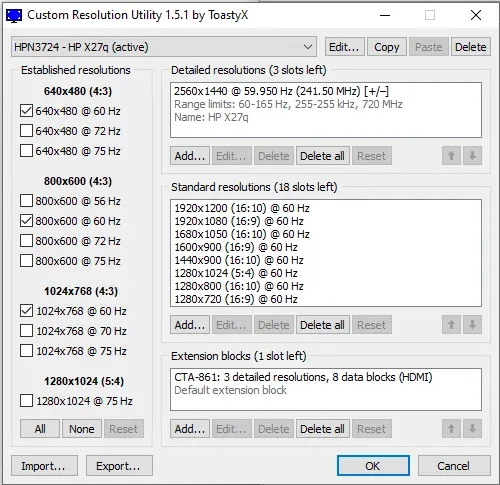
Download Custom Resolution Utility - Download. CRU shows how the monitor defines resolutions and other capabilities and gives you the power to change it.
Personally though I'd just set it to 240hz and turn on freesync
soft jay
floral lake
it's like trying to be an oled, but it won't be the same as oled
better then IPS still right
floral lake
yes and no
it promises to be better than ips
but it suffers from bloom
though it depends from one panel to another, but it is a prevalent issue
i would personally avoid though
hollow cipher
neon root
check to see if anker has anything
$100+ too expensive
warm sequoia
soft jay
better then IPS still right
After playing around with the Innocn 25m2s monitor for a day. It definitely looks a bit better than IPS by this I mean color wise. Idk if it just my eyes but 1440p on 24.5 doesn’t look as sharp as I thought it was going to be. When playing single player games on lower brightness it almost seems like the background has built in motion blur. Idk if that’s the ghosting but it is kind of annoying. If you getting anything less than 120 fps it’ll be noticeable. Also the bloom isn’t actually noticeable whiling gaming just on a pure black screen.
Will continue to keep testing it though but as of rn I wouldn’t spend the $250 on this monitor.
hot junco
Smearing is one of the main drawbacks of VA. Usually really apparent with dark object on light background. For fast paced stuff like shooters I'd be looking at IPS if you don't want to spend OLED money.
 glossy barn
good headphones? i kinda want them to have some form of ANC
and to be good for PC usage
i was looking at the bose QC45 or possibly the sony XM5's
i want to use them to game though, don't think any headphones can be inherently bad for that, but not sure
oak jungle
warm sequoia
After playing around with the Innocn 25m2s monitor for a day. It definitely look...
When playing single player games on lower brightness it almost seems like the background has built in motion blur. Idk if that’s the ghosting but it is kind of annoying.
Yep, this is VA's low pixel response times causing smearing. Try messing with the overdrive setting in your monitor OSD
warm sequoia
it's a IPS panel
hot junco
A $250 mini led ips?
warm sequoia

24.5 Inch Gaming Monitor Mini LED1440P 240Hz QHD 2K PC Desktop Gaming Screen Fast IPS HDMI 2.1 Display, DisplayPort, Built-in Speaker, GA27T1M
Size: 24.5 Inch
Resolution: 2560 x 1440p
Refresh rate: 240Hz
Panel type: IPS
Back-lit: QD-Mini LED, 576 Zone Local Dimming
Style: Flat (non-curved)
...
hot junco
Wouldn't have expected that at all.
warm sequoia
ikr super niche
hot junco
Aoc had a couple $250ish va ones. I've never seen a cheap ips mini led before.
warm sequoia
I think the Aoc one is $225-$230 rn
soft jay
I see
oak jungle
hot junco
Aoc had a couple $250ish va ones. I've never seen a cheap ips mini led before.
Yeah I didn't realize they made ips mini led
west hornet
have any iem people seen anything on decent sales?
 wintry carbon
Could anyone add on whether they think the seller is reputable or not?
https://a.aliexpress.com/_mNe9j5R
 sacred flicker
Is this a good headset?
https://www.amazon.com/Sennheiser-HD-599-SE-Headphone/dp/B07RFNZYJZ?

Powered by SENNHEISER proprietary transducer technology for truly excellent sound performance, the open back HD 599 Special edition delivers impressively natural spatial performance. Topping SENNHEISER 500 Series, The full sized premium headphone offers entry level audiophile sound quality and ex...
I need a good headset that I can wear for like 13+ hours daily because I work from home but I also want something durable and good enough to be able to understand people talking well from.
 torn hatch
what are the best places/websites to look for monitors?
restive sedge
torn hatch
what are the best places/websites to look for monitors?
@floral lake
Oh wait
@hushed root
zinc trench
cyan tinsel
Can anyone recommend me a mouse as an upgrade from g pro? I’ve had It for years ...
I really like my Steelseries Aerox 9 but the side buttons can be a bit awkward depending on your grip
cyan tinsel
Thank you!
zinc trench
quasi mica
Any recommendations on speakers? I've been using some best buy brand speakers fo...
Bose speakers are the best bang for your buck in my opinion. Unless you want to spend hundreds on speakers
zinc trench
hollow cipher
Look for something from Anker, Ugreen, or Baseus. Anker is a more premium brand and you will pay for the name. Ugreen is good but I'm pretty sure they are made in and based out of china if that is something you care about. Baseus is a more budget friendly brand but I have had zero issues with any of their gear even with harder use than most people probably put them through.
oak jungle
Anker isn't just the name, you also are paying for a durable product with a solid warranty
UGreen is good too
Haven't personally used baseus but I have heard of them which is better than some random Amazon brand
zinc trench
Anker is the only brand of battery packs that I have bought that have been recalled 70% of the time. Baseus got recalled once out of the 7 I bought and Ugreen hasn't had recalls on anything yet. Docks don't have batteries but those experiences have soured me towards Anker as a whole lately. It might just be their batteries but I stopped trusting them as much after the last recall and their refusal to offer anything except a gift card to their own shop and the crazy hoops you have to jump through now.
 opal seal
west hornet
have any iem people seen anything on decent sales?
opal seal
west hornet
have any iem people seen anything on decent sales?
what are you upgrading from
west hornet
in the past i used the original moondrop aria until it started falling apart. my main cans are meze 109 pro which I enjoy the sound signature of. I just wanted something portable and not crazy expensive but still sounding decent enough
torn hatch
what do you guys think about paring a ryzen 7 7600 and an rx 7900 gre with a E275B-QPT168 monitor
 north nimbus
that monitor is absolutely baller
the GPU i dunno exactly how powerful it is because i didn't use the 7xxx series at all
north nimbus
oak jungle
Anker isn't just the name, you also are paying for a durable product with a soli...
i kinda swear by Anker and Belkin's stuff, Anker has always made extremely good chargers that i am never disappointed with, and Belkin has always given me the best braided cables I could find.
I really love both of them, and will pay the premium
esp. given the Anker warranty
torn hatch
north nimbus
the GPU i dunno exactly how powerful it is because i didn't use the 7xxx series ...
Im pretty sure it performs well in up to 4k well too not sure tho
Ended up getting the Gigabyte GS27QA instead tho
hot junco
Dropping down to 1440 was a good choice for a 7900gre imo.
north nimbus
I can get 60fps in less demanding games at 4K
by rendering to 150% while running at native 1440p
ends up looking pretty nice
my GPU is pretty mid, just a 5060
but it plays games well
and i can have texture detail that is well matched to my resolution
torn hatch
hot junco
Dropping down to 1440 was a good choice for a 7900gre imo.
I actually went up from 1080p too
hot junco
Oh, I didn't actually check that first monitor you mentioned. Looks like it's a 1440 too. I thought you were saying that one was 4k and you weren't sure the 7900gre could handle that so went down to the gigabyte one instead. I recognized the gigabyte one from the name. The gigabyte one should be good if you don't mind the stand not having height adjust.
 mortal crest
Xl mousepad recs? Have a stock razer viper ultimate. Budg ~50$
neon root
mortal crest
Xl mousepad recs? Have a stock razer viper ultimate. Budg ~50$
the saturn pro and neptune pro are both good and at a great deal right now
saturn pro is more of a control pad
neptune pro is more fast
torn hatch
hot junco
Oh, I didn't actually check that first monitor you mentioned. Looks like it's a ...
I have one of those hydraulic monitor mounts
 cyan basalt
neon root
the saturn pro and neptune pro are both good and at a great deal right now
satur...
cyan basalt
neon root
the saturn pro and neptune pro are both good and at a great deal right now
satur...
I have Saturn pro, can confirm
I think they were going as low as 60% off for Black Friday
were
tacit pawn
how do yall usually clean ur cpu heatsink? mines was dusty af and theres some fully stuck on dust
i used an air compressor gun thingy to blow most of it off but some of it is still like fully stuck on
thing layer but yk
thin*
hot junco
If you can't blow it off and want it cleaner take it off and wash it. If you smoke around the pc then the tar can really get stuck on there. If it's just regular dust then it comes off easy enough.
mortal crest
cyan basalt
I have Saturn pro, can confirm
Dang saturn out of stock
Might grab an artisan
tacit pawn
hot junco
If you can't blow it off and want it cleaner take it off and wash it. If you smo...
its regular dust but its like stuck on there properly, it sits on the floor bc I have no area on my desk to have it on
i do vape but that doesn't get anywhere near the pc
I read online i use some sort of liquid for it, not sure what though
like a cotton bud dipped in kt
it
north nimbus
it's worth noting that vaping doesn't produce much tar, the tar is in the smoke
shouldn't worry too much about that
hot junco
tacit pawn
I read online i use some sort of liquid for it, not sure what though
They probably said isopropyl alcohol as a solvent, same stuff you'd use for cleaning up old thermal paste. Pretty much anywhere that sells bandaids should have it stocked with the other first aid stuff for a couple dollars, higher % is better but 70% will work. If it's a normal tower cooler you can just take it off and run it under the sink though.
It also doesn't need to be sparkling. As long as there aren't clumps clogging up the spaces between the fins it'll still work fine.
tacit pawn
hot junco
It also doesn't need to be sparkling. As long as there aren't clumps clogging up...
ahh I see, thank you!
mortal crest
Was trying to get the saturn pro mousepad but its out of stock. Anyone have alternatives? Looking for xl mousepad
Ik the artisan but is it worth 70$?
torn hatch
The side by side difference is crazy
 thorn grove
@neon root tempted to go back to my Razer Viper V3 Pro, the tenz mouse is giving me a headaches sometimes
 cyan basalt
Probably from buyer’s remorse 
 mild plank
Anybody got some good company recs for oversized mousepad?👀
rocky bronze
https://a.co/d/2M6OHl1 I’m looking for the best 360hz monitor for under $300 and I’m thinking of buying this one if it’s worth it lmk

Alienware 25 Gaming Monitor - AW2523HF. 24.5” monitor for esports-level competitive gaming with a redesigned base for more desk space and a 360Hz refresh rate.
hot junco
IPS past ~240hz is kind of pointless, you run into a wall on response times. You could save yourself a lot of money and get basically the same experience. Asrock also has a 500hz for cheaper than that if you just want to see a big number.
oak jungle
Ok chat if you're working on a PowerPoint on your oled in dark mode for an extended period of time don't forget to wiggle it around or swap sides once in a while

(the camera exacerbates the effect, it's a lot harder to see in person)
I have pixel shift, static image recognition, etc turned on too :/
Running an anti image retention cycle got rid of it thankfully
rocky bronze
hot junco
IPS past ~240hz is kind of pointless, you run into a wall on response times. You...
So is there a better monitor that will run 360hz smoothly and maybe feel the difference on something else other than IPS for the same price?
I lowkey wanna play on 360hz and feel it
oak jungle
TN has better response times but the colors are garbage
OLED is king but more expensive
daring zenith
oak jungle
I have pixel shift, static image recognition, etc turned on too :/
Pixel shift usually happens either when you turn it on or off or when you run a refresh cycle, and static image recognition usually only reduces brightness, so you still need to just run a refresh cycle after having the same screen for a while
oak jungle
daring zenith
Pixel shift usually happens either when you turn it on or off or when you run a ...
Nah my pixel shift happens while using it too
hot junco
rocky bronze
So is there a better monitor that will run 360hz smoothly and maybe feel the dif...
That dell one you had is alright and a good choice if you really want 360hz. It goes on sale pretty often though, I'd consider waiting for that to happen again. If you wanted something significantly better you'd have to save up/wait for price drops on an oled. Those have near instantaneous response times (.2ms or lower compared to the typical ~7ms for ips, the "1ms" or ".5ms" they advertise is a marketing lie) so whatever hz you're seeing advertised is what you actually get. They're impossibly smooth compared to a standard lcd.
Oled also don't come in 1080p, so you'd need a gpu that can do that high of fps in whatever game you're playing. Which if it's cs2 or val or something doesn't really take top end hardware.

 cobalt notch
Guys whats a good Budget Gaming Keyboard and Mouse with rgb? Its for a gift.
He also needs a headset and monitor.
rocky bronze
hot junco
That dell one you had is alright and a good choice if you really want 360hz. It ...
The problem with that is my parents canceled it on accident and said I’m not paying 300 when I could’ve paid 200 for it
rocky bronze
hot junco
That dell one you had is alright and a good choice if you really want 360hz. It ...
So should I get that monitor or get something else
Cause I want something that won’t take a month to come in
hot junco
rocky bronze
Cause I want something that won’t take a month to come in
https://www.amazon.com/dp/B0CV22HQR3 This one should be okay too, ROG generally does really good tuning. It's another one that would have been $100 cheaper a week or two ago though.

Elevate your gaming experience with the ROG Strix XG259CMS, meticulously crafted for utility and performance. Immerse yourself in smooth, ultra-fast 310Hz (OC) refresh rate, and lightning-fast 1ms response time. Conquer challenges effortlessly with AI-powered features, and enhance your connectivi...
rocky bronze
hot junco
https://www.amazon.com/dp/B0CV22HQR3 This one should be okay too, ROG generally ...
So this one is the best option in that price range?
hot junco
If you want a really high refresh, cheapish monitor and want it now that's what I'd be getting. This one is also about the same price. https://www.youtube.com/watch?v=O7rd8xPrYfY Like I said earlier though, once you get to the extreme refresh rates with IPS higher Hz is not really making a difference.

Today we are checking out the fastest monitor we've ever reviewed - ASRock's PG27FFX2A, thanks to its 520Hz 1080p IPS panel. Squarely targeted at competitive gamers, it also supports adaptive sync, up to 400 nits peak brightness, and offers a claimed 1ms response time. But is a 27in screen size just too big for the FHD resolution? And does 520Hz...
rocky bronze
hot junco
If you want a really high refresh, cheapish monitor and want it now that's what ...
I just want a good monitor with high refresh rate cause I’m starting to be more into comp gaming stuff
I don’t need 520hz
I think I’m gonna get the Alienware monitor people are saying it’s the best
 surreal dome
Which of the 4 is better regardless of price? https://marsgaming.eu/fr/souris/mm-t3
https://www.the-g-lab.tech/produit/kult-titanium-pro/
https://www.the-g-lab.tech/produit/kult-titanium/
https://www.logitechg.com/en-us/shop/p/g305-lightspeed-wireless-gaming-mouse.910-005280

Mars Gaming
Souris sans fil ultralégère avec triple mode de connexion, capteur optique PIXART 14400 DPI, base de chargement magnétique RGB avec HUB USB et logiciel de contrôle.

Souris Gamer sans Fil avec Socle de Charge - Triple Mode, Souris Bluetooth / USB 2.4/ Filaire, 12 000 DPI,100% personnalisable - PC/PS4/PS5

Souris Gamer sans Fil avec Socle de Charge - Triple Mode, Souris Bluetooth / USB 2.4/ Filaire, 12 000 DPI,100% personnalisable - PC/PS4/PS5

Logitech
Shop G305 Wireless Gaming Mouse.Features LightSpeed technology for ultra-fast 1-ms response times, advanced HERO optical sensor, and 250 hour battery life.
surreal dome
torn hatch
The side by side difference is crazy
Is middle screen oled or is right screen oled?
surreal dome
oak jungle
You could try using CRU and making a custom setting
https://customresolutionuti...
Can i use 120hz on a max 60hz 1080p tv?
oak jungle
surreal dome
Can i use 120hz on a max 60hz 1080p tv?
No
surreal dome
oak jungle
No
Gah dang it
oak jungle
You might be able to squeak out 75hz
surreal dome
oak jungle
You *might* be able to squeak out 75hz
If i can i take
surreal dome
surreal dome
Which of the 4 is better regardless of price? https://marsgaming.eu/fr/souris/mm...
Still no anwser ;-;
surreal dome
I need an anwser within the next 25:30 hours because i'll be going at my closest pc shop and they have these ;-;
solar raft
No idea as far as the rest go, but can say just purely from personal experience the G305 is pretty good. It is a little on the smaller side, but the battery lasts a long time and it doesn’t really feel as cheap as the price reflects
surreal dome
solar raft
No idea as far as the rest go, but can say just purely from personal experience ...
Alright
solar raft
Really just gonna boil down to personal preference so just look and feel around to see what you like and what you may want
surreal dome
solar raft
Really just gonna boil down to personal preference so just look and feel around ...
Tbf i only owned one mouse and it was a corsair harpoon RGB pro
 grizzled sapphire
I am looking for some help, my son's pc started acting up today. It turns on, it posts, I can see ethernet activity however the graphics card will not stay on. The fans spin for a few seconds after start up but then stop. I'm at a loss on where to even start.
west hornet
#building-and-recc-chat is probably a better place for that
 upbeat portal
Any recommendations for 100% keyboards that are <70 USD? Have a younger sibling that needs a keyboard replacement, definitely looking for white color, other than that not anything else particularly
daring zenith
Keychron c2 should be a decent starting point
restive sedge
Redragon is also a decent brand. Can’t go wrong with one of theirs.
 cobalt wagon
Is nut65 good?
solar raft
 cobalt notch
Will these work on the Lemokey x4?
https://a.co/d/5iG6mDu

dagaladoo Purple Clear keycaps,Transparent keycaps 60 75 100 Percent,jelly keycap Set,Shine Through key caps.,MDA Profile Keyboard key cap for Mx Switches Mechanical Keyboard(115key)
mortal crest
my hyperx cloud alpha microphone crapped the bed and stopped working. looking for new headphones yall got recs for like 100? should i just get the cloud 3s i see lots of streamers use them
wired is fine btw not tryna drop hella money on wireless headphones for my pc
 latent compass
Should I ask my friend to bring back case fans from china?
I saw some jonsbo fans that looked cool but they're like $15 here in the states 😭
Each*
 frigid sparrow
mortal crest
my hyperx cloud alpha microphone crapped the bed and stopped working. looking fo...
frigid sparrow
mortal crest
my hyperx cloud alpha microphone crapped the bed and stopped working. looking fo...
I use the hyperx solocast
cyan basalt

 solar raft
Is that not how you’re supposed to do it
stiff sand
HELLO
stiff sand
cyan basalt
<:pepehmmm:903335097305034783>
where did you find this? can I post this?
cyan basalt
It was on reddit, go for it
stiff sand
do u have the reddit post?
cyan basalt
Reddit
Explore this post and more from the MousepadReview community
thorn grove
@neon root

 latent compass
What's a good controller to pair with pc for steam games?
And what's the best method to connect 2-4 controllers? I heard about a usb stick with bluetooth or something is recommended
oak jungle
latent compass
And what's the best method to connect 2-4 controllers? I heard about a usb stick...
Bluetooth kinda sucks, I reccomend a controller with a 2.4g dongle
8bitdo makes some excellent controllers
$23 for hall effect sticks and triggers is hard to beat
latent compass
oak jungle
Oh best buy has them as low as $18
https://www.bestbuy.com/product/8bitdo-ultim...
Oh wow 18$ for a controller??
That's really nice
latent compass
Is it possible to connect like 2-4 of these to my pc tho?
Worried about the wires
oak jungle
Yes, they come with (USB) 2.4g dongles
latent compass
Wait what are 2.4g dongles?
oak jungle
Plugs into a USB port and connects the controller wirelessly
Lower latency and less of a pain than Bluetooth
latent compass
Ohh interesting, do I need a 2.4g dongle for each controller or just 1 for all of them
oak jungle
One for each.
latent compass
🫡
Ngl I was looking at the ps5 dualsense controller at first because I heard they have like effects like vibrations when things happen in game
But I think these controllers make way more sense in terms of price
Do I have to buy the 2.4 dongle separately? The pictures I see are mostly usbc wires I think
And these don't have those vibration features right? Just barebones
Oh nvm the amazon one is wireless I see
oak jungle
They come with the dongle
And they do have vibration/rumble
Not anything super advanced though
latent compass
Ohh that's cool! Ok I'll try them out
latent compass
oak jungle
Not anything super advanced though
Wait Stevie which one do you have?
oak jungle
Ultimate 2C
latent compass
🫡
restive sedge
oak jungle
Ultimate 2C
I also have this
@latent compass
Best controller I’ve used
It’s a little awkward at first, but it feels so much better
So responsive
Programmable buttons is also nice
oak jungle
IMO the one possible downside is the size/shape, it feels a little smaller than an Xbox or PS controller
But I have pretty average hands and it fits well
restive sedge
oak jungle
IMO the one possible downside is the size/shape, it feels a little smaller than ...
I moved from an Xbox series controller
To the ultimate 2C
I have large hands
It took a week to get used to
But I don’t think I could go back now
oak jungle
Good to hear it works for bigger hands as well
latent compass
oak jungle
Ultimate 2C
Wait woops I mean the version like dongle, wired, bluetooth
latent compass
restive sedge
Best controller I’ve used
Which version of it do you have?
oak jungle
Ultimate 2C has all 3 modes
latent compass
Ohh it comes with all 3??
oak jungle
Yep
latent compass
Omg ok buying one rn 😭
Wait do you mean there are 3 modes you can choose from
Or all 3 modes is included
latent compass
 hot junco
Ultimate 2c is cheap too. I got a pink one for $15. I didn't really like the position of the extra buttons on the shoulders though. I went back to a gamesir g7.
oak jungle
And it works wired too
latent compass
This one is good right?
latent compass
It'll come with everything? I'm so confused because I see different ones priced differently
restive sedge
latent compass
I have the pink and green one
latent compass
I want the peach one but I think Imma see if I can hold out for a deal
The mint green is nice too I like
latent compass
https://www.bestbuy.com/product/8bitdo-ultimate-2c-wired-controller-for-android-and-windows-with-hall-effect-joysticks-peach/CZY3JSJYZJ/sku/6590328 It's the pink one I think
Shop 8BitDo Ultimate 2C Wired Controller for Android and Windows with Hall Effect Joysticks Peach products at Best Buy. Find low everyday prices and buy online for delivery or in-store pick-up. Price Match Guarantee.
But are you positive this one will come with the dongle? 😭
oak jungle
Yeah says peach
latent compass
The prices are different and it says wired I'm scared
restive sedge
latent compass
I want the peach one but I think Imma see if I can hold out for a deal

This is what I got
$20
oak jungle
latent compass
The prices are different and it says wired I'm scared
Oh u right that one's wired
restive sedge
Wired version is best
latent compass
Aw mann
restive sedge
Has no latency
oak jungle
Nah it's nice to have the dongle, and the wireless one can be plugged in as well
latent compass
I think my new pc will only have 1 usbc port and I want to go dongle so there aren't too many wires
latent compass
oak jungle
Nah it's nice to have the dongle, and the wireless one can be plugged in as well
Oh it can? Is that how it charges?
oak jungle
Yeah it's rechargeable
oak jungle
restive sedge
Has no latency
Not exactly

Gamepad Latency Tester
Test — 8BitDo Ultimate 2C Wireless Controller. Input lag 3.87-13.98 ms (Latency score Wired A+/Wireless A) ✅ See latency charts & specs on Gamepadla.

You're not gonna notice 3.87 vs 6.07 ms
latent compass
Ok dongle it probably is
next cipher
oak jungle
https://gamepadla.com/8bitdo-ultimate-2c-wireless.html
I highly recommend this
Absolute w controller
thorn grove
@neon root opinion
 neon root
thorn grove
<@408037951604391937> opinion
neon root
thorn grove
<@408037951604391937> opinion
havent looked into mice/ mousepads in a minute so idk
cyan basalt
thorn grove
<@408037951604391937> opinion
You don’t like your current mouse?
thorn grove
cyan basalt
You don’t like your current mouse?
the tenz mouse is kinda awkward to use
 bold crescent
looking for a monitor, 1080p, 120hz, preferably oled but lcd is fine too.
size wise I have a 30 inch, same size would be good.
not looking for anything expensive
 lyric musk
is the psvr2 fully compatible w pc?
bc it would definitely be a better alternative to the quest 3
west hornet
Ye they sell an adapter for pc first party
I can’t speak for how the experience is though
 sullen crow
lyric musk
is the psvr2 fully compatible w pc?
sullen crow
lyric musk
is the psvr2 fully compatible w pc?
So a quick run down
Adapter and additional software will be needed
Need Bluetooth for the controllers
But otherwise it’s a great competitor to the quest lineup if you don’t already have one but do be weary as hardware connectivity still finicky with each windows and steamvr update
The OLed screen is nice but (the foveated eye tracking I don’t believe is carried over) don’t quote me on last part not entirely sure
lyric musk
Is the image quality better than the quest 3?
 latent stream
Best/most comfortable gaming mouse? What yall rocking?
Currently running a Corsair Scimitar Elite (Wired). Not sure I love the claw grip style
oak jungle
Comfort is subjective
Razer viper v3 pro is up there for best specs (weight and sensor)
 noble quartz
Is this a good monitor?

It’s only $280
I’ve been avoiding monitors that are not HDR1000
It is an HVA panel
bold crescent
oak jungle
> 1080p
> oled
> 30"
> Inexpensive
are 30 inch 1080p monitors that expensive?
restive sedge
bold crescent
are 30 inch 1080p monitors that expensive?
Those specs are kinda not quite the greatest
bold crescent
cant fit bigger than 30 inch
and im good with 1080p
is the fps diference big between 1080p and 1440p?
mainly concerned about Stalker 2 and such but I heard if you play with DLSS/FSR its not a big issue
oak jungle
bold crescent
are 30 inch 1080p monitors that expensive?
Afaik they don't really make 30" monitors, let alone 1080p ones
1080p is typically 24" or 27"
1440p is typically 27"
daring zenith
There are 30in 2560x1080 uw panels
but inexpensive and oled do not fit together rn
oak jungle
4k is typically 27" or 32"
oak jungle
daring zenith
There are 30in 2560x1080 uw panels
Oh I didn't think of UW
bold crescent
oak jungle
Afaik they don't really make 30" monitors, let alone 1080p ones
do you include the bezel or no?
then 27inch
oak jungle
bold crescent
do you include the bezel or no?
No
bold crescent
1440p is alr I guess if the performance is still respectable
daring zenith
What GPU do you have
bold crescent
I play Stalker 2 on max settings and it feels like I can't fully enjoy the graphics with this monitor
bold crescent
daring zenith
What GPU do you have
RX7800XT 16gb
daring zenith
Should be okay with 1440p then, just don't expect to run it at max settings natively
bold crescent
sad
oak jungle

ASRock PG27QFT1B 27.0" 2560 x 1440 180 Hz Monitor (PG27QFT1B)

Acer Predator X27U Z1bmiiprx 26.5" 2560 x 1440 280 Hz Monitor (UM.GXXAA.103)
bold crescent
the price difference is quite big
oak jungle
Yes, oled is premium
hot junco
bold crescent
the price difference is quite big
Stalker 2 looks hilariously bad on native anyway. You are pretty much forced to use upscaling to have a usable AA method.
Going from 1080p to 1440p expect to lose like 30-40% of your fps in most games, 1440p with quality upscaling will run about the same as 1080p native. If you're cpu limited at 1080p the loss could be less than that, resolution doesn't affect cpu performance it only makes things harder on the gpu.
No one makes 1080p oleds but there are some some even more expensive ones that have a dual mode for 1080p instead of 4k or 1440p. Like you can choose 4k 240hz or 1080p 480hz. Expect to see a few hundred dollars more than entry level oleds for those.
24" is generally where you want to be for 1080p, bigger than that and the pixel density isn't great. 27" 1440p is a really god middle ground for clarity and for value. That's for the normal 2-3 feet away you'd be for a desk monitor, the further away you are the less that matters. The 7800xt is a pretty reasonable 1440p gpu.
noble quartz
oak jungle
https://pcpartpicker.com/product/LfzXsY/asrock-pg27qft1b-270-2560-x-1440-180-hz-...
I would take the Acer Predator it has True HDR
Anything that’s True HDR, HDR1000 and up is good
oak jungle
Not asking for advice but thanks lol. Was showing grim eeper the price diff between oled and lcd
noble quartz
The good budget gaming monitors that will last you years is around the 250-400 range
If your lucky you can find one on sale
Just be sure to check the specs if it’s advertised as it is
oak jungle
400 isn't really budget. And by then you should be going oled
Plenty of decent monitors under $200
daring zenith
Rn it's either 150-250 for decent regular panels, or 400-600 for a nice OLED panel, not much worth getting in-between those ranges
 shy rose
anyone have recommendations of something in the $50 price range for over ear headphones. Primarily used for gaming
daring zenith
Cloud ii is around $50 nowadays
sullen crow
Solid set of headphones but mic isn’t the selling point
cyan basalt
thorn grove
<@408037951604391937> opinion
Logitech
Experience the Logitech G PRO X2 SUPERSTRIKE wireless mouse with LIGHTSPEED: ultra-fast clicks, rapid actuation, haptic feedback, and pro-grade precision.
thorn grove
cyan basalt
https://www.logitechg.com/en-us/shop/p/pro-x2-superstrike-mouse.910-007700
Buy it for me
hot junco
If I was going to get one at ~$600 I'd probably get a gen 4 woled like the mo27q28g instead of a 360hz qd.
 glossy barn
hot junco
If I was going to get one at ~$600 I'd probably get a gen 4 woled like the mo27q...
glossy barn
hot junco
If I was going to get one at ~$600 I'd probably get a gen 4 woled like the mo27q...
cant get one to my house
nobody ships them to me
plus it'd be like 800 after fees
hot junco
Are you adding in international shipping or taxes or something? You were saying it's cheaper on tiktok.
glossy barn
oh yeah tiktok has good discounts
but i have no available monitors of the one you mentioned
none that can ship to me
for some reason amazon wont ship it to my address
hot junco
It just came out. It's backordered on newegg and amazon for me too. Into early January on newegg, until maybe mid February on amazon. Same price of $600 as the g60sd that both of them have. That's why I was asking if you're adding in some hidden costs on that $610 price.
glossy barn
600 where?
cheapest i can find online is nowhere near 600
but ill keep looking
👀
glossy barn
so what are the advantages of this monitor?
because to me the listed specs seem more or less the same
hot junco
It's a different panel type. Gen 4 woled is supposed to be more resistant against burn in and have improved text clarity compared to older woleds or qd-oleds.
hot junco
https://www.youtube.com/watch?v=bn-bbk_p3Do They do pretty good reviews here.
Support us on Patreon: https://www.patreon.com/hardwareunboxed
Buy relevant products from Amazon, Newegg and others below:
Gigabyte MO27Q28G - https://geni.us/LED4a
Asus ROG Strix XG27AQWMG - https://geni.us/cUzdJdC
Asus ROG Strix XG32UCWMG - https://geni.us/scnBt
Asus ROG Swift PG32UCDP - https://geni.us/KBdHS
Samsung Odyssey OLED G81SF - http...
hot junco
It was supposed to launch at $550 months ago. It didn't in the US though. Tariffs I suppose.
glossy barn
@hot junco would you say an xg27aqdmgz glossy woled from asus for 570 after tax is a good deal?
oh well i guess theyre about 525 on newegg so i dont know if i should grab it
yeah its 3rd gen woled so idk then
warm sequoia
What's the best gaming keyboard for under $50? Prioritizing, latency & gaming.
 bleak sluice
https://www.vsdinside.com/products/vsdinside-k1-pro I wanna get this, it has these switches, would I wanna change em?


VSDinside Stream Deck, AI Keyboard
VSDinside K1 Pro is a revolutionary mechanical keyboard that combines professional gaming performance with a fully programmable Stream Dock for ultimate customization. Featuring high-quality Red switches, an 87-key compact layout, and dynamic RGB backlighting, this keyboard is designed for gamers, streamers, and produ
oak jungle
warm sequoia
What's the best gaming keyboard for under $50? Prioritizing, latency & gaming.
Look into hall effect from Monsgeek
warm sequoia
oak jungle
Look into hall effect from Monsgeek
I ordered the Monsgeek Pro for like $30 haha
Ima try it out and see
I was gonna get the max ultra but came out to like almost $60 cause of shipping lmfao
oak jungle
Yeah I got a Pro for $35 a little bit ago and it's been awesome
The switches on mine don't work great at 0.01mm but adjusted to 0.025 they feel great
latent compass
Hey y'all what is a good 1080p portable monitor?
For my friend's 5600 + 3050 6gb build
warm sequoia
oak jungle
The switches on mine don't work great at 0.01mm but adjusted to 0.025 they feel ...
Wait so using the software for the keyboard is that considered cheating?
oak jungle
warm sequoia
Wait so using the software for the keyboard is that considered cheating?
Some games don’t allow “snap tap” / SOCD
Actuation distance is fine for all games though
oak jungle
I don't recall
 late plinth
Okay so potentially odd question but hoping someone can help me here.
I have a currently vert-oriented multimonitor setup (due to stuff on the side of my desk hah) paired with an LG C3 off my desk to my right.
The issue is my secondary (currently a 16in 16:10 portable monitor) does not do HDR well even though it can interpret the signal.
Are there any decent HDR-capable options that don't wash out the image? It can't be any bigger than 16in 16:10.
I know Uperfect has a 3K 120 OLED panel but putting it to 3K120 apparently disables HDR? Or is that a erroneous review

 cyan basalt
 solar raft
What a steal
latent compass
Any good 1440p monitors deals at the moment? Looking for one under $150 hopefully, willing to wait and sit on my 1080p for now for a few more months
soft dune
latent compass
Any good 1440p monitors deals at the moment? Looking for one under $150 hopefull...
This is what I have been using for close to a year now
https://a.co/d/i71IuaW

24.5" 1440P QHD 2K Gaming Monitor, 240Hz PC Computer Desktop Monitor, IPS, HDMI 2.1, DisplayPort, FreeSync, Console Ready, 1ms, MPRT, Eye Care, Flicker-free, Speaker, 25G2S
Size: 24.5 Inch
Resolution: 2560 x 1440p
Refresh rate: 240Hz
Panel type: IPS
Style: Flat (non-curved)
Connectivity: 2 ...
oak jungle
latent compass
Any good 1440p monitors deals at the moment? Looking for one under $150 hopefull...
180hz ips for $138
https://pcpartpicker.com/product/LfzXsY/asrock-pg27qft1b-270-2560-x-1440-180-hz-monitor-pg27qft1b
ASRock PG27QFT1B 27.0" 2560 x 1440 180 Hz Monitor (PG27QFT1B)
latent compass
Thanks yall 🫡

 hexed hollow
this has happened like 4-5 times in a row. gonna flip my shit cuz it always resets when im almost done
next cipher
hexed hollow
this has happened like 4-5 times in a row. gonna flip my shit cuz it always rese...
Based modrinth user
hexed hollow
next cipher
Based modrinth user
Erm thanks
frigid sparrow
warm sequoia
What's the best gaming keyboard for under $50? Prioritizing, latency & gaming.
Royal Kludge 60%
oak jungle
frigid sparrow
Royal Kludge 60%
He ordered a monsgeek board already
oak jungle
🤨
 last galleon
Could some one help me find a good oled monitor budgets 700$. Tried looking at YouTube and seen many different decent options. ( prefer to spend less if available)
hot junco
last galleon
Could some one help me find a good oled monitor budgets 700$. Tried looking at Y...
What's your priority for it? 1440p vs 4k, 240 vs 360 vs dual mode, matte vs glossy, qd vs woled will be the main differences to look for. If I was buying one it would probably be the mo27q28g or the asus xg27aqwmg if it's available in your area (not out yet in the US afaik).
last galleon
hot junco
What's your priority for it? 1440p vs 4k, 240 vs 360 vs dual mode, matte vs glos...
Apologies, 240 hertz, glossy ( pretty sure that one’s better) I also don’t know the the difference between 1440p vs 4k, also don’t about woled, qd
hot junco
Generally glossy is better in a dark room because it's clearer and matte is better if it's going to have light on it, especially sunlight.
1440p and 4k are the resolution, how many pixels there are. What gpu do you have and what sort of games do you like?
Woled and qd oled is a finer distinction. Woled are typically also better at handling a bright room or reflections and the new 4th gen woled have better text clarity than other oleds. The qd-oleds are typically better with color handling and vibrance.
Some of the qd oleds are also getting 'cheap' and you can find them for $500 or less.
last galleon
hot junco
Generally glossy is better in a dark room because it's clearer and matte is bett...
I have a 3070 and I play a lot of fps like fort, rust, 2k, pretty much anything. Also thank you so much for your help i appreciate it. The room would be dark
last galleon
hot junco
What's your priority for it? 1440p vs 4k, 240 vs 360 vs dual mode, matte vs glos...
Both of those are sold out
last galleon
hot junco
Generally glossy is better in a dark room because it's clearer and matte is bett...
ASUS ROG Strix 27” 1440P OLED Gaming Monitor (XG27AQDMG) - QHD, Glossy OLED, 240Hz, 0.03ms,
Is this a good option ?
hot junco
last galleon
ASUS ROG Strix 27” 1440P OLED Gaming Monitor (XG27AQDMG) - QHD, Glossy OLED, 240...
That's the last gen version of a woled. https://www.rtings.com/monitor/reviews/asus/rog-strix-oled-xg27aqdmg

RTINGS.com
The ASUS ROG Strix OLED XG27AQDMG is a 27-inch, 1440p gaming monitor with a 240Hz refresh rate. It has a variant sold at Best Buy called the XG27AQDMGZ. It uses ...
 pseudo cloak
hello all, i am wondering which would be better for FPS gaming the sennheiser hd 560s or the hd 650? any answers would help
last galleon
hot junco
That's the last gen version of a woled. https://www.rtings.com/monitor/reviews/a...
So is this a good option or should I look for something else
hot junco
Are you in the US? You said the gigabyte one is sold out but it's $600 on newegg for me.
last galleon
hot junco
Are you in the US? You said the gigabyte one is sold out but it's $600 on newegg...
Yes I’m in the us
hot junco
https://www.newegg.com/gigabyte-mo27q28g-sa1-27-oled-280-hz-qhd/p/N82E16824012111 I'd get that or one of the <$500 qd oleds like the dell aw2725d for $480 at best buy.
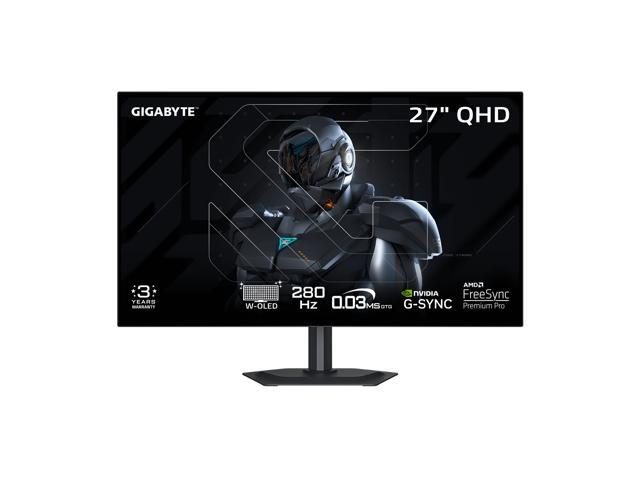
Buy GIGABYTE MO27Q28G 27" W-OLED Gaming Monitor QHD 2560x1440 280Hz 0.03ms GTG - AMD FreeSync Premium Pro, G-SYNC Compatible - Type-C KVM - HDMI, DP, Type-C Height and Tilt Adjustable - Black with fast shipping and top-rated customer service. Once you know, you Newegg!
Support us on Patreon: https://www.patreon.com/hardwareunboxed
Buy relevant products from Amazon, Newegg and others below:
Gigabyte MO27Q28G - https://geni.us/LED4a
Asus ROG Strix XG27AQWMG - https://geni.us/cUzdJdC
Asus ROG Strix XG32UCWMG - https://geni.us/scnBt
Asus ROG Swift PG32UCDP - https://geni.us/KBdHS
Samsung Odyssey OLED G81SF - http...
 dapper adder
pseudo cloak
hello all, i am wondering which would be better for FPS gaming the sennheiser h...
dapper adder
pseudo cloak
hello all, i am wondering which would be better for FPS gaming the sennheiser h...
560 would probably be slightly better for fps since it has a slightly better passive soundstage but personally i do like the hd 600 series more
pseudo cloak
ty
dapper adder
sound quality wise for music they are fairly similar
slightly different freq response
both are not bassy headphones though
pseudo cloak
just gaming with them....for some reason they are quit in game but when i turn on youtube they are able to be louder. im confused
dapper adder
you'll probably only notice if a/b testing the headphones
that is pretty strange
is your game audio set to 100%?
pseudo cloak
yup
pseudo cloak
no game audi is quit, i can turn on a youtube video and have loud volume
dapper adder
ah
pseudo cloak
im sure its somthing simple i just havent figured it out yet
dapper adder
it could be the game
or did you check windows mixer to see if the application volume is also set to 100%
maybe you accidentally lowered it at some point
pseudo cloak
i tried that... im gonna plug them back in the morning and piddle with it again
dapper adder
it's most likely some software issue i'd assume since youtube has proven that the headphones on your computer are able to get loud, so something somewhere is causing the low volume specifically for that game or games
pseudo cloak
im gonna troubleshoot in the morning, thank you!
last galleon
hot junco
https://www.newegg.com/gigabyte-mo27q28g-sa1-27-oled-280-hz-qhd/p/N82E1682401211...
I just bought this monitor. Thanks again for all your help have a great one
solar raft
Nice
 astral hare
For around 700 give or take 100 what is the best OLED monitor I can get? I’m hoping for a really small little to none border
restive sedge
@hushed root
hushed root
astral hare
For around 700 give or take 100 what is the best OLED monitor I can get? I’m hop...
The very last video on top…..if you’re outside the us
The AUS ROG Strix XG27AQWMG is great
But ever since the orange haired guy in office introduced tariffs, it’s been a nightmare for the latest OLEDs
last galleon
hushed root
The AUS ROG Strix XG27AQWMG is great
Out of stock pretty much everywhere
astral hare
hushed root
The very last video on top…..if you’re outside the us
Nah in the US
astral hare
hushed root
The very last video on top…..if you’re outside the us
Gotcha is gigabyte worth it? There’s this one dude I talked to before n he gave a different suggestion, lemme find it when I have the time
hushed root
astral hare
Gotcha is gigabyte worth it? There’s this one dude I talked to before n he gave ...
Gigabyte is good.depends on the model
hushed root
last galleon
Out of stock pretty much everywhere
Idk what’s going on…
hot junco
I've had 3 gigabyte monitors and no problems. The osd sidekick on the higher end ones is pretty handy too. There are lots of good monitor brands though. Asus, msi, dell/alienware, lg, samsung, aoc, etc...
hexed hollow
On and off display stuttering for both monitors? XZ320QU S3 at 120 hz and ARZOPA at 60 hz (max for this one).
astral hare
hushed root
Gigabyte is good.depends on the model
hot junco
If you want a qd OLED, best buy has some sales rn including an AOC for $400.
solar raft
^
astral hare
wait whats the diff between all the oleds
i know theres qd and mini but whats the main good one
astral hare
hot junco
If you want a qd OLED, best buy has some sales rn including an AOC for $400.
What’s the difference between qd and w oled?
Aight I actually did some more research into the typa I want. W oled w true black glossy would be peak
hot junco
astral hare
Aight I actually did some more research into the typa I want. W oled w true blac...
If you can find an asus xg27aqwmg that would be what I'd go for. Afaik it's not been on sale in the US yet. Gigabyte is supposed to be adding a glossy version of the mo27q28g at some point. They had one at CES. The regular version took several months to come out here after it was out in Asia though so couldn't guess on the timeline. The matte coating on the regular mo27q28g is supposed to be better than normal though if you're wanting something soon. You can scroll up a little bit in this channel and someone was asking pretty similar questions.
astral hare
hot junco
If you can find an asus xg27aqwmg that would be what I'd go for. Afaik it's not ...
Yee after reading through it the gigabyte monitors seems to be the best option, thank you gang
Oh also is there any rog, Alienware, or Samsung options you’d recommend or r they not worth it compared to the one you gave
hot junco
Not if you want a current gen woled. There is that asus aqwmg that's not out yet, the gigabyte one and an LG one that's supposed to be not as good.
 vernal pulsar
Y'all I got a monitor question. I have 2 monitors. One is 144hz with HDMI 1.4, and the other is 120hz with HDMI 2.0. Both about 90 USD. What sounds better
cyan basalt
What resolution?
astral hare
hot junco
Not if you want a current gen woled. There is that asus aqwmg that's not out yet...
Gotcha thank you
vernal pulsar
cyan basalt
What resolution?
1080p for now
The HDMI is gonna be used mostly for console gaming unless emergency
And wihtin the next year or two I can see myself getting a switch 2
cyan basalt
Can you save up and get a nicer monitor? Monitors are probably the peripheral that you upgrade the least
restive sedge
Yeah.
Monitor tech upgrades slower on average. So getting something you’re happy with is an important investment.
vernal pulsar
Mine just crapped the bed so nope
vernal pulsar
14600k and 5070 TI
restive sedge
You can handle 1440p.
I actually use a relatively cheap 1440p that has worked very very well for my 5700xt and my 9060XT. 200hz, DP cable included, and has HDR.
Would you like the link to it?
restive sedge

27 inch gaming monitor 200Hz 180Hz 1ms WQHD1440p
vernal pulsar
It sucks cuz I was aiming on keeping the one that bit the dust, and replacing my second monitor with a 1440 later
restive sedge
Only $132
F
I use this thing at 200hz on all my games(except TTW cuz very old does not like high refresh, capped at 120hz)
And HDR is on all the time
No issues
vernal pulsar
27 is a bit big for my area
It is intersting to know thats a decent brand tho. So many off brands idk what to trust. I've also heard some good of Koorui
astral hare
can a 4060 handle 1440p gaming? ill most likely have two monitors aswell
daring zenith
Depends on the game, but no to most recent titles without dlss on performance plus fg
astral hare
daring zenith
Depends on the game, but no to most recent titles without dlss on performance pl...
mostly js rivals, fort, val
daring zenith
Would not recommend it
astral hare
ill also most definetly have dlss on n such
daring zenith
Dlss+fg adds too much latency for comp games
daring zenith
Whatever the best GPU you can fit into your budget is
astral hare
my plans to save up for now and build a am5 platform and reuse the gpu until i can afford a better one
daring zenith
Give it at least a few months for ddr5 prices to come down from orbit before moving onto a ddr5 platform if possible, especially if you're still saving up money
astral hare
Yee imma wait till Memorial Day sales and see what I can pick to get
vernal pulsar
I've seen a post about how it's likely the AI bubble will pop mid 2027 due to the idiocy of how much money these companies were irresponsible with. DDR5 might be more feasible sooner than we thought
dapper adder
this is the peripherals and displays channel
i just noticed the previous convo
i thought you clicked the wrong channel
daring zenith
vernal pulsar
I've seen a post about how it's likely the AI bubble will pop mid 2027 due to th...
Most people think it's a bubble, it's just a question of when the largest companies will chicken out, could be days, could be years
That's also why memory manufacturers haven't increased capacity by much, they're predicting it should balance out by the time any new production started right now would come online in ~2 years
hot junco
vernal pulsar
It is intersting to know thats a decent brand tho. So many off brands idk what t...
Of the ones that show up on amazon that you've never heard of Koorui and KTC are generally the reliable ones. Those are both owned by large Chinese panel manufacturers and are sort of like factory direct brands.
astral hare
hot junco
If you can find an asus xg27aqwmg that would be what I'd go for. Afaik it's not ...
whats the difference between the xg27admg and the xg27aqwmg? its a d instead of a w
hot junco
astral hare
whats the difference between the xg27admg and the xg27aqwmg? its a d instead of ...
Uses a last gen panel. Rtings will have a review on the aqdmg, monitors unboxed might too, they definitely have the new version.
astral hare
gotcha im currently saving up anyway so it should be out by the time img good to get it
dapper adder

Engadget
Sony is ceding control of its Bravia TV brand to China's TCL as part of a new "strategic partnership."
oak jungle
cool video
https://youtu.be/8x1imoz5nrs

This video breaks down how every major screen technology works. LED, IPS, VA, QLED, Mini-LED, OLED, QD-OLED, and MicroLED. What they do well, where they fall short, and what separates one from another. No hype, no marketing language, just a clear look at how these displays actually create an image.
 tough temple
what type of rgb can i add behind my desk or monitor for immersion and to make my setup more astheticly better?
next cipher
oak jungle
cool video
https://youtu.be/8x1imoz5nrs
why does it feel like all of us watch the same stuff...
oak jungle
Similar algorithms
next cipher
cant help but feel like there's not that much content on yt or yt shorts
west hornet
tough temple
what type of rgb can i add behind my desk or monitor for immersion and to make m...
I mean there are tons of rgb strips available. Best if they hve a decent diffuser
dapper adder
diffuser is the single part that makes led strips look not garbage
west hornet
Yeah
tough temple
west hornet
I mean there are tons of rgb strips available. Best if they hve a decent diffuse...
i just dont know if i should get a back light on my two monitors with the rgb behind my desk or just rgb behind the desk, what does the diffuser do?
west hornet
essentially this. smoothens the light spread. looks a lot cleaner and is harder to see the individual leds with diffuser.

personally im not a fan of lights behind monitors. you often barely even see them
tough temple
west hornet
essentially this. smoothens the light spread. looks a lot cleaner and is harder ...
i was thinking of getting this https://www.amazon.com/Govee-Assistant-Segmented-Changing-Bedroom/dp/B0991KSWN9/ref=sr_1_8?crid=20AXDE1WM9QEF&dib=eyJ2IjoiMSJ9.GYf1xLe0MOKnWkZMWOa2fYfJXNCWugVGJat9GCdKZtuhDdwf02xl5b7p2xSQslgZFSV8zl7a1f6vwTiZsYxSTGGa7IA81_Ka1OB1vXq2ZW2u9JzuE9LgMyM-5w98udkc2x1psn1hdqA4GLo5y-GOpPJzn5dwAJH0htarqx46YHgHhBoPkLx1NWvBbdMCW21R_SHGxuAkb-H-Q3qMOHgk98uNBYCjd_yVJrlV1ZbgX0iRi4ULEwATHvPcIc-H9_wNLPndHawPAGxes0s-sgMlqLyENg2Fiosn-Ss0v_6oqNk.e9RnD_i23HFs8FjKl0Yc1Pl7r6Ys8IQJfPsNReh-uVk&dib_tag=se&keywords=govee%2Brgbic&qid=1769228809&sprefix=govee%2Brgbi%2Caps%2C390&sr=8-8&th=1 and this https://www.amazon.com/Govee-Assistant-Backlights-Pictures-Decoration/dp/B096WZXKZP/ref=sxin_17_pa_sp_search_thematic-asin_sspa?content-id=amzn1.sym.f61d6d1e-2ff5-463a-a06a-fd1a1a6a1129%3Aamzn1.sym.f61d6d1e-2ff5-463a-a06a-fd1a1a6a1129&crid=20AXDE1WM9QEF&cv_ct_cx=govee+rgbic&keywords=govee+rgbic&pd_rd_i=B096WZXKZP&pd_rd_r=9becdfa2-2ead-488a-b3e0-a42801728065&pd_rd_w=2djhf&pd_rd_wg=zTnHP&pf_rd_p=f61d6d1e-2ff5-463a-a06a-fd1a1a6a1129&pf_rd_r=PPGQ7KGH9YEE4MMXBCD3&qid=1769229675&sbo=RZvfv%2F%2FHxDF%2BO5021pAnSA%3D%3D&sprefix=govee+rgbi%2Caps%2C390&sr=1-2-baa1f287-65d3-41a3-a655-8bbba0531537-spons&aref=gikMWZ400d&sp_csd=d2lkZ2V0TmFtZT1zcF9zZWFyY2hfdGhlbWF0aWM&psc=1 and look for a diffuser

Works with Alexa and Google
Voice control
Music mode
Scene mode
DIY mode
Timer setting
Wake-up mode
DIY segment control
Led strip lights for bedroom
Led lights for living room
Led lights for kitchen
Led lights for cabinet, Christmas

Govee Smart LED Light Bars, Work with Alexa and Google Assistant, Gaming Lights, RGBICWW WiFi TV Backlights with Scene Modes and Music Modes for Gaming, Pictures, PC, TV, Room Decoration
dapper adder
west hornet
personally im not a fan of lights behind monitors. you often barely even see the...
i mean, if you turn off the lights
dapper adder
tough temple
i was thinking of getting this https://www.amazon.com/Govee-Assistant-Segmented-...
honestly feels a little overpriced
i'd recommend argb strips on aliexpress, and get a decent power supply for it separately
with a little soldering skills (very easy to learn) you could make custom strips with higher led density for cheaper


this is also 16.4ft but has a higher led density, which will look better especially after adding a diffuser
tough temple
how much would it cost in total?
im trying to buy both sets of rgb for 100 dollars max
i have no tool to smolder 🙁
dapper adder
looks like another 20 cad for a premade controller+power supply combination (uses usbc power)

and then spend another like 30 cad on a soldering iron or smth and some solder wire i guess
diffuser will cost a bit more, looks like diffusers tend to be around 50
good quality ones at least
for the full length (5m/16.4")
astral hare
https://www.amazon.com/dp/B0FDC38XGQ?tag=macbid00-20 thoughts on this monitor gang

LG 45GX900A-B 45-Inch Ultragear WQHD (3440 x 1440) OLED Curved Gaming Monitor, 240Hz, 0.03ms, NVIDIA G-Sync, VESA DisplayHDR True Black 400, HDMI 2.1, DisplayPort, USB Type-C PD 65W, Black
There’s a chance of me getting it in the next two days depending on macbid lol
oak jungle
You can get a 2560*1440p oled for less than half of that
Less than a third actually
Acer Predator X27U Z1bmiiprx 26.5" 2560 x 1440 280 Hz Monitor (UM.GXXAA.103)
There's also some 175hz ultrawides for a lot cheaper

AOC Agon PRO AG346UCD 34.0" 3440 x 1440 175 Hz Curved Monitor (AG346UCD)
240hz UW for $700

Acer Predator X39 39.0" 3440 x 1440 240 Hz Curved Monitor (UM.TXXAA.001)
45" 3440*1440 is also pretty low PPI (83)
39" is 96ppi
astral hare
oak jungle
You can get a 2560*1440p oled for less than half of that
I’d be getting for around 600 ish
Again depending on ppl bidding on macbid
oak jungle
For 600 it seems good. PPI still a little low but you can just sit further from it
oak jungle
pixels per inch
soft dune
Damn that’s pretty good
Are oleds cheaper than I thought

Is 2026 the year of the oled monitor
oak jungle
soft dune
Damn that’s pretty good
Tbf it's on "macbid" whatever the heck that is. Probably has additional fees
soft dune
oak jungle
Tbf it's on "macbid" whatever the heck that is. Probably has additional fees
Even 700 on b&h is good considering the size
oak jungle
True
Yeah and $380 for 16:9 1440p 240hz is solid too
Wonder if it's related to ram spiking or just its own thing
hot junco
$380 is tied for the lowest I've seen. There have been a couple costco sales at that price, including one that's on right now for the same model. I guess amazon decided to match the price.
Other one was an msi model around black friday.
soft dune
Are you talking about the aoc
Damn bruh
Even cheaper

The AOC Q27GAZD is a 27-inch QHD gaming monitor designed for gamers who demand fast performance and superior image quality. With a 240Hz refresh rate and an ultra-low 0.03ms response time, this monitor ensures fluid gameplay with minimal motion blur. Powered by QD OLED technology, the monitor del...
If I was a 27" user I would cop
astral hare
oak jungle
Tbf it's on "macbid" whatever the heck that is. Probably has additional fees
yee it should be around 700 but me n my sister splitting it so 350 ish from both
oak jungle
astral hare
yee it should be around 700 but me n my sister splitting it so 350 ish from both
If it's gonna end up at $700 I'd just get the 39" Acer predator
astral hare
oak jungle
If it's gonna end up at $700 I'd just get the 39" Acer predator
if we lose the bid then ill prolly get this
how does that one compare to the gigabyte on above
nvm dumb question obviously im assuming these better
astral hare
Chat we got outbid
astral hare
oak jungle
If it's gonna end up at $700 I'd just get the 39" Acer predator
Is there a thinner option? I like it js a bit thick
oak jungle
Um
Oh its not $700 anymore anyways
Cheapest 240hz are these
https://us-store.msi.com/MPG-341CQPX-QD-OLED

Experience stunning performance with the vast 34” curved WQHD LG UltraGear OLED gaming monitor. Stay a step ahead of the competition with an ultra-fast refresh rate up to 240Hz and .03ms response time that will bring you into the game like never before. And with the steep and dramatic 800R curve,...
astral hare
Thank you
 obsidian cypress
soft dune
Is 2026 the year of the oled monitor
obsidian cypress
soft dune
Is 2026 the year of the oled monitor
Possibly. I am debating buying a QHD OLED or getting a good 3D Printer
obsidian cypress
@oak jungle @soft dune @hot junco can I get your thoughts on this monitor? AOC Q27GAZD 27" QHD OLED
Cheapest OLED in my area at $450
oak jungle
I know very little about oled models but I believe other than the generation of panel they're pretty much all the same
obsidian cypress
I haven't looked into panels much
How much of a concern is burn in on older panels nowadays?
oak jungle
I believe gen 1 was pretty bad, 2 was a little better, and 3 is where it really isn't much of a problem anymore with the right precautions
Gen 3 is like 2024 I think?
obsidian cypress
oak jungle
I know very little about oled models but I believe other than the generation of ...
Some research says it's a WOLED panel
soft dune
I am kind of an oled normie but I think the main thing that comes to mind with new generations are the burn in mitigations
obsidian cypress
Though their site says it's QD-OLED
soft dune
I think at a low brightness it is not a concern
obsidian cypress
Info is all over the place on this monitor
obsidian cypress
soft dune
I think at a low brightness it is not a concern
I use it in a bright office....
oak jungle
I would not get an oled for office use tbh. Static images is how you get burn in
obsidian cypress
Looks like both toms and the main site list it as QD-OLED
oak jungle
QD is more common these days I believe
obsidian cypress
oak jungle
I would not get an oled for office use tbh. Static images is how you get burn in
I switch tabs a lot, I use it for office about 8 hours a day and game about 2-4 depending on time during work days.
oak jungle
Yeah I guess if you're switching between stuff it's alright. Dark mode helps too if you're able to use that
 obsidian cypress
oak jungle
I gotta get to bed, early class tomorrow
obsidian cypress
oak jungle
I gotta get to bed, early class tomorrow
Have a good one.
 ebon atlas
Hello all im looking for a new mechanical keyboard -
I have the corsair k70 mkii speed switches for 6-7 years now and im looking for something new that will wow me again
i saw the hall effect mechanical keyboard, perhaps they will wow me?
looking for a wireless keyboard, 100% size
i mainly play shooters, and type lots of text as a programmer
budget - up till 1000$ if its worth it. thanks!
oak jungle
Wooting HE if you aren't budget limited
sullen crow
ebon atlas
Hello all im looking for a new mechanical keyboard -
I have the corsair k70 mki...
https://www.keychron.com/collections/keychron-he-keyboards/products/keychron-k10-he-wireless-magnetic-switch-keyboard
I’ve got the Keychron HE K2 which I absolutely will buy again as a replacement

Keychron
The Fully Assembled version includes: The keyboard PCB, the case, and the aluminum plate. Keycaps (included Mac & Windows keycaps). Adjustable-actuation-point Gateron double-rail magnetic switches. The K10 HE is compatible exclusively with the Gateron Double-Rail Magnetic Switch. It does not support other magnetic
K10 is just the full-size version
ebon atlas
sullen crow
https://www.keychron.com/collections/keychron-he-keyboards/products/keychron-k10...
"each key is customizable online" - woah, nice
sullen crow
Actuation points can be changed and reset points too
Basically distance traveled per key can be shortened or extended to desire through the web launcher
ebon atlas
sullen crow
Basically distance traveled per key can be shortened or extended to desire throu...
do i need to set it through the web launcher before i buy or during use after i buy it?
oak jungle
ebon atlas
do i need to set it through the web launcher before i buy or during use after i ...
During use. It's fully adjustable on the fly
Can probably set profiles too if you prefer a super short actuation for gaming but want more travel for typing
ebon atlas
sullen crow
Basically distance traveled per key can be shortened or extended to desire throu...
does it come with those windows keys in the box? im not using mac, i need 'alt, ctrl, winkey' keys
 sullen crow
Yes
hot junco
obsidian cypress
<@358383085181730826> <@308023772412116995> <@646898562629632000> can I get your...
The stuff Stevie said is right. I'll add, woled and/or matte finish for bright room. I would just get a nice 4k or ultrawide ips instead if it's for office stuff though. A lot of people have trouble with reading/scrolling on curved panels so I'd go with a flat one. (curved ips tend to be very expensive anyway)
Text clarity is one of the drawbacks of oled and even the newest ones like 4th gen tandem woled or the rgb stripe which are the best at it are still worse than a regular monitor. Oled is amazing for motion clarity and response times, near perfect for hdr and can be very vibrant; that makes them great gaming monitors. The risk of burn in and the text clarity issue makes them less than ideal office monitors.
sullen crow
ebon atlas
does it come with those windows keys in the box? im not using mac, i need 'alt, ...
Mine had the Mac set up but I swapped it with the provided windows key and both alts
obsidian cypress
hot junco
The stuff Stevie said is right. I'll add, woled and/or matte finish for bright r...
Hmm, how much of a concern is it the burn in? Because I do really like the visuals of OLED.
hot junco
Depends what you're doing and how much of the time there is a static image on the screen. Stuff like window borders and the taskbar are the biggest risks. Monitors unboxed has a video series about the one he uses for editing work.
obsidian cypress
If I do go for IPS or something else what would you recommend? I play competitively and in tournaments whenever time is available in shooters like Marvel Rivals, Halo, etc. I am upgrading to a 9070xt Mercury and I already have a 9950x3D.
obsidian cypress
hot junco
Depends what you're doing and how much of the time there is a static image on th...
My taskbar is set to auto hide
obsidian cypress
obsidian cypress
If I do go for IPS or something else what would you recommend? I play competiti...
I find anything below 100 fps to feel noticably slow so I'd like to get around 120fps lows.
hot junco
If it's for dual use and you care about the gaming performance oled might be a good choice.
obsidian cypress
Definitely dual use.
ebon atlas
sullen crow
Mine had the Mac set up but I swapped it with the provided windows key and both ...
Thank you, k10 is in my country and ill buy it over the wooting since it has warranty and my native language layout too.
ill buy it 😄
ebon atlas
oak jungle
Can probably set profiles too if you prefer a super short actuation for gaming b...
thanks stevie :>
obsidian cypress
hot junco
Depends what you're doing and how much of the time there is a static image on th...
Could you share the video with me?
ebon atlas
Ordered, will come at monday ^_^
hot junco
obsidian cypress
Could you share the video with me?

Support us on Patreon: https://www.patreon.com/hardwareunboxed
Buy relevant products from Amazon, Newegg and others below:
MSI MPG 321URX - https://geni.us/gd3t
Asus ROG Swift OLED PG32UCDM - https://geni.us/wN9RQ
AOC AG276QZD - https://geni.us/0JNSHZS
Asus ROG Swift OLED PG27AQDM - https://geni.us/XPKTTI
LG 27GR95QE - https://geni.us/nINpaAB
A...
obsidian cypress
hot junco
https://www.youtube.com/watch?v=RbEgQrigiLc
Thank you.
sullen crow
ebon atlas
Ordered, will come at monday ^_^
A little heads up is that the keyboard will have more heft to it but that’s worth it in the end, battery life is amazing, nice thock but not too loud and versatile connectivity across devices and os with two simple switches
Like this roughly

 obsidian cypress
Found a 3440x1440p flat IPS monitor rated for 160hz and 380 nits. Thoughts? @hot junco @oak jungle @soft dune it's a Mexican brand called CRUA to my understanding. Only $250
Reddit and Amazon reviews look pretty good
hollow cipher
Any recommendations for a USB C hub for my desktop?
My pc is a distance away from my desktop and I don’t like having all my cables stretched line a zip line
I wanna put a usb c hub on my main desk to plug all my peripherals into
What would be good?
Microphone (USB C), keyboard (usb C), maybe even the wireless dongles my headphones and mouse uses.
I don’t need HDMi, high powered charging, or a SD port
obsidian cypress
Decided not to get WQHD, the framerates simply are not as high as I'd like with a 9070xt
obsidian cypress
What would be a good alternative to OLED with good colors and response times?
hollow cipher
obsidian cypress
What would be a good alternative to OLED with good colors and response times?
Mini led
hot junco
obsidian cypress
Found a 3440x1440p flat IPS monitor rated for 160hz and 380 nits. Thoughts? <@...
Never heard of CRUA. Of the brands you've never heard of but might see on amazon Koorui and KTC are probably fine.
I'd pick something from a more 'established and reliable' brand myself though, Dell, Gigabyte, Asus, MSI, AOC, Samsung and LG would be my list. Alienware, Gigabyte and ROG seem to do the best job on tuning for the money if you're not getting an oled, if you are getting oled it's a lot less important.
hollow cipher
But there’s different levels of mini leds with # of zones
Less zones = less contrast thinginess
hot junco
Mini led is more about hdr than response time or anything like that.
hollow cipher
More zones = closer to oiled
oak jungle
cheapest miniled is $300 💀 and it's VA so not great response times
hot junco
Most of the cheap ones are VA too.
oak jungle
there's a $350 ips qd-miniled
obsidian cypress
There is a XiaoMi and AOC Mini-LED for $400 in my area
oak jungle

The Tempest GP27Q is designed for everyone and offers outstanding value and competency with Mini LED QHD 165Hz that empowers your work/play experience with an Quantum Dot wide gamut technology wide gamut of Adobe RGB 99% and DCI-P3 98%. We offer gamers and creatives a quality time for gaming, ent...
hollow cipher
Are you not using oled because of the burning and 10 minute pixel refresh?
obsidian cypress
Could you use amazon.com.mx
obsidian cypress
hollow cipher
Are you not using oled because of the burning and 10 minute pixel refresh?
I don't mind waiting 10m gives me time to get a drink and such. I am just not sure how worried I ought to be of burn in.
oak jungle
hollow cipher
Are you not using oled because of the burning and 10 minute pixel refresh?
he wants to do work on it and can't do dark mode
obsidian cypress
The OLED that's within my budget is the AOC QD-OLED
hollow cipher
I guess work on oled is a bit riskier
obsidian cypress
I'd really prefer not to use dark mode because I have blind spots in my vision
hollow cipher
I do coding on oled but keep my brightness at like 60/100
Also maximum pixel shift
obsidian cypress
I will be upgrading from a 24" 1080p IPS 144hz pixio monitor
obsidian cypress
hollow cipher
Also maximum pixel shift
What's this?
hollow cipher
Moves the pixels at regular intervals very slightly
oak jungle
it's 420usd on amazon.mx :(
https://www.amazon.com.mx/dp/B0B45GPTM3?language=en_US

El Tempest GP27Q está diseñado para todos y ofrece un valor y competencia excepcionales con Mini LED QHD 165Hz que potencia su experiencia de trabajo y juego con una tecnología de amplia gama Quantum Dot amplia gama de Adobe RGB 99% y DCI-P3 98%. Ofrecemos a los jugadores y creativos un momento d...
hollow cipher
Prevents burn in
hollow cipher
I use the $500 AOC oled
obsidian cypress

AOC Q27GAZD es un monitor de juegos QHD de 27 pulgadas diseñado para jugadores que requieren un rendimiento rápido y una calidad de imagen superior. Con una frecuencia de actualización de 240 Hz y un tiempo de respuesta ultra bajo de 0,03 ms, este monitor garantiza un juego suave con un mínimo de...
hollow cipher
It has pixel shift
oak jungle
obsidian cypress
What's this?
basically the display is actually slightly larger than 2560*1440, and it uses the extra area to shift around the image
hollow cipher
It has automatic screen refresh warnings every 4 hours
obsidian cypress
oak jungle
basically the display is actually slightly larger than 2560*1440, and it uses th...
Ahh that's neat
hollow cipher
oak jungle
basically the display is actually slightly larger than 2560*1440, and it uses th...
You won’t notice it at all
Like it sounds bad but it’s nothing
obsidian cypress
Btw I keep my taskbar hidden
So it's only ever the apps on my screen
I use full screen for every thing
oak jungle
hollow cipher
You won’t notice it at all
I notice it but only when looking at static images. during gaming I've never noticed it
hollow cipher
Just don’t run on maximum brightness, try not to skip pixel refresh, and maximum pixel shift
Personally I use wallpaper engine to make sure my desktop background is always moving to prevent static burn in
I use the Minecraft end sky texture lol
obsidian cypress
Looks like XiaoMi, KTC, and AOC all have Mini-LED QHD monitors for $400 usd give or take a few bucks
hollow cipher
Honestly I don’t feel much use out of oled, many people do.
Like yeah it’s amazing quality
But I don’t care much
oak jungle
?
infinite contrast, great colors, near instant response times
you can give yours to me if you dont want it lol
obsidian cypress
What I like about OLED from display monitors at stores is the color and responsiveness. I have better than average color perception so I really enjoy vibrant colors.
oak jungle
ill use it as my second and burn in discord permanently
hot junco
It's a fancy back light.
hollow cipher
Mini LED is the middle ground but you gotta make sure to get a nice one
oak jungle
obsidian cypress
Is Mini-LED a array of sorts?
it's either a va or ips panel with a grid of backlights instead of 1
so you get local dimming
hollow cipher
You can disable local dimming for work since it sometimes looks weird
hot junco
Unless you really care about hdr I'd just get a normal ips instead of a mini led. And if you do care about hdr and it would be almost oled money for a mini led just get an oled because it has the other benefits. A mini led is just a normal monitor with a better backlight.
hollow cipher
OLED is incredible as described. It looks good and has tons of advantages. Personally, I wish I saved $200 and got a high quality IPS (maybe not even mini led).
obsidian cypress
I don't care so much for HDR, I just want really good color coverage and blacks with low response (cough, cough OLED) but concerned about burn in.
hollow cipher
My choice: 27” 1440P IPS 240hz
hollow cipher
obsidian cypress
I don't care so much for HDR, I just want really good color coverage and blacks ...
What games do you enjoy
Do you play games that need pure darkness?
hot junco
The newest generation of oleds with the better text clarity, burn in resistance, better coatings are pretty tempting but they are expensive. A cheap qd oled is like $400-450 USD, those are $600 if you can find one. The cheap mini led are like $250+USD. Regular ips 27" 1440p are like $150-200 depending on how nice of one.
obsidian cypress
hollow cipher
What games do you enjoy
I play mostly The Isle and Rivals these days and I regularly play single player RPG games on the side (recently been enjoying Hogwarts Legacy and looking towards getting some other titles like Space Marines II)
hollow cipher
Honestly I might have even gotten a 4K monitor so I would be able to play at 1080p
1440p looks horrible at 1080p
4K looks a bit better when downscaling to 1080p
hot junco
I'm using a 4k 144hz. The new oleds solving the issues I care about makes swapping sound a lot better. I'd like the asus one though and I haven't even seen it on sale in the US.
obsidian cypress
hot junco
The newest generation of oleds with the better text clarity, burn in resistance,...
My budget maxes out at $450 for a monitor or 8000mxn in other words.
Cause I am leaving budget for a nice 3D Printer

El AOC GAMING Q27G4ZMN ofrece un rendimiento gaming premium y visuales HDR de próxima generación con un panel VA mini-LED de 27 pulgadas y 1152 zonas de atenuación para un contraste ultra preciso. Disfruta de una resolución inmersiva QHD 2560x1440 con una tasa de refresco ultra rápida de 240Hz ví...
found a mini led from AOC claimed 1152 zones, I am not sure if that's good or not
hollow cipher
oak jungle
obsidian cypress
https://www.amazon.com.mx/AOC-Q27G4ZMN-Mini-LED-Adaptive-Sync-Consolas/dp/B0FNG7...
it's VA so pixel response won't be great
hot junco
I'd either aim for less than half that, get a 4k ips (stuff like rivals and halo are more gpu demanding than esports games like cs, val or apex though so 4k might be pusing it), or just go with a cheap oled.
obsidian cypress
oak jungle
it's VA so pixel response won't be great
damn..
obsidian cypress
hot junco
I'd either aim for less than half that, get a 4k ips (stuff like rivals and halo...
I checked, 4k and UWQHD framerates with the 9070xt are in the No range from me.
@hollow cipher is this the oled you use?
https://www.amazon.com.mx/AOC-Q27GAZD-2560x1440-Pantalla-Compatible/dp/B0FTS1KC43/ref=sr_1_8?
AOC Q27GAZD es un monitor de juegos QHD de 27 pulgadas diseñado para jugadores que requieren un rendimiento rápido y una calidad de imagen superior. Con una frecuencia de actualización de 240 Hz y un tiempo de respuesta ultra bajo de 0,03 ms, este monitor garantiza un juego suave con un mínimo de...
hollow cipher
obsidian cypress
<@451212642648981527> is this the oled you use?
https://www.amazon.com.mx/AOC-Q2...
Probably
Looks the same I don’t remember my model #
I got it for $450 USD
obsidian cypress
Oh it comes with a 3 year warranty
I think I will take the risk and just use the maintenance thing every 4hrs
hollow cipher
It tells you when to use it
obsidian cypress
hollow cipher
It tells you when to use it
That's useful
dapper adder
imo miniled should be avoided at pretty much any budget
cheap minileds have pretty bad... i think bloom was the term? due to the low zone count, so the light from a zone is still visible in the dark pixels making it slightly washed out which is pretty noticable when you have a full dark scene with a small bright object
i'd rather a good IPS panel with no dimming zones than miniled at that price
when you get to the price point of where minileds have enough dimming zones to not have blooming, you're reaching the price category where oleds sit, and it would be better to just spend the $50 or so more to get the oled
oak jungle
Yeah they sorta made sense when oleds were more expensive but now that we're seeing $400 oleds somewhat frequently I agree
frigid sparrow
BEST free mic software to get rid of backround noise like people talking and tvs behind me ?
stiff sand
where are you calling? discord?
a lot of times, voice platforms have a place for that settings build in directly
 frigid sparrow
just ingame voice on certain games when I use ingame voice chat they can hear everything lol
I tried with steelseries but still picks it up and I have to put the setting so high that my own voice stops being picked up half the time
stiff sand
oooo
yea i don't think a lot of games have that feature build in
Krisp? Noisegator?
I don't use them so I searched around the web for you
frigid sparrow
I tried both I may have fixed it with steelseries
the noise gate option makes no sense but I lowered it instead of higher
seems to be balanced I just have to speak closely to the mic
does it's numbers in negatives idk why
 daring zenith
RTX Voice/Nvidia broadcast can be useful
frigid sparrow
I don't have nvidia 🙁
dapper adder
frigid sparrow
BEST free mic software to get rid of backround noise like people talking and tvs...
few things you should do:
- move mic closer to your mouth if possible, and lower gain
- noise gate is used to "gate" out audio under the threshold (0db = clipping, -60db typically means a very quiet room), general initial setting for noise gate threshold would be around -45db, but it looks like that software has an option to automatically set the noise gate threshold
- there are some noise suppression vst plugins availiable, i think the easiest way for you to utilize them though is through OBS + vb audio cable (requires a bit of audio routing configuration, but you could set it to monitor to the vb audio cable, and have the game use the vb audio cable as the mic source)
- looking online, it appears you can use equalizerapo to apply a vst filter https://medium.com/@bssankaran/free-and-open-source-software-noise-cancelling-for-working-from-home-edb1b4e9764e
- use push to talk
- change your mic to a dynamic microphone, rather than a condenser if you aren't already using a dynamic mic
btw most "voice activity" voice chat modes is just a noise gate
noise gate does nothing to get rid of background audio, but it prevents background audio from coming through when you're not talking
the most important things to do is reduce background noise as much as possible, and have a cardioid microphone that is close enough to your mouth (the sound source) so that you need as little gain as possible
frigid sparrow
dapper adder
noise gate does nothing to get rid of background audio, but it prevents backgrou...
Gotcha thanks for the useful info I managed to get a decent balance with noise gate so backround noise isn't always playing and even when talking its very quiet
dapper adder
if you're using a headset mic, many of those are omnidirectional, which may pick up more background noise
honestly nvidia broadcast probably is the current best option for removing background noise while preserving your voice as much as possible
it can work in pretty high noise situations, while most other options will have a severely degraded sound quality
dapper adder
frigid sparrow
Gotcha thanks for the useful info I managed to get a decent balance with noise g...
this is for pc right? i'm looking around it and it looks like amd has a noise suppression thing that idk what the quality of is, but it doesnt require any additional installation, and you enable it in the "smart technology" section of the amd adrenaline software, named "AMD noise suppression"
dapper adder
yeah condenser mics are the least ideal microphone for noisy enviroments pretty much
recording studios use them in heavily sound treated rooms, and even youtubers/streamers extensively treat their room for noise before using a condenser microphone
frigid sparrow
yeah I use to own a hyperx solocast but with ai my mic wouldn't even hear me unless it was infront of my keyboard which then was in my way
frigid sparrow
yes correct
this one has a boom arm
there isn't always audio in the back
that's why I went condenser
dapper adder
it has the blue yeti style stand i see, though it probably had a fitting to be mounted on a mic stand
dapper adder
frigid sparrow
this one has a boom arm
but yeah, since you have a boom arm, just position the mic as close to your mouth as reasonable so you can set a lower gain
best to be slightly off axis from your mouth to avoid plosives and it blocking your view
frigid sparrow
yeah sorta what I got now plus I got 2 pop filters
incase it picks up stff
stuff
dapper adder
one would be enough lol
if they're the big universal kind, you don't really need one when you're off axis, it's meant more for when you're recording basically in front of you where plosives can easily happen
if it's the type designed specifically for that mic so it's very small, such as the aston element's pop filter, then you don't have to remove it for the most part
 hard obsidian
daring zenith
hard obsidian
daring zenith
which exact model and what are your current resolution and refresh rate settings
daring zenith
What refresh rate is it currently set to?