#old-cooling
1 messages · Page 88 of 1
 uneven solstice
uneven solstice
uneven solstice
Yeah
 strange flume
If you use rated CFM you're gonna be a bit mislead here
 steel tusk
Rated performance is kinda trash
 azure plume
?
steel tusk
Cause then you got noctua completely oblivious to CFM just being noctua
azure plume
So. . . How do I pick which is the best if the information is fake?
strange flume
There is a lot of comprehensive data out there testing real use cases of fans and how effective they are in practice
steel tusk
P12 5 pack
uneven solstice
azure plume
So. . . How do I pick which is the best if the information is fake?
Go with what people keep recommending to you...
strange flume
Cultists network has a good chunk of info
azure plume
Okay, so I'm guessing the T30 isn't good compared to p12 pst
strange flume
No T30 is good, but it costs a lot per fan
P12 is the go to because it's just overall good
uneven solstice
Price to performance ratio is wack compared to the p12s
strange flume
It has good airflow, good noise, good price
azure plume
Okay, so would the p12 be good for a 55mm thick radiator?
strange flume
Yes
azure plume
I want to use 4 of them for a 480mm
uneven solstice
Have you seen the Arctic rad?
uneven solstice
The Arctic radiator is 53mm thicc. The Arctic fans are tailored for them.
azure plume
Yummy
 rotund sable
uneven solstice
The Arctic radiator is 53mm thicc. The Arctic fans are tailored for them.
rotund sable
uneven solstice
The Arctic radiator is 53mm thicc. The Arctic fans are tailored for them.
which?
azure plume
Let me check how thick mine is
rotund sable
likely
uneven solstice
Ok so 33mm nvm
rotund sable
yea a 53mm rad is thicc
azure plume
The CLC is 28mm thick and made our of aluminum.
uneven solstice
What rad you have?
rotund sable
me?
uneven solstice
Ah arctic fans will cool that no problem.
Its recommended to swap out the fans to arctic anyways. All the time in here lol
azure plume
I currently have a CLC 360 with 3 sickle flow V2.
uneven solstice
For a clc
strange flume
I think the sickflows are supposed to be decent too one sec
azure plume
They are 10$ each.
uneven solstice
strange flume
I think the sickflows are supposed to be decent too one sec
I believe they are. Just a little loud.
azure plume
Loud?
uneven solstice
azure plume
They are 10$ each.
Price doesn't mean better.
strange flume
 azure plume
Compared to the EVGA stock fans they are super quiet.
strange flume
Yeah there they are
azure plume
uneven solstice
Price doesn't mean better.
I'm saying they are cheap and good.
strange flume
3rd one on the list, sickleflows
I'm not sure if that's the same as the V2's but it probably means you'd be fine reusing the sickleflows
azure plume
So I made a smart purchase?
I may have accidentally said V2 and rolled with it.
Nvm. They are V2.
And now 11 dollars on Amazon.
strange flume
They redesigned the v2 blades, ah
azure plume
So more better?
strange flume
I could ask and find out
azure plume
I just check out the best advisor website and supposedly the sicklflow is better.
strange flume
I would definitely say they have the V1's pictured
azure plume
Ye
That is the V1.
So if the V1 can beat the p12 then so can the V2.
Btw. I have two 140mm fans that are p14 as intakes and they are pretty loud at 11%
uneven solstice
azure plume
So if the V1 can beat the p12 then so can the V2.
Not necessarily..
Later versions aren't always better than previous.
uneven solstice
azure plume
Btw. I have two 140mm fans that are p14 as intakes and they are pretty loud at 1...
I'm willing to bet that no matter what fan you get, it isn't going to alleviate your fan noisephobia.
strange flume
I might be wrong but I think the V2 has a revised fan shape similar to the SF120M also on that list so I imagine it's ok
In that sense I would say replacing the fans won't do much
 shrewd juniper
No problem ☺️
strange flume
@azure plume V2's are better than V1's 👍
azure plume
Thank you!
azure plume
uneven solstice
I'm willing to bet that no matter what fan you get, it isn't going to alleviate ...
You alleviate my phobias
 topaz blaze
Idk why but my when turning on my pc rn the fans sounded like they were at max speed? I mean it’s fine rn they’re like dormant but it’s weird
 knotty sparrow
Fans usually ramp up on boot
strange flume
My 5900X system occasionally does that. Different levels of fan freak out on boot lol
Sometimes max, sometimes barely even 10%
It's not something I'd worry about
 marsh badge
^
 sacred wren
afterburner doesnt display cpu temps
that isnt msi afterburner displaying that
that would be a different program
update drivers i guess?
 low pumice
sacred wren
that isnt msi afterburner displaying that
low pumice
sacred wren
that isnt msi afterburner displaying that
that is afterburner osd
Go back to afterburner settings and add them back to osd

tbh, technically it's rtss but afterburner collects the data so meh
low pumice
in the monitoring settings, there's nothing?
and just use task manager, kill afterburner, and then start it again to restart it
what
prob igpu and dgpu
click on gpu1 usage
click show in on screen display
see what it gives you
what
you're using a laptop
prob igpu and dgpu
integrated gpu in your cpu
and dedicated gpu
settings got changed somewhere prob
I mean, you just added it back, so done...?
marsh badge
^
 sterile echo
Does anyone know how much 1 slots width of extra space would affect temps on a GPU? I got a 3070 in a mATX case sitting real close to PSU shield and am wondering if should try to change the mobo to buy a single slot difference or just get a larger case

Or do I locate an FE card and ditch the chonky boy
shrewd juniper
sterile echo
Does anyone know how much 1 slots width of extra space would affect temps on a G...
Just get an atx case
Going FE and having another .5 slot with isn't gonna do much
 glass summit
Anyone know any waterblocks for a 3080ti ftw3
Not sure if corsair has one but it showed it wasn’t compatible with my card
knotty sparrow
glass summit
Anyone know any waterblocks for a 3080ti ftw3
Alphacool has one https://www.aquatuning.us/water-cooling/gpu-water-blocks/gpu-full-cover/eisblock-gpx/28349/alphacool-eisblock-aurora-acryl-gpx-n-rtx-3080/3090-ftw3-with-backplate

Aquatuning USA
The Alphacool Aurora Acryl GPX-N RTX 3080/3090 FTW3 Eisblock combines style with performance and extensive digital RGB lighting. With experience of over 16 years, Alphacool the ability to create GPU blocks that represent high quality and...
 outer quarry
Ryzen master shows my cpu temp is around 30-35 c but on my msi cooler it shows my cpu temp is around 45-50 is there a fix for this
 knotty sparrow
Your cooler is using a different sensor then, probably package instead of core
marsh badge
^
outer quarry
knotty sparrow
Your cooler is using a different sensor then, probably package instead of core
wym by "package instead of core" ;-;
steel tusk
Core temp is a temperature from a sensor basically on a core of your CPU. Package temperature is just a general sensor located elsewhere
outer quarry
steel tusk
Core temp is a temperature from a sensor basically on a core of your CPU. Packag...
ah ok. so the temp that ryzen master is showing me is more accurate?
steel tusk
Both temps are technically fully accurate
If you wanted more precise temps, then check out hwinfo64
It shows temps of all the areas and sensors
 scarlet palm
Is it at all worth it to try to take advantage of Bernoulli’s principle when planning cooling for a case?
Trying to think of how I could implement an idea
I am going to be building something essentially like this:
http://www.deltarov.com/new/product/rov-pc-with-sunlight-monitor/
But with more cooling
I cannot identify what size pelican case this is though, but thats a topic for #cases-psu-and-cooling
shrewd juniper
I don't see how Bernoulli's principle would affect this at all
 dreamy locust
🤨
 ornate kite
Do all liquid coolers of the same size have the same amount of efficiency when it comes to cooling the cpu?
knotty sparrow
And there's air coolers that beat an average 240mm
scarlet palm
shrewd juniper
I don't see how Bernoulli's principle would affect this at all
I want to maximize the amount of air flowing into and out of the case
Using limited space
 noble quarry
isnt bernoulli about fluids?
scarlet palm
the only options are to have a vent at the top with a fan spaced from it with a gap, or to cut a hole in the case, which I dont want to do
low pumice
Best airflow through limited spaces is just use air ducts and smth like delta fans
Finger chippers
scarlet palm
Delta fans I guess is the best that can be done
low pumice
Anything that goes like 3000-5000rpm do give a lot of airflow, but are also really loud
scarlet palm
Eh I dont mind it being a little loud
I just want to avoid cutting a hole in the case
And any new hole is another gasket to add
sacred wren
low pumice
Anything that goes like 3000-5000rpm do give a lot of airflow, but are also real...
Don't p12s get to around 3k?
low pumice
sacred wren
Don't p12s get to around 3k?
No, they're like 1500rpm like most fans lol
sacred wren
Guess I'm remembering wrong then
low pumice
3k is low end with like noctua industrial fans
sacred wren
Smthn in hwinfo was going like 2700rpm when I was watching it the other day
Maybe 224xt fan?
low pumice
Who knows
sacred wren
Ah, not very important either way
dreamy locust
low pumice
No, they're like 1500rpm like most fans lol
P12 is 1800rpm
Then there are other versions like slim or silent that have really low rpm
uneven solstice
P12 ARGB are 2000rpm
 undone yacht
Could I mix 2 colors in a custom loop? I don’t want them to blend but be their own colors
Any ideas?
knotty sparrow
Not without blending them, that's not how homogenous fluids work
 rare rose
undone yacht
Could I mix 2 colors in a custom loop? I don’t want them to blend but be their o...
rare rose
undone yacht
Could I mix 2 colors in a custom loop? I don’t want them to blend but be their o...
I’ve seen dual loops but it’s pretty overkill I think.
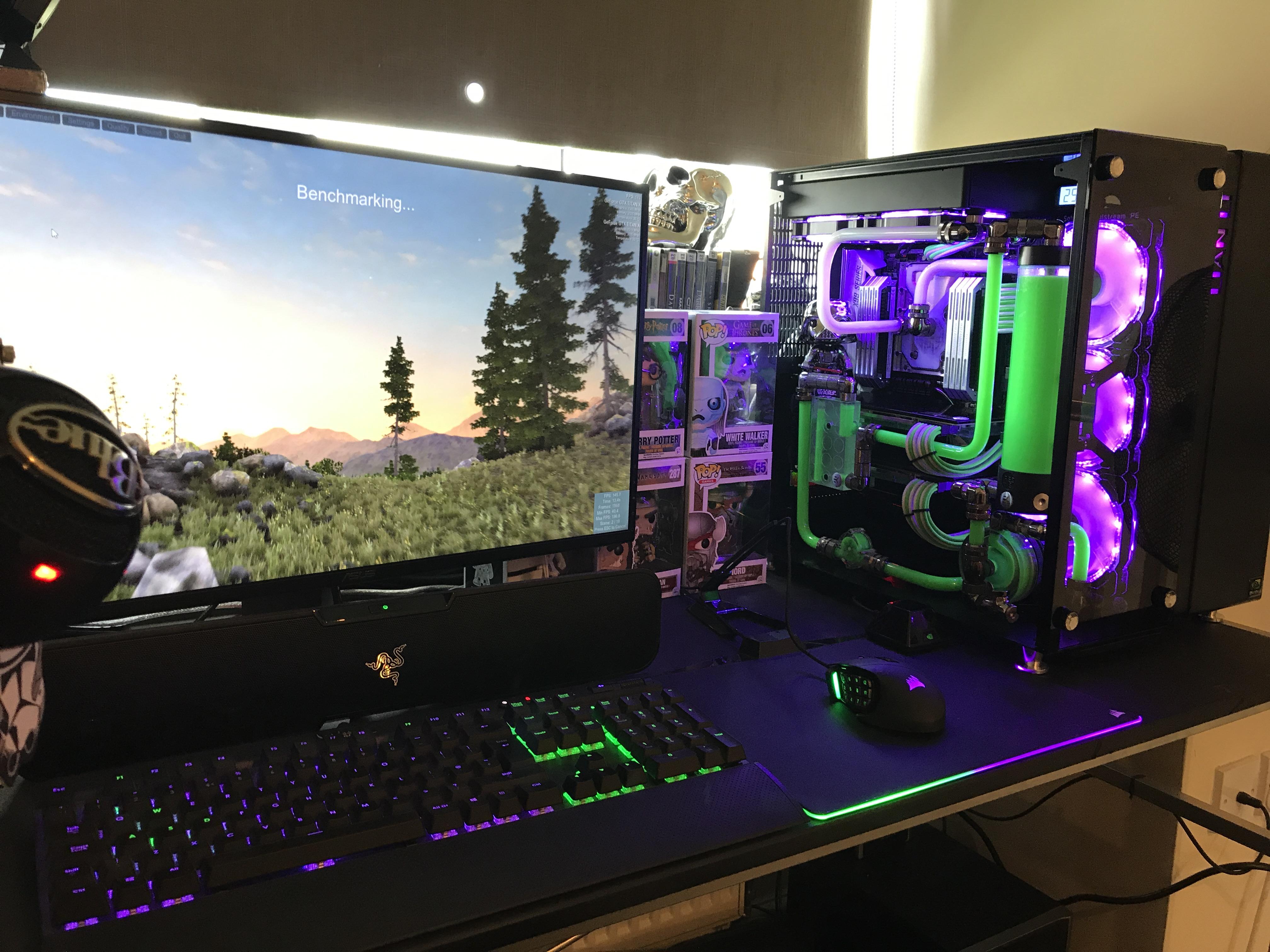
Lian-Li PC09 (Dual custom loop) Hard line Watercooling by Rye_Pye - Intel Core i7-6850K, 2 x GeForce GTX Titan X, Lian Li PC-O9 ATX Mid Tower
Don’t know if this is what you want
 calm timber
Why do I get this on my monitor? It's a bad thing.
 undone yacht
knotty sparrow
Not without blending them, that's not how homogenous fluids work
undone yacht
knotty sparrow
Not without blending them, that's not how homogenous fluids work
I understand but using something water based with something oil based will work. Like mineral oil and distilled water.
@rare rose
I know people use mineral something, but nothing arose like an oil based gel could possibly work
knotty sparrow
undone yacht
I understand but using something water based with something oil based will work....
The fluid in a PC cooling loop needs to be homogenous for effective heat transfer to occur
Oil is too thick for a PC pump as well
And it would mix anyway, like when you shake a bottle containing oil and water it stays mixed until it separates. It would never have a chance to separate while it's running.
Mineral oil can be used for PC cooling but only as an immersion bath
And on top of all that, the reason we use distilled water and additives is that inhibits growth of bacteria and fungus. Oil would have the opposite effect, and you'd have to change it quite frequently.
undone yacht
Unfortunate, thanks t for your response
 modest carbon
My aio went out and I just ordered a new one this https://www.newegg.com/corsair-liquid-cooling-system-h170i-elite-lcd/p/N82E16835181266 had some questions. I have mostly all Thermaltake quad rings in my system if I did a push pull with this aio fans up top and tt on the bottom will I run into problems if my tt max out at 1400rpm verse these at 1600? The commander says it can be used with any fans does it work with TT?
sacred wren
modest carbon
My aio went out and I just ordered a new one this https://www.newegg.com/corsair...
can you cancel that order
that is twice the price of what its worth
assuming you want the rgb, here https://pcpartpicker.com/product/y7wypg/arctic-liquid-freezer-ii-360-a-rgb-488-cfm-liquid-cpu-cooler-acfre00101a

ARCTIC Liquid Freezer II 360 A-RGB 48.8 CFM Liquid CPU Cooler (ACFRE00101A)
better aio and half the price
rotund sable
160 bucks though ouch
shrewd juniper
Could also go
https://pcpartpicker.com/product/yLBhP6/ek-ek-aio-360-d-rgb-6604-cfm-liquid-cpu-cooler-ek-aio-360-d-rgb
Or
https://pcpartpicker.com/product/83vdnQ/arctic-liquid-freezer-ii-420-a-rgb-689-cfm-liquid-cpu-cooler-acfre00109a

EK EK-AIO D-RGB 66.04 CFM Liquid CPU Cooler (EK-AIO 360 D-RGB)

ARCTIC Liquid Freezer II 420 A-RGB 68.9 CFM Liquid CPU Cooler (ACFRE00109A)
rotund sable
the evga 360clc is $80 rn lol
shrewd juniper
Very much the value pick great option
rotund sable
i guess if you want rgb and slightly quieter fans you can get one of those two lol
shrewd juniper
rotund sable
i guess if you want rgb and slightly quieter fans you can get one of those two l...
Considering they choose a c*rsair rgb one I'd say so lol
 languid orbit
sacred wren
assuming you want the rgb, here https://pcpartpicker.com/product/y7wypg/arctic-l...
languid orbit
sacred wren
assuming you want the rgb, here https://pcpartpicker.com/product/y7wypg/arctic-l...
I have this. Keeps my 5800x nice and cool. 👌
modest carbon
The Corsair comes with the commander, is a 420 and goes with my keyboard and Icue nexus. I just want to make sure that the difference in fan speeds wouldn’t affect anything negatively. Need this to test my cpu to see if it’s good or need total upgrade beyond the new video card
Want to have the TT like they are here but upgrading them to 140 verse the 120 that was on that cooler
 sacred wren
There's a 420 lf2
 glad sail
anyone reccomend a good aio that looks pretty good but also has great performance. preferably white
sacred wren
glad sail
anyone reccomend a good aio that looks pretty good but also has great performanc...
Lian li galahad
glad sail
anyone know of a good sfx psu that is atleast 750 watt
sacred wren
glad sail
anyone know of a good sfx psu that is atleast 750 watt
evga gm i believe is sfx
either gm or ga
glad sail
ok thanks
steel tusk
Ga is ATX, believe gm was on sale recently and it's a good unif
dreamy locust
Are 3 noctua 40mm×20mm 5k rpm fan good enough to remove heat from a smol pc with 2600/x and stock wraith spire?
rotund sable
why would you use 3 40mm fans though lol
does your wraith spire not have its fan or something?
or are they supposed to be case fans?
 left pulsar
5k rpm... 
dreamy locust
No, the air from the cooler goes inside the small case, and I also need to take the hot air out
rotund sable
can i see the case lol
dreamy locust
It's a 3D model but ok, I'll take a few photos
I have to print it/build it with some diff materiels
rotund sable
oh you're making your own case?
dreamy locust
Yep
rotund sable
nice
dreamy locust
I'm sure you're not understanding the image, yellow: CPU cooler (spire), orange: 1070, blue: mobo, purple: 40mm fans

Top view

Btw just a random question @rotund sable why do you have 3 ranks on your profile (regular, veteran and master?)?
sacred wren
He hacks
left pulsar
Gpu is "vert mount" I suppose. Well I'd design a case to fit slightly bigger fans. 5k rpm or w/e wouldn't be fun. Even just 80 or 92mm could run way slower moving the same air
rotund sable
dreamy locust
I'm sure you're not understanding the image, yellow: CPU cooler (spire), orange:...
making a rackmount or something? or do you just like that form factor
Either way yea that fan setup should work fine. It'll just get really loud lol
rotund sable
dreamy locust
Btw just a random question <@956440029457178625> why do you have 3 ranks on your...
 dreamy locust
What do you mean with rackmount?

 dreamy locust
rotund sable
Either way yea that fan setup should work fine. It'll just get really loud lol
dreamy locust
rotund sable
Either way yea that fan setup should work fine. It'll just get really loud lol
Maybe I should put the 1070 normally, making the case taller (12cm instead of 8) but less wide so I can fit 80mm fans maybe...?
rotund sable
i thought you were making a 2U or something
rotund sable
dreamy locust
Maybe I should put the 1070 normally, making the case taller (12cm instead of 8)...
it's up to you tbh, but yea that would probably be better so you can get different fans that arent as loud
dreamy locust
dreamy locust
Maybe I should put the 1070 normally, making the case taller (12cm instead of 8)...
I was already thinking in making different designs, also one for a micro itx mobo (with LGA 1151 😐 )
Ok, for now I have this design, now I'll make 2 more
rotund sable
what about a mini-itx X399 system 
dreamy locust
Mlmlm
dreamy locust
rotund sable
it's up to you tbh, but yea that would probably be better so you can get differe...
What are the best fans I can get, 80mm? I elaborated like 5 different designs for the case and they all end up being ~90mm tall, at this point the best option is to get some 80mm fans on the sides
I know arctic 80mm are good (just 8€)
knotty sparrow
There's always Delta 


 spare locust
Has the Noctua 12uha been upgraded throughout its history
knotty sparrow
The NH-U12A? It's in the fifth generation of the U12 line if that's what you mean. They've always kept up with the latest socket brackets too.
It's largely the same as when it launched in 2019 though
ornate kite
So my father thinks that he can replace the front fans on the corsair 4000x with the fans of the Corsair H150i liquid cooler
Is that possible?
strange flume
yes ofc
noble quarry
as long as they are 120mm or 140mm any fan can fit on the 4000x front
modest carbon
How big a drop would I have switching out 2 up to 2000rpm fans on my radiator for ones that are a ed at 1500rpm? Though would be using 4 of those in a push pull.
shrewd juniper
Push pull is not worth it, but why would you do that? Also it depends on the fans because it's going through a radiator static pressure matters
marsh badge
^
left pulsar
Not a big drop in temp, moderate drop in noise. Although I've used 1100rpm case fans a long time.
 bleak crescent
is the arcitc freezer 34 esports duo recommendable? would be using it for the i5 12400f
strange flume
It'll work well but you can use a cheaper tower cooler for it like an SE-214-XT
Even the stock cooler works in the cpu box (loud though)
dreamy locust
Maybe the arctic freezer looks better if you're making a nice build
bleak crescent
so it is worthless to get the arctic freezer when I am aiming at lower temps (better thermals)?
strange flume
I mean it's not a bad cooler, quite a good one, it's just a single tower is a bit of overkill on it already
AK400 is the same thing, that's a gem of a cooler but not really necessary for the extra on a 12400
Better to throw that $10-$20 into something else like upgrading a 512gb MP33 to 1TB, for example
bleak crescent
I see I see, what about the Arctic Liquid Freezer II 280 or the dark rock pro 4
I would then keep the stock cooler and later upgrade it
strange flume
2 other very good coolers, extreme overkill on a 12400F and not suitable
Yeah you could do that, run the stock cooler then change to a higher power part later with a better cooler, what mobo were you planning on again?
bleak crescent
the msi pro b660m-a
strange flume
👍 one of the best ones to pick, likely will pose no problem
bleak crescent
so the stock cooler won't cause any problems or high temperatures?
strange flume
Not supposed to no, cpu's self-manage temps anyway so you know what to get if it's for some reason not working out*
bleak crescent
aight then imma do it this way, for now stock cooler and later imma grab a better one
strange flume
Sounds good 👍
shrewd juniper
bleak crescent
is the arcitc freezer 34 esports duo recommendable? would be using it for the i5...
Would grab a gammaxx 400/gt instead usually
left pulsar
I vote to go ahead and grab that gammaxx 400 or similar right now & enjoy not simply the lower temps but also moderately less noise is the bigger thing. Plus "bolt thru" setup works way better than the pushpins. I paid $37 for my 1st heatsink, lol. 2nd 1 was only $20 though. Plenty for anything under around 80w (peak)

 lusty horizon
Hey guys I'm in the middle of a build here and I've run into some possible misinformation. I'm using a Lian Li Lancool II case and I was going to put a 240mm rad on the top in exhaust mode, one exhaust fan in the back and three intake fans in the front. I've seen builds with this config, but I was told by a friend that I should a 360mm positioned in the front for intake. I've bought the parts already. Is my buddy correct or can I use a 240mm rad on top?
knotty sparrow
What processor are you using?
lusty horizon
3600X
knotty sparrow
240mm on the top is more than enough
Even a cheap $25 air cooler would be plenty on that, there's really no need for 360mm
lusty horizon
OK, thanks for that info.
I think the aio looks cleaner, even if it's not necessary, but if it's too expensive then I'll use the air cooler. What are good budget aio options?
sacred wren
lusty horizon
I think the aio looks cleaner, even if it's not necessary, but if it's too expen...
if you want the aio look, look at the clc 280
its $60 rn
knotty sparrow
I thought that went back up to $80
sacred wren
its never good to get a cheaply made aio, which are mostly what you find around that price point
but clc is on a good sale rn
sacred wren
knotty sparrow
I thought that went back up to $80
just pcp being dumb i think
oh maybe not
yeah i guess the sale ended
dreamy locust
Why the Noctua NH-L9i (intel) is smaller than the Noctua NH-L9a (AMD)? Discrimination 😐
 frozen cape
Would COOLER MASTER MLW-D24M-A18PC-RW Water Cooler be good for Ryzen 9 5950x?
strange flume
You could probably manage to run it on one but I certainly wouldn't call it good at all
For the same price you can get an EVGA CLC 280 and I would definitely call that more capable of a 5950X
Or $10 more for a 360 version
frozen cape
strange flume
You could probably manage to run it on one but I certainly wouldn't call it *goo...
would CORSAIR CW-9060050-WW Water Cooler be better
shrewd juniper
frozen cape
Would COOLER MASTER MLW-D24M-A18PC-RW Water Cooler be good for Ryzen 9 5950x?
No, would not advise buying a cooler master aio, I would recommend the arctic liquid freezer ii 360mm
Also 5950x isn't really a good choice anymore unless you are going to be using VM's or a lot of code compilation
dreamy locust
Can i spray paint a fan (blades and structure)? Ofc by covering every important part like the motor
strange flume
frozen cape
would CORSAIR CW-9060050-WW Water Cooler be better
It's mainly the size. 240mm is not really ideal for a 5950X. You want bigger than that
frozen cape
strange flume
It's mainly the size. 240mm is not really ideal for a 5950X. You want bigger tha...
alright
shrewd juniper
Also corsair coolers are mediocre
dreamy locust
dreamy locust
Can i spray paint a fan (blades and structure)? Ofc by covering every important ...
?
shrewd juniper
Sure?
 tight reef
1600 RPM case fans, is it enough?
shrewd juniper
Rpm doesn't really indicate if its a good fan or not tbh
bleak crescent
Nah
It ain't getting in

When I push it in nothing happens

This is the other side built in
Bro I hate the system of this cooler
dreamy locust
I've never used intel stock but I guess its lifted up on both sides
Is it LGA 1700 or other?
bleak crescent
Ye
dreamy locust
Idk
They pushing more on both sides at the same time
Avoid breaking MB...
bleak crescent
kinda risky
dreamy locust
Could you show with a video why it doesn't get in?
bleak crescent
been trying for 30mins
I would ask how to install after removing it
cause I have done that several times now
shrewd juniper

Hey guys! Welcome back to Novatech HQ, in this video we'll be showing you how to install an Intel 12th Gen CPU and cooler into a motherboard.
⏱️TIMESTAMPS⏱️
0:00 Intro
0:15 How to Install the CPU
2:23 How to Install a cooler
3:52 Outro
MSI PRO Z690-A Intel Z690 Motherboard available at ▶️ https://www.novatech.co.uk/products/msi-pro-z690-a-inte...
try that
bleak crescent
So I gotta turn them clockwise before installing?
He said to the "right"
Did it!!!
 slow condor
whats a good way to power some pc fans or pumps that are separate from pc power supply?
knotty sparrow
What voltage are the fans?
slow condor
12v
knotty sparrow
PC fans?
Right that's what you said, I'm blind
Get a fan hub and power it separately
A dumb hub that doesn't need a motherboard signal
slow condor
so something like this https://www.dazmode.com/shop/watercooling/maintenance/water-cooling-essentials/phobya-external-power-supply-110v-to-4pin-molex-12v-5vdc-34w/
the 4pin molex would connect to hub?
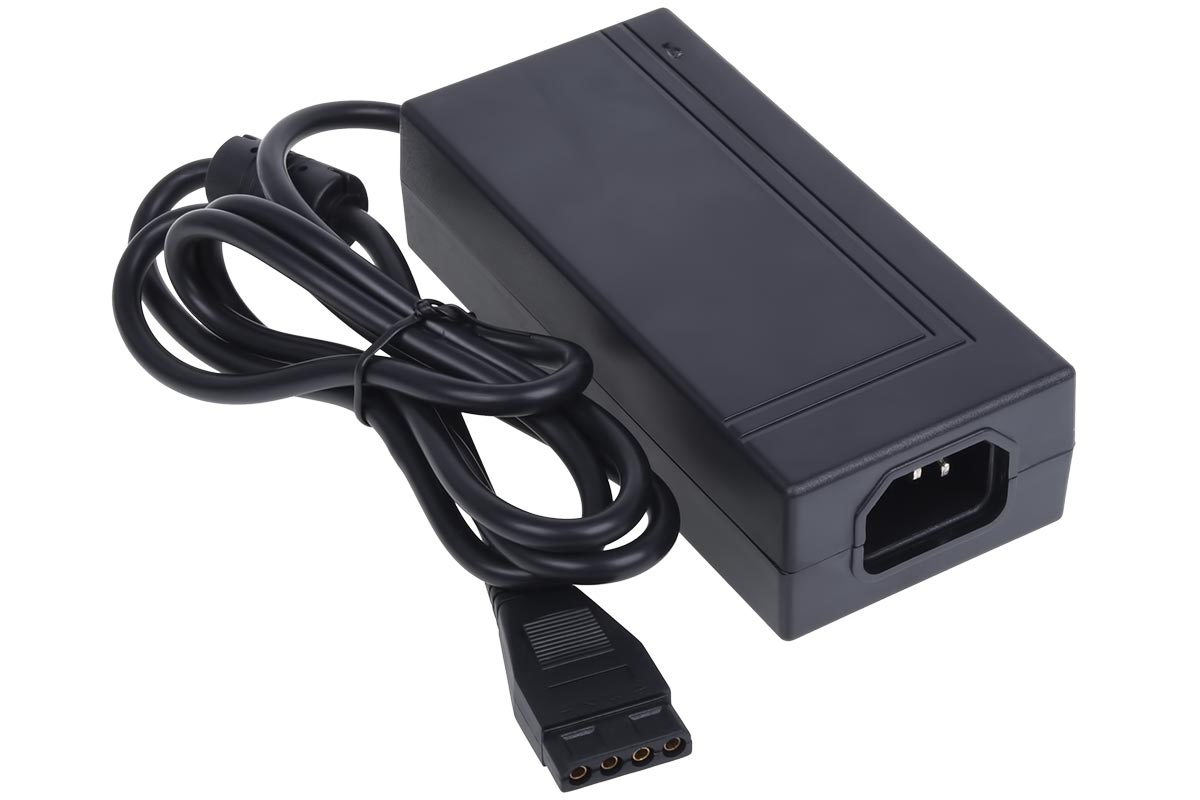
This Phobya power adaptor adapts 110v AC to 12/5v DC for your PC testing, such as initial filling and bleeding. The 4-Pin Molex connector allows the use of many adaptors and hence virtually everything used in a PC. ATTENTION: Standard PC power cord is NOT included. Power Brick only. Technical specifications: Power consumption: 100-240 VAC […]
knotty sparrow
That's expensive sheesh
I'd just grab the cheapest OEM PSU I can find that has sata
I always keep mine from old PCs so I've got like 4 lol
 undone geyser
thoughts on vetro fans?
knotty sparrow
Vetroo? They made a decent low budget cooler, the V5, but I don't think their fans alone are good.
marsh badge
their fans are probably meh
undone geyser
just their 120mm fans im buying
shrewd juniper
Just get some arctic p12s or something
If you are looking for cheap rgb : p12 (a)rgb, id cooling have some fans idk model, phanteks have some idk model
 magic sparrow
Afaik cheapest okay option is from EzDIY or UpHere
 half flame
I picked up a 10900k in a maximus XIII Extreme Glacial today. I haven't done water-cooling before besides an AIO and I'm wondering of someone could point me in the right direction.
Are there any good resources or a parts buying guide as I still would need to get tubes and fittings
noble quarry
the money you will spend on a custom loop on that particular cpu could be better employed on a better pc you know
strange flume
You owe that guy a lunch or two lol
half flame
lmao damn right i do
he has 2 3090s and a threadripper in his main pc which is literally built into his desktop
low pumice
desk pcs are fun
 gilded apex
do y'all know if 140mm fans will fit onto a tower cpu cooler that came with a 120mm fan
 summer current
Alright, friends, cooling newbie here. I've had a GTX 1060 in this case since 2019 and just upgraded to RTX 3080. My PC went from silent and cool to loud fans and 70-78°C on the GPU when playing a game like Fortnite tonight. It does seem like the 3080 is cramped in this case. There's one fan in front and one in back it seems. What should I do?


 gilded apex
marsh badge
unless you use zip ties
gilded apex
marsh badge
unless you use zip ties
Do you think this is worth it
The nxzt fans are on sale for 6 dollars a piece
marsh badge
nah
gilded apex
So I picked up a couple
Oh fake
Damn*
I could move my front fans to the cpu cooler then perhaps?
Or should I just cancel the order
marsh badge
summer current
Alright, friends, cooling newbie here. I've had a GTX 1060 in this case since 20...
add some more fans on the front and top
it'll help
gilded apex
Bc 6 dollars kinda seems like a steal to me
marsh badge
i wouldn't say it's worth it tbh
summer current
marsh badge
add some more fans on the front and top
What about a bigger case? It's cramped as it is in there I feel.
gilded apex
marsh badge
i wouldn't say it's worth it tbh
But wouldn’t the bigger fans decrease noise?
Plus adding extra fans helps a bit regardless no?
marsh badge
not necessarily
gilded apex
I have a p400 for reference
Have 3 front fans and a cpu fan
Nothing on top or rear
So I am thinking maybe I can put the 2 140mm at the front
Move the three at the front to the top and rear
Is that worth it?
noble quarry
summer current
Alright, friends, cooling newbie here. I've had a GTX 1060 in this case since 20...
70-78 is normal working temperature on the 30 series
start worrying at 95+
those cards idle at 45-55 and work at 70-80 on a workload scenario like gaming, you can ofc lower those temps with better airflow or some water cooling solution, but as long as the card is below 95, everything is fine
undone geyser
shrewd juniper
If you are looking for cheap rgb : p12 (a)rgb, id cooling have some fans idk mod...
only bought it for aesthetic lol
increased fps not bad
shrewd juniper
Fans increased fps? You must have beem throttling your poor pc
noble quarry
shrewd juniper
Fans increased fps? You must have beem throttling your poor pc
only on rgb fans. its a scientific fact that rgb increases your fps 😛
shrewd juniper
Oh true
 bold birch
noble quarry
those cards idle at 45-55 and work at 70-80 on a workload scenario like gaming, ...
bold birch
noble quarry
those cards idle at 45-55 and work at 70-80 on a workload scenario like gaming, ...
Idk if 70-80 is norm on Fortnite
Most 30series are in the 60s
Might be ambient temp
noble quarry
i mean, its like 3 roentgen... not great, not terrible
shrewd juniper
bold birch
Most 30series are in the 60s
Highly depends on model and what gpu
noble quarry
60 on workload is way too low for air
bold birch
In the 60s
noble quarry
unless you are blowing your ac on your card
noble quarry
well, yeah, ambient plays a role there
shrewd juniper
My fan curve maxes out at 70c
bold birch
noble quarry
well, yeah, ambient plays a role there
And maybe airflow
noble quarry
cant argue against that
but 70-80 inst that bad, could be improved yeah, but is a n ok temp regardless
bold birch
Doesn’t look he’s running 3 fans in the front in the pick
bold birch
noble quarry
but 70-80 inst that bad, could be improved yeah, but is a n ok temp regardless
That’s usually when cards downclock a couple mhz
Iirc
shrewd juniper
80 is too high for my comfort, 30 series cards stop boosting at 83c
shrewd juniper
bold birch
Also assuming he didn’t do a repad
Once again depends on model
bold birch
shrewd juniper
Once again depends on model
Aren’t most of the models pads crap
shrewd juniper
Afaik you have a 3060 ti right? No need to worry that's only g6
noble quarry
its a msi, could be an x trio
shrewd juniper
bold birch
Aren’t most of the models pads crap
Some, most are decent if your not mining, some are still good enough for mining
shrewd juniper
noble quarry
its a msi, could be an x trio
Could also be a ventus 
noble quarry
yeah could be
noble quarry
at least not a 2x ventus 😛
bold birch
shrewd juniper
Some, most are decent if your not mining, some are still good enough for mining
I mean most of them are in the 90s while gaming or high 80s
Within spec but still high
shrewd juniper
summer current
Alright, friends, cooling newbie here. I've had a GTX 1060 in this case since 20...
Get some arctic p12's and fill the front with them, go into msi afterburner and make a more aggressive fan curve
bold birch
And an undervolt, no point overclocking for 2% gains
shrewd juniper
bold birch
I mean most of them are in the 90s while gaming or high 80s
Perfectly fine ,g6x is rated to 105-110c
Well an undervolt would help yes, bit more complicated and i have a feeling those 2 stock fans aren't doing enough airflow anyway
shrewd juniper
bold birch
And an undervolt, no point overclocking for 2% gains
Overclocking gpu is for way more than 2%

 bold birch
I was talking about gaming, it’s more noticeable in benchmarks
shrewd juniper
9% increase on a oc'd card out of the factory
This card also was locked to 270w max
bold birch
Cool
noble quarry
thats... quite impressive pato sensei
shrewd juniper
Tank, too bad gigabyte did a gigglebyte and the capacitor rolled out of the card and no rmas - only returns in Ireland
Luckily i had bought a 3060 ti FE i was going to sell to rawr and he wasn't getting for few month
shrewd juniper
Yep
Came loose and roller outta my card when i was putting in the 3060 ti to mine with both while waiting for rawr to buy it
bold birch
Noting some soldering and duct tape can’t fix
shrewd juniper
Hell nah it came with a 4 year warranty i could have gotten a replacement from the retailer but prices had gone up from then since and wasn't sure if currys was going to be currys and be like dw you just pay the difference like hell nah
Plus mine was fhr so i was like I'll just keep 3060 ti and get different gpu for rawr/me
Ended up getting him a 6750xt
bold birch
I thought rawr was some other dude
shrewd juniper
He is, @timid carbon now
bold birch
I was lil confused there
 timid carbon
WHOMST HATH SUMMONED THE HUNGRY ONE
noble quarry
everyone, bail out!
timid carbon
lemme have lunch in peace 
shrewd juniper
timid carbon
WHOMST HATH SUMMONED THE HUNGRY ONE
Just talking about how gigglebyte gigglebyted me
timid carbon
lol
shrewd juniper
Sorry the proper past tense is probably gigglebit
timid carbon
Gigabyte has been great to me
bold birch
Gigglebit ticked his capacitor and it laughed too hard
shrewd juniper
Nah they used pritt stick instead of solder
shrewd juniper
timid carbon
Gigabyte has been great to me
Their boards and stuff are decent but safe to say i probably won't be buying a gigglebyte gpu for a while
timid carbon
shrewd juniper
Their boards and stuff are decent but safe to say i probably won't be buying a g...
fair enough
bold birch
shrewd juniper
Their boards and stuff are decent but safe to say i probably won't be buying a g...
It’s basically home protection within a 1m blast radius
timid carbon
ive had no issues with my gigabyte gpu tho
shrewd juniper
bold birch
It’s basically home protection within a 1m blast radius
Nah just stopped working
shrewd juniper
timid carbon
ive had no issues with my gigabyte gpu tho
I wouldn't mind going gigabyte again if their rma service included more than just refund because that's not only a pain my fhr gpu it's a waste cuz that probably went right in the bin
When all it needed was a bit of solder and maybe a new cap
noble quarry
haha looking the last ltt video xD the noctua pc
 fallen jackal
Guys is 72c good for a Rx 6650xt? Is it too hot ( fan speed at 70% )
 languid gale
shrewd juniper
Just talking about how gigglebyte gigglebyted me
languid gale
shrewd juniper
Just talking about how gigglebyte gigglebyted me
FELLOW GIGGLEBYTE SURVIVOR

We love this
Waiting almost two years for an RMA approval
uneven solstice
Jeeze. Calling them gets nowhere?
left pulsar
Yikes, probably still get better service at asus w/ my Pascal huh. 
shrewd juniper
fallen jackal
Guys is 72c good for a Rx 6650xt? Is it too hot ( fan speed at 70% )
That's fine
languid gale
shrewd juniper
At least you got an rma :/
I’ve RMAed this card 7 times, still hasn’t been fixed
 bold birch
-5c 🥶
 timid carbon
bold birch
-5c 🥶
timid carbon
bold birch
-5c 🥶
cap
bold birch
No cap
strange flume
At this point you may as well lose the case 
timid carbon
there is nothing sub ambient about that setup
bold birch
timid carbon
cap
Was at 55c mining now it’s at 50c
Btw I don’t mine just curious on the temps
timid carbon
bold birch
Was at 55c mining now it’s at 50c
then say that
bold birch
Since it’s the only thing that’s steady
bold birch
I’ll test it in heaven in a mint
bold birch
timid carbon
the pc is not at -5c
Oh
I meant minus 5c from 55c
My bad
Dropped 5-6c
 sacred wren
bold birch
Dropped 5-6c
sacred wren
bold birch
Dropped 5-6c
Did you repad and paste it?
76c on mem is pretty cool for a 3090
bold birch
sacred wren
Did you repad and paste it?
Yea
sacred wren
I put a fan blowing at my pc while I bench lol
dreamy locust
bold birch
-5c 🥶
The fan on top of the 3090 Fe
bold birch
And I’m gonna test it later
sacred wren
If you're testing ocing, download 3dmark demo on steam
bold birch
That’s not good enough
sacred wren
Put core up by 15 after each successful bench, could start at like 150
sacred wren
It tests vram too
bold birch
sacred wren
It tests vram too
Not effective as this other bench
sacred wren
Timespy is the best benchmark that's free
sacred wren
Not really
My guy
It tests vram
My 3050 ti crashes on it with anything over +600 on vram
bold birch
Well it could test it
bold birch
But it won’t be as accurate
bold birch
Well the thing is with gddr6x is that +1600 might be the same as +1000
Higher clocks same performance
bold birch
I forgot what it was bc someone recommended it to me a while back
But it test your vram at 8k
And shows noticeable differences in performance when clocked higher
bold birch
sacred wren
If you say unigene engine
That’s one I think thanks
I forgot the name of it
sacred wren
EXCUSE ME
That is literally one of the WORST benchmarks
It does not check for stability at all
bold birch
sacred wren
That is literally one of the WORST benchmarks
Why?
sacred wren
I can put my memory to +1700 on it without crashing
Which btw
Is not stable
At all
bold birch
I’ll try both then
marsh badge
Instead of wasting your time, 3dmark would actually work
bold birch
Alright
summer current
shrewd juniper
Get some arctic p12's and fill the front with them, go into msi afterburner and ...
I bought 4 of these before I saw your message about Arctic p12. Should I instead get what you recommended or would these be fine?
 summer current
Okay. I hit Cancel Order on newegg.. hopefully that works lol

5-pack on Amazon for $31 looks like a sweet deal?
left pulsar
Pretty much normal price, but yes a good value for good fans.
sacred wren
summer current
5-pack on Amazon for $31 looks like a sweet deal?
P12s are the best performing budget fans
summer current
sacred wren
P12s are the best performing budget fans
Picked up 5 of them! 3 in front, 1 in back, 2 on top I'm thinking.
With the 6th fan being one from the case pre-installed.
sacred wren
summer current
Picked up 5 of them! 3 in front, 1 in back, 2 on top I'm thinking.
For that setup, I'd do the three front as intakes and the other three as exhausts
Just because the way heat works
lusty horizon
Can someone please point me in the right direction (article, video, etc) to learn how to set up my AIO? Thanks in advance.
noble quarry
most of the time you can put your aio model on youtube and you will have a ton of installation guides for your specific model
like" 360r installation guide" or something like that
marsh badge
Or just read the manual
shrewd juniper
summer current
I bought 4 of these before I saw your message about Arctic p12. Should I instead...
Those look terrible
dreamy locust
Do pc dust filter reduce airflow? If yes, how much? What could the temperature difference be with and without?
Considering I'll need to get some for my mini pc in a ~6.5L case will a normal dust filter affect much?
Should I go for something like this ↓?

I'll have to cut them anyway to match the mini pc hexagonal holes on the case
uneven solstice
dreamy locust
The dustfilter on my 5000D has much smaller holes than that. Not sure how much dust that'll really catch.
dreamy locust
I'm more worried about airflow, I just need a filter to make sure nothing gets int the case
Would be nice if it blocks dust too ;)
uneven solstice
dreamy locust
I'm more worried about airflow, I just need a filter to make sure nothing gets i...
Like what? Dust/hair? Orr?
What could be floating around your house that you'd be worried about being sucked in? Lol
dreamy locust
I jus want the pc to stay clean because since it's a 6.5L case it'll take forever to take apart and clean
uneven solstice
Then you'll probably want something that can keep dust from getting in.. that mesh you posted above will allow all sorts of dust to get in.
While I know that anything in front of a fan is going to impede airflow.. I can't imagine a fine mesh (such as whats on the 4000D/5000D series) restricting it so much it affects your thermals in any meaningful way.
shrewd juniper
dreamy locust
Do pc dust filter reduce airflow? If yes, how much? What could the temperature d...
Yes, depends on the size of the holes in the dust filter
dreamy locust
Is 0.5mm holes good for airflow and catching dust?
shrewd juniper
No idea .5mm sounds a bit big tho
dreamy locust
 uneven solstice
Thatll largely be better than the 1.4mm
dreamy locust
I'll just check other dust filters and see what dimension they're
I've found 0.2mm, too
That looks too small
dreamy locust
dreamy locust
I've found 0.2mm, too
Yeah, many people said (on the reviews) that they reduce airflow
uneven solstice
Yeah because smaller holes.
shrewd juniper
.2mm sounds too small, maybe.5 is okay
uneven solstice
shrewd juniper
Grab one of those
I feel like it's to rubbery thick though where he could have smaller/thinner mesh wire?
dreamy locust
shrewd juniper
https://www.corsair.com/it/en/Categories/Products/Accessories-%7C-Parts/iCUE-400...
What are the dimensions of the dust filter?
Let me see if I can found them on Corsair EU
 uneven solstice
shrewd juniper
uneven solstice
shrewd juniper
Omg pato
shrewd juniper
Dimensions
uneven solstice
What is wrong with your tower?
shrewd juniper
Nothing
dreamy locust
shrewd juniper
That's corsair itally
Lol, it was in English I thought it was US
Lol
uneven solstice
That looks dirty
shrewd juniper
It says € lol
uneven solstice
Is your mesh ok?
shrewd juniper
uneven solstice
That looks dirty
It's a bit dusty yeah i need to hoover it and my room
uneven solstice

dreamy locust
shrewd juniper
Dimensions
?
shrewd juniper
uneven solstice
<:pepelaugh:903611012396224563>
It's not that bad it's the angle
dreamy locust
Are they like 140*280?
uneven solstice
I'm giving you crap my dear:P
left pulsar
Yea when we start to be able to see the dust circles, time for a clean lol
 shrewd juniper
dreamy locust
?
shrewd juniper
dreamy locust
?
It doesn't say but like slightly smaller than the 4000d, yeah it fits 2 140mms
So roughly that
dreamy locust
Ok
shrewd juniper
left pulsar
Yea when we start to be able to see the dust circles, time for a clean lol
 dreamy locust
Just need to know the area so I can cut them 💀
uneven solstice
left pulsar
Yea when we start to be able to see the dust circles, time for a clean lol
 shrewd juniper
dreamy locust
Just need to know the area so I can cut them 💀
shrewd juniper
dreamy locust
Just need to know the area so I can cut them 💀
But that ruins the magnetic part :p
dreamy locust
shrewd juniper
But that ruins the magnetic part :p
Unfortunately on my case there are no metal parts where it can rest
:/
shrewd juniper
How?
uneven solstice
He build his own case?
dreamy locust
 languid gale
Hmm that sounds like a fun idea, maybe I should build my own case
left pulsar
shrewd juniper
You can barely see
Too late, can't be unseen. Can't see it from my house easily though.
languid gale
shrewd juniper
You can see it quite clearly
dreamy locust
@shrewd juniper how thick are the dust filters? Not counting the magnetic part
languid gale
Well unless you’re blind
dreamy locust
dreamy locust
<@191276897227898880> how thick are the dust filters? Not counting the magnetic ...
No need for accurate measurement
1mm? 1.5 2.0mm?
languid gale
I finally had a great idea for once, mini ITX case that can fit a 360rad
shrewd juniper
dreamy locust
Is it being made out of plastic or something
shrewd juniper
dreamy locust
<@191276897227898880> how thick are the dust filters? Not counting the magnetic ...
Idk pretty thin
shrewd juniper
languid gale
I finally had a great idea for once, mini ITX case that can fit a 360rad
But why bother when 280 is so close and actually smoller
strange flume
left pulsar
Yea when we start to be able to see the dust circles, time for a clean lol
Omg when I have like a 10th of this I clean mine 
dreamy locust
shrewd juniper
Is it being made out of plastic or something
Black Plexiglas probably
The best option I get that is cheap and can be used with laser cutting
strange flume
languid gale
I finally had a great idea for once, mini ITX case that can fit a 360rad
Isn't the jonsbo(?) ipro or something supposed to fit a 360?
i100 pro is the name, lol
Inb4 jonsbo iMac
uneven solstice
@shrewd juniper you gonna clean your dust filter today?
Tech/mod out here giving advice when his dust filter looks like its enough to choke a full size airflow case.
left pulsar
This it? Bit dumb to me. Pretty big & people act like the height by itself is an issue even when care is up in the open.  -- That price is ridic also. $300 I be getting a full tower.
 shrewd juniper
uneven solstice
<@191276897227898880> you gonna clean your dust filter today?
shrewd juniper
uneven solstice
<@191276897227898880> you gonna clean your dust filter today?
Yes plus it's only just getting dusty
uneven solstice
shrewd juniper
Yes plus it's only just getting dusty
How does it "only just get dusty"? Isn't dust something that builds up? :P
shrewd juniper
Yeah but I'm saying it's only gotten dusty to a point that you can see it
shrewd juniper
left pulsar
This it? Bit dumb to me. Pretty big & people act like the height by itself is an...
That's practically an matx minus like 5cm
strange flume
left pulsar
This it? Bit dumb to me. Pretty big & people act like the height by itself is an...
Yeah that's it lmao
uneven solstice
shrewd juniper
Yeah but I'm saying it's only gotten dusty to a point that you can see it
I'm bored so I'm poking you.
uneven solstice
Faillll x2
 shrewd juniper

dreamy locust
left pulsar
This it? Bit dumb to me. Pretty big & people act like the height by itself is an...
That's one reason why I build my own itx/matx case, they're expensive for no reason
I can literally build mine for... 40€? And some patience
Of course if someone is not able to do autocad/solidworks can buy the 300$ one
(and if you don't have a laser cutter)
Bruh
Imagine not having one smh
Chillin
Are you typing a poem?
languid gale
shrewd juniper
But why bother when 280 is so close and actually smoller
Because I already got a 360mm in my main build, I’m trying to downsize while spending the least amount of money possible
left pulsar
dreamy locust
Chillin
Are you typing a poem?
Haha, might've picked up me typing in another channel.
shrewd juniper
languid gale
Because I already got a 360mm in my main build, I’m trying to downsize while spe...
Have you considered swapping on r/hardwareswap?
languid gale
Too lazy to
And I kinda think building a miniITX compatible with a 360 rad could be unique and a fun challenge
Thicc XBOX style case 
 languid gale
shrewd juniper
O11 air mini is small and technically fits a 360
languid gale
shrewd juniper
O11 air mini is small and technically fits a 360
Wdym by technically?
strange flume
Iirc you use adapters to shift the rad like 2 cm sideways it can fit a 360 technically
languid gale
I might actually do that, since apparently it can fit a full ATX motherboard and PSU
strange flume
You also lose like 10% or 20% of the air movement through the rad doing it
Very much a copium thing for o11 air mini lol
languid gale
How does it compare to a Lancool II Mesh size wise? My signal is iffy so it’s a bit of a pain to check
strange flume
Size wise o11 air mini has like basically an atx footprint
It's quite long iirc like 400mm
And thicc
Yea it's wider than a Lancool II Mesh but shorter
I just double-checked
strange flume
It's shorter, 400 vs. 478
But wider, 288 vs 229
languid gale
I wonder what would make more sense for a college dorm
shrewd juniper
languid gale
Wdym by technically?
Like it officially only supports 240/280mm aios but it does support 3x120 fans so you can physically do a 360mm aio in it just not officially
Very tight squeeze tho
languid gale
You think it’d be worth it to downsize to that from a Lancool II Mesh?
shrewd juniper
I wouldn't
languid gale
I’m trying to save space in a college dorm
shrewd juniper
Imo wider is worse in a confined space like a dorm room
languid gale
I might also just leave it home and use my laptop for work and stuff
shrewd juniper
When you save height you're not actually saving anything
What kinda stuff? Also what laptop you got?
strange flume
Just use that
languid gale
32Gb of ram so it’s not a bad laptop at all
shrewd juniper
Yeah just use that and bring a monitor with you imo
Laptop screens are way too small
strange flume
Use the university computers for cad
shrewd juniper
What monitors you got at home?
languid gale
strange flume
Use the university computers for cad
Oh hell naw
strange flume
Eh
languid gale
shrewd juniper
What monitors you got at home?
2 very weird monitors
shrewd juniper
shrewd juniper
What monitors you got at home?
Would you not bring one of these?
shrewd juniper
languid gale
2 very weird monitors
Go on?
strange flume
Do you have a science facility at college?
shrewd juniper
strange flume
Use the university computers for cad
Usually college pcs suck
strange flume
Computer lab?
languid gale
I got one 28” 4K Tn panel 10-bit monitor
strange flume
Not at my uni they were using like, not a6000's but the one before it
languid gale
strange flume
Computer lab?
My laptop outperforms most of the computers you’d find in a computer lab
strange flume
For computer labs
strange flume
Kekw
languid gale
Then I got some 31” 1440p monitor that I don’t even remember the rest of the specs on
shrewd juniper
Granted we don't have any cad heavy courses
strange flume
3rd suggestion, eGPU if you feel desparate
shrewd juniper
God no
strange flume
Lol
languid gale
I’m going to college for nuclear engineering so cad will be pretty involved
shrewd juniper
Those things are so worthless just build an itx pc at that stage
strange flume
You make it too easy sometimes pato lol
shrewd juniper
Lol
languid gale
The laptop would be fine since it’s a 16gb 3080 but not as nice as a desktop 3080 lol
strange flume
I'm sorry
shrewd juniper
Hmm alec how much money are you looking to spend?
16gb will be nicer for cad actually
languid gale
shrewd juniper
Hmm alec how much money are you looking to spend?
I’ll be honest, I don’t really got much of a budget rn
Maybe 8-900 most?
shrewd juniper
Bro that's plenty
languid gale
But I don’t really care about how much I spend on it
I had a plan to convert my desktop into a mini ITX but I forgot about it
I think I could maybe find it somewhere if I looked hard enough
Give me a sec
shrewd juniper
Okay so hear me out, instead of building new pc or trying to downgrade currently why not just build itx pc and take current gpu out of atx and swap between them for 800$
Or
Just leave the 360mm and get like a 280
Clc 280 is like 80$
strange flume
I would find a compatible itx or carry matx and use a smaller mobo
If we go that route
Smallest spend
languid gale
PC Builder - AMD Ryzen 9 5900X, GeForce RTX 3080 12GB LHR, Cooler Master MasterBox NR200 Mini ITX Desktop
Here it is
Anything with 0 as price I already have
languid gale
Not in stock
shrewd juniper
Also why not use your current ram?
strange flume
That would work
languid gale
I have a 4x8 kit of 32Gb
strange flume
That's justifiable
languid gale
Yeah kinda regret when i was originally buying the ram but oh well
strange flume
Cerberus sliger has a handle
So you can cut out some 80-ish dollars
Then you get 4 ram slots along with the portability
languid gale
Oh I don’t really need portability just a smaller footprint
 languid gale
What mobo would you recommend?
strange flume
I don't remember ideal b550m's
languid gale
Out of curiosity is there a mATX case that fits a ATX motherboard?
im kinda attached to my crosshair
languid gale
I’ve had this Crosshair VIII hero since 3000 series launch and I expect to have it until my 5900x isn’t viable anymore
strange flume
Crosshair VIII is still one of the goat boards
languid gale
Still an S tier mobo
Hmm I think I’ll stick with my laptop for the first semester or so and see how things go
strange flume
Honestly I'd rank it higher than the dark hero
languid gale
Why?
strange flume
I see better ram oc results from people with the regular one
Then again most people who know how to use a dark hero prolly moved on pretty early, they're both really good anyway
languid gale
I kinda wish I had a dark hero because of dynamic OC
strange flume
Dynamic OC pretty useless
languid gale
Really?
shrewd juniper
@languid gale would probably do this
https://pcpartpicker.com/list/96vGnt
PC Builder - AMD Ryzen 9 5900X, GeForce RTX 3080 12GB LHR, Cooler Master MasterBox NR200 Mini ITX Desktop
languid gale
Cl18?
strange flume
Maybe for certain benching it has fringe cases but a good pbo tune will smack any form of static oc even with the Dynamic OC switching
strange flume
Wouldn't worry about the ram speed for cad
shrewd juniper
Could go 3200 and save another 15$ or so
Might recommend that actually
Ehh the higher fclk might be worth it
strange flume

shrewd juniper
Mm actually I'd probably do this that way it's only 10$ more than 3200, although tiny bit worse timings
https://pcpartpicker.com/list/9tmzFg @languid gale
PC Builder - AMD Ryzen 9 5900X, GeForce RTX 3080 12GB LHR, Cooler Master MasterBox NR200 Mini ITX Desktop
languid gale
Sorry about that, just got home
But I’m going to stick with 3600cl16 or faster because the CAD programs I use all prefer faster ram speeds
shrewd juniper
Okay i just don't think it's worth 45$
lusty horizon
Hey guys, I'm back with more questions on my fresh PC build: How do I make it to where the case/aio fans do NOT start to run at full speed when the CPU usage spikes? I've heard that this is a common problem with amd processors.
dreamy locust
lusty horizon
Hey guys, I'm back with more questions on my fresh PC build: How do I make it to...
You mean you don't want them to go full speed on small CPU spikes?
lusty horizon
that is correct
dreamy locust
You go into bios and change the fan curves
Or you can use other software in windows to help you change the fan curve
lusty horizon
What kind of software would I use? Like L-connect and all the third party stuff?
dreamy locust
"Fan Control" very simple and intuitive
lusty horizon
Alright thanks I'll check it out
dreamy locust
It's easier to adjust your fan curve without having to go into bios every time
That way you can also stress test and set the best fan curve you want
Ask if you need help
Btw you may want to set a small delay for your fans, that way if it is a 2 seconds 80C spike it won't ramp up like crazy
lusty horizon
Thats exactly what I'm looking for! awesome
Who makes this software
found it thanks!
Also, I was told that I could run case fans and aio fans on the same controller and they would all ramp up the same, and the speed would be the same on all fans. Is this the traditional way of controlling pc fans?
dreamy locust

Download/release page: https://github.com/Rem0o/FanControl.Releases
LTT Thread: https://linustechtips.com/main/topic/1099996-openfancontrol-my-take-on-a-speedfan-replacement/
Paypal: https://www.paypal.com/cgi-bin/webscr?cmd=_donations&business=N4JPSTUQHRJM8¤cy_code=USD&source=url&item_name=Fan+Control
In this tutorial, I'm showing the ba...
dreamy locust
lusty horizon
Also, I was told that I could run case fans and aio fans on the same controller ...
I'd not recommended it, CPU fan speed/aio should be different from case fans
You should set your own speeds based on how many fans you have/ how loud they are or whatever you want...
lusty horizon
That makes more sense, it seems that everyone has a different approach but I couldn't really see all fans doing the same thing
dreamy locust
Btw using a 4pin fan to multiple fans may not be safe if you have high consumption fans.
Usually today you may find 0.1A fans but take in mind that one 4pin header usually supports a max of 2.5A
lusty horizon
Good to know. I'm using Lian Li uni fans with the provided controller. 3 in front, 2 up top (with kraken x53) 1 in back and 2 on bottom. Controller is 4 channels
dreamy locust
Isn't the controller for RGB?
dreamy locust
Oh
Where is the controller connected?
I thought you had individual fans plugged in your MB headers
lusty horizon
usb 2.0 for controls, fan header to pass through to mobo control and its sata powered
sacred wren
lusty horizon
Hey guys, I'm back with more questions on my fresh PC build: How do I make it to...
That isn't a problem, the cpu is heating up so the fans speed up
That's what they're supposed to do
dreamy locust
lusty horizon
usb 2.0 for controls, fan header to pass through to mobo control and its sata po...
But is it like one 4pin header directly to the MB?
dreamy locust
sacred wren
That isn't a problem, the cpu is heating up so the fans speed up
Yeah but they're trying to remove those random ramp up from small temp spikes
lusty horizon
@dreamy locust Yes for control only not power for fans
sacred wren
unless im misunderstanding
that spike of usage is also a temp spike
unless you want it to heat up more, you dont want the fans to not ramp up
dreamy locust
They've got small temperatures spike and all fans ramp up crazy, there should be a delay, that way fans won't ramp up randomly
Like
80C for 1 second (no fan delay) → ram up like crazy
80C for 1 second (with fan delay) → fan stay chill
lusty horizon
@dreamy locust Is this the right way to go about fan control?
dreamy locust
dreamy locust
But is it like one 4pin header directly to the MB?
Is it only one 4 pin to the motherboard for all the fans in your case?
lusty horizon
Yes
dreamy locust
If yes then you can't control them separately I guess
Unless there is a lianli software
Let me check
lusty horizon
But you can control fan speeds in Lian li software
dreamy locust
Then I guess they're using the usb to be controlled
lusty horizon
Also, another problem is I don't know if you can control the fans separately in L-connect
magic sparrow
FanControl isnt limited to mobo fan control
dreamy locust
Yeah but I thought the fans were connected separately on each MB header
lusty horizon
@magic sparrow So Fan Control is still the way to go?
magic sparrow
lusty horizon
<@207156621531545600> So Fan Control is still the way to go?
Maybe, it doesnt detect everything. But it can detect other controllers, dont know if it works with whatever you're using tho
dreamy locust
Or you could connect the 4pin fans directly on the motherboard
I guess the headers are not enough so you could connect just some of them like
Front and CPU to the motherboard
And back/bottom fans to the lianli controller
magic sparrow
If the controller isnt supported, look through LHM (the base of FC) forks/PRs to see if there are builds that do support your controller. That or look for FC plugins that support your controller too.
Github for LHM:
https://github.com/LibreHardwareMonitor/LibreHardwareMonitor
lusty horizon
Alright thanks for all the input. I may use the mobo fan headers for Fan Control and use the lian li software for the rgb on the uni fans.
so just run the fans to the mobo
dreamy locust
What motherboard are you using?
magic sparrow
lusty horizon
Alright thanks for all the input. I may use the mobo fan headers for Fan Contro...
Id recommend using OpenRGB for RGB control
Plugins also exist for OpenRGB which Id recommend some of them
lusty horizon
I'm using gigagyte b550 auros pro v2
dreamy locust
Sometimes not using the "right" software for RGB can cause the led to light up like 50% like it happened to me with both signal RGB and open RGB
So you have 5 sys fan headers on your MB
Where is your aio?
dreamy locust
Good, you have 3front, 2 bottom, 1 back and 2 top
8fans total
Where is your aio?
lusty horizon
top 240mm
dreamy locust
Ok
lusty horizon
lian li lancool II
dreamy locust
Are your fans like the daisy chained ones? Like 1 4pin fan that powers all the other connected fans?
lusty horizon
Yes thats why I bought those
dreamy locust
lusty horizon
Yes thats why I bought those
What's the total of 4pin cables running from your fan?
I guess 4?
1 for the fron
1 for the back
1 top
1 bottom?
Wait
Your aio is on the pump header right?
Or is it on the lianli controller?
lusty horizon
@dreamy locust Yes 4 total connectors. there is no dedicated pump header there is a fan/pump header that i'm using for the aio
aio is kraken x53
dreamy locust
But is the pump header on the controller or r u using the one on the mobo?
lusty horizon
mobo
lusty horizon
I'll give that a shot. This is my first build this complex, sorry for the simple questions but i think i have another one: I read that the aio should be set to run at a set speed ALL the time, and everyone says something different. It should be 100% all the time right?
I think this is also based on different opinions
sacred wren
no
lusty horizon
Wait can't i use this controller for all the case fans then run the aio fan cable to a different header?
dreamy locust
100% if you wan 20C and loud pc
sacred wren
running fans at 100 all the time result in the fans deteriorating
lusty horizon
@sacred wren The aio pump is what i'm talking about
shrewd juniper
Aio pump should be 100% all the time ye
lusty horizon
I guess once I get it built i'll have to mess with it quite a bit
@dreamy locust I still don't understand why the case fans and aio fans run at dif speeds. do the aio fans react to cpu temp and the case fans react to another temp? Case temp?
dreamy locust
Could be but I guess its just because the CPU fan has a higher base fan curve.....?
 storm chasm
I have a MSI motherboard and I used to have MSI center for fan controlling etc... what is a good software just to control fans besides MSI center.
also what is the best air cooler
for the cpu
low pumice
storm chasm
I have a MSI motherboard and I used to have MSI center for fan controlling etc.....
Not many good software in general for fan control, best option tends to just be set your fan curve in bios
low pumice
storm chasm
also what is the best air cooler
for which cpu?
storm chasm
low pumice
Not many good software in general for fan control, best option tends to just be ...
alr alr
storm chasm
low pumice
for which cpu?
11th gen intel 1200 lga socket
have a 11400 at the moment
and i just ordered a z590 and a 11600k
low pumice
Well, I'd reccomend you go for 12th gen instead if at all possible, 11th gen prices aren't great and 12th gen improves a good bit over 11th gen
But, something like cnps20x would be plenty
storm chasm
low pumice
Well, I'd reccomend you go for 12th gen instead if at all possible, 11th gen pri...
well im not going for 12th gen because z690 motherboards have ddr5 and i dont want to hash out 300 bucks for a 32 gig kit of ddr5 ram
so yea
low pumice
storm chasm
well im not going for 12th gen because z690 motherboards have ddr5 and i dont wa...
Half of z690 boards are ddr4
Z590 boards cost about as much as ddr4 z690 boards anyways
storm chasm
low pumice
Half of z690 boards are ddr4
im looking for upper range boards with good vrms and a decent rear io
and z690 has about the skimpiest pcie ever tbg
tbh
storm chasm
low pumice
Z590 boards cost about as much as ddr4 z690 boards anyways
im not going for 12th gen
sacred wren
pcie tbg
skimpy?
what?
also you will notice a negligble difference on a z590 and 11600k compared to your 11400
low pumice
storm chasm
im looking for upper range boards with good vrms and a decent rear io
MSI Z690-a, decent usb rear io, 3.2 gen 2 internal, 4 m.2 slots, 2.5g lan, 14 stage vcore, for 155$
https://www.newegg.com/p/N82E16813144489
sacred wren

MSI PRO Z690-A DDR4 ATX LGA1700 Motherboard (PRO Z690-A DDR4)
$155 z690 good enough for a 12900ks
storm chasm
sacred wren
$155 z690 good enough for a 12900ks
that board is not to good the pro series boards aren't that good most board below 200 bucks for z690 are ass
marsh badge
where did gou get that it's not good?
it's obviously not the best board, but it can handle some high power cpus
noble quarry
well, was damn good at the fantastech sale D: now returned to its 200 price tag 😦
shrewd juniper
storm chasm
that board is not to good the pro series boards aren't that good most board belo...
It's a great board lol
 storm chasm
shrewd juniper
It's a great board lol
storm chasm
shrewd juniper
It's a great board lol
lmao nooo thats why it has high temps
sacred wren
storm chasm
that board is not to good the pro series boards aren't that good most board belo...
It's normally $200, it was on sale first off
Second you can't judge quality off of how much it costs
B660 mag bazooka is enough for a 12900 and is $130
sacred wren
Meanwhile gigabyte z690 ax had issues with running ddr5 above 4400mhz iirc
shrewd juniper
The lowest ones weren't giving as much power 
summer current
So... just got my 5 new extra fans in to bump my fan count from 2 to 6-7. My mobo only has 4 fan sockets. Is daisy chaining the way to go power them all?
uneven solstice
summer current
So... just got my 5 new extra fans in to bump my fan count from 2 to 6-7. My mob...
yeah. Can put the front fans on one header/top exhaust on one header and rear exhaust on one header
or can put all the exhaust on one header
summer current
Sick, thanks!
I've got the Fractal Design Meshify C case that claims a third fan can be installed on the bottom of the front. How is this possible when the PSU shroud is in the way?

 rotund sable
The PSU shroud is removeable right? That's probably what they meant
summer current
Possibly. I'll look to see if there's a way to remove it
left pulsar
@summer current this
 summer current
Yeahh I just saw a video on removing it!
rotund sable
ooo handy
summer current
But THEN that raises the question of where my HDD cage goes...

It used to be in the top right where that upper fan is in the pic.
I know it can be placed underneath near the PSU but idk if it'll fit there now if a fan is installed down there too...
left pulsar
Read your case manual. Probably goes right behind the front fan. That's how tons of cases are.
summer current
Will do. Had this case since 2019. Gotta find a digital manual.
left pulsar
Might have to take out gpu for a min to install the hdd cage.
knotty sparrow
summer current
But THEN that raises the question of where my HDD cage goes...
You can shift it back, it has a rail to slide in
You can theoretically fit a 360mm rad in front with fans and still have the drive sled depending on the AIO and how long your PSU is.
I used to have the meshify c so I can be a good source if you have more questions, feel free to ping me
summer current
knotty sparrow
I used to have the meshify c so I can be a good source if you have more question...
Yeah! So I decided to ditch the bottom front fan and put the psu shroud back. The Drive cage/sled is back in the bottom next to the psu. Where do I mount it on this?

Is it the long oval shaped holes?
And the orientation of the cage itself... how is it oriented down here? I can't figure that bit out. Right now it's got the little prongs and HDD sockets facing toward the PSU.

 knotty sparrow
summer current
Is it the long oval shaped holes?
knotty sparrow
summer current
Is it the long oval shaped holes?
Yes this. With the cover on you can have the cage all the way forward for maximum PSU room.
The plugs for the drives would be facing towards the side panel
knotty sparrow
I used 90 degree cables