#old-cooling
1 messages · Page 27 of 1
 simple anchor
lol what
I think it's running 2C cooler in Apex

Those fans must not have been amazing
 proper charm
anyone awake :((
 weary raft
no
 boreal prism
Might be a dumb question but do they make case fans that only do white? Or do I just have to buy rgb then set them?
I was thinking about adding 2 top fans to my setup as like “spotlights”
 strange flume
Do rgb then set them white
Thermalright C12C-S and C12R-S are pretty good
(R is reversed)
strange flume
boreal prism
Would I use the reverse to be exhaust fans?
You'd use reverse to use them as intakes if you wanted to hide the cage on the fan
So the regular versions would be otherwise the normal pick
strange flume
boreal prism
And do I need software to set them?
Yes software definitely
boreal prism
Ok I’ll def look into it thank you! I just got the white cable extensions I think it would look cool with a like spotlight effect
It’s a black/white build I got going on
strange flume
Ye
 flint ibex
If I have a case with 8 fans, 3 of which are the AIO. What's the intake versus exhaust ratio? I am seeing 4 in and 4 out will create a slight positive pressure due to the dust filters on the front and bottom intake but not the exhaust. I am seeing 3 front intake, 1 bottom intake, 3 top exhaust (aio) and 1 rear exhaust. Would this work?
 knotty sparrow
flint ibex
If I have a case with 8 fans, 3 of which are the AIO. What's the intake versus e...
knotty sparrow
flint ibex
If I have a case with 8 fans, 3 of which are the AIO. What's the intake versus e...
You've got it backwards, if the intake are restricted then it creates negative pressure.
That 4 and 4 setup will work, just run the intake fans a little faster than the exhaust to compensate.
flint ibex
How do you generally control each fan like that?
and what's the easiest way to check the pressure?
knotty sparrow
I keep my intake fans on one header and exhaust on another
knotty sparrow
flint ibex
and what's the easiest way to check the pressure?

Best an average person with no specialized equipment can do to check for negative/positive pressure is hold your hand over a gap in the case with no fan nearby. If you feel air moving out, it's positive pressure.
flint ibex
are these the fan headers?
 knotty sparrow
Yes
flint ibex
How much of a temp difference would there be using 120mm fans as opposed to 140mm?
like if a case has 6 slots that support 140 or 120, and i choose 120, how noticeable may that be?
knotty sparrow
It's usually a negligible difference but 140s tend to be quieter
flint ibex
i dont see a 140 version of the cheaper fans im planning to get
flint ibex
knotty sparrow
You've got it backwards, if the intake are restricted then it creates negative p...
If I move to a case with 6 intakes and 4 exhaust, is running them all at the same RPM acceptable as it will create that positive pressure?
I am struggling to figure out how to manage the RPMs separately while also managing the RGB
knotty sparrow
That would work
flint ibex
Ive found this cheap hub, but my understanding is all the fans will use the same settings with this versus something like a controller, which is $60+. It also looks like my motherboard has 3 5v ARGB connectors. This RGB stuff is more complicated than I expected lol

Seems like I could use the hub to do my 6 intakes, then hook the 1 exhaust to an ARBG header on the motherboard, and the other exhausts are on the AIO which should be controlled either via the last ARBG header or the RBG/AIO software if that's how it works for that
Yeah confirmed 3 total 3pin argb headers, so that should cover each set of fans, can even get a 'breakout cable' to add a fourth but that shouldnt be necessary and im not even sure what that cable is
 brittle pebble
I'm looking for something to block/guide airflow inside the case. Like a piece of plastic that would mount on/next to a fan to prevent air moving in a specific route
Is this a thing
Can't post a picture unfortunately I know the description sounds stupid
 rain berry
Is it fine to be like this?

 low pumice
brittle pebble
I'm looking for something to block/guide airflow inside the case. Like a piece o...
low pumice
brittle pebble
I'm looking for something to block/guide airflow inside the case. Like a piece o...
Some exist for servers but it's not a thing for most consumer cases. There are things like this for some specific sff cases though
https://noctua.at/en/na-fd1

The NA-FD1 fan duct kit makes it possible to significantly improve the performance of Noctua NH-L9i and NH-L9a series CPU coolers in Small Form Factor (SFF) environments where there is a gap of 5mm or more (up to 45mm) between the cooler and a perforated top or side panel. Bridging this gap, the duct prevents the cooler from taking in hot air fr...
low pumice
rain berry
Is it fine to be like this?
Nothing looks wrong at a glance, what are you concerned about?

 low pumice
Bending the tubes is fine as long as you don't bend it to a point where it starts to seriously restrict flow. There's some technical term to it but the only thing you need to worry about is if you start bending it to a point like if you're folding it in half.
rain berry
low pumice
Bending the tubes is fine as long as you don't bend it to a point where it start...
Alr thx a lot mate
knotty sparrow
brittle pebble
I'm looking for something to block/guide airflow inside the case. Like a piece o...
Measure and design what you need in CAD software, that's a good candidate for a 3D print
knotty sparrow
low pumice
Bending the tubes is fine as long as you don't bend it to a point where it start...
Kink is the word you're looking for
low pumice
yea that's the word
 sacred pagoda
brittle pebble
I'm looking for something to block/guide airflow inside the case. Like a piece o...
sacred pagoda
brittle pebble
I'm looking for something to block/guide airflow inside the case. Like a piece o...
Fan ducting, yes
Like Fal said, usually you'll want to 3d print a custom one
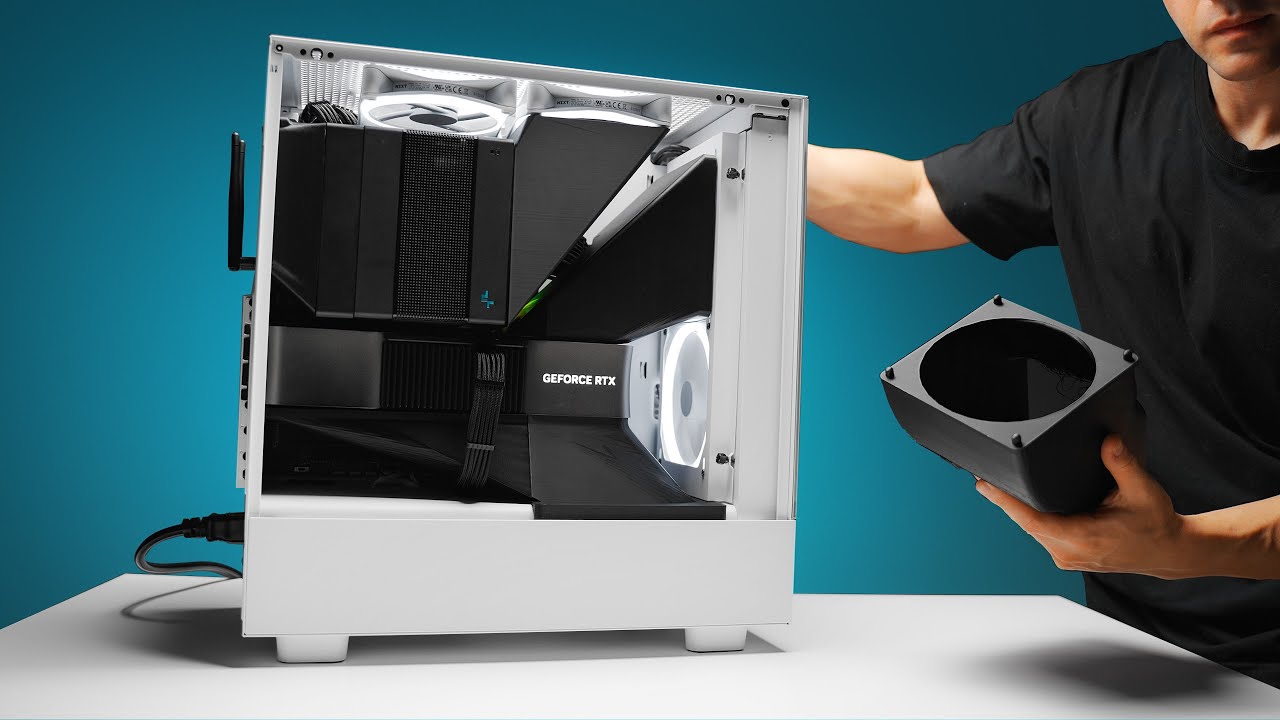
Check prices on Amazon below
NZXT H5: https://geni.us/gbnstA
Deepcool Assassin IV: https://geni.us/zHUx5
RTX 4090: https://geni.us/nIjU
Need some new wallpapers? https://optimum.store/products/shift-wallpaper-pack
What happens when you mix high performance car parts with gaming PCs. I guess, this?
Video gear
Camera: https://geni.us/5YfMuy
Pri...
 ocean garden
Just got a prebuild via new eggs website, only three tower fans register in bios, all the rgb is on but only three work//spin. Three register as N/A in bios while the last three don’t exist according to the motherboard
Motherboard is a ASUS prime z790-P zi
Moved the fans to a different slot and they still don’t register/work I also made sure all wires are securely together
I just fixed it by connected them all together so sorry for the message above. 5070 ti 16GB is AMAZING btw coming from 1060 3GB 🫡
 fringe dagger
ocean garden
I just fixed it by connected them all together so sorry for the message above. 5...
fringe dagger
ocean garden
I just fixed it by connected them all together so sorry for the message above. 5...
Nice upgrade
How much was the system
flint ibex
If an AIO doesn't come with pre-applied paste, is a dot in the center still the best application method?
and is the paste that comes with the AIO (if a tube is included) good enough? Or should I get a separate brand of paste?
knotty sparrow
flint ibex
If an AIO doesn't come with pre-applied paste, is a dot in the center still the ...
Best is technically spreading it out yourself with a credit card or something.
I go for the X or + pattern on AMD chips. Intel you want to spread because they're much bigger.
Yes the included paste is good enough
flint ibex
oh interesting, it always used to be just the dot in the center
it will be a 9800x3d so sounds like an X or +
knotty sparrow
X probably because of the IHS shape
Doesn't need to be huge, it'll spread out when you put the cooler on
flint ibex
Would you happen to have a picture as an example? I will overthink it without a frame of reference
ocean garden
fringe dagger
How much was the system
3.3k
weary raft
oof
ocean garden
fringe dagger
How much was the system
I wanted to build a custom 4070 ti but surprisingly my new build is cheaper and way more efficient
It is the best build I’ve ever been on and it looks so clean I’ll be sure to post it in the build channel
fringe dagger
ocean garden
3.3k
wtf
fringe dagger
ocean garden
I wanted to build a custom 4070 ti but surprisingly my new build is cheaper and ...
Uh… 3.3k for a 5070ti build is atrocious
ocean garden
fringe dagger
wtf
It had a sale $2.7k with tax steal for me
fringe dagger
Are you in the us
ocean garden
ocean garden
Check out build channel
Nvm apparently I can’t send anything in there
I already checked the prices on every part before getting it the build is over $3.5k so I actually saved a lot
ocean garden
fringe dagger
You got scammed
I sent you a friend request to send you more info on the build with pics
flint ibex
maybe like so? maybe a tiny bit extra?

after application

(this is from a video)
I also saw a video with stencils to do cool patterns lol
low pumice
flint ibex
maybe like so? maybe a tiny bit extra?
Just do X pattern corner to corner
It's not a big enough IHS to need x pattern plus the dots
flint ibex
low pumice
Just do X pattern corner to corner
So like the image I showed but just a little further to each corner?
low pumice
Ye
flint ibex
Cool thanks, looking forward to stressing when the time comes to do it 😄
 vocal fable
flint ibex
Cool thanks, looking forward to stressing when the time comes to do it 😄
vocal fable
flint ibex
Cool thanks, looking forward to stressing when the time comes to do it 😄
Try not to think too much of it, chances are if you think you have enough you probably have enough
My 1st build I stressed about it, then when I case swapped and got a new cooler I didn’t even think much of it
I was like “that’s enough I can always add more if I really have to”
Temps are fine so far 
flint ibex
I think the thing I always worry about is the paste spilling over the side and causing issues. I've seen videos like from Jayz where he purposely makes it spill over the sides and says it's fine, but I don't want to have blobs of paste everywhere even if it's not a problem.
knotty sparrow
Modern paste is non conductive so it won't hurt anything. It's just a little more mess to clean later.
 harsh crow
flint ibex
maybe like so? maybe a tiny bit extra?
harsh crow
flint ibex
maybe like so? maybe a tiny bit extra?
this is plenty.
harsh crow
flint ibex
I think the thing I always worry about is the paste spilling over the side and c...
get PTM7950, very little mess.
flint ibex
harsh crow
get PTM7950, very little mess.
ive been planning to just use the paste that comes with my aio
 sinful heart
flint ibex
I think the thing I always worry about is the paste spilling over the side and c...
sinful heart
flint ibex
I think the thing I always worry about is the paste spilling over the side and c...
If he has to purposely do it then dont worry lol
Should be fine if it even does
But preapplied paste will be just fine too
I think with an aio it probably wont even matter like that
flint ibex
Yeah my aio doesn't have preapplied, I will use the x pattern and watch temps

 severe moon
strange flume
Just buy the wood panel lol
severe moon
strange flume
Just buy the wood panel lol
You can’t
I’m 3d printing a new front panel with airflow potential
Attaching this mesh to it
strange flume
You can get the black one rn
For the white one
Check here


Confirmed by the manufacturer so you could just wait if you want beech
The black also looks good on white tbh lol
https://www.reddit.com/r/mffpc/s/nVV2lP9fQP
Reddit
Explore this post and more from the mffpc community
severe moon
strange flume
You can get the black one rn
All of them say out of stock
Only option is buying the full case
But I can easily 3D print one for $25
strange flume
Damn
I mean for $25 I could buy one here but it'd be a little more in shipping to usa
Pretty light piece so it'd be not too bad if you wanted the real deal
severe moon
strange flume
I mean for $25 I could buy one here but it'd be a little more in shipping to usa
Where are you that you are able to get the panel?
strange flume
severe moon
Where are you that you are able to get the panel?
AU
 serene token
yeah we tend to have everything in stock and amazing deals here 🤥
flint ibex
For top mounted rads, does it matter if the tubes are in the front or back of the case?
low pumice
No
flint ibex
Cool, ty
simple anchor
Does anyone know what the stock fans in the Meshify 2 (non-RGB) are?
I'm wondering if there was a reason why it had 140mm fans lol
Well half of the Aorus logo isn't covered by a fan now
 simple anchor
hmm
I would guess that there's probably a reason for that and I should have gotten 140mm instead of 120mm for my new ones
mostly air flow
Oh there are no reverse though 🗿
Well at least it doesn't sound like a semi truck now
Although I've had it completely open since I replaced the front fans and it's only a degree or two higher enclosed, so maybe that's just expected
simple anchor
Okay so what all can I do about bubbles in an AIO? I can't really lean it over 45 degrees for half an hour, the case alone is 20 pounds and I don't think anything I have is going to stop it from falling over.
strange flume
simple anchor
Okay so what all can I do about bubbles in an AIO? I can't really lean it over 4...
You will always have bubbles
You can't perfectly fill an aio, the heat expansion could crack the aio open
But try and work as much as you can out of the pump
You will get the occasional caught in there regardless but just do what you can
severe moon
Drink AIO juice
 sleek fox
Delish
 cedar sigil
yum
flint ibex
Just want to check before I mount the block, is this gonna be ok?
 sacred pagoda
That's plenty of paste
sacred pagoda
flint ibex
Just want to check before I mount the block, is this gonna be ok?
Those mounting brackets say AM4, idk if you're meant to use them or if there's AM5 ones
flint ibex
The thermal right kit says am4/5, the documentation inside only says am4. I think they just didn't update the docs/numbers
Time to mount
flint ibex
It worked
vocal fable
sacred pagoda
Those mounting brackets say AM4, idk if you're meant to use them or if there's A...
Thermalright AM4 is AM5 compatible as far as I am aware
weary raft
sacred pagoda
Those mounting brackets say AM4, idk if you're meant to use them or if there's A...
And (unlike a certain blue company) kept the same mounting for am5
Instead of changing it like every socket for some strange reason
(well, not every socket but yeah)
Though that being said, amd did Change mounting several times in the past sockets
knotty sparrow
weary raft
Though that being said, amd did Change mounting several times in the past socket...
For threadripper/epyc yeah. The consumer stuff has used the same mount since FM2 iirc, assuming you use the stock one.
The hole pattern changed slightly but the stock bracket itself with the 2 clips has not
sinful heart
I dont understand why amd didnt make the socket taller for am5 so that way the ihs can be thinner
sleek fox
Compatibility with coolers
They wanted to make sure AM4 mounts still work on older coolers
sinful heart
sleek fox
They wanted to make sure AM4 mounts still work on older coolers
Yeah but if the socket was taller and the ihs was thinner it would be the same height
sleek fox
Mounting hardware wouldn't work then
Also coldplates wouldn't be right either
Not that it really matters because ultimately your chip is gonna skyrocket to 95 C anyway
sinful heart
Yeah because of the benchmark mode boosting algo lol
Keep pushing until thermal limit
But with some simple changes you can really see how cool it can get
I just wonder how much cooler it would be when thinner
knotty sparrow
sinful heart
I dont understand why amd didnt make the socket taller for am5 so that way the i...
To do that, you need longer, more fragile pins
sleek fox
PB2
sinful heart
sleek fox
PB2
Yeah itll boost as high as it can until it hits a thermal or power limit
sleek fox
Like it's not some "benchmark cheating tool" or anything
It's just how Ryzen operates
And it works
Like really well
And 95°C is normal now
harsh crow
I just learned one of my Dynamic X2 GP18 fans is damaged.
How can I fix this or do I need to warranty it?
harsh crow
Well I found the problem.
 weary raft
Some play in the bearing is normal
harsh crow
weary raft
Some play in the bearing is normal
The piece that looks like a washer is snapped
weary raft
it's like that so they could actually slide the piece onto the shaft
harsh crow
The magnetism to hold the fan in place is far weaker than the other one I have.
harsh crow
weary raft
it's like that so they could actually slide the piece onto the shaft
Oh okay
I thought it snapped.
knotty sparrow
Does it make noise? If not it's fine
Ofc it might NOW since you exposed the bearing
harsh crow
knotty sparrow
Does it make noise? If not it's fine
The magnetism to hold it is weak to the point where it lowers the fan beyond the frame causing it to grind against the fan bracket
knotty sparrow
Grinding, so yes noise. RMA
flint ibex
Well, I am one lucky son of a gun. Somehow I missed the latch when I mounted my aio, so it was off-center the whole time. I was spiking to 90-94c for 3-5 seconds during anta extreme. After remounting and repasting, i am peaking at 84 during the extreme benchmark.
It's a miracle I didn't break it for real. Hard to believe this is like my 8th build
 knotty sparrow
Hoo that is lucky. There's at least 2 documented cases of the CPU burning up in the socket because it was misaligned in the socket.
flint ibex
im glad i got over my anxiety and re-did the block
i ran out of paste right on the last drop too
im so close to having my timings dialed in for 6400, interested to see how they perform during a long form test
i have 3 left to refine then im gonna call it good for a bit, then i get to do it all over with the GPU and maybe enable PBO
sacred pagoda
flint ibex
Well, I am one lucky son of a gun. Somehow I missed the latch when I mounted my ...
CPUs throttle to stay under thermal limits (and 95c is safe for am5). But yeah glad you figured it out so it'll actually work as intended
enable PBO
bro pbo is gonna be a bigger perf increase than a few hundred extra mhz on the ram
flint ibex
all the research i did yesterday when having issues was pointing to the 'non-binary' ram being the issue, but it looks like it was being masked by something else. and the way my adhd works, once i saw how time intensive doing the timing testing was, i became obsessed with locking in the ram as much as i could.
From the little research I've done the PBO mode is just picking one of the modes in the BIOS, I dont know if I will get into manual tuning of the CPU or not
today i am peaking at 78c for anta, so it's only getting better
harsh crow
Am I able to refill my LT720 there appears to be some sort of fill port on the side.
I noticed lately that a lot of fluid has been missing from it, it feels/sounds like maybe a solid 20-30% of the fluid is gone.
With it I have noticed my cpu has been getting hotter quicker and reaching slightly higher temps.

I found a article that said this.
harsh crow
sleek fox
okay NGL
how easy is it to refill an aio?
harsh crow
sleek fox
sadly, expensive
performance and visuals are worth it, you should get it.
harsh crow
harsh crow
I can confirm that my LT720 has this same hole that looks like a fill port.
sleek fox
harsh crow
performance and visuals are worth it, you should get it.
so very expensive tho
sleek fox
harsh crow
how easy is it to refill an aio?
get distilled/deionized, crack open, fill until full, screw top on
sleek fox
Also, fun fact you can totally just integrate the rad into a custom loop when the pump fails
 weary raft
harsh crow
weary raft
harsh crow
hmm yes, the illegal (literally) warranty void sticker
harsh crow
sleek fox
Also, fun fact you can totally just integrate the rad into a custom loop when th...
oh that's neat.
severe moon
sleek fox
Also, fun fact you can totally just integrate the rad into a custom loop when th...
Is this any radiator?
sleek fox
severe moon
Is this any radiator?
this is specifically the LT720's radiator
AIO radiator you don't have to throw away once the pump dies
harsh crow
sleek fox
Also, fun fact you can totally just integrate the rad into a custom loop when th...
iirc it's a aluminum?
 harsh crow
What does FFS mean?
sleek fox
but that's just stupid
sleek fox
harsh crow
What does FFS mean?
For [EXPLETIVE]'s Sake
sleek fox
do you still have warranty on it?
harsh crow
It's like 2 years old now?
5 year warranty so yeah
@sleek fox your thoughts on it? Because if I warranty it, I will need to buy an AIO to keep my pc cooled down while it's being warrantied.
sleek fox
IDK honestly
severe moon
Yeah I guess reusing a radiator makes sense
Literally a block of metal
Is there any worry of residue buildup in the radiator?
harsh crow
severe moon
Is there any worry of residue buildup in the radiator?
How can I check?
severe moon
harsh crow
How can I check?
Idk. Spend a couple hundred on a micro surgical camera 💀
harsh crow
severe moon
Idk. Spend a couple hundred on a micro surgical camera 💀
....
yeah real quick lemme go do that at my local walmart lmao
severe moon
Idk if buildup is much of a worry
Since AIO are usually just dionized water with maybe some chemicals for keeping it clean
The real buildup you gotta worry about is with dyed solution
harsh crow
If I refill my AIO should I drain the fluid completely and refill it with only the new fluid?
flint ibex
Was curious for anyone with a 9800x3d with a thermalright AIO, what are you idle temps like?
weary raft
harsh crow
If I refill my AIO should I drain the fluid completely and refill it with only t...
Just top it off with more distilled water
Aio fluid is full of additives for anti corrosion and anti microbial protection
If you are going to drain it all, you'll need to make sure to add those back
harsh crow
weary raft
Just top it off with more distilled water
just plain distilled water will work like the stuff I find at the store?
weary raft
Yeah
harsh crow
thank you
 toxic trout
I got a nzxt kraken bought it in like 2023 or some used it for a am4 platform, but I currently upgraded my system to a am5 platform will it fit on am5 or do I have to buy anything specific?
weary raft
toxic trout
I got a nzxt kraken bought it in like 2023 or some used it for a am4 platform, b...
am5 uses the same mounting as am4
knotty sparrow
weary raft
am5 uses the same mounting as am4
*as long as it doesn't change the backplate
toxic trout
weary raft
am5 uses the same mounting as am4
Okay bet
severe moon
35C 7900xt at max graphics + fsr quality 1080p in satisfactory
literally running my gpu at room temp
severe moon
 twin coral
hey guys i bought a ryzen 5 5600 what is the best bedget coller for it
twin coral
hey guys i bought a ryzen 5 5600 what is the best bedget coller for it
no overclocking, the included cooler should be enough
Otherwise
$35 Thermalright Phantom Spirit 120 SE - overkill but best value
$30 ID-COOLING FROZN A620 PRO SE - overkill
$17 Thermalright Assassin X 120 Refined SE - cheaper and will do the job

Thermalright Phantom Spirit 120 SE 66.17 CFM CPU Cooler (PS120SE)
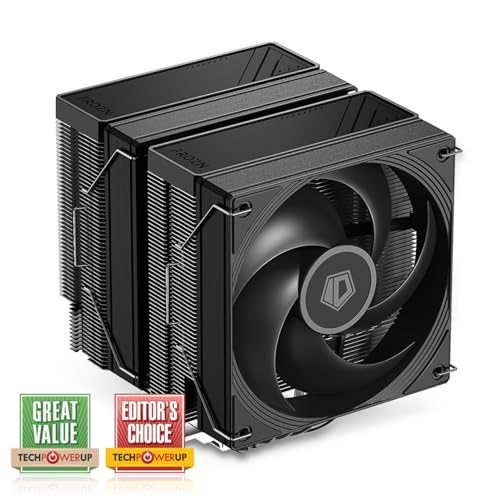
ID-COOLING FROZN A620 PRO SE 58 CFM CPU Cooler (FROZN A620 PRO SE)

Thermalright Assassin X 120 Refined SE 66.17 CFM CPU Cooler (AX120 SE-D3)
sacred pagoda
severe moon
literally running my gpu at room temp
35C is not room temp 😅
severe moon
sacred pagoda
35C is not room temp 😅
Florida
harsh crow
severe moon
35C 7900xt at max graphics + fsr quality 1080p in satisfactory
What cooling solution are you using?
severe moon
harsh crow
What cooling solution are you using?
2 slim 120 intakes on bottom
2 intakes on AIO at top and 1 outtake on AIO above PSU
2 outtakes on side
harsh crow
severe moon
2 intakes on AIO at top and 1 outtake on AIO above PSU
mind sending a picture?
 quasi zodiac
This may be a commonly asked question but what's the best AIO on the market preferably white in color. 9800x3d cpu if it helps answer the question.
I scrolled a bit to see if it was a recently asked question but didn't see it. Thanks in advance.
sacred pagoda
quasi zodiac
This may be a commonly asked question but what's the best AIO on the market pref...
Thermalright makes good stuff starting around $50
https://pcpartpicker.com/product/jpKnTW/thermalright-aqua-elite-argb-v4-6617-cfm-liquid-cpu-cooler-aqua-elite-360-white-argb-v4
https://pcpartpicker.com/product/VnMMnQ/thermalright-frozen-prism-argb-704-cfm-liquid-cpu-cooler-frozen-prism-360-white-argb
https://pcpartpicker.com/product/F9kH99/thermalright-frozen-infinity-360-argb-689-cfm-liquid-cpu-cooler-frozen-infinity-360-white
https://pcpartpicker.com/product/YXFmP6/thermalright-aqua-elite-v3-6617-cfm-liquid-cpu-cooler-aqua-elite-360-white-v3
https://pcpartpicker.com/product/jFYRsY/thermalright-frozen-edge-69-cfm-liquid-cpu-cooler-fe360-white
https://pcpartpicker.com/product/9VmNnQ/thermalright-frozen-notte-argb-7237-cfm-liquid-cpu-cooler-frozen-notte-360-white-argb-d1
$80 but has an lcd screen on the pump
https://pcpartpicker.com/product/y3vD4D/thermalright-frozen-warframe-argb-7084-cfm-liquid-cpu-cooler-frozen-warframe-360-white-argb
$100+, also have lcd displays
https://pcpartpicker.com/product/27TFf7/thermalright-frozen-warframe-ultra-argb-7084-cfm-liquid-cpu-cooler-fw360-ultra-argb-white
https://pcpartpicker.com/product/R9kH99/thermalright-mjolnir-vision-360-argb-69-cfm-liquid-cpu-cooler-mjolnir-vision-360-white-argb

Thermalright AQUA ELITE ARGB V4 66.17 CFM Liquid CPU Cooler (AQUA ELITE 360 WHITE ARGB V4)

Thermalright Frozen Prism ARGB 70.4 CFM Liquid CPU Cooler (Frozen Prism 360 WHITE ARGB)

Thermalright Frozen Infinity 360 ARGB 68.9 CFM Liquid CPU Cooler (Frozen Infinity 360 WHITE)

Thermalright Aqua Elite V3 66.17 CFM Liquid CPU Cooler (Aqua Elite 360 White V3)

Thermalright Frozen Edge 69 CFM Liquid CPU Cooler (FE360 White)
they should all have pretty similar performance and be plenty for a 9800x3d
harsh crow
sacred pagoda
Thermalright makes good stuff starting around $50
https://pcpartpicker.com/produ...
Wow AIOs have gotten cheap.
sacred pagoda
Thermalright the goat
harsh crow
How does the Thermalright Infinity compare to my LT720?
360mm vs 360mm.
Wondering because it looks like it'd be a solid Infinity Mirror option at under $100.
sacred pagoda
I honestly don't know, they're probably pretty similar though
flint ibex
GamersNexus considers the frozen prism the best value AIO on the market
severe moon
sacred pagoda
Thermalright makes good stuff starting around $50
https://pcpartpicker.com/produ...
Thermalright Frozen Notte is apparently the higher end model
its the one i got
sacred pagoda
Yeah it's linked, just didn't imbed
severe moon
Personally, I should have gone with a 280mm
I’m in the lian li A3 and my psu exhaust has to go through my radiator
If I went 280mm I could have the psu exhaust straight out and have room to move it up and leave more cable organization room.
sacred pagoda
Thermalright doesn't make 280s as far as I can tell :(
quasi zodiac
So Thermalright frozen notte should be the one to look into then. Sorry for the delay.
But you say there all pretty close to the same as far as cooling capability?
severe moon
quasi zodiac
So Thermalright frozen notte should be the one to look into then. Sorry for the ...
Probably negligible difference in temps
But if they’re the same price might as well
Gotta say my experience with the AIO was super easy.
quasi zodiac
And forgive me for sounding dumb but what's the main difference between the "warframe" and "mjolnir"
severe moon
quasi zodiac
And forgive me for sounding dumb but what's the main difference between the "war...
Whut
Mjolnir seems to have a bigger screen
quasi zodiac
severe moon
Probably negligible difference in temps
I had a bad experience with an Lian li AIO some years ago, but figured I'd give it another go.
low pumice
Larger and a removable screen
quasi zodiac
severe moon
Mjolnir seems to have a bigger screen
Ah gotcha. So pretty much same just screen size then
quasi zodiac
Got it. I guess for the extra penny's might as well get a bigger scree...
severe moon
Sure
I don’t need a screen since my pc has no glass
Don’t spend $70 more for an AIO with a screen
quasi zodiac
Gotcha. I should probably look into newer fans too...
severe moon
Get a $50 AIO and then spend money on one of those mini displays
Doing a custom mini display would be much more creative and impressive
And they’re like $25 for the basic one
 severe moon
quasi zodiac
severe moon
quasi zodiac
If u can find a screen to go in where the psu is showing and put a car on it that would be sick
quasi zodiac
Racecar=life
severe moon
Keep those white fans until they die or make noise
quasi zodiac
Ill look into them. I will probably get the screen on the AIO as well lol
severe moon
Don’t spend unnecessary money
severe moon
quasi zodiac
Ill look into them. I will probably get the screen on the AIO as well lol
$70 more for an AIO screen is ridiculous
low pumice
Can always follow this guide
https://youtu.be/RTdniu3gn3Y
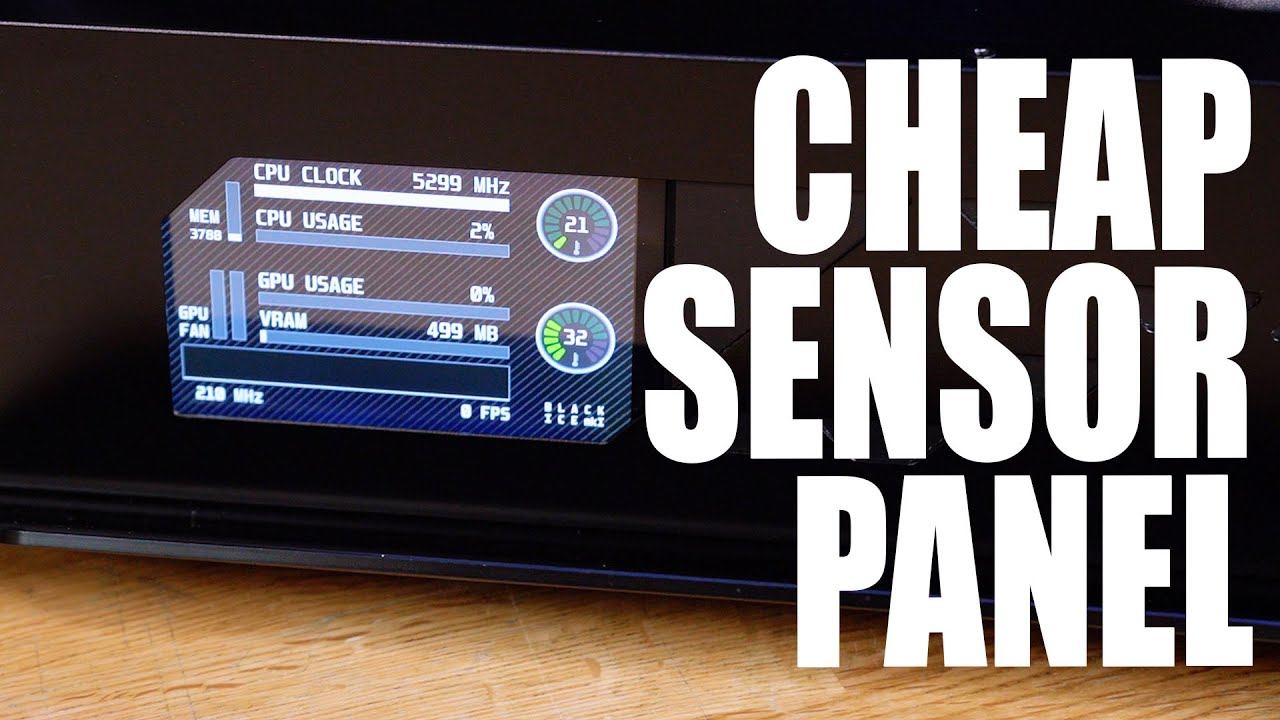
I have been asked MANY times for a tutorial on how to make the custom sensor panel found in Phil's PC, and now my latest gaming rig... well, today we show you how!
Learn more about the Viewsonic Elite XG270QG and see current price at https://amzn.to/37fXdtZ
Recommended Raspberry Pi Panels for this mod
5" Panel - https://amzn.to/386roXY
7" Pan...
severe moon
low pumice
Can always follow this guide
https://youtu.be/RTdniu3gn3Y
Exactly
quasi zodiac
Ive already started to have issues with the fans. Had to replace some of them. But I messed up and got the v2 so some are slightly different.
quasi zodiac
low pumice
Can always follow this guide
https://youtu.be/RTdniu3gn3Y
Love his videos. Will 100% watch this again and see what I can retain. His videos helped me learn to build.
low pumice
Pretty old but still applicable
Although random Chinese screen prices might be going up soon from tariffs
quasi zodiac
Thanks for the help you two.
low pumice
You're welcome
quasi zodiac
Any input on white 120mm fans that are pretty solid as well? My mf120 are doing good but some are starting to have rgb issues and get loud bearing noise.
low pumice
Thermalright has some decent cheap 120mm fans of all styles
quasi zodiac
Looking for a solid cfm and something I don't need to worry about weather it's the rgb not working properly or bearings breaking down quickly.
Ill scope the thermalright again
low pumice
Don't worry about cfm, every manufacturer measures it differently, bearing type doesn't matter that much, all have tradeoffs, dbb lasts longer but the bearings themselves are louder, fdb is classic, and then there's some random manufacturer specific bearings
Still waiting for GN to get their fan testing going so we can have standardized third party testing data
quasi zodiac
Steve will do it right too lol
Ill have a look at the thermalright again. Thank you.
harsh crow
My CPU has running running a lot warmer lately. can a lack of coolant in my aio cause that? I assume my aio has lost maybe 20-30% of it's coolant since I can clearly shake the fluid around
severe moon
Only a taste test could tell
harsh crow
severe moon
Only a taste test could tell
huh?
severe moon
You heard me
weary raft
harsh crow
My CPU has running running a lot warmer lately. can a lack of coolant in my aio...
Is the pump loud? Moving the aio around will always cause a sloshing noise
Also is your ambient temperature warmer
The smaller the ∆t, the less effective the thermal transfer will be
severe moon
How long has it been since you changed thermal paste?
harsh crow
weary raft
Is the pump loud? Moving the aio around will always cause a sloshing noise
Pump is the same, but for slothing noise is audibly much more noticable and the aio also feels lighter physically.
harsh crow
weary raft
Also is your ambient temperature warmer
ambient stayed the same
harsh crow
weary raft
The smaller the ∆t, the less effective the thermal transfer will be
What does "∆t" mean?
harsh crow
severe moon
How long has it been since you changed thermal paste?
Fresh PTM7950
severe moon
harsh crow
Fresh PTM7950
Did the temps change after replacing thermal paste
severe moon
harsh crow
What does "∆t" mean?
Change in temperature
harsh crow
severe moon
Did the temps change after replacing thermal paste
Started happening before changing the paste
sinful heart
harsh crow
What does "∆t" mean?
Temperature delta
harsh crow
I first noticed the change in temps about a couple weeks ago and it's been becoming progressively more noticable.
sinful heart
So it stayed the same even after a repaste is what you are saying
harsh crow
yes
granted this is new ptm7950 so it raised slightly but it's been going back down to where it was a week ago
sinful heart
So the pump is probably fine but there is probably less flow because of less fluid perhaps
harsh crow
sinful heart
So the pump is probably fine but there is probably less flow because of less flu...
so just buy some distilled water and top off the aio?
sinful heart
Like because there is less fluid, maybe not all of it is circulating
sinful heart
harsh crow
so just buy some distilled water and top off the aio?
Try to find if your aio has a little refill bottle thing
I am not sure if all of them have those
But the one i got years ago had a separate bottle with some of the fluid with it
For topping off
harsh crow
This is someone else's LT720 but mine has the exact same thing.

oh like a actual bottle?
mine never came with one
sinful heart
harsh crow
mine never came with one
Yeah so I guess you can add some distilled water
Try not to add too much tho
Dont want to dilute it too much
harsh crow
How much should I add? I think I have lost around 20% of my fluid
 how you know
harsh crow
sinful heart
Damn <:pieskull:1278810686289477683> how you know
how you know
harsh crow
sinful heart
Damn <:pieskull:1278810686289477683> how you know
rough feel based on sound, the tapping trick, and yes it's physically lighter
sinful heart
Yeah true more air would make more slosh sounds
I would just fill it
Not much else can be done so just go with distilled water
harsh crow
Understood.
sinful heart
sinful heart
Dont want to dilute it too much
Idk if this is even a concern really because I never dealt with this ngl
Shouldnt be that deep really
Should be fine
harsh crow
Should I be surprised that I am experiencing this in 3 years? the aio has been running pretty much 24/7 for 3 years now
sinful heart
Because the majority of the original fluid should still be there anyway
sinful heart
harsh crow
Should I be surprised that I am experiencing this in 3 years? the aio has been ...
Probably went faster because of so much use
harsh crow
my pc stays on when I am away/asleep
sinful heart
24/7 3 years is a lot
harsh crow
so it's within the expected range then
sinful heart
If it was 8 hours a day that would be 9 years
Ok I don't think it scales like that but yeah
Thats a lot of usage
sinful heart
harsh crow
so it's within the expected range then
Yea
sinful heart
Nah you can get a distilled gallon not much more than a normal one
weary raft
severe moon
Change in temperature
Difference in temperature* (∆ means delta, which means the difference between one value to another)
severe moon
weary raft
Difference in temperature* (∆ means delta, which means the difference between on...
Change = difference
weary raft
Well, yes, but saying change could be slightly misleading since change is often referring to a difference between 2 points of time
severe moon
As a chemistry major, I feel threatened
weary raft
all change is a difference but not all difference is a change
harsh crow
weary raft
Difference in temperature* (∆ means delta, which means the difference between on...
Gotcha, thank you.
harsh crow
what are the current recommendations for good coolers on a budget?
I am looking for a cooler ideally under $100 that I can later reuse for a 7950x or hotter chip.
sacred pagoda
I know the dual tower thermalright coolers can do a 7800x3d no problem, not sure if the 7950 is significantly hotter
Thermalright also has 360mm aios starting at $50 or so that would work
sleek fox
Phantom Spirit 120 SE can tame a 7950X
It's gonna be above 90 but below 95 at full load iirc
AIO might give a TINY bit more boost headroom tho
Besides AIOs look sick
 shrewd juniper
harsh crow
I am looking for a cooler ideally under $100 that I can later reuse for a 7950x ...
shrewd juniper
harsh crow
I am looking for a cooler ideally under $100 that I can later reuse for a 7950x ...
I'd just grab the cheapest 360mm thermalright aio atm
 spark fractal
Does anyone in #old-cooling know if the Lian Li UNI Fan SL-Infinity 140 Reverse Blade-Single Pack-ARGB fans are compatible with the LIANLI UNI Fan SLIN120 Exclusive Controller, UNI HUB in-CONNECT3, Black, Compatible with L-Connect 3?
I'd like to use the 140mm fans, but they don't come in a 3-pack with a fan hub so I'm going to buy the 140mm fans and hub separately. Just want to make sure they work together.
Thanks!!
Lian Li Fan Hub
https://www.amazon.com/Exclusive-Controller-CONNECT3-Compatible-L-Connect/dp/B0BPM1HZZ8
Lian Li 140 mm Case Fans
https://a.co/d/cqzZqGZ
harsh crow
shrewd juniper
I'd just grab the cheapest 360mm thermalright aio atm
Are the TA aios any good?
harsh crow
sacred pagoda
Thermalright also has 360mm aios starting at $50 or so that would work
Gotcha. I plan to use the cooler for a 7950x or better when I upgrade. It's going to be used for a server PC
shrewd juniper
harsh crow
Are the TA aios any good?
TR as in Thermal Right? yes TA ive no idea what that is lol
harsh crow
shrewd juniper
TR as in Thermal Right? yes TA ive no idea what that is lol
My bad I should've just said Thermalright.
I have seen it abbreviated as TA, first time for me seeing it as TR.
shrewd juniper
harsh crow
I have seen it abbreviated as TA, first time for me seeing it as TR.
All good lol
weary raft
Huh
I've not seen thermal right be abbreviated to TA
Though TR also is used in alot of acronyms
severe moon
shrewd juniper
TR as in Thermal Right? yes TA ive no idea what that is lol
Thermal, right?
shrewd juniper
severe moon
Thermal, right?

 woven vale
Hey so
I have 4 fans on my Cade already that came pre installed and i have 3 more where should I put them
sacred pagoda
woven vale
I have 4 fans on my Cade already that came pre installed and i have 3 more where...
Depends on your case
 chilly bough
Anybody have an idea of when backorders usually get fulfilled with newegg? I'm moving out of my uni place in around 2 weeks and don't want it delivering here after I'm gone. Original estimate was for today but it is now saying "New release date update soon". I'm sure its case-by-case, but if anybody had a general timeframe it would be much appreciated
shrewd juniper
chilly bough
Anybody have an idea of when backorders usually get fulfilled with newegg? I'm m...
i'd say best bet would be to contact customer support, it'll depend on the product
 steel forge
Was wondering, if I need a cpu cooler than can fit in a SFF case would a L9i from Noctua be enough for cooling a 13600k? I can fit the slightly larger 65mm one but there would only be about 1.5 inches of room between the glass panel and fan.
harsh crow
steel forge
Was wondering, if I need a cpu cooler than can fit in a SFF case would a L9i fro...
I don't know about the cooler itself but no long as the cooler/fans aren't touching the glass than the more the marrier.
steel forge
Thanks, also for another build that I was swapping parts for a more retro build I was wondering if you guys might be able to tell me the fan directions I should choose. This old no name brand case I got from FB marketplace has spots for 10 120mm fans. Also I'm going to air cool the cpu with cooler that has a fan(s) facing from the front/back of the case.
 sacred pagoda
steel forge
sacred pagoda
steel forge

I wouldn't use the bottom right spot bc having two fans at a 90° like that can cause more turbulence than it's worth for the extra air
steel forge
Ok, will do, thank you.
sacred pagoda
Also you don't necessarily need to use that many fans if you don't want to. 3 front Intake 1 rear exhaust is usually fine
harsh crow
sacred pagoda
having that exhaust up top may cause the top intake to pull in hot air
sacred pagoda
Yeah maybe, you could just drop the top center fan
weary raft
Top could just be a passive ish exhaust
steel forge
I seem to have miscalculated... my RAM is super duper tall. Can't put my fans over the I/O side either cause they are about the same height (cause of a massive VRM heatsink). Anyone got any low profile DDR4 ram recommendations or do I have to return the cooler ;_;.

 novel helm
Does anyone know a mounting bracket for a reservoir for a 200mm fan
sacred pagoda
steel forge
I seem to have miscalculated... my RAM is super duper tall. Can't put my fans o...
I mean if the case will close you can leave the fan where it is
That plus the middle fan should be enough
sinful heart
Looks like it will close from the picture
You can have the fan like that and have the middle fan on the second tower no problem
But you can get the teamgroup t-force ram if you are not satisfied with this
severe moon
Two personal issues with my Intel i5-14600K (wish I went with a 7700x instead).
- CPU goes into idle after a second and then hikes temps whenever a key is pressed (cau raise up to 20 degrees instantly)
- CPU temp is overall just higher than I'd like, what bios settings would reduce temperature (or fluctuations in temperature) without an intense decrease in gaming performance.
My main game is Marvel Rivals at 1440p 120hz.
My GPU is in the 40s while my CPU can sometimes hit 70s  . I got a 360mm thermaltake AIO and just recently applied thermal paste.
This is my setup in a A3

360mm aio on top
sacred pagoda
Tbh might be better to leave off that third fan on the aio
It's recirculating hot air from the gpu as well as the other 2 fans on the rad. Letting it convect might be better idk
severe moon
sacred pagoda
It's recirculating hot air from the gpu as well as the other 2 fans on the rad. ...
well the last fan pulls the outtake from the psu
idk if i can redirect hot psu air anywhere else
i wish i could
sacred pagoda
Right but it's also pulling hot cpu and gpu air through
severe moon
i definitely think the psu air is the biggest problem
i have those two outtakes in the center tho
u think if i add another outtake in the back itll help?
sacred pagoda
Idk if it makes that big a difference. It's probably just intel sucking
severe moon
bro i literally cannot get cooler
im doing lowest possible graphics marvel rivals, with upscaling and fps maxed 120
undervolted gpu 10%
sacred pagoda
Also 70s really isnt something to stress over unless it's throttling
severe moon
gpu is in 40s
severe moon
sacred pagoda
Also 70s really isnt something to stress over unless it's throttling
but my fans run higher too
sacred pagoda
The idle and ramping up does sound annoying
severe moon
and a completely mesh case is kinda loud
severe moon
sacred pagoda
The idle and ramping up does sound annoying
it doesnt hurt me much, but id prefer it not to do that
do u know if the windows power plan cpu settings might help lower temps?
 sacred pagoda
I mean you could try undervolting to lower temps overall
sacred pagoda
No clue, I've never undervolted a cpu
sacred pagoda
For the idle issue, you could try making your fan curve be based off of an average temperature
Wouldn't solve the temp spike but might keep the fans from doing crazy ramping
sacred pagoda
oh
so you have two temperature related issues that don't actually affect you at all
i.e if you uninstalled your monitoring software there would be no issue
severe moon
sacred pagoda
i.e if you uninstalled your monitoring software there would be no issue
My fans are loud
And if I lower them temps go up
sacred pagoda
who cares about temps if you ain't throttling
severe moon
@sacred pagoda if I disable some e cores do you think that would improve temps without hurting performance
Much?
Cause I don’t really do much heavy workstation stuff
sacred pagoda
again idk anything bout new intel cpus
severe moon
Mostly gaming and some figma / coding
There’s barely any decent info on Google on how to do it and they barely explain what’s happening
Like IA AC and IA DC
Like my default values are 0.7 and 1.10 but someone said to make them both 1.0
sacred pagoda
prolly go ask in #cpus-mobo-and-memory and see if someone more knowledgeable than me can give advice
severe moon
Ok
All I did was lower my ram speed a little and change my fan curve
I’ll see if it’s any better
ill see if theres a better config for my psu
id much rather prefer to shoot out the hot psu from the sides instead the top
and also then i could do triple intake on the aio
severe moon
@sacred pagoda

opinions?
basically id flip the psu to outake down
push the psu down to the bottom so theres room for the cables
sacred pagoda
Might help
sacred pagoda
Pretty sure they're fine in any orientation
 lucid walrus
what is the best high-end cpu cooler
severe moon
lucid walrus
what is the best high-end cpu cooler
like water cooling or air?
sacred pagoda
What cpu are you cooling with it?
lucid walrus
severe moon
like water cooling or air?
AIO
lucid walrus
sacred pagoda
What cpu are you cooling with it?
R7 9800X3D
sacred pagoda
I'd just grab any thermalright 360mm aio
PCPartPicker can help show a big list of all of them
Performance should be very similar, most difference is asthetics
lucid walrus
sacred pagoda
I'd just grab any thermalright 360mm aio
TR is a cheap brand
sacred pagoda
lucid walrus
TR is a cheap brand
Inexpensive, yes. But their products are high quality
lucid walrus
sacred pagoda
Inexpensive, yes. But their products are high quality
i'm looking for something like a high-end aios like: nzxt, corsair and ek wb.
severe moon
lucid walrus
i'm looking for something like a high-end aios like: nzxt, corsair and ek wb.
meh
unless u wanna spend more on purely aesthetics, they don't provide any cooling advantage.
@lucid walrus If you want "high-quality" in terms of performance, get an the Arctic Liquid Freezer III Pro
$91 for their 360mm pro https://pcpartpicker.com/product/Xh9nTW/arctic-liquid-freezer-iii-pro-a-rgb-360-77-cfm-liquid-cpu-cooler-acfre00184a

ARCTIC Liquid Freezer III Pro A-RGB 360 77 CFM Liquid CPU Cooler (ACFRE00184A)
both white and black versions
sacred pagoda
Yeah arctic if you want more cooling capacity (not that you need it for a 9800x3d)
Nzxt is just garbage, Corsair is overpriced and meh, ekwb might be decent but also overpriced I think
lucid walrus
thanks guys for the info
i want a high built quality and high-performance aios for high-end cpus like 9800x3d
lucid walrus
sacred pagoda
Nzxt is just garbage, Corsair is overpriced and meh, ekwb might be decent but al...
👆
lucid walrus
are you guys sleeping
sacred pagoda
No, we already gave you our advice
lucid walrus
sacred pagoda
No, we already gave you our advice
thanks, and any lcd version advice?
sacred pagoda
Thermalright has a few. Not sure about Arctic
harsh crow
lucid walrus
i'm looking for something like a high-end aios like: nzxt, corsair and ek wb.
Those AIOs, you are simply paying for brand name and aesthetics.
If you really wanted to spend more for better performance, pickup something like the LT720, LS720, or any Arctic LF III 360/420mm aio and set any of the above in a push/pull config paired with PTM7950 to gain maybe 5-10c difference
Something you should keep in mind is that unless you are planning to overclock the CPU than having a better aio doesn't make a difference once you have one good enough to keep temps under TJMAX.
Any 360mm from Thermalright can keep the 9800x3D under TJMAX when gaming. If your doing CAD or something that is extremely CPU intensive than you shouldn't be buying a 9800x3D but a 9950X or 9950X3D or any of the dual CCD 7000 series CPUs if your on a budget.
cedar sigil
Also, cooler master MasterLiquid. $99 usd for the 360mm.
harsh crow
cedar sigil
Also, cooler master MasterLiquid. $99 usd for the 360mm.
Doesn't that AIO have a lower average pump lifespan?
cedar sigil
It does?
harsh crow
cedar sigil
It does?
I was hearing a lot of complaints regarding that last year.
I do not know if it's been fixed or not.
cedar sigil
Ig we'll see, I haven't had any problems so far with it
harsh crow
That's good.
harsh crow
Any tips on how I can keep my 7950X under 84c in Sustained All Core Loads?
I am currently using:
- LT720 in Push/Pull with the original fans + P12 ARGB
- PTM7950 for the thermal compound
- AM5 Contact Frame
- and I have a standing fan that draws fresh air from my window and blows it towards me and my pc (ambient of around 10c give or take).
- All fans and pump are maintained at 100%
low pumice
harsh crow
I am currently using:
- LT720 in Push/Pull with the original fans + P12 ARGB
- P...
Test with and without push/pull, added turbulence from using different fans may hinder you instead of improving thermals
harsh crow
low pumice
Test with and without push/pull, added turbulence from using different fans may ...
the push/pull brought it from around 91c down to 84c.
low pumice
Giving both enough time to saturate?
low pumice
Overnight sounds like you'd be really dependent on room temp lmao
harsh crow
the pc and I are receiving a constant blast of fresh air thanks to the standing fan that's pulling air through my window and blasting it right at the pc and I, mostly focused on the pc. ambient hovers around 10c.
low pumice
Anyways you should mess with pump % too, sometimes the pump is too strong at 100% and ends up creating more turbulence without helping temps, test something like 70% or 80% set pump
harsh crow
what fan control software do you recommend? I have been having problems with FanControl not being able to control my pump/fan speeds so I have been forced to set every thing to full speed in bios.
low pumice
I'd just use bios, there's some stuff happening with the backend Windows software that fancontrol and other hardware control software uses rn
harsh crow
gotcha.
low pumice

Sponsor: ID-Cooling Frozn A720 Black on Amazon https://geni.us/VDnou4Y
This video is about the WinRing 0 driver (not to be confused with Security Ring 0, but related in this story) and how it has propped-up the fan control and RGB industry for over a decade now. Unfortunately, or maybe fortunately, security updates have broken this code, resulti...
harsh crow
regarding bios, I see multiple fan inputs but only 3 show up as spinning. any ideas? I am using the fractal's fan hub for 7/9 of my fans, 2/9 have a direct connection to the motherboard so those can be controlled individually, and the pump is plugged into the pump header but I feel like I have no control over it's speed in bios.
low pumice
Sounds like fan hub is just going to copy paste one reading into the mobo and any fan speed you set in mobo would be the same for everything you've plugged into the hub
Pump control can be a bit wacky in bios and might not always be with all the fan speed settings
May need to change its mode too
harsh crow
ran a few tests and it appears all fans are spinning and adjusting to the percentages set it's just that because I have mixed fans it can't provide a RPM reading.
harsh crow
low pumice
Pump control can be a bit wacky in bios and might not always be with all the fan...
solved the pump control, for some reason it needs to be set to DC vs PWM.
low pumice
It's Noctua aio time lmao
https://youtu.be/UpNmd3Y9qUU

Sponsor: Lian Li O11D Evo RGB on Amazon https://geni.us/B3OD
Noctua's Computex 2025 showcase includes engineering and design information on their new Thermosiphon cooler and CPU liquid cooler ("AIO"). We also spend time talking about the upcoming Antec Flux Pro Noctua Edition PC case, the new NF-A12 G2 fan, and just general engineering topics. N...
severe moon
Some how my i5-14600K still hits 70s with a 360mm AIO, 4 disabled e cores, low settings 1440p marvel rivals with balanced upscaling & 180hz
Is Marvel rivals just a cpu intensive game?
sacred pagoda
UE5 slop
Also low settings and upscaling is going to put more load on the cpu
Also 70s under load is not that hot
severe moon
sacred pagoda
Also 70s under load is not that hot
GPU sits in 50s
sacred pagoda
Sounds like your gpu isn't working very hard then 
harsh crow
severe moon
Some how my i5-14600K still hits 70s with a 360mm AIO, 4 disabled e cores, low s...
What compound are you using?
severe moon
harsh crow
What compound are you using?
came with my thermalright aio
sacred pagoda
Thermalright paste is pretty decent, similar to arctic mx6 I think
 short jacinth
if i buy the Thermalright Phantom Spirit 120SE CPU Air Cooler would i be limited when it comes to buying memory since the fan is so big
low pumice
You have 60mm of clearance on it, which will fit most sticks of ram
 short jacinth
does it matter which way i put the fans whether on the right or left side
I have a b550 m pro 4 motherboard
 marsh badge
it doesn't matter
as long as the fans face in the right direction
aka sucking air in from the front of your case
and blowing it out back
rain berry
guys a friend of mine is asking if he have to change the thermal paste because its been used for 5 years but the temps are fine
sacred pagoda
rain berry
guys a friend of mine is asking if he have to change the thermal paste because i...
If temps are fine it's not necessary
5 years is pretty long for paste though. If he doesn't have any he might wanna get a tube just to have on hand
rain berry
sacred pagoda
5 years is pretty long for paste though. If he doesn't have any he might wanna g...
Aight thanks
harsh crow
What are the best AIOs currently? I have a LT720 but would like something better or possibly upgradable. Case is a Fractal Torrent and I am open to the idea of getting a new case
sacred pagoda
harsh crow
What are the best AIOs currently? I have a LT720 but would like something bette...
if you already have 360mm I think the only step up is a thicker rad
which I know Arctic has, dunno about other brands
harsh crow
I am debating getting the Eisbaer Aurora Pro HPE aio from Alphacool.
Unlike most AIOs it claims it is a full copper design at 30mm thick, and iirc I can upgrade it down the line.
 latent juniper
Is there a difference in airflow between 15 mm slim fans and the normal 25 mm fans?
low pumice
Yes, they perform quite a bit worse
latent juniper
If anything. Im down to 4 case fans. 2 for exhaust, two intake on the side.
The 2 bottom is what'll be needed to give more air to the gpu. So i was lookin at slim fans to just put something for the gpu to breath better as its a 3 slot
sacred pagoda
latent juniper
If anything. Im down to 4 case fans. 2 for exhaust, two intake on the side.
The ...
Fwiw I actually found that in a case with very little clearance under the gpu, no fans was better than 25mm fans
So you could just try without any fans and see how temps are
latent juniper
So far, i feel like it just helps guide airflow. Max speed is 2000rpm atm. So ima keep em for now
harsh crow
How well do you guys think this will cool my radiator?
https://www.amazon.com/Wathai-5300rpm-Airflow-Brushless-Cooling/dp/B07SGWNV5J/ref=mp_s_a_1_25_sspa?

Package include: 1 Piece fan include fan grill and mounting screws & nuts
Size:120x120x38mm
Rated Voltage:12V
Rated Current: 2.0A
Connecter: 4Pin
Speed: 5300RPM
Air flow:213CFM
Noise:58dBA
Bearing type:Dual Ball Bearing
Cable Length: 25cm Or 9.85 inches
Life: 50000 hours
Weight...
120mm 5,300 RPM server fan with PWM control
Noise level is not that bad. Quieter then my standing fan
I noticed they draw up to 2A at full speed, I would be plugging it into my fan hub from the Fractal Torrent which is connected by a SATA connector so will that be a concern?
 errant axle
harsh crow
errant axle
harsh crow
Anyone know of how oneself can modify a PC fan to be a RGB fan either through attachments or directly modifying the body?
sacred pagoda
Step 1: just buy thermalright c12cs because it'll probably be less painful and cheaper
harsh crow
sacred pagoda
Step 1: just buy thermalright c12cs because it'll probably be less painful and c...
Looking to upgrade my fan performance
sacred pagoda
You'll see more performance gain by saving up to upgrading that 3070 than you will different fans
sinful heart
Brutal truth pill
harsh crow
sacred pagoda
You'll see more performance gain by saving up to upgrading that 3070 than you wi...
lmao fair, fair. Not my top priority right now because my current fans are starting to wear out.
the hub occasionally becomes unstable and bounces on and off the radiator till it's back in it's proper position and stable
severe moon
thermalright c12cs were great for me
i use arctic p12s now tho but dont see a different in performance
 magic wave
Arctic P series W
 ivory frigate
I would like to be the first to welcome everyone to the watercooling channel. If you have ANY questions about watercooling please feel free to message me and I can help you out.
 rapid plover
can you watercool my laptop


 plush wren
I am looking to expand my pc tech knowledge to water cooling, so anyone who wants to ask questions can join me 😃
 river gorge
but aren't you like, the water cooling master @plush wren
or are you just a big fat phony?
plush wren
I don't want to take @ivory frigate's thunder away, shhh
BOI
Lemme show you a thing or 2 about DIY LCS box
- its fun
- it looks cool if you plan it
- it comes in boxes
 atomic sundial
but this catagory says cooling, so can we talk about heatsinks too?
ivory frigate
no more ⛈
I can lose thunder I never had. @plush wren and ThermalMike could run circles around me when it comes to watercooling. They are watercooling, I just adapted to it.
atomic sundial

Join the Club for only $5 at http://www.dollarshaveclub.com/linus Thanks to our sponsor Dollar Shave Club, new members get their 1st month of the Daily Essen...
river gorge
damn that is a sexy build
plush wren
petg
 lament tundra
so i'm building a dual socket workstation with some old parts and a supermicro x8dtl-if mobo and 2x xeon x5550's (for now) and need help finding a pair of cpu coolers for it. i had planned on getting some artic cooling freezer 12co's but they dont fit 1366. price needs to be in the 20's since i have to buy 2.
atomic sundial

Today’s article is very simple…take one test bench, and 9 CPU coolers from some of the biggest companies, and let them fight it out to see which are the best 360mm AIO coolers in 2019.
 void lake
Hello, my buddy is going to put in 6 coolermaster RGB fans in his new PC but only has 1 addressable header connection. they came in 2 sets with their own little controllers. Is there a product that can connect all 6 to the one header connection?
river gorge
should have a rgb header splitter
void lake
thanks for the response. ill pass the information along @river gorge
river gorge
 paper yacht
What is the best 120mm radiator?
river gorge
budget?
paper yacht
i think up to 200
river gorge
for a 120mm? do you have room for 240?
paper yacht
I can handle
river gorge
wait what currency are we talking? lol
paper yacht
$?
river gorge
usd?
paper yacht
yep
paper yacht
Copper block with aluminum radiator does not give corrosion? or is nickel plated?
river gorge
@plush wren would be better inclined to say, he works for thermaltake 😄
but I don't believe the copper block touches the water.
think of it like a pad.
plush wren
Sorry so long to respond lol
The Nickel plating can protect you from galvanic corrosion for some time, but it isn't perfect. Eventuall the plating will wear out (at the rough parts for instance) and expose the aluminum to copper particles and so on.
It is best to simply go with a full copper setup or full Aluminum setup. Copper is better than aluminum for cooling, Aluminum is cheaper and more widely available
 brisk dagger
have some examples of AIO with only one fan and full copper
 winter wigeon
customer service sent me here as he couldnt help me find a water block for a gtx970 strix. any ideas? or will I just have up grade gpu?
river gorge
what manufacture?
oh nm you said strix
derp moment.
if you aren't looking for a full vga block, and have a spare aio, I would suggest getting the kraken G12 bracket
just swap the crappy vram 80mm fan they have because it's pretty loud.
full block from ekwb is the EK-FC970 GTX .. it is EOL but you might can find it on ebay
winter wigeon
the reasom im doing the gpu block isw the fans went out on this onew
river gorge
I see
that might fit
fits on a 1080 to a MSI HD 7870
according to reviews 😄
looks like a universal type deal.
winter wigeon
would work. as its the wife computer 😃 was just looking at the water route as im already doing it for the cpu
river gorge
gotcha.
the KRAKEN G12 for NZXT would be nice
I have one on my wifes evga 1060 😛
sec I'll snap a picture.
Works great
They make a fan adapter so you can plug in the 80mm fan directly to the gpu so you can still use fan controller software like msi after burner
It evga precision
winter wigeon
thats like a half water half fan?
river gorge
Yeah the fan keeps the vram cool
winter wigeon
im old so...
river gorge
While the AIO cold the gpu chip
winter wigeon
ok
river gorge
There are all kinds of videos on the bracket
To give you better idea
Corsair makes one as well called the G10 I believe
winter wigeon
ya been looking at a lot of the water cooling ones
river gorge
The ekwb will run you alot more if you can find it
But that's a full block too
Full-cover water block is constructed with CNC machined copper base as well as high quality POM top, for ASUS STRIX-GTX970.
there is one from TT.
winter wigeon
EK-FC970 GTX is a high performance full-cover water block for nVidia reference (NVA-P2004) design GeForce GTX 970 series graphics cards. Please check our Cooling Configurator online compatibility system for detailed compatibility list!
This water block d
river gorge
yeah that would be one of them. sad thing is the "End of life"
winter wigeon
oic
winter wigeon
ya, its been around for a bit
river gorge
are you US?
winter wigeon
yes
out in the boonies. so its an issue getting stuff fast... next day takes about a week to get to me
river gorge
company named BYKSKI makes all sorts of blocks
Find great deals on eBay for asus gtx 970 water block. Shop with confidence.
but depending on what type of loop you are going for..
full copper.. aluminum.. acetal/nickel
here is a used card: https://www.ebay.com/itm/USED-ASUS-GeForce-GTX-970-STRIX-GTX970-DC2OC-4GD5-4GB/202658693051?hash=item2f2f663fbb:g:fY4AAOSw2QxcrqWa

eBay
Asus STRIX-GTX970-DC2OC-4GD5. Condition is Used. One fan blade has broken off of the fan, but card still works. Shipped with USPS Priority Mail.
60 bucks and you got yourself an OEM air cooler
oh wait that one has one bad fin
but if you're savvy enough you can swap it all out with your old fins
winter wigeon
got an"all-in -one " in right now.Feel ready to get stuff for a cutome loop
winter wigeon
its a headache
river gorge
what is?
winter wigeon
for me atleast
winter wigeon
ya
winter wigeon
got most of it, just hit a snag with the gpu while installing the loop
river gorge
ah
winter wigeon
looked a t alot of kits and cant find kits for the older stuff. AM3+ board and all
winter wigeon
though will switch to the am4 soon... ish
river gorge
plus ram prices are dropping like crazy
so you wont spend a kidney for a ddr4 kit anymore.
I see 16gb kits for less than 80 right now.
ryzen 3 I think I seen for 80 bucks too
winter wigeon
ya, its just getting the price tag past the wife. just built a new one the the kid and it was almost 3 grand
winter wigeon
no. and she moved out(thand god)
river gorge
lol
winter wigeon
ok. will probably go the the new fans on the gpu with water on the cpu, and that should work until I build another
have a good one
and thank you
river gorge
no worries hope you find what you are looking for 😄
 fleet axle
Hey guys, need help for Noctua NF-A12. PWM. What is the proper way to use their screw? The screws will not able to go further at some point, but the fans are still not tight on the case
 noble rapids
Is this going into a case pannel?
fleet axle
Sorry, my bad guys,. I am being to soft to them
river gorge
that's not a bad thing, with pc parts honestly 😃
 misty basin
hello
river gorge
Hello.
misty basin
i need help finding out whats the socket type of my cpu
river gorge
cool what motherboard
misty basin
the motherboard is p6680t
river gorge
HP Pavilion?
misty basin
yes\
river gorge
Specification details and configuration options for the HP Pavilion p6680t Configurable Desktop PC
if looking for upgrades
socket LGA1156
river gorge
30 bucks on ebay 😄
misty basin
some games are a bit laggy
misty basin
well there intel xeon that fits my socket type
river gorge
if you are hard up on cash
river gorge
to update everything in my opinion
if you like to game, ryzen would be your best choice.
ddr4 ram prices have dropped considerably
misty basin
my pc only supports ddr3
but i have already ordered 16gb of ram
i was thinking of upgrading the processor as well
doesnt look like ryzen is supported with this socket type
river gorge
no that's why I mentioned upgrading everything 😛
misty basin
well with the choices i have for this motherboard what would be my best option
i7, xeon, or?
i know xeon is more error checking and correction but thats all i know much about that
😐
 marsh iris
Nzxt kraken x52 is it good
marsh iris
Ok just want to ask hopefully to upgrade my pc
 scarlet palm
Hello everyone,
I just bought the Acer Predator Helios 300, and it has been great, however, it has a cooling issue with its CPU. I have noticed that whenever it is downloading things the temperature rises a bit above 50°C which is ok, but not ideal. I could just buy a laptop cooler, but I would not want to do this at the moment. Is there any fix to this issue?
 graceful vigil
why...NOT get a laptop cooler? o.0
 topaz blaze
I have one
graceful vigil
that would be the first and simplest 'fix' if it were to start overheating
topaz blaze
My little cousin ducked it up and threw it out the window
I'm sad
She also threw my glasses along with it
scarlet palm
I thought about the laptop cooler, but I was hoping there was a temporary fix until I get one.
topaz blaze
Hi I need a good thermal paste that’s at least under 5$
river gorge
under five? won't really find "good" paste.
 lone niche
 graceful vigil
...
 feral patrol
lol
 cyan gate
Love it when thermal paste acts like glue so the cpu gets ripped out of a locked socket when you're removing the cooler and bends all the pins. Actually compromised a solder joint too.
river gorge
always twist off, never pull directly up.
 glad hare
Noted 😂
Also mustard is a good enough thermal paste if u dont have anything laying around
Its hard to remove it im pretty sure and it stains
 slim ridge
uhhhh no do not put mustard on your CPU
Its thermal conductivity is not suitable for long-term use at least
glad hare
I know i didnt mean long term 
slim ridge
I can see it "working" but I wouldn't put any food-based substance inside a computer lol
especially given that "mustard" doesn't refer to one particular combination of things
glad hare
And mustard was the best
slim ridge
Interesting, I'll have to see how they tested the various compounds
glad hare
I can link it for you
slim ridge
sure
in the other direction, interesting article about diamond thermal paste: https://hackaday.com/2009/08/03/diamond-thermal-paste/
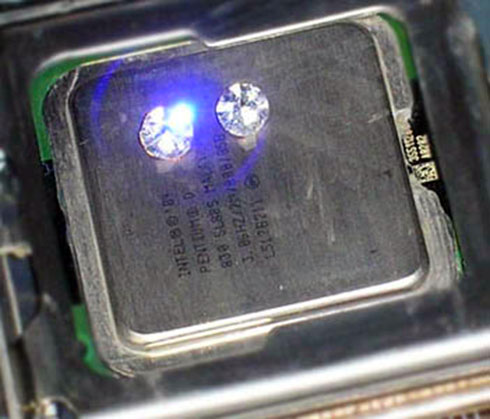
[Jared Bouck] over at InventGeek writes about his experience making his own thermal paste. Diamonds can be up to five times as thermally conductive as silver, the primary ingredient in most popula…
glad hare

Check out the Soundcore Infini Pro on Amazon and use offer code 9UVVEG3Y to get 20% off at http://bit.ly/a3372ltt Check out the Hexgears Impulse Keyboard and...
 copper patrol
is the amd wraith prisim cooler good enough for a 2700x
river gorge
yep
 wanton sparrow
as far as the aesthetic of case fans are concerned, should i go with a black case and white corsair led fans or a black case and the classic noctua fans but with a corsair lighting nod pro to pick up the slack?
feral patrol
hm
 gritty plover
Completely up to you. You have to pick what you like.
 high orchid
water cooling worth the hype on i7? or just stick to noctua?
copper patrol
@high orchid you doing overclocking?
if so, then youre going to need a really good cooler
noctua fans can handle overclocking if you get a good cooler
high orchid
haven’t built it yet, but probably some
copper patrol
AIOs are good for overclocking too
the thing with noctua fans and air coolers that are big, they can cover the RAM slots so its hard to upgrade or sometimes even use the slot if it covers it too much
aios dont have that problem
most dont*
copper patrol
yeah
most AIOs come with different brackets included for different socket types
also air coolers could be louder than water cooling
high orchid
true
copper patrol
if your radiator is replacing fans that were already there, than the noise will be the same
copper patrol
are you gonna do a custom loop?
high orchid
hadn’t planned on it
copper patrol
yeah
 fallen tartan
What i7 are you wanting to get
copper patrol
with AIOs, you eliminate the issues for leaks, (make sure it has a warranty) and you dont have to replace the coolant every 6 months
fallen tartan
I’d recommend Air cooler especially if you don’t wanna have leaks from water cooled stuff also it’s easier to setup
high orchid
i7-8700
fallen tartan
Air cooler
copper patrol
make sure you get an unlocked processor if you wanna do overclocking
fallen tartan
This one is pretty good, it’s brown but I mean it keeps a system cool
copper patrol
@high orchid during the buying process, intel marks their unlocked procesors with a K at the end of the model number
high orchid
yah thats the one noctua says is compatible with the mobo i want
 inner pelican
K proccesors enable overclocking
copper patrol
so for example, an Intel Core i7 8700 is not unlocked, whereas the Intel Core i7 8700k is unlocked for overclocking
high orchid
@copper patrol thanks for that tip! 
copper patrol
yea
really just make sure you take into consideration about the sound you want, if you even need anything other than a stock cooler, and if you think the cost of an AIO or a custom loop is worth it
oh and also the ram slots
those are important too
high orchid
^^
copper patrol
oh and one last thing
if youre going to be overclocking, get at least a 2 fan radiator
high orchid
want to build something for sims and upcoming MFS
 balmy glacier
tbh a corsair h100i runs my intel core i7 8700k with little to no sound at a cool breezy 40 degrees celcius
copper patrol
huh
high orchid
nice
balmy glacier
yeah those work great
copper patrol
honestly i was hoping for something with rgb lighting though
high orchid
what site?
balmy glacier
pre applied thermal paste and with the icue software you can keep it on silent mode and if the cpu ever gets too hot automatically ramps up rpms for you
copper patrol
id be getting a Ryzen 7 and that comes with an rgb fan which i love
@high orchid thats Corsairs website
balmy glacier
the h100i does have rgb
copper patrol
really?
balmy glacier
yeah gimme a sec
copper patrol
even the fans?
copper patrol
wow
ok then
their marketing team needs to get it together
nowhere on this page does it indicate that its rgb
balmy glacier
copper patrol
dang
high orchid
nice rig
copper patrol
if i got a AIO i would wanna go with a thermaltake one to match the brand of my case. also their rgb is compatible with a lot more rgb control software
 thin veldt
i have it its not that good
balmy glacier
which one
 acoustic shard
Are u saying it's not good for cooling
balmy glacier
why not
thin veldt
yea
acoustic shard
Oh
high orchid

balmy glacier
mine does a fantastic job even with cpu after burner on 100% load never goes past 80 degrees celcius
thin veldt
i have mild overclook and i run at 98 f
copper patrol
in this case
copper patrol
yeah
balmy glacier
and clinton if youre saying 98 f is bad
its not at all
thats about 40 celcius thats good for even idle temp
inner pelican
not usually
high orchid
definitely have room for radiator in case
inner pelican
ALWAYS
balmy glacier
nope you can change it if youd like
copper patrol
balmy glacier
just easier if you do celcius since thats more average
inner pelican
But Celcius is easier to understand honestly
balmy glacier
very true
high orchid
0 freeze 100 boil
 rose sonnet
I have that same cooling system too
balmy glacier
here are my numbers for my cooler with cpu overclocking 100% on a i7 9700k with a corsair h100i