#old-cooling
1 messages · Page 26 of 1
 vocal fable
cause if I am going to watercool I want to go all out with a zen6 x3d ngl
unless 12+ core 9000x3d is really good
 strange flume
It almost never is unless you have a hardware issue with the cooler
Like failing heatpipes
Dead fans
It also makes reselling more annoying
 knotty sparrow
vocal fable
unless 12+ core 9000x3d is really good
knotty sparrow
vocal fable
unless 12+ core 9000x3d is really good
Medusa Ridge (next gen after the current new) is supposed to have 12 cores per CCD, including X3D ones
vocal fable
knotty sparrow
Medusa Ridge (next gen after the current new) is supposed to have 12 cores per C...
didnt you say take that leak with grain of salt since it was moores law is dead

knotty sparrow
Yes that was the original source, but it does make sense and now there's more than him reporting it
vocal fable
9000x3d wont have any changes to core layout correct
knotty sparrow
Correct it's the same as previous gens
strange flume
I think I have a current leak somewhere

My KS PC is doing the 7950X3D crap @knotty sparrow
It's stuttering
Maybe it's the extra monitor
Hmm
Nope
knotty sparrow
Possible, I've been getting monitor flicker on my secondary too. I need to try that fix buildzoid talked about on a recent vid.
strange flume
No it's not the monitor
knotty sparrow
Which is pretty much just "set tRAS to 120 because it doesn't affect performance"
strange flume
It's not the camera
The heck
I might need to DDU maybe
Getting microstutter but not probalance
Heh, All that fun with the monitors might ahve caught up with me

knotty sparrow
knotty sparrow
Yes that was the original source, but it does make sense and now there's more th...
The "it makes sense" part comes from this:
The TSMC N3E node offers a 20% speed improvement, over 30% power savings, and approximately 60% logic density increase over TSMC N5
If they can pack 60% more into the same space it would track that they can pack 50% more cores onto a CCD
vocal fable
knotty sparrow
If they can pack 60% more into the same space it would track that they can pack ...
thats insane
 knotty sparrow
I can wait until the end of next year when it'll be finally available with consistent stock 4 months after launch
vocal fable
I'd deadass wait outside microcenter for something like a 11950x3d or whatever its gonna be called
knotty sparrow
That would be a 24c/48t monstrosity
vocal fable
espically if I stay on my 7600 until then
strange flume
It'll be good though the core count won't be the main reason
The IMC change will be
We've had the same IMC since 5000
knotty sparrow
Right the IO die is getting upgraded too
vocal fable
IMC?
knotty sparrow
Integrated Memory Controller
 strange flume
Esp. when it's been IMC limited for several gens
 weary raft
there are so many acronyms for everything fr
knotty sparrow
Decoupling the fclk from uclk was a big step forward too
If you run fast enough you can viably do uclk div2 mode without a real latency penalty
weary raft
not exactly the same industry, but there was a paper written about how papers had too many very technical acronyms that you're expected to know, but you have to be an industry veteran in that specific area of study to even understand the terms without looking it up 
strange flume
My favourite acronym is the TWAIN printing tech
knotty sparrow
My favorite is PHP
It goes around in an infinite loop
PHP
Hypertext
Preprocessor
strange flume

TWAIN and TWAIN Direct are application programming interfaces (APIs) and communication protocols that regulate communication between software and digital imaging devices, such as image scanners and digital cameras. TWAIN is supported on Microsoft Windows, Linux and Mac OS X.
The three key elements of TWAIN are:
Application software. For example...
knotty sparrow
The P stands for PHP 🙃
strange flume

 weary raft
not exactly the same industry, but there was a paper written about how papers ha...
weary raft
weary raft
not exactly the same industry, but there was a paper written about how papers ha...
 deep aspen
@strange flume https://www.cnn.com/2025/02/07/us/two-killed-in-possible-tornado-in-small-east-tennessee-community/index.html

CNN
The year’s first deadly US tornado struck after dark Thursday, killing two people in a small East Tennessee community as the first of five back-to-back, jet stream-driven winter storms pummeled the eastern United States.
strange flume
Nooooooo
knotty sparrow
Wind can be used for cooling ig
vocal fable
knotty sparrow
Wind can be used for cooling ig
 deep aspen
i just opened wegg
vocal fable
crazy comment lmao
knotty sparrow
We've been off topic for a while now it's all good lol
deep aspen
rip
strange flume
deep aspen
<@101107951401455616> https://www.cnn.com/2025/02/07/us/two-killed-in-possible-t...
Lesson to be had here is always take the warnings seriously
deep aspen
strange flume
Lesson to be had here is always take the warnings seriously
absolutely
i checked the path
strange flume
Even the invisible ones can be dangerous
deep aspen
the supercell went DIRECTLY over our complex
and i mean directly
it just never touched ground
weary raft
deep aspen
<@101107951401455616> https://www.cnn.com/2025/02/07/us/two-killed-in-possible-t...
it only just sank on me on how some houses dont have a concrete foundation
yalls houses really be sitting on sticks
strange flume
deep aspen
the supercell went DIRECTLY over our complex
Ye ik, you described it at the time lol
deep aspen
weary raft
it only just sank on me on how some houses dont have a concrete foundation
low income state, a lot of mobile homes
deep aspen
strange flume
Ye ik, you described it at the time lol
true but i was also directly in the middle of it
lol
strange flume
Yeah mobile homes are often the site of many tragedies
weary raft
i wonder how many houses in the neighbourhood was tornado proof/resistant
knotty sparrow
The Sacramento river is flooded right now (we finally got the rain we were missing from the last 2 months... all at once) and people are refusing to follow the evacuation orders. Homes are washing away. Hope they're doing ok but it could be a darwin award moment.
deep aspen
if it had touched down where we were with how strong it was there is a very strong chance i wouldnt be here talking to yall right now
weary raft
or had a tornado shelter i mean
strange flume

 deep aspen
more images from it, it tore straight through concrete
 strange flume
weary raft
how do you do this
strange flume
weary raft
how do you do this
IDK STOP IT
vocal fable
strange flume
<:floosh:968657589762142218>
 strange flume

vocal fable
give me that face leak
 knotty sparrow
You'd think you'd learn to stop throwing rocks at them
strange flume
ME NEITHER
weary raft
real
 knotty sparrow
Well it's pretty much just loading a restore point so be ready for no image and going back to safe mode 💀
weary raft
felix teaches me new methods of breaking a computer every month
or rather
ways a computer can break every month
because i still have no clue how it happens
i just know it can happen now
weary raft
felix, the professional of causing avant-garde pc problems
strange flume
They should pay me to beta test crap
weary raft
you'll be so unlucky that you'll find no problems
and then they'll release it and it explodes for everyone else
vocal fable
strange flume
But IDK WHAT HAPPENED
u saying u don't know what happened is scary
knotty sparrow
He gets the weirdest issues that no one has ever seen before
strange flume
Ok I found the microstutter issue
Apparently the windows rollback thing is cos I triggered safe mode
My microstutter is coming from my hdmi cable
weary raft
I knew it
HDMI sucks frfr
knotty sparrow
And it wasn't happening before? Weird timing
weary raft
Dp superiority

Tbh
I prefer SDI over display port, but nobody is making a SDI GPU, at least for gaming or whatever
Nor any monitors with it (for desktop use)
knotty sparrow
Bring back the USB C port on the GPU
We have monitors that can use that as video input now
80Gbps link with the right cable
strange flume
Yep I have a dead hdmi cable
Old xbox one
It's not dead dead but it's causing massive stutters specifically
I don't even wanna unplug it ugh

But I isolated it to the cable
Damn
Maybe that's what was causing that weird fan crap ages ago
Just now it's like really noticeable
weary raft
strange flume
Maybe that's what was causing that weird fan crap ages ago
...huh???
knotty sparrow
Problem only Felix has #3586
strange flume
weary raft
...huh???
You don't remember me showing ralic
weary raft
I'm learning of even more weird tech problems of Felix
strange flume
I'd plug my cables up and I'd have no power in the KS rig
But one of the fans
Would start spinning

strange flume
It's not contagious smh
weary raft
I have no proof that it isnt otherwise
 weary raft
Maybe they've been exposed so long that they've developed antibodies
strange flume
Dude the cable that died is like 12 years old
I am not surprised it finally kicked
knotty sparrow
I've got a fun one. Vista era computer, new PSU.
Computer refuses to turn on fully, it power cycles infinitely whenever you press the power button.
Change PSU. Same problem. Change CPU. Same problem. Change motherboard. Same problem. Change RAM. SAME PROBLEM.
Nothing is plugged in except power from the wall, 24 pin, and EPS. It's an entirely different computer at this point, still infinitely power cycles.
weary raft
Yeah
12 years ago the antibodies didn't exist
strange flume
knotty sparrow
I've got a fun one. Vista era computer, new PSU.
Computer refuses to turn on ful...
I had this issue last year
I figured out what it was
Cable vdroop
weary raft
knotty sparrow
I've got a fun one. Vista era computer, new PSU.
Computer refuses to turn on ful...
We found the solution to the philosophical question
Yes it's the same ship
It still don't work
knotty sparrow
strange flume
Cable vdroop
All cables have been swapped, including wall power
strange flume
If the 12v is too low then a pc won't even try to boot properly
strange flume
knotty sparrow
All cables have been swapped, including wall power
Powerboard the same or nah
Change monitor?
Change all cables?
Change all peripherals?
knotty sparrow
Nothing is plugged in
knotty sparrow
Same issue straight from wall as on the power bar
strange flume
Same power point?
strange flume
strange flume
Change monitor?
?
knotty sparrow
I literally took my known good CX650 out of my server, including the known good wall cable, and it still cycled
 knotty sparrow
I plugged my server into the same outlet, it worked fine
Unplugged everything else from that outlet pair too
strange flume
But you had the minimum kbm and monitor right
You can't post without input devices
No video is a post error, so is no keeb
99 and 92
knotty sparrow
I had a PS/2 keyboard, it posts without a monitor
weary raft
Id imagine you aren't using a psu with a manual voltage selector and you aren't running it on the 220v sstting
strange flume
knotty sparrow
I had a PS/2 keyboard, it posts without a monitor
So it does post
Same storage?
strange flume
Same fans?
knotty sparrow
Fans unplugged except CPU cooler, which was also swapped
strange flume
So you posted with same keeb?
knotty sparrow
It works on other computers and worked on that computer before
knotty sparrow
No keyboard works right now, it shuts off before it gets to initialize anything
Less than one second of power
Then cycles
Off, on for one second, off...
strange flume
Is the case the same
weary raft
Hmmm....
knotty sparrow
Yes but I also tested with just a motherboard box
See I thought button too and jumped the pins
Still cycles
strange flume
Did you remount the cooler
knotty sparrow
Multiple times
strange flume
Have you tried keyboard out
weary raft
Jumpers in the right positions? If that even matters? If the board is old enough to have jumpers?
knotty sparrow
Jumpers did not change between the time it worked and didn't
strange flume
Are there any adapters
weary raft
But what about for the new board
strange flume
Power or otherwise
knotty sparrow
weary raft
But what about for the new board
Both boards
weary raft
Mysterious
knotty sparrow
strange flume
Are there any adapters
No
knotty sparrow
I wasn't able to move it at the time
No GPU currently, except integrated
I can't even confirm if the PCIe slot works
strange flume
Another outlet would rule out basically everything
Even if other stuff works out of it, electricity is really fickle
You said storage unplugged, was it just the sata data cable or was it also power
knotty sparrow
SATA and power
strange flume
Does the board have pcb protection
knotty sparrow
Drive is known working when I checked it on my USB to SATA adapter
strange flume
Like have you ever noticed any dust from the cooler screws or case standoffs
Metal flakes
knotty sparrow
strange flume
Does the board have pcb protection
There are no screws for the cooler, they're the old push peg design and made of plastic
knotty sparrow
Yeah one cooler broke in the process here
knotty sparrow
Yes, vertical on a desk
strange flume
Hm
knotty sparrow
It's a modern case too, double checked all the standoffs are in the right place
strange flume
Anything else on the circuit besides that plug specifically
knotty sparrow
I don't have the tools to test that
strange flume
You can't switch off part of the house?
knotty sparrow
I really hate accidentally turning off my server 😭
It takes 15 minutes to start up and my network depends on it now
strange flume
Mmmmmm
weary raft
Circuit tester 100
 knotty sparrow
I was pissed when the maintenance guy was replacing an outlet in the bathroom (it wasn't GFCI, right next to the sink) and he turned off the breaker clearly labeled "living room" and not "bathroom"
weary raft
💀
What, you don't have the throne in the living room? Are you really living without it in the living room
strange flume
Only other thing I can think of is there a switch on the board
Like an ln2 type switch
Some have specific startup switches that let you boot in a contained manner instead of default
Ln2 mode is just an example
Oh
weary raft
The power cycling does sound like it's from some sort of short, but where it's coming from idk
weary raft
Imagine if it's not working because a bit flipped
knotty sparrow
I checked for burst capacitors too before you say it
strange flume
Yeah you know what I'm turning up nothing now, you've changed basically everything
Except the wall plug
weary raft
You gotta change the street transformer
strange flume
Well no I mean like
weary raft

strange flume
I've had certain things behave badly with specific wall plugs before
Even if it should work it refuses
weary raft
I think that's more common in places with dirty power rather than the receptacle type? Though if it's worn out too much it could cause a bad contact, but I think that's more of a fire hazard than a "makes PC power cycles"
knotty sparrow
fwiw I have tried both outlets
strange flume
weary raft
I think that's more common in places with dirty power rather than the receptacle...
No
strange flume
knotty sparrow
fwiw I have tried both outlets
That can be enough
Ok
Damn
My brain has run out
weary raft
strange flume
No
Wdym by wall plugs affecting it exactly 🧐
knotty sparrow
I gave up on it a while ago and chalked it up to a ghost in the machine. I'm going to get a new (old) computer.
strange flume
weary raft
Wdym by wall plugs affecting it exactly 🧐
Rusty contact, old worn cables
Maybe water
"Wear and tear"
Really
Talking about the wall btw
Not the PC
knotty sparrow
When I was installing home security I saw an outlet where someone had their treadmill in it and they said it stopped working one day so they switched outlets. I tested the bad one... 105V
The good one was 118V
strange flume
Even just bad contact
Like the plug doesn't set well
I've seen some weird stuff man
weary raft
knotty sparrow
When I was installing home security I saw an outlet where someone had their trea...
Damn crazy voltage drop, assuming nominal is 120v there
strange flume
Lmao
knotty sparrow
Yes, 110V is the minimum for a lot of electronics and even the ones that say 105V won't like it when you put a load on it and it droops to 102.
strange flume
That's basically what I was saying at the start with vdroop
PC'
PC's are the same
Too low out of spec, no start
I genuinely have a fried brain thinking about that vista riddle
Lmao
Ima break
weary raft
Also yeah I got what you meant now
I kinda somehow forgot about voltage drop
From a bad receptacle
Mostly because I just expect what basically is just a bus bar or whatever it's called to just work
weary raft
Some (somewhat unlikely) scenarios I could imagine are
- PSUs too old and are dead/dying
- connectors are not standard pinout and are shorting (though why would they use the same connectors if it wasn't compatible? I think this is probably the least likely)
- jumper on the wrong header causing it to short circuit and trip something
- conductive debris in the io?
What I'm fairly confident in is that short power cycling is probably some sort of power issue
strange flume
Agreed
weary raft
I'm out of ideas for what other power related issues could cause this now lmao
knotty sparrow
PSUs are a P850GM and a 650 GQ, both work on my server which draws more power.
They worked previously.
weary raft
Those damn ghosts emitting too much emf inducing current and causing the protection to trip
knotty sparrow
If it was a short then it wouldn't power cycle, it would shut off and I would need to reset the power supply
Or it would just explode, because P-GM
weary raft
Lmao
Also a motherboard might have built in short circuit protection that might trip, rather than the PSU tripping, though idk how applicable that is for older boards
strange flume
knotty sparrow
PSUs are a P850GM and a 650 GQ, both work on my server which draws more power.
T...
We get that part but also the symptom is 10000% power
knotty sparrow
I agree it sounds like power of some kind
strange flume
That's why I listed like, every possible part in mankind tryna figure out if anything was retained lmao
It does ring a little similar to the problem I had with the grey screen tho
I changed every single part
The problem did not go away
Changed it all back
Problem did go away
Like ????
But then it reappeared and I confirmed it was vdroop over the eps
weary raft
The angry pixies did a little trolling
knotty sparrow
I'd prefer to have an XP or older machine anyway. No compatibility mode needed for retro games.
I could get a cpu with a motherboard that has blown caps and change those out pretty easily with solid caps
strange flume
Maybe

 fluid lichen
Oh god
weary raft
strange flume
Maybe
Minecraft creeper
Four legs ✅
Long torso ✅
Approximately a cube head ✅
Potentially explosive ✅
(Note: requires gunpowder)
 sinful heart

strange flume
I just
Checked every cable
Zero correlation
But when that monitor is specifically plugged into the gpu
It goes haywire
????
Different device
4K120hz
No issue
Tf
strange flume
Checked every port and it's still doing the same thing
Meaning it's gpu side but how
knotty sparrow
Felix issue #3892
 magic sparrow
strange flume
Meaning it's gpu side but how
magic sparrow
strange flume
Meaning it's gpu side but how
Unless you test monitor with another GPU that is same arch (ideally same model), it can still be monitor. Could be smth weird like monitor has weird grounding issues but specific GPU model has missing grounding pins in video port
magic sparrow
knotty sparrow
I gave up on it a while ago and chalked it up to a ghost in the machine. I'm goi...
Mobos from that era just POST error and stay on when no CPU/RAM/storage/etc right? If so, test both boards like that.
I am considering possibility of mobo was dead and killed CPU, which then killed other mobo, and other CPU was killed by one of dead mobos.
strange flume
magic sparrow
Unless you test monitor with another GPU that is same arch (ideally same model),...
I suspect it's something to do with the cpu/io because this is usually how it goes with ryzen bs on windows
Seeing it at least once or twice on Intel wouldn't surprise me whatsoever
When you get a bad usb device it can very easily just happen to stutter really badly
strange flume
Yep happened again
Man ryzen can be ass sometimes
Starting to really damper my feelings for it
3 separate computers 3 similar issues on short notice
They really ought to address this
Idk if it's a windows issue or not but when you don't change anything at all then it just appears it's sus
sinful heart
I never had usb issues
weary raft
I haven't had usb issues recently either
 harsh crow

I have some depressing news about the state of affairs for the watercooling industry...
This is NOT sponsored, but if you are searching for watercoolong parts, check out https://www.performance-pcs.com
Sponsored Links
Click here to learn more about the Hyte THICC Q60 at https://hyte.com/store/q60/fan-hyte-q60-bw
Get your JayzTwoCents Merch He...
deep aspen
All i know is it was expensive
 rocky wadi
Sounds right
deep aspen
Also watercooling in itx builds and what not im sure will stick around
rocky wadi
Water-cooling my Ryzen 4070
deep aspen
I air cool my stuff in a micro atx
harsh crow
I definitely have noticed what he meant by costs going up.
I remember when I looked into a decent 360mm loop for a cpu it was like only $400 6 years ago. now that costs like $600 easily for a basic kit it feels.
strange flume
Cos we are reaching as I said 100 times now
A point where watercooling provides basically nothing nowadays
The moment aios get qdcs, that's the end of custom loops
At that point you could just buy two aios, slap them together, loop
Alphacool already has this type of lineup and it works well enough
 sacred pagoda
harsh crow
I remember when I looked into a decent 360mm loop for a cpu it was like only $40...
sacred pagoda
harsh crow
I remember when I looked into a decent 360mm loop for a cpu it was like only $40...
$35 thermalright peerless assassin 120
 harsh crow
strange flume
The moment aios get qdcs, that's the end of custom loops
harsh crow
strange flume
The moment aios get qdcs, that's the end of custom loops
What does qdcs stand for? Quick Disconnect?
harsh crow
sacred pagoda
https://tenor.com/view/gigachad-chad-gif-20773266
Fair.
 boreal prism
Hey guys I got 1 more really dumb question for today. The arctic liquid freezer 3 argb fans, can I make those just white?
boreal prism
strange flume
Buy arctic p12 maxes or just set the rgb to white
Ok that’s what I wasn’t sure about, it shows the “color wheel” in one of the pics and white wasn’t there so I was thinking maybe not able too
And are p12 maxes fans?
strange flume
boreal prism
Ok that’s what I wasn’t sure about, it shows the “color wheel” in one of the pic...
You can pick any colour and the leds will cycle like christmas lights if you want them to
But you can also pick any colour
Make them do stuff like flash
Make rain effects
Meteors
Sliding door effects
The world of rgb, at your fingertips lol
boreal prism
Oh wow really? lol kinda cool but also unnecessary for me lol
Is there a hub I have to download?
boreal prism
strange flume
They're the better versions of those fans
Hmm ok I’ll see how the thermals look
I bought the antec flux pro so it has 6 stock fans plus I’m looking at buying the 420 liquid freezer for the 9800x3d I figure that will be pretty damn cold lol
strange flume
boreal prism
Hmm ok I’ll see how the thermals look
I bought the antec flux pro so it has 6 ...
You don't need that much aio
Also
I'm not sure 420mm fits in flux pro
 topaz blaze
Where can i go for pc help
strange flume
420mm usually doesn't
strange flume
topaz blaze
Where can i go for pc help
boreal prism
strange flume
I'm not sure 420mm fits in flux pro
Really? I looked it up it said yes
Sorrry it’s flux pro
strange flume
Oh my mistake
boreal prism
And really I watched a vid that said the 420 gave best frame times and they are all onsale rn so it was only like 20$ more
strange flume
It's bigger than I recalled my bad
strange flume
boreal prism
And really I watched a vid that said the 420 gave best frame times and they are ...
Nah better frame times is a weird way to say it
The 420 will be as cold as any old 360mm
boreal prism
strange flume
It's bigger than I recalled my bad
You’re good bro! Trust me I need the reminders… swapped a cpu today and forgot to update bios..
strange flume
9800X3D is easily cooled by a dual tower it doesn't need a 420mm
Source: I own one
boreal prism
strange flume
The 420 will be as cold as any old 360mm
Hmm ok that’s good to know
I’ve never done AIO
Figured I’d try it out while they are on sale bc everyone says arctic is really good
strange flume
You can buy yourself a nice aio if you want but the expectation should be you'll get basically identical performance to a good dual tower
And some 360mm thermalrights trade blows with the large arctic aios
Same with fx360 pro
So to me it's like, spend $60 max on 9800X3D cooling
Any higher is just pretty looks and no functional benefit
If you set the chip up correctly you can use an amd stock cooler on it no problems
Barely any performance loss
So like, you can use any range of cooler quite easily it just depends on your preferences
boreal prism
Dang ok that’s insane. Was it the 7800x3d that was made to target like 95c?
98 doesn’t do that right?
I have a scythe 2 (I think) in the current build for a 5600x, probably massive overkill it’s been great
knotty sparrow
Other way around, the 7800X3D maxes at 89C and the 9800X3D is 95
strange flume
They both do that
Yeah
They both target tjmax
It's just AMD's age old boost algorithm
strange flume
boreal prism
I have a scythe 2 (I think) in the current build for a 5600x, probably massive ...
Fuma 2?
boreal prism
strange flume
Fuma 2?
That’s it!
boreal prism
Ok cool thats actually good to know!
boreal prism
knotty sparrow
Other way around, the 7800X3D maxes at 89C and the 9800X3D is 95
Oh Idky I thought that was different, silly question but does that mean the more you can keep it cold the higher it will ramp?
Sorry if that’s a noob question
Like target a higher frequency
strange flume
boreal prism
Oh Idky I thought that was different, silly question but does that mean the more...
Kinda
But it's in the sense of like
To a point
After that
Diminishing returns
So like to me a good dual tower is more or less good enough
boreal prism
Ahh ok that makes a ton of sense! I assume it would be more “sustainable”
strange flume
You could really push a 360 aio if you really wanted too, you'd gain maybe a couple %
It's just sorta redundant
boreal prism
Ight and the 420 would basically do nothing right?
I wanna try an AIO for this build, might be a waste but I wanted to do a “cleaner” look
knotty sparrow
boreal prism
Oh Idky I thought that was different, silly question but does that mean the more...
If you can keep it at or below 60C you'll get the most out of the CPU, but it's only about a 3% improvement overall. You need to get it below -20C for it to really work at the peak.
strange flume
boreal prism
Ight and the 420 would basically do nothing right?
Essentially yeah
I mean you can do it if you really want
Tbh lf3, 420mm at that, it'll last, and you can service them
knotty sparrow
I have the LFII 420 and it does basically nothing but run at 800 rpm all day, even with an all core workload
strange flume
For one and done it's not a terrible idea
Yeah
It's really overkill unless you yeet the hell out of these chips
Even then it's still kinda a bit much lol
boreal prism
knotty sparrow
If you can keep it at or below 60C you'll get the most out of the CPU, but it's ...
Hmm sounds like a challenge. lol jk no liquid nitrogen over here
strange flume
Yeah you'll be putting 1000% effort in for maybe a few %
Imo the scythe would be fine
If you're not satisfied using the scythe, consider the lf3 then
knotty sparrow
300% money for 3 fps
strange flume
Yeah
boreal prism
lol yea that’s fair enough
strange flume
I mean again, good aio, repairable, will get updated
Not the worst idea if you truly want it
boreal prism
Updated?
strange flume
Yeah arctic is one of those brands that offers updates to older coolers
Noctua also does this
boreal prism
And wait I can repair it? Do they actually make it possible for me to repair the pump or something?
strange flume
Most do but those two more than others
boreal prism
Or add fluid?
strange flume
boreal prism
And wait I can repair it? Do they actually make it possible for me to repair the...
You can open them up easily to flush and refill
boreal prism
Oh that’s pretty damn cool
strange flume
Repairing...I guess I slipped my words there, the lf2 you could, not sure about lf3 repair ability
boreal prism
Well damn looks like I have more homework to do.. i thought it was basically gonna be good for 5 years and then dead
boreal prism
Just replace fans right?
boreal prism
Maybe I’ll keep it then, it works fine it’s like 4.5 years old. So would save me like 100$ on the build can’t imagine the fans would be more then like 20$ each
boreal prism
Lmao really?
strange flume
Pick the right ones yeah
boreal prism
Damn ok
 boreal prism
Maybe I’ll hold off on it and I’ll try it out. Ohh.. will it work with AM5? Or do I have to buy a brace thing
 boreal prism
Whoops
strange flume
Whoop
strange flume
Lol no worries
boreal prism
Dude I really appreciate it
strange flume
It's ok I learn a little myself every time
Like the flux pro supports 420
🔥
Lol
boreal prism
Lmao useless now tho
boreal prism
Yea I have the lian li mesh 2 I think rn. It’s been super sold I love it. Gonna give it to my wife to use
harsh crow

Check out all products and services that Hetzner has to offer:
https://htznr.li/der8auer/250102_en
Give us feedback about the block:
https://forms.gle/7EYwQs4NDizvP1WCA
Music / Credits:
Outro:
1998 Beats - Strange Things
------...
fun video to watch
harsh crow
@weary raft how are the Corsair Hydro XR5 radiators?
3rd of the price of a HPE-45 radiator from alphacool.
vocal fable
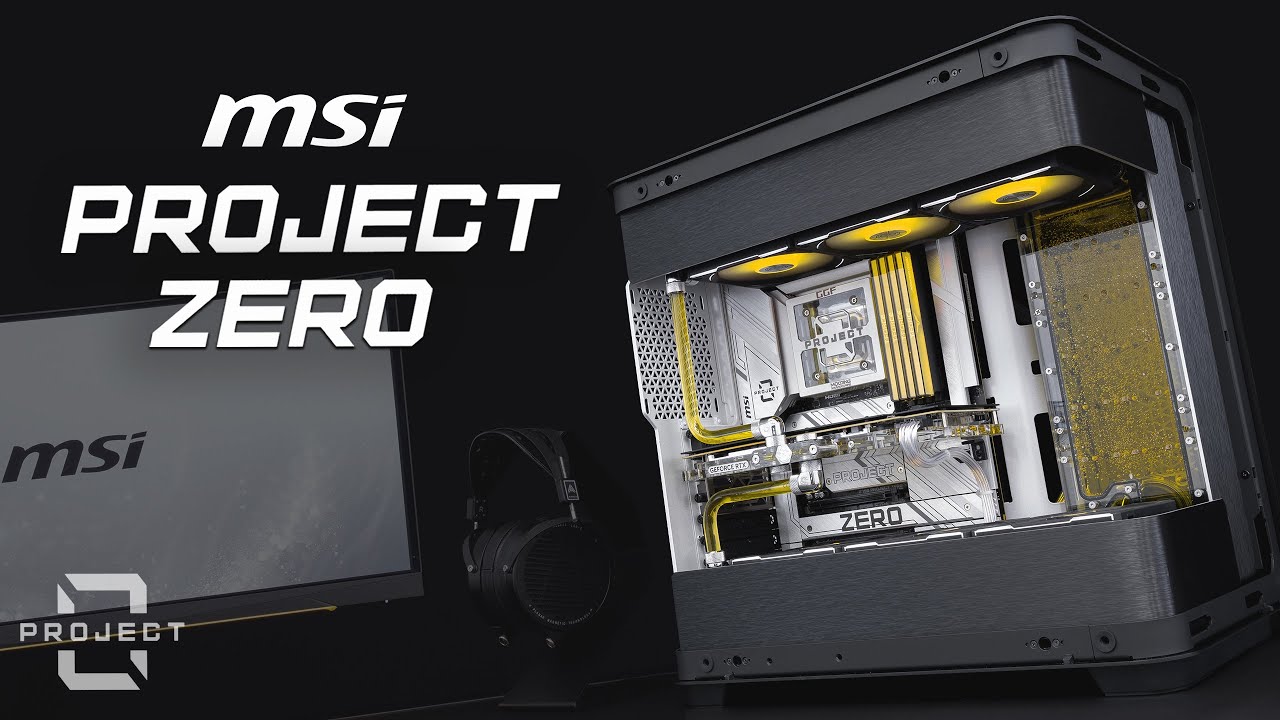
With back connect motherboards becoming more and more popular, we set out to create a clean and elegant build using the MSI Z790 Project Zero motherboard.
00:00 - Build
04:51 - Filling
05:59 - Showcase
►Build Specs - Amazon US Store - https://amzn.to/2JzK5YN
MSI Z790 Project Zero - https://amzn.to/4cZyRX8
Intel i9 14900K - https://amzn.t...
so clean
harsh crow
Agreed.
sinful heart

sinful heart
Dude
Tl b12 probably one of the best buys I have made
Cpu at 100% load and I couldnt even hear the fan
My side panel was off
The difference is exaggerated because the arctic p12 i had was a dud so it made more noise than it should have
Oh the heating was on thats why I heard nothing
Wow so the amazon reviewers were right. there really is a hum between 40-50%
weary raft
zamn
boreal prism
@strange flume so I got the build set up with the fuma2. Currently running cinebench all core test and it’s holding at like 88.5c I feel like that’s a bit much no?
knotty sparrow
That's fine. Cinebench is a harder load than you'll ever see in the real world.
boreal prism
Ok cool literally had me scared. Single core it runs at like 52c
boreal prism
knotty sparrow
That's fine. Cinebench is a harder load than you'll ever see in the real world.
Is it normal to have some spike to around 80c in gaming? If it sits around 60-70 most of the time?
knotty sparrow
Yes, when there's a load spike it will take a second or two to ramp the fan up to compensate
boreal prism
I’m coming from a 5600x with same cooler so it never really happened (idt)
Ok cool good to know. I got a massive lag spike in the first map I ran of POE I assume that’s the PC figuring itself out or maybe it was server side not sure
knotty sparrow
It was probably loading shaders
boreal prism
knotty sparrow
It was probably loading shaders
Oh yea, didn’t even think about that actually. That explains why it spun up to like 80c loading the map
boreal prism
knotty sparrow
It was probably loading shaders
I’ve seen some people say undervolting the 9800x3d is a good idea any thoughts?
knotty sparrow
Are you doing PBO or manual overclocking?
sinful heart
Yeah don’t cpus have some safety mechanism that can kick in with cinebench because of the load? Also like furmark
boreal prism
knotty sparrow
Are you doing PBO or manual overclocking?
I wasn’t doing anything it was just a thought if the temp was climbing that high. I’ve seen some people saying a slight undervolt (I guess manual in the bios) gave improvements
weary raft
boreal prism
<@101107951401455616> so I got the build set up with the fuma2. Currently runnin...
idk what cpu you have, but amd rates their 7800x3d's maxiumum safe operating temperature as 89c
so you're pretty much just at the max recommended temperature (perhaps the cpu is throttling slightly
any modern cpu though (made within the last.... around 20 years?) has an automatic shutoff to prevent it from cooking itself though
boreal prism
weary raft
idk what cpu you have, but amd rates their 7800x3d's maxiumum safe operating tem...
9800x3d
boreal prism
weary raft
9800x3d has a max operating temperature of 95c
Ight cool. Max temp I could hit in cinebench was about 82c all core. Feels a bit warm but I suppose it technically still has room
knotty sparrow
boreal prism
Ight cool. Max temp I could hit in cinebench was about 82c all core. Feels a bit...
It's designed to run at full boost all the way to the thermal limit
boreal prism
knotty sparrow
It's designed to run at full boost all the way to the thermal limit
Ok cool so as long as it’s not hitting 95 it’s boosting?
sinful heart
Basically it will push as hard as it can until it hits a thermal limit or current limit i think so you are fine
If you are really worried then do a negative curve optimizer
boreal prism
sinful heart
If you are really worried then do a negative curve optimizer
What’s this mean?
sinful heart
A negative co offset means you send less voltage to the cpu
strange flume
boreal prism
<@101107951401455616> so I got the build set up with the fuma2. Currently runnin...
That's as high...actually maybe even higher? Than my own one with a 360mm aio mate
You're perfectly fine, 89C is well within spec
boreal prism
strange flume
That's as high...actually maybe even higher? Than my own one with a 360mm aio ma...
Ok cool I was worried it was getting to hot. Scored like 22k not sure how good or bad that is
boreal prism
sinful heart
A negative co offset means you send less voltage to the cpu
Ahh yea that’s what I was thinking, I saw a few vids of ppl saying it was a good idea but I’ve never done it before
sinful heart
Yeah its pretty easy
you can do it in the bios or install ryzen master
you can have ryzen master make its own curve
knotty sparrow
9000 series has the upgraded curve shaper too
sinful heart
Yeah thats what it was called for zen 5
Basically you can have ryzen master run its optimization, go eat something and when you come back your profile will be done if you dont want to do any tinkering
I let it make a curve on its own and it cut my power draw by like 40%
boreal prism
sinful heart
I let it make a curve on its own and it cut my power draw by like 40%
Oh damn that’s kinda insane. Did tht impact performance? Or just reduced the draw
hmm ryzen master says doesnt support the processor. maybe i gotta update it
boreal prism
hmm looks like it wont even let me download it. keeps sayin unable to launch incorrectly downloaded, aborting. but im literally just downloading it like normal
sinful heart
boreal prism
Oh damn that’s kinda insane. Did tht impact performance? Or just reduced the dra...
Yeah performance didn’t change at all
Maybe try to delete that old installation and download the new installer
boreal prism
sinful heart
Maybe try to delete that old installation and download the new installer
Yea I had to do that restart redownload restart then it worked. Idk what the -50 means.
But I ran it at that with an offset of 0 I think
boreal prism
It told me that wasn’t allowed for some reason. I did -50 on each core and then 0 offset which seemed like it might have forced the -50?
 boreal prism
sinful heart
0 is the default curve
boreal prism
sinful heart
0 is the default curve
it kept crashing on me. i reverted settings and uninstalled. still crashes when i load up Cinebench
sinful heart
boreal prism
it kept crashing on me. i reverted settings and uninstalled. still crashes when ...
Did you reboot yet or nah
boreal prism
sinful heart
Did you reboot yet or nah
Yea multiple times bc it’s crashing and freezing
boreal prism
It seems like the changes aren’t reverted, yesterday when I qued up cinebench it got to 83cish
Today not going about 66 still
Ahh ok that’s prob it
sinful heart
Yeah if you have it disabled the stock settings will override
Like before I had it on, ryzen master had to keep applying the profile
I turned it on in bios and my ryzen master profile sticks even on linux
boreal prism
Where would I see that?
sinful heart
Every uefi has a different menu but pbo is prob gonna be in the oc section
boreal prism
I don’t even see pbo. I have performance boost set to auto and TDP to 105W off
sinful heart
Ok try this
boreal prism
Performance preset set to auto also
sinful heart
Reinstall it and do the optimize feature
boreal prism
But that one seems to give me a choice to turn PBo on
sinful heart
Let the program make its own curve and come back to it later
Did you set it to -50 earlier yourself
boreal prism
So it wouldn’t do that either way, I just had a validate option not an optimize button (unless I’m blind)
 boreal prism
Ight im redownloading too
sinful heart
Ok
boreal prism
Oh I don’t have that
 sinful heart
Hmm so maybe its a little different with new boards
Try it and see what happens
Its probably the same thing
boreal prism
i did that
thats was -50 on all cores and tehn the diff offset thing at 0. it crashes on cinebench now
even when i had it uninstalled temps stayed at about 65 today and 83ish yesterday
does that mean that maybe it did something to the bios?
 sinful heart
Yeah what it seems like does is that it makes your bios apply the settings. Did you try the all core function or did you only do per core
I did all core on mine
sinful heart
Try all core
 sinful heart
Not sure what gfx is but type in -30 and see what happens
Not sure why it did -50 on everything because not all cores all the same
It was like “yeah lets do the lowest possible number and see what happens”

boreal prism
gfx seems like its short for graphics
even for the all core i have to put in between -50 and 0 but thats all core
sinful heart
Yeah try -30 and see what happens
boreal prism
Hmm so it seems like it reverted somehow after a few more restarts and im able to run cinebench. I have more questions now but I suppose they are appropriate for OC chat
Yea getting back up to 85c
That’s all core testingz looks like temp might actually be throttling it

 hoary ferry
So i got a quick question, how can I figure out what way are my fans intaking and exhausting? I am using a lian li 011 vision case and aio a gallahad II lcd sl 360mm now I am looking at the infinity fan facing the inside of the pc, where are those fans blowing?
knotty sparrow
hoary ferry
So i got a quick question, how can I figure out what way are my fans intaking a...
Unless they're reverse blade fans, this is pretty universal
 hoary ferry
knotty sparrow
Unless they're reverse blade fans, this is pretty universal
hoary ferry
knotty sparrow
Unless they're reverse blade fans, this is pretty universal
I don't know what universal is since this is my first build 
knotty sparrow
I meant the picture was universal, with the exception of reverse blade fans
hoary ferry
knotty sparrow
I meant the picture was universal, with the exception of reverse blade fans
Ah ok gotcha
 feral wolf
i mean u could also reverse the polarity of the power
and you'll get a change in direction
weary raft
technically yeah
though the fan blades are optimized for one specific spinning direction
vocal fable
for custom loops who are like the leading brands now that EK isn't
seems like thermaltake has alot of stuff
strange flume
Alphacool, optimus, heatkiller
Bargain bin corsair can be nice too
Sometimes
Hwlabs
TT is ok
Sometimes I see ridiculous discounts
magic sparrow
EK was pretty rarely worthwhile. Anyways, some other companies are Supercool, Icemancooling, Barrow, Bykski, Bitspower, Sometimes can just go for random companies for other things, like reservoirs (I have some random Juulasen one lol).
strange flume
Oh yeah bykski and barrow
 severe moon
What's the best 240 or 280mm AIO for LGA1700 under $60? (RGB unnecesary, USA)
could do 360mm too if needed
vocal fable
severe moon
What's the best 240 or 280mm AIO for LGA1700 under $60? (RGB unnecesary, USA)
this is what I have been using for almost a year now, as my first AIO, no complaints, swapped fans for some ringed rgb ones, thermalright has a bunch of really good budget AIOs and fans though, def look there

Thermalright Frozen Edge 360 Black CPU Water Cooler with PWM Fans, Pump Speed is 3300RPM,S-FDB Bearing, for AMD AM4/AM5,Intel LGA1150/1155/1200/1700/2011(FE360 Black)
sacred pagoda
Yeah if you're set on an AIO over air cooling I'd get something from thermalright
severe moon
sacred pagoda
Yeah if you're set on an AIO over air cooling I'd get something from thermalrigh...
i have a phantom spirit
but wanna get a aio
sacred pagoda
Why
severe moon
moving to dan a3
severe moon
sacred pagoda
Does that do 280? Make sure it does, some itx are too skinny
mATX btw
but it does 280
can fit 360mm with my psu and gpu
with a 360mm it limits my gpu to 320mm or something
but i have a 7900xt thats 308mm
so we good
severe moon
sacred pagoda
Matx but doesn't fit a phantom spirit?
it does
since i move the pc around a lot - even in a suitcase - a aio would be more stable
also idk its kinda cool
 wild fjord
Can anyone help me please? This temperature here just goes upp for no reason, I have no programs open just discord
My pc is also laggy af

My pc also automatically turns off
Anyone help please my pc sounds like a airplane
 wild fjord
I just applied new thermal paste but seem not working
wild fjord
strange flume
Either the pump is turned off or dead
How can I check?
strange flume
wild fjord
I just applied new thermal paste but seem not working
You forgot to plug in the pump then
It'll vibrate if it runs
wild fjord
strange flume
You forgot to plug in the pump then
What pump?
Also sorry if I’m confusing but idk this stuff
wild fjord
It was perfect yesterday no problems at all today morning I turned on and yeah this happened
 strange flume
Was it like this before or after repaste
strange flume
Check your lcd cables are plugged in
One of those is a pump cable
If they all are then the aio is dead
wild fjord
The fans are running good how can it be dead?
strange flume
Cos the fans aren't the things that move the water
wild fjord
strange flume
Check your lcd cables are plugged in
Impossible that the cables or not in because I have not even moved the pc
strange flume
Water no move = water at cpu boils
strange flume
wild fjord
Impossible that the cables or not in because I have not even moved the pc
You repasted it
You cannot repaste without moving it
wild fjord
strange flume
You repasted it
Yeah but this problem was before I pasted
wild fjord
Ok lemme see
wild fjord
Lemme move the pc a sec
strange flume

The refreshed Kraken X Series is a must-have for any build, providing better cooling, stunning visual effects, and intuitive installation. You can fine-tune settings with CAM’s software interface, ensuring optimal performance in even the most intense gaming sessions.
The all-new Kraken Z Series lets you personalize your all-in-one liquid cooler...
wild fjord
@strange flume


Everything is connected except this
But it has been unconeccted since I built it
Like 1 year ago
At it was perfectly running
strange flume
Then the pump is dead
wild fjord
What’s the solution?
wild fjord
I bought it like 10 months ago you think I can get new one? For free?
wild fjord
I didn’t buy it directly from nzxt because there is no delivery to my country
Can I still contact them?
wild fjord
Wait lemme see
strange flume
Each country has different laws
 woven basalt
Love dead pumps
strange flume
And each country does warranty different
wild fjord
It was this one I bought but white https://www.proshop.se/CPU-flaektar/NZXT-Kraken-360-Black-RGB-CPU-Vattenkylare-Max-31-dBA/3130778?_gl=1*1xlbcqh*_up*MQ.._gsMQ..&gclid=EAIaIQobChMI3Nqzx8jUiwMV-FiRBR20GBhHEAAYASAAEgJpvPD_BwE&gbraid=0AAAAADl5oReO3Bd0512hY_Xda6asHsK-Z
vocal fable
XFX made an offical waterblock???!?!

that looks so good
they did one for 6950 xt too 

wish i could find one in stock
sinful heart

 simple anchor
Any recommendations for quiet but efficient fans? The ones on my Mystique AIO sound like a semi truck when they spin up.
240mm AIO, but I also wouldn't mind replacing my case fans if there are some that are generally much more efficient
I also kind of broke one of my front fans while blowing my computer out
knotty sparrow
simple anchor
Any recommendations for quiet but efficient fans? The ones on my Mystique AIO so...
Something something thermalright. See the flow chart in the pins.
weary raft
simple anchor
What is infinity mirror?

The infinity mirror (also sometimes called an infinite mirror) is a configuration of two or more parallel or angled mirrors, which are arranged to create a series of smaller and smaller reflections that appear to recede to infinity. Often the front mirror of an infinity mirror is half-silvered (a so-called one way mirror), but this is not requir...
vocal fable
knotty sparrow
Something something thermalright. See the flow chart in the pins.
that chart is honestly such an amazing ad for thermalright then just need to post that on their socials lmao
love my fans and aio from them
 sinful heart

sacred pagoda
That fan likely uses pwm as well, assuming it has adjustable speed
sinful heart
Lil dude
severe moon
sacred pagoda
That fan likely uses pwm as well, assuming it has adjustable speed
3 adjustable speeds
so possibly
i really think i should put some slim fans below my gpu
gpu is just about 25mm above the bottom
any cheap reccomendations for a slim fan
just to try it out?
or should i just buy a $50 vertical bracket w/ pcie 4.0
i think my gpu is struggling to get air through the filter thats like 25mm away
sacred pagoda
That fan could possibly be doing more harm than good
Cause the gpu exhausts out the sides
severe moon
sacred pagoda
That fan could possibly be doing more harm than good
dont worry im not using it lol
just my gpu definitely not getting enough air in
i do have 2 outtake right above/infront of it
those pull out all the hot air
but the gpus fighting to pull air from the bottom with no intake fans
sacred pagoda
My experience with fans under the gpu in a small case with low gpu clearance to the bottomwas that they didn't really help. But they weren't slim
Slim might give better results
severe moon
yeah my arctic p12s are like slightly too big to fit under gpu
probably would but the gpu would be resting on them
so if i get something like 15mm it would leave 10mm of space
sacred pagoda
Here's the clearance mine had

Probably close to 10mm, maybe a bit more
Though tbf the fans didn't line up great under the gpu
severe moon
yeah id line them up perfect
might not even put 3
maybe just 1 slim fan
to get some air in
just tryna find a cheap fan to test with
sacred pagoda
severe moon
just tryna find a cheap fan to test with

Thermalright TL-8015W CPU Fan Computer case Fan Quiet 4pin PWM PC Fan, 15mm Slimline Cooler Fan, 2200RPM Speed, 80mm CPU Cooling Fan(White)
They also have rgb for slightly more but I'm assuming you don't need that for a bottom intake
severe moon
sacred pagoda
They also have rgb for slightly more but I'm assuming you don't need that for a ...
Hell nah
Not tryna cable manage that again
severe moon
sacred pagoda
https://www.amazon.com/Thermalright-TL-8015-Computer-Slimline-2200RPM/dp/B0BNZY6...
That’s 80mm btw
Like I could go with 80mm
But would only use 2 screws
sacred pagoda
Oh huh
severe moon
Any other options or do you think 80mm might work?
Smaller fan would give the GPU more space and not cover the entire GPU fan
Like it would be able to pull air from outside the intake fan too which may help with sound
sacred pagoda
 severe moon
sacred pagoda
https://www.amazon.com/Thermalright-TL-C12015B-Control-Performance-Fan%EF%BC%8C1...
severe moon
sacred pagoda
https://www.amazon.com/Thermalright-TL-C12015B-Control-Performance-Fan%EF%BC%8C1...
Think it’s worth to spend $2 more for an arctic fan?
Arctic p12 slim
sacred pagoda
Probably not
sacred pagoda
¯_(ツ)_/¯
severe moon
sacred pagoda
¯\_(ツ)_/¯
Alright I bought ur 120mm recommendation
Might even stick with 1 fan permanently since the GPU can pull air itself too
Just want a lil more positive pressure
Rn at 2 intakes 3 outtakes
weary raft
Exhausts lol
weary raft
severe moon
Rn at 2 intakes 3 outtakes
Assuming 2 or more of those exhausts are through a radiator, those might restrict enough airflow to prevent a negative case pressure despite having more fans? Though from what I see, you have a mesh case so negative case pressure probably matters less since there's so much more area for air to come in, so dust shouldn't accumulate on the gaps of the case
severe moon
weary raft
Assuming 2 or more of those exhausts are through a radiator, those might restric...
2 intakes on radiator
1 exhaust on radiator. 2 exhaust above GPU on side panel.
Exhaust on radiator is above psu to pull hot air out
weary raft
Hmm
severe moon
So I was thinking intake top bottom exhaust center
Since the center doesn’t really feed air into anything
Putting intake on side center would just fight against the GPU hot air
weary raft
Honestly you shouldn't worry about negative pressure in a full mesh case
severe moon
weary raft
Honestly you shouldn't worry about negative pressure in a full mesh case

i decreased temp by 20 degrees with a single fan
severe moon
i think that single 120mm slim will definitely help when i get it installed
since its a bigger fan that this random desk fan
and actually pulling air in
weary raft
severe moon
i decreased temp by 20 degrees with a single fan
negative or positive pressure matters less than if you're getting the heat out of the case or not; you can be in a negative pressure situation and have good airflow, and a positive pressure situation where the airflow does not get to the parts that need it
honestly moving one fan to a different location might improve your thermals, even without needing to add another fan
idk how your parts are laid out
severe moon
weary raft
negative or positive pressure matters less than if you're getting the heat out o...
im getting heat out
but im not getting enough cool air in for the gpu
theres 2 outtakes right in front of the gpu pulling all the hot air out
i can feel it
severe moon
slim fan definitely helped
50s-60s with single slim compared to 60s-70s
wonder what two could do
sinful heart
Is the normal p12 worth buying
Might as well get more b12s if I need them
Just the weird harmonics around 50% would bug me if I had 4 of those making the sound
Unfortunately there is no p12 max white pack
But thats ok its still not a lot anyway
severe moon
sinful heart
Is the normal p12 worth buying
yes
severe moon
sinful heart
Unfortunately there is no p12 max white pack
max actually isnt much better than a normal p12 btw
it performs similar sometimes slightly worse at lower RPM, but does have a higher maximum RPM.

So basically, if you plan to max out your fans, get the P12 max. Otherwise, if your fans run at around 50% most of the time, buy the normal P12s.
P12 max are quiter at 100% use.
sacred pagoda
sinful heart
Is the normal p12 worth buying
Tbh I'd probably just get thermalright c12c
sinful heart
Yeah even though yall praise that fan I was still skeptical
But now after seeing hardware canucks that fan really is that good
I always thought it was too good to be true, but its not
sinful heart
severe moon
P12 max are quiter at 100% use.
Yeah they were kinda brutal ngl
severe moon
sinful heart
But now after seeing hardware canucks that fan really is that good
i had the thermaltake c12cs in my O11D
but i currently use 2 P12s in my Lian Li A3 PC
i bought p12s cause they were like $30 for 5
triple the price of the c12cs but i thought theyd be better for noise and longevity
i cant tell if theres much of a difference in noise
knotty sparrow
sinful heart
I always thought it was too good to be true, but its not
The price really throws people off.
"No way it's that cheap AND good. What's the catch?"
Good move not listening to a single source and seeking out someone more reputable than 'random Internet stranger #63257'.
sinful heart
severe moon
i bought p12s cause they were like $30 for 5
Oh the 5 pack
Yeah thats good but I want the white fans
There is no pack for them so i really might take the thermalright pill again
sinful heart
knotty sparrow
The price really throws people off.
"No way it's that cheap AND good. What's th...
Yeah even the rgb version is just as cheap
I really don't know how they pull it off man
knotty sparrow
At first everyone assumed that they were flooding the market to gain mindshare while taking a net loss, but it's been a couple years like that now
severe moon
Just buy the thermal take C12C fans
Literally it’s like $2 if they stop working
Mine worked great, no horrible noise, good airflow, and didn’t break in the few months I used them.
If you have extra money to spend and don’t have a different use for it, get the arctic fans since they’ll probably last longer and do have a lot more positive reviews.
-# Arctic P12 Max are not chain link btw
sinful heart
Oh yeah true they arent
Its either that or c12
We'll see
Just trying to find something ahead of time for the inevitable death of my be quiets
I;ll hold on to these for a very long time
severe moon
sinful heart
I;ll hold on to these for a very long time
Buy a industrial size AC powered fan and use zip ties to attach your pc to it


 weary raft
tbf those connectors are like dirt cheap to add lmao
probably like a cent for both the materials and manufacturing combined
severe moon
sinful heart
The thing is that a 3 pack is $12
$2 more for these https://pcpartpicker.com/product/4zkH99/thermalright-tl-s12-x3-476-cfm-120-mm-fans-3-pack-tl-s12-x3

Thermalright TL-S12 X3 47.6 CFM 120 mm Fans 3-Pack (TL-S12 X3)
which i used in a friends build and the rgb is a nice accent
not blinding or ugly white transparent fins, but a cool halo
look especially nice in the front of the case
vocal fable
severe moon
$2 more for these https://pcpartpicker.com/product/4zkH99/thermalright-tl-s12-x3...
i adore these fans
my build is all s12s besides two thermalright 140s on the bottom
 sinful heart
New peerless assassin revision???
https://a.co/d/e1ZxBiO

Dimension: 125MM135MM155MM
Heat Pipes: 6mm heatpipe*6 units
Material: Aluminium Fin, Pure CopperHeat Pipes and Base, Nickel Plated
Heatsink Weight: 610g
Connector: 4PIN PWM
TL-C12C-X28 V2
Dimension:120MM120MM28MM
Fan Weight:130g
Rated Speed: 1850 RPM+10%(MAX)
Air Pressure: 2...
Interesting
sacred pagoda
Still only 6 pipes while the Phantom Spirit is 7 and cheaper
sinful heart
Is the pure wings 3 high speed a good option for heatsinks
Oh its got a rifle bearing
Might be over
I got that be quiet bias ima see how it is
sinful heart
sinful heart
Is the pure wings 3 high speed a good option for heatsinks
Wow this fan is nuts
I am running a couple degrees hotter but it is super quiet
Like the fridge/freezer buzz is overpowering this with cinebench running
As much as I like that b12 it just aint it on a heatsink at least
I wonder if it would make those weird sounds as a case fan though. Maybe I can still keep it
severe moon
I’m buying a second slim fan
 proper charm
yo
 flint ibex
Anyone have any experience with the Thermalright Frozen Prism ARGB 360mm?
proper charm

Micro Center
Get it now! Snap into a better way to cool your RGB with the SWAFAN EX 12 RGB Series. With built-in Neodymium magnets on each fan, its a snap to build and even better to manage with reduced cables in your case.
Would these fans be oki? They don’t need a hardwire to my PSU?
 low pumice
flint ibex
Anyone have any experience with the Thermalright Frozen Prism ARGB 360mm?
low pumice
flint ibex
Anyone have any experience with the Thermalright Frozen Prism ARGB 360mm?
GN reviewed it, it performs well for a cheap price.
https://youtu.be/MPQ-UvavT8Q

WE sponsored ourselves! Support independent testing & grab a GN Modmat or Case Magnet: https://store.gamersnexus.net/
In this review, we benchmark the Thermalright Frozen Prism 360 liquid cooler ("AIO"), available in both ARGB and black-out variants for CPU cooling. We tested the Thermalright Frozen Prism on both Intel and AMD solutions, finding...
flint ibex
Yeah I saw that, I might go with the notte instead
Seems to be slightly better for like $6 more
low pumice
proper charm
Would these fans be oki? They don’t need a hardwire to my PSU?
Looks like those don't use a hub and are just daisy chained into Mobo, as long as you have extra 4 pin pwm and 3 pin argb headers on your mobo, you should be able to use it.
The price is disagreeable but the cost of aesthetics is up to you. I'd look through thermalright's various fans and see if there's anything that catches your eye if you haven't already
proper charm
low pumice
Looks like those don't use a hub and are just daisy chained into Mobo, as long a...
I’m trying to find what I can get day of from a microcenter
And or Best Buy
I have an Asus X870E Crosshair Hero
There’s also a Corsair RS120
severe moon
flint ibex
Anyone have any experience with the Thermalright Frozen Prism ARGB 360mm?
I got the frozen notte because apparently it’s like the higher end Thermalright AIO for a little bit more
Idk if there’s much of a performance difference tho
It was easy to put on
flint ibex
severe moon
It was easy to put on
temps have been good? which CPU are you running?
severe moon
flint ibex
temps have been good? which CPU are you running?
14600K
severe moon
Temps are good
simple anchor
Should I be concerned that the pump in my AIO suddenly sounds off
Probably, right?
Almost sounds like it's struggling
Pump speed is the same as it has been for months
strange flume
simple anchor
Almost sounds like it's struggling
Try tipping the pc around a bit, might have a trapped air bubble
simple anchor
Well it fixed it for a second
It sounds like a bunch of crickets chirping
How far might I need to tip it?
It just got way worse, I shut it down because it sounded so bad
I mean if the pump fails it just fails, right?
Not like it drips liquid all over my motherboard and graphics card?
It's a Mystique 240 by the way
Pretty sure one of the fans is failing
Yeah, stopped it with my hand and the sound completely goes away
So uh
Any fan recommendations?
lmao
Three pack is fine
knotty sparrow
Thermalright something something
knotty sparrow
Flow chart is in the pins lol
simple anchor
I was kind of just wondering if there was anything better since then
I'm not really surprised the fan is dying, these things unironically sound like a semi-truck accelerating
knotty sparrow
Nothing better in the price bracket
Some of them are even nidec clones, basically noctua fans
simple anchor
I probably want reverse in the front, right?
simple anchor
Yeah
Wild that DeepCool got sanctions for selling fans to Russian companies when this fan lasted a couple of months at best
Could be that they just put crappy ones in
Should I have the fan headers for the AIO in any specific ports? Like the pump fan in CPU_OPT and the normal fans in CPU or something?
knotty sparrow
That's up to you and your motherboard
Ideally you'd have the pump at a constant speed, it'll last longer if it's not ramping up and down
Most boards have CPU_OPT match the main CPU header but others will default it to 100%
I would keep my pump at around 60% personally
simple anchor
I don't get a choice with the Mystique
I just want to make sure it's getting the voltage it wants
If I try to set it lower than 100% it will go to 3000 in bursts because there isn't enough voltage
knotty sparrow
simple anchor
If I try to set it lower than 100% it will go to 3000 in bursts because there is...
Is it a 3 or 4 pin pump connector? If it's 4 then make sure the header is set to PWM mode
simple anchor
knotty sparrow
Is it a 3 or 4 pin pump connector? If it's 4 then make sure the header is set to...
Don't entirely remember, but I think four-pin. Motherboard defaults to auto, so it should hopefully figure it out.
simple anchor
I might have also set it to PWM
simple anchor
Oh also, ironically
I got bubble sounds from the pump after I moved my case around trying to remove the non-existent bubbles
Very quiet, but
knotty sparrow
Auto usually means PWM on the CPU fan and DC on everything else
It's fairly rare that it'll actually take the time during POST to test each fan to see if it responds to PWM signaling
vocal fable
For those with custom loops, does anyone run external rads
I’ve seen builds where they have the external rads exhausting like out a window that’s something I’d like honestly consider for the summer that would be amazing lol
topaz blaze
Best coolling for i7 9700
severe moon
topaz blaze
Best coolling for i7 9700
Thermalright phantom spirit
Could probably survive with a smaller one too
But that’s the best cooling value