#cases-psu-and-cooling
1 messages · Page 21 of 1
 bleak holly
 pure coyote
its a 9900k so i’m trying to avoid air coolers
pure coyote
its a 9900k so i’m trying to avoid air coolers
any Thermalright 360 AIO will be plenty. The V6 and Frozen Edge lineups perform slightly better.
Compatibility for Intel:LGA 115X/1200/1700/1851/2011/2011-3/2066
 tame grove
Am I being a smooth brain? No cover for the back of the frame 4000D?

 spare spear
Has anyone bought the Thermalright TL-M12QW daisy chain fans?
 mild roost
thermalright is great
mild roost
tame grove
Am I being a smooth brain? No cover for the back of the frame 4000D?
it's not your brain, it's by design
i checked a review vid, and yup.. no cover
 vocal fractal
Hey guys, I need help with my new build. AIO fans won’t spin when I boot the PC
 sleek tartan
vocal fractal
Hey guys, I need help with my new build. AIO fans won’t spin when I boot the PC
sleek tartan
vocal fractal
Hey guys, I need help with my new build. AIO fans won’t spin when I boot the PC
responded in #building-and-recc-chat
 frozen basin
What are some fancy cables I can get that would work for my new parts I’m getting and my gpu? I wanna get some nice cables I can put into my psu to make my cables and wire management look really nice, I’ll just replace the default cables I got in my pc atm.
 fallow basin
frozen basin
What are some fancy cables I can get that would work for my new parts I’m gettin...
fallow basin
frozen basin
What are some fancy cables I can get that would work for my new parts I’m gettin...
What you are talking about are cable extensions, and you can't replace the PSU cables because they usually are configured proprietarily to the PSU's pin layout
You would get extensions to connect to the ends of the cables you have, which unless you have a large case, makes them harder to cable manage since the whole cable is now longer
frozen basin
fallow basin
What you are talking about are cable extensions, and you can't replace the PSU c...
I found some. Thanks 🙂
decided to go with AsiaHorse, really cheap and affordable but still great quality.
fallow basin
frozen basin
decided to go with AsiaHorse, really cheap and affordable but still great qualit...
Good brand I’ve heard
 tight patrol
would someone be able to help me pick a new case to get?
tight patrol
sleek tartan
what kind of case?
thats kinda what im tryna figure out
performance is a priority but i dont do anything crazy like overclocking or anything
Im coming from a meshilicious case with some what I thought were nice components at the time smashed in there but been having some pc issues so i wanna size up to make it easier to work on and troubleshoot and whatnot cuz i dont think my parts warrant my current performance
sleek tartan
IMO...
Fractal torrent is an amazing case
then the Antec Flux Pro came out
And now the Havn 360 came out and is good too
check those cases out
sleek tartan

ah yes
one word
one WORD
❤️
lol
I have 3 things to say
- Chocolate is a good flavor
- Coffee is a good drink
sleek tartan
fallow basin
Montech century II 850w
i've heard good things about montech as well though
fallow basin
sleek tartan
I have 3 things to say
1. Chocolate is a good flavor
3. Coffee is a good drink
W
fallow basin
sleek tartan
Its just that good for the rating, wattage, and price
tight patrol
sleek tartan
IMO...
Fractal torrent is an amazing case
then the Antec Flux Pro came out
And...
hows this one compare?
sleek tartan
yea
meshilicious looks like a SFF
which is small form factor
and low on room/space
by design
bleak holly
@tight patrol the Fractal Torrent and Fractal North XL cases are both full size ATX. They are massive so space won't be an issue.
Emphasis on the word massive.

 bleak holly
tight patrol
would have a lot more room than the meshilicious too right?
bleak holly
tight patrol
would have a lot more room than the meshilicious too right?
Your Meshilicious is an ITX/MATX SFF case from SSUPD correct?
tight patrol
bleak holly
<@269601459660652544> the Fractal Torrent and Fractal North XL cases are both fu...
I don’t wanna go huge
Just big enough I don’t need stupid adapters or put things in weird positions
bleak holly
tight patrol
I don’t wanna go huge
Well what I can say about the Torrent is that it's super easy to work in, no adapters needed, but it is definitely huge.
They make smaller versions of each case called Nano if I recall but I have not used those.
 spiral flower
Was wondering if anyone might know the sku/upc for the case from GMA5600BSTV4 cyberpower pc from Best Buy. I really like the case but I don't want to get the whole pc to get it.
bleak holly
spiral flower
Was wondering if anyone might know the sku/upc for the case from GMA5600BSTV4 cy...
It's a discontinued version of the Phantems Evolv. This is the current version which has performance improvements over the previous and in my opinion looks a lot more elegant.
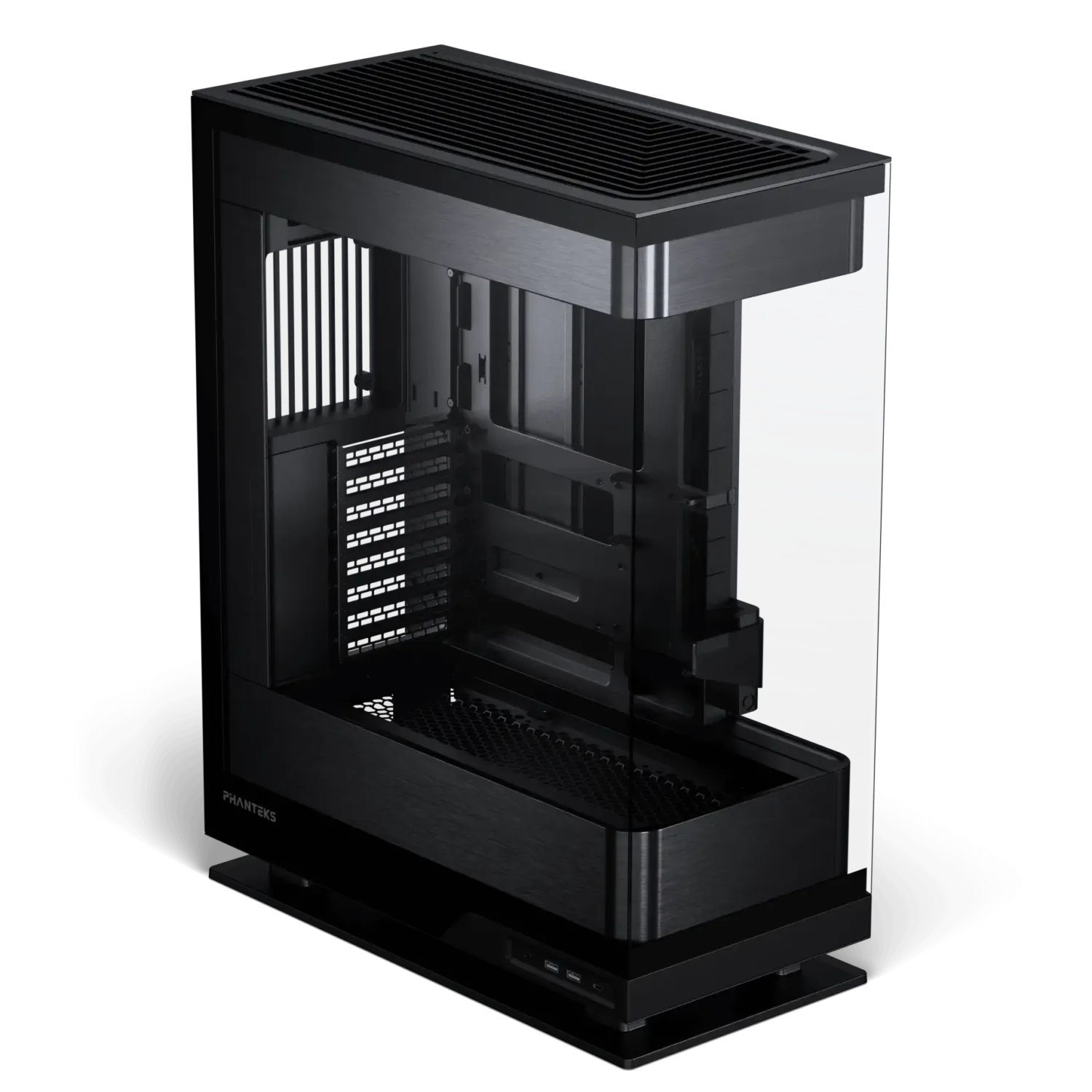
The Evolv X2 redefines the desktop computer with its see-through glass design, aluminum interior, and powerful vertical cooling solution. The entire chassis floats above its base, drawing in surrounding air and channeling it efficiently through the GPU and CPU.
Support 360x120mm on both the top and bottom.

 tawny oxide
bleak holly
tawny oxide
bleak holly
Love these cases
spiral flower
Thank you, ill give it a look, gonna replace my old corsair 8000d with something that fits on my desk.
bleak holly
tawny oxide
Love these cases
They are beautiful. Not the most functional but beautiful.
HAVN 420 HS I think is the best currently.
 primal remnant
i bought a cooler master Q300L V2 and at first i thought the dust filters were great, they just fall off so i just thrw them out
it's a great case, because it's very heavy metal construction with like one panel of tempered glass
no RGB
the only thing i dsilike is there isn't like a full coverage set
which would let me more effectively direct the airflow rather than it just being open
directing airflow is hard
i think if there's black contact paper i might jerry-rig some of that to enable me to cover up the parts i''m not using
 mighty girder
can i put bottom fans on the H5 flow
primal remnant
https://www.amazon.com/gp/product/B08P2CJ18F does anyone know whether this particular fan brrand is a problem? it looks fantastic (ba-dum-tsshj) and seems to blow an absolute buttload of air and that's what i need
even has lovely vibration damping that I typically see as a noctua feature
there are better deals on them, i just linked this one
 wide parrot
primal remnant
https://www.amazon.com/gp/product/B08P2CJ18F does anyone know whether this parti...
wide parrot
primal remnant
https://www.amazon.com/gp/product/B08P2CJ18F does anyone know whether this parti...
Haven't ever heard of the brand. However it will be LOUD compared to most fans we typically reccomend here. Not sure your usecase but if it is for a PC case I'd reccomend a couple thermalright c12c's.
44db vs 26db (db isn't linear either so that's a huge difference)
Also this won't be "air whooshing" sound, it will be motor whine and bearing noise. There's multiple Amazon reviews that mention it
primal remnant
yeah, i knoww about the coil whine
i'll probably buy arctic fans like i have a bunch already
well, two
my CPU cooler seemed loud to start but after using it for a while the whine has pretty much disappeared into the ether
i think the loudest thi ng is my GPU because of the single 120mm fan
but it's an RX 6400 right now so that's expected
i don't have any brand loyalty, i just prefer the fans be the same, so i'll end up buying an extra if those fans change.
the arctic P14 Pro PST has daisy-chaining PWM as a feature
which is excellent for value, because you don't need a hub
similarly, i don't like RGB (my CPU cooler is actually not connected to an ARGB setup)
noise isn't really a concern for me, but it's nice to have less of it
i'm probably gonna get a hyper 212 black to replace my current cooler as it's still the noisest component. probably a bad purchase but whatever
attachment is suffering
wide parrot
primal remnant
i'm probably gonna get a hyper 212 black to replace my current cooler as it's st...
Get a thermalright cooler
Arctic fans are good and if you already have some and want them to mach that's totally fair
But please do not get a hyper 212
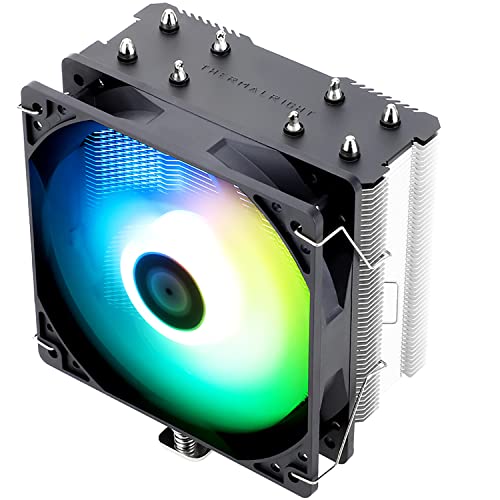
Thermalright Assassin X Refined SE RGB 66.17 CFM CPU Cooler (AX120 Refined SE ARGB)

Thermalright RK120 SE 66.17 CFM CPU Cooler (RK120 SE)

Thermalright Royal Knight 120 80.45 CFM CPU Cooler (Royal Knight 120)
If you want the full black heatsink there's these

Thermalright Assassin Spirit 120 EVO 68.9 CFM CPU Cooler (AS120 EVO)

Thermalright Assassin Spirit 120 EVO DARK 70.4 CFM CPU Cooler (AS120 EVO DARK D6-DE)

Thermalright Assassin Spirit 120 Vision ARGB 66.17 CFM CPU Cooler (AS120 VISION ARGB BLACK)

Thermalright Peerless Assassin 120 SE 66.17 CFM CPU Cooler (PA120SE BLACK)
tawny oxide
primal remnant
https://www.amazon.com/gp/product/B08P2CJ18F does anyone know whether this parti...
These guys are fine, but they’re loud.
I did a deepdive into that brand a while ago due to their cpu coolers
Their entire lineup has a problem with sound
primal remnant
what is wrong with a hyper 212
thermalright's coolers seem to be really big
i've literally used hyper 212s for years and had a fine time
but i am not an overclocker so that might be it
wide parrot
primal remnant
what is wrong with a hyper 212
Costs more than a single tower thermalright and performs worse
primal remnant
https://www.amazon.com/ARCTIC-P14-Max-High-Performance-Controlled/dp/B09VH2HXM1 these look ideal for my 140mm front fans, i'll go for that

ARCTIC, a leading manufacturer of low-noise PC coolers and components, initiated and continues to shape the trend towards quiet cooling systems. In addition to an extensive range of CPU coolers and fans, ARCTIC produces high-quality monitor arms, wall mounts, thermal paste as well as thermal pads...
also, the hyper 212 black is like $16 on amazon right now
wide parrot
I would still get a $18 thermalright over that. I've used both coolers, and the thermalright is better
primal remnant
i see, i see
well, i'll look into these
might replace the fans with some super high static pressure stuff later down the road
single tower is good for me
wide parrot
primal remnant
might replace the fans with some super high static pressure stuff later down the...
The p14s should be fine. You really only need high static pressure for dense radiators in water cooling setups
Or tight server configurations
primal remnant
it also keeps the dust out
if the air is pushing out ikn all directions
due to pressure
wide parrot
You can create positive pressure just by having more intake than exhaust. Don't need particularly high static pressure ratings on the fans
primal remnant
yeah, i just liked the fans because they were powerful and have better rubber mounting stuff
seems like even if they go fast, the rattle is unlikely to be an issue
from vibration
wide parrot
Yeah they won't rattle but the motor and bearings will still be stupid loud
primal remnant
i wish i could just afford noctua fans
wide parrot
primal remnant
i wish i could just afford noctua fans
Eh, not really worth the price these days
primal remnant
the loudness happens when they spin up to max
ideally that doesn't need to happen always
my current CPU cooler has so much whine
the actual air noise doesn't really cause much trouble
wide parrot
primal remnant
the loudness happens when they spin up to max
They'll still be louder at medium speed than arctic or thermalright though. 25 to 44db is a big difference
primal remnant
oh, the ones i just posted were arctic max 14s
i realize there's a similar shape there
wait, apparently the P14 pro is newer and better?
i should go to that then
they also cost less.
lower RPM, similar CFM
wide parrot
Yeah pro looks like better value
primal remnant
i'll kit my case out with P14/P12 fans
top + back as exhaust, front + front-bottom intake
the intake will have two stronger 140mm fans
so it'll provide a bit more intake than exhaust.
i'll get a fan extension cable, the fans daisy chain to each other just fine but the cables aren't long
wide parrot
Your motherboard may have more than 1 header and you could do 2 and 2
primal remnant
yes, it does have two headers
wide parrot
Guess it depends on the size of your case as well
Mines small so the fan cables reach easy
primal remnant
i can daisy chain my bottom fan with my two front fans
then daisy chain the back fan with the two top
ezpz
extension cables will fix any issues and allow me to manage the cables a little bit
i hate having too many cables just hanging about
since it's daisy-chaining the wire right arouind the fans should be fine. if i have to, i can stuff some cable into the back and tape it down or something, if it won't reach around totally
this setup can be pretty legendary with the right stuff
i have old hardware right meow but i'm thinking i'll keep whatever i get for future use too
none of this stuff fails too quickly
long as you're good about removing dust.
oh hey, front takes 120mm also
i'm gonna just use a 5-pack, save some money. hell yeah cheap but good fans. i already have a P12 Pro PST
very little difference between 140mm and 120mm in the end, and equal intake and exhaust is cool
i wish i'd have gotten an ITX system, i really love ITX form factor despite its limits
i had an ITX tower in a fractal define nano
it was brilliant stuff
primal remnant
https://www.amazon.com/Thermalright-SE-TL-C12B-TL-C12015B-Cooling/dp/B0DCNV5NHP also, this item sells me on thermalright

the ingenious use of a half-width fan and a bit less wide second tower means that you can have a push-pull, two tower design and not have RAM clearance issues
it's also cheap
wide parrot
primal remnant
the ingenious use of a half-width fan and a bit less wide second tower means tha...
Yup, it's nice. There's also this for a just a little more if you want the improved asthetics
Thermalright Royal Knight 120 80.45 CFM CPU Cooler (Royal Knight 120)
primal remnant
oh, aesthetics aren't important to me
i just want things to look relatively basic
i hate fancy RGB stuff for example
the aesthetic just doesn't suit me
not saying there's something wrong with wanting that
n ow see
this one looks rather nice
i actually (unintentnionally, it was just more affordable) ended up with a standard green PCB
i also use corsair vengeance LPX on purpose because it fits in that aesthetic.
so i guess i do have an aesthetic, just a very different one from most people
i'd have preferred a black or white motherboard, but $65 is too good to pass up
it's one of the ASUS business boards
 covert swan
sleek tartan
covert swan
sleek tartan
Having some issues. D:
hopefully I just a reboot will suffice.
our Corsair pc looks beautiful and amazing
which is why we chose from Corsair
primal remnant
i remember the days of sharing a PC like 20 years ago
i had a cheap athlon XP system, shared it with my mom. she has used more linux than windjows.
she needs a steam deck for gaming, i think she'd be thrilled with it in place of her laptop
maybe a gift idea
 scenic lance
can anyone recommend a minimalist case + psu + cooler combo for a 9800x3d & 5070ti
preferably no rgb & preferably no aio (had a liquid freezer ii 240mm in the past with issues)
wide parrot
scenic lance
can anyone recommend a minimalist case + psu + cooler combo for a 9800x3d & 5070...
atx, matx, or itx?
scenic lance
wide parrot
atx, matx, or itx?
atx
wide parrot
ok
scenic lance
also just realized i'd prob be better with an aio
had woohooz (active guy in here) helping me out & he linked a pretty good build, just not a fan of the case tbh lol
and sketchy of unknown psu brands
wide parrot
there are dual towers that should be fine for a 9800x3d but I can do an aio too
scenic lance
🫡
this is the current build im considering

already ordered the ram
and everything else is fine, literally just contemplating switching psu, cooler, and case
wide parrot
that aio is good
scenic lance
yeah i'll probably keep it
i currently have a thermalright (not an aio though) and it's served me well so no complaints
wide parrot
Can turn off rgb if you don't want it
scenic lance
yeah
wide parrot
PSU seems good
looks grey? if you want a black one there's this
https://pcpartpicker.com/product/tWMTwP/cooler-master-mwe-gold-850-v2-850-w-80-gold-certified-fully-modular-atx-power-supply-mpe-8501-afaag-us

Cooler Master MWE Gold 850 - V2 850 W 80+ Gold Certified Fully Modular ATX Power Supply (MPE-8501-AFAAG-US)
and lemme grab some atx cases
scenic lance
yeah that's nicer
and yeah i'd prefer darker/black colors
im colorblind anyways so i just dont really get anything out of having an rgb build
wide parrot
most atx cases are gonna have a psu shroud anyways
wide parrot
up to you, idk if one's better but I think they're both pretty good
scenic lance
does the brand not matter as long as it's gold certified?
wide parrot
there's a lot of factors tbh. Certification is the efficiency
https://pcpartpicker.com/product/zJWJ7P/phanteks-xt-pro-atx-mid-tower-case-ph-xt523p1-bk01
https://pcpartpicker.com/product/bvTZxr/nzxt-h5-flow-2024-atx-mid-tower-case-cc-h52fb-01
https://pcpartpicker.com/product/ybNxFT/fractal-design-north-atx-mid-tower-case-fd-c-nor1c-02
https://pcpartpicker.com/product/bCYQzy/corsair-4000d-airflow-atx-mid-tower-case-cc-9011200-ww

Phanteks XT PRO ATX Mid Tower Case (PH-XT523P1-BK01)

NZXT H5 Flow (2024) ATX Mid Tower Case (CC-H52FB-01)

Fractal Design North ATX Mid Tower Case (FD-C-NOR1C-02)
Corsair 4000D Airflow ATX Mid Tower Case (CC-9011200-WW)
scenic lance
currently have a 4000d airflow, no problems with it but grown bored of it
also main one i was considering was the h5 flow
wide parrot
for fans
https://pcpartpicker.com/product/wHpD4D/arctic-p12-pro-pst-77-cfm-120-mm-fans-5-pack-acfan00307a

ARCTIC P12 Pro PST 77 CFM 120 mm Fans 5-Pack (ACFAN00307A)
scenic lance
but i thought that case was causing people's pc's to blow up or something, am i thinking of something else
wide parrot
scenic lance
but i thought that case was causing people's pc's to blow up or something, am i ...
H5 non-flow has terrible airflow
scenic lance
yeah i think i'll go with the h5
scenic lance
wide parrot
for fans
https://pcpartpicker.com/product/wHpD4D/arctic-p12-pro-pst-77-cfm-120-m...
i thought the h5 flow came with fans
bleak holly
wide parrot
PSU seems good
the Montech is a solid A tier psu.
wide parrot
scenic lance
i thought the h5 flow came with fans
just sent those in general because I sent multiple cases that might need fans
scenic lance
bleak holly
the Montech is a solid A tier psu.
i'll pull the trigger on that as well then
primal remnant
wide parrot
for fans
https://pcpartpicker.com/product/wHpD4D/arctic-p12-pro-pst-77-cfm-120-m...
i'm buying a couple of P14 pros, and planning on kitting my case out with the 120s, over my current 120mm (used for exhaust)
they're very nice
i can't hear the one i have right now at all
mighty girder
Heared Montech X5 has a molex and is not good quality standered is that correct
 trim crest
mighty girder
Heared Montech X5 has a molex and is not good quality standered is that correct
trim crest
mighty girder
Heared Montech X5 has a molex and is not good quality standered is that correct
Kind of but not really. They are not pwm or dc speed controllable though so might as well be. It's definitely a budget quality case.
primal remnant
PWM is such a lovely kinda basic tech that does so much
primal remnant
kinda seems like when i get a K-series CPU i'm going to need the thermalright royal knight (not going to buy the nicer looking one for $5 more, it shouldn't make a difference)
primal remnant
i found t he arctic MX-6 i bought
applied t in place of MX-4
got like 20 degrees less temps in all areas
lm,ao
the thicker texture implies more thermally conductive material
it's so thick it's actually a bit challenging to apply
wide parrot
If you got a 20 degree difference either your mx4 was totally expired/faulty or your mx6 is absolutely insane
primal remnant
wide parrot
If you got a 20 degree difference either your mx4 was totally expired/faulty or ...
i think the MX-4 didn't settle right
i was afraid of applying too much
i used a blob method before but this time i just used like a thin X
seemed to work a lot better
trim crest
The center dot doesn't work well on lga1700. X worked well for me. Vertical line should work well too, or good old buttered toast. Mx4 also deteriorated after about a year for me, which was weird, I've never had to change out mx4 before. Added a contact frame and mx6 and dropped 9-10C.
The mx4 I put on a 6700k new with a 212 was still doing fine when I retired it a few months ago.
primal remnant
i have LGA1200 at this point, i'm well behind the curve
 thick viper
primal remnant
i have LGA1200 at this point, i'm well behind the curve
thick viper
primal remnant
i have LGA1200 at this point, i'm well behind the curve
i thought you said lga 1700 and i was confused how that was very behind the curve lol
primal remnant
thick viper
i thought you said lga 1700 and i was confused how that was very behind the curv...
the thing is, my i5-11400 is still just fine for playing games, so i'm not sure it's important right away to get something nicer
thick viper
primal remnant
the thing is, my i5-11400 is still just fine for playing games, so i'm not sure ...
nope i think you’ll be fine
primal remnant
and while i plan on streaming, i don't think that's a huge CPU cost because nvenc is a thing
wide parrot
Ok, I want opinions on airflow/case fan setup. I originally made this beautiful mspaint image but then realized a photo might be better so that the scale is correct. Case side panel is mesh.
I have a different ram kit I want to use... but it's too tall and I can't raise the cpu cooler fan bc it will hit the side panel. I've thought about flipping the direction of the cpu airflow, but I think the fan on the cooler would likely be too close to the fan on the left. Maybe just remove that fan? Not sure though.


Realistically the ram is only marginally better so I could also just leave it be.
trim crest
wide parrot
Ok, I want opinions on airflow/case fan setup. I originally made this beautiful ...
Is this a lian li a3? The way you have it should be fine. I'd probably go top and rear exhaust with bottom intakes. A good general rule is positive pressure, more intake than exhaust. Filtered intakes. Try not to use top as intake. That's to help minimize dust buildup.
It would be weird for a single tower to overhang and not have full ram compatibility. Is it asymmetrical and on backwards? You could also just ditch the rear fan or move it and put the cooler fan on the left as a pull. That will make it a little less efficient than push since the pressure will be worse but it's minimal.
wide parrot
trim crest
Is this a lian li a3? The way you have it should be fine. I'd probably go top an...
it's a Sama im01. Motherboard is itx which is why the ram is so close to the cooler
 mossy abyss
yo, any good recommendations for a good case? white, glass on 2 sides, maybe a pretty unique design, and an atx mid tower case, any good examples?
$150 ish price max btw
mossy abyss
mid tower can hold 10 fans right? unlike those
im looking for a bigger case rn
bigger and better
i was think about the view 380 then its price increased so im reconsidering that
mossy abyss
tawny oxide
Montech XR?
i have a montech air 100 rn and sorta hate it
tawny oxide

Thermaltake View 380 XL TG ARGB ATX Mid Tower Case (CA-11E-00M6WN-00)
trim crest
Mid tower and full tower don't have any real set definition.
mossy abyss
tawny oxide
https://pcpartpicker.com/product/2JnXsY/thermaltake-view-380-xl-tg-argb-atx-mid-...
is spending that much more for the xl really worth it tho?
trim crest
If you want a relatively good deal then the 380 or 380 xl, the antec c5, v100r, hs02 are worth looking at. Maybe the y40 if you like the vertical mount.
I also like the o11 mini v2 or the flow if you're not doing argb.
mossy abyss
trim crest
I also like the o11 mini v2 or the flow if you're not doing argb.
u mean like the h7 flow?
also im swapping in new fans no matter what, they come on the 14th
mossy abyss
trim crest
If you want a relatively good deal then the 380 or 380 xl, the antec c5, v100r, ...
big fan of the v100r or hs02 tho tbh
trim crest
mossy abyss
u mean like the h7 flow?
The flow version of the 011mini V2 comes with a set of plain fans.
I also forgot about the antec c3. The v100r white tends to be sold out and that's pretty close.
mossy abyss
trim crest
The flow version of the 011mini V2 comes with a set of plain fans.
I also forgo...
eh, any that i can fit 3 fans on the bottom? my plan is to put 10 fans in, including aio fans
sorry i know this is like a lot of specifications i am looking for but at the same time im focusing heavily on looks rn instead of performance
trim crest
You'd probably want to look at dual chamber models then.
mossy abyss
trim crest
You'd probably want to look at dual chamber models then.
yeah, i couldnt remember the word for it
trim crest
H9 flow, o11d, 6500x. You said you had a air 100 right? If you are keeping the matx board maybe the 2500x. I think phanteks has one like that too, can't remember the name.
mossy abyss
trim crest
H9 flow, o11d, 6500x. You said you had a air 100 right? If you are keeping the m...
yeah air 100
and i plan to swap out of the matx after a few month of keeping this mobo
hold up ill send the build plan, ignore the case i have on it rn
@trim crest https://pcpartpicker.com/list/bwqJjn
Part List - AMD Ryzen 5 7600X, Radeon RX 9070 XT, Thermaltake View 380 ARGB ATX Mid Tower
i think im tied between antec c5 and nzxt flow h9
i do sorta like the unique fan angle, ergonomics, and size of the h9
not really a big fan of the pricing but i suppose its worth it
tawny oxide
Could go with my case
A Coolermaster Stacker 830
Need all those fans to do some proper airflow
 leaden bluff
tame grove
leaden bluff
tame grove
The airflow on the 217 is nuts.

 tame grove
leaden bluff
is this good? https://www.newegg.com/rosewill-atx-3-0-compatible-atx-3-1-compati...
tame grove
leaden bluff
is this good? https://www.newegg.com/rosewill-atx-3-0-compatible-atx-3-1-compati...
I would go with the montech century at that price or the MSI A850GS, or the ASROCK PG Line
 subtle lodge

igor´sLAB
The new ARCTIC MX-7 is a consistent further development of a paste series that has been shaping the market for many years in a rather inconspicuous but technically relevant segment.
 tulip granite

I got a PSU OVP 3V Alert. Is this anything to be concerned about? 4090 + 7800x3d
this is under a short furmark run
 elfin trout
tulip granite
I got a PSU OVP 3V Alert. Is this anything to be concerned about? 4090 + 7800x3d
elfin trout
tulip granite
I got a PSU OVP 3V Alert. Is this anything to be concerned about? 4090 + 7800x3d
Got anything that might use 3.3v? Sata devices maybe?
Most PSUs skimp on 3.3v protections nowadays since nothing really uses it
tulip granite
elfin trout
Got anything that might use 3.3v? Sata devices maybe?
The only thing I have connected to sata is a fan hub
3fans I think
elfin trout
generally you're going to be fine
Fans use 12v from SATA power, argb 5v
If you have nothing that uses 3.3v, shouldn't matter if voltage goes a bit over
elfin trout
It can use 3.3 but generally only 12v now
tulip granite
elfin trout
It can use 3.3 but generally only 12v now
it reads 3.3V on the motherboard sensor in hwinfo but 3.7 on the psu
maybe a faulty sensor?
bleak holly

Alright, let's put an end to this heated discussion once and for all! 🔥😤 The question plaguing the minds of PC enthusiasts is finally getting answered: Which thermal interface material distributes most effectively? I've taken on the laborious task of putting various contenders to the test in a head-to-head comparison, saving you the time a...
tawny oxide
Okay
So
Wife wants an entire liquid cooling system
What do I need, what should I look for, and what do I need to find out
Part List - AMD Ryzen 5 3600, Thermaltake View 270 Plus TG ARGB ATX Mid Tower
Her pc
wide parrot
You buy a thermalright cooler and then firmly, yet politely, tell her that the rest of the budget will be going to a gpu upgrade and not a full loop
elfin trout
tawny oxide
What do I need, what should I look for, and what do I need to find out
Easiest would be a cheap soft tube kit like this bykski kit, old but still decent, ofc still a lot more expensive than good old aio
https://www.formulamod.net/en-fr/products/bykski-b-hsrbw-ed-water-cooling-kit-soft-tube-kit-pump-radiator-reservoir-program-kits-for-intel-amd-computer-cooling-system

FormulaMod
For GPU block, Please contact for your GPU model before Order ! Purchase Notes: 1. All program kits do not come with coolant. 2. The program kit, which only include the products in the corresponding program kit list. The products such as case, RAM blocks, motherboard etc. outside the list, only for reference and displa
tawny oxide
elfin trout
Easiest would be a cheap soft tube kit like this bykski kit, old but still decen...
That’s expensive
Sigh
trim crest
If $150 is expensive then you're really not going to like custom water cooling.
I also agree with steviejoe. There is no point spending money on watercooling old midrange parts. If something is overheating a good new cpu air cooler is $20-40 and repasting a gpu is like $5-20 assuming you have screwdrivers already, the higher end if the memory temps suck and you need to replace pads too.
bleak holly
tawny oxide
That’s expensive
Sigh
That is incredibly cheap for a full water loop. A cheap but decent CPU loop typically costs north of $300.
We strongly recommend you not go custom or if the wife is very insistent, grab one of Alphacool's Modable AIOs such as the Eisbaer and slowly add rads and or change the tubes on that.
elfin trout
bykskii kit is going to be as cheap as you can get it without going used tbh, if that price is too high, probably shouldn't bother with it
 sharp lintel
is a 750w going to be enough for a 9070xt and a 7800x3d
im not going to do any manual oc
subtle lodge
trim crest
If $150 is expensive then you're really not going to like custom water cooling. ...

subtle lodge
mild roost
a 7800x3d only needs 88w of power
And in games it uses like half of that the majority of the time
 gusty arrow
bleak holly
gusty arrow
Which one is better?
https://www.bestbuy.com/product/corsair-rme-series-rm850e-8...
gusty arrow
bleak holly
gusty arrow
Which one is better?
https://www.bestbuy.com/product/corsair-rme-series-rm850e-8...
RM850X is slightly better, but get whichever is cheaper.
gusty arrow
bleak holly
RM850X is slightly better, but get whichever is cheaper.
how so?
bleak holly
gusty arrow
how so?
Handles power spikes a little better if memory serves me right.
trim crest
Better fan and longer warranty too.
gusty arrow
bleak holly
Handles power spikes a little better if memory serves me right.
how much psu watts do i need for this pc?
https://www.bestbuy.com/product/cyberpowerpc-gaming-desktop-amd-ryzen-7-9800x3d-nvidia-geforce-rtx-5070-ti-16gb-32gb-ddr5-2tb-pcie-4-0-ssd-black/J3L7GQWGGS
Shop CyberPowerPC Gaming Desktop AMD Ryzen 7 9800X3D NVIDIA GeForce RTX 5070 Ti 16GB 32GB DDR5 2TB PCIe 4.0 SSD Black products at Best Buy. Find low everyday prices and buy online for delivery or in-store pick-up. Price Match Guarantee.
bleak holly
Though as mentioned, the difference between the two is small so just get whichever is cheaper.
bleak holly
gusty arrow
how much psu watts do i need for this pc?
https://www.bestbuy.com/product/cyberp...
850 is fine for this.
gusty arrow
bleak holly
850 is fine for this.
i also plan to add a 2tb hdd
does that change the watts req?
bleak holly
No.
trim crest
If you're going to replace it I'd see what it comes with first.
bleak holly
Well yes, but a tiny difference.
trim crest
They're usually junky but not always.
gusty arrow
trim crest
If you're going to replace it I'd see what it comes with first.
it comes with a apevia psu and 2tb ssd
check the reviews
trim crest
Apevia yeah I'd replace that.
gusty arrow
its good for the most part even the mobo is good besides the psu
gusty arrow
trim crest
Apevia yeah I'd replace that.
to be fair i am on a cyberpowerpc rn and its been running for 6 years but idk the psu but i wanna upgrade for my fight simulatort
 shut moon
Any Phantek case fan applications to change fan rpms without having to use bios
shut moon
Perfect thank you
thick viper
the two front fans, should they exhaust or input air? (they’re right in front of the gpu)
 trim crest
I'd have them blowing at the gpu. What case is that?
thick viper
trim crest
I'd have them blowing at the gpu. What case is that?
fractal north
yeah theyre blowing at the gpu right now, wasn't sure if it was maybe efficient to try and suck air out
trim crest
Pulling air out they'd be fighting for the same air the gpu is trying to blow upwards through itself.
bleak holly
thick viper
the two front fans, should they exhaust or input air? (they’re right in front of...
Keep it as intake.
On a different topic.
I want to use dual GPUs for frame generation (my board supports the PCIE needed) but my PSU does not have enough 8pin connectors for both.
My 3070 has two 8pin connectors. Can I just use a singular 8pin or should I buy a 8pin to dual 6+2pin cable?
Both solutions will deliver the necessary power my 3070 wants.
Without power override, the 3070 draws 225 watts.
trim crest
bleak holly
On a different topic.
I want to use dual GPUs for frame generation (my board su...
Do you mean a pigtailed cable? Should be fine. If you mean just plugging a single 8 pin in when it needs two then that won't work, good chance it won't even post like that.
bleak holly
trim crest
Do you mean a pigtailed cable? Should be fine. If you mean just plugging a singl...
Option 1. Use a singular 8pin to 8pin for the GPU.
Option 2. Use a 8pin to dual 6+2pin for the GPU.
The GPU has two 8PIN connectors but does not use more than then what a single 8pin+PCIE slot can provide.
trim crest
bleak holly
Option 1. Use a singular 8pin to 8pin for the GPU.
Option 2. Use a 8pin to dua...
It'll have sense pins and be able to tell there is a cable missing though. You can try but it should either give you a warning about it or just not post/turn on properly.
bleak holly
trim crest
It'll have sense pins and be able to tell there is a cable missing though. You c...
wouldn't option 2 solve this?
trim crest
A thing like that should work yeah. You'd also want to look at the label on the psu and see if it's multi rail and check the total amperage available at +12V before getting one of those.
 bleak holly
trim crest
A thing like that should work yeah. You'd also want to look at the label on the ...
bleak holly
trim crest
A thing like that should work yeah. You'd also want to look at the label on the ...
I found one like this.
It's a Corsair SF1000. I will try checking the PSU tier list for info on it later.
trim crest
Are you missing some of the original cables? You could also just contact corsair about it. I've heard multiple people have new cables sent to them for free.
1000W and that would be single rail is more than enough for a 3070 btw.
Or was that using the 3070 as an accelerator and you have a different main gpu that takes 3x8 pin? Should still be alright though.
bleak holly
trim crest
Or was that using the 3070 as an accelerator and you have a different main gpu t...
I am gonna use a 9070xt that takes 3x8pin as the primary gpu and I want to use the 3070 for both Frame Generation and 3D software like Blender.
bleak holly
trim crest
Or was that using the 3070 as an accelerator and you have a different main gpu t...
Do you think Option 2 will work then?
.
the cable I was looking at

SAAWEE Cable de alimentación PCI Express de 8 pines a doble 6+2 pines GPU PCIe de 8 pines 1 a 2 divisor para Corsair HX1050 HX850 HX750 HX650 Modular
trim crest
bleak holly
the cable I was looking at
Seems expensive. Brand and stuff does matter if it's going to plug straight into the power supply. That one isn't clear to me but it looks like it would be a corsair 'type 4' and five copies of the same cable? I didn't do well in Spanish. The sfx model you have uses 'type 5' cables which have a smaller plug for the end that goes into the power supply.
If you get a simple adapter that plugs into the psu's cable like an extension that doesn't matter, it would be universal but I would try to find one that's explicitly 18AWG or, preferably, 16AWG though.

It doesn't say type 4 but it looks like it would plug straight into a power supply and the HX models it lists would be type 4. Maybe just a licensing thing because it's off brand so it can't be explicit about it? Type 5 would be for the sf series like you have or the rmx shift.
bleak holly
trim crest
Seems expensive. Brand and stuff does matter if it's going to plug straight into...
Thank you for pointing this out to me.
So look for a 18/16 AWG extension/adapter or a type 5 cable if plugging in directly
trim crest
Yep.
bleak holly
trim crest
Yep.
Would using two 6pin to 8pin adapters work as well?
trim crest
Most of the time going from 6 pin to 8 pin doesn't really change anything, you're just adding an extra ground and a sense pin. They both use 3 hot wires. I'm not sure how you're getting two 6 pins to work from though.
bleak holly
Amazon has very limited options so far
Having a hard time finding 8 pin female to dual 6+2pin male
Maybe I need to get a 8pin female to 8pin female to adapt to the 8pin male to dual 6+2pin male?
trim crest
I was looking through the type 5 cable sets on corsair and I think they might not even make one that goes into a pig tail. Maybe because of the smaller plug they don't want people putting up to 300W through it?
You could also get a 12vhpwr to 2x 6+2 pin. I don't know if corsair makes them but msi does, the a1000g comes with one. The 12vhpwr is universal, it's the same on both ends so that kind of cable could work with any power supply.
bleak holly
Is 18 or 16awg better?
trim crest
I'd try messagin their support and asking.
With AWG lower number = thicker wire and that means lower resistance and better.
bleak holly
Gotcha
trim crest
18 is standard for psu cables except 12vhwpr where 16 is standard.
bleak holly
Gotcha
How bad of a idea is it to basically daisy chain 12VHPWR? Or is it a non issue since 30 series has load balancing?
I found 12VHPWR female to dual 6+2pin male
trim crest
It's definitely 6+2s and not solid 8 pins? There are a lot of them where the two 8 pins plug into the psu to adapt older power supplies to work with new nvidia gpus and they'd look very similar.
That was how corsair did all of their first gen atx 3 stuff.
bleak holly
 trim crest
Yeah that should work.
bleak holly
I am desperate to get high FPS and not lose performance in blender lmao.
Thank you @trim crest for helping me out. PSUs are not my forte.
Oh wait issue
The Corsair SF1000 does not have 12VHPWR native. It uses a adapter for it.
trim crest
Oh you have an older one not the atx 3.1 version?
bleak holly
Oh lmao this is interesting, it's included 12VHPWR is 2x6 pin to 12VHPWR
So the plan will still work.
trim crest
Aren't you using the slots to plug in the 8 pins for the 9070xt though?
bleak holly
trim crest
Aren't you using the slots to plug in the 8 pins for the 9070xt though?
3/4 of the 8Pins slots will be used for the 9070xt.
2/4 of the 6 pins slots will be used for a fan hub and SSD.
The SF1000's solution for 12VHPWR is a adapter using dual 6pin male to single 12VHPWR male.
 trim crest
It uses 6 pins on the end? Like it plugs into the same spot as the sata or molex cables instead of 8 pin like gpu or cpu cables?
trim crest
That doesn't sound right to me. Sata and molex have 3.3 and 5v pins to go with a 12v pin. Cpu and gpu are all 12v or ground.
trim crest
12v 2x6?
bleak holly
Wait now I am more comfused
trim crest
They changed the name of 12vhpwr to that when they did atx 3.1 even though the cable doesn't actually change.
pcie 5, pcie 5.1, 12vhpwr, 12v 2x6, 12+4 are all different names for the new nvidia plug.
bleak holly
Well isn't that confusing for the consumer.
Anyways it seems it is 8pin based on Google searches
trim crest
You already have the power supply?
bleak holly
Not yet.
I am buying the GPU and PSU in about a week or so once money arrives
I guess here's what I can do.
When I am home I will try and see if my RTX 3070 will post with a single 6+2pin.
So I found 8pin female to dual 6+2pin male adapters
trim crest
Looks like it has 6 8 pin plugs, so 3 for 9070xt, 1 or 2 for motherboard?, then you could get a 8 pin pcie splitter or another cable depending. Or just get a 5070ti lol.
bleak holly
trim crest
Looks like it has 6 8 pin plugs, so 3 for 9070xt, 1 or 2 for motherboard?, then ...
My board takes two 8 pins.
I am thinking of the splitter route
Found this 8pin F to 2x6+2pin M made in 18awg.
https://www.amazon.com.mx/FFHDJL-alimentación-tarjeta-gráfica-máquina/dp/B0DKCR1QQ6/ref=mp_s_a_1_2_sspa?

FFHDJL - Cable de alimentación hembra de 8 pines a macho, doble 8 pines 6+2 pines, tarjeta de video gráfica GPU, cable de alimentación para máquina minera
The SF1000 to my understanding is 16awg, is there any risk in extending a 16awg with a 18awg cable?
trim crest
Not really. It just changes the max amps. Even at 18awg putting all 300W across 3 hot wires like would happen with a normal pig tailed cable is fine. It's at the limit of what you should do. That adapter is using separate wires for each plug so it's not as bad as that, at least on the downstream end where the adapter meets the gpu. More thin wires can be as good or better than fewer thick wires.
Higher resistance and same amps/current means more heat and more voltage loss. Like those people with the melting 5090 cables, the 16awg wires are rated for about 10Amps per, the wires rarely have trouble even at 20+Amps but when it's so imbalanced like that because of crap contact in the plug the plug ends up melting before the wire gets hot enough to melt the sheathing.
bleak holly
Gotcha.
Splitter will be fine then
I found 8pin F to dual 6+2 M cables which I will plug into the PSU's 8pin M to 8pin M.
It's cheap and fast delivery as well.
bleak holly
For now this will work, next is to figure out how I transplant the 9070xt and the RTX 3070 into the SSUPD meshroom when I get that case, I think I can squeeze it in if I remove the front panel between the frame and extender bracket.
 tepid rain
Can someone recommend me specific psu for my 3060 ti and ryzen 5 5600 build?
mighty girder
Fractal Design Support
This article is to highlight the differences between the Meshify 3 RGB and Meshify 3 Ambience Pro models. The compatibility and frame of the two case models are overall the same, but there are a few key differences between the features each m...
whar's the diffrence
spare spear
are the Asrock pro-g power supplies any good?
 lusty dagger
Hello, I have an NZXT H6 Flow and I was wondering how many case fans im supposed to run for a i9-14900kf paired with rtx 5070ti, 32gb ddr5 ram and 2tb ssd
So far im currently theres 7 fans
3 for radiator
4 case fans
3 in the front
1 in the back
trim crest
lusty dagger
So far im currently theres 7 fans
That would be pretty standard. You could add the bottom intakes if you want and it could lower gpu temps a bit, should be fine like you have it though.
 grizzled sinew
Do I go for regular to slim fans?
Regular fans work now but if I want to upgrade to a bigger card in the future I have to use slim fans
 woven thunder
so i have a 280X case, and the drive bay rubber anti vibration grommets have failed to hold in the hdds. now the drive's spins are loud as heck as it vibes across the case with regular screws. what kind of rubber washer/stop can i put to dampen the noise?
woven thunder
grizzled sinew
Do I go for regular to slim fans?
supposedly slim fans push less air in than thick fans. some are able to try and be fast to make up for it, but slim are generally limited to a partial loss of what regular fans could do. if it is necessary for tight spaces, then you may go for it, though sometimes the difference in temps maybe minimal.
tawny oxide
woven thunder
so i have a 280X case, and the drive bay rubber anti vibration grommets have fai...
Get more grommets
woven thunder
So it doesn't matter what kind? All will work as well so long as its the correct fit?
grizzled sinew
woven thunder
supposedly slim fans push less air in than thick fans. some are able to try and ...
Ok that makes sense, also should I consider deshrouding a gpu so it fits
tawny oxide
grizzled sinew
Ok that makes sense, also should I consider deshrouding a gpu so it fits
Ask @tulip depot
tawny oxide
woven thunder
So it doesn't matter what kind? All will work as well so long as its the correct...
Should in theory
 neon badger
Rm 850e???
tawny oxide
Good PSU
 tulip depot
tawny oxide
Ask <@981674102215569408>
tulip depot
tawny oxide
Ask <@981674102215569408>
Huh? Wrong ping
tawny oxide
tulip depot
Huh? Wrong ping
My b
tulip depot
tawny oxide
My b
Man I’m not even allowed to repaste my cpu you think my dad would let me do anything 😭
subtle lodge
This cooler is goated

Tom's Hardware
Despite its small profile, the 67mm (2.64 inches) tall Big Shuriken 4 provides adequate cooling performance.
woven thunder
tawny oxide
Should in theory
It didn't work...
or am i dumb an this noise is something else even though i hear it from the HDD
the hdd disk revs bein loud
wide parrot
woven thunder
or am i dumb an this noise is something else even though i hear it from the HDD
Could be fans ramping up quickly, that sometimes makes a weird noise in my experience
woven thunder
thing is, i disconnected all the fans to verify it coming from this monster 8tb WD black hdd i got years ago
bleak holly
Well I think I know why my temps have been a few degrees celsius higher these last couple months.

 bleak holly
Significant improvement.


The first picture I was about 2/3rd of the way done.
Used a toothbrush and beard brush.
 obtuse vessel
Does anyone know a good, small case for a small form factor build? Something that could only fit a mini itx motherboard
trim crest
obtuse vessel
Does anyone know a good, small case for a small form factor build? Something tha...
Is there some specific size requirement you're trying to accommodate for?
obtuse vessel
trim crest
Is there some specific size requirement you're trying to accommodate for?
Small as possible that can fit a gtx 970 red msi GPU and all the other computer components
trim crest
obtuse vessel
Small as possible that can fit a gtx 970 red msi GPU and all the other computer ...
So you're just doing a recase? You've already got an itx board and psu and stuff? And what cpu cooler?
obtuse vessel
trim crest
So you're just doing a recase? You've already got an itx board and psu and stuff...
Well, I've been collecting a bunch of pc parts that I've gotten for free for various reasons, and I'm throwing them together to make a tiny Linux pc to do stuff with. I don't have the psu, case, or case fan
So if I can find a case, I probably can figure out the psu and fan
trim crest
The case would be good to figure out before a psu, yeah. There are ones that require an sfx psu, some can take an sfx-l psu which is a bit longer, and some can take a normal atx psu. I'm assuming you want something relatively affordable?
obtuse vessel
Smaller = better in my case, but also consider price. I don't wanna pay a ridiculous amount for a case
trim crest
https://pcpartpicker.com/list/bRMHv4 Here's a few to look at. The jonsbo models and the lian li a3 are bigger and can fit up to matx motherboard and an atx psu. Sfx psus can be rather expensive too, almost never see anything decent under $100.
Part List - Lian Li A3-mATX MicroATX Mini Tower
woven thunder
woven thunder
thing is, i disconnected all the fans to verify it coming from this monster 8tb ...
Big scrathing noise was from a 3rd party tiny 1 inch m.2 cooling fan. I took it out of the m.2 heat sink. I freaking swapped cooling from aio to air for nothing!
 tight sand
what’s a nice case with fans that fits a atx mid mobo
trim crest
tight sand
what’s a nice case with fans that fits a atx mid mobo
Not sure what you mean my mid mobo. Atx mid'tower' that fits a standard atx board but isn't huge like a full tower case?
Corsair 4000d frame rs, antec flux series, lian li 216, 217, v100r, o11 mini v2 flow, montech 903 on the cheaper end.
tight sand
trim crest
Not sure what you mean my mid mobo. Atx mid'tower' that fits a standard atx boar...
well i have a b650 e - e wifi is that gros
trim crest
That's a normal atx sized board.
tight sand
oh so what type cases would fit it
wide parrot
tight sand
anything with fans
https://pcpartpicker.com/product/nBFCmG/phanteks-eclipse-g370a-atx-mid-tower-case-ph-ec370a_dbk01
https://pcpartpicker.com/product/xtsMnQ/diypc-argb-n5-bk-atx-mid-tower-case-argb-n5-bk
https://pcpartpicker.com/product/3JQKHx/phanteks-xt-view-atx-mid-tower-case-ph-xt523v1-dbk01
https://pcpartpicker.com/product/BXtLrH/phanteks-xt-pro-ultra-atx-mid-tower-case-ph-xt523p1-dbk01
https://pcpartpicker.com/product/gBzp99/lian-li-v100r-atx-mid-tower-case-v100rx
https://pcpartpicker.com/product/Mjy8TW/corsair-frame-4000d-rs-argb-atx-mid-tower-case-cc-9011296-ww

Phanteks Eclipse G370A ATX Mid Tower Case (PH-EC370A_DBK01)

BitFenix Nova Mesh SE ATX Mid Tower Case (BFC-NSE-300-WWGKW-4A)

DIYPC ARGB-N5 ATX Mid Tower Case (ARGB-N5-BK)

Phanteks XT View ATX Mid Tower Case (PH-XT523V1-DBK01)

Phanteks XT PRO ULTRA ATX Mid Tower Case (PH-XT523P1-DBK01)
 mortal falcon
is there any cooling/ airflow differences between the o11 vision compact and the o11 mini?
 half crag
I just put an arctic freeze iii pro, a tuf 5090, and a 9800X3D in a Lian Li A3-mATX.

After 3 hours of gaming it hasn't overheated.
 tame cape
never thought I'd hit the limits of my psu with a motherboard upgrade
apparently the 1080ti peaks at 350w+ and the 450w psu doesn't really like it
wide parrot
...mobo shouldn't be affecting gpu draw?
tawny oxide
wide parrot
...mobo shouldn't be affecting gpu draw?
Pcie lane
tame cape
wide parrot
...mobo shouldn't be affecting gpu draw?
I assume its because of the more i/o and few other factors
the real problem is the psu 12v dropping all the way down to 11.4v under load
 pallid isle
The air bubbles in my Mystique have gotten worse as it has gotten cold, it's sounding rough much more often. At this point should I start looking at a Thermalright AIO, or just air cooler?
It's not cooling badly, it's actually still cooling well if anything, but I don't need it failing on me
tawny oxide
Air cooling supremacy
tawny oxide
Pretty sure they released one last year, solid reviews
trim crest
In typical fashion for that brand they have a bunch of models competing with themselves. Frozen warframe, vision, and a fancier one with a big screen like the tryx.
 north mauve
Are Asrock PSUs good? I'm a little skeptical of the low price point but they seem to get really good reviews.
right now I'm looking at the ASRock Steel Legend SL-1200G 80 PLUS GOLD
trim crest
north mauve
right now I'm looking at the ASRock Steel Legend SL-1200G 80 PLUS GOLD
It's okay. Do you need 1200w? Leaving options open for a 4090/5090 or similarly high power draw future card?
north mauve
trim crest
It's okay. Do you need 1200w? Leaving options open for a 4090/5090 or similarly ...
I probably only need 1000 but I'd rather make sure
This thing is probaly going to end up with 5 drives and a Radeon RX 6800 XT
trim crest
Cybenetics publishes good reviews and have covered that model.
north mauve
Thanks!
tulip depot
north mauve
Are Asrock PSUs good? I'm a little skeptical of the low price point but they see...

Google Docs
if they are cheap then yeah go for it
if you want that 1000+ range, id say a SAMA G1000 rn is your best value

SAMA G1000 1000 W 80+ Gold Certified Fully Modular ATX Power Supply (G1000-BKGFF001-US)
A- rating on the tier list, would be great for basically any gpu except a high end 5090
north mauve
Thanks!!
north mauve
Offhand, does anyone know a half-tower case that could fit ~6 HDDs and a 310-mm GPU? I've been looking at PCPartPicker but I'm finding things that seem to have exact 310mm clearance left over, and I don't want to take a chance on that - if there are other good tools to find out, please let me know.
tawny oxide
north mauve
Offhand, does anyone know a half-tower case that could fit ~6 HDDs *and* a 310-m...
Buildcore is a good resource.

BuildCores
3D PC Builder and Part Picker. Find compatible parts for the lowest prices and see how your build looks before you buy.
tawny oxide
tawny oxide
https://www.buildcores.com/
north mauve
Thanks!!
tame cape
happy to see they added more 3d models
 lavish hull
thoughts on the super flower leadex VII 1000 w platinum on a 5070 ti?
trim crest
lavish hull
thoughts on the super flower leadex VII 1000 w platinum on a 5070 ti?
Super flower's higher end stuff are excellent power supplies. If hearing the fan ramp up and down will bother you then I'd get something else though. You didn't say if you meant the xg, xp or pro but they all share the problem of a crappy over aggressive fan curve. You'd also likely be more than fine with an 850W depending on cpu.
lavish hull
i wanted to get the 850W but it went out of stock so i just settled for the 1000W and the added bonus of future proofing
lavish hull
trim crest
Super flower's higher end stuff are excellent power supplies. If hearing the fan...
the pro
bleak holly
I am debating downsizing to a Lian Li Dan A3 Wood with a positive pressure setup to run a 360 AIO on the top, 3x120mm fans on the side to cool the RAM/VRMs and feed the AIO and a GPU with 3x120mm slim fans on the bottom as intake.
lavish hull
Whats the difference between the peerless assassin variants 1 2 and 3?
tawny oxide
lavish hull
Whats the difference between the peerless assassin variants 1 2 and 3?
Newer versions
3 is the best imo
bleak holly
bleak holly
I am debating downsizing to a Lian Li Dan A3 Wood with a positive pressure setup...
Any ideas on if the Lian Li Dan A3 is a hot box?
What I'd most likely do is have 3x120x15mm fans on the bottom as intake, 3x120x25mm fans on the side as intake, and a AIO on the top in push/pull as exhaust with the rear fan set as intake.
lavish hull
best fan configuration for fractal north? i have the 2 stock 140mm, 5 arctic p12 pro case fans, and using thermalright peerless assassin 120 SE V2
 viscid patrol
lavish hull
best fan configuration for fractal north? i have the 2 stock 140mm, 5 arctic p12...
viscid patrol
lavish hull
best fan configuration for fractal north? i have the 2 stock 140mm, 5 arctic p12...
Front is always intake, top is ideally exhaust, rear should generally be always exhaust
PSU should intake from bottom if PC is not placed on carpet, and intake from case if placed on carpet
Don't put your case on carpet in any instance anyways because the PC gets way more dusty
Ideally have it on a stand next to the desk (or even mounted on the desk, like some standing desks)
wide parrot
With an air cooler top shouldn't necessarily be exhaust
trim crest
Some people like extra positive pressure. I like top as exhaust because it keeps the dust off.
viscid patrol
wide parrot
With an air cooler top shouldn't necessarily be exhaust
Multiple reasons for top exhaust and a few for intake
Top exhaust pros is that convection naturally also wants to make heat rise, also the GPU blows hot air up, and like covante said, it keeps dust off
Top intake pros is that it's extra case pressure, especially on cases with solid front panels
wide parrot
Yeah just don't want to "steal" air from the cpu cooler
viscid patrol
fair bit of setups (using AIO) may have the rad on the top of the case which also should be exhaust
trim crest
I agree with not 'stealing air from the cpu cooler'. I had the green one when I first built my pc but removing it dropped a couple degrees off the cpu in stress tests. The other top one actually helps for me. It's a 140 set to really low rpm, there was noticeable heat building up there without it.
 viscid patrol
trim crest
I agree with not 'stealing air from the cpu cooler'. I had the green one when I ...
viscid patrol
trim crest
I agree with not 'stealing air from the cpu cooler'. I had the green one when I ...
Similar setup to mine NGL
I just have a rear top exhaust but front top is just passive
lavish hull
trim crest
I agree with not 'stealing air from the cpu cooler'. I had the green one when I ...
what case?
trim crest
lavish hull
what case?
The original version of 4000d air.
bleak holly
I am having a hard time deciding if I should get the SF850 from Corsair or the V850 Gold SFX from Cooler Master.
It's a $10 difference and the V850 has more IO technically due to splitters but the SF850 is a higher tier.
tawny oxide
bleak holly
I am having a hard time deciding if I should get the SF850 from Corsair or the V...
Check refurbished Corsair psus first
bleak holly
tawny oxide
Check refurbished Corsair psus first
On the Corsair site itself or? The one I am looking at is a Refurbished - Excellent on Amazon.
tawny oxide
bleak holly
On the Corsair site itself or? The one I am looking at is a Refurbished - Excel...
Corsair site
You have to Google refurbished Corsair psus

CORSAIR
Get huge discounts and a warranty on our range of certified refurbished PSUs. CORSAIR refurbished power supplies are rigorously tested, cleaned and re-packed.
@bleak holly
bleak holly
Ty
tulip depot
Why not get the Vetroo sfx
bleak holly
Way to much and lack of io
tulip depot
What country are you in again
tawny oxide
Mexico
bleak holly
Mexico
bleak holly
@tawny oxide so what does refurbished entail for Corsair?
tawny oxide
Just returned/unopened models from what I’ve seen
I’m using a rm750e that wasn’t opened
Got 3 year warranty for it free
tawny oxide
I’m not sure
I think it’s either 3 or 5
But yeah, all box and cables
tulip depot
But still, short warranty on a non new psu is IFFY
tawny oxide
Wife is using a 850w from 2017 from them
Still fine
I don’t like Corsair
Except their psus
They’re high quality
I gotta find wife an AIO she can put in her pc eventually
She wants all water cooling
Gpu, cpu, everything
Someone sent that kit a bit ago, so I just gotta wait to upgrade her for that
bleak holly
tawny oxide
You have to Google refurbished Corsair psus
This is annoying they deliver to essentially every major country except mexico.
tawny oxide
bleak holly
This is annoying they deliver to essentially every major country except mexico.
Bruh
bleak holly
I've been debating the Lian Li SP1000 SFX but it's not on any tier list.
tulip depot
tawny oxide
She wants all water cooling
Gpu, cpu, everything
That’s gonna be so expensive…
tawny oxide
tulip depot
That’s gonna be so expensive…
Yeeeeaaaaahhhhh
wide parrot
custom water cooling loop... or... thermalright royal pretor and a gpu upgrade
tulip depot
tawny oxide
I wanna get her to a 3070 and 5700x first
if yooure gonnna do a custom loop you want high end specs...
tawny oxide
tulip depot
if yooure gonnna do a custom loop you want high end specs...
Counterpoint:
im poor
tulip depot
roomba
you
1 wont be able to afford a loop then
2 low end specs RARELY have waterblocks, esp gpus
tawny oxide
The lady gets what the lady wants
tulip depot
https://www.newegg.com/p/37B-0003-007S3 wow thats cheap
tawny oxide
Yeah surprisingly
wide parrot
tulip depot
https://www.newegg.com/p/37B-0003-007S3 wow thats cheap
It's also like, a quarter of the cost of a 3070
Maybe more
viscid patrol
im not sure if cheap is the right word
i wouldn't call it cheap, though it is cheaper than expected
tulip depot
most waterblocks i looked at were easily 200$ or so
viscid patrol
maybe due to age
viscid patrol
tulip depot
most waterblocks i looked at were easily 200$ or so
looks like it's heavily discounted due to age
even on the alphacool page, their 3090 blocks and such are 60% off
 viscid patrol
a few over 70% off
 tulip depot
they dont ship to usa anymore tho
tulip depot
tulip depot
they dont ship to usa anymore tho
^
viscid patrol
yeah
due to tarrifs and such
but i suspect the newegg listing is also trying to get rid of old stock
tulip depot
mmm
 thorny kiln
I recently upgraded my mobo, CPU, and AIO fans to the following:
Gigabyte X870-E Aorus Master
x3 Noctua NF A-12x25 Fans
AMD Ryzen 9950x3d
AIO - Arctic Liquid Freezer III Pro 360
I noticed my CPU idle temp has been unusually high (sitting at low to mid 60s) and went to go re-adjust my fan curves. my AIO fans are not controlled via the same cable as the AIO and so I set them to monitor based off of CPU temps. Yet BIOS and gigabyte control center are reporting that at 100% fan speed they are only running at 850RPM. Despite the fact that in another fan slot, I have 3 more of the same fans that at 80% are running at a reported 1300RPM. Im not sure what the cause of the issue is since I know the fans are capable of running at full speeds. I have yet to re-apply thermal paste to the AIO since it was doing fine before the fan swap from the stock AIO fans
Idle CPU usage sits around <10% consistently
 tame cape
have you checked if all fan headers are set to pwm in bios?
thorny kiln
Yep they are!
The sys2 fans are the exact same make and model noctuas and they seem to run fine. Not sure if it's a result of daisy chaining the AIO fans together somehow but the sys2 header also has 3 fans running off of it
tame cape
let me get this right, your aio fans are daisy chained to sys3 which is a regular header just like sys2?
thorny kiln
tame cape
let me get this right, your aio fans are daisy chained to sys3 which is a regula...
so i have 2 CPU headers and like 6 system headers. but total I have 8 fans. 4 intake 4 exahust. 2 of them are individually plugged in to system headers. the bottom 3 intake fans are daisy channed together and connected via sys2. The 3 AIO fans (acting as exhaust) are daisy chained together and plugged into sys3. CPU_FAN and CPU_OPT are my AIO vrm fan and AIO pump
my current best guess is that the AIO fans for whatever reason arent getting enough power (even tho the bottom 3 fans (linked the same way) are doing fine
tame cape
personally, I always had problems with gigabyte bios fan control, idk if it has improved on newer motherboards but I had fans not spinning despite the curve being at high pwm
thorny kiln
its just weird to me that most 5/8 fans run just fine
tame cape
it's unlikely power related since those three fans together shouldn't pull more than .5a, each header should provide at least 1a
you could try using fan control in windows and playing with the speeds, see if anything changes
thorny kiln
tame cape
you could try using fan control in windows and playing with the speeds, see if a...
like another software? bc iirc windows 11 doesnt have built in fan control
tame cape
yeah, there's a program called FanControl
very useful and full of features. I use it on every build.
still it hasn't solved issues with all my gigabyte boards
thorny kiln
tame cape
still it hasn't solved issues with all my gigabyte boards
any reccomended fan curves?
 tame cape
click the wrench icon and select the option to identify fans
tulip depot
thorny kiln
this is what i use
 tame cape
thorny kiln
any reccomended fan curves?
tame cape
thorny kiln
any reccomended fan curves?
that depends on many factors, but since you have noctuas you can probably run them close to 40% idle and still have them be quiet
thorny kiln
im assuming check the box
 tame cape
that depends on many factors, but since you have noctuas you can probably run th...
tame cape
tame cape
that depends on many factors, but since you have noctuas you can probably run th...
most curves will end up being like linear or exponential to balance noise and airflow
thorny kiln
still looks like this
 tulip depot
did you run the auto check
thorny kiln
like the assisted setup?
thorny kiln
it seems like its doing its thing

appreciate ur guys' help btw. I never have issues anymore and then i decide to spend like 3k on upgrades and my life turns upside down xD
tame cape
gigabyte's curse
thorny kiln
i used to have a gigabyte board. then i went to asus for a while. hated armory crate. went back to gigabyte
alrighty
 thorny kiln
so i can prob assume Fan #4 is the AIO
tame cape
likely yes
thorny kiln
i increased it and the speed went down xD

 thorny kiln
yea 100% is at 844RPM
i wonder if i just plug the fans directly into headers
if theyll run at full speed
bc then my idea of power issue might be valid
or if i unplug one of the fans from the chain
thorny kiln
ill leave 2 on it since there are 3 total
should i just leave the PC running for this
tulip depot
wait
thorny kiln
waiting
tulip depot
what fans, and how many per daisy chain
thorny kiln
total? I have 8 noctua fans. 5 of them are nf-a14x25 and 3 are nf-12x25
and i have x3 a12's daisy chained together
and x3 a14's daisy chained
3 going to one fan header 3 going to another
tulip depot
ok the a12's are fine
thorny kiln
and then the remaining 2 fans are just solo plugged in to 1 header each
thorny kiln
tulip depot
ok the a12's are fine
the a14s are the ones mounted to my AIO
thorny kiln
exactly
tulip depot
is it displaying 800 and runnning at 800 or is it displaying 800 and running at normal speed
thorny kiln
its displaying at 800 but all my fans are so silent i couldnt tell ya
i have 4 exhaust. 3 of them are AIO fans. the one that isnt an AIO fan feels like its pushing out more air
want me to take a vid? maybe u can visually see it
tulip depot
youll have to put a light up to the fans and check
turn all the others off and then look for the one spinning the fastest
thorny kiln
tulip depot
ooh ok you do already know which are problematic
thorny kiln
reg fan header. CPU_FAN and CPU_OPT are taken up by my AIO pump and AIO VRM fan
thorny kiln
my AIO has a cable that comes off of it
tulip depot
AIO vrm fan?
tulip depot
uhhhhh
thorny kiln

ARCTIC GmbH
ACFRE00180A | The Standard Brings a New Benchmark in Cooling and Pro Performance | Essential Cooling | Liquid Freezer III Pro | CPU Cooler | CPU Water Cooler | CPU AIO Cooler | Water Cooler
i was using the all in one cable before the fan swap
 tulip depot
hmmmm
thorny kiln
now im using the three-headed cable bc i didnt wanna power the fans through the AIO
tulip depot
try the all in one cable, then put the aio fans on CPU_FAN
thorny kiln
i had done that originally and had the same issue
tulip depot
huh
thorny kiln
which is why i swapped to the other one
thorny kiln
glad we're on the same page xD
lemme try unplugging one of the AIO fans from the daisy chain
and see if it kicks up to normal RPM
because technically I have a total of 8 fan headers on this mobo
6 for non-CPU usage
if i need to i can run each one to an individual header. Pain in the ass but whatever
Alright they're all individually plugged in now
Let's see
Mmmm all 3 still reporting low
tame cape
that's odd
tame cape
even if you plug one on sys2?
thorny kiln
Let's see
tulip depot
thorny kiln
Mmmm all 3 still reporting low
might be a fan issue
thorny kiln
I just plugged in one of the stock fans that came with the AIO into system 3 and unplug the rest of it, and it's running at 1500 RPM
So yeah. It has to be defective fans
tame cape
that aio stock fans should spin at up to 2500 if I'm correct
thorny kiln
At max yea
My CPU was at 39° in BIOS so fans were spinning at like 40 or 50%
They worked fine honestly but because I was using that all in one cable I couldn't regulate fan speed without adjusting pump speed. And so the fans were constantly running at 100% and they started rattling because the bearings gave out
But now that I have the separate fan controller cable I might be able to tune them down so that they don't rattle
tame cape
did you confirm the noctuas were not spinning 100% speed and not reporting wrong speed?
thorny kiln
Yeah. All my other knocked to a fans I can feel the air being pushed out even at 40%. These felt like I could have took a breath out and pushed more air
tame cape
it's very odd that all three noctuas are faulty
could try connecting one at a time on different headers like cpu or pump and having them set to 100%
thorny kiln
I did buy them together. So I agree with you that it does seem strange but then again if they were manufactured together this chance they were faulty together. But I did try plugging them into a whole bunch of different headers and they all read the same 500-800 rpm
tame cape
you tested all of them individually, no splitters no daisy chain?
tame cape
they might be broken then. that's the last thing I expected...
thorny kiln
I know. I've had a lot of them over the years and I've never had a faulty one let alone three
tame cape
 you could keep them as spares or use them on other pcs
tame cape
🤷♂️
viscid patrol
thorny kiln
i used to have a gigabyte board. then i went to asus for a while. hated armory c...
best part of mobo software is that you don't need them on a desktop
thorny kiln
Like here I have 2 noctuas plugged in with 1 stock fan. It's reporting 2200rpm and the stock fan is spinning at that for sure but the noctuas are still slow
 viscid patrol
make sure the fan control method in bios is set to pwm and not dc and not auto
if you have a multimeter, you can probe to make sure the port is also supplying 12v
thorny kiln
tulip depot
try it in a working fan port
This is a single noctua fan that was not working right plugged on its own into a known working fan port at 95% speed
 thorny kiln
Yep!
viscid patrol
wonder how 3 of them broke
tulip depot
voltage surge to that port?
tame cape
btw when moving fans between headers you can keep your pc on if you're careful not shorting anything out
tulip depot
it would break the fans
thorny kiln
tame cape
btw when moving fans between headers you can keep your pc on if you're careful n...
Yea that's what I did
tulip depot
so then theyd be fried after taht
viscid patrol
were they shipped together? was the package damaged
thorny kiln
viscid patrol
were they shipped together? was the package damaged
Nope package was fine but yes they were shipped together
viscid patrol
i have my doubts about a manufacturing defect affecting 3 units that all went in your hands, since noctua does have good QC and should have probably caught that the batch was failing before they shipped them probably
thorny kiln
IDK man. I got 5 other fans saying it's okay and 3 saying something isn't working
Like I understand your reasoning and that's why I wasn't so quick to jump to that as a conclusion because I've never had a broken noctua fan in my life
tame cape
are the faulty fan hubs hot when set at 100%?
thorny kiln
No. They're warm to the touch but they're not hot
tame cape
well I don't really know then...
I'm going to get some sleep, hope you figure out why the fans gave up
thorny kiln
I appreciate all your help have a good night man
viscid patrol
just quickly go in the bios and check to make sure it's set to pwm mode for the headers connected to the noctua just in case for whatever reason some fans are working fine on dc and the others dont
if that doesn't fix it or was already set, then idk other solutions
thorny kiln
It is. All my headers are set to PWM except for my pump
viscid patrol
oh well
 viscid patrol
thorny kiln
viscid patrol
thorny kiln
ah yeah you bought the LS variant

lol
you also wrote the wrong fan model
(though the 120mm also had a low speed variant)
thorny kiln
viscid patrol
you also wrote the wrong fan model
didnt i say a14x25?
i guess i forgot the LS
wow. i caused ya'll all this trouble
thats my bad xd
viscid patrol
thorny kiln
I recently upgraded my mobo, CPU, and AIO fans to the following:
Gigabyte X870-E...
a least from this message, you said "x3 Noctua NF A-12x25 Fans" which i googled and saw that it should be 2k rpm lol
thorny kiln
yea thats my bad then
thorny kiln
yea i guess noctua QC is fine lmao
viscid patrol
for case cooling, low speed should probably be fine especially with the amount of fans you got
thorny kiln
yea but theyre my AIO fans and they're exhaust fans so id like them to be running at at least 1000rpm
trim crest
I'm not sure why they even sell those. The normal ones come with a low speed/noise adapter that slows them down.
thorny kiln
trim crest
I'm not sure why they even sell those. The normal ones come with a low speed/noi...
right?
and the fact that the only thing differentiating them is "LS" in an already very long and technical description is not it
Like "Noctua NF-A14x25 G2 PWM, Premium-Quality Quiet 140mm PC Fan, 4-pin (Brown)"
wasnt long enough
so we added LS in there somewhere
viscid patrol
i wonder if the ls is lower cost? though that doesnt really make much sense either
i wonder if the ls is just the low speed adapter built in?
if you feel on the cable, do you feel a resistor
trim crest
Looks like they are both $35 per.
thorny kiln
viscid patrol
i wonder if the ls is lower cost? though that doesnt really make much sense eith...
no its not
its the exact same
viscid patrol
idk why they do then
viscid patrol
thorny kiln
yea but theyre my AIO fans and they're exhaust fans so id like them to be runnin...
also for aio fans it probably would have been better to get the p14 instead of a14 (p14 is pressure optimized, a is airflow optimized) (though both should work it fine)
trim crest
A is both and that's all there is for gen 2. F is flow.
viscid patrol
oh? interesting
my fans are still using p lmao
good and reliable
though my meshify c case fans included are also still functioning so
trim crest
I have the original a12-25s as case fans. Needlessly fancy but I like looking at them.
viscid patrol
ngl i was kinda waiting for my meshify c fans to die to get more noctuas but they are still perfectly fine and similarly quiet
thorny kiln
trim crest
A is both and that's all there is for gen 2. F is flow.
was gonna say. They make a p14 fan (pre gen 2) that is HORRIBLE compared to the a14 gen 2 series
and its like $20 iirc
hlaf the price
half the performance
trim crest
They don't put out new models very often. I have one of those for top exhaust.
thorny kiln
yea
tawny oxide
Does anyone have any experience with CCFL kits?
viscid patrol
???
cold cathode florecent lights?
what do you want to do with it? i personally want to avoid florescent lighting since it's hazardous waste (when you want to get rid of it when it dies or breaks) from the mercury
tawny oxide
I have two tubes in my pc. Missing a tube cap. Wanted to know if it was worth replacing the cap, or doing another form of lighting.
They are still functioning from 2007 till now.
viscid patrol
hmm
the cap couldnt be that pricy right
tawny oxide
Nah, but it’s impossible to find a correct fit
viscid patrol
you'll probably even be able to 3d print something with tpu
tawny oxide
Don’t got a 3d printer to make one either
tawny oxide
Would that keep any dangerous stuff leaking?
viscid patrol
i doubt the tube would explode just from sitting in a pc
if you break it from dropping it, it probably wouldnt since the outer tube would possibly break as well lmao
tawny oxide
It’s a plastic tube
viscid patrol
a 19 year old plastic tube
tawny oxide
Yes
viscid patrol
i think silicone putty would be as good or better as the old cap considering that the old cap is gone
viscid patrol
what happened to the old cap
tawny oxide
Havent been able to find it in months, so now I need to figure something out
Well, the bottom works fine. Maybe that can stay. Idk what kind of LEDs could work here
I am not well versed in lighting fixtures in pcs lmao
viscid patrol
just get argb and you could set to w/e colour you want
make sure to get one that includes a diffuser or get a seperate diffuser for it
tawny oxide
Would you be able to find something for me?
My pc is very long
Mine is, from very end to end, 24 inches long
viscid patrol
hmm
im just remembering that aliexpress has a 30% tariff in the us currently i think
tawny oxide
Ah shit
That’s where I was looking
https://vetroo.com/products/led-strips
vetroo has onev
 viscid patrol
not a bad price for something like that
make sure it's local though because afaik the 30% tarrifs is for stuff from china specifically, also i'm not 100% sure that it applies for stuff like led strips like this as well
i just have a friend that is lamenting that they cant buy their random shit off ali now because they dont want to pay the extra 30% lmao
bleak holly
tawny oxide
Don’t got a 3d printer to make one either
@fallow basin has a printer.
fallow basin
I have been summoned
I mean if he sends the file I can print it and mail it
But I don't have TPU just PLA+ and ABS
bleak holly
What's the difference between them?
fallow basin
tpu is a very bendy, kind of elastic filament
abs is for overall strength and temp resistance
pla is strong but brittle, pla+ is less brittle and more strong
he could use a PLA+ cap and put hot glue on the inside as a sealant for a permanent fix
bleak holly
So ABS is stronger and less flexible than PLA+?
fallow basin
abs is more impact resistant and good for high-ish temps and repeated stress
pla is stiffer but brittle, snaps under too much pressure, good for parts that either support something on a simple scale or are just static
abs is slightly more flexible to its advantage
pla's advantage is being rock solid unless its thin or under too much bend stress
bleak holly
I am trying to figure out if I should use PLA+ or something stronger for my case idea.
fallow basin
pla+ will work fine
bleak holly
Currently I picture the board, ram, and hubs in a front chamber then the GPU (vertical) with the AIO (horizontal side mount) both exhausting with fans on the bottom and top both set to intake in the front and rear chamber.
fallow basin
man when will i unlock techie finally
bleak holly
This way the GPU, CPU, VRMs, RAM, PCB, and PSU all get fresh air.
fallow basin
bleak holly
This way the GPU, CPU, VRMs, RAM, PCB, and PSU all get fresh air.
good plan
pla+ is good just dont drop it lol
bleak holly
Using the airports measurement I should be able to build the case within 41 linear inches. The Dan A3 is about 37.5 linear inches.
United Airline's Carry-On bag size limit is 45 linear inches for perspective. @fallow basin
bleak holly
fallow basin
pla+ is good just dont drop it lol
How cautious we talking?
fallow basin
ultimate smuggling pc build /j
fallow basin
bleak holly
How cautious we talking?
set it on desk gently and dont fumble it while standing
bleak holly
Cause I want to load this with dual 64mm deep 360mm radiators when I do a custom loop
fallow basin
if you can, glue rubber things to the bottom
fallow basin
bleak holly
Cause I want to load this with dual 64mm deep 360mm radiators when I do a custom...
at that point thatll be one of the supporting skeletal aspects lol
bleak holly
I am borrowing the amazing Thermal take Tower 900's dual chamber design with bottom and top intakes for the design
Just much more compact
fallow basin
cool
another thing to note with abs
it must be printed in an enclosure so hot aitr and fumes stay in
(you buy get printer enclosures)
cause abs warps easily
bleak holly
Gotcha which the SV06 does not have by default
fallow basin
and fumes toxic, cause cancer
fallow basin
bleak holly
Gotcha which the SV06 does not have by default
yeah but they cheap dont worry
bleak holly
Is there anything stronger than ABS/PLA+ the SV06 can print without costing a kidney and half a liver?
I am thinking of making all the panels 3mm thick and the racks inside ideally 1-2mm.
Though thinner is always welcome wherever possible
fallow basin
there is another, PETG
more impact resistance (less than abs still)
more heat resistance (less than abs)
cheap
its like abs but cheaper and slightly lower specs lol
wouldnt recommend when abs is an option
theres also PC (yes its called PC filament lol)
polycarbonate-blend
make sure when buying that its PC-blend
its more expensive but its one of the strongest consumer filaments
good for high stress brackets, gears, tool parts, load‑bearing components
even stronger is Nylon filament (PA12 or PA6 blends)
extremely tough, flexible, impact‑resistant, absorbs shock and stress better than almost any consumer filament, best for hinges, gears, mechanical parts, anything that must not snap
the absolute strongest non exotic is nylon-carbon fiber
which i think you said no to cause of cost
but its insanely strong
most expensive of them all
bleak holly
Gotcha. Hmmm
So Nylon and CF-Nylon are not toxic and my strongest options?
Seems the SV06 requires modded to print Carbon fiber filament
fallow basin
nylon is not seriously toxic but can cause many different types of irritation so always print enclosed and with a fan pointed out the window
CF-nylon is toxic and causes worse things so do the same
they're a full magnitude below abs's toxicity but better to be safe
bleak holly
Seems Nylon also requires tinkering to the printer
fallow basin
bleak holly
Seems the SV06 requires modded to print Carbon fiber filament
Yes you need a hardened nozzle
fallow basin
you should just use pla+ lol
in my experience its strong enough for many things, especially when printed solid thick
bleak holly
Yeah I think I am gonna do that
How thick do you think I'd need to print it?
I want it to be solid enough to handle transit and lots of vibration during flight
fallow basin
the motherboard holding part at least 3mm
bleak holly
The backbone should be 3mm minimum. Noted.
What of the racks that will eventually be holding 405x125x64mm rads?
fallow basin
those can be like 2mm but the ends should be well reinforced by being connected to thicker parts
it needs to be thin enough at the screw parts to screw a screw in
bleak holly
Noted.
With everything setup I did the math and this case will hold 18 fans with one rad.
6 intakes for both chambers
120mm fans
And push/pull on the rad will bring it to 18.
fallow basin
nice
bleak holly
The Mercury has honestly mind boggling temps so I don't see myself putting a loop on it anytime soon.
Performs basically the same as a water locked 9070xt
tawny oxide
fallow basin
I mean if he sends the file I can print it and mail it
How do I make file
fallow basin
then you're just gonna have to retire it
tawny oxide

fallow basin
tawny oxide
No idea how to 3d scan
you can get an app for newer iphones that lets you scan stuff with the front camera
but then youd need to know how to create and edit 3d files
 fallow basin
sadly that does not have a LiDAR scanner
viscid patrol
My main concern is really just that idk if the cap would make the tube light up properly
The finger did make it slightly brighter but it still didn't look anything like the other tube did
So I'm not exactly sure if it is worth the time and money to try a cap considering the lack of a 3d printer in person and silicone putty isn't the cheapest thing in the world and you need to buy a fair amount that might just sit and dry out or smth idk (it's 2 parts like epoxy but idk the shelf life of it being opened)
bleak holly
@fallow basin how long should I dry Elegoo PLA+ before using it for prints?
fallow basin
bleak holly
<@1012023780283002970> how long should I dry Elegoo PLA+ before using it for pri...
I usually just turn on the dryer right when I start printing but for true dryness leave it on drying overnight before printing
then print in the morning
viscid patrol
New sealed spools should theoretically not be too wet
Main concern is just spools stored in open air for a while
bleak holly
fallow basin
I usually just turn on the dryer right when I start printing but for true drynes...
It can feed the 3D Printer and dry at the same time?
viscid patrol
You'll know if you have wet filament
fallow basin
bleak holly
It can feed the 3D Printer and dry at the same time?
yes
viscid patrol
It will make sounds and the print would be bad
fallow basin
i recommend getting a nylon filament tube to connect the two
bleak holly
Oh awesome that's way better than the one my school had
bleak holly
fallow basin
i recommend getting a nylon filament tube to connect the two
.... Sounds expensive. Is this to keep it dry while feeding?
viscid patrol
Tube probably would be like 2 bucks