#cases-psu-and-cooling
1 messages · Page 20 of 1
 pallid isle
Another thing, is there aq meaniningful difference between ATX 2.x and 3.x?
Okay I read something about it, is 3.x really that important on current gen hardware?
Also working on my parents' computer, is AliExpress the best place to look for a cheaper 8700G? They're $280 from any site that PCPP lists.
 young nova
 bitter sentinel
What case is it
young nova
bitter sentinel
What case is it
Darkflash dy470
young nova
bitter sentinel
What case is it
Do u think removing those is easy ?
bitter sentinel
Slow down
Darkflash is brand new to the case scene so I'm looking it up for you lmao
like, reviews have only been out for a few months
young nova
Wait do i need to fully remove the pump and the cooler itself ?
Not only fans ?
Cause why case matter in this case
bitter sentinel
You can't reach all the screws holding the fans in without at least lifting the radiator up and out of the case
young nova
Shit
bitter sentinel
That's why
So from what I'm looking at here, it appears there's 2 thumbscrews towards the top, on the back of the case
those hold the top panel on
and then there's 2 more thumbscrews on each side panel holding the sides on
how long ago did they build you the PC
bc honestly this is something where I'd be taking it back to the store
the type of fans that were included with your AIO are called "High static pressure" fans
young nova
bitter sentinel
the type of fans that were included with your AIO are called "High static pressu...
The original ones that come with ?
young nova
bitter sentinel
how long ago did they build you the PC
A day
young nova
bitter sentinel
bc honestly this is something where I'd be taking it back to the store
So no chance of me doing it ?
bitter sentinel
if it was literally a day ago
just go back with the computer
tell them you want the original fans on your AIO because they were the high static pressure ones
and if they say they no longer have them, or they threw them out, or something
just say that's fine they can refund you for the retail cost of the fans and you'll go buy them
young nova
@bitter sentinel the issue is the case is too big and i have lost the case cartoon so i have no idea how to take this big beast
I was hoping that the fan replacing process is easy so i can take their own fans out and get back my aio fans
bitter sentinel
I mean you can do it yourself, but this is definitely something they should do for you
for free
it's a lot of work for someone to do on a brand new PC
young nova
bitter sentinel
I mean you can do it yourself, but this is definitely something they should do f...
Yeah but the part of moving this heavy case is hard too
bitter sentinel
Did they give you warranty on this computer
young nova
Yes
bitter sentinel
because going in and changing parts yourself, when you have no idea how to do it, is an easy way for you to wind up voiding your warranty
bitter sentinel
carefully
bitter sentinel
I don't understand why you got rid of the case box immediately
young nova
Atleast with the cartoon i had something to grab ob
young nova
bitter sentinel
I don't understand why you got rid of the case box immediately
😂😂 cause it was too hard to open the pc
and get it out
Im an injured gym guy
And definitely the case is wayy to heavy with the parts on
young nova
yes
bitter sentinel
it's gone gone? or it's just in the dumpster for your apartment building
young nova
Yeah its gone
young nova
😎
bitter sentinel
My company puts a label directly over the power button on every PC we sell
young nova
But in the reality it was the first hour
bitter sentinel
it says Keep all your packaging
young nova
When i reached home
bitter sentinel
So if someone turned their PC on... they removed the label
but also we do most of our business online, so if someone needs their computer serviced, they need to ship it back to us
young nova
Honestly im cooked i might end up asking someone for helping me taking it
I will cover it with a blanket or clothes
Im injured in my right arm because of the gym
Too
This is heavy workout 😅
bitter sentinel
Basically here's what you need to know:
- The fans that originally came supplied with your AIO were "High static pressure" fans, designed to push air through a radiator more easily. It's a thing, it matters for temperatures and hence for the longevity of the CPU - even if the case has lots of other cooling.
- They need to make this right by swapping out the fans they put onto your AIO with the ones that originally came supplied with the AIO. If they claim to no longer have them, saying they threw them out or got rid of them or whatever, it's very likely one of the employees took them. So just say that's not your problem, you paid for the fans so they're your property.
young nova
bitter sentinel
Basically here's what you need to know:
1. The fans that originally came supplie...
They offered me a whole new LIQUID
i bought mines for 175$ , and they said they no longer have lian liquid ones
So can you suggest me a good liquid for around 200$ that works fine ryzen 7 9800x3D
bitter sentinel
I mean the best liquid cooler on the market right now is the Arctic Liquid Freezer III, as far as cooling performance
There are others that cost more but they perform worse
Check this out on @Newegg:ARCTIC ACFRE00184A Liquid Freezer III Pro 360 A-RGB AIO CPU Cooler, Water Cooling 38 mm Radiator, AMD AM5/AM4, Intel LGA1851/1700 (Black) https://www.newegg.com/p/2YM-004H-00079?item=9SIA2W0KER9629
Holy share link
Idk why Newegg mobile app does that
There
young nova
bitter sentinel
I mean the best liquid cooler on the market right now is the Arctic Liquid Freez...
They look so bad
Lian li one had the best look
What u think about asus rog strix lc 2 ?
bitter sentinel

You don't like the look of this?
the ROG Strix is fine I guess. It just doesn't cool as well
I'm a little weird about this, I don't like spending more for a worse product even if it looks nice
bitter sentinel
strange. it's german engineered but ok
 river silo
so i am looking to hook my old pc that has a corsair cx550m. I cannot find the cable that goes from the psu to the wall. am i able to get a replace cable or am i out of luck?
bitter sentinel
river silo
so i am looking to hook my old pc that has a corsair cx550m. I cannot find the ...
the cable that goes from the power supply to the wall is standard
you can get a replacement at basically any electronics store
river silo
bitter sentinel
you can get a replacement at basically any electronics store
oh thats great news been 3 years since used that once since build new one.
thank you so much
bitter sentinel
No worries at all
young nova
bitter sentinel
strange. it's german engineered but ok
What u think about nzxt kraken 360
This better or asus one
pallid isle
Is the price difference between a 900W and a 1000W usually much of anything?
 elfin trout
There's a jump in price from 850w to 1000-1200w units, but generally the big jump in price is going from 1200w to the 1600w units
pallid isle
elfin trout
There's a jump in price from 850w to 1000-1200w units, but generally the big jum...
Looking to get a PSU right now, assuming it's going to be cheaper, because I'm pretty much going to go all out when Zen 6 and UDNA come out and give my brother my computer, from what I have gathered 1000W would be the better choice over a 850W. Is that likely correct?
elfin trout
It's much more dependent on the unit than anything else, but tbh it's dependent on what the next gen looks like
pallid isle
I'm going based on the transients I could find for the 7900 XTX
Well I thought I had seen 600W
elfin trout
Should get a 850w unit
 bleak holly
pallid isle
Looking to get a PSU right now, assuming it's going to be cheaper, because I'm p...
bleak holly
pallid isle
Looking to get a PSU right now, assuming it's going to be cheaper, because I'm p...
A good 850W unit can handle most parts. 1,000W is my personal preference for high end systems just for peace of mind.
 limber knoll
Does anyone know any softwares to set a fan curve of the motherboards pwn connectors for asus boards? I. Trying to set a curve for my aio coolant or gpu but can only do the cpu from bios
elfin trout
Fancontrol should still work rn
pallid isle
bleak holly
A good 850W unit can handle most parts. 1,000W is my personal preference for hi...
Or I guess it would probably be better to wait?
bleak holly
pallid isle
Or I guess it would probably be better to wait?
Power Supply Units aren't the thing that usually require waiting for since their prices hold very steady.
I recommend the Montech Century II 1050W or Enermax Revolution D.F.2 1200W.
Both are under $150
pallid isle
bleak holly
Power Supply Units aren't the thing that usually require waiting for since their...
I mean to see what Zen 6 and UDNA will need
bleak holly
If it needs more than 1200 watts your house breaker is going to be an issue.
pallid isle
Yeah
 versed quest
M3 screws are the ones for mounting a motherboard, right? If so, I cannot for the life of me get them to thread in the standoffs in my Fractal Torrent case, they just keep spinning.
elfin trout
versed quest
M3 screws are the ones for mounting a motherboard, right? If so, I cannot for th...
For the fractal torrent, you need the 6-32 screws that don't have that little lip like the M3 screws for screwing the motherboard into the standoffs, the M3 screws are for mounting 2.5in drives and some other small bits
versed quest
Yeah, I found that out when I read the user guide
I got the motherboard, CPU and RAM in the case already
elfin trout
Nice
bleak holly
Has anyone here tried and prehaps succuessfully made a 24/7 sub-ambient pc cooling solution?
Or a ambient cooling solution that keeps the cpu temps at ambient.
I have been trying to learn about TEC and other methods of cooling.
 vocal tree
refrigerants
bleak holly
vocal tree
refrigerants
More context please.
.
On a different but related topic, what are the best performing ARGB 140mm fans nowadays?
bleak holly
bleak holly
On a different but related topic, what are the best performing ARGB 140mm fans n...
Something that can perform about the same as a P14 Max is what I am curious about.
 tulip granite
hey
my girls pc went off mid restart and wound not turn on. The PSU makes a screeech like noise and there are no signs of life. Thinking a dead psu? Thoughs?
parts list https://pcpartpicker.com/list/3WwpFs
Part List - Intel Core i7-10700, GeForce RTX 3070 Ti, MSI MAG FORGE 100R ATX Mid Tower
no signs of visable damage anywhere
elfin trout
tulip granite
my girls pc went off mid restart and wound not turn on. The PSU makes a screeech...
Anything show up on debug LEDs?
elfin trout
I'd assume PSU died then, you can try starting RMA with seasonic
tulip granite
yeah i am. I ordered a tester to check but i think its the psu
tulip granite
elfin trout
I'd assume PSU died then, you can try starting RMA with seasonic
i was able to short the psu and fans spin
I want to check the gpu. Is there any risk for plugging in a shorted gpu into a working a 2nd working pc?
elfin trout
Depending on what actually happened, it's unlikely
tulip granite
... water damage
elfin trout
tulip granite
i was able to short the psu and fans spin
Fans spin and then off or?
tulip granite
There was some moisture on the gpu itself
tulip granite
elfin trout
Fans spin and then off or?
no, they stay on when shorted
elfin trout
I'd lean a bit more towards potentially something wrong with the mobo then, considering debug LEDs aren't showing you anything
tulip granite
yeah
im gonna try the tester we order on the psu tomorrow. If not, we'll order a new motherboard
 tame cape
I'm testing out Gelid gp ultimate thermal pads and i compared the original one to the fake I got on aliexpress.
since I didn't wanna waste much of the good one, I tested with a hd5450 that uses a spring mechanism cooler + thermal pad on the core. idk if this is a good testing method, you tell me...
fixed fan curve and the fake one idles 2C higher and +7C load.
not sure if this is bad since tdp is just 20w. any way of figuring out what w/mk these might be?
tulip granite
elfin trout
I'd lean a bit more towards potentially something wrong with the mobo then, cons...
oki. we took out the gpu and was able to post. Dont realy wanna risk it with the gpu in
 flat lagoon
#build-pics message
@balmy badge looks great! I just wanted to ask how that cpu cooler has been doing with that setup.
I just moved my desk PC back to my Core P3, and coincidentally I'm using the exact same motherboard lol, but with a 3900X. I'm currently using an old cooler master ML360 cooler, but have been considering switching to another one, and I know that's one of the more affordable options out there.
 balmy badge
I listed and sold that system locally, so I don't have long term info on it, but I've used quite a few for builds I sold and have never had a complaint @flat lagoon
Iirc I had to replace the fans on that one for arctic p12's due to some fitment issue
flat lagoon
Gotcha, good to know. Thank you!
tame cape
I have to get some good thermal pads for repasting graphics cards. what are the most used thicknesses?
just to determine how much I should get for each: 1, 1.5, 2, 2.5 and 3mm
I don't think 0.5 is even used, 2.5 quite uncommon and 3 mostly for backplates
 mild roost
bleak holly
mild roost
bleak holly
Is there a way for me to use my LT720 AIO for direct die cooling my 9950x3D?
I imagine I'd probably need to lower it somehow but I was wondering if this would work or not.
The plan would be to use the TG Direct Die frame and TG Kryosheet.
.
If it makes a difference the coldplate is a massive rectangle that covers more than the CPU and my current TG Contact frame combined.
@languid topaz thoughts?
bleak holly
The stuff I picked out for the task, open to ideas, tips, etc.
 pallid isle
Is there an easy way to definitively tell when your power supply is failing?
I'm pretty sure that's what's happening with my friend, sometimes the crashing is worse than other times, but in the middle of everything, it'll randomly get a kernel power problem
Looking at event log
And it is one of the not so great Corsair bronze PSUs
She has been playing games the last week or so with significantly fewer crashes, but I still think it's the power supply
bleak holly
pallid isle
I'm pretty sure that's what's happening with my friend, sometimes the crashing i...
Kernal Power can be a failing CPU as well. Speaking from experience.
Only way to definitely confirm it is to swap the hardware
pallid isle
Okay
One of my thoughts was that it could have been a 13th or 14th gen that has the microcode problem
It's 11th iirc
No, I'm stupid
It's an R5 5700X
bleak holly
@pallid isle is every thing properly seated including cables?
CPU and PSU would be the most likely for Kernel Power issues.
pallid isle
bleak holly
<@363474138549059604> is every thing properly seated including cables?
Not sure, she doesn't exactly know what she's doing and I haven't physically seen it to try that, it is a little uh
jank though
It's not that bad, but she has one of those ASUS AIOs that uses USB-C and it's sideways because the cable doesn't reach otherwise, apparently
bleak holly
pallid isle
It's not that bad, but she has one of those ASUS AIOs that uses USB-C and it's s...
the usb-c is for LCDs though.
pallid isle
It looks like it's this AIO
https://www.amazon.com/ASUS-ROG-240-ARGB-Addressable/dp/B0B16YGZKM

ASUS ROG Strix LC II 240 ARGB White Edition is the perfect solution for RGB enthusiasts and delivers high-performance CPU liquid cooling with clean aesthetics. Featuring a closed-loop design and addressable RGB radiator fans, unleashes the full potential of your unlocked Intel or AMD CPU, while f...
bleak holly
pallid isle
Not sure, she doesn't exactly know what she's doing and I haven't physically see...
My recommendation is get them to take the time to reseat all the parts properly and to take their time doing it. Hop on a video call and guide them step by step.
pallid isle
Okay
bleak holly
If that doesn't work, get a temporary CPU that you can return within 30 days to confirm if the issue is a faulty processor or otherwise. @pallid isle
I recommend Amazon for this purpose.
pallid isle
Yeah, that would be my go to for that
Thanks
I don't think she trusts herself enough to do any of it, so I'm not sure if I should go over there or what
bleak holly
bleak holly
Is there a way for me to use my LT720 AIO for direct die cooling my 9950x3D?
@fringe granite can I get your thoughts?
 languid topaz
bleak holly
The plan would be to use the TG Direct Die frame and TG Kryosheet.
languid topaz
bleak holly
The plan would be to use the TG Direct Die frame and TG Kryosheet.
it would probably work unless the design like prevents you from over tightening the block at normal height
bleak holly
languid topaz
it would probably work unless the design like prevents you from over tightening ...
You think this would be a good budget way to accomplish better temps?
languid topaz
as long as you can get good contact, direct die is gonna run cooler
I dunno if anyone typically uses thermal paste for direct die
I could be wrong tho but usually you'd use liquid metal
which alone can make like a 10-20C difference from my experience
vocal tree
Just weld it :3
bleak holly
languid topaz
I could be wrong tho but usually you'd use liquid metal
I thought about LM but since the AIO wouldn't wrap around the side of the die like the Mycro block from TG I think that'd leak all over.
languid topaz
what can mess you up is like you see how the part that the screws for the block only lets you screw it in so far?
 bleak holly
this image is what makes me think it might work.
 languid topaz
so if you remove the few mm the IHS gives you, your mounting pressure can be a lot lower
you can get some like M4 or whatever screws fit & make your own essentially
bleak holly
So I would need a custom mounting solution.
languid topaz
I just kinda made it up as I went along

with liquid metal, if it's dripping you likely used too much
you can use conformal compound to create a barrier in case the liquid metal does drip
bleak holly
languid topaz
you can use conformal compound to create a barrier in case the liquid metal does...
My idea to avoid any risk is to use the Kryosheet and use conformal coating + maybe kapton tape to insulate the capacitors.
So no risk of spills and no risk of shorting
bleak holly
languid topaz
what can mess you up is like you see how the part that the screws for the block ...
Do you know what screws AM5 uses for mounting the cooler?
the bottom screws for my mount look like this.
 languid topaz
I think I actually used M3. iirc M4 is the biggest you can even fit thru the holes in the PCB for like LN2 pots
I'm pretty confident they're M3
heck somewhere around here is the stock ILM
which iirc attaches to the same backplate that holds coolers in place usually
bleak holly
languid topaz
I think I actually used M3. iirc M4 is the biggest you can even fit thru the hol...
So I get either a long M3 or M4 screw?
languid topaz
hmm maybe not
I found the ILM
but it only seems to have holes for the ILM parts not like the CPU cooler
 bleak holly
the ILM is definitely separate from the mount.
languid topaz
so ig I did use the stock back plate
this is how those M3 screws look in the stock backplate

 bleak holly
languid topaz
bleak holly
languid topaz
that's the M3 screw?
languid topaz
ya that's where it comes thru
it looks like yours has some sort of riser?

this is the set of screws I used https://www.amazon.com/dp/B01NBOCXHE?ref_=ppx_hzsearch_conn_dt_b_fed_asin_title_1&th=1

High-quality Stainless Steel Screws Nut Lock Flat Washers Kit
Screw Head Style: Pan Head Screws
Screw & Bolt Drive: Phillips
Material: Quality 304 stainless steel
Package Quantity: 300 Piece
M26---------------------------20-Pieces
M28---------------------------20-Pieces
M2*12------...
bleak holly
languid topaz
it looks like yours has some sort of riser?
Not a picture of my pc but mine does have that round metal nut
languid topaz
my concern would be that you may not get good contact pressure using that nut & double thumb screw
since you can see it basically restricts you from overtightening
which is a nice feature when there's an IHS but prevents you from getting an extra few mm down to get good contact without an IHS
also, depending on the size of the brackets on the coldplate/pump, you might get uncomfortably close to those caps next to the mounting part
bleak holly
languid topaz
since you can see it basically restricts you from overtightening
the coldplate is larger than my cpu, it covers my entire contact frame.
languid topaz
which is a terrible description trying to say these things

 bleak holly
Yeah no worry of touching the caps with the LT720.
languid topaz
ah okay
bleak holly
So it seems the biggest hurdle is mounting pressure.
languid topaz
so it's just about finding a way to either use that silver thumb screw without the black piece so it's lower or using different screws entirely
bleak holly
I don't have the black piece btw
languid topaz
ah okay so all you need is a screw that the nuts that actually mount the cooler can thread onto & enough of a washer behind the board that the screws stay securely in place
btw I'd take the board out to mount the pump or at least use your phone to make sure it looks like it's sitting even
or count the screw turns at least
bleak holly
Just took these pictures.
languid topaz
or get all of them pretty close then just go in an X pattern slowly adding tension. You know what I mean I'm sure you'll be fine haha


 languid topaz
it looks like it would clear but if it doesn't, you could always use some cutting pliers to remove a little bit of the metal near it
bleak holly
gotcha.
So I guess we have a plan.
Delid, use insulate the caps on the cpu with conformal + kapton tape, use kryosheet, mount the cooler. if cooler doesn't fit then either shorten the screws or look for a replacement screw.
languid topaz
like if you absolutely had to
 bleak holly
Ohhh, hmm I see. yeah metal cutters ought to work
I have a dremel btw
with diamond bits
languid topaz
the screws shouldn't be that hard to cut. just make sure you put a nut on them first then cut so you can kinda fix the threads with the nut by taking it back off
oh ya or cut with dremel so it's nice & straight
bleak holly
I was thinking I can use the diamond bits and just remove it.
Make a nice round corner.
languid topaz
ya that'd be even better so you don't end up with sharp' edges
bleak holly
Sounds like we got a plan.
languid topaz
I usually put a plastic one when it's against the PCB or something then put a metal one on top of the plastic
bleak holly
If the cooler can make contact but lack pressure with the stock bracket
what if I put springs under that top screw?
Wouldn't the springs add additional pressure?
languid topaz
it could as long as the screws can go low enough
like they're not blocked by the design like these I mean

 fringe granite
bleak holly
<@122901618369757184> can I get your thoughts?
fringe granite
bleak holly
<@122901618369757184> can I get your thoughts?
all I have to add is that ggood is more knowledgeable than I am about this topic lol
languid topaz
lol Gary-1 Max-10,000
bleak holly
@languid topaz TG Offset Mount + Adapter to M3 and or M4.

I think this might be the solution to the mounting and would let me center my AIO coldplate over the dies.
"The AM5 Adapter & Offset Mounting Kit also increases CPU cooler mounting compatibility when using the Thermal Grizzly Ryzen 7000 Direct Die Frame. Due to the change in mounting height with Direct Die cooling, the cooler must be mounted lower, which is made possible by the M3 and M4 adapter screws."
languid topaz
bleak holly
I think this might be the solution to the mounting and would let me center my AI...
I think it was my 280mm liquid freezer 2 that had similar offsets. It worked well on 5900x for the like 3 weeks it was on there
cooled reasonably well
 bleak holly
languid topaz
cooled reasonably well
bleak holly
languid topaz
cooled reasonably well
Neat.
My LT720 currently keeps my 9950x3D at about 84-85c in CR23 drawing 300W +/-15W.
 round crest
Hey all! I need some help! I got a Montech Air 903 air cool case and it came with 3 fans, I wanna replace the 3 stock fans it came with with RGB fans, what fans would be ideal to do so if possible?
bleak holly
round crest
Hey all! I need some help! I got a Montech Air 903 air cool case and it came wit...
Are you going for noise, performance, or a bit of both? Also, what is your budget per fan assuming a 3 fan purchase.
round crest
bleak holly
Are you going for noise, performance, or a bit of both? Also, what is your budg...
My fans right now are pretty quiet
bleak holly
round crest
My fans right now are pretty quiet
Best RGB fans right now to my knowledge if price is not of consequence would be Phanteks D30 which you can find in 120 and 140mm at $100 for a 3 pack
Not loud, high performance, excellent rgb imo.
If your on a budget buy a 3 pack of Arctic PWM PST ARGB fans, it's like $50-60 for a 3 pack.
If your on a super tight budget look into Thermalright TL fans.
round crest
@bleak holly I got a Phantom Spirit 120 SE ARGB I use for my CPU. But dont know if they will fit in the place of the other fans
bleak holly
round crest
Hey all! I need some help! I got a Montech Air 903 air cool case and it came wit...
Do you have the Air 903 Base or Air 903 Max?
The Air 903 Max can use 120 or 140mm fans. I recommend buying a 5 pack of Arctic P14 PWM PST ARGB fans. Good performance at a fair price.
round crest
Just base
bleak holly
round crest
Just base
I just double checked, it's the same support and also here, Arctic's P14 Pro ARGB fans are now cheaper and better performing than the ones I mentioned previously. Buy two 3 packs and you will have all the fans your case needs and a spare just incase.
https://www.amazon.com/gp/product/B0DPX78QJZ/ref=ox_sc_act_image_1?smid=A2T6N244WTLWGU&psc=1

ARCTIC P14 Pro A-RGB, 3 Pack
round crest
bleak holly
I just double checked, it's the same support and also here, Arctic's P14 Pro ARG...
Right on
 toxic cairn
anyone know why my pc is so hot, im running the CoolerMaster MasterLiquid 240L
 scenic lance
been about 2 years since I pasted my CPU, used to get 20-30c on idle, not sure if this is because its the summer and im overthinking but its now 50c idle but it doesnt get higher than 60c, im on a 3900x
this is normal right?
scenic lance
oh wow it was signal rgb, im back to my normal temps
maybe thats why I was also bluescreening
 tame grove
scenic lance
been about 2 years since I pasted my CPU, used to get 20-30c on idle, not sure i...
tame grove
scenic lance
been about 2 years since I pasted my CPU, used to get 20-30c on idle, not sure i...
I was going to say if you meant 60c under load or gaming then your AIO is doing just fine lol
 spare spear
Has anyone here used ASRock Power supplies? Specifically, the CL-B line. Can't find them on the tier list so I always avoided but just wondering.
 drowsy dock
spare spear
Has anyone here used ASRock Power supplies? Specifically, the CL-B line. Can't f...
drowsy dock
spare spear
Has anyone here used ASRock Power supplies? Specifically, the CL-B line. Can't f...
The Gs are decent
I wouldn't buy the Bs tho
CL-G is the lowest I'd go
CL-B is pretty close to being a Mark XIV Torpedo
tame grove
spare spear
Has anyone here used ASRock Power supplies? Specifically, the CL-B line. Can't f...
I’ve used two of the PG-850W’s in the past and I LOVE the stock cables on those. Can get lucky and grab them on sale.
What wattage are you looking for
spare spear
drowsy dock
I wouldn't buy the Bs tho
For sure thanks
spare spear
tame grove
I’ve used two of the PG-850W’s in the past and I LOVE the stock cables on those....
650-850 I tend to focus more on budget builds so maybe 650-750
 elfin trout
pallid isle
https://www.amazon.com/dp/B0F8NPJPM8/
elfin trout
pallid isle
https://www.amazon.com/dp/B0F8NPJPM8/
what are you trying to use it for? thermalright has a bunch of options that have been more proven
pallid isle
elfin trout
what are you trying to use it for? thermalright has a bunch of options that hav...
My friend has a small case with a 7900X and the NH-L9x65 he has cannot cool it
elfin trout
pallid isle
My friend has a small case with a 7900X and the NH-L9x65 he has cannot cool it
What case
pallid isle
It's thermal throttling in eco lol
elfin trout
Need to know clearance of the case to choose the right cooler
pallid isle
He's finding the Amazon link
pallid isle
elfin trout
Need to know clearance of the case to choose the right cooler

MILO 12 is the latest installment from SilverStone’s iconic slim and compact MILO series chassis line, which sports a dual-compartment internal body structure as the ML08 and RVZ03, but with adjustments and enhancements to adhere to today’s high-end hardware standards. For accessing the internal ...
elfin trout
pallid isle
https://www.amazon.com/dp/B0BQ4XDB1F
In terms of noctua options, this was literally made for that case
https://noctua.at/en/nh-l12sx77
In terms of thermalright options, this is probably going to be slightly worse but more proven
https://www.amazon.com/dp/B0B1DHVJG8

The NH-L12Sx77 is a slightly taller variant of the award-winning NH-L12S, offering improved cooling performance as well as enhanced motherboard and RAM compatibility. With six instead of four heatpipes, it provides additional thermal headroom while maintaining the same default fan setup with the fan installed below the fin stack blowing upwards,...
 pallid isle
The L12Sx77 is what I was looking at for a replacement
elfin trout
the L12Sx77 was made for the 77mm clearance of those itx cases, but noctua tax is expensive
pallid isle
Then he saw that thing lol
pallid isle
elfin trout
the L12Sx77 was made for the 77mm clearance of those itx cases, but noctua tax i...
yeah
elfin trout
if they want to save money, I'd rather go with the more proven thermalright axp-120-x67
if they're fine with spending (significantly) extra money, noctua l12sx77
pallid isle
Alright, thanks
tame grove
ID COOLING has some good options too. IS-67 and an IS-77 is on The way
 wide parrot
elfin trout
In terms of noctua options, this was literally made for that case
https://noctua...
wide parrot
elfin trout
In terms of noctua options, this was literally made for that case
https://noctua...
I think this is a little more beefy than the axp120
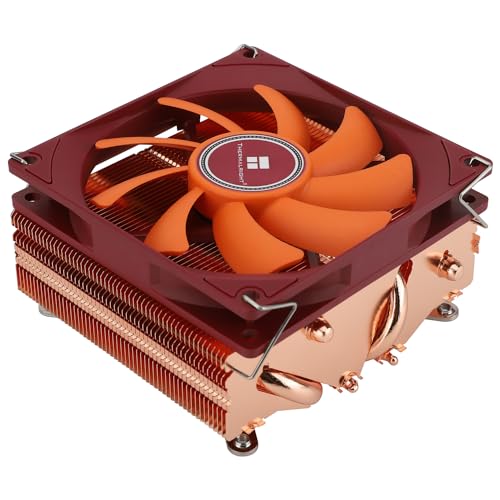
Thermalright AXP90-X53 FULL 42.58 CFM CPU Cooler (AXP90-X53 FULL)
Oh it's a 90mm fan tho
Yeah nvm I think it's just a perspective thing, the small fan makes the cooler look bigger
elfin trout
tame grove
ID COOLING has some good options too. IS-67 and an IS-77 is on The way
Yea, only IS67 is available rn, which is more expensive than the AXP120 X67 with the same form factor, we'll have to wait for the IS77 to come out
tame cape
I was thinking about making a sleeper build since I have a few 90s pc cases I could use. do you recommend spray painting it white on the inside even if I'm going to use mostly black components?
 steady walrus
Could someone help me understand, but what is the advantage of using the 600W PCIe 5.0 12V-2x6 Type-4 PSU Power Cable from corsair versus a stock cable adapter that uses 3-4 PCIE cables? Wouldn't it be better to spread it out between more cables?
 tulip depot
steady walrus
Could someone help me understand, but what is the advantage of using the 600W PC...
tulip depot
steady walrus
Could someone help me understand, but what is the advantage of using the 600W PC...
Don’t use splitter
elfin trout
steady walrus
Could someone help me understand, but what is the advantage of using the 600W PC...
Mainly fewer points of failure
pallid isle
Any recommendations for a good full size air cooler for a 7600/7500F?
I had the Phantom Spirit SE on the part list for this guy, but it's out of stock where he lives now
And it looks like there are new TR coolers since then
elfin trout
What country?
pallid isle
Italy
elfin trout
Prices look a bit wack but this should work fine
https://www.amazon.it/dp/B0DJZBZY7L

 earnest light
Good morning everyone- Im moving out from the US that uses 120V for power to the Phillipines that uses 220V. Do I just need to change the PSU cables or do I need a new PSU?
elfin trout
earnest light
Good morning everyone- Im moving out from the US that uses 120V for power to the...
What PSU do you have? Most are full range, like 110v-240v, and would just need a new cable, but some are only 120v or only 240v etc.
earnest light
elfin trout
What PSU do you have? Most are full range, like 110v-240v, and would just need ...
I have the Corsair HX1500i
elfin trout
earnest light
I have the Corsair HX1500i
It's full range

You'll just need a different kettle lead
earnest light
elfin trout
You'll just need a different kettle lead
Thank you Sir!
elfin trout
You're welcome
tame cape
elfin trout
Mainly fewer points of failure
I mean... fewer isn't always better cough cough 🔥
tame cape
should i get a Cooler Master MasterWatt 550W or Corsair CX550M 550W (both semi mod) for the same price?
i know theyre not the best but i got good deals on them
 obtuse vessel
Anyone know any good white Aio cpu coolers? It'd be great to keep it below $80, but I don't mind paying more if it's really good
elfin trout
obtuse vessel
Anyone know any good white Aio cpu coolers? It'd be great to keep it below $80, ...
Want a LCD screen or no
It's going to be one of the thermalright options but you can narrow it down a bit more with some preferences
obtuse vessel
elfin trout
Want a LCD screen or no
Nah
It'd probably double the price I'm guessing
elfin trout
thermalright have some options near that price point with lcd screens
elfin trout
obtuse vessel
It'd probably double the price I'm guessing
Does your case fit 360s?
elfin trout
obtuse vessel
I'd like it to be white and have rgb
Normal white with argb:
https://www.amazon.com/dp/B0F8BKKJJQ
With a lcd screen:
https://www.amazon.com/dp/B0D1JZXJHH


Thermalright FW 360 White ARGB V2 CPU Water Cooler with 3 PWM Fans with 2000RPM,IPS LCD Screen with 320 * 240 Resolution,Liquid CPU Cooler,CPU PC Aio Cooler for AMD:AM4/AM5/Intel LGA1700
obtuse vessel
Huh, that is very reasonable
elfin trout
indeed
tame cape
tame cape
should i get a Cooler Master MasterWatt 550W or Corsair CX550M 550W (both semi ...
no way I got sent all the wrong cables from the seller 
 mystic tartan
Are Thermaltake psus still cheeks
I had 3 that dropped rails
Have they improved their QC
It’d be a tough power gf3
elfin trout
Gf3 or gf a3? The old gf3 is decent, the newer ones aren't great
tulip depot
mystic tartan
Are Thermaltake psus still cheeks
Rn if you want a psu id only recommend getting montech (in USA and Uk at least) unless you need more than a 1200w psu
vocal tree
any psu for an igpu and some hard drives?
I go down the list on pc part picker and the prices are gigantic
pallid isle
vocal tree
I go down the list on pc part picker and the prices are gigantic
You could use the PSU tier list, filter the wattages and remove whatever is overkill
vocal tree
yeah I should run down the list of whatever's got a price in pcpp again just looking at c tier
tame grove
Man. I will NEVER put my hands or spend a dollar on an Arctic cooler again. Bought this B Stock unit from them and it appears to be brand new. Absolutely impossible to get mounted to my board. I knew people had a hard time with these things, but obviously I have a lot of systems under my belt. Absolutely hate this design lol.
elfin trout
sometimes, there's a reason why parts that are cosmetically fine end up on b stock lol
 subtle lodge
Will the scythe wonder tornado be better than the wonder snail for heatsinks because of the larger hub
Should help more with static pressure
 still yacht
I have 7 fans, 3 top, 3 bottom, and 1 back. What would be the best airflow setup? My case is the ap201 so every panel is perphorated
Someone told me to have top and bottom be intake and back as exhaust, but I'm wondering if that's the best setup
wide parrot
still yacht
Someone told me to have top and bottom be intake and back as exhaust, but I'm wo...
If the side panel is mesh/perforated this is likely best
Means both the GPU and cpu get fresh air
still yacht
I just recently upgraded to a 14700k so I'm tryna figure out ways to keep it cool
running a peerless assassin, which is just barely able to run it at 95
still yacht
unfortunately that seems like the normal for my cooler
 wide parrot
still yacht
I just recently upgraded to a 14700k so I'm tryna figure out ways to keep it coo...
wide parrot
still yacht
I just recently upgraded to a 14700k so I'm tryna figure out ways to keep it coo...
Dual tower thermalright

Thermalright Royal Knight 120 80.45 CFM CPU Cooler (Royal Knight 120)
still yacht
still yacht
running a peerless assassin, which is just barely able to run it at 95
^
Might try tweaking fan curve to go a little higher rpm
 terse cargo
so I want to try and run a dual GPU system with a 7800xt and a 5070 Ti any suggestions for cases that wont cause them to suffocate each other?
plan on getting a new psu as well as im currently running a 650W
tame grove
this case looks kinda dope - review https://www.youtube.com/watch?v=K-ayZAby_ds


Thermaltake is back in a big way. The View 390 is their best case in a very long time!
Radeon RX 9070 XT AORUS ELITE 16G: https://lihi.cc/RdfeA
AORUS Review Program: https://lihi.cc/aQR1u
Thermaltake View 390 Air - https://geni.us/0a5EE (Amazon)
AMD Ryzen 9 9950X3D - https://geni.us/Tqzof (Amazon)
AORUS B850 Elite WiFi 7 - https://geni.us/2b7B...
obtuse vessel
What's a good, inexpensive 240mm aio cpu cooler that comes with fans
elfin trout
anything from thermalright, take your pick at what aesthetics you want
tame grove
obtuse vessel
What's a good, inexpensive 240mm aio cpu cooler that comes with fans
Also, keep an eye on Arctics page on eBay. You can get their 240mm for 45$ B stock
 exotic perch
Was thinking about swapping out my o11 dynamic for a 4000D Frame. Would this be an ideal fan/aio configuration. With the 360mm aio as intake on the back
*found this picture using it for reference
 wide parrot
exotic perch
Was thinking about swapping out my o11 dynamic for a 4000D Frame. Would this be ...
wide parrot
exotic perch
Was thinking about swapping out my o11 dynamic for a 4000D Frame. Would this be ...
I've heard running fans at a 90° angle like that can cause extra turbulence. Might be worth looking into
 lapis plover
exotic perch
Was thinking about swapping out my o11 dynamic for a 4000D Frame. Would this be ...
lapis plover
exotic perch
Was thinking about swapping out my o11 dynamic for a 4000D Frame. Would this be ...
If you can, rad should go on the top
I feel like there was a diagram somewhere
 sonic lake
One of my fans has been doing something interesting recently, wondered if anyone has thoughts. It happens when the RGB/LEDs are on, and when my computer goes into low power mode where it shuts off all the RGB/monitors, but keeps running processes.
 kind sluice
hey yall, so lately my cpu (R7 5800x)_ runs at 90 celcius when gaming. I did replace my thermal paste. I have a msi coreliquid 240R AIO running with the stock fans running at 100% speed. The temp does not run past 91 celcius. The case fans are just cheap Asiahorse fans running at 80 percent speed. Im not sure if its just the cooling of my case fans? Temps are normal averaging around 65 celcius when running on chrome. it also stays at 90 celcius when running Music software Reason 11 and chrome at the same time
kind sluice
these are my temps when playing Zenless zone zero at High Graphics for a good 10 mins

let me know if these temps are normal!
elfin trout
kind sluice
these are my temps when playing Zenless zone zero at High Graphics for a good 10...
5800x does inherently run hot, but 90c with a 240mm aio is a bit too much, it's likely throttling at 90c. What's the ambient temperature like, and have you checked what the pump is running at?
elfin trout
kind sluice
hey yall, so lately my cpu (R7 5800x)_ runs at 90 celcius when gaming. I did rep...
Also wait the first 240R, or the v2? The first 240R got recalled for gunk buildup a while ago
kind sluice
elfin trout
Also wait the first 240R, or the v2? The first 240R got recalled for gunk build...
I got the MSI - MAG CORELIQUID 240R V2. I can check the pump really quick in bios
Temp upstairs is around 65 degrees. I got it on the floor
 elfin trout
Try setting the pump to 100% if you haven't already
I assume that's 65f and not 65c?
 elfin trout
Is the pump plugged into CPU_Fan or is it plugged into a different header?
 elfin trout
Test setting the max of the CPU_Fan curve to something like 70%, sometimes pump being set at full speed adds turbulence that ends up reducing performance
bleak holly
Well I am in the market for a new case. The airline broke my Fractal Torrent case.
I have been debating getting the Havn 420 HS or trying out some more exotic cases like the TT P3 Pro.
bleak holly
Is anyone aware of any pc cases that can fit a 360mm aio, atx motherboard, and ideally fits into the overhead carry-on of a plane?
bleak holly
https://www.amazon.com.mx/egowz-Creativo-computadora-EATX-Aluminum/dp/B0CW61VDBD/ref=sr_1_149? Currently debating purchasing this atx test bench to be used as my pc chasis for a while.

abrir la caja del computadora
tame grove
bleak holly
Is anyone aware of any pc cases that can fit a 360mm aio, atx motherboard, and i...
It having to be an ATX board is the roughest part here
tame grove
kind sluice
hey yall, so lately my cpu (R7 5800x)_ runs at 90 celcius when gaming. I did rep...
Set a negative Curve Optimizer in BIOS (start around -15 all cores) and manually limit PBO to ~120W PPT / 90A TDC / 120A EDC with scalar at x1 — this undervolts the chip and caps power draw without hurting gaming boost clocks, usually dropping temps 5–10 °C while keeping the same in-game performance.
bleak holly
tame grove
It having to be an ATX board is the roughest part here
Agreed.
bleak holly
kind sluice
hey yall, so lately my cpu (R7 5800x)_ runs at 90 celcius when gaming. I did rep...
What's your ambient temp and is the aio being obstructed?
What Nebac mentioned above is worth trying. Note, ALL CORE performance may drop a bit.
wide parrot
If I was going to be traveling I don't think I would go for a glass side panel
bleak holly
bleak holly
https://www.amazon.com.mx/egowz-Creativo-computadora-EATX-Aluminum/dp/B0CW61VDBD...
@wide parrot. my current plan is to purchase this open air frame/test bench, make some wood panels for it, then put it into a small suitcase that I can bring as carry-on.
wide parrot
That could probably work if you're confident in your woodworking skills
The other option could be to break down the PC and reassemble at the destination. That's sort of what I do when I go from school -> home. I have 2 cases, mobos, coolers, and PSUs, and I travel with my gpu/cpu/ram/storage
Granted I'm on am4 and can get away with single tower coolers and 700w PSUs so it wasn't too expensive to snag the extra set
earnest light
Morning everyone: I replace 1 of my Corsair Fans, but now their no longer lighting up, however all the fans are still spinning. Its the Corsair Link fans. I tried uninstalling Icue, but no luck. Any pointers?
earnest light
 earnest light
The buttom 3 fans lights up but the rest upwards doesn't. The buttom is directly connected to the iCue hub.
elfin trout
earnest light
Morning everyone: I replace 1 of my Corsair Fans, but now their no longer lighti...
Sounds like the micro USB cable isn't fully plugged in
It'll still get power from the pcie power, just won't do anything with it without micro USB
earnest light
elfin trout
It'll still get power from the pcie power, just won't do anything with it withou...
Only uses the USB cable to link all the fans up to the Corsair Icue Link System HUB.
elfin trout
earnest light
Only uses the USB cable to link all the fans up to the Corsair Icue Link System ...
From the hub to the motherboard
It should be pcie 6 pin and then micro USB to the motherboard
earnest light
elfin trout
From the hub to the motherboard
Ill double check connections then
Its all hooked up right

 elfin trout
Looks a lil loose on the mobo end, just make sure it's fully in
earnest light
elfin trout
Looks a lil loose on the mobo end, just make sure it's fully in
Its on there

Even removed and plugged it back firmly
elfin trout
Do they show up on icue or no
earnest light
The HUB shows and the buttom 3 fans along with the LCD Display
 elfin trout
Just have to assume either it's broken or it's something software if the hardware is connected correctly
earnest light
elfin trout
Just have to assume either it's broken or it's something software if the hardwar...
Roger, thank you for trying, really appreciate it.
 crude juniper
Hello was wondering if I could get help connecting cables to psu Corsair RMx shift series rm1200x a bit confusing than other cables I have 2 cables labeled cpu and 7 pcie wirh daisy chains and small connectors rest are hdd power and what not quite a few
 hollow leaf
I have been out of the PC parts world for close to 2 years and I am needing new fans. They must be white. ARGB. Daisy Chainable. Good quality. I need 10 fans.
These are what I currently have, but the bearings have gone out in 2 of them.
https://pcpartpicker.com/product/fnpzK8/lian-li-st120-6917-cfm-120-mm-fans-3-pack-st120-3w
If anyone has kept up to date on what is best to buck ratio, I'd be appreciative of your recommendation.

Lian Li ST120 69.17 CFM 120 mm Fans 3-Pack (ST120-3W)
 fallow basin
hollow leaf
I have been out of the PC parts world for close to 2 years and I am needing new ...
fallow basin
hollow leaf
I have been out of the PC parts world for close to 2 years and I am needing new ...
thermalright

Dimension:L124 mm x W120 mm x H25 mm
Rated Speed:2000 RPM±10% (MAX)
Noise Level:28.2 dBA (MAX)
Air Flow:68.9 CFM (MAX)
Air Pressure:2.21 mm H2O (MAX)
Ampere:0.17 A
Connector:4 PIN PWM
ARGB Connector:3 PIN 5V
Bearing Type:S-FDB Bearing
these are excellent
never overspend on fans
hollow leaf
fallow basin
never overspend on fans
Yep.
hollow leaf
fallow basin
these are excellent
Thank you
kind sluice
bleak holly
What's your ambient temp and is the aio being obstructed?
I think i figured it out. I think my AOI pump is dead
My pc Boggs so much when my pc starts over heating
bleak holly
kind sluice
I think i figured it out. I think my AOI pump is dead
That's unfortunate. Do you feel any vibration or flow in the pump/block and or tubes when touching them?
kind sluice
Nah, I held them together. No vibration or anything. Just completely warm with no flowing
kind sluice
I have the pump connected to the cpu fan too
kind sluice
I can check rn
bleak holly
Mine for example doesn't work on PWM mode.
kind sluice
I have mine on auto
bleak holly
Try forcing it to either DC then PWM if DC fails.
kind sluice
No luck on both. Tubes have no movement
Ill probably shift on over to a fan cooler instead of an aio pump cooler.
Any reccomendations? Im rocking a Ryzen 7 5600x.
bleak holly
kind sluice
Ill probably shift on over to a fan cooler instead of an aio pump cooler.
Any ...
What aio failed you?
Good ones usually last about 5 years.
Mine's been running strong for four years.
bleak holly
bleak holly
Mine's been running strong for four years.
Pretty much 24/7/365 at 100% pump speed.
kind sluice
MSI - MAG CORELIQUID 240R V2
I had it in my setup since 2021

This one specifically
bleak holly
Gotcha. A better and cheaper replacement would be some of Thermalright's new AIO's. I have heard very good things about their stealth ones.
You can get a high performance 360mm AIO with 2200rpm fans for $50-60.
I believe they make them in 240mm for about $40. @kind sluice
kind sluice
Hmm. So I found a thermalright aoi but debating whether I should stick to 240 or move onto a 360?
Actually nm. My case doesnt fit a 360
Lol
I was looking at this one
 bleak holly
The infinity's are cheaper though lower rpm.
Around 1850rpm. The ice or stealth I forget the name is 2150rpm.
Pumps are the same to my knowledge. Just different fan performances.
kind sluice
Okay ill check thay out
This is the only aoi I can find on Amazon that has fans that go 2000rpm+10%
 bleak holly
kind sluice
This is the only aoi I can find on Amazon that has fans that go 2000rpm+10%
bleak holly
kind sluice
This is the only aoi I can find on Amazon that has fans that go 2000rpm+10%
Gimme a sec, but that's nice if you like ARGB. The stealth one doesn't have it.
wide parrot
kind sluice
Actually nm. My case doesnt fit a 360
If you can fit it, a 280mm is almost as good as a 360
bleak holly
 kind sluice
Ahhhh gotcha no worries. Ill check them out
kind sluice
Well it was indeed my stupid AIO pump. Just install the new one and bam, I can operate without overheating 😭

Iv been working on my pc with 75 - 80 Celsius just by running chrome
bleak holly
Yikes.
bleak holly
kind sluice
Well it was indeed my stupid AIO pump. Just install the new one and bam, I can o...
What cooler?
 mighty girder
are the X5M and X5 good Cases ?
or Lian Li A3 ?
I'm trying to make a Mixro ATX build
 lusty dagger
would the noctua-nh-d15s air cooler do well in cooling an i9-13900kf
lapis plover
lusty dagger
would the noctua-nh-d15s air cooler do well in cooling an i9-13900kf
If you want it running at 50C+, probably
lusty dagger
lapis plover
If you want it running at 50C+, probably
wat about i9-14900kf
lapis plover
You should only use an aio with that
No air cooler is equipped to handle the 200W+ heat output
lusty dagger
i havent opened the box yet can i still return the cooler back to newegg?
ima return it and buy the aio
i was waiting for my other parts to arrive
lusty dagger
lapis plover
No air cooler is equipped to handle the 200W+ heat output
360mm deepcool lt720?
lapis plover
Yeah, should work
bleak holly
lusty dagger
360mm deepcool lt720?
Great AIO, I own one.
Keeps my 9950x3D around 80c in Cinebench R23 drawing 290w.
It also has a refill port but using it voids warranty.
lusty dagger
bleak holly
Great AIO, I own one.
Thankss
lusty dagger
bleak holly
It also has a refill port but using it voids warranty.
what do u mean voids warranty
im still quite new to pc
i can build it
its just idk abt parts a lot
besides gpu and cpu
bleak holly
lusty dagger
what do u mean voids warranty
A nice perk about the LT720 is that it has a fill port. AIO's even with the best sleeving eventually lose some fluid (takes years), when that happens you can open the fill port and top it up with new coolant, though doing so will void the warranty unless you send it in for a replacement.
lusty dagger
bleak holly
A nice perk about the LT720 is that it has a fill port. AIO's even with the bes...
but what if I am buying it with have a warranty on it
bleak holly
It comes with warranty, 5 years if I recall.
lusty dagger
ohh
bleak holly
I have been using mine for a little over 3 years now I believe.
Fluid is still pretty full, so I haven't bother refilling, note this is with me running the pc 24/7 and having put it through easily more than a hundred hours of intense stress testing heating the fluid up.
lusty dagger
bleak holly
Fluid is still pretty full, so I haven't bother refilling, note this is with me ...
oh shit
dang its that good
its on sale rn on canada computers
might have to go cop it in store the tmrw
Thanks for the tips and review
Really do muchly appreciate it! 😄
lusty dagger
Also
Anyone know if im supposed to have plugged in both cpu powers
cuz i currently only have 1
its perfectly running fine
on i9-14900kf
mighty girder
NXZT h5 FLOW for 65 USD or Lian li 216 for 95 USD
also
ID-COOLING FROZN A620 PRO SE
or
Thermalmight peerless assasian SE
for like a 7800X3D
 tawny oxide
Peerless assassin
mighty girder
is Foikin good at all ?

FOIFKIN PC Case - Pre-installed with 4 PWM ARGB Fans, ATX Mid-Tower Gaming Case, Hinged Tempered Glass, FOIFKIN
tawny oxide
mighty girder
https://www.amazon.com/FOIFKIN-Walnut-Pre-Installed-Mid-Tower-Gaming/dp/B0F1YBGP...
Never heard of them. Their cases look like popular brand’s knockoffs.
bleak holly
Thoughts on this PSU? I plan to downsize to a LianLi A3-mATX case and I want to be able to fit 3x120 on the top, side, and bottom of the case.
Corsair SF1000 (2024) 80 Plus Platinum
https://www.amazon.com.mx/gp/product/B0D45RN3KZ/ref=ox_sc_act_title_3?smid=AVDBXBAVVSXLQ&th=1

Proporcione a su PC SFF de alto rendimiento la potencia que necesita con una fuente de alimentación SF Series 80 PLUS Platinum SFX de CORSAIR. Compatible con ATX 3.1 y preparada para PCIe 5.1, la serie SF Platinum ofrece una potencia de alto vataje con certificación 80 PLUS Platinum en un formato...
Interesting it seems this new PSU list has it listed as an A+ psu.
tame grove
If anyone is in the market for a new case, so far this has prolly been my favorite overall this year. ATX, 360 AIO, 5x Reverse Blade Fans, ATX PSU https://www.microcenter.com/product/697004/lian-li-o11-dynamic-mini-v2-flow-tempered-glass-atx-mid-tower-computer-case-black
 limpid fog
I’m looking for a lower price preferably under 100 850w power supply for my 3070 graphics card upgrade. Any recommendations?
mighty girder
limpid fog
I’m looking for a lower price preferably under 100 850w power supply for my 3070...
Montech centruy II 850 Gold
tawny oxide
limpid fog
I’m looking for a lower price preferably under 100 850w power supply for my 3070...
Also Corsair’s refurbished psus
From their official website
bleak holly
@tawny oxide @vestal wharf @subtle lodge
I finally found the perfect case. It's 36 linear inches with all upgrades.
SSUPD Meshroom S V2 with Fan Bracket for +360mm radiators up to 71mm deep and the aluminum feet to raise it.
-
Full ATX motherboard support
-
Room for mounting 2x120mm in front of the board to cool RAM and VRMs
-
up to 360mm or longer radiator if I don't mind it sticking out the top of the fan bracket
-
GPU up to 332mm in length and 63mm deep or 304mm length and pretty much as deep as I want.
 subtle lodge
Oh nice it can still take 3 slots
bleak holly
 vestal wharf
how much?
vestal wharf
how much?
About $200 for the case, bracket, and feet then $90 for the PCIE 5.0x16 440mm cable.
vestal wharf
bleak holly
About $200 for the case, bracket, and feet then $90 for the PCIE 5.0x16 440mm ca...
No not too bad tho
bleak holly
subtle lodge
Oh nice it can still take 3 slots
it can do 4+ slots on the left side deep so long as the gpu's width doesn't get in the way of the motherboard tray
subtle lodge
$200 for all of that is really not bad at all
You can save some with a 4.0 riser though
There are itx cases that cost more than $200 with less
Just a case alone
bleak holly
subtle lodge
You can save some with a 4.0 riser though
I plan to upgrade to a 5080 after I swap cases. Wouldn't that be a bottleneck?
subtle lodge
bleak holly
I plan to upgrade to a 5080 after I swap cases. Wouldn't that be a bottleneck?
No because a 4090 doesn’t saturate pcie 3
bleak holly
subtle lodge
No because a 4090 doesn’t saturate pcie 3
Interesting. Another question, for Clock generators like bCLK or eCLK overclocking, does PCIe 4.0 vs 5.0 react differently?
subtle lodge
That I do not know
But there is a small performance regression when using a 5090 on pcie 3
Crazy it took that long to saturate pcie 3
bleak holly
subtle lodge
Crazy it took that long to saturate pcie 3
I am amazed. I assumed since they opted for PCIe 5.0x16 native on 5000 series that there was a reason for it.
https://www.amazon.com/PNY-GeForce-RTXTM-5080-Triple/dp/B0DYRZZJZ1/ref=sr_1_6? I am going to get this GPU as soon as I can. min-maxes what I can fit into the SSUPD Meshroom S V2 and it's compatible with the 5080 Aorus and Astral bios.

Gear up for game-changing experiences with the NVIDIA® GeForce RTX™ 5080 and AI-powered DLSS 4. Built with NVIDIA Blackwell and equipped with blistering-fast GDDR7 memory, it lets you run the most graphically demanding games and creative applications with stunning fidelity and performance. With N...
bleak holly
subtle lodge
You can save some with a 4.0 riser though
Also thank you for this tip. If I find a 400-440mm riser for cheaper I will definitely do that.
subtle lodge
Yea 5 risers are like double the price of 4
bleak holly
subtle lodge
Yea 5 risers are like double the price of 4
Seems I can save about $30 going with 4.0 the 440mm 5.0 is $94 vs $80 for the 4.0 at 400mm.
subtle lodge
Oh nvm then
I do remember seeing a big difference somewhere else though
But yeah as long as you dont run out of vram, the 4.0 is fine
That’s when pcie 5 matters more
subtle lodge
bleak holly
Seems I can save about $30 going with 4.0 the 440mm 5.0 is $94 vs $80 for the 4...
Make sure you set the slot to be pcie 4 in uefi
bleak holly
subtle lodge
Make sure you set the slot to be pcie 4 in uefi
noted.
bleak holly
subtle lodge
But yeah as long as you dont run out of vram, the 4.0 is fine
?
Please elaborate.
subtle lodge
The board can’t tell you are using a 4.0 cable so you’ll get some strange things on the screen
Flickers, maybe no picture
subtle lodge
bleak holly
Please elaborate.
The extra bandwidth from 5.0 helps when it comes to shuffling data between ram and vram
bleak holly
I think I might go with the 5.0 one since I know it will definitely be long enough but more importantly the cables seem a lot more flexible.


Thoughts?
Because it needs to make a 90 degree turn to the left
 subtle lodge
Yeah the savings aren’t as much as i thought, so if you want you may as well get it
I expected their 4.0 to be cheaper
subtle lodge

caseking.de
Flexible riser cable, PCIe 5.0 x16 to PCIe x16, 200 millimetre length, for custom positioning of graphics card, female connector reverse
Big discount
https://www.caseking.de/en/ssupd-riser-flat-ribbon-cable-pcie-4.0-270mm-black/ETSP-032.html

caseking.de
25 cm long and flexible riser cable, for PCIe standard 4.0, from PCIe x16 to PCIe x16, for individual positioning of expansion cards
bleak holly
the plan is to get the case, get the gpu, then do a custom parallel waterloop to cool the cpu and ram using a 360x120x45mm rad in the fan bracket and 240mm rad in the rear.
 wide parrot
Assuming you have decent intake into the case already, the gpu is probably getting plenty of air
mighty girder
sadage
bleak holly
mighty girder
Montech X5 (1590NTD)
Unless you plan to use a thin 420mm AIO on the front, get the Montech X5.
Cheaper and better airflow.
mighty girder
bleak holly
Unless you plan to use a thin 420mm AIO on the front, get the Montech X5.
most i'll ever use is 360
hmm
i'll
think bout it for a bit
bleak holly
mighty girder
most i'll ever use is 360
Oh the X5 also supports a 420 up front.
mighty girder
i see
bleak holly
mighty girder
i see
Well, it's iffy. It can fit 3x140mm fans up front but whether or not you can fit a 420 depends on how much longer the AIO's radiator housing is.
Anyways, I am in much favor of the X5.
bleak holly
mighty girder
but no screws for them
You will want either M4 or M3 screws that are the length of the fan + an extra couple milimeters to screw into the case.
wide parrot
mighty girder
but no screws for them
Zipties 😈
lapis plover
wide parrot
Zipties 😈
How would that even work
wide parrot
Put the ziptie through the fan and case crew holes
Link multiple together if you need more length
lapis plover
Ah
wide parrot
Exhibit A (2 screws, 2 zipties)

Officially only supports an 80mm fan but I wanted a 120
wide parrot
lapis plover
Lol
Exhibit B (one screw, one "normal" ziptie, one mcgyvered ziptie)
And bonus Exhibit C (2 screws)

wanted the 120mm as intake for CPU cooler, but it can't go any further right due to the PSU. The little guy was originally for vrm cooling, now it just blows on the CPU cooler I guess
lapis plover
Might need to do that at some point now lol
wide parrot
At some point I may reverse the setup so the rear fan (exhibit A) intakes into the CPU cooler and then the top fans exhaust.
In theory it would lower cpu temps a bit bc rn the CPU is getting some hot gpu air from a flow-through backplate
But tbh my cpu temps are fine, it hits EDC well before TDC
bleak holly
lapis plover
Ah

 bleak holly
bleak holly
bleak holly
@mighty girder
I wanted a good RAM fan but didn't have any standoffs for such as mounting solution so I used 4 sets of Zip ties chained together.
wide parrot
bleak holly
I wanted a good RAM fan but didn't have any standoffs for such as mounting solut...
beautiful, this outdoes my own work
 primal remnant
https://www.amazon.com/dp/B0CJY5LH65 if i put a 92mm noctua or CM sickleflow fan on this cooler later, will it be awesome? I already bought it because i'm only cooling a 65W CPU, but I would like to eventuall transition it to a higher wattage CPU for my dream build - I like the 92mm size a lot, and I think the actual heatsink looks pretty great.

ID-COOLING SE-903-XT BLACK CPU Cooler
direct contact heatpipes seem to be in line with cooler master's quality
alxso i don't give a shit about noise, it's gonna be behind tempered glass in my new case
i got the CM Q200 2 microATX case, and I am satisfied more than enough with the level of cooling for now, but would love to get more fans at a later date, ideally again noctua or sickleflow.
you know, for an R5 7600X or a core ultra 5 245 or 265 later on.
definitely a K or ideally KF series
bleak holly
@languid topaz @wide parrot @subtle lodge thoughts on doing a custom loop like this? P = pump.

I will use Y fittings to merge the fluid into the radiators then another Y fitting to split the fluid to each pump that then feeds the components.
bleak holly
subtle lodge
Ram doesn’t use enough power to justify the split
Main thoughts was on pressure since each D5 pump only does 650L/HR. Other benefit is this allows me to have two pumps with 300mm reservoirs.
I plan to use the Dracaena 65ml D5/Pump Res combo then upgrade the reservoirs to their 300ml ones.
This was my other idea

I plan to use two pumps for three reasons:
- More flow
- More coolant (I will upgrade the Dracaena 65ml D5 PUMP/RES to use 300ml tubes)
- Redundancy incase one of the pumps die during travel when I move the PC as a carry-on in the plane.
bleak holly
bleak holly
This was my other idea
@subtle lodge @languid topaz thoughts on the two setups?
mighty girder
do aio's have a limited lifetime ?
primal remnant
can anyone comment on sickleflow vs NS-P14 (the positive pressure Noctuas)
i'll need at least a couple of fans
due to my case only having a basic cooler master exhaust
heat in summers here (eastern WA) are absolutely brutal.
tawny oxide
mighty girder
do aio's have a limited lifetime ?
They’re good for about 3-5 years. Some longer.
languid topaz
bleak holly
<@808772530017665024> <@358383085181730826> <@308023772412116995> thoughts on do...
from my understanding, you're better off either splitting the loops entirely or just going with one. Two pumps in parallel increase head pressure; two pumps in series increase flow rate. If you wanted to do one for GPU & one for CPU & RAM it might make sense but otherwise, it's not really necessary. You start hitting diminishing returns really quickly after a certain point with increased head pressure & flow rate
bleak holly
Hey, glad to see you're alive and kicking.
languid topaz
bleak holly
I plan to use two pumps for three reasons:
1. More flow
2. More coolant (I will ...
I have an EK pump that has two pumps in it for redundancy but it's not really necessary. The only thing to worry about is if you use PETG & the pump dies, it'll melt the pipe pretty quick
maan I'm still recovering from the flu & work has been kicking my ass at the same time
sorry for inactivity
bleak holly
I plan to keep the GPU air-cooled for now because I am not sure how much a 240x28 and 360x45 rad can handle. I will be upgrading to a 5080 in the near future.
languid topaz
the motherboard will shutdown if the CPU temp gets out of control in my experience
it slightly depends with fin density & the static pressure of the fans but the difference is pretty minimal
I used to play around with this crap a lot. I had delta fans on an AIO at one point lol
bleak holly
languid topaz
it slightly depends with fin density & the static pressure of the fans but the d...
P12 Pro. The 240 is 16fpi, the 360 is 13fpi.
languid topaz
the difference was like 2C which is basically margin of error lol
bleak holly
I plan to use the Dracaena radiators.
languid topaz
honestly, the most effective thing I've ever changed for better cooling is using liquid metal
which people tend to hate but really isn't that scary if you use conformal compound
bleak holly
Higher fpi then Alphacool's rads in the $100 range and cheaper.
bleak holly
languid topaz
which people tend to hate but really isn't that scary if you use conformal compo...
I plan to delid my 9950x3D, use the TG Direct Die block, and use TG-Shield to cover the entire PCB around the dies.
Will that make Liquid Metal safe to use?
languid topaz
as safe as it can. I think TG-Shield is TG's conformal compound isn't it?
it's all just clear nail polish lol
it smells exactly like it
languid topaz
ya same thing afik. I use some like MG chemical one. The only reason I know of to choose one over the other is price
which is like nothing anyway lol
bleak holly
How much cheaper is that one?
5ml bottle is gonna run me like $50 after import and shipping.
languid topaz
heck they don't even have it anymore
 bleak holly
For the pumps, I thought parallel is better for flow?
languid topaz
they have a 55ml one but it's like $55 which is nuts https://www.amazon.com/419D-55ML-Chemicals-Premium-Acrylic-Conformal/dp/B0FJX5LPR7?

Product: Conformal Coatings Type: Acrylic Conformal Coating Size: 55 ml Container: Bottle
bleak holly
For now to keep costs low I will only use one pump and do the CPU but for redundancy, coolant, and flow I plan to add another pump when I waterblock the RAM.
languid topaz
that's enough for like the next 50 years
bleak holly
How far does 5ml get me?
languid topaz
bleak holly
For now to keep costs low I will only use one pump and do the CPU but for redund...
that's plenty
like you put a tiny bit on a q-tip & that's it
bleak holly
It's the Dracaena D5 Pump/Res rated for 650L/hr, is that decent?
languid topaz
try to use those like spongy q-tips though or the cotton can come off on the regular ones
bleak holly
It was the only reasonably priced D5 i could find.
bleak holly
languid topaz
try to use those like spongy q-tips though or the cotton can come off on the reg...
The TG one I found comes with a brush/eye dropper.
languid topaz
that's fine. On Thermaltake Live, Mike ran like 5 pumps in series & showed that two pumps barely changed temps & more than two had basically no effect at all
bleak holly
Brb like 3-5m.
languid topaz
alr
bleak holly
languid topaz
that's fine. On Thermaltake Live, Mike ran like 5 pumps in series & showed that ...
Not worried about temps but rather flow and coolant capacity since I can't fit a 240 reservoir into the SSUPD Meshroom V2 with the fan bracket addon without doing some black magic which I will show you in a reddit post I found
languid topaz
you could get a reservoir separate from the pump & get a pretty huge one
a lot of aspects are kinda counterintuitive tbh
like I used to think that running like pump>rad>CPU>GPU>RAM>rad>pump would perform worse than like pump>rad>CPU>rad>GPU>RAM>pump since you're going from hot component to hot component but the difference is barely anything
bleak holly
I plan to get the basic D5 Pump/res from Dracaena at 65ml and upgrade it to the 350ml reservoir for $30
languid topaz
I've used a bunch of Dracena fittings & never had an issue but I've never tried their rads or pumps. Ironically, I had an EK pump that was pretty expensive die in less than a year, meanwhile my Barrow pump is my oldest pump (~5 years old now) & still runs fine
as long as the rads aren't aluminum, they should be just fine
I've used Thermaltake, EK, Barrow, Hardware Labs, & PrimoChill rads & none really outperforms any of the others in any meaningful way
languid topaz
Honestly, the only thing I'd suggest is to avoid is PETG pipe if you can. If coolant temps end up higher than like 40C, it can start to deform. When the EK pump died, the pipes in & out of my 12900K's waterblock totally melted. It's kind of a miracle they didn't come out of the fittings
what sucks tho is PETG is by far the easiest to work with
bleak holly
I found EPDM soft tubing from XSPC. 6" for $50
languid topaz
acrylic requires you to heat the heck out of the pipe to bend it & you have to cut it with a hack saw because it will straight up shatter
oh nvm
bleak holly
3/8 ID, 1/2" OD.
languid topaz
EPDM is fantastic
bleak holly
Costs a bloody fortune though.
languid topaz
& basically every soft tubing fitting I've ever used holds so tight you could probably lift the PC with it lol
the TG DeltaMate fittings are super nice imo
bleak holly
languid topaz
I've used a bunch of Dracena fittings & never had an issue but I've never tried ...
From what I read, the Dracaena rads compete with Alphacool's midrange very well. only ones from Alphacool that beat it are like the Monsta which has both more depth and higher fpi is why.
languid topaz
lol I love my Alphacool rad. I have one that fits two 200mm fans on it
bleak holly
The dracaena radiators are copper fins/tubes with brass tanks then a steel case.
languid topaz
hardware labs rads are relatively inexpensive & I'm pretty sure they make Corsair's rads
that's fine. the Steel won't even touch the liquid & brass & copper are functionally the same for galvanic corrosion
bleak holly
One of the reviewers, was running a 350w gpu through their 360x45mm rad with Dracaena fittings and pumps as well. Said their load temps maxed out at 50-55c depending on ambient.
languid topaz
you know how you get watercooling parts for good prices... heck let me find it
bleak holly
languid topaz
hardware labs rads are relatively inexpensive & I'm pretty sure they make Corsai...
Apparently HWlabs either owns or makes the rads for Dracaena if reddit was true.
languid topaz
Performance-PCS.com is a really good source for watercooling parts. Titanrig & even bykski's US store are pretty good too. The best deals are usually on PPCs or on PPC's ebay store https://www.ebay.com/str/ppcsclearance?_trksid=p3542580.m47492.l74602

eBay
Performance PC's clearance on watercooling, computer accessories, and more!
Performance-PCs is located in beautiful Palm Bay, FL and has been in the computer and networking business for over 20 years. During this time we have grown to now specialize in the modification of high end computer cases and power supplies, as well as, offering a huge i...
bleak holly

Reddit
Explore this post and more from the SSUPD community
This was the black magic I spoke of.
The guy took the fan bracket from the back of the case and moved it to the front in order to mount more stuff.
languid topaz
that's pretty sick haha
bleak holly
languid topaz
Performance-PCS.com is a really good source for watercooling parts. Titanrig & e...
How do they handle warranties and shipping?
languid topaz
iirc they do free shipping once you meet a certain $ threshold but that might be continental US since they're here in FL
bleak holly
Gotcha. I am currently in Playa Del Carmen, Mexico which is close to FL but still a different country.
@languid topaz I am gonna whip up a quick graphic of what I am thinking of doing for version 1 of the loop.
languid topaz
sounds good. If you buy multiple things off their ebay site, I think they can bundle shipping so it's cheaper but you gotta email them afik
they used to accept offers but I don't see any listings that do now
bleak holly
 languid topaz
this is a nice pump/res that holds a lot of coolant https://www.performance-pcs.com/products/alphacool-core-200-aurora-d5-vpp-reservoir-acetal-acrylic-with-vpp655-pwm-pump

Performance-PCs.com
The Alphacool Core reservoir has an integrated pump top for powerful D5 pumps and comes with a VPP655 PWM pump. The tube of the reservoir is made of acrylic, the D5/VPP pump top and the lid of acetal. The combination of these two materials gives the expan
languid topaz
bleak holly
you're building in the same case as the one on reddit?
bleak holly
languid topaz
you're building in the same case as the one on reddit?
Yeah, it's the only case I found that fits full size parts without sacrificing flow or part sizes other than SFX psu.
The specific configuration is the SSUPD Meshroom V2 with the Fan Bracket and Aluminium Riser feet upgrade.
The benefit of this is I can bring it as a carry-on when I fly.
36 linear inches, the airline maxes out at 42.
languid topaz
this one has an option suitcase haha https://thermaltakeusa.com/collections/chassis/products/tr100-future-dusk-mini-tower-chassis-ca-11a-00snnn-00

Thermaltake USA
TR100 Future Dusk Mini Tower Chassis is a compact, dual-chamber, Mini-ITX case that is designed for those who demand performance and portability. It supports an SFX power supply and features space for two 120mm or 140mm fans on the top, as well as room fo
only fits 1 240 & a 280 tho
bleak holly
The SSUPD V2 with addons fits an ATX board, 3 slot GPU up to 330mm, 240 rad in the back and a 360mm or longer rad up front with the external fan bracket. @languid topaz
bleak holly
languid topaz
ya that's way bigger nvm
since the external fan bracket doesn't have a cap, I can fit a 600mm rad so long as it's only 120mm wide and up to 72mm deep (though then there'd be no space for fans).
granted that'd make it impossible to bring as a carry on but my point remains that it lets me have full size parts while being compact.
languid topaz
understandable
I've only ever done large PC builds. I've been meaning to try SFF someday
bleak holly
I got sick of the airlines breaking my pc parts...
They damaged my PSU and wrecked my fractal torrent case this time around
@languid topaz How much do you think a 240x28mm (16fpi) and 360x45mm (13fpi) rad can cool? Both Copper tubes/fins.
I'd like to eventually have my CPU, GPU (5080 upgrade soon), and ram all looped.
This is what the company SSUPD did for a custom loop in that case. @languid topaz

 mighty girder
tawny oxide
They’re good for about 3-5 years. Some longer.
mighty girder
tawny oxide
They’re good for about 3-5 years. Some longer.
And what does one do after they die ?
bleak holly
mighty girder
And what does one do after they die ?
Replace it or contact manufacturer for a new one. higher end AIOs come with 8-10 years warranties.
Mine, the LT720 has a 8 year warranty.
4 years in and going strong.
tawny oxide
mighty girder
And what does one do after they die ?
Yeah, replace or talk to manufacturer like @bleak holly said
In my opinion, I just don’t use AIOs. They have negligible performance overhead, and I don’t like having fluid near my pc lmao
bleak holly
tawny oxide
Yeah, replace or talk to manufacturer like <@217356391675985921> said
In my opin...
AIO is a must for me since even a low profile cooler still puts more weight and leverage on the socket/board than a AIO block.
tawny oxide
Yeah, in some cases they are better for space, but for the average gamer, you won’t need them.
I try to lead newer folks away from AIOs purely due to chances of failure, and mounting may be a little confusing.
bleak holly
@tawny oxide, @languid topaz, @subtle lodge, my soul hurts. After shipping and import, to do a Direct Die cpu loop with:
- Dracaena: 240x28+360x45mm Rad
- Dracaena: Fittings
- Dracaena: D5 Pump/Res + 300mm reservoir upgrade
- XSPC: 3/8 ID, 1/2 OD 6' EPDM tubes
- Tube Cutter
- Pressure Tester
- TG: Mycro Direct Die Pro CPU block
- TG: Delid-Die-Mate
- TG: Conformal Coating
- TG: Liquid Metal
All that is going to run me for about $700-800 USD to get to me in MX. about $250 is all freaking shipping and import.
tawny oxide
bleak holly
<@423224499849134081>, <@808772530017665024>, <@308023772412116995>, my soul hur...
I’m betting you the reservoir upgrade is one of the bigger prices on there
mighty girder
tawny oxide
I try to lead newer folks away from AIOs purely due to chances of failure, and m...
Naaa I’ll be fine I don’t even need a aio
I’m getting the peerless assassin SE
tawny oxide
Good
bleak holly
tawny oxide
I’m betting you the reservoir upgrade is one of the bigger prices on there
cheapest actually lmao.
tawny oxide
Good cooler
Not heavy
bleak holly
It's a 300mm reservoir sold separately by Dracaena that I can remove the bottom and fit onto the D5 pump/res combo to expand my coolant capacity.
Since it's a reservoir not a pump it doesn't get charged import.
So it enables me to purchase a $60 D5 pump and upgrade it from 65mm res to a 300mm res for $30.
@tawny oxide
oh btw @tawny oxide I decided to replace my PSU then upgrade GPU before replacing the case then do waterloop. Thought you'd appreciate the info.
tawny oxide
I want this
CherryTree Inc
We made another one! XXL Warp Core Custom Loop Water Cooled Gaming PC It comes with: CPU: AMD Ryzen 7 9800X3D Mainboard: Gigabyte X870 AORUS Stealth Ice GPU: Asus Prime GeForce RTX 5080 OC Edition Memory: 64GB Crucial Pro DDR5 6400MHz White Storage: 2 x 2TB Samsung 990 EVO Plus m.2 TRYX Panorama CPU Water Block with cu


 tawny oxide
bleak holly
oh btw <@423224499849134081> I decided to replace my PSU then upgrade GPU before...
tawny oxide
bleak holly
oh btw <@423224499849134081> I decided to replace my PSU then upgrade GPU before...
You needed that PSU replacement before anything
bleak holly
agreed.
That was always first, but I will gonna do case second.
Decided that it's high time I retire my 3070.
It's been in service for 4 four long harsh years now lmao.
tawny oxide
My 9060 is just beginning 
Wife’s 5700xt is gonna need retired
It’s getting hot even after a repaste
bleak holly
tawny oxide
https://mycherrytree.com/products/xxl-warp-core-gaming-pc-2nd-of-3
It's like a rip off tower 900 from TT. I like it.
bleak holly
tawny oxide
Wife’s 5700xt is gonna need retired
It’s getting hot even after a repaste
I assume that's where the 3070 is going yes?
tawny oxide
bleak holly
I assume that's where the 3070 is going yes?
Hopefully
If I can ever afford it

If I ever can do a custom loop, I want to do it in my behemoth. Aka my 2007 cooler master stacker 830
 bleak holly
tawny oxide
bleak holly
tawny oxide
oh my drive bays lmao.
 subtle lodge
bleak holly
<@423224499849134081>, <@808772530017665024>, <@308023772412116995>, my soul hur...
subtle lodge
bleak holly
<@423224499849134081>, <@808772530017665024>, <@308023772412116995>, my soul hur...
Yeah that is why I am never water cooling
ever
With sff water cooling options are extremely limited anyway
languid topaz
tawny oxide
I wish CoolerMaster would re-release this bad boy
 languid topaz
bleak holly
<@423224499849134081>, <@808772530017665024>, <@308023772412116995>, my soul hur...
languid topaz
bleak holly
<@423224499849134081>, <@808772530017665024>, <@308023772412116995>, my soul hur...
you should be able to get the EPDM tubing at like auto parts stores. I'm pretty sure it's what they use for radiator hoses. how much is 6' of it? Grainger has 100' for $136 lol https://www.grainger.com/product/Tubing-EPDM-4CHN5?
Also... weren't you just in Alaska not too long ago?
bleak holly
languid topaz
you should be able to get the EPDM tubing at like auto parts stores. I'm pretty ...
6` is $50 + import
bleak holly
languid topaz
Also... weren't you just in Alaska not too long ago?
yes, I snowbirded back to Playa Del Carmen, Mexico. Next trip will be to Irvine, California.
languid topaz
bleak holly
6` is $50 + import
maybe check your local auto store & see if they have it
bleak holly
gotcha.
bleak holly
@languid topaz @subtle lodge I just found out Noctua sells their Direct-Die mounting kit separates from the cooler! This means I can use my AIO as a cheap Direct Die solution.
Also apparently, all I need are 3.5-4mm spacers to do the mount without needing the special bracket
bleak holly
subtle lodge
Also seems cheap
it retails for 5 Euro but it's hard to find so my plan is to have my friend 3D print it since the STL files are free.
mighty girder
montech King 45 pro or montech X5
mighty girder
i want a cooler that looks like Hyper 612 APEX
but cheaper
or a air cooler that looks really clean in the King 45 pro
or
what are the cleanest
air coolers
white
wide parrot
I think the really clean looking thermalright coolers are back but they have this

Thermalright Peerless Assassin 120 Digital ARGB 88.89 CFM CPU Cooler (Peerless Assassin 120 Digital ARGB WHITE)
There's also these but I have no idea if they're any good
https://pcpartpicker.com/product/cTV2FT/apnx-ap1-v-763-cfm-cpu-cooler-ap1-5pipe-argb-wh
^only single tower 4 pipes for $30 is really ehhh
https://pcpartpicker.com/product/RvcBD3/uphere-ue2tc6-68-cfm-cpu-cooler-ue2tc6

APNX AP1-V 76.3 CFM CPU Cooler (AP1-5pipe ARGB WH)

upHere UE2TC6 68 CFM CPU Cooler (UE2TC6)
bleak holly
As a cheap Direct Die solution I plan to use washers to lower my LT720 AIO's coldplate to the dies with a TG direct die frame.
For the TiM should I use PTM7950 or Kryosheets? I don't want to use Liquid Metal because of potential welding and spilling. I will be covering the capacitors with kapton tape.
bleak holly
bleak holly
As a cheap Direct Die solution I plan to use washers to lower my LT720 AIO's col...
@languid topaz ?
primal remnant
https://www.newegg.com/thermaltake-cl-p147-ca13sw-a-130mm-intel-lga-1150-intel-lga-1151-intel-lga-1155-intel-lga-1156-intel-lga-1200-intel-lga-1700-intel-lga-1851/p/N82E16835106792 i am pretty sure this cooler is the absolute shit
i'm buying one and nobody can discourage me. it's delightfully silly.
wide parrot
primal remnant
i'm buying one and nobody can discourage me. it's delightfully silly.
Go ahead but it will have poor performance and be loud AF
That heatsink is kinda pathetic compared to even a shite single tower
bleak holly
primal remnant
i'm buying one and nobody can discourage me. it's delightfully silly.
You are trolling yes?
bleak holly
@languid topaz, @subtle lodge, I found a reddit covering my exact interest in AIO direct die.
https://www.reddit.com/r/overclocking/comments/1jszj0t/anyone_have_experience_direct_die_cooling_9950x3d/
What I will need is:
-
TG Direct Die V2 Frame
-
TG AM5 Offset Mounting Kit (for lowering the coldplate and maintaining pressure
-
Sandpaper to flatten the AIO's coldplate
-
Kapton Tape or Conformal to cover the capacitors
-
TiM which will be Kryosheets most likely.

Reddit
Explore this post and more from the overclocking community
subtle lodge
Be careful with sanding because you can't reverse a mistake
bleak holly
subtle lodge
Be careful with sanding because you can't reverse a mistake
I was planning on using a 3,000 grit sandpaper on the dinning table's glass counter since I think that should be very flat.
Thoughts and openions?
I can purchase 5k and 7k grit if you think that's still to rough
This is everything I am looking at currently minus Sandpaper.
$200 USD approximately. @subtle lodge
 subtle lodge
bleak holly
I was planning on using a 3,000 grit sandpaper on the dinning table's glass coun...
subtle lodge
bleak holly
I was planning on using a 3,000 grit sandpaper on the dinning table's glass coun...
Yeah I am just concerned about flatness
Mirrors are really really flat
Might get some crazy looks but if you can take the mirror out

bleak holly
subtle lodge
Might get some crazy looks but if you can take the mirror out
I thought mirror finish meant smooth? Don't I want a mirror finish?
bleak holly
Changed the list for LM method.
 languid topaz
subtle lodge
Be careful with sanding because you can't reverse a mistake
languid topaz
subtle lodge
Be careful with sanding because you can't reverse a mistake
ah yes, a famous quote from my 13600K lol
languid topaz
bleak holly
<@808772530017665024>, <@308023772412116995>, I found a reddit covering my exact...
I've used AIOs for direct die but on 10900K lol
bleak holly
languid topaz
I've used AIOs for direct die but on 10900K lol
Any tips?
subtle lodge
bleak holly
I thought mirror finish meant smooth? Don't I want a mirror finish?
No I meant using a mirror instead of the glass table if you can, because of how flat mirrors are
subtle lodge
languid topaz
ah yes, a famous quote from my 13600K lol
bleak holly
oh
subtle lodge
Should still be good enough tho
Just saying if you can get away with a mirror then try
If not then it should be fine tho
Just splitting hairs here
But if you reasonably can then why not
mighty girder
Thermaltake View 270V2 TG ARGB for 1690 NTD
Or
Montech 45 pro 2990 NTD
bleak holly
subtle lodge
But if you reasonably can then why not
Noted.
Now the question is simple.
After a PSU replacement do I delid it or keep saving for a 5080. Hmmm..
subtle lodge
I think you should get the 5080 before delidding
You won't gain in game performance with delidding
bleak holly
Fair. I am already pushing this pretty far.
I think I might take your advice on the flying part as well and just disassemble my computer Into the individual parts and bring that as a carry-on rather than a whole case when I fly back to the US.
primal remnant
wide parrot
Go ahead but it will have poor performance and be loud AF
it is very quiiet, even though I am gaming and my PC is relatively open
temps don't go above 40ish for gaming
it manages to be so quiet because of the sheer size of the fan, which is 130mm
wide parrot
Most fans are 120 so that's not that big
bleak holly
primal remnant
temps don't go above 40ish for gaming
What are you cooling with it?
languid topaz
bleak holly
Any tips?
I used RockItCool's direct die frame & they sent me some shorter screws for my LF2. The only thing that really prevents success is if you have capacitors or other crap mounted on the board near the socket that would prevent you from using the coldplate closer to the board than usual
bleak holly
languid topaz
I used RockItCool's direct die frame & they sent me some shorter screws for my L...
Mind sending me a link?
Oh wait, is this for the 10900K?
languid topaz
bleak holly
Mind sending me a link?
heck this was for 10th gen Intel I dunno if they even still make stuff
I used Thermal Grizzly for AM5
looks like they stopped after 13th gen Intel on their website
bleak holly
This is what I am currently looking at for what I think I need to do Direct Die using my AIO.

The offset kit provides the screws to lower the AIO according to TG and Reddit.
The Liquid Insulating tape is a black goop to insulate the capacitors.
@languid topaz you think I am missing anything?
languid topaz
bleak holly
This is what I am currently looking at for what I think I need to do Direct Die ...
the liquid tape is cheaper than conformal compound? Looks good otherwise as long as the direct die frame works for your CPU (I had to cut mine but it was V1 lol)
bleak holly
languid topaz
the liquid tape is cheaper than conformal compound? Looks good otherwise as long...
Drastically. $25 vs $60ish. Also this is 250ml vs 5ml.
bleak holly
languid topaz
the liquid tape is cheaper than conformal compound? Looks good otherwise as long...
I figured incase the DD frame did overlap the glue on my CPU, I can use some sand paper to shorten the edge.
languid topaz
IceMan on AliExpress (I dunno if you can get them anywhere else) might be worth checking out
my 12900K is direct die & the coldplate actually substitutes as the IHS
bleak holly
Isn't that the purpose of Direct Die?
languid topaz
I'm not sure if they have an AM5 version but I'm trying to figure it out
 bleak holly
To remove the IHS as a middle-man
bleak holly
languid topaz
I'm not sure if they have an AM5 version but I'm trying to figure it out
wth?
languid topaz
ya but usually the coldplate is still separate
bleak holly
Where'd you get that monstrosity.
languid topaz
lol eBay
bleak holly
... well damn.
languid topaz
you screw the block in over it with a gasket
bleak holly
I like that option way more than a separate coldplate.
languid topaz
it's permanently on there lol
bleak holly
languid topaz
it's permanently on there lol
Nothing a clothing iron and some fishing string can't undo!
languid topaz
I dunno if you can use it without gluing it on but at least everything that could bork the rest of the system is stuck in there
haha true. I might even be able to break it loose with my delid tool
I just haven't really wanted to
I kinda wanna get another one for benchmarking 13900KS
bleak holly
That's honestly a awesome IHS.
languid topaz
I have the EK direct die for that CPU and it's HORRIBLE
they have a direct die frame https://www.aliexpress.us/item/3256807424791349.html?
bleak holly
Pretty sure IceMan has a DD RAM block where the water flows through the dimms.
languid topaz
I dunon if they make the IHS replacement for AM5 tho. This is all I've found lol https://www.aliexpress.us/item/3256805050314139.html?
bleak holly
Oh neat, it's not that expensive either.
bleak holly
languid topaz
I dunon if they make the IHS replacement for AM5 tho. This is all I've found lol...
Is that Direct Die?
languid topaz
ya tbh the only reason I haven't ordered it before is I don't have an AliExpress account & I figured shipping would take awhile
it says it is in the item name
bleak holly
Whoops I missed it.
languid topaz
lol you had me second guessing it
bleak holly
Do you think the TG Mycro Pro is better?
I like that they have free shipping to MX.
Wondering because that's less than half the cost of TG's Mycro Direct Die.
languid topaz

BYKSKI.US
The Bykski CR-RD1080RC-TK100 Extreme-performance external radiator delivers extreme heat dissipation, capable of removing up to 4,200 watts of heat for custom liquid cooling loops. With a large fin surface area and optimized core density, it efficiently handles high thermal loads from CPUs and GPUs, helping maintain lo
bleak holly
languid topaz
lol holy crap https://www.bykski.us/collections/new-products/products/bykski-ext...
lmfao.
The newest MORA Copy cat.
languid topaz
probably fits in a server rack
Alphacool has a 4x200mm fan version iirc
it fits 9x140mm
iirc
 bleak holly
@languid topaz thank you for sharing the IceMan stuff with me. I just made an AliExpress ACC and saved it to the card.
languid topaz
I think I need to break down & make one myself
tame grove
When the customer wants a 9060XT 16GB worth of fans
 bleak holly
languid topaz
I think I need to break down & make one myself
bleak holly
languid topaz
I think I need to break down & make one myself
A DD cooled CPU?
Btw I was right, IceMan is the brand that makes Direct Die RAM Blocks.
languid topaz
I use EK of Bykski RAM blocks
I've also had no issues with FreezerMod or whatever it's called tbh
my son's PC has been running 3800c14 2x16gb B-die at like 1.65 DRAM for years now
The listing is kinda deceptive. It actually only includes the RAM waterblock (no modules or rgb thing) https://www.amazon.com/dp/B082Y6F5QK

Specification:
Item: Memory water cooling block
Model: MEO-PM0A
Size: Approx. 131x 44) x 15.5mm / 5.16 x 1.73 x 0.61in (LxWxH)
Support: 4 memory heat sink vest
Thread: Inner G1/4 x 2
Package List:
1 x Memory Water Cooling Block
1 Pack x Screw
but it's also like $30 lol
with a set of something like these, you can have basically everything (obviously not radiators, pump, fans, etc.) for less than $50 https://www.amazon.com/Aluminum-Heatsink-Replacement-Computer-Cooling/dp/B0CKYRFBZ1/144-6603768-8438750?

- [Efficient Heat Dissipation]: The computer water cooling heatsink is made of aluminum alloy material, which ensures balanced heat conduction and rapid heat dissipation.
- [Easy Installation]: The top hole design of the heatsink allows for easy installation of memory coolers. You can quickly a...
the bykski block with two modules is about $75. They don't have the 2-DIMM version of the waterblock anymore (which is the only one I've used) but I've used the modules and they work just fine. https://www.bykski.us/collections/ram-blocks

which is about what Alphacool charges just for the waterblock & their modules are like $30/each
I don't think they even sell the EK ones I have anymore. They were called EK Monarchs iirc
bleak holly
languid topaz
but it's also like $30 lol
Fair. The Iceman DD RAM which is the whole package is $100.
subtle lodge
tame grove
When the customer wants a 9060XT 16GB worth of fans

Coulda saved like 55% by getting be quiet pure wings 3
tame grove
subtle lodge
<:nocheers:906332983999475782>
He could have saved more than that by using the 5x included reverse blades in the case and the included arctic pro fans like I recommended lol. But some people love that Noctua.
I was more surprised they don’t sell these in 2,3, or 5 packs with a slight discount
subtle lodge
tame grove
He could have saved more than that by using the 5x included reverse blades in th...
Lian li goated for including that many fans
If he wanted to swap noctua on a cooler then I get it, but you’ll be running case fans at a low rpm so might as well stick with lian li
 tame grove
subtle lodge
Lian li goated for including that many fans
tame grove
subtle lodge
Lian li goated for including that many fans
They are for sure. And I’d get it if it wasn’t for the fact the stock fans on the LF3 Pro 360 are fantastic lol
 thick escarp
What psu do you guys recommend for the 5080 gigabyte wind force I have a 1200 watt psu be quiet pure power but it doesn’t come with enough pcie cables for it
languid topaz
bleak holly
Fair. The Iceman DD RAM which is the whole package is $100.
Btw I forgot, my direct die ihs coldplate thing for 12900K is made by SuperCool not Iceman. Apparently they have one for AM5 https://www.supercoolcomputer.com/en/product/49/water-block-direct-die-amd-ryzen-g9
bleak holly
languid topaz
Btw I forgot, my direct die ihs coldplate thing for 12900K is made by SuperCool ...
Awesome!
Do you think this will perform the same as a Mycro block from TG?
tame grove
This is insane lol
 bleak holly
tame grove
This is insane lol
bleak holly
tame grove
This is insane lol
Are those vibration pads for case fans?
tame grove
bleak holly
Are those vibration pads for case fans?
Yeah. Just all the spares from the 9x fans
 elfin trout
tame grove
This is insane lol
elfin trout
tame grove
This is insane lol
Noctua does love making those things lol
wide parrot
tame grove
Yeah. Just all the spares from the 9x fans
Was it also the customers request that the anti vibration bits be installed on the wrong side of the fans?
tame grove
wide parrot
Was it also the customers request that the anti vibration bits be installed on t...
Each fan comes with the full fan black vibration pad, which is on the mounted side of each and every fan.
They chose the gray for now as the corner pieces on the exposed side.
wide parrot
Ohhhh I see it now lol
 wet burrow
I need the silverstone flp02 so bad

it would save me the hassle of cutting up an old IBM to support a liquid cooler
bleak holly
wet burrow
it would save me the hassle of cutting up an old IBM to support a liquid cooler
Why not purchase a modern PC case? Any particular reason for one with drive bays?
bleak holly
wet burrow
Not really a fan of sleek glass cases
What are you planning to cool with it?
wet burrow
Im gonna use a 240mm aio for the CPU but I do plan on doing a custom loop some day. The case supports up to a 360 rad