
#cases-psu-and-cooling
1 messages · Page 7 of 1
 blissful thistle
 sand atlas
Yep that little extra is good for peace of mind and upgrade room
 coarse moss
Alright thank you so much
blissful thistle
masterwatt is C tier as well, but the extra wattage should give the 6700 enough headroom
next step up would probably be this, but not really much better than cxm https://ca.pcpartpicker.com/product/qt3H99/cooler-master-mwe-bronze-650-w-80-bronze-certified-atx-power-supply-mpx-6501-acaab-us

Cooler Master MWE Bronze 650 650 W 80+ Bronze Certified ATX Power Supply (MPX-6501-ACAAB-US)
cxm will def be fine with a 6700, but it's known for having coil whine
coarse moss
Aight you guys helped a lot. I have a friend building a pc and the PSU he wanted wasn't available.
 timid basin
blissful thistle
next step up would probably be this, but not really much better than cxm https:/...
timid basin
blissful thistle
next step up would probably be this, but not really much better than cxm https:/...
it's also the old version
which was discontinued years ago
 coarse basin
should i get corsair bronze 750W or gold 650W
blissful thistle
what models
coarse basin
blissful thistle
what models
sand atlas
CXm is decent enough but what gpu and cpu?
coarse basin
sand atlas
CXm is decent enough but what gpu and cpu?
I5-12400f and radeon 6700xt
sand atlas

Thermaltake Toughpower GF1 PE 650 W 80+ Gold Certified Fully Modular ATX Power Supply (PS-TPD-0650FNFAGU-1)
coarse basin
sand atlas
I'd do this https://pcpartpicker.com/product/zDMTwP/thermaltake-toughpower-gf1-p...
thx
coarse basin
what other mobos could run well with i5-12400
sand atlas
If you're looking cheaper DS3H is fine
There's a wifi model too, the AX
Just keep in mind it limits your upgrade options later
coarse basin
ok thank u
 static bolt
I just bought a lian li pe750 and it doesn't come with any cables. I was wondering what kind of cables would work with it?
@balmy badge
sand atlas
static bolt
I just bought a lian li pe750 and it doesn't come with any cables. I was wonderi...
It's really supposed to come with cables. Buying new ones will cost you a LOT and you'll be buying from cablemod or moddiy.
That's also an outdated, discontinued model.
static bolt
Yea ik
coarse basin
good cases for around $1100 build?
 serene siren
Fractal focus 2
 unreal portal
My power supply blew up, am I able to buy a replacement and move on or is it possible another component caused it to blow up?
 mild roost
The cause is just the psu being bad
But a psu blowing up can bring down other components too
Try to visually check all parts for damage
Then get another psu to test
sand atlas
Only way to know if anything else got cascade failures is to test it
timid basin
unreal portal
My power supply blew up, am I able to buy a replacement and move on or is it pos...
It depends on which half it failed if any components are potentially affected
As the AC and DC sides are physically isolated from each other
Check for physical damage, blown fuses, melted connectors and so on
 arctic summit
Y’all think a pcie5 atx3.0 power supply with a dedicated 12vphwr port is necesary for a 4090?
mild roost
nope
 idle fiber
is a 650w psu enough for a r5 7600x and a rx 6700xt?
 elder mantle
My setup is: ASUS Z690 MB, 32 gig DDR5 RAM, Intel I9 12900, GEFORCE RTX 3070 TI VENTUS 3X 8G OC, 2 1 TB SSD and a CORSAIR RM850x. My question is, is the PSU large enough to handle my listed setup?
serene siren
Mhm
blissful thistle
elder mantle
My setup is: ASUS Z690 MB, 32 gig DDR5 RAM, Intel I9 12900, GEFORCE RTX 3070 TI ...
Easily
You could throw a 4080 in there and be fine, possible a 4090
elder mantle
excellent, thank you for the help.
blissful thistle
Actually, likely a 4090 if you're gaming. 12900 won't pull that much gaming, and rmx is a great psu
elder mantle
It is primarily a gaming setup, WOW, Elden Ring, Red Dead Redemption, Tomb Raider. I like running them all at close to max for the GPU.
 past harbor
4090 if 4k, 4080 plenty for anything below that imo.
 fierce pivot
elder mantle
My setup is: ASUS Z690 MB, 32 gig DDR5 RAM, Intel I9 12900, GEFORCE RTX 3070 TI ...
fierce pivot
elder mantle
My setup is: ASUS Z690 MB, 32 gig DDR5 RAM, Intel I9 12900, GEFORCE RTX 3070 TI ...
If you haven't bought any of that I'd change a lot of these parts btw
 steady walrus
What PSU would you guys reccomend for a 13700k and a 4080?
blissful thistle
steady walrus
What PSU would you guys reccomend for a 13700k and a 4080?
There's a tier list pinned here, any A tier 850w imo
A 750 should do it but I'd go 850
 lapis rivet
So got the ASUS Thor 850W PSU for Christmas, and have the 4000X RGB case...anyone have tips on "making a window" in the shroud here to show off the side lighting and screen of the PSU? I'm going back and forth on whether or not I should even do it lol

 vocal tree
When you cut it, leave some material inside the square for curling back maybe
So you can create an edge that isn't sharp
 upbeat dew
or just... you know.... sand the edges?
upbeat dew
lapis rivet
So got the ASUS Thor 850W PSU for Christmas, and have the 4000X RGB case...anyon...
yeah if you have a thor unit then you need to drill a big square in your case to make it worth
no point in a thor unit if you dont have a psu window anyway..
lapis rivet
upbeat dew
yeah if you have a thor unit then you need to drill a big square in your case to...
Yeah my exact thinking...If I knew a year before when I got the case, I wouldnt have gone with the 4000X ha...but @vocal tree good idea with curling the edges
upbeat dew
curling the edges seems like a lot of work to me, and a lot of ways to go wrong, just cut the rectangle and sand the edges... some new paint job and done
fierce pivot
lapis rivet
So got the ASUS Thor 850W PSU for Christmas, and have the 4000X RGB case...anyon...
Make sure you take all the pc parts out of the case before you do any cutting, and I'd bring it outside if possible while doing it
 lapis rivet
fierce pivot
Make sure you take all the pc parts out of the case before you do any cutting, a...
lapis rivet
fierce pivot
Make sure you take all the pc parts out of the case before you do any cutting, a...
Yeah definitely would take everything out of the case...I dont want to risk metal shavings getting into anything and shorting things out
lapis rivet
upbeat dew
and use all the protective gear
haha thats going to be me 
lapis rivet
Yeah I think I will go with the dremel cut, then sand then touch up paint on the exposed aluminum
lapis rivet
upbeat dew
luckily a dremel will be enough, and the sandpaper, and a can of spray
ha yes 😉
fierce pivot
lapis rivet
Yeah definitely would take everything out of the case...I dont want to risk meta...
Yeah that's exactly what i was worrying about
But yeah proper ventilation
upbeat dew
someday i will buy spray paint to do a paint job on my case :3 its a white canvas and im not using it properly

white case go brrrrrrrr
 lunar root
upbeat dew
or just... you know.... sand the edges?
lunar root
upbeat dew
or just... you know.... sand the edges?
Nah live on the edge have pc with sharp edges
 bleak holly
lapis rivet
Yeah I think I will go with the dremel cut, then sand then touch up paint on the...
bleak holly
lapis rivet
Yeah I think I will go with the dremel cut, then sand then touch up paint on the...
To get a flat even line I recommend using a ruler and some tape to use as a marker and make sure to move it a little inward of the edge as sanding will take some metal off and Incase you mess something up you got some shaving room left.
lapis rivet
bleak holly
To get a flat even line I recommend using a ruler and some tape to use as a mark...
Thanks! I'll definitely remember that when I start out
 gray wren
Hi guys can anyone help me on how i can view my psu voltage live? if is possible
 urban tulip
What do you mean by PSU voltage?
The input voltage from the wall, the output 12v, 5v, etc?
gray wren
urban tulip
What do you mean by PSU voltage?
I mean like the rivatuner thing that i can view the watts
urban tulip
Hwinfo64 would have a ton of sensors then
gray wren
Watts sprry i said voltage
urban tulip
Hwinfo64 best for in detail by far
sand atlas
Hwinfo will tell you voltage too lol
urban tulip
Yea
 elfin trout
Hwinfo64 aida64 afterburner, you can use rtss with any of them and get that info
 lofty pewter
lapis rivet
Yeah definitely would take everything out of the case...I dont want to risk meta...
lofty pewter
lapis rivet
Yeah definitely would take everything out of the case...I dont want to risk meta...
I'd also use some sort of air compressor and magnets (if case metal is magnetic) to remove metal shavings too.
lunar root
What's perif
 past harbor
Hook up what* doesn't have sata connectors & you'll find out.
past harbor
 timid basin
lunar root
What's perif
timid basin
lunar root
What's perif
the actual name for what people refer to as "Molex"
a connector ironically designed by AMP
lunar root
🤔

 sand atlas
That's pretty good for 1600W
past harbor
Personally I'll have a hard time not just getting rm1000x, or 1000w G6/g7 or such. Still waiting for evga psu prices not be poopoo.
lunar root
past harbor
Personally I'll have a hard time not just getting rm1000x, or 1000w G6/g7 or suc...
Are they poo poo idk what tier
past harbor
Soild B-tier though. I have a G+ 650w as backup. 
lunar root
past harbor
Soild B-tier though. I have a G+ 650w as backup. <:kek:585582975136301077>
Oh okay just wanted to make sure it is less
But I can always look for some more I just screenshotted thos they looks nice
sand atlas
lunar root
But I can always look for some more I just screenshotted thos they looks nice
Remember that more Watts also means larger power supplies, those get really long and can be incompatible with a lot of cases
sand atlas
There's always this, A tier Corsair  https://pcpartpicker.com/product/KnYmP6/corsair-rm1000e-1000-w-80-gold-certified-fully-modular-atx-power-supply-cp-9020250-na

Corsair RM1000e 1000 W 80+ Gold Certified Fully Modular ATX Power Supply (CP-9020250-NA)
You can get the 12+4 pin cable for it too since it's Corsair, that way you're not using the ugly adapter
lunar root

lunar root
sand atlas
You can get the 12+4 pin cable for it too since it's Corsair, that way you're no...
only 4 slots tho
 sand atlas
lunar root
only 4 slots tho
sand atlas
lunar root
only 4 slots tho
The corsair cable I mentioned uses 2
lunar root
sand atlas
The corsair cable I mentioned uses 2
oh you said 12+4 ooooo 16 cable
lunar root
Yea
lunar root
sand atlas
Remember that more Watts also means larger power supplies, those get really long...
@sand atlas yea i just found this photo ill only have little bit more room before i get that metal piece

 cloud coyote
what is the wierd bag that says do not eat that came with my psu
upbeat dew
dunno, but best not to eat
sand atlas
It absorbs moisture
 wide parrot
I once accidentally left one of those in my freeze dried meal while camping
Didn't eat it but it did sit in there for 10-15 min after I added the water and let it rehydrate
 brave niche
Is there a full tower version of iBuyPower's snowblind case?
 midnight latch
/imagine
sand atlas
We don't have that bot
vocal tree
But you can use your imagination
sand atlas

 runic urchin
morning people. haven't assembled my new parts yet, but my current rig (13yo) has started spontaenously powering off.. it's not overheating. my first guess is the psu is dying. the ups doesn't appear to be having any trouble, but that could always be a possibility too... so i'm thinking of putting an extra device on the ups for now, like a desk lamp... and if it happens again and the lamp goes out.. that should help point the finger at the ups.. and if not, then it's more likely the psu
blissful thistle
runic urchin
morning people. haven't assembled my new parts yet, but my current rig (13yo) ha...
That's a good idea
It could also be something like a loose connection
runic urchin
possible.. but the only way i could see a loose connection creeping into a computer that hasn't moved in 6 years would be something like silver creep
 sharp remnant
runic urchin
blissful thistle
That's a good idea
sharp remnant
runic urchin
blissful thistle
That's a good idea
got a desk lamp up now. if i get a spontaneous loss of power again, i should be able to tell if the bump is in the psu or the ups
wide parrot
If your monitor turns off as well it's probably the power source, if it stays on then it's the psu or some other component
 vagrant lantern
any one can recommend a decent powersupply at the price between 50 - 100$?
 late inlet
@vagrant lantern how much do you need?
vagrant lantern
750
mild roost
What's your system's specs?
Can't go guessing how much wattage you'll need without knowing the specs of everything
 scenic lance
Is the NR200P mod the only dual itx option 🤔
late inlet
@vagrant lantern This is probably your best bet.https://www.newegg.com/corsair-rm750e-750-w/p/N82E16817139300?Item=N82E16817139300&quicklink=true
runic urchin
wide parrot
If your monitor turns off as well it's probably the power source, if it stays on...
Hard part is telling whether the black screen is power or loss of signal. There's no led on the front to tell otherwise, and they come back on automatically when the PC is powered back on
scenic lance
scenic lance
Is the NR200P mod the only dual itx option 🤔
🤔
fierce pivot
You could just use 2 itx cases lol
 candid moth
Wanted to get some cablemod cables just because they look super nice, but I'm not familiar with how it works.
This is my PSU, and I can't find it on there
If I had to guess does that mean it's not supported?
Just wondering if there's anywhere else I could get some
fierce pivot
candid moth
If I had to guess does that mean it's not supported?
Correct
fierce pivot
candid moth
Just wondering if there's anywhere else I could get some
You could get extensions they're universal
candid moth
fierce pivot
You could get extensions they're universal
That'd make cable management even worse 😭 but fair
Just wanted them cause they look clean
Maybe someday they'll support 🙏
fierce pivot
Probs not enermax is a relatively small brand compared to other psu companies
Although i did hear somewhere that it unofficially had either the same or similar pinout as a different psu although i wouldn't risk
candid moth
I'd rather not risk. I found some dude saying he made his own pinout for them or something
But no clue what any of this even means
scenic lance
fierce pivot
You could just use 2 itx cases lol
More space 🧌
But no really technically yeah 😭
timid basin
candid moth
If I had to guess does that mean it's not supported?
You can get Corsair type 4 on it
However, Cablemod has not tested it themselves, hence they don't support it
 steady walrus
Is the 12VHPWR connector cable mostly just for aesthetics?
mild roost
Not really, it has a function but you don't need the PSU to have it
Can always use the cable that comes with the gpu, as long as the psu has enough 8 pin connectors to power it
past harbor
upbeat dew
seems like the g6 series is about to be extinct
Yeah there might be a successor soon. The newer fsp-made G7 (like G5) is actually really good. If I have to, might do a g6/p6 from Ebay. There's a few nice ones for $100-115, even if used.
mild roost
The adapter will take care of everything for you, but make sure to plug it into the gpu fully in
Double, and triple check if you want to
timid basin
upbeat dew
seems like the g6 series is about to be extinct
Was discontinued months ago, actually
EVGA basically only produces with FSP now
timid basin
steady walrus
Is the 12VHPWR connector cable mostly just for aesthetics?
Pretty much, as the included adapters are way overbuilt
urban tulip
timid basin
EVGA basically only produces with FSP now
Common Evga L
urban tulip
So what's their next thing? They're barely in motherboards, they aren't really into Psu's a ton, and they're out of GPUs now
Idk what EVGA is doing
mild roost
Just don't have skill issue and you won't have any melting
timid basin
urban tulip
So what's their next thing? They're barely in motherboards, they aren't really i...
They moved some of the GPU division to PSUs at least
So they now actually have an R&D instead of the OEM dice
timid basin
Oh, they definitely should've kept Andyson
Hooo boy they could make something awesome with the right team behind them
urban tulip
yeah
timid basin
Because they basically went from being Andysonic as a joke to Andysonic in reality
Because they now have the production capacity of Seasonic with better equipment and a will to modify as long as you pay
urban tulip
i actually liked when evga was cutting ties with oems since we got some sweet deals on discontinued units
timid basin
Upgraded everything to be ready for RMe production, but Corsair ended up choosing HEC as they can do more inhouse
But a modified PAD01 would make a great midrange unit
urban tulip
for sure
whats the reason behind the general rise of psus somewhat recently? supply stuff?
timid basin
Probably Chinese newyear screwing with supply?
That's the main thing I'm thinking of
urban tulip
i still remember the days you could get a rev df 850 for $100
or the bitfenix formula golds, but those were kinda a special thing
timid basin
I just don't pay for my PSUs anymore
urban tulip
bummer
candid moth
timid basin
You can get Corsair type 4 on it
Would it actually work? Don't wanna risk anything 😭
timid basin
I've seen people doing it, but I can't give you official confirmation
candid moth
I'll ask around on a few forums to see if I can get someone who did it themselves
 violet rock
timid basin
Was discontinued months ago, actually
violet rock
timid basin
Was discontinued months ago, actually
was G6 the one that had bait and switch?
i remember jon testing like 3 of them and all of them dying so he got sus
dont remember if it was G6 or another unit
fierce pivot
Afaik no, g6 was a great psu
sand atlas
I don't think that was any EVGA power supply but there are a few that got caught sending cherry picked units for certifications
upbeat dew
g6 IS a great psu
 edgy flume
is a 550W psu enough for a 6650XT and 5800X3D?
edgy flume
o
How do i get specific cables thatll work in it
nvm i forgot i asked a corsair support dude
and he showed me some cables that will work
hopefulu
Hopefully*
blissful thistle
edgy flume
is a 550W psu enough for a 6650XT and 5800X3D?
it will be fine
blissful thistle
upbeat dew
it will work, but you are kinda pushing it
nah not really
that would likely be fine on a 400
upbeat dew
well if bacca san say that, then its fine
blissful thistle
Digital storm is the model of the psu?
fierce pivot
blissful thistle
Digital storm is the model of the psu?
They do have some psus for their prebuilts as custom branded ye
Idk who the oem is tho, maybe luke knows
fierce pivot
Hey @timid basin do you have any info on the digital storm PSUs?
urban tulip
See if you can take a picture of the sticker showing the voltages and rated amps/watts
That'll atleast tell us a bit about it
 mint terrace
Played a game like Everspace 2 and Fortnite, I got a Kernel 41 (63) every time while playing a game like that. Tried different possible solutions.
I havent tested the RAM yet but Im reading Kernel 41 while gaming shuts off tech forums...various tech forums they've all pointed to a PSU failure
One might say it's either not enough cooling that causes system to shut down or the PSU
I've turned fans to max and see if it helps with cooling, if it does that again. I'm slapping back the old Thermaltake that it came in with prebuilt parts.
And if the PSU is the issue then I will contact the manfuncatuer either a RMA or maybe a refund.
HUH. So my 3070 Ti alone pulls 250-255 W that might be the problem?
 mild roost
mint terrace
Played a game like Everspace 2 and Fortnite, I got a Kernel 41 (63) every time w...
mild roost
mint terrace
Played a game like Everspace 2 and Fortnite, I got a Kernel 41 (63) every time w...
which psu do you have?
mint terrace

Revolution D.F. Is a full modular power Supply Series with 80 Plus Gold certified efficiency. In addition, revolution D.F. Comes with an exclusive D.F. Switch design which offers users to activate the patented DFRTM (dust Free Rotation) technology anytime they desire. 100% Japanese 105°c electrol...
mint terrace
Get this, it ran no issues with Intel i5 10
switched to Ryzen 5 5600x with B550 F
Kernel 41 (63) was encountered on this AMD build.
mild roost
well that's on amd tbh
i would try updating bios first just to see if it solves anything
mint terrace
I updated BIOS.
sand atlas
?ddu
 final patioBOT
DDU (Display Driver Uninstaller) Guide by Pato
https://github.com/NeweggTechie/Graphics-cards/wiki/How-to-use-DDU

GitHub
Contribute to NeweggTechie/Graphics-cards development by creating an account on GitHub.
sand atlas
A good step to narrow things down
mild roost
^
mint terrace
Done that. Noticed 3070Ti pulls 280 Watts. Is that not a problem especially with Enermax being weird with high draw gpu on a multi rail?
mint terrace
Let me rephrase, 3070ti isn't even close to being a high draw power GPU right?
mild roost
It is, but it's fine for that psu
past harbor
Look at my name, no issues w/ a 650w G3. -- extra 200w on that revo DF should be good.
mint terrace
I see and lol good to know
lofty pewter
Do you have both CPU and GPU plugged into the 3rd 12v rail?
 mint terrace
I'd have to take a close look after clearing out the spaghetti cables.
one momento - gonna shut down my game
past harbor
5600x sure doesn't need a 2nd cpu cable btw.
mint terrace
The motherboard B550 F has two cpu ports so I thought it needed both to power it
mint terrace
lofty pewter
Do you have both CPU and GPU plugged into the 3rd 12v rail?
Yes it is
lofty pewter
Ideally you dont want the two highest powered components on the same rail.
Also cuz you have two, is it the EPS 8P or EPS 4P that is plugged into 12v3 (EPS is CPU)?
mint terrace
Would it be ok to just send photo so to easier see for yourself?
past harbor
Sure. I would also just use a single 8pin eps/cpu on that 12v2 spot, ignoring a 2nd cpu cable.
lofty pewter
Cuz ur using two EPS cables my doubts about triggering OCP (Over Current Protection) on a single rail are now pretty low. But still might be possible with high transients (power spikes).

 mint terrace
lofty pewter
Ideally you dont want the two highest powered components on the same rail.
Also ...
mint terrace
lofty pewter
Ideally you dont want the two highest powered components on the same rail.
Also ...
So is this what caused the Kernel 41 (63)?
past harbor
I'm just thinkin wouldn't hurt to remove this:
 mint terrace
And 5600x does truly not need an second cpu cable?
I see. Second cpu cable was for overlocking eh?
past harbor
Heavy oc. Single 8pin eps is good for 288w or something like that.
lofty pewter
Im now highly doubtful you were getting OCP on any rail as your GPU power was split between two rails.
lofty pewter
past harbor
Heavy oc. Single 8pin eps is good for 288w or something like that.
iirc closer to 360w - 390w
lofty pewter
With PBO a 5600 is like ~100w on stress tests
mint terrace
lofty pewter
Im now highly doubtful you were getting OCP on any rail as your GPU power was sp...
So splitting the gpu power is bad on two rails?
And pbo?
lofty pewter
No. Splitting power between rails lessens the load on each rail. So each rail is less likely to trigger OCP and shut down the system.
PBO is Precision Boost Overdrive, AMD CPU OC.
mint terrace
Gotcha. So just remove second the cpu cable and see if problem goes away completely?
lofty pewter
Anyways, what Im trying to say is that it is extremely unlikely to be the PSU or PSU "config" that is causing this issue. Basically there is like a less then 0.1% chance this will fix anything, but idk a chance is still a chance ig.
mint terrace
Would it not hurt to relocate the gpu cables to 2nd rails and have cpu/mobo to 1st rail?
Just to split up the power and keep it balanced?
lofty pewter
If you want the most balanced config
-mobo/perif in 12v1 (no other choice)
-CPU in 12v2
-GPU1 in 12v3
-GPU2 in 12v4
past harbor
Ignore red circles now, but check your 24pin as I think it's not 100% in
 lofty pewter
That said, doesnt really matter. Just dont want worst case config (which now that Im thinking about it, I hecked up cuz under normal circumstances one cant reach 40a limit anyways. Need GPU to pull power far beyond normal limits and a high power CPU with one EPS in 12v3).
I got a bit too use to thinking about OC power numbers. Even worst case config with your components will never be an issue unless PSU lemon.
pg13 lol
mint terrace
Well, crap. Didn’t see the mb not being in 100%
past harbor
G*, could say that on a pg13 movie.
mint terrace
Might have moved while I was doing a mobo swap
past harbor
Btw the red circles are where I was gonna ask if you were gonna move that one to the empty spot, but nvrmind. W/ 24pin fixed and perhaps the 2nd cpu unplugged I wonder if we're good.
mint terrace
Yeah let’s see, now to untangle this spaghetti mess and sort it out before closing it up and powering it on
Second question.
lofty pewter
I give it a 1.e-5% chance it'll be fixed after the changes from config "issue".
I give it a 1.e-3% chance it'll be fixed after the cable is fully plugged in.
I really dont think any of this is the issue, but still as said before, chance is still a chance.
mint terrace
This is cpu pins I only need to remove the small 4x one yeah?
 sand atlas
Yes
mint terrace
PSU cables reorganized. PC starts up no issue.
Let's see what happens and if that fails, I'ma just get my prebuilt old psu and swap it back in and see how it goes.
lofty pewter
tbf I just feel like it AMD CPU being AMD. Old CPU worked without issue and is not far off in power consumption then current CPU, and AMD is kinda still plagued with random issues that never get fixed.
timid basin
lofty pewter
iirc closer to 360w - 390w
depends on the wire gauge and terminals used
you can push around 460w with HCS+16AWG assuming a very worst case of 11.4V
mint terrace
lofty pewter
tbf I just feel like it AMD CPU being AMD. Old CPU worked without issue and is n...
Guy who sold it to me said he never had this Kernel 41 (63) problem. So it’s either my hardware or the software
blissful thistle
Or he's lying
mint terrace
His reason selling it was to switch to Dddr5 motherboard.
 fresh pilot
My girlfriend has a TG01-2030,2021
What all do i have to upgrade to switch cases..
- I already have a case for it.. i know i have to buy a new mobo and more ram but do i have to get a new power supply? I already got a new ssd and already have a cpu cooler for it
sand atlas
fresh pilot
My girlfriend has a TG01-2030,2021
What all do i have to upgrade to switch cases...
Yes you need a new power supply too
fresh pilot
Thanks
serene siren
Ok well this is fun. I think my psu has just comitted seppuku
XTX is fine, motherboard is fine. The psu keeps immediately tripping
Like it's detected a short
sand atlas
Well the next troubleshooting step is to try it in another system
serene siren
I noticed the rgb was like, not staying on one colour yesterday
It was doing almost technicolor stuff
sand atlas
If it starts and dies that might be the power_ok signal failing
serene siren
Yeah immediate start and death
Focus gx 1000w
I've never pushed it to above it's limits, I have parts that could but never ever done it
What ima do is plug it into another outlet. This seems weird
It's basically doing what the PGM gigabyte did
sand atlas
Except when PGM died it went up in smoke and never turned on again
serene siren
Mine never magic smoked
It just wouldn't turn on again like ever lol
At least, I don't remember smoke
sand atlas
Mine didn't smoke but one did POP and trip a circuit breaker
And that was just jumping it with a paperclip, not even in a system
Oh yeah, that's another test for you
Paperclip jump it outside the system and check 12V power with a multimeter
serene siren
Yeah I was thinking that
Like it just had to break today it couldn't wait 2 more days
Ugh
serene siren
I'm thinking it's 5V cos the rgb was doing half technicolor
sand atlas
If you want to be thorough sure
serene siren
If it's psu
But I'm trying another outlet first
All kettle cables are born equal right?
sand atlas
Yes
serene siren
Ok good, takes 5 minutes then
Booted fine in the other room
Ok it's dirty input
Ez fix ez life
IM SO GLAD
Wow actually it booted to windows quicker than it was doing before (5 min?)
Poor seasonic, finally had enough of my bad power
sand atlas
Guess it's time to take that multimeter to your wall outlet instead
sand atlas
Fine or just less sensitive?
serene siren
Fine
I'll be honest, the way I set up the means to power this pc is nasty, so I got what I deserved lol
sand atlas
I've heard bad things about that Aussie power, I had to recommend a UPS earlier today even because of frequent outages
serene siren
I live next to a power station
sand atlas
Well that answers that lol
sand atlas
I C
serene siren
So I earned this lol
I've run both systems full tilt off the same breaker and not tripped jack
So me just turning on the pc? Nah, it's def the power board I plugged it into
I used to run just a laptop off it, so it made more sense at the time, but now it's a full blown pc and has been for a while lol
Not to mention a 460W KF and an XTX, I'm pushing my limits if I fully unlock the cpu LMAO
Alr so I can probably fix this today then

serene siren
I slowly plug everything back into the board and I'm fine????
no way
- hair on back immediately stands on end *
it's even booting normally again, no stupid 5 minute boot time, I thought that was the contact frame\
serene siren
I'm super sus rn 
sand atlas
Huh. Must have been a short circuit after all from a loose cable?
serene siren
Everything's plugged back in and it's working with zero problems
It's like the psu had a panic attack and we back
@timid basin thoughts?
Did part of my psu die and now it's just ignoring what happened?
violet rock
aussie power grid is good where im at at least
1 blackout every year or so
never had a brown out
but im not in rural, those dudes r still on dial up
violet rock
serene siren
Poor seasonic, finally had enough of my bad power <:kekw:741678350791081994>
personally, id blame the seasonic unit for making the power dirty 

timid basin
serene siren
Did part of my psu die and now it's just ignoring what happened?
it... can't "ignore" it, but it could be that something else was shorted out
serene siren
timid basin
it... can't "ignore" it, but it could be that something else was shorted out
Ok maybe not the best word for it, was wondering if maybe the safety was just not working anymore, what I meant by ignore
Cos if anything that the psu quiz taught me, there's a lot of safeties and tests that a psu goes through that I'd need to learn 
timid basin
yeah, and I mean in a sense that it's not magically gonna disable a safety measure, so it was either a false positive or the thing was actually detecting a short somewhere in the system
serene siren
Yeah, I'm def suspicious the short still exists
timid basin
doubt it
serene siren
Cos I barely disconnected anything tho
timid basin
could also be a loose connection somewhere
there are so many things that can cause it
serene siren
Yeah I'd believe a loose connection
But it's all seeming to be fine? I just didn't check the pump but temps were fine so idk
Maybe I'm haunted by some weird Australian ghost in my psu
timid basin
check if it was upside down
serene siren
The ghost? Should I use a right side upward cross?
timid basin
yes, obviously
serene siren
mint terrace
Think I am out of woods with Kernel 41 (63) while gaming on a same game that made system shut off. Yesterday gamed for 9 hrs of uptime no issues. 3 hrs of uptime now no issue
Either DDU or re-arranging the PSU cables helped. Thanks yall 🙂
sand atlas
Aussie ghost is back
Try a full power drain
Flip off PSU, hold power button for 30 seconds, wait 5 minutes, repeat twice
serene siren
Ok
upbeat dew
ʇsoɥƃ ǝᴉssnɐ ǝɥʇ ɟo pᴉɹ ʇǝƃ oʇ ǝsnoɥ ɹnoʎ uo lɐnʇᴉɹ snoᴉɹǝs ǝɯos ɯɹoɟɹǝd oʇ pǝǝu no⅄
serene siren
Trying a different outlet again
Ok now it's repeating the problem
Trying a different kettle cable
Psu is shorting in the pc
It must be a loose cable
Or something like that
Me moving it to the other room stopped the problem so I must've moved it off the short by lifting it and carrying it
fierce pivot
serene siren
Paperclip test was fine
Oh my bad i was haunting it
 hollow leaf
serene siren
YEY PSU NO BROKEN
hollow leaf
serene siren
YEY PSU NO BROKEN
What was causing the short then?
Something inside the psu?
serene siren
I put it to one side and went off to relax and watch anime
Nothing inside the psu is broken afaik, nothing is loose
So the best answer is the short one
fierce pivot
hollow leaf
Watch.. my cursed PC somehow sent it's bad juju to you.
Dw mine currently doesn't restart properly
Or wake from sleep
hollow leaf
Mine never goes into sleep.
hollow leaf
fierce pivot
Dw mine currently doesn't restart properly
Just hangs?
hollow leaf
Rip
fierce pivot
Ye
hollow leaf
Is it a windows issue then?
fierce pivot
Think it's the contact frame o hope's
hollow leaf
Oh
sand atlas
fierce pivot
Dw mine currently doesn't restart properly
MINE TOO wtf is up with that?
I have to shift click restart and hit shutdown from there.
If I tell it to sleep it wakes instantly
If I try a regular shutdown or restart it just logs me off
upbeat dew
fierce pivot
weird indeed, my a-pro blinks red and orange... and then white led, then all of them turn off and bam! windows desktop
and zero issues to shut down or restart the pc
im pretty sure is not windows
fierce pivot
sand atlas
MINE TOO wtf is up with that?
I have to shift click restart and hit shutdown fro...
Mine just fails yo restart in any manor though, if i click shift restart, it does its failed boot then i have to shut down via power button then turn back on and I'm in windows menu or whatever
upbeat dew
thats... kinda weird
fierce pivot
upbeat dew
weird indeed, my a-pro blinks red and orange... and then white led, then all of ...
Yeah i think my contact frame is not pushing down on a certain pin enough so gonna try tighten a smidge
upbeat dew
could be a thing, yeah
sand atlas
edgy flume
Whats better, 500DX or 4000D airflow wise
4000D
 next knot
what is a good 500watt psu for a 6600?
sand atlas

Apevia Prestige 600 W 80+ Gold Certified ATX Power Supply (ATX-RP600W)
Cheaper than most decent 500W ones
next knot
thx
timid basin
sand atlas
https://pcpartpicker.com/product/xLtKHx/apevia-prestige-600-w-80-gold-certified-...
eh... meh
timid basin
next knot
what is a good 500watt psu for a 6600?

Thermaltake Smart BM2 550 W 80+ Bronze Certified Semi-modular ATX Power Supply (PS-SPD-0550MNFABU-1)

Enermax Revolution D.F. 650 W 80+ Gold Certified Fully Modular ATX Power Supply (ERF650AWT)
mint terrace
I run revo df 850w in my build, no issues with intel motherboard build, later switched to Ryzen amd and let’s say I had a little bump that’s it, so far going good.
sand atlas
@timid basin I'm sure you've seen it already so what are your thoughts on RMx Shift? Internal layout must be very different to have the cables on the side right?
timid basin
sand atlas
<@540962942863015947> I'm sure you've seen it already so what are your thoughts ...
Already been reviewed fyi, so you can see the internal layout
The long story short is that is basically what you should expect... A "shifted" RMx
Electrically surprisingly slightly behind CWT CSZ
But all things considered very solid
past harbor
 sand atlas
Interesting. I have no reason to doubt it would meet or exceed ATX 3.0 spec then.
As it claims to
final patioBOT
Link to the Cultists PSU Tier List
https://cultists.network/140/psu-tier-list/

PSU Tier List will help you to choose the best PSU out of hundreds of models on the market. From budget to the highest end Power Supplies.
 valid gyro
placing hp coputer in front of seam roler
urban tulip
Valid 👍
past harbor
Shall I? Although, I'm hesitant while both 650 are still going strong for now. W/ 925mV on 3080 pc lately peaks around 410w give or take so even trasients probably won't trip OCP or such.
 fierce pivot
past harbor
Shall I? Although, I'm hesitant while both 650 are still going strong for now. W...
fierce pivot
past harbor
Shall I? Although, I'm hesitant while both 650 are still going strong for now. W...
You selling or buying for that price?
Cuz it buying unless you must have white you can get revolution df for 3$ less brand new from a retailer
past harbor
You're right. Probably not quite crazy enough of a deal, even stock 3080 made pc peak 520w & no crashes. I made it so general peak load on the gpu matches it's tdp barely. 👍 -- I also did good skipping the sn850x/770 sales so far. Gonna run sn550 boot & P41 games/storage. Sn550 choked up writing 7+ GB. I'll find out soon if that partially was from the 3770.
 thorn sparrow
My current PSU (CX750M) seems to only have 2 8 pin connectors for GPU, can I use a splitter to get 3 8 pin connectors for my 4070Ti?
bleak holly
thorn sparrow
My current PSU (CX750M) seems to only have 2 8 pin connectors for GPU, can I use...
I think this is better suited for #graphics-cards.
sand atlas
Both apply
sand atlas
thorn sparrow
My current PSU (CX750M) seems to only have 2 8 pin connectors for GPU, can I use...
That should be ok in theory since you'd only be pulling about 225W peak through the cable. I'd see if it'll run with only 2 plugged in first, 12VHPWR should know what to do with that.
sand atlas
For what GPU and CPU
 tight patrol
sand atlas
For what GPU and CPU
tight patrol
sand atlas
For what GPU and CPU
5950x and 3070ti

Cooler Master V850 SFX GOLD 850 W 80+ Gold Certified Fully Modular SFX Power Supply (MPY-8501-SFHAGV-US)
maybe?
sand atlas
You could get away with a 650W with those parts
sand atlas
Yeah, 3070 ti pulls about 400W peak and the 5950X pulls about 200W peak at stock
And you don't usually get both at max at the same time
tight patrol
sand atlas
And you don't usually get both at max at the same time
whats best brand for a sf750, and do any happen to have rgb lmfao
sand atlas
Lemme check what available
fierce pivot
tight patrol
whats best brand for a sf750, and do any happen to have rgb lmfao
no good 750s on pcpp anyway
sand atlas
https://pcpartpicker.com/product/3ZzhP6/lian-li-sp-750-w-80-gold-certified-fully-modular-sfx-power-supply-sp750
If you want the extra breathing room of 750W

Lian Li SP 750 W 80+ Gold Certified Fully Modular SFX Power Supply (SP750)
Could do this for 650W https://pcpartpicker.com/product/DZDJ7P/enermax-revolution-sfx-650w-80-gold-certified-fully-modular-sfx-power-supply-erv650swt
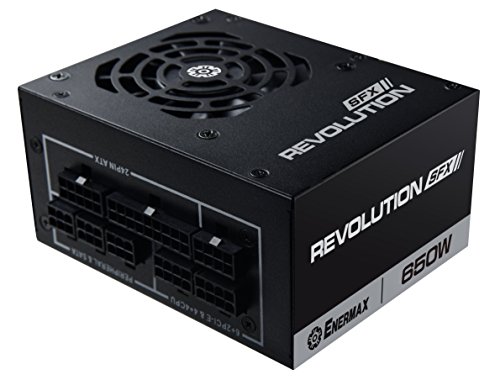
Enermax REVOLUTION SFX 650 W 80+ Gold Certified Fully Modular SFX Power Supply (ERV650SWT)
tight patrol
sand atlas
https://pcpartpicker.com/product/3ZzhP6/lian-li-sp-750-w-80-gold-certified-fully...
gonna go with this one i think
really struggling to make my new case work so hopefully that helps
speaking of anyone with a ssupd meshlicious had the front panel not stick?
or find something for using the hdmi and display port in the case/
?*
struggling with clearance
fierce pivot
my bad i am clearly blind read 750s as 850w's
thorn sparrow
bleak holly
I think this is better suited for <#500101029157797899>.
I feel like it applies to both, but I understand what you are saying. Thank you
tight patrol
tight patrol
speaking of anyone with a ssupd meshlicious had the front panel not stick?
anyone?
fierce pivot
What do you mean the panel won't stick doesn't it click in ?
 rough plover
Hi guys, can someone give me a good PSU SFX for a ryzen 9 7900x + RTX 4070 ti? max 200 $
fierce pivot
What country?
rough plover
UE => Romania
fierce pivot
rough plover
UE => Romania
I'm not sure where you can buy stuff there but anything on the A or B tier that's 750w or more in green text
https://cultists.network/140/psu-tier-list/
PSU Tier List will help you to choose the best PSU out of hundreds of models on the market. From budget to the highest end Power Supplies.
rough plover
yeah, ty ^.^ i need to find something with ATX 3.0 ready
because i find something from Lian Li is ATX 3.0 but have just 12 pins instead of 16
serene siren
You might have better luck getting an atx 2.0 psu then getting a custom 12vhpwr from moddiy made specifically for that psu instead
Safer that way too, only one 12vhpwr plug that could melt or fail, not two
fierce pivot
rough plover
yeah, ty ^.^ i need to find something with ATX 3.0 ready
Nah you could just use the adaptor or if you need the space because sff, corsair sf they have a connector for the 12 pin although it's not actually atx 3.0
https://www.corsair.com/eu/en/Categories/Products/Accessories-|-Parts/PC-Components/Power-Supplies/12-pin-GPU-Power-Cable/p/CP-8920274
rough plover
fierce pivot
Nah you could just use the adaptor or if you need the space because sff, corsair...
yeah, but this one have just pins and RTX 4070 TI need 16, no?
fierce pivot
rough plover
yeah, but this one have just pins and RTX 4070 TI need 16, no?
Some companies count the 4 sense pins in their pin count, some dont
Same connector
bleak holly
Have any of the PSU makers made a adaptor that doesn't look like a rats nest yet?
bleak holly
Are there any issues with the Corsair HX1500i?
bleak holly
mild roost
often not good value but a nice unit
One of the view PSUs I found in Mexico with a high wattage that doesn't have massive import fees.
Few*
mild roost
go for it then
fierce pivot
bleak holly
Are there any issues with the Corsair HX1500i?
Price
bleak holly
fierce pivot
Price
$400
fierce pivot
Yeah that's the problem
bleak holly
Question, how good is Corsair's 10 year warranty?
blissful thistle
Its.... 10 years long
bleak holly
I mean like if the PSU stops working or causes damage to the system what will they do?
fierce pivot
Probably replace/repair like any other warranty
urban tulip
Depends on the reason it stops working
valid gyro
od ? is a 4 tb sada to big for a older sys
sata
wanting to go to a singel hd insted of 2 but ill have a 2 tb external
sand atlas
Depends on how old the system is. If it's Windows XP old then it will only recognize 2TB drives.
sand atlas
I have no idea what n6cc is supposed to mean
valid gyro
AM2 processors: AMD Phenom™ FXN68-S UCC
Phenom II X6 6-Core CPU Ready
Supports UCC feature (Unlock CPU Core)
Hyper Transport 2000 MT/s
Supports Dual Channel DDR2 1066
Integrated NVIDIA® GeForce 7025 graphics, DX9.0 VGA, Pixel Shader 3.0, Max. shared memory 256MB
Supports ASRock XFast RAM, XFast LAN, XFast USB Technologies
Supports Instant Boot, Instant Flash, OC DNA, ASRock OC Tuner (Up to 132% CPU frequency increase)
Supports Intelligent Energy Saver (Up to 20% CPU Power Saving)
Free Software : CyberLink DVD Suite - OEM and Trial; Creative Sound Blaster X-Fi MB - Trial this is what i have now
mild roost
okay so it's a pretty old system
should still work with 4tb of storage
you're running win 10 on it
valid gyro
yes
sand atlas
Phenom is Windows 7 era at least so as long as you have 64 bit Windows you're good
mild roost
storage really is only limited by os support if the system isn't very old
like newer than pre 64 bit era
valid gyro
ok thx
baclky i reblt it for my aunt with recyeld hd but im wanting to put a singel hd in it
backly all she wants it for is word prossing and internet
sand atlas
Just double check it's 64 bit windows
valid gyro
ok
sand atlas
Right click the start button and hit "system" to find out
It'll be under "system type"
valid gyro
ok thx
tight patrol
fierce pivot
What do you mean the panel won't stick doesn't it click in ?
The front one is adhesive
 tight patrol
Ok has anyone successfully put two m2 s in that case to?
tight patrol
mild roost
if the board has enough slots for the ssds
One is on the back of the board
fierce pivot
wont have a heatsink but i believe its pretty doable
 quaint trellis
I need a top-tier case for a 13.3" 4070 Ti Suprim X OC
mild roost
what's the kind of aesthetics and form factor are you looking for?
itx, mid tower or full tower
fierce pivot
I'd go with the phanteks g360a or g500a performance
mild roost
sff psus has coil whine, it's common tbh
 daring hawk
Should i upgrade my case and add more tower fans my case seems to small for my build my case is the Phanteks ecipse g360a atx
lunar root
Check this out on @Newegg: MSI - MPG A1000G PCIE 5.0, 80 GOLD Full Modular Gaming PSU, 12VHPWR Cable, 4080 4090 ATX 3.0 Compatible, 1000W Power Supply https://www.newegg.com/msi-mpg-a1000g-pcie-5/p/N82E16817701016?Item=N82E16817701016&Source=socialshare&cm_mmc=snc-social-_-sr-_-17-701-016-_-02122023
Under $200
mild roost
still too much money tbh
lofty pewter
Damn no 2080Ti/3070(Ti)/3080(Ti)/3090(Ti)/4070Ti in the name. Guess it isnt compatible like the 4080/4090 are. ||/s||
fierce pivot
daring hawk
Should i upgrade my case and add more tower fans my case seems to small for my b...
Nah it's a good case honestly could fit any gpu and up to a 360mm aio
lunar root
mild roost
still too much money tbh
Well this is where we are
Newer tech will be more expensive 
 granite terrace
lunar root
Newer tech will be more expensive <:PepeHands:968900943368319007>
granite terrace
lunar root
Newer tech will be more expensive <:PepeHands:968900943368319007>
thats the problem
the tech will be more advanced leading to higher prices
and in a short time the value depreciates and other tech overtakes the tech
all bcos of our economy 
sand atlas
Inflation has a bit to do with that too. 10% increase in 2 years.
granite terrace
sand atlas
Inflation has a bit to do with that too. 10% increase in 2 years.
yeah..
lunar root
bleak holly
Has anyone ever made a PC case that looked like a snake?
sand atlas
As in the shape of a snake or snakeskin texture
bleak holly
shape.
sand atlas
There's this from a custom job done by MSI in 2015
 bleak holly
I really like the concept of creature shaped pc cases.
bleak holly
sand atlas
There's this from a custom job done by MSI in 2015
Not quite what I expected.
sand atlas
You could probably do something with an open air case/test bench and a 3D printer
bleak holly
You mean like taking one of those really basic open air cases and 3D printing a frame around them?
bleak holly
Mhmmm, might try that or something similar in the future. For now, my focus is to get my pc finished and replace my drawing tablet that got stolen.
Are decent 3D printers still very expensive?
sand atlas
Moderately
bleak holly
$300?
sand atlas
That'll get you started on a basic system that doesn't totally suck
bleak holly
What would you say gets a person a decent starter 3D printer with the kind of print space needed for the task you suggested.
sand atlas
Considering ITX is 170mmx170mm and it'll need to accomodate the rounded design... Probably want at least a 250mm bed
bleak holly
I see.
sand atlas
You could get a decent one for about $500-600
bleak holly
Holy smokes, just for a 250mm bed?
sand atlas
Well that gets you into the large printer category where they have about 400mm beds
bleak holly
Oh.
sand atlas
It's 500-600 for the whole deal
bleak holly
Okay, that makes more sense.
I thought you meant $500-600 just for a bed size of about 250mm.
bleak holly
So $500-600 gets me a print bed of about 400mm on a decent printer along with anything else I'd need for the printer? (excluding resin of course.)
sand atlas
The starter kit will have everything you need to do your first prints
Then the more advanced stuff will need different materials
bleak holly
If that's the case, after I finish my pc and the such I may look into saving up for a few months to get a printer as that would be a fun machine to use.
bleak holly
In my old science classroom, my teacher had 4 3D printers that he'd let us use.
Okay I gotta look this up. Human Shaped PC Case.
R.I.P closest thing I could find was this.

Though in anycase if I get a 3D printer it would be fun making a pc case for my current system, would make for a nice lil pc deco. I7-10700f + 3070.
well I gotta sleep, thanks for the help and have a good evening.
sand atlas
G'night, you too
bleak holly
Cool pc case.

 dusk pasture
 sullen island
Hi! My girlfriend computer SEEM to get power issue, but the newegg power calculator say i need 500-599W but she got a 650W! Does it really the power or it could be something else...
My kid was playing Lego StarWars and it's close very often, just after few minutes of play.
One time the machine reboot and did not find the SSD boot drive (the only drive)!
blissful thistle
sullen island
Hi! My girlfriend computer SEEM to get power issue, but the newegg power calcula...
What gpu and cpu, and what is the model of power supply
sullen island
ASUS tuf rtx 3060, i5-12400 and Corsair RM650x
fierce pivot
thats just fine
fierce pivot
or power supply usually pretty overpriced too
sullen island
Too late guys! 🫠 already built
hollow leaf
sullen island
Hi! My girlfriend computer SEEM to get power issue, but the newegg power calcula...
Are you monitoring thermals on your cpu/gpu? Do you have any overclocks on your cpu/gpu/ram?
sullen island
No overclock
I check temperature quickly it said 39 C but the game was not running... then I should monitor temperature in game? I have only one monitor on that machine
bleak holly
sullen island
I check temperature quickly it said 39 C but the game was not running... then I ...
Check the temps during gaming.
Idle temps aren't important.
sullen island
Could I record the temperature while gaming? Like start an app before the game?
hollow leaf
sullen island
I check temperature quickly it said 39 C but the game was not running... then I ...
What you could do is download WhoCrashed and see if your drivers are crashing.
hollow leaf
sullen island
Could I record the temperature while gaming? Like start an app before the game?
Not that I'm aware of, but I have 5 monitors so I never need to record it.
There could be.
sullen island
Btw I got Noctua NH-U9S CPU cooler
 twilit knoll
Is the Newegg psu calc good?
sullen island
Yep! 500 to 599W
twilit knoll
The estimate I got was 700-799 and I have an 850. I should be good as well?
hollow leaf
twilit knoll
The estimate I got was 700-799 and I have an 850. I should be good as well?
What cpu/gpu do you have?
twilit knoll
Not trying to steal your question or anything @sullen island just trying to piggyback
Currently have a 4070ti, haven’t gotten a new cpu yet
Either 13600k or 13700k
blissful thistle
twilit knoll
Is the Newegg psu calc good?
No
blissful thistle
twilit knoll
Either 13600k or 13700k
A good quality 750w would be a good idea
Rme is the cheapest in the US rn, the 850 is only $15 more though
twilit knoll
I have an 850 currently
blissful thistle
What model
twilit knoll
Rx Corsair I believe it is
blissful thistle
Nice
twilit knoll
RMx
hollow leaf
twilit knoll
Either 13600k or 13700k
Do you do any editing or tasks that would require you to need more cores? If not I'd just go with the 13600k
twilit knoll
No, just gaming
hollow leaf
then def just go with 13600k.
twilit knoll
I’ve been told to go 13600k but idk why im leaning towards the 13700k
Guessing because technically it is faster
I think lol
hollow leaf
twilit knoll
I’ve been told to go 13600k but idk why im leaning towards the 13700k
because it says i7 and has "MOAR CORES!!"... will be wasted if just gaming.
blissful thistle
twilit knoll
Guessing because technically it is faster
It's 2% faster in gaming tasks
Probably less with a 4070 ti
hollow leaf
even the 12600k is way more than enough for gaming. I believe the same can be said for a 12400.
blissful thistle
12400f with a 4070 ti is fine
hollow leaf
I game at 1440p on a 12600k with 5 monitors and a crap load of tasks while running games and not once have I experienced any bottleneck.
blissful thistle
I'd aim for 12600k/13400f personally, but 12400f would do the job
hollow leaf
isn't the value of the 13400 a bit crappy compared to value of 12400 or 12600k?
iirc the 13400 is just a worse 12600k, but a fat increase in price over the 12400.
blissful thistle
hollow leaf
iirc the 13400 is just a worse 12600k, but a fat increase in price over the 1240...
Eh, rn 12600k is same price as 13400f so it is a better buy
But with 13400f normally being cheaper, as well as being cooler, id go for it
past harbor
I've seen the 13600k actually faster than 13700k in some games. It's about boost behavior & most games don't use many cores.
twilit knoll
So I should get the i5 13600k? Over the 13700k
upbeat dew
yes
 chrome yacht
anyone have any experience building in one of those Borg Cube atx cases? if so, how is it and how is quality? is it worth the price/
sand atlas
chrome yacht
anyone have any experience building in one of those Borg Cube atx cases? if so, ...
The company that makes it is known for making decent enough stuff. I wouldn't do a super high end build in it for airflow reasons but it would be a nice novelty case.
 ornate nimbus
So question, would an undervolt 3070 rtx work well with an 600 gold psu?
upbeat dew
depends on your cpu as well
ornate nimbus
Its an i5-11400 @upbeat dew
I did check it on newegg and they said it needed an 500-599 if I'm only using 2 SSD cards but more than that, I need 600-699w
upbeat dew
3070 draw about 250w, and the cpu will be on low utilization most of the time, maybe 50w, plus 100w from mobo things... you will be hitting like 500 only
600 is fine
ornate nimbus
Okay then sounds nice
upbeat dew
you will be on the edge tho
a more powerful gpu will shut down the system, like a 3080 as an example
upbeat dew
a 3080 will be fine on 750
blissful thistle
ornate nimbus
So question, would an undervolt 3070 rtx work well with an 600 gold psu?
What model psu
3070 fine on a 500 with an 11400 in most scenarios
sand atlas
upbeat dew
a 3080 will be fine on 750
I've tripped my RM850x twice so that's a big "it depends"
fierce pivot
ornate nimbus
Dunno what brand tho
If you take the back panel off you should be able to see the sticker on the psu and you can send a pic here we would be able to tell if it could handle a 3070
 hybrid basin


ornate nimbus
fierce pivot
If you take the back panel off you should be able to see the sticker on the psu ...
Okay I do it when I open my PC then
blissful thistle
Does this case support normal sized psus? https://pcpartpicker.com/product/CzfmP6/silverstone-sg13-v2-mini-itx-tower-case-sst-sg13p-usa

Silverstone SG13 V2 Mini ITX Tower Case (SST-SG13P-USA)
According to pcp it does but I'm not sure I trust it
sand atlas
blissful thistle
According to pcp it does but I'm not sure I trust it
According to the Amazon page, "The SG13 features an ATX-compatible power supply mount and can fit ATX power supplies up to 150mm long"
blissful thistle
sand atlas
According to the Amazon page, "The SG13 features an ATX-compatible power supply ...
Ty
vagrant lantern
anyone got a good matx case under 90$ on amazon
fierce pivot
Honestly there's not many actual good matx cases because you can just use an atx case and get better airflow etc and matx is just less tall and then there's itx if you actually wanna go small
bleak holly
Are there any issues with this PSU?
https://www.amazon.com.mx/SilverStone-Technology-alimentación-Totalmente-SST-HA1300R-PM/dp/B0BVGQ3NZK/ref=mp_s_a_1_35?crid=20VIQCH81Q6YI&keywords=atx+3.0+psu&qid=1677084596&sprefix=atx+3.0+psu%2Caps%2C398&sr=8-35&ufe=app_do%3Aamzn1.fos.2f990652-065f-4ce4-905d-4c9d6a080141

Desde la introducción del estándar ATX 3.0, SilverStone ha sido el líder en esta nueva generación, siendo la HELA 850R Platinum la primera fuente de alimentación compatible con ATX 3.0 que se lanzó ampliamente en septiembre de 2022. Dos modelos adicionales de la serie HELA ahora siguen con los 12...
Contemplating between this and the Corsair HX1500I. About the same price. Leaning towards the Silverstone one because I'd prefer not having a giant adaptor cable mess.
NVM just looked at Corsair's adaptors which are surprisingly not as messy as the other ones I've seen.
fierce pivot
bleak holly
Are there any issues with this PSU?
https://www.amazon.com.mx/SilverStone-Techno...
i mean the price

Las fuentes de alimentación totalmente modulares de la serie CORSAIR RM1000x con conectores EPS12V están construidas con componentes de la más alta calidad para ofrecer una alimentación eficiente 80 PLUS Gold a su PC. Las PSU RM1000x utilizan solo condensadores japoneses de 105 °C, para una larga...
just get that and if you reallly want the 3.0 native just get the 20$ cable from corsair
bleak holly
fierce pivot
just get that and if you reallly want the 3.0 native just get the 20$ cable from...
What do you mean native?
Isn't it still a adaptor?
fierce pivot
bleak holly
Oh, so it's 1 plug that splits into 2 or more.
fierce pivot
doesnt have technical atx 3.0 capabilities with the talking between gpu and psu but its same connector
just how a regular pcie cable would
fierce pivot
Yes but what in the hell would you need a 1500w psu for
I think so anyway can't remember the layout
If it's type 3 or 4 it can
timid basin
HX1500i is 2022, so type 4
 fickle bison
I'm currently looking for a PSU between 500 and 800 watts which is as quiet as possible for an "always on" machine. Any recommendations for this at all?
fierce pivot
fickle bison
I'm currently looking for a PSU between 500 and 800 watts which is as quiet as p...
I've honestly never heard a psu make a noise over the low hum of the fans anyway, what parts are gonna be in it?
fickle bison
fierce pivot
I've honestly never heard a psu make a noise over the low hum of the fans anyway...
Well that's the bit I want to be quieter 😅 the fan to not be quite so loud.
It's a machine I've had for a while and the fans in it now don't make a noise. The only think making a noise is the PSU fan pretty much. And it's in my bedroom so would like it to be quieter for when I'm sleeping
fierce pivot
What specs are in the pc?
Is it actually running any load over night because no fans will make no noise at all even if they're not loud they have to make some sound
If it was running any load it would deff not be silent
fickle bison
fierce pivot
Is it actually running any load over night because no fans will make no noise at...
Well thinking about it, I know you can get those PSUs where the fan only turns on under certain load. This one doesn't have that capability but that could be an option.
I'll have to get back to you on what the specs are. Don't have them handy right now
blissful thistle
I'm assuming it's hosting a server or something along those lines if it stays on over night
fierce pivot
Yeah that's basically your only option, no worries whenever you can just trying to recommend a good one depending on pricing and requirements
blissful thistle
If mining weren't dead I'd say maybe that
fierce pivot
Not me finding it okay going to sleep at 60% gpu fan speed 
blissful thistle
I used to sleep with gpu at 80%
fierce pivot
I did 70% for a bit too but 60% was bettter and doable
fickle bison
Na definitely not mining haha. Specs certainly aren't good enough for that.
It'll be definitely be a server that's running on it, yes. Multiple different types of things really
sand atlas
fickle bison
Na definitely not mining haha. Specs certainly aren't good enough for that.
It...
There's lots of power supplies that have a "hybrid fan" function where the fan only spins up if the power supply is hot. That would be dead silent at idle or low load.
fickle bison
fierce pivot
I did 70% for a bit too but 60% was bettter and doable
Asrock AB350 Gaming-ITX/ac
Ryzen 3 1200
16GB DDR4 2400 (8GB x 2)
MSI Geforce GTX 1050
It's not been built for for part efficiency originally. Was just something that got thrown together ignorantly
fickle bison
sand atlas
There's lots of power supplies that have a "hybrid fan" function where the fan o...
Yeah I'm wondering if something like that could be what i want 🤔
fierce pivot
fickle bison
Asrock AB350 Gaming-ITX/ac
Ryzen 3 1200
16GB DDR4 2400 (8GB x 2)
MSI Geforce GTX...
id probably get this its a pretty silent one, if its not in stock the 750w is the same price
https://uk.pcpartpicker.com/product/8ZJgXL/fractal-design-ion-gold-850-w-80-gold-certified-fully-modular-atx-power-supply-fd-p-ia2g-850
https://uk.pcpartpicker.com/product/mL92FT/fractal-design-ion-gold-750-w-80-gold-certified-fully-modular-atx-power-supply-fd-p-ia2g-750

Fractal Design Ion Gold 850 W 80+ Gold Certified Fully Modular ATX Power Supply (FD-P-IA2G-850)

Fractal Design Ion Gold 750 W 80+ Gold Certified Fully Modular ATX Power Supply (FD-P-IA2G-750)
sand atlas
Not a hybrid fan but it does say it's a very low speed one at least
fierce pivot
sand atlas
Not a hybrid fan but it does say it's a very low speed one at least
its got the blue legend on cultists and i trust luke which means quiet
sand atlas
That means quiet under moderate load too iirc. Good. Especially since that'll be nowhere near capacity usage.
fierce pivot
yep
lofty pewter
I'd look at min load for active fan. So many hybrid models suck due to poor fan hysteresis causing the fan to constantly toggle between off and on during certain workloads (some of which could be quite common, like idling or light/mid/heavy games).
The few models I've had were technically good, but real world usecase made them terrible in the sound department.
fickle bison
This machine won't be running any actual games at all.
It's gonna be running a server OS with different types of stuff and maybe be downloading things overnight etc
Nothing all that intense really
fickle bison
fierce pivot
id probably get this its a pretty silent one, if its not in stock the 750w is th...
I'll take a look at the options, thanks
hollow leaf
sand atlas
There's lots of power supplies that have a "hybrid fan" function where the fan o...
Mine has this, but I've been skeptical of using it. Not that I hear it already anyways, but I'm afraid whatever sensor that is in it will fail and it'll just not kick on causing my PSU to overheat. 
sand atlas
If you can't hear it as it is there's not really a reason to turn it on
Except fan life but that's a minor thing
 exotic perch
Why do SFX PSUs cost so much.
blissful thistle
Sff tax
fierce pivot
exotic perch
Why do SFX PSUs cost so much.
timid basin
sand atlas
That means quiet under moderate load too iirc. Good. Especially since that'll be...
which is something most people won't hit anyways
and to be fair
ion gold is quite literally a slightly downgraded ion plat
both are Highpower #818 (also used on Hela 850R)
candid moth
Best 1000W psu for reasonable price?
My 850 doesn't seem to be good enough for my system 😢
fierce pivot
candid moth
Best 1000W psu for reasonable price?
Country? and what psu and specs do you have
candid moth
fierce pivot
Country? and what psu and specs do you have
Part List - AMD Ryzen 7 7700X, GeForce RTX 3080 10GB, Lian Li LANCOOL 215 ATX Mid Tower
I know it should theoretically be enough
But I am having weird display issues that looking around PSU seems like a culprit
I'd rather spend 200 on a nice psu than 800 on a new gpu if it could fix it!!
fierce pivot
candid moth
USA, https://pcpartpicker.com/list/DxpxMb
That's on a great 850w should be more than plenty, have you tried using DDU?
candid moth
fierce pivot
That's on a great 850w should be more than plenty, have you tried using DDU?
10s of times 🥹
I’ve done everything I can think of
fierce pivot
candid moth
10s of times 🥹
Can you describe or show the graphical issue?
candid moth
But I’ve seen some random stuff about gigabyte software causing issues so I’m gonna do a clean windows install
candid moth
fierce pivot
Can you describe or show the graphical issue?
The fans go to max speed, screen goes black
Can’t recreate it in any benchmark or game it’s seemingly random
And outside of that my GPU is performing way above expectations(if OCd)
But the issue persists on base settings
fierce pivot
Just for the sake of it, download hwinfo64, open up the sensors, look for gpu hotspot and down occt and put on the power mode and watch to see if you're getting above like 95c hotspot
Also try download whocrashed to see why you've been crashing
candid moth
fierce pivot
Also try download whocrashed to see why you've been crashing
The weird thing is I don’t know if it gets logged as a crash anywhere, because I can still hear audio and input audio like on discord calls
But if I’m hosting a game that game stops, and if I make an input it doesn’t go through
candid moth
fierce pivot
Just for the sake of it, download hwinfo64, open up the sensors, look for gpu ho...
Done it before and I think it was fine but I’ll check again just for the sake of it
fierce pivot
okay no harm in checking, otherwise if whocrashed doesnt pick it up you can have a search in event viewer for something timestamped around when you last "crashed" and send a screenshot of the page
candid moth
And which settings should I select in OCCT? This things a mystery to me I just picked something someone recommended last time
fierce pivot
candid moth
And which settings should I select in OCCT? This things a mystery to me I just p...

also keep an eye on these at the bottom too
 candid moth
Alright sweet, give me a little and I’ll run it
candid moth
@fierce pivot well I left to go use the bathroom and the issue occurred, probably 10 minutes in
Checking out the dumps now
fierce pivot
Alright lets see then
candid moth
WHOLEEEE lotta errors wow

Using whocrashed rq!
Whocrashed doesn't pickup on this error, only ones from when I had bad ram in january
I have a hwinfo file but no clue how to read it....temps were around 86C when I left but it was a good two minutes and it had not stopped heating up
And it's all linked to AORUS LCD SERVICE
And oculus in some way
This thing is impossible to read
Gonna clean install windows and not download gigabyte software to be safe i guess!
fierce pivot
That would be my best guess
sand atlas
candid moth
WHOLEEEE lotta errors wow
None of that is particularly concerning and I'm not at all surprised they're related to RGB
The RGB controllers might not respond to every single status request, triggering an error
candid moth
That's exactly what it said
My GPU has a little LCD on it
It does NOT like the work well I guess
Kept saying there was a timeout in response with AorusLCD or something like that
followed by a crash
Really goofy that it's even a thing on this GPU
running OCCT now and it all seems fine
although junction and hotspot are reaching 90C, not sure if that sok
upbeat dew
yeah, if your psu was the culprit your whole pc shut down, not just the display
candid moth
Man I saw so many people saying they RMA'd this card for this specific reason and spent months trying to get it back
upbeat dew
90c hotspot dang
i mean, is not dangerous, but dang, its high
i feel kinda worried when mine reach 76c
candid moth
memory junction is 84C max
Hot spot is 90.8 max
How would one go about lowering these?
Just for ease of mind
Here wait I'll go the the GPU channel
upbeat dew
should be some on youtube
 craggy mirage
Ravell, that first water cooler I owned, the one that broke like 8 years ago, was a Corsair that came with thermal paste. Forgot the Forums, I think it was Tom's Hardware. I had 7 people tell me not to use their thermal paste that's provided, and use Coolmaster instead. Not sure what's top of the line today, but years ago, was glad I reseated with better thermal paste. Only 3 days later, when I went to clean my first I7 I got, right before It's initial release, the paste was hard like plaster, and basically used a PC minivac to get it all off the CPU. Was very crumbly.
Oh, it was pretty conductive too. Used my air compressor after.
upbeat dew
well... that was 8 years ago
technology even thermal paste tech advanced a lot to this point
fierce pivot
candid moth
How would one go about lowering these?
Increasing fan speeds is the easiest way, you could repad your memory but honestly it's a pain and those temps are okay, I'd personally make your fan curve go to 100% at 70c
Although those temps are fine
hollow leaf
candid moth
Hot spot is 90.8 max
Seems about right for the Aorus Master. I have the 12gb version and my hotspot was hitting 97c. Once I swapped to a case with bottom airflow going directly up to my GPU, that hotspot max dropped to 86c.
candid moth
hollow leaf
Seems about right for the Aorus Master. I have the 12gb version and my hotspot w...
Might add some fans in the bottom then, or repaste at some point
Have an aggressive overclock though so I’m honestly fine with temps
hollow leaf
candid moth
Might add some fans in the bottom then, or repaste at some point
If the case isn't set up to bring bottom airflow directly from outside the case then it likely won't have any substantial effect. Repaste would be best best. I haven't done mine, but watching teardown vids of the card, it looks easy.. just gotta go slow slow and pay attention.
fierce pivot
Imr with my gigabyte gaming oc, it wasn't tightened super well
I'd just unscrew the 4 screws on the backplate and rescrew in an x pattern and see if that works
 sick viper
I am still looking for compact cases with good cooling, even if it is something like an open bench. Even something I could DIY as I know a place where I can borrow tools. Even better if I can attach a monitor to it. My original idea was to make a pelican case PC, but honestly I am not sure I want to irreversibly mangle a pelican case and make it no longer waterproof.

I mean this does look kinda neat
As for cooling I feel There is a better way to get air to circulate in there that doesn’t require me to be an engineer to understand.
sand atlas
sick viper
I am still looking for compact cases with good cooling, even if it is something ...
You can make holes in a Pelican case without compromising waterproof-ness. You just need to use the right cables or coupler. https://www.l-com.com/audio-video-waterproof-hdmi-cables
upbeat dew
and some rubber washers for the exterior
sand atlas
That's what those are but better
upbeat dew
ohhhh true
i was thinking more on the screws for the mobo standoffs
but those waterproof hdmi mounts are kinda cool as well
sand atlas
3M tape a baseboard to the case
upbeat dew
that sounds even better than my caveman idea for standofs e_e
sick viper
sand atlas
You can make holes in a Pelican case without compromising waterproof-ness. You j...
i need somthing wide and squareish but no such thing exists
also I could probably work out something to add some vibration resistance
daring hawk
How do I check to see if my PSU isn’t working/isnt performing well
sand atlas
OCCT power test for 30 minutes will load it up to the max, watch voltage while it does that
PSU issues are very hard to pin down tbh, you can only test for so many problems
timid basin
PSU Tier List will help you to choose the best PSU out of hundreds of models on the market. From budget to the highest end Power Supplies.
Since a few people mentioned ATX 3.0 being included into the list, might as well show that Juular did some solid work 😄
sand atlas
Updates are always appreciated 👍
vagrant lantern
is second hand psu reliable? for budget builds?
vocal tree
I believe people do it all the time, but I think I would generally try to get them new instead
sand atlas
Depends on how old the PSU is. Normally it's fine but you'll want the age to be less than the standard warranty for that model in general.
So if it's a 5 year warranty unit, probably 3 years or less used I'd be comfortable using.
 olive geode
I've installed a new PSU but the computer won't turn on. And I don't know why
blissful thistle
olive geode
I've installed a new PSU but the computer won't turn on. And I don't know why
Did you change the cables
And did you switch the psu on
If you didn't switch the cables do, if you're lucky just change the cables and you're fine
olive geode
Both PSU 's have their own sets of cables. I'm double checking the connections, it feels like I can push the 24 pin in any further but is that little latch supposed to close around the notch on the motherboard?
blissful thistle
Pic?
olive geode

 olive geode
I'm also realizing I've unplugged something that wasn't even a part of the old PSU, and now I gotta go through old photos of my computer and see if I can put those tiny connectors back in the right order
 tame cape
It should but sometimes cheaper PSUs cables are difficult to push in till you hear the click, so yes it should go all the way in but don't push the connector too much or it could also break
Probably bad psu or motherboard quality and that's why it doesn't lock in place
olive geode
This is apparently what the power and reset switch was supposed to connect to. I just don't know where exactly to connect the connectors. They have "reset sw", "power sw", "power led-", "power led+", and "hold led -+"
 sand atlas
olive geode
This is apparently what the power and reset switch was supposed to connect to. I...
sand atlas
olive geode
This is apparently what the power and reset switch was supposed to connect to. I...
 past harbor
Helps to just zoom. The small arrow on 1 side of a connector generally means positive I think, but also pwr/reset don't care about polarity (leds do).


 fierce pivot
260$ for a 1200w skull emoji
mild roost

violet rock
is it still seabubonic
sand atlas
Probably. It's likely all they did was add the 12VHPWR connector to their (already A tier) C series units.
urban tulip
- jack up the price
 gloomy aspen
I got the Montech x3 mesh, and it has a reset switch but no fan controller, so does anyone know what it does?
sand atlas
Reset usually wires to the motherboard to do a hard reset without killing power
Other times you can wire the reset to a RGB controller to adjust colors
gloomy aspen
like an led reset switch for the fan colors
sand atlas
It would cycle through RGB colors/modes in the case that it's wired to a controller yes
gloomy aspen
yes but the case doesnt have a controller it has all the fans daisy chained in molex
sand atlas
Then the first case applies, where the reset is used to reset the system
gloomy aspen
oh okay thank you
 glass tundra
I need help with the psu cables on the thermal take tough power gf1 650 w

Billion cables
But not even the manual help me figure it out
 tired summit
glass tundra
tired summit
glass tundra
What do you need help with? This is from the manual

If can give us the motherboard, graphics card, and storage device (m.2, ssd, hdd), we can try to let you know exactly what cables you'll need
Just for reference, though:

 sand atlas
yes
glass tundra
Only the long side of the pci-e goes in
But there’s 2 close connectors and on the power supply there’s 2 connectors
Is only the 1 by itself supposed to be in
??
sand atlas
The two close ones go to the GPU and the one furthest away goes to the PSU

There's multiple spots on the PSU to plug into, usually you just pick one that fits and it works.
glass tundra
Thx
 languid olive
I need a case preferably no rgb
languid olive
Somewhere 100 or lower, the size could be mid range or full doesn’t really matter and i like mostly black
 carmine oyster

The CORSAIR 4000D AIRFLOW is a mid-tower ATX case with easy cable management and exceptional cooling. A steel front panel offers optimal airflow to your components, accompanied by two included 120mm AirGuide fans designed with anti-vortex vanes that enhance cooling. The CORSAIR RapidRoute cable m...
languid olive
Need a power supply, the one thats been shipped is coming too late
Nvm i found one
bleak holly
Is the TT Tough power GF3 1650w also A tier?
sand atlas
Yes
 burnt crane
I'm possibly upgrading my PC soon. I have an 850w Platinum PSU by Seasonic. I'm thinking of getting a 7900 XT GPU, upgrading to 64 GB of RAM and a Ryzen 9 5950X, will that PSU be enough?
Said GPU I'm looking at I don't think is an OC model
sand atlas
64GB is totally unnecessary if you're just gaming, but yes that PSU will be fine
Also if you're gaming the 5800X3D destroys the 5950X, and competes with the 13900k in a lot of titles
If you're doing actual work then disregard that
burnt crane
Actual work. I do a lot of animation and video editing
So thank you!!! Good to knkw @sand atlas
fierce pivot
If you don't have an am4 board 13600k(f) or 13700(k)(f) would be a better choice imo
 coarse sable
Which is better?
MSI MPG A750GF 750W 80 Plus Gold Certified Power Supply
OR
EVGA Supernova 750 GT, 80 Plus Gold 750W
OR
Should I get Whichever is cheaper?
blissful thistle
coarse sable
Which is better?
MSI MPG A750GF 750W 80 Plus Gold Certified Power Supply
OR
E...
what gpu
coarse sable
7600
blissful thistle
?
coarse sable
Rx7600
coarse sable
R6700**