#cpus-mobo-and-memory
1 messages · Page 227 of 1
 wintry girder
X61 isnt worth it
 vast meadow
 glossy wave
Water cooler
glossy wave
Water cooler
You said you already had it?
Why is that an issue?
Surely nzxt would send you out an am4 bracket?
vast meadow
If not I'd replace it with a frost spirit 140/scythe fuma 2/arctic liquid freezer ii/ek rgb/lian li Galahad
vast meadow
wintry girder
Also why do you need such a high psu wattage?
All the non auto prices, they already have those parts
wintry girder
Ah
 cursive epoch
Even if it doesn't, there's always a workaround kek
Literally grab win 10 and 11 iso
Use the win 10 iso to make bootable usb
Then extract win 11's iso
wintry girder
Do all 10th gen processors support win 11?
cursive epoch
Convert install.wim in sources folder of the 11 iso to install.esd thru cmd
Then slap it into the usb drive, sources folder too
Also yes
Since 8th gen, ms officially supports it
wintry girder
Nice
wintry girder
Do u do that in bios?
vast meadow
cursive epoch
Literally grab win 10 and 11 iso
Not good idea and workaround not needed https://youtu.be/NF6lu6IzIo8

Yet another new thing to consider before upgrading...
CORRECTION: I used the wrong blog post screenshot at 1:14. The Windows 11 release build is 22000.194.
⇒ Become a channel member for special emojis, early videos, and more! Check it out here: https://www.youtube.com/ThioJoe/join
▼ Time Stamps: ▼
0:00 - Intro & Context
1:19 - The Windows 11 "...
cursive epoch
It's usually off by default
lol I literally installed win 11 on my laptop
It's "unsupported" yet I get updates
I don't believe what ms says
In my case it literally went smooth
Cause look at what happened to win 10 being the last os
They never hold their words tbh
wintry girder
Somehow my surface go supports win 11 even though the specs are awful
vast meadow
cursive epoch
It's "unsupported" yet I get updates
Even still that bit is a through up but if cpu not supported it tanks perf
 tepid nebula
CPU for Windows 11
 carmine lynx
why all the sudden is AVG using like 50-90% of my cpu?
 grizzled bloom
Because antivirus
They all do that at some point, it usually stops after it's done scanning or whatever
vast meadow
Although avg is a big fat meh imo anyway
carmine lynx
grizzled bloom
They all do that at some point, it usually stops after it's done scanning or wha...
Yea I just restarted my pc since I didn't run a scan and it went away
carmine lynx
vast meadow
Although avg is a big fat meh imo anyway
Yea I know avg isn't a great antivirus software I haven't put in the time to get a different one
vast meadow
carmine lynx
Yea I know avg isn't a great antivirus software I haven't put in the time to get...
I'd recommend just windows defender and malware bytes
carmine lynx
Alright
I think I have or had malware byt es
I have avg and glary utilities currently
vast meadow
I haven't even heard of the 2nd one
cursive epoch
It's auto acans they run sometimes
I use kaspersky myself and its auto scans are low on resources
grizzled bloom
vast meadow
I'd recommend just windows defender and malware bytes
This plus an ad blocker addon
grizzled bloom
cursive epoch
I use kaspersky myself and its auto scans are low on resources
I just had to kill Kaspersky because it was keeping my UAC locked. I couldn't run any programs in admin mode.
grizzled bloom
It was also blocking my mining even when I had the folder excluded and the behavior shield off
cursive epoch
rip
 lunar pawn
What things i should consider before choosing a motherboard to wed for?
- CPU socket
- Casing front usb port capability
- Number of sata port
- Ram ddr type
What else?
Do ram maximum clock speed also restricted by mobo capability?
 dense frost
Your CPU and RAM type are inextricably linked, so you dont need to specify both
If going Intel, you have to decide weather you want to overclock or not
vast meadow
lunar pawn
What things i should consider before choosing a motherboard to wed for?
1. CPU s...
Ram ddr type wont be a problem, certain cpus are basically locked to certain ram, eg atm all cpus from the past few years are ddr4
vast meadow
lunar pawn
What things i should consider before choosing a motherboard to wed for?
1. CPU s...
And no maximum ram speed should be ignored not a thing unless you want to do hard overclocking and get really expensive ram, and should be completely ignored if going Ryzen, vrm layout and power delivery is very important, number of sata ports is not something I'd bother looking at, you'll at least get 4, front panel case compatibility is something you can pay attention to but i wouldn't care, usually it's just the cases usb c not able to work if there's any incompatibility
lunar pawn
vast meadow
And no maximum ram speed should be ignored not a thing unless you want to do har...
Power delivery and vrm is decided through psu right
dense frost
lunar pawn
Power delivery and vrm is decided through psu right
no. motherboard
lunar pawn
Where can i look for that information?
dense frost
lookt at reviews on Hardware Unboxed, and look for Buildzoid reviews.
Those 2 sources will let you know if a motheboard s any good
cursive epoch
Power supply just supplies the power the motherboard asks
While the motherboard deals with the rest
Through VRMs
vast meadow
lunar pawn
Where can i look for that information?
It's kinda hard you need to look at reviews, or ask one of us lol
 hollow thorn
https://docs.google.com/spreadsheets/d/1d9_E3h8bLp-TXr-0zTJFqqVxdCR9daIVNyMatydkpFA/htmlview#
https://docs.google.com/spreadsheets/d/1yPS3hj_K7EPT4RBWCyjdKNP56pnwDz-IgBc0975-FUg/edit#gid=0

Google Docs
400-series
2020-09-05,LGA1200 VRM list by /u/qhfreddy,Thanks to asdkj1740 @OCN for compiling many sources in this thread: https://www.overclock.net/forum/6-intel-mot...
lunar pawn
So hardware unboxed is a youtube channel eh
hollow thorn
useful
sometimes useful
https://linustechtips.com/topic/1137619-motherboard-vrm-tier-list-v2-currently-amd-only/
Linus Tech Tips
Credit to: @LukeSavenije The following list is based on facts, ranked on power delivery and known problems. The list will include boards that support CPU overclocking available at retail from different brands. There are still differences in performance among boards of the same tier. As a result, ...
lunar pawn
hollow thorn
https://docs.google.com/spreadsheets/d/1d9_E3h8bLp-TXr-0zTJFqqVxdCR9daIVNyMatydk...
This is intel right
lunar pawn
hollow thorn
https://docs.google.com/spreadsheets/d/1d9_E3h8bLp-TXr-0zTJFqqVxdCR9daIVNyMatydk...
Damn, I don't understand at all 😭
hollow thorn
lunar pawn
Damn, I don't understand at all 😭
all you need to know is the overall rating

500 series boards are in a different sheet at the bottom there
lunar pawn
It doesn't list b550 right?
 south atlas
Sup guys I got my hands on a 3060 ti and now I was wondering if I should upgrade my cpu aswell. Rn I have a Ryzen 5 3600. is that a bottleneck for gaming? Ty for your help
 vernal cosmos
Not bottleneck
 smoky widget
@south atlas I would say that the 3600 be good CPU with your 3060ti
hollow thorn
south atlas
Sup guys I got my hands on a 3060 ti and now I was wondering if I should upgrade...
What resolution
south atlas
Rn 1080p but I’m thinking about going 1440p soon
south atlas
Aight ty guys my bank account will be happy about that haha
 naive pendant
and here i am with a 2160p display and gtx 1070 
 devout mothBOT
 Peace_Keeper#0750 has been warned
Reason: Bad word usage
Peace_Keeper#0750 has been kicked
Reason: Too many infractions
devout mothBOT
 ReDBull#8841 has been warned
Reason: Bad word usage
ReDBull#8841 has been kicked
Reason: Too many infractions
lunar pawn
Thank you for all the fam here who gave me tip 👍
I settled for strix b550-a
wintry girder
south atlas
Sup guys I got my hands on a 3060 ti and now I was wondering if I should upgrade...
3600 should pair fine with 3060ti
At 1080p and 1440p
 teal island
Question
Can the ASUS TUF Gaming X-570 Plus support a most recent Gen AMD CPU? I know the chipset should be fine, but I believe I heard something about BIOS or that jazz
grizzled bloom
Yes it can. Small chance you need to update the bios but that's trivial. It has flashback so it doesn't even need CPU to flash.
naive pendant
Hmmm should I get a 2680v4 for 118 bucks, a 6950x for 207, or a 6900k for 167 🤔
The 2680v4 is likely the best deal, but the other ones are overclockable, plus the higher clockspeeds despite the lower core count 🤔
and having a 6950x is cool... plus it'd be a nice addition to my collection
oh who am i kidding, if i want to overclock i already have a 5820k. i should just get the 2680v4 lol
vast meadow
cursive epoch
1080p, eh
Not the best at 1080p but not really worth upgrading, at least until zen 3d cones out
 finite elm
Not worth upgrading if they only game of course.
Other PC uses might make it worth upgrading
vast meadow
Yeah but you'll kinda know if you feel your cpu is lacking and need to upgrade
 gusty ledge
Computer only boots into bios after bios update
cursive epoch
gusty ledge
Computer only boots into bios after bios update
What cpu and mobo?
gusty ledge
ryzen 7 2700 and b450 tomahawk max
gusty ledge
cursive epoch
What cpu and mobo?
i fixed it temporarily by doing a cmos update, but whenever I try to change somethingin bios the same thing happens again
naive pendant
i have a b450 aorus m and i want to upgrade but idk to what any1 have suggestions?
for a r7 2700x
grizzled bloom
There's not a lot that you can upgrade to without upgrading the CPU as well.
Most B550 and X570 boards dropped support for 1000 and 2000 series chips.
My suggestion is hold your money until next gen Intel or AMD at least
naive pendant
i was planning to upgrade the cpu too
grizzled bloom
Ah well that changes things. If you get a 5600X you can pair it with a good B550 board.
Or you could even keep your B450 and just get the 5600X, it won't make much difference, if any.
grizzled bloom
Doesn't matter for a 65W processor like the 5600X, that's why I suggested it
naive pendant
ohh ok
grizzled bloom
It's still going to keep up with even a RTX 3090, no worries about bottlenecks
naive pendant
also i am trying to use a aio to cool my chip does my board support that
or will i need to get a new mobo with cpu opt?
grizzled bloom
It looks like you have 3 headers, one for CPU and 2 for system fans. You can plug the pump into a system fan header and lock the speed to 100%. That's all the special AIO headers do anyway.
naive pendant
alright thx man
grizzled bloom
Happy to help
 limber dragon
grizzled bloom
There's not a lot that you *can* upgrade to without upgrading the CPU as well.
M...
limber dragon
grizzled bloom
There's not a lot that you *can* upgrade to without upgrading the CPU as well.
M...
x570 should have zen+ support on launch bioses
grizzled bloom
Yeah but that would usually mean using flashback to downgrade the version and I'd hate to recommend that
@limber dragon Do you know if there's any X570 max boards, that have the 32mb rom instead of 16mb?
Or B550 for that matter
limber dragon
they dont exist
max was to get support for zen2
and the 32mb roms are generally still dropping zen+ support with zen3 bioses
grizzled bloom
Looks like there's one at least that I can find, a newer model that's $300 and supports as low as the Ryzen 1200
https://www.msi.com/Motherboard/support/MAG-X570S-TOMAHAWK-MAX-WIFI#support-cpu
devout mothBOT
 Re!#3276 has been warned
Reason: Bad word usage
Re!#3276 has been kicked
Reason: Too many infractions
 burnt spear
 wind nest
w hy my minecraft only at 60fps with a ryzxen 7 3700x
wind nest
w hy my minecraft only at 60fps with a ryzxen 7 3700x
Do you have vsync on?
Or an fps limit?
wind nest
burnt spear
Do you have vsync on?
thats what it was I fixed it a couple mins ago appreciate it 🙂
burnt spear
wind nest
thats what it was I fixed it a couple mins ago appreciate it 🙂
happy to help
wintry girder
Does anyone know if this mobo has a nmve slot and if so, where?


 digital kernel
wintry girder
Does anyone know if this mobo has a nmve slot and if so, where?
digital kernel
wintry girder
Does anyone know if this mobo has a nmve slot and if so, where?
It has two, top one is a direct CPU connection, bottom one is through the cipset
If you have an 11th gen CPU the top one will also be pcie 4
wintry girder
digital kernel
It has two, top one is a direct CPU connection, bottom one is through the cipset
So should i use the direct cpu connection or the chipset?
grizzled bloom
Direct is technically better for latency but it doesn't matter in practice
wintry girder
Would the sn550 work with it?
grizzled bloom
Yes
 heady nymph
Does anyone know of a mobo I can find for cheap to match an Intel Xeon E5-2620 V4 20M Cache 2.10 GHz 8 Core CPU
 vernal apex
You would need an LGA 2011 motherboard with native V4 support, so it's not going to be overly cheap
heady nymph
thx
 mild jackal
heady nymph
thx
mild jackal
heady nymph
thx
@vernal apex That's 2011-3, also make sure the chipset supports the cpu.
devout mothBOT
 DextrousBand759#3145 has been warned
Reason: Bad word usage
DextrousBand759#3145 has been kicked
Reason: Too many infractions
 KaoticGaming#9360 has been warned
Reason: Bad word usage
KaoticGaming#9360 has been kicked
Reason: Too many infractions
smoky widget

Intel Core i9-12900K Alder Lake CPU benchmarks show that it offers the highest single-threaded performance & is on par with Ryzen 9 5950X.
Wth. Intel were not joking. The benchmark are insane.
limber dragon
yes, much wow very insane: "Before moving over to the performance metrics, it is stated that the Intel Core i9-12900K peaked at 250W in the AVX2 mode stress test while running at 108C temperatures."
smoky widget
limber dragon
yes, much wow very insane: "Before moving over to the performance metrics, it is...
Correct. Im in awe that numbers. I know that maybe later will be reduced. The temp is not good for longevity of the CPU
grizzled bloom
I'm now 100% convinced intel is leaking intentionally
Think about it, it's the perfect business strategy. You give some info to a known leaker and they generate free publicity and hype. Then if it doesn't live up to the expectations, you just say the leak was wrong.
limber dragon
you dont need any actual leaks when you have wccftech and adoredtv
smoky widget
Who knows who leaked it. But is crazy
limber dragon
let me guess, you cite wikipedia too?
the exiled prince of nigeria could have leaked it, and wccftech will still make an article about it
grizzled bloom
Pffft everyone knows the Nigerian princes are fake now. It's all about Wakandan royalty.
hollow thorn
Nah, it's the old English Royal family
smoky widget
LOL
 main pulsar
 grizzled bloom
Yeah. The whole big/little core thing makes sense but it'll need some flawless execution so there's no increased latency moving a task from one set to another
finite elm
Yeah for sure

 grizzled bloom
What's wrong with the board you have?
 tranquil gull
Nothing neccesarily, but I want a more colorful setup and my nephew is building his own soon so this will go to him if I can get a new one.
grizzled bloom
There's much cheaper options than getting a whole new board for more RGB
tranquil gull
Got any recommendations then?
grizzled bloom
You've got two 4 pin RGB headers right? One top right and one bottom left?
grizzled bloom
Ok, so you can have up to 6-8 4-pin RGB devices using just splitters, but if you want the more advanced aRGB with more color selection you can get something like this that includes a controller that uses a USB 2.0 header
https://pcpartpicker.com/product/8KFXsY/corsair-ll120rgb-led-4325-cfm-120-mm-fans-3-pack-co-9050072-ww
tranquil gull
I have one of those fans, just have to get the stuff to get their RGB working.
grizzled bloom
Perfect, their fans will connect to each other nicely. The hub is included in that pack.
tranquil gull
85$? I can do that. I ordered 32gb of ram Saturday. It will be here tomorrow, then after that I am gonna order a AIO.
digital kernel
limber dragon
yes, much wow very insane: "Before moving over to the performance metrics, it is...
Yikes
dense frost
limber dragon
yes, much wow very insane: "Before moving over to the performance metrics, it is...
that.. doesnt sound so good?
 smoky folio
can a laptop CPU be upgraded with a complete motherboard change
hollow thorn
technically, but you might as well be getting a new laptop
smoky folio
ok thats what I thought, what is the best place to check out motherboard prices
hollow thorn
laptop motherboards? really hard to check those tbh
devout mothBOT
 jackyy#9096 has been warned
Reason: Bad word usage
jackyy#9096 has been kicked
Reason: Too many infractions
smoky folio
ok thanks, wonder how long Microsoft will support Windows 10 now Windows 11 is coming out
hollow thorn
maybe another 10 years
smoky folio
10 years would work for me before replacing my laptop
smoky folio
oh goodness, I'll stick with windows 10 for now, my laptop cannot support Windows 11
hollow thorn
I don't think MS has promised anything about how long they'll support w11 for yet, but yea
limber dragon
hollow thorn
laptop motherboards? really hard to check those tbh
Surprisingly not that difficult (I do 2-3 a week), the only hard part is seeing if you need a new heatsink if there's a gpu on the board, and reactivation of windows/ service tags
cursive epoch
win 10 will be supported until 2025
hollow thorn
limber dragon
Surprisingly not that difficult (I do 2-3 a week), the only hard part is seeing ...
Where?
limber dragon
Amazon and ebay
hollow thorn
Huh
 rocky beacon
You usually can find laptop motherboards on ebay
 subtle crow
Does the 5700G have any significant performance advantage over the 5600G?
hollow thorn
With or without a GPU
subtle crow
without
hollow thorn
Not really
subtle crow
I'm looking to make a workstation with the one of the two cpus as their graphical capabilities seem sufficient
smoky folio
I'll stick with Windows 10 for now, my intel i-5 2.40GHz CUP is not supported for windows 11 at this time.. that may change
subtle crow
yeah, I'm debating on whether the extra 2 cores is worth a hundred dollars
hollow thorn
What exact program are you planning on using?
subtle crow
mostly cad and coding
lots of multitasking
I get by on my i7-6700HQ at the moment
and the M1000M gpu I have on my laptop is about equal to the performance of the rx550 provides plenty of power for my needs
 hushed spear
Question can u use 1-32GB ram with 2-8GB ram sticks?
hollow thorn
you could but no dual channel so I wouldn't do that
hushed spear
Ok if I only have 1-32GB ram stick do I put it in slot A1or A2
naive pendant
just cut the 32GB stick in half duh
hushed spear
I Kno I accidentally bought the wrong one so I'll have to wait till next month to buy a second
hollow thorn
why not just return and buy 2x16
hushed spear
Can I if IV already opened it
hollow thorn
I mean, as long as you have the original packaging, you should still be able to return it
might ask you to pay for shipping back, but that shouldn't be too bad
hushed spear
If I just buy a second 32 of the same one I could still dual channel it right so why not do that instead?
Sry I'm very new to computer stuff 😩
hollow thorn
how much ram do you really need
and using single channel ram is just really quite sad
so performance will suffer when you're only using single stick
hushed spear
Probably not 64 lol
hollow thorn
yea
I have 2x16 and I personally see very few things that might even use more than 32gb
most things won't take more than 16
hushed spear
Well I plan on playing fps and games like ark survival evolved and streaming
hollow thorn
For things such as gaming, it's more about how fast the ram is more than how much
2x8gb 3600c16 would outperform 2x32gb 2666c19 in most games
hushed spear
This 32GB is 3200c
hollow thorn
Memory capacity is just, if you have enough, getting more doesn't do anything (If you don't have enough ram, things go wrong, it might just straight up crash or performance just kinda dies)
But if you have faster ram, the faster, the better performance
I could see ark using a bit more than 16gb of ram because unoptimized but not much more.
I'd grab 2x16 3600c16 over 2x32 3200c16 for better performance on most platforms
(If Intel, z series boards or b560, If AMD, anything beyond Zen+, otherwise you have limitations on getting 3600c16 running)
hushed spear
Ok I'll look into returning it then tyvm I'd love to stay and chat more but I got to head out to work and yes it's a b560
Tyvm for the help I suck at researching thing on the internet
 radiant iron
is upgrading to 4x8gb only a plus no downside to it?
 long yew
1.352v okay for ddr-4 3200?
long yew
radiant iron
is upgrading to 4x8gb only a plus no downside to it?
most people haven't the need for more than 16GB total
radiant iron
long yew
most people haven't the need for more than 16GB total
i know but is there no downside to it?
long yew
2 downsides
one is cost, two is you'll probably never be able to max it out or get near that
by the time you are able to get close to maxing it out capacity wise, it'll probably be time to upgrade to ddr5
radiant iron
what do u mean by maxing it out?
radiant iron
oh right so big overkill is what ur saying?
radiant iron
so cost is the only real downside to this?
long yew
far as I can tell, yeah
grizzled bloom
long yew
1.352v okay for ddr-4 3200?
That's well within spec for every ddr4 chip. Some can go to 1.5v or higher.
grizzled bloom
radiant iron
is upgrading to 4x8gb only a plus no downside to it?
4x 8gb you might need to increase some voltages to keep it stable and it might not overclock as well, but besides that there's no real downside.
radiant iron
grizzled bloom
4x 8gb you might need to increase some voltages to keep it stable and it might n...
would i need to increase voltages manually?
grizzled bloom
Maybe, only way to know is to test it.
If you do, it's just vddg and vddp offset, easy stuff.
radiant iron
grizzled bloom
4x 8gb you might need to increase some voltages to keep it stable and it might n...
and how badly does 4 effect oc
grizzled bloom
It varies. Some chips are barely affected, others won't even hit their xmp rating.
radiant iron
alright thanks
 strong mica
My sister has a 4690k right now, is it worth trying to get a 4790k or a 4790 not k or are they not worth upgrade cost. Going to be at least a year or two before upgrading. She's having issues with valorant it has a 750 ti gpu think it is cpu having issues as reddit says Valorant is cpu intensive.
 crimson monolith
Hi everyone, having an issue tonight.
Super stoked I got a new M.2 SSD, and I added a second one then I get the M.2 genie error. I reset CMOS but it still gave me this error, and I’m currently trying to see if maybe I seated the m.2 SSD not fully in? But it says it’s remapping one of my m.2 SSD in bios. If anyone has experienced this before, what’s the solution? I have a MSI Z490 Carbon Wifi mobo. My Two M.2 SSDs are Samsung evo plus and the first one worked well. I only added the second one tonight
crimson monolith
My motherboard lets me put two M.2 slots so I’m confused why this issue happened. Honestly it’s pretty annoying something so simple as this shouldn’t be complicated
grizzled bloom
strong mica
My sister has a 4690k right now, is it worth trying to get a 4790k or a 4790 not...
That's such a small upgrade, it's not really worth it. The 9600k beats both of them nicely, and for the price of the 4790k you could get a 9600k and a motherboard.
grizzled bloom
crimson monolith
Hi everyone, having an issue tonight.
Super stoked I got a new M.2 SSD, and I a...
Looks like you'll need to disable the M.2 Genie and Optane mode in the bios. First you'll need to prepare Windows for the change, because you're going to be loading a different storage driver. I didn't see any other solutions anywhere.
To prepare windows, you'll boot normally, then hit the windows key+R, and in the run dialog box enter msconfig. In the system configuration window that comes up, go to the boot tab and select the check box for safe mode and the radio button for network.

When you hit ok it'll ask if you want to restart. Go ahead and do that, and then head into bios to disable M.2 Genie and Optane. Should be under Integrated Peripherals. Then F10 to save and restart.
Windows should boot into safe mode now and prompt for your password. Go to the desktop, wait a few minutes, then check the device manager to make sure it loaded the correct driver. If it didn't there will be a yellow triangle with an exclamation mark next to some storage controller.
If it's loaded correctly, go back into msconfig and uncheck the safe mode box. Then shut down the PC and you can install the second M.2 drive.
strong mica
grizzled bloom
That's such a small upgrade, it's not really worth it. The 9600k beats both of t...
I was finding 4790k for around 130 used you can find motherboard and cpu for around that or are you saying for $300 msrp or 240 new price off Amazon?
crimson monolith
My password is a PIN so when that screen comes up, that’s what I will enter?
Question before I do this, my data won’t be erased in any step of this process following your steps?
grizzled bloom
crimson monolith
My password is a PIN so when that screen comes up, that’s what I will enter?
Qu...
As long as you're on the latest Windows 10 version it'll be your pin, yes. That was a recent change, older versions required your full microsoft account password.
No data will be destroyed.
crimson monolith
Sweet! I’ll update you afterwards, thank you so much already for your time and help, it is sincerely appreciated 🤍
grizzled bloom
strong mica
I was finding 4790k for around 130 used you can find motherboard and cpu for aro...
4790k is only 5% or so better than the 4690k. It won't be a significant difference anyway.
mild jackal
Sell it all for something modern
strong mica
Yeah didn't think the 130 was worth it but figured i get a second opinion just is expensive to go new will need new ram and likely case currently in an mini itx case.
grizzled bloom
DDR4 is pretty cheap now tbh
I've seen 16gb kits for around $50
32gb for $80
You could get used too for cheaper
strong mica
True looking at Facebook and eBay trying to find a cheap cpu motherboard combo, some that I am seeing include the ram just going to have to get new case and I have seen a few on Facebook for 10 or 20.
grizzled bloom
Check reddit r/hardwareswap too, a lot of good deals to be found there including combos and near complete PCs
You can put a buy request listing there too I believe
strong mica
Ok will do.
 fathom shoal
Hey guys I have a question I’m trying to buy a pc to play Fortnite and I was reading about one and it said this “However, it does come with drawbacks. The Blaze II does not have NVMe storage, so you'll have to settle for a 500GB SATA SSD. There is an M.2 slot if you're willing to spend a little extra on an M.2 SSD. Overall, the Blaze II is a nice budget PC that should please most people” do you guys knows if this is relevant or will negatively affect a game or it’s not a big deal ? Thank you
 wise quest
I don’t know what laptop this is, but an nvme drive won’t benefit Fortnite much
crimson monolith
grizzled bloom
When you hit ok it'll ask if you want to restart. Go ahead and do that, and then...
Also, when you mentioned to make sure it loaded the right driver, what should I be looking for by name for the driver?
grizzled bloom
As long as there's nothing marked with a trouble icon it doesn't matter
grizzled bloom
fathom shoal
Hey guys I have a question I’m trying to buy a pc to play Fortnite and I was rea...
98% of games can't use storage faster than sata anyway, the only thing that would really be affected is system boot time and even then it's only a few seconds difference.
fathom shoal
grizzled bloom
98% of games can't use storage faster than sata anyway, the only thing that woul...
Betttt thank you endlessly
limber dragon
grizzled bloom
98% of games can't use storage faster than sata anyway, the only thing that woul...
icarus loads stupid fast on gen 4 nvme, and fairly slow on everything else
 umbral finch
10300h
burnt spear
i believe 4800h will be better, but for gaming gpu is more important
umbral finch
my friend bought a new a laptop and he hases the ryzen 7 4800h , we both have the same gpu ( gtx 1650) does the ryzeen justify the pricing ,cuz mine is for 3600sar ( 2 lazy to convert ) and his is 4500 sar
burnt spear
nah, not cpu alone, but theres probably other things that differ
battery life, cooling, storage size, ram size
umbral finch
idk about battery and cooling but storage and memory are the same
burnt spear
mm
umbral finch
weve played minecraft cuz its more on cpu than gpu and we got the same performance
burnt spear
sure you dont have an fps limit or vsync on?
umbral finch
acctually nvm i forgot that the 144 hz screen he has justifys the price
burnt spear
i mean i dont think that alone would be that big of a price jump
but prolly better battery and cooling too on his
finite elm
strong mica
True looking at Facebook and eBay trying to find a cheap cpu motherboard combo, ...
A lot of people were buying Pre built PC's for the GPU and selling the PC after. You could look at those too.
 clever mango
9700k with a 3060 ti?
clever mango
Big cpu or gpu bottleneck u think?
dense frost
nope
dense frost
not unless you pairing a 3060ti with a pentium ||
dense frost
clever mango
Finally got my hands on 3060 ti
congrats bud. great hardware
clever mango
Yeah I’m a budget man. I’ve had a 2060 fe with a 9700k forever lol
dense frost
thats a nice upgrade. 1080p ultra settings are now yours for the taking 😆
clever mango
Yessir I’m a big 1080p guy so I’m real happy about what’s coming to me.
dense frost
make and model?
clever mango
Wym
dense frost
Make and model of your card (asus/msi/gigabyte 360ti OC etc)
burnt spear
dense frost
9700k = 10700k = 11700k
10700k has a good bit better mc doesn't it?
And slightly better single?
Still works great with 3060 ti
Just curious
burnt spear
clever mango
Evga ftw3
I mean asus strix is the best air cooled card
Like without a doubt
Ftw3 is definitely a great card tho
dense frost
burnt spear
10700k has a good bit better mc doesn't it?
yeh. sorry, 10700 has mutithreading, 9700k is 8c/8t
but for gaming... meh
burnt spear
Yeah still great to pair with a 3060 ti
Would be fine with probably even a 3080 ti at 1440p
dense frost
absolutely
dense frost
burnt spear
Ftw3 is definitely a great card tho
very very good
burnt spear
It's a bit better than 3700x no?
For gaming that is
Idk I could be completely off
I think I remember someone here saying that
vast meadow
dense frost
9700k = 10700k = 11700k
9900k~= 10700k
vast meadow
clever mango
9700k with a 3060 ti?
Should be fine
vast meadow
clever mango
I’m my opinion the best there is
Best is the cheapest 3060 ti you can find lol
dense frost
vast meadow
9900k~= 10700k
yes, thats more accurate. thank you 👍
vast meadow
burnt spear
Would be fine with probably even a 3080 ti at 1440p
Ehhh i wouldn't put the 80 ti on it, but it would be fine for 1440p, would struggle to keep up at 1080 lol
burnt spear
vast meadow
Ehhh i wouldn't put the 80 ti on it, but it would be fine for 1440p, would strug...
I said 1440p
vast meadow
Ah missed that
I still would prefer better cpu but would be fine yeah, no point upgrading yet anyway when new cpus around the corner
burnt spear
Well yeah its not the ideal pair, but its far from the worst I've seen
I saw someone pair a 6700k with ddr3 ram with dual 1080s
vast meadow

clever mango
I’m looking to use my pc anyway for competitive gaming and some open world games here and there
At 1080p
So I’ll be fine
Yeah the 9700k is good but only 8 threads
Last gen beast
mild jackal
9900k is too hard to cool without a delid anyway, 9700k can run some nice, sweaty ran oc's too. 4133 c16 tight with average b-die
vast meadow
Yeah no point really going 9900k unless need the multi core anyway lol
mild jackal
Even if you do need the multicore, >1.25v or something will throttle in tough workloads.
devout mothBOT
 vik#0266 has been warned
Reason: Bad word usage
vik#0266 has been kicked
Reason: Too many infractions
devout mothBOT
 LAYBITZ#0878 has been warned
Reason: Bad word usage
LAYBITZ#0878 has been kicked
Reason: Too many infractions
 leaden mirage
Thinking of upgrading my r7 5800x to an r9 5950x, but I think I’d end up gpu-bound with the RX 5700 XT
devout mothBOT
 TooTallCreeper#1628 has been warned
Reason: Bad word usage
TooTallCreeper#1628 has been kicked
Reason: Too many infractions
crimson monolith
grizzled bloom
As long as there's nothing marked with a trouble icon it doesn't matter
I didn’t see any exclamation marks under the storage controller, but if see them under a lot of other components, that’s fine?
I see them under game controller, monitor, network adapter, software devices (wavetable synth), other devices- base system device, software components (generic software component, Intel dynamic application loader host interface, icls client), and audio
grizzled bloom
Those are fine, they don't load in safe mode is why
vast meadow
leaden mirage
Thinking of upgrading my r7 5800x to an r9 5950x, but I think I’d end up gpu-bou...
For gaming, the jump is margin of error
 south valve
Hey yall, any thoughts about my high end..? build? Going to be buying it max on december.
Feel free to share you're thoughts, but please do keep in mind, keyboards is a peripherals and I just simple like red switches.
vast meadow
south valve
Hey yall, any thoughts about my high end..? build? Going to be buying it max on ...
I assume youve already bought the things with the automatic price?
south valve
vast meadow
I assume youve already bought the things with the automatic price?
didn't buy a single thing
vast meadow
south valve
didn't buy a single thing
Grand I'd make a few changes then
south valve
vast meadow
Grand I'd make a few changes then
aw, I pretty pleased with it
@vast meadow you can go ahead and do changes tho
vast meadow
south valve
Hey yall, any thoughts about my high end..? build? Going to be buying it max on ...
https://pcpartpicker.com/list/qBvQt8 I'd do this, if you want to spend more you can get a 3080 ti for 1500
south valve
vast meadow
https://pcpartpicker.com/list/qBvQt8 I'd do this, if you want to spend more you ...
how can I buy a 3080 ti for 1500
vast meadow
south valve
how can I buy a 3080 ti for 1500
Check pins in #graphics-cards
south valve
vast meadow
Check pins in <#500101029157797899>
don't live in the us
vast meadow
south valve
don't live in the us
Ohh where do you live? Because you're using the us pc part picker
vast meadow
south valve
qatar
Well then basically all my recommendations are probs void lol
south valve
@vast meadow is it fine if I swab just the case and maybe the cooler?
with my current list
vast meadow
south valve
<@191276897227898880> is it fine if I swab just the case and maybe the cooler?
Yeah lancool mesh ii is a decent case but i wouldn't get the corsair cooler, I'd aim for Arctic liquid freezer ii, ek rgb or lian li galahad 360mm aios
south valve
vast meadow
Yeah lancool mesh ii is a decent case but i wouldn't get the corsair cooler, I'd...
well I just want something that looks good
vast meadow
south valve
well I just want something that looks good
They do lol
south valve
vast meadow
They do lol
do u have any photos of them on a pc
vast meadow
south valve
do u have any photos of them on a pc
No but google should and pc part picker has photos ofc
south valve
vast meadow
No but google should and pc part picker has photos ofc
oh alr, lemme see rq
@vast meadow saw it, i don't really like the looks of it
but the thing is
all cases are 120 dollars for shipping
vast meadow
south valve
<@191276897227898880> saw it, i don't really like the looks of it
Hmm okay you do you but I'd really get a 280 or 360mm
south valve
so I would get it here locally, but i don't know what they got
what if they have absolutely bull$hit cases?
@vast meadow you get me?
south valve
vast meadow
Hmm okay you do you but I'd really get a 280 or 360mm
I don't think the lian li Case supports 360 for top mounting
vast meadow
south valve
so I would get it here locally, but i don't know what they got
Yeah would be a bad idea to buy from the us if you live in qatar, look to countries closer to you
south valve
vast meadow
Yeah would be a bad idea to buy from the us if you live in qatar, look to countr...
hm, Saudi doesn't ship here because of past blockade
bro I'm not even Qatari, I'm egyptian Canadian
id rather off wait until college and then go to Canada and buy it, but I don't got the patience
vast meadow
Well you could try germany or something
south valve
vast meadow
Well you could try germany or something
yeah, they all are the same thing
same shipping price
south valve
vast meadow
What about in your country?
?
egypt?
@vast meadow people in pcmr recommending the lian li glackhead or idk what's it called
that lian li copler
cooler
vast meadow
south valve
<@191276897227898880> people in pcmr recommending the lian li glackhead or idk w...
Galahad
south valve
mhm
vast meadow
south valve
?
I'm not sure if you're in Egypt or qatar but whichever
south valve
In Qatar
vast meadow
Yeah i already recommended the Galahad lol
south valve
dang
I think I'm gonna get it
but which case tho aa
lian li case doesn't support 360 ontop
vast meadow
south valve
lian li case doesn't support 360 ontop
You can do front mount
vast meadow
south valve
is the phantex case good?
Yeah the p400a can't top mount a 360 but the p500a can, so can the td500 mesh
south valve
vast meadow
Yeah the p400a can't top mount a 360 but the p500a can, so can the td500 mesh
ah alr, lemme see lol
finite elm
@vast meadow check out my latest upgrade 
 vast meadow
Lovely
vast meadow
Smol ram lol
grizzled bloom
1gb is plenty for xp
finite elm
Do people still use XP?
grizzled bloom
I used to run xp on 384mb
finite elm
I wanna get one of those old tan PC's and modernize it. Have a sleeper build.
grizzled bloom
finite elm
Do people still use XP?
Mostly people running legacy programs and benchmarks
finite elm
Ah
 grizzled bloom
I'm partial to 98 SE
vast meadow
I was not alive yet lol
grizzled bloom
My old 98 was the most stable computer I ever owned. I even ran 3d games on it, starcraft, all that good stuff
finite elm
Imma check eBay for an old Compaq
vast meadow
Damm
devout mothBOT
 hammerofdoubt#4091 has been warned
Reason: Bad word usage
hammerofdoubt#4091 has been kicked
Reason: Too many infractions
vast meadow
south valve
<@!191276897227898880> can i dm u
I'd prefer here tbh i like my dms empty lol
vast meadow
south valve
dk what to choose
What are your options?
south valve
vast meadow
I'd prefer here tbh i like my dms empty lol
alr
lemme get the options


@vast meadow
rocky beacon
Galahad
grizzled bloom
MSI is loud
Corsair has garbage software
Galahad is best option
south valve
grizzled bloom
MSI is loud
Corsair has garbage software
Galahad is best option
wait im actually gonna choose corsair
since the front looks way better tbf
grizzled bloom
Ok just keep in mind I've seen the corsair software use 12% of a 5950X just to have a single color
vast meadow
Galahad any day
 weary mulch
I've been wondering if the 5000 series threadripper CPUs were delayed to early 2022 because they will also come with the 3D-Vcache https://www.pcgamer.com/amd-confirms-ryzen-cpu-refresh-with-3d-v-cache-early-in-2022/

pcgamer
Slapping way more cache on existing chips gives an average uplift of 15%.
 vast meadow
finite elm
EK
vast meadow
finite elm
EK
Nice option but they live in Qatar was going off what was available to them
finite elm
oh
devout mothBOT
 centrix#6562 has been warned
Reason: Bad word usage
centrix#6562 has been kicked
Reason: Too many infractions
 Decimo#0801 has been warned
Reason: Bad word usage
Decimo#0801 has been kicked
Reason: Too many infractions
 bronze furnace
Is the AMD Ryzen 5 5600G good for gaming?
vernal cosmos
bronze furnace
Is the AMD Ryzen 5 5600G good for gaming?
its a great apu but if you dont want integrated graphics, the 5600x is better and the 11400 is best value
11500 if you want igpu and great price
vast meadow
vernal cosmos
its a great apu but if you dont want integrated graphics, the 5600x is better an...
When 11400 at 200$ and 11500 at 220$*
devout mothBOT
 FMR#7777 has been warned
Reason: Bad word usage
FMR#7777 has been kicked
Reason: Too many infractions
naive pendant
devout moth
 vernal cosmos
vast meadow
When 11400 at 200$ and 11500 at 220$*
vernal cosmos
vast meadow
When 11400 at 200$ and 11500 at 220$*
ofc
vast meadow
vernal cosmos
ofc
Ik you know but just fyi for them or anyone else as you don't really here about cpus being scalped/oos a lot
vernal cosmos
yeah fair
umbral finch
What is the best cpu now
devout mothBOT
 That_boy786#5358 has been warned
Reason: Bad word usage
That_boy786#5358 has been kicked
Reason: Too many infractions
 steel marsh
quick question, what are the current market prices for ryzen 5000X series cpus?
steel marsh
bruh this must be a scam
 grizzled bloom
Why would it be a scam? It's just overpriced is all
It's $600 on newegg right now from third party
steel marsh
 umbral finch
noone answered me , what is the best cpu rn
interms of performance in gaming
ik that gpu are more important or someshit but i want to play minecraft on 128 render distance
 supple sedge
umbral finch
interms of performance in gaming
supple sedge
umbral finch
interms of performance in gaming
the absolute best GPU or something that will do 128 render just fine?
smoky widget
AMD 5800X or 10900K since the 11900K is too expensive
supple sedge
feel like a 5600x or 5800x will do just fine on 128
supple sedge
probably the 5900x?
smoky widget
ohh, then 5900x then. Since it has 12/24 and is decently up in single and multicore graphs
umbral finch
k
grizzled bloom
Conventional wisdom says 5950X is best but it's really hard to cool effectively, so it tends to boost lower than the 5900X
smoky widget
So 5900X then @grizzled bloom ?
grizzled bloom
Yes, but it's only like 2% better than 5800X in gaming
supple sedge
yeah honestly if you're just gaming I would almost just go for 5800x
only really need anything better if ur a content creator or something
grizzled bloom
Exactly, no average person needs 24 or 32 threads
smoky widget
Unless the new Intel leaks are true. 😦
supple sedge
we shall see
grizzled bloom
I'd avoid the new platform for now personally, first gen DDR5 will have some growing pains and the new core structure will need optimizing
Once we start seeing DDR5-7000 is about when I'll upgrade
smoky widget
totally agreed @grizzled bloom It's promising but ya
vast meadow
steel marsh
quick question, what are the current market prices for ryzen 5000X series cpus?
Msrp
smoky widget
If you buy them at microcenter, Store only. Sometimes it's decent priced with a mOBO. But mostly everywhere is MSRP @steel marsh
subtle crow
vast meadow
Msrp
Why is it that the 5000 series is selling at msrp while like the r5 3600 is way over?
3300x is also way over
grizzled bloom
They're not being produced any more so it's only old stock, used stock, or scalpers selling
subtle crow
Shame
I almost bought a 3300X
But then it went out of stock and is now only sold for twice the price used
vast meadow
Also cuz 3600 was pretty popular for bit
 zenith spruce
Hi everyone, not sure where to post this so I thought here would be good... I put my computer to sleep at night, but when I wake up in the morning it's been 'on' and this usually means the GPU is not seated properly. However, my RGB are always not what I set them to. I'm using Aura Sync, as soon as I open the program, it goes back to the settings I had, but when it wakes up itself, it's always solid red. Any suggestions?
hollow thorn
..?
rocky beacon
What?
zenith spruce
What doesn't make sense
rocky beacon
The GPU not being seated properly has nothing to do with your computer waking up from sleep?
Also am confused on what RGB has to do with your computer waking up from sleep?
zenith spruce
Well that's what I've been told in the past. I actually reseated the GPU and it corrected the issue for about a month.
My RGB is all set to white, when the computer wakes they're always red until I load the RBG app.
I also don't know why the RGB is changing upon waking up.
This is why I'm here asking
rocky beacon
zenith spruce
My RGB is all set to white, when the computer wakes they're always red until I l...
Your RGB settings are only applying when you have your RGB app open
Is it set to run on startup?
zenith spruce
If I manually wake the computer myself, RGB stays white. It's only when it's waking up on it's own.
vast meadow
mb just dont run your pc overnight if its not mining and if it is mining just set it to not sleep so it doesnt actually stop mining lol?
zenith spruce
But I want it to sleep.... cause I'm not using it. lol
vast meadow
zenith spruce
But I want it to sleep.... cause I'm not using it. lol
thats what shut down is for, having windows keep running for many days is a bad idea anyway
zenith spruce
I guess I could just shut down.
I've always heard with SSD's you can have it sleep for months on end without issues.
vast meadow
zenith spruce
I've always heard with SSD's you can have it sleep for months on end without iss...
i mean you can but windows doesnt like it, its supposed to be restarted every day or 2
zenith spruce
Gotcha. I also just went in and removed the mouse & keyboard from allowing them to wake the computer.
Also seen a command prompt I can run to see what woke the machine up, so I'll have to give it a shot tomorrow and see what it says, if it wakes... if it doesn't, must have been my razer stuff.
 jade nebula
I am looking to upgrade the components of my home computer I built a few years ago to be Windows 11 compatible and looking for recommendations. The current components in my computer are not Windows 11 compatible. Here's the list: CPU:
Intel Core i7 2600K @ 3.40GHz
Socket 1155 LGA
4 cores / 8 threads
Motherboard:
ASUSTek P8Z68-V GEN3
Memory:
DDR3
Dual Channel
32 GBytes
devout mothBOT
 Betoloco#5561 has been warned
Reason: Bad word usage
Betoloco#5561 has been kicked
Reason: Too many infractions
grizzled bloom
jade nebula
I am looking to upgrade the components of my home computer I built a few years a...
You'll need a new processor, memory, and motherboard at a minimum
Maybe $250 for low end modern parts that can beat your old parts
jade nebula
Correct. I am aware I need a new motherboard, processor and memory. That's what I am asking.
grizzled bloom
Ok, a 10100 processor, cheap b560 motherboard, and $50 16gb memory should run you around $250
jade nebula
I would like to upgrade to an 8 core proc and also keep the RAM at least at 32 GBytes like I already have.
grizzled bloom
Ok, how much of a budget do you have for this upgrade in total?
jade nebula
$500 - $1000
 hoary echo
🤔
 grizzled bloom
jade nebula
$500 - $1000
grizzled bloom
jade nebula
$500 - $1000
Ok, do you think you'll need a CPU cooler too? These 8 core chips get VERY hot and standard cooling solutions won't be sufficient. Usually a 240mm AIO is the minimum.
Here's my recommendation https://pcpartpicker.com/list/8QB7Bc
vast meadow
@jade nebula can you resuse your case, power supply and do you have a graphics card or will you be using integrated graphics?
dense frost
grizzled bloom
Here's my recommendation https://pcpartpicker.com/list/8QB7Bc
gotta check if their case can support a 280 AIO
vast meadow
I'd also swap the mobo
devout mothBOT
 ryannferragamo#3963 has been warned
Reason: Bad word usage
ryannferragamo#3963 has been kicked
Reason: Too many infractions
devout mothBOT
 Joker0XIII#0443 has been warned
Reason: Bad word usage
Joker0XIII#0443 has been kicked
Reason: Too many infractions
 rocky pilot
Hey Team, looking for some help on connecting a fan hub to my Mobo. Anyone have the knowledge?
devout mothBOT
 Twitter1Butterzz#8071 has been warned
Reason: Bad word usage
Twitter1Butterzz#8071 has been kicked
Reason: Too many infractions
hollow thorn
rocky pilot
Hey Team, looking for some help on connecting a fan hub to my Mobo. Anyone have ...
What do you need?
rocky pilot
hollow thorn
What do you need?
Check out case thread right below this thread. Chatting with Pato as we speak
hollow thorn
aight pato can do the thing
rocky pilot
hollow thorn
aight pato can do the thing
We're still stumped. Another perspective might help. Appreciate it though
hollow thorn
rocky pilot
We're still stumped. Another perspective might help. Appreciate it though
dm me photo and what fans are you trying to use?
naive pendant
jade nebula
I am looking to upgrade the components of my home computer I built a few years a...
Do you need Windows 11?
If you dont need it, I would really suggest sticking with Windows 10 for a good while until W11 gets it issues worked out.
vast meadow
Well it sounds like they're well due for an upgrade tho anyway, even if they do run windows 10 on their new pc for a bit it will be win 11 ready for when it's fixed
naive pendant
lol i just realized the e5 1650v3 has a higher boost clock than the 5930k, yet its cheaper than it on ebay
 little frigate
hi everyone do someone can help me with for Référence (SKU) du système RC47KB i cant find the information for the motherboard to know what max spec ram i can put in and what drive i can add thank you
smoky widget
but is harder to OC the E5 1650V3. Since is a Xeon CPU. for the LGA2011V3 maybe the i7-6900K,6950x @naive pendant
grizzled bloom
little frigate
hi everyone do someone can help me with for Référence (SKU) du système RC47KB...
That's the aorus 7 laptop right?
It supports up to 64gb memory and max speed is 2933. (faster memory can be used but will be reduced to 2933)
subtle crow
So, do older generations of intel make less heat, I currently have an i7-950 with an intel stock cooler
and was actually really amazed that it ran at 35C with no load, while I have yet to see it exceed 60C
grizzled bloom
No, they don't. Sometimes they can make more heat and use more power than current gen.
The 950 is a midrange CPU so they don't get as hot to begin with
subtle crow
huh, weird
It contrasts quite a bit with my i7-6700HQ which likes to run around 90C while playing games
lol, the cooling system on my laptop is terrible though
grizzled bloom
Yeah laptops don't compare to desktops at all
 noble rampart
I figured out my memory problem.
What recourse do I have?

Can I return it to amazon?
Can I contest the RMA?
They said I was within my warranty to have it fixed.
But then said they wouldn't.
naive pendant
Well look what I found lol
 cursive epoch
ah yes
sli ram
that glorious green
those are 4 gigs sticks, whoa
8 gigs in 2008 sounds like overkill kek
grizzled bloom
noble rampart
But then said they wouldn't.
That's some BS. They're supposed to replace it with a comparable model if the exact one is out of stock. I've gotten routers upgraded that way lol. 3 year warranty and the thing craps out a little after 2 years, it's out of production, so they send me a comparable newer model.
naive pendant
Lol just found this mini itx board in an unused hardware bin

it has bent pins, yet the board has probably never been used since the IO shield is still packaged lmao
cursive epoch
nothing a delicate work can't fix
cursive epoch
ya
hoary echo
what socket?
grizzled bloom
That's a lot of bent pins too, very sad
naive pendant
hoary echo
what socket?
lga775
so those patriot dimms would work with this board
might have to try it lmao
there's another one of this board too
hoary echo
how old would that be then?
hoary echo
thats almost as old as i am
naive pendant
lol how old are you
hoary echo
i found an lga 1155 mobo in my schools tech room
hoary echo
naive pendant
lol how old are you
16

 cursive epoch
dem old downdraft coolers
grizzled bloom
Ooh very nice
Looks like that Zotac board is from late 2006/early 2007 based on driver build dates
And yes drivers are still available, and support XP through 8
grizzled bloom
Not officially but generic drivers will be loaded
naive pendant
sounds good
grizzled bloom
And you can usually install Windows 7 drivers on Windows 8 also
naive pendant
I just wanna see if the hardware still works lol
There was a WD740 here that I tested, and it actually works, although with some bad sectors
oh wait im dumb, this board uses ddr3 not ddr2
hoary echo
when was ddr2 first made?
naive pendant
I forget
grizzled bloom
2003
naive pendant
hmmm im gonna pair this mini itx board with a gtx 480
naive pendant
lol yea
cursive epoch
ye
You can install win 7 drivers on 8.1
Even 10
Not sure 11 but who would run core 2 on 11 lmao
naive pendant
doubt it lol
grizzled bloom
11 won't even want to work because no UEFI probably
naive pendant
hmmm board's not posting, and seems like a CPU related issue
im gonna check if i bent the pins back well
the CPU did come out a couple years after the board though so it could be a bios issue
I dont think there are any older LGA775 cpus here though :(
cursive epoch
grizzled bloom
11 won't even want to work because no UEFI probably
you can even skip that, iirc
but i wouldn't recommend it
bypassing tpm? sure, but secure boot
ehhh
grizzled bloom
It can install on normal bios? Socket 775 was before UEFI
cursive epoch
win 11 will run bleh on things before secure boot anyway
but yes
you can with some tricks
naive pendant
cursive epoch
you can with some tricks
ooh that would be interesting
cursive epoch
it's as simple as making hybrid install media
grizzled bloom
I kinda want to install it on my Phenom platform now
cursive epoch
make win 10 boot media
use win 11's iso that you extracted with winrar
convert its install.wim to install.esd thru dism
then slap that into win 10 media
boom, you get win 11 with win 10's installer
but i suggest before installing it, make sure to do some registry hack when you're at first page of the installer
linus has a vid on it
not sure if you actually need to do registry stuff, cause i have uefi but no tpm, and it installed fine
wise quest
I love how we can just say Linus and everyone knows who it is. Speaking of love, i love the way i can segue to our sponsor, ting mobile
grizzled bloom
Well yeah, he's probably the biggest tech influencer around right now. Definitely the biggest company group.
cursive epoch
Also the good thing with the hybrid install media is that
VBS is automatically off by default
So you won't lose perf instantly
Gotta love the modularity of windows installer
grizzled bloom
I guess I could also take a prepared install partition and slap it into a grub bootloader, would probably work right?
 winged granite
i dont think my mobo has support for nvme ssd should i get another one
it came with an optiplex i got for cheap off of ebay
i dont know if i can jsut switch motherboards so thats why im asking lol
cursive epoch
Your platform's too old for nvme
winged granite
i mean i havent seen it on the front and i havent checked the back of the board becuase that sounds hard
finite elm
Amazon has a monthly payment plan for a i9 10850k 🤔 was thinking of doing an Intel build and that's tempting even though I'd be paying 400$ for it.
vernal cosmos
you live near a microcenter?
finite elm
Microcenter has it for 369$ right now
vernal cosmos
it drops to 280$
finite elm
But paying for it over a 5 month period would be a lot easier on the wallet
Occasionally
vernal cosmos
vernal cosmos
it drops to 280$
from time to time
finite elm
I've been watching it and it hasn't in a few months
vernal cosmos
oh it was there last month
dense frost
finite elm
But paying for it over a 5 month period would be a lot easier on the wallet
not in the long run
rather put away some cash every month
finite elm
vernal cosmos
oh it was there last month
It was in August and July before I was back in the states
vernal cosmos
finite elm
It was in August and July before I was back in the states
It was 280$ last month
sometime in september
finite elm
Whennnn i check microcenter literally every other day
Are you sure you didn't see the save 280$ and mistake that for the price? Lol
 brisk falcon
AMD CPUs are supposed to run pretty hot?
I recently got a 5900X and a friend of mine got a 5950X. Both of them are idling around 45-50degrees and they can get up to 75 degrees from just playing Halo2.
We are both use to Intel CPU, but Google is telling us these temps arnt problems. Just wanted to be sure.
vast meadow
brisk falcon
AMD CPUs are supposed to run pretty hot?
I recently got a 5900X and a friend of ...
Temps under 90c ish under load is no problem, idle temps is not a great measurement as it depends what's running in the background as well as your room temp but sounds normal, they are toasty chips tho
brisk falcon
@vast meadow okay awesome! That makes us feel better. 🤣
What about that kind of heat resting on the mobo? Does it make it wear out faster?
burnt spear
On 5000 series I think 95 is the danger zone
burnt spear
brisk falcon
<@191276897227898880> okay awesome! That makes us feel better. 🤣
What about tha...
Nah dw about it
Theyre built for it
vast meadow
brisk falcon
<@191276897227898880> okay awesome! That makes us feel better. 🤣
What about tha...
Nope the motherboard itself, the only thing you want to worry about is vrm temp but aslong as you didn't put them on like sub ~150$ boards you're fine
brisk falcon
Awesome. Thanks y'all!
vast meadow
Np
 cyan raft
I’d laugh so much if AMD decided to bundle a stock cooler with the 5800x and up
vast meadow
Lmao
cyan raft
I wonder how a TR stock cooler would look
vast meadow
lmao
naive pendant
cyan raft
I wonder how a TR stock cooler would look
w i d e
finite elm
brisk falcon
AMD CPUs are supposed to run pretty hot?
I recently got a 5900X and a friend of ...
My 5950x performs about the same. No worries
noble rampart
grizzled bloom
That's some BS. They're supposed to replace it with a comparable model if the ex...
Ok, so I should contact them and ask them for a comparable model.
grizzled bloom
That's what I'd do
digital kernel
cyan raft
I wonder how a TR stock cooler would look
Cooler master does make a wraith cooler for threadrippers. Is big

Not stock, but probably the closest we'll ever get to it
grizzled bloom
That covers like 1/3 of the board geez
digital kernel
It's thicc
Unfortunately isn't that great at cooling
It's slightly worse than the U12S
subtle crow
looks cool though
noble rampart
grizzled bloom
That's what I'd do
Thanks!
 potent pine
Hi guys, newbie to server from canada but been building my own machines for over 30 years, so are amd out performing intel when you look at cost, need a new hyper-v machine have been using a few I5's with 32 gig of ram and having great success but interested in 128 gig now that we can do it at an almost reasonable cost, feel free to offer up opinions and urls.
vernal cosmos
i5 11400 best price to perf if you can get it at msrp
Why do you need a hyperv machine tho
grizzled bloom
If you need to run a bunch of VMs at once you can't beat the 5950X without jumping to threadripper
12th gen intel will be interesting, but impractical for a VM box
vernal cosmos
@potent pine

 mild jackal
Lol, I thought the same about these threadripper blocks https://i.imgur.com/cSztqo6.jpg
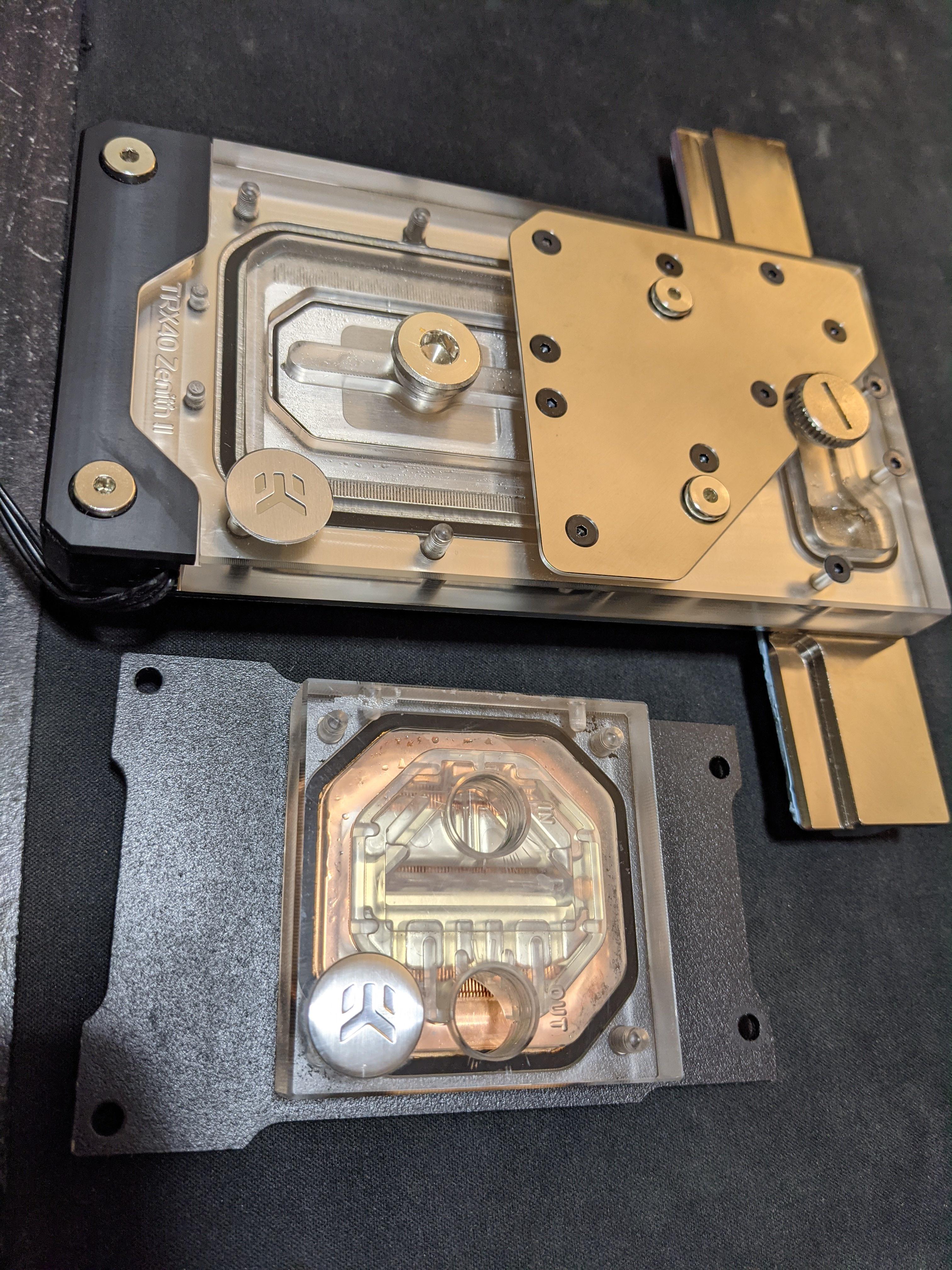
 naive pendant
dang
 bronze jungle
On my third gaming build; RAM questions for the community: Will 128gb of 3600 /16 DDR 4 make much of a performance difference vs got the same speed at 64GB?
hollow thorn
bronze jungle
On my third gaming build; RAM questions for the community: Will 128gb of 3600 ...
For what workload?
hollow thorn
naive pendant
i reseated them and they started working
Prob bad contact
I'd assume you're doing something other than gaming if 64gb and 128gb of ram are what you're choosing between
smoky widget
@naive pendant Always check that it clips and makes a sound of "click" then recheck each corner to make sure.
vast meadow
bronze jungle
On my third gaming build; RAM questions for the community: Will 128gb of 3600 ...
no, 32gb is plenty for gaming tbh
if youre just gaming no point going 128gb
64gb if youre power user how has 8-16 cores and never closes anything xD
assuming you dont render etc
bronze jungle
I do some video editing with Premiere and a power user
hollow thorn
What do you mean by "power user"
bronze jungle
Some 1080, some 4k
hollow thorn
Tbf even doing 1080p, stacking a crap ton of effects and such will eat up ram
bronze jungle
hollow thorn
What do you mean by "power user"
For business, 3 monitors of open programs (outlook, word, excel, etc.), 50 webpages, several windows explorer windows,
hollow thorn
Prob won't really need over 32gb for those things
bronze jungle
hollow thorn
Tbf even doing 1080p, stacking a crap ton of effects and such will eat up ram
Thats my concern; at most times the 64GB would be fine or overkill. Just wondering when video editing
hollow thorn
It's honestly going to be a question of what kind of content you believe you'll be making
bronze jungle
I can afford to get the 128 just done want to if theres no need or performance difference
hollow thorn
But 64gb will do just fine 98% of the time
bronze jungle
hollow thorn
But 64gb will do just fine 98% of the time
Agreed
hollow thorn
There will be no performance impact other than once you run out of ram
bronze jungle
So if it’s you and you had the cash; splurge or stay with 64
vast meadow
bronze jungle
So if it’s you and you had the cash; splurge or stay with 64
well what cpu would you be going with btw, id go 64gb personally
bronze jungle
vast meadow
well what cpu would you be going with btw, id go 64gb personally
5950x
With the Asus dark hero III my
MB
vast meadow
Okay good at least your not cheaping out on the cpu to get 128gb if you were, personally id get 2x32gb ballistix 3600mhz because its basically only 1 die in use, as well as being cheap and good with timings so you are pretty sure to buy another 2x32gb kit of ballistix 3600mhz if you need to upgrade in the future and have it run fine
vast meadow
bronze jungle
With the Asus dark hero III my
i wouldnt get that motherboard
overpriced
what do you need in a motherboard
bronze jungle
Like the number of back high speed USB ports; like the higher end audio DAC, the number of SATA ports (I have 6 HD)
It is overpriced but there weren
Weren’t many that had my specs
vast meadow
yeah but just waste of money
vast meadow
bronze jungle
Weren’t many that had my specs
you need any other features from your mobo?
also what country you in? us?
bronze jungle
In us; like the ability to have 2 M.2.2 SSD’s
bronze jungle
rocky beacon
Most motherboards have 2 M.2 ports
Was adding on my requirements from my previous post
vast meadow
@bronze jungle id go with one of these https://pcpartpicker.com/product/XV6qqs/gigabyte-x570-aorus-elite-wifi-atx-am4-motherboard-x570-aorus-elite-wifi or https://pcpartpicker.com/product/cL3mP6/gigabyte-b550-aorus-pro-v2-atx-am4-motherboard-b550-aorus-pro-v2 or https://pcpartpicker.com/product/2f4BD3/msi-mpg-b550-gaming-edge-wifi-atx-am4-motherboard-mpg-b550-gaming-edge-wifi
hollow thorn
bronze jungle
Like the number of back high speed USB ports; like the higher end audio DAC, the...
Also, most dacs really don't care about USB version and such
You can prob easily run like a Magnus modius stack off USB 2.0
Oh wait I misread
hollow thorn
bronze jungle
Like the number of back high speed USB ports; like the higher end audio DAC, the...
If you buy an expensive board for the sound chip, just buy a better separate dac
vast meadow
all of the motherboards i listed have high speed usb and are very nice boards and have 6 sata ports and 2-3 m.2 slots
hollow thorn
Like a 20$ Meizu dongle beats alc1220 easily
bronze jungle
Nice board
hollow thorn
Keep in mind unify x being 2 dimms might not be great considering they want lots of ram
vast meadow
hollow thorn
Keep in mind unify x being 2 dimms might not be great considering they want lots...
Woops missed that
hollow thorn
Yeye unify x is a 1dpc board built for mem oc
vast meadow
bronze jungle
Nice board
i meant tosend this one instead https://pcpartpicker.com/product/NgDkcf/msi-meg-b550-unify-atx-am4-motherboard-meg-b550-unify
vast meadow
hollow thorn
Yeye unify x is a 1dpc board built for mem oc
meant to sent non x but sent x by accident
bronze jungle
vast meadow
i meant tosend this one instead https://pcpartpicker.com/product/NgDkcf/msi-meg-...
Nice board
vast meadow
Yes so are the other 3 i sent
vast meadow
They're all nice boards that are way better value, no problem, if you want to send your list for advice i can give ya a few pointers btw
bronze jungle
Thx Pato;
vast meadow
Np :>
limber dragon
hollow thorn
Yeye unify x is a 1dpc board built for mem oc
and nothing else (as in nothing else works as intended)
hollow thorn
lol
vast meadow
limber dragon
and nothing else (as in nothing else works as intended)
Ohh really? What's wrong with it?
limber dragon
tons of QC issues
bios chips killing themselves on the first update
pcie 4 being enabled results in not posting
those are the major 2, that ~70% of the boards have one or the other
vast meadow
limber dragon
those are the major 2, that ~70% of the boards have one or the other
yikes ty for the info
limber dragon
the review boards that were sent out ~3 months before launch are all fine, but retail boards are all plagued with issues
vast meadow
shame :(
 cunning ingot
limber dragon
those are the major 2, that ~70% of the boards have one or the other
cunning ingot
limber dragon
those are the major 2, that ~70% of the boards have one or the other
the other 30% suck at overclocking 
limber dragon
the other 30% leave it at stock + jedec
 weary condor
Looks fixable to me
 hollow thorn
Got the ihs off somehow eh
rocky beacon
CPU itself is also bent
burnt spear
weary condor
Ryzen 9 5950x
How much? Was it new?
vast meadow
weary condor
Ryzen 9 5950x
Just return it
weary condor
Yup i am tomorrow but it was $800 new
finite elm
Still tempted to get that 10850k so i could use the Mobo instead of sell it.
Just don't know what I'd use it for 🤔
weary condor
Well idk what size the mobo is but i build used the same situation you’re in for an itx build. I bring it with me to air bnb’s so i can stream anything i want
finite elm
weary condor
Well idk what size the mobo is but i build used the same situation you’re in for...
It's an ATX Mobo
I have an SFF build that i took on my deployment and then on my vacation
weary condor
Just build it to flex then
finite elm
True true
weary condor
weary condor
Looks fixable to me
Separated the cpu since it was only being held on by thermal compound
 limber dragon
weary condor
Separated the cpu since it was only being held on by thermal compound
limber dragon
weary condor
Separated the cpu since it was only being held on by thermal compound
except its not supposed to be held together with thermal compound
 odd forum
Does anyone know if the ASRock A520M-ITX/AC AM4 AMD A520 SATA 6Gb/s Mini ITX AMD Motherboard will support an AMD 5700G out of the box? The commpay's website says it is compatible with bios v 1.06 but the newegg product page does not list any zen 3 CPUs. I'm worried that it won't support it out of the box and I won't be able to upgrade the bios because I won't have a spare zen 2 CPU to perform the upgrade.
weary condor
limber dragon
except its not supposed to be held together with thermal compound
The random sticky substance then
limber dragon
its supposed to be soldered on
limber dragon
odd forum
Does anyone know if the ASRock A520M-ITX/AC AM4 AMD A520 SATA 6Gb/s Mini ITX AMD...
most likely not, but it should have bios flashback/update features
odd forum
limber dragon
most likely not, but it should have bios flashback/update features
I've never updated a board that didn't support the CPU. Will I be able to flash the bios if I don't have a compatible CPU?
limber dragon
if it has a flashback feature, yes
check that the motherboard has flashback/update, and its generally a usb port on the rear io and a button alongside it
weary condor
limber dragon
its supposed to be soldered on
Its def not solder. Im pretty sure i got an opened box but best buy sold it as new. The previous person did sus stuff
odd forum
limber dragon
check that the motherboard has flashback/update, and its generally a usb port on...
Thanks. It does not appear to have the capability.
limber dragon
cursive epoch
solder that's been cut
No, the solder on the io die and a ccd are both still there, what you see is the copper plane in the substrate
weary condor
I will just unbend it
cursive epoch
but the delid the previous owner did sure killed it
weary condor
Yea idk what he was doing
weary condor
 grave star
yo guys what's some good 2x16 gb ram that's white and has rgb
grave star
yo guys what's some good 2x16 gb ram that's white and has rgb
T force argb
vernal cosmos
grave star
yo guys what's some good 2x16 gb ram that's white and has rgb
ballistix rgb
radiant iron
if my DDR is at 3200 and task manager shows the ram is at 1600 MHz is it still at 3200mhz?
naive pendant
task manager shows the actual clockspeed of the memory, which is half the actual transfer speed of the memory
hence the "double data rate" in the name of DDR
the "3200MHz" or "3600MHz" ram kits and whatnot you see on amazon and stuff should say MT/s instead of MHz
carmine lynx
Ram speed doesn't necessarily affect boot times does it?
naive pendant
not really
vernal cosmos
naive pendant
task manager shows the actual clockspeed of the memory, which is half the actual...
no it doesnt
cpuz does
task manager shows mts number
naive pendant
oh yea
naive pendant
radiant iron
if my DDR is at 3200 and task manager shows the ram is at 1600 MHz is it still a...
you might just have to go into BIOS and make sure the memory is at the right settings.
vernal cosmos
Wait yeah 1600 is the worst ddr4 jdec
I thought it was 2133
go in and enable xmp
in the bios
vast meadow
 jagged raptor
almost 70 dollar difference for minimal performance downgrade
jagged raptor
almost 70 dollar difference for minimal performance downgrade
Well depending on region, but it should be like 20$ difference between them, 5600x if they already have a gpu, 5600g if they don't, the difference in perf isn't minimal it's just acceptable cuz nice graphics
grizzled bloom
5600g is comparable more to the 3600 in performance, some of the cache is removed to make room for the iGPU
 vivid lynx
Been looking at the asus prime x570 Pro recently
vast meadow
I'd suggest not
Unless you really need the pcie lanes hust get a b550 aorus elite/aorus pro/gaming edge wifi/rog strix/tuf
vivid lynx
ive just been trying to find a decent board with usb c front and back with a good amount of type 3/2 usbs as well, doesn't need Wi-Fi cause i use ethernet
vast meadow
vivid lynx
ive just been trying to find a decent board with usb c front and back with a goo...
Your best bets for that then are msi gaming edge wifi/nzxt n7(bios is fine but eh for price) and gigabyte aorus pro x570
vivid lynx
aorus one looks promising, just trying to fine tune everything, so like having the correct port for my aio, get rid of hdds cause they be loud
vast meadow
vivid lynx
aorus one looks promising, just trying to fine tune everything, so like having t...
Wdym the correct port for your aio?
vivid lynx
well my mobo doesnt have an aio connector
supple sedge
doesnt the aio just plug into cpu_fan on mobo?
vast meadow
vivid lynx
well my mobo doesnt have an aio connector
Pump headers are just fan connecters running at 100% so same difference
vernal cosmos
you can manually turn any fan header to a pump header in bios
vast meadow
Ye
vivid lynx
well i need to change it to get type c connector anyways aha
digital kernel
vast meadow
Pump headers are just fan connecters running at 100% so same difference
Don't they usually also have a higher max current?
vast meadow
digital kernel
Don't they usually also have a higher max current?
Afaik no
You could be right tho
But should be same function
jagged raptor
intel i5 11600k good w MSI MPG Z490 GAMING EDGE WIFI?
vast meadow
jagged raptor
intel i5 11600k good w MSI MPG Z490 GAMING EDGE WIFI?
No, you need z590 or a z490 with bios flashback but very rare on z490, easier to get z590, also unless you want to oc as a hobby, 5600x and a b550 is cheaper and bit better
subtle crow
Do integrated graphics on say the ryzen 5 4600H compete with the 5600G? And how does Iris Xe intel graphics fit into the competition as well?
noble rampart
I figured out that they sent me back a different board, they just said nothing about the fact that it was different on the report I got.
So now my ram works at 3200mhz and stuff
grizzled bloom
subtle crow
Do integrated graphics on say the ryzen 5 4600H compete with the 5600G? And how ...
4600H is a mobile processor, they don't really compare to any desktop chip
Iris is meh
subtle crow
I'm just looking for a budget gaming laptop for a friend of mine
super budget bascially
cursive epoch
They at least have 1650 in em
subtle crow
my friend is used to turning down the graphical settings current playing off of a 2200u or something
but he wants to get a new device mostly because the one he plays on isn't his
subtle crow
US, lets say, can we get like the best 800ish and best 1000ish
it would be nice if I could give him different price ranges to choose from
grizzled bloom
That's not going to have a GPU in that price range, it'll be integrated graphics still unless you get lucky
subtle crow
I understand that, but he doesn't exactly make a load of money
and you don't think a 1650 would be in at least the 1000$ range?
The MSI GL65 that I'm looking out has a 1650
grizzled bloom
That comes down to the "if you're lucky" part
subtle crow
K, well I suppose he's going to have to rely on at least a little luck
I play cod warzone on an rx 550 equivalent quadro myself
so he can probably get away with integrated graphics
as he plays lighter games himself