#cpus-mobo-and-memory
1 messages · Page 212 of 1
 earnest rover
Ight
Crucial Ballistix 3200 MHz DDR4 DRAM Desktop Gaming Memory Kit 16GB (8GBx2) CL16 BL2K8G32C16U4B (Black) https://www.amazon.com/dp/B083TRRT16/ref=cm_sw_r_u_apa_glt_fabc_E3QG5WTTQM2BMEN03Z7P
This bad boy?
 vernal cosmos
Buy Crucial Ballistix 3600 MHz DDR4 DRAM Desktop Gaming Memory Kit 16GB (8GBx2) CL16 BL2K8G36C16U4B (Black): Memory - Amazon.com ✓ FREE DELIVERY possible on eligible purchases
earnest rover
Thanks
 vast meadow
earnest rover
Crucial Ballistix 3200 MHz DDR4 DRAM Desktop Gaming Memory Kit 16GB (8GBx2) CL16...
vast meadow
earnest rover
Crucial Ballistix 3200 MHz DDR4 DRAM Desktop Gaming Memory Kit 16GB (8GBx2) CL16...
I'd get 3600, it's like 5$ more but worth it
earnest rover
Kl
 fading mauve
do i really need the hard disk light on my case
 elfin warren
No
fading mauve
oh
 twin surge
Any chance gigabyte will allow 10th gen cpus use the top m.2 slot on the z590 elite aorus ax lol
elfin warren
No
vast meadow
elfin warren
3600 c16
The thing bout ballistix is only one cl rating per speed which is  makes recommendations for learners easier too
fading mauve
i am thinking of going to get a ssd down the road 930 gigs i have a 1tb hardrive
elfin warren
Its a cpu issue not a motherboard issue
twin surge
elfin warren
Its a cpu issue not a motherboard issue
gotcha and thank you!
fading mauve
does windows make a windows 1tb with 930 gb
vast meadow
It's because storage makers use the 1000mb=1gb instead of 1024mb=1gb
Which is what windows uses
 hollow thorn
Wait gigabyte also doesn't let you use top m.2 slot on 10th gen?
vast meadow
(╯°□°)╯︵ ┻━┻
fading mauve
wut
vast meadow
fading mauve
wut
Logical 1gb is 1024mb, storage makers use 1000mb=1gb
Cuz make sound bigger
Window's use logical gb
hollow thorn
Also, it's just different units of measurement
vast meadow
Basically
vast meadow
hollow thorn
Also, it's just different units of measurement
Well yess but I'm giving the detailed explanation basically lok
Lol*
hollow thorn
Gigabytes versus gibibytes
vast meadow
Gibibyte icky to say
hollow thorn
Hey telling them to search up 1tb to gib in Google is the easiest solution that explains it
fading mauve
and i tried to install a ddr3 2 gig my mobo don’t like it
twin surge
Yeah I just caved and bought an ABS gladiator since I could not obtain a 3070 any other way. Bought additional storage and about lost my mind wondering why it wouldn't show in the bios. Googling led to a reddit thread which showed in the manual the disclaimer. Overall fine, removed the GPU and installed in the second slot
 fresh wren
fading mauve
and i tried to install a ddr3 2 gig my mobo don’t like it
fresh wren
fading mauve
and i tried to install a ddr3 2 gig my mobo don’t like it
Explain
twin surge
but wasn't fun when I just wanted to start my downloads lol
fading mauve
fresh wren
Explain
i tried to add more memory when i installed it it turns on then off
hollow thorn
Sadly
fresh wren
fading mauve
i tried to add more memory when i installed it it turns on then off
Give hardware
Motherboard, RAM
fading mauve
msi h77ma-g43 ddr3
fresh wren
What did you have before, what did you add?
hollow thorn
twin surge
Yeah I just caved and bought an ABS gladiator since I could not obtain a 3070 an...
Surprised if a prebuilt came with z590 and then a 10th gen chip...
fading mauve
i can give you a pic when i get home
fresh wren
You said you wanted to add 2 GB, what did you have before? How many slots were filled?
hollow thorn
That's surprising
fresh wren
I didnt even know they still made sticks below 4gb
fresh wren
So you had two slots full with how much RAM? 4GB, 8?
fading mauve
8
fresh wren
And you put in how many sticks to add 2gb?
vast meadow
Well cuz putting different sizes ends up being wack
fresh wren
I think your problem is here ^
You want same frequency, same size, same latency ideally.
Pretty much everyone and their dog would recommend buying a full kit of 4 sticks or at least two sticks of the same model from the same manufacturer
fading mauve
i am trying to add another 2 gigs of ram
hollow thorn
It's just weird compatibility issues, ram doesn't really like being mix matched
hollow thorn
fresh wren
I didnt even know they still made sticks below 4gb
It's ddr3
twin surge
I don't think the RAM cares as much as the MOBO 😛
hollow thorn
It's mobo that cares about the ram, but the ram is still the wacky part
fresh wren
hollow thorn
It's ddr3
Yeah, I know that. But i haven't seen a 2gb stick in ages
hollow thorn
And really, it's mobo not able to make the sticks run together
fresh wren
If you have 2x4GB and 1x2GB your Mobo is probably angry. 10GB is also a weird amount of RAM to have
Filling only 3/4 slots can also be funky
hollow thorn
It also can't run dual channel anymore
vast meadow
fresh wren
Filling only 3/4 slots can also be funky
Can confirm
vast meadow
hollow thorn
It also can't run dual channel anymore
Sometimes it can but i doubt ddr3 does good flex mode lol
fresh wren
Mix that with differing frequencies and timings and your PC gonna poop itself trying to figure out how to run
hollow thorn
I doubt it can
fresh wren
Mostly the mismatched sticks and 3/4 slots tho
vast meadow
fresh wren
Mix that with differing frequencies and timings and your PC gonna poop itself tr...
The freq would just run at lowest speed out of the 3 tbh so that's no worry
fresh wren
Tru
 finite elm
hollow thorn
Surprised if a prebuilt came with z590 and then a 10th gen chip...
finite elm
hollow thorn
Surprised if a prebuilt came with z590 and then a 10th gen chip...
The prebuilt i bought is a 10th gen I7 and Z590 mobo
ABS is pretty good when it comes to component selections.
Although some things seem to have issues 😟 like the ram in mine was broken and prevented it from booting for a bit.
 naive pendant
Got an ASUS ROG STRIX X570-F mobo, and have a gen 3 2tb m.2 ssd, can I just put it on the bottom slot and leave the gen 4 one free?
 cyan raft
Yeah you should be fine
But honestly don’t bother with PCie Gen4 ssds yet, they really don’t have much better real life performance than gen 3
vast meadow
cyan raft
But honestly don’t bother with PCie Gen4 ssds yet, they really don’t have much ...
Some ssds like p31 from hynix even outperform samsung 980 pro etc in rand
 rain rover
Hello,
I am looking at the Asus PN51 MiniPC Barebone with AMD Ryzen R3-5300U. Do you recommend that?
 grizzled bloom
What purpose will this computer serve?
naive pendant
Hello fellow pc gamers.
vast meadow

naive pendant
I need 2x8 GB 3000+ mhz ram under 100 cad.
vast meadow
naive pendant
I need 2x8 GB 3000+ mhz ram under 100 cad.
What cpu?
naive pendant
Im planning on getting an APU for light gaming at the moment untill prices settle down
Not sure what one to get yet.
Preferably a Ryzen 5 APU
vast meadow
naive pendant
Preferably a Ryzen 5 APU
If you can get a 5600g with some 3600mhz ram but if not i would just go i5 11400/11500/11600k
 limber dragon
if you're trying to play games, even 3000G or 4000G is better than intel's igpus
vast meadow
naive pendant
Could you help me find some kits?
https://ca.pcpartpicker.com/product/fDn8TW/crucial-ballistix-16-gb-2-x-8-gb-ddr4-3600-memory-bl2k8g36c16u4r if you can stretch
https://ca.pcpartpicker.com/product/CsF48d/gskill-flare-x-16-gb-2-x-8-gb-ddr4-3200-memory-f4-3200c16d-16gfx if you can't stretch the 100/if you go 3200g/3400g because they are the same architecture as Ryzen 2000 so you would not be able to run 3600mhz
vast meadow
limber dragon
if you're trying to play games, even 3000G or 4000G is better than intel's igpus
But the i5s will be fare better once they get dgpu
elfin warren
limber dragon
if you're trying to play games, even 3000G or 4000G is better than intel's igpus
3000g doesnt have enough pcie lanes for a gpu. 8 total. :/
Chipset takes some
vast meadow
elfin warren
3000g doesnt have enough pcie lanes for a gpu. 8 total. :/
Really? That's wackkk
limber dragon
8 gen 3 lanes is still fine for 2080tis....
elfin warren
You only get 4 tho. Chipset takes some.
naive pendant
Im going to get a 1660 if anything, not a 2080Ti
elfin warren
Igpu takes 8. Chipset 4 and 4 for gpu.
limber dragon
Im pretty certain 3400g still has 8 usable lanes
limber dragon
oh, by 3000G and 4000G I meant the series of chips, not the exact 3000G
vast meadow
You thought athalon 3000g vintage?
vast meadow
elfin warren
Well he said 3000g
Completely forgot about that until you said lol i was wondering why they capped lanes on 32/3400g lol
elfin warren
Problem is amd have bad cpu with good igpu
Intel has weak igpu with good cpu
So.....yeah
vast meadow
Imo go intel unless you can find a turn 4650g on the grey market
vast meadow
naive pendant
Now I need help deciding between 2 motherboards
Worry about motherboards after you pick a cpu
elfin warren
5000g coming in august
vast meadow
That's a while away tho tbf
vast meadow
naive pendant
https://www.amazon.ca/ASRock-B450M-STEEL-LEGEND-Motherboard/dp/B07MV9BMNY/ref=sr...
You need to decide on cpu first and use https://ca.pcpartpicker.com/list btw
elfin warren
Ya, amd 4000g or intel
naive pendant
i already have the case and gpu
if i salvage from my current pc i get the gpu
and i already bought the case
vast meadow
naive pendant
if i salvage from my current pc i get the gpu
If you wanted to show us your build you will need to send the link from the yellow box instead
vast meadow
On pc part picker
vast meadow
 naive pendant
Oh
well
i
accidently deleted it
there
i have the case and gpu
well
actually ill buy a dif gpu when i can
but thats good for now
cyan raft
Permission denied
 hidden cobalt
@vast meadow did my homework. Dropped about 5C by tightening the Scythe Fuma II
Still running 85 all core.
Just popped the front panel off to see where it lands
Well the good news is the front panel really isn't the culprit. 1-3C difference by popping it off and often much closer to the 1 degree end of things
I honestly think there isn't much more I can gain on the 5800x with the current cooling.
hidden cobalt
Setting eco mode seems to have shaved off about 10-15C. Well worth the performance hit IMO
Less than a minute difference for converting a 2 hour movie in handbrake
earnest rover
As I was discussing earlier with a couple dudes
The docp suggested didn't work
Still stuck at 2133 mhz
Guess the dims really suck
vast meadow
hidden cobalt
Less than a minute difference for converting a 2 hour movie in handbrake
Hmm well at least it dropped a bit i suppose and won't be as near to thermal throttling, you can also change the fan curve to make it mkre aggressive which would help
 dense frost
hidden cobalt
Setting eco mode seems to have shaved off about 10-15C. Well worth the performan...
dense frost
hidden cobalt
Setting eco mode seems to have shaved off about 10-15C. Well worth the performan...
wow. thats quite a difference.
hidden cobalt
vast meadow
Hmm well at least it dropped a bit i suppose and won't be as near to thermal thr...
Yeah I was thinking about that next, I think it goes to 100% at around 70C I can see what happens if I set the peak to like 60C instead
hidden cobalt
dense frost
wow. thats quite a difference.
Yeah I was expecting a slight difference for that, but it turned out to be massive.
Overall, I am cool with the performance hit I am taking with ECO. The stuff I am having my rig churn on is not mission critical so would rather be a little slower and cooler
Then in the future I have more headroom to work with IF I ever need to really redline the 5800x
dense frost
you could always get an AIO later too
hidden cobalt
I could, but I think I would eventually run into the same issue of heat. My cousin has the same chip with an AIO and sees his temps hit similar highs like what I was getting before. The biggest difference he sees is just the amount of time to reach that point
dense frost
right
vast meadow
hidden cobalt
Yeah I was thinking about that next, I think it goes to 100% at around 70C I can...
That might help yeah
vast meadow
dense frost
you could always get an AIO later too
I think they might just have bad luck with the bin because the scythe fuma is a top tier air cooler
vast meadow
hidden cobalt
I could, but I think I would eventually run into the same issue of heat. My cous...
If they have a meh aio that would be why, if they have a quality one like arctic ek or lian li galahad they wouldn't really have that issue lol
 oblique crown
Quick question. I have a MSI MPG B550 GAMING PLUS, just installed the new PC. Does anyone know if it supports 5+1 sound? It has audio inputs that are all black, I stuck my 5+1 cables in them but I have zero sound 😛 And I can't find any 5+1 details about it online.
Also, for Sound Output I only have this option https://prnt.sc/16qcen9
 elfin warren
It has 7.1
oblique crown
Hm, maybe I have to install the drivers separately
elfin warren
Did you DL audio drivers?
elfin warren
Should DL and install all drivers from the MB site
As a world leading gaming brand, MSI is the most trusted name in gaming and eSports. We stand by our principles of breakthroughs in design, and roll out the amazing gaming gear like motherboards, graphics cards, laptops and desktops.
oblique crown
Excellent, will do that, thank you.
elfin warren
Windows, if it grabs them, will just do generics to get you running
oblique crown
I suppose I don't have to install drivers for the CPU? Dumb question.
elfin warren
Not for the CPU no, for the chipset yes
oblique crown
And now I am pissed that I haven't installed the MB drivers right after installing windows. Me idiot.
elfin warren
Lol, you'll remember this for next time XD
oblique crown
Should I restart installing everything from scratch?
Cause I can do it.
Do windows, then MB, then software?
oblique crown
Thank you.
elfin warren
YW
oblique crown
Also, is there some guide to teach me what audio cables go where? The previous MB had colored audio mother jacks that matched my 5+1
This one is all black.
elfin warren
Manual from the same area I linked for the drivers
earnest rover
Haha I brick my mobo with bios update
vast meadow
earnest rover
Haha I brick my mobo with bios update
Did the power turn off in the middle of it or something?
earnest rover
Nope it stuck while loading and never loaded
vast meadow
Ehhh did you download the right bios?
oblique crown
Should I flash the bios with the beta or just the latest stable?
dense frost
oblique crown
Should I flash the bios with the beta or just the latest stable?
latest stable only
unless you got spare motherboards lying around
oblique crown
dense frost
unless you got spare motherboards lying around
Maybe a spare kidney 😄 For another mobo. Thanks
vast meadow
oblique crown
Should I flash the bios with the beta or just the latest stable?
Stable, beta can cause issues sometimes
vernal cosmos
oblique crown
Should I flash the bios with the beta or just the latest stable?
always latest stable
unless you need the beta for cpu compatability
oblique crown
Stable it is, thank you both.
vernal cosmos
oblique crown
Stable it is, thank you both.
YW!
oblique crown
Do I need this driver? AM4 RAID Driver. I am not using any RAID drives.
vernal cosmos
oblique crown
Do I need this driver? AM4 RAID Driver. I am not using any RAID drives.
nop
You want only chipset drivers and gpu drivers
oblique crown
vernal cosmos
You want only chipset drivers and gpu drivers
Hallelujah, thank you!
vernal cosmos
and then if you have fancy peripherals you might need drivers for those
refer to da manual
oblique crown
Nothing fancy here :)) I have downloaded the effin manual, so I can read a bit
Bios flash here I come.
dense frost
vernal cosmos
You want only chipset drivers and gpu drivers
- network + audio
vernal cosmos
dense frost
+ network + audio
Ahh yep
oblique crown
dense frost
+ network + audio
Gooood, thank you. I definitely need audio since I have zero sound 😛
vast meadow
vernal cosmos
You want only chipset drivers and gpu drivers
And lan/ethernet/wifi and audio 
oblique crown
Thank you
vast meadow
Np
oblique crown
Restart it is.
dense frost
oblique crown
Restart it is.
a few will happen
hidden cobalt
vast meadow
I think they might just have bad luck with the bin because the scythe fuma is a ...
I think it has more to do with the architecture of the 5xxx processors. Researching a bit, it definitely looks like AMD pushed these chips to the absolute limit that the current structure revision could withstand. Makes sense seeing that the next gen is getting an entire overhaul rather than the incremental changes between Zen 1 to Zen 3. The 5800x in particular seems to be the worst off of the bunch in terms of the temp:performance ratio for reasons that can be found that I don't quite understand.
One comment on reddit put it best when looking into the stock thermals of the 5800x, "5800x has a serious temp issue. No one really knows what's going on, but I doubt that hundreds of people made errors when mounting their coolers...". A clarification on AMD's part stated that this is the feature and not a bug.
For my usages I don't need the full capability of PBO so forcing the CPU into a lower performance state is ideal for me. This is probably a good course of action for most who see the same behavior on any of these chips since I am sure a good chunk of users don't need the extra performance out of these CPUs right now if they are just using them for gaming
vast meadow
hidden cobalt
I think it has more to do with the architecture of the 5xxx processors. Research...
Well yes they are toasty chips but I've seen lower temps with a similar cooler iirc hence you might have been a bit unlucky
vast meadow
hidden cobalt
For my usages I don't need the full capability of PBO so forcing the CPU into a ...
That's fair yeah
 brittle stirrup
whats u-dimm memory?
vast meadow
brittle stirrup
whats u-dimm memory?
Unbuffered ram, basically normal ram, ecc ram is only for the threadripper/xeon/epyc platforms
hollow thorn
hidden cobalt
I think it has more to do with the architecture of the 5xxx processors. Research...
I mean, this generation is what made AMD release a statement to say that 95c is safe for the chip, and Ryzen chips are somewhat know for hotspots. There's also just 5800x draws a lot of power.
brittle stirrup
vast meadow
Unbuffered ram, basically normal ram, ecc ram is only for the threadripper/xeon/...
oh
limber dragon
hollow thorn
I mean, this generation is what made AMD release a statement to say that 95c is ...
If you have a zen2/3 chip (might be on older zen too now) check out the latest beta hwinfo
Amd is straight up dumb when it comes to temp reporting for ccds
hollow thorn
hm
vast meadow
limber dragon
Amd is straight up dumb when it comes to temp reporting for ccds
How so?
limber dragon
core temps and tdie are like 15-20c off
vast meadow
limber dragon
core temps and tdie are like 15-20c off
Oof really how?
limber dragon
by reading the readings
vast meadow
limber dragon
by reading the readings
No like how is it that much off temp wise
limber dragon
go ask amd
vast meadow
Fair lol
vast meadow
fading mauve
is $283 a good price for a cpu mobo and ram
Can you strech it a bit? Also that cpu has no integrated graphics btw
fresh wren
o no
I literally just jokingly mentioned a gt 1030
Speak of the devil and he shall appear
vast meadow
fading mauve
i have a gpu geforce 1030 that i can clock
Okay just making sure, but can you increase budget a small bit?
fading mauve
my nom doesn’t understand that 1155 is out of production when it’s time when windows 10 stops updates i will still have to upgrade
vast meadow
fading mauve
my nom doesn’t understand that 1155 is out of production when it’s time when win...
Well yes but windows 10 is gonna be supported to 2025, if you not gonna upgrade within the next month or 2 there's no point looking at things now other than to give an estimate of how much you would need
You still got a solid 4 years before needing to upgrade
By then way better cpus for the price will be out
 dim cloak
So im gonna be getting a z590 MoBo but i want to stick with I5 11th gen but i dont know what model to go with specifically and it will mainly be used for heavy gaming and Vr gaming cause ik my 9400f gets eaten alive in vr thanks to ovr server
dim cloak
Im not really worried about price that much but im just trying to see what recommendations there are
 devout mothBOT
 dweam#9641 has been warned
Reason: Bad word usage
dweam#9641 has been kicked
Reason: Too many infractions
vast meadow
dim cloak
So im gonna be getting a z590 MoBo but i want to stick with I5 11th gen but i do...
Unless you were getting an i5 11600k there would be no point getting a z590, a b560 will be a better match, but vr is more gpu intensive what gpu do you have?
But i would go 11400 and b560 or 11600k and z590
dim cloak
Alright and i currently have a MSI 1660 Ventus XS OC 6g but my 3060 12 gb is on its way but the OVR_Server eats my cpu at 100% at all times
Ovr server i believe is an application used by oculus software
vast meadow
dim cloak
Alright and i currently have a MSI 1660 Ventus XS OC 6g but my 3060 12 gb is on...
Ohh a server? You should be getting a 10700 or 10850k then
Or go Ryzen 9 5900x
dim cloak
Well should i still get a Z590 with the 10850K? Cause the model im gonna run is the Asus Tuf Gaming plus Z590 wifi i think is the name will dual 16gb 3600Mhz
I just need to upgrade from the b365m that im running
vast meadow
dim cloak
Well should i still get a Z590 with the 10850K? Cause the model im gonna run is ...
z490 or z590 but id go z490 because the only real difference is price, it more depends on the model of board you get if you are going 10th gen
vast meadow
dim cloak
Well should i still get a Z590 with the 10850K? Cause the model im gonna run is ...
looks good, although i would have a look at both z490 and z590 and see what you prefer and is good, i assume you wont something with wifi so heres a list of wifi z490 and z590 https://pcpartpicker.com/products/motherboard/#c=143,148&V=8000,6000&sort=price&page=1, although i would get this https://pcpartpicker.com/product/ZJ2bt6/msi-mpg-z490-gaming-edge-wifi-atx-lga1200-motherboard-mpg-z490-gaming-edge-wifi and save the money, make sure the memory is cl16 as well, if you want you can use https://pcpartpicker.com/list/ and send me your list and i can check it out
dim cloak
https://pcpartpicker.com/list/mrWDW3 so i found a z490 prime from asus that i kinda liked the look of
And like i said i already have the 3060 on its way
vast meadow
dim cloak
https://pcpartpicker.com/list/mrWDW3 so i found a z490 prime from asus that i ki...
do you not want wifi on the board? if not thats fine but the prime is looking a bit too expensive imo
what have you already bought apart from 3060?
dim cloak
Well if i have the wifi card already for a PCIe 1x card would it matter and i have the WD HDD and the 970 in storage and i forgot to put the Intel optane memory module that is in my current build
vast meadow
dim cloak
Well if i have the wifi card already for a PCIe 1x card would it matter and i ha...
ehh i would return the 970 if you can its pretty meh for the price and the hdd is a bit overpriced to for 4tb but not as important as the ssd being returned
but way too expensive for the hdd
dim cloak
Well i already have the WD in current build and im happy with it but i was suggested to get a hynix or something like that but i was wanting a fast m.2 2280 ssd
Mainly for boot and siege
vast meadow
dim cloak
Well i already have the WD in current build and im happy with it but i was sugge...
ahh, well yeah the sk hynix p31 kicks the 970's ass by miles thats what i was going to recommend you
vast meadow
dim cloak
Well i already have the WD in current build and im happy with it but i was sugge...
for reference the sk hynix p31 beats the 980 in real world performance
@dim cloak https://pcpartpicker.com/list/GY8Yj2 if you can return the 970 and get the money back for the p31 then great, if not well the 970 will do but overpriced for what it is
dim cloak
Alright i can get a refund for it as it hasnt shipped yet
vast meadow
dim cloak
Alright i can get a refund for it as it hasnt shipped yet
great, i went for a black psu thats better btw because you wont even see it as its under a psu shroud anyway
dim cloak
Yeah i noticed that
But i felt i need this upgrade maimly because my current build is good but ik it will struggle with new vr equipment ill be getting and even playing MSFS With vr
But again does it matter if board has wifi or not if i have a PCIe 1X wifi card
vast meadow
thats fair but i would keep the psu i gave you
dim cloak
I will
vast meadow
dim cloak
But again does it matter if board has wifi or not if i have a PCIe 1X wifi card
if you want wifi you only need the card
or mobo just has built in card like
dim cloak
I dont like some of the built in cards but thx
Im just happy i even got to the point i have from 2019 from when i first built the pc and now i have made it to 2021 building a new pc
dim cloak
And the only thing i have upgraded from when it was first built to now was my cpu cooler swap from a air cooled to an AIO, 8gb of ram to 24gb (3×8gb of 2666Mhz), hdd from a 1tb wd to and extra 4tb wd and an intel optane memory stick and a wifi card
vast meadow
i see ya lol sure look my first pc was a bit janky too lol dw
dim cloak
Yeah i was very very new to it to the point at BB the guy walked me around and i told him i had a 2k budget but i was new to all of it and he walked me around with a cart and a list and helped me with my parts list for a beginner pc all for under $750
This was mid 2019 tho
And thanks to him he helped me snag the 3060
 gilded pebble
Just got my cpu today, had it on sale with the Amazon prime day. I7 10700k  anyone got any recommendations for a motherboard?
Preferably one with Bluetooth
vast meadow
dim cloak
And thanks to him he helped me snag the 3060
nice lol
vast meadow
gilded pebble
Preferably one with Bluetooth
either of those will be v nice
dim cloak
Was the ram i picked a good choice?
vast meadow
dim cloak
Was the ram i picked a good choice?
yes ballistix 3600
dim cloak
Alright coolio
Pato i really appreciate the help you have given and ill use that build list when i can
vast meadow
No prob :)
gilded pebble
vast meadow
https://pcpartpicker.com/product/PLytt6/asus-prime-z590-p-wifi-atx-lga1200-mothe...
Thx
vast meadow
gilded pebble
Thx
Np
gilded pebble
Also what does the wireless networking do? I'm still new to pc's so trying to figure it out
vast meadow
gilded pebble
Also what does the wireless networking do? I'm still new to pc's so trying to fi...
wireless networking is wifi / bluetooth
gilded pebble
Ah ok gotcha
 sudden coral
 candid mango
whats a good motherboard for a I5-10600k??
candid mango
whats a good motherboard for a I5-10600k??
Not sure but I picked up a refurbished NZXT Z490 for about $150 from Amazon
vast meadow
sudden coral
Not sure but I picked up a refurbished NZXT Z490 for about $150 from Amazon
nzxt z490 is no no
b550 
sudden coral
He wanted aesthetics more than anything else lol
hollow thorn
P sure nzxt z490 is the one with overheating VRMs
vast meadow
hollow thorn
P sure nzxt z490 is the one with overheating VRMs
Probs, z490 was before they moved over to asrock too so it was that other wack company
vast meadow
hollow thorn
ASRock z490 is absolute crap anyways
Ik but even more crap XD
 grizzled bloom
Is that idle or under load?
sudden coral
It's using the Asus ai autoclocker
Both
It'll idle at like
5ghz
And stays in game as well
limber dragon
did you set a clock speed, then leave voltage on auto?
grizzled bloom
Yeah that's normal but I'm more concerned about that voltage
limber dragon
so yeah, turn off the auto overclocker
grizzled bloom
Yeah that vcore is way too high if that's under load
hollow thorn
Wonder how hot that's getting
limber dragon
grizzled bloom
Yeah that vcore is way too high if that's under load
it isnt accurate, but its still fixed clocks with auto voltage
sudden coral
It's running at what it says is 35-50 degrees c
hollow thorn
Uh you're sure it's under load and not idle?
sudden coral
Going into a game now
Ive seen it around 60 while on battlefield
Never seen it go above 80
Yeah not it's staying around 60-70 on val'
I mnow it's not cpu heavy but
@hollow thornI did see a thread from an intel engineer mentioning how they ran theirs on 1.45v
this chat turned into a ghost town real quick huh lol?
 manic brook
sudden coral
It's using the Asus ai autoclocker
manic brook
sudden coral
It's using the Asus ai autoclocker
ASUS strikes again
grizzled bloom
Just because it's capable of doing 1.45v doesn't mean you should
It'll probably degrade the chip making it perform worse over time
grizzled bloom
Auto overclockers in general are pretty bad. It's 100% better to spend 30 minutes doing a basic overclock yourself.
sudden coral
Anyone got a consistent setup for the 11700k?
limber dragon
every 11700k will be different
sudden coral
There a good guide for it?
grizzled bloom
What motherboard do you have?
sudden coral
Asus Prime Z590-A
Alright the autoclocker is off and it's running fine now
Now it's max at about 1.36 but usually around 1.3V
grizzled bloom
That's much better. 1.35v under load is the highest I'd be comfortable with on that chip.
grizzled bloom
Single core (gaming) or all core?
grizzled bloom
Not bad at all, the bios is doing its job well
sudden coral
Yep alright well, I wanna use this CPU long term so I'll stick away from trying to OC it
 potent dew
Is there a list of mobos that have TPM 2.0? Or, does anyone know if the B450 Aorus Elite rev.1 has it?
elfin warren
2700x?
It has it
Search bios for fTPM, that's what AMD calls it. make sure it's set to Firmware and not Discrete.
 burnt spear
vast meadow
burnt spear
vast meadow
I stg that CPU was about as rare as a 3060 ti lol
 brisk stag
What cpu do you recommend for gaming, mostly warzone, with rtx2070super at the moment (1080p but plan to move to 2k)?
burnt spear
brisk stag
What cpu do you recommend for gaming, mostly warzone, with rtx2070super at the m...
11600k is best price to performance imo, but what's your budget? And do you already have a mobo?
brisk stag
burnt spear
11600k is best price to performance imo, but what's your budget? And do you alre...
No mobo (the current one is old) not Ryzen?
burnt spear
3600 isn't worth getting anymore, not since 10th gen i5 came out
If you want to leave room to upgrade id say 11600k, if you're only gaming and you're not going to upgrade for a while a 10400/k would be fine
vast meadow
brisk stag
No mobo (the current one is old) not Ryzen?
I5 11400 and a b560 or 11600k and z590
burnt spear
Yeah 5600x is overpriced
vast meadow
Even if you can get 5600x for 250 you would want a scythe fuma 2 min which is like 2-2.5 times the price of a gammaxx 400
earnest rover
@vast meadow hey its me again. Like my situation the other day with the dims stuck at 2133mhz
It's the same still
I'll just replace the dims
 rancid estuary
Is amd ryzen 5 5600x better than ryzen 7 3700x?
elfin warren
Single core yes, multi core no
Which means for gaming yes, for rendering/editing videos or photos, no
earnest rover
Question to the public
Will a bios update help me with setting rated ram speed?
No matter what is done I'm stuck at 2133mhz
Possible a bios update could fix this issue?
earnest rover
Ok one more question
The .cap file do I place it on the USB drive as is or in the folder it's extracted feom
earnest rover
Ok thanks
elfin warren
YW
 forest kindle
vs
https://www.amazon.com/Viper-Steel-4400MHz-Performance-Memory/dp/B07KXLFDL6?th=1
Performance wise?
Buy Patriot Viper Steel DDR4 16GB (2 x 8GB) 4400MHz Performance Memory Kit - PVS416G440C9K: Computer Accessories & Peripherals - Amazon.com ✓ FREE DELIVERY possible on eligible purchases
VENGEANCE LPX memory is designed for high-performance overclocking. The heatspreader is made of pure aluminum for faster heat dissipation, and the eight-layer PCB helps manage heat and provides superior overclocking headroom.
Sorry idk how to remove links on mobile
grizzled bloom
4400 will always be far superior in performance to a 3000 kit
The question becomes "can my motherboard and cpu handle that set"
Assuming the listed specs are accurate that patriot kit looks like b-die which is extremely sought after by overclockers
forest kindle
my main concern is that my 3000 kit is cl15 and the other one is at cl19
but thank you
and yes, the x570 gaming edge wifi and the 5600x can handle it
 keen surge
I got a 3200 kit that's CL16 on an MSI MAG X570 Tomahawk
elfin warren
forest kindle
and yes, the x570 gaming edge wifi and the 5600x can handle it
Eh, not really
to run 4400 mhz you'll have to unlink the FCLK
not ideal, probably peak out around 1900 mhz FCLK 3800 mhz ram
You'd be better off getting a kit of Crucial Ballistix 3600 C16 and overclocking it to whatever your FCLK maxes at
keen surge
Does RAM latency really matter as much as people say it does?
hollow thorn
how much is 'as people say it does'
keen surge
I've heard people say that CAS16 is a "noticeable difference" from CAS18 in gaming
hollow thorn
it depends
I doubt you can really notice it, but it'll have an impact
it's kinda of a 100 fps versus 108 fps kind of thing
keen surge
Heh. I got a bigger boost just by upgrading from a B450 to an X570 motherboard
Ryzen 5 3600, Radeon RX 5500XT on the ASUS RoG Strix B450F, 88fps on Unigine Heaven on the High quality preset. On the MSI MAG X570 Tomahawk? 131fps on Unigine Heaven on the High quality preset
I made sure as many of the BIOS settings on the MSI board were the same as the ones I used on the ASUS board. The 5500XT was core clock OCd by 100MHz on the B450 but running at stock speeds on the X570
forest kindle
elfin warren
to run 4400 mhz you'll have to unlink the FCLK
sorry I dont quite follow. I've checked cpuz with the new RAM and it says its running at 2199.5 MHz for DRAM frequency
vast meadow
keen surge
I made sure as many of the BIOS settings on the MSI board were the same as the o...
You're either measuring fps in a different area with different settings or possibly the new board had pbo on automatically or something
keen surge
vast meadow
You're either measuring fps in a different area with different settings or possi...
Nope. I had to manually enable PBO on both boards. And the Unigine Heaven Benchmark isn't different "areas". The full benchmark is a 20-something scene benchmark of a steampunk village on floating islands. The framerates were measured at the conclusion of the benchmark after all the scenes had been rendered.
vast meadow
Something else must have happened before that kinda thing doesn't happen to Ryzen 5 3600s for no reason, it's not like the b450 vrms where struggling
keen surge
But, it may have to do with the MSI MAG X570 Tomahawk.
limber dragon
sounds more like jedec memory vs xmp
hollow thorn
Just weird things, there's some weird funkiness with 5500xt and pcie gen 3 tho
Also possible just xmp on xD
keen surge
limber dragon
sounds more like jedec memory vs xmp
Recently, all of MSI's boards except the Godlike, failed their VRM thermal management tests...And that forced MSI to remake all their boards. The MSI MAG X570 Tomahawk is the first of those remakes, and the VRM thermal management on the Tomahawk saw the VRM temperatures stay within 4 to 5 degrees Celsius of those on the Godlike
hollow thorn
What
limber dragon
no, that vrm test is a joke
limber dragon
harbor on box most likely
vast meadow
Yeah I'd say xmp or something along those lines
hollow thorn
Hardware unboxed testing should be decent
keen surge
Both boards had XMP
limber dragon
HU ran like a 3950x at 1.35v for an hour with no airflow
vast meadow
keen surge
Recently, all of MSI's boards except the Godlike, failed their VRM thermal manag...
Literally a b550m ds3h can run a 5950x full load and not fail
hollow thorn
Ehhh
vast meadow
Very hot
hollow thorn
Maybe not?
vast meadow
But not throttle
hollow thorn
Oh wait you're replying to that
vast meadow
Ohh it was like 115c but didn't throttle lol
hollow thorn
Nvm
limber dragon
BZ tested the biostar b550 something, and it was terrible
hollow thorn
Yea and power bridge
hollow thorn
limber dragon
BZ tested the biostar b550 something, and it was terrible
That board was interesting how good components on paper + bad powerplane = bad vrm
keen surge
This may help, @vast meadow the RoG Strix B450F was PCIe gen 3 only, and the Radeon RX 5500XT is hard-piped to run at x8 speeds when in PCIe 3 mode
Also, the B450F could not run the third-gen Ryzens out of the box. It needed a BIOS update.
limber dragon
that doesnt make any sense
keen surge
facepalms why don't people ever look stuff up if they don't believe what is being said?
limber dragon
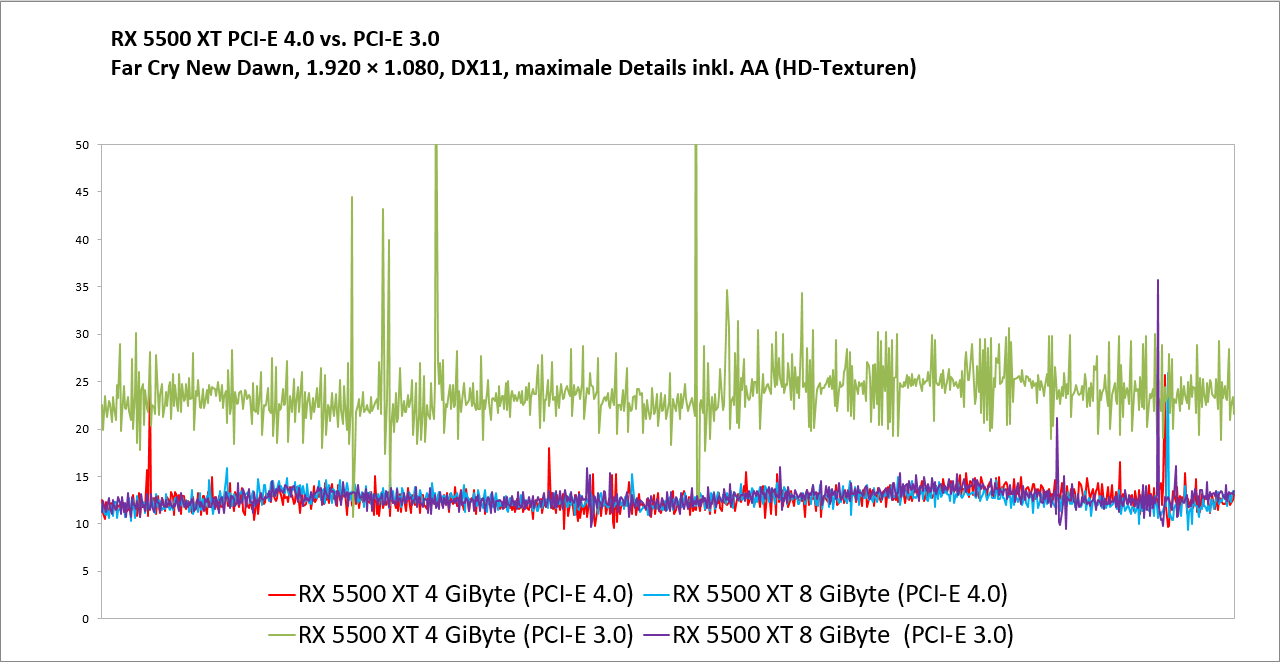
because the 4gb model at pcie 3 is bad https://cdn.mos.cms.futurecdn.net/ZLanBFsZdDsTBnuGur9GzT.png
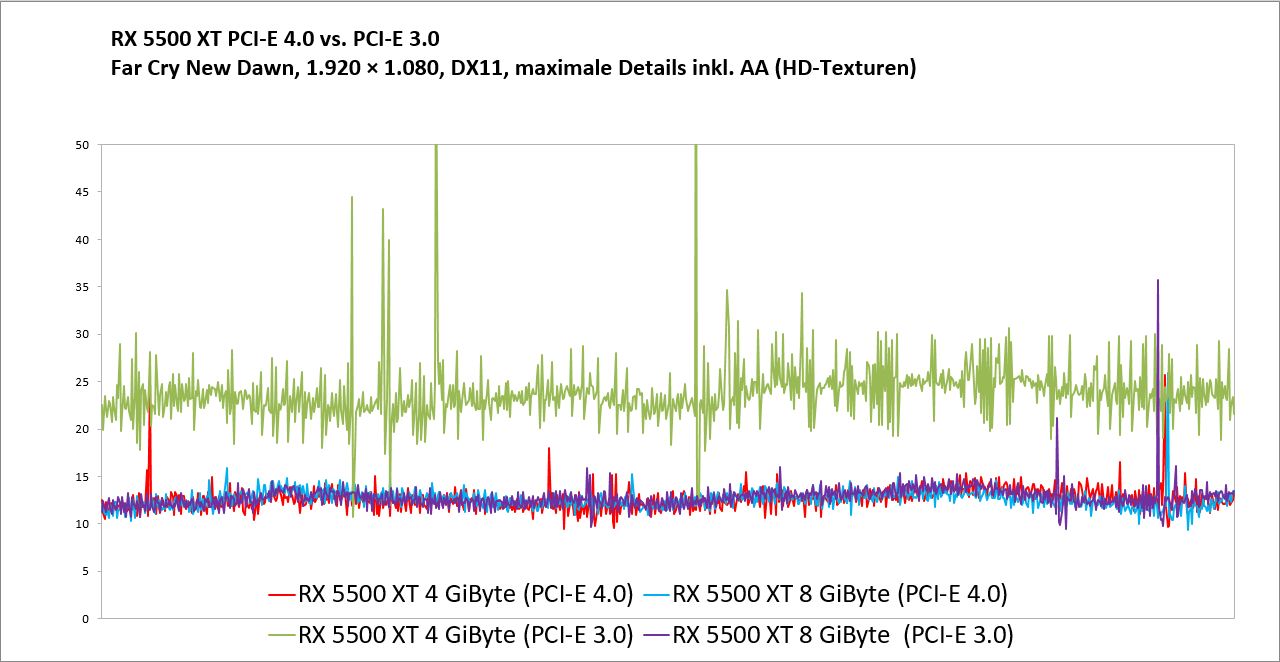
8gb model at pcie 3 is fine
keen surge
limber dragon
because the 4gb model at pcie 3 is bad https://cdn.mos.cms.futurecdn.net/ZLanBFs...
Even the 8GB model is hard-piped for PCIe 3 x8 speeds, though.
keen surge
Some people tell me it is the chipset. Upgrading from a B450 to X570 is what they say is causing the differences
hollow thorn
Maybe it's the CPUs io controller, dunno
Chipset should have about 0 impact by itself
Perhaps newer bios version?
keen surge
Like I said, the B450 could not run the third-gen Ryzens out of the box without a BIOS update, while the X570 has the third-gen Ryzens as drop-in plug-and-play
hollow thorn
B450 boards seem to only have like agesa 1.0.6 before recent 1.2.0 betas
Might be mixing numbers up, will double-check
keen surge
It also could be the difference in operating system versions between old and new.
Going from the 5.8 Linux kernel to the 5.11 kernel
hollow thorn
Checked bios, agesa 1.0.0.6 versus 1.2.0.2
keen surge
The actual specific boards are the ASUS RoG Strix B450F and the MSI MAG X570 Tomahawk
hollow thorn
Just pointing out there's a definite disparity between bios updates between different boards
Agesa updates may or may not help things, but it's one factor
(I can't magically tell you which bioses are currently installed on each board and compare them rn)
keen surge
You also have to keep in mind, when I was using the B450F, I had the Radeon RX 5500XT's core clock speed bumped up to 2,000MHz
On the X570, it is at stock speeds
limber dragon
just curious, how much vram does heaven use?
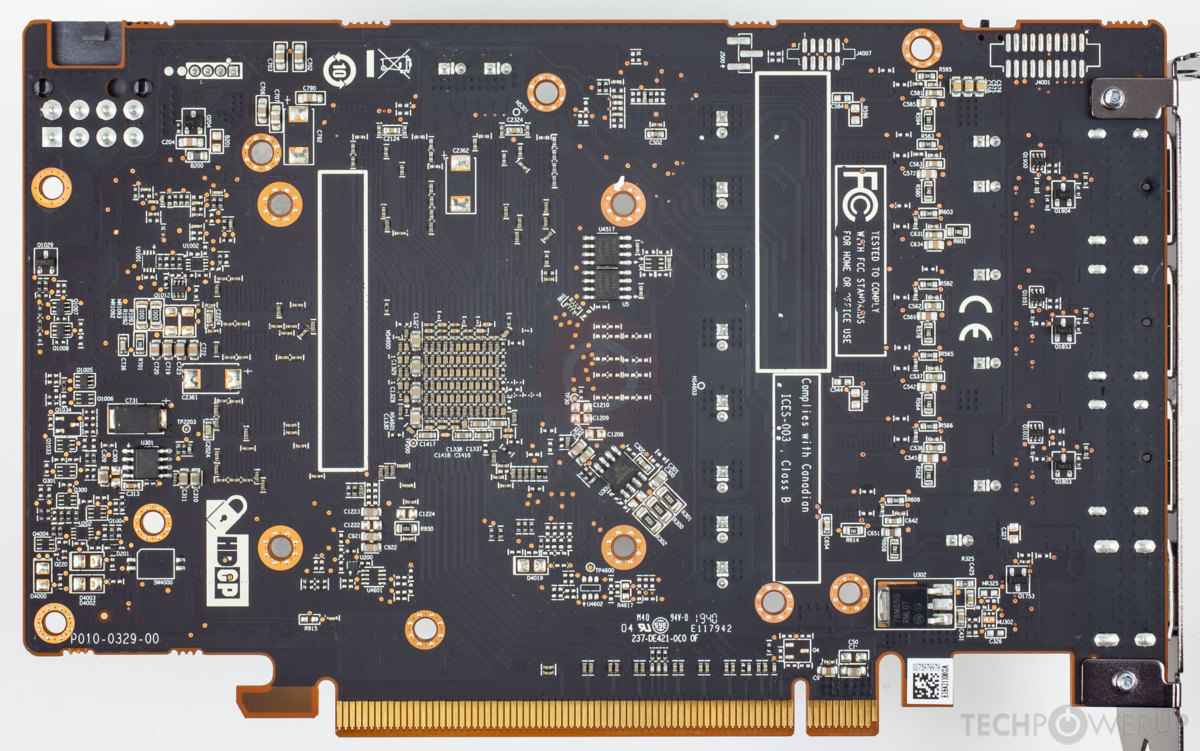
https://tpucdn.com/gpu-specs/images/b/7513-pcb-back.jpg its definitely wired to just x8, and if it was running out of vram, the pcie bandwidth would come into play
 keen surge
Not sure. But I did test in another game using the in-game benchmark that I was able to get a VRAM measurement on
vast meadow
keen surge
This may help, <@!191276897227898880> the RoG Strix B450F was PCIe gen 3 only, a...
That makes no sense lol
limber dragon
vast meadow
That makes no sense lol
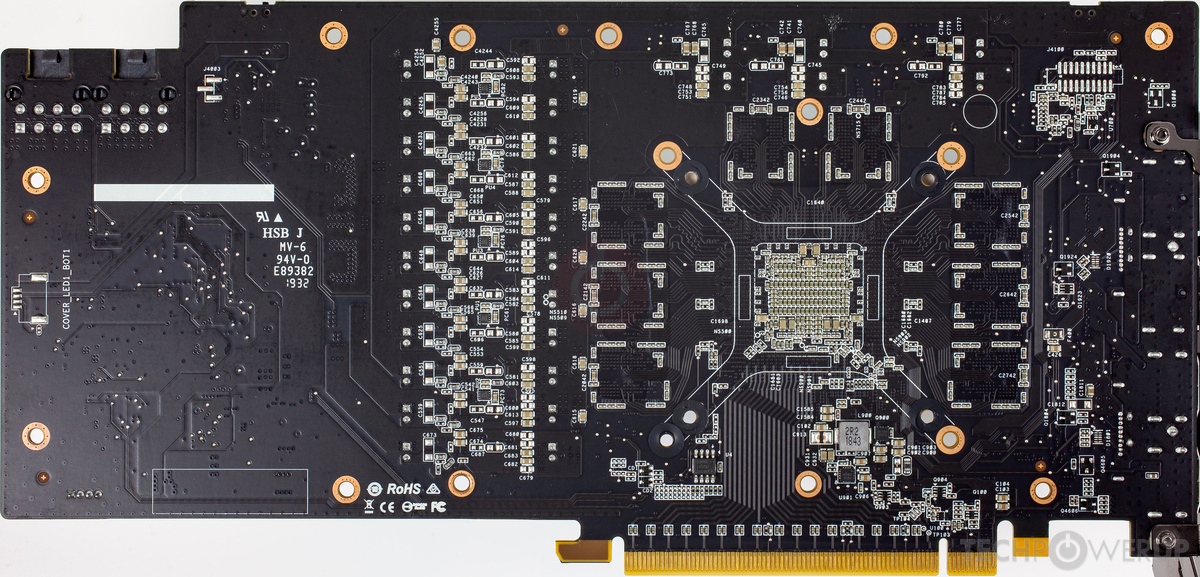
look at the pcb, its literally wired for just x8
vs a 5700xt with full x16 https://tpucdn.com/gpu-specs/images/c/3339-pcb-back.jpg
 vast meadow
I see yeah
keen surge
limber dragon
look at the pcb, its literally wired for just x8
On Shadow of the Tomb Raider on the B450 board, 73fps on the High Quality preset, while on the X570 board, 80fps on the high quality preset. Game itself uses between 4 and 6 gigabytes of VRAM. Card I have has 8GB of VRAM. I did not take the time to compare the game framerates with AMD FidelityFX Contrast Adaptive Sharpening on or off. The framerates I speak of were with FidelityFX CAS enabled. Shadow of the Tomb Raider and Anno 1800 are the only two games I play that make use of the AMD FidelityFX stuff
limber dragon
cheaper to not certify 16 lanes of pcie4
keen surge
limber dragon
cheaper to not certify 16 lanes of pcie4
But see, that may explain it. 8 lanes on PCIe3 vs 8 lanes on PCIe4. 8 lanes on PCIe4 is equal to 16 lanes on PCIe3. Many videos I've seen online, say it is that x8 hard pipe on PCIe 3 that's holding back the 5500XT
limber dragon
its not really holding it back, I ran my 6900xt at pcie3x8 and it was maybe 5% difference compared to pcie4x16
keen surge
Take of this what you want, but it does appear that the 5500XT is hamstrung by the x8 lanes. https://www.youtube.com/watch?v=-EDJXISD6RY

Support us on Patreon: https://www.patreon.com/hardwareunboxed
Merch: http://crowdmade.com/hardwareunboxed
Radeon RX 5500 XT - https://amzn.to/2YIbVGL
Radeon RX 5700 - https://amzn.to/2FYq5v5
Radeon RX 590 - https://amzn.to/2qP0KvS
Radeon RX 580 - https://amzn.to/2OqZPjx
Radeon RX 570 - https://amzn.to/2Wb3x08
GeForce RTX 2060 - https://amzn.to...
This doesn't explain the wide discrepancy between the framerates, though. I was just as surprised when I noticed it. On the ASUS board, I had Precision Boost Overdrive enabled, Hardware Level 2 Overclock as well, XMP enabled, and the Radeon RX 5500XT overclocked to 2000MHz core. On the MSI board, I have PBO and XMP enabled but everything else is stock.
limber dragon
just "pbo enabled" also varies board to board
keen surge
Also keep in mind that the B450F needed a BIOS update just to be able to run the Ryzen 5 3600 since it was released before the 3000-series Ryzens
The other thing is that on the ASUS board, when I was gaming, the CPU was kept at or as close to 4.1GHz on the active cores as possible, and it did not look like it had very good CPU Idle State management, while the MSI board does.
On the ASUS board, even just a 1% use on the CPU cores, triggered PBO to push the core clock to 4.1GHz until that core went idle again. On the MSI board, the CPU core speed is scaled with its utilization
The B450F board also had only one 4-pin CPU power connector, while the X570 board has two
keen surge
limber dragon
just "pbo enabled" also varies board to board
It also doesn't seem "real" that the MSI MAG X570 Tomahawk with the Ryzen 5 3600, the Radeon RX 5500XT, an ASUS Xonar SE sound card, AND my MSI Optix MAG24C monitor combined use less than 240 watts during gaming, but I measured that at the outlet using an energy-monitoring smart plug
limber dragon
Its all fairly low power parts tbh
50w for cpu, 100w for gpu, 20w for monitor, 80w for psu and motherboard
keen surge
limber dragon
Its all fairly low power parts tbh
I'm not complaining about the difference in framerates, but it did surprise me seeing the difference with just a motherboard upgrade
keen surge
limber dragon
Its all fairly low power parts tbh
This might explain it.
AMD Zen 2/Zen3 CPU Performance Enhanced
Earlier, in December 2020 there were reports that the performance of Zen 2/Zen 3 CPUs were affected terribly due to the introduction of CPU frequency invariance support and the implementation of the Schedutil CPU frequency scaling governor.
As major Linux distros moved towards using CPUFreq Schedutil by default, there were major performance penalties across the board affecting Zen 2/Zen 3 processors and a solution to these problems was very important.
Linux Kernel 5.11 seems to resolve the problems caused by it and AMD Zen 2/Zen 3 CPUs are running fine without any major performance penalties.
Ubuntu 20.10 used the 5.8 kernel. Ubuntu 21.04, which is what I am on now, uses the 5.11 kernel.
I was on the 5.8 kernel when I got the framerate numbers on the B450F board
vast meadow
limber dragon
just "pbo enabled" also varies board to board
I've a feeling it's this yeah
keen surge
vast meadow
I've a feeling it's this yeah
On another note, it appears AMD is going to merge the ThreadRipper into the Ryzen line. They dropped hints that "Zen 4 will have 128 cores", which hints that there will be either a ThreadRipper using the Zen CPU stuff or that they will merge the ThreadRipper line in with the Ryzen line and just call the whole thing Zen 4
keen surge
vast meadow
I've a feeling it's this yeah
How often do you see Microsoft fixing problems like this?
limber dragon
keen surge
On another note, it appears AMD is going to merge the ThreadRipper into the Ryze...
Man, its a good thing its always been that way
TR1000 was zen, TR2000 was zen+, TR3000 was zen2, and no TR4/5000 because too much demand
vast meadow
keen surge
On another note, it appears AMD is going to merge the ThreadRipper into the Ryze...
Both tr and ryzen are zen, it's the architecture lol
vast meadow
keen surge
How often do you see Microsoft fixing problems like this?
Wdym Microsoft have nothing to do with how your bios is configured by board
vernal cosmos
keen surge
On another note, it appears AMD is going to merge the ThreadRipper into the Ryze...
Whaaa?
Zen 3 and 4 are core architectures not lineups
the current threadrippers are zen 2
the current epycs are zen 3
the current ryzen cpus are zen 3
all they mean by that is zen 4 will be able to do 128 cores
which is exactly what they have been saying
nothing more
Threadripper and ryzen have different sockets and the size itself is different
makes them not compatible on the same board and hence not a part of the same lineup
also the epyc cpus will probably see a 128 core cpu before TR sees it imo
 sonic island
I have a Gigabyte GA-X99-UD4 motherboard with the Intel I7 5820K - and it works perfectly. In order to install Windows 11 I will need the Gigabyte TPM module which is unavailable. I would like to reuse as many components (including the Processor) in a motherboard that has TPM ver. 2 already on it.
What boards would you suggest that would allow me to reuse the components?
vast meadow
sonic island
I have a Gigabyte GA-X99-UD4 motherboard with the Intel I7 5820K - and it works ...
That's cpu is like 6 years old i doubt any motherboard for it will have tpm 2.0 chips and if they did it would be stupid expensive to buy from anywhere but ebay lol as nowhere retail is gonna carry a 6 year old mobo, make sure you just don't have to enable ttpm or something along those lines in the bios of your current board
vernal cosmos
sonic island
I have a Gigabyte GA-X99-UD4 motherboard with the Intel I7 5820K - and it works ...
you can get a TPM module
no need for a mobo upgrade
cyan raft
What’s my best option for RGB ram?
32 Gb 3600mHz
And is there a difference between using a 2 and 4 sticks
elfin warren
Crucial Ballistix
2 sticks is easier on the IMC
You can OC better with only 2 sticks
cyan raft
I’m not really thinking about OCing ram that much
How does the ballistix compare to TridentZ Neo?
cyan raft
How do I know if it’s B die?
elfin warren
The timings mainly
16-19-19-39 is usually Hynix
I can't remember the bdie specific timings but I think it's similar to the Micron E die on Ballistix
cyan raft
I’ll probably go with TridentZ then since I like the look better
elfin warren
Ballistix looks pretty good installed, not so good in the product screenshots.

But ya, just avoid the 16-19-19-39 kits
cyan raft
I’d be buying it through microcenter
elfin warren
16-16-16-36 IIRC
This kit is Hynix, note the timings on the spec tab https://www.microcenter.com/product/610708/gskill-trident-z-neo-series-rgb-32gb-(2-x-16gb)-ddr4-3600-pc4-28800-cl16-dual-channel-memory-kit-f4-3600c16d-32gtznc-black

Micro Center
Engineered and optimized for full compatibility on the latest AMD Ryzen 3000 series processors on AMD X570 chipset motherboards, Trident Z Neo brings unparalleled memory performance and vibrant RGB lighting to any gaming PC or workstation with AMD Ryzen 3000 CPUs and AMD X570 motherboards. Uniquely designed with a contrast of black brushed alumi...
microcenter may not have Bdie kits
cyan raft
That’s 16-19-19-39
elfin warren
Ya, that's Hynix
cyan raft
Oh wait so I should avoid Hynix?
elfin warren

Micro Center
Engineered and optimized for full compatibility on the latest AMD Ryzen 3000 series processors on AMD X570 chipset motherboards, Trident Z Neo brings unparalleled memory performance and vibrant RGB lighting to any gaming PC or workstation with AMD Ryzen 3000 CPUs and AMD X570 motherboards. Uniquely designed with a contrast of black brushed alumi...
cyan raft
So that’s why that’s more expensive
How big of a difference will 3200 vs 3600 MHz make?
cyan raft
General gaming?
elfin warren
Same applies, Gamers Nexus did gamer comparisons with a ton of ram on Ryzen 3000 series
cyan raft
Would you say it’s worth it to but 3600 for my 5900x?
elfin warren
5900x should be 3600-3800 absolutely
Honestly if you aren't interested in overclocking the Hynix kit will be fine
I very much doubt you'll see a difference between B-Die and Hynix without overclocking
cyan raft
How much difference would there be in overclocking?
 patent lark
how is ASUS TUF Z590-Plus (WIFI 6)?
elfin warren
cyan raft
How much difference would there be in overclocking?
Quite a bit, B-Die could do 4000+ with tight timings EZPZ, while the Hynix probably 3800-4000 depending on which exact die it is
But if it's Ryzen, ram speed is linked to FCLK which means you won't really go above 3800 anyway. Ryzen 5000 series very rarely hits 2000 fclk
cyan raft
XD
elfin warren
Yo need to go to something like 4400+ unlinked to gain back the performance loss from unsyncing FCLK
cyan raft
That’s way too expensive imo
elfin warren
Right
cyan raft
So I shouldnt really pay that much attention to Hynix vs B die then?
elfin warren
Depends on how far you want to push your machine
If you're not interested in it then probably don't worry about it
elfin warren
Ye
cyan raft
Out of curiosity what’s so bad about Corsair ram?
elfin warren
XMP issues and usually bad binned chips
I've seen more issues with Corsair ram not sticking XMP than any other brand here
cyan raft
Turns out there’s a bit extra performance for Zen 3 CPUs when running 4 sticks compared to only 2
By about 10%
cyan raft
Ahh ok

This benchmark started as an AMD Ryzen 5000 memory timings and frequency benchmark (like of 3600 vs. 3200, 3800, with FCLK changes), but morphed into a 2x8GB vs. 4x8GB benchmark.
Sponsor: EVGA XR1 Capture Card on Amazon (https://geni.us/3IMrqPi)
Watch our AMD R5 5600X CPU review: https://www.youtube.com/watch?v=01EhbmJAW-k
Watch our AMD R9 5950...
elfin warren
So if you have 2 dual rank sticks, which you will at 16 GB each, it's like having 4 single rank sticks IIRC
cyan raft
What does single vs dual rank mean?
elfin warren
Single rank means chips only on one side of the stick
Dual means both sides of the stick have chips
cyan raft
Ahh that makes sense
elfin warren
It's just how many modules the CPU can address that matters
cyan raft
So I’d be better off buying 2x16 vs 4x8?
elfin warren
GN's testing above was all single rank sticks
elfin warren
cyan raft
So I’d be better off buying 2x16 vs 4x8?
Mainly for future upgradeability
cyan raft
My next ram upgrade will most likely be DDR5
elfin warren
They will perform the same for the most part although sometimes 4 sticks XMP/DOCP can be fidgity
cyan raft
In a couple years
burnt spear
So ddr5 is rumored to be like 3x as fast as ddr4, atleast from what I've seen
How much of an fps different will that actually be?
cyan raft
I ended up buying the Crucial Ballistix RGB
cyan raft
burnt spear
How much of an fps different will that actually be?
We really will have to say I don’t think there’s any way to tell the the current moment
vast meadow
cyan raft
Out of curiosity what’s so bad about Corsair ram?
Bad value and meh bins
 pale mist
Hey could i have some help with an old motherboard battery
So it reads as a “Panasonic br2380 3v”- could i just get a generic 3volt button battery and it would work? This is for a compaq presario so its old
The computer isn’t remembering bios settings so I assumed the battery was the issue
cyan raft
Yeah any 3 volt button battery thats the same size should work
pale mist
Thanks ok
 lime lintel
Looking to replace my current motherboard with one that supports TPM 2.0. Current is MSI 970A - G43 plus. Looking at MSI Tomahawk Mag B550. Can someone advise
hollow thorn
What CPU do you have?
elfin warren
That's an AM3+ MB. Probs need a new CPU as well
elfin warren
Purpose for the PC?
lime lintel
General use
hollow thorn
Office work, gaming, editing, rendering, etc?
lime lintel
yes.
lime lintel
office work, videos mostly
hollow thorn
What'll be the budget?
lime lintel
not worried anout budget. Will the board I spec’d beva good replacement ?
elfin warren
Depends on what CPU you want to go with.
hollow thorn
Well, your current CPU is not compatible with that new board.
elfin warren
Right now Intel is the price/performance leader
hollow thorn
Also, what graphics card do you have?
hollow thorn
So, I assume you want to have a machine that's compatible with windows 11?
lime lintel
correct
hollow thorn
I would say the best price to performance route would probably be an Intel 11400/11500 with a B560 board, and sticks of 2x8gb ddr4 3000/3200, that'll cost around 400-500$, assuming you don't do too much besides office work.
If you want to stick with AMD, 5600x with a b550 board and sticks of 2x8gb ddr4 3600 would cost a bit more, probably around 500$
lime lintel
understood. However, I’m assuming the Tomahawk with an appropriate AMD Ryzen will be WIN 11 comaptible, right
sorry, just saw yourvresponse
Thanks.much for the advice
hollow thorn
B550 Tomahawk itself isn't a great model in terms of price to performance, but TPM 2.0 is a bit more about the CPU than the motherboard
hollow thorn
If you need wifi, B550m pro-vdh wifi,
If not, a B550m bazooka, both around 110usd.
Tomahawk is just a bit more expensive for features and capability you'll likely never need, it's not a bad board, just a board that doesn't make as much sense at the price.
hollow thorn
:)
hollow thorn
lime lintel
okay. Reall
Just notes on compatibility, windows 11 will work on Ryzen CPUs 2nd gen and beyond, and Intel CPUs 8th gen and beyond. Keep in mind compatibility when choosing a CPU for the board, for example, 2nd gen Ryzen chips are not compatible with b550 boards.
hollow thorn
For a b550 board, 3600, 3700x 3800x, 3900x, 3950x, 5600x, 5800x, 5900x, 5950x, and a few more will work, 5600x would be optimal if you can get it for 300$, or probably even less if you can go to a microcenter
lime lintel
sounds good
lime lintel
thanks
earnest rover
Need expert advice


How do I go about getting that controller for the 6 fans rgb to software control on the asus tuf b450m pro board?
Do I need special wires or sumting
grizzled bloom
earnest rover
Do I need special wires or sumting
What controller is it? It probably isn't compatible with that 4 pin RGB header, and you don't have any 3 pin headers.
grizzled bloom
Yeah but then you don't get to sync all your lighting
elfin warren
Can't do it with those fans, looks like a proprietary connector. Power and RGB all in one connector...what case is this?
 dusky totem
Rip
cyan raft
I’ve been testing out this Crucial Ballistix RGB ram and so far I’m loving it
grizzled bloom
cyan raft
I’ve been testing out this Crucial Ballistix RGB ram and so far I’m loving it
What die did you get? Rev.e is pretty common in those halfway decent kits.
 celest anchor
grizzled bloom
What die did you get? Rev.e is pretty common in those halfway decent kits.
celest anchor
grizzled bloom
What die did you get? Rev.e is pretty common in those halfway decent kits.
well all it could be is Rev.E or Rev.B
fresh wren
I love when my PC idles at 48-52°c
vast meadow
Thats seems a bit too high unless it's blistering ambient temps
 wheat halo
For gpu its normal if fans are off
vast meadow
wheat halo
For gpu its normal if fans are off
That's true i just assumed it was CPU because in cpu chat lol
limber dragon
For zen2/3 that's normal too
vast meadow
limber dragon
For zen2/3 that's normal too
Idle? I suppose it depends on the A ambient a lot
fresh wren
Stupid ambient temperature of 35°c
cyan raft
grizzled bloom
What die did you get? Rev.e is pretty common in those halfway decent kits.
Timings are 16-18-18-38
At least that’s what it says on the sticks
devout mothBOT
 Big Daddy Dubbs#7886 has been warned
Reason: Bad word usage
Big Daddy Dubbs#7886 has been kicked
Reason: Too many infractions
devout mothBOT
 sageweeb#1133 has been warned
Reason: Bad word usage
sageweeb#1133 has been kicked
Reason: Too many infractions
grizzled bloom
cyan raft
Timings are 16-18-18-38
3600? If so there's a good chance it's rev e. If that's the case you should be able to easily up the clock speed to max out your infinity fabric.
vast meadow
fresh wren
Stupid ambient temperature of 35°c
Do you live in an oven XD
vast meadow
cyan raft
Yeah 3600
Sips got their rev e 3600mhz kit to 3800cl14 sooo definitely 3600 cl16
vast meadow
Yikes
cyan raft
vast meadow
Sips got their rev e 3600mhz kit to 3800cl14 sooo definitely 3600 cl16
Stock its 3600 CL16
vast meadow
cyan raft
Stock its 3600 CL16
Ik but you could easily oc that to 3800cl16 anyway
cyan raft
Ahh ok
limber dragon
my 3600c16 rev e did 3800c14 without issue too
vast meadow
Yep figured you could just oc the primaries and leave the rest auto but wasn't 100% sure for cl14
cyan raft
should i try for 4000cl16 or 3800cl14?
Also how would i go about speeding up the timings?
Because rn im at 3800Cl16
celest anchor
cyan raft
should i try for 4000cl16 or 3800cl14?
if 4000 cl16 works with synced FCLK that
grizzled bloom
Yeah. Your fclk stability is the limiting factor there. My 5800X will work at 1900 (3800) but any higher and I start seeing errors. 1900 is about par for 5000 series, bios updates can help push higher sometimes.
It's technically stable for gaming up to 2000 on my chip if I ignore WHEAs.
grizzled bloom
More voltage doesn't stabilize it for me either. 1.15 SoC and other adjustments, no luck.
celest anchor
LCLK runs off soc so that's all that'd effect it
just a shame you can't run it at 2:1 like you can UCLK
 warped scroll
can someone help me out with a storage issue I'm having? I have an EVGA Z77 FTW motherboard and an i7-2600k, I'm trying to put a 120gb SSD + 500gb or 1TB HDD in this build but all that gets recognized in windows or the BIOS is the SSD, I've tried all sata slots and multiple confirmed working hard drives but it all yields the same result. Don't know if this question is better suited for #storage-devices but since they're confirmed working i thought I should post here
 magic rampart
Intel(R) Core(TM) i7-10700F CPU any reccomendations for a better cpu for streaming?
 void jolt
That’s a fine CPU
Dunno why you need better?
The next rung up the ladder would be a 10850KF or something
celest anchor
what gpu do you have?
magic rampart
nvida 3070
celest anchor
stream off that
If you really want to stream off the CPU make sure power limits are unlocked
magic rampart
Tbt I'm not super computer savvy
celest anchor
you'll get around 30% more CPU multithread perf from unlocking power limits
Your gpu has a really strong encoder, so you can use it for encoding and stuff
magic rampart
streamlabs is a thirsty program lol
void jolt
Basically go into OBS and then encoding settings, and set it to NVENC rather than CPU
magic rampart
Just unsure of how to do this lol...set it to NVENC ...got it
celest anchor
CPU encoding is better quality, but nvenc is good enough
unless if you are a pro streamer or something
void jolt
CPU encoding destroys the CPU tho lol
celest anchor
yup
magic rampart
how so?
 magic rampart
seems my encoding has been using nvenc hmm
magic rampart
I wouldn't call myself a "pro streamer" yet anyway lol Long ways off from there XD. But quality of life would could be better so
celest anchor
check with taskmanger to see what is using all of your cpu
celest anchor
is the encoder set to hardware?
magic rampart
yeah
celest anchor
I don't know about slobs but obs looks like this
 magic rampart
hmm cant show you mine for some reason...
well its similar
software (x264)
Hardware (NVENC)
Hardware (NVENC)(new)
finite elm
Any good leaks for 12 gen Intel?
celest anchor
it's 10nm
cyan raft
Oh it’s 10 now?
celest anchor
superfin
yeah it is
10nm super fin has already proven it's self to be very good with the mobile chips
and the 'B' series
celest anchor
performance of what? the silicon?
celest anchor
hasn't really been tested too much
But it's a tigerlake chip so it's a better arch
also boosts to 5.3 too
big problem is it'll be really power limited
 viral knoll
Needs someone’s help can someone tell me a good b550 or x570 mobo for a 5800x?
@copper solar 
 viral knoll
how are you theo
 copper solar

 copper solar
tired
viral knoll
Hope you get some good sleep then
void jolt
viral knoll
Needs someone’s help can someone tell me a good b550 or x570 mobo for a 5800x?
X570 TUF GAMING PLUS
vast meadow
I'd get the b550 over the x570
void jolt
He asked for a good board
hollow thorn
void jolt
X570 TUF GAMING PLUS
no flashback tho
void jolt
Pro then
void jolt
I haven’t seen a single Asus board in the last few months that hasn’t had a new enough bios
cyan raft
I would say B550 because PCie 4.0 still really isn’t that useful yet
I’m pretty that’s like the biggest difference between the two
void jolt
B550 has PCIe 4.0
void jolt
 cyan raft
Huh ok
void jolt
The B550 Chipset has had PCIe 4.0 since day one
void jolt
Mostly overclocking capability
hollow thorn
cyan raft
So what even is the difference between X570 and B550
B550 chipset lanes runs at pcie 3.0, x570 chipset lanes run at pcie 4.0
so on B550, M.2_1 would be PCIe 4.0, but M.2_2 would be PCIe 3.0
hollow thorn
void jolt
Mostly overclocking capability
nothing to do with the chipset tho :P
void jolt
I thought we were talking about the difference between a TUF b550 and TUF x570?
hollow thorn
I don't think we said anything about tuf b550? I said b550 aorus elite ax..?
 hollow thorn
no, go sleep
viral knoll
hollow thorn
would grab something like a b550 aorus elite ax tbh
The normal or V2?
Model
viral knoll
Alrighty thx
cyan raft
hollow thorn
B550 chipset lanes runs at pcie 3.0, x570 chipset lanes run at pcie 4.0
SO I WAS RIGHT ABOUT THE PCIE
grizzled bloom
Add on the qualifier statement "but this doesn't really matter for 99.9% of users"
 elfin epoch
Any way to get rid of that red led? B450 tomahawk max
 limber dragon
mystic light and disable rgb
elfin epoch
if I install then uninstall will it keep the lighting the same?
 halcyon relic
anyone know where to find product page/drivers for this MB?
Buy ASRock B550AM Gaming AMD Chipset B550A Socket AM4 DDR4 HDMI USB SATA 6Gb/s Micro ATX Desktop Motherboard 80-MXBBL0-A1A01: Motherboards - Amazon.com ✓ FREE DELIVERY possible on eligible purchases
cannot find it on their website
limber dragon
elfin epoch
if I install then uninstall will it keep the lighting the same?
maybe? My msi x470 keeps it through various OSes
elfin epoch
just uninstalled and everything seems fine
I just dont like having applications i'll only use once or twice
ok idk what I did but when i rebooted the cpu light turned on for a sec then the vga light turned on

those lights
limber dragon
prob need to keep mystic light installed then
devout mothBOT
 Preston#7132 has been warned
Reason: Bad word usage
elfin epoch
I think it messed with my cpu temps somehow. Idfk how it would do that but as soon as I installed and uninstalled it, my cpu temps skyrocketed
 lavish aspen
Would extra ram help in raw gaming performance?
lavish aspen
grizzled bloom
Not beyond 16gb
Thank you
limber dragon
*yes, but if its dual rank memory
 split copper
More ram more mods 
grizzled bloom
limber dragon
*yes, but if its dual rank memory
That's an edge case, and really hard to find anyway
limber dragon
How is it hard to find? And its not an edge case
rank interleaving is a real thing
celest anchor
dual rank ram is easy to find
Just pop onto the used market and you can easily get guranteed dr kits
grizzled bloom
If you know where to look sure but the average person won't
By "edge case" I meant uncommon scenario since it's rarer than SR
celest anchor
average person won't even buy ram or enable xmp
you can get dr 8GB sticks too though
limber dragon
https://www.youtube.com/watch?v=-UkGu6A-6sQ GN showing it, but not explaining that the 2x8 vs 4x8 is rank interleaving
This benchmark started as an AMD Ryzen 5000 memory timings and frequency benchmark (like of 3600 vs. 3200, 3800, with FCLK changes), but morphed into a 2x8GB vs. 4x8GB benchmark.
Sponsor: EVGA XR1 Capture Card on Amazon (https://geni.us/3IMrqPi)
Watch our AMD R5 5600X CPU review: https://www.youtube.com/watch?v=01EhbmJAW-k
Watch our AMD R9 5950...
celest anchor
gn is hopeless
celest anchor
I'm surprised they didn't just go and copy more bs from wikipedia again
that's all their memory timings video is
limber dragon
they pinned that they were going to make an explanation video, but dram timings part 2 will probably come before it /s
celest anchor
It's good they haven't made a second video, because it'd be worse
grizzled bloom
Probably scrapped that project after all the criticism
celest anchor
wikipedia

problem is they act like they know what they are talking about when they don't
grizzled bloom
Anyone can read a script copied from a wiki
celest anchor
Like even in linus' video where they tested x16 vs x8, they were really clear they didn't know why it was so much faster
Linus' stuff on memory is actually pretty good
celest anchor
they don't explain stuff that they can't
split copper
Isn't x8 not significantly slower than x16 
celest anchor
x16 is significantly slower
I'm actually suprised with how accurate my theoretical estimation of 19% was
grizzled bloom
If you're talking 8Gb density vs 16Gb dimms yes, 16 is slower
celest anchor
No, not density
chip width
yeah 16Gb is slower but it's much less of a difference
grizzled bloom
Yeah that, technical name slipped my mind
celest anchor
8Gb is about 2.76% faster
in theory
in linus case the x16 sticks being slower were partially due to that
but mostly due to tCCD and the bankgroups
 digital kernel



 naive pendant
best mobos as of right now? (any price) (intel or amd)
vernal cosmos
naive pendant
best mobos as of right now? (any price) (intel or amd)
what cpu you wanna get?
high end mobos arent really worth it at all tbh
burnt spear
I'm guessing it's one of these that had an issue, so "Your device encountered an error, we are collecting information and will then restart it for you" just popped up
And its nkw restarting slow af
I was just playing valoranr and streaming
The boot screen keeps switching between monitors
And now it's preparing automatic repair
Anyone know what happened?
 vast meadow
naive pendant
best mobos as of right now? (any price) (intel or amd)
vast meadow
naive pendant
best mobos as of right now? (any price) (intel or amd)
Really depends on the cpu and if wifi is wanted etc
@burnt spear i would google the error and see if anyone else has a solution tbh
burnt spear
Windows corrupted I figured it out
But i can't reset it bc I don't have it set to be able to edit my drive or whatever
And now I'm pretty sure I have to take my ssd out and bring it somewhere since no one in my house has regular pc I can use
Write protection or whatever
And I can't even reset it
Fun timew
Looks like I'm buying a new ssd
vast meadow
Yikes, I don't see how it would have write protection tho?
Mb someone else will have better insight than me
 mild jackal
celest anchor
Linus' stuff on memory is actually pretty good
mild jackal
celest anchor
Linus' stuff on memory is actually pretty good
I'd guess anthony was leading that project
hollow thorn
Iirc GN said they didn't know what they were doing for memory timings part 1, but learnt more for timings part 2
 smoky widget
https://pcpartpicker.com/product/GTCD4D/western-digital-blue-1tb-25-solid-state-drive-wds100t2b0a when the price goes down. I got two of for 89.99
 small urchin
Anyone have any idea why my PC is connecting to the 2.4ghz and not the 5ghz?
vernal cosmos
small urchin
Anyone have any idea why my PC is connecting to the 2.4ghz and not the 5ghz?
what wifi chip or dongle you have in the pc
small urchin
Any way to tell without looking for the packaging?
vernal cosmos
just get the packaging
small urchin
 vernal cosmos
small urchin
vernal cosmos
small urchin

Rosewill
1.0.0 Version 301 Download 95.82 MB File Size 1 File Count July 26, 2018 Create Date July 26, 2018 Last […]
install the driver from there
small urchin
Pretty sure it was working earlier before I had a DDoS attack and had to change the static IP on my mc server
vast meadow
 grave star
https://pcpartpicker.com/product/h3tQzy/crucial-mx500-1tb-25-solid-state-drive-c...
grave star
https://pcpartpicker.com/product/h3tQzy/crucial-mx500-1tb-25-solid-state-drive-c...
It's a good sata ssd but if you have an nvme slot available I'd grab an sn550 instead
naive pendant
i got a r7 2700x for 200$ cad is that a good deal ? or could i have gotten better
vast meadow
naive pendant
i got a r7 2700x for 200$ cad is that a good deal ? or could i have gotten bette...
When did you get it? And what use case? And if it's recent and for gaming, no as that's like 20$ cheaper than an i5 11400
naive pendant
vast meadow
When did you get it? And what use case? And if it's recent and for gaming, no as...
for gaming sadly
sheeesh
just today
vast meadow
I'd return it if i where you and get an i5 11400
But if you want to do content creation etc it's ntb
naive pendant
i like to stream while i play game if thats what u mean
lol
currently on a i5 4460 rn
vast meadow
Ehh meant like video editing, what gpu do you have?
naive pendant
i do that too
im using a 1060 3gb rn with the build i have
but i have a rx 570 8gb and a rx 580 4gb put away
vast meadow
Ahh
Ehh thr 580 would probs perform better but the 1060 has nvenc encoder for streaming i suppose it will do
naive pendant
alright sounds good
vernal cosmos
AYY PATO!
vast meadow
I really would return the 2700x for an i5 11400f and a b560 motherboard if you can btw
vernal cosmos
WASSUP MY G