tf is the difference between these?
#cpus-mobo-and-memory
1 messages · Page 200 of 1
 nova hornet
one might use cheaper memory dies or something
there's one digit difference in the part number
nova hornet
according to the newegg listings they're also the same price, just different discounts currently applied
but who knows how accurate that is
 cedar frigate
Opinions on the B460M MOBO, how does it look for the future upgrades?
 lucid nexus
ewww
more then half of those pcie slots are useless
what are u building
@vast path
what is this for?
 split copper
not really a problem, jmust use water blocks
the nyou can ocupy all the slots
big brain
 elfin warren
Quadros are two slot cards.
 vast path
A monster computer
lucid nexus
vast path
A monster computer
u dont need it tho
whats ur budget u can get such a cool lookin pc with all the specs u want
for literally the amount of the mobo and cpu
 willow shuttle
 tulip verge
i missed the sale on the ryzen 7 5800x
tulip verge
i missed the sale on the ryzen 7 5800x
F
 candid flax
lucid nexus
for literally the amount of the mobo and cpu
candid flax
lucid nexus
for literally the amount of the mobo and cpu
If he wants to spend that much it's his money. But if he's going threadripper id spend that much too
lucid nexus
Already talked in dms with him
 silk ice
Hey anybody know about how long msi usb bios flash takes? In my infinite wisdom I didn't grab a monitor before starting the update.
silk ice
👍 just didn't want to touch it early and create issues
elfin warren
Pretty sure the light shuts off
silk ice
Hey can a display output blinking in and out be indicative of ram issues or is it only a gpu problem
I've been having some weirdness after enabling xmp and I'm trying to ensure it's not related to that
 vivid glacier
Hey I just upgraded some parts and now my computer will not turn off from the windows tab. I have to turn it off by the PC itself any ideas on how to fix that?
 wintry scarab
vivid glacier
Hey I just upgraded some parts and now my computer will not turn off from the wi...
wintry scarab
vivid glacier
Hey I just upgraded some parts and now my computer will not turn off from the wi...
That's an issue with your Windows OS installation, not the hardware
vivid glacier
is there a way to fix that?
wintry scarab
Install all latest drivers, check bloatware and unused apps
vivid glacier
ok cool thanks
 vast meadow
silk ice
Hey can a display output blinking in and out be indicative of ram issues or is i...
vast meadow
silk ice
Hey can a display output blinking in and out be indicative of ram issues or is i...
Could be either ram or gpu issue, what cpu, mobo and what ram?

 woven epoch
Ryzen 5 3600 to Ryzen 7 5800x worth the upgrade ? (Use: Video Editing, 3D modeling and some gaming like puzzles and Fallout New Vegas, Reason: Have the cash for it)
vast meadow
i mean i would only go 5900x in that scenario considering 100 more and makes it way more worth the upgrade
woven epoch
Ah so it's definitely worth 5900x, i'll have to look into it, it's tempting for sure
vast meadow
also what mobo do you have? if its not great one you would want to consider a 150ish price increase to your total cost
 hollow thorn
@gritty meadow Interesting, with Foveros production, is Intel moving further away from monolithic die?
woven epoch
vast meadow
also what mobo do you have? if its not great one you would want to consider a 15...
I have the Gigabyte B550 Aorus Elite
 gritty meadow
hollow thorn
<@!131369265608654848> Interesting, with Foveros production, is Intel moving fur...
gritty meadow
hollow thorn
<@!131369265608654848> Interesting, with Foveros production, is Intel moving fur...
yes-ish
but at its core, its a question of how you define it
and considering the cluster hump that is "definition" in the semi-conductor space .....
hollow thorn
I don't quite understand what it is, but it seems to be putting a chip on a chip?
hollow thorn
alright, thanks!
gritty meadow
https://www.anandtech.com/show/13699/intel-architecture-day-2018-core-future-hybrid-x86/7 <- that is a solid starting point @hollow thorn


and if you get a slight headache after that. Dont worry, that is expected
hollow thorn
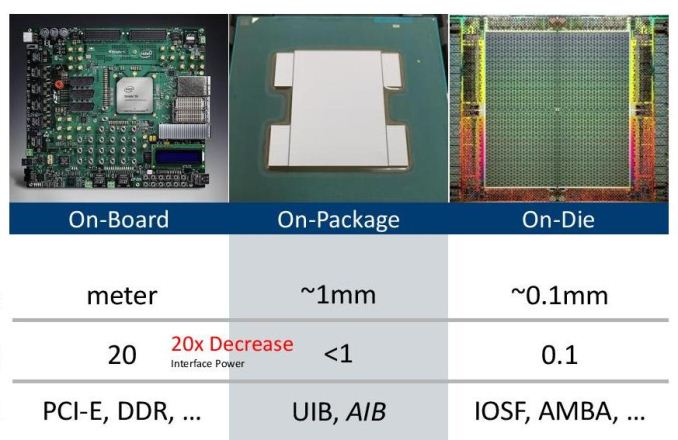
I need to clear something up, so what exactly is the package, is the package io things?
gritty meadow
depends on what context you are asking in
foveros is about what is "in" the chip
https://images.anandtech.com/doci/15270/hc29.22.523-hetro-mod-platform-shumanrayev-intel-final-page-011_678x452.jpg <- that is how intel defined it in that particular talk
 vast meadow
woven epoch
I have the Gigabyte B550 Aorus Elite
vast meadow
woven epoch
I have the Gigabyte B550 Aorus Elite
thats fine then all you would need to do would be update bios
woven epoch
Ah, noice, i'll go look up a youtube video to make the bios update
Would it be possible for a cpu to be at 1nm ?
vast meadow
its not the cpu its the size of the transistors on the cpu but yes
woven epoch
Wonder what the cost would be to achieve that size of a transistor, (quite costly from my guess)
gritty meadow
bonkers levels of cost
the R&D on this stuff is very expensive and very very far reaching
 naive pendant
given the lesser use of L3 in the new 5700g i wonder how that will bork the performance
silk ice
vast meadow
Could be either ram or gpu issue, what cpu, mobo and what ram?
Looks like it's the ram since turning off xmp seems to have stabilized things, cpu is a 5600x, mobo is a MSI b550 gaming edge wifi, and ram is patriot viper 4 Blackout 2x16gb 3600mhz cl18 memory. I'm not too surprised the memory is wonky I had just hoped it would work out since I got a really good deal on it and ballistix was out of stock at the time.
woven epoch
gritty meadow
bonkers levels of cost
Levels to 600 Billions dollars a year like the Military Budget ?
Or more than that
gritty meadow
its a weird thing to try and put a direct number on, because its "all the things"
we wouldnt be able to produce the chips we do now, if there hadnt been a metric tonne of material advances etc etc
"make a better wood coin" <- is fairly simple
hollow thorn
I mean, Intel's R&D budget is what, probably in the 100 Billion dollars range?
gritty meadow
i honestly cannot remember what % it is at currently
hollow thorn
iirc it was something like 30-40% when I saw it last?
gritty meadow
"make a better cpu" <- not simple at all
naive pendant
silk ice
Looks like it's the ram since turning off xmp seems to have stabilized things, c...
i get the feeling, given my own issues with ram, that the b series boards have issues with xmp
elfin warren
They don't
If they do it' because either BIOS needs updated, Ram is in the wrong slots, or bad ram
hollow thorn
gritty meadow
https://images.anandtech.com/doci/15270/hc29.22.523-hetro-mod-platform-shumanray...
Alright, so package is just name for big boi term that's overarching?
silk ice
I think it's bad ram, they're in the right slots, and I updated the bios today so I could use zen 3 cpu's
gritty meadow
hollow thorn
Alright, so package is just name for big boi term that's overarching?
depending on context? kinda-ish/sometimes? yes!
hollow thorn
Fair.
naive pendant
elfin warren
If they do it' because either BIOS needs updated, Ram is in the wrong slots, or ...
then ive had bad ram seven times in a row 
also issues using 4 sticks for some reason
hollow thorn
I'll spend some time reading those articles in a moment :)
naive pendant
or maybe its the weirdness of the 1600af varient
naive pendant
all i know is: dont spend 60 bucks on a cpu that you dont upgrade
naive pendant
im on the 450 actually
elfin warren
ah good
naive pendant
plan was to get a 5000 series
silk ice
Yea I'm on b550 with a 5600x
naive pendant

silk ice
So if my memory is struggling with it's xmp profile would manually adjusting it work? Or should I just try to buy new ram and see if I can sell the patriot memory since I'm way past the return window.
naive pendant
yes you can manually adjust it
start by restoring to stock volt values and working on speed then timing
my old guide site for this has dissipated but there is a fine tool for OCing ryzen based systems
silk ice
Alright, I'll try that out later, I'm headed back out for errands now
vast meadow
silk ice
Looks like it's the ram since turning off xmp seems to have stabilized things, c...
Yeah mb just try 3200cl16 xmp it probs has a 2nd profile for that right?
 trim crane
5600x is better than the 3700x right?
elfin warren
Faster single core, slower multicore
trim crane
How much slower is the multicore?
vast meadow
Well a good bit, 3700x has 2 more cores
Do you really need more multi core perf is the question? Games and most stuff will be faster for a 5600x
 pale geyser
Do I really need to update my mobo bios if im changing my cpu to Ryzen 5 3400g from Ryzen 5 1500x
I have Gigabyte Gaming 3 ab350 mobo
elfin warren
3400G F41
1500x F6
So that would be a yes
pale geyser
Ahh okay
So when i go to my mobo support/bios, Do i just download f41?
It says that before i updating the bios to F41 I must go through f40
and F40 says i must go through f31
before F40
elfin warren
Yes, and also your chipset drivers would be good as well
- Before update BIOS to F40, you have to install EC FW Update Tool (B19.0606.1 or later version) to avoid 4DIMM DDR compatibility on 3rd Gen AMD Ryzen™ CPU
pale geyser
Do i have to update my amd chipset driver too?
elfin warren
Yes
pale geyser
On F30, it says Update them first
Okay
So I just go to amd website for that right?
 hollow sandal
I’m getting a 3700 rather than a 5600 because micro center sells it for much cheaper than their 5600
elfin warren
Yes, they have a driver section
hollow sandal
I’m upgrading from a amd phenomenon 2 x6 lmfao
pale geyser
- Update to F31
- Install EC FW Update Tool and update to F41 through q flash utility
- Last is to update it to F41?
Sorry correction on 3) update to F40**
Is this the right steps?
pale geyser
PITA? What is that
elfin warren
Pain in the butt
pale geyser
Oh LOL
Yeah
I will upgrading my ram to corsair vengeance 3600 c16
Should be compatible too right?
2 sticks
2x8gb
elfin warren
No, fastest that board can support is 3200
pale geyser
Oh even if i use the xmp?
pale geyser
how about for a mobo like
ASUS ROG Strix B550-F Gaming
elfin warren
4400+ if I remember right
pale geyser
Ahh okay, got it!
pale geyser
I have two systems rn, one im using right now is ASUS ROG Strix B550-F Gaming with ryzen 5 3600 with 4x8gb 3200 ram. My other system which i will give to a friend is the gigaby gaming 3 which will have ryzen 5 3400g (due to not having a gpu) and 2x8gb 3600 ram.
I guess I just have to switch the rams right?
elfin warren
Taht would make your 3600 happy, yes
pale geyser
I knoww
LOL
Okie
Now i kinda wanna get two more sticks
Anyways, thank you so much for your help @elfin warren
elfin warren
YW
pale geyser
I really appreciate it!
Better than googling
LOL
One last question
Does usb storage matter when updating bios through q flash utility
elfin warren
that'll work
pale geyser
So my usb i have rn is 14.6gb capacity with a file system of FAT32
Should be fine right?
or are you talking about 32gb of capacity
pale geyser
Okay, thank you so much
elfin warren
YW
pale geyser
So download and unzip the bios file in the usb
elfin warren
Yes, BIOS file needs to be outside the folder too
vast meadow
elfin warren
But it doesn't support the 3400G
wait really why?
elfin warren
Cuz 3400G isn't a real 3000 series
elfin warren
X570 doesnt support first gen
 dense frost
elfin warren
X570 doesnt support first gen
dense frost
elfin warren
X570 doesnt support first gen
first gen what?
elfin warren
Ryzen

 hollow thorn
older agesa, afaik newer agesa throws away 1st gen support
elfin warren
🤷 It's not listed on most of them
trim crane
You have a 3 1200 with x570?
elfin warren
Due to BIOS sizes
dense frost
hollow thorn
older agesa, afaik newer agesa throws away 1st gen support
actually, I updated the bios as soon as I got it
dense frost
trim crane
You have a 3 1200 with x570?
oh, wait for the kicker
dense frost
 elfin warren
Ok fine, a handful of boards support odd things like the 1200
hollow thorn
but it might've been x470 that was throwing away older support
elfin warren
I also wouldn't call the 1200 and 1600 supporting first gen but eh
dense frost
hollow thorn
but it might've been x470 that was throwing away older support
I think this makes sense... especially since the x470 was abandoned
"abandoned"
dense frost
elfin warren
1200 and 1600
lucky for me 😆
pale geyser
I have a question about updating amd chipset, where do i find it. Im changing it to ryzen 5 3400g so am i going to the driver & support for that cpu
pale geyser
it didnt send me to the site because amd didnt allow links that download from a site outside of amd.com
elfin warren
It should just download the driver file
pale geyser
So is it just auto detect and install updates
pale geyser
The 2nd link sent me to b350 drivers & support
pale geyser
Ahh okay, thank you
what is the difference between ab350 vs b350 or a better question might be what is a in the ab350
Just wonderin
elfin warren
Just a model number, it's a B350 board
pale geyser
Ahh i see
Once i upgrade my bios to F41, do i need to swap my cpu right away from 1500x to 3400g?
elfin warren
Nah
pale geyser
When I downloaded F31 and opened it, why is it opening as a VLC media player
elfin warren
You don't open BIOS files
hollow thorn
ya
pale geyser
I can't find extract when i right click it
Should I just move the whole file that was just downloaded to the usb drive
elfin warren
No
Need to extract the ZIP file
It will ask you where you want to put it
Open the extracted folder and put the file inside on the thumb drive
pale geyser
I'm trying to extract the ZIP file but there's no option when I right click. But when I open it with windows explorer 3 files popped up and one of them has the AB350G3.F31
The others are autoexec.bat and Efiflash.exe
Should I move these three files to my usb drive?
elfin warren
Ya
It'll probably ask you to extract them first
You right click the ZIP file and don't get Extract ALl as an option? What OS is this?
pale geyser
Yeah, I have windows 10 but i recently moved my license key to my other computer
So this one Im using right now is not licensed anymore
Or actually, my windows is activated with a digital license
linked to my microsoft
I just installed a zip extractor in the microsoft store and I was able to extract it
So now, I just need to restart with my usb plugged in and go to bios then update it there right?
elfin warren
yes
pale geyser
For he EC FW update Tool, am i using the same thing? Extracting it then put the file inside the usb drive
*the
Oh wait, i just need to run the program and restart right?
elfin warren
Not too sure about that, haven't seen it TBH. Sound slike it's just an EXE you run tho
pale geyser
Yeah, I saw a video on YT and it was just an exe
hollow thorn
@gritty meadow I read a bit more into it, so, Foveros is the tech Intel is planning to use for making the multi-die designs a reality, which are made with EMIB For the inter-die communication, and in the future, they're planning to use ODI to stack more in the 3d direction, instead of the '2.5d' expansion they're currently talking about, with mix-matching various dies?
And I believe they're talking about IO and cache currently fitting in more on the '2d' plane using EMIB, but in the future, they want to use the ODI tech, also working along with dram makers to stack cache on top..?
gritty meadow
correct @hollow thorn :)
 ionic hamlet
I've about talked myself into just going ahead and flashing the BIOS before I gamble on putting the 5600x in my b550 board.
gritty meadow
hows the head after that reading @hollow thorn ?
hollow thorn
surprisingly decent
hollow thorn
Had to watch his video for it to make a bit more sense
gritty meadow
its also fascinating as all hell :)
hollow thorn
for a bit, I thought foveros was the EMIB tech (connecting the dies together, not the process used to make the die)
Yea
 prisma bough
hi
gritty meadow
hollow thorn
for a bit, I thought foveros was the EMIB tech (connecting the dies together, no...
and i think i have linked techtechpotato before (ian's youtube channel), but if i havnt, i can recommend throwing a sub his way or checking in regularly to see what he is talking about now :)
hollow thorn
Yea, subbed a bit back
gritty meadow
good :)
he is a bit of a odd ball, but he does know his tech and he (imo) presents things in a sensible manner
pale geyser
@elfin warren It reset bios back to F8 from F31 after the EC FW update tool...
pale geyser
Should I just update it back again to F31?
elfin warren
No
hollow thorn
@gritty meadow quick clarification, this was attached to the second article, so is this an example of the Omni-Directional Interconnect they were talking about?
 pale geyser
to F40 then F41
hollow thorn
As a capability of foveros?
pale geyser
Even if Im back on F8?
elfin warren
Yes
elfin warren
You already did that
gritty meadow
hollow thorn
<@!131369265608654848> quick clarification, this was attached to the second arti...
going of memory here, but i seem to recall that one being more of a "this is what we COULD do" diagram (with ODI that is)
elfin warren
XD
pale geyser
Okiee
hollow thorn
This was a few paragraphs above the attached image
But it’s a good point – we’ve spoken about 2.5D integration, then 3D with Foveros, and Intel has also disclosed the ODI, the omni-directional interconnect. It’s been talked about here at IEDM as one of the most interesting interconnect technologies as it allows you the opportunity to have a bigger die on top of a smaller die, or you can have cantilevered/shingled die together kind of like NAND flash and this technique can give you better connectivity. You have to design with these things in mind, and with something like ODI it can give you much better connectivity while also balancing the thermal constraints by covering or not completely covering the bottom die with the top die.
And what they're saying there sounds like what's in the image
hollow thorn
Also also, Foveros is capable of doing both that, and just doing EMIB and more of the '2.5d' integration with placing dies side by side too, correct?
gritty meadow
currently not all that up to date with things, because work, but i am not as such aware of any implementation that uses that particular setup
gritty meadow
hollow thorn
Also also, Foveros is capable of doing both that, and just doing EMIB and more o...
as i remember, yes
hollow thorn
Fair, lots of info
gritty meadow
i mean, i am not up to date with what is currently being whispered about in regards to this tech.
hollow thorn
Does Intel also have another process for achieving EMIB other than foveros? It does seem to be a bit of a '3d' process

That's fair
gritty meadow
re: up to date: there was one heck of a turf war going on a while back on some of the forums i frequent, so i just left them for a while to let things cool down, and ive been too busy to read up on the back catalogue of info
gritty meadow
hollow thorn
Does Intel also have another process for achieving EMIB other than foveros? It ...
aye, foveros is the "future" solution
pale geyser
Ahh okayy, my boot also turned into a fast boot. Now I cant access my bios for my F40 update
gritty meadow
and with that said, i am out for the night. Bread is cooled enough to package, so no need to stay up anymore :)
pale geyser
It seems like I still have to update it to F31 because when I tried doing F40 it is giving me Invalid Bios Image
naive pendant
is the b560 steel legend worth it over the pro4?
or should i go b560 a or smth and spend as much as my cpu 
 hardy moon
naive pendant
is the b560 steel legend worth it over the pro4?
hardy moon
naive pendant
is the b560 steel legend worth it over the pro4?
Asrock intel boards mediocre in general, I’m pretty sure they are going to be similar maybe with some slight io and header differences or something
split copper
b460 asus boards look like a better option but like ionly if yoo're not using a rocket lake cpu or ever planning to
naive pendant
split copper
b460 asus boards look like a better option but like ionly if yoo're not using a ...
yea but i still want an 11400
naive pendant
hardy moon
Asrock intel boards mediocre in general, I’m pretty sure they are going to be si...
apparently steel legend has a 10 phase vrm isntead of 8 on the pro4 but that's about all i could find
hardy moon
split copper
b460 asus boards look like a better option but like ionly if yoo're not using a ...
Nah b460 ram speed limiter would restrict the performance significantly
hardy moon
naive pendant
apparently steel legend has a 10 phase vrm isntead of 8 on the pro4 but that's a...
Yeah there’s probably like more rgb headers or something on steel legend. I’ll check it do you real quick
split copper
should max at 2933 right
hardy moon
split copper
should max at 2933 right
2666 for i5
split copper
ah
hardy moon
2933 for i7/i9
@naive pendant so it looks like some of the only features of the steel legend is 3 vs. 2 m.2 ports, 2500 mbps vs 1000 mbps lan, 5 vs. 3 chassis fan headers, type c port on back, and better type c front panel connector
naive pendant
hardy moon
<@456226577798135808> so it looks like some of the only features of the steel le...
do ya think it's worth the $30 bump tho?
hardy moon
naive pendant
do ya think it's worth the $30 bump tho?
If you are going to need a usb c port or, are going to be using 2-3 m.2 drives, or are going to want the 2500mbps Ethernet then sure.
The chassis fan amount, while kinda nice to be able to have all of them on individual headers doesn’t really matter too much if you are setting the same fan curve to all of them.
Or if you are planning to put a better non oc chip in the board later and want the better power delivery since the pro4 power delivery is usually lacking
naive pendant
hardy moon
If you are going to need a usb c port or, are going to be using 2-3 m.2 drives, ...
i think im going steel legend then. usbc will probably be nice even tho im not using more than one m.2 and apparently im getting faster internet so the boost will be nice
fan headers will be cool too
pun intended btw 😎
hardy moon
👍
 quasi forge
When will there be more ryzen 9s available 5950x?
hollow thorn
We can't really predict it, just have to watch stock on various retailers and AMD's site.
vast meadow
I believe amds site restocks every Thursday and i they also show up in the shuffle too
 finite elm
quasi forge
When will there be more ryzen 9s available 5950x?
finite elm
quasi forge
When will there be more ryzen 9s available 5950x?
If you're in the US and near a microcenter I'd suggest watching those. Managed to get me one for MSRP that way earlier this year
 grim hornet
How does the i7 10700k perform with the 3070
grim hornet
1440p
elfin warren
You'll be fine
grim hornet
Is it better to go for the 5 5600x ?
dense frost
yeah, thats fine
dense frost
I dont think the difference in FPS will be noticeable
elfin warren
SIngle core yes
Multicore, no
So if gaming and rendering videos, 10700K will render faster
dense frost
 deft helm
Benchmarks show 10700k slower afaik
deft helm
Benchmarks show 10700k slower afaik
at 1440p, I dont know that the difference will be significant
especially if running the 3070
grim hornet
Tbh for now i will use the pc for games, but i have many plans for the future like streaming and learning how to use editing softwares...
dense frost
thats what ive been saying
elfin warren
So save the money and get the Intel
dense frost
whats the prices of the 2 chips you looking at?
deft helm
And availability ^^
grim hornet
324€ and 300€
dense frost
oh, then 5600x
grim hornet
Alright
finite elm
Oh, at the microcenter in MN, the 10700k is 80$ cheaper than the 5600x lol
finite elm
 elfin warren
$350
finite elm
Could even get the 10850k cheaper than the 5600x
elfin warren
shame on them
finite elm

5800x is on sale, they are likely trying to get rid of it.
Cause everyone wants the 5900x instead.
 grizzled bloom
Yeah retailers are finally dropping the 5800X to a price it should have been to start with
Way too much price jump for only 2 more cores
finite elm
I'm just glad i caught the 5950x in stock for msrp instead of waiting for the 5900x
candid flax
does the rog strix b550 have bios flashback
nvm i see it does
whats good dimm with cl14 and 3600 mhz speed
tridentz neo?
vast meadow
grizzled bloom
Way too much price jump for only 2 more cores
Imo 5600x should have been like 250-275 and 5800x 375-400 but yeah
candid flax
finite elm
saw 5900x on amazon available, i think it was at like 775 though
not terrible mark up though
grizzled bloom
Probably third party then
candid flax
yeah i think so
vast meadow
candid flax
whats good dimm with cl14 and 3600 mhz speed
You're going to be paying a huge premium for cl14 ram youre probs better off getting ballistix cl16 and oc ing to cl14 yourself
candid flax
i found some for less than 200$
vast meadow
16gb?
vast meadow
Too much
candid flax
trident z neos
vast meadow
That's 2x ballistix 3600cl16
candid flax
aesthetic is part of my wishlist too
vast meadow
Then get ballistix rgb for an extra 5-10$?
candid flax
they have rgb?
does it got white on it lol
i mean if its hella better deal yeah then i might add that to the part list
candid flax
white
do they only have cl16? i mean its not that big of a deal but it will really help the 5800x
vast meadow
candid flax
white
grizzled bloom
White is a bit tricky tbh. Different things might not match perfectly. Some whites have a slightly blue hue.
candid flax
yeah and some white plastic discolors
vast meadow
candid flax
do they only have cl16? i mean its not that big of a deal but it will really hel...
Dw about it you can oc to cl14 if tou want, higher hz is better for ryzen as memory should be 2:1 of infinity fabric
candid flax
yeah i was reading about that
grizzled bloom
3800 C14 is a good target for Zen 3
candid flax
hmm
grizzled bloom
I have mine at 14-13-13 but it's b-die, so that overclocked really well
candid flax
thats why i was looking at the neoa
its samsung bdie
still dont really get the whole deal with hynix v bdie, havent put enough research
candid flax
thats cheaper than cl114 3600
vast meadow
Yep lol
candid flax
and it could probably be oc'd
vast meadow
I'd see what fal or another more memory knowledgeable person
candid flax
isn't "ryzen compatible" just a gimmick?
vast meadow
candid flax
isn't "ryzen compatible" just a gimmick?
It's just so they can charge more
 vast meadow
Ntb
elfin warren
Issue with 4000 mhz is getting the FCLK on 5000 series to be at 2000
3800 is the sweet spot for 1900 FCLK
grizzled bloom
You can easily down clock it to tighten the timing a lot, that's what I did. I have a 4133 set running at 3800
candid flax
maybe get tighter timings 200 mhz lower anyway
so what im seeing is tight timings at higher clocks make it easier to get even tighter timings on lower clocks
but it might not always work that way, stability wise
grizzled bloom
Some Zen 3 chips might get lucky and be totally stable up to 2000 fclk, but most I've seen top out at 1900.
 mild jackal
It won't be stable for 3d loads over 1900 usually
Even if you can pass memtest/occt etc at 2000
grizzled bloom
If you push the frequency too high for the infinity fabric, you end up desyncronizing and you get a penalty in latency
candid flax
does it physically damage the fabric?
elfin warren
No
grizzled bloom
Only if you push the voltage too high
Worst case is it's just not stable, you get games crashing etc
candid flax
im very unfamiliar with this. haven't ever done a cpu overclock or messed with timings on my ram
grizzled bloom
Check out the pins in #overclocking for more info, lots of good info to read
candid flax
so this would be a good pick?
and just clock it down to 3800 and mess with timings?
vast meadow
They want rgb i think
 wheat halo
Why do you need 4000 ram?
grizzled bloom
And mine is rgb and only cost $110
vast meadow
There's was g skill ripjaws for 150 but the trident z was next cheapest
grizzled bloom
wheat halo
Why do you need 4000 ram?
B-die
hollow thorn
I mean, there's always the 3200c14 option
vast meadow
hollow thorn
I mean, there's always the 3200c14 option
But Ryzen so fclk
wheat halo
arent there 3600 that are b die?
vast meadow
I mean I'm pretty sure you could push that with ballistix 3600 but i could be wrong
hollow thorn
buncha b die bins
https://docs.google.com/spreadsheets/d/1Xz_rQgNFQF3Dm0yHJBzldVkal5jmfI9Ug9tnpjky5Bc/edit#gid=0

Google Docs
Sheet1
Cas Predictions (ns),RCD Predictions (ns)
XMP Rating,Speed,Cas Lat,RCD,Voltage,XMP CL,XMP RCD,1.35v,1.4v,1.45v,1.5v,1.55v,1.6v,1.35v,1.4v,1.45v,1.5v,1.55v
Single Rank
3200 14-14-14 1.35 ,3200,14,14,1.35,8.75,8.75,8.75,8.44,8.15,7.88,7.62,7.38,8.75,8.44,8.15,7.88,7.62
3600 14-14-14 1.4,360...
grizzled bloom
wheat halo
arent there 3600 that are b die?
Yes but harder to find and not guaranteed
candid flax
how to know if its bdie or hynix? model number say it?
grizzled bloom
For g.skill you can decode the chip from the white sticker on the memory
hollow thorn
Some XMP timings can tell you, because it's only really achievable with b die xD
But yea, typhoon or sticker
grizzled bloom
Yeah if the XMP voltage is 1.45v for example, that's almost 100% bdie
candid flax
ill prob have more questions later but thanks for the help, back to work!
 fallen gull
Would a dual core Pentium with hyper-threading be good for general schoolwork. I'm looking for a low-powered, cheap option so I don't have to use my gaming PC, which eats up lots of power, for work.
elfin warren
which pentium
fallen gull
I'm looking at a Pentium Gold G6400. I have no idea how good it is.
 livid sparrow
What does your school work look like? Is it mostly web browsing and document typing or are you doing something more resource heavy?
fallen gull
I'll go check this one out. Ty!
elfin warren
YW
 viral nebula
uhh, how am I running at 5.71 GHz right now
 nova hornet
task manager 
viral nebula
derp
 serene topaz
Task manager says my cpu is always at 3.31ghz
I decided to try running cinebench on my pre production i9 and so far it's going quite well I think
vast meadow
Oof
serene topaz
Nvm it was caused by my gpu crashing
serene topaz
how bad is this result?

 limber dragon
worse than a 10900k
serene topaz
well it is a pre production i9 7th gen so that makes sense
elfin warren
7900x?
serene topaz
yea
serene topaz
X299
serene topaz
it came to the engineer that gave it to me before release and they never released an i7-7900X
only every an i9-7900X
elfin warren
yes, they did lol
Ah, i7
they just released it as the i9-7900x? SPecs in Cinebench match
Same clock speeds and core counts
same platform
serene topaz
its the same for almost everything
elfin warren
Yeah, even the cinebench score is the same
Yours is a tad low but that could be ram or boost clock or something
serene topaz
slightly better thermal efficiency and uses a lot less power
one of the cores also always reads dead but idk
elfin warren
INteresting
serene topaz
also says it uses boost but everything that monitors its clock speed it never changes
elfin warren
Even something like HWINFO64?
serene topaz
yea
its an odd cpu
It was given out as a bonus to certain engineers as far as I know
 elfin warren
That's kinda cool TBH
serene topaz
i only know of 10 others who got it as a bonus but it definitely was given out to others because i think you can find it on ebay
elfin warren
I'd be putting that in a glass case somewhere XD
serene topaz
Well for now it's stuck in here

 onyx flame
I have a Z270 Taichi ASRock mother board with a quadcore i5-6600K CPU @ 3.50GHz 3.50 GHz and 32gb of RAM.
I'm wanting to upgrade my CPU to run Photoshop and Lightroom better. What do you guys recommend?
From what I can tell it can be up to an 8th Gen INtel chip
elfin warren
Not on that particular board, they only list the 7700K as the fastest being supported
 hollow hollow
is the silicon shortage reaching ram now?
the same set I bought last year is $70 more today\
elfin warren
You sure it's not from a third part seller?
limber dragon
ram was hit by tariffs, along with gpus
hollow hollow
the 3rd party seller is another $50 beyond that
elfin warren
onyx flame
From what I can tell it can be up to an 8th Gen INtel chip
So, IMO, might best to just save up for a newer CPU and MB and maybe some ram
onyx flame
@elfin warren yes. looks like I'm wrong. up to 7th gen
elfin warren
Not sure the 7700 would do much for you
limber dragon
prob cheaper to get a 3600 or 10400/11400 and mobo, than to try and upgrade to an old flagship
onyx flame
@limber dragon what does the 3600 / 10400 the CPU?
naive pendant
Whats the standard cost for a pc?
elfin warren
So it would require a new CPU, motherboard and most likely ram since the ram with the 6600 is likely to be slow
naive pendant
A good one
naive pendant
Holy
elfin warren
Ye
onyx flame
I was hoping to spend about $500 to gain some speed before I drop $1500 on a new machine
onyx flame
Woundn't an i7 be a lot better thatn what I'm running now? 32gb of ram
elfin warren
Not really
onyx flame
Newegg told me I could just put a Ryzen cpu in it. LOL! Thanks!
onyx flame
2019 is old... 🙂
onyx flame
That's why I was hoping I could just put a faster cpu in it.
elfin warren
7700k's are going for $200-300 on ebay
wouldn't you rather get something newer and faster?
With more cores?
onyx flame
Depends on the pride. Money is a little tight these days with CA still being shut down on big events and thats how I make my living
price*
elfin warren
I understand. But spending $200 for a 10% increase or $500 for a 35% isn't worth it?
onyx flame
no
limber dragon
7700k for $250 (4c/8t) vs 10400f+mobo for $250 (6c/12t)
limber dragon
7700k would get stuck with current ram either way
elfin warren
onyx flame
no
Then sit tight and save money for a new system. Don't waste money on a 7700
limber dragon
I was looking at 10400s since they're $150
onyx flame
Thanks guys! I gotta run. I'll be back later tonight.
limber dragon
oh, I didnt see them for $175, google was only showing me $250
limber dragon
elfin warren
Eh, back order
:/
Still
I get the feeling they're going to slap a 7700K in it anyway
limber dragon
yeah
onyx flame
I'm back.
So is there a mother board you recommend that will be expandable for more than 2 years like the one i have now? ?
elfin warren
See, that's the thing
Intel is bad about that
2 gens of CPU needs a new motherboard
onyx flame
I'm open to a Ryzen one
onyx flame
btw, I am seeing the 7700K on Ebay for aroudn $200
elfin warren
Next will be AM5
You're caught between generations
Even AMD next generation will be a new socket
I still wouldn't invest $200 into a 7700k though for a minimal performance gain
I'd hang in a little longer until the new stuff hits the market.
Because the new CPU's and Motherboard will be DDR5 as well
onyx flame
ok
 storm mantle
i have the usb from mouse
elfin warren
Others are black
storm mantle
wait
elfin warren
Doesn't matter really because they're all compatible
elfin warren
YW
elfin warren
what CPU are you putting in there
grizzled bloom
Tier C VRM
grizzled bloom
A 5600X or 5800X is probably fine on that
Maybe 5900X if you don't want to overclock
hollow thorn
ofc
storm mantle
r5 3600x
grizzled bloom
Yeah the board is fine for that
serene topaz
Tommorow im going to troubleshoot this but any ideas?

 serene folio
Idk if im just blind but I can't see an issue lol. Are the fans rgb or something?
limber dragon
its hedt, half the sticks dont have rgb going
serene folio
Oh. Well, in that case I'm no help lol. Sucks.
serene topaz
It's not only the RGB the sticks are dead
finite elm
storm mantle
is this good
I have that mobo in the PC i brought overseas with me. Have it with a 3700x lol
 toxic ridge
Hey guys my cpu runs insanely hot when I boot up my new laptop the fans ramp all the way up then the CPU hit 95 degrees then after about a minute everything goes back to normal
And help?
limber dragon
disable some startup programs
vast meadow
storm mantle
r5 3600x
Don't buy a r5 3600x atm they're like 300$ if you already have it that's fine
finite elm
If you are building from scratch and are near a microcenter a 10400f or 10600 is a better option.
vast meadow
10400 or 11400 and a b560 board yeah
finite elm
10400f is 150$. Crazy
vast meadow
finite elm
10400f is 150$. Crazy
10400 is 140
candid flax
yeah 10400f much better option for the price but there is a 5 to 15% uplift with the 11400
vast meadow
vast meadow
10400 is 140
Last time i checked anyway
More 10-15% perf uplift i would say
finite elm
Well I'm looking at the microcenter i live by. Prices can vary I'm sure
candid flax
why userbenchmark so intel biased
livid sparrow
Userbenchmark isn't even properly Intel biased because they probably don't follow any testing norms and instead of bothering to either clarify their own testing methods or actually trying to pretend to be unbiased, they find new ways to penalize anything AMD cpus excel at and bark up conspiracy theories about how big Red is fake newsing Intel into the ground, that any and all major tech reviewers are in cahoots with AMD in trying to kill Intel and that them trying to follow Intel's recommended specifications in their testing is sabotaging Userbenchmark's god, Intel. With that rant, I sleep. Good night
split copper
tech politics 
vast meadow
The 5950x description on ub is a good laugh tbh
 vernal cosmos
livid sparrow
Userbenchmark isn't even properly Intel biased because they probably don't follo...
vernal cosmos
livid sparrow
Userbenchmark isn't even properly Intel biased because they probably don't follo...
userbenchmark trash
would have been enough
split copper
ub 
 summer abyss
has anyone done their fair share of troubleshooting? I was just playing bdo and it suddenly shut down and now it wont turn on
vast meadow
Any loose wires?
summer abyss
nope. no overclocking done, also tried replugging the connections to the board
the cpu fans are spinning but the light on the motherboard keeps turning off and on
hollow thorn
Intel
Defines CMOS technology and how to clear CMOS using the jumper or battery methods.
elfin warren
I mean, fans sound rattly and some aren't working
I'd unplug those while you're in there
summer abyss
yeah some werent already working before, and I am currently clearing the cmos, how long do I have to wait to slot in the battery again?
and yeah I removed the fans
vast meadow
Bout 10 mins
elfin warren
Did you unplug it from the wall before you removed the battery?
hollow thorn
remember to unplug from wall, 5 minutes imo
summer abyss
yeap I did
hollow thorn
The purpose is to power cycle to clear the settings that's stored on the cmos chip, nothing wrong with waiting more if you want to. Also, pressing the power button a few times might help discharge the energy.
summer abyss
if some of the fans are spinning then its not the PSU?
hollow thorn
Who knows, one step at a time
summer abyss
aights guess I'll wait 5 more mins beforr plugging this back
hollow thorn
(Although very unlikely, the PSU might be providing power, just not good power, like say 10v on the 12v rail or something, and screwing things over)
elfin warren
What power supply is this, since we're on the subject?
hollow thorn
(A list of all the parts would be helpful too)
summer abyss
I think this is just a cheap one since this is an old build.
Huntkey 500W, I think this was bronze rated iirc
also using
i5 8400
gtx 1070 OC
gskills 16gb Ram
summer abyss
yeap been using this for like almost 3 yrs
elfin warren
might have found the problem
vernal cosmos
elfin warren
might have found the problem
2 red flags lol
hollow thorn
heh, huntkey makes their own PSUs
elfin warren
ye
hollow thorn
they're listed as the OEM
(Other than MVP Gold and Plat being Seasonic)
summer abyss
So Imma plug it back in aftet thr cmos test first if it dont work I proceed with the paper clip test?
hollow thorn
paperclip test unnecessary if things are getting power
elfin warren
Eh, paperclip test redundant I realized
hollow thorn
All paperclip tells you is if the PSU will power it's own fan
summer abyss
what about bent pins? I heard that can be a thing esp with these tower coolers
elfin warren
Heh
If it was working before the pins aren't bent
OPnce it's in the socket the pins don't bend
summer abyss
what about these two ramsticks should I plug em 1 by 1?
summer abyss
I havent done it yet, just gonna plug it again now
Ive tried both pairs already
elfin warren
Ok, should be A2 B2
summer abyss
it ddnt work
elfin warren
what motherboard is it
vast meadow
Did you unplug your exhaust fan?
summer abyss
yes I did
summer abyss
nope, this is the HD3 version btw
elfin warren
Ya, I have the manual for it
So when you power it on, none of the lights stay on? Do they cycle at all?
summer abyss
yeap I dont see a single. light except for that orange one which I think is on the back of the board
elfin warren
So if none of those lights cycle or light up, that means it's not trying to boot at all
Which means I'd start by unplugging all the power cables except ATX 24 pin and CPU 8 pin
Then trying to power it up
Unplug power to all the drives, GPU, etc
summer abyss
would you mind sending me a screenshot of where the leds exactly are so I im sure if its there or not? and also sorry for the bother
 tight river
apparently the ram for my new motherboard wasn't compatible even though part picker sites said it was. And it was supposed to arrive today but it didn't get to the truck in time so it will be tmr before it gets here. 😦
vast meadow
It will be
It's just not on the official list
Unless you ordered ddr3 ram or something
tight river
It was Gskill DDR4 3600 mhz ram, with a msi tomahawk b550
summer abyss
also one thing I noticed earlier was when the orange light would turn off the cpu fan would slow down (wont stop since it turns back on again)
vast meadow
tight river
It was Gskill DDR4 3600 mhz ram, with a msi tomahawk b550
It is compatible
tight river
when you put the serial number into the msi site and do the motherboard memory compatibility check the ram isn't on the list
elfin warren
QVL doesn't matter
tight river
hmm
well then what was the problem? Because when I booted it up for the first time everything turned on but there was no monitor connection. It was getting power and I tried every cable I could
and the cpu i'm using doesn't have integrated graphics
summer abyss
@elfin warren I removed everything nothing lit up
tight river
ryzen 3 3100
 languid pulsar
Is now a good time to upgrade cpu? I have a 2600x and a 3600 is just not worth my money for a small upgrade and 5600x kills my walllet even more and even then do i need to upgrade my cpu? Or would it run fine with a 3060 ti?
summer abyss
@elfin warren oh and wait this board is actually a D3h not hd3
languid pulsar
But then again some games are more cpu heavy so I’m having a hard time decideing could someone weigh in
elfin warren
tight river
ryzen 3 3100
You have EZDEBUG LED's near the ram
Are any of them lit up?
tight river
one sec
elfin warren
summer abyss
<@618616722840223754> oh and wait this board is actually a D3h not hd3
Z370M M-ATX?
tight river
yes
elfin warren
No diagnostic LED's then :/
summer abyss
yeap exactly
tight river
I think the new ram should fix it, but it's just annoying that I have to wait another day when it's so close
summer abyss
so there is no other way of knowing what exactly went wrong?
tight river
I'm currently using a old laptop with 12 gb ram and an amd a10-9600P
elfin warren
summer abyss
so there is no other way of knowing what exactly went wrong?
Not without swapping parts, no, since no diagnostic LED's. Could be GPU or power supply or CPU
elfin warren
tight river
I'm currently using a old laptop with 12 gb ram and an amd a10-9600P
What Diagnostic LED's are lit up while you're trying to boot?
vast meadow
There's s no 11400k and the thermal paste comes with the cooler not the cpu
It's okay lol
tight river
elfin warren
What Diagnostic LED's are lit up while you're trying to boot?
just the one to the right of the ram channels
elfin warren
tight river
just the one to the right of the ram channels
What is it labeled or what color is it
Not sure if they're different colors but they are labeled
VGA< DRAM< CPU and BOOT
tight river
it's labeled Dram with red light
elfin warren
tight river
it's labeled Dram with red light
What slots is it in?
summer abyss
what about the board is there no chance that it might be a faulty board?
tight river
2 and 4
elfin warren
tight river
2 and 4
Try just one stick in A2
tight river
nothing
tight river
still dram light
elfin warren
Could be CPU or DRAM to be honest, memory controller on the CPU can cause that light to come on
vast meadow
Depends on price and if you want wifi, they both perform the same
For what cpu?
It's good just usually the fuma 2 is better for not much more but if it's an i5 just get a gammaxx 400, vetroo v5 (if you want rgb) or id cooling se 224xt
Just get a vetroo v5 if you want rgb
If not gammaxx or se224
toxic ridge
Hey guys my cpu runs insanely hot when I boot up my new laptop the fans ramp all the way up then the CPU hit 95 degrees then after about a minute everything goes back to normal
tight river
what laptop is it
elfin warren
Takes effort to boot a system and CPU power, it's kinda normal while it loads programs. Check the Windows Startup and shut off any programs you don't need running right when it boots
tight river
^
toxic ridge
msi gs65 8rf
but everything else runs COMPLETELY silent, like i can even play some games with absolultey no temps or fan noise, but when i boot it gets to 95 DEGREES with MAX fans
that just doesnt seem right
elfin warren
Depends on what's loading at startup
toxic ridge
i can tell you what i load at boot
spotify, discord, steelseries rgb controller, and medal
and java update cheduler
vast meadow
Turn off spotify and medal on start up
Also go into windows settings then there's starp up apps there too
tight river
i think its the same in TM
vast meadow
A lot of things open on start up even calc and stuff does
tight river
ah
toxic ridge
i guess i can turn off medal and spotify but on every other machinei own i can load all of those apps perfectly fine
vast meadow
Same as tm?
vast meadow
Gotta remember it's a laptop not a pc
tight river
true
vast meadow
Thermal constraints and not as good hardware
tight river
yea, but that laptop is running an i7 and a gtx 1660
vast meadow
So
tight river
which is decent
vast meadow
Yeah but still
tight river
yea
tight river
true
elfin warren
There's just something running at startup using CPU
vast meadow
^
 hot chasm
BIOS update maybe?
elfin warren
I mean, it's only at startup while things load then it's fine during gaming
vast meadow
hot chasm
BIOS update maybe?
No
elfin warren
I don't think it's an overheating issue, just something at boot is using CPU
summer abyss
@elfin warren btw one thing I noticed with all these testing is that my rgb ram wont lit up
so does that mean my ram is not getting any power?
toxic ridge
i could check bios
alright so it still did it btw
but for some reason microsoft edge is startiung up os i tmight be that
vast meadow
Most likely discord or something else on startup
toxic ridge
alright
it could be mirost edge
for some reason it starts up
i cnat figure out how to disable it btuh
elfin warren
I don't think you can, Thanks MS
toxic ridge
it doesnt on my desktop
there has to be a way
ill do a safe boot rn
@elfin warren safe boot loads only microsoft stuff and none of my ownprgrams
 elfin warren
3 open in Edge?
 devout mothBOT
 ❄Chilley❄#9909 has been warned
Reason: Bad word usage
 elfin warren
Mmmm, I'm gonna go with no
summer abyss
I tried reseating the ram like all the slots already solo etc.,
do you guys recommend trying to short the case's power button?
elfin warren
toxic ridge
Do you use Edge or something else?
vast meadow
You can't use old edge if you have a recent version of Windows anyway
elfin warren
If you use Edge we can't hard disable it
Something is opening a ton of web pages at boot, have you used Emsisoft or anything lately?
elfin warren
Deep antivirus scan
toxic ridge
alright bet
elfin warren
Emsisoft
Emsisoft Emergency Kit is the ultimate free anti-malware and antivirus tool to scan, detect and remove viruses, keyloggers and other malware threats.
elfin warren
Yeah, updates may indeed help
toxic ridge
Hold up I'm doing all this in the car and I'm car sick I gotta go for a sec I'll be bac
elfin warren
kk
toxic ridge
Another issue I'm having tho is when I download games from steam it gets insanely hot too
devout mothBOT
❄Chilley❄#9909 has been warned
Reason: Bad word usage
toxic ridge
You would think hey this guy has really crappy cooling in his laptop
But I can run games and tons of tasks with literally no fan noise and low temps it runs amazing
elfin warren
It's kind of an issue with any "thin" laptop
hardy moon
Ssds can get hot sometimes
elfin warren
I'd get all the updates done and see what happens. All those Edge processes are weird
toxic ridge
hardy moon
Ssds can get hot sometimes
Yeah this is what I'm thinking, when I boot and when I download games the SSD gets used to 100%
But why would that make the CPU so hot?
elfin warren
Well, in order for the SSD to be at 100% the CPU needs to get used too
toxic ridge
Hmmmm
Interesting
I'll just see what happens when I update
@elfin warren when i look at my cpu temps i us hwinfo, should i look at core temp or core temp enhanced?
 elfin warren
Alderlake
finite elm
Ye^
This is a 12 gen intel cpu codenamed core-1800
The CPU has a relatively low base clock of 1800 MHz. The datasheet confirms that the Core-1800 sample will boost up to 4.6 GHz with two cores, up to 4.4 GHz with 4 and 4.2 GHz with 6. An all-turbo boost is 4.0 GHz.
tight river
do ya'll know anything about the evga classified sr2?
finite elm
tight river
do ya'll know anything about the evga classified sr2?
I know nothing.
I'm kind of an idiot
tight river
I don't know much about it either
elfin warren
why would you want one lol
elfin warren
It's an old Dual Xeon board
tight river
he got it out of an old server
he works in the cad department so he's always upgrading his rig
tight river
But they had an old server and he's using that as his personal
XD
Yea it's kind of sad lol my $170 motherboard has more memory capacity than this
although i guess 10 years ago 48 gb was a lot
best part is probably the 7 pcie slots
 young lily
Looking for help/advice. I am waiting on the majority of parts for my 3rd build which will be for a homelab server (first time for this build type). The parts thus far are the ASRock Rack X470D4U Micro ATX and AMD and Ryzen 5 3600 going into a Cooler Master Q300L. I have read there are issues with RAM clearance and CPU coolers which I plan on using a Cooler Master ML 120L V2 to remedy this. What I am seeking is help/advice for the type of RAM (64GB total capacity) that will work.
hollow thorn
Well, what will it be used for? Some tasks don't really scale with higher freq (more expensive ram), but some do.
young lily
It will be running Proxmox
hollow thorn
hm, just lots of vms?
young lily
Yes, essentially. It will be primarily for myself and not exposed to public
hollow thorn
Well, to start off, this is surprisingly decently priced for being vengeance RGB, and shouldn't have any compatibility issues as long as you don't top mount the AIO (Vengeance RGB is stupid thicc, and like to block top radiator in some cases)
CORSAIR VENGEANCE RGB PRO Series DDR4 overclocked memory lights up your PC with mesmerizing dynamic multi-zone RGB lighting, while delivering the best in DDR4 performance.
young lily
I plan on running the AIO with the tubes down and mounted to the read exhaust as the boards RAM orientation is above the CPU rather than to the right.
hollow thorn
young lily
Looking for help/advice. I am waiting on the majority of parts for my 3rd build ...
Basically, for type of ram that will work, for actual compatibility sake, 288pin ddr4 ram, height doesn't really matter with a small aio, width shouldn't matter unless you top mount the radiator, and speed wise, I'd say at least 3000mhz for Ryzen, 3600mhz is optimal.
young lily
OK
The part I am confused on is the ECC/UDIMM non-ECC that is stated through the documentation and on the SPECS of newegg
this is the board
hollow thorn
ECC is error correction, I believe the 3600 supports ECC, but it's generally not too big of a worry on consumer platforms
young lily
OK, so then I should be able to use any DDR4 3200Mhz RAM and it should be good?
hollow thorn
Most consumer sticks, yes, I linked a kit that currently makes the most sense price wise
young lily
Yeah I saw that, thx. Just want to make sure that's all.
vast meadow
The 64gb 3200mhz sticks are currently a good bit more expensive than the Corsair set
young lily
Yes, I have seen this.
young lily
Thx for the help, ended up going with two sets of crucial (Check this out on @Newegg: Crucial Ballistix 3200 MHz DDR4 DRAM Desktop Gaming Memory Kit 32GB (16GBx2) CL16 BL2K16G32C16U4B (BLACK) https://www.newegg.ca/ballistix-32gb-288-pin-ddr4-sdram/p/N82E16820164177?Item=N82E16820164177&Source=socialshare&cm_mmc=snc-social-_-sr-_-20-164-177-_-05052021) ballistix as crucial is on the mobo’s recommended list albeit not these specific ones. Fingers crossed hoping it works out.
limber dragon
young lily
Thx for the help, ended up going with two sets of crucial (Check this out on @Ne...
the motherboard recommended list is really just:
Is it the right format (ddr/ddr2/ddr3/ddr4)
can the cpu that the motherboard supports generally run it
young lily
limber dragon
the motherboard recommended list is really just:
>Is it the right format (ddr/dd...
As far as I can tell, all is a yes.
silk ice
Hey is there a way to identify what die this memory is? I've been having some issues with getting it to run at the 3600mhz cl18 profile advertised on the box but Thaiphoon doesn't actually show die type. It just shows this.
 limber dragon
silk ice
Hey is there a way to identify what die this memory is? I've been having some is...
limber dragon
silk ice
Hey is there a way to identify what die this memory is? I've been having some is...
what's the full xmp of it? It looks like a 2x16 kit?
silk ice
Here's the full window here, and here is the newegg link to the kit: https://www.newegg.com/patriot-32gb-288-pin-ddr4-sdram/p/N82E16820225241?Item=N82E16820225241
I'm realizing this kit may have been a mistake but unfortunately due to not having a gpu haven't been able to test it when I got it in November on a really good black friday sale.
 limber dragon
well, you have 16gbit ICs, may or may not be samsung, that's all you can really get from it
 warped scroll
yo, I have a Gigabyte H270 Gaming 3 im gonna use in a PC flip and i need a 12v 4 pin RGb connector to connect my CPU fan to, but there's only a 5 pin on the motherboard, how do I get RGB working on here? I'd assume since this motherboard has so much RGB anyways there should be a way to get external RGB devices but I can't see anything about it
elfin warren
5 pin rgb?

 elfin warren
Ah, just connect it starting at the 12V pin
warped scroll
ive tried doing that on my friends B450 Aorus elite and it wouldnt produce good light
had to bend the W pin out of the way and the colors were always funky and wouldnt match the software
warped scroll
lemme try it again on this board, maybe itll work