#cpus-mobo-and-memory
1 messages · Page 199 of 1
 naive pendant
 livid sparrow
I still have mine kicking around somewhere, not the box though
naive pendant
@hollow thorn is the 750 the new xe graphics?
 hollow thorn
Yes
naive pendant
@livid sparrow I will be using the plastic gutted ps1, not the oem box
hollow thorn
UHD 750 is on 11500, 11600k, 11700k, 11900k
livid sparrow
Ah, I see. Now I understand
hollow thorn
price is big oof
@naive pendant How soon will you be building it?
If possible, I'd wait to see AMD's APUs launch
 split copper
yea
naive pendant
@hollow thorn when i can, no rush, its an emu box for the living room to go to the tv. Connecting it to the house network
split copper
they better come out with athlon 5000G and make it 4c4t 
naive pendant
@hollow thorn do you know of any launch date for the AMD apus?
hollow thorn
Not sure.
livid sparrow
They'll be out sometime later this year, they got released to OEMs on the 14th
I wanna say late summer or in the fall
hollow thorn
ye
naive pendant
@livid sparrow any benchmarks?
cpu names?
etc
FYi, you folks have been a great help
livid sparrow

AMD announced the next generation of its Ryzen APUs: the AMD Ryzen R7 5700G (& GE), R5 5600G, and R3 5300G are all available to OEM partners with availability to DIY later this year.
Sponsor: Get 10% off Squarespace purchases (https://geni.us/BqEpf)
Modmats are in stock and shipping now in all 3 variants! https://store.gamersnexus.net/
Our s...
hollow thorn
I know 5300g had leaked benchmarks from an engineering sample that got sold in China
others not too much info
 glacial oxide
i am building my pc finally (thanks to the friendly usernames i recognize who helped me before) and I am setting up the mobo. I remember there is a reason not to install a second M.2 because you lose the 2nd and 3rd PCIe slots...but what even goes there? Like how would that negatively affect my rig? Thanks in advance!
 elfin warren
It usually disables SATA ports for drives, not PCI-E slots
glacial oxide
okay
elfin warren
Some people run 2-3 video cards or other things there
 silk ice
Wireless cards or capture cards also can go in the additional PCIe slots
glacial oxide
I have a samsung 980 pro and a WD black SN 850 with a B550 aorus pro ac...paired with a 2060 currently and Ryzen 7 5800X
elfin warren
wowza
silk ice
Only one of those drives will run at gen 4
elfin warren
Ye
glacial oxide
gotcha
silk ice
Yea
glacial oxide
so what does that mean in newb terms...one of my drives wont actually go as fast as it should?
silk ice
Yes
elfin warren
yes
Which is why we generally don't recommend PCI-E 4.0 drives
There's really no benefit to them
Except in specific use cases like 3D rendering or dealing with massive files
 main pulsar
scrubbing through 4k+ video during editing
elfin warren
Or that too yeah
glacial oxide
gotcha. so hypothetically does it make the most sense to return one and get a different drive for the second one?
silk ice
Yes
elfin warren
I'd return both TBH and get 2 gen 3 drives
glacial oxide
all i do is game and i want it to be butter lol...plus movies etc
elfin warren
Save some major money lol
glacial oxide
i got one on sale so im happy with the price
elfin warren
Yeah, just get two Mushkin Pilot E's or something
main pulsar
glacial oxide
all i do is game and i want it to be butter lol...plus movies etc
you could accomplish the same feat using a sata ssd...
livid sparrow
Why use Sata when it is a similar price for slower performance? Unless you've already got one or have 2 M.2 drives already
silk ice
main pulsar
you could accomplish the same feat using a sata ssd...
I mean there's something to he said for nvme if direct storage ever becomes a thing. That and sata isn't much of a cost savings
glacial oxide
gotcha. so if i keep one 4.0 as my main for OS and games, the second could just be 3.0 and not lose any sata?
glacial oxide
and what usually goes in those 2xSATA ports I would lose?
silk ice
Granted if you're not plugging a bunch of hard drives in losing sata ports shouldn't make much of a difference?
elfin warren
Drives
glacial oxide
ahhh
elfin warren
SATA SSD drives or Hard drives
main pulsar
silk ice
I mean there's something to he said for nvme if direct storage ever becomes a th...
i mean sure, but that wont be relevant for a while
also NVMe based ssd is like, the same price per GB as AHCI based sooooo
no real reason to go with sata anyway lol
glacial oxide
I have 3TB between the 2 M2s, I expect maaaaybe adding an SSD or HDD down the road, but only one.
and I have 4 total right?
livid sparrow
I've got 2tb in NVMe storage, 512gb of Sata SSD storage and a 2tb hard drive. Just in case
glacial oxide
gotcha...so ultimately if I just stick with these two M.2s, I lose 2xSATA drives, but with the B550 Aorus pro ac, I have 6 SATA and 2 for SSD
and how does the GPU play into the PCIe slots?
elfin warren
Just tske up one physical slot, might cover more
glacial oxide
gotcha. the GPU takes up the fastest slot right? the silver one on my mobo
livid sparrow
...What do you even put in the x1 slots 🤔
silk ice
livid sparrow
...What do you even put in the x1 slots 🤔
Wireless card
glacial oxide
yea gotcha, okay. so I am just ultimately losing on extra storage slots...and ofc the point that it'd probs be a better $ deal to only have gotten 1xPCIe 4 storage?
elfin warren
Wifi is x1 i think
livid sparrow
Hmm...
livid sparrow
A Tv Tuner card 
The concept of watching cable television on a computer by shoving the cable into a x1 card hurts my head
split copper
or ota
glacial oxide
alright, thanks all!
silk ice
matx I assume then?
silk ice
Nice what board did you get?
silk ice
Nice
 noble rampart
thx
 dusty holly
Can someone please recommend a good budget mobo for r5 3600, 3600mhz ram and 3070 please I’ve been looking for hours
dusty holly
What’s that I’m dumb this is my first pc lol
elfin warren
Do you already have the 3600?
 delicate hearth
its the lanes that are used for the CPU to talk to other components
delicate hearth
gen 4 is the newest
dusty holly
Oh
elfin warren
Ya!
noble rampart
delicate hearth
and if you want pcie gen 4 support or not
I don't believe the 3600 has pcie gen 4 support
elfin warren
It does indeed
noble rampart
rly
interesting
I thought only the 5000 series and 11th gen (intel) processors had pcie gen 4.0 support
elfin warren
Nope
 limber dragon
3000 series has gen 4
 broken onyx
Would you call the 11700 (Not K, just 11700) a substantial upgrade over the 2700x?
noble rampart
what for?
elfin warren
11700 is a waste of money, get 11600 instead. And yes, decent upgrade
But you'll need a new motherboard too
broken onyx
my prebuilt is coming with an 11700, but now I see I could have had a 5800 for a hundred bucks more
whoopsie
elfin warren
Well, prebuilts typically limit them with slow ram and other things anyway so
Better to have saved the money
elfin warren
Ye
 warped scroll
i5-7400 vs i7-4790? Which is better? Would pair 4790 with 4x4gb 1600MHz DDR3 and 7400 with 2x8gb 2666MHz
split copper

honestly would go for an e3-1271v3, a bit better than the 4790 by some margin
only caveat being no igp
 warped scroll
split copper
honestly would go for an e3-1271v3, a bit better than the 4790 by some margin
warped scroll
split copper
honestly would go for an e3-1271v3, a bit better than the 4790 by some margin
Have both spare anyways
warped scroll
Looks like 7400 has a little better single core but in everything else 4790 beats it
Yeah have both just lying around
 brazen crater
what's the better for ram for r5 5600x 3200mhz or 3600mhz? 
their website said it's 3200
or they're just playin safe or whateve
 vast meadow
brazen crater
what's the better for ram for r5 5600x 3200mhz or 3600mhz? <:PumpkinThink:770687...
vast meadow
brazen crater
what's the better for ram for r5 5600x 3200mhz or 3600mhz? <:PumpkinThink:770687...
Depends on the cl of the ram, if you're getting 3600 make sure it's cl16 and not cl18
brazen crater
vast meadow
Depends on the cl of the ram, if you're getting 3600 make sure it's cl16 and not...
wait what's diff of that
wait
ol good
vast meadow
brazen crater
wait what's diff of that
It's the latency, lower is better, 3600cl18 actually performs the same as 3200cl16
brazen crater
ty mate
hollow thorn
Well, 3600 performs better for 5600x
vast meadow
So the formula is 2000*cl number/speed
vast meadow
hollow thorn
Well, 3600 performs better for 5600x
Well yes but 3600cl16 is hardly any more money, sometimes chesper
Yes ik cuz infinity fabric but
hollow thorn
vast meadow
It's the latency, lower is better, 3600cl18 actually performs the same as 3200cl...
;)
3200c14 outperforms 3600c18 and 3600c16, even on Ryzen, but yea.
 hidden cobalt
Any recommendation for a mATX B550 mobo with flashback
 long basalt
Why mATX?
hidden cobalt
smaller factor. Going to build in a micro case
long basalt
But why? Do you have space limitations or something?
Like, I'm all for reducing size, but sometimes it isn't really needed.
elfin warren
hidden cobalt
smaller factor. Going to build in a micro case
Probs the cheapest I'd go from MC https://www.microcenter.com/product/632814/asus-b550m-a-prime-ac-ps-amd-am4-microatx-motherboard

Micro Center
Get it now! Find over 30,000 products at your local Micro Center, including the B550M-A PRIME AC PS AMD AM4 microATX Motherboard
hidden cobalt
No, but I like the smaller footprint. And really don't need the extra PCIe slots
elfin warren
Full ATX isn't needed with a single GPU setup
long basalt
No, but having some expansion slots is nice when you suddenly realize "Oh shirt, I need Wi-Fi" and "Well... USB Capture cards kinda blow"
And you end up having problems with GPU clearance in a mATX board because most of them have the PCIe 1x slots BELOW THE GPU SLOT...
hidden cobalt
elfin warren
Probs the cheapest I'd go from MC https://www.microcenter.com/product/632814/asu...
micro center has an open box only think it is safe for that?
long basalt
Why Microcenter only?
elfin warren
hidden cobalt
micro center has an open box only think it is safe for that?
Open box might be missing things you need like sata cables etc
long basalt
Do you have like, a bajillion giftcards or something?
elfin warren
M.2 screws
long basalt
M.2 Screws are a big one...
I lost mine and got lucky that MSI and all other vendors use the same screws EXCEPT ASUS.
elfin warren
hidden cobalt
micro center has an open box only think it is safe for that?
Didn't realize that was open box, this one then https://www.microcenter.com/product/624552/asus-b550m-a-prime-amd-am4-microatx-motherboard

Micro Center
Get it now! Find over 30,000 products at your local Micro Center, including the B550M-A Prime AMD AM4 microATX Motherboard
hidden cobalt
I got one nearby and already have a card going there
long basalt
I'd look at the MSI MAG B550M Bazooka if you don't explicitly need Wi-Fi
elfin warren
hidden cobalt
I got one nearby and already have a card going there
have a look at the Open Box one though, it has WiFi
Might just need to buy the antennas or something
long basalt
And if you buy new antennae, you can buy better ones!
Because most wi-fi cards come with really crap antennae.
elfin warren
The asus boards don't
long basalt
Do they come with 9DBI antennae?
 long basalt
https://www.amazon.com/Antenna-Omni-Directional-Wireless-Connector-Network/dp/B07QWQ6ZT9 cheap and might get you more speed.
Albeit they are long bois
elfin warren
XD
long basalt
I need to buy a pair for my PC and my Fiancee's PC.
Just so we don't have issues when we move into an apartment.
elfin warren
Except you're forgetting the bluetooth.
long basalt
No?
BT runs over the same antennae
BT is a 2.4ghz signal.
Same as Wi-Fi
Well, same as 2.4ghz Wi-Fi
noble rampart
naive pendant
No, 10850k
he would have to get a new motherboard
long basalt
Apparently the antennae can also be used on the router to boost signal.
hidden cobalt
elfin warren
have a look at the Open Box one though, it has WiFi
I might roll with that open box since it still has warranty, wifi, and flashback. Says complete on the site.
elfin warren
hidden cobalt
I might roll with that open box since it still has warranty, wifi, and flashback...
Check the box though just to be safe
hidden cobalt
Yep will do in store to make sure when I pick up
 warm path
Mhm
 grizzled bloom
long basalt
Apparently the antennae can also be used on the router to boost signal.
grizzled bloom
long basalt
Apparently the antennae can also be used on the router to boost signal.
Depends on the router, you'll need one with removable antennae and make sure it's an exact fit. A lot of good routers that have that feature already come with good antennae anyway.
long basalt
grizzled bloom
Depends on the router, you'll need one with removable antennae and make sure it'...
Yeah, I know it's router dependant. I'll probably start doing research on routers here pretty soon since I'm gonna be moving out in the next 6 months or so.
 brittle stirrup
how to buy amd ryzen 7 pro 4750g
vast meadow
Ebay
long basalt
brittle stirrup
how to buy amd ryzen 7 pro 4750g
Pretty sure Ryzen Pro CPUs are Board Partner only CPUs. 99.99% of consumers don't need them. Also, I think that's a Laptop SKU.
brittle stirrup
oh
broken onyx
Intel boost clock rates are different from overclocks, right? A non-K processor can still hit their advertised boost rates?
grizzled bloom
Correct
broken onyx
Awesome thank you!
 timid ember
AMD or Intel? I'll be using it for gaming, astro photo editing, and general use
elfin warren
Depends on budget
timid ember
Budget for the cpu is $250 max and $300 max on the mobo
 marble knot
probs intel then?
elfin warren
Don't need a $300 mobo regardless
marble knot
true
vast meadow
timid ember
Budget for the cpu is $250 max and $300 max on the mobo
300 is way too much for a mobo
vast meadow
Better off 300 cpu/200ish mobo
vast meadow
elfin warren
11600K and Z590 https://www.newegg.com/p/N82E16813145293?Item=N82E16813145293&De...
For general use wouldn't b560 10700 be better off because more cores?
elfin warren
with money left over for a cooler
long basalt
More Cores doesn't always equal more better.
vast meadow
long basalt
More Cores doesn't always equal more better.
Ik
long basalt
If you are just gaming, a 11600K would likely be better overall.
Since it has faster boost clocks.
elfin warren
SIngle core is higher in 11th gen, which most people will use
vast meadow
long basalt
If you are just gaming, a 11600K would likely be better overall.
They not gaming tho
 vast meadow
long basalt
<:KnucklesThinking:641081208532500493>
vast meadow
long basalt
<:KnucklesThinking:641081208532500493>
Ohh i only saw astro and general
elfin warren
XD
long basalt
Photo Editing is so easy a potato can do it in 2021, so buying a CPU just for Photo Editing is pointless.
vast meadow
Fair
timid ember
Okay, thank you, so an 11600K and a B560 should be enough for my uses then
timid ember
Is my RAM going to matter? Cause I already bought that
hollow thorn
What ram is it? It can matter
timid ember
16gb Trident Z 3200
long basalt
It'll be good enough.
I prefer to have 32GB because i'm a forgetful person and I like to have a bunch of crap open.
vast meadow
16gb is plenty for most people
warped scroll
vast meadow
Depends on the cl of the ram, if you're getting 3600 make sure it's cl16 and not...
I’d still much rather 3600 CL18 > 3200 CL16 on Ryzen cause Ryzen likes the speed more than it likes the latency, so performance would still be better
silk ice
warped scroll
I’d still much rather 3600 CL18 > 3200 CL16 on Ryzen cause Ryzen likes the speed...
Yea but in a lot of cases Crucial Ballistix for 3600 CL16 is practically the same price, sometimes even a little cheaper
warped scroll
Then get that
I was just saying 3600 CL18 is looked down upon cause it “performs the same as 3200MHz CL16” when in almost every situation it’s better
silk ice
That's fair
vast meadow
warped scroll
I’d still much rather 3600 CL18 > 3200 CL16 on Ryzen cause Ryzen likes the speed...
Yes ik, if you oc it it's okay imo but considering cl18 is usually like 2$ less or more expensive than cl16 it's just a waste to me at least if you go 3200cl16 you can oc to 3600cl18
warped scroll
Yeah no you’re right
vast meadow
elfin warren
It's always a roll of the dice
Well yes but considering it's usually trident z neo that's like 10$ more than ballistix cl16 and 20 more than their non rgb i just feel like it's not worth
 prime echo
Anyone know when NewEgg Canada is gonna get in the TUF GAMING B560-PLUS WIFI?
Cant find any place in Canada (That is reliable) that carries it yet.
prime echo
Its not just out of stock, theres no entry for it on NewEgg. lol
prime echo
Nope. Want a ATX board.
Ill just wait till it does come in stock
Not like I have much of a choice anyways
vast meadow
prime echo
Not like I have much of a choice anyways
Why not theres plenty of atx to choose and why you want an atx anyway matx is fine and fits in atx cases
prime echo
Cant use my CPU cooler and GPU on a mATX board. Air Cooler is too wide. lol
Ill have to look and see what other Asus ATX boards I can get my hands on. Really wanted TUF since I liked the new Aesthetics
vast meadow
Oof what cooler do you have
And what cpu are you going to put on it?
Anyway mb this would be better
It's cheaper than most of the atx b560s
 storm mantle
whats diff in z4-590?
vast meadow
Z590 support 11th gen out of the box and pcie 4.0 if 11th gen cpu
prime echo
vast meadow
And what cpu are you going to put on it?
10700K and a AS500 Cooler
The AS500 is wide enough that it actually conflicts with any Mobo that has its X16 PCIE slot at the very top.
vast meadow
prime echo
10700K and a AS500 Cooler
Get any of the boards i linked then
You actually want a z490 or z590 if you want to overclock anyway
prime echo
I dont Overclock my CPU. Just Memory.
Hence why I was looking at B560.
It also needs to have SPDIF out for my Audio stuff.
Needs Wifi to.
Theres alot of checkboxes to mark off XD
Might as well just wait for the TUF GAMING H570-PRO WIFI to get in stock. It is on NewEgg, just outta stock.
elfin warren
H570??
elfin warren
For that kind of money go Z590 at least so you can upgrade in the future. https://www.newegg.com/p/N82E16813145263
prime echo
Uh, the one I linked is in Canadian dollars. Rofl.
The one you linked is in USD :p
a good Z590 board for me would cost over 325-350 bucks. And thats not counting taxes+Shipping XD
Least, for the higher end boards.
elfin warren
Well, the VRM on that board is pretty bad
prime echo
How so?
prime echo
 Pretty sure a 10700K wouldnt have issues.
elfin warren
Ok then
prime echo
No way in heck would I go to Rocketlake. 
elfin warren
I mean, you know how much power that CPU uses right
prime echo
Not off the top of my head, but it consumes less then its rocketlake counterpart. I know that for sure.
elfin warren
heh
prime echo
If a H570 board like that cant handle a 10700K, it definitely wouldnt handle anything from Rocketlake. lmao.
elfin warren
Ya
elfin warren
11600K OC"d draws less power
hollow thorn
Don't you love when stuff is so new we don't have data...
prime echo
An 11600K (stock) draws less power then a 10700K? I dont beleive that. lmao
hollow thorn
that we do have data for, brb,


 elfin warren
They need WiFi and SPDIF
hollow thorn
b560 at least a bit more info
prime echo
Christ, there goes an extra 450 bucks for my upgrade.
hollow thorn
wat
elfin warren
Canada pricing
prime echo
- provincial taxes and shipping
hollow thorn
prime echo
isnt ATX. Doesnt have SPDIF output. Wont fit my cooler.
hollow thorn
and at least we know that board as 12 stages of some kind of onsemi DrMOS
wait what
why is being ATX an requirement
and why wouldn't it fit cooler?
prime echo
my Cooler wouldnt fit becuase the GPU slot is too high up
prime echo
AS500 from Deepcool.
hollow thorn
uh, that shouldn't care about GPU slot location
elfin warren
Only 3" wide
hollow thorn
not exactly a wide boi
elfin warren
1.5" from center of CPU
hollow thorn
spdif is annoying though
prime echo
I tried it on my Z490-G wifi Mobo. The cooler is too close to the GPU, and actually pushes down on it a bit.
Making it impossible to take off the fans on the cooler.
Even harder to take the GPU out since ya cant reach the release latch
elfin warren
There's more room between CPu and GPU on the B560
There's an M.2 slot in between them
adds like 3/4"
Maybe not that much
prime echo
elfin warren
hollow thorn
tomahawk looks to be 5x2+1x2
prime echo
And it does check all the checkboxes. Problem though, is their software. I had an MSI board before, and Dragoncenter was giving me nothing but issues >-<
hollow thorn
oh nice it does spdif out
elfin warren
Ye
hollow thorn
@prime echo don't use dragon center then
and also, all mobo software suck
armory crate sucks
asrock's thing sucks
gigabyte's thing sucks
dragon center sucks
prime echo
Gigabyte just sucks over all.  Bad Customer service, RMA service, bad RGB Software.... the only thing good is the Discord communtiy. lol
I have had 0 issues with Armoury crate though.
hollow thorn
Gigabyte makes some good boards, some good cards, and some good monitors :(
@elfin warren didn't you have an issue with armory crate crashing your system randomly?
elfin warren
Not just me but Kenzie and others too
From Event Viewer lol
and WhoCrashed
It's poo
prime echo

livid sparrow
I've never had Armory Crate crash, but the installation disc that came with my mobo did a lot
prime echo
Who still uses CD Roms for Mobo software?
hollow thorn
¯_(ツ)_/¯
livid sparrow
ASUS sent one with the mobo, it had a single file I needed
hollow thorn
software always wacky
prime echo
Starting to think I should just stay Z490 XD
The Tuf B560 should be able to handle my 10700K though. 
hollow thorn
you know
it doesn't really matter, the VRMs, since it'll run, just won't boost as high if vrm starts running hot
can't really say how exactly it'll do because lack of info, but it will run
livid sparrow
I had this thing where downloading the AMD chipset drivers from both AMD and the ASUS website would crash my computer for some reason, but the ones from the disc didn't. So I downloaded those after about 12 attempts that were interrupted by the install wizard crashing and updated using the ones from the ASUS website, which for some reason worked. And then I had to reinstall Windows because other crashes and the download from the websites worked
hollow thorn
seems to be 8x some kind of 50a stages
prime echo
Might I be better off getting the TUF Z590 then? So I have room to upgrade to a rocketlake CPU later down the line?
vast meadow
You might be better off not going tuf tbh
prime echo
I hear the Intel 500 series of TUF Boards are really good.
370 bucks Canadian (Total) doesnt seem bad for a Z590 board.
limber dragon
See if you can get a gigabyte z590 imo
limber dragon
elite/ultra/master
prime echo
Id rather not deal with RGB Fusion with my RGB, k thanks XD
limber dragon
so just the bloatware that is armory crate?
prime echo
Ive had 0 issues with Aura/Armory Crate so far. So its my go to.
And Gigabyte Customer Support is the worst to. So Im avoiding that stuff like the plauge.
elfin warren
Heh, you haven't dealt with Asus support lately
Should see the people here dealing with RMA's
It's cringe
prime echo
Same with Gigabyte.
limber dragon
asus support ime is "F you, you're on your own"
elfin warren
OH, your board M.2 slot stopped working? There's a tiny chip on your board so that'll be $700 for us to Fix it"
There's a tiny piece of paint missing on the corner, that'll be $800
livid sparrow
I'm one of those tiny chip on your board people
livid sparrow
180
prime echo
This is why I like my warranties. kek.
livid sparrow
It was under warranty, they tried arguing it was voided because damage
 vernal cosmos
prime echo
Id rather not deal with RGB Fusion with my RGB, k thanks XD
vernal cosmos
prime echo
Id rather not deal with RGB Fusion with my RGB, k thanks XD
RGB fusion is actually the best motherboard rgb software lol
prime echo
The MSI B560 Tomahawk Wifi is my only other choice really. Though, Im a lil confused at that bottom PCIE PSU plug though...
hollow thorn
it's normal for multi-GPU
prime echo
Ah, so I wouldnt have to worry about it.
hollow thorn
it's generally a plug that shows up on HEDT boards that needs more power if you want to draw more power through PCIe slots for more GPUs
prime echo
Welp, We will see when the time comes. Might end up flipping a coin. Kek.
vernal cosmos
Get a gigabyte as fitz suggested tbh
prime echo
Nope. Not gonna do Gigabyte. lol
prime echo
Ill just do Z590 TUF. That will future proof my Mobo till Meteor Lake.
naive pendant
prime echo
Nope. Not gonna do Gigabyte. lol
why
prime echo
Bad Customer/RMA Service. Bad RGB Fusion. lol
elfin warren
No worse than anyone else at this point.
prime echo
elfin warren
🤷
livid sparrow
🤷♂️
 signal garden
So Im really at a loss at this point, so I'll ask here to see if anyone can help. My pc has been crashing recently after I tried to boost the mhz of the ram (It should have been more than capable of that). But I did that and it didnt want to boot up. After that I put it back to auto (which set it back to the default 2133). Since then my computer had been randomly freezing then crashing. I have already tried swapping my ram, to see if that was maybe the problem. But the problem keeps happening. Im assuming at this point the problem may be the motherboard? Anyone else have any other ideas as to what it could be?
grizzled bloom
Reset your bios to default settings and see if you have problems still
signal garden
grizzled bloom
Reset your bios to default settings and see if you have problems still
I'll try that and see if that works. Its kinda random as to when it decides to crash
Thank you for the advice, hopefully it works
grizzled bloom
A lot of the time that helps unstable memory
broken onyx
This is probably a very silly question, but there's no reason a prebuilt wouldn't use Intel's turbo boost, right?
grizzled bloom
I've seen prebuilt limit the boost before but that's a rarity. Most of the time it'll follow standard spec for each part.
broken onyx
That's good information, thanks. Really hoping this corsair prebuilt doesn't limit it, it's a non K variant but it's over 2K so by golly they better not limit it
split copper
Probably not
My i7-4790 limits itself to like 3.8GHz because it's got a smaller cooler
grizzled bloom
Even that is a synthetic and not a hard limit, and can be easily fixed. 99% of prebuilt follow their minimum spec at least.
signal garden
grizzled bloom
A lot of the time that helps unstable memory
Hey quick question for ya. Someone suggested that it could be my psu. Is that a possibility? I wouldnt think thatd cause my entire computer to freeze and then crash, would it?
grizzled bloom
If it was the psu you'd have symptoms along the lines of graphics drivers crashing under heavy load or full system shutdown with no errors
signal garden
Ahh
grizzled bloom
It would be mostly instant crashing under heavy or sustained load, not a freeze
elfin warren
SOunds like a driver issue to me
grizzled bloom
What errors on the blue screen? Usually drivers yeah
elfin warren
Id' just grab WhoCrashed
signal garden
Stop code: WHEA_UNCORRECTABLE_ERROR
signal garden
When I look that up, it says something about it being hardware
grizzled bloom
That's often a failed overclock
signal garden
Its an i7-9700k
grizzled bloom
Yep, reset and update bios and see if you still have problems
signal garden
grizzled bloom
Yep, reset and update bios and see if you still have problems
Alright. Just reset bios. Now stupid question. How do I get out of bios? Normally I hit exit, save changes and reset. Then it takes me back to windows booting up. But its just taking me back to bios
elfin warren
Oh, update it
signal garden
I almost never go into bios tbh. I don't even know where those are
signal garden
grizzled bloom
Windows boot loader should be the top
So I see the boot menu option. Where exactly am I going now?
nvm, found booted it up through csm
Alright, so I believe I downloaded the most recent bios for my motherboard through Armoury Crate. It downloaded a .zip file. Not too sure where to go from here
 wintry scarab
 true fiber
I heard Gskill is usually able to oc higher than advertised
elfin warren
Depends on the chips it has TBH
true fiber
done so they can keep it stable guaranteed
but ive only ever had their ripjaws
and those were... mediocre
elfin warren
Ye, they are. Most are Hynix chips
true fiber
its gonna be a 128gb set
elfin warren
The good stuff goes into the Trident
true fiber
That is where I will be buying
Trident or Royal
the next question
which one is better
elfin warren
If it's all the same speed and timings, get the cheaper of the two.
grizzled bloom
My 3200 ripjaws are c-die so not too bad for the price they were. That's my backup / test set now.
 pale mist
Am i just completely screwed with my ram?
I bought 16gb of 3200mhz Oloy warhawk
And it doesn’t even reach advertised timeings
Not stably at least
grizzled bloom
Your first problem was buying oloy, your second was buying 3200
In all seriousness you probably just need to play with the various voltages
limber dragon
or if they're on zen/zen+, might just be the cpu
grizzled bloom
Would you really expect Mr. Sketchy Xeon CEO to use AMD?
pale mist
Haa. Well, actually i am using AMD on this build.
Its a 5600x
I use AMD from time to time- but i will always be a xeon fan. RN working on a phenom x6+ 950 build as well
grizzled bloom
My original post stands then. Oloy compatibility and only 3200, eww.
livid sparrow
I am assuming Oloy puts out meh ram?
pale mist
Yeah. I was really rooting for them to be good to.
pale mist
Looks good at least, but RGB is a headache
elfin warren
Gotta check xmp timings and such to know
livid sparrow
I've never seen the appeal for RGB ram, fans yes, but RGB ram usually looks...odd to me
pale mist
I like RGB personally
 rigid hemlock
rgb ram can make it look glowy which is neat
grizzled bloom
3200 not likely to be a great die
rigid hemlock
also its realllyyy nice cuz its a visual indicator the ram is powered
pale mist
- Because i am 14 (ooh shiny things cooool)
rigid hemlock
i.e know when its sleep mode vs truly off, know when system has power
pale mist
- Because it is easy money for me because people go weak for RGB
So i get some ali RGB strips
grizzled bloom
RGB is actually useful in my case, MSI software lets me set color based on cpu temps
rigid hemlock
if you want mad money figure out argb aio sleaves for a galahad with strimer style effects. I really want argb tubes
 livid sparrow
Eh, I use the Aura Sync software from ASUS and found that the cpu temp setting lags and is inaccurate
Plus it pulses and I don't like the pulses
pale mist
My NZXT aio already got that covered
grizzled bloom
split copper
pov fal'cie
Only when it shifts to red
split copper
lol
grizzled bloom
livid sparrow
Eh, I use the Aura Sync software from ASUS and found that the cpu temp setting l...
I find the MSI one to work pretty well, it's a little delayed yeah but only a second or two
livid sparrow
Hmm, I'll have to check it out. I couldn't even track what temperature the Aura one was using because it wasn't changing based on any of the cpu related temps I had while I was monitoring it
Like I was pushing 70 and it was still green for sub 30
 devout mothBOT
 TheTrueBacca#2995 has been warned
Reason: Bad word usage
 burnt spear
God dang it I don't think I even swore in that message
Whatever I dont feel like typing that out again
 spare geyser
Just wondering which one is better dark hero or formula
 fiery barn
Hi Everyone, I am new to this forum and just learning how to use this. Looking for help on building a dual CPU with two w-3175x Xeon Skylake. Want to buy parts from different places, but want to be sure i have the right stuff for the build.
Hope i can find help here.
elfin warren
What are you using this for?
hollow thorn
@fiery barn what's the budget and what will be the purpose?
(I'm thinking a single threadripper chip will do)
hollow thorn
Even just a 3990x that'll outperform 2 w-3175x's in most tasks is just what, 4000$?
 harsh night
hollow thorn
Even just a 3990x that'll outperform 2 w-3175x's in most tasks is just what, 400...
harsh night
hollow thorn
Even just a 3990x that'll outperform 2 w-3175x's in most tasks is just what, 400...
can 3175x's even support 2p?
no it can't
according to intel.com at least


 gentle acorn
Should I get the MSI Z590 -A PRO or Z490 -A PRO for a i9-10850k? Most likely not going to end up upgrading to 11th gen so I won’t have need for the 4th Gen PCI
harsh night
gentle acorn
Should I get the MSI Z590 -A PRO or Z490 -A PRO for a i9-10850k? Most likely not...
the z590 just in case you ever want a gen 4
its worth just $10
also the z590 has better rear io
gentle acorn
Alright
 eager shore
z490 is better if you're just staying with the 10850k tbh
no need for a z590 chipset
harsh night
eager shore
no need for a z590 chipset
better io and gen 4 support for only $10 more is worth
for like $30 not worth
eager shore
huh better io, that's nice

 finite elm
me on my b550 pro-VDH wifi 👁️👄👁️
gentle acorn
Actually would the MPG Z490 GAMING PLUS be better?
https://www.newegg.com/p/N82E16813144305?Item=N82E16813144305&Source=socialshare&cm_mmc=snc-social-_-sr-_-13-144-305-_-04302021
It’s the same price as the Z590
 haughty pewter
I'm buying a msi b560 torpedo mobo and was wondering if I could daisy chain 5 rgb cables of the fans to one rgb connector
harsh night
gentle acorn
It’s the same price as the Z590
if you want rgb sure
they are very similair
but the gaming plus has rgb so
gentle acorn
Alright
Guess I’ll go with that one then it also has another PCIe slot if I need it later on for something
harsh night
gentle acorn
Guess I’ll go with that one then it also has another PCIe slot if I need it late...
wdym
gentle acorn
The Z590 had 2 slots the Z490 one has 3
gentle acorn
Yeah
harsh night
i dont see you needing more but ok
gentle acorn
I’ll be needing a WiFi card and one will be covered by my GPU likely
harsh night
also i think you can put a 1x device in a 16x
fiery barn
elfin warren
What are you using this for?
I am using this for fluid dynamics simulations. Flow3D. The developers say that their software runs faster on Xeons over AMD
elfin warren
3175 CPU doesn't support a dual cpu installation tho. It's 1S only.
fiery barn
hollow thorn
Even just a 3990x that'll outperform 2 w-3175x's in most tasks is just what, 400...
Flow3D apparently runs faster on Xeons and they recommended the W-3175x chip as best bang for buck
elfin warren
Right but it doesn't work in Dual CPU boards, it's 1S only. So I'd choose a different Xeon or use it in a single CPU setup
 rocky beacon
"Intel Xeon, Core i9, or Core i7 processors are recommended"
That is what their website says
elfin warren
Ya, it's just the CPU they want to use is 1S and can't be used in a dual setup
rocky beacon
Matthew Taylor breaks down the different hardware components and suggests some ideal configurations for getting the most out of your FLOW-3D products.
fiery barn
hollow thorn
<@837679515765178418> what's the budget and what will be the purpose?
Budget is under $8,000 or a bit more. For CFD flow simulation Flow 3D
fiery barn
elfin warren
3175 CPU doesn't support a dual cpu installation tho. It's 1S only.
Thanks for this bit. This is the kind of info I need from this forum. Much appreciate this.
grizzled bloom
fiery barn
I am using this for fluid dynamics simulations. Flow3D. The developers say tha...
Was this info updated after testing with epyc processors?
fiery barn
rocky beacon
https://www.flow3d.com/hardware-selection-for-flow-3d-products/
I got an email from Matthew Taylor yesterday and he recommended that chip over Threadripper.
rocky beacon
Okay
Read the bottom of that page
It gives recommend specs for exactly what you want in the application
grizzled bloom
Threadripper is not epyc
fiery barn
Looks like there is no dual socket for this W-3175 chip
fiery barn
grizzled bloom
Threadripper is not epyc
Flow3D doesnt recommend either Epyc or Threadripper. I have the Threadripper 3990x and it is 3x faster than a 16 core xeon that is 6 years old.
fiery barn
rocky beacon
"Intel Xeon, Core i9, or Core i7 processors are recommended"
I am looking for abotu 3x the speed of the i9
rocky beacon
Read the bottom of that page
fiery barn
rocky beacon
Read the bottom of that page
Thanks, i will look at the HPC option. it is crazy expensive compared to buying hardware and using the license that i already bought.
grizzled bloom
fiery barn
I am looking for abotu 3x the speed of the i9
The more I read the more information contradicts itself. The email doesn't recommend epyc but then the website says go by floating point performance, which epyc does quite well in. Here's an idea of what some of the best systems would be based on that floating point data they recommended looking at.

This is more than a processor list, you can buy these systems pre-configured from those vendors
 topaz reef
They are also comparing intels cooper lake vs milan, which has over a year between them
oems are still releasing rome boards, i dont see these being available too soon in quantity
 plain hawk
Should I get a b550 or x570 for my r9 5900X?
 lavish aspen
plain hawk
Should I get a b550 or x570 for my r9 5900X?
lavish aspen
plain hawk
Should I get a b550 or x570 for my r9 5900X?
What’re u gonna pair it with?
plain hawk
lavish aspen
What’re u gonna pair it with?
Rog strix 3070
lavish aspen
plain hawk
Rog strix 3070
Spicy
Hmmmm maybe x570
Depends how much u wanna spend on it too
But I do know that Aourus boards and their bios is good
plain hawk
lavish aspen
But I do know that Aourus boards and their bios is good
i wish asus had a x-570 white rog strix mb lol but they only have a b550 thats white
lavish aspen
plain hawk
i wish asus had a x-570 white rog strix mb lol but they only have a b550 thats w...
That’d be sick tho
Like maybe a winter edition or something
plain hawk
lavish aspen
That’d be sick tho
so if i got the white b550 for my ryzen 5 5900x it would still be solid?
lavish aspen
plain hawk
so if i got the white b550 for my ryzen 5 5900x it would still be solid?
What are the rest of ur parts like case, ram, etc
Cus if it’s all white black would be tacky
Hm
Wait maybe not
plain hawk
It’s all white ..
 lavish aspen
If it’s black and white build I’m pretty sure aorus has addressable rgb for their Mobos and just set that to white
Whit B550 100%
White B550 the way to go
lavish aspen
plain hawk
It’s all white ..
That 3070 tho 😩😩😩😩
Why’d it take me this long to realize it’s a rog themed build I swear I’m not stupid
 minor gyro
It’s cute. Would be cuter if the 24 pin was under the AIO cords tho 😦 (my opinion is all that is)
plain hawk
lavish aspen
White B550 the way to go
well i currently have i9-10850k pumping with z490 mb but im going back and fourth whether or not i should get a b500 mb with my extra r9500x or just leave it lol
lavish aspen
minor gyro
It’s cute. Would be cuter if the 24 pin was under the AIO cords tho 😦 (my opini...
Agreed (it doesn’t really matter but it would make it that much better)
minor gyro
(It’s just personal preference tbh)
lavish aspen
plain hawk
well i currently have i9-10850k pumping with z490 mb but im going back and fourt...
EXTRA
minor gyro
very good job though jack.
lavish aspen
plain hawk
well i currently have i9-10850k pumping with z490 mb but im going back and fourt...
So u r gonna strip the parts from ur current build to make an AMD system right?
plain hawk
minor gyro
It’s cute. Would be cuter if the 24 pin was under the AIO cords tho 😦 (my opini...
i tried that but it doesnt even look that much better cause the cables just look crammed in the back
plain hawk
lavish aspen
So u r gonna strip the parts from ur current build to make an AMD system right?
maybe.. not exactly sure yet
lavish aspen
minor gyro
very good job though jack.
What gpu r u getting? (Ur name)
minor gyro
Ahh. I see you want to clean look on both sides. I just shave things in the back... literally any 30 series I can afford
lavish aspen
plain hawk
maybe.. not exactly sure yet
Hm what ab two separate builds or is that out of the question?
But if u r stripping the parts go with a whit B550
plain hawk
lavish aspen
Hm what ab two separate builds or is that out of the question?
i could but what would be the point 0.0
lavish aspen
plain hawk
i could but what would be the point 0.0
Yea lol I think the white B550 is worth getting
plain hawk
lavish aspen
But if u r stripping the parts go with a whit B550
im just tryna see what cpu and mb combo would be ideal to keep and run warzone at a billion FPS\
lavish aspen
plain hawk
im just tryna see what cpu and mb combo would be ideal to keep and run warzone a...
I don’t really know if MOBO like significantly changes performance if so I think it does slightly
Oh and 3070 according to a few ppl here is amazing for wz I love the game and obviously turn in DLSS
elfin warren
it doesn't
lavish aspen
On*
lavish aspen
elfin warren
it doesn't
Alr thx
elfin warren
ON some Intel it might if they don't follow the pL rules
lavish aspen
Idk I thought it was slight change
plain hawk
so i should just sell my r9 5900x?
lavish aspen
plain hawk
so i should just sell my r9 5900x?
I mean not really u could get the mobo and sell the the 10850k
It’s up to u
lavish aspen
noble rampart
got my motherboard
Which one?
noble rampart
b560 tuf matx wifi
plain hawk
lavish aspen
I mean not really u could get the mobo and sell the the 10850k
thats my point, im not sure which one to go with and how they make an impact
lavish aspen
Pogey
noble rampart
yep
lavish aspen
plain hawk
thats my point, im not sure which one to go with and how they make an impact
Do u usually have tabs open in the background when gaming?
And what do u do with ur system?
plain hawk
lavish aspen
Do u usually have tabs open in the background when gaming?
discord lol or maybe my stream ? mainly play roblox at 4k (jk)
hollow thorn
Tabs open in the background doesn't really matter, just what you do with the system matters :p
And well, roblox doesn't really need a 5900x
lavish aspen
plain hawk
discord lol or maybe my stream ? mainly play roblox at 4k (jk)
Hmm maybe stay with the 10850k and sell the r9 for maybe a lil over retail
hollow thorn
@plain hawk do you do anything beyond discord...?
plain hawk
hollow thorn
<@501644873846226945> do you do anything beyond discord...?
stream. uhh homework? minecraft RTX on
hollow thorn
(background processes doesn't usually impact the system's cpu usage, unless it's rgb software)
What do you stream?
plain hawk
hollow thorn
What do you stream?
warzone
plain hawk
lavish aspen
With B550 if u don’t really care if the MOBO is black
rog strix has a white b550 mb but not a x570
lavish aspen
Yeah go for R9 b550
hollow thorn
Warzone may see gains from 5900x
plain hawk
hollow thorn
Warzone may see gains from 5900x
if you were given the option would you keep your i9-10850k and sell r9 5900x? or switch to b550 and r9-5900x?
lavish aspen
plain hawk
if you were given the option would you keep your i9-10850k and sell r9 5900x? o...
For me I would switch to the R9 and B550
hollow thorn
Depends on your financial situation imo, because both are capable chips
lavish aspen
Cus u stream
hollow thorn
5900x will net you a while lot more money
lavish aspen
hollow thorn
Depends on your financial situation imo, because both are capable chips
He Alr has the R9 I believe
hollow thorn
lavish aspen
Cus u stream
Well, nvenc does the job most of the time for streaming :p
Yes
lavish aspen
hollow thorn
Well, nvenc does the job most of the time for streaming :p
True
lavish aspen
I’m not gonna tell u that either is better I just prefer AMD
A little more freedom to like stream
plain hawk
hollow thorn
Depends on your financial situation imo, because both are capable chips
no Financial situation? im set just want the best possible gaming and streaming combo
hollow thorn
Just if you needed the money, selling 5900x would net you a lot more money.
lavish aspen
^^^
plain hawk
nah i dont need the money. just going for best posible build
hollow thorn
Like personally I don't have a lot of money to throw around, I'd rather keep a decent solution (10850k) and be able to save up, that's why I mention it.
5900x is better in general.
plain hawk
yeah i have that exact same mb but the z490 version
lavish aspen
Mhm just go with the B550 and try to find sum1 who will buy the 10850k
plain hawk
im sure i can find someone
split copper
I'm thinking of what I would buy if I were to do a 10100 build and looking at the current cheapest mobos of each chipset
b550 has two 2280 slots but you can only use both with a rocket lake cpu 😔
b560 rather
and the cheapest b460 supports both with a 10th gen cpu
limber dragon
One that fits your budget and has everything you want/need, they're all decent for the most part
limber dragon
Yeah
vast meadow
Yes but b560 would be better because it allows memory to go over 2666mhz
noble rampart
wait can I damage my motherboard by touching it (nothing is on)
I wasn't on carpet either
elfin warren
no
finite elm
hollow thorn
I'm saying 5900x sells for what, 600$
5900x is supposed to be 549 but the microcenter by me is charging 700$ for it lol
finite elm
So glad i decided to just get the 5950x for 800$ when they had that available
I'm not in Minnesota currently, who would i call them out to? Lol
 elfin warren
$150 over MSRP, shame on MC :/
finite elm
For sure
I don't even know why they'd sell the 5950x at msrp and then this one for only 100$ less, i think they are trying to get people to buy the 5800x instead
The 5800x is 20$ under msrp, and they also get that 20$ off when you buy a new mobo as well. So you can get one for 410$ if you're building a new pc.
 wanton escarp
Anyone know when newegg might get the vision z590i ?
vast meadow
Motherboards usually restock every few weeks so should be soon
 fallow lark
can a b560 unlock/max turbo a 10100f to 4.4+ac
also run gen3 x4 off cpu lane with it?
vast meadow
fallow lark
can a b560 unlock/max turbo a 10100f to 4.4+ac
it can turbo fine but cant be overclocked anyway but the freq will probably depend on what cooler
split copper
get a decent air cooler and it should turbo fine
also some b560s I looked at lock one of the m.2 slots unless you have a rocket lake cpu which sucks
while a b460 equiv will let you have both slots occupied with your 10th gen chip
hollow thorn
is just asus
hollow thorn
asus too lazy to make m.2_1 switch from PCIe 4.0 to 3.0 for 10th gen chips
fallow lark
the m.2 issue is quite problematic for itx as its already limited storage wise
vast meadow
split copper
will there ever be rocket lake i3s
theres 10th gen refresh i3s :/
fallow lark
i just want 2 m.2 drives on a budget itx build and intel with its "budget chip" price points make it seem impossible
vast meadow
fallow lark
the m.2 issue is quite problematic for itx as its already limited storage wise
well its only with asus boards b560 with 10th gen
fallow lark
key note itx/b560 are scarce if not non-existant
looks at price of msi and gigabyte b550i.......shakes head
split copper
don't they only get one slot on itx boards
fallow lark
i can run my r9 with my pro ax...at the cost of clock speed bc of cooling
and the b550 has 2x m.2 slots smh and one is cpu laned
intel acts like this is impossible to offer <200$
vast meadow
fallow lark
key note itx/b560 are scarce if not non-existant
pretty much only as rock iirc on the cheap anyway
fallow lark
exactly and all z490 and z590 itx cost up the a
vast meadow
split copper
don't they only get one slot on itx boards
some have some on the back but probs not on a cheapish b560
split copper
ah right tru
fallow lark
the whole point was to make a 4k rig i could lump around from display to display and use to lan party
not a 8c+ cpu
i might just have to get a noctua cooler and put the r9 in the itx....and sell the desktop
not to mention non zen3 performance in esports etc for those warzone/cs lan sessions its why im pushed to 11th gen 11400f
vast meadow
https://pcpartpicker.com/product/99JgXL/asrock-b560m-itxac-mini-itx-lga1200-motherboard-b560m-itxac you can always wait till this comes in t stock
fallow lark
its a good price point and has wifi for those needs
i really cant wait for usb4/amd zen4 laptops so i can throw all these builds/ideas in the trash
 solar parcel
I went through 2 defective ROG boards before going with an Aorus board, did I just get unlucky twice in a row? or are ROG boards just trash?
 ember marten
They are overpriced but I have yet to have a defective Asus board
I've ran/tested 4 of them personally
solar parcel
well, the first one wouldn't use wifi at all, I tried a few different dongles and a pci wifi card, the second one wouldn't let me use all 16gigs of ram, but wouldn't even boot without both sticks in just the right slots
ember marten
For wifi you want to use their antennas
Strange it wouldn't work with a PCIE card though
solar parcel
I thought so too
ember marten
Also asus boards tend to be pretty decent with memory, especially the dark hero. So not sure there
solar parcel
yeah, no one I talked to had any kind of idea what was going wrong there
ember marten
I'd recommend an MSI board for the casual user but I'm happy with my C8Hero
solar parcel
my old pc had a msi board
ember marten
I also built with an X570 Aorus Master for my dad. Good board, but I prefer my C8Hero
ember marten
Built a compact system with the ROG B550-I. It also works just fine. Unfortunately Asus (like all the other motherboard vendors) gimp the BIOS a bit by not allowing full VTTDDR control, so you can't use it for proper memory overclocking even though it would be perfect for it otherwise
solar parcel
yeah, I remember my rog bios didn't use the full potential of the ram
 hardy moon
ember marten
I also built with an X570 Aorus Master for my dad. Good board, but I prefer my C...
hardy moon
ember marten
I also built with an X570 Aorus Master for my dad. Good board, but I prefer my C...
Isn’t that the one 500 dollar mobo
ember marten
hardy moon
Isn’t that the one 500 dollar mobo
That's the Dark Hero. I have the "non-dark" version
hardy moon
ember marten
That's the Dark Hero. I have the "non-dark" version
No the aorus master
 vast path
I was able to buy a Cooler Master Cosmos off of Craigslist for $20. I am looking to build a computer I will never outgrow and I will never have to upgrade. Since the case can take it I want to get an XL ATX motherboard. Any recommendations??
elfin warren
Are you going THreadripper or Xeon?
vast meadow
Just a rule of thumb, what you want comes at a large cost and you will outgrow it and it will need upgrades unless you want to run a fairly slow computer in 10-15 years
elfin warren
Well, EATX is a pretty rare thing and only needed for TR or Xeon anyway
grizzled bloom
Even epyc has ITX options lol
vast meadow
Really?
elfin warren
Yes
vast meadow
It's a server cpu why would you need itx
elfin warren
Cuz you can
vast meadow
Sounds v niche
vast meadow
Touché
ember marten
Maximum compute density...
vast path
elfin warren
Are you going THreadripper or Xeon?
I am not sure. What is better?
 analog rune
Quick question... I have a i5-9600k and it always is running at 4.3 GHz.... Should I be worried? I feel when I am idle it should slow down but for some reason its just constantly high... any ideas?
vast path
elfin warren
Are you going THreadripper or Xeon?
What is better?
elfin warren
Depends on what you're doing and what workstation software you're running, some prefer AMD, some prefer Intel
analog rune
Just checked the power plan and its was set to ultimate lol but only brought it to 4.2 and I'm only running a couple google tabs and discord 😬
elfin warren
So the other thing you can do is go into Power Plan Details, Minimum CPU state to 30% or something
analog rune
Gotcha I'll definitely take a look! Thank you!!!
elfin warren
YW
vast path
I would probably go with Threadripper
split copper
I recently learned about an issue where the advanced power settings were cut down to like 4 items
There's not much out there to solve it
There was some registry edits that worked once upon a time, but those are apparently nonfunctional
Now it's some powershell commands or something
analog rune
I was able to set it to a balanced power mode and then turn my maximum processor power to like 90% and the min to 5% and that totally did the trick only running at like 2.3GHz and everything is still running great
split copper
Epic
vast path
I was thinking of a Gigabyte TRX40 Aorus Xtreme
split copper
Sometimes it's best to leave computer settings alone like in paging file size, but on the case of power settings they've hamfisted it so you might not be able to have control over it, and you really need to be able to have control over it
It's garbage
Windows bad 😎
vast path
Funny. No response
elfin warren
Well, because Threadripper for a home user is kinda silly? There's been nothing about what you want to do with this PC and spending $4000 on a cpu isn't to be taken lightly XD
limber dragon
I'd go 10400f for gaming
limber dragon
yeah
 sinful helm
say less thx man
solar parcel
I decided to go with AMD cpu cause all the shenanigans that Intel was into some time ago
grizzled bloom
That's fair. AMD is better for gaming right now anyway. Intel became the "value" option.
solar parcel
you know that benchmark where it builds a picture one tile at a time?
grizzled bloom
Cinebench
solar parcel
that's it
for multi-threading my cpu was only topped by 2 thread rippers and a xeon
elfin warren
Well, that benchmark doesn't show all the CPU's XD
grizzled bloom
Yeah my 5800X is matching the top first gen threadripper. It's insane how far they've come.
solar parcel
yep
solar parcel
elfin warren
Well, that benchmark doesn't show all the CPU's XD
don't burst my bubble, I'm happy
elfin warren
I'm a bit of a realist
solar parcel
fair enough
grizzled bloom
You can check out the leaderboards on hwbot
solar parcel
neat
elfin warren
I usually use something like Passmark or CPU monkey to compare CPU's in single and multicore
solar parcel
oh, that's handy
I wasn't really wanting to be the best of the best, I just don't want to have to figure out where I'm gonna get the money to upgrade in the next 5 or more years
grizzled bloom
With a cpu you don't need to upgrade nearly as often as a gpu, 5 years is reasonable.
pale mist
Yeah, thats true
solar parcel
my gpu is a raedon 5700xt
pale mist
Ok, respectable
grizzled bloom
Not bad. I'd give that another couple years.
solar parcel
awesome
grizzled bloom
Unless you want to move up to 1440p before then
pale mist
I mean frankly i don’t understand why people want these new cards this badly
elfin warren
5700XT should do OK at 1440p
solar parcel
no 1440p?
elfin warren
2070 super level
grizzled bloom
It'll be OK sure, but it'll struggle over 100 fps in a lot of titles.
pale mist
I am blessed with being happy with 30fps 
solar parcel
yeah, especially since crypto mining just refuses to die
grizzled bloom
I don't want it to die, my crypto wallet is too nice 
solar parcel
lawl
pale mist
My poor 290 is just terrible at crypto
grizzled bloom
Really though, mining is only a small part of the larger problem with stock
solar parcel
really?
elfin warren
yes
pale mist
Somehow it manages to cost more to run then it makes
elfin warren
overall PC demand went up 26%, biggest increase in more than a decade
and that was the end of 2020
solar parcel
what could be the worse thing that I've never heard about?
grizzled bloom
Yeah, maybe 5-10% of new stock is going to miners
elfin warren
It's literally people and kids schooling and working from home XD
That are the biggest demand
solar parcel
then the reason everything is priced at least 50% higher cause scalpers?
solar parcel
oh
split copper
and normal retailers go along with the scalper dance
sometimes
oversimplified, but if their price is low, their inventory is gone really quick, so they hike the price to hold onto inventory longer
solar parcel
yeah, I getcha there
grizzled bloom
Plus tariffs in the US
split copper
yea
solar parcel
not like any manufacturer is going to open up domestic production
 grizzled bloom
solar parcel
not like any manufacturer is going to open up domestic production
grizzled bloom
solar parcel
not like any manufacturer is going to open up domestic production
They have domestic fab facilities that they're building but that takes a long time to get them running. Another 2 years or so from what I've heard.
solar parcel
oh, that's neat, maybe when it's up and running, prices will go down
vast path
elfin warren
Well, because Threadripper for a home user is kinda silly? There's been nothing...
Silly? Why silly?
elfin warren
I mean, thousands for a CPU you can't make use of in a non-workstation environment? You gonna be rendering or cad work or something?
grizzled bloom
Probably around the time the second generation of DDR5 stuff is going around. Price impact remains to be seen...
elfin warren
Still haven't answered that BTW
 grizzled bloom
vast path
Silly? Why silly?
grizzled bloom
vast path
Silly? Why silly?
If you're just gaming you won't be using more than 4 cores probably. 6 cores for multitasking. 8 cores for future proofing.
vast path
elfin warren
Still haven't answered that BTW
You never asked it. Besides what difference does it make?
grizzled bloom
Threadripper is a massive waste in that case
split copper
doesn't tr have underperforming single core perf
vast path
Video production?
vast path
elfin warren
I asked twice
Funny. I never saw it
grizzled bloom
split copper
doesn't tr have underperforming single core perf
Compared to Zen 3 yes. Low clock speeds per core.
grizzled bloom
vast path
Video production?
What editing program?
Most will use gpu acceleration so cpu has less impact
elfin warren
🍿
vast path
Probably Premiere Pro
vast meadow
Premiere is gpu accelerated so something like an i5 10400 or 11400 would be all you need
 minor gazelle
Do u guys think there’s point in over clocking a 32gb 3600 cl16 ram? I’m running 5600x and 3070 with it
vast path
vast meadow
Premiere is gpu accelerated so something like an i5 10400 or 11400 would be all ...
I don't want just good enough.
 mild jackal
lol, premier definitely like more cores if you can afford it
naive pendant
i want a white design so im looking at steel legend, pro4, whatnot
vast meadow
Looks like a decent one but not the price listed on Amazon dear god
vast path
This is the one I was looking at buying
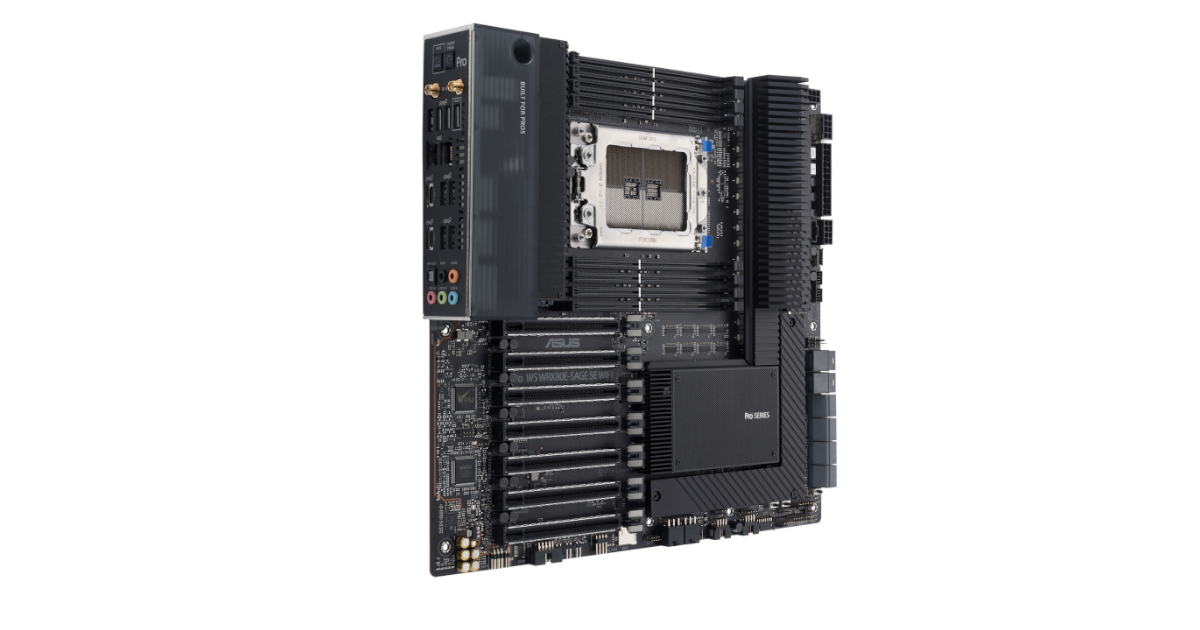
ASUS USA
ASUS Pro WS WRX80E-SAGE SE WIFI is engineered to unleash the incredible power of the latest AMD® Ryzen® Threadripper™ Pro series processors and is a reliable foundation for professional creative workloads that benefit from multi-core CPUs, such as video editing and 3D rendering. Additionally, seven PCIe 4.0 slots with SafeSlot fortification deli...
rocky beacon
Why would you need theadripper pro
That is a $1000 motherboard
@vast path What res are you editing?

Puget Systems
Our Recommended Systems for Adobe Premiere Pro are application tested and optimized to give you the best performance and reliability. View our hardware recommendations.
11700K is what is recommended for 4K video editing in Premire Pro
vast path
Who says that is the only thing I am doing?? 🙂
And you are right. It is a $1,000 board 🙂
rocky beacon
What resolution are you editing and what are you doing with the PC?
limber dragon
$1000 board for octa channel $3000+ cpus makes sense tbh
vast meadow
rocky beacon
11700K is what is recommended for 4K video editing in Premire Pro
5950x would be a way better option 11700k meh and bad value tbh
rocky beacon
Agreed
hollow thorn
Well, maybe more on the ~500$ range would make sense for a TR board
limber dragon
does PPro use 512?
rocky beacon
5950X is better for all around usage
hollow thorn
What even uses 512
limber dragon
and also costs nearly 2x as much
hollow thorn
Isn't it just a really new thing
limber dragon
anything intel hedt optimized uses 512
hollow thorn
I mean software wise
limber dragon
ik there's a video rendering software that does, cant remember if its blender or some adobe
hollow thorn
Hm, might need to look more into avx512 then
grizzled bloom
minor gazelle
Do u guys think there’s point in over clocking a 32gb 3600 cl16 ram? I’m running...
Yes, overclocking is definitely worth it with Ryzen 5000. Faster memory clock means faster infinity fabric, which means faster CPU. Check this out for more info:
https://www.gamersnexus.net/guides/3508-ryzen-3000-memory-benchmark-best-ram-fclk-uclock-mclock

Memory speed on Ryzen has always been a hot subject, with AMD’s 1000 and 2000 series CPUs responding favorably to fast memory while at the same time having difficulty getting past 3200MHz in Gen1. The new Ryzen 3000 chips officially support memory speeds up to 3200MHz and can reliably run kits up to 3600MHz, with extreme overclocks up to 5100MHz...
3800 CL14 is a good target for 5600X
Depending on what die you have
limber dragon
cant find the program I was thinking of, but stumbled upon this from intel/pixar https://www.youtube.com/watch?v=-WqrP50nvN4

Pixar's development team is continuing their journey to develop RenderMan XPU™, their next-generation photorealistic production rendering technology to deliver the animation and film visual effects of tomorrow. We'll update you on our techniques leveraging heterogeneous compute across CPUs and GPUs. Pixar and Intel® are working together to refi...