#cpus-mobo-and-memory
1 messages · Page 194 of 1
 subtle lava
z590 pro
 hollow thorn
what cpu
subtle lava
11700k
hollow thorn
okay mobo compatibility is 98% not the issue
if it just doesn't work, most likely ram issue
subtle lava
msi said its not compatible
subtle lava
unless the guy has no idea
hollow thorn
qvl only lists so many sticks
 grizzled bloom
If you're just looking at the QVL that's not a complete list of everything that will work, that's only a list of things they've tried and guarantee will work
hollow thorn
yea
subtle lava
 hollow thorn
ya, QVL is only what they check
grizzled bloom
That just means "we can't promise it will work, so we can't support that"
subtle lava
oh
but mine doesnt work i enable xmp
i just get a black screen
people said its bios but there is no bios update yet :/
grizzled bloom
It doesn't appear to be any crazy timings either, just a standard Corsair 3600C18 kit
hollow thorn
ya
subtle lava
is the ram defective of something
hollow thorn
Intel imc usually good too
subtle lava
or just bios thing
hollow thorn
z590 pretty early, but I haven't heard any issues yet though
grizzled bloom
Try using one stick at a time
subtle lava
or is not enough power being given to ram
grizzled bloom
grizzled bloom
Try using one stick at a time
^ Try XMP, one stick at a time
hollow thorn
yea try that
subtle lava
I did still didnt work
grizzled bloom
You can manually input the timings
hollow thorn
manual freq+timings+voltage time
3600mhz, 18-22-22-22-42, secondary can be auto, 1.1v soc, 1.4v dram, that should do it
grizzled bloom
There's several tools that will read the XMP data for you to input, such as thaiphoon burner
subtle lava
so I should change it from auto to that speed?
grizzled bloom
Yes, everything else can be auto
 hardy moon
hollow thorn
z590 pretty early, but I haven't heard any issues yet though
hardy moon
hollow thorn
z590 pretty early, but I haven't heard any issues yet though
Couldn’t oc past 48x multiplier with mine until I updated bios and some don’t have updates yet
subtle lava
z590 pro doesnt yet
 low radish
should i upgrade ram ?
it currently has this one
Origin: SMBIOS
Type: DDR4
Manufacturer: Hynix/Hyundai
Maximum Speed: 2400 MT/s
Current Speed: 933 MT/s
Size: 8192 MB
Part number: HMA81GS6AFR8N-UH
@shrewd yoke
 shrewd yoke
dunno if you tagged me on accident but how many gb and what cpu
low radish
its a laptop to be specific a ThinkPad A475 with an amd proA12
shrewd yoke
8gb?
low radish
yup
shrewd yoke
can you upgrade or is the ram soldered on
shrewd yoke
id add one more stick of 8gb
that the first thing i did with my laptop, bought another stick of ram
low radish
yup but i am looking for a one that my computer is compatible and its in the range of 700mxn
low radish
thank you
shrewd yoke
np
low radish
it says it has shipping cost but ignoring importation
eh i have a relative that has amazon prime so imma become a LEECH
 marble knot
what?
low radish
buying ram
marble knot
how much more
low radish
8gb to make 16gb
low radish
amd proA12 with integrated graphics
marble knot
whats the spped or ram?
low radish
2400 Mhz
low radish
not much
low radish
minecraft, tf2, fallout 3 and new vegas, M.A.X, sid meiers alpha centaury
planning on buying halo mcc or g mod
marble knot
well its complicated... so you can have much more tabs open and if your games use a lot of ram unlike minecraft which uses like 1 gb you will have much more room for mods and games that need a lot of ram
overall it will not make that much of a difference in games that dont need a lot of ram
shrewd yoke
with your system, you may notice some improvements but idk how much
marble knot
but in games where 8 gb is not enough it will benifit somewhat
shrewd yoke
feel like you gpu will be bottlenecking
marble knot
apu is gpu/ cpu combo i think
marble knot
especially amd cpus
low radish
so yup imma buy this one but never heard of the brand , is it good enough?
low radish
Timetec Hynix IC 8GB DDR4 2400MHz PC4-19200 Unbuffered Non-ECC 1.2V CL17 1Rx8 Single Rank 260 Pin SODIMM Laptop Notebook Computer Memory RAM Module Upgrade (8GB): Amazon.com.mx: Electrónicos
low radish
ok
and this would be a silly question but how may i change the porfiles between apps like in game just switch to max performance and while on discord or other apps on power saving/discrete
marble knot
hmmm idk
shrewd yoke
im not sure either
low radish
shall we call wideus?
low radish
what do you say lance?
shrewd yoke
vintage is big brain
low radish
vintage racer?
shrewd yoke
yup
marble knot
@elfin warren helpppppppppppp
arakso asked this and we are dumb
and this would be a silly question but how may i change the porfiles between apps like in game just switch to max performance and while on discord or other apps on power saving/discrete
 eternal helm
marble knot
and this would be a silly question but how may i change the porfiles between app...
eternal helm
marble knot
and this would be a silly question but how may i change the porfiles between app...
nvidia or radeon?
eternal helm
o
marble knot
he has an amd apu
 heavy arrow
so while playing games
heavy arrow
you wanna have high perfomance
eternal helm
super easy to set up
marble knot
i think thats what @low radish wants
i dont need that i just reapeted it b/c so u didnt have to scroll up a lot
heavy arrow
you can use this app called
eternal helm
i can help tehm
i have a radeon gpu aswell
and i have game profiles set up
so just ping me once they get back
 lime quartz
mmmm
 elfin warren
This is why arctics offset aio mount works so well. Centers the coldnplate on the dies
 pale mist
So I know that single channel RAM is a sin
But on 4th gen i7s does it affect performance a considerable amount?
I know its worst on ryzen
Or maybe mismatched RAM
hollow thorn
single channel hurts everywhere
@pale mist Ryzen hurts more from lower frequencies, single channel hurts no matter what platform
pale mist
How much?
pale mist
Damn
pale mist
What about mismatched?
pale mist
Not exactly
hollow thorn
like if you want to run a 4000c15 stick with a 2133c15 stick, it'll run at the slowest stick, so 2133c15
pale mist
Yeah, i am sticking with all ddr3 1600
hollow thorn
all assuming it does work that is
small but not negligible chance of just not working
pale mist
Il take that risk
hollow thorn
But mix match over single channel of course
pale mist
But like a 8 and a 4gb stick dual channel with same speed
hollow thorn
It should
pale mist
Ok, forgot to look in the 4gb> cabnet, thanks
 mild jackal
pale mist
mild jackal
pale mist
Ok
Its an HP oem MOBO so bios will be limited
At best
This is one of those 1050ti flips that are so fun to do
low radish
eternal helm
nvidia or radeon?
Radeon
low radish
the drivers?
eternal helm
ok
so open that software
then go to performance--->tuning--->Add game profile
then you can set up games to run at whatever tuning you want
and i just leave card undervolted all the time on my global graphics settings
so when i open a game it goes back to normal
but then when i cruise the web or go on discord its on power saving
low radish
radeon adrenalin 20.12.1
low radish
huh
weird
its blurry
like its the window size but its just a blur
it says it isint compatible and i can have an erlier vertion
eternal helm
hmm
low radish
oh wait
my bad it says it is 21.3.1 or 21.3.2
which driver shoul i use @eternal helm
eternal helm
prolly newest one
low radish
.2?
low radish
eternal helm
ye
do i restart¿
eternal helm
if it tells you to
low radish
eternal helm
if it tells you to
now whats next?
eternal helm
low radish
now whats next?
low radish
eternal helm
https://discord.com/channels/500085440221806603/500101047612604427/8313668972652...
i declare my self with comodore 64 brain
 mild birch
hollow thorn
pretty sure you need same capacity for dual channel
mild birch
hollow thorn
pretty sure you need same capacity for dual channel
you dont
it'll just mean unbalanced channels
which can be bad for bandwidth
but theoretical max bandwidth will still be the same
idk if windows manages uneven channels properly anymore but 🤷
 strong mica
Any one use a msi gaming edge mother board? It any good, any huge issues.
strong mica
The z490 or z590
mild birch
and what CPU?
strong mica
For a 10900kf
mild birch
heres a better mobo
@mild jackal need your opinion
I have an M12A
and I kinda want to do a PCB breakdown
but notsure if its of any use
no gonna take apart my M13A until I go cold

you think I should do it? or waste of time?
strong mica
I ended up finding the edge with wifi for 200 vs the 250 ish I would have to spend to get the network interface card with that one trying to stay around 220 pre taxes.
mild birch
but
alas
uhhh
you said gaming edge wifi for 200?
thats...good enough
go with that
strong mica
What is the difference in the boards any ways? I get that asrock has stability issues and the lower boards have vram temp issues but most of what I have found on YouTube and internet show that the mid tier z boards keep the vram around 70ish-80ish?
mild birch
strong mica
What is the difference in the boards any ways? I get that asrock has stability i...
I get that asrock has stability issues and the lower boards have vram temp issues
what?
...
Motherboards dont have VRAM
do you mean VRM?
if so
VRM temps dont matter
mild birch
and no
asrock doesnt have stability issues
the main difference is in the quality of the power delivered, differences in signal integrity with the ram
the differences in chipset
differences in I/O
so on
these all are major factors in overclocking ram and CPU
and I/O obviously helps if you need to connect stuff
aside from that its mainly just aesthetics and debugging features
its mainly just down to the quality ofthe PCB, the VRM and whether the I/O is good or not
 rough moth
Hey guys suggest me any cheap mobo nd case
mild birch
for example
the z590 elite uses 12 phases of SiC649 mosfets from an ISL69269
those are 60A Smart power stages
overall
the board has really really low ripple and transient response times, which is good
its also a 6 layer PCB
which is useful for ram overclocking
Its surprising howmany z590s are still 4 layers
with somthing like an aorus pro, you get an uprade to the mosfets, as well as 8 PCB layers
in addition to 20 usb ports instead of 17
and a few other changes
strong mica
Ok now motherboard differences make more sense. Previously I thought it was just the power delivery that changed (as in mosfits and phases) and the ports but i have yet to use all the ports they give on my pc with 8.

 oblique crown
So bottomline, the mb matters.
 vernal cosmos
oblique crown
So bottomline, the mb matters.
vernal cosmos
oblique crown
So bottomline, the mb matters.
very much so
 swift shale
Intel i9 - 10900, intel i7 - 10700k, or Intel i7 - 11700k and if I’m not overclocking should I not get the k at all
 vast meadow
If you're not overclocking get a non k model, 11th gen i7 pretty meh, if you don't already have a motherboard I'd recommend getting a ryzen 7 5800x instead of i9 10900 if in your budget as its around the same price, if you already have board look as it's basically a 10900k -100mhz
hollow thorn
mild birch
if so
VRM temps dont matter
MSI low end x570 would like to have a word with you
5800x has wack stock though
vast meadow
It's improving pretty decent tho
hollow thorn
still wack stock though
vast meadow
Fair
low radish
question?
hollow thorn
answer?
low radish
an internal ssd can be made into a external disk drive?
like an adaptor to sata and the power to usb
hollow thorn
You can grab a external enclosure and slap it in
low radish
nois
vast meadow
Why would you bother tho? ¯_(ツ)_/¯
hollow thorn
why not
low radish
vast meadow
Why would you bother tho? ¯\_(ツ)_/¯
disk running out of sapce and i have an spare ssd
vast meadow
Fair
hollow thorn
very useful for like laptops
low radish
hollow thorn
very useful for like laptops
yup thats me
vast meadow
I thought they wanted to buy a new ssd for it then in external drive lol
low radish
vast meadow
I thought they wanted to buy a new ssd for it then in external drive lol
nah just like put it into a case with sata daptor that goes into usb
i know that kinda gadget has to be somewhere
vast meadow
Yes i get that now
low radish
i mean if i move all of my games into the external ssd i could save some space for windows updates and stuff
 night patio
Hi. I'm interested in buying the CyberpowerPC Gaming Desktop Gamer Master GMA9120CPG at Newegg.ca (Item#: N82E16883230606). However, it only comes with 8GB DDR4 and I need to add at least 8GB. I consulted the Newegg "Memory Finder" but the CyberpowerPC model GMA9120CPG was not listed. Could someone tell me the exact spec of the DIMM in place (for example: 288-Pin DDR4 SDRAM DDR4 2666 (PC4 21300)).
vast meadow
night patio
Hi. I'm interested in buying the CyberpowerPC Gaming Desktop Gamer Master GMA912...
hollow thorn
@vast meadow tbh I just suggested a kit of 2x8 ballistx since wack prebuilts have wack ram
likely 2666mhz or even lower
ryzen no liek slow ram
vast meadow
True
 dusky totem
vast meadow
dusky totem
vast meadow
Probs has an a320 board or something tho :/
low radish

Bienvenido A La Tienda ANZATOMX, Brindarle Un Servicio De Calidad Es Nuestra Motivación. Bienvenido A Comprar Nuestros Productos.Si Por Alguna Razón No Está Satisfecho Con Alguno De Nuestros Productos O Tiene Alguna Duda Con Respecto Al Uso Del Producto Póngase En Contacto Con Nosotros Antes De Levantar Un Reclamo.Muchas Gracias Por Su Apoyo.Ins...
hollow thorn
@vast meadow b550 according to product listing
low radish
this one sounds good?
vast meadow
hollow thorn
<@!191276897227898880> b550 according to product listing
Ohh wow suprising for prebuilt
night patio
Thanks everyone!
vast meadow
dusky totem
they said newegg.ca
Didn't see that bit
 tawdry plinth
Mr. 1111!! Want to give me another hand? I said just start asking the right questions and not just assuming I remember everything perfectly cuz I can't get my desktop to bios setup
hollow thorn
@low radish Dunno how that price looks (relative to local pricing), but that should work.
Hai there
low radish
hollow thorn
<@!708800881239523448> Dunno how that price looks (relative to local pricing), b...
its like 10 bucks
tawdry plinth
Got a couple minutes answer a few questions?
hollow thorn
Sure
low radish
hollow thorn
<@!708800881239523448> Dunno how that price looks (relative to local pricing), b...
but its good enough to make my ssd a external drive?
tawdry plinth
First, for some reason to me since it sounds dumb, but power supply unit if it's supplying power shouldn't be anything to do with it right?
hollow thorn
Yea, it looks to be just a standard external sata enclosure, and that's all it needs to be, powered by usb
hollow thorn
tawdry plinth
First, for some reason to me since it sounds dumb, but power supply unit if it's...
Is it not booting, or no display at all right now?
low radish
hollow thorn
Yea, it looks to be just a standard external sata enclosure, and that's all it n...
k
tawdry plinth
I can only get it to boot by hard jumping it I can't just press the power button
No display
The green lights on no q LED lights
hollow thorn
Is the monitor plugged into the back of the GPU or the motherboard?
tawdry plinth
I've tried multiple variations but usually I always try to do the motherboard first, and usually by deviate I think not the HDMI or DP
DVI
hollow thorn
What CPU and GPU do you have?
If you have a GPU, it should be plugged into the back of the GPU
since a lot of CPUs don't have iGPUs (The display ports on the back of the motherboard are only for the iGPU)
dusky totem
what CPU?
tawdry plinth
So my instinct try the iGPU first incorrect? I-74770k
dusky totem
that has intergrated graphics
hollow thorn
(-f varients on Intel don't have iGPUs)
But it should be plugged into the back of the graphics card when you do have one.
Sometimes the presence of a dGPU disables the iGPU
tawdry plinth
Ok, that'll be the first thing I try. Second question.
hollow thorn
Can you take a picture of the bottom of the motherboard where you plugged in your front panel connectors?
Since not turning on when pressing the power button probably means the front panel power connector is plugged in wrong
tawdry plinth
Yup

Feel free to point out any obvious errors, I'm very forgetful sometimes
I also was going to complete the upgrade and everything but I decided that I'm just going to fix instead
 hollow thorn
Well, this bit is what I'm current concerned about for now, so if you could take another picture and/or unplug those and check those over before plugging them in again

And also, what motherboard is it? I can pull up a manual for the pinout for front io if it's not clear
tawdry plinth
Heh, Yeah that concerns me too especially when you'll see that I'm about to show you. Z87 Sabertooth by Asus. And thank you cuz I've heard that manual hundreds of times and it's hard for me to follow them sometimes if it's not telling me a story I can't read really but let's just say that I ruined a few USB ports by stepping on cables
 hollow thorn
rip :(
tawdry plinth
Uh oh, no further questions your honor?

I'm just not getting a look at it there's.,. Is one missing?
Now*
hollow thorn
Found it! This is where the pwr switch needs to go, so check this

Page 47 of manual according to whatever this website is
tawdry plinth
Schnikes I wasn't paying attention and put it there?
But that doesn't answer my original question just yet right?
hollow thorn
In terms of some missing, as you can see, only some of the pins are used
tawdry plinth
Ive placed those on the right pins 100 times
hollow thorn
(For the front panel power button not working, check that the pwrsw connector is connected to the pwrsw header)
hm
oh well, could just blame it on faulty case for now
tawdry plinth
Yeah I could turn it off by the button but not on
hollow thorn
If there is still no display, apparently debug LEDs are all over the board on this board, can you check if any of these light up?
 tawdry plinth
Okay well I deal with that, is Asus hasn't upgraded the qvl list in 5 years, and my RAM chips I just bought to augment the two burnt out dimm slots, does that necessarily mean that they won't work? And can it damage it in any way? The chips or anything?
They're PNY and I actually got her contacted PNY he said it's on the qbl lists but like I thought and but he said it should still work if it meets the specs
hollow thorn
Electronics are annoying, and what do you mean by augment the two burnt out slots?
hollow thorn
If it's like actually burnt out, probably shouldn't use those slots, the pins are probably damaged
tawdry plinth
Sorry I use voice to text, but I stay clear of those cuz that's what my PC shop guy told me when I completely screwed up a few months back
 hollow thorn
Are the left 2 slots damaged?
tawdry plinth
That's what they said
 hollow thorn
hm
tawdry plinth
Once I started noticing problems that it thought we're unfixable I got a little haphazard
Since then I'm learning there's a pretty much for a whole lot of things if you just think hard enough.
A fix*
hollow thorn
Recommended memory config uses those slots so... I don't know if the slots are actually broken but oh well, back to the start, is there still no display?
 tawdry plinth
Haven't tried yet but I wanted to ask that ram question first and then get to this one before I started going further, hard drive anything to do with it could interfere if it's not that a Windows on it correctly (uncorrupted) and it's plugged via SATA (and does the slot matter if you're clearing the CMOS) what if anything does have to do getting to the BIOS screen?
It's an SSD Samsung Evo
hollow thorn
Lack of a hard drive or broken hard drive can cause no boot, and you could see that with the "boot device" debug led on the board, but good drive should be good
Reset cmos shouldn't care about drives
reset cmos just resets (clears) the bios cmos chip on the board
tawdry plinth
Yeah I should have been seeing Q-LEDs all happy dancing around the board. And that's the other thing and the reason why I'm asking the questions cuz I don't understand it anything about CMOS, UEFI and all that
tawdry plinth
Now should I replace this power supply unit anyways it is pretty damn old and I remember somebody even saying what the heck is that
 hollow thorn
da heck is that
tawdry plinth
I don't know where I got it, but I imagine it had to have been just cheap though
 grim jay
R5 4650g or i5 11500 ?
tawdry plinth
I'm going to go ahead and replace before I try to boot up at all
Have a feeling it might help with those airsoft getting with the fans. Even the PC techshop guy says I have almost no need for fans he said that exaggerating but he was just trying to make a point that my case is completely breathable
Errors*
grim jay
tawdry plinth
Now should I replace this power supply unit anyways it is pretty damn old and I ...
This is 970/980 ?
tawdry plinth
I don't know.... Lemme see if I can find out
grim jay
The gpu
tawdry plinth
Been my best friend for quite a while
Lol
Assassin's Creed Valhalla is the first game in a long time I haven't been able to run at Max
grim jay
Best budget gpu
tawdry plinth
Best investment I ever made
Or at least tied
So with PNY right if the specs are okay should those RAM chips be all right even if they are major upgraded from.... well I'll show you comparison in a second here
grim jay
What ?
vast meadow
grim jay
R5 4650g or i5 11500 ?
Get 11400, 11500 should only be gotten if the better igpu is needed
vast meadow
Depends on the cpu
Don't get a amd 4th gen apu if you don't need the integrated gpu tho
tawdry plinth
 vast meadow
11400 best budget gaming cpu
grim jay
I need it
vast meadow
grim jay
I need it
But you said to pair with 3070/80
 split copper
My brother's old PC has that ram kit I think
split copper
Might be slightly different
grim jay
tawdry plinth
You bought new ra or what ?
vast meadow
grim jay
Yeah not now
Tbh i would go 11500, the 4th gen apus have to be imported from china
tawdry plinth
Here's something a little humorous I think that the jumper that I was supposed to use to clear the CMOS and was assuming that I needed to I guess, might be inside of this new unit just with the way the case was and I pulled it off and it fell into Oblivion, the abyss or purgatory. I never found it again. I still think it's trapped in here.
 grim jay
vast meadow
Tbh i would go 11500, the 4th gen apus have to be imported from china
grim jay
vast meadow
Tbh i would go 11500, the 4th gen apus have to be imported from china
Whats the problem ?
tawdry plinth
And I just bought this RAM chips yesterday
grim jay
They are used ?
vast meadow
grim jay
Whats the problem ?
That you have to import it from china
tawdry plinth
Best buy
grim jay
vast meadow
That you have to import it from china
Ok
vast meadow
grim jay
Ok
Also the 11500 is better cpu
tawdry plinth
Someone refresh my memory how does this 5 digit number get designated?
vast meadow
What?
tawdry plinth
Plenty of builds over the years and I never noticed it being calculated into five digit numbers this like 10400 or 10600 or 11500 I don't know what that means
It's just not a value that I've ever used but then again maybe that's why I don't know as much as you guys
vast meadow
tawdry plinth
Plenty of builds over the years and I never noticed it being calculated into fiv...
Intel i5 10400 and i5 10600(both 10th gen) , i5 11500 11th gen
split copper
9900K, 9th gen
tawdry plinth
Gosh I'm looking at that I'm still looks like Chinese to me. There was a point in high school that I stopped giving crap about math because I just couldn't understand. Pilots and vectors are > and beyond me
I was an English master instead, which is ironic because I use voice to text now
vast meadow
Lmao
tawdry plinth
And I know that comparison is flawed
Lol
What do you call a guy with no arms and no legs in a kitchen sink
Dwayne
vast meadow
...
tawdry plinth
Some of us have a lot of alone time with our thoughts, that little stupid joke comes up occasionally
vast meadow
Nice lmao
tawdry plinth
I think I'm going to take it from here I think I've got everything I need, thank you guys again I'm sure I'll be back
vast meadow
Np
 azure silo
Hi I upgraded my ram and was having issues was wondering if anyone could help. I changed it from oloy 2x8 16b 3600 to Corsair vengeance rgb pro 2x8 16gb 3200 moba only supports 3200 it says and it just wants to go into a infinite boot or if it does come up once I turn it off and back on it does it again or just won’t boot
elfin warren
What mobo
azure silo
Asrock b550m/ac
azure silo
The Moba book says 3200
elfin warren
You misread it
azure silo
I can’t post a pic of the page from the book lol
elfin warren
I know but trust me, it'll do 4400 mhz
I'm on the board page right now, 3200 is a JEDEC speed not an XMP speed
 wintry scarab
Just tried installing "Open Box from NewEgg" TT DDR4 3200 in parallel with existing TT DDR4 3200 , failed to post in Bios
Have also attempted removing old ram and installing new ram only, still would not post.
I guess there's a reason why it was "Open Box" -- NewEgg just wants to leverage the money on a bad product that you will have to ship back to them
grizzled bloom
Or the new set of RAM has different dies on the sticks, which often causes POST failure
wintry scarab
Both are listed in the Z590 QVL, not sure why it would
grizzled bloom
CMOS reset often helps with memory issues like this
wintry scarab
Hmm, will try that then. Attempted every other Troubleshooting method I could think of
grizzled bloom
The BIOS has the IDs of the old sticks in its configuration, so if you tried installing new sticks and didn't turn every XMP/overclock option off it can get confused
 worthy leaf
whats the best cpu for a 3070 (amd)
grizzled bloom
If just gaming, 5600X. If streaming or other multi-tasking, 5800X/5900X. If you're also doing video editing/3D modeling 5900X/5950X.
wintry scarab
grizzled bloom
The BIOS has the IDs of the old sticks in its configuration, so if you tried ins...
Reset the CMOS, tried again with all 4 RAM in parallel and again with only the 2 new cards, still getting Error 55 (memory not readable)
grizzled bloom
Try one stick at a time with the new ones, if one works and the other doesn't you'll know for sure the problem
worthy leaf
grizzled bloom
If just gaming, 5600X. If streaming or other multi-tasking, 5800X/5900X. If you'...
i'm trying to get a 5900x but its kinda hard right now, might just go with a 5800x
grizzled bloom
I have a 5800X, as far as performance it's fantastic, but value per core isn't great.
worthy leaf
hmmmmm
grizzled bloom
I run a media server and a couple other things in the background so the extra threads are worth it to me
grizzled bloom
5600X is more than enough for just gaming, and if you have an nvidia GPU you can stream using that
 ionic hamlet
I'm aiming for a 5600x. Then I'll be set and not need to worry about upgrading anytime soon.
 elfin epoch
Idk which chat do ask so I’ll ask here
I have a controller for my fans to change the led but I have rgb Ram and an led on my motherboard as well. Would it be possible to sync all of these to the same controller? Usually I have to change it through windows for the Ram and mb
grizzled bloom
RAM RGB can only be controlled from in motherboard software. If you have the RGB controller connected to the motherboard, you could sync it.
elfin epoch
I’m using a b450 tomahawk. Would I just use the app to sync it or would I need to download something else
I haven’t really explored the app myself so idk
grizzled bloom
That has the MSI mystic light app right? You'd have to use that.
elfin epoch
Dope. I barely passed my a+ cert so I’m terrible with these things
I’m a programmer not a hardware guy
Thanks for the help
grizzled bloom
No problem
 modern flame
MB shortage. Should I get the ASRock H570M PRO4 now, or wait for the ASUS TUF B560m Plus Wifi?
elfin warren
B560
grizzled bloom
Motherboards restock pretty regularly, I'd wait
elfin warren
Better feature set although both allow ram speeds
dusky totem
grizzled bloom
Motherboards restock pretty regularly, I'd wait
^
Sorry for the ping 😬
modern flame
I'd rather wait for the ASUS, but no sign on when they will be available. I'm just anxious. I've been sitting on everything for a build except the MB for 2 weeks.
Thank you for the help 🙂
grizzled bloom
Mobos tend to restock every 2-3 weeks, and they stay in stock for a while.
ionic hamlet
I'm just waiting to snag a 5600x when they come back in stock. I missed my shot last week.
vast meadow
Ehhh it's okay unless you have a b450/b550/x470 board and unless you need the extra 2 cores, i5 11400 would be about 50$ cheaper and perform better in games
eternal helm
ionic hamlet
I'm just waiting to snag a 5600x when they come back in stock. I missed my shot ...
Buy it rn for that price
Especially if you wanna go into productivity
 limber dragon
if their productivity can utilize avx512, go 11th gen
eternal helm
Ye
 quartz zinc
how do i add another pci-e slot on my motherboard?
elfin warren
You can't add PCI-E slots..........
quartz zinc
dang
grizzled bloom
Well, you could get a riser that splits the slots but they're expensive
 hard cape
Hey, Did anyone test the compatibility of P05592-B21 64GB DDR4-2666 PC4-21300 Memory Upgrade by Nemix Ram
with ROME2D16-2T motherboard (Dual socket)?
swift shale
Question. Let’s say for example just comparing an i9 10900 and an i9 10900k. They have an almost identical boost clock speed, but the base in the 10900k is higher than the 10900. What would be the benefit of that higher base frequency?
limber dragon
if you're on a locked motherboard, get the non-k
if you're on z490/z590, get the k and remove the power limits
swift shale
But If I’m not overclocking and get the non k will I have a low GHz as oppose fo getting a K and still not overclocking
hollow thorn
Boosting behavior will usually take you much higher than base frequency
swift shale
But let’s say I get a 10900 and don’t overclock right. Would that 2.8 or so GHz effect me a lot as opposed to getting a 10900k and having a better base
elfin warren
Not really, CPU will boost as needed
vast meadow
swift shale
But let’s say I get a 10900 and don’t overclock right. Would that 2.8 or so GHz ...
Get the non k and a b560 board if you're not overclockint
Depends intel? 3000 probs fine, amd yes yes yes, go 3600 if possible
Ballistix 3600 is like 90 for 16gb vs like 10 less for 3200
 wary peak
is there a cheap Intel better than the i5 3570
hollow thorn
10100 with a b560 board
vast meadow
Sometimes the i5 10400 is cheaper some reason, get that isntead of the i3 10100 if it is
 long basalt
Ayy, my RAM is out for delivery
vast meadow
Def go 3200
Ballistix is usually pretty good, tbh you could get 3600cl16 can't remember if it's officially supported but it would give extra perf
vast meadow
Couldn't remember because my b450 only officially supports 3200
elfin warren
Support for DDR4 3600(O.C.)/3466(O.C.)/3200(O.C.)/2933/2667/2400/2133 MHz memory modules
GIGABYTE
Lasting Quality from GIGABYTE.GIGABYTE Ultra Durable™ motherboards bring together a unique blend of features and technologies that offer users the absolute ...
grizzled bloom
On AMD the "officially supported speeds" are more guidelines anyway
vast meadow
Nvm then
Last time i checked swear it said 3200 anyway doesn't matter as I'm running 3000 but wanna oc but 3 ram sticks means 1usmus calc doesn't work lol
grizzled bloom
We can help with that, but 3 sticks will usually run single channel...
vast meadow
Cpu z says it's running dual
grizzled bloom
Guess you're one of the exceptions then, but it might be dual only up to a certain capacity
vast meadow
I'd say so
elfin warren
grizzled bloom
Guess you're one of the exceptions then, but it might be dual only up to a certa...
This
grizzled bloom
If the channels have different size memory
vast meadow
To my knowledge it's dual for first 16gb then the last 8 are single channel
grizzled bloom
Do all 3 sticks have the same die?
vast meadow
Don't use the extra 8 but had 8 3000mhz originally and when i upgraded and got a new 16gb kit 3200mhz and doubt there's really a diff in 3000 to 3200, i benchmarked with both saw like 0.5% improvement mb
vast meadow
grizzled bloom
Do all 3 sticks have the same die?
According to typhoon they're all samsung b but it's corsair lpx so could be wrong
grizzled bloom
Oh that's easy then, check the version number on the stickers
Thaiphoon guesses wrong sometimes
vast meadow
Then just look up the version number?
grizzled bloom
The version number will correspond with the die revision
vast meadow
Okay lemme check
grizzled bloom
 long basalt
Can I do that kind of lookup for my Crucial Ballistix RGB kit? It's a 32gb 2x16 kit.
It hasn't arrived yet, but I'd like to know what I have when I go to use 1usmus calc to get it tuned as tight as possible.
And the speed it's rated for is 3200 C16
grizzled bloom
Crucial does it differently, it's not so easy to figure out. If you post a picture of the stickers we might be able to figure it out.
vast meadow
grizzled bloom
Okay so the both say v4.32 so samsung c die? Even tho their different speeds i guess
grizzled bloom
Yep that's C-die. It won't overclock as well as B-die, but it should do ok.
vast meadow
Okay nice thanks
grizzled bloom
I'd expect you to be able to get 3600C16 with minimal effort at 1.4v or less
vast meadow
Ohh nice
Even with mixed kits?
What about the rest of the timings? Or should i just try 3600cl16 with 1.4v
 willow minnow
Anyone want a Ryzen 9 5950x?
grizzled bloom
If they're the same die yeah. I'd ask fitz or one of the other pros about subtimings and tertiary. By all means, play around with it, but note that it won't scale past 1.4v or so.
vast meadow
Okay thanks
hardy moon
willow minnow
Anyone want a Ryzen 9 5950x?
Rule 9: no buying or selling
willow minnow
I am not selling I just asked if anyone wanted one lol
vast meadow
Pretty sure it's still against rules
willow minnow
vast meadow
Pretty sure it's still against rules
TO ASK IF SOMEONE WANTS ONE??
vast meadow
As if you were giving one away yes
grizzled bloom
Poking the line is still not advised
vast meadow
If you're asking would i dream to have one thats okay
willow minnow
I can't give my things away?
vast meadow
vast meadow
If you're asking would i dream to have one thats okay
But not phrased like this
grizzled bloom
Nope, no giveaways either
vast meadow
willow minnow
I can't give my things away?
No giveaway #rules num 9
grizzled bloom
That we can do. We love throwing builds together. I'd do it but I'm about to leave.
willow minnow
Dang I have a mobo and the cpu an aio rn but I need ram,case,power supply,gpu
vast meadow
Gpu, good luck but for ram I'd go 32gb ripjaws 2x16gb 3600cl16 a Corsair 5000d airflow and a enermax revolution df for $120 for and 850w but you could always go 1000 depending on what gpu and other things you want to put in it
willow minnow
So what I am thinking is like the NZXT H510i Compact ATX Midtower or the one with Dual tempered glass and my mobo I am going to use is ASRock > B550 Phantom Gaming-ITX/ax and ofc my cpu is a Ryzen 9 5950x and I have an AIO but I don't like it
Its an Enermax aquafusion AIO
vast meadow
H510 will choke your poor components terrible airflow
willow minnow
I know I'm looking at more rn
vast meadow
Okay good idea
willow minnow
How about an H210 mini ITX tower?
I am still thinking of a gpu like maybe an rtx 3060 or 3080
willow minnow
Fr?
vast meadow
Yep
willow minnow
dang whats a good case lol?
hardy moon
willow minnow
Fr?
If you have 5950x actually
willow minnow
yes
hardy moon
willow minnow
wym by that lol
Are you going to be playing games, or are you going to do workstation stuff (CAD, video editing) as well and if you are streaming or not
willow minnow
Well I'm going to be gaming ofc and streaming but some video editing
rn I have a ryzen 5 2600 andd I recently have a ryzen 9 5950x
hardy moon
Ok so gaming you should do a 3080 at least then because you have such a good cpu
willow minnow
Ok so a 3080 but Im lowkey lost rn I wish they had a vc lol
hardy moon
Do you want a larger case or a smaller case
willow minnow
Ok I have a Mobo and a cpu and an aio but the aio I dont want because it just isnt appeling to me and my board is an ASRock > B550 Phantom Gaming-ITX/ax and I want to work with this as much as I can
willow minnow
Yea when I opened the box it was small and my case I have rn is an midtower I think and its rosewill
And I have an 240mm
vast meadow
Few i thought you were going to say 120
willow minnow
lol
hardy moon
@willow minnow just do what patovak said earlier “Gpu, good luck but for ram I'd go 32gb ripjaws 2x16gb 3600cl16 a Corsair 5000d airflow and a enermax revolution df for $120 for and 850w but you could always go 1000 depending on what gpu and other things you want to put in it
willow minnow
Lets jump in a vc rq?
hardy moon
Sorry I’m at school lol
willow minnow
Lol all good
hollow thorn
vc is sad
vast meadow
Mr1111 (or any other ppl knowledgeable with ram ocing) I'm trying to OC my ram, it's Samsung c die and fal cie said that it should probs boot at 3600cl16 no prob with 1.4v but I've got 3 sticks do i need to change something, because i can't get that to boot even 3400 wasn't booting
vast meadow
Yeah i originally had 1 8gb stick and when i was upgrading it was like an extra 10 for the 2x8 over 1x8 so why not have 24gb ram :/
Thanks tho, guess I'll pop into overclocking channel then
long basalt
Honestly having 24gb of RAM is probably more of a hindrance than having proper dual channel. Your adding more stress on the IMC using Flex Mode.
grizzled bloom
Definitely adding more stress but let's see if the IMC is good enough to handle it
vast meadow
If not i can always take one of the sticks out i guess
 naive pendant
@vast meadow
I have a question
If i connect my gaming laptop to a monitor can i like play games on the monitor and watch youtube on the laptop
 storm mantle
yes
grizzled bloom
Yes, just set it to be an extended desktop
 silk ice
Yea I'm doing that right now, performance won't be quite as good as normal but it 100% works
grizzled bloom
And set games to use "borderless windowed" mode
naive pendant
grizzled bloom
And set games to use "borderless windowed" mode
Okay Thanks
silk ice
Also out of curiosity what is an appropriate cpu for a 3060?
buddy managed to get one and I'm trying to help him plan a new pc
naive pendant
Ryzen 5 3400G RX VEGA 11 And Ryzen 5 4600H GTX 1650 which one is better?
 wheat halo
@silk ice depends on your needs
grizzled bloom
silk ice
Also out of curiosity what is an appropriate cpu for a 3060?
Ryzen 3600+ or Intel 10400+
silk ice
wheat halo
<@362029998569291777> depends on your needs
He mostly does VR and other miscellaneous games
grizzled bloom
VR on a 3060 won't be a great experience
silk ice
It's a better experience than his 1060
grizzled bloom
True
silk ice
And alright, thanks for the advice
 smoky widget
Hi, I have the same question, what ram should I get for i9 10900K? g.skill Ripjaw 3200, 3600 or 4000?
long basalt
grizzled bloom
VR on a 3060 won't be a great experience
What? You can easily do VR on a 1060. I play VR games on my Quest with a 1070.
grizzled bloom
3200 is fine, 3600 is good, 4000 is better, but you get less performance per dollar going faster @smoky widget
long basalt
smoky widget
Hi, I have the same question, what ram should I get for i9 10900K? g.skill Ripj...
Intel doesn't care as much about RAM. 3600 is fine if you can find it cheap enough.
naive pendant
Can the Ryzen 4600H run Fivem? Btw its the Ryzen 5 4600h 3.0ghz 16gb ram
smoky widget
Thank you @long basalt and @grizzled bloom I saw that G.skill ripjawV 32gb 4000 was on sale for 196 in newegg
grizzled bloom
long basalt
What? You can easily do VR on a 1060. I play VR games on my Quest with a 1070.
It depends a lot on your headset of course, you won't be driving 1440p 120Hz with a 1060
long basalt
naive pendant
Can the Ryzen 4600H run Fivem? Btw its the Ryzen 5 4600h 3.0ghz 16gb ram
If you have a GPU, it should be fine.
naive pendant
GTX 1650 btw
long basalt
naive pendant
GTX 1650 btw
Ehhhh I wouldn't play GTAV on that.
grizzled bloom
smoky widget
Thank you <@!100710174137798656> and <@!396513761550270464> I saw that G.skill r...
What timings? That's more important than speed
naive pendant
long basalt
Ehhhh I wouldn't play GTAV on that.
why not?
smoky widget
long basalt
naive pendant
why not?
You might be lucky to get 60 FPS 1080p Low
grizzled bloom
smoky widget
https://www.newegg.com/g-skill-32gb-288-pin-ddr4-sdram/p/N82E16820374107?itemPos...
Not great timings, 18-22-22
Better to get a 3600 kit with better timings
long basalt
naive pendant
What about GTX 1650 Ti
There's not much of a difference between a 1650 and a 1650Ti
I think the only major difference is 4GB of VRAM
A 1660Ti would be the lowest I'd go in a 16 series card to play GTA V
smoky widget
ok, that works. I just got the email and they were on sale earlier this week
long basalt
I.... Doubt that.
grizzled bloom
Vega igpu is way faster than Intel
smoky widget
16-19-19-39 better? Item#: N82E16820232907?
naive pendant
the GTX 1650 is an intel gpu?
grizzled bloom
Nvidia
smoky widget
no @naive pendant it's NVIDIA
smoky widget
NVIDIA uses GTX or RTX. AMD is RX
long basalt
naive pendant
can the RX5600M play fivem?
Probably
naive pendant
Im looking for a gaming laptop around 800 that can play fivem
grizzled bloom
smoky widget
16-19-19-39 better? Item#: N82E16820232907?
That one's not great either, same latency essentially, I'll find you a good kit
long basalt
naive pendant
Im looking for a gaming laptop around 800 that can play fivem
LOL good luck. Might as well be looking for a diamond in a haystack
grizzled bloom
Could probably find a laptop with a 1650 or something around that price
naive pendant
Now im starting to think these bestbuy agents dont know anything about computers
grizzled bloom
You'd be right
naive pendant
this guy sends me a link of a 300 dollar computer telling me its a gaming laptop
grizzled bloom
They read from a script and the answer to most problems is to buy more things
naive pendant
grizzled bloom
They read from a script and the answer to most problems is to buy more things
some get the answers from google
grizzled bloom
If they're smart enough to do that
naive pendant
mhm
smoky widget
better chance on buying a laptop online when there are sales
naive pendant
wdym
I just want a gaming laptop cuz i have nothing to play on except for a switch and this laptop with 1.0ghz
naive pendant
ik im buying a used one
the good ones are expensive
the decent ones are at a good price
grizzled bloom
@smoky widget Most of the good stuff seems to be out of stock so those G skill kits will be ok. You can probably overclock it so the timings are tighter.
smoky widget
I don't mind G.skill, corsair or hyperx. I just been using G.skill for three computers and no issues at all
but it's cool. If there no good 3600 with decent timings. I guess 3200 will suffice
 grizzled bloom
Gskill has the best compatibility overall, but even the other brands I looked at are out of stock.
naive pendant
that i can play fivem at least 60fps on the ryzen 5 4600h gtx 1650?
grizzled bloom
Considering the official recommended spec for that calls for a GTX 660 from 2012, a 1650 can handle it easily
naive pendant
Oh Alright cuz rn many ppl are telling me different things
grizzled bloom
Straight from the horse's mouth https://docs.fivem.net/docs/client-manual/system-requirements/
Cfx.re Docs
smoky widget
Usually having recommended or better specs than recommended for future games
grizzled bloom
The 1650 is roughly double the performance of the 660, unless you mean the mobile version
smoky widget
he's talking about a laptop
naive pendant
yes a laptop not desktop
grizzled bloom
Even then, it should work great. Just not quite as many frames as desktop.
 grizzled bloom
According to who? I mostly pulled a number out of the air anyway
naive pendant
According to youtube a 1650 ti cant handle 120fps on fivem
fivem is a big software with big servers
@grizzled bloom cna it handle fortnite 120fps max?
grizzled bloom
I'm seeing even a 1050ti is enough for 50+ fps. Even the mobile 1650 is better than that.
Fortnite is more CPU use than GPU, lemme look
naive pendant
Okay
grizzled bloom
Easy 120 from the look of it https://www.youtube.com/watch?v=ZcWQ_ACNU-Y

Fortnite Gameplay HP Pavilion Gaming Gaming Laptop Ryzen 5-4600H/144Hz/NVIDIA GTX 1650ti 15-ec1051AX, 15-ec1050AX ,15-ec1052AX ,15-ec1021AX gaming test ,ryzen 5 4600h laptop gaming test fps 1650ti15-ec1052AX ,asus tuf gaming a15 4600h fortnite 2020 1650ti 4600h
Hi,
HP EC series gaming laptop with new ryzen 5 4600h processor comes in different ...
grizzled bloom
Doesn't matter, it's more CPU use like I said
strong mica
Bumd question is there any white motherboards for intel 1200 socket that are good around 220ish dollars with out wifi or 250 with? Decided on z590 arous elite ax for 240 before I got a white case. Willing to stick with it if nothing is around it in quality for the price.
 strong mica
Ok.
strong mica
Was looking into the power delivery of the two.
Looks like it is 8+2 while arous is 12+1
vast meadow
The only non fire board nzxt has is there b550 to my knowledge as it's made by asrock not my someone else
smoky widget
I would recommend maybe Asus TUF. Not bad at all either @strong mica. Unless you going all white build
long basalt
strong mica
Looks like it is 8+2 while arous is 12+1
The +2 is just RAM power delivery. And the Phases don't matter if they are crappy ones.
You can have an 8 phase power delivery that kicks the crap out of a 12 phase.
subtle lava
So I can't enable XMP for 3600 because my system just turn on after that
can i manually change my memory to a lower speed?
if so do i need to change the voltage too?
grizzled bloom
subtle lava
if so do i need to change the voltage too?
1.1v SoC
1.0v VDDP
1.05v VDDG
Assuming Ryzen
vernal cosmos
grizzled bloom
Oh the mATX board?
the b560 budget board
 potent zenith
yes
vernal cosmos
with an m.2
grizzled bloom
Most B560 boards will have an M.2 slot
potent zenith
thank u
potent zenith
grizzled bloom
Most B560 boards will have an M.2 slot
I know
xd
But I just want to get a good cheap one under 140€
vernal cosmos
what cpu do you intend to use on the mobo
potent zenith
11400f
grizzled bloom
Right now it's not so much what's good as what's actually in stock
potent zenith
isnt b560 board in stock?
vernal cosmos
Wait even mobos out of stock now falcie?
grizzled bloom
What country, since you're using Euros?
grizzled bloom
Yes B560 has been VERY high demand
potent zenith
well they are in stock here..
grizzled bloom
Because memory overclocking now
vernal cosmos
Ahhh
potent zenith
but ehm,, which one would you recommend ?
grizzled bloom
Working on it, checking what's available to you
potent zenith
Oh sorry
subtle lava
grizzled bloom
1.1v SoC
1.0v VDDP
1.05v VDDG
intel
grizzled bloom
grizzled bloom
There's not a lot available even in Sweden according to pcpartpicker, but they don't scrape everything
vernal cosmos
true
Just making a general statent tho
ASUS and gigapoop>msi>asrock>oem gray stuff cringe
potent zenith
perhaps not in sweden, but i can buy it from a danish store or something with no shipping
Why are you recommending this, like why is it good for the price xd.. I just want to learn
grizzled bloom
Mostly because it was the only one available in your price range on that website that wasn't ITX lol
potent zenith
ASRock B560 Pro4
but is ASRock B560 Pro4 good then?
looks like it good more heatsinks for mosfets and stuff,.. perhaps a littel better chipset heatsink too, idk
grizzled bloom
It's better than the other one yes. If you can pitch an extra few Euros I'd go for this one though
https://www.alza.de/asus-tuf-gaming-b560m-plus-wifi-d6376881.htm

Alza
Das Motherboard der Marke ASUS besteht aus dem Chipsatz Intel B560 und zum Integrieren des Prozessors gibt es den Steckplatz Intel 1200. Ein Standard bildet die Soundkarte für insgesamt 8 Kanäle. Verwenden können Sie unter anderem ein Netzwerkmodul mit einer angenehmen Anschluss-Variante mittels
vernal cosmos
potent zenith
So will ASRock B560 Pro4 work then...
it will work
I wouldnt buy it tho
grizzled bloom
If you're on a locked processor the BIOS doesn't really matter that much
vernal cosmos
lack of wifi, only 2 ram slots, bios and also less usb ports
for my use 6 rear usb isnt enouh
 vernal cosmos
potent zenith
vernal cosmos
potent zenith
thats not linked anywhere
potent zenith
ASRock B560 Pro4
potent zenith
cant I just use a wire?
potent zenith
vernal cosmos
also a WAYYY weaker audio card
Oh im really bad at audio card stuff.
vernal cosmos
potent zenith
cant I just use a wire?
ethernet works for sure
potent zenith
Dont even know what it means
grizzled bloom
Not much difference if you use speakers on your monitor or a headset
vernal cosmos
grizzled bloom
Not much difference if you use speakers on your monitor or a headset
headset makes a massive difference
grizzled bloom
Not for the usb kind
vernal cosmos
Im talking exclusively 3.5mm
vernal cosmos
potent zenith
So u cant have 7.1 surround sound headset...
you can have a virtual 7.1. not true 7.1 like a razer tiamat
the razer tiamat is hot garbage tho
I used to have it
grizzled bloom
True surround headsets are VERY expensive anyway, most are emulated surround
grizzled bloom
Depends on how you plan to have audio mostly. What will you be using? Monitor speakers? USB headset? Probably not if either of those

 grizzled bloom
Well I guess it's a moot point anyway if it really does have 7.1
 compact sun
can someone help me find some memory for ASUS - ROG MAXIMUS XIII HERO Socket LGA 1200 USB 3.2 Intel Motherboard from best buy? i am having no dang luck
potent zenith
grizzled bloom
Well I guess it's a moot point anyway if it really does have 7.1
huh? it says that it has it...
grizzled bloom
Moot point meaning the whole part of the conversation didn't really matter since it has 7.1
vast meadow
compact sun
can someone help me find some memory for ASUS - ROG MAXIMUS XIII HERO Socket LGA...
You want the ram from best buy? To my knowledge they don't have very much ram
compact sun
just want something compatible so asus will stop telling me that its the memory fault because i didnt buy one on their dang list
im dyslexic and keep getting numbers hosed up
long basalt
compact sun
just want something compatible so asus will stop telling me that its the memory ...
Their list is bogus usually. RAM is RAM for the most part.
compact sun
does it matter what the speed is for gaming?
long basalt
Yes but No.
Anything slower than 3000Mhz is gonna be bleh, But anything faster than 3600Mhz is just overkill.
Just get a solid 3200Mhz CL16 kit and you will be just fine.
compact sun
i have a asus crosshair viii hero wifi, with amd ryzen 93950, and 32g ddr4 corsair 3600 memory and a couple m2 drives and black ops keeps crashing and nobody can seem to fix it so im going back to intel....
compact sun
cod black ops cold war
long basalt
It's probably just the game being a trash game.
Yeah, I'd wager it's the game's fault.
compact sun
ya but it dont crash on my intel laptop....
long basalt
If that's the ONLY thing crashing, then it's the game being bad and you should play a better game.
Like Titanfall 2, or Rainbow 6 Siege, or literally any other shooter.
compact sun
i play to play with mk son, cause he is 3000 miles a way
long basalt
Then play a better game with him.
COD is just a reskin of itself ever since Black Ops 2.
Your Desktop is trying to tell you that you are playing a bad game, that's why it's crashing.
compact sun
i see....
long basalt
Seriously, Cold War has been one of, if not the Worst COD release in like, 5 years.
vast meadow
Ram is ram yes and intel 3000mhz or 3200mhz is fine
The list is nothing you need to bother with
long basalt
vast meadow
Ram is ram yes and intel 3000mhz or 3200mhz is fine
Even on Ryzen, 3000Mhz is fine
vast meadow
It's fine but you'll notice the bump above to higher speeds on ryzen way more than intel
long basalt
compact sun
i have a asus crosshair viii hero wifi, with amd ryzen 93950, and 32g ddr4 corsa...
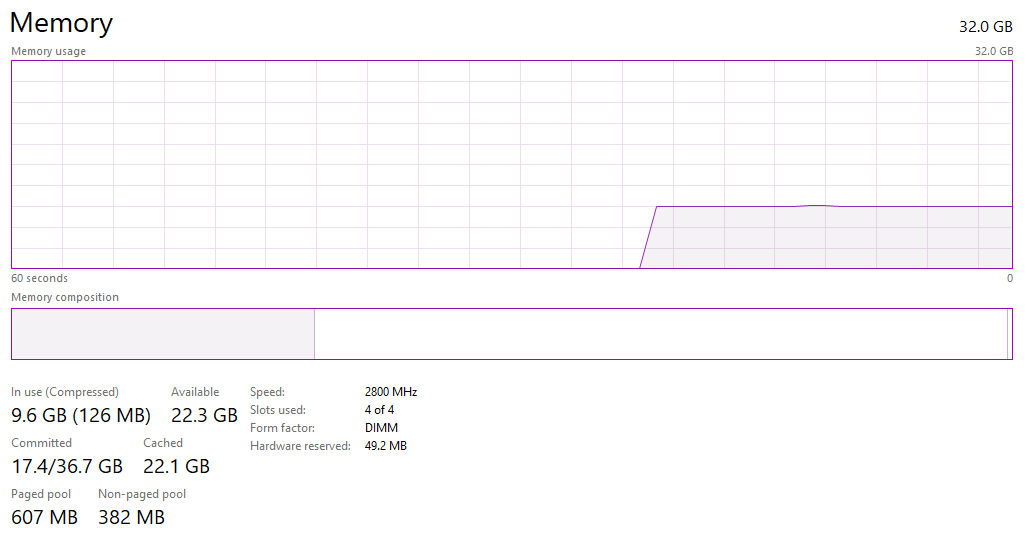
Have you verified your RAM is running at 3600Mhz? Most people forget to turn on XMP and expect their RAM to run at the rated speed out of the box (Spoiler alert, it doesn't run at that speed out of the box)
vast meadow
^
 vast meadow
long basalt
Newer versions of windows 10 will even report your RAM speed.
vast meadow
long basalt
Newer versions of windows 10 will even report your RAM speed.
I thought it always did no matter version lol
long basalt
My current kit is 2800Mhz, (I just got an upgrade to 2x16 at 3200Mhz CL16, but my parents would be furious if they knew I bought it so I'm installing it tommorow)
Nope, that was a feature added later in W10's lifetime.
long basalt
Ewww
3600mhz C18?
Jesus, that's a BRAND NEW kit.
And expensive too
That's a 128GB 8x16GB kit at 3600Mhz CL18
You don't need 8 Dimm modules.
compact sun
sais only 2x16 on their web site
long basalt
Uhhh no...
compact sun
its the only thing i can find on their damn list!
long basalt
If you read it, the SKU says 128GB.
And this SKU is a Corsair SKU for Dominator Platinums with Capellix RGB. This kit retails at 1,500 USD
vast meadow
compact sun
its the only thing i can find on their damn list!
Ignore the mobos rated list tbh
compact sun
CORSAIR - DOMINATOR PLATINUM RGB 32GB (2x16GB) 3.6 GHz DDR4 C18 Desktop Memory Kit AMD Optimized
Model:CMT32GX4M2D3600C18
SKU:6450421
long basalt
You pulled a SKU for 128GB
compact sun
oh, crap thats the 2x16 see, i always screw it up.....
compact sun
want corsair rgb to go with my system 🙂 guess im being to picky
long basalt
Oh jeez...
compact sun
its for a birthday present 🙂
vast meadow
Ballistix 3600cl16 for 2x8gb is 90$ like 110 for rgb
long basalt
RGB RAM is damn near pointless unless you can get it as-cheap or cheaper than the normal RAM
grizzled bloom
99.9% of the time a halfway decent G.Skill kit will work on your computer, Corsair has good compatibility too
vast meadow
Get ballistix rgb if you want rgb
long basalt
https://pcpartpicker.com/product/TtkgXL/crucial-ballistix-rgb-16-gb-2-x-8-gb-ddr4-3200-memory-bl2k8g32c16u4bl Comes in Black White or Red heatspreaders.
compact sun
well as i have just proved...I have no idea what im doing...gonna need to point and click at this point i think 🙂
long basalt
No...
You literally just take our recommendations.
We know what we are talking about.
Especially people with the Yellow color.
They are Techies.
Techies go through a bit of a vetting process and have been on this server for a long time.
If you are just going to die without having Corsair RGB RAM, then https://pcpartpicker.com/product/rVwkcf/corsair-vengeance-rgb-pro-16-gb-2-x-8-gb-ddr4-3200-memory-cmw16gx4m2z3200c16 is at least a reasonable price.
long basalt
The difference between 3200 and 3600 isn't that massive.
grizzled bloom
On Intel it's not much, but AMD that's a huge jump, 10-15% gains on fps/benchmarks
long basalt
Really? Even if you can tune a 3200 kit to tighter timings than a 3600 kit?
vast meadow
Yeah but in that logic you could probs tune a 3600 kit to 4000 r sum
grizzled bloom
Yes, for Ryzen the infinity fabric clock is tied to the RAM clock. The IF directly affects core performance.
long basalt
Hmm, makes me wonder if my 3200mhz Ballistix kit can run at 3600mhz
compact sun
cool thanks for the help guys!
 noble rampart
hey is a r7 3700x better than a r5 5600x?
considering the r5 is 370 and the r7 is 280
long basalt
No, and Yes at the same time.
long basalt
3700X is better at Multithreaded tasks. E.x Rendering and Video Editing
5600X is better at Singlethreaded tasks E.x Gaming
The 3700X is also 1 generation older than the 5600X
noble rampart
ok
but if I do many things (school, cad, gaming, etc...) does the r5 have a significant boost given it is almost 100usd more
long basalt
In Gaming you should see a 10 to 15 FPS boost over the 3700X, depending on your GPU obviously (If you have a GT 1030 you would see basically no boost)
vast meadow
Get an i5 11400 instead tbh
 vast meadow
Pretty sure micro center bumped the prices like that but still that means they'd be getting a 3700x for like 230 usd or something
noble rampart
long basalt
In Gaming you should see a 10 to 15 FPS boost over the 3700X, depending on your ...
wab a 1060 3gb
long basalt
You'd see no boost from either of those CPUs
long basalt
Unless you are in CPU bound tasks (CAD work, Video Editing)
long basalt
I mean, unless you are working in files with over 1000 individual parts, you shouldn't have too many issues with even an older Intel CPU doing CAD work.
noble rampart
k