#cpus-mobo-and-memory
1 messages · Page 170 of 1
 iron seal
 ruby laurel
hell yeah
iron seal
When I'm ready, I'll upgrade to 3090
ruby laurel
put those cuda cores to workkkk
iron seal
eyy
 hollow thorn
Unify do be in stock
iron seal
I'm tryna find them in stock at amazon rn lol because I'm fed up of waiting
I can officially say I've been waiting a year for my motherboard
It was held at the border in 2020
It's now 2021
hollow thorn
Lol
 limber dragon
if you have just one gpu and one m.2 gen4, then get a b550 unify
hollow thorn
@limber dragon how are stock for those?
limber dragon
unify is in stock, x not yet
iron seal
limber dragon
if you have just one gpu and one m.2 gen4, then get a b550 unify
I trust your judgement, but just out of curiosity - why is this?
hollow thorn
The dual ram slot one is the x, right?
iron seal
I'm trying to learn what I can about the hardware side of things
iron seal
Of course I'm gonna OC 😛
ruby laurel

hollow thorn
Unify x is like for xoc
iron seal
Gotta roll that silicone lottery
ruby laurel
i hate how msi has such nice looking boards
limber dragon
iron seal
Of course I'm gonna OC 😛
like push 5500+ memory?
hollow thorn
Supposed to have really god ram topology iirc
ruby laurel
asrock high end looks pathetic its super funny lul
limber dragon
cpu oc = normie
iron seal
Nah no chance, base clock for my RAM is 3600 DDR4
ruby laurel
ssd oc = cool
iron seal
It's ballistix
limber dragon
and? I have my 3600 ballistix at 3800c14
hollow thorn
@limber dragon btw, can ya remind me on anything interesting b550 unify non-x does? Seems redundant against x570 unify
ruby laurel
limber dragon
and? I have my 3600 ballistix at 3800c14
i have a 2133 8gb kit at 2933
oc master
limber dragon
x570 has all pcie gen4
limber dragon
b550's bottom pcie is a x4, and all the m.2 gets swapped around
ruby laurel
literal fat brain
limber dragon
b550 unify and x are the same board
hollow thorn
My phone does not like loading up the Mobo sheet so can't check VRMs
limber dragon
x570 is completely different
hollow thorn
(b550 unify against x570 unify)
iron seal
If I were to upgrade to the Ryzen 9 5950x in the future, along with the 3090 would I need a better mobo?
hollow thorn
No
iron seal
(To utilise the hardware properly)
limber dragon
vrms are different, memory traces are different, pcie slots and m.2 are different
idk if x570 has a video out
limber dragon
he has a breakdown of x570 and x
hollow thorn
Alright, I'll go find em tomorrow
limber dragon
they're very different boards though
iron seal
So I could get the 550 by tomorrow, but the 570 is out of stock
hollow thorn
I know he was doing ram oc on the x570 unify a while back
 cunning helm
hey guys kinda new to building pcs. Im interested in buying an ASUS B450-F but im not sure if it's fully compatible with my 5600x. any thoughts?
iron seal
I bought the 550 unify I gave up waiting for Alza to ship further than the Czech republic
PC Build tomorrow 😄
 naive pendant
ruby laurel
naive pendant
ruby laurel
me
naive pendant
ruby laurel
me
 fresh river
cunning helm
hey guys kinda new to building pcs. Im interested in buying an ASUS B450-F but i...
fresh river
cunning helm
hey guys kinda new to building pcs. Im interested in buying an ASUS B450-F but i...
It’s not, you’ll need a bios update when the BIOS supporting Zen3 is out in B450 motherboards and your board doesn’t have a bios flashback button, meaning you’ll need a Zen2/1 gpu
 river ledge
why is the package temp higher then the core temps?
the cores idle in the 20s but the package is 10 degrees higher then it
 elfin warren
What CPU?
river ledge
i7 10700k
elfin warren
I wouldn't put too much thought into TBH. It all depends on where the sensors are placed and I haven't researched that far into the 10 series
naive pendant
Hey guys, this issue has recently started happening a few weeks ago. When I turn on my PC, it does not give out a signal at all. However, once I hit the reset button on my case, it finally boots. Any solutions on how I can resolve this issue?
elfin warren
When it doesn't boot, what error LED's are on?
fresh river
naive pendant
Hey guys, this issue has recently started happening a few weeks ago. When I turn...
Maybe a bad driver, if it needs to be reset each time
or something could be wrong with the memory
but LED's are helpful
naive pendant
elfin warren
When it doesn't boot, what error LED's are on?
Boot
Do you think clearing the CMOS will resolve it?
elfin warren
Kinda doubt, that means it can't find the boot drive
I would check BIOS and make sure boot priority is the proper drive
fresh river
If he accidentally set it to the wrong drive somehow cmos would fix it
because thats part of the BIOS
naive pendant
elfin warren
I would check BIOS and make sure boot priority is the proper drive
Im not too familiar with the BIOS. How would I do that?
elfin warren
CMOS reset doesn't always pick the right boot drive
Does this board have onboard graphics as well?
fresh river
But if he set an incorrect one on accident it might
elfin warren
Like an HDMI slot in the motherboard?
naive pendant
elfin warren
Like an HDMI slot in the motherboard?
yea it does
elfin warren
Does your processor have onboard graphics also? And you're using a GPU?
fresh river
What CPU do you have
fresh river
so no onboard
elfin warren
no but it would be worth checking that it's actually disabled in BIOS and not checking for it
fresh river
True, What mobo do you have @naive pendant if you don't know how to boot into BIOS
naive pendant
fresh river
True, What mobo do you have <@456226577798135808> if you don't know how to boot ...
I have the b450 tomahawk max (ik its kinda overkill)
I know how to boot into bios
fresh river
ok perfect I know msi bios lol
naive pendant
and the only thing i did was enable xmp but thats all
naive pendant
normal bios
fresh river
alright, there should be in the main bios menu a bunch of icons you can swap around, make sure the icon representing your boot driv is first
and that shows boot order
thres also under advanced settings iirc a boot menu which might work too
naive pendant
It’s not letting me boot into bios, the del key is what u have to press right
fresh river
I alwaus launch into windows and restart with UEFI
its easier cause my boot time is too short
fresh river
when you boot into windows, go to settings, update and security, recovery, advanced startup
and then from there i think its self explanitory, just for future use
naive pendant
my ssd is the first one out of all the icons
naive pendant
My bios is really laggy, is that normal?
fresh river
I don't think so, I don't really know what BIOS lag looks like. do you mean input delay?
naive pendant
Yes, i move my cursor and it’s taking like 10 seconds to recognize
river ledge
so is the cpu package power the amout of watts my cpu comsumes?
elfin warren
Yes
river ledge
then i got the same as the r5 3600
wait so power consumption doesnt go up as the cpu usage goes up?
elfin warren
It should?
river ledge
i have it on a constant 5ghz and 1.305v
elfin warren
I'm not familiar with that software though
I always use HWINFO64
Or Ryzen Master for my AMD CPU
river ledge
doe HWINFO64 also show power consumption ?
river ledge
i did it again on HWINFO64 and it was only 65w
 hidden spoke
ok so i wanna make a cheap server computer to host minecraft/tf2/other servers would a Xeon E7-4880 be good for that build or should i go with a i5 3470
 hoary cedar
Is there anything I could to to bring my CPU performance up? This is my build + benchmark: https://www.userbenchmark.com/UserRun/38168951

I'm saving up for switching to an AMD CPU + mobo, as I am heavily CPU bottlenecked right now.
 fresh wren
Lmao I'm trying to sell 16GB of 1600MHz CL9 DDR3 RAM for $50CAD
and the dude is like
"Uh $20?"
elfin warren
XD
fresh wren
and I was like "For both sticks or just one?"
elfin warren
I would have been not so nice
fresh wren
told him the lowest I'd go is $20 per stick (which is a steal)
Most used RAM that's got the same spec is like $30 or $40 per stick
Tempted to list it as sold
and re-list at a higher price
Yeah I'm looking at used RAM on Ebay and the exact same sticks are selling for $77.80 with $15 shipping.
fresh wren
facebook marketplace is a joke
elfin warren
agreed
fresh wren
Haven't gotten a bite on my R9 290X that's up for $130 yet, looking forward for lowballers on that
considering people are selling 750ti's for $180
fresh wren
Man I could probably bump the price of my R9 up
but I won't because I bought it for $120
 median lance
Does anyone have really good ram they can recommend for a 5900x?
median lance
700$ is my limit
I stream/game/record
Well 700-750 is my limit
I’m running a 3090 with it currently
median lance
USD
fresh wren
Honestly you're unlikely to hit your price limit with RAM
you can basically get anything
median lance
Hm okay
fresh wren
RGB or not?
median lance
Kk ^^ thank you
fresh wren
no real point in going over 4000MHz
median lance
Also is 32gb enough?
fresh wren
evern then 4000 is overkill
hollow thorn
new AGESA update will help
elfin warren
Yup
median lance
Oh the bios update?
elfin warren
BIOS updates to come
fresh wren
I've had some stability issues when I clock up to 4000MHz, so I've been running 3866 for more stability.
elfin warren
New AGESA just released yesterday, will take a bit before it hits new BIOS versions
median lance
Ahh okay
fresh wren
But so far no big complaints. 32GB should be enough, but if you want to blow the cash you'll never max out 64GB
median lance
Any good 64gb kits? Just so I have options
Cos I was gonna order some but dual rank seemed to be an issue if I recall
median lance
Oh okay!
elfin warren
The dual rank thing isn't' an issue for 2 sticks
It's only when you run 4 that it gets weird
fresh wren
even then single/dual rank really isn't as big of an issue as people make it out to be
median lance
Yeah I was in the middle of ordering 4x16gb and than I heard it was weird
So I just decided not too
elfin warren
IMO, it's better not to just so you have upgrade room in the future
and don't have to buy a whole new kit
median lance
Yeah, that’s why I gave myself such a budget just to deal with it now
Ty both! I think I’ll probably get the 32gb (4000mhz) black ram 🙂
fresh wren
I think it also comes in 2x16 instead of 4x8
median lance
Do I have to mess with the fclk or just lower down the clock speed if 4000 doesn’t work?
fresh wren
Comes in an even lower latency too, which is fun
I was wrong, that's the 3000MHz with the lower latency
fresh wren
you have to use FCLK to bring it up to 4000
median lance
Gotcha I wasn’t sure I’ve always just popped xmp on
fresh wren
I think out of the box without changing settings it sits at 2166?
median lance
Is it a lot to learn? I’m searching on yt rn
fresh wren
I was really confused when I built my PC in December
because I knew NOTHING about RAM
fresh wren
FCLK isn't too hard. All I had to do was change two settings.
only slightly more complicated than XMP
elfin warren
FCLK = RAM speed with Ryzen
EZPZ
Well, half ram speed
so 3600 mhz ram = 1800 FCLK
hollow thorn
well, half transfer speed, fclk=ram freq
fresh wren
My motherboard's BIOS gave me an option for 4000, I think it took that into account
But all I had to change was frequency and voltage
limber dragon
what about them? They're bdie, and half decent

Google Docs
Sheet1
Cas Predictions (ns),RCD Predictions (ns)
XMP Rating,Speed,Cas Lat,RCD,Voltage,XMP CL,XMP RCD,1.35v,1.4v,1.45v,1.5v,1.55v,1.6v,1.35v,1.4v,1.45v,1.5v,1.55v
3200 14-14-14 1.35 *,3200,14,14,1.35,8.75,8.75,8.75,8.44,8.15,7.88,7.62,7.38,8.75,8.44,8.15,7.88,7.62
3600 14-15-15 1.4 (EOL),3600,14,...
limber dragon
if you want to overclock for daily, reve if you dont want active cooling on the sticks, bdie if you're fine with active cooling
median lance
Reve?
hollow thorn
micron rev e
hollow thorn
thought ballistix 2x16 sticks were still in stock
elfin warren
nope, not even the white RGB ones
Oh, 2x16
Lemme check
Yeah, the red ones are
hollow thorn
that should be rev e
limber dragon
amazon has reve in stock 99% of the time
elfin warren
Ram has been getting as rough as GPU's the last couple days
elfin warren
Amazon out of stock until 2/6 now
limber dragon
huh, amazon is out too
hollow thorn
Well, for daily, it'll be easier to keep rev e sticks happy at a higher oc, than b die needing 40c or whatever it was
limber dragon
median lance
I thought b-die was better than micron?
if you're overclocking just the primaries:
bdie does 3800 14-15-8-11
reve does 3800 14-17-8-11
even secondaries are the same
terts vary a bit
limber dragon
in the zen overclocking pinned in #overclocking I have 2x8 bdie, 4x8 bdie and 2x16 reve subbed in the spreadsheet for zen2
hollow thorn
32x2 likely won't oc well, just because dual rank high capacity
limber dragon
2x32 is revb, but it overclocks the same as reve
median lance
Dang ram is difficult lol
 analog dune
Does the msi b550 tomahawk support a ryzen 7 3700x right out of the box ?
elfin warren
Yes
hoary cedar
Is there anything I could to to help my CPU performance? This is my build + benchmark: https://www.userbenchmark.com/UserRun/38168951
I'm super CPU bottlenecked rn, looking forward to upgrading to an AMD cpu/mobo, but will take a while to save up for that.
limber dragon
get 2 sticks of ram
fresh wren
it's easier to get the same model
hoary cedar
Also, could my mobo be a problem?
fresh wren
your RAM is clocked at 2400 but is a 3200 stick?
hoary cedar
I haven't had much luck finding the same model sold in Europe (I'm in France). Shipping from US is like $15, and that model 1x16GB stick is $80 without shipping...
fresh wren
hoary cedar
Yeah, I'm pretty sure either my mobo or CPU don't support higher speeds
fresh wren
have you edited clock speed in the BIOS?
hoary cedar
Yeah, I tried """overclocking""" my RAM a few weeks ago because it was running at 2133MHz. I was only able to get it up to 2400MHz...
This is the specifications: https://www.msi.com/Motherboard/B250-PC-MATE/Specification
Welcome to the MSI Global official site. We are the top Gaming gear provider.
hoary cedar
overclock the motherboard!!!
elfin warren
ya know, you used to be able to do that
elfin warren
Back when NOrth and South bridges were a thing
Yeah, dual channel ram would help a bit
hoary cedar
So, what are my options for getting another stick?
elfin warren
in France?
hoary cedar
I presume it has to be 16GB as well, and same speed.
fresh wren
Same clock speed and frequency should be good enough?
elfin warren
weeelllll
fresh wren
also latency
elfin warren
max is 2400 mhz
fresh wren
that's so low
river ledge
why doe it say 1600mhz?
fresh wren
it hurts me
elfin warren
Becuase actual ram speed is half of advertised
hoary cedar
bc this specific model appears to be 200€ or so in france, and importing it from US is a pain (french bread)
elfin warren
DDR = Double Data Rate
hoary cedar
yeah
elfin warren
I mean
river ledge
false advertisement then jk
elfin warren
Might be worth finding a cheap DDR4-2400 dual stick kit?
And saving the 3200 for later?
hoary cedar
To replace this stick entirely?
elfin warren
Ye
hoary cedar
But then the 2400 kit is useless afterwards.
fresh wren
could resell it
hoary cedar
How expensive would an upgrade to 32GB be?
elfin warren
Well, which is cheaper, the single 3200 or dual 2400 kit?
limber dragon
elfin warren
Becuase actual ram speed is half of advertised
they arent technically wrong, its 3200 at ddr speed 
hoary cedar
bc I wouldn't mind more ram 😏
elfin warren
So back to
river ledge
limber dragon
they arent technically wrong, its 3200 at ddr speed <:rollsafe:56335816384000821...
what about when i have 4 sticks
elfin warren
Which is cheaper? A single 3200 stick or a dual 2400 kit?
hoary cedar
I wish that meant 4x speed lol
What's a good way to search for good prices? pcpartpicker?
fresh wren
pcpartpicker works, does newegg have a euro site?
hoary cedar
I'll just search from the US and then find the same model in France, hopefully it's less than twice the price
sadly no :c
However first-word latency is 14 ns. I'm not sure what first-word latency is, but I do know what latency is. Therefore, my guess is that it is not a good choice.
elfin warren
C or CL
hoary cedar
wdym?
elfin warren
it's math between the C number and the frequency
fresh wren
the CAS Latency is 17, first word latency is listed as 14.167 nanoseconds
elfin warren
Even though it's underclocked, if you're adding a single stick to the pair it should match the first
hoary cedar
elfin warren
Even though it's underclocked, if you're adding a single stick to the pair it sh...
Latency-wise as well?
hoary cedar
Looks like it yeah :o
fresh wren
are any of those within your price range?
fresh wren
you can also set a price alert for when it drops back down
hoary cedar
Any chance it might drop down to 70€ or so anytime soon?
I know nothing of the RAM market
fresh wren
there's a shortage of everything rn so it's hard to say
hoary cedar
I don't need to upgrade right now per se
A bit worried for when I upgrade my headset to ditch facebook later this year, but ig if I have perf issues then I can upgrade my RAM at that point.
Gonna get the DecaGear probably, and it looks quite a bit more demanding to run than the Rift S (higher refresh rate & much higher resolution). GPU is def up to the task, but my CPU is struggling with the Rift S already...
elfin warren
Well, with those ram speeds it's kinda no wonder
but I'm not entirely familiar with how fast the 7700K can use
hoary cedar
(I bought the non-k)
hoary cedar
Because it was $10 cheaper and I didn't know what overclocking was four years ago 🤦
elfin warren
But other boards can maybe use faster
hoary cedar
Alright, I'll watch for RAM prices, and I'll buy if it drops to 70€ or so. I've set up the alerts on that model. Thanks for the help!
 tender turtle
can somebody help me
hollow thorn
with
 leaden gale
is the ryzen 7 3700x or ryzen 5 3600 better?
 magic cedar
Obviously 3700x
Has 2 more cores
But more expensive
And 3600 is better bang for buck
naive pendant
How would you guys feel about a 3700x on this board?
ASRock B550 Phantom Gaming 4 Supports 3rd Gen AMD AM4 Ryzen/Future AMD Ryzen Processors Motherboard https://www.amazon.com/dp/B089VTZ83Q/ref=cm_sw_r_cp_api_glc_fabc_Ypp-Fb1ECG1V3
I’m building for my friend - I would’ve told him to get a better mobo but he’s stuck with what he bought
elfin warren
Not bad
Not the best VRM but it will work
Won't be a speed penalty or anything, it's fine
naive pendant
Ok perfect
The build is just so unbalanced - guy spent 150 on case 150 on aio, 600 FOR A 3060TI
And 99 for mobo lol
elfin warren
what about PSU?
naive pendant
He had some trash gammaxx that some kid told him to buy
But I freaked out
And he went and got an rm750 today
naive pendant
Yeah... I panicked when he sent me that
elfin warren
XD
naive pendant
Mobo was the only iffy part but that’s cleared up so I’m good to build now
elfin warren
YW
limber dragon
naive pendant
And 99 for mobo lol
aint nothing wrong with a $100 mobo
elfin warren
Nope
limber dragon
I have a $500 cpu, $1500 of gpu, probably another $500 in watercooling on my $91 mobo
elfin warren
unless you're slapping a 5900 in there on LN2 lol
The big fancy motherboards are honestly over rated
naive pendant
limber dragon
aint nothing wrong with a $100 mobo
Depends what you're doing with the mobo + how much power is going through it ig
you want good power delivery for yo stuff
limber dragon
I've pushed 200A+ through it without an issue if that's what you're asking
99.9% of vrms are overkill
naive pendant
aghh might just be a problem with me but I just cant sit right like that
idk there could be something wrong with me lol
limber dragon
do you know how many amps a vrm is rated for, and the efficiency curve on the phases?
naive pendant
Only some rudimentary knowledge a friend passed to me about what power delivery to look for when I was buying my board
I just preferred to be on the safe side so I was willing to pay 20-30 more for a board that would give me better IO, some better power delivery, heatsinks, etc
but im willing to learn
limber dragon
tldr most cpus can pull a max of 100-200A, and most stages are rated at 50A+
that's 50A per stage
naive pendant
and most have at least 8 stages?
so power delivery on most boards is fine?
just my guess
limber dragon
say you have a 5800x, its going to pull 100-125A
your x570 would have 60A stages
so you really only need a 3 phase vcore and 1 phase vsoc to run it
naive pendant
wouldnt it be safe to follow psu logic and get a board with headroom even if not oc'ing?
limber dragon
psus have to deal with gpu transient spikes
a 3080 rated for 400w may spike to 700w and trip OCP
elfin warren
Which is a thing
naive pendant
i see
thanks for enlightening me, I will defo look more into it
There's still a lot I don't know
elfin warren
Some stuff really isn't important, like VRM's, for 99% of people
 opaque radish
i will say this if this means much, i have a 5800x and i have it running at 4.7 all core with 1.32vcore which is defo aggressive
and i only hit maybe 125 totaly package consumption at peak
hollow thorn
P95 hits very hard as a stress test
opaque radish
about what i hit at mine
you should maybe be getting 4.2 at 1.3
i hit 4.3 with mine
hollow thorn
I can do 4.2 at 1.325
Used to be able to do 4.3 at 1.35 and 4.2 at 1.3 but not any more
I also have early sample
opaque radish
wow i had the same thing, when my 3800x was new i was able to get 4.4 at 1.31 then all of a sudden, i needed 1.33 and then that was the voltage i needed for 4.3
like silicon quality dropped like after a month
it was weird asl
hollow thorn
Just deterioration on my part, was dailying 1.35v and running 1.375v when I forgot to change clock/voltage back after benching
opaque radish
glad to know someone else who shoudlve gotten a 3700x had the same problems with their 3800x

limber dragon
is talking about degradation
is also trying to daily 1.32v
 limber dragon
1.25 is the recommended safe voltage for zen2, and zen3 will be even lower
hollow thorn
even lower?
 silent lichen
hey got a question for you guys... today I go to turn on my desktop, but nothing, nada. EVGA 1600 PSU w a Gigabyte X399 Pro mobo and AMD Threadripper CPU.. My heart stopped.. anyway, I've tested the PSU, the fan spins when i switch it on. When I connect the cable back to the motherboard, all the motherboard does is light up for a split second then turn back off when I flip the power switch on the PSU. Power button on the case does nothing. The system has been working great for the past 2 months, not sure what's going on. Do you think it's a bad mobo at this point?
 celest wolf
hopefully its not your cpu but it could very will be a motherboard
I'd suggest trying to use the motherboard alone and seeing if the power works and stays
ruby laurel
silent lichen
hey got a question for you guys... today I go to turn on my desktop, but nothing...
haha my threadripper system does that too
x399 weird as hell
silent lichen
i'm getting scared 😢
partly b/c if something does need to get replaced, may be a few months before i get that part, and i need my computer!
everything is out of stock
it was stressful enough building this system (pricey components), not really looking forward to stripping it down again
i removed the RAM, graphic cards, usb headers... i guess next step is to remove the M2 nVME SSD
FML
 rough junco
sounds to me like you have a partially dead power supply . do you have another power supply that you can hook up to your system. remember a power supply adds 3 different voltages to your system and if one of those 3 voltages fail it may cause the very symptoms you are having
silent lichen
no i dont. i can go out and get another one tomorrow i suppose
ruby laurel
leadex time
naive pendant
it looks like dead psu
ruby laurel
if its from evga they are excellent about warranty
id throw an email to their support team and see if they can go anything for you @silent lichen
 manic hull
How difficult would 4000 CL14 be to achieve with overclocking? and would i need a specific memory kit?
 midnight pollen
some ram die is better for overclocking than others, samsung b die one of the better ones iirc? tho with overclocking nothing is guaranteed. its not really my area but im sure someone in #overclocking should know
limber dragon
Needs to be bdie, reve or revb, and most likely need over 1.5v
manic hull
i should probably ask my question there, thank you for the response.
midnight pollen
fitz is right, he good with overclocking
manic hull
somehow i didnt see that, its a bit late.
manic hull
limber dragon
Needs to be bdie, reve or revb, and most likely need over 1.5v
Whats the best way to tell if its one of those?
limber dragon
Crucial sticks will telp you in thaiphoon, bdie you can set low trfc and see if it boots
manic hull
When purchasing* is there a way to tell without going into the manufacturers spec sheets?
limber dragon
Yeah
Crucial over 3200mts is rev e/b depending on capacity you get, and I've posted a bdie sheet around if you search my messages
If my os repair was successful, I'll post it soon
manic hull
I'll look for your bdie sheet, is there any tips for a beginner RAM overclocker btw?
limber dragon
Read integral's guide
manic hull
where would i find that?
limber dragon
Github link in #overclocking
manic hull
and this it?https://docs.google.com/spreadsheets/d/1Xz_rQgNFQF3Dm0yHJBzldVkal5jmfI9Ug9tnpjky5Bc/edit#gid=0
Google Docs
Sheet1
Cas Predictions (ns),RCD Predictions (ns)
XMP Rating,Speed,Cas Lat,RCD,Voltage,XMP CL,XMP RCD,1.35v,1.4v,1.45v,1.5v,1.55v,1.6v,1.35v,1.4v,1.45v,1.5v,1.55v
3200 14-14-14 1.35 *,3200,14,14,1.35,8.75,8.75,8.75,8.44,8.15,7.88,7.62,7.38,8.75,8.44,8.15,7.88,7.62
3600 14-15-15 1.4 (EOL),3600,14,...
limber dragon
Ya
manic hull
sweet!
limber dragon
Never heard of patriot doing that bin, only gskill
 deft inlet
anyone back ordered a CPU ?
 muted island
anybody got the i59600kf ?
 chrome bear
Does anyone know what to put in my "Antal Processorer" i have up to 32 Cores but i dont know what to put it on
 marble tinsel
If a psu passes the clip test, and mobo only passes power to usb but no lights no fan, is it doa?
elfin warren
MIght still be PSU
Just because the fan spins doesn't mean it's putting out all the power
 hardy moon
Does the A320 chipset support 2nd gen ryzen
hardy moon
K thanks
elfin warren
This ASrock one does for example
Micro ATX; ASRock Super Alloy; Supports AMD Socket AM4 A-Series APUs (Bristol Ridge)* and Ryzen Series CPUs (Summit Ridge & Raven Ridge); Supports DDR4 3200+ (OC) (Ryzen CPU) / 2400 (A-series APU); 1 PCIe 3.0 x16, 1 PCIe 2.0 x1; 7.1 CH HD Audio (Realtek ALC887 Audio Codec), ELNA Audio Caps; 4 SATA3, 1 Ultra M.2 (PCIe Gen3 x4 & SATA3); 6 USB 3.1 ...
hardy moon
Hey I was looking at that board
elfin warren
Well, IMO
hardy moon
And on supported cpus it says 3000 series
hardy moon
No I am talking to a client who wants to upgrade
elfin warren
YW
 long geyser
@chrome bear just disable the option and let it run Windows with all cores
Also when asking for help, best to convert options to English so anyone can help. I only know what you're talking about because I know the settings and UI, not because I understood the language.
 warm path
Hmmm, I just cleaned the fan on my PC and my CPU temp idles at 25C now
It idles at 29C before cleaning
 jade bobcat
Finally looking to build a new rig. Been using an i5 6600k and it shows. I use my PC for gaming mostly but nothing super intense. WoW, Overwatch, planning on Diablo when it comes out. I don't care about max settings or ultra high-end. I'll be using a 2080 super that's about 2 months old that a friend is gifting me. I don't stream or do any video editing or design or anything. Ryzen 5600X a good choice? Seems to be a really popular option.
elfin warren
Great choice
chrome bear
@long geyser but when I turn it off it runs at 16 cores but I can choose 32 so I don’t know what to use
elfin warren
Good pairing with the 2080
jade bobcat
Not too much or too little?
elfin warren
Nope
Goldilocks LMAO
if you can get one in stock, that is
Supply has been getting better
elfin warren
B550 TUF
it'll need a BIOS update before you install the CPU though
but it's good because it has flashback
And some 3600 C16 ram to go with it
jade bobcat
I actually have the RAM already! Thanks for the MOBO recommendation though!
elfin warren
YW
long geyser
@chrome bear it means amount of threads, not amount of cores. You have SMT/HT, you 2x the amount of threads as cores
jade bobcat
Vintage, is this what you were referring to? https://pcpartpicker.com/product/pnqBD3/asus-tuf-gaming-b550-plus-atx-am4-motherboard-tuf-gaming-b550-plus
elfin warren
Yes
jade bobcat
Thanks again
elfin warren
YW
naive pendant
jade bobcat
Thanks again
Another thing you might want to consider is a 9900k for the same price as 5600x, rather marginal performance difference when you consider 2 more cores 4 more thread
9900k is actually available for purchase and is an excellent chip
long geyser
@chrome bear I would, doesn't really do much for you.
jade bobcat
@naive pendant I feel like I'm going to start a fire by saying this but I'm under the impression that Ryzen has been better for value for dollar lately and easier to update down the road since Intel forces mobo changes every other gen (or something like that, I'm somewhat new to this)
elfin warren
Mmmm
jade bobcat
My current build is my first and only.
elfin warren
AM4 is the end of the line for AMD anyway
AM5 is next
Sorry, 5000 is the end of the line for AM4
And value for dollar now belongs to Intel
At least until 11th gen comes out
Gotta wait and see for that one
naive pendant
jade bobcat
<@456226577798135808> I feel like I'm going to start a fire by saying this but I...
This is true, the exception being the past 2 months wherein last gen ryzen CPU’s have been selling for above MSRP and new ryzens aren’t even findable
elfin warren
Amazon has dropped a TON of 5000 series
naive pendant
If you want future proofing, you can get an lga1200 board and an i7 10700k for 30 bucks more than a 5600x
Pretty sure 1200 socket will be compatible with intel 11th gen as well
naive pendant
elfin warren
Amazon has dropped a TON of 5000 series
I didn’t hear about this - point taken
elfin warren
Yeah, more reliable than Newegg
naive pendant
Making me rethink my 3700x purchase
elfin warren
it's hit or miss though, I use a stock bot on Youtube
I mean
don't sweat it
3700x is more than capable, I have one
Which is why I'm not going 5000 series
because AM5 is the next step in the road
naive pendant
Yeah, I’m sure it really doesn’t matter since most benchmarks are done with 3080 and differences with 3070 that I have are marginal at best
jade bobcat
Okay, so let me backtrack a bit then. I'll have a 2080 super, mid to high-end gaming and don't care about "maxing out" graphical capability but absolutely will if I can do it without spending out the wazoo, I just want performance, and I want to future proof if I can without blowing out the bank. Best processor recommendation?
My info may be a little outdated lol
elfin warren
"Future proof" is rough right now with AMD ending AM4 and Intel liking to flip sockets every other CPU
jade bobcat
Do we know when AM5 is coming?
elfin warren
End of the year roughly from the roadmap
I'd exect a better announcement next week at CES
jade bobcat
Okay. I'm not working on ordering/building until closer to Spring so I have time.
elfin warren
Oh
Intel 11th gen is coming in March
Even more options!
WOuld be worth waiting to see benchmarks and performance reviews
jade bobcat
I can definitely do that.
river ledge
can i mix this with my ram? https://www.amazon.com/G-Skill-Trident-3200Mhz-PC4-25600-Channel/dp/B07LD43HMG/ref=pd_sbs_147_5/133-9859376-9349507?_encoding=UTF8&pd_rd_i=B07LD43HMG&pd_rd_r=3e779b17-5047-433b-958b-02a83975915b&pd_rd_w=VJEB1&pd_rd_wg=hanpL&pf_rd_p=c52600a3-624a-4791-b4c4-3b112e19fbbc&pf_rd_r=RZ767NGP368ZFJFGNR0E&psc=1&refRID=RZ767NGP368ZFJFGNR0E it has the exact speed and timings except or the cycle time. this one has 38 while mine has 36. if i change it do u think it can work?
elfin warren
Go with the slower timings. no guarantees it will play nice but it should
river ledge
so 36
river ledge
oh
elfin warren
Lower number = faster
naive pendant
How is this mobo?
Gigabyte B550 Gaming X V2 (AMD Ryzen 5000/B550/ATX/M.2/HDMI/DVI/USB 3.1 Gen 2/DDR4/ATX/Gaming Motherboard) https://www.amazon.com/dp/B08LGKGBKT/ref=cm_sw_r_cp_api_glc_fabc_.VJ-FbX2F6Y16
Debating this vs b550 pro4
river ledge
it has a dvi port lmao
 wild kiln
Hey peoples, I have a quick question. My friend just bought a motherboard and upon opening the socket to put the CPU in (Core i9 9900k into an ASRock Steel Legend X390 Intel motherboard) he found some stuff inside the socket
Its hard to see and unfortunately this person is not amazing with camerawork, so getting photos is difficult, but they say it looks like lint or fuzz in the socket.
 fallen lynx
the metal pins are su pposed to be there
wild kiln
They are brand new
wild kiln
We dont know what to do as compressed air and even fine point objects like toothpicks dont get the fuzz out
river ledge
wild kiln
We dont know what to do as compressed air and even fine point objects like tooth...
u trie getting it out by flipping the board upside down
wild kiln
yep
river ledge
and shaking it a bit
wild kiln
mind you this person lives far away from me. so i cant tell what they have done specifically, but they said they have done all of the things mentioned thus far
The person did (against my own advice) slotted the CPU in and just built up the PC and tested it, and it wouldnt post
fallen lynx
any bent pins in the socket?
river ledge
fallen lynx
any bent pins in the socket?
no the hair messes with the pins
anything inside the pins is bad
the board might be fried
river ledge
wild kiln
We dont know what to do as compressed air and even fine point objects like tooth...
oh the tooth pick might of bent a pin. pins on mobo break super easily compared to amd pins and cant be bend back
its probably what broke the board tbh
wild kiln
for clarity the toothpick was not attempted until after the slotting was done
 rancid ocean
Hey guys! I have a MSI B350M BAZOOKA, with an Radeon RX 580 4 GB ARMOR OC, looking to see if upgrading to a RYZEN 5 3600 from a Ryzen 5 1400 would be worth while or even compatible?
wild kiln
The put the CPU in, built the rest of the pc, and when they turned it on, no post.
river ledge
shouldve just kept the black cover on ask for a warranty. now theres no warranty with that black cover removed
 pliant cypress
@rancid ocean not compatible
rancid ocean
@pliant cypress What's not compatible about it?
rancid ocean
@pliant cypress Okay I'll do some more digging, any insight on what might be similar to what a Ryzen 5 3600?
pliant cypress
r5 2600
river ledge
rancid ocean
<@!237788399442853899> Okay I'll do some more digging, any insight on what might...
i5 10400
and cheaper
river ledge
pliant cypress
r5 2600
thats basically a 1600 af
 covert delta
How good would this CPU be for an all around streaming, gaming, video editing, pc? https://www.newegg.com/intel-core-i9-9th-gen-core-i9-9900/p/N82E16819118023?Item=N82E16819118023&Description=CPU&cm_re=CPU-_-19-118-023-_-Product&quicklink=true
rancid ocean
@pliant cypress I'm curious, is it because the new integrating of PCIe 4.0 that makes it incompatible with my B350 mobo
in regards of the higher Ryzen 5 3000 models & up
deft inlet
mmm
rancid ocean
Sorry that might've been a stupid question, the answer that im really seeking is a Cpu that can utilize 3200 mhz of ram
pliant cypress
"Bios rom size limitations is a major issue of late and a lot of older gen Msi boards have 16mb chips which isn't enough space to store the additional information for new Ryzen processors. Apparently Msi are re-releasing older gen boards with larger bios roms."
that was from a post from 2019
wild kiln
hey to clarify, if the person kept the black top part could they use that for the warranty?
Or is it the case of "you take it off, its no longer warranty"
fallen lynx
it has to be taken off to use a CPU
if removing it voided the warranty they could never RMA anything ever
 cedar stone
Could I get help to do for my Ryzen 3700x. I got light non-conductive thermal paste on the edges here. Am pretty scared.
Can I use alcohol and a nylon or fiber brush to clean them
hollow thorn
You can just get a brush to get it off
It's not like it's acid or anything, as long as there's nothing on the pins, it'll be fine.
cedar stone
Even the bit in the center (pins)i touched like an idiot as I panicked? I waited too long for it to cool. The paste is fairly new so when I took the cooled out with force, some it it slid to the sides.
The pc was unplugged for a day.
hollow thorn
as long as you can clean it off
cedar stone
Ok, thanks 😅
river ledge
can u benchmark your cpu so we can compare? @fresh river
just curious what the scores gonna be
 night kite
Would yall say upgrading from an i56400 to a ryzen 5 3600 be a good enough upgrade?
river ledge
probably
night kite
I mean i would
limber dragon
4c/4t to 6c/12t
night kite
Laptop is a ryzen 5 3600 and the tower is a i5 6400
river ledge
laptop better
fresh river
river ledge
can u benchmark your cpu so we can compare? <@!319182510548451329>
yeah i got my benchmarks one sec
 lofty belfry
Hey so I upgraded my mobo and now it won’t boot into windows it just goes into bios and says there are no bootable drives
river ledge
alright thx
fresh river
Mines a bit lower
river ledge
is this single core
fresh river
river ledge
is this single core
yeah
river ledge
fresh river
yeah
do u have the muticore?
river ledge
makes sense i suppose
river ledge
if u oc u may come close or beat mine
river ledge
@fresh river heres my score when i turn off 2 cores
fresh river
not bad
river ledge
maybe if oc to 5.2 ghz i could meet your stock on 6 cores
fresh river
eh i just dont care if im being honest
river ledge
missing out on fps but alright
fresh river
i have a 3070, i dont need any more
naive pendant
Whats the best x570 you can buy aside from aqua and godlike
river ledge
naive pendant
Whats the best x570 you can buy aside from aqua and godlike
asus x570 e and hero
hollow thorn
@naive pendant Unify
hollow thorn
idle
hollow thorn
p r i m e 9 5
s m a l l f f t
river ledge
Looking at mobo specs and wish I got a unify instead of the z490e. Way better specs and features
For the same price
 old oxide
For a budget rig with a ryzen 7 which would be best? Trying to stay under $100 for the mobo
hollow thorn
prob ds3h
 pale mist
Yeah, gigabyte has a lot of experience making cheap mobos
 long acorn
Threadripper WRX80 platform has leaked! This is going to be some serious, serious processing power. 8 channels of memory, gobs of PCI-E lanes, pci-e 4.0, all hooked up to a motherboard featuring no less than 6 required power connections. https://wccftech.com/asus-wrx80-pro-ws-sage-motherboard-amd-ryzen-threadripper-pro-leak/
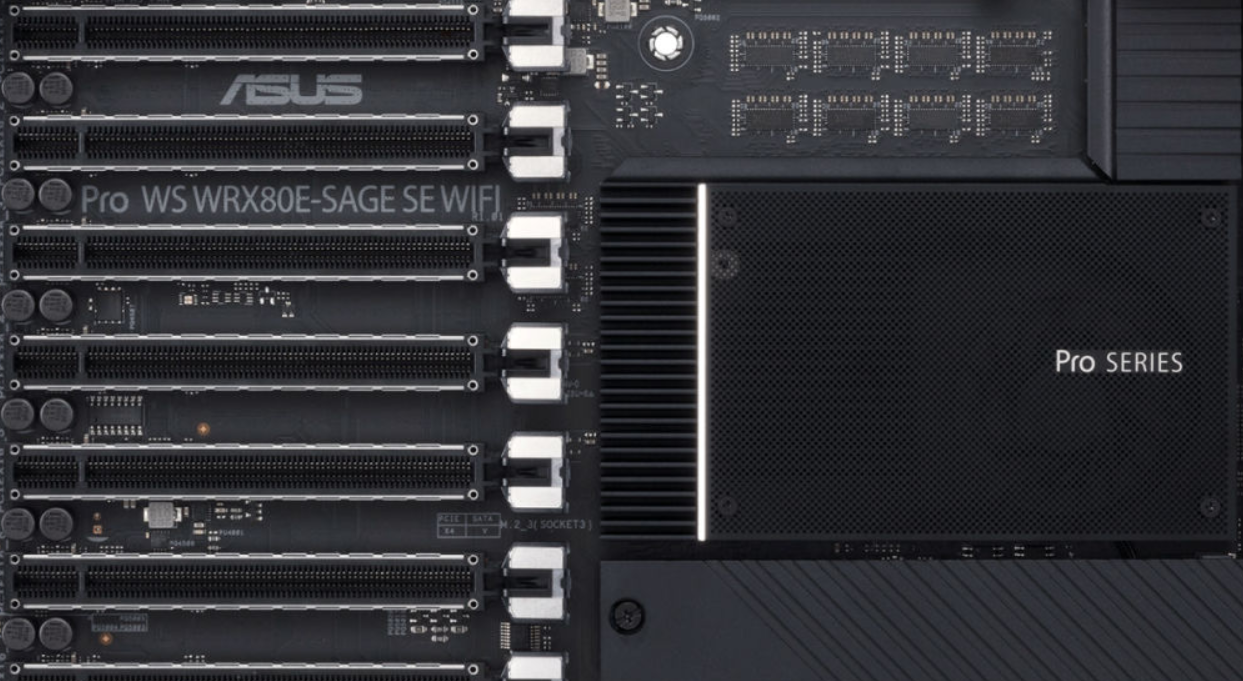
The second WRX80 chipset based motherboard, the ASUS WRX80 PRO WS Sage, for AMD's Ryzen Threadripper Pro Workstation CPUs has leaked out.
long acorn
old oxide
For a budget rig with a ryzen 7 which would be best? Trying to stay under $100 f...
You may be able to find a decent A520 motherboard if you plan to run the machine at stock and you aren't working the living heck out of it. B550, just get whatever board has the features you like most. If you're going to spend less than 100$ on the motherboard, a B450/X470 board on close-out (deep discount) would work but only if you're going with a 3000-series processor, the chance of them taking a 5000-series processor is next to nil due to having a BIOS that's too old (though most 400-series boards will accept a 5000-series chip AFTER - and only after - a required BIOS update). Most boards need a 'known' CPU before being able to flash the BIOS to accept a new previously unsupported CPU.
If you're not very experienced, or don't have a spare older Ryzen CPU sitting around the older board would recognize before the BIOS update, don't bother with 400-series boards, and just pick whatever Asus or Gigabyte motherboard you can find, prefferrably one with 4 ram slots so your system lasts longer before needing to be replaced.
To get a really decent motherboard, look at spending at-least 180$ - though if you're not going to use all those features or capabilities, that could be money better spent elsewhere on the CPU or GPU.
Make sure to get at-least 3000mhz or 3200mhz memory when choosing a Ryzen processor. Higher Mhz = better, Lower CAS (or CL) Latency is better.
old oxide
Thanks @long acorn we don't have a spare so I will stick with a 500 series since the cpu we bought is 5000 series. We are also getting 3200 ram
limber dragon
long acorn
Threadripper WRX80 platform has leaked! This is going to be some serious, serio...
did you know that's been a thing since they announced trx40? Literally had trx80 in the slides with it 😂
long acorn
limber dragon
did you know that's been a thing since they announced trx40? Literally had trx80...
Yes, that was about 13~14 months ago, but this is an actual, physical, real live motherboard in it's natural environment.
I've been keeping tabs on it, as I'm the hardware guy for a few of the youtubers that do BeamNG video comps. They come to me when they have questions or want advice.
ruby laurel
long acorn
Threadripper WRX80 platform has leaked! This is going to be some serious, serio...
only 1tb of ram max tho
thats where they get you
long acorn
ruby laurel
only 1tb of ram max tho
INTEL has 1tb, AMD TR has 256GB/quad channel TRX40 and 2TB/octo-channel memory on WRX80.
I don't believe WRX80 or PRO line TR CPU's support overclocking, just for the record - that is not set in stone nor confirmed though on the OC'ing bit. The rest should be solid fact.
And some 65 watt slightly more relaxed clocks on non-x 5000 series AMD Ryzen processors https://wccftech.com/amd-ryzen-9-5900-12-core-ryzen-7-5800-8-core-zen-3-65w-desktop-cpu-specifications-leak-out/

The clock speeds for AMD's upcoming Zen 3 based Ryzen 5000 Desktop CPUs, the Ryzen 9 5900 and the Ryzen 7 5800 have leaked out.,
ruby laurel
the board will max at 1tb is what they said unless im super high rn
long acorn
WRX80 is 2tb max by chipset design, it's up to the motherboard vendor to test 256gb modules if they're available, they often aren't until later on in the board life.
ruby laurel
yep
long acorn
It's likely a typo in the article, or in the reporting given to that site. WRX80 has been 2tb limit from the get-go and is designed to trounce intel.
ruby laurel
i mean i hope its good but imo it doesnt make the most sense
would rather offload to a server instead of using all that locally
long acorn
Well, certain super-powerful workstations doing high-end science computation or physics computation will make use of all those 128 PCI-E lanes @ pci-e 4.0. That basically is a server, it's just a workstation-oriented class of processors / chip-set. Only AMD would give us a server for use as a workstation / desktop. What would we have thought of the 3950x only 3 years ago? @ruby laurel
ruby laurel
long acorn
Well, certain super-powerful workstations doing high-end science computation or ...
im saying i dont understand why youd do this vs getting vms allocated to the users on a more powerful server
long acorn
There's a niche for it. A youtuber doing car crash videos in BeamNG Drive is getting one. He has 1~2 million subs and makes a ton, he paid for half my 2070 Super, too, last year in DEC 2019.
hollow thorn
I mean, PCIe lanes for GPU power, and home workstations/servers
there's a middle point between being able to do calculations on your average PC and needing to queue up work on a supercomputer
long acorn
For those 1% elitists, and the folks using adobe premier and beamng drive uses all those cores you can throw at it, so there's definitely a market, especially in small businesses or medical research labs who need the compute power.
hollow thorn
There's always a bunch of niche workloads that pay well
long acorn
If you take money out of the equation, I'd snag one, but honestly, I really don't have to wait with the 3950x here, and it's plenty more than I need especially on a daily basis. As long as you feed it enough RAM and fast enough RAM at that rate, it's good to fly through even the messiest desktop.
ruby laurel
long acorn
There's a niche for it. A youtuber doing car crash videos in BeamNG Drive is ge...
introduce us ill build him a nice setup 
hollow thorn
Lili will build him a 1pb nas
ruby laurel
true
hollow thorn
for... work purposes
long acorn
He's not in the USA / Canada sadly. He's foreign, but he almost moved to the US due to politics in his country a year back (well one of the guys anyways). I think the other guy is from IRAN and a third is in USA who doesn't need such a fancy machine.
He uses a NAS for mirroring and has online backup, but he has good internet. I'd have free access to it but my current download is 256kb/s on rotten Hughes Net. It takes ALL NIGHT to upload my 3.1gb city map project.
Basically, my work I do modding and doing game-dev type duties and also providing him tech support for issues, lets him make money. So he treats me nicely. Nicer than just about anyone else (no offense for those here). I would have had to buy a 5700xt last year if not for him, or a 2060 KO. This 2070 Super isn't bad, just wish it had more VRAM.
Really my RX 480 8gb was fast enough, plenty fast enough - not perfect but I'm okay with 35~60fps in most things on high/highest details, but the drivers were so bad I was losing hours each week due to driver crashes.
I played MS-DOS doom at 15~30fps on my first machine depending on the spot in the level I was in (doom II was harder to render ending up more towards 15fps), but I was okay with that, especially consider you could do way more with a 486 in 1994~1995 than an SNES. So I'm not FPS-picky here. The 2070 Super should have had more VRAM.
ruby laurel
long acorn
Basically, my work I do modding and doing game-dev type duties and also providin...
its good to find ppl like that
 hollow kraken
whats better than a 2600x for the same price?
river ledge
How much performance gain will I get from tuning the timings in my ram on intel?
limber dragon
yes
river ledge
limber dragon
yes
Thx for the helpful info
fallen lynx
river ledge
How much performance gain will I get from tuning the timings in my ram on intel?
miniscule, unless you are doing something like running 3800 at non-XMP speeds
 wise jackal
10700k or 5600x?
elfin warren
Either is fine. Roughly same performance. I believe the 10700k is slightly cheaper so a little more value there
warm path
Is temps in the 60s while using Prime95 mean a lot of headroom? I might upgrade another PC I have.
elfin warren
Means a bit yeah
naive pendant
wise jackal
10700k or 5600x?
if you want 8c/12t 10700k
5600x if you want better single thread perf
but i would go 10700k since it's cheap and sitting around 310-360$
 celest ginkgo
Not gonna lie, when I got my 10th gen Intel chip, and I looked at it and it wasn’t shiny purple pearlescent, I was sadge
naive pendant
lol
celest ginkgo
I just got the 10700kf, the d is even $10 cheaper than the k and I ordered it Jan 4th from Newegg obv, and it was delivered the 6th no Lapp.
Kapp**
My aio is coming tomorrow and then I can build.
naive pendant
nice.
celest ginkgo
F** idk where that d came from up there
warm path
elfin warren
Means a bit yeah
How much head room? I know Dell has killer coolers, I don’t know about Lenovo
You guys should wait for 11th gen CPUs
Make sure you race horse scalpers
celest ginkgo
I’ll probably just end up upgrading again anyway.
warm path
Ok
naive pendant
and intel CPUs offer a good value rn
celest ginkgo
I’m not the..... most efficient lmao
naive pendant
except for 10600k 
warm path
So much much headroom of terms of TDP when I am at 65-66C in Prime95 @elfin warren
elfin warren
IDK without knowing TDP of cooler
celest ginkgo
I’m going from 9700f to 10700kf I’m so excited.
warm path
Yea
celest ginkgo
I just installed my 9700f from a 9400f on november 22 Lmaoo
warm path
@elfin warren it’s an 8th Generation 35-watt i3 I am upgrading from. Does that help? Coolers are not documented by Lenovo
elfin warren
So probably just a metal chunk then
Don't know that I'd put that cooler on a 65W TDP part
elfin warren
I mean, a chunk of metal is a chunk of metal
warm path
Yea
elfin warren
IDK what Dell uses
warm path
Not to mention the other Dell AIO uses a solo heat pipe and heat sink
elfin warren
I mean, a Gammax 400 is $25 and will cool just about anything
warm path
The Lenovo uses a dual heat pipe with heat sink yet runs little warmer on Prime95
elfin warren
But if we're talking AIO's, that's a whole nother ball game
warm path
Yea
elfin warren
But if it's a 35 W TDP CPU, I wouldn't count on it cooling a higher TDP part
warm path
Yeah
Yup
Ok
Sticking to upgrading to an i7-8700T later
I am pretty sure the i7-8700 65-watt is going to throttle
Thanks!
elfin warren
YW
 brazen lichen
does anyone know if there will be a r5 5600 non x version?
elfin warren
Not yet
 humble wasp
hello what it will gain if i put 2 rams instead of one ?
elfin warren
Everything faster. Not necessarily loading though, that depends on hard drive
elfin warren
yw
 amber fossil
anyone having trouble with G.SKILL DDR4 3600 32gb?
manic hull
There was apparently a bad batch that went out for gskill ram, but it might not affect you.
elfin warren
Mine works great
amber fossil
just died like 2 days ago
elfin warren
XMP no problem
amber fossil
yea it worked fine before they died
manic hull
Do a bit of troubleshooting, if it’s really broken get an RMA
amber fossil
i did
im using 2400 16gb kit from my old pc
i used burnintest and it had a lot of errors
BSOD as well
elfin warren
Did you test the ram you have in there now?
amber fossil
yea there there all good
 smoky geode
What’s a better cpu overall (single core performance)
Ryzen 9 5950x or Intel i9 10900k?
magic cedar
for single core all 5000 series beat the 10900k i believe
hollow thorn
leaden gale
is the ASUS ROG Strix B550-F Gaming good?
 neat glacier
hollow thorn
neat glacier
hollow thorn
i dont rlly think it's fair to compare the 5950x to the 10900k- use the 5900x
and yes I am aware that the 5900x still beats the 10900k by a large margin
hollow thorn
smoky geode
What’s a better cpu overall (single core performance)
Ryzen 9 5950x or Intel i9 ...
I personally would say 5900x is a more fair comparison, but that wasn't the question.
hollow thorn
Is ok
elfin warren
Hmmm, I thought I had read somewhere the 5950x was slower single core but I guess not
 fickle iris
5950x is slower single core
elfin warren
not than the 10900
fickle iris
Obviously but 10900k has worse IPC
limber dragon
Can you produce an avg of benchmarks that shows a 10900k slower than a 5950x in single threaded workloads?
elfin warren
5950x also faster single core than 5900x in Cinebench too
limber dragon
My 3900xt is about equal to a 10900k at 5.3 in r20 single core
magic cedar
wow
limber dragon
It was also doing 4.84ghz with stock boosting
 spare gyro
Upgrade time
 stoic cobalt
FANCYY
warm path
GG
I am more of an Intel Fanboy, I don’t know why...
Maybe because I had a bad experience with AMD A-series chips...
 night notch
guys I had a question about RAM. what is more important when buying ram thats 16gb? the mhz or the CL
I'm looking at 3200mhz cl16 or 3600mhz cl18
limber dragon
if you're just doing plug and play xmp, go 3600
night notch
whats xmp?
limber dragon
the timings and speed that you're talking about
night notch
oh my cousin that built my PC said that he had to overclock my ram or something
limber dragon
yeah, by enabling xmp
night notch
oh okay. I will prob eget him to do that. so go with the 3600?
magic cedar
no 3200mhz cl16 is faster than 3600 cl18
but if you can get 3600mhz cl16
@night notch
night notch
oh
elfin warren
Keep in mind also that while the first world latency is the same, 3600 provides more bandwidth.
fallen lynx
the difference is miniscule and will only be apparent in benchmarks, not real world use
limber dragon
magic cedar
no 3200mhz cl16 is faster than 3600 cl18
how is 3200c16 faster than 3600c18?
wild kiln
hey gents
This is a bit of a followup from yesterday for anyone who remembers
But we had forgotten to search the post tracker lights on the motherboard


The DRAM stays a solid red no matter what is done to get this new system to post
magic cedar
limber dragon
how is 3200c16 faster than 3600c18?
it is
cl is latency, lower is better
limber dragon
do you have a benchmark to prove it?
elfin warren
3600 has more bandwidth despite latency
magic cedar
someone sent a ram speeds comparison
wild kiln
any ideas on what to change? We have tried reseating the RAM
limber dragon
by that logic, ddr 200 1-1-1-1 is the best
magic cedar
idk where it is
elfin warren
First world latency isn't the whole story though
hollow thorn
@wild kiln reseat cpu maybe, single stick of ram in the preferred spot in the manual
limber dragon
I have my bdie comparisons, but neither of those kits are on it, because neither are bdie
hollow thorn
the ns cas latency wise, both are 10ns
elfin warren
There are some surprising effects in these tests by GN for real world use

Memory speed on Ryzen has always been a hot subject, with AMD’s 1000 and 2000 series CPUs responding favorably to fast memory while at the same time having difficulty getting past 3200MHz in Gen1. The new Ryzen 3000 chips officially support memory speeds up to 3200MHz and can reliably run kits up to 3600MHz, with extreme overclocks up to 5100MHz...
hollow thorn
depends on secondary and tert timings afterwards
wild kiln
The CPU light itself doesnt seem to turn on though. I thought the light turning on means theres an issue>?
wild kiln
Yeah we figured that much, but we dont know what to test past using different ram
We have tried different ram, both in dual channel and single channel configs
limber dragon
sticks in the right slots and tried one stick at a time?
elfin warren
What CPU and motherboard again?
wild kiln
core i9 9900 k going into the AsRock STEEL LEGEND Z390 board
Corsair 32GB (16x2) 3200 mhz mem
We tried 4 different sticks in all 4 slots, for a total of 16 tests
All came up with the light
elfin warren
Is it a K or a KS?
i found a weird note in that boards BIOS about the KS, it requires a BIOS update
elfin warren
Just checking
I would say the board is defective if you've tried all the ram in all the slots
wild kiln
Well, heres another conundrum
We originally had the i9 slotted into another motherboard, and it was working fine in there for a few days. It was giving a very burnt smell
Because it was the ASUS TUF 365M board
It did work and ran okay, but when putting the older CPU back in, it suddenly stopped working
Its a conundrum
elfin warren
Honestly that was probably the VRM's
Technically, the 9900K isn't on the supported CPU list, just the 9900.
wild kiln
oh
ewrr sorry
B360M Gaming PLUS
Which does have the i9 9900k on the list after a bios update
although i heard from a youtube group thatwe cant do that
like its pretty bad
pale mist
Ok so quick q
What happens when a cmos dies? I know it stores bios info but how will i know its dead
limber dragon
when you boot up and every time you get a message that cmos has been cleared
you can also tell if the system clock is getting reset each time
limber dragon
it should post without a battery, but depends on how the board is set up
pale mist
Ok, good. Recently been getting cmos checksum error at post on a lga 775 rig
I think the bat is dead then
 random sierra
Hello, looking for some help with ram, trying to upgrade my ram from 2400 to 2666 I can't get my computer to fully turn on this is my 3rd pack of ram all 3 were different speeds. X99 killer board anyone have any ideas?
random sierra
My board had slots on both sides sorry for the confusion
 merry marlin
How do i fix my vengance pro ram not lighting?
 main pulsar
random sierra
My board had slots on both sides sorry for the confusion
main pulsar
random sierra
My board had slots on both sides sorry for the confusion
DOES IT? im sorry im an idiot
random sierra
@main pulsar no luck didn't work it seems im stuck with only 1 speed of ram
main pulsar
i didnt look at the image close enough, and of course it does its x99
im not sure what the recommended memory config is for an 8 dimm board
oh i think it requires 4 minimum
random sierra
I've read my manual cover to cover like 10 times i know I have the speeds right just doesn't want to work
main pulsar
yeah, memory can be fussy
random sierra
I have 4 ill try again
random sierra
Yes pny 2666
main pulsar
or did you buy 2 kits of 2 dimms each
random sierra
2 pack of 2
Dang no luck with 4 either ...I dont get it .. boots just fine with my 2400 stick.
Maybe thats as fast as I can go
main pulsar
the board supports much faster
could be a DOA stick in the lot
hard to test when the board requires 4 at a minimum
Do you have another DDR4 system to test with?
random sierra
This is my 3rd pack of 4 ram started with 3000 been working my way slower
main pulsar
what cpu is in the board?
random sierra
I7 5930
main pulsar
that chip technically supports up to 2133
of course, it can overclock to whatever
i wonder if its having issues with memory training or something
have you updated the boards bios?
might wanna put in the old ram, update bios, see how that goes
random sierra
I downloaded newest bios from 2018 not sure where to put the file its zipp file
Sorry I'm trying to learn
main pulsar
it varies
i would assume, extract the bios file from the zip, copy it to a flash drive, go into the bios
there should be a bios updater tool in the bios somewhere
random sierra
Okay thanks
main pulsar
then you can select the new bios rom from the flash drive
wise jackal
16gb ram 3600mh vs 32gb ram 3600mh for editing and gaming (also vfx)
manic hull
What type of footage will you be editing? And what will you be doing with vfx?
limber dragon
I'd go 32gb either way, unless timings are completely terrible
river ledge
I’m so smart
river ledge
Will this fan kinda help out my vrms?
It suppose to spin at like 1500 rpm when connected
limber dragon
if you're on water, yes the fan will help
naive pendant
Hey guys, lately I have been having this problem where I turn on my PC, and I am not able to boot. However, I hit the reset button, and I get a signal. Any suggestions so I can resolve this issue? The VGA led lights up when I am unable to boot.
naive pendant
naive pendant
Hey guys, lately I have been having this problem where I turn on my PC, and I am...
does it just turns on and turn off? also specs can help troubleshooting
naive pendant
naive pendant
Hey guys, lately I have been having this problem where I turn on my PC, and I am...
try resetting the CMOS?
your use of the word "lately" is kind of vague
pale mist
what boards support xeon e7s? you can get 12 core 3ghz CPUs for like 30$ and was wondering if I could just slap it in any aliexpress x79/x99 mobo