#cpus-mobo-and-memory
1 messages · Page 155 of 1
 normal jewel
normal jewel
normal jewel
sorry that was a past braodcast

With audio alerts
GPU STREAM: https://www.youtube.com/watch?v=NMQwh5NCNBc
Canada 6800 stream: https://youtu.be/uULSUxcfH1Y
30 Series stream: https://twitch.tv/falcodrin
Support the stream: https://streamlabs.com/falcodrin1
Discord: https://discord.gg/y3Rna29
30 Series: https://twitch.tv/falcodrin
Amazon Affiliate Links:
Cart all CPUs link : ...
that's the live stream
@desert sundial
 desert sundial
❤️
normal jewel
whenever there is a hit he drops the appropriate link in chat
desert sundial
thx for the share! time for sleep now tho
 south harbor
Which is better the b550m ds3h or b450 pro 4?
 fickle flax
south harbor
Which is better the b550m ds3h or b450 pro 4?
fickle flax
south harbor
Which is better the b550m ds3h or b450 pro 4?
the b550 is more recent and a bit better than b450 pro 4 but you should get an asrock b550 instead of the ds3h
south harbor
Which one then?
fickle flax
matx?
south harbor
Or atx it doesn’t
south harbor
What’s the price for the steel legend
 timber trout
Good morning. Am I correct in my research that in general Intel processors have a lower TDP at idle than “equivalent” AMD processors?
fickle flax
the b550 pro 4 is 90 on newegg while the b550m steel legend is 130
south harbor
Hmm i think I’ll go with the pro 4
It costs less and fits my budget more
Thank you for your help
And it matches the brand of my gpu
 patent jewel
I think that if I don't see a 5600x in stock by December 20th or like December 25th then I am just going to order a 3700x because the difference is not that noticeable. Thoughts?
 modest ice
Can't see any partner cardsa
this is frustrating
TAKE MY MONEY NEWEGG
w/e man
They'll probably appear in 15 minutes showing up as sold out
Like they did last time
I wonder if they think I'm a bot
Oh there's 2 now
Out of stock of course
 vivid pewter
b550 aorus pro ac or b550 aorus elite ax?
 boreal tundra
I think that if I don't see a 5600x in stock by December 20th or like December 25th then I am just going to order a 3700x because the difference is not that noticeable. Thoughts?
@patent jewel there’s actually 220 i stock in a website called Ddtech, i bought 2 of them but it is only for Mexico i think

Procesador AMD Ryzen 5 5600X / 6 Core / 12 Thread / 3.7GHz / 4.6GHz Boost / TDP 65W / Wraith Stealth / (Requiere Tarjeta de Video) / 100-100000065BOX
219 left
 hollow thorn
yea a lot of the more regional stores have them
@patent jewel Well, the difference for gaming is quite noticable, closer to the 20% mark
patent jewel
Yeah I get that I just want to build in January to know if my mobo is dead or not which is my problem
hollow thorn
you could get like a 3100/3600 placeholder if you want
patent jewel
If the 3600 is ever at a good price
patent jewel
Yeah
I also don't want to see it and it is on a back order past January then I can no longer return my mobo if it is damaged
hollow thorn
ofc
patent jewel
I just need my cpu and then I can pop in my brothers gpu to see if everything works
 west iris
5800X on Amazon - check twitter user @Wario64
 green terrace
Microcenter is your friend
vivid pewter
Then my friend is so far away
green terrace
Long distance friendship
patent jewel
6 hour friendship
So the best idea is to try and get the 5600x but if I can't just get a placeholder or should I get the 3700x
patent jewel
Ok i will think about that
 neat estuary
@hollow thorn I bought a ToMaHaWk 😎
hollow thorn
as long as it's not b450 it's fine
X570 tomahawk is good, B550 tomahawk decent, Z490 tomahawk decently bad afaik
neat estuary
The b550 was for sale at 140$ but sold out within a hour at every site.
 spring condor
What's the difference between the B550 and X570? Building a new computer, and can't decide which might be better for my build...
green terrace
X570 is expensive and overkill and b550 isn’t
spring condor
Is one better than the other when it comes to overclocking?
green terrace
X570 is a higher tier chipset
Ryzen doesnt take as much power to overclock as intel so I can’t comment there
It also doesn’t overclock much (not sure about zen 3)
hollow thorn
all depends on price
spring condor
So performance wise the B550 and X570's are basically the same?
 violet zealot
The only difference really is expanded PCIE gen 4 support on X570. For the average person, the top m.2 slot and PCIE slot for the graphics card being Gen 4 is enough, that's what B550 offers.
hollow thorn
mhm, performance there is 0 difference between the chipsets
between boards there's differences
violet zealot
At that point it comes down to feature set between boards
spring condor
So with the x570, the second M.2 has a few more lanes available for better speeds? Currently only have one M.2, but was thinking of expanding to a second
hollow thorn
no
violet zealot
Well not quite
hollow thorn
PCIe 4.0 instead of 3.0
violet zealot
Yeah its really only if you need multiple Gen 4 NVMEs
Which honestly, most people don't need that level of speed; especially for the price/performance
hollow thorn
gen 3 ssd will still run at the same speeds in the second slot
spring condor
Got it, thanks!
 silver pewter
Do any of you have a preference on your thermal paste? It's one of those things I don't understand the difference on.
 topaz atlas
Some people use thermal grizzly
hollow thorn
@silver pewter it's a "good paste is good enough" thing
You don't need to chase the best
 vale yarrow
will a ryzen 5 3600 bottleneck a 3080
 fallen lynx
no
vale yarrow
alright
i read something about it bottlenecking in cpu intensive applications. What would that mean?
fallen lynx
its a stupid term and people use it like it causes some kind of damage
or harm
all it means is your CPU/GPU is sufficiently overpowered that the other one can't fully keep up/feed it with data so one of them will run somewhat less than to its full potential
its not BAD to be mismatched in this way, but it is also not a wise use of your money if you are grossly mismatched
any MODERN CPU/GPU pair is fine
 wheat cliff
Hey! I'm in the process of updating my pc and was wondering how important version number is when it comes to compatibility with a mobo.
I'm planning to pick up the MSI MEG X570 UNIFY and was looking at some Corsair Vengeance sticks as RAM but on the MSI site it says I need a specific version number which I can't find listed on any site.
CMK64GX4M2D3600C18 ver 5.49 is the ram I was looking at if it helps
fallen lynx
ive never heard of RAM having version numbers like that
do you have a link to what you are looking at
wheat cliff
I can't send the link apparently since it's not form newegg
let me screenshot
nvm I can't upload an image, but it's on MSI's site
fallen lynx
unless the model number (CMK64GX4M2D3600C18) gives you an indication of the version number i don't think there's any way you can know what they will send
corsair vengeance LPX is all over the place in terms of what the put in it
 devout needle
just a quick question if a cpu is sold out till december 7, that means it won't be on sale for black friday right?
The ryzen 5 3600 sold by amazon will restock on december 7, but another company is selling it for 50$ more on amazon
green terrace
vale yarrow
will a ryzen 5 3600 bottleneck a 3080
Performance limitations get pretty complicated. At high resolutions, the gpu is doing the bulk of the work to draw frames. The cpu also helps draw frames but does other tasks inside the game. In traditional terms they call a bottleneck a “10%” loss in performance, but in reality your pc will always be bottlenecked by something. And it’s not always the same component, even if you’re playing the same game.
That’s a long winded answer to say 3600 should be fine, however, I would spend more if you’re spending 700+ on a gpu
If you’re reducing your cpu bottleneck from 20% of the time to 5%, you will see a difference in performance
 slim night
Is it better to have 3200 cl16 ram or 3600 cl18 (same price)
neat estuary
3600
 humble igloo
Hello, New Egg Customer Service sent me here. My question is if you could recommend a higher performing cpu for my 6 year old motherboard. I am not ready to start a new build and have upgraded when I can. My concern is buying the wrong cpu or overpaying for not much improvement as it appears sockets have moved on. I have ASUS Z87-PRO (V EDITION) LGA 1150 Intel Z87 HDMI SATA 6Gb/s USB 3.0 ATX Intel Motherboard; Intel Core i5-4690K Devil's Canyon Quad-Core 3.5 GHz LGA 1150 88W BX80646I54690K Desktop Processor Intel HD Graphics ...
 vast granite
Glad i returned my 2x8 gb of crucial ballistix to b&h and picked up 4x8 from newegg before they sold out
vale yarrow
Thank you @green terrace
slim night
I Googled it and the article i read said to typically pick the higher clock speeds vs lower cas latency, as they both have the same uh, nanosecond delay or somethin
Now the real question is how fast of ram does my computer support
How do I check tjat
green terrace
@humble igloo How much are you willing to spend, and when do you need it?
You will definitely see improvements from modern cpus, but it really depends what you use your computer for.
humble igloo
2 main reasons for our computer: running microsoft flight sim 2020, and high quality photo editing. my wife's photos take up a ton of memory when editing. I've upgraded to 4 x 8g ram cards.
not to mention adding about 4T of storage already
 tough wyvern
Is there a definitive way to tell what a sensor being reported by your motherboard really is and if it's value actually means anything?
My motherboard and open hardware monitor are telling me one thing, and hwInfo is telling me that thing, plus another thing, and I'm not sure if that other thing is something I might actually need to address or if it's something that can be safely ignored.
When I consult our overlord and savior google I only get tangentially related answers.
Namely, my bios/ohw are telling me my PCH is running at X temperature, and hwinfo is telling me it's running at X temperature, but also Y, and Y is significantly higher.
It'd be just, super helpful to know what that sensor actually is according to my motherboard but I can't find that information anywhere.
neat estuary
@tough wyvern hwinfo64 sensor are really hard to track down. In fact the Ryzen control sensor isn’t even a hard contact. It’s a number put together from several different sensor and then smooth out so the fan curve stays smooth
tough wyvern
Yeah, it's not super helpful. It has a listing for "AMD X570" and then under there is a temp listed as Chipset, which is running much hotter then the PCH reading. But that PCH reading is the one that everything else reports; I don't see that chipset reading anywhere else at all, so I can't cross reference it with anything else to see if in error, or if I should just ignore it.
patent jewel
My 3 options that I have so far are these: Number 1: I wait until December 25th and see if I can get a 5600x if I can't then I get a 3700x Number 2: I wait until December 25th and see if I can get a 5600x if I can't then I get a placeholder cpu such as a 3100 or 3300x if at a good price or even a 3600 if it gets to msrp and Number 3: I return my motherboard and wait until I have enough money for my gpu, cpu, and motherboard and buy them at the same time.
 gaunt hill
So i have about $140 for a cpu upgrade but i dont know what to get the ryzen 3 3300x or the ryzen 5 2600 I will mainly being playing light games and some light streaming.
patent jewel
there is a couple reasons that you might buy intel 1: Now both socket types are going to change 2: they are actually available 3: Yes they are somewhat more expensive than amd cpus 4: Right now it is better to buy intel for a budget system such as a 10100 or a 10400
just a few some could be wrong but to my knowledge these are some reasons
plus the fact that there are not that many problems and for 5000 problems have and still can arise
green terrace
9900k has been super cheap, but it is on a dead platform
 naive pendant
Intel CPUs (besides i9) tend to be more stable too
especially with their multicore technologies lasting for years
patent jewel
It is not that good of a motherboard
All of the x570 lineup from msi is not good except the expensive ones and the Tomahawk
 neon sigil
o ok
i was going to get the asus x570tuf wifi
or the gigabyte ekute x570 wifi
which one of those is better?
neon sigil
i want x570
i know technically id do fine with b550 but they're so similar in price
like b550 aorus elite is 20 dollars less
id rather just go with a x570 then
i have the budget for it
 prisma nymph
ok den
 hushed aurora
Hi! i have been noticing while either playing games for video editing my cpu will be anywhere from 3 percent to 60 percent usage while my gpu goes from 0 to 14. Does that mean my gpu is not good enough or vice versa?
 sour coyote
depends of what games you play. Some are more cpu intensive
if you play in 1080p 60fps it might be just a soft task for your gpu
vivid pewter
Having a tough time choosing between three motherboards. Would be helpful to get more opinions. The b550 aorus elite ax, b550 aorus pro ac, or the b550 msi gaming edge wifi.
 brisk smelt
depends do you need the wifi and overclockign features
sour coyote
go with the msi
hollow thorn
Why msi
hollow thorn
Laptop 3750h wasn't particularly good
 hollow bluff
damn
any under 1k nice laptops with like
at least an intel i7 like
maybe a 10th gen
with a nice gpu?
hollow thorn
@hollow bluff Asus Tuf A15, 4800h+1660ti for ~980$ on Newegg last I checked
hollow thorn
What game
prisma nymph
siege do be pog tho
hollow thorn
Should do 144+fps high pretty easily
hollow thorn
Siege is fairly lightweight and 1660ti is good
hollow bluff
ah thats nice af then
hollow thorn
I do siege on modified high settings, 240fps with a 2070
hollow bluff
yeah this isnt even for me
i have an rtx 2060
this is just for a friend
and idk that much on laptops
appreciate the help
hollow thorn
You're welcome
 raw abyss
Is the 3080 ti worth waiting for?
hollow bluff
@hollow thorn sorry to bother again
but i also found this
and its cheaper
isnt the 2060 better?
hollow thorn
Thing is, 3750h was pretty bad so I'd get the A15
 gentle river
Does the B550 DS3H have internal usb headers?
vivid pewter
What makes the b550 aorus elite ax better than the b550 msi gaming edge wifi?
@hollow thorn
spring condor
Do the non-wifi motherboard still have Bluetooth capability? I never use wifi, but I do use the latter...
slim night
Typically yes but in the probably very rare case it doesn't you can always get a Bluetooth dongle or attachement
patent jewel
What do you guys think about instead I wait until like January 10th and see if I can get it if I can't then I return my motherboard then I can buy my gpu, cpu and mobo at the same time. I think this might be better than just out right returning without still trying
hollow thorn
@slim night afaik only wifi board get bluetooth
 gritty meadow
mainly because bluetooth is bundled with the wifi chip from the manufacturer (of the wifi chip side)
hollow thorn
@vivid pewter elite ax top gaming edge wifi bottom, I prefer it better
 raw anchor
I picked up a msi mpg x570 gaming edge wifi to pair with my ryzen 7 5800x, are these two compatible?
neat estuary
yes
fickle flax
raw anchor
I picked up a msi mpg x570 gaming edge wifi to pair with my ryzen 7 5800x, are t...
Yes
 nimble olive
Someone want to explain to a dummy how to update a bios
I reset the cmos and now Im stuck
 still juniper
Uh, does anyone know why the ryzen 5 3600 went up so high in price? Wasnt the point of it being so good was that it was the best bang for your buck?
 azure ravine
Looking for a bit of advice - picked up ASRock B550 Pro4 and when applying to the pcpartpicker it gave me this warning:
The ASRock B550 Pro4 ATX AM4 Motherboard has an additional 4-pin ATX power connector but the Cooler Master MWE Gold 750 W 80+ Gold Certified Fully Modular ATX Power Supply does not. This connector is used to supply additional 12V current to the motherboard. While the system will likely still run without it, higher current demands such as extreme overclocking or large video card current draws may require it.
can anyone suggest a proper powersupply? My plan is to pair with 5600x eventually. I don't plan to over aggressively OC (well not at least right away).
vivid pewter
@hollow thorn tbh I do not know what I am looking at
I have only seen that the vrm on the gaming edge is better based on hardware unboxed video
patent jewel
@azure ravine the extra 4 pin is for some serious overclocking you won't need it for the 5600x the 8 pin itself can carry 300w iirc and the 5600x will get no where close to that
patent jewel
no both of those will be a great pair with the 5600x
really it is just whatever one you can get
azure ravine
lol .. now isn't that the truth. I might have a very heavy paper weight until stock improves
patent jewel
yep realistically that is what will happen just try to find the one you want but if you see the other one then get it
 rigid sluice
I had a neck beard af idea
If i got this motherboard https://www.supermicro.com/products/motherboard/Xeon/C600/X9DRi-LN4F_.cfm
Could i run it with only one CPU? and then later throw another in it
 pastel monolith
@rigid sluice I'm actually pretty sure you could I think most of the peripherals use the top socket cpu only
gritty meadow
yes, you can run it in 1 cpu mode
there is chipset measures for what you mentioned @pastel monolith
pastel monolith
that would be a fun project pc
rigid sluice
Basically my plan is to get a https://ark.intel.com/content/www/us/en/ark/products/76161/intel-xeon-processor-e5-2687w-v2-25m-cache-3-40-ghz.html
Intel® Xeon® Processor E5-2687W v2 (25M Cache, 3.40 GHz) quick reference guide including specifications, features, pricing, compatibility, design documentation, ordering codes, spec codes and more.
and make a ill call it a Stop gap pc
not good and pretty janky
just a termpoary measure
But then i also wanted to be able to go duel socket for expansion
so i went
I could buy this.. single socket motherboard for 100$... or i could buy this duel socket motherboard for 150$ and just throw another CPU in it when ever i like instead of rebuilding and swapping the motherboard
gritty meadow
the question that never really got answered the other day
what exactly are you going to be using it for?
rigid sluice
me?
gritty meadow
yes
rigid sluice
I want to do creative things like blender
lmao but also some gaming
and also i just loveeee having a lot of threads
gritty meadow
you do you, just remember that memory is going to be a pain to deal with
rigid sluice
what do you mean by memory will be a pain?
gritty meadow
quad channel ddr 3 is going to be fun to source for you
rigid sluice
already found https://www.ebay.com/itm/154075411883?ul_noapp=true

eBay
Find many great new & used options and get the best deals for 16GB (4 X 4GB) DDR3 1333 Memory for Lenovo ThinkStation C30 D30 S30 at the best online prices at eBay! Free shipping for many products!
gritty meadow
yes, 16 gig total
which for your use case is nothing
but again, you will figure this out by yourself down the road :)
gritty meadow
that board can only fit 6 of those kits
rigid sluice
i just noticed that
i counted way moreee
thats still 96GB
hell of a lot
but that board will take 64GB sticks so if i really needed more ram
i could go up to 1.5TB of ram
gritty meadow
now, try and look at the price of those kits
rigid sluice
Lmao its as if you think my broke ass could afford that much memory off the bat
I think your missing the part where i have massive upgrade/expansion options if i need lmao
i plan to get 1 CPU and the board + 2x 16GB kit of memory
as something very small which can expand a lot
Lets not even bring up the fact i have no intent to buy a case of it
my only intent is to go buy a piece of wood and mount it to
Im just a broke ass 15 year old all that i care about is
How much i can get per $
rigid sluice
G34? what
CPU in question is https://ark.intel.com/content/www/us/en/ark/products/76161/intel-xeon-processor-e5-2687w-v2-25m-cache-3-40-ghz.html
Intel® Xeon® Processor E5-2687W v2 (25M Cache, 3.40 GHz) quick reference guide including specifications, features, pricing, compatibility, design documentation, ordering codes, spec codes and more.
of course used
gritty meadow
g34 is the name for Opteron socket
 mild jackal
There was someone else I was trying to talk out of buying a G34 board
pastel monolith
it needs a major cooling solution like that or some custom water cooling
rigid sluice
Noise dosent bother me as long as its constant
pastel monolith
dont let her get too hot
rigid sluice
as long as its constant and i can tune it out im fine
Lmao i used a 9000 RPM server cooler with a E5-2690 v1
with bad thermal interface material
i used a graphite thermal pad
still kept it at 70c
without much throttling
pastel monolith
its not a normal cpu though keep her under 78c at all times
rigid sluice
Yes already have my expericece with the server cooler in question
The cooler is pretty chunky
Ignore the chinese motherboard
Its quite a stout little cooler
sounds like a turbine
but it does well
will probally do even better because i plan to
mount the duel socket motherboard to a piece of wood and let it run open air
Ok i will end up putting guards over the fans tho because those are some really mean fans to have out iin the open
pastel monolith
you must get an air filter just like one of those room ones and put it next to it and it will suck in all the dust instead of the cpu lol
rigid sluice
lmao my bed room has two large air purifiers in it
pastel monolith
thats what im talking about
rigid sluice
my room has like no dust
like my PC can go a year any only get a little dusty
pastel monolith
yeah I have to big holmes ones next to our set up here at home lol
rigid sluice
lmao
pastel monolith
at this point we have one in pretty much every room. when i realized that it eliminated dusting...
rigid sluice
If you got a HVAC system you can just set the fan to run constantly
so its constantly filtering and circulating air lmao
pastel monolith
I almost dont have to vacuum anymore lol
rigid sluice
Lmao
pastel monolith
oh and I totally leave the hvac fan running all the time
rigid sluice
lmao i personally wish my parents would have ours set to run all the time
but my parents refuse to
so i had to go get one of those duct booster fan things, just to keep my room at any reasonable temp
I want to take the fans out of the duct booster and put server fans in it
pastel monolith
lol
rigid sluice
yea i got one of these to help cool my stuff... because like my room gets hot AF just by running a few PC's the thing has 2x 80mm fans, i want to put 2x 80mm 9000rpm delta fans in it
i used to run a GTX 580 to
so that just added to the Thermal load
*GTX 580 was under full load 24/7 365
Assuming were dealing with Freedom units
My room would normally be like 80F while the rest of the house would be like 60F before i got the duct booster
gritty meadow
another thing to consider: ask the people paying the power bill if they are okay with things like that :)
because if you are in a air con setup, you are not only using power on the machine itself, you are also potentially taxing the aircon a heck of a lot :)
rigid sluice
You have a valid point but they didnt have much of a problem when i was running like 4 PC's in my room 100% load 24/7 consuming like 800-900w constantly
And considering this planned machine is going to be 500w or so
it wont be much of a issue
sour coyote
anyone in canada backordered at memory express? would like to know the average time it would take to actually receive the cpu if i order there
 cyan night
it depends
during launch i monitored my local one if they restocked
when i saw it
me n my friend drove down and picked one up each
@sour coyote
cpu will be easier than the gpus
sour coyote
yeah i dont have one on my province (quebec) so my only shot at this place is on their website. Just trying to figure out if its a better deal than fighting for a restock on newegg or amazon
 cinder sphinx
Can msi mag x570 tomahawk wifi update bios without cpu?
 novel finch
Anybody know if the msi B365 Pro DH Board has argb headers?
 candid vale
can you get 3600mhz on an intel b460 mobo
violet zealot
No you can't, the ram speeds are limited depending on the CPU used. If it's an i5 or lower then it's limited to 2666Mhz, if it's i7 and above then it's limited to 2933Mhz
vivid pewter
Will the crucial ballistix rgb work on my mobo even though the specific kit is not on the qvl list?
 hollow kraken
what makes the b450m pro4 such a popular board?
violet zealot
Could be because it's cheap?
cyan night
@cinder sphinx yes
gritty meadow
@hollow thorn we have talked about it before, but here is a good example of the "silly" that is AsRack
 cosmic pagoda
Does it make sense to buy the Ryzen 9 3950, or should I wait for the ryzen 9 5950X (+$100) to become available?
fickle flax
cosmic pagoda
Does it make sense to buy the Ryzen 9 3950, or should I wait for the ryzen 9 595...
depends if you really want the 5950x or you will upgrade to it eventually in the long run
 sharp creek
Could anyone help me find these? G.SKILL F4-3800C14Q-32GTZN
They seem to have disappeared from the Newegg page all together
fallen lynx
vivid pewter
Will the crucial ballistix rgb work on my mobo even though the specific kit is n...
usually, yes. but theres always a chance
naive pendant
everytime i look at my 32gb ram i wonder if i really need that eventhough i am video editing large videos and streaming
sharp creek
I'm not really interested in the quantity
More so the frequency and latency
And to populate all slots
The 16GB I have at the moment is enough
hollow thorn
Lmao
sharp creek
Is something funny?
neat estuary
Armoury crate is really screwing with my pc in sleep cycle and restart. Is their a different way to control all the lighting without Aura Sync?
naive pendant
oh sht
just realized why this cpu on amd was 294
it has 4.4ghz vs mine at 279 having 3.6ghz
if i apply blackfriday code they are the same price
 rigid zodiac
hi grop i have a problem i have a aerus x570 master a ryzen 9 3900xt and 64 gig memories 3200 mhz but when i put the xpm memori booster my pc crash all the time solution for this
naive pendant
can someone tell me what are the benefits of having a higher boost clock cpu
sharp creek
Depends what you want to do with it really
sharp creek
rigid zodiac
hi grop i have a problem i have a aerus x570 master a ryzen 9 3900xt and 64 gig ...
Make sure your voltages are set to the correct setting for the RAM you have
naive pendant
game, stream, video editing large files
im confused
this code by newegg says it ends 11/30
for black friday but email says limited 24 hrs
rigid zodiac
ok and i see this on bios or anithing else
sharp creek
naive pendant
im confused
It's all about latency essentially
The higher the frequency the latency is effectively reduced
sharp creek
rigid zodiac
ok and i see this on bios or anithing else
Check your bios settings for DRAM Voltage
sharp creek
naive pendant
for black friday but email says limited 24 hrs
You want your latencies to be as low as possible
rigid zodiac
ok and he siad 1.35 v but he crash
naive pendant
ok @sharp creek
sharp creek
rigid zodiac
ok and he siad 1.35 v but he crash
Pull out a RAM stick and check on the label
rigid zodiac
ok
sharp creek
naive pendant
ok <@!435766772424245258>
The actual time it takes you to video edit in particular will depend on a lot of other factors though
sharp creek
Type of encoding and compiling you are doing with what software etc.
naive pendant
so im covered on multiple computers i transfer to when i have to update it xd
dont hae to rush to 24gb of ram like everyone else when the time comes
sharp creek
You are running 1600MHz?
sharp creek
Pull out of a RAM stick and check it is set correctly
sharp creek
What are you thinking of buying?
sharp creek
What CPU?
naive pendant
its alrdy on black friday deal, may as well
sharp creek
What are you running at the moment?
sharp creek
Right, got you this is a shopping list
naive pendant
that cant play a simple game like hearthstone
sharp creek
I would probably save your money and go for a ryzen 5 to be honest
naive pendant
nah im good
sharp creek
I have been running a 3700X for about a year
naive pendant
welp buying this now
sharp creek
Give me a shout if you need a hand setting anything up
sharp creek
what GPU are you going for?
I would also recommend checking out CCL Clearance Section
CCL Computers that is
naive pendant
i want the nvidia 3070
sharp creek
MSI MAG B550M MORTAR - £99
naive pendant
for 500 or the 3060ti comin out december
unless i get a deal on the ones that used to cost above 500 (before the 3070s came out)
i think it was 2080 super or windforce somethn like that, was 550 now its 440
i cant remember the name so i cant find it
sharp creek
Gigabyte B550 GAMING X - £115
I am looking to upgrade my GPU soon
Currently running 2060 Super
It is a bit under powered
naive pendant
@gritty meadow the 2tb i have in my system building list u said somethn abt it
whats wrong with it if i choose it, is it noisy?
slow?
gritty meadow
its going to be the loudest part of your system. that was my comment on it a couple of days ago
naive pendant
ahh

Best Buy
Shop CyberPowerPC Gamer Supreme Gaming Desktop AMD Ryzen 7 3700X 16GB Memory AMD Radeon RX 5700 XT 1TB SSD at Best Buy. Find low everyday prices and buy online for delivery or in-store pick-up. Price Match Guarantee.
with 5700xt being alrdy near 500, how the hell is this build 999 bucks -_-
cpu is alrdy 300 bucks itself
and he gives all peripherals like wtf
that build at minimum (if i were to switch out his tb ssd for my 2tb) would be worth near 1300$ just retail cost
also switching out ram to 16gb since he is using 16gb i using 36gb
32*
 obsidian peak
Is it possible to change ryzen r5 4650g tdp like the amd A series Kaveri processors?
sharp creek
I couldn't ever recommend a pre-built
sharp creek
obsidian peak
Is it possible to change ryzen r5 4650g tdp like the amd A series Kaveri process...
Manually increasing your voltages should increase your power target
This will increase your TDP
obsidian peak
Ohh. I had an A series. Which had an option in bios for configurable tdp
sharp creek
Was it a percentage?
Well the answer to your question is apparently yes
Although I doubt you would be able to increase it by much
With A series boards especially
obsidian peak
A series I had 45w/65w options
It got from 3.0 to 3.1 something
I don't want to mess with voltages and stuffs that I don't understand well.
😂
sharp creek
obsidian peak
I don't want to mess with voltages and stuffs that I don't understand well.
Use HW Monitor and keep an eye on what the voltage ranges are under load conditions
As long as your cooling is good enough you should be able to crank it up a bit
naive pendant

Best Buy
Shop ASUS TUF Gaming VG249Q 144Hz 23.8” IPS LCD FHD 1ms FreeSync Gaming Monitor (DisplayPort, DVI, HDMI) Black at Best Buy. Find low everyday prices and buy online for delivery or in-store pick-up. Price Match Guarantee.
obsidian peak
sharp creek
Use HW Monitor and keep an eye on what the voltage ranges are under load conditi...
Oh. Let me try something tomorrow.
What's the red signal to lookout for
Temps?
sharp creek
Yeh
obsidian peak
Ok. Cool
sharp creek
On both the CPU and Mobo
obsidian peak
Yes
sharp creek
Easy to kill VRMs with poor cooling solutions
Cheaper boards always have poor VRM cooling
 devout mothBOT
 Thundering_Love#7346 has been warned
Reason: Bad word usage
sharp creek
Naughty naughty
obsidian peak
I have got good cooling and Airways. Mobo is asus b550f gaming wifi
obsidian peak
devout moth
😂 😂 😂
sharp creek
You should be fine with the VRM cooling
Keep on eye on what your usual temps are on CPU under load and the voltages you are hitting before making any changes
Save a profile in your bios before starting to make any changes too so you have a safe bio to go back to if you have made changes already
sharp creek
Give me a shout if you need a hand
obsidian peak
Sure sure
 blissful dragon
QUESTIONEY
thoughts on asrock x570 tachi?
(went on sale and I wants)
thinking about that vs. asus prime x570
violet zealot
I think both those boards are pretty good, the Taichi might edge out the prime possibly though. I recall Hardware Unboxed giving it the overall best board back when they were reviewing all the new X570 boards.
sharp creek
blissful dragon
QUESTIONEY
I would personally recommend a Gigabyte X570 from my own experience of them
3 m.2 slots on my Aorus Ultra
 vast halo
What's y'all's opinion on the number of RAM sticks
blissful dragon
I keep mine at 2 sticks
vast halo
Does maxing out the channels really gain much
neat estuary
2x16 dual rank is the sweet spot atm
vast halo
blissful dragon
I keep mine at 2 sticks
I'm thinking this too, to make it easier to upgrade
blissful dragon
sharp creek
I would personally recommend a Gigabyte X570 from my own experience of them
That would be my decision but it depends on what Black Friday brings
neat estuary
not really. Its risky to add a diffrent kit ... The xmp profile is calibrated per kit
It does often work tho.. so worth a try anyway
vast halo
Oh, didn't know that. It'll always work at the JEDEC speeds though, right?
(without xmp). I don't know what those are for ddr4 though
neat estuary
It will always work at low speeds or u can tune manually
blissful dragon
works at what it’s rated to run at
vast halo
3200 is a real JEDEC speed for ddr4 so (I assume) the same model of 3200 kit should work together? Anything above 3200 is xmp and if you're correct anything could happen
I have 3200 on my current build but I'm considering getting 3600 for my new ryzen build
blissful dragon
Amd says that 3600 is the sweet spot for Ryzen 5000
vast halo
Yep. Only thing holding me back is that if I go for the same 2x16@3200 kit I have now, I can yoink the other kit from my current build if I go insane and cause 32 gigs to not be enough
blissful dragon
32gigs would be enough lol
vast halo
I thought so... It has been not enough before
But only when I'm doing stupid things so probably not worth it to prepare for 64gb
blissful dragon
The heck you doing that uses 32GB
vast halo
Booting windows
violet zealot
What 
blissful dragon
Hah
vast halo
It boots up right quick if you boot it from RAM
violet zealot
Oh you're using a RAM drive?
That makes sense for small stuff maybe, but excessive for an entire OS
blissful dragon
My m.2 drive would operate at the same speed as my ram 🙂
vast halo
Sort of? In that case I just threw the VM image into /tmp
@blissful dragon the latency is what gets ya on those SSDs
blissful dragon
Correct
vast halo
I don't know the access pattern of booting windows but it must be a lot of small operations because it absolutely flies when booting from ram
violet zealot
How much faster does it boot?
vast halo
Iirc it was basically instant. Less than a second I'd say
From an old SSD I was getting 10-20s on that same image
BUT it's not useful because:
- windows needs about 25gb to actually install and run, leaving very little for the VM to use as actual RAM
- in order to do it you need to load the image from non-volatile storage every time you boot the real PC so you're not REALLY saving time
ANYWAY I will go ahead and grab 2x16@3600 at some point
 gray jetty
I'm having significant issues with my build. I contacted NEWEGG to assist with a RMA issues, and they directed me here. How should I be proceed?
vast halo
Did they send you here to try to fix your problem without an RMA or to help the actual RMA? Not that I'm personally helpful for either
neat estuary
Name all your parts. and what ur issue is in a nice format
gray jetty
Basically I've been dealing with this issue for several months, and they are debating whether to contact AMD on my behalf because AMD hasn't responded to any of my requests.
3950x on Gigabyte Aorus master,(x570) the computer phantom resets
gray jetty
apologies. Should I post/list the specs? can also copy/past all troubleshooting.
neat estuary
Sure.. We need to know all parts and the problem
gray jetty
Motherboard; Gigabyte x570 Aorus master v1.0
RAM; 4x memory sticks of G.SKILL F4-3600C16-8GVKC
PSU=750W, M.2 NVME Samsung 970 1TB
computer will hard restart whenever it is under heavy load[ This normally occurs when I am playing video games and sometimes when i am editing a video. The computer will also randomly restart whenever it is idle for just 2-3hrs. This also occurs sometimes during startup (1/10), and happens in both windows-10 and Ubuntu 20.1. Windows event viewer will indicate Critical Event 41 (Kernel-Power). The numerous WHEA-errors (Event-19).
Occasionally these hard resets will also trigger Event 55(Kernel-Processor-power), 32 times, for every processor on the chip. Online users have informed that this maybe caused by a faulty CPU. Tthe CPU has not been overclocked or modified, all settings are set to auto. Based on online feedback this cpu does seem to run at higher than normal temperatures 52-60C under load. I am using a sufficient water-cooling setup with 2x 280 radiators.
- Manually adjusted memory timings (XMP, Levels 1/2/3, default 2133Mhz)
- Manually removed/replaced memory in slots 1,2,3,4 (and 2x8, in slots 1/3 OR 2/4)
- Swapped Power supply (corsair 750W for known working Corsair 600W)
- Re-installed windows 10 and Ubuntu OS 20.1
- Removed/replaced CMOS batter in motherboard.
- Swapped graphics card (5700xt for known good RX480)
- Set PICE to 3.0 vs. 4.0, manual Bifurcation
- Swapped SATA and NVME drives
- Attempted different BIOS version (F20 thru current F30)
- Adjusted numerous BIOS settings for memory, Fast boot, USB, ethernet, etc.
- Turned off windows power supply/hibernation schemes
- Updated all drivers (AMD Ryzen, AMD GPU, Realtek Lan, NVME, SATA, raid etc.)
##what I've attempted to resolve the issue
 hidden hound
dumb question, have you reseated the cpu/cooler and checked for dmg?
gray jetty
Yes, no issues. It does seem to run higher than nomral 55-62C, but online reviewers said this is normal under load.
hidden hound
i would guess faulty cpu but i could be very wrong. i've had stranger issues happen
i take it you haven't yet tried replacing with a known good cpu?
(i take it you also don't have one)
gray jetty
I don't have a similar CPU to test with.
hidden hound
i'm sure someone around here or on reddit could get you a known good am4 cpu to test with
gray jetty
G.Skill memory is my current topic, as they company responded and said that you cannot use multiple G.Skill "kits" in your computer
hidden hound
gray jetty
G.Skill memory is my current topic, as they company responded and said that you ...
that's kinda bs.
neat estuary
The first haunch i have is your Ram.. It seems you also had the same idea however. I had some faulty ram that kept corrupting my files frequently.. Next I suspect Motherboard. I bought a Aorus Pro B550 at release and it had very similar issues to urs. I finally sent it back for a Asus B550-e.. No problems after that
hidden hound
have you tried only one "kit"?
gray jetty
basically i have two (2x 8gb kits) for a total of 32gb
gray jetty
Any configuration of 2x8gb works fine, 4x8gb seems to cause greater instabillity
naive pendant
my laptop just puts itself to sleep at randomt imes, even when just booting it up, aka why im alrdy moving to a new pc
@gray jetty 2x8gb is better
gray jetty
Even in manual timing the issue still occurs, so we are pretty certain it is the CPU
neat estuary
If you attempt to combine 2 kits the xmp will work sometimes.. But if it doesnt you are forced to tune manually... this si where your at
U get luck or you dont simple as that
gray jetty
Do you want me to post the memory timings I've attempted??
hidden hound
yeah try just setting manually the xmp stats? if you haven't already
neat estuary
No because Memory tuneing is extremely complicated and varies with absolutely every kit
gray jetty
***Also, is there any good documentation/references for what memory times you should use? G.Skill refused to assist on this issue, or even provide manual timmings/voltages
hidden hound
the best you're going to get is whatever the stock settings are. tuning is pretty much manual from there
neat estuary
I have overclocked a bit of ram myself.... The best thing i can do is point you to watch VIds on it on Youtube to try to understand it..... It is stupidly complicated
BTW i did the same thing you did...... It caused similar errors
naive pendant
im overclocking everything, 32gb ram, cpu, mofo ganna open whatever i want in 1 second xd
neat estuary
Thats where i started studying stuff i found online and learned enough to understand the basics
gray jetty
Please, I'll take all the help I can get. My manual timing has safely put me at DDR4-3400, but here's the kicker. Even at stock 2133 MHZ the random restarts still occur, just now as frequently, and not when gaming
naive pendant
heres my stuff i have left to buy
neat estuary
@naive pendant totally depends on the model... They are all diffrent
naive pendant
@neat estuary i sent the part list if u can check it out
hidden hound
yeah he just posted his build, it looks as if it does
it says wifi and the io has antennae
naive pendant
@hidden hound my only question is if i have 2 ssd's how do i put them onto the motherbaord, does this have space for both?
neat estuary
@gray jetty Here is the short of it.. If you mix kits,and it fails... we really cant help you,, You can take it to a pro,,, to tune if you find one,, or attempt to learn yourself... I recommend you return/selll your kits and buy a kit of 2x16gb kits
hidden hound
naive pendant
<@!173479179688345602> my only question is if i have 2 ssd's how do i put them o...
m.2 or 2.5"?
it looks like you have 2x m.2 slots
and 4 sata slots, so you should be fine either way
neat estuary
@gray jetty As you basiclly confirmed your problem is "when" you add the second kit,, i now understand when they blew you off.... Its just how it goes
naive pendant
@hidden hound so the sata slots are for 2.5"?
gray jetty
Thanks Cru4y, I didn't realize manually setting RAM would be so difficult, but now I'm still stuck with the random resets that occur with stock speed? I think I will try to find a Ryzen CPU to swap out and test
hidden hound
naive pendant
<@!173479179688345602> so the sata slots are for 2.5"?
yes
gray jetty
Single kit, or even single module still produces the Resets, they are just less often.
neat estuary
Feel free... It is a factor,,, but just one of very many... Try Dram Calculator if you want and try easy settings...
gray jetty
I've attempted XMP, and XMP Profiles 1,2,3 and then manual timings (which I think will work....). Goal here is to minimize these resets to once a week vs. 2-4 times a day.
neat estuary
Can you still tell the diffrence??
Kits have a serial number just one number diffrent
I would try both kits by themselves
and see if one works but not the other
what is your GPU and your rateing on your PSU
gray jetty
I've actually tried several combinations (because I didn't mark which sticks came together). It does happen less frequently with my current 2x8GB kit. Is there a way to tell which stick came with which kit? Don't think it matters as the XMP is configured for all stick equally (per the Thaiphoon readings)
neat estuary
It very much matters
Kits have a serial number 1 number diffrent
like just the last number is one number diffrent
gray jetty
GPU is sapphire 5700XT, PSu is 750W, but I've also tried 600W to check if this was the issue
neat estuary
750w should be fine.. But is it some really cheap one?
naive pendant
i got 750w today
just to be safe, was same price as 600w bronze
got 750w gold on deal
for some reaosn my 600w bronze went to 180 bucks
from 120
i was like breh
gray jetty
You don't really need anything higher than 600W. even at max load my UPS reports only 358W of power draw.
neat estuary
I actually dont think it matters if you tried both
gray jetty
No, Corsair M750 no wait CX750
neat estuary
Atm i blame your ram... 95% certainty
and i have to go. GL man.. You sound about like me when i built my first PC last year
gray jetty
Hey thanks, I really appreciate the support, Happy Thanksgiving
neat estuary
But i stuck with it until i figured it out.. and learned a huge amount along the way
Yes happy Turkey Day!
gray jetty
This is like my 14th build, and havent'd had soo many issues until I switched back to AMD and x570
naive pendant
guys ik this has wifi but now my concern is does it have bluetooth, no review is talkn abt it https://pcpartpicker.com/product/PDsnTW/msi-b550m-pro-vdh-wifi-micro-atx-am4-motherboard-b550m-pro-vdh-wifi
 harsh grotto
Most WiFi motherboards should come with Bluetooth
naive pendant
kk
 tacit hemlock
Anyone see the apple m1 chip yet? I think its pretty interesting lol
sharp creek
gray jetty
This is like my 14th build, and havent'd had soo many issues until I switched ba...
Just caught up with this thread and I have a X570 Aorus Ultra
Had numerous issues with similar things when I built mine using 3700X
Check your VRM loadlines, I have set all mine to the max and it is very stable now
I also had to set a manual voltage on the CPU to get everything to run more stable
 dusk vessel
should i buy i7 9700k or i9 9900k
sharp creek
You should buy AMD 🙂
dusk vessel
i want intel
violet zealot
Well between those two, 9900k. Forget about 8 threads
And if you can 10700k, get on their latest chipset
dusk vessel
i only have these two options because they are on sale for black friday
violet zealot
Eh, even then I think 12 threads are at the end of their rope
sharp creek
Then go with what El Domonio said
violet zealot
Get more
dusk vessel
i9 ?
violet zealot
Whatever is giving you at least 16 threads, either 9900k or 10700k
naive pendant
would this be a good motherboard choice for the new AMD CPU's?
👀
oof little pricey for me, im just buying a new case and motherboard atm then i'll get a new CPU next month
violet zealot
That motherboard is alright, but I think there's objectively better B550 options for less money too
Like the Tomahawk https://www.newegg.com/msi-mag-b550-tomahawk/p/N82E16813144326
It's on sale right now, I believe it has better VRMs than the TUF as well
 vivid pewter
So I am buying 2x8 3600 cl16 crucial ballistix rgb, but I can not seem to find this specific kit on any mobo qvl. Will this be a problem?
prisma nymph
huh, 3600x is the same price as the 3600 rn
violet zealot
vivid pewter
So I am buying 2x8 3600 cl16 crucial ballistix rgb, but I can not seem to find t...
Which motherboards have you looked at?
vivid pewter
Mostly b550
Gaming edge wifi, aorus pro ac, and aorus elite ax
The specific kit is not on the qvlof ny of these mobos
I also just checked two x570 asus tuf and aorus elite
violet zealot
Are those Ballistix kits new?
vivid pewter
I think they are
violet zealot
Cause I haven't seen them around until recently
vivid pewter
Not many reviews
violet zealot
I know the older Ballistix models are on the QVL generally
So it could work just the same, but I dunno. QVL isn't end all be all, but it does ensure stability and that everything's working right at least
violet zealot
If the reviews are saying that it works, then it's likely alright
vivid pewter
This may sound dumb, but if I buy a 3600 cl16 kit it will run 3600 out of the box without tuning right?
violet zealot
No, it will run at a default speed, typically 2133 or 2400
You need to enable the XMP profile in the Bios
vivid pewter
Oh ok thanks
hidden hound
Can anyone tell me if this kit of memory is samsung b-die? https://www.newegg.com/g-skill-16gb-288-pin-ddr4-sdram/p/N82E16820232898?Item=N82E16820232898
B-die finder https://benzhaomin.github.io/bdiefinder/ doesn't seem to see it.
Find Samsung B-Die DDR 4 memory kits on Amazon, Newegg and many more.
There is one difference in SKU, there is a C at the end of it compared to the $130 one
hollow thorn
The one with 16-16-16-36 is decent b die
hidden hound
a little bit probably
hidden hound
i wouldn't do xmp most likely, i would manually oc
but not like extremely much
just like average oc i guess
 uneven onyx
https://www.newegg.ca/team-32gb-288-pin-ddr4-sdram/p/N82E16820331527?Item=N82E16820331527 what're your opinions on these
i already bought them for my upcoming build but i dunno if people will think these are a bad choice or not
the timings are pretty chonk 22-22-22-52
but at 32gb for each stick the capacity to price was undeniable
violet zealot
That's a single stick?
uneven onyx
yes
i bought 2 cause its cheaper in singles than paired to 64
i didnt really think about like, bottlenecks from ram timings
so thats in the back of my head
im sure it'll run great but there was probably a similar but better option
violet zealot
What uh system are you using this in, a Ryzen one?
uneven onyx
5900x
prisma nymph
Alright, just before I buy my mobo and cpu (and case) I just wanna do a final check that there’s no compatibility issues

$80 cheaper than whan pcpartpicker says too
cause its bundled
uneven onyx
i guess running dual with chonk timings will still be faster than running quad with faster timings
afaik they're double sided sticks which is probably whats contributing to the chonk timings
violet zealot
Dual Rank I think it's called
But I just think the quality of the memory is just on the lower end, not because it's dual ranked
sharp creek
prisma nymph
Alright, just before I buy my mobo and cpu (and case) I just wanna do a final ch...
That will be fine
 amber lantern
this any good
uneven onyx
gritty meadow
uneven onyx
yeah thats more expensive
gritty meadow
thats 2 sticks
 gritty meadow
ah, the sneaky northern dollars
uneven onyx
yeah it makes everything complicated, budget it all out and then ohhh nice this site is located 20 minutes on the other side of the border that'll be 30% more money + shipping and tariffs pls
gritty meadow
aye, difference is the timings are a heck of a lot better than what you had on the model you listed
uneven onyx
taxes and shipping came to $287.91 cad
yeah I see that but will Timing 22-22-22-52 vs Timing 16-18-18-38 make up that big a difference
gritty meadow
imo, yes, and then some
uneven onyx
i noticed the voltages are also different between those two
gritty meadow
look in the channel pins
uneven onyx
oh i didnt know that chart was there this is really handy
neon sigil
any good reccs for ram?
uneven onyx
but thats for CL
neon sigil
for a 5600x?
im looking at crucial ballistix
i dont wanna mess with memory tuning and stuff
and im getting an x570 board
uneven onyx
oh cl is still 16 for the one you linked though so it'd still hold true
gritty meadow
aye
 heady root
the rgb crucial ballistix 3600 cl16 2x8 kit is 70 rn
gritty meadow
cl16 is imo the only thing that makes sense, unless you are going either super budget OR the opposite
neon sigil
is that good for ryzen?
heady root
yeah 3600 cl16 is solid
uneven onyx
i get bigger number is worse but what does this actually represent? the time between actions?
neon sigil
its confusing
gritty meadow
basically yes @uneven onyx
uneven onyx
so would this be 37.5% slower overall
gritty meadow
and basically yes
uneven onyx
nice
uneven onyx
the 16 is at 10.00 so i mean 13.75
gritty meadow
aye aye
uneven onyx
on the flip side of things i should compare to my current ram gimme a sec
do you think it'd run faster if i used just the one stick or both with this considered
1064 cl 15 
i guess it'll still be a massive improvement to what i have now if the charts trends mean anything
i guess i could look into overvolting since these are 1.2v vs the ones you linked being 1.35v and by the same company
 worthy dome
Pogchamp first pc part
uneven onyx
the lack of a heat spreader might make it a bad idea though
 ionic skiff
what motherboard to match ryzen 7 5800x?
uneven onyx
am4 socketed boards that claim to have support for it, some will need a firmware update before hand though
uneven onyx
i havent gotten my 5900x yet so i can't really make any
worthy dome
ionic skiff
what motherboard to match ryzen 7 5800x?
Get a b550
ionic skiff
thanks
uneven onyx
ASRock B550 PRO 4 is what mines got coming but theres a bunch of other similar boards that are probably better
one thing i'll say though is that having more/better m.2 connectors is probably gonna be a good thing
those definitely seem to be the direction high performance anything is going
uneven onyx
NOTE: to calculate the RAM speed, you have to double the DRAM frequency in CPU-Z. If the DRAM frequency is 1800 MHz, then your total RAM clock speed is 3600 MHz (1800 X 2 = 3600).
oh hey im dumb i have 2100something
14.06
 mental bronze
Is 3200 speed ram good enough for an R5 3600
violet zealot
It's good enough, yeah
mental bronze
Ok
violet zealot
3200 is the expected supported speed
mental bronze
Thanks
 quiet plank
is it ok to have intel xmp 2.0 ram with a ryzen cpu
hollow thorn
why not
 strange tiger
Hey, dose anyone tried the xpg rams and is it good compare for the ones in the same price?
violet zealot
"XMP" is actually the intel branding of the feature, it's just marketing anyway
mild jackal
Just buy 3600 cl16
slim night
Adata xpg are the sticks i have in my system and I love them but really it doesn't matter all that much considering how cheap ram is getting
They are good value, thats all to sau
 arctic tiger
I bough the mpg b550 gaming edge wifi this morning for 140 cause it was on sale and i checked the price rn and now its 205 😳
 grizzled fable
Check this out on @vague haven: ASRock B365M Pro4 LGA 1151 (300 Series) Intel B365 SATA 6Gb/s Micro ATX Intel Motherboard https://www.newegg.com/p/N82E16813157864?Item=N82E16813157864&Source=socialshare&cm_mmc=snc-social-_-sr-_-13-157-864-_-11262020
Would this work with an 1151 docket I5?
Socket
 lament hollow
does any know of a good motherboard for a ryzen 7 3700x
south harbor
Does the 3700x come with the wraith cooler?
@lament hollow I’m buying the asrock b550 pro4
 versed geyser
so i'm wanting to upgrade my ram from 2x 8gb corsair vengeance lpx to 2x 16gb corsair vengeance rgb pro. would i probably get a better deal for black friday or cyber monday?
 gritty ocean
important
 split copper
Twitter for iPhone
gritty ocean
Twitter for iPhone
hollow thorn
Twitter for samsung smart fridge
 violet hatch
sour coyote
violet hatch
sour coyote
3600 cl16
split copper
What do you have atm @violet hatch ?
 mental jungle
anyone know if asrock mobos are any good?
 bleak heath
Asus X570-i gaming Mini ITX motherboard, I got the 2606 BIOS version, does it support AMD Ryzen 5900x?
and how do I update it without a CPU, it doesn't support flashback
uneven onyx
https://rog.asus.com/Motherboards/ROG-Strix/ROG-Strix-X570-I-Gaming-Model/ says on their site it supports it
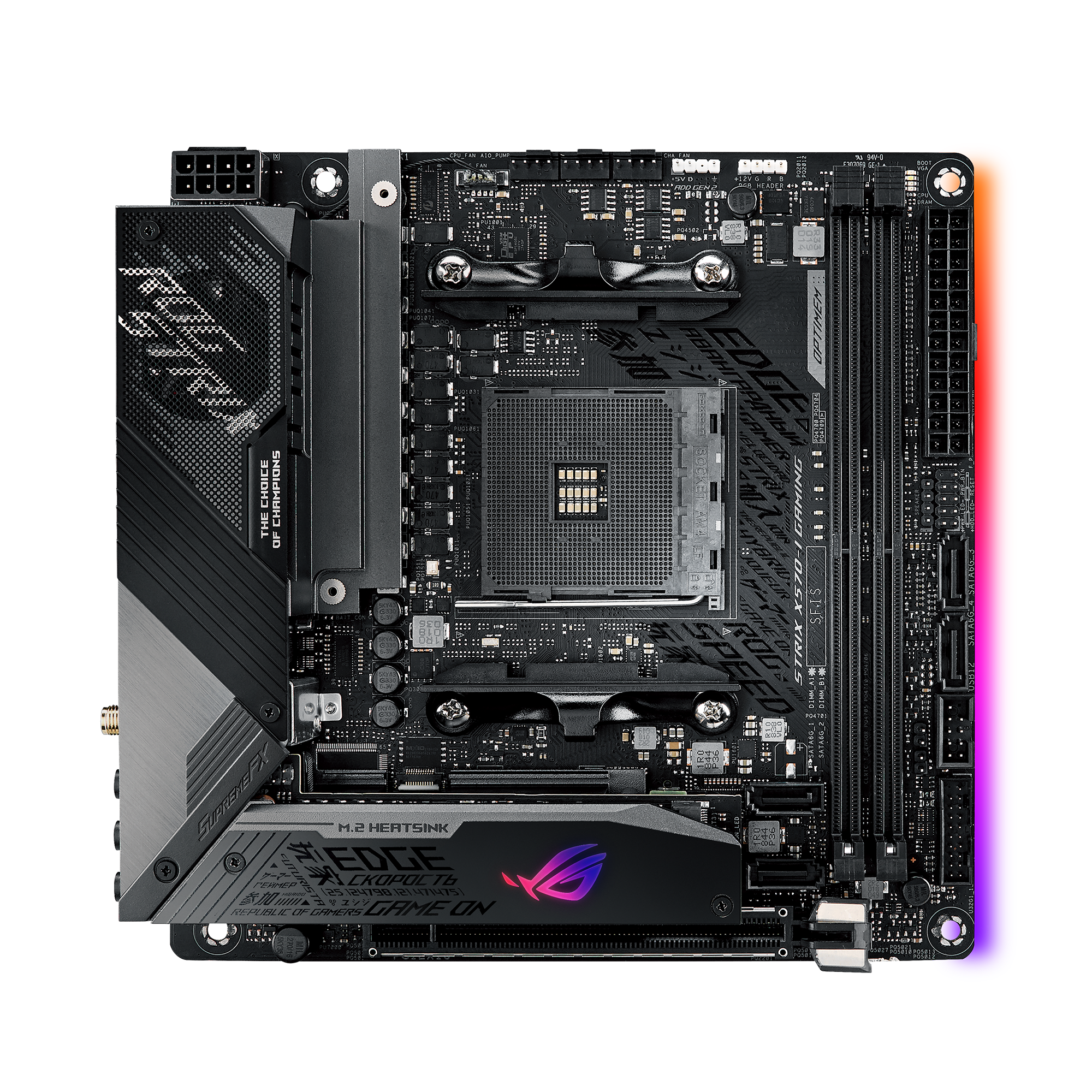
AMD Ryzen 3000 series mini-ITX motherboard with Aura Sync, WiFi 6(802.11ax), Intel Gigabit LAN, Dual PCIe 4.0 M.2, SupremeFX and USB 3.2 Gen 2
bleak heath
Ok nice TY
I guess so too, its just that another site says it doesn't
not out of box
but since its their site
I guess it does
uneven onyx

depends on how long you've had it possibly
they might also be writing it ontheir sites to just cover their butts
'may need firmware update' is a lot less likely to get angry customers demanding refunds if it doesnt work right away
mental jungle
Is getting a asrock b550m pro4 the right corner to cut for a budget gaming rig?
uneven onyx
how much was it
 tribal yoke
hello
uneven onyx
ASRock B550 PRO4 is what i've got coming which is just the non-m version
mental jungle
So a decent board for the price?
tribal yoke
3900x OR 5800x???
uneven onyx
its like 10 dollars more than the one you're looking at on the canadian site
mental jungle
Building my sister a rig for Xmas and trying to cut as many corners as possible to stay on budget lol
Its on sale by me
uneven onyx
oh on the american site the price difference is a lot more
mental jungle
Only complaint is the lack of a io shield
Sadly I can't find the plans to print one
uneven onyx
i mean a lot of cases have those cheap punch out ones but
mental jungle
Also 4 sata is a bit low but doubt she will need it
Its her first custom build and will be waaaaay better than anything she has had in the past
uneven onyx
4 sata isnt that few
uneven onyx
even if they insist on an unused dvd drive thats 3 drives plus the m.2 slots
mental jungle
Week thanks for the input
uneven onyx
my current has 6 too but i dont use that many
mental jungle
I got 5 drives in mine atm
Also had a disk in my old case but couldn't swap it over
uneven onyx
like unless your sister is hardcore her facebook and league of legends machine won't really need more than 4 sata
👀
mental jungle
I'm only putting 1 sata drive to start anyways
uneven onyx
my own sister was asking me about a 500cad dell machine today and i was like 'yeah its stronger than you need'
mental jungle
Lol, she is already a bit of a gamer and looking to get into some more graphic intense stuff
uneven onyx
which cpu are you looking at putting in it
3600?
oh yeah you said that
im tired
just keep cpu/gpu bottlenecks in mind
mental jungle
Yeah I am
 glad lodge
anyone one knows the dark hero drop? at what time?
 astral tiger
that's what I want to know :\
I wonder if it already did and it just sold out right away because the notice went away
 normal tapir
Why did the ETA got removed from dark hero?
candid vale
whats the best 10th gen intel board under $150
astral tiger
normal tapir
Why did the ETA got removed from dark hero?
because it's the 27th
 outer coyote
Is this the chat for motherboards?
normal tapir
@astral tiger so is that normal and still gonna get restocked today? Cuz I’m new to Newegg but I setup and alert and when my alert went off and I checked, the only change was that the eta was removed
Yes @outer coyote
outer coyote
What is the standard size for motherboards
fickle flax
atx
normal tapir
If I’m not mistaking ATX
fickle flax
thats the standard size
astral tiger
@normal tapir you got a restock alert?
outer coyote
Ok and what are the dimensions
astral tiger
i didnt get one =\
fickle flax
its mini itx, matx, atx, then eatx
normal tapir
@astral tiger I had my alert set on specific parts of the page so if anything changes on those parts it alerts me like the “out of stock” “notify me” texts on the page
fickle flax
outer coyote
Ok and what are the dimensions
305x244 mm
outer coyote
Ok
astral tiger
normal tapir
<@176506763116281857> I had my alert set on specific parts of the page so if any...
ah kk
outer coyote
And they should all have the same places to mount onto the case right?
fickle flax
should be
astral tiger
yeah I dont know when it will be stocked
outer coyote
Alright
normal tapir
This so so frustrating cuz it’s the last part I need 😂
astral tiger
same
 solemn vault
should i get the gigabyte b450m board or asrock b450m pro 4 board
 unkempt sphinx
ryzen 3600xt for 20$ more or do i go for 3600
astral tiger
@dusk vessel whats your workload
fickle flax
solemn vault
should i get the gigabyte b450m board or asrock b450m pro 4 board
which gigabyte b450? the ds3h?
hollow bluff
i wanna do a stress test on my cpu but im not sure which program to use
 bold hedge
Anyone know if there's a Mobo that supports WiFi 6?The one I was going to get only has WiFi 5
worthy dome
bold hedge
Anyone know if there's a Mobo that supports WiFi 6?The one I was going to get on...
There’s tons lol just go on pcpp and select the checkmark in filters that says wifi 6
 deft helm
Hello I am currently in my MSI x570 gaming edge WiFi motherboard and there is a setting a-XMP, which I’m assuming is XMP. But it has a 2 and a 1 setting. Which should I choose? I am using Corsair vengeance ram I believe.
 spare gyro
Anyone get ddr4 4000 running on Zen3?
deft helm
Update: tried both profiles and neither got me past 2133 in task manager
cinder sphinx
How do I update bios without cpu, gpu, rams? Just plug in to PSU and update bios? My msi mag x570 tomahawk wifi will be shipped in a few days. Still waiting for my 5900x and rtx3080.
 runic quest
Hey all, I have motherboard ASRock b450m/ac; i want to buy a new SSD but i don't know which is compatible. Can anyone point me in the right direction? It came with a 512 ssd and i'd like to add a 2tb in addition
fickle flax
@runic quest #storage-devices
runic quest
thanks
 autumn fossil
what is a good 6+ core processor i should cop?
 bitter smelt
what is the difference between those items? https://www.newegg.com/global/il-en/Product/Productcompare?CompareItemList=20-232-880%2C20-232-195&compareall=true
violet zealot
The timings are tighter on the more expensive one
bitter smelt
is it a big difference? will I notice it?
violet zealot
Uh, probably not
There's a chance it's higher quality memory in general that could be tweaked further, but I can't say that for sure
topaz atlas
@autumn fossil 10400f or 5 3600
autumn fossil
the 3600 are either sold out, or more expensive than they should be @topaz atlas
topaz atlas
Then go for the 10400f
topaz atlas
10400f is LGA 1200 so a Asrock Pro4 or B460 Torpedo
violet zealot
So something you might not have heard about is if you don't have a high end chipset for Intel, the Z board basically: it limits your RAM speeds depending on the CPU used i5 specifically gets limited to 2666Mhz. This hurts the performance more than you might think, there's comparisons if you're curious
 tacit dagger
Does anyone knows if this motherboard ASUS AM4 TUF Gaming X570-Plus (Wi-Fi) ATX Motherboard needs an older cpu to install bios update? I saw it on Newegg you can do it without the cpu/memory install, but I dont see the q-flash buttons or bios usb port.
thanks
violet zealot
From what I can tell that board does not have the feature to flash the bios without a cpu
Though, pretty much any new shipment from the factory will have an up to date bios
Not easy to tell when you're shopping online though, you could get old stock
tacit dagger
assuming i get the old stock, will i be able to use 5000 series amd cpu first and log in to window then do a update form there? or I need an older amd cup to start?
thanks!
violet zealot
The bios update isn't done in windows
deft helm
Anyone here experienced with MSI Bios?
tacit dagger
i know, but i need a complete pc first to do bios update? no?
violet zealot
It's done in the bios, and you won't be able to boot into the bios with a cpu that isn't compatible
deft helm
I turned xmp on profile 1, and it didnt set my ram past 2133 in task manager. I then tried profile 2, and it still didnt set me past 2133
used with a 3600 on a x570
violet zealot
Most likely, cause it's been a while and everyone's been buying stuff; you'll probably get one with a new bios
Maybe look at B550 motherboards that have a bios flash feature though
tacit dagger
i will hold off motherboard for a while. I need to wait fot amd cpu and gpu anyway.thanks Demonio
violet zealot
Just in case, you'll probably get it for a better deal anyway
Like this one, this has a bios flash feature https://www.newegg.com/msi-mpg-b550-gaming-carbon-wifi/p/N82E16813144322
It's pretty much the same price too
 frigid raven
Asus b550-f or msi b550 gaming plus
sour coyote
theres a guy ready to sell me a 5600x for 550 CAD
brand new unopened
what do you guys think
 gritty patio
sour coyote
gritty patio
sour coyote
on newwegg its 450 cad
but all the bots get them
theres another seller that sells the 5600x (aero malls) for 530 cad
sour coyote
prisma nymph
its supposed to be around $400 msr, right?
there are no shop at all that sells the 5600x at this price
prisma nymph
i thought i saw like $410 at canada computers
well yea, that because its out of stock obv
like, they're showing the 3600 for $500
sour coyote
yes but they never got restocks for a while and dont give notifications
prisma nymph
you think that price is gonna be the same once theres actually stock?
sour coyote
the real question is when will there be stock?
supposedly amd is pilling up on stocks but no legit proofs of that
 burnt ocean
if my main use for a strong cpu is console emulation should i just get a 3700x instead of tearing my hair out and paying more for a 5600x?
violet zealot
Either would be fine, but it isn't worth overpaying in general so
 safe geode
if the ram i am planning to order is not on the qvl should i be looking at different ram or is it fine?
deft helm
What the ram and what’s the motherboard
safe geode
asus tuf x570 gaming plus probably with crucial 32 gb 3600 c16 from b and h
its not on the qvl so
 charred venture
99% should be fine
 bitter oak
can someone explain the hype to me around this dark hero thing? I get that it's low supply, but what's so special about a specific mobo that it's so talked about?
sour coyote
passively cooled chipset


 tribal harbor
Hey gents. I am brand new to the concept of upgrading a computer. I am seeking to upgrade my Gateway DX4375. I know the form factor is DTX. I also know that the current processor is I believe an A5200. I think the current bus speed is 3300. That is about the extent of my knowlege atm..
I know i will need mobo/cpu and ram. As far as anything else..it may be an added bonus if i can get in under $250.00
I also considered adding a 250 gig SSD.
I desire at least 16 gig ram. I have a NVidia GEFORCE 1080x sitting in wait. I believe its pcie.
deft helm
I don’t even know what a gateway 4375 is but DTX is a dead platform
tribal harbor
well, could i use mini ATX in its place??
neat estuary
Your really looking at a complete system rebuild.. I wouldnt bother with upgradeing.. But the 1080 is a great card
tribal harbor
I guess i could scrap the case and buy a cheapy $30.00 case..lol Then i could use a basic ATX..right??