#cpus-mobo-and-memory
1 messages · Page 125 of 1
 left path
 hollow thorn
@naive pendant it's really nice for fan curves, I mean, do you really want to work with fans that can only ramp up and down in 25% increments?
 gritty meadow
no worries mate.
left path
yep...your right....its just a bit depressing to have to disgard 2x16 if you want to upgrade later to 64gb
gritty meadow
@hollow thorn minor note, the DC control you are talking about is the BIOS one. Because you could easily do a manual adjustment with an external dongle.
@left path absolutely.
however, 2*16 should not be hard to sell later on
because a lot of other users WONT be going the dual stick path
so they will be missing a single 16 stick :)
hollow thorn
Yea, without any extra hardware
left path
make sense.....just 1 more question....since system is sold as 2666mhz/cl19.......could i go with 2666mhz/cl18.......guess latency has limits also
gritty meadow
try and see what other users have been able to actually run that laptop model with
laptops are a bit weird in what you have access to bios/setting wise
IF it was a desktop, i would say, go ahead, have at it.
left path
hmmmmmm.....im guessing that if i dabbled with bios.....and it didnt turn out so well, and wanted to return......id get hit with a restocking fee or worse....denied return.....all cause i didnt do my homework and was a bonehead
gritty meadow
one could also say, because MSI are about as clear as mud with info like that :)
its a good question, but one i (at least) cannot answer, because i have not had hands on experience with that model
hence the recommendation to have a look at what other users have gotten to work :)
left path
thanx to both of you who responded.....this is a great site and will be bookmarking ......
gritty meadow
you are very welcome and best of luck :)
 woven cosmos
Ryzen 5 1600/2600 or ryzen 3 3200g best to get?
hollow thorn
3100
 gritty patio
@woven cosmos either a 3100 of a 3300 if you can find one
gritty patio
you have a gpu?
woven cosmos
So that what I shall get
gritty patio
the 3100 imo
woven cosmos
So I can’t post
gritty patio
nah
woven cosmos
3400g same price ish
gritty patio
you gotta be a certain level

Based on 31,986 user benchmarks for the AMD Ryzen 3 3100 and the Ryzen 5 3400G, we rank them both on effective speed and value for money against the best 1,263 CPUs.
woven cosmos
I can dm you?
gritty patio
its faster and cheaper
woven cosmos
I dmed you
 naive pendant
Looks like I might be getting a 3800x instead of a 3700x
gritty patio
poggers
 cunning rivet
i have a question about the trident royal series i need help with
is there a 16 gb kit? im doing my first build and trying to find one that would match the Gamerock 3070
never mind i didnt check their site
imma stick with the neo kit lmao
 misty belfry
so
what does everyone think
should it be more important to get a GPU or more important to first buy RAM that fits my infinity fabric speeds so that my overall system speed is up to par
currently running 2400MHz DDR4, want to run 3200MHz DDR4
wondering if actual improvement in system speed
 verbal atlas
This might seem dumb but what’s the difference between these two sets of ram from gskill? I was gonna get a 3700x to go with them
hollow thorn
@misty belfry GPU first, that'll be the largest performance difference in games
 modern tundra
@verbal atlas only difference I can see is that the second is labeled ‘AMD ready’ and costs more because of it. Either should be fine
verbal atlas
@modern tundra ok thanks, in the title each set lists both amd and intel so I was just a little confused as to why if it doesn’t matter. Thanks for the help!
naive pendant
Hey a friend wants to know if he should get a Ryzen 3 3100 or a Ryzen 3 3200G
modern tundra
Can he afford a graphics card? If so he should get a 3100, if he is going without one and wants to use integrated graphics get the 3200g. The 3100 has better CPU performance @naive pendant
misty belfry
@hollow thorn oh I realize that much. I'm talking about building things in a correct order so when I do get a GPU the performance benefit is the best it can be
infinity fabric is very much a thing in terms of overall system performance, including your GPU, because AMD went and tied it to everything
misty belfry
well also the obvious "RAM speed is affected and that affects everything"
and "any kind of bus that is connected to the CPU is theoretically affected"
hollow thorn
eh, ram perf matters for cpu perf which matters for everything
anyways
what CPU again?
misty belfry
R7 2700
hollow thorn
Not really if bus is running on the default 100
misty belfry
R7 2700
still powerful, despite being a bit old
also, i already know I need DDR4-3200
that's bottom level knowledge for this CPU
brb
gritty meadow
@verbal atlas "why does it have a amd/intel ready sticker" <- because marketing is silly. And yes, i am actually serious about that answer.
 bitter shadow
Hello y'all! I was wondering if the RAM is upgradable on an HP ENVY x360 15-ee0010ca? The information is quite hard to find >_>
The default 8Gb is not enough in 2020, I wonder why they even sell them
 main pulsar
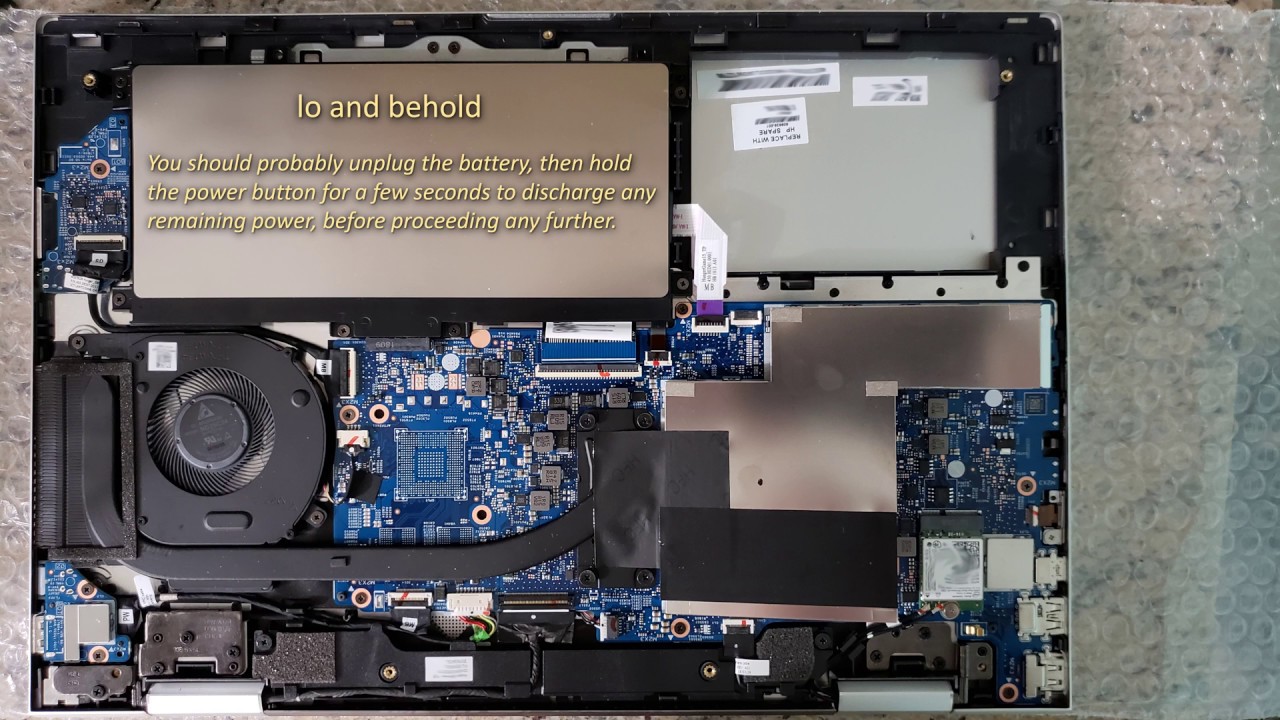
Inside the HP ENVY x360 15-cn0008ca
bitter shadow
Cool, thank you @main pulsar! Will the instructions be compatible with the model I'm refering to you think?
main pulsar
at 2 mins it shows 2 sodimm slots
the differences in model number at that point have to do with listed specs, so the HP ENVY x360 15 is the important part, with the remainder of the model number really only used by the manufacturer to differentiate between the specifications of models
bitter shadow
Ok, awesome to know that! Thank you ❤️
Do you also know what is the maximum supported RAM?
I'd like to install 2 x 16GB
bitter shadow
Fair enough
bitter shadow
Last question for you, do you know how I can be sure of RAM specs compatibility?
(speed, etc.)
main pulsar
even in the rare event you do run out of memory, caching to the NVMe ssd wont really effect you
really any ddr4 will work tbh
bitter shadow
Thank you ❤️
bitter shadow
HP should give money to people like you for helping their customers. Can't seem to find anything as useful on their website
main pulsar
hp has people they pay to do this sort of thing
but all they do is read from a script
gritty meadow
@bitter shadow its so-dimm memory modules.
naive pendant
I have the i9 10900k and rog swift z490 16gb ram 2070 super and I was wondering if I should plug my cpu with 8 pins or 12!
Can someone please help me would really appreciate it
verbal atlas
@gritty meadow seems like that’s the case, thanks!
hollow thorn
PSU should have 2xEPS 8 pins
main pulsar
rog swift is a monitor
hollow thorn
Plug one 8 pin in, and half of the other
Prob some random rog z490 board, doesn't really matter :p
hollow thorn
Doesn't really matter, as long as 1 8 pin is plugged in it's fine
misty belfry
wait, 12 pin CPU?
is that for if you're overclocking max and drawing all the power?
misty belfry
for when you're drawing 200W with your CPU
 vital field
hello everyone
anyone have a clue to upgrade ram of dell 14 5401 ? models supported
F4-3000C16S-16GRS and HX432S20IB/16 are options
would they be compatible?
 faint ferry
Is a Asus Prime X570-Pro motherboard a good choice? Two reasons why I would get this is for the white style since most of my components will be white and as well as the pci 4 for storage. Or should I go with a Asus ROG Strix B550-F Gaming?
hollow thorn
X570-p
PCIe 4.0 storage is completely unnecessary for 95% of users
and b550-f tend to be way overpriced at like 160$
 quaint current
b-b-but it looks cool :(
 cunning pumice
Is pcie 4.0 good for graphics cards
 neat estuary
Its not needed atm. Nvidia themselves have confirmed you will only gain the tiniest boost by useing it
 loud escarp
The silicon lottery was not nice to me
 rustic locust
which b550 should i get
 bronze summit
It depends @rustic locust
gritty meadow
@naive pendant https://ark.intel.com/content/www/us/en/ark/products/190884/intel-core-i5-9600kf-processor-9m-cache-up-to-4-60-ghz.html
Intel® Core™ i5-9600KF Processor (9M Cache, up to 4.60 GHz) quick reference guide including specifications, features, pricing, compatibility, design documentation, ordering codes, spec codes and more.
have a look here
specifically the base frequency and the max turbu frequency.
gritty meadow
does that make sense of things for you?
gritty meadow
2sec
what would you like to obtain by buying that board?
as in, what do you think you will gain?
naive pendant
Overclocking and more space to assemble my components, I got 3 bruises on my hand and I can barely move it now
And also usb 3.0
Along with I'm looking to buy an i7 and my current one has a 4 pin only
naive pendant
Alright
 junior hedge
hmm
10900k or 3900x for a 3080 build? also what sort of mobo would bring the best out of that gpu/cpu combo?
 north plaza
gritty meadow
north plaza
gritty meadow
@north plaza details about parts
 left nymph
naive pendant
left nymph
naive pendant
That's too little money lol
Unless you go used market maybe but still a stretch for anything halfway decent
 vital field
especially for video editing
hollow thorn
@naive pendant I think they want to say best CPU
@left nymph best CPU under 200$ atm is a 3600
 tacit hemlock
Out of those three options the 3800x is obviously the best, but it's the most expensive too
naive pendant
@tacit hemlock cheaper than 8700k in my country
tacit hemlock
Older gen intel cpus tend to still be priced expensively, so that might be the case there. The 3800x is the best option there so I'd go with that
naive pendant
according to benchmarks 8700k beats these ryzens easily
naive pendant
um
gritty meadow
and i have just had a look at his video titles via twitter. Please dont go back there.
https://www.anandtech.com/show/14605/the-and-ryzen-3700x-3900x-review-raising-the-bar <- a suggestion would be to read that

and then make up your own mind based on that and other sites that actually do testing instead of just synth tests
cunning pumice
Is the MSI B550 Carbon Gaming a good motherboard?
 jovial flare
excellent motherboard, no doubt about that
i got a b450, which does already very well
b550 should be better
 stiff kraken
anyone know the cheapest AM4 ATX board that supports rainbow ARGB? i know the pro4 has an argb header but it only does solid colors in the software i think
hollow thorn
@cunning pumice depends on price
@stiff kraken you know how to use the Mobo sheet right, I'm on mobile rn
I'll try in a sec, but you can use #building-and-recc-chat
 prisma blade
gotcha, thanks
stiff kraken
@hollow thorn yes but not every mobo with 5V argb header actually supports rainbow color
stiff kraken
Pro4 has ARGB header but only lets you use solid colors
stiff kraken
yeah
faint ferry
Anyone know the price drop of the 3900x or estimated price during Black Friday? Original price is $440 with no sales.
hollow thorn
Can't predict the future :D
Also keep in mind AMD desktop 4000 series is announcing in october, releasing sometime near that.
 proud pier
well if you keep waiting for the newest stuff you'll never build it
hollow thorn
@proud pier mentioning it because it'll likely come out before black friday lol
hollow thorn
I'm not telling people to buy a 4080 today yaknow
proud pier
yeah ur not like some other chads going like "wait for rocket lake"
im not waiting for rocket lake
im just gonna go amd
 quartz cypress
is a 5000 mhz ddr4 ram stick necessary?
quaint current
for a lot of people no
rustic locust
does b550 have a big performance diffrence than x570
hollow thorn
no
 warped scroll
Best motherboard for 10900KF at around $250 or lower?
Is that possible
rustic locust
your mom
tacit hemlock

rustic locust

naive pendant

rustic locust
amd haz cooler name tan intel amd beter dan intel
naive pendant
cool
 warm fulcrum
so is the keynote of zen 3 on the 8th or that the release date?
prisma blade
What’s a good sub $150 mobo for r5 3600 and 2060/3060 super
prisma blade
I have no pcie 4 storage
I’m just looking at b550 for the VRMS
And “future proofing”
It’s mainly for gaming
prisma blade
And is 3200CL16 enough for the r5 3600?
naive pendant
get 3700x
gritty patio
ya just a bit confused lmao hand me rethink my purchase
gritty patio
yes lmao
naive pendant
of like ram a mobo and cpu
scorptech has a killer combo
@naive pendant sorry newegg
gritty patio
never seen this website in my life
naive pendant
scorptech?
gritty patio
ya lmao
naive pendant
lmao
hollow thorn
What do you do
what do you use your PC for
different CPUs are for different workloads
oh wait oof I forgot 9700k is 8c8t
no HT
 supple flax
oof
hollow thorn
What's the total budget?
supple flax
gotta get the HT lmao
hollow thorn
might be able to fit in a 10600k
 heady root
hollow thorn
heady root
hollow thorn
No
10600k better
6c12t vs 8c8t
@naive pendant simply, get the "i3 i5 i7" marketing out of your mind
it's bs
10600k is slightly better overall iirc
It's more threads for multi-core loads
it's slightly higher clocks/ipc for single-thread loads
Well effectively the same single-thread perf
AMD current gen has lower single-core perf
that's why Intel still wins in gaming
quaint current
:v probably was userbenchmark
jovial flare
i think that website is pretty reliable
quaint current
its really skewed towards single core vs multi core
jovial flare
oh ok
quaint current
for example the "effective speed" of the 5 year old 4c/4t is higher than the new 64c/128t chip https://cpu.userbenchmark.com/Compare/Intel-Core-i5-5675C-vs-AMD-Ryzen-TR-3990X/m31828vsm1035665
Based on 1,101 user benchmarks for the AMD Ryzen TR 3990X and the Intel Core i5-5675C, we rank them both on effective speed and value for money against the best 1,263 CPUs.
 topaz reef
tbh i wouldnt count on that being correct
quaint current
ya thats why we dont like userbenchmark here
its pretty misleading to people that dont know much and isnt a good true benchmark overall
 silver star
Random question; I’m looking to upgrade the processor on my fiancé’s pc, and was wondering if you guy have any deal spot. She currently has an i5 6600, which means that 7th gen is the best I could slap in there. Thing is, even the 7600 is kind of expensive for being 3 gens old at this point. I’d rather not swap out her whole motherboard/processor combo if i don’t have to...
gritty patio
@silver star you dont really have a choice lmao
i was in the same predicament
it just makes sense to get a new mb and processor
i went with a 3600 and b450
silver star
Thing is, she doesn’t game all that much. The most intensive thing she does atm is the sims 4. But, we plan to play Ashes of Creation, and she’d have to do min settings with her current processor(the only thing holding her back). I found a 7600 for 189 on Amazon, so I light just grab that and throw it in there. It should keep her set for what she wants to do.
gritty patio
a cheap b450 and throwing in a 3100 would be around the same price
We compare the AMD Ryzen 3 3100 with the Intel Core i5-7600K with a wide selection of benchmark tools and data to help you choose the right processor, for your computing needs.
Based on 31,523 user benchmarks for the AMD Ryzen 3 3100 and the Intel Core i5-7600, we rank them both on effective speed and value for money against the best 1,263 CPUs.
neat estuary
It is time 🙃
prisma blade
I heard that 3rd gen ryzen doesnt need crazy fast ram
would ddr4 3200 c16 be enough for gaming?
gritty meadow
technically yes
would it like faster ram? yes
3600 cl16 is what is normally recommended
16gigs is about 75-80 usd
prisma blade
i like rgb and im trying to decide between a 3600 cl16 ripjaws vs 3200 c16 rgb pro
prisma blade
how big is the fps difference
gritty meadow
not "much" now
gritty meadow
what you are trading imo, is longevity.
 long geyser
lows I think are noticable?
gritty meadow
"in my opinion"
prisma blade
ah
long geyser
its been a while since I looked at benchmarks
prisma blade
im stuck, im not going to have any rgb except ram and maybe an argb xstrip
i want that "gamer look"
lmao
thanks for you time @gritty meadow
long geyser
generally if you want cheap RGB gamer look, only get RGB fans or a strip
long geyser
yeah, that's Corsair
cunning pumice
Im going non rgb fan
long geyser
$45 for a five pack of RGB fans
prisma blade
im going arcit p12
long geyser
if you know your companies
prisma blade
5 pack for $30
gritty meadow
you are very welcome @prisma blade
prisma blade
p12 is 200-1800 PWM i believe
neat estuary
Got my 4x8gb b-die kit to 3800mhz at cl16 at 1.5v and 1900flck. Not too shabby for 4 sticks.
jovial flare
how much did u pay for them
 dark flame
anyone have any idea why my ram and cpu are performing "way below expectations"?
ignore the 1060 lol, sent my 2080s back
unless you think that that is what is causing them to perform so low
i remember doing a test when i had my 2080s and the 9900k said it was performing lower than it should then too, though
hollow thorn
CPU looks fine-ish, if you had bad bin or thermal throttling or something
@dark flame xmp?
dark flame
haven't done that yet but was going to try it and see, just wanted to ask to see what you guys thought first
hollow thorn
Temps look fine?
hollow thorn
idle only tells you room temp, what about under load?
dark flame
one sec
i let cpu benchmark test run for about 10 mins, ram and cpu got up to around 40c
between 37 and 40
hollow thorn
what kind of benchmark
dark flame
granted, thats with a 120mm liquid cooler on a 9900k, though im buying a new one soon for it. the temps have never gone over 40 though afaik
prime95
hollow thorn
which test
neat estuary
@jovial flare I bought 2 kits of 3600 cl16-16-16-36 and threw them together. It’s around a 100$ a kit for good b-die.
hollow thorn
anyways temps prob not an issue
jovial flare
ah ok
hollow thorn
I don't deal with intel boosting/ocing so I dunno about that part
jovial flare
thats a rlly good deall @neat estuary
wait
oh i thought u got 2 kits for 100 dolalrs
nvm
hahaha
neat estuary
No.
dark flame
not really sure which test it was, sorry, lol. i know it was 16 thread test
hollow thorn
the reason I asked was that default was blend, and blend isn't anywhere as intensive as smallfft
but shouldn't be a temp issue if you're running around 40c
faint ferry
Anyone know which would be better? For just streaming and gaming. But potentially for multi-tasking in the future and as well as recording and editing? 3900x or a i9-9900k?
warped scroll
3900X would kill 9900K In productivity
9900K would be better in gaming
Also 9900K has zero upgrade path
So, make your pick. I’d say 3900X since you might be editing in the future, but, not my choice to decide
@faint ferry
 hallow warren
very important question
should i go ahead and go big on my cpu just in case i wanna upgrade graphics card in the furture or just stick with the 3600x
 fading lynx
@hallow warren if its for gaming then that cpu wont really hold u back anyway if u decide to upgrade the gpu in the future
 mild jackal
AM4 motherboard quick reference chart.
https://i.redd.it/2iwdy5wrrly31.png
 mild jackal
AM4 motherboard quick reference chart.
https://i.redd.it/2iwdy5wrrly31.png
mild jackal
mild jackal
AM4 motherboard quick reference chart.
https://i.redd.it/2iwdy5wrrly31.png
 vivid pewter
A little new to pcs, but I heard next gen amd cpus will be announced next month. Just a few question. Will amd keep producing their last gen and will last gen get a price cut?
last gen refering to zen 2
gritty meadow
last gen will be produced for a while yet
official price cuts? ... not likely. It is not as if there is any serious competition from intel at the moment
does that answer it for you @vivid pewter ?
naive pendant
I'm looking to get a 10700k for my 3080 build. But I heard I should wait a few months for the 4700x because it's going to "thrash the 10700k in all departments". Is that true?
hollow thorn
@naive pendant only speculations, we won't know until it comes :D
naive pendant
True
rustic locust
anyone know if the asus rog strix b550
a gaming is a good motherboard
i'm going to use a ryzen 7 3700x
hollow thorn
B550 strix is overpriced rn
hollow thorn
Something more like a B550 pro4 or B550-A Pro at most imo in terms of price
rustic locust
thx
hollow thorn
More than 140$ for a b550 board doesn't make too much sense to me when x570 phantom gaming 4s is 140$ and x570-p is 150$
vivid pewter
@gritty meadow Yes it did. Thank you
gritty meadow
you are very welcome :)
naive pendant
can i get someone to double check my build
to make sure it could fit in my case
I am planning to buy this price drop on the case instead of waiting for cyber monday, just ganna have it on the side
neat estuary
I assure you it will fit. Maybe a elephant on the side as well
naive pendant
aight
idk should i wait, could this drop to 70 bucks lol
its lowest its ever been rn XD
 empty spindle
Could someone explain the power connections for this mobo
https://www.newegg.com/asus-rog-maximus-xii-extr/p/N82E16813119291?&quicklink=true
It has the 24 pin, 2 x 8 pins, and another “EZ Plug”. Where does that ez plug connect to the psu and with what cable?
hollow thorn
mans trolling
@empty spindle I believe it's extra power for the board for when you are running multiple GPUs
empty spindle
Ok so shouldn’t even need to connect it if I’m just running one GPU?
hollow thorn
documentation doesn't say much
empty spindle
Yeah the manual leaves a bit to be desired there
hollow thorn
and usually an extra connector is for PCIe power for PCIe slots for extra GPUs
empty spindle
I’m the kind who would want to connect it just to be sure, but not sure how if I wanted to
hollow thorn
Yea I'm gonna keep looking around for a bit in case it's in there somewhere
empty spindle
Awesome, thanks
hollow thorn
@gritty meadow you think this looks like extra PCIe slot power?
If so, what do you use to connect it with?
yea
interesting
empty spindle
Yeah I wish it was a bit more specific and told you to ONLY use it when installing multiple graphics cards. Leaving it open makes me wonder if I might need it for even just one very powerful one, like a rtx 3090
hollow thorn
Not unless Nvidia yeeted power standards out the window
gritty meadow
the only reason for giving extra power is IF you are going over the spec
last card i can remember that did that was the rx580 ... iirc
hollow thorn
I think you said rx470 had a bad rep of pulling up to 120w from slot?
but what connector do you use? only 4 pin I can think of is 4+4 EPS
empty spindle
Yeah but every psu I can find only comes with 2 4+4 and this mobo already uses those
gritty meadow
2sec, let me open the link
gritty meadow
that just looks like molex
hollow thorn
Hm?
gritty meadow
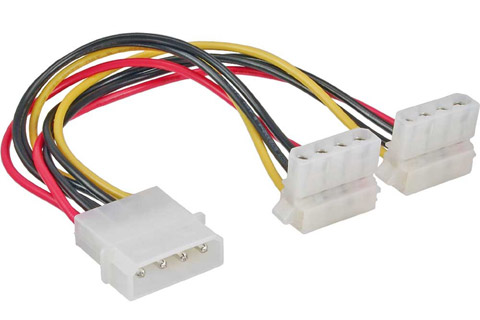
@empty spindle https://img.av-connection.com/0/AVimg_30796.jpg <- does that look like something that would fit in there?
main pulsar
eww, why that connector
empty spindle
@gritty meadow I think so but I’m working off the manual at this point too
main pulsar
usually boards use a 6 pin pcie
gritty meadow
because it can carry a fair deal of juice and it is normally its own rail away from the others
it IS molex @empty spindle
gritty meadow
see the "triangle cuts" on two sides on the "ez-plug"
gritty meadow
what brought this question up?
main pulsar
yeah they do
empty spindle
Yeah that’s my problem. Don’t see one that includes it
gritty meadow
(been out of the loop, was in a call)
hollow thorn
I'm curious, they're curious too
main pulsar
most modular psu cables come with a cable that will have one or two
hollow thorn
haven't been bought yet afaik
empty spindle
@gritty meadow it was my question. I bought this mobo, it’s on the way but I was combing through the manual and wondering how to connect that or if I even need to
gritty meadow
the reason it is there is because of the OC segment that board belongs to
you should not need it
empty spindle
Ok, appreciate the help guys
gritty meadow
you are very welcome :)
naive pendant
@naive pendant dont need a high end motherboard at all to have a really good build
vivid pewter
Do you guys think zen3 will match or beat their intel counterparts or still be behind (gaming wise)?
quaint current
we dont know
 full flame
Zen3 will do one of those three things 😄
 gentle mauve
Ok so I have this problem where my system takes half of my amount of ram for hardware reserved. Anyone know why this happens? Looked it up and other users with the GA-AX370 mb seem to have the same problem
But I didn't find any answers so here I am
jovial flare
wdym by "hardware reserved"
main pulsar
does your cpu have an iGPU?
long geyser
I looked into it a fair while ago. It has to do with BIOS or drivers usually. Best to try to update everything.
I didn't fully look into it and never really fixed it at the time. So idk how likely it all is to fix it
gentle mauve
Oh ok thanks
wdym by "hardware reserved"
@jovial flare Says so in task manager
does your cpu have an iGPU?
@main pulsar Im unsure but i do know that the motherboard does
And I run from a external gpu anyways because r7 2700 dont work with intergrated gpus
main pulsar
yeah, the 2700 doesnt have one
jovial flare
dang
gentle mauve
Ye I also heard that they discontinued the 2700 not the 2700x
naive pendant
Finally got my cpu and memory on the way
gentle mauve
Not sure but I heard something about that
gentle mauve
I looked into it a fair while ago. It has to do with BIOS or drivers usually. Best to try to update everything.
@long geyser So I just update my bios to the latest version but that doesn't seem to resolve my problem
hollow thorn
reset cmos maybe
Also, I had one day where half my ram was just system reserved, restarted pc and it was usable again
supple flax
Alright i got a question. I currently have 2 8gb sticks of Trident Z Neo 3600MHz CL16-19-19-39
didnt mean to hit send yet
i want to upgrade to 32 gb total for MSFS 2020. Should buy a new kit or just buy exactly what I already have? As long as the frequency and timing match exactly (they also sell 16-19-19-36) they should perform just like if they all came together right?
Someone told me that variations between manufacturing batches can make them act weird together
Also, it'd be sick to have all 4 sticks instead of buyin 2 16gb
main pulsar
itll be cheaper to just get 2x8
so do that
also you can search based on the memory model number and get the exact same stuff
 twilit olive
I find it strange that if I keep my processor power management on 80%, I don't hit temps higher then 72 degrees C. But when I set it to 85% the temps max at 86 degrees. How come 5 percent more processor power adds 15 more degrees?
6700 hq btw, so not a new cpu
topaz reef
@twilit olive thats just how it scales
each architecture and physical cpu are different
 bitter sandal
Yo
gentle mauve
reset cmos maybe
@hollow thorn Ill try that
 digital kernel
Anyone got a beep code table for asrock mobo?
quaint current
beep beep
2 short Parity error.
3 short Main memory read / write test error.
4 short System timer failure.
5 short Process error.
6 short Keyboard controller BAT test error.
7 short General exception error.
8 short Display memory error.
9 short ROM BIOS checksum error.
10 short CMOS shutdown Read/Write error.
11 short Cache Memory bad.``` devout mothBOT
 Rithvl#5842 has been warned
Reason: Bad word usage
cunning pumice
?
digital kernel
No bad words
main pulsar
beep beep lettuce
tacit hemlock
Anyone know why my mobo debugging light stays lit on vga even tho i can post
gritty meadow
does it keep being lit up?
gritty meadow
you are just all kinds of lucky @tacit hemlock
gritty meadow
it could be that its just a random "i want to light up" bug
it could also mean something is wrong
but, some boards use the VGA led to signal multiple things
what does your mainboard manual say?
tacit hemlock
Haven't checked yet
I'll look rn
Seems to only signal my gpu and it says it stays lit until the error is fixed
It also could signify an error if I was using integrated graphics but I'm not
hollow thorn
Could be something you can take up with customer support, they might know of some common issues
tacit hemlock
I'm getting kinda tired of dealing with asus support lol but ya ig I could
 gritty meadow
aye,
gritty meadow
try the other pci-e slot?
tacit hemlock
Trying rn
Very similar result, except this time, the green post light turned on at the same time as the vga, and then turned off, which leaved only the vga on again :/
tacit hemlock
my day wouldn't be complete until i cut myself on a cpu cooler
fading lynx
bruh how
tacit hemlock
usually when im disconnecting a psu cable, and its really stuck in there, so when I finally get it out, my hand jerked back into the fins of the heat spreader
 lethal glacier
What’s a good B550 motherboard for no more than $150?
faint ferry
Question, for a 3900x is 1.250 volts for 4.2ghz good?
 trim dust
3200 or 3600? the price difference is $60
 half reef
So i have a question. Ever since i built my pc. I have never been able to activate the XMP profile for my ram to run at 3000.
Whenever its on it seems to get really unstable.
I have the following
I7 9700k
z370 prime a - II
corsair vengeance 2x8 3000mhz CMK16GX4M2B3000C15
Feel free to DM or Ping me with response
naive pendant
hi guys does anyone know why my computer reboots just by tapping the case or my table? or just any shock.
jovial flare
that should not be happening... @naive pendant
naive pendant
hi guys does anyone know why my computer reboots just by tapping the case or my table? or just any shock.
@naive pendant tighten your cables
jovial flare
@half reef you should be able to activate the xmp profile in bios, do you have a screen shot or something that shows that you are not able to activate the profile
and wdym by it gets unstable
does it become slower?
half reef
@jovial flare whenever i activate the XMP profile i can boot fine but the system will blue screen and crash
naive pendant
that should not be happening... @naive pendant
@jovial flare do you know whats wrong? i just built my pc recently. also i have had the “blue screen of death”recently
half reef
@naive pendant are all of your connections plugged in?
naive pendant
yeaaa
i was testing the pc today
but tapping it
ad when i tapped it a bit too hard
the top case fan blade snapped
jovial flare
@naive pendant sry man, i have no idea what oculd be wrong, could be a variety of things but not sure
idk what else to say but, check all ur connections and make sure theyre plugged in the right places
warped scroll
Question, for a 3900x is 1.250 volts for 4.2ghz good?
@faint ferry it’s different for every chip
half reef
@naive pendant to me it sounds like something isnt tight and when you tap your case it is coming undone
naive pendant
@naive pendant to me it sounds like something isnt tight and when you tap your case it is coming undone
@half reef i checked the wires. the last time i raged i hit my table and the whole computer rebooted
half reef
@half reef i checked the wires. the last time i raged i hit my table and the whole computer rebooted
@naive pendant
Is your pc on your desk? Is your gpu fully plugged? Like it doesn't move or anything? Same with you cpu cooler by Chance?
misty belfry
so i'm gonna do something pretty rad
and build a linux box with my old i5-2400S
i'm aware of the CPU vulns
but it's cheap and a fun project
i've got a case and a power supply
and if need be an RX 460 2GB
but i don't think the intel graphics will be any slouch for running a basic linux UI
 tepid heart
Yeah you’ll be good with just the basic intel graphics
also the cpu vulnerability will only be exploited if you are stupid on the internet
other than that you are good
tepid heart
It’s only bad if you are dumb on the internet
if you know what you are doing you are ok
naive pendant
tepid heart
the vulnerabilities won’t be taken advantage of if you don’t go and just trust every sketchy site you visit
hollow thorn
No
@naive pendant the vulnerabilities doesn't matter until you start downloading stupid crap
It's not something you can just get hacked by over the internet
It's programs being able to read system memory without being given permission to
naive pendant
Well that's the same for any malware
But it seems intel just has more of it
hollow thorn
It doesn't really matter for the consumer
That stuff matters for datacenters and corporate data
naive pendant
Ah okay thank you
So just another thing red team can poke fun of
That doesn't affect the average consumer
hollow thorn
Mhm
 normal iron
so im getting a new processor for my system. I was going to get a Ryzen 7 3700x, but newegg has a Ryzen 7 2700x for $220. Im going to get am RTX 3070 when they release, would the 2700x be worth it and could handle the GPU or should i spend the extra $100 for the 3700x (im on a fairly tight budget)
normal iron
Im planning on getting a B-550F mobo (im pretty new to all this and dont know a whole lot about this stuff)
naive pendant
yea then dont get 2700x
i am also getting a b550 f gaming wifi mobo
the 2700x might bottleneck
normal iron
ok, thats what i figured but didnt want to accidentally miss a really good deal, thank you!
normal iron
yeah thats true
naive pendant
cuz 4th gen ryzen in coming in a month
 gilded fog
what's a good step up from an i7-8700? I need it for premiere pro - don't really want to bother with overclocking. Thx
 proud minnow
Hi everyone, I just checked the compatible memory for my rog strix b550-f gaming wifi motherboard and the largest 4000mhz ddr4 in the qvl is 2x8GB. There is no 2x16GB in the QVL even though g.skill has tridentz and ripjaws v 2x16GB 4000mhz. would those work on the motherboard?
main pulsar
@gilded fog depends on the motherboard, but you probably need a newer motherboard to support a newer cpu
so, stepping up from a 6/12 cpu for multithreaded workloads i would suggest getting a Ryzen 9 3900x
if you cant afford that, then you can step down to the 3700x, but idk if adding 2/4 to your cpu is gonna make a big enough difference in your work to make the cost of a new cpu, motherboard, and memory worth it
so, a meaningful and definitely noticeable upgrade would cost you around 650 USD, assuming the rest of your system isnt extremely proprietary
 burnt pivot
What so I could get the ryzen 7 4700x for like 300
burnt pivot
Ig?
naive pendant
u could
burnt pivot
Yeeeesssssssss
naive pendant
they are gonna tell everything on oct 8
burnt pivot
Oooohhhh ok 👍
gilded fog
@main pulsar yes, thanks. I know I'll need a new system. I can get the 3900x
Would the threadripper be the next step up?
gritty meadow
if looking at absolute raw computational cpu power? yes.
is it the right solution for you? that is a completely different topic
gritty meadow
aye
and related to our other recent talk Nachos, binning will enable some interesting 4xxx chips
gritty meadow
because lets say (just as a theory) that nothing serious changes between the zen2 and zen3 chips. Lets just for fun, imagine that the 4950x has the same cores and all that. BUT it comes in with 10-15% less power leaked/used
that suddenly gives access to a LOT more boosting
quaint current
what kinda all core do u think that could do?
quaint current
yes for the theory made for fun
hollow thorn
AMD 5ghz time?
quaint current
honestly i could see 4.9 or 8 boost on a 4000 chip
gritty meadow
aye, that part is quite likely
BUT
the 3950x is a bit of a special kid in that class
quaint current
5ghz 16 cores or bust
gritty meadow
because that is a LOT of transistors, in NOT a lot of space
quaint current
true
mild jackal

DDR4 has been quite boring era when it comes to high-end memory options compared to good old DDR3 days. Since the launch of Samsung B-Die based DDR4 memory kits in early 2016 or very late 2015 we have been sticking around with those and mainly single sided kits, most often wit...
gritty meadow
@naive pendant for a ryzen build, the Ripjaw CL16's
gilded fog
So 3900x or 3950x for Premiere Pro as an upgrade from my i7-8700? Thx!!!
gritty meadow
if you have the money AND structure (in the rest of your components) then the 3950x is the faster one.
gilded fog
ok! And yes I'm starting over w/a new build.
 grave ore
Planning on making an upgraded rig later this year, was gonna ask y'all if I should go for a ryzen 5 or 7 when getting a setup with the next rtx 3000 series cards
Currently I'm just sitting with an Intel i7-2600 with a GTX 1660
dark flame
gritty meadow
ask when you are closer to buying @grave ore
grave ore
Alright cool, thanks guys
dark flame
Lots of things changing really quickly lol
gritty meadow
see you later in the year :)
 serene rain
seeking advice; is ASUS ROG Maximus XII Hero Z490 MB compatible with G.SKILL TridentZ RGB Series 128GB (4 x 32GB) 288-Pin DDR4 SDRAM DDR4 3600 (PC4 28800) Intel XMP 2.0 Desktop Memory Model F4-3600C18Q-128GTZR
serene rain
thanks
gritty meadow
you are welcome :)
 tepid heart
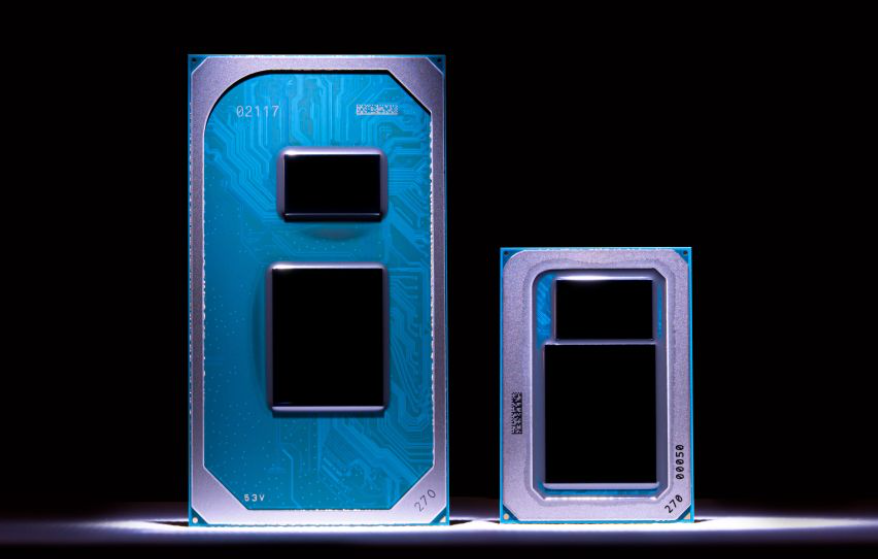
yeah while intel is good and all there is definitely going to be more heat than amd because of nanometers
hollow thorn
We'll have to see benchmarks
tepid heart
lmao intel really outdid themselves with cherry picking benchmarks
also advertising the hell out of amd ryzen chips
 grim fox
Woah Nvidia bought ARM
hollow thorn

CNBC
SoftBank bought Arm for $31.4 billion in 2016, and the sale is seen as a move to raise much-needed cash as it has recently lost a significant amount of money in its high-profile investments in companies like WeWork and Uber.
naive pendant
There is this piece in with the screws for my new MB, and I have no idea what it is for.
tepid heart
do you have any pictures?
naive pendant
Trying to find one
Which is proving to be more difficult than I had anticipated. Was hoping to not have to dig it out of the box.
Did just come to the realization that I'm missing two sata cables, two velcro cable ties and the g connector though.
hollow thorn
E
tepid heart
I think that’s for a PCIe bracket, but not sure.
naive pendant
Just never seen one before, and there's no reference to it anywhere in the manual. The smaller hole is threaded.
 neat cliff
are the b450m pro4 on newegg ryzen 3000 ready?
naive pendant
most boards yea
gritty meadow
@neat cliff https://www.asrock.com/mb/AMD/B450M Pro4/#CPU <- the bios that supports the non-XT versions of the Ryzen 3000 chips is P3.30, which was released in late may of 2019.
So IF their stock is newer than that. Then yes.
But you would have to ask them about that.
neat cliff
oh okay thanks
gritty meadow
you are very welcome :)
 vocal spire
Anyone have motherboard recommendations for a i5 9600k build
mild jackal
<$150 Asus anything
 hollow basin
anyone know why putting two 16gb sticks in the first two slots works fine, but trying to put them in the correct slots for dual channel (2nd and 4th slots) results in no post
quaint current
ram slots could be bad
hollow basin
apparently they are quad channel. is that a problem
yeah, I suppose I should test the 3rd and 4th slots individually
gritty meadow
mainboard model @hollow basin
gritty meadow
lets label your sticks A and B
have you tried installing them both A+B and B+A order in the correct ram slots @hollow basin ?
and have you got the option of trying the ram in a different machine?
hollow basin
nope, I've only got one machine that I can test with
I think I tried every combination of slots at first and the first two were the only ones I could get it to boot with so I just settled for that for a while
gritty meadow
you using the stock cooler on the cpu?
hollow basin
but now I wanted to try to get dual channel working, so I've tried it again and the first two slots is the only combination that works
yup. the stock 3600 one
gritty meadow
hm, that one should not have mounting pressure problems
the memory controller is ON the cpu, hence why "uneven" mounting pressure can matter
hollow basin
yeah, I read something about having the cooler on too tight
hollow basin
yeah, I just screwed the screws in until they got a little hard to turn and stopped
I assumed it was foolproof
gritty meadow
remove the cooler, then pull the cpu out of the socket
put it back in, then remount the cooler
hollow basin
ok. I'll try that eventually. I don't really feel like it because I had problems when I first installed the cpu, it apparently wasn't in all the way so nothing was happening when I hit the power button
at one point I took the cooler off and the cpu was stuck to it
gritty meadow
lesson for you: NEVER pull on the cooler as the first thing. ALWAYS twist
hollow basin
ok. that makes sense
hollow thorn
Straight up pulling is worst case broke pins/bent pins, best case you have a cpu stuck on a cooler and it's really hard to take off
gritty meadow
@charred venture twist works just as well
the only place heat is needed is IF you are dealing with thermalpaste glue
 charred venture
yeah i accidentally broke off the pins of an athlon a while ago trying to pull it
that wasn't very fun
hollow thorn
Rip cpu
quaint current
it wont really hurt to run a stress test and heat it up but it should be fine without it
hollow basin
ok, I just tried both sticks individually in slots 3 and 4 and neither of them worked in either one
updated the bios beforehand too
I guess I'll try the cpu thing now
I'm doubting this is gonna make a difference for some reason
how tight am I supposed to tighten the screws then when I put it back on
 drowsy nymph
Naed is Naed.
gritty meadow
@hollow basin happy to hear it worked :)
misty belfry
a friend has speculated that RAM costs are about to go up a lot soon. is there any truth to this? can someone who knows something confirm?
gritty meadow
last i looked, it was the opposite
gritty meadow
not a massive "down", but same or slightly down
misty belfry
i don't want to buy RAM yet because my 2400 isn't actually gonna bottleneck even my new GPU
so, i don't care about it until i want 32GB
i hate to say "bottleneck" lol
only way to describe it. it happens with a 2080 Ti but it doesn't happen with the 2060 or 5600 XT i'll be buying
 twilit violet
ok so, I have this intel Xeon e7-8880 v3 (lga2011) and I can't seem to find a motherboard that would work, there are some that I have found but they turn out to have an incompatible chipset or have a lga2011-v3. does anyone know of a compatible board?
main pulsar
wdym incompatible chipset?
its not the chipset you have to worry about its the specific motherboard cpu support list
the consumer 2011-v3 socket is x99. literally, any x99 motherboard with support for the typical e3-e5 xeons should support this one
twilit violet
doing research, I found that the lga 2011 and 2011 v3 are different. On Intel's website it says that the e7-8880 v3 is supported by the normal lga 2011
main pulsar
yes, however thats actually wrong
it says "2011" but they really mean the the second revision of the 2011 socket
2011, 2011-1, and 2011-3 are the three revisions
its a 2011-1, which is electrically compatible with 2011-3
this is just from what i can remember from when i researched it last year
twilit violet
so it doesn't matter if it's a lga 2011 v3 or normal 2011 is what you're saying
main pulsar
so i may have to go back and refresh my memory
no, it does matter
theres 2011, which is sandy and ivy bridge E, EP, and EX
and 2011-1/2011-3, which are basically the same, running haswell EP and EX
i think theres a Haswell E as well
idr
twilit violet
ok, got it
gritty meadow
the main thing for you to check, is the actual support list of a given mainboard
just like SassyFish said earlier :)
main pulsar
the specific problem is that E7 v3 and v4 are not supported by any consumer motherboard
well, "supported"
gritty meadow
yes, ofc its not supported on a consumer board
its a server cpu.
Intel® Xeon® Processor E7-8880 v3 (45M Cache, 2.30 GHz) quick reference guide including specifications, features, pricing, compatibility, design documentation, ordering codes, spec codes and more.
main pulsar
well, i mean yeah, but E3 and E5 are supported
gritty meadow
@twilit violet where/how did you end up with that cpu?
twilit violet
my cousin who works at Avnet gave it to me with a 32gb stick of ecc ram
twilit violet
no, customer price would be $5000+ too
gritty meadow
no, customer price, not consumer
big difference :)
that specific model is the 8 socket one
main pulsar
ok, i think ive got a grasp on it now.
E3 and E5 are basically socketed according to their architecture, but all E7 v2, v3, and v4 are all 2011-1
thanks intel
gritty meadow
https://www.supermicro.com/CDS_Image/uploads/imagecache/600px_wide/intel_motherboard_active/x10qbi.jpg <- picture of a quad socket board for it.

its not supposed to make sense, i thought you had figured that out by now @main pulsar :)
main pulsar

so in conclusion, your E7 is a nice rock
unless you wanna buy 3 or 7 more along with a board such as naed pictured
and run linux or ESXi lol
gritty meadow
@twilit violet try and see if you can ply your cousin with some alcohol and get him to cough up a mainboard too
because from what i see, there is only 1, single socket board, and thats a blade server board with custom connectors
twilit violet
got it, I'll see if i can get one from him

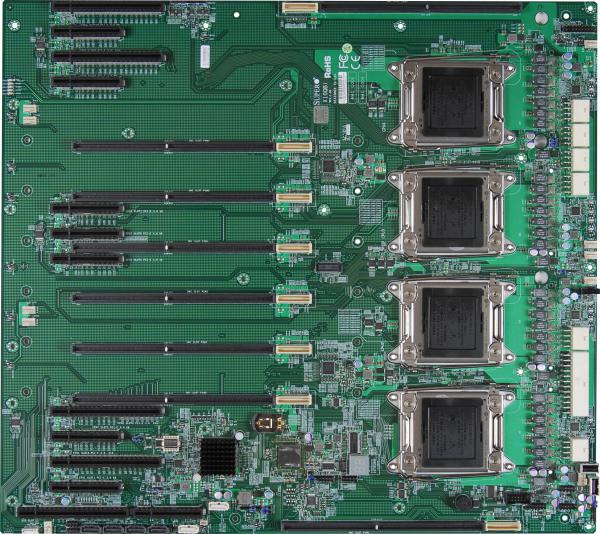
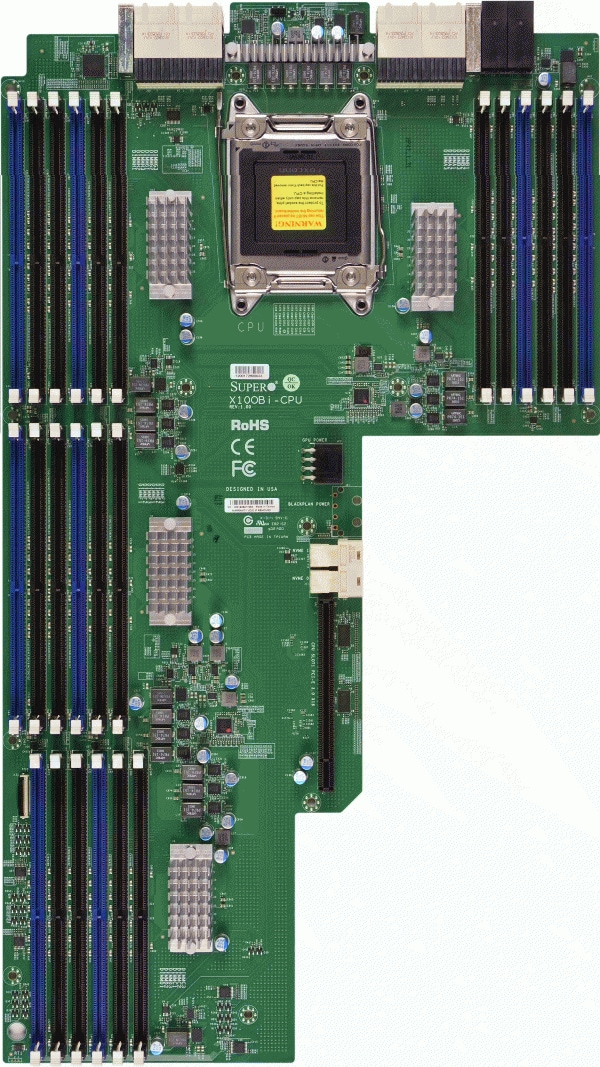
 midnight pollen
gritty meadow
@main pulsar above might be of technical interest to you :)
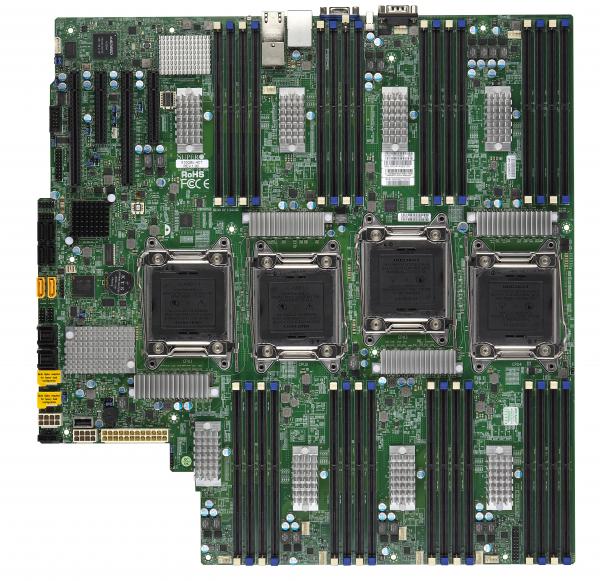
special one just for you @midnight pollen
 midnight pollen

main pulsar
lol well at least the second board is usable on its own
main pulsar
heh
gritty meadow
X10Q, X10QB, X10QBL, X10QBL-4
main pulsar
i guess the QPI link bus goes out the back connectors on the first board?
gritty meadow
aye
main pulsar
i wonder if the chassis the blades slide into only support up to 8 blades
gritty meadow
The SYS-7088B-TR4FT multi-processor system is optimized for extreme large in-memory computing, and/or mission critical apps with maximum configurability and scalability.
its for something like that
main pulsar
or if they have some magic in the backplane lmao
gritty meadow
oh there is "magic" alright
main pulsar
oh yeah, 8 blades
main pulsar
ive never actually seen a blade system where each blade is a part of the whole machine
i always thought it was a cluster of individual machines
main pulsar
this does make way more sense than trying to cram 8 sockets onto a single board
gritty meadow
:)
main pulsar
especially when you consider the increased space for both memory capacity and pcie devices
gritty meadow
we "generally" stop at 4 sockets per board
and that has gone down as core density per socket has gone up
jovial flare
wait do you work at supermicro
gritty meadow
no
jovial flare
oh nvm
gritty meadow
the "we" was to give the context of the "industry at large"
gritty meadow
@main pulsar https://www.supermicro.com/en/products/motherboard/X11QPL here is a more modern board
X11Q, X11QP, X11QPL, X11QPL
ram sockets with more ram sockets basically
 young cloak
what ram should i pair with the 3970x?
gritty meadow
3200, 4 identical sticks
basically, have a look at what your mainboards QVL has on it. Go with that for simplicity. @young cloak
quaint current
wonder what kinda weird looking server boards are out there
like those look pretty funky ngl
gritty meadow
look up some of the google containers and the facebook boxes
mild jackal
so in conclusion, your E7 is a nice rock
Nice paperweight, worth maybe $50 on ebay, but any board/case/psu setup for it will be around $1k unless you get lucky.
Would be a nice winter space heater
naive pendant
What ram should I get? I plan on getting a ryzen 9, and a 3080.
I also dont know which mother board is neccesary, because i dont think my b450 will cut it
mild jackal
3600 mhz cl16 or better
topaz reef
@gritty meadow what socket is that?
gritty meadow
@topaz reef for which one?
topaz reef
thats a big boi
gritty meadow
correct
topaz reef
im trying to find the link to crays epyc system with 16K cores in a single rack
each 1u has 6 64core cpu
topaz reef
nah just sp3
tepid heart
oof
threadripper is still a great choice for like a cheap web server
because since web servers don’t need a whole lot of ram and all
topaz reef
too bad SM didnt release any atx rome dp boards
gritty meadow
you are aware that Rome is a 8 channel cpu right?
16 ram sockets and atx does not really "fit" together all that well :)
topaz reef
yeah i figured it would have been eeatx
gritty meadow
eh, not really either


would not really call that "atx-anything"
the above is this one https://www.supermicro.com/en/products/motherboard/H11DSU-iN
quaint current
that thing is shaped after a T
tepid heart
are those like board links
gritty meadow
custom pci-e slots @tepid heart
tepid heart
damn that’s cool
gritty meadow
PCI-Express
WIO:
1 PCI-E 3.0 x32 Left Riser Slot
1 PCI-E 3.0 x16 Right Riser Slot
Ultra:
1 PCI-E 3.0 x40 Far Right Riser Slot
tepid heart
oh they didn’t add pcie 4.0 wide bus support yet?
gritty meadow
for that architecture? no
here is a server that uses that board
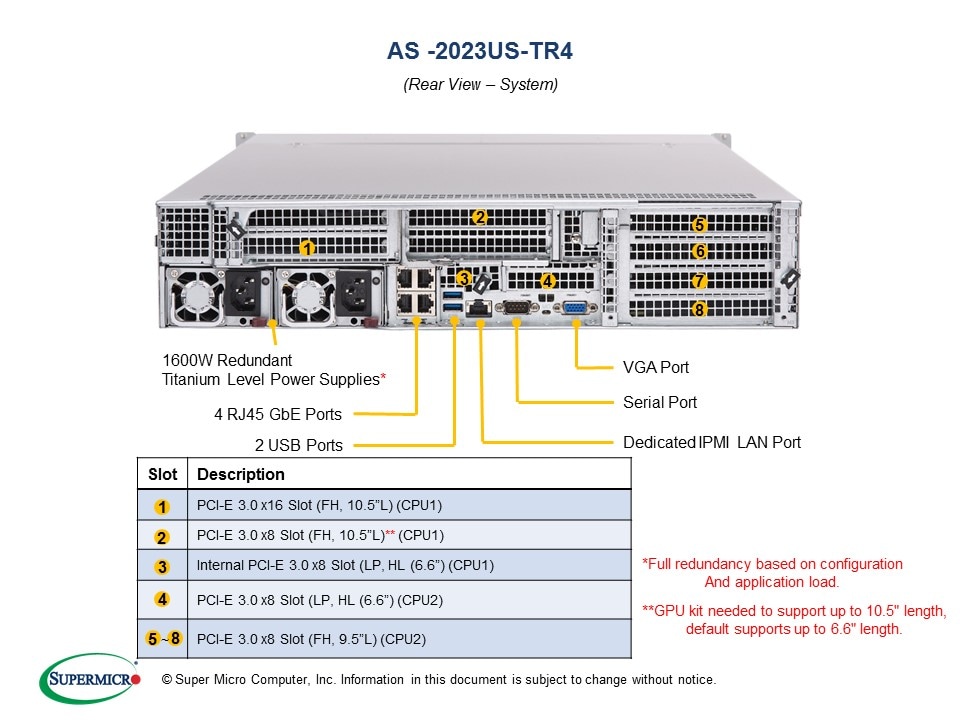

see the description
and start counting pci-e lanes
tepid heart
oooh okay I see
not enough lanes
to have higher bandwidth or a pcie controller that isn’t fast enough for 4.0 yet
topaz reef
Those A+ servers you get the proprietary boards with arnt cheap either
the 4U are around 4.5K to start with
tepid heart
I know server board are never cheap unless you go old generation
mild jackal
Don't buy an A+ board to run standalone, lol
I know server board are never cheap unless you go old generation
Kinda ya, dual/quad g34 is reasonably cheap rn

eBay
Supermicro H8QG6-F Motherboard with Shield and Qty 4 AMD Opteron 6134 CPU G34 Item Description Hover any image to see it full size ---Manufacturer: Supermicro ---Model: H8QG6-F ---CPU: Qty 4 AMD Opteron 6134 with heatsinks ---Condition: Used, removed from a working server in g...
rustic locust
is corsair lpx 16gb ram compatible with ryzen
 buoyant relic
Would the 3700x be a good buy atm or should I wait a little to see if the prices go down?
verbal atlas
@buoyant relic its going to be a newegg daily deal tomorrow, and if its like the 2700x today, it could drop $100
im going for it tomorrow if that helps!
topaz reef
@rustic locust yeah
@buoyant relic if you can wait 2-3 months the 4000 series should be out
3700x is plenty for most tho tbh
buoyant relic
Alright cool thanks the both of you.
@topaz reef @verbal atlas
drowsy nymph
Yes new processors are close.
verbal atlas
id like to wait for the 4000 series to come out which would probably drop the prices of current gen but i dont wanna wait lol
 umbral fog
i mean if it is that crazy of a drop for deals then 3700x isnt bad
like if a new 3700x drops to below 260 i wouldn't consider that a bad deal
umbral fog
i don't have personal experience but what are you planning to do with it
like if you're trying to get some heavier overclocks i'd probably advise against it
but it should handle even the higher end chips ok
but if you have the money for better cpus you can probably afford to spend a bit more on a mobo
verbal atlas
correct me if im wrong but 450 boards won't be supported in future generations, meaning if you wanna upgrade cpu again you'll have to upgrade the board
umbral fog
am4 is probably going away in a year or two anyway
most b450s should be getting zen 3 support
that said i'd personally go b550
unless there is a really nice b450 board that has excellent features
gritty meadow
there is the option for the manufacturers to update the bios on the 450 chipset with support for zen 3 when that time comes. IT is however a bit of a cluster in regards to how it would actually work. So dont expect the manufacturers to do it willingly
umbral fog
though a lot of buyers will definitely rip in to the manufacturers if they don't
again i'd probably go b550
good amount of fair priced b550 boards out
gritty meadow
nah, a lot of people that think that they understand what the tech journos are talking about will complain. But that is about it
umbral fog
tbh if the 3700x deal tomorrow is decent i'll probably go for that
zen 3 will probably be a decent amount better
lethal glacier
umbral fog
not a fan of the colors myself, but the board itself looks ok
 steel zodiac
Anybody know if the msi mpg x570 gaming edge mobo supports nvme? Doesn't specify on newegg
gritty meadow
@steel zodiac always look up details on the manufacturers page
never trust a sellers site to have correct info
hollow thorn
And what do you mean by "Support NVMe?", Do you mean by support a M.2 NVMe drive?
steel zodiac
Yeah
dark flame

Black and red Worth buying AMD AM4 X570 ATX gaming motherboard, lightning PCIe 4.0, lightning M.2, Frozr heatsink, USB 3.2 Gen 2, M.2 heatsink accessory, good overclocking, extended heatsink, MSI GAMING
Yes, I’m sure it does
gritty meadow
you can scratch the "pretty sure" part of that @dark flame
hollow thorn
How many drives are you looking to use?
steel zodiac
Nvm I got it
dark flame

naive pendant
for an intel 10th gen gaming setup, should i go for cl15 3000mhz or cl16 3200mhz?
or even 3600?
warped scroll
intel doesnt need fast memory
and anything over 2400MHz or something is considered overclocking and voids your CPU and motherboard's warranty
(only on intel)
naive pendant
well but i probably should get atleast 3000 right
i see differences in fps in benchmarks
warped scroll
do what you want
warped scroll
check out builds on pcpp or something
warped scroll
again, it voids warranty, so if i had intel im not going over 2400MHz
but your choice
yw
 sterile sphinx
If I get 3200 RAM, how do I know if my computer will actually run it that fast?
 mellow summit
Hey guys! I'm torn between these two mobo's. I heard great things about the ASUS ROG Strix B550-F Gaming (WiFi 6), but it's just overpriced atm.
I'm also torn between these two memory sticks. I do have a Corsair headset, and keyboard. So the matching RGB lights would be nice.