#cpus-mobo-and-memory
1 messages · Page 107 of 1
 gritty patio
 sharp cairn
USB*
gritty patio
anything sounds better than that lmao
sharp cairn
I'm thinking 350 bucks is not a bad wage
Basically the cost of the new monitor I'm going to be getting anyway
gritty patio
so you gonna get the b450 then?
sharp cairn
Not to mention more 550s will be made
I think I am
Whatever happened to TigerDirect
sharp cairn
I think I'm going to do that
gritty patio
@sharp cairn are you finding any mb?
sharp cairn
im looking at a b450 AORUS PRO Wifi now
but one is 10 dollars more than the other and I can't find a difference
is the RGB the difference?
they're the same thing!
 quaint current
the first is from amd, second is by gigabyte same board different vendors
quaint current
for a 3600/x?
gritty patio
its not available until june tho
might as well wait the 13 days until b500 at that point lmao
quaint current
i'd probably just get the cheapest decent kit of 3200mhz cl16
gritty patio

eBay
AORUS M.2 Thermal Guard. With AORUS Motherboards, RGB Fusion is even better with Digital LEDs. Already feature filled with colors and patterns, RGB Fusion on AORUS Motherboards are now upgraded with Digital LED support.
also
the same mb just micro instead of mini and cheaper
also sold by newegg
quaint current
that doesnt have wifi tho, idk if thats needed
gritty patio
buying a wifi card is prolly still cheaper
sharp cairn
in june, it'll be sold out, and the others will
quaint current
i'd wait on the ram+mobo choice until b550 prices are announced (if they're cheap i'd get a 3600cl16 kit instead)
quaint current
also does it have to be through amazon or no
sharp cairn
naw.
but i did just get prime for 30 lollll
the ram is less expensive on Newegg, everything else is less expensive and in stock/pre order because not sold out
on amazon
quaint current
also do you need wifi in the mobo and does it need to be itx
sharp cairn
the case is atx.
wifi would be nice, but my PC is hardwired, but if i ever chose to make it just wifi, that would be handy.
this is what i have now
i needed to swap out the 3600 DDR4 for 3200
chose t his
quaint current
i dont know good b450 mobo's with them being sold out rn, but i changed the psu+ram for a little cheaper parts, id ask @long geyser for a mobo suggestion https://pcpartpicker.com/list/Qnk3Xv
also whats up with the cd writer, do you need one? (havent seen those in a build in forever lol)
sharp cairn
just for disc reading should i ever choose to do it.
I don't need a writer, you're right
 long geyser
added mobo and redid RAM for better specs
https://pcpartpicker.com/list/LC2GMc
sharp cairn
nice. but ryzen 5 3600x. i'll fix that up
quaint current
the 3600x doesnt really have large benefits/performance improvements compared to the 3600, i'd go with the 3600 and save $15-20
quaint current
yeah, my 1070 ti is pretty close to 2060 performance and is pretty smooth 60+ fps on high/ultra for the games i play
quaint current
yuh
sharp cairn
time ta fix dat up
good good?
I have prime so no shipping on that ram
so it's only l.ike $1 more expensive than the amazon one
less*
quaint current
i'd throw the atx version of the mobo in for $10 more, you get the benefits of atx compared to itx such as more pcie lanes and support https://www.newegg.com/gigabyte-b450-aorus-pro-wifi/p/N82E16813145082?
https://www.amazon.com/dp/B07FW85VFT?
sharp cairn
thank you
sorry was afk at the store
Candy run -- M&M's, ice cream, cherry coke, doritos
sharp cairn
Hmm. I'll have to see if Newegg has everything in stock. That's a great board for $50 on Newegg than Amazon
oooh!
RYZEN 5 3600x is 20% off for 2 hours
save $40
 full folio
Not exactly sure what channel to ask this in. I built a system with the AsRock B450M Steel Legend back at the first of the year. And it's running great, but the other day the RGB controller stopped recognizing my ram. I'm not living with Unicorn Vomit or anything, it's just stuck on the same color just at max brightness. But I can't adjust it down in Windows using the(really bad) RGB software or in BIOS. I've reinstalled the software a couple times. I can live with it like it is, but I'd like to fix it if I can. Any ideas?
 deep vigil
@full folio tried reseating your ram?
gritty patio
what yall think of this?
idk the difference between this and the tomahawk max but i think its the about the same just not as sexy
maybe just the vrm cooling?
 teal sundial
How if any way is intel better than amd
teal sundial
So amd is better for streaming
 midnight pollen
yes, but if you are streaming i would get a nvidia gpu and use their nvenc encoder
teal sundial
I’m getting a 2060 and what’s a nvenc encoder
midnight pollen
there are different types of encoders that process the video on stream or recording. there is a software one that uses cpu and looks best but is very intensive and will lag game usually.
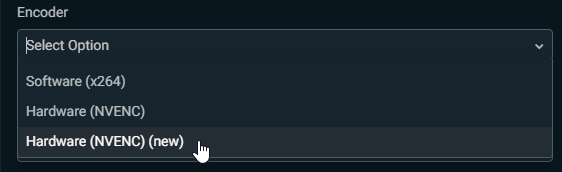
Then there is hardware encoders that use the gpu, they are less intensive and still look very good. currently nvidia's nvenc encoder is best hardware encoder https://i.imgur.com/l3MQJv7.png
 midnight pollen
in the app you use to stream there is an option. that above is a screenshot of the output settings for Streamlabs OBS
teal sundial
So y do like big streamers use intel instead of amd does intel give u more FPS or something
midnight pollen
most streamers i've seen have been moving to amd, but many big streamers use dual pc setups. so one pc that plays game and the other that captures the others screen and uses software encoder for best result
with amd you just get more for your money
teal sundial
Do you reccomend intel or amd to a big streamer
midnight pollen
Well i would recommend amd to anyone rn, but for a big streamer that can afford any pc, maybe one intel gaming pc and one amd streaming pc for dual setup
long geyser
You'd want a 2.5k budget before going Intel rn
midnight pollen
lol
long geyser
because only Intel option that kinda makes sense is 9900k+2080Ti
teal sundial
Ok
long geyser
and that is only "kinda"
teal sundial
I ask people that have a ryzen5 3600 like me and 2060 what FPS they get and it’s way better than what the benchmarks tell me
midnight pollen
this is just random chart i found
intel just slightly better but still cost a lot more money
then more non gaming things
 earnest bronze
Could someone put together me a good gaming computer build sheet I have around 1500 dollars to build one I already have a Nividea 2070 video card
midnight pollen
maybe ask in #building-and-recc-chat usually someone lurking there
 prisma spoke
Will the 1600 af go back to $85 again
 hollow thorn
likely not
 brazen cradle
@hollow thorn yo should I buy the 3700x now while it’s 279 or wait for it to drop even more , if it does
It’s a gamble
So idk 😐
hollow thorn
it's not gonna drop lower unless you go microcenter or you want like 6 months
 naive pendant
I've never even seen one
brazen cradle
But they don’t ship , well at least for there good deals
quaint current
even microcenter has it for more iirc
nvm its 10 less there, but still 279 is a great deal
brazen cradle
Ok thank you
brazen cradle
hollow thorn
yes
naive pendant
Do you need specific drivers for a Mobo?
midnight pollen
mobo uses bios and 99% of the time already has, you can update when you get. I usually only update bios if there is a problem
naive pendant
I remember back having to install every little thing. So glad that's not usually a thing anymore.
 devout mothBOT
 Dodd#4110 has been warned
Reason: Bad word usage
 plucky mantle
Hey, I just got a colorful x570 mobo. support from manu. is terrible. No video ouput, but iit seems to power up okay. one short beep. known-good cpu/ram/psu
deep vigil
@plucky mantle did you plug in the hdmi cable to the mobo or gpu
since you have ryzen you and an x570 board you mostlikey have a cpu with a igpu
so make sure the gpu is the output
plucky mantle
I've not gpt the gpu installed, I'm connected to the moniter via on-baord hdmi
and I just tested the monitor for good measure.
deep vigil
what cpu do you have
deep vigil
well then you need gpu
plucky mantle
Ah
deep vigil
3900x has no igpu as I said above
deep vigil
yes
plucky mantle
okay, I'll test that right now
plucky mantle
Okay, progress, The screen says "please power down and connect the pcie power cables for this graphics card"
and that's all
but the power is already connected
Maybe I need to get my vmm and check the voltages
 crude path
you can also double check the connection, make sure its plugged in all the way
plucky mantle
I'll do that.
crude path
also make sure you are not trying to use cpu cords to power the gpu.
they look similar but are different
plucky mantle
my psu has the cords labelled pretty well
quaint current
the one for the cpu should say EPS, dont use those. use the ones that say vga or something like that
plucky mantle
I double checked the power cords to the gpu, one of them was not properly seated, fixed that, and no I'm back to no display
but I'm getting post beeps
1 beep followed by 3 short
 tropic scarab
Hello
I was referred to this discord by someone on the website
I am seeking help with a cpu / mobo issue
I was using pcpartpicker to assemble a computer
and now my messages are being deleted....
lol newegg links aren't allowed in neweggs server
priceless
crude path
links cant be posted until you are level 3
hollow thorn
Yes
tropic scarab
So I am trying to put this MOBO: GIGABYTE B450 AORUS M AM4 AMD B450 SATA 6Gb/s Micro ATX AMD Motherboard with this CPU: AMD RYZEN 5 3600 6-Core 3.6 GHz (4.2 GHz Max Boost) Socket AM4 65W 100-100000031BOX Desktop Processor
and pcparticker is saying some sort of BIOS upgrade or update or fix may be required
Can anyone help?
crude path
so basically
tropic scarab
Keep in mind you are speaking to a layman
hollow thorn
Checked page, it's compatible.

GIGABYTE
AMD B450 AORUS Motherboard with Hybrid Digital PWM, M.2 with Thermal Guard, GIGABYTE Gaming LAN with 25KV ESD Protection, Anti-sulfur Design, CEC 2019 ready...
tropic scarab
Compatible but will require a fix?
crude path
if the specific b450 board you buy was manufactured before the release of 3000 series, it may need a bios update to run a 3000 series. most b450 mobos you could buy were made after and should come with the latest bios update installed. Some b450 mobos are made with 3000 series in mind already.
tropic scarab
Compatible, pcpartpicker is crazy?
crude path
so it will say that with all b450 mobos on 3000 series cpus
hollow thorn
Pcpartpicker has that warning for all b450 boards with 3rd gen chips
With some exceptions
tropic scarab
So I should be completely fine and I don't need to worry at all?
crude path
yes that motherboard should have no issue with that cpu.
tropic scarab
Thank you very much
plucky mantle
Hey, me again- my colorful x570 mobo says pcie 4.0, my gpu is 3.0, wouldthat cause issues or should the mobo be able to use that gpu?
plucky mantle
Okay, I appreciate the help you guys. still nor working, so I'm guessing the mobo is bad.
midnight pollen
Make sure u using display port on back of gpu not mobo
hollow thorn
Yes
gritty patio

Tigerdirect
what yall think of this
i dont feel like waiting any longer and the features included are on par with the b450 tomahak
**tomahawk
i just dont know if it comes with a the updated bios
gritty patio
yeah cause it has pro in the name
and the asus has two versions of their b450 and the pro model has the bios
plucky mantle
hdmi or displayport- would that make a difference?
naive pendant
Where is it coming from?
gritty patio
no clue
but if imma pay that much i might as well get the asus one where i can actually find it in stock at that price with free shipping lmao
plucky mantle
I agree, but we don't really have a local reetailer for this kind of thing.
but at this point I'm willing to make a field trip
naive pendant
Was just curious, I was looking at a PSU last night and it was free from one site and about that same $23, and I realized it was coming from the UK to the US, lol.
I can't find any either ... at least not ones I want.
naive pendant
I'd honestly have my gf ship it at that point (she's in the UK)
Although She's on the Isle of Wight so that adds about another $20
gritty patio
but if im gonna wait another 10 days for them to go back in stock and then wait like 7 days shipping i'd rather wait for b550
damn bruh
naive pendant
At this rate I'm getting to where I might wait for the X670
 rare phoenix
 naive pendant
okay i need some help with my build. So I have a amd ryzen threadripper, and I am not exactly too sure of what kind of motherboard to get. Is there a specific socket style that I need to get? Anyone have some advice for a PC building noob?
hollow thorn
Do you already own the threadripper chip or
midnight pollen
which threadripper
 tacit hemlock
First build is a threadripper wow
devout mothBOT
 Bearnard#0631 has been warned
Reason: Bad word usage
hollow thorn
heck
midnight pollen
naive pendant
its a 2920X
hollow thorn
do you already own the chip?
naive pendant
@hollow thorn yes
midnight pollen
i think 2nd gen is sTR4
quaint current
yuh tr4
naive pendant
it does have a little paper inside that says socket TR4. so i guess that answers my question.
hollow thorn
well
naive pendant
around black friday
midnight pollen
x399 is the chipset, tr4 is the socket
quaint current
thats the tr4 chipset
naive pendant
i had some friends that said to pull the trigger on this one
hollow thorn
¯_(ツ)_/¯
midnight pollen
threadrippers are fast for sure, just not meant for gaming
naive pendant
so what kind of differences will I see?
hollow thorn
in games, lower fps
naive pendant
even with 4.3ghz boost?
midnight pollen
it's a bit slower than a 3950x, maybe closer to 3900x
midnight pollen
well ya
hollow thorn
okay its zen+ 12nm
midnight pollen
just curious how much did you get it for
naive pendant
$299
midnight pollen
ehh
naive pendant
i could always re-sell and probably make a profit. Its never been used
midnight pollen
maybe
hollow thorn
yea I think you can
midnight pollen
i see it still going around 400 new
hollow thorn
take a look at this
https://www.ebay.com/sch/i.html?_from=R40&_nkw=2920x&_sacat=0&LH_Sold=1&LH_Complete=1&_sop=13

thats already sold
the most recent one being sold yesterday
naive pendant
would it be good enought to run borderlands 3 and jedi fallen order well enough. Im not looking for 120fps
just over 60 is nice
hollow thorn
like I'd suggest you just make a profit on that
and get a consumer chip that'll do quite a bit better at games
at a much lower price
for example right now you spent 300$ on the chip, and you'll have to spend about 300$ more for a motherboard
midnight pollen
the thing is buying a mobo for that threadripper is still going to cost a lot
hollow thorn
You could buy a 3600 at 180$, and a good b450 motherboard at 100$
and have better performance in games
naive pendant
is that your suggestion?
 tulip raft
Right now I'm trying to get an 10900K
hollow thorn
Yes
I would suggest you get a 3600 and a Asus tuf b450m pro gaming motherboard
and spend the rest on a good GPU
pcpp is useful
naive pendant
what GPU you recommend?
hollow thorn
What's your total budget?
assuming you sold your cpu for 300
(you can prob sell it for 400 or more, just worst case scenario)
naive pendant
IDK what exactly I want my total budget to be. Prefferably not more that 1500
naive pendant
@hollow thorn thanks for the help
hollow thorn
you're welcome
 daring patio
@hollow thorn you should make a pc for every budget and somehow get your profile pinned so everyone can see it
 lethal charm
Only problem, Hypercore - parts change so fast.
hollow thorn
I could update daily
tacit hemlock
It doesnt even need to be daily, it could be at the beginning of every week and then we have a channel just for it that they get pinned in
daring patio

reddit
7,692 votes and 1,372 comments so far on Reddit
 warped scroll
no way
daring patio
Ahhhh
daring patio
Lol
 north barn
So at this point would there be any reason to wait for a b550 besides pcie 4.0?
quaint current
not really, but b450/x470 might have some issues with bios's working well in the beginning and being a little buggy
full folio
@deep vigil It turns out that I have to run a very specific version of the Polychrome software, the 2.0.38 version
 shut cargo
so i got a tracking number for my 10900k but not for my Z490 MEG ACE. At this point i won't have it by friday will I?
 sharp blaze

pcgamer
By increasing the TDP, ASRock's Base Frequency Boost technology tricks the CPU into running at a higher clockspeed.
hollow thorn
Lol
 frigid whale
Just pieced my system together. Motherboard lights up.
When I hit power button it clicks but nothing activates.
hollow thorn
No fans no nothing?
hollow thorn
Is the power button at the back of the PSU on?
frigid whale
Yes
hollow thorn
You've checked all the connections?
frigid whale
Yes
hollow thorn
Tried to reset cmos..? Maybe that could do something
hollow thorn
Yes
Don't forget to turn off PSU when you do that, and press the power button a few times to discharge everything
And in the meantime, are there debug LEDs on your Mobo?
midnight pollen
do you have a pcpp of your parts?
frigid whale
None that come on
hollow thorn
Weird
midnight pollen
can you tell where the clicking is coming from
hollow thorn
I believe that's a normal sound from startup one sec
hollow thorn
Just started up my PC to hear the sounds
https://photos.app.goo.gl/XF7fZTeCeCS9iRVs7

Google Photos
frigid whale
It's a normal click like it's about to turn on
midnight pollen
can we see a pic on the inside of the pc
frigid whale
Ignore the cables I haven't tied away yet.
It's the PSU clicking
I help my ear to it.
 weak hamlet
is your ram in slot 2/4
weak hamlet
yeah you have it in a1 and b2
try a2 and b2
looks like a first boot, as shiny as everything is 😄
frigid whale
I had all 4 of my ram plugged in and it still didn't boot
midnight pollen
2 and 4
frigid whale
Nada
midnight pollen
does it appear to be on when you press power or no? how is it responding
frigid whale
Not on just the RGB motherboard lights.
midnight pollen
does anything happen when you press power
 swift trench
thats strange, if the lights on the mobo are turning on then the psu is probably fine, but no fans or lights might mean your motherboard is only partly working (maybe?)
sharp blaze
that front panels connector looks off
I dont have asus, or know what case you have, but I dont think that is correct
midnight pollen
make sure the front panel is in right spot for everything^
swift trench
i think his case has it all connected
sharp blaze
some cases have that, but should have an adapter if its not the same standard. also I see exposed pins above the header
swift trench
oh yes
frigid whale
What
swift trench
youre right, look at the manual for the front panel connector
sharp blaze
usually the top row has the power button connector
swift trench
the manual should explain exactly which connectors to plug into the 9 pin (4 on top, 5 on the bottom) connector
sharp blaze
unless asus is just very different
frigid whale
swift trench
i have an old asus mobo and its the same
frigid whale
This?
swift trench
yeah that doesnt look right
it should be plugged into every pin except the bottom right (9th pin)
sharp blaze
oh, nevermind. they put the speaker header above the other pins
sharp blaze
what case is that
swift trench
can you double check the connector labels?
sharp blaze
what cpu and motherboard is it
sharp blaze
for the time being unplug this stuff to rule it out
frigid whale
Unplug what stuff
frigid whale
And my graphics card should be IN right.
swift trench
yeah the graphics card needs to be in for the system to post in most cases
sharp blaze
yes, that cpu doesn't have an integrated gpu
frigid whale
Same
Just a PSU click
sharp blaze
only other thing that really looks weird to me is that vga power connector looks kind of like it got squished. could be an optical illusion but make sure its not been damaged and nothing is shorting
midnight pollen
psu click is prob just a relay
sharp blaze
sharp blaze
but look at the wires near the plug. they look like they were crushed or something. make sure there is no exposed wire
could just be deformed a bit from how they were packaged
frigid whale
My old setup just was working. Same PSU. No more than 2 hours ago.
I just put in a brand new cpu
swift trench
you might want to just pull everything out and test it outside of the case
devout mothBOT
MrTaco#3285 has been warned
Reason: Bad word usage
midnight pollen
what cpu and what mobo
sharp blaze
any chance you seated it incorrectly and bent some pins
midnight pollen
did you upgrade just the cpu or the cpu and mobo
 clear quarry
Hello, I have a question. My computer currently has 4 slots for memory, and two of them are being occupied by 8 GB memory each. I would like to add more memory to my computer but do I need to get the exact same 8 GB Memory or can I use a different version/model? I hope my question makes sense.
sharp blaze
usually when a board instantly shuts off like that something somewhere is shorted
frigid whale
It doesn't instantly shut off it never turns on
midnight pollen
@clear quarry same kit of mem works best
sharp blaze
if you press a button and hear a click that usually means some protection is kicking in and stopping the power from powering up
clear quarry
Thank you for your insight, I figure as much but wanted to be sure.
midnight pollen
always best to double check 🙂
it could be click preventing it turning on or click to turn on power
frigid whale
I'm a failure.
I've been at this build since I placed my order March 26th.
I built my friends Intel build perfectly fine. No issues.
Not this one.
deep vigil
Heyy my rmx 850 has its fan hitting something and is making alot of noise anyway to fix?
frigid whale
Any thoughts? 😱
 spark kiln
If I bought a b450m-a/csm in feb on amazon, what are the odds that it’s ryzen 3000 ready?
I’d check the box but my mom threw away the box and it had the m.2 screw still in it!!! Smh
 tranquil wolf
the b450m-a/csm is 3000 ready, we put one together for my roomie last week
our board was missing the m.2 standoff completely lol
 solemn hare
My computer has this Intel Management Engine driver missing eveeryrime I boot up and will shut down 30 mins later. I found out that if I pull the power adaptor to the motherboard and plug it in again, it will appear upon the next boot up. Motherboard having issues?? It has this bus 0, device 22 error when I don't pull it out to replug it in.
 jaunty folio
If I plan on streaming and gaming, would a R7 2700X or R5 3600 perform better?
midnight pollen
3600 better for gaming, for streaming a nvidia gpu would be best using the nvenc encoder
midnight pollen
3600 much better for gaming
 thorny gate
even with the 2 lesser cores?
midnight pollen
yes, cores don't always matter
thorny gate
im using a asrock fatality x370 mb atm but its setup for 3000 series
midnight pollen
if you trust userbenchmark: https://cpu.userbenchmark.com/Compare/AMD-Ryzen-7-1700-vs-AMD-Ryzen-5-3600/3917vs4040

Based on 430,811 user benchmarks for the AMD Ryzen 5 3600 and the Ryzen 7 1700, we rank them both on effective speed and value for money against the best 1,238 CPUs.
thorny gate
when is 4000 supposed to hit?
midnight pollen
yeah bios update if it's not updated already on x370 can support 3000
thorny gate
yea i updated it while ago
midnight pollen
4000 series looks like it might come out later this year
but it seems it will not support x370
or at least they don't plan to as of rn
midnight pollen
yeah x470 can work with bios update in future
hollow thorn
@midnight pollen y ub
 manic temple
I'm doing a build soon and was wondering if it's better to just do two sticks of 4gb ram so I can have dual channel off the bat or should I go with one stick of 8gb so I can later upgrade with one more 8gb stick
 strange prism
i9 10900k or ryzen 9 3900x?
 muted roost
@manic temple if your system has 4 dimm slots I would go for duel sticks
manic temple
It does
manic temple
ty!
crude path
@midnight pollen they said it will not work with the x470s. only b550 and x570 as far as we know right now
midnight pollen
I believe amd recently announce support for 470 and b450 on zen 3
They did not say however that it will be on all boards, that will be up to the manufacturer
midnight pollen

updating bios to support it will get rid of support for some older chips because of ROM issues tho
and they will most likely not ship with zen 3 ready bios
crude path
im wondering if it will have a performance impact on the zen 3 chips tho. i feel like there was a reason they didnt want to lol
ah fair
midnight pollen
looks like there may be some limitations, but i guess we will have to see for ourselves
¯_(ツ)_/¯
crude path
ill just wait and see what happens. and then watch other people do it before i try it myself 😛
midnight pollen
yeah it's like preordering 
crude path
i just wanna make sure it will work fine before or if i decide to get a zen 3 lol. Like i dont wanna try to update bios with a 2600 and it break the mobo cause it loses support for the 2600 halfway through the update or something 😛
midnight pollen
lol
sharp blaze
if the bios you are flashing to does not support the cpu your old cpu will not work after its done and it restarts. It will work fine until a reboot.
 zenith fog
i have a asus b450 prime plus and ryzen 5 3600 do i need a bios update so will i need a different cpu
 vital falcon
Anyone know the size of the M.2's on the MSI z390 Tomahawk MB is? i think the uncovered one is the full sized, but the smaller one that is covered, not sure the size.... been looking for this. Anyone have this MB and used both M.2 slots for storage?
oh think I found it.. but if anyone uses it.. any information would help!
daring patio
Should I get a ryzen 5 3600 or ryzen 7 2700x?
gritty patio
3600 :))
hollow thorn
@daring patio depends, what you tryna do with it
midnight pollen
3600 would be better for gaming where 2700x would be better for content creation stuff
 grizzled holly
What's the difference between the i5 10600K and the i5 10600KF?
hollow thorn
integrated graphics
midnight pollen
KF variants do not have integrated graphics
grizzled holly
Does it give it any advantages?
midnight pollen
no
midnight pollen
depends on the market, i've seen the KF chips go lower and higher than the normal version in the past
grizzled holly
And which would be better for gaming and streaming
midnight pollen
between the 10600k and 10600kf there would be no difference
grizzled holly
Alright, last question, wait for Ryzen 4000 series before buying the 10th gen series from intel or no.
midnight pollen
if you can wait i'd say yes wait
grizzled holly
Alright
Sorry, one more question, should I just stick with my 2700X? I got it in December
midnight pollen
amd has been killing it lately and might continue with some very interesting products
grizzled holly
yeah I agree
midnight pollen
the 2700x is a fine chip, it should still last some time
midnight pollen
np
 deft phoenix
after seeing the performance of the new intel i think ill just get a 3950x if that is the better choice
daring patio
@hollow thorn Gaming, schoolwork and dad's work
hollow thorn
3600
manic temple
Does Zen 2 and 7nm really matter THAT much for CPUs?
manic temple
How big of a difference does it make overall
manic temple
The two or for each
hollow thorn
what
manic temple
Like 20% for each or for both
hollow thorn
Zen 2, built on 7nm, has 20% ipc improvements over Zen+
hollow thorn
If you just shrink the gate size, and don't change your architecture, all you'll get is a smaller die of the same performance
grizzled holly
Which would be a better motherboard, https://www.newegg.com/p/N82E16813144302 or https://www.newegg.com/p/N82E16813145190
hollow thorn
Why z490 tho
grizzled holly
might get the 10700K if the 4000 series is a flop
it probably won’t though
but preparing for the worst
 raven topaz
Does anyone know when the 3300x is going to be available
It says it was the 13th of may, but it is still not on amazon. Mabye its a canada thing?
 mild tinsel
"May 21, 2020
The new AMD Ryzen 3 3100 and 3300X CPUs have a release date set for May 21, 2020, with the Intel 10th “Gen” release date set for May 20, 2020."
this is what google told me
grizzled holly
What RAM has RGB that syncs with NZXT's CAM software?
 warm fulcrum
I have a question about mobo's. Can someone help me?
hollow thorn
Ask away
gritty patio
@warm fulcrum whats ur question vrother
plucky mantle
Hey, none of the sata ports on my mobo seem to work. it's an x570 and ryzen 3900x
Is there something about that combination I don't know? the GPU thing threw me off a little
plucky mantle
by plugging in drives and seeing if the show up in bios.
only the m.2 drives seem to be detected
hollow thorn
Do you restart every time you plug it in?
I don't think sata is hot pluggable by default
plucky mantle
yes
hollow thorn
Do you know that the sata drive works?
plucky mantle
Yes. I tested it on a different PC.
deep vigil
Did you try different sata cable
 gleaming fog
is RGB worth it on RAM for more money? also do 3200 vs 3600 speeds matter?
plucky mantle
Yes, and I tried a different power cable.
hollow thorn
3200 vs 3600 a matters a lot for Ryzen
deep vigil
@gleaming fog yes
hollow thorn
RGB only if you want it
deep vigil
And also cl
hollow thorn
Don't forget Cas latency
 green agate
Always try to get 3600
deep vigil
The ddr4 3600 cl16 gskills really good kiy
hollow thorn
Yea G.skill trident z neo 3600cl16 is good for RGB
@plucky mantle is it partitioned..?
gleaming fog
i have a set of 2x8GB 3600 mhz g.skill ripjaws V (CL 16-19-19-39) that i got for $84. rgb seems to be alot pricier wherever i look for those speeds and latencies
hollow thorn
ofc
rgb costs more
always
Because maybe it's assigned to a letter that is already used by the SSD and it's conflicting maybe? not too sure by now
Theres a very very very low possibility that ALL of the sata ports on your mobo don't work
plucky mantle
It's got a zfs partition on it, but I presumed bios should at least be able to see it. And win10 disk management doesn't show it at all, regardless of which sata port it's in
deep vigil
Also a m.2 drive mau disable one of the sata ports
plucky mantle
see, that's what I was wondering
deep vigil
Ye
hollow thorn
what motherboard, cpu, and drive?
plucky mantle
colorful CVN X570 GAMING PRO V14, ryzen 3900x and seagate 3tb spinner
deep vigil
Idk what that is
plucky mantle
brand is colorful. I know, it's weird
deep vigil
Never heard of it
 meager pecan
Is 3 hours of Prime95 small ffts enough to rule out CPU instability while playing Asphalt/TF2

hollow thorn
should be
meager pecan
coolio
plucky mantle
Okay, thanks for the confirmation. I can always just go get an offboard controller if I have to.
Is there a reasonably convenient way I can compensate you guys for the help? Ya'll have solved a few problems in my new build and I'm quite grateful.
hollow thorn
Just a warning, I've heard things with the seagate barracuda 3tb model in particular with very high failure rate
nah
no need
plucky mantle
Well, just know that I'm appreciative.
hollow thorn
You're welcome.
gleaming fog
is $28 more worth getting rgb on ram (comparing non-rgb and rgb options with same specs)
meager pecan
yes, here's my patreon /s
$28 more?
The real question is how much is the $28 compared to how much you're actually spending
gleaming fog
fair lol
meager pecan
if you're talking 16GB of RAM, which is the bare minimum RGB RAM gets sold at, I think
It would be a hard sell
gleaming fog
its a 2x8gb
meager pecan
unless it was a very particular type of RGB RAM
the type with dummy RGB RAM sticks I can use to fill out the slots
if it was 32GB or 64GB
I would absolutely jump at it no matter what
if you happen to be getting Corsair Vengeance/Pro RGB
remember the fake RGB sticks sell for $40 for a pair
well
they used to...
gleaming fog
g.skill ripjaws V vs g.skill trident z rgb (or neo cause 2 dollar difference)
meager pecan
trident z is a nicer looking one
you sure they have the absolute same timings though?
or at least CL?
gleaming fog
yea both cl 16-19-19-39
meager pecan
um
well that's up to you
but if I felt there was nowhere else to put the money
then yes, I would do that
hollow thorn
well
meager pecan
I would just make sure I'm not making any glaring compromises on performance elsewhere first
hollow thorn
If you're mix matching ram, rgb don't look great
hollow thorn
since you said you had ripjaw vs
meager pecan
if you plan to upgrade your RAM down the line
you'll be locked into buying the same exact kit
unless uh
you're an absolute monster
/s
Wait, is this RAM for an entirely new PC
or RAM as an upgrade (assuming you're not ditching your old sticks)
gleaming fog
i ordered the ripjaws on amazon prime for $84 and i would get a free return and get the other one for $113.39 (after tax) from newegg. the only thing that might be an issue is that the specific set of ripjaws i recieved were tested on an intel core and the latency readings are based off of that (got them through a 3rd party seller on amazon with prime so didnt have option for ryzen specific ones)
from what i can tell online, it showing "supports intel core" shouldnt matter
also its for my first build (got most of the parts in)
the only difference would be slight CL variations and would have to test and enter custom values
meager pecan
Yes, generally "Core optimized", "AMD optimized", etc. are negligibly helpful at best and complete nonsense at worst
hollow thorn
What other one are you talking about?
gleaming fog
so with that being said, spend more money? or use the ones i got for now?
hollow thorn
also at 113$... you can possibly get the B-die stuff
hollow thorn
gotta check prices
gleaming fog
b-die?
meager pecan
Refers to the highest quality of RAM produced which can hit notably high frequencies/low timings.
hollow thorn
huh
meager pecan
nani
hollow thorn
iirc this was b die
https://www.newegg.com/g-skill-16gb-288-pin-ddr4-sdram/p/N82E16820232858
 mild jackal

meager pecan
CL16 3600MHz
seems like B-die to me
well
at least I remember hearing something about this particular kit
mild jackal
Lowest it's been is $100 /2x8 for 3200cl14 non-rgb, rgb $20 more, both are a bit inflated because 'rona
gleaming fog
i can send the links but would have to DM cause cant send links on here
mild jackal
3600 16 16 16 38 is lower end b-die, but still b-die
16 19 19 42 is probably Hynix CJR or something
hollow thorn
DJR in my case
hollow thorn
oh wait
meager pecan
more that the ones you're sending are ridiculously long for some reason...
hollow thorn
right 3200 cl14 is likely better binned than 3600 cl16 ?
meager pecan
apparently yes?
gleaming fog
@meager pecan i dmed you the links
quaint current
3200cl14 is usually b die, 3600cl16 is lower end b die or other dies such as e die
hollow thorn
@quaint current I know the 16-16-16-38 kit is b die, I checked it before
16-19-19-39 is prob cjr/djr
@mild jackal is DJR just dual rank CJR? do you know? just curious
mild jackal
Don't think so
hollow thorn
alr bc djr isn't listed on the reddit oc guide xD
and cjr is just "found on some corsair 3600mhz ram"
quaint current
@hollow thorn yuh all 16's is usually b die, but the lower latency kits are probably poorly binned b die at best
hollow thorn
well
I'm not too sure
3600cl16 is about the same latency as 3200cl14
idfk tho
we wer taking
F4-3600C16D-16GTZN
quaint current
yuh thats b die
hollow thorn
mhm
I checked before :p
I have F4-3600C16D-32GTZNC
so I thought the C meant CJR die
but no
I have DJR die
quaint current
no the c stands for cool
mild jackal
Is it b-die?
https://benzhaomin.github.io/bdiefinder/
-might add more ram stuff later
Find Samsung B-Die DDR 4 memory kits on Amazon, Newegg and many more.
mild jackal
mild jackal
Is it b-die?
https://benzhaomin.github.io/bdiefinder/
-might add more ram stu...
hollow thorn
ye b die finder good
quaint current

hollow thorn
oh yea forks not sure if worth pinning but
https://docs.google.com/spreadsheets/d/1wmsTYK9Z3-jUX5LGRoFnsZYZiW1pfiDZnKCjaXyzd1o/edit?usp=sharing

Google Docs
AM4 MB Comparison @2017-2019 raisonjohn b.
AM4-socket MOTHERBOARD COMPARISON,SUBJECTIVE TIERS:,HOW TO SORT & FILTER THE MOTHERBOARD MODELS YOU ONLY NEED TO SEE AND COMPARE: ...
very useful for everything
mild jackal
Reaper pinned that
mild jackal
I'll pin a z490 vrm tier list / mobo spreadsheet when I find a good one
hollow thorn
for some reason I thought that was
https://linustechtips.com/main/topic/1137619-motherboard-tier-list-v2-currently-amd-only/
Linus Tech Tips
Credit to:@VegetableStu @GoldenLag @LukeSavenije The following list is based on facts, ranked on power delivery and known problems. The list will include boards that support CPU overclocking available at retail from different brands. Currently only AMD boards are done because ...
quaint current
the longboi
hollow thorn
anyways
mild jackal
I have the z370/390/, all x570 ones saved, but they're a bit less relevant now
Haha I think that longboi is super useful
hollow thorn
I dont like using it xD
quaint current
also i found this pretty neat thing for ram SKU's and what they mean https://forums.tomshardware.com/threads/meaning-of-ram-product-item-numbers-codes.3113155/

Tom's Hardware Forum
If you are looking at differences between RAM modules being sold or if you are just checking some RAM models of your motherboard's Memory QVL that have been tested, you may have come across with these hard-to-figure-out RAM Product Items/Codes such as: "HX430C15SB2/8" or "TED4...
mild jackal
I think it's the easiest quick reference + it has the bios flashback feature indicated
hollow thorn
but yea the z390 mobo sheet by the same guy that made the am4 sheet is good
It's just pog for MSI and Gigabyte :p
some asus some asrock
theres like 1 non-msi board with bios flashback on b450/x470
mild jackal
Is the z390 sheet I like https://www.overclock.net/forum/attachment.php?attachmentid=250662&d=1548963030

The spreadsheets for 115x/AM4 are useful, might pin later
 stable yew
Looking for some help from this group... I'm building a pc with ryzen 7 3700x. I'm set on a MSI B450 Gaming Pro Carbon AC motherboard for it but I read that it doesn't support Precision Boost Overdrive. Is not supporting the Precision Boost Overdrive a deal breaker for this?
hollow thorn
Where exactly did you read that? @stable yew
Because I'm kind of running PBO off that exact motherboard, with a 3800x
DM it to me
 shrewd jacinth
A10 5700, Speed is key.
Im gonna build a 3800x 2070 super build, What you guys think? 32gb 3200 ram
deep vigil
@shrewd jacinth what is the purpose of the pc
 daring quest
i'm confused. I had ryzen 5 3600 msi tomahawk b350 with 32gb ripjaws V and it only recognised 1 stick. but trident z 16gb is compatible? is ripjaws just not great for matisse?
naive pendant
try a different dimm slot and see it it detects it
naive pendant
google it you will probably find an answers after a little research.
im not shure why it would do that
but the ram work on 1600 and not the 3600 are the two chips on the same mobo?
naive pendant
if you can try a different 16 gb kit
grizzled holly
I want a black and white scheme
So I got black RAM
Can I get the same exact RAM in white and it'll still work?
 shy breach
@grizzled holly the answer is yes, probably. Kinda depends on the RAM and the Mobo. If the RAM is manufactured with zero changes one stick to another it [i]should[/i] work... As long as your motherboard isn't "picky" I've had motherboards that would boot with 4 different dims from 4 different manufacturers and I've had motherboards that wouldn't boot with a matched DIM set even though it would boot with every single DIM one at a time...
manic temple
Does the Ryzen 3 3200G work on the asrock B450M Steel Legend mobo without a bios update?
gritty patio
it should
thats why i got mine
also
anyone know where to get the 3300x
i missed the release on newegg and was wondering if i should just preorder off of b&h
naive pendant
If I get a build and it only has one stick of ram and I need another; what’re the requirements?
Can I simply get another stick that is the same speed?
@midnight pollen might you know by chance?
midnight pollen
it is best to get the same kit of ram
naive pendant
Simply for compatibility?
midnight pollen
mixing kits can sometimes have compatibility issues like the timings or clock no playing nice
naive pendant
Oh, thank you
 thick fjord
Hey, do any of you recomend a ASUS Pro WS X570 motherboard?
Or would i be better off going with a MSI motherboard?
hollow thorn
Brand name doesn't matter as much as the exact model
thick fjord
Alright, thank you
quaint current
@thick fjord if you mean the ws x570 ace, thats designed as a workstation motherboard, the cheapest i could find it is like $380, i'd recommend a board thats $180-200 if you have a ryzen 3900x/3950x, or a b450 board like the b450 tuf pro
mild jackal
Get pro ws if you want an out of band management port and/or a plx chip to run 3 x8 lanes.
grizzled holly
@shy breach Do you know if the ASUS ROG STRIX B450-F motherboard is picky?
shy breach
@grizzled holly I actually have one I'm building right now, I can try a couple different sets of RAM.
gritty patio
jesus
9 sets fo ram
**of
my goodness
i barely bought one
anywho
uhm yall know where to buy the 3300x or nah?
i missed the pre-order on amazon a couple of weeks ago
and missed the stock on newegg sometime in between 2:57am and 8am
and i cant find it anywhere else
shrewd jacinth
@deep vigil for the LATE reply, gaming/productivity hense the 32gb of ram and 8 cores streaming/VMs/light editing
 ionic hamlet
Just going to have to wait for it to come back in stock, like everything else that's outta whack right now
crude path
thats everywhere
 clear walrus
what would a good motherboard that is not too expensive for a Ryzen 3 3300x be
gritty patio
i got the asrock steel legend atx
sexy mf mb
with two nvme slots i believe
**believe
but it also has rgb
i got mine for $108
but you could also get x470 over a b450 since it will be supported in the future
@clear walrus
clear walrus
ok thank you
gritty patio
where do you plan on getting the 3300x? @clear walrus
clear walrus
newegg
gritty patio
when its back in stock or what?
gritty patio
i think im gonna get mine off of b&h
 spare ferry
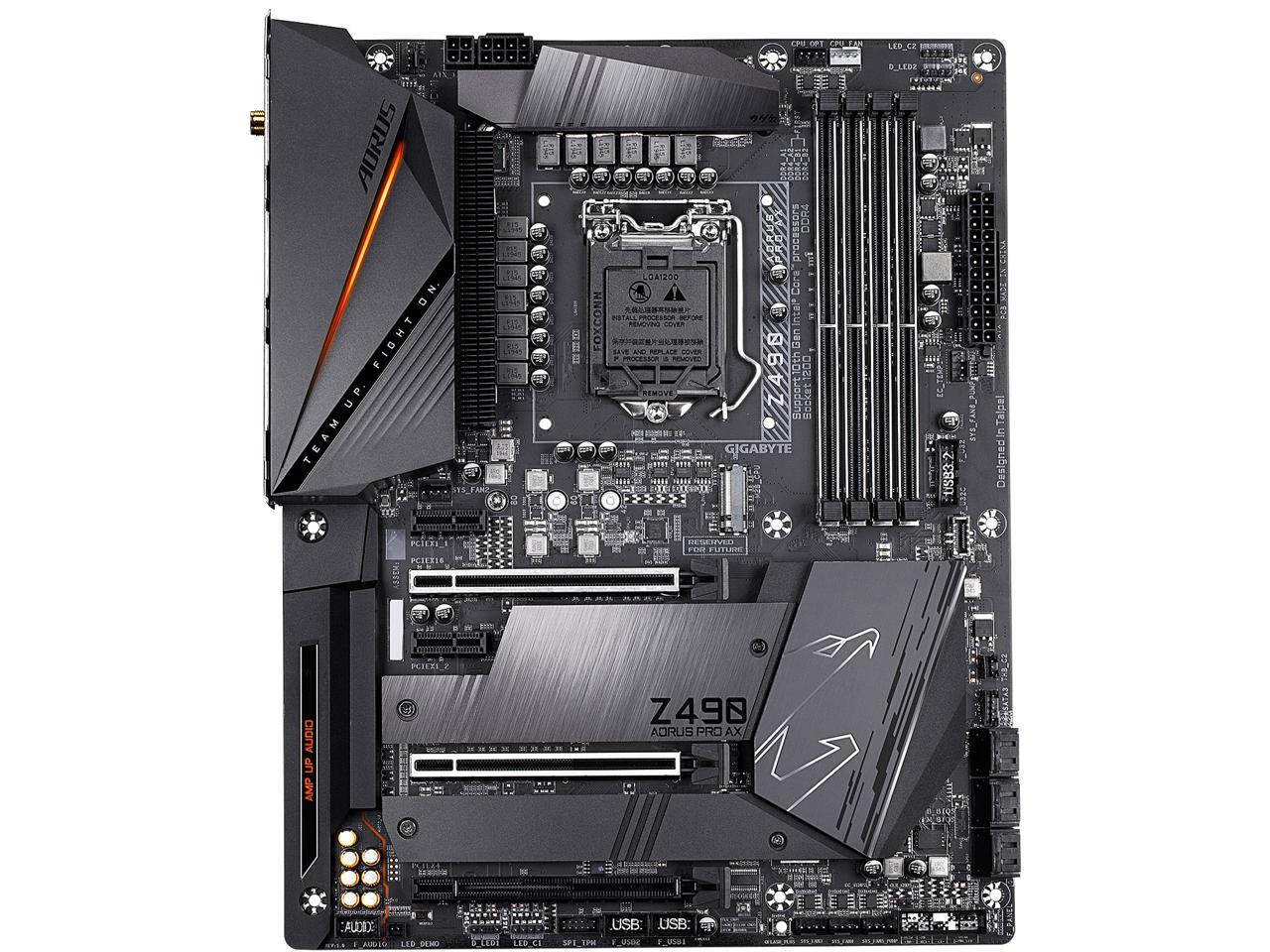
i need a little bit of help. i am getting a z490 mb and noticed that it has one 8 pin 4 + 4 and one 4 pin slot to power the cpu. my psu only has a single 8 pin 4+4 power connector. should i get another 8 pin 4+4 power connector and where can i find one? what i see most of on newegg are psu power connector extension cables.
 supple monolith
You don't need both
crude path
what cpu? a lot of people have no problem only using 1 8pin
spare ferry
for reference here's the mb (aorus z490 pro ax) https://c1.neweggimages.com/NeweggImage/ProductImageCompressAll1280/13-145-194-V07.jpg
 supple monolith
Unless you are doing some serious OC
crude path
you might wanna see about getting a new psu or if your psu has the slot for another cpu pin, getting another wire for it then
spare ferry
only 1? that's good to know. either way, i am gonna try and get a new psu, preferably the evga supernova g3 750w
yeah that's the thing idk if it even has another slot for that
supple monolith
What PSU do you have
spare ferry
i could take a look but it's a thermaltake toughpower 80+ gold 750w
crude path
the g3 is a better psu
quaint current
as long as you dont try to push like 850w into it, G3 is a great psu
spare ferry
and it comes with 2 8 pin 4+4 cables
supple monolith
Yeah, go EVGA or corsair if you want good customer support/warrenty
spare ferry
so i should be alright with the single 8 pin with the OC i mentioned?
btw thanks for the responses
i am still a bit of a novice when it comes to this
supple monolith
I honestly am I novice with OC too, I just know you don't need a second one if you aren't OCing
quaint current
a single 8 pin eps maxes out a 235W, you should be fine but its better to have both incase
spare ferry
thanks
right now i am using it with my z390 and 9700k 4.7 ghz oc on all cores
at 1.21v
upgrading because i want hyperthreading and the 10700k is like a cheaper 9900k
plus my family needs some extra components for computers and will be gifting some old hardware
ah, all i'm seeing are extension cables for the 4+4
gritty patio
any good white atx cases?
gritty patio
the one that just came out right?
yeah cause im looking at cases for my asroxk board i just bought the other day
**asrock
its the steel legend
spare ferry
i have my eyes on the be quiet pure base 500dx
it comes in white

Buy be quiet! Pure Base 500DX Mid-Tower Case (White) featuring ATX, Micro-ATX, Mini-ITX Support, Tempered Glass Side Panel, 3 x 140mm Fans Included, 5 x 2.5", 2 x 3.5" Drive Bays, 7 x Expansion Slots, USB 3.1 Gen 1 | USB 3.1 Gen 2 Type-C, Audio Out | Microphone, Support f...
gamersnexus did a review of it btw
gritty patio
cap
spare ferry
we'll see if that ends up being true
gritty patio
just lmk lul
case and the cpu are the last things i need
and sorry i meant to ask the case question in the other chat lmao
shy breach
@gritty patio I did a case review of the Lian Li Lancool 2 on my YT channel. I built two system in it. It's pretty awesome.
gritty patio
yeah i was looking at that as well
that and the be quiet one looked clean af
but my only problem was that i found some cases included more fans
that are also rgb
like the td 500
so im still not too sure
i also found this one but ill put it in the correct chat
and those prices for the card i sent normally goes down after a couple of days for around $300 or 245 pounds
spare ferry
@crude path @supple monolith @quaint current took a lot of poking around, this is what i found https://store.cablemod.com/configurator/#cfgload:7f66b0bab41c
not my exact model, but i think it should do
the shipping though WEW $20
supple monolith
Yeah, pricey
I'd see if you can find em on Amazon, where they don't charge a ton for shipping
spare ferry
they're all corsair compatible only from what i'm seeing
naive pendant
Yo, ordered a rockit cool 9900k delid and direct die complete kit yesterday and its already shipped out yesterday ready to arrive by Wednesday at the latest 👍
thorny gate
been watching videos and noticed that a bunch are using 3900x and x370
is that really viable?
naive pendant
Oof
shy breach
@thorny gate depends on the x370. The Gigabyte AX370 Gaming K7 got a really good review for it's VRM from Buildzoid, it should have zero issues running a 3900x or 3950x, you just won't get as much I/O and obviously no PCIE 4.0
thorny gate
@shy breach just watched a video of a guy run a 3900x on a b350m lol
successfully too
ill probably go 3700x the gain is minimal between the two
like not even 10 frames higher
 thorny gate
im pretty sure its 3700x 3800x and 3900x only 50 i know of is the 3950x
 jovial nova


 charred venture
?
 vapid mist
Hey, I think I am gonna buy my RAM for my new PC early so i can use it now, how does that sound?
 past minnow
ahh ok
vapid mist
Yee, big PC gains
past minnow
so probably 32gb 3600 speed
past minnow
you can get some trident z royal
vapid mist
64 GB 3600 cl16
past minnow
ah
past minnow
I was going to get the trident z royal silver kit
vapid mist
I just have an older gaming PC, but my renders are limited by RAM
past minnow
true true
vapid mist
I am aiming for 3950x or 4000 series equivalent
past minnow
interesting
meager pecan
@thorny gate haven't been keeping up with the rumors, I take it
 analog dune
Any good mobo recommendations i have a ryzen 5 3600
 rich sphinx
Any good mobo recommendations i have a ryzen 5 3600
@analog dune I used this motherboard with the Ryzen 9 3900x. It's out of stock rn, but pretty cheap for what you'd get: https://www.newegg.com/asrock-x570-phantom-gaming-4/p/N82E16813157884?Item=N82E16813157884
analog dune
Looks ok rn i was planing to get asus tuf gaming pro
rich sphinx
 cobalt tartan
If anyone can spare the time, I'm looking to upgrade my Samsung SSD 840 120GB, to a Samsung SSD 860 500GB. I just wanted to make sure it would be compatiable with my system. or if its even possible
charred venture
it is as long as you have a sata port/power available
 wheat merlin
Anybody got some good RAM recommendations
crude path
g.skill
gskill ripjaws ram was what was usually recomended as the cheaper but still really good option
idk if thats still true tho cause of the shortage in parts
typically you want at least 16 gb of 3200 or 3600 ddr4 (if you're running newer stuff) and CL16
 pliant flicker
What cpu? Intel or AMD?
If you are AMD I would look at 3600 with the lowest CL that fits your budget. For intel you can get away with higher speeds but highest speed and lowest CL that fits your budget. At least 16gb for sure
crude path
3200 is sufficient for any 1000 or 2000 series ryzen cpu, and its enough for r5 3600. higher than that you probably want 3600 mhz ram although its still not absolutely necessary, just to get the best out of your cpu. I'm not entirely sure on the intel cpus. also its usually reccomended to get CL16 or lower in any case from what i've seen but i still dont fully understand the CL so 🤷♂️
lethal charm
@Kise Shouldn't have any issue at all. However, if buying new, probably more value in a 1TB drive ($130?) than spending +/- $90 on a 500GB drive.
crude path
it appears that for the 2000 chips the rated speed is 2933, but you can still overclock past that. Im using a 2600 with ram clocked at 3200 and i am getting that 3200
keep in mind the speed rating shown for those chips are the guarantees. amd guarantees it will run at 2933 or lower. If you OC, it is not guaranteed.
but usually it works fine