#cpus-mobo-and-memory
1 messages · Page 66 of 1
 cursive epoch
 plain vortex
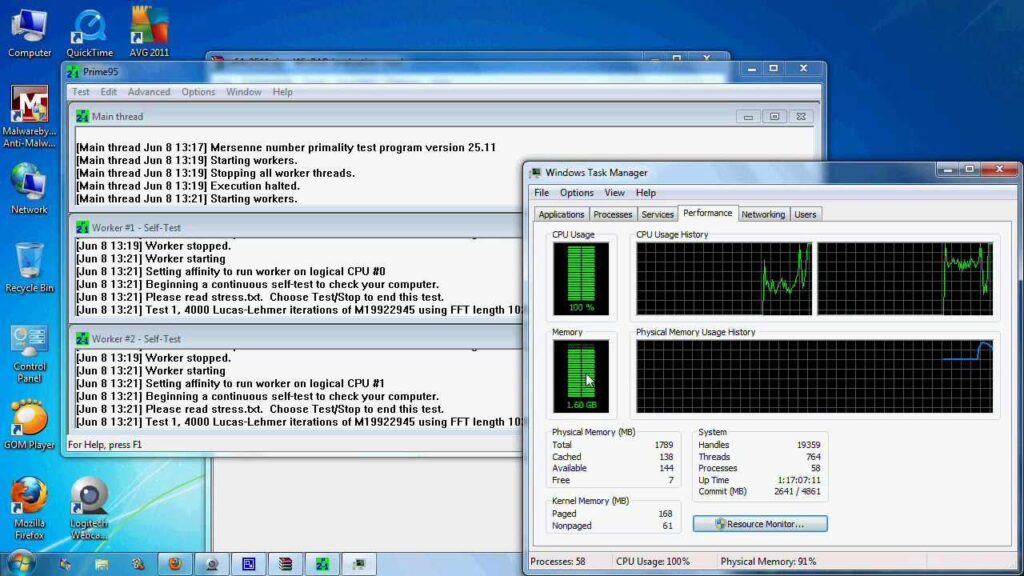
Download Prime95 - a software application designed to stress-test computer systems to identify weaknesses in system stability.

Maxon
Maxon tools include C4D for 3D modeling, simulation and animation, ZBrush and Forger for 3D modeling, Red Giant tools for editing, motion design and…
cursive epoch
Those are the correct links
plain vortex
Alright I'm downloading them
If the PC doesn't crash on either it should be good right?
cursive epoch
Yeah
You wanna run prime95 for a couple hours at least tho
Small FFT
SSE or AVX shouldn't matter iirc
But don't test AVX 512, your cpu doesn't support that haha
plain vortex
like this then?
 plain vortex
cursive epoch
Those are the correct links
plain vortex
cursive epoch
Those are the correct links
for cinebench default settings right?

multicore
plain vortex
Alright thanks! I'll run cine bench now and leave prime running when I leave in a couple of hours
 tender sleet
Is something like the 14700K still relevant?
For gaming (after the prices kinda bottoming out)
plain vortex
cursive epoch
You're on the right track for both
cinebench is done with no crashing

it got a bit toasty lol

but it's idling a lot cooler now after the undervolt
cursive epoch
tender sleet
Is something like the 14700K still relevant?
Hell no, not with the cpu degradation risk
cursive epoch
plain vortex
cinebench is done with no crashing
Niceee
Also yeah it's easy af to make a zen 2+ cpu run cool at stock clocks with negative CO
plain vortex
cursive epoch
Niceee
do you think it'd be worth trying a -25 or -30 undervolt?
plain vortex
cursive epoch
Also yeah it's easy af to make a zen 2+ cpu run cool at stock clocks with negati...
Yeah it dropped like 10 degrees lol
cursive epoch
If it's stable I don't see why you wouldn't try
plain vortex
Alright thanks!
cursive epoch
Gotta be a bit lucky past 20 tho
plain vortex
I'll try later and see what can I get haha
cursive epoch
gl
plain vortex
Thanks, and thanks for the help!
cursive epoch
yw
 vagrant mist
 sudden creek
cursive epoch
Hell no, not with the cpu degradation risk
sudden creek
cursive epoch
Hell no, not with the cpu degradation risk
That's still not solved? I thought the bios updates were supposed to fix that.
sudden creek
 hollow thorn
it has been fixed
hollow thorn
it has been fixed
Oh that's good.
sudden creek
hollow thorn
it has been fixed
Does 14th gen still perform the same or did it lose performance due to the new bios?
hollow thorn
nothing measurable iirc
sudden creek
That's good at least.
 meager elbow
sudden creek
That's still not solved? I thought the bios updates were supposed to fix that.
meager elbow
sudden creek
That's still not solved? I thought the bios updates were supposed to fix that.
fixed but still a ton of degraded cpus on the used market
sudden creek
Does anyone know if this ram kit has Hynix M Die for the ICs?
https://www.amazon.com/gp/product/B0CQP4KQ36/ref=ox_sc_act_title_1?smid=AWD7GDDT7Q2ZT&th=1

TEAMGROUP T-CREATE EXPERT Overclocking 10L DDR5 96GB Kit (2 x 48GB) 6400MHz (PC5-51200) CL32 M-DIE Desktop Memory Module Ram White - CTCWD596G6400HC32ADC01
At $270 I am tempted to purchase it.
.
Also does anyone know what ICs this kit uses? I have been having a hard time finding any information on that.
https://www.amazon.com/gp/product/B0D2888BLV/ref=ox_sc_saved_image_3?smid=A3TOECTKC4OEBD&psc=1

Ripjaws S5 is a performance DDR5 DRAM memory series made with hand-screened memory ICs that passed G.SKILL rigorous validation tests. Each Ripjaws S5 memory kit strikes an ideal balance between performance, compatibility, and stability and is available in matte black or matte white aluminum heats...
sudden creek
meager elbow
fixed but still a ton of degraded cpus on the used market
Gotcha so avoid the used ones. I am guessing there are those trying to sell the degraded cpus as works like new.
 umbral finch
i wanted to use the 2x4 setup from my last laptop instead of 8 on my new one ( in the mean time to getting 2x8)
but
i thought about
8 + 4 gig setup
whats the worst that can happen!
both are same speed to all i know
meager elbow
Just make sure the laptop does have the 2 sodimm slots and is the same generation
Ram is not compatible between generations
 scenic solar
I tried plugging in antennas to a asrock z370 to get better bt signal, but as I went to screw in the first one the pc shut off.
what's going on?
I think asrock stupid design choices led to the metal shell touching that smd component

it better turn back on
 limber dragon
Given that metal shell is soldered in place, I doubt that's the issue tbh
 lusty wadi
which cpu preform better in gaming ryzen 5 7600x or ryzen 5 7500f or ryzen 5 9600x don't compare the price they the same price were i live just performance (and will like to also compare them with ryzen 5 7600X3D its 100 euro more )
hollow thorn
lusty wadi
which cpu preform better in gaming ryzen 5 7600x or ryzen 5 7500f or ryzen 5 960...
A light game that shows scaling, 7500f is between 12400 and 7600 on the chart.
 scenic solar
limber dragon
Given that metal shell is soldered in place, I doubt that's the issue tbh
scenic solar
limber dragon
Given that metal shell is soldered in place, I doubt that's the issue tbh
it's not the one on the right, but the one as in the picture. apparently the metal shell has a less than 1mm clearance from that component, that after coming loose caused the parts to touch

could have been replaced with a non original one too, it's a 2nd hand mb
seems to be original nvm
 lyric turret
Ofc the 9800x3d goes out of stock when I’m about to order
sudden creek
lyric turret
Ofc the 9800x3d goes out of stock when I’m about to order
RIP, I know the feeling.
sudden creek
Does anyone know why my internet connection has been dropping? I noticed that my pc's internet connection sometimes will disappear and takes forever to come back but by replugging my ethernet cable it immediately comes back. Other devices experience no internet drops.
I am wondering if it's a bad ethernet cable.
sudden creek
Wifi works perfectly fine so far.
Issue seems to be limited to when using Ethernet.
limber dragon
Cable or nic in the board most likely, but chance it's the router too
sudden creek
limber dragon
Cable or nic in the board most likely, but chance it's the router too
Any suggestions on how I can test for the issue? I do not have another ethernet cable on hand currently.
limber dragon
see if the driver is dropping in event viewer, or try plugging it into a different port on your switch
 dusty field
Anybody know what to do when my power reporting deviation hits a high number and shuts off both my monitors and my keyboard and mouse but my pc stays turned on but I cant see anything anymore?
 eternal coyote
Hey guys, anyone knows if this mb supports 9005? https://www.newegg.com/supermicro-h13ssl-nt-amd-epyc-9004-series-processors/p/N82E16813183820
 potent dew
eternal coyote
Hey guys, anyone knows if this mb supports 9005? https://www.newegg.com/supermic...
potent dew
eternal coyote
Hey guys, anyone knows if this mb supports 9005? https://www.newegg.com/supermic...
It says it supports 9004 and 9005 series EPYCs
It uses the same SP5 socket
 mild jackal
eternal coyote
Hey guys, anyone knows if this mb supports 9005? https://www.newegg.com/supermic...
mild jackal
eternal coyote
Hey guys, anyone knows if this mb supports 9005? https://www.newegg.com/supermic...
Yes, but only the revision as noted on the supermicro spec page for that board. I bought one off Newegg and got the 1.0, sadly.

Force flashed it for turin, will fail to boot on any 500w chips
umbral finch
is this bad

i had one of those short m.2 sticks from my and dead laptop
plugged it into my new one
and its always running hot
when i plugged it in , i used tape to secure it , because its too short to be screwed
but it didn't not tape over the things
what were they called?
i only taped it from the edge of the board
will it be safe to use at this temprature
hollow thorn
it's going to be throttling at those temps, best to get a heatsink over it if you can
not harmful to the drive yet at that temp but it'll be throttling to stay under thermal limits
 shut thicket
If it is idle then it seems rather high
 spice fog
can't wait to finish school and see how much of a gain i get from the 200S boost thing
shut thicket
Watching the derbawuer video it looks to be negligible
sudden creek

Thanks to Alienware for sponsoring the video! Learn more about the new Area-51: http://spr.ly/60010J1dJ
Alienware has changed EVERYTHING about the Area-51 Desktop and that's explicitly due to public feedback... how do you think they did?
○ Get your JayzTwoCents Merch Here! - https://www.jayztwocents.com
○ Join this channel to get access to...
lyric turret
im updating my bios but do i put this whole folder inside of my usb\
 lyric turret
?
 thick thorn
Seeing some talk about 14900k and 13900k stability issues. I was planning on buying one of the two for my upcoming build. Do you guys recommend one over the other, or would it be best to skip them entirely? I'm also considering a 9800x3d but it's a bit pricier at the minute.
hollow thorn
thick thorn
Seeing some talk about 14900k and 13900k stability issues. I was planning on buy...
What's your goal for it? The stability issues have been patched out with 0x12b, but in general 9800x3d will perform significantly better in many tasks
thick thorn
I use my pc as a work station as well as for games, things like amd's vivado/vitis/etc
lyric turret
hollow thorn
What's your goal for it? The stability issues have been patched out with 0x12b,...
I have a red light at boot on my mobo any ideas on how to fix it
hollow thorn
thick thorn
I use my pc as a work station as well as for games, things like amd's vivado/vit...
I'm not too sure how well performance in vivado scales with core count or single core perf, safe bet would probably be something like 9900x actually
hollow thorn
lyric turret
I have a red light at boot on my mobo any ideas on how to fix it
if it boots, debug leds cycling through is normal, ignore it
thick thorn
hollow thorn
I'm not too sure how well performance in vivado scales with core count or single...
I'll take a look, thanks! Thoughts on it vs something like the 7800x3d?
hollow thorn
x3d definitely wins for games, but when I used vivado, it did seem to be able to use every core, so I'd say it's definitely possible that you'll see better results with the extra cores with a 9900x
lyric turret
hollow thorn
if it boots, debug leds cycling through is normal, ignore it
Oh bet
It boots I think it stays running but it cycles the lights but then the red boot light just stays red, is it bc I don’t got a usb with Windows yet
hollow thorn
Debug LEDs stay on for whichever step it ran into a problem with
plain vortex
I'm helping a friend configure an 9600x system which of these would this be a good motherboard for it? I'm leaning towards the MSI gaming plus
https://pcpartpicker.com/product/pqkqqs/asrock-b850-pro-a-wifi-atx-am5-motherboard-b850-pro-a-wifi

ASRock B850 Pro-A WiFi ATX AM5 Motherboard (B850 Pro-A WiFi)

MSI B650 GAMING PLUS WIFI ATX AM5 Motherboard (B650 GAMING PLUS WIFI)

Asus PRIME B650-PLUS WIFI ATX AM5 Motherboard (PRIME B650-PLUS WIFI)
 feral anchor
If i could send pictures it would be amazing
feral anchor
plain vortex
I'm helping a friend configure an 9600x system which of these would this be a go...
Brother dont go with asus
Go with msi their very helpful
Customer support
 slender otter
feral anchor
If i could send pictures it would be amazing
slender otter
feral anchor
If i could send pictures it would be amazing
you gotta reach regular rank to do so, so basically staying here and talking for a bit
feral anchor
Ah
slender otter
shouldn't take too long to reach tho
feral anchor
Okay so
plain vortex
yeah, i ended up sending him the msi one
plain vortex
great price for that board
feral anchor
Ram no work cpu error light top nvme slot stopped working for 2 weeks back to normal top pcie stopped working and when i was troubleshooting my pcie slot not working i plugged it into my igpu(I restarted it before dont worry) and when i cut it on BAM black and green lines absolute everywhere
slender otter
feral anchor
Okay SO
to send images use this:https://postimages.org/

Provides free image upload and hosting integration for forums. Free picture hosting and photo sharing for websites and blogs.
slender otter
feral anchor
Ram no work cpu error light top nvme slot stopped working for 2 weeks back to no...
black and green lines..
slender otter
there's no image shown btw...
feral anchor
Damnit
slender otter
lemme send example
feral anchor
When i click on the pictures of it its there but no link or something to copy
slender otter
supposed to be something like this:
 feral anchor
Oh
slender otter
ok now i see it
feral anchor
Ignore crap camera its a iphone X
slender otter
have you tried using one ramstick?
feral anchor
Yes
slender otter
and you inserted into each slot one by one?
slender otter
what about the other sticks?
slender otter
icic
feral anchor
Same thing all around
feral anchor
feral anchor
The ram errors stopped after using the white one
But started up again a few days later
slender otter
that red light is for CPU or RAM?
feral anchor
CPU
slender otter
ok
feral anchor
but thats pretty common from the youtube videos ive seen
slender otter
one second, looking through the manual
feral anchor
Manual? Whats that dont use the M slur 🥀🥀
slender otter
bruh
feral anchor
Lol im messing with i
slender otter
ik
feral anchor
U i read the manual how i found out i was missing the nvme screws
slender otter
interesting
yea you gotta leave the nvme screwed down tight
leaving it loose will introduce problems
feral anchor
Yea asus customer support told me to BUY!!!!!! BUY I TELL YOU!!! Corsair gave me stuff tghat i was missing they dgaf abt a “warranty”
Dont worry
I REFUNDED most of my steam libary to pay out of pocket 15$ for a screw pack
😤
feral anchor
Also another note it took me a hour to find asuses customer support i clicked on link sent me to another and so forth
Static
The dram flashes but only on startup when it trains or whatever
Unfortunately my motherboard is used and was used for gpu testing
So maybe that has something to do with allthus
slender otter
maybe but if you're getting those green lines from igpu on display that means something in the cpu might be borked
or it could be the faulty memory
Install the white ram stick on the most stable slot (so you can boot), and try to reseat the cpu
feral anchor
Man they are all funky slots
I might just save up and buy new motherboard cpu and ram
I have literally 0.00
$
slender otter
feral anchor
$
do you still have ur old build?
slender otter
it may suck but it works
slender otter
also congrats, ur a regular
 slender otter
you can post images now but please do it in moderation AND know the rules
feral anchor
Radeon7850 gtx 770 and 4099
slender otter
feral anchor
hold up
feral anchor
Yeppers
slender otter
install GTX 770 to new pc
feral anchor
Thats what i was using lmao
slender otter
so did you plug into igpu or gpu?
feral anchor
I have a 200$ case (hyte y60) and a 150$ chair
Iglu
Gpu no displau but was booting with sounds of w11
Google ai (ikik i hate to even mention ai) said cpu error
slender otter
did the GTX 770 work on your old build?
slender otter
☠️

 slender otter
ok, so when you boot with igpu you see those awful green lines
feral anchor
Was only once
OKAY SO
LET ME MENTION
it booted without cpu error that time
I restarted it and was back to cpu light
slender otter
something is wrong with either the cpu or ram
feral anchor
100%
slender otter
i really do think you should try reseating the cpu
who knows
it could be bad contact
feral anchor
I already tried twice
And inspected pins
All look fine
Except for one but its like that on both sides so ig its normal
slender otter
do u have any other ram sticks
slender otter
cooked
feral anchor
Probably not
slender otter
ok, if possible can you try to boot into windows with ur igpu?
and attempt to install GTX 770 drivers?
feral anchor
Lol
Their up to date
They stopped in loke 2022
Its my motherboard my gpu is fine
Either mobo cpu or ram
slender otter
not asking if its up to date but if its installed on ur system (probably is)
feral anchor
Ye
Yes
How do i know?
When I upgraded to ssd and tried to play a game lets just say a jar of peanut butter could have ran it better
So i tried a very EASY to run game and it sucked
So i looked at my windows updates and whadaya know they cancelled before finishing
slender otter
lol
feral anchor
My cpu is 13$
Which is very lucky for me
My motherboard not so much i found one for 50$ but i dont have a dollar to my name
I want to buy the motherboard incase there is something wrong with the motherboard
slender otter
ok is there a setting in ur bios where you can switch igpu to gpu?
feral anchor
Probably so but i dont feel like doing it
feral anchor
My gpu is 100% fine
Its been tested to the absolute maxinum in sons of the forest
A pretty hard to run game for my gpu
But it does it on ultra settings at 30 solid fps
Some frame spikes when turning around tho

This has got to be a cpu error i have never gotten this on my gpu ONLY when i switched to cpu
slender otter
not much i can do but to upgrade or replace most of them someday
feral anchor
Yep
Me and my gtx 770 against the world man ✊😔
Looking at a 3060 if i can round up 350$ want the asus tuf but that would go against my no asus policy
slender otter
feral anchor
Me and my gtx 770 against the world man ✊😔
lol, hope u can find a solution. Welcome to newegg
slender otter
not sure but funnily enough i also joined years back foor a goveaway
feral anchor
Lmfao
slender otter
now its kinda my main server i frequent
feral anchor
It was a white pc build i think
Prettt high end stuff cant rmb the details thooo
My gtx 770 and radeon7850 are basically the same age 2 years apart i think 770 absolutely beats the breaks off the 7850 in terms of performance i can run every game i own at absolute maximum 7850 couldnt even do high on the forest
Was my first gpu only got it because it was the desktop version of the gpu in the ps4
slender otter
mmm i see
feral anchor
Yep i also have a xbox
Which is where i play games on the most
Did i mention i DONT have wifi lol
Only cell service good ol louisiana
Wifi setup cost is 800$ for 20mpbs
 hollow jolt
been getting bsod due to memory issue, might need to buy new memory?
 hollow thorn
hollow jolt
been getting bsod due to memory issue, might need to buy new memory?
hollow thorn
hollow jolt
been getting bsod due to memory issue, might need to buy new memory?
Run tm5 and see if it errors out
If not, most likely driver issues
 twilit kite
Gigabyte b650m mobo secretly disable pbo

 sudden creek
hollow jolt
sudden creek
hollow jolt
extreme is a good choice
 scenic solar
if on a motherboard I'm missing a few VSS and DDR1_DQ/DQSP/DQSN pins, how likely is it that only the first ram slot will be affected? maybe the entire channel? or will it not boot at all?
these are the affected pins, none is actually broken but i feel like some are bent past repair. lga1200 socket
 hollow thorn
scenic solar
these are the affected pins, none is actually broken but i feel like some are be...
hollow thorn
scenic solar
these are the affected pins, none is actually broken but i feel like some are be...
Generally there's some redundancy with vss pins, but that's a whole group of missing vss pins, so there's a good chance that it'll just not boot, if it does, it's a pretty good chance the entire ram channel is unusable
scenic solar
thanks, i'll try my best to fix those pins, i'm sure two of them will break. Just need to be careful and patient...
mild jackal
For things like VSS/GND, if the pin looks like it'd be risky to try and fix, I'd just snip it with flush cutters and hope for the best
scenic solar
i always try my best to bend them back in place, those that break, well... they just won't be repairable
I also make sure none are short circuited otherwise things can only get worse
I just fixed a lga775 mb, but i think one ram slot is dead after being powered on with a single bent and shorted pin
I cannot find a clear lga775 socket pinout tho
scenic solar
dayum
 scenic solar
idk i got this motherboard as not working for 40€. they said dram led was on after case swap. maybe they hit a standoff when moving the parts
back m2 slot also has minor damage but not to the pins
the broken chip is on the back side of the dimm slots so that explains something
problem is I don't even know what I have to buy as replacement
schematics are 10$ :[
meager elbow
they had too much
 sudden creek
I have finally done it.

Purchased the 7950X, I am going to use it to confirm my booting problems >> claim warranty >> then reuse it as a server cpu.
sudden creek
.
Submitted the claim to get this damned 7950x3D warrantied.
 rocky iron
does anyone think my i7 12700k is the reason why Im not getting enough frames in game? I got a 4070ti, i think my gpu is a little too powerful-
sudden creek
rocky iron
does anyone think my i7 12700k is the reason why Im not getting enough frames in...
game, resolution, and current framerate?
I assume you have things on max settings.
rocky iron
Actually dont have them on max, have on high so I can get some more frames
Its fortnite, 1080p and getting like 160 average
Reaches like 200 when nothings happening
My cpu usage is just high and my gpu is a little lower usage
sudden creek
160-200 seems about right for Fortnite.
cursive epoch
fortnite is weirdly hard to run
so that's normal
especially at max
high is also fairly heavy too
sudden creek
rocky iron
is my cpu still underpowered for my gpu?
a bit but nothing much
rocky iron
alright
scenic solar
could these damaged traces behind a mb stop it from working?
 scenic solar
its from a lot of motherboard labeled as "untested"
from my experience untested ones usually end up being completely dead and its just a way for the seller to get a few bucks extra
i can get that one for 20€, asrock b365 lga1151
 drowsy nymph
scenic solar
could these damaged traces behind a mb stop it from working?
drowsy nymph
scenic solar
could these damaged traces behind a mb stop it from working?
Definitely looks like there’s damage to the traces. I wouldn’t risk it. You can see metal exposed.
Find one with bent cpu pins you can fix. That’s much easier.
 steady wigeon
Is there really a feature on AMD chips where a manufacturer could lock out a CPU from being used on a different device?
or are they just over exaggerated thoughts
meager elbow
steady wigeon
Is there really a feature on AMD chips where a manufacturer could lock out a CPU...
Lenovo used it
Not really anybody else did
scenic solar
drowsy nymph
Definitely looks like there’s damage to the traces. I wouldn’t risk it. You can ...
ok, its a low end mb too. not worth 20€
I've got better deals for far less
thank you
 wind karma
steady wigeon
Is there really a feature on AMD chips where a manufacturer could lock out a CPU...
wind karma
steady wigeon
Is there really a feature on AMD chips where a manufacturer could lock out a CPU...
Haven't personally heard about locking the cpu but they can certainly lock the motherboard socket (usually done for thermal/tdp reasons)
 brittle minnow
I got a problem. I have a msi meg x570 ace mobile and I was updating the bios when the power to the house turned off for a couple minutes. Nobody want boot up even though I pushed the clear cmos button. The mobile is throwing a error code 45 ( memory).
scenic solar
scenic solar
these are the affected pins, none is actually broken but i feel like some are be...
so far i fixed a few pins, yellow ones have a bent or broken head so i'm not 100% sure they'll work, while orange ones broke off

i still expect channel 1 not to work, hopefully nothing else is affected
sudden creek
It's here!
Got it refurbished from Newegg for $357 total and received it after 4+ calls to UPS regarding the carrier not showing up to my home.
 sudden creek
I also got 5 8GB DDR4 SODIIM RAM sticks today for doing some ram sorting for a computer shop today as a gift/payment.
spice fog
sudden creek
I also got 5 8GB DDR4 SODIIM RAM sticks today for doing some ram sorting for a c...
whats the 5th one for lol
 warm dune
So I got curious and decided to look around the pbo settings for my motherboard and realized they were mostly all off. I turned them on and set pbo limits to motherboard spec and the ppt went from 90 to 395. Is that 395 how much the cpu is allowed to ask for or is it how much the motherboard will tell the cpu to draw?
wind karma
warm dune
So I got curious and decided to look around the pbo settings for my motherboard ...
afaik PBO has the cpu draw as much as it wants as long as it is under the thermal limits
warm dune
Ah so then no problem nice. Thanks
wind karma
so it's not going to get anywhere near 395 (except subzero cooling maybe?) but given proper cooling it might go over 90
warm dune
Looks like with the cooling I have under full load at an average of 4.3ghz it doesn’t really go over 80c from what I understand going over 4.4 is unstable so looks like this is the most I’m getting out of this cpu
wind karma
yeah manual OC might squeeze out a bit more but typically PBO and good cooling gets you most of the way
 gritty pagoda
Need help underclocking / undervolting my 14600K in ASRock bios?
Is there any basic changes I can make to lower its power consumption / temperature?
I mostly game with some light workstation stuff.
sudden creek
spice fog
whats the 5th one for lol
2 are matching kits, and 1 is a backup incase one of the matching kits has an issue.
spice fog
Oh, w
 scenic solar
what could be the problem if an i5 7500 tops out at 40w even with prime95?
 rain badger
Possibly a power limit
scenic solar
are the pins under the am4 socket easier to repair compared to lga sockets?
as long as they're just bent and not broken
gritty pagoda
Is disabling some E-cores on my i5-14600K safe?
Using a ASRock B760M PG Riptide.
 thorn pulsar
Hello. Just joined. I'm wanting to upgrade my desktop from a windows 10 to windows 11. Need to change cpu, motherboard and what else? Not a gamer, just productivity work at home, internet surfing and the like.
built the system about 8 years ago using a newegg spec sheet. Tried using the AI upgrader and that wasn't very good at all. I'd like to change as little as possible on this system. Right now I have
Intel(R) Core(TM) i3-7100 CPU @ 3.90GHz, 3900 Mhz, 2 Core(s), 4 Logical Processor(s)
Installed RAM 16.0 GB
Storage 466 GB SSD MKNSSDRE500GB, 466 GB HDD WDC WD5000AAKX-083CA1, 932 GB HDD WDC WD10EZEX-75WN4A0
Graphics Card NVIDIA GeForce GTX 1050 Ti (4 GB)
BIOS American Megatrends Inc. P2.10, 4/17/2017
ASRock BaseBoard Product B250M-HDV
OS Windows 10 Home
64-bit operating system, x64-based processor
what would you recommend ?
sudden creek
thorn pulsar
Hello. Just joined. I'm wanting to upgrade my desktop from a windows 10 to win...
You will need to upgrade to a modern CPU which will require a board and likely a ram change as well. Since your not gaming a low end chip will more than suffice. What is your budget?
thorn pulsar
I'd like to keep it less than $500.
sudden creek
thorn pulsar
I'd like to keep it less than $500.
That is definitely doable.
Any aesthetic preferences? I can help pick out some parts for you when I am off work later.
thorn pulsar
not really.
I've got a rosewill case with a couple of CD RW drives in it and a wifi-6 adapter. if you think of anything else let me know. thanks for your help.
sudden creek
Do you have any thermal paste meant for CPUs on hand?
Do you mind if I DM you the list later?
I need to get back to work now.
thorn pulsar
no thermal paste on hand. I do have a static bracelet. Send me the list when you can, no worries. work comes first! TIA
sudden creek
@stiff kraken
New account created today, just joined this server today, and more than a bit fishy with that message.
 upper aspen
 prisma hill
what do you guys think of this ram and mobo for 5600x

G.Skill Ripjaws V 32 GB (2 x 16 GB) DDR4-3200 CL16 Memory (F4-3200C16D-32GVK)

Asus PRIME B550M-A WIFI II Micro ATX AM4 Motherboard (PRIME B550M-A WIFI II)
sudden creek
prisma hill
what do you guys think of this ram and mobo for 5600x
https://ca.pcpartpicker.c...
should work fine.
prisma hill
thanks
spice fog
do i need a special mobo for a NAS
 midnight pollen
Not really you can use pretty much anything. But if you plan on expanding your nas connectivity on mobo can be very important. The number of pcie slots, sata ports, etc
spice fog
also should i get a pcie expandable storage card? or just stick to m.2s and satas?
midnight pollen
Pcie is nice if you want to use different drive controllers, network cards, gpus, or ye just add more m.2 if you really need it. Ofc i would do research first to see what you really need and if you should leave room for expandability later
 ashen anvil
gritty pagoda
Is disabling some E-cores on my i5-14600K safe?
Using a ASRock B760M PG Riptid...
ashen anvil
gritty pagoda
Is disabling some E-cores on my i5-14600K safe?
Using a ASRock B760M PG Riptid...
yes but you dont usually need to
benchmarks show e cores on is better fps
gritty pagoda
i disabled 4 E cores
small different in temp
no difference in performance
not hitting 70s anymore
prisma hill
What do you guys think of the b350m gaming pro
I heard it has issues with cpu power among other things
id prob use a 5600x with it or 3600
sudden creek
prisma hill
What do you guys think of the b350m gaming pro
I heard it has issues with cpu ...
This is for a new build or are you trying to reuse parts?
prisma hill
sudden creek
This is for a new build or are you trying to reuse parts?
Trying to build a pc to sell, saw someone selling that mobo for 60 cad
prisma hill
So I'm wondering if that kind of mobo has issues bc if so I prob won't put a 5600x in it and would instead make a lower end pc
 frail kettle
My pc memory is reading 2666 mhz but i bought gskill trident 4400 mhz. Am i wrong for thinking my sticks are running slower than they should
wind karma
frail kettle
My pc memory is reading 2666 mhz but i bought gskill trident 4400 mhz. Am i wron...
You likely need to go into the bios and set the XMP speed
frail kettle
wind karma
You likely need to go into the bios and set the XMP speed
i am pretty sure ive done that
maybe i have the sticks in the wrong slots
for dual channel
wind karma
Sometimes the monitoring will show 1/2 the speed for unit reasons but 2666*2=5332
frail kettle
Is that only if thhe sticks are set in the dual rank channels
or it doesnt matter which sltos they are in
wind karma
Idk if wrong slots messes with speed specifically but you could try
It should be in slots 2 and 4
frail kettle
i think mine are in 1 and 2
wind karma
1 is closest to cpu socket and 4 is furthest
frail kettle
So this may be ther problem
wind karma
Yeah try 2 and 4, double check what it says in the bios as well
frail kettle
This is from the manual... so i think i have it set wrong
 limber dragon
what cpu and motherboard are you expecting to run 4400mhz on?
 woeful zinc
my little bro's H510M-D seems to be fried, what mobo should he get? budget ~$60 but preferably less
I3-10100f
cursive epoch
another h510 would work
or h610
try to go for used
wait h610 is lga 1700, disregard that

ASRock H510M-HDV/M.2 SE Micro ATX LGA1200 Motherboard (H510M-HDV/M.2 SE)
woeful zinc
cursive epoch
https://pcpartpicker.com/product/3Yrp99/asrock-h510m-hdvm2-se-micro-atx-lga1200-...
thanks!
as long as it's reliable enough
cursive epoch
shouldn't have any issues with a 10100f
woeful zinc
cursive epoch
shouldn't have any issues with a 10100f
preferably asrock? gigabyte sells one for slightly less than $60
asrock sells it for about $75
woeful zinc
alright, thanks for the needed help!
 cobalt harness
Intel Core i9-14900K or AMD Ryzen 9 9950X and why
wind karma
Intel because 14900 > 9950
sudden creek
cobalt harness
Intel Core i9-14900K or AMD Ryzen 9 9950X and why
What is the use case?
cobalt harness
sudden creek
What is the use case?
gaming. minecraft with shaders, roblox, and mainly microsoft flight simulator 2024
wind karma
cobalt harness
gaming. minecraft with shaders, roblox, and mainly **microsoft flight simulator ...
afaik none of those will benefit from that many cores
7800x3d would be the one to get
cobalt harness
wind karma
afaik none of those will benefit from that many cores
yeah but flight sim is quite intensive
wind karma
bro did not read what I sent
cobalt harness
i did
wind karma

Ryzen 9 9950X vs Ryzen 7 7800X3D l 1080p
Buy Ryzen 9 9950X at newegg.com - https://bit.ly/3Av13mv
Buy Ryzen 7 7800X3D at newegg.com - http://bit.ly/43e3VxW
Games :
Forza Horizon 5 - 0:00
Microsoft Flight Simulator 2020 - 1:03
CYBERPUNK 2077 - 2:00
Red Dead Redemption 2 - 3:06
The Witcher 3 - 4:07
Ghost of Tsushima - 5:10
Hogwarts Legacy - 6:0...
cobalt harness
i currently have a i9 9900k which has 8 cores and msfs 2024 runs bad
cobalt harness
wind karma
https://youtu.be/VsdYnIpHSmA?t=66
this video doesnt make any sense. why does the ryzen 7 get more fps than a newer model
wind karma
x3d has more l3 cache which helps in games
cobalt harness
wind karma
x3d has more l3 cache which helps in games
what is equal to a i9 14900k
sudden creek
cobalt harness
this video doesnt make any sense. why does the ryzen 7 get more fps than a newer...
Notice the X3D at the end of that model's name. In short, all chips hace Cache which asks as fast access memory. More cache = less crucial info needs to be stored on the ram allowing the chip to grab said info and process it quicker.
9950X has higher clock speeds but less cache.
sudden creek
cobalt harness
what is equal to a i9 14900k
14900K is not the fastest from Intel's current lineup either.
Anyways, if your just gaming than grab a 9800x3D or 7800x3D.
cobalt harness
sudden creek
Anyways, if your just gaming than grab a 9800x3D or 7800x3D.
how about AMD Ryzen 9 9950X3D?
it has a x3d
sudden creek
Unless you do any sort of workstation application such as 3D Design, Simulations, etc, you won't notice a difference.
the 9950x3D is a split hybrid design, it has two sets of cores called chiplets, 1 chiplet has the X3D while the other is the same as a 9950X.
cobalt harness
sudden creek
Anyways, if your just gaming than grab a 9800x3D or 7800x3D.
the 900x3d is not even on the websitre
cobalt harness
sudden creek
Anyways, if your just gaming than grab a 9800x3D or 7800x3D.
or atleast on microcentger
sudden creek
It sells out regularly.

Welcome to the new era of performance. AMD Ryzen 9000 Series ushers in the speed of “Zen 5” for gamers and creators with pure power to tackle any game or workflow on the digital playground.
I need to go now, but the two I mentioned are your best options if your just gaming.
 kindred bear
what was the "sweet spot" for the 5800X3D for RAM Mhz? like how 6000mhz is for AM5
 dim cloak
kindred bear
what was the "sweet spot" for the 5800X3D for RAM Mhz? like how 6000mhz is for A...
dim cloak
kindred bear
what was the "sweet spot" for the 5800X3D for RAM Mhz? like how 6000mhz is for A...
3600mhz cl14 or 16
kindred bear
dim cloak
3600mhz cl14 or 16
thats where the memory controller is in sync right
dim cloak
correct
scenic solar
will any IC-DRAM work on a ThinkPad 340 (2610) as long as it is 8mb or less?
I didnt even know about this ram form factor before and i want to be sure about compatibility with pinout and specs
 lime parcel
So I'm noticing that the idle temps on my 7950x3d seem high lately, after installing my 9070xt. Idle temps sit around 46 on boot, but after working or gaming idle temps creep up to about 56 and will not drop back down even after long stretches of inactivity. Cooler is a Noctua NH-D15.
limber dragon
your gpu is dumping heat into the case and you need better idle airflow
lime parcel
That was my first suspicion but I don't think that's the case. Even cranking my case fans up to max RPM for several minutes results in no temperature change.
lime parcel
And I'm guessing these things don't typically idle around 50 C.
spice fog
Get an aio
lime parcel
Should an NH-D15 not be plenty adequate for this CPU?
hollow thorn
An aio might help, D15 is good but 7950x3d idles pretty hot in general
lime parcel
Hot is fine, I guess I'm just curious if ~50 C idle temps are normal for this CPU
hollow thorn
It's a common complaint lol
lime parcel
Really? That hot?
hollow thorn
as long as it doesn't get too hot under load it doesn't really matter
lime parcel
I mean, it'll thermal throttle at like 85 or whatever. I just feel like the thermal performance was better before I put the 9070 in.
mild jackal
Tctl/tdie is showing the hottest temp from over 100 sensors across the CPU. High idle temp is a non issue if power draw is normal.
hollow jolt
I keep getting BSODs, and the error seems to be related to a memory issue. I've tested the memory, and it appears to be fine, so it's probably a software issue. I ran sfc /scannow and checked Device Manager for any yellow warning triangles, but no problems showed up. I don’t know what else to do to stop the BSODs. I could just ignore it and keep restarting my PC, hoping it turns back on, but it's really annoying.
sudden creek
lime parcel
That was my first suspicion but I don't think that's the case. Even cranking my ...
Ambient temp? Also try opening the side panels at full speed just to test
sudden creek
lime parcel
Hot is fine, I guess I'm just curious if ~50 C idle temps are normal for this CP...
What are your load temps?
But honestly your idle doesn't seem that bad.
360mm aio in push/pull with PTM7950 with ambient temp around 15c my 7950x3D idles around 40c give or take and that's with fan speeds around 80%.
lime parcel
sudden creek
What are your load temps?
My load temps tend to shoot right up to 75 almost regardless of what I’m doing. I suspect it only stops there because I have my PBO set to throttle at 75.
 tawny brook
Hello, I recently bought a b650 Aero G, but the rear USB-C port doesn't work, is there a fix for it?
wind karma
lime parcel
My load temps tend to shoot right up to 75 almost regardless of what I’m doing. ...
Am5 CPUs are meant to go straight up to the throttle limit, by default 95C I think? You're just hurting perf by limiting it to 75
AMD.com
At AMD, we’re extremely proud of what our engineers accomplished with the new Ryzen 7000 series processors and platform from all angles. Whether it’s performance, efficiency, or longevity, this is just a killer processor. But to push the boundaries, you have to break convention sometimes, and that c...
Wait bro you have a 7950x3d and are worried about temps 😭😭
Oh I guess only the non-x3d has the 170W TDP
x3d is still 120W though and can pull up to 140ish
lime parcel
wind karma
Am5 CPUs are meant to go straight up to the throttle limit, by default 95C I thi...
I am aware, but summer is here so I’m trying not to turn my room into a greenhouse.
wind karma
So you should really care about power draw and not temps
Could try undervoltimg maybe
lime parcel
I have my PBO offset at like -20 on the vcache CCD and -5 on the regular one. Can’t seem to get more than -5 on that one though
 bitter portal
hi i have a question i already have a z490 plus tuf gaming mother board and a case and a psu i also have an i5 10400f with 16gb ram with gtx1650 oc and a budget of 300 bucks max what parts do you think i should upgrade can i get a good cpu gpu combo with that price?
wind karma
bitter portal
hi i have a question i already have a z490 plus tuf gaming mother board and a ca...
Keep the 10400f and spend the $300 on a used 6700xt
sudden creek
wind karma
x3d is still 120W though and can pull up to 140ish
Can pull 200 watts give or take if not power limited.
7950X will draw 250 watts give or take if not power limited.
wind karma
Wow
sudden creek
wind karma
Wow
My 7950x will chug down roughly 261W peak and 243W sustained under all core loads.
bitter portal
wind karma
Keep the 10400f and spend the $300 on a used 6700xt
Wouldnt a 3070ti be better its pretty much the same price in my country
wind karma
It's a bit faster but also only has 8gb of vram
sudden creek
Guess it comes down to your resolution then.
wind karma
At 1080p 8gb is okay for most games but I'd probably reccomend going with the 6700xt cause 12gb will have you totally set at 1080p and also pretty good at 1440p
sudden creek
I finally received my replacement from AMD and got an upgrade as well!
7950x3D to 9950x3D.


 sudden creek
I finally received my replacement from AMD and got an upgrade as well!
7950x3...
sudden creek
sudden creek
I finally received my replacement from AMD and got an upgrade as well!
7950x3...
@stiff kraken @wind karma
sudden creek
Took a lot of convincing.
I am gonna install it later this week.
I look forward to the performance and oc gains.
I definitely will need a GPU upgrade soon lmao.
wind karma
yeah not sure you'll see much of a perf uplift with the 3070
in cpu workloads i guess but not gaming
sudden creek
I need some help, @wind karma, @stiff kraken.
Is there a way for me to do a fresh windows install or reset without losing any of my files on the boot drive?
I plan to swap to the new CPU today so I was thinking a fresh install might be a good idea alongside a bios update.
wind karma
sudden creek
I need some help, <@358383085181730826>, <@122901618369757184>.
Is there a way ...
You can, though I believe it's not quite as good as a true fresh install
Going from 7950 to 9950 I wouldn't really worry bout it though
sudden creek
Gotcha alright.
 magic panther
Anyone about that wouldn't mind helping me out. I'm needing to upgrade my cpu and maybe even the motherboard if that's needed. But not exactly sure to what. there's three things keeping me from upgrading to windows 11
sudden creek
Budget and PC use?
midnight pollen
it's prob tpm is my guess
scenic solar
will a Samsung kmcj 5322000-08 icmc v4.1 something ram be compatible with a ThinkPad 340 type 2610?
 shy wyvern
$150 5500x3d about to go crazy for am4 users with 2600/3600
Idk why they didn't do a press release for it
wind karma
^for anyone curious about a comparison, it's a 5600x3d but instead of 3.3-4.4ghz it's 3-4.0
wind karma
Not seeing any source for a $150 msrp
shy wyvern
It was on one of the articles I read, idk where they got it
wind karma
Probably more like $175-200, seeing as 5600x3d was very limited run and 5700x3d is $250+
 shy wyvern
Yeah the article I was seeing was doing currency conversion
But the issue with that is, U.S. has tech tariffs
So it's not as simple as just importing chips at same cost
Shipping + tariff
I was hoping for cheap bundle too from microcenter
Although microcenter currently has 7600x bundles for $250 I don't think it'll be worth it for bundle when am5 is so cheap now
wind karma
Yeah at this point AM4x3d should really only be for people who already have an am4 system and want a drop in upgrade
shy wyvern
And tbh if someone is already on am4
I'd just bite the bullet at this point
AM5 already 3 years old
sudden creek

Tom's Hardware
Impacts most, if not all, CPUs from Zen+ through Zen 5 architectures.
 fickle swallow
Does anyone know What is the best intel cpu is for the price/performance is for this mobo
MSI B460M PRO-VDH WiFi ProSeries Motherboard
Get amd
fickle swallow
spice fog
Get amd
mobo doesnt support amd i think
fickle swallow
spice fog
Exactly, it's a intel 10th gen board
so jus replace the mobo and cpu then?
spice fog
Wait you already have the board?
fickle swallow
spice fog
Wait you already have the board?
yes trying to upgrade the pc
spice fog
..ah
fickle swallow
mb shoulda said that
spice fog
yeah i was gonna say why u buyin a 6 yr old cpu
fickle swallow
spice fog
probably, but if you wanna keep it, i'd say 10700
10700KF?
was looking at that one just a bit ago
 little wigeon
Is there a gamer friendly amd cpu better than my 3600 for under $200
sudden creek
fickle swallow
if I were to upgrade the mobo, whats a decent one
Any B650/X670/X670E motherboard will work fine with 7000 or 9000 series Ryzen CPUs so long as they aren't the 12 or 16 core ones. For 12 core and above ones I suggest a X670 or X670E board as those tend to have better VRMs for power management. Avoid Asus Prime motherboards or the ones that don't have heatsinks covering the VRMs. The little round or square things generally top left side of the board.
I am intentionally recommending the boards that are 1 gen old as that will save you a good bit of money without any performance loss. The only difference on the newer boards are looks and that they have USB 4 I think it was.
sudden creek
little wigeon
Is there a gamer friendly amd cpu better than my 3600 for under $200
200 is the max budget?
If so I'd look towards a 5800x3D/5700x3D/5600x3D. Used is probably the best route if your budget is small.
little wigeon
Thank you
sudden creek
 autumn spade
Anyone using the asus crosshair x870e apex?
autumn spade
Anyone using the asus crosshair x870e apex?
No point unless your willing to tune the board and spend a month tuning the CPU and RAM as a whole.
 proven nest
I've got a Windows PC here that hasn't turned on properly in 2 years. It turns on but the GPU doesn't have power and my keyboard does not light up. I took it to a PC tech months ago and he says it could be a power supply issue, but I think it's a motherboard issue since my PSU was bought brand new and the motherboard is 2nd hand and not that good; it also turns on so I don't really think it's the PSU-- unless I'm wrong. What can I do?
Specs
CPU: Ryzen 3 1200
GPU: Biostar Radeon RX560
MOBO: Asus Prime A320M-K
PSU: Silverstone ST50-F
RAM: x1 HyperX Fury 8gb 2666mhz
 split copper
you can test the supply with another board if you have a different computer on hand
pictures of the psu don't inspire confidence in me...
there are multiple st50fs out there so if you can get the full label info that would narrow it down
lemme look at the new psu tier list
limber dragon
I have a PSU that doesn't supply enough 5v and RGB keyboards don't work with it. It'll power a computer without issue and stay on for weeks at a time, but keyboard no work
spice fog
proven nest
I've got a Windows PC here that hasn't turned on properly in 2 years. It turns o...
Dude just get a new computer how old is that thing😭
split copper
not older than my old ones
proven nest
spice fog
Dude just get a new computer how old is that thing😭
Im broke as hell dawg 😭
spice fog
Buy some money trust🔥
sudden creek
spice fog
Buy some money trust🔥
Smells of investment.
 glad quest
Idk if this is the right place to ask but would this motherboard be ideal for a 9800x3d + 9070 xt build?
ASUS TUF GAMING B850-PLUS WIFI AMD AM5 B850 ATX motherboard, 14+2+1 80A stages, AI Ready, DDR5, PCIe 5.0 , 3x M.2, Wi-Fi 7, 2.5Gb LAN, DisplayPort, HDMI, USB 10Gbps & 20Gbps Type-C, BIOS FlashBack https://www.newegg.com/asus-tuf-gaming-b850-plus-wifi-atx-motherboard-amd-b850-am5/p/N82E16813119705?tpk=1&item=N82E16813119705
Want to pair it with these
G.SKILL Flare X5 32GB (2 x 16GB) 288-Pin PC RAM DDR5 6000 (PC5 48000) Desktop Memory Model F5-6000J3038F16GX2-FX5 https://www.newegg.com/g-skill-flare-x5-32gb-ddr5-6000-cas-latency-cl30-desktop-memory-black/p/N82E16820374457?tpk=1&item=N82E16820374457
hollow thorn
glad quest
Idk if this is the right place to ask but would this motherboard be ideal for a ...
It would work fine, but it's pretty expensive, you can get something like this that is significantly cheaper at $140 while having pretty similar features
https://www.newegg.com/gigabyte-b850-eagle-wifi6e-atx-motherboard-amd-b850-am5/p/N82E16813145547
hollow thorn
glad quest
Want to pair it with these
G.SKILL Flare X5 32GB (2 x 16GB) 288-Pin PC RAM DDR...
The ram is good but you can also get the same performance for $10 cheaper
https://www.newegg.com/team-group-t-create-expert-32gb-ddr5-6000-cas-latency-cl30-desktop-memory-black/p/N82E16820985077
glad quest
Oh wait nvm 😭
glad quest
hollow thorn
It would work fine, but it's pretty expensive, you can get something like this t...
Would this work out the box with a 9800x3d?
sorry for the pings
I know the asus tuf mobo does
hollow thorn
glad quest
Would this work out the box with a 9800x3d?
It's supported out of the box for every bios version
glad quest
Okay thanks
sudden creek
.
Test
I am reading about Asus's NitroPath DRAM layout for their high end motherboards such as the X870E Extreme, Apex, Hero, Strix E-E. And here's an image showing the main thing they did differently to the slot aside from better traces in the board.

NitroPath DRAM Technology gives gamers next-level memory performance and stability so that they can fully unleash their DDR5 kits.

Apparently the Gene does not feature their NitroPath DRAM which means the Asus X870E Apex is probably the better overclocking board now since that's a 2 Dimm board.
 storm spoke
Hello, I'm helping my friend build his pc, and he's getting a solid red and orange light on his computer, any reason why?
Getting mixed responses, saying that the computer needs time for it the CPU and ram to acknowledge the pc, the other half says the there's a seating issue with the ram and cpu
hollow thorn
storm spoke
Hello, I'm helping my friend build his pc, and he's getting a solid red and oran...
assuming it's the debug LEDs, check the manual for what the lights refer to, it's normal to cycle through the debug LEDs on boot until it gets stuck on something, and only the light it stays stuck at matters
storm spoke
hollow thorn
assuming it's the debug LEDs, check the manual for what the lights refer to, it'...
We got it
Ram stick location was in channel 1 and 3
We changed it to 2 and 4
And it worked
 icy field
Anyone around to talk about ram timings?
Just kinda wanna figure out what would be more stable for my ram kit... ive been getting hard crashes and now im thinking its probably ram related.
but I think my kit isnt really being stable right now due to AMD...
Heres my kit 30-40-40-96
Currently running it at EXPO speeds. Should I keep the timings and drop it to 5800mhz or any recommendations?
sudden creek
icy field
Anyone around to talk about ram timings?
Just kinda wanna figure out what would ...
What is your cpu's vSOC voltage at?
I assume you're using an AM5 CPU?
 steep atlas
Anyone ever come across an issue with MSI motherboards that the pc will fail to boot and will give an error message stating that the XMP profile failed and being you into the bios? Any idea what could be causing that? The ram is rated up to 6000 mhz but defaults to 4800 mhz when xmp profile is off. Maybe the voltage is too low?
MSI B760M-VC Wifi Motherboard, intel i5 14400f and the XMP rating on the ram is XMP 3.0.
hollow thorn
What exact ram kit do you have?
hollow thorn
steep atlas
Anyone ever come across an issue with MSI motherboards that the pc will fail to ...
It just seems like the ram is unstable at 6000 with default settings
steep atlas
hollow thorn
What exact ram kit do you have?
TeamGroup Delta RGB 32GB DDR5 6000 MHz (2x16GB)
hollow thorn
steep atlas
TeamGroup Delta RGB 32GB DDR5 6000 MHz (2x16GB)
What are the timings?
steep atlas
hollow thorn
What are the timings?
I’m pretty new to this so I took a picture of the xmp profile on the bios
Never mind, I can’t post pics.
38-38-38-78 1.250v. Does that make sense?
hollow thorn
Yea that sounds like Samsung, it's possible that it's just the ram being unstable, you can test bumping up dram voltage to 1.35v and seeing if that helps
steep atlas
hollow thorn
Yea that sounds like Samsung, it's possible that it's just the ram being unstabl...
It’s currently set to auto. Should I manually change it?
hollow thorn
Assuming xmp is 1.25v, it sounds a bit low, set it to manual and try booting with 1.3v and then 1.35v if that doesn't work
steep atlas
hollow thorn
Assuming xmp is 1.25v, it sounds a bit low, set it to manual and try booting wit...
So the computer does boot most times. It’s might happen once every few days that it fails to load the xmp profile and boots into bios. I currently have it changed to 1.35. Think I should keep it there for the time being or dial it back to 1.30 and try that for a few days?
hollow thorn
Test with 1.35 and see if problem persists or not
It's probably slightly unstable at xmp defaults
steep atlas
Okay thanks for your help. I'll try this for a bit and hopefully that was the issue.
icy field
sudden creek
What is your cpu's vSOC voltage at?
Yes 9800x3d. Just woke up so sorry for the late reply.
I dmed orange mushroom about it yesterday and this is what he recommended to do:
vsoc to 1.25
vddp to 1.05
Havent made the change yet because my motherboard isnt letting me into the bios... I just found out about this stupid bug last night that still to this date has not been fixed. Basically in order to access my bios I have to remove my ssds which are in a striped array which is causing the bios to hang on bootup. So basically I will spam delete key and it will just freeze lmao. Gigabyte is giga dumb.
 sudden creek
icy field
Yes 9800x3d. Just woke up so sorry for the late reply.
I dmed orange mushroom ...
sudden creek
icy field
Yes 9800x3d. Just woke up so sorry for the late reply.
I dmed orange mushroom ...
Ahh that's a annoying issue. Also Orange's advice should work. If you want to push for higher frequencies you could try 1.3v SOC.
VDDP max safe is 1.15v
Note if you raise vSOC to high you will destabilize fCLK (The Infinity Fabric Clock).
icy field
sudden creek
Note if you raise vSOC to high you will destabilize fCLK (The Infinity Fabric Cl...
but should this in theory increase system stability?
Just seeing this now because I stepped away for awhile
sudden creek
icy field
but should this in theory increase system stability?
Higher vSOC can stabilize higher RAM frequencies.
But high vSOC can destabilize high Infinity Fabric Frequencies though if you leave it at the default 2,000 (PBO on) it should be fine
icy field
Gotcha
 marble knot
Are intels issues with 14th gen present on laptop cpus?
sudden creek
Are games/apps finicky with odd numbered core layouts?
 meager jungle
marble knot
Are intels issues with 14th gen present on laptop cpus?
meager jungle
marble knot
Are intels issues with 14th gen present on laptop cpus?
yes but if bios is updated should be fixed
 marble bough
I have the g.skill 96GB DDR5 6400 kit (2x48). Did they ever fix the problem with DDR5 and 4 sticks? I remember last year they said DDR5 was buggy with more than 2 sticks. I run MSI Z790 Gaming Pro WiFi MB, and Intel i7-14700 running at 5.6ghz. I want to see if it I can fully populate the memory to 192gb, so I need to know if the issues were fixed.
sudden creek
@limpid warren @dim delta am I reading this right? Did my CPU seriously need to wait two and half seconds for my GPU to play catchup....?
 sudden creek
marble bough
I have the g.skill 96GB DDR5 6400 kit (2x48). Did they ever fix the problem wit...
sudden creek
marble bough
I have the g.skill 96GB DDR5 6400 kit (2x48). Did they ever fix the problem wit...
The problem to my knowledge is still very prominent. Yes you can run 192GB but expect slow speeds.
Like maybe 5600mhz possibly 6000mhz if your very lucky.
marble bough
@sudden creek that the speed I’m getting right now from my 96GB right now anyway, 5600. I’m not a gamer. I need it for video editing. Thanks!
sudden creek
marble bough
<@217356391675985921> that the speed I’m getting right now from my 96GB right no...
Hmmm you can run higher capacities but if your struggling at 5600 you might be down to 4800-5200 with 196.
marble bough
@sudden creek the system runs well for editing, which is my main use for it, but I’m thinking about changing the MB and ram.
sudden creek
Only way you will get higher speeds with large capacities is if you get a ROG Hero, Apex, maybe a E-E board. Otherwise keep the current board and just see what speeds you can do up to 1.3v SOC.
 limpid warren
sudden creek
<@808772530017665024> <@929166408930189362> am I reading this right? Did my CPU...
limpid warren
sudden creek
<@808772530017665024> <@929166408930189362> am I reading this right? Did my CPU...
I think that means GPU had to wait
that crap is all over the place tho.. 27,909fps is very smooth
 icy field
I have found a reliable way of replicating my pc hard crashes that ive been getting. It will hard crash when I load a 19,000 line long google sheet that I have from monitoring and logging using hwinfo64 for about 10 hours. If the sheet fully loads, the pc will hard crash. Do you think that this is a fairly good chance that its the cpu?
Troubleshooted the ram and gpu already... thought it was the gpu because of driver issues but I did DDU and went to a slightly older gpu driver version but it still was happening.
I have zero crash logs and nothing shows in reliability report
I do also run 4 sata drives in raid 0 using windows raid. Could that be part of the issue? I was thinking about that but wasnt sure...
icy field
Turns out it was my raid configuration... windows striped raid was messing somehow with both my mobo and with windows where it would freeze my pc. Now I can load that 19,000 line with many horizontal lines google sheet without hard crashing.
icy field
I’m gonna freak out…. Literally just froze on me again. So I think the cpu is borked or something.
 weary condor
What could have caused this

 sudden creek
weary condor
What could have caused this
sudden creek
weary condor
What could have caused this
Voltages being way to high with insufficient cooling.
Likely due to old BIOS version
marble knot
ohh poor cpu
weary condor
sudden creek
Voltages being way to high with insufficient cooling.
Ahh well rip 
sudden creek
weary condor
Ahh well rip <:JPhasnocomputer:1385022118827397191>
If your on old BIOS version you could probably get the thing warrantied.
Possibly with new bios but not sure.
weary condor
I believe i was. Latest one was out for a month before i realized it was out
sudden creek
Could try warranting it.
weary condor
through rog strix?
sudden creek
Never tried warranty with Asus/ROG.
weary condor
sudden creek
Voltages being way to high with insufficient cooling.
Im assuming you mean cpu cooling? Could have this been done by the ai overclocker
Sorry havent been keeping up with recent innovations in the pc space
sudden creek
weary condor
Im assuming you mean cpu cooling? Could have this been done by the ai overclocke...
AI Overclockers are not a good idea for daily.
To my knowledge it sets settings that it thinks may be stable but does not guarantee they are safe or actually stable.
weary condor
sudden creek
To my knowledge it sets settings that it thinks may be stable but does not guara...
Thank you for the knowledge i had no idea 🫡 i have a b650 on the way
 civic lava
Quick question. Is the x870e MSI edge ti (white mobo) a good pairing for a 9800x3d/5090 build?
I might wanna overclock at some point.
 olive totem
Been having issues of almost daily quad BSOD, using WhoCrashed, I've gotten the error codes underlined. What would be the steps to fixing Vcore/imc unstable?

I've gotten a BSOD by literally sitting watching YT.
sudden creek
olive totem
Been having issues of almost daily quad BSOD, using WhoCrashed, I've gotten the ...
-
What CPU
-
Is it overclocked in any way
-
Do you have proper cooling
-
Do you know what your current CORE and SOC voltages are?
olive totem
sudden creek
1. What CPU
2. Is it overclocked in any way
3. Do you have proper cooling
4...
R5 7600
Never OCed
360mm AIO
I do not, is that something I can find in my bios I assume? Been ages since I've been in there.
sudden creek
olive totem
R5 7600
Never OCed
360mm AIO
I do not, is that something I can find in my bio...
If the errors are correct, either your CPU is not receiving enough voltage or it's defective.
How hot does your CPU get?
I'd assume not very hot but if it's overheating due to bad contact that can also cause said issues.
When your in bios, check what speed you RAM is being run at.
olive totem
sudden creek
How hot does your CPU get?
I noticed my CPU isn't showing all the information about it in my Adrenalin software either. It used to, and temps were rarely above 50c iirc.
 sudden creek
olive totem
I noticed my CPU isn't showing all the information about it in my Adrenalin soft...
sudden creek
olive totem
I noticed my CPU isn't showing all the information about it in my Adrenalin soft...
Use HWinfo. Far more reliable.
Hmmm, did your PC get moved around recently?
olive totem
sudden creek
Use HWinfo. Far more reliable.
Free Hardware Analysis, Monitoring and Reporting. In-depth Hardware Information, Real-Time System Monitoring, Reporting & more
olive totem
sudden creek
Hmmm, did your PC get moved around recently?
Nope
sudden creek
Well here's what you can do,
-
Install HWinfo and monitor the SVI3 voltage
-
In bios check what your SOC voltage is
-
What is your RAM speed set to and capacity
-
Let me know your findings and I will tell you if anything seems off
-
If you want, it doesn't hurt to reseat the CPU to make sure everything is receiving proper contact pressure.
sudden creek
olive totem
https://www.hwinfo.com/ ?
Yes.
sudden creek
Kay, I will respond when I get a chance.
olive totem
sudden creek
Well here's what you can do,
1. Install HWinfo and monitor the SVI3 voltage
2....
I am assuming that first SS is the SVI3? I apologize I am not familar with any of this lol.
Ram speed I believe is 5600? 32gb. I can go into BIOS in a bit if needed.

 sudden creek
olive totem
I am assuming that first SS is the SVI3? I apologize I am not familar with any o...
sudden creek
olive totem
I am assuming that first SS is the SVI3? I apologize I am not familar with any o...
Your SOC voltage (voltage for the CPU's memory controller) is very low.
Set it to a moderate 1.2v SOC or sometimes called vSOC in the bios.
1.2 is well within safe limits.
olive totem
sudden creek
Your SOC voltage (voltage for the CPU's memory controller) is very low.
Which row were you seeing that in my picture?
2nd?
sudden creek
VDDCR_SOC
olive totem
sudden creek
VDDCR_SOC
Ah gotcha I see it now sorry
olive totem
sudden creek
Yours is below 1.1
Any idea why it might be so low?
sudden creek
Because your RAM speed is at 5600 it thinks it doesn't need that much voltage.
Also do you have XMP or EXPO enabled?
5600 is very slow.
olive totem
sudden creek
Also do you have XMP or EXPO enabled?
I gotta be honest I don't think I ever set that up when I mobo swapped.
olive totem
sudden creek
5600 is very slow.
This is my memory kit https://pcpartpicker.com/product/6JLFf7/teamgroup-t-force-vulcan-32-gb-2-x-16-gb-ddr5-5600-cl32-memory-flbd532g5600hc32dc01

TEAMGROUP T-Force Vulcan 32 GB (2 x 16 GB) DDR5-5600 CL32 Memory (FLBD532G5600HC32DC01)
sudden creek
Enable your XMP or EXPO (same thing, different name), and set the SOC to 1.2v if it's below 5600mhz and if it is 6000mhz set it to 1.25v, try 1.28v if it's 6400mhz.
olive totem
I want to get high-end X3D Zen5 or Zen6 in the future, if I do I would upgrade my memory as well.
sudden creek
Gotcha
Also your XMP is 5600.
So just make sure it's enabled and set the SOC voltage in bios to 1.2v, bump it to 1.25v if issues persist.
olive totem
Was on a budget back when I put stuff together originally, I've changed things since then but my original parts are still my CPU/RAM.
olive totem
sudden creek
So just make sure it's enabled and set the SOC voltage in bios to 1.2v, bump it ...
Alright I'll head into the bios now and take a look.
olive totem
sudden creek
5600 is very slow.
So is it not even at 5600?
 sudden creek
It's running jedec so you need to enable XMP or EXPO whatever the bios is calling it
olive totem
?
 sudden creek
Select that
olive totem
Do I need to check the High Bandwith or Low Latency for anything?
sudden creek
Don't mess with those.
olive totem
Gotcha
sudden creek
Runs possibly unstable settings and is just for benchmark numbers
olive totem
VCORE SOC? I have a dropdown when I select that and it gives me .005 increments of voltage as options
And if so I’ll set that to 1.200 then
sudden creek
olive totem
VCORE SOC? I have a dropdown when I select that and it gives me .005 increments...
That's the right voltage.
Set it to 1.2v
Bump to 1.25 if issues persist.
olive totem
Done.
 olive totem
sudden creek
Bump to 1.25 if issues persist.
olive totem
sudden creek
Bump to 1.25 if issues persist.
Back on my PC now, I appreciate your help and time.
sudden creek
olive totem
Done.
👍
sudden creek
olive totem
Back on my PC now, I appreciate your help and time.
Happy to help, I know the frustration of not knowing what's wrong with something.
 hexed dune
Suddenly my pc cannot run any apps besides internet browser. If I tried to run any game, they just shut off. Sometimes it will say in the interenet browser that I am out of memory. Is that a software problem or physical ram problem? -from friend, yesterday he was fine
scenic solar
is there any chance a 2*16gb 6400cl32 kit works on a b660i paired with a 13400?
xmp enabled
hollow thorn
There's a chance, but just expect to attribute any instability to that
marble knot
Any reccs for a 9950x3d? Undervolting or
sudden creek
marble knot
Any reccs for a 9950x3d? Undervolting or
#overclocking I shall train you well.
marble knot
sudden creek
<#610602203849162772> I shall train you well.
Oh no lol
spice fog
Does ram speed matter as much for work? If i get a 2x32g kit for myself, I can buy another of my current 2x16g kit and combine them for my dad's pc. He needs 64g bc he has a lot of tabs and Adobe photoshop and illustrator open all at once.
He doesn't game a lot
midnight pollen
the speed shouldn't matter too much just the amount. photoshop likes to use a lot of ram even without files open
spice fog
midnight pollen
the speed shouldn't matter too much just the amount. photoshop likes to use a lo...
Alr ty
 mild jackal
Why wouldn't it
 naive pendant
mild jackal
Why wouldn't it
naive pendant
mild jackal
Why wouldn't it
Its not qvl and this is really low latency
mild jackal
Motherboard won't matter for that, just cpu really
I have two of those in SR, one in DR, they're the best sticks you can buy for am5 daily
sudden creek
mild jackal
I have two of those in SR, one in DR, they're the best sticks you can buy for am...
I am assuming they are in capacities of 16x16, 24x24, and 32x32?
mild jackal
2x24 is MHBD, good, but not as good. The 2x32 is DR ofc
sudden creek
mild jackal
2x24 is MHBD, good, but not as good. The 2x32 is DR ofc
What does the MHBD stand for?
mild jackal
Hynix M die revision H
Just google around places like this for general info https://www.overclock.net/threads/official-intel-ddr5-oc-and-24-7-daily-memory-stability-thread.1794772/page-840
marble bough
Hi. I’m thinking about doubling my DDR5 memory, while using an Intel Arrow Lake CPU. Can I fully populate my ram? I’m not a gamer, I edit video, and create content. Current setup is Intel i7-14700, 96GB DDR5 (G.Skill 2 x 48GB), NVidia RTX-4070TI Super with 16 GB VRAM. Motherboard is MSI Z790 Gaming Pro WiFi. Can I fully populate, or should I consider switching to AMD?
hollow thorn
marble bough
Hi. I’m thinking about doubling my DDR5 memory, while using an Intel Arrow Lake...
For the current generation of CPUs, neither AMD or Intel IMCs are able to run 4 sticks of ddr5 above ~5200
Which generally is going to be worse for your performance, more so than the extra capacity
marble bough
My current DDR5 runs on XMP at 6400. I was hearing that the latest MSI firmware beta addressed it, but I prefer the word of the community vs the manufacturer. Thanks
hollow thorn
Current gen have no problem with running 2 sticks at 6400 or above, the problem comes from running 4 sticks
marble bough
Yes. That’s what I thought. So much better hearing it from actual users than MSI.
I did hear that AMD handles it better than Intel, that’s why I asked. I appreciate the input.
hollow thorn
The listed 6000+ for 2dpc 2r is a bit optimistic, even though some people may get it to work with some tweaking, I would not say it's something guaranteed to work, and if you do still want to do it, just have the expectation of only getting 5200 or 5600 stable.
mild jackal
hollow thorn
For the current generation of CPUs, neither AMD or Intel IMCs are able to run 4 ...
Haha what?
hollow thorn
mild jackal
Haha what?
Looking back that is a bit exaggerated and not really accurate lol
I was thinking some people about running into issues at 6000
sudden creek
hollow thorn
The listed 6000+ for 2dpc 2r is a bit optimistic, even though some people may ge...
5600 is within reason assuming 4 SR dimms with a CPU that has a decent IMC, so neither good or bad.
 opaque sparrow
Looking for a combo to build a beginner pc for my girlfriend. Also any other deals seen for other parts maybe a 500w psu would be great. Starting here and moving forward looking to spend $200-300 total. Hoping for a Ryzen 5 combo preferably
sudden creek
opaque sparrow
Looking for a combo to build a beginner pc for my girlfriend. Also any other dea...
Do you have any parts on hand that you can use or do you need an entire list for about $300?
 spice sluice
 spice fog
spice sluice
spice fog
spice sluice
Link? I kinda wanna try it lol
spice fog
Are there any good amd cpus that are good for work?
 fair vessel
 slender otter
spice fog
Are there any good amd cpus that are good for work?
slender otter
spice fog
Are there any good amd cpus that are good for work?
plenty
spice fog
I dont rlly wanna go intel for my dad's build
slender otter
a ryzen 5 5th gen or higher for example is more than enough
spice fog
slender otter
a ryzen 5 5th gen or higher for example is more than enough
Aight
Wait 5th gen r5?
That'll be enough for Adobe suite?
slender otter
spice fog
That'll be enough for Adobe suite?
should be, a ryzen 5 5600x has 6c/12t
and is pretty capable
spice fog
Alright
sudden creek
spice fog
Are there any good amd cpus that are good for work?
What kind of work?
spice fog
adobe suite, very light gaming, and a crap ton a chrome tabs
sudden creek
spice fog
adobe suite, very light gaming, and a crap ton a chrome tabs
Definitely a lot of options. If you want to be able to upgrade than I suggest a 7600 with 2x32 ram or if your on a tight budget go for a 5700G with 2x16gb of ram.
Ryzen 5 5700G or 5700X both are excellent budget choices from AM4. good single thread and can game fairly well.
spice fog
yeah im thinkin 7600/x
sudden creek
spice fog
adobe suite, very light gaming, and a crap ton a chrome tabs
To be clear, I define a crap ton of chrome tabs as at least two chrome windows and a minimum of 40 tabs open.
spice fog
wanna be able to upgrade him should that be a concern
sudden creek
Since that's why I usually have when working lmao.
Definitely AM5 if you want to upgrade.
spice fog
sudden creek
To be clear, I define a crap ton of chrome tabs as at least two chrome windows a...
he's usually at three windows with over 100 tabs each
spice fog
sudden creek
Definitely AM5 if you want to upgrade.
yea
sudden creek
spice fog
he's usually at three windows with over 100 tabs each
YIKES, definitely 2x32 minimum.
spice fog
yup
sudden creek
I use up 30-36GB for what I do alone
Then my recommendation is this with upgrade in mind.
- 7600/7600X
- 2x32 or 2x48 DDR5 6000
- A good budget board that he can upgrade up to like a R9 class cpu in the future.
I listed a really good cheap board in #tech-deals that I personally use.
spice fog
alr
sudden creek
$189 with 4xM.2, PCIe 5.0 x16 and x4 with 14+2+1 VRMs.
sudden creek
sudden creek
$189 with 4xM.2, PCIe 5.0 x16 and x4 with 14+2+1 VRMs.
@spice fog
sudden creek
Also here, @spice fog 7700x for $200
Ahh it's out of stock, but it restocks once a week.
sudden creek
$179 for 7600x with 500GB NVMe
https://www.newegg.com/amd-ryzen-5-7600x-ryzen-5-7000-series-raphael-zen-4-socket-am5/p/N82E16819113770
or here, @spice fog
$144 7600X Refurbished from Newegg
https://www.newegg.com/p/N82E16819113770T?Item=N82E16819113770T
the refurbs work fine and are more likely to work than new since they are tested by someone before being sold.
I bought my 7950x refurb from newegg, just a minor visual defect
Someone had to put a new IHS on it from what I noticed.
spice fog
sounds good. generally cautious with refurbs but yeah
sudden creek
I actually bought the board I mentioned as refurb excellent from amazon at $160
AMD sent me 2 new cpus that were faulty in a row lmfao.
So I distrust the NEW lable nowadays.
spice fog
that's crazy lol
sudden creek
Does your father mind tuning ram?
I am looking for a ram kit
So my recommendation is this, @spice fog:
-
$144 7600X (REFURB)
https://www.newegg.com/p/N82E16819113770T?Item=N82E16819113770T -
$189 MSI X670E GAMING WiFi (NEW)
https://www.amazon.com/MSI-X670E-GAMING-PLUS-WIFI/dp/B0CRF81BBC/ref=pd_aw_subss_hxwPER_sspa_mw_detail_m_sccl_3/142-2417197-5063412 -
$186 2x32 6000cl30@1.35v Hynix A White RAM kit to match the white board (NEW)
https://www.amazon.com/KLEVV-2x32GB-6000MHz-Gaming-Desktop/dp/B0D6XT9VSL/ref=sr_1_7_sspa?

Satisfying gamers with what they really need, X670E GAMING PLUS WIFI is equipped with Extended Heatsink Design, Frozr Heatsink Design, Core boost, Lightning Gen5 M.2, M.2 Shield Frozr accessory, Turbo USB and MSI latest Dragon Center.

Breakthrough in Performance Unprecedented Speed Like Never Before: Tremendous build deserves fastest RAM ever! Delivering blazing speeds up to 8000MT/s, the new CRAS V RGB is engineered for groundbreaking performance & extreme overclocking potential.
Full Range for RGB Color Support Marvelous L...
spice fog
thx man
sudden creek
Should last him for a very long time.
The board can easily handle the likes of a 9950x3D btw that's what I use on it.
RAM can be easily overclocked with a little bit of work as well.
You can shove 1.7v into Hynix A die so long as you have proper cooling for daily lmao.
spice fog
would it be cheaper to get a 4x16 kit? i have a 2x16 and could combine that with another one for him and get myself a 2x32.
sudden creek
if the dies match then yeah but your ram speed will be very slow.
4 dimms on AM5 puts to much strain on the memory controller.
So you'd probably be running the ram at 5200-5600mhz and need to spend time tuning it.
@spice fog any other questions I can help with?
spice fog
nah i think im good fn. definitely will need more help as I start really planning tho.
sudden creek
Aight, you know who to ask.
sudden creek

 past rain
I have a old pc that my Bluetooth option skips or lags how would I fix this
like if I use my beats speaker I can get smooth audio it jus pops n skips
potent dew
past rain
I have a old pc that my Bluetooth option skips or lags how would I fix this
Have you already reinstalled Windows since you started using it again?
I had problems with not great quality until I reset and upgraded to Windows 11 (moment), and then audio would take forever to connect until, for some reason, I had to wipe my VIDEO drives
BT would connect instantly, but BT audio would take anywhere from 30 seconds to two minutes to start working
lyric turret
Patriot Viper Venom 64GB (2 x 32GB) 288-Pin PC RAM DDR5 6000 (PC5 48000) Desktop Memory Model PVV564G600C30K this good 64gb of ram its 157$
 sudden creek
So as it stands it looks like in a few months I will probably be moving to a part of Israel with humidity in the high 60-80% range and ambient of about 35c. Should I have any concerns about erosion, etc for my computer electronics because of the salty humid air?
wind karma
Pray you have AC and maybe a dehumidifier as well
wind karma
past rain
I have a old pc that my Bluetooth option skips or lags how would I fix this
Try reinstalling drivers, if that doesn't help probably just buy a USB Bluetooth adapter
meager elbow
sudden creek
So as it stands it looks like in a few months I will probably be moving to a par...
EROSION

pc landslide on god
you dont need to worry about salty humid air because humdity doesnt really carry salt
it's just mist from salt water (e.g. crashing waves or whatever) that carrys alot of salt
but ideally you have an AC or dehumidifier
though considering the heat just an ac is fine
climates that dont need an ac - get a dehumidifier
climates that need an ac - you dont need a dedicated dehumidifier
ideally get a mini split imo
assuming the house doesnt have central heating
do note though in any desert environment, you're going to very likely have to replace the condenser more frequently because the sand beats up the coils
sudden creek
meager elbow
you dont need to worry about salty humid air because humdity doesnt really carry...
I would be living right next to the sea is why I am concerned.
wind karma
sudden creek
I would be living right next to the sea is why I am concerned.
If 343 is right about the humidity itself not carrying salt then you should be ok long as you don't open a window and let mist into the room the PC is in
meager elbow
i mean, it is possible it does carry some amount of salt but i've never really seen that cause any issues
i do see salt buildup from mist caused by the ocean from wind/crashing waves/etc though
but that's probably because there's way more water in mist than just humidity
sudden creek
Hmm gotcha,
 rain fossil
Can i pair an xmp ram to my am5 mobo?
 dire dirge
rain fossil
Can i pair an xmp ram to my am5 mobo?
dire dirge
rain fossil
Can i pair an xmp ram to my am5 mobo?
In my experience, yes.
sudden creek
rain fossil
Can i pair an xmp ram to my am5 mobo?
XMP and EXPO either will work fine. The difference is EXPO will prioritize timings that AM5 may like more.
Likewise for Intel with XMP.
lyric turret
Is there. A program I can install to see if my 9800x3d is running correctly? Or performing good?
hollow thorn
Any benchmark like cinebench
hollow thorn
use 3dmark or unigen superposition for gpu
dire dirge
5800XT + Entry level B550 170$
Check this out on @Newegg:AMD Ryzen 7 5800XT - Ryzen 7 5000 Series Vermeer (Zen 3) 8-Core 3.8 GHz Socket AM4 105W None Integrated Graphics Desktop CPU Processor - 100-100001582BOX https://www.newegg.com/amd-ryzen-7-5000-series-ryzen-7-5800xt-vermeer-socket-am4-desktop-cpu-processor/p/N82E16819113846?tpk=1&item=N82E16819113846
rain badger
wtf are those vrms
I wouldn't even pair that with a ryzen 5 unless I have really good airflow
split copper
Is it like a bare vrm
split copper
Wait where do I find it
 rain badger
I'd be more comfortable if it at least had heatsinks
split copper
Yeah needs those little guys off of Amazon or something
rain badger
I like how it says "value $99.99"
split copper
Big if true
rain badger
as if it's even worth that much
It's honestly criminal that they would put this as a "gift"
It'd possibly be fine under ideal circumstances
but they can't possibly guarantee that the end user will have perfect airflow on the vrms

this at least has a heatsink
it's a 6+2 too
I'd get it if it was a Ryzen 3 or 5 or something
I'd roll my eyes at the R5
like it's not ideal but it's still acceptable
but a 5800XT?
split copper
Would be great for a basic server but I don't wanna buy a ryzen 5800 xt to get it free so bleh
rain badger
the 5800XT is pushing it
rain badger
split copper
Would be great for a basic server but I don't wanna buy a ryzen 5800 xt to get i...
yeah it'd be a lot better with a 5600
I'd still hate it but at least it's not stupidly bad vrms on one of the most power hungry chips
it's still a bad board but it'd be fine
dire dirge
You are 1000% right with the board being way less than optimal. However for an effective cost of 30-40$ it’s not bad, but better yet if you can use that board elsewhere.
dire dirge
rain badger
it's still a bad board but it'd be *fine*
But- yes it would work just fine with good case airflow and stock CPU settings for gaming. No long term high power high load/production.
rain badger
I would be inclined to agree if it was a Ryzen 5
A 5800XT is pushing it
I would not in good conscience recommend anyone to pair a 5800XT with a board of this quality
A 5600X would be a more appropriate pairing
rain badger
Here is my reasoning:
- It's a 4+2 phase vrm setup
- The vrms are exposed
Not even sticking a heatsink on the vrms will make it decent for a 5800XT
Ryzen 5 maximum with good airflow
hollow thorn
You can look at the hub b550 roundup for reference, 3900x power draw is pretty similar to 5800xt, the Asus B550m-a vrms are pretty similar hardware wise to B550m-k, just that the b550m-a has a small heatsink on it lol
 dire dirge
rain badger
That's very toasty
dire dirge
rain badger
That's very toasty
You’re not wrong. Less than ideal for sure. I for one snagged the bundle, will likely throw the 5800XT into a different build and at most go Ryzen 5 or a 3700x.
 orchid badge
Is the N7 B650E motherboard any good?
 strange sedge
orchid badge
Is the N7 B650E motherboard any good?
strange sedge
orchid badge
Is the N7 B650E motherboard any good?
For the right price yeah
orchid badge
Should I get it off the nzxt site
strange sedge
orchid badge
Should I get it off the nzxt site
How much is it
orchid badge
About 320
orchid badge
How much should I be looking for then
 fleet obsidian
What’s the best gaming AMD CPU for a b550. I currently have a 5600x with a 4080. Wanna do a lil upgrade before the big overhaul. Any suggestions
 molten maple
Bought my first AMD setup a couple years ago. AM5 Socket Ryzen 5 7600. I've been very happy with it. Been debating switching to a Ryzen 7 or Ryzen 9. Willing to replace Mobo (i'd like to get one with 4 m.2 slots). Looking for suggestions/advice.
spice fog
molten maple
Bought my first AMD setup a couple years ago. AM5 Socket Ryzen 5 7600. I've bee...
7 is good all round
9 is for top o' the line stuff
molten maple
Yes, that I already knew, thank you. 🙂
hollow thorn
molten maple
Bought my first AMD setup a couple years ago. AM5 Socket Ryzen 5 7600. I've bee...
What motherboard do you have right now? If it ain't broke, don't fix it
molten maple
Well I did, in my haste partially break it during install. The front USB pin part broke, so I haven't used it, otherwise it's been fine.
But I ended up getting a MSI Pro B650M-A.
hollow thorn
As in you currently have a b650m-a or you just bought it..?
molten maple
I have currently, willing to replace it.
Recently just got myself a 5070, and running a 1080 FOREVER, so I kinda want to get a CPU that is a wittle better.
hollow thorn
tbh that board is good enough for anything below like a 7900x/9900x
Do you need wifi, what is your budget, and are you looking for anything special io wise?
I wouldn't necessarily buy a new board unless you need more io
Like if you need a working front io USB port for something
molten maple
I'd like to have a working front USB on my case again, and im currently running a PCI m.2 expansion card.
Would like to get rid of that, and just have more onboard m.2 slots.
hollow thorn
molten maple
I'd like to have a working front USB on my case again, and im currently running ...
How many m.2 drives are you using?
molten maple
Currently, 3.
hollow thorn
molten maple
Currently, 3.
Cheapest board with 4 would be this, but it does some lane sharing so the second PCIe slot is unusable if you have 4 m.2 drives.
https://www.newegg.com/p/N82E16813162192
A more rounded option would be this, all 4 m.2 slots can be populated and you can still use the rest of the PCIe slots.
https://www.newegg.com/p/N82E16813144647
Cheapeset and simplest board with 3 would be this
https://www.newegg.com/p/N82E16813145491
molten maple
https://www.newegg.com/p/N82E16813144667
I've had this floating around in my cart.
But I like your middle suggestion better.
Now, processor? got any suggestions?
molten maple
Was concidering: https://www.newegg.com/p/N82E16819113811
hollow thorn
molten maple
Now, processor? got any suggestions?
What's your budget and what specifically are you going to do with it? Specific applications/games that is
molten maple
I haven't given myself a budget. I was just going to find something, stare at it for a while, add it to the cart, and checkout with my eyes closed.
I mostly just watch youtube, as I play videogames. Most "recent" game is Dune, and one that there is a slight struggle on, is the Starfield: Starwars Overhaul mod.
However, would love to keep the mobo+processor combo under $500, as I will be adding ram as well.
spice fog
molten maple
Yes, that I already knew, thank you. 🙂
Oh wait u said mobo mb mb
hollow thorn
molten maple
I haven't given myself a budget. I was just going to find something, stare at it...
What CPU cooler do you currently have?
And are you looking for CPU+Ram+Mobo to be under $500?
Also, do you live near a microcenter?
molten maple
I use an aftermarket one that has a massive heatsink and fan on it from coolermaster.
No. Just mobo+cpu under $500.
And I live in montana..the most tech thing we have is best buy. 🤣😅
hollow thorn
molten maple
And I live in montana..the most tech thing we have is best buy. 🤣😅
Was almost tempted to say 7800x3d but you'd have to get a good bundle to get it to fit in the budget
nothing really worth getting as an upgrade for under $300