#cpus-mobo-and-memory
1 messages · Page 57 of 1
 burnt spear
 sudden creek
burnt spear
Could bite the bullet and go 64 now
sudden creek
burnt spear
Could bite the bullet and go 64 now
yeah that'd help
 hearty juniper
Does this mean that the 200s will exceed the 9800x3d?

VideoCardz.com
Intel Core Ultra 200 launch not as smooth as expected The company addressed gaming performance variations between reviews and that there is an internal work done to address some of this these issues. Robert Hallock (Intel VP and GM, Client AI & Technical Marketing) was just recently interviewed by Hot Hardware to discuss the Intel […]
 dull flint
hearty juniper
https://videocardz.com/newz/intel-confirms-core-ultra-200-launch-didnt-go-as-pla...
dull flint
hearty juniper
https://videocardz.com/newz/intel-confirms-core-ultra-200-launch-didnt-go-as-pla...
Not even close in gaming
Intel is working to align performance to within advertised expectations, which was near 14900K performance in games, which it's struggling to reach
9800X3D will be king for some time
 dusty cipher
Hopefully until 9950x3d
 meager elbow
old news ong
 vagrant mist
What do you think?
Assuming you know what an NPU is and what it can do
It depends on if you actually do stuff that needs it
 tender sleet
@vagrant mist actually that makes me wonder
Does Microsoft actually secretly install and enable Copilot even on PCs that don't have NPUs like desktop ones
tender sleet
Omfg
Why Microsoft
Why must you be stupid
@dull flint tbh I have yet to find it on my PC
Either Copilot or Recall
And I do update as soon as possible
So
It seems flakey
dull flint
It's not fully pushed out yet
tender sleet
Unless they only do it to preview version yet (I have that turned off)
dull flint
You can eradicate recall
I think copilot too
I'm not as worried about copilot as it actually kinda works well?
tender sleet
Guess I will be doing that then
dull flint
Recall however is just a massive security risk
tender sleet
Never asked for either, don't want either, AI in consumer PCs is a fad anyway
dull flint
Copilot is much better than google a lot of the time
tender sleet
At least the way Microsoft and everyone else seems to use it as literally nothing but a marketing buzzword
dull flint
Oh I could care less about the AI stuff
But their tools make internet research actually much faster
A unique take away
Try it
Trust me you'll start to see what I mean
No more false advertising websites and clickbait
tender sleet
It's more a principle thing
dull flint
No more parsing 1000 reddit threads
tender sleet
I didn't ask for it and I don't care about it
But Microsoft unilaterally shoves it down my throat anyway
That's kinda why I will never own any Apple made thing
Out of principle
Like even if it's in every way outright superior to a PC
dull flint
Up to you
tender sleet
Still not gonna get one
dull flint
Just saying I can do like 15 minutes worth of googling in 1 minute of typing into copilot sometimes
It's really the best thing that came out of the ai craze
dull flint
And I'm handing over my google searches to one company or the other so it doesn't make a difference
tender sleet
And how much of it is just stolen content
dull flint
tender sleet
I wonder how much of it is slop
It's just google results highly refined
Nothings stolen LMAO
tender sleet
I mean I prefer my information unprocessed (as much as possible)
That's why I'm experimenting with search engines
dull flint
Lol
tender sleet
Yet to find one that's really just giving you what you're looking for, but hey
dull flint
I need to give an active demonstration it seems
dull flint
tender sleet
Yet to find one that's really just giving you what you're looking for, but hey
It's exactly what it is
I don't sign in or anything
tender sleet
I mean feel free
Just be aware that I have no interest in AI crap
dull flint
It's just google but better
tender sleet
So if I'm indifferent it's not against you, but the product
dull flint


I get this back in like, 10 seconds
No sign in, nothing
It's just a useful as hell edge plugin
But pay attention to the feedback it gives
It gives me context clues
Like
"Oh it's retailed here but it's out of stock at this time"
I don't even need to click the website to check myself
Sometimes it's a little flakey, like here it gives two accurate AU price readouts then a third US price readout

But you can see where it gets that info from so if you're cluey it can be parsed
I have not signed into this or given over any more data than I would a google search
To me copilot is just a better google
 grizzled bloom
dull flint
To me copilot is just a better google
grizzled bloom
dull flint
To me copilot is just a better google
In some regards yes, but the issue arises when you try to find info on a less common topic because then it can pull bad info or just make it up
Quoting PCMR subreddit for example
vagrant mist
tender sleet
<@354025720273436672> actually that makes me wonder
Does Microsoft actually secr...
Yeah my laptop with a 5600H has copilot
Or, had
I removed that garbage as soon as I saw it
If I want to use an ai I can do that with firefox AI chat
grizzled bloom
My PC got Copilot force installed too
And this is an install that I ran a debloat script on
vagrant mist
I just revo uninstalled it lol
dull flint
grizzled bloom
In some regards yes, but the issue arises when you try to find info on a less co...
Being efficient 8/10 times saves a lot of headache at least
I'm not using the app btw, just the edge addon
Not interested in the app
 hollow thorn
I guess MSI is adding auto mem oc
https://wccftech.com/msis-memory-extension-mode-significant-gaming-improvement-core-ultra-200s-cpus/

Wccftech
MSI's Memory Extension mode has brought up to 21% performance improvement on Intel's Core Ultra 200 CPUs by reducing memory latency.
grizzled bloom
Oh goodie, add that to the list of things that can go wrong
 halcyon relic
if you swap from 7800x3d to 9800x3d, aside from making sure bios is updated do you need to do anything else? Is windows reinstallation necessary?
burnt spear
Imo that upgrade is very pointless unless you're gaming at 1080p
dull flint
If you're not playing extremely CPU bound games that upgrade is like less than 1% performance lmao
 grizzled bloom
To be clear, those results are explicitly for the 4090 where even at 4k it is possible to be very CPU bound
dull flint
Oh yeah for sure
Can I get an overwatch?

Still highly meaningless at 4K but fun nonetheless
dusty cipher
A better cpu never hurts nonetheless
Also when 5090 comes 9800x3d would be even more welcome
vagrant mist
Meanwhile ubm:
You're all stupid and falling for amd marketing there's no actual benefit to the 9800x3d chips except for super cherry picked examples ree
Meanwhile that's all they subsist on
 distant gulch
One does not cherry pick without cherry picking
And by god does ub cherry pick cherrypicking
dull flint
I'd enjoy encountering the wild mystical beast that is the owner of ubm
I'd snap a blurry picture like something you'd see about bigfoot before he sprinted into a dark alley leaving only an i3-8100 box in his wake
distant gulch
I just imagine gollum really
dull flint
If not some crazed area 51-esque failed mutation out of intel's dumpster who hides in forest caves
distant gulch
He was fine with amd until it challenged his precious
dull flint
I really just wanna know what his daily rig is tbh
distant gulch
Watch him run a 7800x3d
burnt spear
dusty cipher
A better cpu never hurts nonetheless
Except it's $450-$700 and 10-15% better
That's just silly
 wind karma
better parts won't hurt performance but they do hurt your wallet
 dark ruin
Guys I have a b450matx ds3h wifi and what's the most powerful CPU it can support?
grizzled bloom
For gaming? Probably a 5700X3D realistically
dark ruin
Cause I am looking into a 1440 setup
dull flint
5700X3D maximum
It's basically anything with a 65W tdp
The vrm on that board sucks
Like big time
So it'll struggle with higher power parts
Ideally the maximum would be 5700X rather than X3D given the tdp difference
5700X3D would be about as high as it would go with some moderate throttling/tdp change to keep it cool
dusty cipher
Is it worse then a Msi A620 m-e in terms of vrm?
dull flint
At a glance, probably not
Probably pretty close to equal
I wouldn't touch any board out of AM5 without a vrm heatsink tho
 karmic perch
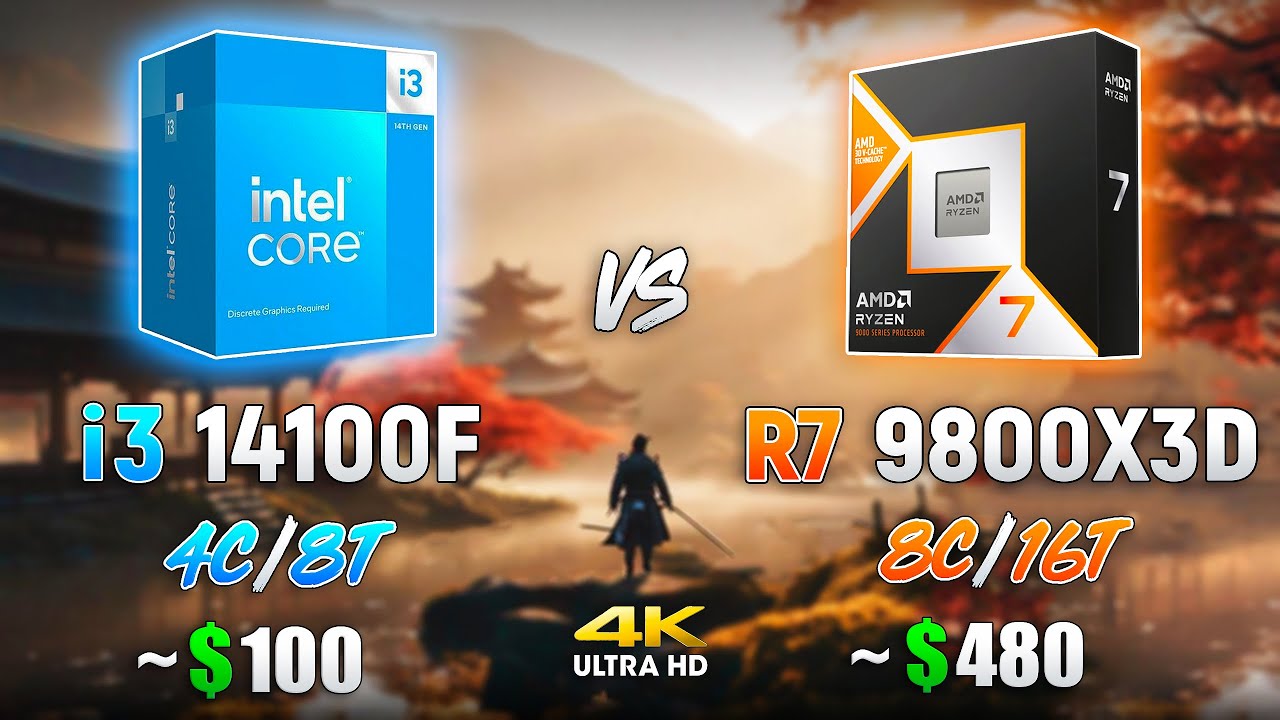
Intel Core i3 14100F vs AMD Ryzen 7 9800X3D l 4K
Buy games at the best prices on gamivo.com - https://gvo.deals/TestingGames
Use coupon code and get discount - TG3
Ad - 0:00
Games :
CYBERPUNK 2077 - 0:06
God of War Ragnarok - 1:13
Forza Horizon 5 - 2:09
CS2 - 3:08
Ghost of Tsushima - 4:03
Hogwarts Legacy - 5:01
Microsoft Flight Simulator - 6:...
grizzled bloom
They have DLSS on so it's not even really 4k
Their results would only be valid when using a 4090 with those settings, which very few people will be doing
dull flint
I'm surprised this is even a video tbh
grizzled bloom
There's youtube accounts that pretty much just test every relevant CPU and make a video pretending it's a head to head comparison
So they'll have 500 different videos with 20 different CPUs with the footage just spliced together
dull flint
When it's really just a handful of cpus with disabled configs and odd settings
Sometimes even the same cpu with spoofed numbers
💀
tender sleet
grizzled bloom
They have DLSS on so it's not even really 4k
The argument that using DLSS performance at 4k is a valid CPU test because it is internally rendered at 1080p
grizzled bloom
But then you should just run it at 1080p and leave DLSS off
Because it does mess with results
tender sleet
It makes "more relevant results for the average gamer"
That's the argument, not my opinion
dull flint
How does this even make sense

The numbers are saying it uses 30% less CPU on a 8 core vs an 4 core for the same numbers
Last I checked that doesn't really math correctly
dull flint
dull flint
Sometimes even the same cpu with spoofed numbers
As I said ^^^
distant gulch
I didnt read chat above lol
dull flint
Not after you for what you said
But think of it this way
Turn off 2 9800X3D cores and you'd get those results
distant gulch
Yurp
dull flint
If you could even call it a 9800X3D
This might just be some kids 13900K
You can edit the values in RTSS and make anything look like anything
distant gulch
Thatd be scummy gd
dull flint
Test looks like a buttload of bs to me, makes people talk and that's the bad part, it makes people look
dull flint
distant gulch
Thatd be scummy gd
It's a long known practice of many YT benchmarks
This is why we stick to proper benchmark channels as much as possible
dull flint
dull flint
Turn off 2 9800X3D cores and you'd get those results
I'm like 99% sure this is what I'm seeing btw, This isn't 2 cpus, it's the same one with 25% less cores lmfao
Ragnarok right side looks more like typical X3D numbers now

And would you look at that 4 cores disabled this time
Hahaha
Funny how it's EXACTLY HALF THE CPU USAGE

First test was 6 cores same cpu
second and third were 4 cores same cpu

grizzled bloom
If that's the case then it's probably not even a 9800X3D because the "14100" results show the clock below the base freq
dull flint
Hahahahaha

Ain't no way this is a 14100F
I doubt 9800X3D as well
I bet this is like some Raptor lake or maybe a 7800X3D
And the dude's shuffling numbers
Yeah I've seen enough

Exactly half + I/O die power draw
I'm dead certain now it's fake
The left hand side even has better numbers 
This is some kid with a 4090 and OBS
One pc
grizzled bloom
You know I bet it's not even a 4090 because even with the settings they showed in cyberpunk it still had DLSS on so it should be making WAY more fps
dull flint
I'm pretty sure this channel has been called out a million times btw
In the past
I've seen this particular one a number of times for strange looking benchmarks
dull flint
grizzled bloom
You know I bet it's not even a 4090 because even with the settings they showed i...
May very well be, I'm just being optimistic
You could never know it's actually a 4090 too, you're totally right
Cos you can't see the resolution
Could just make up numbers and make up settings
They capture in 4K tho
grizzled bloom
I can capture in 4k too using DSR scaling
grizzled bloom
That plus DLSS is a funny combo, upscale it just to upscale it again
dull flint
Unless every single test is slammed with dlss it's not native 4K
I notice the difference immediately on my 43"
That might be real 4K

That's also still disabled cores
X3D scales tremendously with FS2020
Bahaha
grizzled bloom
It does use the extra cores a little too for background threads and asset streaming
dull flint
Ok PUBG is NOT 4K

Those trees are 1080p ass render LOL

Hahaha wtf is this
94% usage and the average is identical
Absolutely BS
I didn't think it was this bad
I've seen this channel before for bad benchmarks but they were never this telling
This is an X3D rig with disabled cores, I'm like 10000% sure now
Hahaha we're back to exactly half cpu usage again
 grizzled bloom
Maybe even a 5800X3D with a 3080 if I had to guess, or something close to that GPU
dull flint
0% attention to the detail these are entirely different platforms with entirely different IPC and execution behaviour
It's so obvious in this video lmfao
grizzled bloom
No way it's 40 series because DLSS 3.0 wasn't an option in cp2077
dull flint
grizzled bloom
No way it's 40 series because DLSS 3.0 wasn't an option in cp2077
Is there
 grizzled bloom
Ah I missed it, 4070 then
dull flint
It'll either be a 40 series or it's a modded game
grizzled bloom
Or they just pulled the footage of the settings list from somewhere else
dull flint
Oh yeah true
Ok every single benchmark gives it away it's the same chip now

Like this is blatant
This is an X3D rig with/without some 40 series card just being messed with the core count
I should report this for misinformation
LOL
grizzled bloom
I will if you do
dull flint
How do I report a YT video
grizzled bloom
Flag by the like button iirc
dull flint
I need to sign in guhhh
Ok ima do it
Misinformation to also the links in the description
 grizzled bloom
dull flint
grizzled bloom
dull flint
thx
grizzled bloom
Ok so DLSS quality 4k renders in 1440p, and with a 4090 it should be getting 150 fps

So it's definitely not a 4090 since their claimed result is half of that
dull flint
I don't think a mod at youtube would understand that
The top pic is good tho
It shows a huge difference
grizzled bloom
10% difference at 4k is pretty major
Especially when you're running that close to 60
dull flint
There we go
 grizzled bloom
1440p (4k with DLSS on) should show an average 30% difference between the 14100 and 9800X3D
 grizzled bloom
I'm not saying to add it to the report, just adding to the conversation
dull flint
Alr
grizzled bloom
And I do acknowledge that TPU isn't perfect when it comes to their reviews and charts, but it's generally good for ballpark numbers
dull flint
It's way better than whatever pipe they're smoking here
grizzled bloom
definitely
dull flint
distant gulch
dull flint
There we go
Youtube taking action? Yeah right, only if its copyright and they have risk of losing precious companys
grizzled bloom
They have AI doing the initial report reviews now
It'll make an initial judgement and the uploader can appeal (sometimes) and it'll go to a moderator
dull flint
It had a selection for misinformation as the report reason too
I don't expect anything out of it, but I will laugh if anything does happen
It's deserved
distant gulch
The channel is probably using old parts and dont feel like buying the actual new equipment so they can pump out more pointless content
That would be my best guess
If they can make money recycling, theres no point spending the extra money, right? 
grizzled bloom
Or in this case, just make stuff up and they don't need to buy anything
dull flint
distant gulch
The channel is probably using old parts and dont feel like buying the actual new...
Exactly what I was suggesting earlier lol
It looks completely faked tho
distant gulch
dull flint
Exactly what I was suggesting earlier lol
Ah didnt see that, but yeah its the most likely answer
grizzled bloom
Their own numbers on screen don't line up with each other
distant gulch
Hate to say it but youtube isnt doing crap, look at sssniperwolf
grizzled bloom
I could do a comparison vid of my own, 7600X vs 7600X3D vs 7900X3D
dull flint
distant gulch
Hate to say it but youtube isnt doing crap, look at sssniperwolf <:kekw:74167835...
We can't talk about that here but I know exactly what you're talking about and it's disgusting
grizzled bloom
No purchase necessary
meager elbow
youtube probably doing more stuff than twitch but twitch is like no bar
bar underground
distant gulch
dull flint
We can't talk about that here but I know exactly what you're talking about and i...
Oh we cant? Is it just because we're in #cpus-mobo-and-memory or
grizzled bloom
Twitch is too busy biting the hand that feeds it and trying to ban nudity
grizzled bloom
It's too controversial
meager elbow
twitch banning vtubers showing too much skin but ignoring irl streamers that show their ass
dull flint
distant gulch
Oh we cant? Is it just because we're in <#500101047612604427> or
The stuff she did and also I want no

of it tbh
meager elbow
 distant gulch
grizzled bloom
Twitch is too busy biting the hand that feeds it and trying to ban nudity
distant gulch
grizzled bloom
Twitch is too busy biting the hand that feeds it and trying to ban nudity
Im done with twitch, they put talking about lgbtq+ on the same guidelines as warcrimes
Because its "too controversial"
grizzled bloom
And that is where this thread ends lol
distant gulch
I think they did a flip on it but the fact it happened
distant gulch
grizzled bloom
And that is where this thread ends lol
Lol fair enough
grizzled bloom
#general-chat if you want to continue but avoid the controversial topics
karmic perch
dull flint
There we go
🤔
4090 Video card is overpriced 🤡🤡🤡
You need to spend 2000 dollars.
burnt spear
You don't say
distant gulch
Rocketships are overpriced
dull flint
distant gulch
Rocketships are overpriced
 burnt spear
This looks ai generated
grizzled bloom
Nah it's totally real I was there for the launch of the RTX Quad Booster rocket
burnt spear
grizzled bloom
Nah it's totally real I was there for the launch of the RTX Quad Booster rocket
Yeah it was funded by Jensen and musk
Elons there bc what isn't he involved in at this point
 feral stratus
hey guys, I recently got a new CPU Its a small upgrade from R5 2600 to the 3600, but when installing the 3600 my computer doesnt boot, no power, no lights and no spinning fans. Ive updated my bios so it can process the 3000 series CPUs, wondering if i can get someone input on this. thank you
 silk jungleBOT
How to clear CMOS (works for AMD and Intel)
https://www.intel.com/content/www/us/en/support/articles/000025368/processors.html
Intel
Defines CMOS technology and how to clear CMOS using the jumper or battery methods.
grizzled bloom
The motherboard probably still expects the old CPU so it's panicking
That'll clear out its memory
burnt spear
feral stratus
hey guys, I recently got a new CPU Its a small upgrade from R5 2600 to the 3600,...
If that doesn't work, are you sure you updated bios right?
You might need to do an older version first and then a newer one
grizzled bloom
Especially if it's a B350 or B450, that's correct. There's sometimes a "stepping" version you need to install before the final update.
feral stratus
grizzled bloom
Especially if it's a B350 or B450, that's correct. There's sometimes a "stepping...
i do have a b450 gaming pro
grizzled bloom
MSI or Asus
feral stratus
MSI
grizzled bloom
Ok, MSI doesn't do stepping versions
But they do have versions that remove support for old CPUs to add new ones
That wouldn't be a problem here I think, but it's worth checking if the motherboard powers on with the old CPU in
No need to put the cooler and paste on, just need to see if the CPU gets warm to the touch
feral stratus
i have the my old pcu
grizzled bloom
Then turn it off
grizzled bloom
Oh perfect
feral stratus
it just doesnt work with the new CPU
grizzled bloom
Load up CPU-Z and go to the mainboard tab, take a screenshot and DM it to me
It'll tell me if the bios is updated correctly that way

System information software
As well as tell me the exact model of motherboard you have because MSI has a dozen different "gaming pro" models
feral stratus
grizzled bloom
As well as tell me the exact model of motherboard you have because MSI has a doz...
i lied i have this mobo, https://www.msi.com/Motherboard/X470-GAMING-PRO/Specification
X470
grizzled bloom
Ok, that changes nothing though tbh
grizzled bloom

Looks like you installed the lowest version that supports the new CPU
I'd recommend actually installing the latest version, it should support both of your CPUs and contains critical fixes
feral stratus
i watched a video where it said i dont need to instal the newst, just the version that supourts my new CPU
should i try again?
grizzled bloom
While that's technically true, there's a critical security vulnerability called "sinkclose" that needs to be fixed via a BIOS update
An attacker could use that vulnerability to take control of your computer
grizzled bloom
It can yes
grizzled bloom
Clear the CMOS before you swap the CPU yes
That way the motherboard doesn't still expect the old CPU
feral stratus
not sure im understanding the CMOS
what do i do to my mother board?
with the pins
grizzled bloom
You have a small button located here to clear with

Flip the power supply off first
With the switch and not your middle finger
feral stratus
ok
does there need to be power in the computer
to clear CMOS
i un plugged everything and turned off the power supply
grizzled bloom
It needs the opposite of power
grizzled bloom
Yes now you would switch the CPU
grizzled bloom
I'm starting the think the new CPU is bad
Can you get a pic of the bottom of the CPU
Close as you can and still be in focus
grizzled bloom
Hmm
feral stratus
the “new” cpu was a hand me down from a friend who hasn’t used it in a while
grizzled bloom
I still say update BIOS and then try again
feral stratus
u think i can run it without the
cpu fan
i’ve installed it like 5 times today lol
grizzled bloom
You don't need to screw it down but at least set it on top
feral stratus
grizzled bloom
You don't need to screw it down but at least set it on top
check dms
confused how it turns on
grizzled bloom
Oh weird, so it works with the socket lever up but not down?
Maybe those pins aren't so straight after all
feral stratus
grizzled bloom
Maybe those pins aren't so straight after all
check dms, the pins look pretty straight to me
grizzled bloom
Hard to tell for me
I can't pause fast enough to look at all the rows both ways
I think I saw something on one of the corners but it could just be from the camera's refresh rate
feral stratus
found the bend pin
bent pin
it was very slightly bent aswell
hopefully this works
yep doesn’t work with the lever down
man
 tender turtle
Can someone help me
so i bought a new m.2 and its not popping up
anywhere
and i dont know what to do
i checked disk management
bios
meager elbow
tender turtle
bios
if it's not showing up on bios then that means the drive isnt being detected at all, this could be caused by multiple reasons, but the more likely option is either a bad contact (so try reseating the m.2) or you have something plugged into one of the last 2 sata ports on your mobo, which may disable the m.2 slot on some boards
or if you got a m.2 sata drive, sometimes the mobo does a sneaky thing and doesnt actually support sata m.2 (even though it's part of the specifications)
tender turtle
meager elbow
or if you got a m.2 sata drive, sometimes the mobo does a sneaky thing and doesn...
i think so
meager elbow
slightly more rarely, the slot is dead or the drive is dead
tender turtle
i was thinking it might be the gen if it has to do with anything
meager elbow
no, it's backwards and forwards compatible
tender turtle
dang it might be the m.2 sata thing
meager elbow
you can use a gen 1 pcie m.2 (if that even exists) on a gen 5 m.2 slot, or a gen 5 drive on a gen 1 pcie slot
is it a sata m.2?
or is it nvme?
tender turtle
my mobo thing says 4 SATA3, 1 Ultra M.2 (PCIe Gen3 x4), 1 M.2 (SATA3)
tender turtle
fudge
meager elbow
though you shouldnt have been able to fit a nvme into that slot since it would have a different keying?
meager elbow
huh..
meager elbow
well, another reason is that maybe you need to flip some jumper pins to enable the 2nd m.2 slot? but that's extremely rare on modern mobos
sure
tender turtle

so the top one i got a 512 m.2
and i just installed a 990 evo 2tb into the bottom
tender turtle
asrock b450m
tender turtle
yea

 meager elbow

oh
i was looking at the image you sent so i saw the chipset heatsink and it wasnt the same so i was like hmm that's not right lol
tender turtle
sorry
meager elbow
says the same thing in the manual so it's still a relevant screenshot
so yeah 2nd slot only supports sata
tender turtle
so my thing not working
meager elbow
i have no idea why they used m key on the 2nd slot if it only supported sata
they're supposed to use b key
oh well
at least now you know that your drive is likely fine and it's just your mobo lol
tender turtle
duuuude
aw man
do u think i can get transfer everything to my new drive?somehow?
like windows and games
meager elbow
yeah.... always sucks when a company doesnt follow industry standards
do you have a free pcie slot
you can get a pcie to m.2 slot adapter
or if you dont, you can get a usb m.2 enclosure
tender turtle
 tender turtle
i might upgrade my mother board
then
or find a way to transfer everything on my original m.2
meager elbow
ehh, i probably wouldnt, if you were to upgrade, better to go to am5 at this point lol
 mystic inlet
the 14900's still shorting out burning things?
burnt spear
not with new bios, but I'd suggest the 7950x/9950x/7800x3d/9800x3d depending on what youre doing
high end video editing is the only reason id suggest high end lga1700
mystic inlet
burnt spear
not with new bios, but I'd suggest the 7950x/9950x/7800x3d/9800x3d depending on ...
Thanks, looking for a new pc for the wife, and she doesn't want any AI chips ( she read somewhere they can alter grammar, and she's already using perplexity for that and doesn't want to chance pc's AI altering things on her papers.) and only knows Intel so AMD would be out, I am lucky I can get something for her that's not a F'n Dell PC. Figured if I can't get her new then get her best of last gen. Maybe a 13000? Though kind of getting forced into a 14000 with the 64 or higher ram ( not gaming) she needs something with the 100's of open tabs she keeps.
meager elbow
mystic inlet
Thanks, looking for a new pc for the wife, and she doesn't want any AI chips ( ...
Having a physical chip optimized for AI doesn't mean it will be used randomly
Hell, copilot last I heard still doesn't use the npus lmao
64gb ram is overkill for anything but applications you know need it
32gb is plenty for hundreds of tabs
Especially for modern chrome
The AI cpus are mainly just marketing, they're just the regular cpu with some extra features that don't get used unless you have something that can use those npus
burnt spear
mystic inlet
Thanks, looking for a new pc for the wife, and she doesn't want any AI chips ( ...
??
That's not how that works
100s of Google tabs is much less demanding than you'd think
My mom used a 15 year old laptop till it broke a few years ago with at least 60 open at any given time
You don't need an i9 for Google
grizzled bloom
Don't believe everything you read on the Internet, especially these days when so many articles are written by AI.
meager elbow
Needing like a tb of ram for chrome is a joke
burnt spear
Definitely, 4tb or bust
 warm hemlock
is gigabyte b550 gaming x v2 motherboard with R5 5600x and rtx 3060 worth? (i have gtx 1650s and i5 9400f)
distant gulch
I think itd be a nice jump in performance yes
burnt spear
warm hemlock
is gigabyte b550 gaming x v2 motherboard with R5 5600x and rtx 3060 worth? (i ha...
Maybe. It depends on the pricing
3060 is mostly bad value
warm hemlock
burnt spear
Maybe. It depends on the pricing
the price is so good
205 usd for it
almost
grizzled bloom
Yeah that would be good
burnt spear
warm hemlock
the price is so good
For all three? Or just the gpu?
warm hemlock
burnt spear
For all three? Or just the gpu?
no lol just the gpu
burnt spear
Thats about right for a 3060 12gb, if jts the 8gb version that'd be a pass
warm hemlock
burnt spear
Thats about right for a 3060 12gb, if jts the 8gb version that'd be a pass
im talking about 12gb version
distant gulch
is 8 gigs v ram even enough for newer titles?
burnt spear
Not like the 3060 is strong enough to make use of 12
warm hemlock
burnt spear
How about the cpu and mobo price?
80 to 150 usd each one
distant gulch
burnt spear
Not like the 3060 is strong enough to make use of 12
true
burnt spear
burnt spear
Not like the 3060 is strong enough to make use of 12
The 8gb version has worse perf too
burnt spear
warm hemlock
80 to 150 usd each one
Are you in the US?
warm hemlock
burnt spear
The 8gb version has worse perf too
yes obv
warm hemlock
burnt spear
Are you in the US?
no im in sa
burnt spear
Ah alr
burnt spear
Yeah sounds like you're fine then. You could hold off on the cpu/mobo upgrade though, the 9400f won't limit a 3060 much
warm hemlock
distant gulch
people ship out of the US lol
not all the parts are shiped from us tho lol
warm hemlock
burnt spear
Yeah sounds like you're fine then. You could hold off on the cpu/mobo upgrade th...
distant gulch
oh i assumed it was all bundled together
yeah the gpu would be the only significant upgrade
burnt spear
The cpu has a stock cooler you don't need a diff one unless noise is an issue
warm hemlock
warm hemlock
check https://pcpartpicker.com/list/Ck2WXR
the prices are different from what i said cuz there is discount in sa
burnt spear
But looks fine. Could do a cheaper mobo depending on what it costs there
If 5600 is more than $10 cheaper I'd grab that, theyre essentially the same cpu
12600k/kf with a b660/b760 would be better, if 12400f would be cheaper it matches the 5600/x
warm hemlock
burnt spear
12600k/kf with a b660/b760 would be better, if 12400f would be cheaper it matche...
yeah but 5600x is cheaper right now
warm hemlock
burnt spear
The cpu has a stock cooler you don't need a diff one unless noise is an issue
yes but the temperatures wont be that good
grizzled bloom
With a 5600X? They'll be fine unless you overclock it
warm hemlock
grizzled bloom
With a 5600X? They'll be fine unless you overclock it
oh then imma save that $20 and get a dinner
warm hemlock
burnt spear
Yeah sounds like you're fine then. You could hold off on the cpu/mobo upgrade th...
btw i will prob just buy the 3060 right now and save money for the other parts
wind karma
Anyone know if a 5700x3d will be ok in an a520 board with no VRM heatsinks?
burnt spear
wind karma
Anyone know if a 5700x3d will be ok in an a520 board with no VRM heatsinks?
I'd put a fan for the vrms
wind karma
I think I could move the 80mm up top. Don't need it for the gpu now that I undervolted

Or I could get an even smaller fan and mount it to the side panel facing the vrms. Don't think the 80mm fits in between the cooler and exhaust 120
I really hate looking at the inside of my pc. Maybe I should have put a spoiler on that. Thankfully the side panel is normally closed and covers up everything :)
burnt spear
Yeah i think it needs a TW
 ripe tartan
wind karma
I think I could move the 80mm up top. Don't need it for the gpu now that I under...
ripe tartan
wind karma
I think I could move the 80mm up top. Don't need it for the gpu now that I under...
You need a bigger case
Or a case with better cable management
(That case looks like it has nothing to hide cables in)
wind karma
wind karma
I really hate looking at the inside of my pc. Maybe I should have put a spoiler ...
^
wind karma
ripe tartan
(That case looks like it has nothing to hide cables in)
Don't need to hide anything when the case is closed up
ripe tartan
wind karma
Don't need to hide anything when the case is closed up
If worth about having heat damage to the cables
But if you get adequate cooling, guess there’s no need to change it
wind karma
No cables are directly touching any heatsinks, and I don't think the air is getting nearly hot enough to melt plastic
 potent dew
How is this cheaper? Also, is this a Chinese version or something?
https://www.newegg.com/p/274-000M-001Z9
grizzled bloom
It's cheaper because they're drop shipping from aliexpress
 prisma hill
My old AM3 socket motherboard/cpu died, idk which but I'm pretty sure 1 of them died
So I'm looking to upgrade to a newer socket cuz I'd rather upgrade from the old socket cuz I can barely find replacement parts
I would have to upgrade cpu, motherboard and ram, anyone have any suggestions?
I don't need it to be top of the line or anything, and it doesn't need to be the newest sockets and stuff, just something that isn't old like AM3, I'm looking for like an average level of stuff
My gpu is nvidia windforce 970, I have a hard drive and 2 ssds, idk if that makes a difference, psu is CX600M but Id be willing to upgrade it just cuz its old, my case is the NZXT Phantom 410, Ideally I wouldnt want to change that if I dont have to either
if its a motherboard that can have a faster ssd that would be nice, motherboard doesnt need wifi either I have ethernet
I also dont care about how it looks, like I dont want to spend an extra 30$ on rgb if theres like a normal variant right next to it
grizzled bloom
@prisma hill
All you would need with this combo is a cheap fan like this https://www.amazon.com/dp/B09FDWPCWZ?tag=pcpapi-20&linkCode=ogi&th=1

ID-COOLING SE-214-XT ARGB CPU Cooler 4 Heatpipes CPU Air Cooler ARGB Light Sync with Motherboard(5V 3-PIN Connector) CPU Fan for Intel/AMD, LGA 1700 Compatible
prisma hill
Would I be able to use my existing fan?
Idk what model it is but it's corsair and it's watercooling, it has like weird hooks and knobs that hold in onto the cpu
Is an nv3 the same as an m.2?
grizzled bloom
It would need the new bracket for the cooler to support the new socket
NV3 is a M.2 NVMe SSD
Much faster than anything from FX
prisma hill
Thanks I'll look into those offers when I'm home
I assume I don't have to change gpu then
And cases don't need specific mounting brackets or something
grizzled bloom
The 970 will work for now until you upgrade it later
Motherboard mounting has been standardized since the 90s so any standard ATX case will work
grizzled bloom
You add it to your cart and it'll give you a discount
prisma hill
Im in Canada too idk if that makes a difference, I checked the .ca site and all the deals are there
prisma hill
grizzled bloom
You add it to your cart and it'll give you a discount
So if I get that exact combo it'll give me the discount code for a free nvme ssd
grizzled bloom
You'd get extra shipping charges to ship international, I can put something together for canada with more local stuff
prisma hill
When I pressed the links I changed the .com to. Ca and it took me to the Canada sites of each and it still had discounts and stuff so I think I would be able to buy it from Canada site
grizzled bloom
The question is whether it ships from canada, because if they have to ship international there's a lot of fees
prisma hill
grizzled bloom
You'd get extra shipping charges to ship international, I can put something toge...
You don't need to if you don't want to
Like rn I'm just looking at cpus and motherboards and they all look the same to me, idk what to look for
grizzled bloom
No idea what just happened to bacca's messages but here's this which is basically the same as their first link https://ca.pcpartpicker.com/list/JPMWXR
Part List - AMD Ryzen 5 7600
burnt spear
Didn't see you were making a list and didn't want to have too many options since it gets confusing (taking a page out of your book lol)
prisma hill
What would price difference look like between am4 and am5?
burnt spear
Was basically just that with an msi 750 agl
Part List - AMD Ryzen 5 5600X, NZXT Phantom 410 ATX Mid Tower
burnt spear
I was making it as a third option before deleting the others lol
grizzled bloom
No, since the prices change almost daily. But we know what to look for so the filters make it quick.
grizzled bloom
No cooler required with the 7600 as well, it comes with one
prisma hill
How can I know if my existing cooler would be compatible
grizzled bloom
What model is the cooler
prisma hill
grizzled bloom
No, since the prices change almost daily. But we know what to look for so the fi...
So what is it that you look for
Like for example motherboards I can't tell the difference other than the cpu sockets
Cpus I just search up cpu A vs cpu B and compare them like that
prisma hill
grizzled bloom
What model is the cooler
I couldn't tell you, I'm st the gym rn so I'd be able to check when I'm home
Its corsair, has water cooling and it's mounted by weird hooks with knobs, then has a radiator that has fans on it
grizzled bloom
CPUs we just keep up with the news and we know what's good through those trusted sources.
Motherboards, most of them are fine but sometimes you need better heatsinks (like if you upgraded to a 7950X later) or other features. We use the filters to find ones that match your needs.
Memory we just know what specs are good for what CPU.
And if the AIO is more than 5 years old I would recommend replacing it anyway because of fluid loss over time
meager elbow
true
grizzled bloom
Unless it has a fill port in which case you can service it yourself
You can let us know what model it is later, or take a pic and we'll figure it out
prisma hill
Dynamic Computer Surplus
In excellent condition and tested to be fully functional. Includes the bracket for the AM3+ socket. Not sure what other sockets it is compatible with.


It looks like that one
I'm pretty sure it's that one or very similar
grizzled bloom
meager elbow
bleh 120mm aio
grizzled bloom
Also yeah 120mm AIOs are often worse than air coolers these days
prisma hill
grizzled bloom
Corsair sells an adapter bracket https://www.corsair.com/us/en/p/pc-components-a...
I think mine has that already
Maybe, not sure
I can send a pic later
prisma hill
meager elbow
chipset and features
So what does chipset even mean and what features do you look for
meager elbow
chipset splits out the io from the cpu
so it gives your mobo USB, additional pcie slots, networking, etc.
it honestly serves quite a few purposes
old diagram but at least i finally found one that didnt have the northbridge chipset on it LMFAO
 meager elbow
Indeed
North bridge was integrated into the cpu in like 2011 or whatever
Northbridge: the days when motherboards actually made a performance impact to your cpu
prisma hill

this is a pic of the cooler, would that fit onto a newer motherboard or would I need a dif one/a bracket
meager elbow
prisma hill
this is a pic of the cooler, would that fit onto a newer motherboard or would I ...
less a matter of whether it fits or not than is the aio too old and probably should be replaced
i would personally probably replace it with a cheap tower air cooler
prisma hill
grizzled bloom
so when I add all of these into my cart on newegg (just testing not gonna buy), the total is 540 cad
but its supposed to be 300 usd which is roughly 420 cad, so am I doing something wrong or is it just canada dif
also where would it say the nvme drive part
prisma hill
I see it on the US site but looks like its not there on the Canadian site
grizzled bloom
Yeah it's the Canada difference
prisma hill
burnt spear
https://ca.pcpartpicker.com/list/kC3YrM
If I was to add on a 1tb+ m.2 ssd to this, is there a specific one you guys would recommend?
or just any
burnt spear
P400 lite is cheap and decent
Actually m450 is cheaper by $2

MSI SPATIUM M450 1 TB M.2-2280 PCIe 4.0 X4 NVME Solid State Drive (SM450N1TB)
prisma hill
thanks
prisma hill
burnt spear
https://ca.pcpartpicker.com/list/kC3YrM
So on this list theres this 6 core cpu:
AMD Ryzen 5 5600X 3.7 GHz 6-Core Processor
but theres also the following 8 core one for 25$ more:
AMD Ryzen 7 5700X 3.4 GHz 8-Core Processor
Currently my FX cpu was 8 cores, will I feel a difference if I go down to 6?
Like in what case would it be a good idea to do 6 vs 8 cores
prisma hill
Part List - AMD Ryzen 5 5600X, GeForce GTX 970, NZXT Phantom 410 ATX Mid Tower
this list is baccas list ^
With my gpu and psu added
bacca recommended upgrading the psu to a dif one
dull flint
I agree with his list @prisma hill
And with the psu suggestion
The psu is really old, and not a high end one like a TXM from back in that day
Would be worth it to get something more current day
$80-$90USD would get you a really long lasting good quality one
But if you want to minimise loss, then you could continue to use the CXM I guess
distant gulch
I forgot nvidia had lines outside of the quad digits 😭
dull flint
Just don't be surprised if anything happens, the psu is really old, most don't last over 7 years
prisma hill
The thing is I just measured my current psu with a multimeter, all of the readings were within 5% of the actual value, except the blue wire was -11.3 instead of -12
so I was thinking it would be fine
prisma hill
dull flint
Just don't be surprised if anything happens, the psu is really old, most don't l...
So youd recommend changing psu just cuz its old and it could risk other parts?
dull flint
Yep exactly
That's your call at the end of the day, but a new quality unit also enjoys a renewed warranty
So anything happens, you're covered
prisma hill
if something happens and the psu blows up then idm, but my issue is if it blows up and damages other things
dull flint
prisma hill
so I was thinking it would be fine
It in all likeliness is, again, your call, but it's schrodinger's guess as to when (even if) it fails
prisma hill
alr fair enough
dull flint
But a warranty would mean you're covered is all
dull flint
Well if a psu goes, any number of things can also go with it
Especially if it's a short based problem
prisma hill
Part List - AMD Ryzen 5 5600X, GeForce GTX 970, NZXT Phantom 410 ATX Mid Tower
how does this system look then
thats the psu Bacca recommended
dull flint
Absolutely solid
prisma hill
is it good
dull flint
The stock cooler for 5600X is a loud one on that chip
But it'll work
You can impose a bios power limit to make it run like a 5600 and it'll be a lot quieter for minimal performance loss
So 65W PPT
prisma hill
if it was your build, would you get a dif cpu cooler or na
prisma hill
dull flint
So 65W PPT
what does PPT mean
dull flint
PPT is the imposed power limit setting for AMD products
What you'd know as TDP
(It's not really TDP tho)
(AMD measures power differently)
65W is what the cooler the 5600X comes with is typically used for
And it's not that bad of a cooler if you stick to that
Like a pretty decent LP 90mm
prisma hill
Im not gonna overclock it or anyhting so Ill prob be running it as they intended
Another last question again, Bacca was saying my case which is on the partpicker list above is like an oven, is this something I should change, I would much rather not have to change it
dull flint
Do you have a side intake fan
dull flint
It won't be terrible then
prisma hill
alr cool
dull flint
Hot it definitely is tho
prisma hill
itll warm me up during the winter
dull flint
Cases have come a really long way over the years
Mesh and wood panelling is the norm now instead of solid panels and glass
dull flint
Both
The wood for looks, mesh for performance
Most cases pre-2022 are floored by anything released after
prisma hill
whats an example of a case like that
dull flint
Uh ok
prisma hill
out of curiostiy, not gonna change the case
dull flint
So your case was succeeded by the S340
Which became the H510
Those two cases are a good, 10-15C? Hotter than their successors
The H510 flow
And the H5 flow after it
Literally all they did was add a mesh panel for the wall of front intake fans and the case transformed in cooling performance
Cos the fans now have a direct intake path
Lian Li O11, transformed after the Evo came out, dropped temps some 5C (Big case with a lot of dead space so less dramatic)
Corsair cases of old
Like the Carbide 275R
Don't even get close to competing with their successors
The 465X was halfway there
The 5000D was the first majorly distributed form of mesh
275R Airflow was also leagues better
It's just allowing the fans to not starve of air
Solid cases still exist but they're more rare
Fractal makes most of the good ones, like the pop silent
Even those are still a lot better though because there's still proper mesh fan mount points
I would argue the phantom 410 isn't truly terrible tho
The side intake fan alone is big
dull flint
The front intake also helps a ton if you use it
prisma hill
Ye I have 2 fans at the front, 2 fans at the top, 1 at the back (this was the cpu cooler one) then 1 on the side
dull flint
Yeah that's not terrible
This won't be like, competitive to current day but you'll be doing better than many glass cases
If anything just better fans might do enough
Which isn't necessary
prisma hill
I just need to keep the dust out
slacked on that and there was a ton of dust in there when I was trying to do stuff
which way should I orient fans tho
as in like should the front be intake
then side intake
top and back out?
dull flint
Just keep the fans jammed if you clean it all out
Don't let them spin if you're using canned air or something similar
Can break them
dull flint
prisma hill
which way should I orient fans tho
Side front intake top rear exhaust
prisma hill
alr cool
prisma hill
prisma hill
So on this list theres this 6 core cpu:
AMD Ryzen 5 5600X 3.7 GHz 6-Core Process...
I guess my last (will it ever be last?) question would be this then
dull flint
That's easily enough answered
Cores themselves are rated to a certain speed to interpret data
That is given by the clock, right?
So each generation, cpus get better in the metric known as IPC
IPC is instructions per clock, and it's measured across all different types of workloads
Like SSE, AVX, Decompile, Compression
Including specific code types
Like C++ for example
Everything works to different codes and types of work
But every generation, these manufacturers improve how well these chips interpret the data to make them more efficient
As well as faster, less power hungry, more streamlined
Every generation since FX was a pretty big jump for AMD up until their most recent Zen 5 (Which was still big in ways us normies don't care about)
So we do the simple math
A 5600X is roughly equal as a 6 core to a 3700X as an 8 core, in terms of multicore performance
But much better in single core due to both being improved from IPC
They can do the same work for less clock speed
So we go back another step
Ryzen 3000 was a huge multicore jump over Ryzen 2000 series
As it was a big jump over 1000 series (a refresh though really) with many still preferring a 1700AF
Then we jump back again, and Ryzen's 1700 chips were a massive leap over the FX series
1700 brought the Ryzen chips pretty damn close to Intel's 7700K, they were just a massive leap
So where am I going with all this, essentially each generation can do the same work for much less power/effort, and this is the generational leap
Just having 8 cores isn't a massive deal anymore
See if I can find a rough example here...
Don't use these websites, but this is a good easily drawn conclusion from a snapshot:

Cinebench is a measure of both 1 core and all core performance, and each generational leap I talked about adds up to a massive jump like this
So the 5600X can compute 3x as much data compared to it's FX older brother
Both in a 1 core and all core sense (It's a coincidence they're both similar improvements)
3600 vs FX-8350

2700X vs FX-8350

1700X vs FX-8350

This is what the many years AMD have been up to, improving each generation
Just having 8 cores doesn't necessarily mean the game will run really well anymore
Games have become very adapted to using all 8 now
And many CPUs now ship with 8+extra
prisma hill
dull flint
And many CPUs now ship with 8+extra
wdym
dull flint
Well for example the 9950X of today ships with 8+8
2 clusters of 8 cores
The 14900K ships with 8+16
A whole monolithic chip of 24 cores
Arranged in a way that it has 8 strong cores and 16 weak ones
8 for the main stuff, 16 for the background stuff/full power work
prisma hill
Interesting
what about these cpus in specific then
AMD Ryzen 5 5600X 3.7 GHz 6-Core Processor
AMD Ryzen 7 5700X 3.4 GHz 8-Core Processor
The 8 core one runs on a slower clk but then has more cores to do stuff with
Do they also have a + X amount of cores
dull flint
The 5700X is a lower clock cos of lower power limit
5600X and 5800X have similar clock
5800X is a 5700X without a lower power limit
5700X & 5800X are 8 cores
1 8 core cluster
vs 5600X which is one 6 core cluster
And while we're on this
5900X is 6+6
5950X is 8+8
So almost like slapping 5600X's and 5800X's onto the same cpu
Those extra 6 and 8 core clusters aren't beneficial for games though, just multithread work
The latency between the clusters stops the extra ones being useful
While Intel does P cores and E cores
P being the strong two thread cores for the main work
And the E cores being the small compact and efficient single thread cores for offloaded background work or multithread work
In a similar way, the extra e cores do nothing for games, as they can't process like the P cores can
prisma hill
so the 5800X is pretty much has 5600s speed with 5700s cores
prisma hill
AMD Ryzen 5 5600X 3.7 GHz 6-Core Processor, 150$
AMD Ryzen 7 5700X 3.4 GHz 8-Core Processor, 175$
AMD Ryzen 7 5800X 3.8 GHz 8-Core Processor, 210$
thats all cad btw
but anyways in my case I dont think I need to go with the 5800X
So I have the option of the 5600 or the 5700
the 5600 is faster, but the 5700 has more cores
So generally, in what case would I pick one over the other
Wont affect gaming performance prob
but would it affect other things
dull flint
Mmmm depends tbh
The 5700X is a hard pick these days
Since AM4 is getting really close to LGA1700 prices
So once you start spending more, it's better you pick a whole different platform
prisma hill
could you give an example of an LGA cpu that would be equivilant in price to that 5700X
like is that LGA a lot better or something
dull flint
12600K/KF and a board like a b760m pg riptide
Then you go DDR5
It's a little more but the performance jump is enormous
prisma hill
roughly around 160$ more if I just briefly look
burnt spear
7600x mobo ram and ssd is $340 on wegg
dull flint
Cos you get DDR5 which is much longer lasting
Ah if bacca knows a deal that I don't then it's probs better
That one sounds closer to comparable
dull flint
7600X is roughly equivalent to a 12600K
burnt spear
But still great value, although mobo is not great
burnt spear
And handle something like a 10600x upgrade down the line
prisma hill
burnt spear
The issue with this deal is that its for the US, when I do the same parts on the canadian side its 540 cad and doesnt come with the free m.2
burnt spear
Mb forgot you're in ca
prisma hill
All good lol
dull flint
I'm a bit out of the loop for sales rn due to fixing my own stuff but yeah
The jump up is worth it
You get DDR5, and you get another generational leap
5700X3D also makes a lot of sense here vs. 5700X
Another leap again
Though for games specifically, if you like games
burnt spear
Part List - Intel Core i5-12600KF
prisma hill
dull flint
5700X3D also makes a lot of sense here vs. 5700X
more than double the price tho lol
burnt spear
Part List - AMD Ryzen 7 5700X3D
dull flint
Partly the reason why
burnt spear
Part List - Intel Core i5-12600KF
dull flint
5700X3D/5800X3D have demonstrated probably the best longevity of any CPU to date, bar maybe 9900K
Or prior to that 4790K
prisma hill
The thing with me is I dont really need anything crazy, like I wasnt planning on upgrading my FX-8320 for the foresable future
burnt spear
Part List - AMD Ryzen 5 7600
dull flint
Ah well if you aren't interested in the jump then stick to the 5600X/5700X
burnt spear
Sorry last option
prisma hill
In any case
burnt spear
Or 12400f with ddr5 and could drop in a 136/14600kf down the line
prisma hill
im gonna be bottlenecked by my gpu anyways
is the jump in performance that big with the 12400
and ddr5
dull flint
12400 is roughly a 5600X but it's better than it with ddr5
By a fair bit
DDR4 vs DDR4 they're basically equal
prisma hill
the biggest jump is gonna be fx to literally any of the choices we just said lol
prisma hill
dull flint
DDR4 vs DDR4 they're basically equal
what number is the 2nd one supposed to be
3 or 5
prisma hill
I see
I think Ill stick to 5600/5700
Just cuz if I go with 12000 its more than I think I need
like it would be future proofing the pc more
well future proofing would be going with something like an am5 socket
prisma hill
Going back to this then,
AMD Ryzen 5 5600X 3.7 GHz 6-Core Processor
AMD Ryzen 7 5700X 3.4 GHz 8-Core Processor
so if Im not multitasking, I should pick the 5600 cuz its faster
but if I am multitasking, like having a game open while having other stuff open, would I then pick the 8 core?
burnt spear
Editing, photoshop, Adobe suite, maybe blender, rendering, music production, coding, VMs
Some other workstation tasks
prisma hill
and if im doing something like playing a game
would the loss of 300hz be a big difference
dull flint
Basically negligible
Since as long as you're GPU bound then Ryzen gaming performance isn't dictated by the core clock
burnt spear
burnt spear
https://ca.pcpartpicker.com/list/9XWGJy
There's also 12600kf on ddr4
dull flint
It's dictated by ram and FCLK performance
prisma hill
burnt spear
There's also 12600kf on ddr4
in this case that system would be equal to the 5700 in performance?
burnt spear
A bit better in games
prisma hill
does the intel cpu not come with its own cooler
or is it bad enough that getting a dif one is better
burnt spear
It doesn't have one
dull flint
What
burnt spear
Could do ag400 for a bit cheaper
burnt spear
There could be better sales soon too
No way of knowing either way tho
And sounds like your pc isn't working, which would suck waiting
prisma hill
pc isnt working but I got the laptop so Im able to manage
burnt spear
Ah
prisma hill
kinda good tbh cuz it forces me to not play games lol, especially near finals
Part List - AMD Ryzen 5 5600X, GeForce GTX 970, NZXT Phantom 410 ATX Mid Tower
Part List - Intel Core i5-12600KF, GeForce GTX 970, NZXT Phantom 410 ATX Mid Tower
so those are my two options pretty much
100$ more and go intel 12600
or just stay with that other one I hvae
the thing is Im gonna be bottlenecked regardless by gpu, so if im not upgrading my gpu soon I dont see the point of going with the intel one
socket wise, is one better than the other? Like has more of a future?
ig am4 doesnt have a future bc of am5, is that intel one its current socket or is it an older socket
burnt spear
It's end of life is 14th gen, the 12600kf is just a bit better and tbf the extra cores might help it age better
Everyone said 4 cores was peak until they didn't lmao
Either way you're fine though, either pc will do you good
Also it looks like a $55 diff
prisma hill
is that with a cheaper cpu cooler
apparently that cpu cooler just sold out or something
burnt spear
Oh yeah I missed that
https://ca.pcpartpicker.com/list/qYG8Kq 13400f has a stock cooler although it's not great it'll keep it from throttling
Part List - Intel Core i5-13400F, GeForce GTX 970, NZXT Phantom 410 ATX Mid Tower
Or just get the ag400 with the 12600kf
prisma hill
is that a cpu cooler
prisma hill
also on the intel one it says ill have an issue with the gpu fitting, but it doesnt say the same with the amd one, clearly the gpu fits in the case cuz thats what I have rn
but should I be concerned it says that for the intel one but not amd
burnt spear
Yeah i was very confused by that
I see no reason cpu or mobo would affect gpu and case clearance
burnt spear
Gpu has to be on the back of the case though
prisma hill
true
no idea
its prob tripping
like rn im looking at my pc, there might be a couple drive bays removed but theres plenty of space
Alr well thanks for all of your guys help
I'll decide between one of the two
Youll prob hear from me again when Im trying to get all my data from my old pc onto the new stuff, or just building it in general
wind karma
prisma hill
Youll prob hear from me again when Im trying to get all my data from my old pc o...
Macrium Reflect is good (and free) if you want to clone your data
meager elbow
clonezilla the goat
prisma hill
wind karma
Macrium Reflect is good (and free) if you want to clone your data
What's that
wind karma
A program for copying/cloning drives
Macrium Software
Macrium Reflect - Incredibly powerful software that allows you to create and schedule effective backups
prisma hill
My old pc won't boot is the issue, so how would I go about doing this
With the upgrades I'm doing I'd get an m.2, so I'd want the boot drive to be that, but otherwise all my old data in sata ssds / hard rives can stay where they currently are
dusty cipher
Nvme is the way to go
vagrant mist
wind karma
https://www.macrium.com/reflectfree
Not just for windows drives, it can clone any drive you connect to your computer
vagrant mist
prisma hill
My old pc won't boot is the issue, so how would I go about doing this
With the ...
You'd need a second PC to clone the drivr
prisma hill
Once I actually get the parts and come to build it (Dec 14 or 15 bc of finals) then I'll prob ask more about this
wind karma
So I updated my bios but it doesn't seem to recognize my boot drive. Trying to boot just goes straight to bios.
Hitting f8 opens boot manager but the only boot option is "enter setup" which goes to bios
wind karma
Nah nvme
dull flint
Think there's also a situation it applies for nvme but I can't remember the option
wind karma
Hmm. I have a Linux USB and I can boot to that
dull flint
It's definitely gonna be a toggle
wind karma
Yeah I'll look for something nvme related
dull flint

wind karma

It does recognize the 2 sata ssds I have plugged in
But they aren't boot drives
Yeah when I boot into Linux on a usb it shows the data drives bit not nvme
grizzled bloom
Try without the sata drives in, sometimes having those in certain slots will disable M.2 slots
wind karma
grizzled bloom
Try without the sata drives in, sometimes having those in certain slots will dis...
Would that change from bios version to version?