#cpus-mobo-and-memory
1 messages · Page 54 of 1
 raw crest
no but i think am gonna get the msi it's meet my needs plus i got a good deal on it
but the PCIe gen 5 doesn't matter right? bec the msi has gen 4
 grizzled bloom
Not in the slightest
No GPU uses 5.0 yet and no consumer needs a 5.0 drive
Even when GPUs do eventually have 5.0 it'll run perfectly fine on 4.0
The 4090 barely uses half the 4.0 x16 bandwidth
 burnt spear
What is the budget for the whole build?
The riptide is just a bit nicer, has some better features but it's really going to be the same computer as long as you don't get a dirt cheap board
Eagle ax, gaming plus wifi, pro rs/pro rs wifi, hdv, x ax v2, ud ac, livemixer, tons of cheap good options
This is a general idea for a 7800x3d list
https://pcpartpicker.com/list/DvMdsh
Part List - AMD Ryzen 7 7800X3D, Fractal Design Pop Air ATX Mid Tower
 silent parrot
burnt spear
This is a general idea for a 7800x3d list
https://pcpartpicker.com/list/DvMdsh
silent parrot
burnt spear
This is a general idea for a 7800x3d list
https://pcpartpicker.com/list/DvMdsh
is the ex900 nice
as an ssd
its cheap and the reviews show its better than a nm620 which sucks but thats really good for it being so cheap
(90$)
burnt spear
silent parrot
is the ex900 nice
I'm not sure, looks like it's new
I'm gonna do some research though
Fx900 pro is great, it's top tier gen 4
silent parrot
my other other ssd is fake gen 3 ;c
silent parrot
burnt spear
No
why
burnt spear
Kolink
silent parrot
are you saying garbage
burnt spear
Yes
burnt spear
Slightly yes
But there's exceptions to that rule
Biostar for example
Gamesmax psus
Raid max psus
burnt spear
Apevia isn't my favorite, I try to avoid them but in some cases, like budget builds a psu that's been reviewed to be safe is fine with me. The regulator isn't on a tier list
silent parrot
yea
ik
also budget just go with the bn
the bn price rose tho
so thats sad
eh its prob bad
burnt spear
This is my budget pick rn
https://pcpartpicker.com/product/NBYRsY/corsair-cx-2023-750-w-80-bronze-certified-atx-power-supply-cp-9020279-na

Corsair CX (2023) 750 W 80+ Bronze Certified ATX Power Supply (CP-9020279-NA)
Also any non mainstream brand cheap high power unit is a red flag to me honestly
Might be a bit biased of me
burnt spear
burnt spear
This is my budget pick rn
https://pcpartpicker.com/product/NBYRsY/corsair-cx-20...
This is C tier atx 3.0
silent parrot
so is the a-bn
bn slightly more tho
nvm alot more
wow
why did they raise the price so much
i got my a750-gf for 60$ tho (:
burnt spear
my 850 gt was 50, b stock from evga
currently doing fine but the highest load it's seen is 500w from my 13600k/3060 ti
more than half that was the cpu lmao
silent parrot
burnt spear
my 850 gt was 50, b stock from evga
cool
well i didnt have the patience for a god deal
just for a really good one
burnt spear
agf 750 at 60 is great
gt is b tier, agf is a tier
you arguably got the better deal lol
silent parrot
burnt spear
gt is b tier, agf is a tier
oh i thoughr they were both a
it was actually 70 and a 10$ rebate i WILL use
bc i buy pc stuff
 covert cloud
guys do you think the price of the 7800x3d will go down soon? It has been increasing for the past couple of weeks
covert cloud
burnt spear
That or new x3d soon, idk
but I heard that the new x3d is Ryzen 5 is that right?
 cerulean wadi
covert cloud
but I heard that the new x3d is Ryzen 5 is that right?
cerulean wadi
covert cloud
but I heard that the new x3d is Ryzen 5 is that right?
You're right,but what Fal said
https://www.tomshardware.com/pc-components/cpus/amd-launches-ryzen-5-7600x3d-microcenter-exclusive-six-core-zen-4-cpu-with-game-boosting-3d-v-cache

Tom's Hardware
A promising CPU for inexpensive gaming machines.
 cursive epoch
o
 halcyon relic
Hypothetically, if someone were to get a b650 with a 7800x3d and get ddr5 6000 but it is not supported from the motherboard, what could potential issues be? Could it still work as "normal" but then randomly start having stutters?
grizzled bloom
halcyon relic
Hypothetically, if someone were to get a b650 with a 7800x3d and get ddr5 6000 b...
6000 works on about 95% of AM5 builds. Occasionally you get one that doesn't want to do it, and in those cases what you see is random crashing and/or very poor performance.
I don't know of any B650 boards that don't support 6000 also, except for OEM ones like HP and Dell.
Even the cheapest one, the ASRock B650M-H/M.2+, which you should not buy, supports 6400
halcyon relic
grizzled bloom
6000 works on about 95% of AM5 builds. Occasionally you get one that doesn't wan...
not necessarily talking about the speed
I am looking at a motherboard manual for a friend who has been having some issues on a cpu/mb/ram upgrade
and i was looking through the supported memory list and the ram he isnt using a "supported" mem
grizzled bloom
halcyon relic
I am looking at a motherboard manual for a friend who has been having some issue...
Did Windows get reinstalled after the upgrade, and the chipset drivers installed? There's a known bug where you get weird performance issues if you use an old Windows install.
The QVL isn't a definitive list, it's just the ones they tested
halcyon relic
grizzled bloom
Did Windows get reinstalled after the upgrade, and the chipset drivers installed...
Windows did get reinstalled, and I believe the chipset drivers got installed but not 100% the first time. went through another fresh install with him today and saw that he did
 potent dew
So how do I look for a DDR5 kit with the fastest timings?
Looking at 64G kits that are at > 6000MHz and the price goes up fast
Here's what I currently have

TEAMGROUP T-Create Expert 32 GB (2 x 16 GB) DDR5-6000 CL30 Memory (CTCED532G6000HC30DC01)
 dull flint

Silicon Power XPOWER Zenith Gaming 64 GB (2 x 32 GB) DDR5-6000 CL30 Memory (SU064GXLWU60AFDESK)
TL;DR going for higher end 64gb produces no meaningful speed difference
Between H16A and H16M, M is faster at tighter timings and lower frequency but much hotter, so H16M can work better at lower speeds
The result is both are comparably about the same in speed, so seeking better than ^above is meaningless
You can meet in the middle with H24M and 48GB but you will lose 16GB, in exchange for much faster possible speed (Not easy to OC tho)
 past rain
would there be a difference if i would to switch to 2 sticks of 32gb ram each if i have 4 sticks of 8gb each 32gb in total
 tropic moat
Hi folks yesterday my ssd got busted which was a (m2.gen 2 ssd sata ) so bought a crucial p3 plus 1 tb and the issue is I couldn't find the drive partition during the windows install
I am pretty sure that this has something to with bios compatibility of my board and pci gen slot
My current config is amd ryzen5 3600 running of asrock b450 steel legend with current bios p3.40 amd agesa 4 combo ..... 1.0.0.6 can some one please help with some insights on this
 meager elbow
tropic moat
Hi folks yesterday my ssd got busted which was a (m2.gen 2 ssd sata ) so bought ...
meager elbow
tropic moat
Hi folks yesterday my ssd got busted which was a (m2.gen 2 ssd sata ) so bought ...
Is it detected in bios?
Usually PCIe devices (including m.2 nvme SSDs) are backwards and forwards compatible
Which is why you can stick a 4090 on like a machine that released with Windows XP (like a Pentium 4 system)
Can technically even use it on PCI
Just need an adapter
tropic moat
meager elbow
Is it detected in bios?
Nope it ain't visible in bios and all of other videos in yt show that a bios update did make them detectable but i am pretty much stumped on what bios should I jump without bricking the board
meager elbow
Do you have any other m.2 slots
 hollow thorn
tropic moat
Hi folks yesterday my ssd got busted which was a (m2.gen 2 ssd sata ) so bought ...
hollow thorn
tropic moat
Hi folks yesterday my ssd got busted which was a (m2.gen 2 ssd sata ) so bought ...
Are you using any SATA devices? On the b450 steel legend, the second m.2 slot shares lanes with some sata ports
meager elbow
Also I'm assuming that the drive is m.2
tropic moat
Yup I have two one ultra m2 and one normal m2 tried both of em
meager elbow
Ok yeah m.2
tropic moat
hollow thorn
Are you using any SATA devices? On the b450 steel legend, the second m.2 slot s...
Yup read that the case Is I only have a sata hdd which is unplugged
meager elbow
Looking at the bios releases, I don't see any that reference a fix for m.2 SSDs
hollow thorn
Can you try updating bios to the newest non-beta version, 4.6, anyways?
tropic moat
hollow thorn
Can you try updating bios to the newest non-beta version, 4.6, anyways?
Yup the only catch here is the bios update can do well and can make the board read a ryzen 7 and can make the ryzen 5 3600 the current cpu I have unusable
Is that the case with asrock boards?
hollow thorn
It should only lose compatibility with 1xxx series, 3600 should be just fine
tropic moat
Like this guys video he got a bunch of new settings on storage configuration after a bios update
tropic moat
Yup I also had the same stream of thoughts
I will let you know how this goes thanks for the insights buds
hollow thorn
Yea as the bios page states, don't update if Pinnacle, Raven or Summit Ridge CPU, which is 1xxx, 2xxx, and the zen APU
potent dew
dull flint
Between H16A and H16M, M is faster at tighter timings and lower frequency but mu...
What are H16A and H16M?
hollow thorn
Should be Hynix 16gbit A die and Hynix 16gbit M die
potent dew
oh
dull flint
@grizzled bloom @burnt spear just learned that most am5 boards don't support sata nvme
Asrock b650e/x670e do
Just a heads up
grizzled bloom
*sata M.2
And yeah I learned that one the hard way
dull flint
Ye
 scenic solar
found some i5 9400f on aliexpress going for 45 to 55 euro. That's even lower than most used ones online. Is that legit? The one €45 is on discount and many positive reviews... should I trust?
As well as one i5 9600kf for €70
I get they're old cpus but still capable for more budget builds
 dim cloak
9400f does have its limits but that's any generation after a few years, I wouldn't doubt that pricing being legit as it was a staple for most pre builds and budget builds then, I know someone that daily drives my old 9400f (vr minimum for me at the time) back when i first got it in 2019 and with a R5 4500 at sub $80 most of the time and having roughly a bit more performance uplift
burnt spear
@dull flint how do we feel about this
https://www.ebay.com/itm/156370327914?mkcid=16&mkevt=1&mkrid=711-127632-2357-0&ssspo=92chrSivS8C&sssrc=4429486&ssuid=r8em-zv_qyc&var=&widget_ver=artemis&media=COPY

eBay
AMD Ryzen 7 PRO 5845, Octa-core (8 core), 3.40 GHz. Workstation power is now within your reach with the ThinkStation P358. NVIDIA GeForce RTX 3060. 16 GB DDR4.
 limber dragon
Wouldn't there be a solid chance the cpu is locked to the mobo? Ryzen pro on a lenovo thing
silent parrot
limber dragon
Wouldn't there be a solid chance the cpu is locked to the mobo? Ryzen pro on a l...
yea
dull flint
Yeah likely would be, with that caveat known and accepted by the buyer tho, it's not bad @burnt spear
Quite good tbh
dim cloak
roughly the same performance of a Ryzen 7 5800 give or take
dull flint
NonX ye
burnt spear
$550 for a "5700x" 3060 build isn't bad
Think I'd take the 13400f one over this tho
That one at least has more upgradability
 wise phoenix
how long should I run testmem5 to check if my memory is doing alright?
dull flint
Minimum 3 cycles for anta777
10 would be pretty thorough
Pcb destroyer you clock by hours
So I'd say, 10 hours?
For that one would be pretty thorough
Depends how many gb ram you're working with
Each 16gb adds a fair amount of time
Everything I said above refers to 32gb
wise phoenix
oh okay, I currently have 16gb
3600mhz 8x2gb corsair vengeance lpx
so should I divide everything you say by 2?
so 5 hours would be good?
wise phoenix
alright, thanks man
wise phoenix
everytime I use the xmp profile of the ram, Im encountering multiple issues, bsod with video internal memory, checkerboard patterns appearing even with non chromium browsers, usually it wasnt an issue because I can do just fine with the base clock, but since I am planning to buy another 16gb I figured find out what's wrong with this pair currently
dull flint
Interesting
These things don't appear at default speed?
Ooo
Ok I might know what this is
wise phoenix
o sorry that wasnt allowed
wise phoenix
but yes it doesnt appear at default speed
dull flint
Turn on xmp and do the test
If it gets even 1 error, don't use them
Go get a 32gb kit
Mixing corsair kits is a recipe for disaster with the way they make them
Even if it's the exact same product
Underneath they mix parts up
wise phoenix
I forgot to ask, what's pcb destroyer? is that a config? cause im currently using anta extreme profile
dull flint
So no two kits are identical unless they're made the same time
dull flint
wise phoenix
I forgot to ask, what's pcb destroyer? is that a config? cause im currently usin...
It's a configuration file for testmem5
As is anta777 extreme
Have a look here
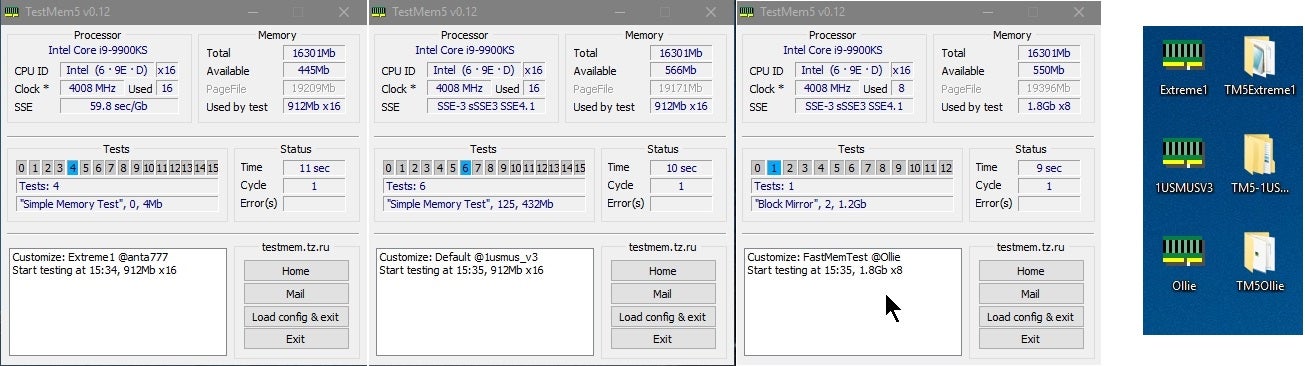
Overclock.net
Configs in the links
You need to load up the config into the program before you start
It'll show like, 16 tests?
Instead of the default 5
Now, once you sort the ram problem out
I would take a look at your windows
Consider a DDU
?ddu
 silk jungleBOT
DDU (Display Driver Uninstaller) Guide by Pato
https://github.com/NeweggTechie/Graphics-cards/wiki/How-to-use-DDU

GitHub
Contribute to NeweggTechie/Graphics-cards development by creating an account on GitHub.
dull flint
^
Then do sfc /scannow to try to resolve errors
A full reinstall could be in order
Reason being is ram corruption is hard to reverse in an existing install if it's too deep
But worry about that later
I think you're on the right track
Your blue screens seem like video driver corruption, which could very well be triggered by bad ram
Give the test a shot
wise phoenix
ohh okay okay, thanks a lot for the information, I'll get right into it
wise phoenix
did all of the stuff, so far here are my stats:
========= TestMem5 Log File =========
Customize: PCBDestroyer @Mechan0
The program in compatibility mode,
need to run with Administrator privileges!
Start testing at 22:42, 960Mb x12
Testing completed in 1:27.58, no errors.
========= TestMem5 Log File =========
Customize: PCBDestroyer @Mechan0
The program in compatibility mode,
need to run with Administrator privileges!
Start testing at 22:42, 960Mb x12
Testing completed in 1:27.58, no errors.
========= TestMem5 Log File =========
Customize: Extreme1 @anta777
The program in compatibility mode,
need to run with Administrator privileges!
Start testing at 0:11, 1Gb x12
Testing completed in 2:01.15, no errors.
========= TestMem5 Log File =========
Customize: PCBDestroyer @Mechan0
Start testing at 10:37, 960Mb x12
Testing completed in 1:26.59, no errors.
I also did the sfc scannow and it did not find any integrity violations, what's weird is when I play games(specifically minecraft) it still crashes on the 3600mhz, but does fine on the base clock, I'm gonna be able to get the new 8x2gb ram on sunday and I'll do another benchmark then, maybe I didn't run the testmem5 enough, if I still get errors with the new ram then maybe the issue is with my graphics card, and I might have to resort to underclocking or something
dull flint
@wise phoenix try the DDU tutorial I linked above
Remember to use safe mode otherwise it won't work properly
wise phoenix
dull flint
<@301970547129057281> try the DDU tutorial I linked above
I have done that as well, I also followed some extra instructions like disabling the network adapter, and installing the chipset necessary, unfortunately the problem still persists
 shy knoll
I need help finding the updater for my motherboard, an Asrock Z790 Riptide Wifi
grizzled bloom
shy knoll
I need help finding the updater for my motherboard, an Asrock Z790 Riptide Wifi
I do not recommend using auto installer, but here it is. https://download.asrock.com/Utility/Others/AutoDriverInstaller(v2.0.0.6).zip
It's all the same drivers as this page. https://pg.asrock.com/mb/Intel/Z790 Riptide WiFi/index.asp#Download
dull flint
wise phoenix
I have done that as well, I also followed some extra instructions like disabling...
Hm. Try setting the ram to 3200 MHz and your FCLK (infinity fabric) to 1600MHz in bios
 pine agate
where can i ask for help about my pc not posting anything
 vast meadow
pine agate
where can i ask for help about my pc not posting anything
vast meadow
pine agate
where can i ask for help about my pc not posting anything
Here or #building-and-recc-chat is fine
pine agate
vast meadow
Here or <#589689072692494356> is fine
its ok i was dumb as hell
I was testing my ryzen 5 2600 before putting it on a case
I forgot I needed a gpu for it to post
smh
thank you tho!
its working now
vast meadow
All good happens to the best of us
wise phoenix
dull flint
Hm. Try setting the ram to 3200 MHz and your FCLK (infinity fabric) to 1600MHz i...
this is working for me, I'll still keep playing to ensure that it's not just a fluke, but so far it is indeed working. Thanks man
is there a way to "brute force" or stress test my gpu so that I know if it will have issues? like testmem5 but for gpus
shy knoll
grizzled bloom
I do not recommend using auto installer, but here it is. https://download.asrock...
Thanks, but ew Windows 11
Does the OS version actually matter?
Oh, it's both, the search filter just hides the one irrelevant to the filter
grizzled bloom
wise phoenix
is there a way to "brute force" or stress test my gpu so that I know if it will ...
You can try occt, or looping time spy. Those will catch common errors.
shy knoll
You don't recommend using auto-installer, but there is no other option, right?
grizzled bloom
You can install the drivers individually
shy knoll
Oh I see, you don't recommend using the auto install feature
shy knoll
Thanks
dull flint
wise phoenix
this is working for me, I'll still keep playing to ensure that it's not just a f...
Just want to clarify which cpu is this?
shy knoll
grizzled bloom
Right
This is all that is in the zip file:

And this is the resulting installation
 wise phoenix
dull flint
Just want to clarify which cpu is this?
wise phoenix
dull flint
Just want to clarify which cpu is this?
Ryzen 5 3600
Gigabyte B550M DS3H AC
Corsair Vengeance LPX 8x2GB 3600Mhz
RTX 3060 Ti
dull flint
wise phoenix
Ryzen 5 3600
Gigabyte B550M DS3H AC
Corsair Vengeance LPX 8x2GB 3600Mhz
RTX 3060...
Very possible that either the board or CPU is holding you back on hitting 3600
FCLK silicon limit
3600 isn't guaranteed on zen 2
You could try your hand at a little overclocking to fix that but honestly running a stable 3200 profile should feel about as fast anyway
The small uptick in fclk won't do much, not in the context of xmp
wise phoenix
I see, well so far I'm satisfied the gpu isn't the issue, and I guess I'm alright with sacrificing a few frames deduction as long as the system is much more stable now
Thanks for the help man
dull flint
Ye
It's possible you could do 3600 but you'd need to run a lot more tests so it's all good
Last thing
You mentioned you have another 16gb coming right?
If I'm right then I'd highly suggest not adding 16gb more of corsair
That brand is notorious for using like, every manufacturer under the sun to make ram chips
And every ram chip runs quite a lot differently to another type, making compatibility a nightmare**
So you have very high odds of mixing with that brand specifically
If you want 32gb, I'd suggest a whole new 32gb kit and selling the current 16gb, you'll break even with more money in the pocket anyway
Food for thought @wise phoenix , otherwise glad to have helped 
wise phoenix
dull flint
If you want 32gb, I'd suggest a whole new 32gb kit and selling the current 16gb,...
I'll probably do this, don't wanna risk breaking anything more, so far im currently eyeing the G-Skill Ripjaws 16gb ddr4 3200mhz, is that any good?
dull flint
Ye if you want a new kit, go get a 2x16 or 4x8 set
Silicon power is good, so is teamgroup
They sell 32gb for $50
You can sell your current vengeance for like, $20-$30
wise phoenix
alright, I'll probably look for those, hopefully it's available here
wise phoenix
Philippines
dull flint
Ooo, no silicon power I don't think
Look for KLEVV
Mushkin
Team group
G skill
Uh
V color
wise phoenix
so far I found team group and G skill, maybe I can find others as well
dull flint
Yeah that should be most of them
Ye those are the ones I'd call pretty solid
Just any old 32gb 3200MHz kit really
Cheap as you can find it that you don't mind using
wise phoenix
Alright, got it, thanks again man, glad to have solved this issue
dull flint
No worries
 split vigil
Any updates on the Meteor Lake situation
dull flint
Not anything massively significant atm
 stuck basin
Hey ya'll. So a friend of mine is having an issue upgrading an existing build. The specs before upgrade were:
Asrock B550M Pro4
x2 8GB Crucial 3200Mhz DDR4
650W PSU
GTX 1660Ti```

He was upgrading his CPU to a ryzen 7 5800x and after upgrading, he now has both DRAM and CPU error lights on his motherboard. We tried clearing CMOS, we updated the BIOS before installing the new CPU, we put back in the original CPU as well and now get the same errorSure you cleared cmos right?
Side not, if cpu is returnable I would
stuck basin
powered down the PC, power cycled it, unplugged from wall, pulled out the CMOS for about 10 min, put it back in, then powered back on
burnt spear
5600 cheaper and within 5% in gaming, 5700x cheaper, much cooler, 2% worse, 5700x3d $210 and 20% better in games
As for current issue
stuck basin
i got the 5800x on a 60% discount. otherwise i wouldbe gotten a 5700x
burnt spear
You def cleared cmos right. I'd double check cpus pins, try booting with a single stick of ram
burnt spear
stuck basin
i got the 5800x on a 60% discount. otherwise i wouldbe gotten a 5700x
How much was that?
stuck basin
100$
stuck basin
cpu pins are all straight. have tried running with a single stick of ram (using both sticks)
stuck basin
burnt spear
Mb on the above
np
burnt spear
burnt spear
Oh nice
Does he have an adequate cooler for it?
stuck basin
its the stock wraith cooler
burnt spear
Would def need something much stronger, 5800x is either hottest or second hottest cpu on am4
But that shouldn't stop it from booting
stuck basin
but in theory it should still post regardless
burnt spear
Hmm
I'd suspect bios didn't flash fully, or it needs to be updated to something inbetween first, and then to current
stuck basin
but how can we re-flash it if we cant get the pc to boot even w the old CPU
burnt spear
Yeah...
What's the bios version you tried flashing to?
And would you happen to know what the old one was?
meager elbow
stuck basin
but how can we re-flash it if we cant get the pc to boot even w the old CPU
Is there a bios flashback
burnt spear
Also, I don't think it does, but did you check for- that^
stuck basin
3.40 is the bios we flashed to
meager elbow
Button
stuck basin
no there is no flashback button
meager elbow
Welp
burnt spear
I'm honestly not sure. How long did you wait after dram/cpu lights turned on for it to boot?
It could take a few min to memory train potentially?
stuck basin
2-4 min
burnt spear
Maybe try again and give it ~10
Can't hurt at least
Other than that I don't really have any ideas
stuck basin
i mean the only gaurantee i can think of is new motherboard ready for 5000 series
nothing crazy but something thatll do
burnt spear
That's true
burnt spear
burnt spear
Other than that I don't really have any ideas
I'd give it a shot first tho
stuck basin
yep gonna do it rn
burnt spear
Would you be buying new?
stuck basin
hed be buying a new mobo then yea
burnt spear
I'd say one of these
Barebones, has a bios flashback button
https://pcpartpicker.com/product/kthmP6/asus-prime-b450m-a-ii-micro-atx-am4-motherboard-prime-b450m-a-ii
Cheap ok b550
https://pcpartpicker.com/product/4mjNnQ/asrock-b550-phantom-gaming-4-atx-am4-motherboard-b550-phantom-gaming-4
Nicer b550
https://pcpartpicker.com/product/JVJgXL/msi-b550-gaming-gen3-atx-am4-motherboard-b550-gaming-gen3
meager elbow
Would be weird but ram slot could be dead, and you could try another slot
Or try clearing cmos again, and using the 3200g with the MOBO display out, and everything else unplugged (only PSU, MOBO, cpu + cooler, one stick of ram, and the display) to see if that outputs properly
stuck basin
i mean the lights on the ram both power on. I took out the PGU completely for testing right off the bat and have the display out from the IO
but yea. currently re-clearing cmos again. i'll test the ram running for 10 min after that with the default config minus the GPU
meager elbow
but yeah, if neither of my ideas dont work, idk what else could solve this issue lmao
stuck basin
i mean the only sure thing would be a new mobo
meager elbow
if you do suspect that it's the bios, you could get an eprom programmer to flash the bios externally
stuck basin
but yea. Hopefully something fixes itself in the next 10 min. if not new mobo
but i appreciate ya'lls help
grizzled bloom
You can buy a cheap, old CPU to get it to POST and update the BIOS
I'm a little late to the party here but if it's AM4 then a 1500X would do the trick
burnt spear
stuck basin
and a new cooler as well
What cooler?
burnt spear
That won't do it
stuck basin
its better than the wraith
burnt spear

Thermalright Phantom Spirit 120 SE 66.17 CFM CPU Cooler (PS120SE)
Same price
Much better
It thermal throttles with any single tower
burnt spear
burnt spear
https://pcpartpicker.com/product/GpbRsY/thermalright-phantom-spirit-120-se-6617-...
That's good but 2.5x the price of this for same perf
stuck basin
i had a 50$ newegg gift card
burnt spear
This for a similar aesthetic
https://pcpartpicker.com/product/BRMMnQ/thermalright-phantom-spirit-evo-69-cfm-cpu-cooler-phantom-spirit-120-evo

Thermalright Phantom Spirit EVO 69 CFM CPU Cooler (Phantom Spirit 120 EVO)
Then one src
hollow thorn
oh drp5? didn't realize there was a fifth
burnt spear
https://pcpartpicker.com/product/TgzXsY/jonsbo-cr-3000-argb-5948-cfm-cpu-cooler-cr-3000-argb-black
https://pcpartpicker.com/product/TXXJ7P/montech-metal-dt24-base-69-cfm-cpu-cooler-metal-dt24-base
https://pcpartpicker.com/product/g7pQzy/scythe-fuma-3-6762-cfm-cpu-cooler-scfm-3000

Jonsbo CR-3000 ARGB 59.48 CFM CPU Cooler (CR-3000 ARGB Black)

Montech METAL DT24 BASE 69 CFM CPU Cooler (METAL DT24 BASE)

Scythe Fuma 3 67.62 CFM CPU Cooler (SCFM-3000)
burnt spear
Yes, just costs a good bit more to accomplish the same thing
Your money either way, just my suggestion
stuck basin
yea i appreciate it
meager elbow
grizzled bloom
I'm a little late to the party here but if it's AM4 then a 1500X would do the tr...
the issue was that they had a cpu that originally worked, decided to upgrade the cpu, so they did a bios update, and now both cpus dont work, so it may be a failed bios update or something
no bios flashback on the mobo either
meager elbow
yeah, all the standard troubleshooting steps have been done from what i've seen
from clearing cmos to single stick of ram, and reseating the cpu
grizzled bloom
Bad flash is possible, but what was the old CPU
And was it the latest version they flashed?
I guess it's pointless by now to ask
meager elbow
grizzled bloom
And was it the latest version they flashed?
latest non-beta bios yeah
 distant gulch
Woop woop

 wind karma
Not sure if someone's posted this already but
Reddit
Explore this post and more from the pcmasterrace community
meager elbow
Yeah I saw somebody post this morning
Felix talked about it
Might have been fingertips that sent it
cerulean wadi
A similar incident was probably posted 20 years ago, just zif-pga combined with amateurs not heating the cpu 1st, hehe.
grizzled bloom
Except this redditor claims he did run a stress test to heat it up, then hit the heatsink with a hairdryer before trying to twist the cooler off. All of which is good practice.
I'll admit I've ripped a couple CPUs out of the socket. It's never been THAT bad though, where it takes the socket with it.
cerulean wadi
Interesting. Burgler is a prankster and put crazy glue into their paste, idk.
 long scaffold
Should I go ahead and download windows or wait until I have my gpu
I have ryzen 7 7800 x3d
CPU
grizzled bloom
Up to you. If that's the only thing missing you might as well get it set up imo.
long scaffold
grizzled bloom
Up to you. If that's the only thing missing you might as well get it set up imo.
Will it interstate anything when I install my gpu
grizzled bloom
You can just pop in the new GPU and install the drivers
No conflict or anything to worry about
long scaffold
Okay bet
And with no gpu can I go ahead and download my games and stuff or should that wait
grizzled bloom
You can download games, sure
long scaffold
And that won’t mess anything up either ?
grizzled bloom
Old games might get confused but anything from the last 15 years or so will just auto detect the new GPU
long scaffold
Oh ok bet
 sudden creek
My friend has a laptop (Model: G513QY-SG15.R96800) from ROG that has been seeing temperatures in the high 90s and experiences random crashes mostly during gaming. Do you guys think it is due to thermal issues?
grizzled bloom
Could be. That's the thermal limit on a lot of laptops. You could try undervolting.
sudden creek
grizzled bloom
Could be. That's the thermal limit on a lot of laptops. You could try undervolti...
Both CPU and GPU are in the 90c during gaming.
cursive epoch
sounds like it's due for a repaste
i'd clean the fans
stuff like that
they use lm tho, so that's an ordeal to redo
grizzled bloom
Oh that's one of the liquid metal models? Yikes. Those are known to just die when the lm leaks.
sudden creek
Jesus that makes this a hard one.
Also her laptop has been used for about two years now.
Just use regular compressed air for cleaning out the pc yes? And give it a couple minutes for every thing to cool off/dry.
 kind swift
Need assistance please 🙂 someone local to me is selling a 7600x. What is a fair used price to offer? This is in Canadian dollars as well.
hollow thorn
~150-200cad should be fine, but you might want to look around for recent listings near you for recent prices for the used market
cerulean wadi
sudden creek
Just use regular compressed air for cleaning out the pc yes? And give it a coup...
If blowing fans area, try to use something to hold the fans so they don't get spun too fast
sudden creek
cerulean wadi
If blowing fans area, try to use something to hold the fans so they don't get s...
Understood.
Also while I know to hold the fans down, why are we supposed to do this? Is it because static electricity might be produced from the fans spinning or?
dull flint
Too much rpm can destroy the bearings
Too much internal inertia and outward pressure from high rpm
Cracking, broken grindy fans
cursive epoch
If the fans have a clutch in em, you'll be fine
But you never know so it's best practice to make sure they don't spin
meager elbow
stick shift fans ong

 mystic inlet
For a non gaming / work and school laptop would I be looking for more ram or ram speed ?
cursive epoch
wot
but anyway
with any tasks, i think 16gb is a minimum these days
16-32 is a good amount
meager elbow
mystic inlet
For a non gaming / work and school laptop would I be looking for more ram or ram...
ram speed doesnt really matter much in those cases
go with 16-32gb
16 should be plenty if all you're doing is notetaking and working on spreadsheets
mystic inlet
Thank you
 acoustic lynx
I have a question, so the i9 14900k is like the "best" cpu so I've heard, then why does the 7800x3d have much better stats in tests on games?
dull flint
The answer isn't black and white is why
7800x3d is easily the best from a plug and play perspective
However the 13900K/KF/KS/14900K/KF/KS can all perform within a few % of it (better or worse) depending on how it's set up
If it's tuned really quick, bonkers ram, delidded, hell, throw it in a uber expensive dedicated cooling system like a phase change, it'll run rings around a 7800x3d
But in irony the 7800x3d is simply that good for so much less effort
acoustic lynx
Ngl idk what half of that means 😭
dull flint
Ya I imagine
acoustic lynx
What would you suggest getting?
dull flint
But all these things are essential to make the i9's as fast as the 7800x3d
Well it depends what you want the pc to do
acoustic lynx
Video games
dull flint
Easily the cheaper option
burnt spear
7600x3d, 7800x3d, or 7950x3d
burnt spear
It's been within $50 of 7800x3d recently tho
acoustic lynx
is the 7950 better
dull flint
He won't have a need for the $50 tho
burnt spear
That's fair
burnt spear
acoustic lynx
is the 7950 better
For gaming they're near identical
dull flint
acoustic lynx
is the 7950 better
Better in the sense of 1 or 2%
dull flint
But not better in the sense of you spend 10% more
burnt spear
Do you have a microcenter nearby?
dull flint
Ye imo
burnt spear
In the US?
dull flint
7800x3d also doesn't need a bonkers motherboard
burnt spear
acoustic lynx
13k pop
There could be one nearby outside your town tho?
Unless you have already checked, I would
acoustic lynx
Ill check
burnt spear
They've a 7800x3d bundle for $600 or 7600x3d bundle for $450
acoustic lynx
Closest one is 4 hours
dull flint
If you're within maybe 1-2 hours of one, it'll be a bit justified
burnt spear
Sadge
dull flint
Welp
burnt spear
Nearest to me is just about the same distance
Felix how close are you to one
Should be driving distance, right?
dull flint
About 28 hours
burnt spear
dull flint
93 hours
Oh lightwork
dull flint
Next question is what screen size you want to play at
burnt spear
acoustic lynx
Alright well thank yall, I think I'm gonna go with the 7800
Have you heard of pcpartpicker.com?
acoustic lynx
burnt spear
Have you heard of pcpartpicker.com?
Nope
burnt spear
It makes building a pc list very easy
What's your budget for the full pc, if you don't have anything alr?
acoustic lynx
Okay so I have a pc I built myself
dull flint
Research not required
acoustic lynx
My bday was yesterday and my mom got me a 4070 super
burnt spear
W mom
dull flint
Solid
acoustic lynx
So I was gonna upgrade my cpu
burnt spear
What's your current cpu?
acoustic lynx
burnt spear
W mom
Absolutely
dull flint
She bought the best nvidia card wth
burnt spear
Real
dull flint
Your mom might be better at it than us
acoustic lynx
Ryzen 7 5700X
burnt spear
Lmao
burnt spear
If you wanted to keep it, it isn't the worst pairing with a 4070 super, but you would see a difference with a cpu upgrade
dull flint
Yeah 5700x is solid
burnt spear
Imo I'd wait at least a little while. Cpu prices, at least for x3d, recently went up
acoustic lynx
Yes, the main reason for the upgrade is bc I play a lot of arma 3
Which is like
Nearly all cpu
dull flint
That's fair
dull flint
@acoustic lynx what's your total budget for this
You could do this for like, $640-660
Anything lower I probably wouldn't bother tbh
burnt spear
Part List - AMD Ryzen 7 7800X3D
acoustic lynx
dull flint
<@973549832214040636> what's your total budget for this
I dont rly have one ngl
dull flint
Bacca that list is not Christian
dull flint
He will be cursed by demons
burnt spear
Or blessed by the jews
dull flint
The Lord will forsake his minecraft servers
burnt spear
One of the two
dull flint
Why is it only 6's and 9's 
burnt spear
acoustic lynx
I dont rly have one ngl
I mean, you could do cheaper than the list I linked, or more expensive
dull flint
Ye
burnt spear
That mobo is a solid board, nothing special but am5 boards are very "overbuilt"
dull flint
Not a whole lot cheaper tho to justify the upgrade
burnt spear
Meaning even a lot of cheap boards can support the best cpus without issue
burnt spear
$130 is where ok boards start
acoustic lynx
I'm not very nowledgeable on how mother boards work
dull flint
$636, or really, about $627 would be the floor for 7800x3d rn
burnt spear
If you want to get creme de la creme or whatever tf that weird expression is
dull flint
acoustic lynx
I'm not very nowledgeable on how mother boards work
So they have a new platform now
burnt spear
B650e pg riptide wifi is basically as good as it gets
dull flint
Old board won't work
burnt spear

ASRock B650E PG RIPTIDE WIFI ATX AM5 Motherboard (B650E PG RIPTIDE WIFI)
acoustic lynx
dull flint
Old board won't work
Wdym
dull flint
Am4 is dead
burnt spear
You need a new cpu, mobo, and ram
burnt spear
Current mobo and ram won't work with 7000 series
acoustic lynx
How do I check what my ram is
burnt spear
It's ddr4
burnt spear
It's impossible to be anything else, it's all am4 supports
acoustic lynx
Oh
dull flint
Ya so $627 before tax is your entry price
burnt spear
And matches the ryzen 7600
acoustic lynx
I'm more outdated than I thought 😃 🔫
burnt spear
I mean
acoustic lynx
Alr so
burnt spear
20% diff in games, especially being cpu heavy games
And could resell the 5700x for at least $120 or so

AMD Ryzen 7 5700X3D 3 GHz 8-Core Processor (100-100001503WOF)
burnt spear
$4 per %
dull flint
Ye
Could just to that if you didn't want to mess around
Update bios on motherboard first
Then swap cpu out
Away you go
Proviso is the 5700x is sold
And for a good price
acoustic lynx
Okay so
I think I'm just gonna upgrade everything lmao
7800
that mobo you sent
and new ram
dull flint
Use the link bacca sent for a list
acoustic lynx
Okie dokie
burnt spear

Silicon Power Value Gaming 32 GB (2 x 16 GB) DDR5-6000 CL30 Memory (SP032GXLWU60AFDEAE)
dull flint
And the places to buy from
burnt spear
If you want rgb
https://pcpartpicker.com/product/2JLFf7/teamgroup-t-force-delta-rgb-32-gb-2-x-16-gb-ddr5-6000-cl30-memory-ff3d532g6000hc30dc01

TEAMGROUP T-Force Delta RGB 32 GB (2 x 16 GB) DDR5-6000 CL30 Memory (FF3D532G6000HC30DC01)
dull flint
I am pretty sure we have a cheaper atx option btw
burnt spear
acoustic lynx
Okie dokie
Oh also, what cooler do you have? 7800x3d is super easy to cool
99% chance you can save it
burnt spear
dull flint
I am pretty sure we have a cheaper atx option btw
Only non wifi or b650-s wifi
acoustic lynx
shi lemme check
burnt spear
So if you have ethernet could do a diff board
acoustic lynx
Do not have ethernet
dull flint
burnt spear
Only non wifi or b650-s wifi
Nvm prices changed
Just buy the 3 we linked tbh, hard to beat that
Much nicer ram for another dollar
https://pcpartpicker.com/list/bMfY89
Part List - AMD Ryzen 7 7800X3D
And less unheavenly
☠️
dull flint
32 is enough
acoustic lynx
Okay
dull flint
We aren't at the threshold for 48 or 64 yet
acoustic lynx
I planned on getting a new cooler anyways
acoustic lynx
I know, but I want a new one
dull flint
Just get a small tube of arctic mx-6 for $7 and you're good to go
Oh well I can suggest a couple
Thermalright any single tower
Or thermalright peerless assassin/phantom spirit/frost commander
Anything else isn't worth it in US rn, and you won't need more
If you have a dual tower or 240mm or better aio I wouldn't change really
Single tower also works but I could understand wanting a bit more
burnt spear
acoustic lynx
I planned on getting a new cooler anyways

Thermalright Assassin Spirit 120 EVO DARK 70.4 CFM CPU Cooler (AS120 EVO DARK D6-DE)

Thermalright Phantom Spirit 120 SE ARGB 66.17 CFM CPU Cooler (PS120SE ARGB)
acoustic lynx
Is watercooler or fan better
burnt spear
A heatsink will have a much longer (infinite) lifespan
burnt spear
An aio is only needed on very hot cpus that are hard to cool, like the 13900k
burnt spear
burnt spear
https://pcpartpicker.com/product/MzMMnQ/thermalright-phantom-spirit-120-se-argb-...
7950x can be cooled by this, let alone 7800x3d
acoustic lynx
dull flint
What is your current cooler
It's an AIO
360mm
But I think I have the fans set up wrong
dull flint
Would just use that tbh
burnt spear
acoustic lynx
360mm
What brand if you happen to know
And im assuming you've only had it a couple years?
dull flint
Use it til you lose it
acoustic lynx
corsair
dull flint
🔥🔥
burnt spear
Mmm
acoustic lynx
is 750w enough
dull flint
Ye
burnt spear
Yeah
acoustic lynx
Okay
burnt spear
7800x3d pulls like 88w
dull flint
What 750w is it
burnt spear
Peak
acoustic lynx
dull flint
What 750w is it
Also corsair
burnt spear
acoustic lynx
Okay
Ye model of psu matters more than wattage here
Do you know what letters are on it?
dull flint
acoustic lynx
Also corsair
Got a specific name
acoustic lynx
RM
burnt spear
Ie rm, rmx, rme, cv, cx
dull flint
?
burnt spear
Nice
acoustic lynx
RM750
burnt spear
Fantastic psu
dull flint
Oh yeah ur good
acoustic lynx
Okay sweet
burnt spear
Peace
acoustic lynx
dull flint
Alr ima head out
Ty
 lyric bay
Hey can someone help me out real fast and tell me how to get in contact with support for help getting a replacement? I ordered a new CPU but it wouldn't slot in correctly and when I flipped it over Irealize that like 4 or 5 of the prongs are bent a little
Quite literally fresh out of the box
burnt spear
lyric bay
Hey can someone help me out real fast and tell me how to get in contact with sup...
What cpu and what motherboard
And that's a newegg customer support thing, not a discord server thing
lyric bay
Amd ryzen 5 5600 and my mother board is a AMD MSI B450M pro-m2
lyric bay
burnt spear
And that's a newegg customer support thing, not a discord server thing
I kinda figured but I'm ngl navigating the support page on my busted phone is kinda a pain
burnt spear
You can try dming @glad socket
 compact zenith
Have a question about corsair dominator ram. When windows forces updates and reboots server, it's not fully loading the memory's light settings till someone actually logs in, which is causing the ram sticks to turn on to default. Is there something that can force them to load in the settings after reboot, without making someone log in?
vast meadow
compact zenith
Have a question about corsair dominator ram. When windows forces updates and reb...
You could try setting a task in task scheduler for icue or whatever other rgb software you're using, there might already be one, change it from run when user is logged on to run whether user id logged on or not
compact zenith
Thanks. I'll go check. I kinda miss the old days of editing sys.cfg to do those things. Windows kinda got me rusty over the years.
vast meadow
hopefully should do it for you
halcyon relic
anyone know if there are benchmarks comparing 7600x3d vs the 7800/7900x3d?
burnt spear
halcyon relic
anyone know if there are benchmarks comparing 7600x3d vs the 7800/7900x3d?
It's about a 5% difference
Sometimes less
I don't have a comparison off hand tho
halcyon relic
burnt spear
It's about a 5% difference
think it’s worth swapping that into my current build and using my 7900x3d for the other build i mentioned in #building-and-recc-chat LOL
grizzled bloom
halcyon relic
so probably a little better than the 7900x3d then lol
Especially in 1% lows
halcyon relic
grizzled bloom
Especially in 1% lows
I got a 7600x3d I was going to use in another build, so it actually is gonna be a bit better for gaming than my 7900x3d in main build then
i might actually just swap them and use the 7900x3d in that other build then lol
is there anything in particular I should do when swapping cpus?
sudden creek
Clear CMOS, Fresh Windows Install, and make sure to install the right drivers.
@halcyon relic
grizzled bloom
Ideally yes all of the above
dull flint
halcyon relic
anyone know if there are benchmarks comparing 7600x3d vs the 7800/7900x3d?
Slightly better than 7900x3d, a little chunk worse than 7800x3d/7900x3d as a number of games are made to scale with more cores (For ryzen this scales up to 8)
 void viper
lyric bay
I kinda figured but I'm ngl navigating the support page on my busted phone is ki...
void viper
lyric bay
I kinda figured but I'm ngl navigating the support page on my busted phone is ki...
Get your card and bend the pins back to place
Also check if thos epins are ground pins also
 indigo moss
Whats better i7-11700k or i9-10900F?
burnt spear
indigo moss
Whats better i7-11700k or i9-10900F?
Do you already have a mobo to go with one of them?
If not I wouldnt get either if possible, unless it's a very good deal
Like $150 max, even that's pushing it considering 12600kf is a good bit better at $130-140 new
https://www.cpubenchmark.net/compare
indigo moss
burnt spear
Do you already have a mobo to go with one of them?
The mobo is a MSI MPG z590
burnt spear
indigo moss
The mobo is a MSI MPG z590
Do you already have it in hand
indigo moss
No, I'm using the PC part picker
burnt spear
Ok, I wouldn't buy into an old generation
You end up spending more for less performance
What's your budget for the whole pc?
indigo moss
Under 2k if possiable
burnt spear
Yeah you can fit a 7800x3d in that, which far outperforms any lga1200 cpu
If you really want intel, I would get a 13600k and make sure you update to the newest version of bios and undervolt the cpu, to ensure it's safe. Intel had a quality control issue on their 13th/14th gen cpus, but with a uv and new bios it's fine.
You don't have an upgrade path with any intel cpu at the moment, which is why I would suggest amd 7000 series, am5
Part List - Intel Core i5-13600K, GeForce RTX 4080 SUPER, Montech XR ATX Mid Tower
7800x3d has had some stock issues recently, so is up to an insane $500. Would never pay that much for that cpu, but you could go for a 7600/7600x, which just about match the 13600k in games
Part List - AMD Ryzen 5 7600X, GeForce RTX 4080 SUPER, Montech XR ATX Mid Tower
@indigo moss some options ^
Can swap in a cheaper gpu if you want
indigo moss
I was also trying to do it only on newegg so I can have them build it for me
I just realized I meant to say i was doing the PC builder on newegg
my bad
burnt spear
indigo moss
I was also trying to do it only on newegg so I can have them build it for me
They don't actually build it for you unfortunately
They just "help" you choose the parts
The newegg pc builder is really, really, really bad
It recommends old and overpriced parts almost exclusively
I would look for someone local, or if you have a microcenter nearby they do custom builds
A local pc shop did my first build a couple years back
Otherwise I'd say pre built time
indigo moss
I'll look at my options thank you for helping me
burnt spear
Happy to, if you've any questions or want any other recommendations feel free to ping me
indigo moss
@burnt spear How would a i5- 12600Kf be with a asus z790 plus TUF
also would a heatsink or radiator be better for cooling?
meager elbow
I personally will always recommend an air cooler whenever possible due to reliability
Air coolers last practically forever
Aios last for 4~ years
Long enough for most people to upgrade to a new system, so some people don't mind
But a dual tower cooler performs around the same as a 240mm aio
indigo moss
Cool, thank you
meager elbow
Also most people would be recommend going with an ryzen 7000 series AMD cpu for new builds currently, unless you're on a tight budget
Bacca sent you one with it
meager elbow
burnt spear
https://pcpartpicker.com/list/RMWfJy
Here
indigo moss
I've never used an AMD cpu so im not sure how they perform compared to intel
meager elbow
Unless you don't have much free time to do some tinkering, I would highly recommend building a PC yourself
AMD currently is destroying intel in a few fronts
Though mainly in their x3d cpus
indigo moss
So currently AMD is pretty good
meager elbow
Yeah, AMD is no longer the option that only people on a tight budget gets
dull flint
indigo moss
I've never used an AMD cpu so im not sure how they perform compared to intel
If I covered two PC's up, one with amd, one with intel, and no hints (obviously)...
You'd never tell the difference.
It'll behave basically the same, performance will be basically the same, experience in windows will definitely be the same
As far as using it you'd never really notice
indigo moss
whats a good AMD thats a decent price but good performance
meager elbow
Same answer as before, Bacca's reccs are solid
If your budget is smaller than that, then someone can help modify the list for you
indigo moss
https://www.microcenter.com/site/content/custom-pc-builder.aspx?load=45e2dce5-70d6-4432-86f3-a0d8dbe5b5b0 This is what I have so far

Micro Center
Ready to build your own PC? Micro Center is your one-stop source for PC parts and more! Use our PC builder to find the best prices on the parts you need.
meager elbow
indigo moss
https://www.microcenter.com/site/content/custom-pc-builder.aspx?load=45e2dce5-70...
Are you using microcenter for their build service?
indigo moss
yeah
indigo moss
I know
meager elbow
Ask in #building-and-recc-chat for a microcenter build for the build service, and say your budget as well
indigo moss
ok
meager elbow
There are alot of things that aren't ideal in your current build lmao
Yikes I just noticed the air cooler price 💀
 compact zenith
acoustic lynx
compact zenith
acoustic lynx
My bday is in a few days. Why thank you 🙂
.
My wife is now deciding on whether she wants a new gaming laptop, or have me build a new gaming desktop. I've always built Intel systems, because I just loathed AMD due to nightmares back early 90s. But looking at their ryzen 12 core 24 thread CPUs and the prices, thinking of building an Amd one.
Actually, disliked sounds better. I loathed Tandy systems more.
Apple falls in between 😉
compact zenith
I used to think the most expensive part of college was buying the parts to build both my kids top of the line gaming webservers. Then discovered the mechanic part was far worse, with Matco tools 2k+ 😦
 vagrant mist
compact zenith
.
My wife is now deciding on whether she wants a new gaming laptop, or have me b...
vagrant mist
compact zenith
.
My wife is now deciding on whether she wants a new gaming laptop, or have me b...
A lotta people are gonna hate Intel now cause of 13/14th gen degrading and intel doing everything they can not to fix the issue
compact zenith
vagrant mist
A lotta people are gonna hate Intel now cause of 13/14th gen degrading and intel...
I'm lucky then. The systems I built a little over a year ago are 12th gen. My heavy dislike for AMD was because when I worked retail, early 90s, I already despised Tandy, and AMD was irking me a lot, as they were not running all game titles like MSDos did. Also having to research sys.cfg info for it was an even bigger headache. I didn't like Windows 3.1 either, but gave Windows 95 a try, because my brother was working for MS at the time and a free os back then, was unheard of. (My brother also failed to tell me it would shut off after a period of time) Then Windows 98, and around that time I joined the $500 a year program which gave me 10 keys for just about every Microsoft product. Got annoyed when it was dropped to 5, then 3, but got them to grandfather in my 5 keys per product already activated. Sadly they killed the program like 7 years ago 😦
Anyways, didn't even know Intel was having issues.
Explains why an I9 processor has 2k ratings, yet it's AMD comperative cpu has 12k ratings.
I take it crypto currency took another bad hit recently? Lot of used hardware is on Ebay, and I see a lot of good CPUs on sale, marked down around 30 to 40%, which is what happened in October 2022, when the $900 I9 cpu dropped to $349. Bought one for myself and two I7 for my kids. Wife wanted to wait but now wants a new build.
And AMD ratings are positively through the roof.
In a good way.
I never built an AMD system, but I gather it's the same as Intel? Motherboard, CPU, Ram, Fan, NVME boot drive.
vagrant mist
Obviously a different socket
But the rest is the same
Different cooler mount too I guess
Amd chips have been killing it since 3000 series
At least on the consumer space
Latest launch was mostly just underwhelming but it's still a good chip on its own
vagrant mist
compact zenith
I never built an AMD system, but I gather it's the same as Intel? Motherboard, C...
7800x3d is the top gaming CPU right now
compact zenith
vagrant mist
7800x3d is the top gaming CPU right now
Better than the 7900X?
vast meadow
compact zenith
Better than the 7900X?
The x3d chips are better for gaming
dull flint
The X3D chips stand at the top
vagrant mist
In short, yes
 loud crater
how do cpus bottleneck gpus? as far as i know its just the graphics card that does the rendering of objects, so if you have a good one it can do a full screen of pixels many times per second, but how does a cpu stop it from doing all it can?
hollow thorn
loud crater
how do cpus bottleneck gpus? as far as i know its just the graphics card that do...
Imagine you have a GPU that can instantly render and output image of any kind, but how are you going to know what should be where in the image? The CPU generally does a lot of the logic and physics calculations in games, so the CPU has to figure out where an object should be, then tells the GPU to render it there. At some point, if your CPU can't provide that information as fast as the GPU could render the scene, you can be "bottlenecked" by the CPU. There are generally many factors, so it's usually not clear cut when your performance is bound by your CPU or GPU
loud crater
ohhh ok ty
so a game with lots of npcs and explosions and maybe like projectiles effected by gravity will be more cpu intensive, but a game with lots of reflections and far away objects will be more gpu intensive?
grizzled bloom
That's the general trend yes. More objects and things moving needs more CPU power. More eye candy like reflections and ray tracing needs more GPU.
It's not a hard and fast rule but a trend
compact zenith
loud crater
how do cpus bottleneck gpus? as far as i know its just the graphics card that do...
My old motherboard, an Aorus Gigabyte 490, or maybe it was a 390, either way it was the most horrible board for bottlenecking. The card slots were broken down to 32/16/8/4 and at the time, NVME was new to me, so was using a 2200 mbps read, 1600mbps write nvme, with 8 sata spindle drives.. my internet was too fast for the system. When I ran an Ultima Online server, which averaged 8 online at all times, all item hoarders, the graphics card couldn't keep up because it was plugged into the 4x slot, and keeping tract of people connected lagged the server horribly. What was worse, losing data with one drive. That service used to be as bad as a coaster writer. If data bottlenecked, while it was writing, it lost not just the file it was writing, it killed all files in the folder as well. Worst build I ever put together. System I built last year runs perfectly. I only use the nvme slots, no spindle drives unless it's a portable copying over large files to an nvme.
compact zenith
vast meadow
The x3d chips are better for gaming
Thanks for the info. I'll recheck everything over.
compact zenith
vast meadow
The x3d chips are better for gaming
I take it the 7900X3D are the better of the 7800X3D? I keep running searches for 7800x3d, and keep getting 7900x3d offers.
dull flint
7800X3D = 7950X3D > 7600X3D > 7900X3D in performance
grizzled bloom
compact zenith
I take it the 7900X3D are the better of the 7800X3D? I keep running searches for...
That's because the 7800X3D is so popular it's sold out almost everywhere. The 7900X3D is better for production due to more cores but worse for gaming due to heavy stuttering caused by the dual CCD layout. I say this as a 7900X3D owner, you don't want one.
compact zenith
That might explain the $400 price drop. You also against the 7950X3D as well?
grizzled bloom
That one isn't as bad since there's more cores and less need to activate the second CCD, so less stuttering. It's still a little worse than the 7800X3D in 1% lows.
It's a production powerhouse but also one of the top gaming chips
dull flint
^All that, though 7950X3D is not recommended for anyone that doesn't need the extra despite the better value pick over 7800X3D
grizzled bloom
Hard to judge value for something you can't buy right now 🙃
I do agree it's not the ideal choice, but if you do need extra cores it's nice
dull flint
Ye
AMD knows the worth so we're getting the price hikes
They've done it plenty of times, more guilty of monopolistic behaviour than team blue or green tbh
Moment they win something it's 📈📈📈
$$$$
grizzled bloom
Gotta milk it while they can since Arrow Lake is looking competitive for gaming. It only took 3 generations.
It's probably worth waiting for that to launch btw
I'm seeing between 12-15% single core improvement over 14th gen
Which is quite far below Intel's original estimates but still good
(multi core remains to be seen but that doesn't matter for gaming)
Oh and it does launch at the end of next month, around the 24th
compact zenith
If my wife was just gaming, it would be an easier choice. She's doing art, coding I never seen before, and game playing, sometimes all 3 at once. See a few motherboard and cpu packages, but not with the cpus listed above


 compact zenith
I'm going with the 7950x3d. Just did a clean format on my wife's 4 year old Aorus Master I7, and with its 12gb EVGA RTX, still struggles with her game running with office running in background.
Actually, just realized she has 4 sata drives. Be interesting to see how it runs with nvme only.
Bbl
acoustic lynx
I finish pc, plugged it in, turn it on, but no display
I've already reseated the ram
Reset it
Allat
Idk what to do
meager elbow
acoustic lynx
I finish pc, plugged it in, turn it on, but no display
new pc? try to turn it on and leave it for like 10 minutes
it probably wont boot immediately
acoustic lynx
Nah the motherboard was just faulty
I bought a new one and did all the stuff and things and it works now
 light vine
anyone know deals for a 7800x3d? i also need ddr5 mobo and 32g ddr5.
burnt spear
light vine
anyone know deals for a 7800x3d? i also need ddr5 mobo and 32g ddr5.
Not unless you have a microcenter
This is really the only choice otherwise
https://pcpartpicker.com/product/XccgXL/amd-ryzen-9-7900x3d-44-ghz-12-core-processor-100-100000909wof

AMD Ryzen 9 7900X3D 4.4 GHz 12-Core Processor (100-100000909WOF)
light vine
burnt spear
Not unless you have a microcenter
i have access to microcenter
burnt spear
light vine
i have access to microcenter
They have a $600 7800x3d bundle or a $450 7600x3d bundle
light vine
burnt spear
They have a $600 7800x3d bundle or a $450 7600x3d bundle
can u link the 7800x3d one
burnt spear
Oh damn I guess they took it down due to the 7800x3d stock issues
You'd have to choose between the 7600x3d and 7950x3d bundles I guess
The latter is around 8% better in gaming
And comes with a better mobo
Imo not anywhere near worth $200 extra unless you're doing more than just gaming
light vine
i saw the deleted deal but i wasnt able to drive to mc till this wknd.. is there anywhere else where i can find a deal for this or a feed somewhere i can watch for one
burnt spear
light vine
i saw the deleted deal but i wasnt able to drive to mc till this wknd.. is there...
No not really
 lyric turret
Need a mobo for a ryzen 9 7950x3d
grizzled bloom

Thermal Grizzly: https://www.thermal-grizzly.com/produkte/522-cpu-contact-frame-for-12th-gen-intel-by-der8auer
Support us on Patreon: https://www.patreon.com/hardwareunboxed
Join us on Floatplane: https://www.floatplane.com/channel/HardwareUnboxed
Buy relevant products from Amazon, Newegg and others below:
Asrock B650 PG Lightning - https://ge...

See MSI QD-OLED Gaming Monitors: https://msi.gm/GetQDOLED
Go QD OLED Global: https://msi.gm/GoOLEDGlobal
Go QD OLED Australians: https://msi.gm/GoOLED
Support us on Patreon: https://www.patreon.com/hardwareunboxed
Join us on Floatplane: https://www.floatplane.com/channel/HardwareUnboxed
Buy relevant products from Amazon, Newegg and others belo...
For VRM temperature, as long as the board isn't throttling it's acceptable. There's effectively no difference between a board running at 60C and one at 80C.
They helpfully highlight the ones that throttled in red instead of blue.
The rest of the vid is mostly covering other features like USB ports and PCIe slots.
lyric turret
so anyone of them work
grizzled bloom
Most of them do, except the ones that have cut down VRM cooling. Which are the ones they put in red on the 7950X charts.
Oh and if you have questions about a specific board we can dissect it for you
 grizzled bloom
lyric turret
is this good?>
grizzled bloom
lyric turret
is this good?>
To quote the first video around 4:34, all of the Prime B650 boards suck and should be avoided
lyric turret
grizzled bloom
To quote the first video around 4:34, all of the Prime B650 boards suck and shou...
yea not sure which mobo to do
lyric turret
i need a mobo under 200$ usd
using b&h video website bc thats where my cpu is in stock currently
grizzled bloom
lyric turret
i need a mobo under 200$ usd
using b&h video website bc thats where my cpu is i...
Are there any special features you need? Wifi, USB C header, extra M.2?
Did you need mATX or is full ATX good?
This would be a good one, 7:02 on the first video and they do say it's a good option.
https://www.bhphotovideo.com/c/product/1730066-REG/msi_b650pwifi_pro_b650_p_wifi_am5.html
VRM temp was a cool 65C so more than acceptable
A Gigabyte option if you prefer https://www.bhphotovideo.com/c/product/1795716-REG/gigabyte_b650_aorus_elite_ax.html
sudden creek
Who pinged me?
grizzled bloom
Looks like AMD might launch X3D early to compete with Arrow Lake's launch, since Arrow Lake is looking quite decent in single core/gaming.
With the efficiency improvements of Zen 5 they could theoretically bump the clocks a fair bit, maybe +400 MHz over 7000.
dull flint
Final post update. TL;DR:
Intel 14th and 13th gen users are highly encouraged to update to microcode 0x12B as soon as possible.
Degradation problem has been 'root cause identified'
This will be addressed either though bios updates or through windows update. It is strongly suggested to move to the newest bios that becomes available with 0x12B that's not in beta.
wise phoenix
So I just did a major oopsie and bought an intel ram, it said it's Intel XMP 2.0 ready, but I have a ryzen 5 ram, will this still work? or am I cooked and I need to return this while I still can?
 grizzled bloom
wise phoenix
So I just did a major oopsie and bought an intel ram, it said it's Intel XMP 2.0...
grizzled bloom
wise phoenix
So I just did a major oopsie and bought an intel ram, it said it's Intel XMP 2.0...
Nah you're fine
XMP is just the name for the preconfigured profiles, which AMD is totally capable of reading and setting.
dull flint
Wait
@wise phoenix
Are you adding more intel ram to your ryzen ram?
Or is this just replacing the old ram
/new ram for the new pc
?
The posing of that question is odd to me Fal
It sounds like they're mixing

grizzled bloom
Funny that you say that with the "do not mix memory" warning being front and center in that pic
dull flint
LMAO
grizzled bloom

 grizzled bloom
There's also no need to censor any of the info on those sticks, it's not like someone can claim warranty with it because they'll see a different serial number once it arrives. Besides, g.skill has a lifetime transferrable warranty so there's no need for such fraud.
wise phoenix
dull flint
Or is this just replacing the old ram
nono I followed your instructions and I bought a new pair and sold(will sell) the old one
grizzled bloom
That'll work perfectly fine then
wise phoenix
good to hear, felt scary for a moment, thanks guys
grizzled bloom
Make sure to enable XMP in BIOS, it might be called AMP or A-XMP or DOCP.
wise phoenix
grizzled bloom
Make sure to enable XMP in BIOS, it might be called AMP or A-XMP or DOCP.
will do, thanks man
grizzled bloom
Out of curiosity, what is the code starting with 042 or 043
That'll tell you what type of memory die it uses
The last 5 digits specifically
grizzled bloom
8Gb Hynix D, weird I haven't seen that one yet
dull flint
What DJR?
That's a good one
iirc that's the high clocking fun stuff of D4 Hynix
It might be a downbin though but should run well
grizzled bloom
I guess I just haven't seen dual rank djr on g.skill yet
Some decent potential to it

3800 c16, could be better but not bad at all
dull flint
Check with @limpid warren but iirc DJR is one of the ones that'll do the stupid high frequencies on intel
Could be 16gbit I'm thinking of
 limpid warren
grizzled bloom
djr seems similar but down binned
limpid warren
grizzled bloom
djr seems similar but down binned
CJR is the hynix that's usually like 18-22-22-42. I have two DJR kits. One is DR 4400c19-26-26-46 & the SR is 5000c19-28-28. Micron Rev E (or maybe N?) can also clock 5k with tighter primaries but won't POST with oddly high tRAS. The DJR won't budge on tRCD or tRP but benches tRAS 28.
limpid warren
I broke my 11th gen CPU so I don't really get to enjoy DJR anymore
dull flint
CJR can also be kinda whack good
Depends all on the bin
Not DJR levels tho
(again, binning)
limpid warren
Oh I have a PNY 4600 SR DJR kit somewhere too I forgot lol
dull flint
Gary these are 8gbit ye?
limpid warren
CJR can clock high with good bins but can't handle a voltage beat down like DJR, Bdie, or Rev E/N
grizzled bloom
You couldn't kill B-die if you tried
limpid warren
Yes. I actually think the 4600 kit is in the motherboard I forgot to send to Rommy like 2 months ago. Crap lol
grizzled bloom
Straight up 1.8v and it's a little warm but fine
limpid warren
DJR will take 1.8 & drop tCL pretty low but tRCD/tRP will be the same based on the frequency
I could daily this on 11600K until I decided to throw it in a 10th Gen delid tool & rip off an SMD

I found a great "OBO" on ebay. Fitz grabbed the same kit from the same seller actually haha

Wasn't as fun on 10900K sadly
grizzled bloom
I'm torn between selling my b-die kits or buying a used r5 2600 to upgrade my server
Leaning towards the upgrade
But it feels bad putting b-die in a system that will never go above 3200
limpid warren
They're nuts https://www.ebay.com/itm/226177580081?

eBay
Upgrade your desktop's memory with this Kingston Fury Renegade DDR4 SDRAM kit. It consists of two 8 GB UDIMM modules with a total capacity of 16 GB and a bus speed of PC4-40000 (DDR4-5000). The CL19 memory is perfect for high-performance gaming and multitasking, making it ideal for those who demand the best from their PC. With 288 pins, it's com...
Is like 5600 much more? My dad's 5600G did high clocks synced
grizzled bloom
The 2600 is $35 and a 5600G would be $50
limpid warren
Isn't 5600 monolithic die? Or maybe 5500? I can't remember
grizzled bloom
The G ones are mono
limpid warren
Oh heck that's pretty inexpensive
limpid warren
Isn't 5500 like a 5600G without igpu?
grizzled bloom
That's one way to look at it
But it manages to be worse somehow
It does use a disabled cezanne die though you're right about that
 grizzled bloom
Bro will put anything under LN2
limpid warren
4934c18-19-19
With godbin 4800c17-19-19 bdie
There are so many that I wonder how low they'd go
 grizzled bloom
Maybe I'll look on ali
$70
Still twice the cost of the 2600, hard to justify for a plex/nas/pihole server
limpid warren
Of the first 7 listings, like 5 had "more than 10 available" then the next one had 76 available lol
grizzled bloom
Yeah they'd probably take $70-75 if offered and shown the ali listings
limpid warren
Lol I'd offer $40 just to see
Sure they don't make much but it's better than not selling at all & making $0
limpid warren
But even if, why keep the bdie for that application anyway? I should sell off some ddr4 heck
limpid warren
People still use it so it hasn't bottomed out yet I'd think
Maybe sell it & get some dirt cheap 2666 stuff
grizzled bloom
Huh. The 1600 is on the compatibility list but not the 1600X or 1600AF.
limpid warren
That's strange. Guess you gotta do 2600 lol
grizzled bloom
The 1200 is the only other one from that series on the list, trippy
grizzled bloom
I've got several laptops here I have yet to part out... but I don't think any of their processors would beat my current 1650 v2
limpid warren
You don't have any desktop memory from office PC's otherwise heading to a recycle center?
grizzled bloom
Nope
limpid warren
I hear legends of places that recycle pc parts selling stuff dirt cheap but never actually seen one in person
grizzled bloom
I used to have one of those near me, but it shut down permanently (covid)
I found a stock cooler for a socket 8 processor just when I needed it there
grizzled bloom
Alright I think I might do the 2600X for $31
I can sell my current server for $100 easy
My wife will be happy to be rid of it, it's rather large
I'll bench it before I set it up as a server too, yeet 1.5v, get a few points
compact zenith
Question, do motherboards like the Aorus master Z690 series have some any type of bricking safety measures built in, in case of a power outage during bios updates?
Just curious. Friend of mine bricked his 7 year old Asus doing a bios update, and lost power. Makes me wonder if motherboards have been improved since then.
grizzled bloom
BIOS flashback would be the only built in method of recovery there, and it isn't perfect by any stretch
dull flint
Gigabyte has a failsafe bios chip on their boards, which can be activated if a bios fails to flash
grizzled bloom
Gigabyte calls it "Q flash plus"
dull flint
They also have q flash on some ye
Also, ch341a fixes all of these problems
I'm pretty sure of this, unless you run into a compatibility issue in which case, soldering a new working bios chip on is the plan b
grizzled bloom
I'm not sure the aorus master has dual bios. It's not advertised at least.