#cpus-mobo-and-memory
1 messages · Page 53 of 1
 dull flint
Set temp limits as well to around 80 and power limits to some 220W
Or even lower if it's really bad
170W
 shy wyvern
Ecores ratio is actually down to 38 because it's not stable above that for 1.25. I had it at 42 on 1.28
dull flint
That sort of thing may help
dull flint
shy wyvern
Ecores ratio is actually down to 38 because it's not stable above that for 1.25....
40 alone is extreme as it is
Have you got msi game mode on in bios
shy wyvern
To be fair isn't stock like 1.35?
shy wyvern
That's what it was running at before manual tuning
shy wyvern
Yeah so if static has degraded .3 I feel like it's a hardware issue like oxidation
dull flint
It really does sound like that yes
shy wyvern
I've never had issues doing static voltage this low
dull flint
Especially if you tell them you swapped ram, mobo, psu
shy wyvern
I usually do static voltage when overclocking
dull flint
Static on 10nm is fickle
I've seen more than enough on the platform to know over 1.35 is problematic
shy wyvern
dull flint
Especially if you tell them you swapped ram, mobo, psu
I have!! I even upgraded to a revolution 850 D.F. from a EVGA 650 watt when I got my 4090
dull flint
Which is very typical even for older intel
dull flint
shy wyvern
I have!! I even upgraded to a revolution 850 D.F. from a EVGA 650 watt when I go...
There you go
shy wyvern
Went to DDR5 and a new board. Literally the only thing consistent is my heccin CPU
dull flint
Then it's very conclusive
shy wyvern
Because I went from a 3080 12GB to a 4090 same issue
dull flint
Reinstalled windows?
shy wyvern
Yeah I do that every 6 months
dull flint
Yep you've covered literally everything they could physically ask then
shy wyvern
And I even upgraded my boot drive from a sn750 to a 990 pro
dull flint
definitely everything lmao
shy wyvern
Good lord you made me realize I even upgraded my case in the last 2 years LMFAO
dull flint
That is conclusively degraded then
shy wyvern
I just thought the CPU would be rock solid?
shy wyvern
I even decided and abused my 8600K and my 4670K
And ran my 8600K at 1.42 for 4 years
No issues
dull flint
Even I wasn't that suspicious despite me sticking to my beliefs of running 1.32v since I got onto ADL
I've run it ever since and that may be why all my CPU's are ok
shy wyvern
I didn't set static voltage until like 6 or so months in
By then I think I was cooked
dull flint
Well if electromigration had happened by then
Then yeah
At that point you'd have maybe worn away the wall thickness
Trying to remember what the wall of the via is called
Gallium?
lemme find a pic
Tantalum nitride
Basically you overwhelm the copper vias with too much energy/heat, it experiences, I believe it's deposition?
And electro migrates
But since you can potentially cause so much it wears away that tantalum layer, there's no going back at that point
Think of it like, pouring acid onto a power cable
As the rubber sheath wears away, eventually it burns to nothing, then the wires finally bridge with the acid and the fluid is electrified
Chaos occurs at that point (Instability)
Anyway, side rant, yeah just do what you can and be patient
I think that it sucks but given how big this is
As well as how big the denied RMA cases have blown up to
I don't think you'll be refused
And I don't think there's just one way to skin the cat here, you could discuss with microcenter, mailing the cpu with warranty claim details attached
Pay for shipping here and back
That's not an unrealistic request
I think this will get figured out, it just sucks to be in the middle of it
shy wyvern
I haven't crashed in 2 hours, I set voltage limit to 1.245, set P core to 53 and disabled ecores. Working perfectly fine for now
I was crashing every 5-10 minutes before but I've been running a game for 2 hours so far without issues
I'm eventually going to hit a point to where the CPU isn't going to accept a lower voltage and be core clock stable.
Weirdest part about this is that unlike overclocking errors, I am error free on things like P95 but just randomly blue screen or all my applications crash at once
It was like this on my old power supply with my 3080 too when it first started happening so I doubt it's that either. It's so strange. Anytime I've been unstable, memory and CPU tests always throw up errors, first CPU I've had where it doesn't do that?
 next thistle
I just Read something in French sorry that even the i5-13600k is affected by the intel problem... should I wait for a problem or should I build a new machine using AMD? 😟😟😟
I mean like right now
 burnt spear
next thistle
I just Read something in French sorry that even the i5-13600k is affected by the...
burnt spear
next thistle
I just Read something in French sorry that even the i5-13600k is affected by the...
Theyre replacing cpus affected
shy wyvern
All CPUs from the initial 13th gen batch are affected by oxidation
And ALL CPUs 13th and 14th are affected by voltage issue
 sudden creek
shy wyvern
Weirdest part about this is that unlike overclocking errors, I am error free on ...
sudden creek
shy wyvern
Weirdest part about this is that unlike overclocking errors, I am error free on ...
this sounds like what I experienced with my faulty 7950x3D
it wouldn't toss errors, it'd game, and just randomly shutdown or bluescreen.
lowering the clocks might've helped but I think it was just in my head.
 vagrant mist
could be a lemon
AMD, unlike intel, doesn't have current gen chips that damage themselves over time lol
shy wyvern
AMD did with the x3d
Motherboards we're making the chips melt themselves
AMD fixed it

GRAB THE LIMITED GN15 ANNIVERSARY FOIL SHIRT! https://store.gamersnexus.net/products/limited-edition-foil-gn15-tshirt-design | Grab one of the brand new, LIMITED EDITION FOIL 'GN15' shirts to help out while getting something commemorative for 15 years of GamersNexus in return! This research piece took us a straight week of nonstop work to comple...
vagrant mist
Ah I forgot about that kekw
But in this case it was actually just the motherboard
Not a much deeper issue that Intel is halfheartedly trying to hide
Its similar, but not the same
shy wyvern
Yeah and they were a lot more graceful
They didn't even care about proof of purchase AMD said "contact us and send it in"
vagrant mist
meanwhile intel is just dead silent on their cpu returns
 grizzled bloom
Looking forward to Intel pushing a Windows update that forces a microcode update without telling the user and bricking a bunch of PCs (again)
 tender sleet
Classic Intel-Crowdstrike collab be like
Imagine if Crowdstrike somehow manages to brick PCs so hard it fixes the Intel degradation :3
 cerulean wadi
Decided to try a 14600KF that was $180. Could soon use some input about if I can just do a modest PL of 125ish, or how I can maybe adjust voltages to be safer. B660M Aorus Pro
dull flint
@cerulean wadi instructions here
 limber dragon
are the i5s even affected?
cerulean wadi
Feetlick, Thnx. Hot this weekend so perhaps I'll be inside, swap in new cpu & test. See what like Discord I can assign to the Ecores, idk.
 elfin warren
Not as far as they've said
dull flint
limber dragon
are the i5s even affected?
Not even intel is sure atm
They've stated as much as anything over 65W which is basically all of them
To as little as just i7 and i9
limber dragon
"I cant recommend anyone get a Chevy because their corvette zr1 has transmission issues"
Meanwhile Joe Brown needs a pickup truck
dull flint
Fair, but he was asking for the instructions anyway lol
The post highlights all K cpus, and i7 and i9 specifically
Intel has stated to that much and also more
limber dragon
Chillin's worried about the safety of it
dull flint
Anything B0 stepping at this stage
Yes for a 14600KF I would do the steps
Then once the microcode lands in 2 weeks, provided everything seems good
I will take that post down
Or make a new one with updated instructions
cerulean wadi
Will checkin after work, thnx
dull flint
I've been reading a buttload of info about this stuff
Including a ton of people coming out explaining their undervolts were successful
So I'm holding fast for now but the micro code seems to have some weight to it maybe fixing things
There's a huge amount of discussion on twitter and reddit about these intel issues
(Yes ik, of all places)
Some good detailed posts that I check and scan the comments regularly on, so I keep things up to date
There I tidied it up some more lol
Kinda really inclined to do so as I'm right in the firing line for intels problems rn
grizzled bloom
limber dragon
are the i5s even affected?
In theory yes, and there are a few reports of this, but they're far less likely to have problems because they're not pushed as hard.
 hollow knot
How much perf from 5900xt and 5600 cpu?
burnt spear
hollow knot
How much perf from 5900xt and 5600 cpu?
?
burnt spear
limber dragon
are the i5s even affected?
I believe mine is
I have exactly the same issues people with affected i7s/i9s have
And i bought mine within a few months of launch
dull flint
hollow knot
How much perf from 5900xt and 5600 cpu?
Little at all difference between them until the extreme end
tender sleet
limber dragon
are the i5s even affected?
Some say all 13/14th gen at or over 65 watts TDP is degrading, laptop chips included
But only 700 and 900 desktop SKUs are confirmed explicitly by Inten

 cyan raft
cerulean wadi
grizzled bloom
cyan raft
cerulean wadi
grizzled bloom
Those Intel chips are pretty big. The cooler doesn't need to cover the entire thing, as long as the main die area is covered.
 gritty patio
grizzled bloom
Those Intel chips are pretty big. The cooler doesn't need to cover the entire th...
gritty patio
grizzled bloom
Those Intel chips are pretty big. The cooler doesn't need to cover the entire th...
No like it didn't line up with the bracket
Like no matter what's I did
*what
dull flint

Reddit
Explore this post and more from the GamingLaptops community
Adding this to pinned post
 agile jolt
Never knew microcenter had such good cpu deals
Was able to get a 7800x3d for $225 yesterday
Brand new
grizzled bloom
Oh yeah they've got fantastic bundles too. Some of the bundles are a full $200 off retail for the parts compared to other places.
agile jolt
I got the CPU. B650m mobo and a 32gb kit of 6000mhz ram for a little under 500 bucks
I’m unsure how well 6000mhz is for DDR5
Sounds high
cerulean wadi
That's fine. If you end up needing to, ez to adjust it down to 5600-5800
agile jolt
I’m not noticing any stability issues with it
7800x3d seems to run a tad hotter than my 5800x3d
It isn’t thermal throttling though
From what I can tell
burnt spear
agile jolt
I’m unsure how well 6000mhz is for DDR5
That's perfect
7800x3d can be cooled by a $15 air cooler, you're good.
tender sleet
Perfectly normal
It wouldn't throttle anywhere below 85 anyway
Believe me I daily a 7600X and it took me a while to get used to the higher temps @agile jolt
agile jolt
Ah
tender sleet
Mine idles at around 60-65 (though it is a higher power draw chip than yours)
tender sleet
So it's perfectly fine
agile jolt
As long as it’s safe idc
tender sleet
That's perfect lol
tender sleet
Anything below 85 and you get full perf from the CPU
agile jolt
Gotcha
My cpu is really pushing 5ghz so I can play melee at max capacity
I’ll leave it as is then
I have 2 intakes at the bottom, one up top than one exhaust
The temps are probably higher because my room is a sauna this time of year
tender sleet
agile jolt
I have 2 intakes at the bottom, one up top than one exhaust
What case do you have?
Your airflow pattern seems weird to me
agile jolt
Jonsobo d31
tender sleet
Ah
@agile jolt you might want to flip the top intake fan if you can
Heat naturally rises after all
But u2u
If it works as it is, why bother?
agile jolt
Yeah
I just don’t have an intake up front
With how the PSU is
So I have one up top above the cpu cooler
Like the slot in front
tender sleet
I guess that's fair enough
agile jolt
I just bought the case cause it was kinda cheap and fit on my desk
There probably are better MATX cases though
Airflow wise
Might look into them
tender sleet
I'm planning to go D41 for my top gaming build
Do have a Montech Air X rn that's housing my current PC
agile jolt
Ah
I think I’m considered higher end
Might look for a better airflow case
Just to run quieter maybe
dull flint
Holding my breath saying this but Zen 5 has some pretty stable measurable results over Zen 4, in the ways of comparability and even regression, but I'm thinking both the delay and maybe a future agesa could bring out more perf from zen 5, have to wait and see, amd has a history of fumbling the launch, so.
TL;DR Zen 5 ≈ 4% improvement in gaming over Zen 4. Big improvements however in efficiency and multicore/workstation as a general take at this time. X3D retains the gaming lead.
13th & 14th gen ironically show better value to zen 5 for gaming at this stage, but intel's dubious situation for silicon at this moment inclines much bias towards ryzen in general for workstation
Side note and a serious point of interest, Zen 5 has gone to native avx-512 instead of 256+256, the result is a near complete doubling of performance in this specific type of work.
dull flint
After a bit more thought, this is probably a lot of everything intel could've hoped for with their next-gen coming. AMD has made a massive jump for server side performance, but for desktop and mind share this is perfect for them
Arrow lake could win back the consumer base if they can prove it by numbers

Wccftech
Intel's Arrow Lake CPUs will feature strong performance uplifts over Raptor Lake while being less power-hungry & without instability issues.
 high tapir
is this a reasonable mobo for a 7700x/4080S https://www.newegg.com/msi-b650-gaming-plus-wifi/p/N82E16813144628
we've decided the aesthetics of having a matx mobo in an atx case is weird so the b650m is not an option
vagrant mist
dull flint
https://wccftech.com/intel-arrow-lake-cpus-less-power-hungry-strong-performance-...
I like how no instability is now a selling point for them
Like shut up you still got instabilities in current and last gen CPUs go actually address and fix that lmao
Instead of extending warranty, while also making it difficult and rejecting applications for no reason
burnt spear
high tapir
is this a reasonable mobo for a 7700x/4080S https://www.newegg.com/msi-b650-gami...
Imo I'd take the eagle ax for $10 less, but it's up to personal preference
grizzled bloom
high tapir
is this a reasonable mobo for a 7700x/4080S https://www.newegg.com/msi-b650-gami...
Passable. That board might not like Ryzen 9 but anything less will be fine.
burnt spear
Eagle ax has 1 more nvme slot and I believe a bit better vrms, but not a big difference
vagrant mist
SENDING IN AN EAGLE
high tapir
burnt spear
Imo I'd take the eagle ax for $10 less, but it's up to personal preference
thanks that one looks slightly btter aswell
dull flint
vagrant mist
I like how no instability is now a selling point for them
They're making big promises though
And better hope like HELL they live up to them
vagrant mist
If they don't they're so done
 thorny cobalt
Hey guys, I attempted overclocking my memory to its specified 3200MHZ last night, and then my PC went dark and wont respond. I tried powering it up, but the monitor is not getting signal, and some of the debug lights come on then turn off, the motherboard RGB has gone to red, I didn’t set it that way, but I have a B450 Tomahawk Max and 16 gigs of 3200 MHZ DDR4 on 2x8 sticks. I tried to do 3 CMOS resets and tried jumping/shorting the JBAT cables but it’s still not responding. Have i fried my RAM or Motherboard? I want to mess with it more tonight, my PC wont even post.
I also tried running 1 stick of ram
tender sleet
I think you fried it when you shorted the cable
You're super NOT supposed to connect any cables to the JBAT header
thorny cobalt
I touched the jbat with a screwdriver
With everything unplugged
I held it for around 15 seconds with the cmos battery out
 kindred rover
I have a Corsair Vengeance 8gb ddr4 3200mhz ram.. if i add another 8gb ddr4 3200mhz ram from another brand other than corsair, will it cause any issue with my system?
burnt spear
kindred rover
I have a Corsair Vengeance 8gb ddr4 3200mhz ram.. if i add another 8gb ddr4 3200...
Likely yes
burnt spear
kindred rover
I have a Corsair Vengeance 8gb ddr4 3200mhz ram.. if i add another 8gb ddr4 3200...

Silicon Power GAMING 16 GB (2 x 8 GB) DDR4-3200 CL16 Memory (SP016GXLZU320BDAJ5)
 cursive epoch
@gentle canyon https://videocardz.com/newz/intel-reportedly-planning-8-core-core-ultra-3-205-215-arrow-lake-desktop-processors

VideoCardz.com
Intel Core Ultra 3 in Arrow Lake desktop Only 8 cores. We have an update on the Arrow Lake desktop series from OneRaichu. The previous report didn’t include any details about low-end processors within the Core Ultra 3 tier, suggesting only Core Ultra 5, 7, and 9 were expected. However, it appears Intel will also […]
eight.. core.. i3???
4p+4e but still


 meager elbow


 thorny cobalt
tender sleet
I think you fried it when you shorted the cable
thorny cobalt
tender sleet
I think you fried it when you shorted the cable
I found my issue
Had my display plugged into the motherboard and not the gpu
tender sleet
That do be a reason sometimes
vagrant mist
dull flint
TL;DR update bios to 129 and read this:
Lmao yeah sure you're committed to making sure your help any consumers who have cpu issyes
Explain all the people who you denied for no reason lmao
 winged roost
What to choose 5600x or 7600x?
burnt spear
winged roost
What to choose 5600x or 7600x?
7600 is 20% better
winged roost
burnt spear
7600 is 20% better
How come?
winged roost
I have a tight budget so I was thinking about going for DDR4 platform
I read an article on DDR4 vs DDR5 platform on XDA developers
cerulean wadi
It's partly about how budget you talking, and what sort of upgrade path you may not care about. Very quick example:
 dull flint
It's not a huge drop to go next gen
In fact
If you budget it properly
You can get next-gen with very little perf loss if at all
burnt spear
winged roost
I have a tight budget so I was thinking about going for DDR4 platform
What is your budget for the whole build?
In local currency
As an example
https://pcpartpicker.com/list/D6PBMV
Part List - AMD Ryzen 5 7600, Radeon RX 6750 XT, BitFenix FLOW ATX Mid Tower
winged roost
burnt spear
What is your budget for the whole build?
In INR like 50k max I can stretch it to 60k
burnt spear
Yeah 7600 eats 18k of that
Lemme see what I can do for a list rq


@winged roost
Mobo is far from ideal
If you'd spend extra anywhere I'd get a better mobo
dull flint
That one I can already see from here is like a 2 stage vcore
burnt spear
Get the sapphire 7600 instead
Well it's 3mm, case specs say 300mm and gpu is 303
Not sure if 300 is including the fan, moving it might fit it but I'm not sure.
dull flint
Updated.
TL;DR discussions still ongoing, no new developments at this stage, formal testing proving degradation on new microcode still not published/demonstrated as possible.
 woeful zinc
thought's on Asrock B450m pro4? $40
my friend also has MSI B450m Pro Max II
$40 still
cursive epoch
good enough board
woeful zinc
sure thanks
 oak sand
Am I crazy or is this voltage wrong?? I thought it was supposed to be 12v 5v and 3v
 grizzled bloom
From the power supply yes, but that 1.8v is converted from 12V and feeds the CPU
The 1.8v gets stepped down to whatever the CPU is requesting by the VRM
Very few things use the 3.3v rail any more but if you're curious, the sensor is available for monitoring in the OS
dull flint
Updated
TL;DR new disable option for intel default settings turns off all 0x129 mitigations. Highly recommended not to use this option at this point in time

My Patreon: https://www.patreon.com/buildzoid
Teespring: https://teespring.com/stores/actually-hardcore-overclocking
Bandcamp: https://machineforscreams.bandcamp.com/music
Twitch: https://www.twitch.tv/buildzoid
Twitter: https://twitter.com/Buildzoid1
Facebook: https://www.facebook.com/actuallyhardcoreoverclocking
#intel #14900k #Z790 #gigabyte
 vernal holly
is the i7 12700kf a powerful cpu?
 distant gulch
Any good alternatives at this price range for motherboard? Asrock has never really been reliable enough for my liking

ASRock A620I LIGHTNING WIFI Mini ITX AM5 Motherboard (A620I LIGHTNING WIFI)
Its for a 7900 gre and ryzen 5 7600x
dull flint
Compared to that it'd be usually either the a620m pro rs, b650m pro rs, b650m hdv, b650 eagle ax (bit meh) or b650m-a pro
distant gulch
Aight, appreciate it
dull flint
A620i lightning is an excellent board and itx at that
It's the same as a b650i lightning with just the chipset change
VRM is great on it
dull flint
I mean if you prefer an alternative, all the ones I mentioned are also not bad
But honestly, it's a great entry to itx, that one
Nothing else comes close to it in the itx department
It's a 6 stage vrm that can more than handle a 7950x
distant gulch
Yee that itx form factor is pretty important for me lol, would preferably fit in my case 🥹
dull flint
Some sff cases do matx too if it's an option
e.g im01/pro or jonsbo z20
Food for thought
Those are 20-ish L cases
distant gulch
Ill do some looking, ill trust what you say about that model tho
distant gulch

Thermalright Assassin Spirit 120 EVO DARK 70.4 CFM CPU Cooler (AS120 EVO DARK D6-DE)
Thats what i have on standby
dull flint
Should be ok, I've heard it's both perfectly fine and 1 case of it being not enough
I suspect that 1 case was a defective unit
It was crooked
distant gulch
400 mm x 205 mm x 365 mm are my dimensions, not the most cramped case out there
burnt spear
Def adequate for a 7600/7800x3d
Here's the cases felix mentioned
https://pcpartpicker.com/product/RMWJ7P/sama-im01-pro-microatx-mini-tower-case-sama-im01-pro-bkg
https://pcpartpicker.com/product/pfvdnQ/sama-im01-microatx-mini-tower-case-im01
https://pcpartpicker.com/product/MM7scf/jonsbo-jonsplus-z20-microatx-desktop-case-z20-black

SAMA IM01 Pro MicroATX Mini Tower Case (SAMA IM01 Pro BKG)

SAMA IM01 MicroATX Mini Tower Case (IM01)

Jonsbo Jonsplus Z20 MicroATX Desktop Case (Z20 Black)
dull flint
distant gulch
400 mm x 205 mm x 365 mm are my dimensions, not the most cramped case out there
I think z20 might fit that honestly
Z20 is about nr200p size
Im01 as well
burnt spear
https://pcpartpicker.com/product/CjFmP6/lian-li-a3-matx-microatx-mini-tower-case-a3-matx-x
https://pcpartpicker.com/product/rRWzK8/jonsbo-d30-microatx-mini-tower-case-d30-black

Lian Li A3-mATX MicroATX Mini Tower Case (A3-mATX-X)

Jonsbo D30 MicroATX Mini Tower Case (D30 Black)
Also decently small
distant gulch
I have my pc case already 😭
dull flint
Ah ok
distant gulch
Here ill just link the whole build (gpu is a placeholder until i get a better deal)
dull flint
Show what's bought or not too
distant gulch
Part List - AMD Ryzen 5 7600X, Radeon RX 7900 GRE, Phanteks Eclipse P200A DRGB Mini ITX Tower
dull flint

burnt spear
Ah, p200a is an odd one
distant gulch
dull flint
Show what's bought or not too
Already done 🔥
burnt spear
It's itx but really big
distant gulch
burnt spear
Ah, p200a is an odd one
Yee thats what i was tryna say, doesnt feel like much of an itx to me
dull flint
/d31
burnt spear
Part List - AMD Ryzen 5 7600, Radeon RX 7900 GRE, Phanteks Eclipse P200A DRGB Mini ITX Tower
Any way you could return the case?
distant gulch
Its like 6 months old
burnt spear
Ah
distant gulch

distant gulch
I do like how it looks tho so
dull flint
You could get 7600 and save a bit too
burnt spear
7900 gre at $510 is great
burnt spear
I mean
distant gulch
But yeah, maybe 7600
dull flint
@distant gulch how old is the ssd
burnt spear
I don't see a point in avoiding nvidia
distant gulch
dull flint
<@721052260607459400> how old is the ssd
8 months?
dull flint
Alr one sec
distant gulch
burnt spear
I don't see a point in *avoiding* nvidia
If its a good deal i swipe
But otherwise
dull flint
What I'd do
https://pcpartpicker.com/list/YwsT28
Part List - AMD Ryzen 5 7600, Radeon RX 7900 GRE, Phanteks Eclipse P200A DRGB Mini ITX Tower
GRE for 509 >>> 450 4070
Also far better gre than a challenger
dull flint
Oh wow fair enough LOL
dull flint
dull flint
Also far better gre than a challenger
Contrary to what I said about the mobo, the challenger is probably one of the most common models I've encountered heat issues with over the years
Asrock have some dumb issue with paste so I would steer clear of specifically that model imo
distant gulch
Still have a good bit of cash to save up, its mostly food for thought
distant gulch
Somehow me asking about a mobo sprang to the whole build lol
 dull flint
Apart from that not much else to say
distant gulch
So mostly placeholding
Have 150 set aside for the motherboard tho ✨
Might order that soon
dull flint

140/130 is typically about as low as it gets for that one
A620 will soon be replaced by b840 which is just plain worse on paper
So I wouldn't hesitate tbh
dull flint
Got someone pestering me to experiment a bios mod on one too if you're curious in trying it
Essentially turns it into a b650
Which is kind of insane
(you're welcome to say no lol)
distant gulch
No ❤️
dull flint

distant gulch
What would be the point out of curiousity?
dull flint
Free b650 upgrade for $0
dull flint
Essentially gives you cpu overclocking and a few other things
But I can't affidavit it being risk free
distant gulch
If i ever grow away from that sentiment when i get everything tho, might try it
Unless there's something new, which is basically always
dull flint
We'll see
Some a620's have been enabled already
So it might happen to the asrock ones, who knows
 pliant siren
So one part of the hardware is faulty now, but im not sure how to tell which one as i don't have the physical hardware tools. Just software which is still limited
pliant siren
I swapped in new PSU cables today btw. Did power test, it failed. Doin gpu test again, then cpu. May as well do memory.
I feel either the PSU or motherboard is bad. Motherboard is close to runing out of warranty. I bought in 2021
Guess the june tests we've done before is worthless now.
Don't get how something big happened within 2 months...
dull flint
If you did cables but not psu I still suspect psu
You should do rma both when you do that
pliant siren
Corsair RMA is gonna be bad though, seen some stories. We only get refurbished, not new units.
dull flint
It's power related what you're experiencing
pliant siren
Guess other hardware quality isn't as good as PSU quality
Aren't all PSU's technically made by one company as well?
dull flint
Idk if I already described this but it sounds exactly like a multitude of pc problems I've had, all relating to power or power cables specifically
I'm suspicious of the psu
Or some other cable with a bad bridge
After that, a part with a fault in 12v
pliant siren
I even swapped slots too of what i used in the PSU as well.
dull flint
Power test slams the cpu and gpu into a trip, which is 12v rail ocp
So it's power related
pliant siren
Oki, guess i gotta ask the physical store to reprint a recipt for PSU RMA
dull flint
Ya that's what I'd take up doing
It's gonna be power related somewhere, but the fact that it's specifically full load scenarios has me leaning towards the psu
Often if it's something else, the trips are more sporadic or random
It's why I asked if any sata cables were connected as the data ones die easily
Those lead to annoying psu tripping
pliant siren
there is sata power cables in yes, 2 for HDD'S and one for the corsair Icue hub
dull flint
You should try isolating those out as well
Controllers and storage can die and lead to problems like that too
pliant siren
Though if any of them died, i wouldn't be able to have access to either wouldn't i?
pliant siren
Its a new hub with the aio, i got that aio in 2021 as well.
pliant siren
It passed the extreme gpu test. Before it failed last night
Ima check tomorrow for the rest, but ima get material to RMA corsair. I may get a bad RMA unit from corsair. But least it'll hold for then till i probably find some top line quality PSU then
dull flint
TechSpot
Zen 5 reviews that focused primarily on server workloads, development software, and AI-type benchmarks found Zen 5 to be generally excellent, often offering good performance gains over...


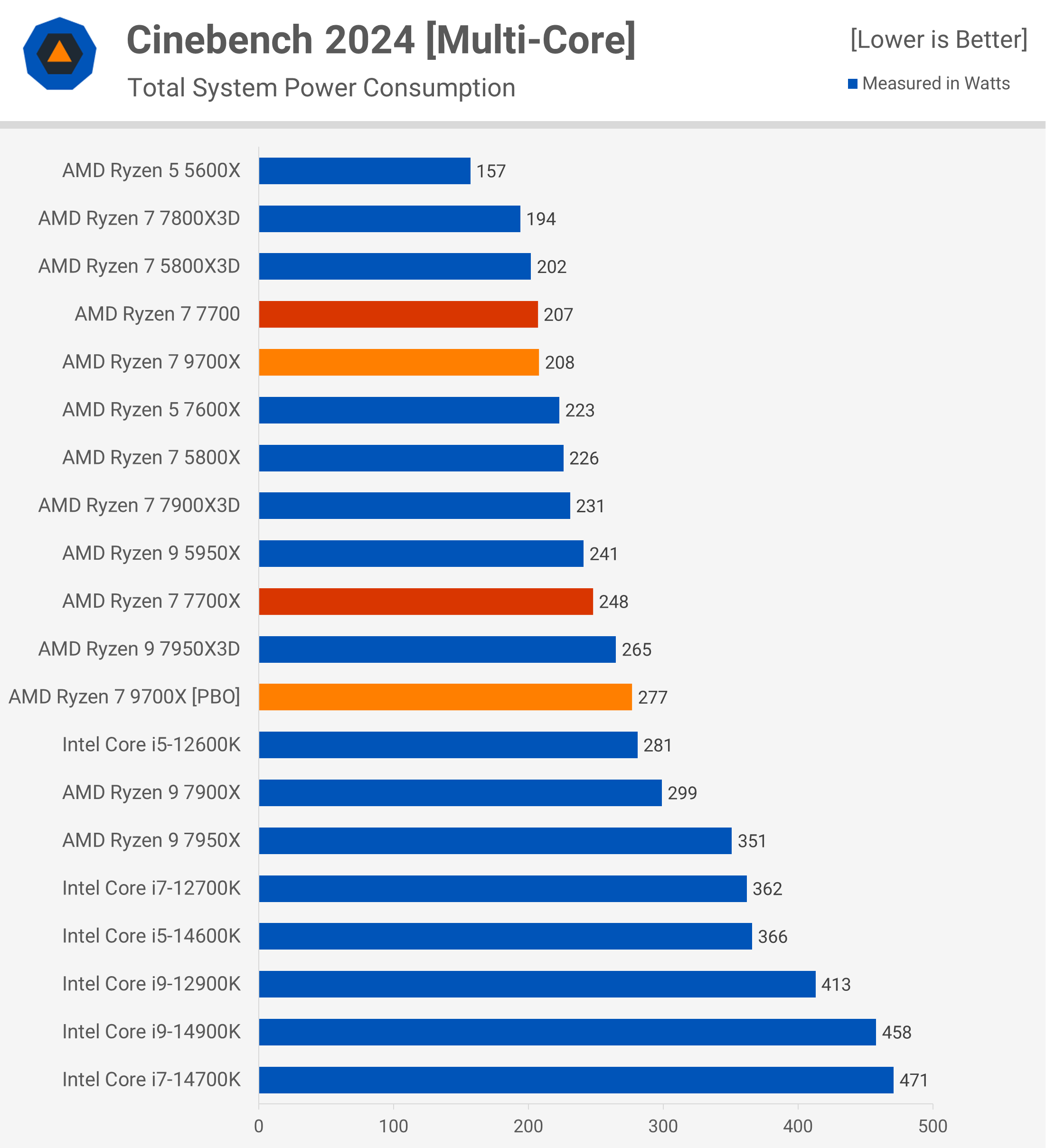

Well summarised and just overall disappointing if you're a consumer really, but for future epyc and threadripper it's massive
 past rain
wat pc component lets u run multiple apps is it a strong cpu or lots of ram or both
like aftereffects youtube n stuff
dull flint
Cpu most of all but also ram in order to cache pool everything at once
past rain
so is a intel i7 9700k n 32gn of ram enough or need more on both @dull flint
or do i need to overclock both
dull flint
Not sure why you'd need overclocking involved
If that's what you're working with that should still be mostly fine
No hyperthreading doesn't really hurt much for games (if at all really) but it will hurt for heavy multitasking
For normal stuff you should be ok
I'm assuming you already own these things
Wouldn't recommend buying them these days
past rain
no hyperthread but jus tryna make animations in after effects but watchit from youtube @dull flint
no games this is my streaming pc
i mean i do have games but i know im behind the curve in technology
\so ill wait 4 a 2nd pc build
but still messing around with my toaster of a pc
dyno bot pc lol
dull flint
If you're not gaming with it then it should honestly still be fine
It might chug a bit, but not unusable
past rain
ok
pliant siren
pliant siren
It passed the extreme gpu test. Before it failed last night
I've done cpu and ram as they passed, doin power test again. If it fails, we know for sure
bad psu. We got em. Time to see if corsair will throw my ticket away or actually help
vagrant mist
Don't pull an Intel corsair
meager elbow
lmao
shy wyvern
Intel: you need to do warranty claim through your vendor
Vendor:

This has been a nightmare to try and return a product that's not working?
I feel like Intel is definitely brushing off the issue
 long geyser
The rate at which Intel does dumb RMA stuff is prolly the same rate as other companies. Just that now there are way more people doing RMA. Actually so annoying that just about every company can get away with selling defective products and have a rather high chance of just not replacing it.
grizzled bloom
It's because the US consumer protection agency is all bark and no bite. Even when they do get it together, the fines are less than a week's worth of profits.
pliant siren
approved for RMA of the corsair RM850x PSU, hopefully i'll get news of it back quickly. supposedly fastest is one week. i wanna play wukong on ma machine man
dull flint
Been reading a lot this morning on the stability situation for intel
Some people crawling out of the woodwork echoing the problems I saw back with 12th gen degrading under high vcore set
Haven't found any confirmed cases at this stage that the microcode didn't work
grizzled bloom
dull flint
Haven't found any confirmed cases at this stage that the microcode didn't work
Except when the patch is disabled because you forgot to enable intel defaults
Beta BIOS doing beta things
My Patreon: https://www.patreon.com/buildzoid
Teespring: https://teespring.com/stores/actually-hardcore-overclocking
Bandcamp: https://machineforscreams.bandcamp.com/music
Twitch: https://www.twitch.tv/buildzoid
Twitter: https://twitter.com/Buildzoid1
Facebook: https://www.facebook.com/actuallyhardcoreoverclocking
#intel #14900k #Z790 #gigabyte
vagrant mist
oopsie
haha sorry we didn't account for people wanting to do any optimization to their cpus
tender sleet
Oh boy
So if you update your microcode and try to tinker
Instead of slowly cooking your chip you immediately fry it
 pallid thicket
If I got a hot deal already on a cpu/mobo/ram combo deal that came with ddr5 6000 c36 ram, would I see a significant upgrade by buying 6000mhz c30 ram? Wouldn’t mind adding RGB but not sure if this would just be a waste of $100 or not
grizzled bloom
pallid thicket
If I got a hot deal already on a cpu/mobo/ram combo deal that came with ddr5 600...
No, there would be next to no difference in the real world.
 grim hornet
I am currently trying to update BIOS, however I keep getting this error

 hollow thorn
Are you using the correct unzipped file?
grim hornet
This is the mobo I am trying to update.
I downloaded the update using this link: https://www.gigabyte.com/Motherboard/GA-AX370M-Gaming-3-rev-1x/support#support-dl-bios

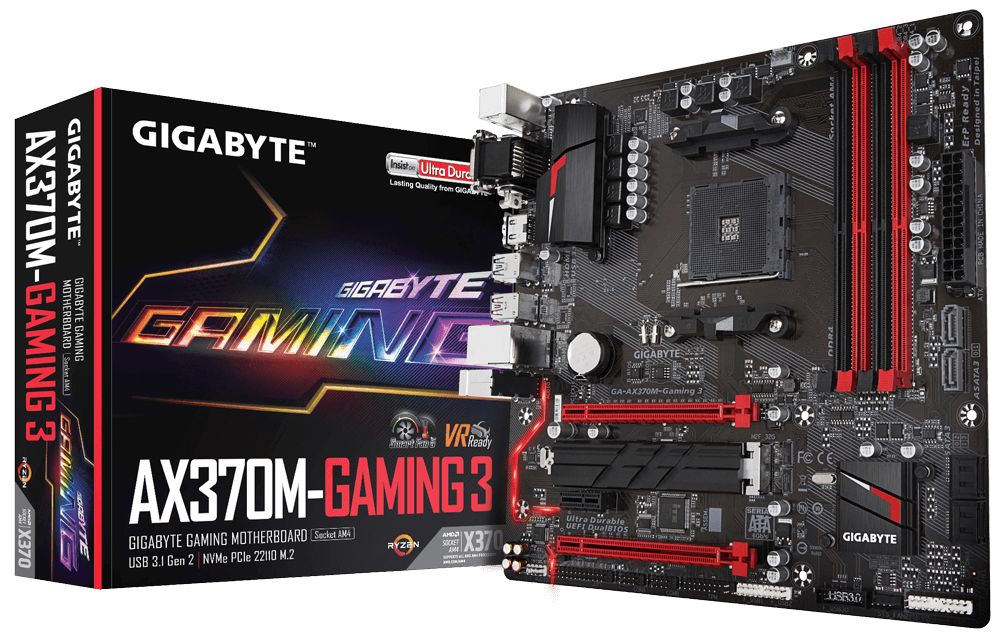
GIGABYTE
Lasting Quality from GIGABYTE.GIGABYTE Ultra Durable™ motherboards bring together a unique blend of features and technologies that offer users the absolute ...

I am using a 64gb 3.0 sandisk flash drive
I made sure it is formated as FAT32

This is the current downloaded BIOS
Should I try not skipping BIOS versions?
Now I tried version F25, it works
grizzled bloom
grim hornet
Should I try not skipping BIOS versions?
This is usually the issue. Sometimes they need "stepping stone" versions, and this is usually noted on the download page saying "update to X version before flashing this one."
grim hornet
grizzled bloom
This is usually the issue. Sometimes they need "stepping stone" versions, and th...
I updated to F31, however under “current flash” it still shows F20. What can be the issue?
grizzled bloom
Run CPU-Z and post a screenshot of the mainboard tab
I'll look into what stepping versions you should do
grim hornet
Sry for the picture not being a screenshot, this account isn’t connected to the pc I am working on
grim hornet
grizzled bloom
Run CPU-Z and post a screenshot of the mainboard tab

The BIOS of this motherboard has not been updated since 2018, now the homie who uses it wants to upgrade his CPU to 5600x. So I'm trying to update his BIOS (I know it's better to upgrade the mobo but it's not in his budget rn)
grim hornet
ye the current one is 2600 but he bought 5600x
grizzled bloom
First thing will be to update the chipset drivers, then it wants you to use the EC FW tool to update
grim hornet
I have actually done that
grizzled bloom
Both?
grizzled bloom
Looks like F31 is your stepping version, then F40, then you can go straight to F53b
grim hornet
I see, but the BIOS doesn’t update after flashing
grizzled bloom
It has dual bios so it's probably switching between primary and secondary
grim hornet
grizzled bloom
It has dual bios so it's probably switching between primary and secondary
How to fix that?
grizzled bloom
The way it works on gigabyte boards is there's 2 bios chips. The primary is writeable, and the backup is not. If there's some kind of issue with the primary, then it copies from backup and writes over the primary. If this is happening then there may be some kind of problem with how you tried to update at some point.
We can work around it. With the PC off, hold the power AND reset buttons for 10 seconds, then let go. It'll trigger the backup to reset the primary, and after a few minutes you should be able to go back into bios and try to update to F31 again.
grim hornet
grizzled bloom
We can work around it. With the PC off, hold the power AND reset buttons for 10 ...
Where do I find the reset button?
grim hornet
He doesn’t have one
grizzled bloom
You can use a screwdriver to jump the pins on the motherboard for the reset button instead
The power button goes to the top highlighted ones here, the reset are the bottom two. Touch a screwdriver to the bottom 2 while simultaneously pressing the power button.

If unwilling/unable to do this, there's a couple other methods
An easier way might be to hold the power button until it turns on, then it turns off. Then when you turn it on again it should flash the backup. This may take a few attempts.
grim hornet
Is it this switch?
 grizzled bloom
The pins are covered by the wire but they're highlighted here

 grim hornet
Oh
grizzled bloom
Or maybe it goes to a button that was previously unnoticed
But if it is a LED then that might explain why it doesn't want to flash, since if the reset is shorted constantly it'll be constantly loading the backup bios
grim hornet
grizzled bloom
We can work around it. With the PC off, hold the power AND reset buttons for 10 ...
Without doing this method?
grizzled bloom
Worth a try
grim hornet
Trying that out, thanks for your help and time
 grim hornet
After last bios update we are stuck here and input devices won’t work, I tried unplugging - still no response
 grizzled bloom
grim hornet
After last bios update we are stuck here and input devices won’t work, I tried u...
grizzled bloom
grim hornet
After last bios update we are stuck here and input devices won’t work, I tried u...
?cmos
 silk jungleBOT
How to clear CMOS (works for AMD and Intel)
https://www.intel.com/content/www/us/en/support/articles/000025368/processors.html
Intel
Defines CMOS technology and how to clear CMOS using the jumper or battery methods.
grim hornet
It turns out that it only updated to F31
grizzled bloom
Ah, yeah you need to go up to F40 before you do the final jump
At least you're making progress
grim hornet
Ye, I tried F31 -> F40 -> F53b. But it did only update to F31
 graceful elm
Hello, im trying to help my dad build a pc and he is big on storage. He wants to be able to have multiple m.2s and normal SSDs so i was wondering what kind of motherboard to get. Probably one with 4 m.2 slots as thats what i kind of saw as the most but we are working with a budget so the cheapest one you could recommend would be nice.
burnt spear
graceful elm
Hello, im trying to help my dad build a pc and he is big on storage. He wants to...
What's his budget for the build?
And how much storage were you looking to start out with?
graceful elm
he has a bunch of old multi terrabyte hard drives that hes looking to convert over to SSD and m.2s since this will be his first desktop in a while. He wants to do a build around $500 but im sure we are gonna go over that a bunch.
burnt spear
Ahh so he's transferring what's on those drives to these new ssds?
graceful elm
yeah
burnt spear
Any idea how much he's looking at total?
graceful elm
good thing is i gave him my old 3080 so gpu isnt a part of the budget
burnt spear
Is storage included in the $500 budget?
Or do you just need the path to add a bunch down the line
And sorry last few questions. What's the pc mainly being used for, does aesthetic/size matter, and does he need wifi or is ethernet available
graceful elm
so hes got about 8tb already that hes looking at converting over but he said he could probably cut that in half. Storage is not a part of the budget we just need enough for the os and some change to save files and stuff for now
burnt spear
Ah got it
That makes this much more doable
Also a big 8-16tb hdd is not a bad choice
$60-120 or so
graceful elm
need wifi, pc is gonna used for maybe possible extremely light gaming. then light video and photo editing.
aesthetic/size matter doesnt matter too much if it cuts down price
burnt spear
Light as in hobby level across, for all three of those tasks?
Bc we could do pretty cheap for this then
graceful elm
he has a small area hes trying to put a small L shapped desk in
and yeah like hobby stuff
nothing crazy at all
we were planning on the 7600x to make sure we could upgrade later and go ahead and be on ddr5 and stuff
burnt spear
You could def downgrade the gpu, if you wanted to add budget elsewhere
graceful elm
Zotac GAMING AMP Holo GeForce RTX 3080 10GB 10 GB Video Card
burnt spear
Meaning sell+buy another
burnt spear
Part List - AMD Ryzen 5 7600, GeForce RTX 3080 10GB, Corsair 3000D AIRFLOW ATX Mid Tower
burnt spear
graceful elm
thats what i gave him
Yeah, but could sell it to go for a cheaper gpu, and add the difference to the total budget
graceful elm
ah yeah makes sense
burnt spear
3080 is def overkill for what he's doing, but that's not a bad thing
graceful elm
right right
burnt spear
Part List - Intel Core i5-12400F, Corsair 3000D AIRFLOW ATX Mid Tower
graceful elm
i didnt know there was a 7600 non x already
havent looked into the 7000 series much
burnt spear
Part List - Intel Core i5-12400F, Radeon RX 7600, Corsair 3000D AIRFLOW ATX Mid Tower
burnt spear
graceful elm
i didnt know there was a 7600 non x already
Yeah, 7000 series has been out for a good while
9000 series just came out
No major perf gains
Just price and efficiency increases for the most part
graceful elm
im waiting on the 9800x3d to upgrade my 5800x non 3d so i can do ddr5
burnt spear
Nice
graceful elm
so i see the other 2 lists have intel
is it better than the 7600?
or just for if he likes intel more?
burnt spear
Just cheaper
burnt spear
Both have 3 m.2 slots, first has 4 sata slots I forgot to check for the second
It has 6
I doubt he'd need more than 3 m.2s and 4 satas honestly
2 4tb m.2s, 2 4tb sata ssds, 2 large capacity HDDs should be way more than enough
3 4tb m.2s if you ever replaced the boot drive
burnt spear
Actually something I didn't factor in is a case with enough space for all the satas
burnt spear
That case does only come with two fans, so you'd likely need to add one or two more
This also works
https://pcpartpicker.com/product/tvFmP6/bitfenix-flow-atx-mid-tower-case-bfc-flo-300-kkgsk-4a

BitFenix FLOW ATX Mid Tower Case (BFC-FLO-300-KKGSK-4A)
graceful elm
gonna go with that one thank you
 frigid scarab
Hey! I’m new to DDr5 and wondering which one to get. I’m looking at this 6000 MHZ CL30 which is $99 and the exact same one but it’s 6400 MHZ CL32. Only a $1-2 more. Which should i get?
grizzled bloom
frigid scarab
Hey! I’m new to DDr5 and wondering which one to get. I’m looking at this 6000 MH...
What processor are you pairing it with? If Intel 13th/14th gen, 6400. AMD or Intel 12th gen, 6000.
frigid scarab
grizzled bloom
What processor are you pairing it with? If Intel 13th/14th gen, 6400. AMD or Int...
Buying the 7800xd
grizzled bloom
6000c30 then
Some AMD processors have trouble running even that high, but 6000 is usually a safe bet
Make sure UCLK mode is set 1:1
frigid scarab
grizzled bloom
Some AMD processors have trouble running even that high, but 6000 is usually a s...
Sounds good I picked up the 7800xd for $300 which is -$150 off 🙏🏼 on Amazon
I forget with PCs if you upgrade one thing you’ll have to upgrade the others.. so I had to get a new motherboard and ram 😭
grizzled bloom
Yep that's what we call a platform upgrade. The good news is with the new motherboard, you're set for a few more generations if you want to upgrade the CPU down the line.
frigid scarab
grizzled bloom
Yep that's what we call a platform upgrade. The good news is with the new mother...
For sure. I settled with the B650 a gaming WiFi. I’ve been with asus motherboards for years so I’m gonna stick with them..
burnt spear
Asus has the worst am5 mobos at their price points honestly
Maybe a couple exceptions like the asrock a620m h/m.2 or whatever it is
Maybe b650m-p and m-e are down there too
grizzled bloom
Asus mostly got flak for their frankly illegal warranty practices, but they claim they're fixing things
From what I've heard that is mostly true and they're re-evaluating past RMA requests
burnt spear
Yeah but their boards are still mediocre at their price points, and their low end boards are just yucky
B650m-a wifi ii if I remember right is bottom tier for vrms like that asrock a620
grizzled bloom
Yeah HUB straight up says avoid them all https://youtu.be/ZtHOOyWYiic?si=1i43qHgnZuWlrMzu&t=275

Thermal Grizzly: https://www.thermal-grizzly.com/produkte/522-cpu-contact-frame-for-12th-gen-intel-by-der8auer
Support us on Patreon: https://www.patreon.com/hardwareunboxed
Join us on Floatplane: https://www.floatplane.com/channel/HardwareUnboxed
Buy relevant products from Amazon, Newegg and others below:
Asrock B650 PG Lightning - https://ge...
frigid scarab
burnt spear
Asus has the worst am5 mobos at their price points honestly
i did hear that. taking the risk tho😭 🙏
burnt spear
This is the point of brand loyalty that is just weird...
Acknowledging a product is likely worse but buying it because they've made good products in the past is hilarious
You do you chief
grizzled bloom
Is it really a risk if you know for a fact what the result will be?
At least it won't make much difference on a 7800X3D but who knows for the future.
frigid scarab
burnt spear
Acknowledging a product is likely worse but buying it because they've made good ...
Wouldn’t say good. Just has worked for me 🤷 always can return new items if it doesn’t workout in my favor
Doesn’t hurt to try
tender sleet
I'mma be real the only reason I'd even consider buying an Asus mobo is to avoid having to reinstall Windows and all my programs if I built a new PC rn
But since I'd also move to a pro key I'd do that anyway and by that point you might as well just use something else (B650E PG Riptide Wifi do be hot)
cerulean wadi
Techdeals has a plenty decent $121 B650M for whoever is fine w/ gigabyte. Some people are not.
dull flint
frigid scarab
i did hear that. taking the risk tho😭 🙏
Asus strix is a functional board. 12x 50-60A vrm. Not the problem with that one. The elephant in the room on that one is base level B and A prime*.
The problem is cost. It's effectively an inflated price aorus. If you got a good sticker price with it, say, $160-ish, excellent. If not, I can count at least 39 boards that will be about as nice as that one, some 8 or 9 of which are a nice white, one of which being a better white Asus board at that.
If it's not too late to cancel or return, an alternative white motherboard would likely prove a lot nicer if this is what you're looking for, as strix is never the good value buy, less the recent rise of their former sub-brand Asrock effectively beating them on almost all accounts of quality and performance at this point if you choose the right one
The better value asus for example, provided this strix was bought for $230 before tax
https://pcpartpicker.com/product/VZ6p99/asus-prime-x670-p-wifi-atx-am5-motherboard-prime-x670-p-wifi

Asus PRIME X670-P WIFI ATX AM5 Motherboard (PRIME X670-P WIFI)
Meanwhile the usual go to recommendation for AM5 by and large often being this (B650/A620) or the hdv
https://pcpartpicker.com/product/qcbRsY/asrock-b650m-pro-rs-wifi-micro-atx-am5-motherboard-b650m-pro-rs-wifi
https://pcpartpicker.com/product/kvWJ7P/asrock-a620m-pro-rs-wifi-micro-atx-am5-motherboard-a620m-pro-rs-wifi

ASRock B650M Pro RS WiFi Micro ATX AM5 Motherboard (B650M Pro RS WiFi)

ASRock A620M Pro RS WiFi Micro ATX AM5 Motherboard (A620M Pro RS WiFi)
Or the alternative full white from gigabyte for aesthetics
https://pcpartpicker.com/product/w3dG3C/gigabyte-b650m-aorus-elite-ax-ice-micro-atx-am5-motherboard-b650m-aorus-elite-ax-ice
https://pcpartpicker.com/product/CwjRsY/gigabyte-b650-aorus-elite-ax-ice-atx-am5-motherboard-b650-aorus-elite-ax-ice

Gigabyte B650M AORUS ELITE AX ICE Micro ATX AM5 Motherboard (B650M AORUS ELITE AX ICE)

Gigabyte B650 AORUS ELITE AX ICE ATX AM5 Motherboard (B650 AORUS ELITE AX ICE)
And the new generation zero cable approach from MSI with project zero
https://pcpartpicker.com/product/9sTZxr/msi-b650m-project-zero-micro-atx-am5-motherboard-b650m-project-zero

MSI B650M PROJECT ZERO Micro ATX AM5 Motherboard (B650M PROJECT ZERO)
I have a pretty long list, these are just the white ones, all of which can handily run up to a 7950X on PBO (9950X still pending but unofficially capable atp)
Food for thought 
Sorry I forgot another one 💀

Gigabyte B650 AERO G ATX AM5 Motherboard (B650 AERO G)
vagrant mist
List them all
vagrant mist
frigid scarab
i did hear that. taking the risk tho😭 🙏
This is the same logic as the one guy who invested 700k into intel
"I love intel so I will invest in them"
frigid scarab
vagrant mist
"I love intel so I will invest in them"
vagrant mist
Anyway, any of the choices feetlicks has put up are great
dull flint
It's a choice at the end of the day tho. I'm the most guilty of this but if it's an educated decision that's all that really matters. Everyone means well however, to bring about a better outcome, no harm done
While we may not have escalated very far with it, a reminder keeps us all good at what we try to do

 grizzled bloom
It's just a screw, twist
grim hornet
Kinda can’t do that

I think it's built in, can I install the m.2 and stick it on the heatsink that goes into this standoff? (the m.2 is then not screwed to the mobo)
You get what I mean?
 grizzled bloom
From your manual

Either there's another standoff included in the box or that one unscrews
grim hornet
What budget mobos are there for 5 5600x?
 indigo grail
would this work for him?
 grim hornet
grizzled bloom
Either there's another standoff included in the box or that one unscrews
grim hornet
grizzled bloom
Either there's another standoff included in the box or that one unscrews
I don’t have the box anymore and this standoff is for the heatsink - it can’t be removed :(
grizzled bloom
indigo grail
would this work for him?
Possibly, worth a try for $5
grim hornet
What option should we go for?
 dull flint
grim hornet
Kinda can’t do that
dull flint
grim hornet
Kinda can’t do that
That's permanent
Why do I know this
I tried unscrewing one
I put on the mcfindouts and I regretted it
grizzled bloom
AMD shame on you. You don't need to trip while laughing at how Intel fell.
https://www.youtube.com/watch?v=IaPo5io-Gfw

Support us on Patreon: https://www.patreon.com/hardwareunboxed
Join us on Floatplane: https://www.floatplane.com/channel/HardwareUnboxed
Buy relevant products from Amazon, Newegg and others below:
AMD Ryzen 7 9700X: https://geni.us/M27J3o
AMD Ryzen 5 9600X: https://geni.us/FyvXbeW
AMD Ryzen 7 8700G: https://geni.us/rTptD
AMD Ryzen 7 7800X3D: ht...
vagrant mist
lmao
 obsidian lagoon
whats good 32-3600mhz ddr4 ram rn? Someone told me corsair kinda sucked so i was wondering something I could get
pliant siren
pliant siren
bad psu. We got em. Time to see if corsair will throw my ticket away or actually...
They're sending a replacement. It was waranted since its damaged but they won't say what
cursive epoch
obsidian lagoon
whats good 32-3600mhz ddr4 ram rn? Someone told me corsair kinda sucked so i was...
anything not corsair
obsidian lagoon
What makes corsair so bad lol, I've never had a problem with their ram in the past 5ish years. Is it something more recent that's been problematic?
burnt spear
They have a habit of mixing dies in the same kit of ram, which causes instability and inability to run xmp
On their ddr5 they lock a voltage that no other brand does
cerulean wadi
Some of their ddr4 was fine, but they were definitely better pre-ddr4. Sorry CoarseHair
dull flint
Top that off with the flakey icue support in 5/10 buyers
It's just bad from top to bottom
I can think of I think two countries that have Corsair at least near the top for a fair price
And even then they're only matching, not beating
long geyser
burnt spear
They have a habit of mixing dies in the same kit of ram, which causes instabilit...
More info: Mixing ICs of the absolute lowest binning, then failing to properly test that binning. Corsair D4 had some pretty poor failure rates compared to other brands cuz it couldnt run XMP, and sometimes not even JEDEC, on various systems.
pliant siren
obsidian lagoon
What makes corsair so bad lol, I've never had a problem with their ram in the pa...
I am not starting to see... the answer is yes...
frigid scarab
Hey! I’m sure I know the answer but I’d like for someone who knows more than me. I had a ryzen 5800x with a RTX 4070 DDR4 3600MHZ. I upgraded to the 7800xd DDR5 6000MHZ and noticed only a 5-10 FPS difference..? Now this is bottle neck correct? I believe that’s my answer but would rather have someone who knows more tell me :). I just didn’t think it would be that such little difference
dull flint
frigid scarab
Hey! I’m sure I know the answer but I’d like for someone who knows more than me....
Depends on the game
But basically
If the gpu says 100%
Or 99%
Yes
frigid scarab
Yeah MW3 does. Honestly thought the 4070 would hold up..
dull flint
7800x3d is good for almost any gpu at a relatively expected resolution for mw3
frigid scarab
Cyberpunk I noticed a 10-15 difference
dull flint
4070 at 1440p, no surprise imo
Cyberpunk, yes, I'd believe that
Late dlc made it super cpu intensive
frigid scarab
Honestly super disappointed but I did expect a bottle neck. You think I should just keep the parts? I don’t plan on upgrading my GPU for another 3-4 years
Yeah
They’re brand new idm returning
dull flint
Imo?
4070 kinda bleh for the price
Unless you got it for like
450-ish, kinda hard to call it good
But I don't see anything objectively wrong, all said and done
A game will speed up to a bottleneck, as with anything else
Though changing your pc based on that, I would only really care about that if the pc was making me money
Lol
Consider it from a value standpoint, if you wanted more and it's underwhelming, consider changing
A 7800x3d is really good tho, arguably could be still hugely competitive to next gen x3d
You'd be set in the cpu department for a long time imo
frigid scarab
Yeah heard it’s the best gaming cpu. Def underwhelming. I’m assuming games that are more CPU based such as GTA 5 will do better correct? Even with a 4070 in GTA I was getting 70-80 FPS taking in the fact the game is poorly optimized.
dull flint
Yeah
So the easier time the gpu has to render, the harder the cpu (or even cache/ram, or ssd!) has to keep up
Having a perfect balance between all is nigh on impossible for a game, the load varies on the situation
The two most obvious bottlenecks are cpu and gpu, and it's not good to focus on these things
frigid scarab
Understandable. Assuming that then playing on higher settings then all low would be better in my situation, now that I’m getting bottle neck?
silk jungleBOT
"TL;DR Bottleneck calculators take massive generalisations and will cause someone to almost completely miss the entire snapshot of the performance that they wanted to know in the first place.
Bottleneck calculators are a commonly searched tool on the internet to make a generalised comment on a pairing of hardware for things such as games, workstation software, rendering and the like.
Bottlenecks are regarded as a limit for a pc in a given task, and each different workload, each different game, each different task may and will push a pc to a limit in a certain way, and it's never the same way. Some games will push the cpu to a limit, most the GPU, some the ram, etc.
Bottleneck calculators try to generalise this and this is why you should never use them. It isn't a true outlook of the hardware you'd be working with and doesn't give you a real take on the performance, especially when you consider your own individual needs. Some bottlenecks are good for example, a lot are expected and normal, some are caused by the application itself and don't bring out the full pc performance either, the games or apps you use might be very specific and unique in their behaviour and have an entirely different realm of performance altogether."
dull flint
^This is why you never use bottleneck calculators
You can discuss specific bottlenecks and it's a statement to the game or scenario
But bottleneck calcs generalise it to all things which is misrepresentation
Like how you said, cod wasn't better, but cyberpunk was
dull flint
frigid scarab
Understandable. Assuming that then playing on higher settings then all low would...
Playing on lower settings would push the load off the gpu onto the cpu more
Inversely, increasing adds to the gpu load
Reducing cpu stress
And both of these have an effective ceiling in each scenario
A real world limit as to how fast
A perfect balance between the two would have them both at 95%+
But that's unrealistic
I will say this tho
If you do want a bit bigger of a bump, and the 4070 is returnable, a 7800xt is basically the same price and a lot better if you ignore RT
In MW3, huge fps explosions
MW3 LOVES AMD
But cyberpunk doesn't
So....
Worth weighing up anyway
dull flint
frigid scarab
Yeah, ima test out GTA later and see
GTA is maxed out on a lot of modern hardware now at the engine limit
Which is like
165-ish
Might not help a whole lot
 scenic solar
Just bought a 2×16GB crucial ddr4 kit, and it supports 3200mts, but i only noticed cas latency is something like 22-(22-22)... the kit will be used for my home server that hosts my mc server + ftp and eventually something else.
Did i buy a decent kit, or will I lose a lot of performance? Currently runs 16gig 2133cl21 or similar
 velvet pagoda
you won't notice between cas 18 or 22 for what you're doing
only notice in benchmarks really
scenic solar
Just saw the really good price and didn't think much of the whole ram specs
scenic solar
Alternative is gskill, €10+ more however it has 16-18-18 timings
velvet pagoda
for an mc/file server, what you have is fine
scenic solar
Ok, thanks. I also thought those were not demanding scenarios and latency is no big issue. Just had to be sure
Still an upgrade over the current bottlenecked setup
Rn I'm running 1×16GB 2133mts c18~21 or something
velvet pagoda
ya, should see a nice boost with 3200 although it also depends on the cpu
grizzled bloom
Latency mostly affects 1% lows when gaming, servers don't care. Lots of Minecraft servers are running DDR5-4000 c36 right now.
vagrant mist
What about Ddr4 4000
cerulean wadi
4000c18 for instance has a bit lower overall latency vs 3200c16. Nothing we notice in most programs.
grizzled bloom
vagrant mist
What about Ddr4 4000
Servers aren't typically going to run that, especially if they have 2dpc
DDR4 3200 is about as high as they go, and with all slots filled even that would be difficult
scenic solar
Thank you all
obsidian lagoon
g.skill trident z ddr4 has no issues right?
I kinda wanna get the rgb ram instead of just normal
burnt spear

TEAMGROUP T-Force Delta RGB 32 GB (2 x 16 GB) DDR4-3600 CL18 Memory (TF3D432G3600HC18JDC01)

Silicon Power XPOWER Turbine RGB 32 GB (2 x 16 GB) DDR4-3200 CL16 Memory (SP032GXLZU320BDB)
obsidian lagoon
did you send that cause theyre both cheaper?
scenic solar
Best one to pair with ryzen 9 x3d and 4080/4090 (or 50 series)?

Or just any other recommendation
Just has to be below €250 and good features
Is 32gig of ram enough for basically anything? Rendering, editing....?
burnt spear
scenic solar
Best one to pair with ryzen 9 x3d and 4080/4090 (or 50 series)?
I'd take the first one assuming it's at least €20 cheaper
grizzled bloom
scenic solar
Is 32gig of ram enough for basically anything? Rendering, editing....?
It depends on the program you're using and the size of the project. I've seen Blender use over 64GB on a massive scale render.
48GB is the most you can usually do without sacrificing speed for capacity., also.
dull flint
Provided the 48gb price is reasonable yeah
Often 64 is similar in price to 48 for good sticks
scenic solar
And what about cpu? 7800x3d, 7900x3d or 7950x3d?
Theres a big gap in price and performance between 7900 and 7950 x3ds
7800x3d just has half c/t even tho it matches 7950x3d gaming performance. Not sure if the 8 cores would be a bottleneck for the more demanding tasks such as rendering/editing
 wraith igloo
Yall i need a bit of help. I want to upgrade my laptop's ram to 32 gb ddr5 but idk if i should get 2 sticks or 1. There is a slight possibility that I will have to upgrade to 64 but its not that high. My frnd suggested me that i should get 1 stick since it doesnt really matter to get dual channel in ddr5 since its already something like that.
Also he is asking me to use 8 gb + 32 gb. What do I do?
dull flint
scenic solar
7800x3d just has half c/t even tho it matches 7950x3d gaming performance. Not su...
Not really a limit
It's more on how hard is the workload
dull flint
wraith igloo
Yall i need a bit of help. I want to upgrade my laptop's ram to 32 gb ddr5 but i...
8+8, 16+16 or 32+32
Don't mix capacities and ic's
I would get a kit
Luckily it's laptops so, just pick the cheapest honestly
Jedec doesn't need anything special
wraith igloo
I might need to upgrade to 64 gb in the future
dull flint
Even though it's not nearly as bad on ddr5, full quad channel 16+16 still better than 32 alone
wraith igloo
My laptop does not have quad slots :"D
dull flint
wraith igloo
I might need to upgrade to 64 gb in the future
Depends on the need but you'd need a pretty crazy laptop imo to warrant that
dull flint
wraith igloo
My laptop does not have quad slots :"D
Ddr5 is 2 channels per slot
So 2 slots
Ddr4 was 1 per slot
wraith igloo
Oh right
yea
I got this laptop: G614JV-N4141WS
although the store page does not say it supports 64 gb
the command shows that it does
wraith igloo
yes
Also one more question, are the intel 13th and 14th gen stability issues affecting laptops as well?
or is it just the desktop cpus
dull flint
wraith igloo
Also one more question, are the intel 13th and 14th gen stability issues affecti...
13980hx appears to be affected so yes, look into what you can do
^Huge info dump if you want to learn
I believe undervolting is the play rn for hx but they may have an update out
wraith igloo
Alright ill check that out, tysm :D
dull flint
Np
burnt spear
Never been happier that my laptop has a 6800u lol
 long scaffold
Which is better ryzen 7 7700x or ryzen 7 7800x3d
dull flint
The x3d obviously
7700x is like slightly better multicore but the x3d is better in a bigger way with games
Granted you're not massively gpu bound all the time
long scaffold
Ok
grizzled bloom
That would be an excellent 1080p configuration, but if you're targeting 1440p then consider trading some CPU budget for the GPU and looking at the 4080 super.
Not to say it would be bad at 1440p but the 4080 would be better
burnt spear
7800x3d imo makes sense with any gpu equivelant to a 4070 super/gre or better at 1440p
dull flint
X3d always makes sense in an fps gamer's build imo
grizzled bloom
If you're not going for max detail then yes I'd agree
burnt spear
And tbf the x3d is only $200 more than the 7600, while the 4080 super is $350 more than the 4070s
Although it's really expensive rn
$413 for a 7800x3d when it's been $310 before is depressing
dull flint
Also 4070 super would be insane for 1080p lol
burnt spear
burnt spear
$413 for a 7800x3d when it's been $310 before is depressing
7900x3d is cheaper than it lmao

AMD Ryzen 9 7900X3D 4.4 GHz 12-Core Processor (100-100000909WOF)
grizzled bloom
The black sheep of the family
dull flint
burnt spear
$413 for a 7800x3d when it's been $310 before is depressing
Tmw the parent company knows what everyone wants so it jacks that to sell the things no one wants
 covert cloud
guys is msi tomahawk b650 mag a good motherboard for 250$ and has no issues? like bios wise
dull flint
Can't think of a single situation where a tomahawk is worth it
Every extra pcie slot is 1x
The io is meh
The bpard quality is hardly better than their cheaper offerings
Would rather an x670 gaming x ax for that price
Or go with a $130 choice instead cos asrock can do most of all these things and also do better for less
Bios issues won't matter by brand
Agesa has rarely if ever at all been specifically problematic to a brand
covert cloud
dull flint
Every extra pcie slot is 1x
yah but i only need one for the gpu but i have it same price with the x670 gaming x ax like u said should i take it?
this is my build https://pcpartpicker.com/list/tChGKX
Part List - AMD Ryzen 7 7800X3D, Radeon RX 7900 XTX, NZXT H9 Flow ATX Mid Tower
grizzled bloom
covert cloud
yah but i only need one for the gpu but i have it same price with the x670 gamin...
You're paying for the slots even if you aren't using them
dull flint
Really gonna try to be nice here
Like not trying to be aggressive
Pretty much every single choice there is outclassed by a better value choice
Lol
Overspenditure ranks at about 400 extra by the looks of it
You can get similar results for a lot less
covert cloud
dull flint
Pretty much every single choice there is outclassed by a better value choice
ya but some of them are close price to the other comparisons at least in my region
dull flint
Again being really nice here
Don't think I've searched in any country and found a 990 pro as the top pick
990 pro was outdated the day it came out
grizzled bloom
990 pro is also prone to self dying
covert cloud
dull flint
990 pro was outdated the day it came out
idk everyone says keep the 990 for the system it's faster
burnt spear
covert cloud
this is my build https://pcpartpicker.com/list/tChGKX
990 pro, case, sn770, aio and ram i would change
burnt spear
covert cloud
idk everyone says keep the 990 for the system it's faster
because a lot of people are misinformed
"more number=better"
i just moved from a sata cs900 ssd to a p41 plus for my boot drive
and there is barely any difference
for games theres literally no difference
dull flint
Part List - AMD Ryzen 7 7800X3D, Radeon RX 7900 XTX, Montech XR ATX Mid Tower
grizzled bloom
They're also convinced Samsung is the best brand ever because they made good drives 15 years ago
dull flint

eBay
Radeon RX 7900 XTX. AMD Radeon RX 7000 Series. Phantom Gaming. Max GPU Length. Form Factor. HDCP Ready. Power Connector. Thermal Design Power.
grizzled bloom
There's faster and more reliable drives for cheaper now
dull flint
dull flint
Overspenditure ranks at about 400 extra by the looks of it
After punching the numbers in it looks closer to 600 or 700
burnt spear
Part List - AMD Ryzen 7 7800X3D, Radeon RX 7900 XTX, Montech XR ATX Mid Tower
g70 pro graphene is among the best gen 4 ssds
same ballpark as 990 pro
covert cloud
dull flint
https://www.ebay.com/itm/296384065250?mkcid=16&mkevt=1&mkrid=711-127632-2357-0&s...
but is it fine to use the same m.2 for the windows and games same time?
burnt spear
yes
burnt spear
aio is still very overpriced, but cheapest 360 with an lcd display
dull flint
Halfway house
https://pcpartpicker.com/list/b8YwN6
Part List - AMD Ryzen 7 7800X3D, Radeon RX 7900 XTX, Montech XR ATX Mid Tower
dull flint
burnt spear
aio is still very overpriced, but cheapest 360 with an lcd display
Once you pass the $80 extra mark, raspberry pi screen mounted to case is cheaper and infinitely better
So safe limit imo is like, 120-ish
covert cloud
ya but the prices are very different where i live like the EVGA CLCx 360 73.15 CFM Liquid CPU Cooler is the same price as the kraken 360
dull flint
You could really stick most of any semi new aio on a 7800x3d without a problem tbh
Even the 120's
That cpu sips power, poor heat transfer is the reason it gets hot
Contained by the copper vcache conductive layer
Not the cooler's being bad by any means
Anyway I think you'll stand to save a lot here
Irregardless of the place cos the ssds alone are a big cut
covert cloud
dull flint
You could really stick most of any semi new aio on a 7800x3d without a problem t...
i can get the ARCTIC Liquid Freezer III 360 for 150$ is it good?
covert cloud
or i can get the non rgb for 110$ if it is a good deal?
dull flint
110 sounds way better
Still kinda pricey
Any thermalright would be nicer
Or a new idcooling
Fx240, fx360, etc
covert cloud
i got the fx360 for 150$ and i like it more than the kraken already but is it a good price?
covert cloud
Thermalright Aqua Elite 360 ARGB V2 for 80$
burnt spear
covert cloud
ya but the prices are very different where i live like the EVGA CLCx 360 73.15 C...
Check the sl360
Sl240 if you don't need it to be 360mm
covert cloud
burnt spear
Check the sl360
300
burnt spear
Ew
covert cloud
burnt spear
Ew
yah bad prices
dull flint
covert cloud
Thermalright Aqua Elite 360 ARGB V2 for 80$
1000% this one
long scaffold
Package acquired 😩
 vagrant mist
Its still wild that the 7800x3d has a 780 in it
long scaffold
I wish some one can built my pc for me so I don’t mess anything up
dull flint
vagrant mist
Its still wild that the 7800x3d has a 780 in it
*720
2CU (720m) instead of 12CU (780m) iirc
vagrant mist
damn
long scaffold
I have everything but my gpu would I be able to turn on my pc and setup windows without my gpu or no
cerulean wadi
If the cpu has an igpu, yes.
 raw crest
guys what best mobo for 7800x3d and for later am5 GIGABYTE B650 AORUS ELITE AX V2 or MSI MAG B650 TOMAHAWK or ASRock B650E PG RIPTIDE?
burnt spear
raw crest
guys what best mobo for 7800x3d and for later am5 GIGABYTE B650 AORUS ELITE AX V...
Riptide
You doing a full new build?
raw crest
burnt spear
You doing a full new build?
ya
raw crest
burnt spear
Riptide
why what the difference between it and the msi b650 tomahawk?
grizzled bloom
long scaffold
I have everything but my gpu would I be able to turn on my pc and setup windows ...
Yes, the 7800X3D CPU includes a basic iGPU you can use while you wait.
grizzled bloom
raw crest
why what the difference between it and the msi b650 tomahawk?
Personally I'd also be looking at the Riptide. It has better memory support and also has a faster header for USB C. The Aorus is also a good board, with some of the best VRM thermals out of all B650 boards.
raw crest
grizzled bloom
Personally I'd also be looking at the Riptide. It has better memory support and ...
what do u mean by the memory support bec am buying cl30 6000 and they all support this speed
grizzled bloom
If you're not planning on overclocking it then the memory support isn't something to worry about
It would be between the Aorus and the Riptide for me
raw crest
grizzled bloom
If you're not planning on overclocking it then the memory support isn't somethin...
but the riptide is same as the msi other wise right?
bec i don't like the blue color on the riptide lol
and i don't want to take a bad mobo for the color only
grizzled bloom
The MSI has a slower header for the front USB C port
raw crest
grizzled bloom
The MSI has a slower header for the front USB C port
u mean for the case?
grizzled bloom
10Gbps instead of 20Gbps
Yes for the front panel
Which is the one you would usually want to use for VR if that matters to you at all
So the speed on that port can matter a lot
raw crest
but that's the main difference right? and the memory support also
grizzled bloom
For the most part yes
The MSI has 2 extra SATA ports but you probably don't care about that
4 is enough for most people these days
raw crest
grizzled bloom
The MSI has 2 extra SATA ports but you probably don't care about that
ya and I use m.2 anyways
grizzled bloom
Do you care if the motherboard has a displayport connector in addition to the HDMI?