#cpus-mobo-and-memory
1 messages · Page 48 of 1
 dull flint
300?
 sudden creek
dull flint
300?
sudden creek
dull flint
300?
mexico has outrageous import taxes on tech.
dull flint
sudden creek
mexico has outrageous import taxes on tech.
But the 7950x3d is 700?
sudden creek
yes.
dull flint
Confusion
sudden creek
it was weird.
dull flint
That's the normal price
sudden creek
true. just for some reason other parts get a higher bump sometimes.
dull flint
The price hikes are worse here. I'm often counting my lucky stars if it's 30% more
sudden creek
I doubt it's my ram since that would cause BSODS afaik not to mention the hundreds of test runs I ran it with.
yikes. that's even higher than here which is usually 2200-2400 USD.
dull flint
Aud to usd is 0.66 usd per $1 aud
sudden creek
oh, AUD.
dull flint
Idk why you'd want that
Amazon are good already
I'd just make the decision to return earlier
sudden creek
just tired of tech parts I order experiencing problems literally like 1 week after the return window.
sudden creek
and AMD put me through hell with their support team, spent a week with them before they finally said go to the warranty team then they had me repeat the stuff I worked with their support teamm on.
dull flint
Yes they will do that
Some are specific to make you do it with them per policy so they just don't approve any rma
Welcome to red tape
sudden creek
feels like they were trying to make me give up. at least the support person was nice about it.
dull flint
This is why I often take pictures when I do my own diagnosis
 grizzled bloom
Remember that Intel 12th gen users were getting perma banned from games due to anti cheat detecting the e-cores, and running 4 sticks of DDR5 was near impossible.
The only unusual part of the AMD issues are how long they've gone on.
sudden creek
dull flint
This is why I often take pictures when I do my own diagnosis
I prepared ahead of time and took pics of every computer part when purchased from closed to opening of box to the chips.
dull flint
Well if they didn't accept it then that's down to either the individual or what company policy trains them to do
Sometimes you gotta just do what they ask
They'll be more helpful when you do
AMD is not exclusive to something like that
sudden creek
yeah, that's what I decided to do with the support and warranty person. but gosh that should not of taken a week to get in contact with RMA team.
dull flint
I've had that with a lot of places
Especially tech stores here
I'll describe the problem 1000x, show pics, steps I took
sudden creek
grizzled bloom
Remember that Intel 12th gen users were getting perma banned from games due to a...
forgot about that.
dull flint
"We'll check ourselves and let you know in a week"
Like smh
I did all that for nothing
Then they come back and tell me "oh yeah you were right"
And I have to drive all the way back for 3 hours

I'm very familiar with annoying rma process
sudden creek
well I am gonna stay positive, get this CPU shipped off once their company gives me the delivery details and hope they give me a new chip that works.
dull flint
Yeah man
We can do this step by step
I'd be tempted tbh
If you can
Get a 7600 off amazon
Try it for 3 days
No problems? Return it
You can rule out everything but the cpu
Do it while the 7950x3d is gone
sudden creek
hmmm, true. I am gonna take a peek at how much it costs.
is 7600 the lowest tier for 7000 series?
grizzled bloom
7600X is cheaper than 7600 rn
dull flint
You can rule out most possibilities with a donor cpu
sudden creek
donor?
grizzled bloom
Temporarily though, so maybe more like borrowing a seeing eye dog until you get your eye transplant
grizzled bloom
grizzled bloom
7600X is cheaper than 7600 rn
Very significant difference too https://pcpartpicker.com/products/compare/66C48d,yXmmP6
AMD Ryzen 5 7600X 4.7 GHz 6-Core Processor vs. AMD Ryzen 5 7600 3.8 GHz 6-Core Processor
 vast meadow
Wtf that's so weird, can buy a dual tower with that delta
grizzled bloom
Right? Even if you get the one sold by amazon instead of that third party, the 7600X is $50 cheaper
So for someone with a cooler already that's a no brainer
sudden creek
Checked on amazon.com.mx, 7600 is $230 in USD/3,900 in pesos. Need to get some more money in first but I like your idea @dull flint and it'd be a hell of a lot faster then dealing with yet another RMA team.
sudden creek
grizzled bloom
Very significant difference too https://pcpartpicker.com/products/compare/66C48d...
rip that deal is for US amazon.
I am still in Mexico at the moment. looking forward to escaping back into the US.
sudden creek
Yikes. Out of curiosity I looked up the 7960X thread ripper and my god it's expensive. 3x as much as a 7950x.
sudden creek
Just occured to me. Do I need to buy more thermal paste? I had opened up a pack of TF7 I had sitting around about 4 months ago.
Wondering if I can reuse that or not.
grizzled bloom
That should be fine
Shelf life is typically about a year
And it would probably still work fine after that year, just harder to spread
sudden creek
ok
dull flint
You can use peanut butter on a 7950x3d and it's probably fine
sudden creek
what's the best non conductive thermal paste? because I just realized I only have one application left.
dull flint
I'll say it again cos why not
sudden creek
dull flint
You can use peanut butter on a 7950x3d and it's probably fine
Is that a suggestion? xD
dull flint
Toothpaste
These are genuine suggestions that you should never do
But absolutely work
Vegemite how about that
sudden creek
Why not just go ahead and use dry-ice.
dull flint
Sure
Real talk, best thermal paste rn
MX-6
Above that, ptm7950
Buy anything else and it's an L
sudden creek
is that best value or performance?
sudden creek
neat
dull flint
7950 is the best high end that isn't stupid expensive
sudden creek
and personal preferences?
sudden creek
oh it's a thermal pad.
dull flint
Nope
Phase change paste
They use it on really high end stuff now
XTX's and 4090's
Certain laptops
sudden creek
all the ptm7950 I see so far are thermal pads.
dull flint
It ships in a square
It's not a thermal pad.
It's cured phase change paste
It's literally thermal paste
sudden creek
PTM7950 Phase Change?
sudden creek
so it's thermal paste that's been shaped?
dull flint
It's been cured
And ships as a square
It's in the shape of a thermal pad but definitely isn't the same consistency
Completely different texture
I g2g bye
👋
sudden creek
aight.
are the pads one time use?

Se sugieren presión y temperatura de sujeción para lograr un grosor mínimo de línea de unión del material de interfaz térmica, normalmente menos de 0,038 mm para un mejor rendimiento. El material debe pasar por la temperatura de cambio de fase para mostrar el rendimiento de derecho.
I think I found it.
grizzled bloom
sudden creek
are the pads one time use?
Yes but it has longer life than most thermal paste, and actually gets better with age and heat/cool cycles
Make sure it's the real stuff because there's lots of fakes
sudden creek
Anyway for me to confirm?
sudden creek
grizzled bloom
Yes but it has longer life than most thermal paste, and actually gets better wit...
really? do you know a little bit about why it gets better?
grizzled bloom
sudden creek
really? do you know a little bit about why it gets better?
It's a phase change material, so when it heats up it turns into a liquid and more effectively fills in the tiny gaps and valleys in the cooler cold plate and IHS. When it cools off again, it hardens a bit but it's still got the gaps filled. The next heating cycle, it repeats, until it's at the ideal point.
grizzled bloom
sudden creek
Anyway for me to confirm?
It's usually apparent in the reviews. I'd check but Amazon Mexico doesn't load right on my phone
sudden creek
grizzled bloom
It's a phase change material, so when it heats up it turns into a liquid and mor...
Wait, do I need to worry about conductivity then or leaks?
grizzled bloom
sudden creek
is 40mm by 40mm enough?
For AMD yes
grizzled bloom
sudden creek
Wait, do I need to worry about conductivity then or leaks?
No
It's non conductive
Not like liquid metal
grizzled bloom
See here for more easy to understand info, lots of other sources get extremely technical
https://youtu.be/2BhKx0iQ4K8?si=9ZxcHm0vypJUzZbg

Join us in War Thunder for FREE at https://playwt.link/joinltt Get an exclusive bonus using our link - thanks for supporting the channel!
PTM7950 looks like any other thermal paste that you might find pre-applied to a heatsink or squeeze out of a tube… only it’s not, because once this material gets above 45 degrees, it starts to MELT! But what ...
sudden creek
thanks.
grizzled bloom
They're also going to stock some of it in the LTT store that they source direct from the manufacturer
 limber dragon
sudden creek
https://www.amazon.com.mx/Almohadilla-t%C3%A9rmica-silicona-conductividad-proces...
limber dragon
sudden creek
https://www.amazon.com.mx/Almohadilla-t%C3%A9rmica-silicona-conductividad-proces...
order from moddiy or ltt, lots of fake stuff on amazon
sudden creek
okay.
Ngl I miss my LTT water bottle lmao
thing was actually pretty good.
not seeing it on LTT
limber dragon

LTTStore
At long last, the legendary Honeywell PTM7950 Phase Change Thermal Pads from this video are available on lttstore! If you're looking for a thermal interface material that offers higher performance than standard paste, but you don't want to go through the trouble of something like liquid metal, this is a fantastic middl
 tender sleet
sudden creek
Anyway for me to confirm?
tender sleet
sudden creek
Anyway for me to confirm?
GN sells them now
afaik
or is it LTT
yeah wait LTT
my bad
Wait
Holy crap
it's made by the same folks that make fighter engines
ROFL
 cursive epoch
you can get it from some other places
yeah honeywell makes virtually anything
even car turbos
dull flint
7955 I'd be in 2 minds about
7950 is cured
7955 is not and requires curing
It can be both better and worse
limber dragon
cursive epoch
yeah honeywell makes virtually anything
And air con units afaik
grizzled bloom
They do smart homes too
sudden creek
My g0d this is a unefficient system. AMD after approving RMA now has me dealing with two different companies regarding shipping details, documents, etc.
 limber dragon
sudden creek
My g0d this is a unefficient system. AMD after approving RMA now has me dealing...
limber dragon
sudden creek
My g0d this is a unefficient system. AMD after approving RMA now has me dealing...

sudden creek
at least it seems AMD is paying for express shipping.
Not sure why they are making me work with what appears to be a middle man called SIR company rather then just dealing with DHL alone.
sudden creek
Hello.
How's your 7950x3D treating you so far?
@wide falcon, just saw your build in #build-pics. Looks fantastic.
sudden creek
Good luck and 🤞 it works without issue.

 naive pendant
are there motherboards that dont require bios updating for 14th gen intel
(white preffered lol)
dull flint
no not really
you want a board with a bios flash button
some boards can ship with a recent bios or a recent enough bios that it can pseudo work
but you really want one with flash to be sure
sudden creek
I am becomming more and more confused by this computer, the crashes haven't happened for about 5 days now though.
I do notice that in Event viewer I get this error every day roughly 20 times and the second error a few times a day.
-
Metadata staging failed, result=0x80070490 for container '{8D86D72E-FA54-532D-B3F0-BD836A797FB4}'
-
MDM ConfigurationManager: Command failure status. Configuraton Source ID: ({2A2868C6-E3F5-487B-AE60-008DBED7DE8D}), Enrollment Type: (FamilySafety), CSP Name: (AppLocker), Command Type: (Clear: first phase of Delete), CSP URI: (./Vendor/MSFT/AppLocker/FamilySafety/FamilySafetyGroup), Result: (Unknown Win32 Error code: 0x86000002).
on occasion I'd see some error in event viewer stating a error like Issues setting provider traits or something like that.
I am wondering if the previous reboots might be a problem related Windows and not the computer it self.
sudden creek
Not sure if I jinxed myself or what but PC just crashed right after opening SignalRGB.
vast meadow
naive pendant
are there motherboards that dont require bios updating for 14th gen intel
Theresa not really any 14th gen chip worth your money anyway
 burnt spear
14700k often can be, and 14600kf has been cheaper than 13600kf for a while
dull flint
Theresa wouldn't know though
naive pendant
vast meadow
Theresa not really any 14th gen chip worth your money anyway
would you reccomend going with 13th gen?
vast meadow
naive pendant
would you reccomend going with 13th gen?
Depends on your budget, and use but probably ryzen 7000
naive pendant
vast meadow
Depends on your budget, and use but probably ryzen 7000
i have alot of budget but prefer to stay intel lmao
vast meadow
naive pendant
i have alot of budget but prefer to stay intel lmao
Preferring one brand over another is absolutely pointless
If you're gaming as main focus, 7800x3d is by far the best gaming cpu
naive pendant
vast meadow
If you're gaming as main focus, 7800x3d is by far the best gaming cpu
gaming and editing top things, some workstation
i got 64gb of ram 4 the editing
vast meadow
naive pendant
gaming and editing top things, some workstation
Would probs just get a 7950x3d if gaming perf is priority, 7950x if workstation perf is priority
sudden creek
naive pendant
i have alot of budget but prefer to stay intel lmao
Personally speaking, either go Intel or get a AMD CPU that isn't a 7900x3D or 7950x3D unless you are prepared to likely deal with finicky issues.
 fresh river
I can’t tell if my@cpu is tweaking or not
If I stress test it it doesn’t get hot, max of 58C
I don’t know if it’s throttling performance or what’s the story
grizzled bloom
What cpu and what score do you get if you run a benchmark like 3dmark time spy?
fresh river
grizzled bloom
What cpu and what score do you get if you run a benchmark like 3dmark time spy?
5900x, I can try time spy later
 mild jackal
Just run cpuz multicore benchmark for a quick test, TS will show you if ram/fclk are problematic though.
Watch task manager core utilization on the side
vast meadow
sudden creek
Personally speaking, either go Intel or get a AMD CPU that isn't a 7900x3D or 79...
Yeah bro hate to break it to you but that's just you being unlucky, haven't heard any other problems with 7950x3d etc
dull flint

Well in other news I finally figured out what the new meme intel name rebranding will give for us
It's stupid naming, but people will have less of an association with the idea that "i7 is good for gaming" is still true
Cos i7 don't exist anymore 
Suddenly I'm warming up to the idea of ultra
 amber canopy
vast meadow
Yeah bro hate to break it to you but that's just you being unlucky, haven't hear...
amber canopy
vast meadow
Yeah bro hate to break it to you but that's just you being unlucky, haven't hear...
dude my 7950x3d literally robbed my house and killed my goldfish.
vast meadow
dull flint
Cos i7 don't exist anymore <:harold:669551190954213386>
Nah they're just gonna be like core 7 is good for gaming
vast meadow
amber canopy
dude my 7950x3d literally robbed my house and killed my goldfish.
Hate when that happens, risk of buying from such a sketchy multi billion dollar company
 sudden creek
Unfortunately I was indeed unlucky.
dull flint
vast meadow
Nah they're just gonna be like core 7 is good for gaming
makes it a lot less common for people to say that though
vast meadow
dull flint
makes it a lot less common for people to say that though
I x to doubt
dull flint
I think it will
those generic articles may finally do some research
since the whole schtick comes from like, 2017

sudden creek
Mind if I inquire as to how that saying came to life?
dull flint
sudden creek
Mind if I inquire as to how that saying came to life?
for that answer I really don't know, I do know it's existed since 2018 at the very least
sudden creek
Alright.
dull flint
my speculation is it's been around since probably 4th gen
sudden creek
🤞 DHL will finally gives me a straight answer and that I can send out my jinxed CPU by tomorrow or the next day for RMA.
sudden creek
dull flint
my speculation is it's been around since probably 4th gen
Yikes, that's a long time if so.
dull flint
it used to make a fair bit of sense
but since like, 8th gen? 9th gen? that statement has aged poorly
for a long time now you've been able to buy an i5 with 6p cores which has done really well for longevity
since I think 9600K
sudden creek
Skylake right?
sudden creek
?
sudden creek
will do that later.
dull flint
I believe I'm talking about coffee lake and comet lake iirc
sudden creek
comet lake is 11th gen right?
dull flint
that's rocket lake
sudden creek
which was 10?
dull flint
then we got alder, then raptor, then raptor refresh (did 14th even get a unique name???)
10 was comet lake
birth of the i9 that shouldn't have worked
sudden creek
Why should it not have worked?
dull flint
skylake's architecture was only supposed to run up to 8 cores
10900k had 10
it was a great cpu, but it was also a frankenstein
10900k having extra cores was a bit of a snap response to ryzen 3rd gen
much like the 9900ks
at least from what I've read
9900KS was definitely, but intel didn't have an answer for the 3950x back then
and so the frankenchip 10900k was born, and it still didn't have the multicore of the 3950x
but was still a really good cpu at the time
sudden creek
gotcha
vast meadow
sudden creek
Mind if I inquire as to how that saying came to life?
Simple, anything under the i7 until like 10th gen either was 4 cores only and or didn't have HT so the system was just kinda slow, because of background tasks
vast meadow
dull flint
since I think 9600K
6 cores but only 6t 💀
dull flint
oh oops I thought it was 12 threads when I googled it
must've typed 9600k
that's what I originally had
vast meadow
dull flint
oh oops I thought it was 12 threads when I googled it
Yeah no 10th gen was first with ht on the whole stack (excluding any of the ewaste i mean celeron and pentium chips)
dull flint
No I mean I went to intel's website to check what I wrote and I thought I saw 8600K > 12 threads but I checked again and no
9600K has 12 threads so I must've mistyped
I know at around that point they were introducing hyperthreading to the others but I couldn't remember which
vast meadow
Ahh yep
vast meadow
dull flint
I know at around that point they were introducing hyperthreading to the others b...
Funny thing, 9700k is 8c8t
vast meadow
Yeah no 9600k is 6c6t like i thought
vast meadow
dull flint
but if you understand hyperthreading, it makes complete sense
You must have looked at 10600k or something my guy
vast meadow
dull flint
wat
Yeah bro
tender sleet
12700k against 7700?
dull flint
I'd be swayed to 12700k ngl
mmm actually
no 7700
it's a tie game
7700 wins cos platform future
tho certain workstation tasks will highly favour one or the other
tender sleet
I'm guessing that for general use 7700, productivity favors Intel?
cursive epoch
mhm
grizzled bloom
sudden creek
Mind if I inquire as to how that saying came to life?
Fallout 4.
When you're in a conversation, the X/square controller button option is always the one that's doubting the sincerity of the other person.
The meme itself uses the image of the Vault-Tec Representative, and if you X your way through that conversation you say things you would normally say to someone selling something you don't want or don't trust, like "Whatever you're selling, I'm not buying." and "Maybe I don't want to talk to you."

grizzled bloom
dull flint
then we got alder, then raptor, then raptor refresh (did 14th even get a unique ...
Raptor Lake-R is the official name for 14th gen
https://en.wikipedia.org/wiki/Raptor_Lake#Raptor_Lake-S_Refresh
Raptor Lake is Intel's codename for the 13th and 14th generations of Intel Core processors based on a hybrid architecture, utilizing Raptor Cove performance cores and Gracemont efficient cores. Like Alder Lake, Raptor Lake is fabricated using Intel's Intel 7 process. Raptor Lake features up to 24 cores (8 performance cores plus 16 efficiency c...
dull flint
grizzled bloom
Raptor Lake-R is the official name for 14th gen
https://en.wikipedia.org/wiki/Ra...
according to tpu it's RPL-S for 13th and RPL-R for 14th so idk


actually yeah that article says RPL-S for 13th

14th is RPL-S refresh or RPL-R
idk
it's all the same crap
 tender sleet
so 12th is Raptor Lake
13th is Raptor Lake-S
And 14th is Raptor Lake-R?
grizzled bloom
12th is alder lake
grizzled bloom
I guess the R means Refresh
sudden creek
Finally got the chip shipped. Now to wait for good news on receiving a new replacement.
Gosh, how many weeks have I been at this now?
 ripe tartan
sudden creek
Gosh, how many weeks have I been at this now?
ripe tartan
sudden creek
Gosh, how many weeks have I been at this now?
A good few
tender sleet
That's the simplest way to blowing up your 400 dollar brand new CPU
I mean yeah TECHNICALLY using PBO/CO could be considered overclocking but
Is it really overclocking?
Besides using an external clock gen is just gonna turn everything unstable
grizzled bloom
You can't even use all the pbo features like the clock override, so external clock gen is the only way. And it does NOT like that.
Afraid I have to delete the pic until you censor the swears though
tender sleet
grizzled bloom
You can't even use all the pbo features like the clock override, so external clo...
This dude just tried to pull the "pay twice as much for 15% perf" argument after saying he intends to blow thousands of dollars in LN2 gear on an X3D chip
 tender sleet
grizzled bloom
Afraid I have to delete the pic until you censor the swears though
tender sleet
grizzled bloom
Afraid I have to delete the pic until you censor the swears though
Yeah my b
I'll go through the prev one to censor the curses brb
I think I got all of them

But yes
Mister "I want to save 300 bucks on the CPU after spending God knows how much on pointless LN2 gear that the CPU won't even benefit from" is really going hard at it
grizzled bloom

The Ryzen 7 7800X3D @ 5681.2MHzscores getScoreFormatted in the CPU Frequency benchmark. naganannanranks #null worldwide and #1 in the hardware class. Find out more at HWBOT.


12.5% according to the bus speed of this frequency world record, and there's no way that's stable
tender sleet
Oh I mean
He'll LN2 it, surely he'll get like 0.1% more bus speed that way right?
(Aka he's a filthy liar for internet clout)
grizzled bloom
The bus is controlled by the mobo tho lol
tender sleet
IKR?
That's like exactly my freaking point
LN2 is completely pointless with a 7800X3D
Entirely and utterly so
grizzled bloom
Hence why this world record clearly has an air cooler
grizzled bloom
He even admits he doesn't know what he's doing

So why argue about it instead of, I don't know, actually learning?
tender sleet
But he curses at me?...
tender sleet
grizzled bloom
So why argue about it instead of, I don't know, actually learning?
You be the judge
Did I say anything that would warrant him calling me what he called me?
grizzled bloom
I'd say you responded a little harshly, but it seems clear he's not willing to listen to reason anyway
tender sleet
I told him originally that spending on an X670E mobo to pair with a 7800X3D is needless overspending
grizzled bloom
No but you see he needs the extra PCIe 5.0 lanes for all those 5.0 GPUs that don't exist yet
Realistically I think it's a case of someone that can't take criticism. Everything they do is perfect and no one can say otherwise. In other words, a narcissist.
tender sleet

That's how it started
Saying a nearly world record OC is "without issues"
So yeah, your theory of narcissism seems to hold water
grizzled bloom
Direct him here and ask if that's "no issues"
https://youtu.be/pUjUKKXRiFk?si=F0c8Z2wPEEWfTEGF

My Patreon: https://www.patreon.com/buildzoid
Teespring: https://teespring.com/stores/actually-hardcore-overclocking
Bandcamp: https://machineforscreams.bandcamp.com/music
Twitch: https://www.twitch.tv/buildzoid
Twitter: https://twitter.com/Buildzoid1
Facebook: https://www.facebook.com/actuallyhardcoreoverclocking
#ryzen #overclocking #amd #78...
tender sleet
Yeah BuildZoid knows the shizz
grizzled bloom
That's only a 7% overclock and even he is saying "yeah don't do this, it's unstable"
dull flint
Who ping
tender sleet
Me
tender sleet
grizzled bloom
That's only a 7% overclock and even he is saying "yeah don't do this, it's unsta...

This guy is REALLY deep in the hole eow
grizzled bloom
I had to delete it sorry, dem swears
tender sleet
Yeah Falcie needed to remove it, lemme reply to it for you Felix
tender sleet
tender sleet
I think I got all of them
Here it is censored
grizzled bloom
BZ had to do all kinds of tweaks to get it stable at any point over 105 bclk
tender sleet
But yeah he seems like a narcissist
grizzled bloom
He's quick to point out a syntactic error from you but probably didn't even notice BZ is using an air cooler, and the WR clock is too
tender sleet
A narcissist that's drank the marketing koolaid about "You need the most expensive things because those are the best and you should totally overpay for stuff then spend even more on something that won't benefit you"
tender sleet
grizzled bloom
He's quick to point out a syntactic error from you but probably didn't even noti...
Should I point that out?
For the lolz
I bet he'd absolutely melt down
grizzled bloom
Up to you
grizzled bloom
Maybe you could convince him to blow 10k on threadripper or epyc because more cores are better
tender sleet
grizzled bloom
At least then he could use the LN2
What stage of grief is this?
 cursive epoch
acceptance
sudden creek
Whatever was causing the crashes on the 7950x3D system it definitely wasn't my storage, psu, or GPU because I am experiencing rock solid stabillity on my 5700G system.
sudden creek
Definitely is the experience so far. It's on it's way to the SIR Company that AMD told me to send it to.
🤞 I get a replacement soon
 scenic solar
Any other software recommendations to test out ram stability on a system with missing socket pins (ram-related ones), other than occt and memTest?
Or will these two be sufficient?
sudden creek
scenic solar
Any other software recommendations to test out ram stability on a system with mi...
IIRC I think Prime95 has some memory tests.
scenic solar
Will try that out too, never really ran anything other than small ffts so I forgot about all the other options I have with p95
 cyan raft
scenic solar
Any other software recommendations to test out ram stability on a system with mi...
cyan raft
scenic solar
Any other software recommendations to test out ram stability on a system with mi...
Don’t bother with prime95, just run TM5 anta777extreme, TM5 pcbdestroyer and ycruncher
naive pendant
Built my first itx system for my son a few weeks ago
First time using a gigabyte board (a520i AC)
Hwinfo is either bugged on this setup or the gigabyte board is pushing this CPU (which is just an r3 3100) with insane power reporting deviation
It'll get down to 60% under full load sometimes
And I've seen it go as low as 14%, but that was (probably) at idle (sometimes I just leave hwinfo running in the background the whole time while hes using the PC, so it's probably happening when he's switching between programs and games and stuff)
But 60% is still really really low
My older son has an Asus b450 tuf with a 3600, and I have an ASRock b550 extreme4 with a 5900x
I run the exact same scenarios with these two setups and it never goes lower than ~87% under load and ~80% idle
I've also seen the gigabyte board go as high as 440% power deviation
Any idea why the board is being so aggressive with this CPU? I did buy the cpu used, could it be chip degradation? It's only an a520 board so it's running at stock frequencies. I'm really hoping it's not an issue with silicon quality but I can't think of a better explanation for why it would need to run at ~40% higher wattage than it's reporting for stock clocks
It's only a 3100 so even if the 60% figure is accurate it's not pulling an insane amount of power. Maybe a bit more than what's "safe" for the CPU, though
burnt spear
It wouldn't surprise me if it's just the cpu honestly. It's fairly old, and 4 cores
dull flint
naive pendant
Built my first itx system for my son a few weeks ago
First time using a gigabyte...
power deviation is just a flavour text measurement
Some cpus will report deviation in the thousands of %
naive pendant
High percentages don't matter
Low percentages are the (potential) issue
If it thinks it's pulling 60w but the deviation is at 60% it's really pulling like 90w.
And I don't know why this CPU would need 90w to run cinebench r23 at only 3.9ghz
dull flint
If this is the setting allowed by the bios to do a multicore workload then it will pull that much
a lot of ryzen cpus rated for 65W often pull around 90-ish as well
I can confirm this with every ryzen 6 core released in the last like 4 years lol
Cinebench at that as well, will draw out as much of the cpu as it can
it's closer to a full stress test I would say than P95 when it comes to Ryzen
gets beaten by real stress tests tho like occt small
dull flint
dull flint
a lot of ryzen cpus rated for 65W often pull around 90-ish as well
If you unlock these chips btw they will pull more if they need more
it's all down to what the bios dictates, either by PBO/PB2 rules or stock
naive pendant
That's just because tdp doesn't mean what people think it means
My 3600 pulls like 88w (65w tdp) in cinebench and my 5900x pulls like 135w (105w tdp)
But those know they're pulling 88 and 135w, respectively
This thinks it's running at 60w, sensors on hwinfo and Ryzen master thinks it's running at 60w, but with deviation it's pulling 90w.
naive pendant
A520 is a locked chipset and even if it wasn't PBO doesn't actually change max clocks for anything earlier than zen 3
dull flint
it's rated for a 65w tdp as a chip, so it'll pull 90w if it feels like it
all the same like a 3600, 5600, 5500 etc
sudden creek
dull flint
it's rated for a 65w tdp as a chip, so it'll pull 90w if it feels like it
Why is that though?
dull flint
it's dictated by the board
dull flint
sudden creek
Why is that though?
Vid table and boost algorithm in agesa
when you load these cpus in they have whole logic and vid tables baked in, and cppc to dictate what are preferred cores even
it's all microcode stuff
sudden creek
So if I put a power limit of 65w on a CPU rated for 65w it will still run, it just won't boost as much or as high?
dull flint
it'll boost higher
cos amd doesn't work the tdp the same way
like how they'll report tgp but everyone truly cares about the board power as a whole, tbp
might have those acronyms mixed up sorry
for example, adrenalin can report it's pulling some 95W on an XTX at idle, but if you check the true power measurements it's more like, 120ish
sudden creek
Think I follow.
dull flint
naive pendant
That's just because tdp doesn't mean what people think it means
My 3600 pulls li...
The 3600 having the same tdp pretty much confirms what I mean about the 3100
it's just a crazy ass little 4 core

7800x3d acts the same way
65W tdp, 88W under load
you could probably reduce the draw using core undervolting if that's an option in the bios (it's not technically overclocking)
but it'll pull the power cos it can, just like radeon cards and ryzen chips alike
I can't remember which cpu it was I investigated with power deviations, but at times I'd be playing sim games and the deviations would spike like mad (temps too) into the thousands of percents
sudden creek
I remember HWinfo likes to read my DRAM as 4000+ Celsius quite often lmao.
dull flint
yeah there's that too
sudden creek
And when I go touch my ram it's almost cold lmao.
dull flint
if you have certain programs open together, it can spike the readouts to stupid numbers
like aida and hwinfo do that a lot
naive pendant
I'm not even taking tdp into account because it doesn't mean anything
The power itself doesn't matter.
What I'm finding confusing is why the gigabyte board is under reporting power by so much
I don't care how much power it's pulling or how that correlates to outdated tdp measurements
Im asking why the board is lying to the chip about how much power it's getting
Every other Ryzen system I've ever built did not under- report power by even close to that much
The power draw number itself isn't part of the question
The question is why does the board think it has to under report power by so much to hit stock clocks.
naive pendant
It usually displays closer to 58-60w
But yeah, it does it while it's actually pulling more like 90ish
For stock boost frequency
Like the 5900x will report 130w with 90% power deviation
So it's actually pulling more like 145w
But displaying 10% lower than actual is a lot different from displaying 40% lower than actual
dull flint
ok
so if you can see it pull 88-90w, does it show it's pulling any higher? or it's just still the same
if you understand what I'm trying to say
cos if AMD dictates it can use X amount of voltage at Y current per the stock vid table, it'll yeet itself in stock conditions until something else tells it to stop
naive pendant
88-90w it an estimate based on the deviation
The highest tbp I've seen it report was 62w
But that was at 60% power deviation, so ~90w is the actual power it's getting
dull flint
ok, so it's still obeying amd spec
naive pendant
Yeah that's what's so confusing about it
Because it can just pull 90w and report 90w
So why the deviation
dull flint
so it really boils down to again, the board just reporting a wild flavour text deviation, which I've seen happen on other boards
it's not gigabyte specific
but not something you should worry about either
if AMD sells it to run at that much power at stock, it must be arguably within some calculated wear cycle out of the factory
the power deviation doesn't seem to be affecting the way the board behaves, so it's again, likely just a confusing, unnecessary measurement out of a controller on the board
My MSI board did this same thing with an intel cpu
that cpu has lived for 4 years now
You see this a lot with people using pbo on 5800X's, they'll just see the chip just continue to pull until it hits a thermal bottleneck
and at the end of the day, you have a warranty as well, I personally wouldn't stress over it
sudden creek
Hearing this makes me wonder if AMD systems are actually as power efficient as advertised.
dull flint
they are definitelyn't
still wildly better than intel at least on the cpu side
if you *don't cut e cores out anyway
sudden creek
Were you saying definitely or definitely not?
sudden creek
Oh okay.
xD my 5700G draws 103w though tbh I did do some OC on it.
That being said it draws around 80ish watts at stock despite 65w rating.
dull flint
I think the big take from this is honestly, as long as it's obeying AMD spec and behaviour, I wouldn't be worried
3100 was still during the zen 2 era when they found the degradation side of their process node
hence the birth of PB2 and PBO
naive pendant
No warranty
The only reason I'm concerned about it at all is because I bought it used and it's at stock clocks
So I'm worried that the cpu is just shot because of the previous owner
Or could it be because it's a locked chipset?
Like maybe CPU is 65w tdp 3.9ghz boost, but to get to 3.9 boost it actually has to pull ~90w and the locked chipset has some limit on how far above 65w its allowed to go? So rather than using 90w and reporting 90w it uses 90w and reports 60w?
Just doesn't make any sense. It's like for whatever reason the board doesn't want the CPU to know it's getting more than 65w
dull flint
naive pendant
No warranty
The only reason I'm concerned about it at all is because I bought it...
nah, it's not shot, it just won't draw lower as the vid table is set to behave that way
if you had it in a b450 then you could probably achieve the same clocks at a way lower power draw sure through undervolting*
but even still, that wouldn't mean it's broken
radeon cards behave very much the same way as ryzen chips, they will obey the power spec until another proc occurs (eg procHOT) and just pull that irregardless of the scenario
think of it like
a turbo in a car
lol
or better yet a supercharger
it'll just yeet itself cos it's told it can have the headroom
it doesn't know it doesn't need that much power, but it's rated to do so by AMD, so it should by design, last years doing this
it's a big reason why undervolting works really well on the 6 core chips historically
they have a lot of headroom to give
that and (at least for as long as I've been around) downbinning isn't necessarily a severe cut
you would honestly know if the cpu is shot as some simple stress tests like corecycler would reveal degradation with time
but apart from that it's just obeying spec and just going up to it's rated tdp cos it can
 spark gate
I am planning to install a chipset driver for the x570-p motherboard. Should I install the driver from asus x570-p website? In AMD only x570 chipset driver is available.
sudden creek
AMD just approved a replacement processor! This likely confirms the processor is what was faulty
 olive totem
sudden creek
AMD just approved a replacement processor! This likely confirms the processor i...
olive totem
sudden creek
AMD just approved a replacement processor! This likely confirms the processor i...
Nice, I remember you complaining about this for a few weeks lmao
sudden creek
olive totem
Nice, I remember you complaining about this for a few weeks lmao
yeah it's been frustrating.
Weeks of crashes and troubleshooting and two weeks of back and fourth with AMD to get a replacement.
olive totem
sudden creek
Weeks of crashes and troubleshooting and two weeks of back and fourth with AMD t...
seems like corporations love to make things more difficult then they need to be sometimes
glad it seems to be working out
sudden creek
Yeah, so far so good.
Email said my replacement should arrive within 5 business days.
Well I gotta go. Have a good day.
sudden creek
Chip seems to be bouncing around a lot. Trying to figure out why the chip is being sent to where I sent it for receival rather then my address.
scenic solar
I just realized I'm missing the cooler mounting backplate on my Asrock h310cm. are they the same on all motherboards as far as the socket is...?

no wait... i'm dumb. the back of the MB looks like this, and i'm trying to install a HP oem cooler, do mounting backplates usually come with the collers themselves, right?

yeah, the hp one screws into the case with no bracket so i guess i could (not should) use some bolts to secure the cooler temporarily
grizzled bloom
The vast majority of coolers will mount to the stock backplate, which is why the stock backplate is usually glued on (or at least really strong tape)
HP loves their proprietary BS, odds are the parts are not going to work on anything except what it was originally made for
scenic solar
scenic solar
no wait... i'm dumb. the back of the MB looks like this, and i'm trying to insta...
well this is the back of a new h310 motherboard and there is no backplate apparently, so I'm thinking that when i buy a cooler it comes with a mounting mechanism
i dont even remember how i mounted the hl9i on this thing
let me check
comes with bolts, right

guess ill find matching ones for the hp one... :/
Questionable


Tight enough but I feel like those small standoffs put quite some stress on the board
Near traces too, so I'll have to find a better solution later
grizzled bloom
Don't let bare metal touch the board, it can easily damage it. You can poke it through a piece of paper for an easy, cheap insulator
scenic solar
So you mean like anything that stops the standoffs from touching the mb... I do have some rubber rings that should fit perfectly
grizzled bloom
yep
limber dragon
tons of OEMs will have coolers mount directly to the case unfortunately, and you're just screwed using the cooler with anything else
grizzled bloom
Dell and their "load bearing CPU cooler" are notorious for that. The cooler was holding the motherboard to the case, among other disasters.
 split copper
I love oems doing weird ass things 😃

 grizzled bloom
That works. It'll keep the board from getting scratches that way. One bad scratch in the wrong place and the board is dead.
scenic solar
Yep, especially this one, traces go super close to the mounting holes
I remember someone here with an as rock motherboard that broke because they scraped the traces with the cooler screws
Might be this same mb
scenic solar
Running occt to find out if the motherboard works fine, 95% mem. I guess it's sufficient to figure out if something is wrong with the missing pins
I'll let it run for 8h, tomorrow I'll also do 8h of testMem5
 fringe cedar
Hay
Anyone around?
I have a ridiculous somewhere question
So my mom wants the power bill to be under 100% dollars a month and somehow it's over that so my question is is there a way to see how much power a PC eats :/ or something around there?
limber dragon
https://www.amazon.com/P3-P4400-Electricity-Usage-Monitor/dp/B00009MDBU something like this

P3 P4400 Kill A Watt Electricity Usage Monitor
ask you mom if there's varying rates for kwh/$, and just dont play games when its more expensive, or make sure you turn off the lights when you arent in the room
grizzled bloom
fringe cedar
I have a ridiculous somewhere question
So my mom wants the power bill to be und...
You can plug your parts into this and see what it says about your annual power use. Calculators are typically not meant to be gospel, but a rough estimate. This is one of the better ones I've found.
https://outervision.com/power-supply-calculator

Power Supply Calculator - Select computer parts and our online PSU calculator will calculate the required power supply wattage and amperage for your PC.
scenic solar
Brooo 😭
 cursive epoch
F
scenic solar
Ik also running this test on a new windows to-go USB so I'm not sure if that's part of the errors
cursive epoch
it's possible
scenic solar
I know to-go gave me errors previously, bsods and error reports in hwinfo
So I shod be testing with an ssd
Gotta buy some
cursive epoch
ya
scenic solar
Disk usage gets to 100% often, even if it's running off a 100MBps rated SD card, but that 100 percent caused temporary freezes, which are definitely not good for the system
So... possible causes:
-Win to-go
-Ram I bought from Facebook marketplace
-dead channel or memory controller/communicatoion problems
-ram freq
 stiff crater
scenic solar
Disk usage gets to 100% often, even if it's running off a 100MBps rated SD card,...
stiff crater
scenic solar
Disk usage gets to 100% often, even if it's running off a 100MBps rated SD card,...
You're running the windows PC on a SD Card?
scenic solar
Yes, because I only have hdds but I refuse to have a 10s latency for most basic actions
SD card is slightly better but still not good enough
scenic solar
I'm at 120k errors with 2133Mts and it's been just half an our

I'll swap to a hdd for stability and test one mem channel at a time
Why is memTest5 using just 10gb of memory with extreme anta777 profile?
scenic solar
Got almost no errors with 2133, currently only one in MemTest
grizzled bloom
"Almost no errors" is still a failing grade here
I'm going to stop recommending that anta profile, too many headaches.
There's other ones that work but anta doesn't for me. Just insta crash.
sudden creek
🤞 that the replacement CPU also has better silicon quality when it arrives. Should be here on the 27th.
sudden creek
scenic solar
Why is memTest5 using just 10gb of memory with extreme anta777 profile?
You need to go figure the profile itself. I forget how but I found a reddit a while back that explained sometimes you need to go in and configure the amount of RAM for it to use or it won't work properly or in my case crash.
scenic solar
grizzled bloom
"Almost no errors" is still a failing grade here
Yep, somethings definitely wrong but I get a lot of errors with 2133 and 2666, 2400 is more stable
scenic solar
sudden creek
You need to go figure the profile itself. I forget how but I found a reddit a w...
Okk
scenic solar
I'm currently testing with the windows install on the hdd. Seems like there are no error reports anymore... nvm
At least in occt
scenic solar
13k errors yay
I now tested the I5 8500 on this mb, using cinebench i get only 6k points mc, almost 7k should be expected. Power sonsumption only gets to 50W almost as if it was capped
Task priority is set to normal
Motherboard is Asrock h310cm dvs, missing pins, ram releated that are likely the cause of all the memory errors. But i dont think CPU should be affected, maybe something that has to do with the bios?
scenic solar
Just noticed the bios sets latencies differently from what is reported on the dimms, even with just one running at 2666 (max supported by motherboard) instead of the max 3200


Here it shows the xmp profile with matching latencies and maximum frequency
 scenic solar
I was able to get 64w (tdp) as well as a 77w peak with p95

But still don't get why I have a low score on cinebench?
8gb ram @2666, isn't that enough?
 cerulean wadi
Btw, you should enable xmp then simply adjust ram speed. Xmp is how you get the timings on the sticker unless you manually set them & 1.35v-ish.
Single channel effects performance quite a bit, & can only expect so much from a non-HT 8th gen. --
grizzled bloom
It's H310, XMP isn't even supported
scenic solar
scenic solar
Here it shows the xmp profile with matching latencies and maximum frequency
I set xmp1 from this menu, and it ended up not posting. "Resetting?" Bios was a huge headache but for some reason after setting the frequency manually to 2666 it started working + the timings are now the ones I have on the sticker
I guess xmp1 basically forced 3200mts even if the mb is not capable of those frequencies. But after restarting some times and getting into the uefi It showed up as 2133, but with the xmp timings, so that's where I just changed the frequency to the max allowed limit
2666
There's a reason if this motherboard is cheap af
Cheap build quality, really bad uefi, lots of limitations and components support
Still have to figure out if these ram modules work properly.
Currently testing one of the two (8GB) @2666 16-18-18-36 in channel A1 and it seems to be stable.
naive pendant
Can a computer with an intel CPU with suffix F at the end boot to Windows 11 without trouble?
burnt spear
^
 ember prawn
does anyone know how i would exactly achieve the exact same contrast and vibrance of downloaded shutterstock video as its original?
just name the hardware components i need and ill get them
scenic solar
Asrock cheap stuff absolutely sucks
scenic solar
scenic solar
I now tested the I5 8500 on this mb, using cinebench i get only 6k points mc, al...
Nvm i can't read 
5.5-6k is expected, i get a perfect 6k so its absolutely fine
Slower ram clocks did affect the score a bit btw
amber canopy
scenic solar
Brooo 😭
seems stable to me
 silver turret
How do I fix it??
 cursive epoch
you have to do some soldering i think
sudden creek
This is becomming frustrating to no end.
DHL did not like my address so I had to update it to be picked up from a DHL facillity which has added nearly a week to the delivery date/pickup date.
tender sleet
Ouch
 tender sleet
I'll take it off of your hands if it's so troublesome
I can use a new mobo anyway since the current one succs
sudden creek
xD if they return my old cpu I'd consider giving it to you.
sudden creek
the thing is so damn confusing. after weeks of tuning it was stable for 3-5 days at a time (if your lucky and never touch your pc's power)
tender sleet
it wouldn't really make sense for me to run a 7950X3D paired with a 6700 XT but hey who am I to complain if that happens?
tender sleet
I might unironically sell it and buy a new mobo, memory and monitor from the money
sudden creek
tbh I am more likely to give it to my friend who desperately needs a computer (his can barely even run MC now)
tender sleet
since the monitor is clearly a bottleneck for me, and my memory won the wrong lottery (not to mention that the motherboard literally cannot update BIOS)
tender sleet
sudden creek
tbh I am more likely to give it to my friend who desperately needs a computer (h...
that's okay I'm mostly memeing
sudden creek
this is all assuming they even give me the old one back.
sudden creek
luckily I have multiple pictures of the old cpu's SN and OPN.
tender sleet
ye fair
sudden creek
and also in the return they showed a new OPN number so I am hoping they aren't BSing me.
tender sleet
I just wish I could get a job so I can start getting the upgrades I need
sudden creek
Yes, in my case it'd be getting stable income from my job.
tender sleet
It does get easier once you have stable income
right now I'm on subsistence so that succs
 trim bane
I just got the MSI Gaming Desktop Aegis R 14NUF7-681US PC. Can't for figure out how to turn on the Wifi. Not showing up in Dedvice Manager, went in BIOS and put it WiFI only, disconnected the network cable so it didn't take priority. Any one come accross this?
Also went on MSI's site and got the drivers, no change
Mobo: PRO B760-VC WIFI
burnt spear
trim bane
I just got the MSI Gaming Desktop Aegis R 14NUF7-681US PC. Can't for figure out...
Are you using ethernet or wifi
If wifi, did you connect the antennae?
burnt spear
But you're trying to use regular wifi?
trim bane
the wifi card doesnt' even show up in Device Manager, that's my 1st concern
I disconnected the network cable to test it
burnt spear
May I ask why bother with wifi if you're able to use ethernet?
trim bane
It's new, I want to make sure it's working and have options down the road
burnt spear
Make sure you followed the tutorial properly for wifi drivers (msis website prolly has a tutorial I'd imagine)
I dont think you'd have to though, pre builts ship with them typically
trim bane
I'll double check, but seems odd it doesn't even detect the card. Maybe another BIOS setting tweak
trim bane
True, I'll specifically check the card and re-seat everything. Perhaps during shipping
trim bane
Fixed, had to clear the CMOS, then it auto detected when I logged back into Windows. Hado to re do the XMS RAM profile but that was to be expected with the reset. Mission accomplished (using WiFI now)
burnt spear
Oh weird
olive totem
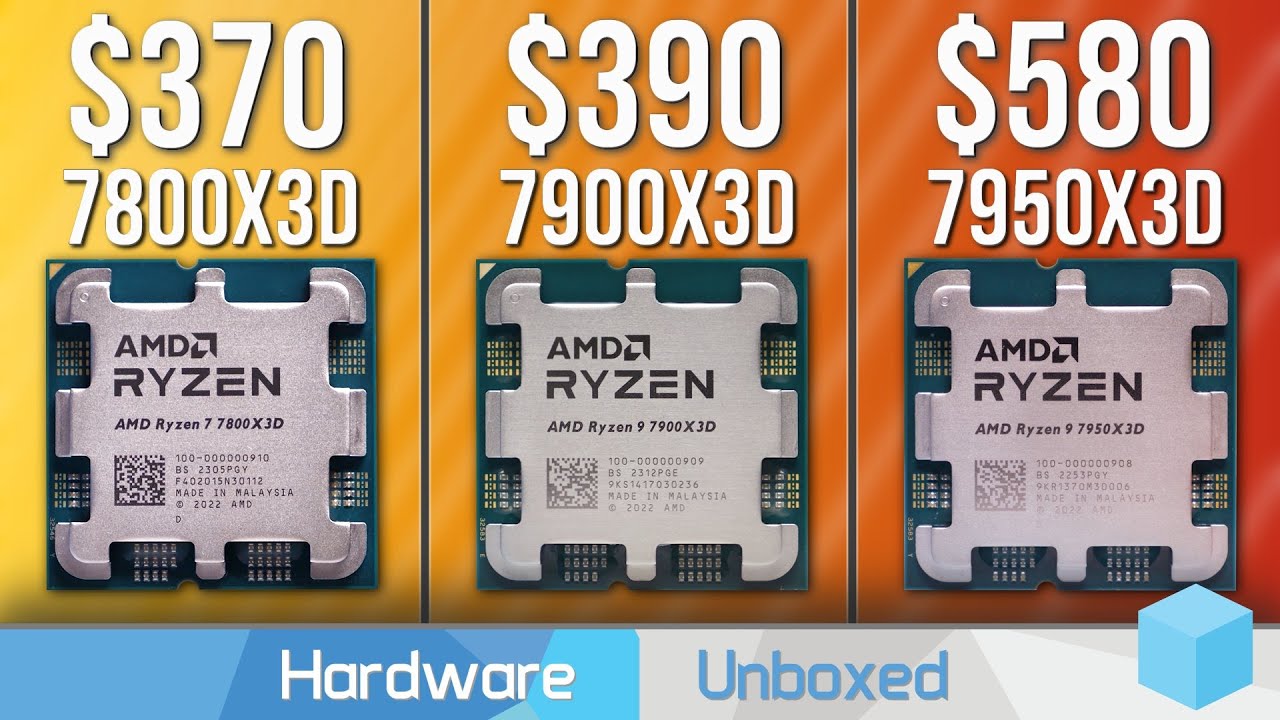
ThermalTake CTE E600 Mid-Tower Cases: https://www.thermaltake.com.au/products/chassis/atx-mid-tower-chassis.html?chassis_series=798
Why Reviewers Benchmark CPUs @, 1080p: Misconceptions Explained: https://www.youtube.com/watch?v=Zy3w-VZyoiM
Support us on Patreon: https://www.patreon.com/hardwareunboxed
Join us on Floatplane: https://www.floatp...
ive been wanting a review of these 3 forever and i could never find a good one
@grizzled bloom was it you who ordered a 7900x3d
i cant remember
grizzled bloom
Yes I got one recently
I saw the vid already
I got mine for $220 from a friend that has too many CPUs so as long as it beats my old 5800X I'm happy
grizzled bloom
Great so far, occasional stutters in games that use a lot of cores
I've been using process lasso to avoid most of the issues by restricting (most) games to the 3D cores
So it performs like their simulated 7600X3D but slightly better since background tasks can be offloaded to the other cores still
olive totem
interesting
grizzled bloom
Keep in mind also, I'm "only" using a 3080 ti at 1440p so the CPU doesn't impact me that much
So compared to the 1080p/4090 results from the vid, it's a very different experience when you're GPU bound
dull flint
interesting to see the 7950X3D mostly has the issues resolved now tho
wondering if their "optimisation" for it has just been bandaid fixes over time (I've heard the scheduler runs by program name which could be both a good or terrible thing)
so maybe the 7900/7600X3D aren't getting all manner of the same
but could also just be the 8 core games are just not appreciating 6 cores as much lol
idk, not bothered to look into it atm
 formal bolt
best mobo for 5800x3d? (not above like 180)
burnt spear
formal bolt
best mobo for 5800x3d? (not above like 180)
Do you already have the cpu?
burnt spear
Wifi needed?
formal bolt
i have ethernet
burnt spear
Also, did you get a good cooler?
 burnt spear

Asus TUF GAMING A520M-PLUS WIFI Micro ATX AM4 Motherboard (TUF GAMING A520M-PLUS WIFI)
Good cooler, it'll be fine
scenic solar
is it possible to add an hdmi connector to a motherboard if there already are the holes for one?
I have a asrock h310cm dvs, dvs is basically referring to the display outputs apparently, with it being dvi + vga. The other motherboard variant, the hdv, includes hdmi.
Of course the two mobos are identical and the dvs has the holes for a hdmi port.
Is there any chance it'll work if I solder one on the mobo?
I really don't understand why they kept only the two most useless connectors instead of removing dvi and always including hdmi and dp
tender sleet
I think the software might be different
so if the DVS is not expecting an HDMI output, it might not use it whatsoever
grizzled bloom
scenic solar
is it possible to *add* an hdmi connector to a motherboard if there already are ...
Short answer, no.
Long answer... If you have a CH341 programmer you can risk the board imploding and flash the bios of the model that has the connector. It won't let you do it normally.
scenic solar
Ok, just to know: will anything bad happen if I solder the connector properly and plug it in? Other than likely not having a display output
grizzled bloom
Other than the standard risks involved with soldering, it should be ok. Probably.
 compact zenith
I got to build one more gaming system, and needed to find out if the Gigabyte z790 Master still has the 4 ram stick issue, the Z690 has.
Think this is the shortest message I ever wrote here.
Hey there Fal. LTNS.
scenic solar
grizzled bloom
Short answer, no.
Long answer... If you have a CH341 programmer you can risk the...
I feel like I'd need some more components that go around the port itself, perhaps ICs and smd resistors/capacitors

I just wanted to check what the m stands for in smd so I googled "smd meaning", got an unexpected result
grizzled bloom
Surface Mounted Devices
Yeah you're definitely missing some resistors and capacitors
grizzled bloom
compact zenith
I got to build one more gaming system, and needed to find out if the Gigabyte z7...
There's still a max speed penalty but it's not nearly as bad as it was on Z690. You can expect to get about 6000 or so easily instead of 4800.
compact zenith
grizzled bloom
There's still a max speed penalty but it's not nearly as bad as it was on Z690. ...
I was more worried of the crashing and bsod I was told about using all 4 slots. Actually, I didn't even bother to check if z790 had 2 or 4 ram slots. Brb.
Kind of iron it still has 4 slots, yet the Manuel from the manufacturer isn't even stating its maximum ram capacity. Not that I plan putting maximum in, but it's nice to get an idea of how much, then find out after I get all parts that there is something limiting it to 16 or 32 gb ram. Fact it's not saying anything, kind of disturbing. Guess I might as well go with ASUS. Unless something better. Building a gaming system for my wife. Ram has to be 32gb+. Not just for games, though that's what she uses her system for mostly. It's for school as well, and 32gb comes a bit to close, even with 12gb rtx she already has.
Would have gone the z690 route, but looks like the motherboards only being sold used now.
grizzled bloom
The max should be 192GB with 4x48GB sticks
Don't expect that to run very fast though
burnt spear
I could see 6000-6400 with some effort, depending on the mobo
dull flint
192?
I'd expect ddr5-4000
Even on the good boards
The imc strain would be way too heavy
 tawdry cedar
is this good foor 4080 super and ryzen 7 7800x 3d
 cerulean wadi
Even 850 would be plenty.
burnt spear
Yes
split copper
compact zenith
Think this is the shortest message I ever wrote here.
The Xanthor efficiency arc continues to amaze 
amber canopy
compact zenith
Think this is the shortest message I ever wrote here.
correct
compact zenith
grizzled bloom
The max should be 192GB with 4x48GB sticks
Not fast due to 4x? I'd stick with 2x48 for 96gb. Definitely perfect for her. That's a strange number come to think of it. Past memory if I remember correctly, going back to 8088 was : 2gb, 4, 8, 16, 32, 64, 128. 24 is just... messing with my head lol. Thanks again Fal.
grizzled bloom
24 threw me for a loop at first too. They're 24Gb memory dies.
2x48GB should run at 6400 or so with luck.
scenic solar
Can someone help me stress test my ram with yCruncher?
I have never used it before, so I need some help to chose the right settings and tests for stability testing. Thanks in advance
dull flint
48gb runs really well
as good as 32gb just about
96gb it'll start to struggle a bit, similar to 64gb
128gb and 192gb...good luck
tender sleet
dull flint
96gb it'll start to struggle a bit, similar to 64gb
96 might get to 6000?
but no higher and with sub-optimal timings I assume
tender sleet
Fair enough
scenic solar
I've been testing the repaired h310 motherboard and ram for days now.
Occt + tm5 for many hours a day and got no errors at all using only 1 dimm at a time. Tested dimm 1 in both channels, same for dimm2. I feel like I got something wrong with the timings when I set that fake xmp thing in the uefi
Just need to test bot dimms in bot slots
I should probably stop blaming myself for mistakes when working with asrock products
scenic solar
Just plugged in both dimms and it's giving a ton of errors :PepeHands:
tender sleet
Could be a clock mismatch?
like each module individually is fine but the board somehow mistimes the sync
scenic solar
I'll now try with the two dimms in the opposite slot. Is high ram temperature an issue for ddr4?
scenic solar
tender sleet
like each module individually is fine but the board somehow mistimes the sync
It could be almost anything on this motherboard.
I repaired it since it had many bent pins and only a few missing ones. If I remember correctly that is one VCCIO, VCCSA, VSS, VCC, and one PCIE_PEG_TXP
Out of all these the most probable is either VCCIO or VCCSA as they're more ram releated
They're less redundant on the motherboard and they're the only ones that have some use for the ram communication/management
And don't get me wrong, it could also be the dimms themselves. I got them used but i don't think they're mismatched, coming from different pairs. I'll check that too.
And I should also check if they run fine on a know stable system
tender sleet
scenic solar
It could be almost anything on this motherboard.
I repaired it since it had many...
I more think that the traces on the board could be damaged
which causes the mismatch
but obviously anything is possible with a board that previously got mangled
scenic solar
I see no damaged traces, only damage is on the socket.
It still doesn't work properly anyways, so if I can get it to work with different ram I'm ok with it
scenic solar
@tender sleet the previous test with the two dimms in opposite slots gave me more errors in TM5, but with the current setup it only gives me the error when it first runs the 12th test. Restarted the test 2 times and both it failed on 12th run
Idk what's wrong here
scenic solar
Gor also some errors other than the 12th one on the 2nd run. Maybe just a coincidence
Or the test just uncovers the problem with the 12th test for some reason
grizzled bloom
Or maybe there's some pattern in test 12 it doesn't like in addition to other issues
grizzled bloom
scenic solar
Or the test just uncovers the problem with the 12th test for some reason
Yeah basically what I said lol
scenic solar
I'll test the dimms separately on another bench and try different ones on this mobo
Oh btw fal could you help me figure out what is better? #electronics message
It's about the cat6 ethernet cables.
1x20m or 2x10m coupled together?
Will 10gig be compromised with the connector in between?
scenic solar
grizzled bloom
Or maybe there's some pattern in test 12 it doesn't like in addition to other is...
Apparently there are other ones that constantly report errors, not just 12. But it's always the same 4 tests
grizzled bloom
scenic solar
Will 10gig be compromised with the connector in between?
It shouldn't matter at that length, you only need a repeater after 100M
6a is technically better
6e is still good even if it's not a standard
6 is fine at short runs
scenic solar
grizzled bloom
6a is technically better
But isn't it stiffer compared to normal cat6?
scenic solar
Well if I can find 6e I could get that.
I'll get whatever cheaper and well reviewed on aliexpress.
I'll check local stores for 10m one
grizzled bloom
They're always overpriced in stores
scenic solar
Not always. I got a cat6 one recently and it want bad in terms of pricing. Build quality was good
I just don't remember how much
I should compare it to one from aliexpress
dull flint
@tender sleet follow up from yesterday:
 cyan raft
Krunk actually knows what he’s talking about
burnt spear
Is this talking about a specific platform
?
Bc 2x48 I've seen 6000 and 6400 on am5
4x32 I think 5600
If not 6000
grizzled bloom
AMD handles 4 sticks better, for whatever reason
It appears that he's talking about Intel
But no chipset mentioned
dull flint
burnt spear
Bc 2x48 I've seen 6000 and 6400 on am5
yes
dull flint
burnt spear
4x32 I think 5600
if lucky
6000 is insane for 128
oh there was a time where AM5 could do it
this was when the boards were going postal with SoC voltages
and CPU's were popping like popcorn
they can't really do it now
limber dragon
burnt spear
4x32 I think 5600
2x48 is still dual rank, while 4x32 is quad rank
tender sleet
dull flint
<@405396333650903042> follow up from yesterday:
Yeah makes sense
I'm liking 96gb
though it still feels weird
naive pendant
Why do almost NO mobo supports ECC memory
grizzled bloom
Because no standard consumer CPU supports ECC memory. At least not the real kind.
RDIMM support is mostly HEDT, servers, etc.
DDR5 has a kind of ECC built into the spec, referred to as on die ECC
That kind of ECC is definitely supported
But not registered DIMMs, which are the high capacity kind you find in servers
tender sleet
grizzled bloom
DDR5 has a kind of ECC built into the spec, referred to as on die ECC
how effective is on die ECC compared to standard ECC RDIMMs?
grizzled bloom
It's not meant for data retention like registered ECC, it's more for reliability of the memory dies and increased yields in manufacturing
It's good enough at correcting single bit errors on the fly but if something is really wrong it can't help fix the data that was corrupted
 rapid kindle
hey
i was looking around and came across the
AMD Ryzen 9 7900X3D
AMD Ryzen 7 7800X3D
AMD Ryzen 5 5600X3D
and i dont get quiet the differences between these
tender sleet
rapid kindle
i was looking around and came across the
AMD Ryzen 9 7900X3D
AMD Ryzen 7 7800X3...
7900X3D is a 2×6 Zen 4 cores, 6 of which has 3D V-cache, expensive but good hybrid of gaming and productivity
7800X3D is 8 Zen 4 cores, all of which has 3D V-cache, mid-price. Outright best CPU for gaming, mid in productivity
5600X3D is 6 Zeb 3 cores, all of which has 3D V-cache, cheap. Gaming-focused cheap CPU for builds where you want to maximize gaming performance and use older hardware, dead platform
7900X3D and 7800X3D are newer processors on a new platform that's likely to get a bunch of updates down the line
rapid kindle
ow okay now it makes sense thanks a lot
ive also heard that you will need a mainboard wich supports the x3d is that something ?
tender sleet
rapid kindle
ive also heard that you will need a mainboard wich supports the x3d is that some...
not really, the difference only happens when you have an X3D chip that has both normal and 3D cores
rapid kindle
ohh okay
tender sleet
since there is a specific firmware that enables the 2 CCD chips (the ones with both normal and 3D VCache cores) to function properly
if you had a standard chip (like any of the original Ryzen 7000 chips or the 7800X3D) and you upgrade to a 7900X3D or a 7950X3D
You MUST reinstall Windows and all drivers from scratch for ideal performance
that's literally it
they use the same motherboards, memory and so on otherwise
it's a software optimization thing
rapid kindle
tender sleet
if you had a standard chip (like any of the original Ryzen 7000 chips or the 780...
okay, yea thats interesting i wouldnt think about that
thank you anyway
tender sleet
np
scenic solar
I'm still testing my motherboard and ram for stability, using testMem5 @anta777 xtreme
I've currently lowered the frequency and timings to JDEC #1 in the bios.
Sometimes when I start testMem it gives only one error on test 0. Is it a bug or actual instability?
Jdec 1 is 2133 15-15-15-34 or something similar
Test 0 is the first one, it lasts few milliseconds. And when it gives me the error the box doesn't become red (usually it happens when tests fail)
scenic solar
Nvm, got more errors now
scenic solar
What main timing can be usually encountered on a 2666mts ddr4 dimm?
14-16-16-34...?
 hollow thorn
sudden creek
hollow thorn
sudden creek
Finally a week later DHL has moved my CPU so I can just pickup the pesky thing myself.
sudden creek
@scenic solar may I ask why you put so much time into repairing what appears to be a very outdated CPU?
Or was it a motherboard? I forgot.
scenic solar
It's a asrock h310 + i5 8500
A few years old but I was thinking about upgrading my server which is an optipkex 3050 with i5 6500
It's still a valid cpu for my requirements
sudden creek
Replacement cpu is finally in my hands.
sudden creek
drivers installed
sudden creek
I am loving the 7950x3D experience so far
sudden creek
So far about 24hrs without crashes or any sort of instability from what I've noticed.
scenic solar
happi
2533mhz 16-18-18-34 gives zero errors :]
Further testing because it's going to be my home server hardware
No errors must occur!
Precious data is contained in such device
sudden creek
Congratulations, @scenic solar!
Off-topic but it feels nice having a working 7950x3D 😄
feels great when it works
naive pendant
i have
3600mhz ram
is it worth it to upgrade
same thing with my cpu i have r7 3700x are the new ones that much better
sudden creek
naive pendant
same thing with my cpu i have r7 3700x are the new ones that much better
I have a 5700G which is basically it's equivalant. I can say without a doubt that 7000 series is dramatically better.
grizzled bloom
3600 is right in the sweet spot for ryzen 3000/5000
sudden creek
Okay I couldn't help myself. I just tried to apply 6600mhz on my ram with 1.4v DRAM/VDDP/VDDPIO didn't boot so I turned it down to 6400mhz at 1.38v and all booted
dull flint
Normal
scenic solar
sudden creek
Off-topic but it feels nice having a working 7950x3D 😄
I really wish I had a x3d cpu, but 5600x3d is not available here and 5700/5800 x3d are still too expensive compared to other countries
scenic solar
scenic solar
2533mhz 16-18-18-34 gives zero errors :]
I left it overnight and it gave one error
Which is enough to know this frequency isn't stable either
Uffff
dull flint
@scenic solar wth cpu is this that even 2533 is suffering
sudden creek
scenic solar
I really wish I had a x3d cpu, but 5600x3d is not available here and 5700/5800 x...
Unless you are prepared to likely deal with AMD support or fuss with your PC a lot I can't recommend the 7950x3D. That being said after having gotten a replacement that appears to work rock solid so far it's been a far more pleasant experience so when it works out great as Felix said.
dull flint
scenic solar
i5 8500
Isn't jedec for that like 2666?
Seems odd
Maybe dying stick
Unless the sticks are old af
scenic solar
dull flint
Maybe dying stick
Maybe
scenic solar
dull flint
Unless the sticks are old af
Maybe
dull flint
Lol
scenic solar
dull flint
Isn't jedec for that like 2666?
Yes, I'm testing a bunch of other frequencies and timings to figure out which ones won't give me errors
grizzled bloom
Missing pins on that board too aren't helping
grizzled bloom
One of the pins is VCCSA so definitely could be part of it
scenic solar
There are some pins that might be ram related but im not 100 sure
That one might be one
dull flint
Try a different ram slot maybe
scenic solar
I can also try different voltages but im not sure if that helps
In a 3200 16-18-18-36 what timings can I drop more if I'm running below 2666?
Without stability issues
sudden creek
Hopping off in a second.
@scenic solar I recall my 5700G system having defaulted to either 2400mhz or 2666 with cl14 pretty easily before. Might be worth trying.
scenic solar
It's a different platforms, the ram sticks won't even be close ig
grizzled bloom
5700G is way newer than i5 8500, and the sticks decide the default speed not the CPU
scenic solar
On the h310 mb I'm limited to 2666mts. So I can't even test xmp for the dimms. It's such a bad motherboard that setting xmp tries to use 3200mts and it doesn't boot because it's not supported
Got the dimms used for few bucks. Not sure if they even work properly. I'll test them on my own system which is 100% stable
scenic solar
There's also fclk freq, only options are 400, 800 and 1000mhz so it will never matche the speed of the ram. Running 800mhz now (ig default)
Uefi recommends 400mhz. Does it really matter?
I'll leave here some other questions I have about the h310 uefi
Is MRC fast boot (on/off) important when I'm testing memory for stability?
Does the flck affect the ram in any way?
There's an option for bios boot performance mode (max battery/max non turbo speed/max speed), does this affect just the bios post time? (Cpu tuning section)
scenic solar
Currently set @2666mts, 16-17-17-34 + tCWL 16 (instead of 15) @1.35v
I read online that odd tcwl can cause stability issues and apparently it should be about the same if not lower compared to tCL
scenic solar
scenic solar
Currently set @2666mts, 16-17-17-34 + tCWL 16 (instead of 15) @1.35v
seems stable 
(now that I said that it'll crash)
scenic solar
I'm really taking up all ds server space with all these messages
scenic solar
I just waited a whole day of testing. just to get the 5th 3 hour run to give me some errors
testing stops here. i'll move the ram to my other stable sys
if its not ram, then I'm getting a new h310 or other itx-ish lga1151
sudden creek
I am debating saving up to buy a 21:9 WQHD monitor for programming/gaming. Thoughts on how Warframe and COD will run with High settings using my rig?
cursive epoch
should be more than good lol
scenic solar
is there any significant difference between i5 6500 and i5 7400? They look the exact same except for very little changes here and there but nothing too important ig...
Acutally the 6500 seems to perform better with the slightly higher boost freq
- will an i5 8500 work with a rog z270e gaming? I see no official support for 8th gen. Maybe some bios updates will allow for it to work, or just nope?
cursive epoch
scenic solar
+ will an i5 8500 work with a rog z270e gaming? I see no official support for 8t...
depends
if it has a bios update for next gen
then yes, easily
otherwise you'll need to mod the bios
and write extra microcodes into it
scenic solar
I can't find any 8th gen related info for this mobo... so I guess it just supports 6 & 7th gen
You mind helping me find out if it is possible to use a 8th gen one?
scenic solar
scenic solar
I just waited a whole day of testing. just to get the 5th 3 hour run to give me ...
What if it was drivers? Maybe windows just installed something not right for this mb. Its ulkikely but ill give it a try after checking that the ram works fine on another system
 white pelican
i’m having trouble picking between the msi b650 and the asus X670E motherboard. Which one is ultimately better?
cursive epoch
white pelican
i’m having trouble picking between the msi b650 and the asus X670E motherboard. ...
id get cheapest board there is with enough io and ssd slots for ya
on am5 x670, and x670e matters none unless you really need that extra pcie bandwidth
even a620 is fine
scenic solar
scenic solar
What if it was drivers? Maybe windows just installed something not right for thi...
It's faulty ram probably
Now I'll try:
- driver updates
- xmp frequency
Can a very slow but working hdd cause those ram errors? It's like very very slow
60MBps sequential and much lower secondary speeds (tested with crystalDiskMark)
I'm currently testing on another system that was repaired and has missing socket pins but they're all gpu related, could those affect in any way?
dull flint
white pelican
i’m having trouble picking between the msi b650 and the asus X670E motherboard. ...
Unless you deal with massive amounts of storage like a server, or need tons of add in cards like nic's, pcie ssd's, sound cards, thunderbolt, no point at all to x670e
the B650M-HDV from asrock holds a WR for overclocking performance and it's only $120
WR = World record
so that should pretty much tell you that you don't need to spend much at all on an AM5 motherboard to get overkill performance lol
go as cheap as you can for one with a decent heatsink
like A620M pro rs is really good
MSI B650M-A pro
MSI B650 Gaming Plus
all solid
dull flint
dull flint
WR = World record
For context:
https://wccftech.com/asrock-110-us-b650-motherboard-sets-overclocking-world-record-amd-ryzen-9-7950x-cpu/

Wccftech
ASRock's $110 US entry-level B650 motherboard has achieved record OC performance for a 16-core CPU using the AMD Ryzen 9 7950X.
Only avoid the ones with no heatsink really, or Asus prime B650
those are about the only bad boards that I'm acutely aware of that you should avoid. Very cheap quality and noticeably degraded performance in the wrong configurations
The rest, you could get like, A620m gaming x, or A620i Lightning wifi, and those use 6 and 8 stage 55A (pretty low counts), still run a 7950X no problem lol
white pelican
appreciate it
scenic solar
Where do i set xmp in a rog z270e uefi?
grizzled bloom
scenic solar
Where do i set xmp in a rog z270e uefi?
Asus calls it DOCP
 scenic solar
I guess some sort of overclock or just max single core turbo applied to all cores?
grizzled bloom
scenic solar
I guess some sort of overclock or just max single core turbo applied to all core...
It's a basic overclock using offsets and power limits. It would modify the boost behavior.
scenic solar
Can it cause instability with some cpus right?
grizzled bloom
It sets an overclock that 75% or more CPUs that they tested worked with
So yes there's a chance it doesn't like it, but a decent chance it does
scenic solar
I keep getting the message "pleas enter setup to recover bios settings" in the post screen on the z270. Solutions?
Its not always but few times when i turn on the pc it shows this message
Maybe i found the problem
Cmos reading .2v hehe
scenic solar
What is pin BCLKP on a lga 1151 socket?
(Probably clock releated)
scenic solar
I'm testing the ram on the z270, which has also missing pins: 3×VCCSA (middle right) and one GND (VSS)
 scenic solar
I notice vccsa is redundant, with 17 pins and i got 3 less than that. Us there any chance this might affect the rams behavior?
 gentle acorn
Recently bought microcenters bundle of MSI B650 -P PRO WIFI, Ryzen 7 7700x, and 32GB DDR5 RAM and I installed everything and at first I booted into BIOS just fine but after leaving the BIOS the system won't boot with a glowing red and yellow light for the DRAM and CPU and was wondering if anyone could help...
Oh it just did a thing
Now I have a orange and green light
It popped up a message on the display but I didn't have time to read it
I think actually it might just be taking a really long time to boot and is also not detecting that I have a windows installation already
grizzled bloom
gentle acorn
I think actually it might just be taking a really long time to boot and is also ...
First boot can take up to 15 minutes. If you have flashback you can update the BIOS and that should help if you can't get into the menus.
gentle acorn
I'm able to get into BIOS but just not any operating system for some reason
I checked the boot load order too and it doesn't say any of the drives I have plugged in
grizzled bloom
Ah perfect, update BIOS if you haven't already and check that the drive is detected. If so check the boot order and make sure Windows is on top.
Ok so no drive detected
gentle acorn
I'll try and update it
Nope
Oh? It brought up my bootable USB
For a windows install
The windows installer recognized 3 of my drives
I'm still missing one
grizzled bloom
And that's probably the one with windows on it right?
I'd try another slot for the drive
grizzled bloom
Some boards will disable a M.2 slot when certain SATA ports are used
Which board do you have and what slots are filled
Oh right msi