#cpus-mobo-and-memory
1 messages · Page 47 of 1
 grizzled bloom
 wispy hill
Quick question about an ancient system: I've got an old Optiplex 745 SFF that I'm spending a couple dollars on to modernise (yes I know, don't state the obvious please). Looking at Dell's tech specs it states the max RAM and speed as
DDR2-667 with four 2s or
DDR2-800 with four 512MB or 1GB modules
How biblical do you guys think those specs are? I know some older machines list lower specs because of CPU tech at the time of listing and can run more RAM with a CPU upgrade but this machine has the memory controller on the North bridge and I've never exceeded that before and am unsure if the limits imposed are due to avaliability of RAM modules at the time before bigger ones came out
grizzled bloom
You can put faster memory into it but it will only run it at those speeds, much like a laptop.
As for putting more than 8GB of memory into it, I don't think the memory controller itself is capable of that because larger DIMMs will be registered ECC memory for servers.
Consumer systems require you to use UDIMM, aka Unregistered, memory.
Up to 8GB per stick is only possible on server or workstation grade processors, like the Xeon series
wispy hill
Ooh okay, I didn't realize the bigger modules were only ECC. I wasn't planning on more than 4x4 but back then those were also probably enterprise
grizzled bloom
Well I do see 4x4GB udimm kits but they're $300 so that's probably not the upgrade you wanted
$100 on ebay but only if you ship it from China
wispy hill
Yeah now that I'm looking again, they sure are all ECC
I'll just stick with the 4x2. Should be enough for the light consumer use I see it being used for
Thanks for the tip on the registered sticks
 sudden creek
What does disabling Global C states do?
grizzled bloom
It'll disable sleeping on AMD chips, as well as boosting. So it'll be locked at the base clock speed.
sudden creek
grizzled bloom
It'll disable sleeping on AMD chips, as well as boosting. So it'll be locked at ...
gotcha..
grizzled bloom
Don't know why I said boosting twice. I need more caffeine.
 dull flint
If you have ECLK (Only on a handful of AM5) you can disable c states then set ECLK to run the base clock multiplier all the way up to boost
Bit of a wild west way of overclocking but it's a way to overcome the C state loss
sudden creek
dull flint
If you have ECLK (Only on a handful of AM5) you can disable c states then set EC...
gotcha.
Is that like PBO or is it like a static oc?
grizzled bloom
dull flint
Bit of a wild west way of overclocking but it's a way to overcome the C state lo...
That's also the way to overclock X3D funny enough
But boy does that suck without voltage control
sudden creek
🤞 I no longer crash,
Updated windows (there was a update) and so far nothing bad.
 scenic solar
Another win

Unbent a bunch of pins and still works with a few missing ones
Both ram channels are working, even if a few of the missing pins are for the ram slots.
Will need to further test stability for the two systems
Oh, and the chipped cpu works (quite obviously)


 grizzled tendon
I’ve been wanting to upgrade mobo for awhile, I’ve looked into good options, and everything I found was from a few years ago. I wanted to get any opinions that may be more up to date. But I have a ryzen 5 3600 with a 2060. And right now I have ddr4.
 cursive epoch
I'd probably just buy a 5800x3d
grizzled tendon
cursive epoch
I'd probably just buy a 5800x3d
I’m sorry I searched that, and I was shown cpus
sudden creek
grizzled tendon
I’m sorry I searched that, and I was shown cpus
It is a cpu. Would offer a large uplift in performance (especially gaming due to the extra cache).
cursive epoch
^
You don't need a platform upgrade yet
As that will add cost quick
But then again for around $300-350 you could easily upgrade to AM5 and start with 7600
grizzled tendon
I’m sorry, I’m just looking to upgrade my motherboard, so I could donate my older one just.
I don’t really have any issues with playing games
sudden creek
Alright.
grizzled tendon
But thanks I’ll look into that too now. Haha
cursive epoch
Value wise it's just a waste to buy another AM4 board, s'all
grizzled tendon
Then maybe I should upgrade my cpu instead. Thank you both very much! 🙂
On neweggs website it comes with a free motherboard haha
cursive epoch
Yep there's a deal rn
 burnt spear
grizzled tendon
Then maybe I should upgrade my cpu instead. Thank you both very much! 🙂
burnt spear
grizzled tendon
Then maybe I should upgrade my cpu instead. Thank you both very much! 🙂
I'd do 5700x3d btw
It's basically the same as the 5800x3d just a good bit cheaper
For mobo on am4, a520m plus wifi is good
dull flint
grizzled tendon
I’ve been wanting to upgrade mobo for awhile, I’ve looked into good options, and...
5700x3d or go up to next gen boards with am5 and a whole new cpu and ram
Everything else is kinda mid
Except 5600, but that's not really a huge upgrade from 3600
grizzled tendon
Thank you
 amber canopy
scenic solar
Another win
amber canopy
scenic solar
Another win
reminds me of the time I got two X299e-ITX boards full working for like a 1/5th of what they normally go for
sudden creek
yay another crash. (for f sakes).
scenic solar
amber canopy
reminds me of the time I got two X299e-ITX boards full working for like a 1/5th ...
I got this asrock h310 mb for €3.5 and the strix z270e for €20.
+€18 shipping :/
But the rog itself is worth 3 times the amount i spent for these two
 pale fox
Just a question, I have got a 3060,16gbx2 and a 5600x
with my cpu how can I improve futher on its peformance?
Should I consider manually overclocking it or get another cpu?
burnt spear
pale fox
with my cpu how can I improve futher on its peformance?
At 1440p, 7800xt/4070/3080/6800xt
Oh
I thought you meant upgrading gpu
Gaming, you're gpu limited with a 3060
pale fox
okay
burnt spear
You'd see more of a difference with gpu overclocking, and overall cpu ocing isn't really beneficial for gaming, at least not noticeably
Gpu ocing is also much easier
pale fox
Okay I understand
pale fox
okay, ill make sure to check
but with theses gpus that you listed is it potential that my cpu might bottleneck it?
burnt spear
For gaming, if you want a simple overclock, just download msi afterburner, do +115mhz on the core and +650mhz on the vram. That'll be stable on any 3060 no matter how unlucky you are
burnt spear
pale fox
but with theses gpus that you listed is it potential that my cpu might bottlenec...
The cpu would start to limited them yeah

What?
Why?
Article here https://mezha.media/en/2024/02/13/ryzen-8700g-can-be-up-to-17-faster-after-replacing-thermal-paste/

The overclocking expert has published several benchmarks that show the ability to increase the performance of the AMD Ryzen 8700G Phoeni APU and significantly reduce the temperature.
That just seems like a terrible idea on AMDs part. Won't it dry up just like any other paste?
That's extremely anti user friendly
pale fox
burnt spear
The cpu would start to limited them yeah
then what amd cpus would you suggest?
burnt spear
7600, 7800x3d, 5700x3d, 5600x3d
5600x is fine to pair with them though
There will always be a limiting factor in your build
It's impossible to avoid
5600x with any of those gpus, unless you're playing at 1080p is a good pairing
 gilded cape
Does anyone have a recommendation of what cpu l should get to replace my 5600g? My gpu is a 5700xt.
burnt spear
5700x3d, 5600x3d, or 7600
grizzled bloom
gilded cape
Does anyone have a recommendation of what cpu l should get to replace my 5600g? ...
The 5700X3D might be a good upgrade. One of your cheaper, good options at $250 and it gets the performance of a 7600X.
5600X3D too, right, but that's only if you have a microcenter near you since it's exclusive.
gilded cape
grizzled bloom
The 5700X3D might be a good upgrade. One of your cheaper, good options at $250 a...
Sounds good, thank you. I’ll probably get the 5700X3D then.
dull flint
sudden creek
yay another crash. (for f sakes).
with c states disabled???
RMA it dude
At this point, it's either not worth it or something profound
dull flint
burnt spear
Why?
Not really a hot chip anyway tbf, and very easy to delid unlike the rest of ryzen
burnt spear
dull flint
Not really a hot chip anyway tbf, and very easy to delid unlike the rest of ryze...
Yeah, but more people aren't than are willing or knowledgeable enough to
dull flint
well all AM5 has been like this tho
burnt spear
Oh yeah
But with the paste won't your cpu start throttling at some point or another?
dull flint
10 degrees is both an incredible and at the same time not too incredible difference
burnt spear
But that's new
dull flint
burnt spear
But with the paste won't your cpu start throttling at some point or another?
as long as it's good paste no
burnt spear
In three four years I doubt it'd be that slim
burnt spear
Oh hm
dull flint
you imagine like servers right
burnt spear
Also while you're here can I ask a very unrelated question
burnt spear
https://www.amazon.com/gp/aw/d/B0CK8H31Y1/ref=ox_sc_act_image_3?smid=ATVPDKIKX0DER&psc=1
Any reason to avoid this?

Sweetcrispy L Shaped Computer Desk - Gaming Table Corner Desk 50 Inch PC Writing Black Desk Study Desks with Wooden Desktop CPU Stand Side Bag Reversible for Home Office Dorm Small Space
burnt spear
dull flint
intel used to use paste
And im sure it's being done better now than it was years and years ago
burnt spear
Dope, ordered it like 30min ago lol
dull flint
so don't expect sturdy
burnt spear
As long as it can support at least 2 monitors and some other basic stuff, im good w it
dull flint
$70 msrp tells me this won't feel like anything great from say like IKEA or a name brand
but it's a desk
it's probably fine and functional
burnt spear
I'm coming from a desk that's older than me and the keyboard and mouse tray is falling to pieces
And it has tons of dings, scratches and dents
Ty for the feedback
 burnt spear
dull flint
get this colour
burnt spear
dull flint
get this colour
The rooms got mostly black furniture so I went w the black
It's also going between a black desk and a black TV stand thingy
burnt spear
Our room is a former living room so we have a big ass TV on the wall with a black cabinet thingy under it
sudden creek
dull flint
with c states disabled???
C states is not disabled.
dull flint
sudden creek
C states is not disabled.
it's the real litmus test
if it happens with c states disabled there's probably something more seriously wrong with it or the problem is something else like the psu
sudden creek
gotcha
I updated my drivers today so if it crashes again I will try disabling c-states
sudden creek
dull flint
it's the real litmus test
what is Litmus?
gilded cape
Does anyone have any recommendations for a black motherboard that isn’t too expensive but still gets the job done?
burnt spear
gilded cape
Does anyone have any recommendations for a black motherboard that isn’t too expe...
What cpu?
gilded cape
A 5600g but might upgrade to a 5700X3D
dull flint
so something semi decent
gilded cape
MSI B550-A PRO ATX AM4 Motherboard (B550-A PRO) - PCPartPicker
https://pcpartpicker.com/product/7gxbt6/msi-b550-a-pro-atx-am4-motherboard-b550-a-pro

MSI B550-A PRO ATX AM4 Motherboard (B550-A PRO)
Would this work, or could l get something cheaper that looks similar? I was looking for a full size black motherboard.
burnt spear
Ye that's good
dull flint
As cheap as you can go if possible
Actually 109, that's not bad at all
Should be ok
gilded cape
Sounds good, thank you guys for the help, l appreciate. Still kinda new to pc’s overall.
dull flint

Wccftech
AMD has disclosed new BIOS vulnerabilities across all of its Zen CPU generations, which has particularly impacted the SPI connection.
sudden creek
dull flint
https://wccftech.com/amd-discovers-new-vulnerabilities-affecting-zen-1-2-3-4-cpu...
You think updating my bios would help with stability? I am on Agesa 1.0.8.0
burnt spear
yes
sudden creek
I forget. If I update my bios do I need to reinstall the amd chipset drivers being adrenaline?
Or is that only for when resetting windows.
sudden creek
Does this type of thing happen with Intel's products lately or?
I guess before I do that I am gonna switch to an older GPU driver since It was updated.
Well at least I am not nearly as concerned now cause it seems I have 1 year to RMA this cpu.
dull flint
Intel has it's own can of worms
 silk jungleBOT
DDU (Display Driver Uninstaller) Guide by Pato
https://github.com/NeweggTechie/Graphics-cards/wiki/How-to-use-DDU
GitHub
Contribute to NeweggTechie/Graphics-cards development by creating an account on GitHub.
sudden creek
dull flint
Intel has it's own can of worms
ahh gotcha
installing the GPU drivers from december rn
Just disabled Global C-States as well.
 tender sleet
dull flint
get this colour
tender sleet
dull flint
get this colour
holy crap that would be so good for me
 ocean cradle
Is this something to worry about?
 burnt spear
Doubt
 hollow thorn
good to do, not something thats likely to affect you, most of them have to do with having access to your physical motherboard.
burnt spear
They just use that headline to get clicks
Freak people out, more likely to get views
grizzled bloom
Anytime a headline says something like "You need to do this NOW!" it's click bait. In this case AMD has revealed vulnerabilities in their BIOS that they uncovered and there is no evidence they have been exploited by hackers yet.
 midnight pollen
omg no you have to do it noowww
grizzled bloom
midnight pollen
omg no you have to do it noowww
And only that one article will tell you how to do it but only at the bottom of the page once you scroll past 30 ads
scenic solar
I'm tempted to buy 64gb 3600 of ddr4 corsair ram for €80, should I?
burnt spear
Do you do anything beyond gaming?
 sick iron
I'm having trouble figuring out where to plug in my fans, anyone got ideas?

B760 GAMING PLUS WIFI is designed with tons of connectivity, flexible tools, and convenient Wi-Fi solution with DDR5 memory version for gamers who want all.
scenic solar
burnt spear
Do you do anything beyond gaming?
Yes
I'd also like to push minecraft to its limits since i have capable hardware
It's quite a good deal and it's C. Vengeance, same model I currently have (16gb)
scenic solar
I do things such as rendering stuff, running a bunch of vms and editing
burnt spear
If you think you need more than 32gb sure go for it, but it might not run 3600mhz
scenic solar
burnt spear
What the heck are you doing on mc that needs 64gb lmao
The power of 128 chunks
burnt spear
Literally for what reason
And that would be cpu
I dont think even my 13600k could do that at a high frame rate
scenic solar
burnt spear
If you think you need more than 32gb sure go for it, but it might not run 3600mh...
I probably don't need 64, 32 would do the job but considering the price, this one is just a good choice
burnt spear
64gb can hurt performance over 32, what cpu do you have?
And what would a 32gb 3600mhz kit cost used?
scenic solar
burnt spear
I dont think even my 13600k could do that at a high frame rate
Trust me it likely can, Oc 5600x (i may upgrade later) is capable of rendering at least 64 chunks with "good" framerates together with the 6950xt
scenic solar
burnt spear
And what would a 32gb 3600mhz kit cost used?
Most of them go for €70-80
burnt spear
I mean sure try it, you can always resell it later
scenic solar
Exactly
At the time I paid the 16gb kit €80... new
And this one is 4 times the amount of ram, higher speed, same price
If I change my mind after testing the 64gbs in my main system I can always move them to the "server"
Btw the minecraft one was kind of a joke, I'll never run more than 64gb of ram on a daily basis for my gameplay. But it's worth just for testing it, been trying for long to squeeze all that java juice coffee out of the game
I currently can't render past 48c in 1.19 16g allocated, not sure if that's because of the game version or the gpu, since I was able to render 128 with the 2080, but it might have been a different version I was using.
I feel like the gpu doesn't really contribute to amount of chunks you can render, just the fps you'll get for visualizing that many
I guess this one may be a decent investment since I don't plan on upgrading mb/cpu soon. there still are some nice am4 chips out there, will wait for good deals or price drops until I get one for cheap.
dull flint
ocean cradle
Is this something to worry about?
Wccftech
AMD has disclosed new BIOS vulnerabilities across all of its Zen CPU generations, which has particularly impacted the SPI connection.
sick iron
can someone look at this? my pc won't turn on
did I forget to plug something in?
I'll send a pic


 ripe tartan
@burnt spear
burnt spear
The case power button cable labeled power sw
I think that's missing
@sick iron
Aside from that make sure gpu, cpu, and mobo connections are secure
sick iron
I got it to turn on
burnt spear
Ah nice
sick iron
but
only one of the fans on the bottom and one of the fans on the side is working
I think that is a separate issue
burnt spear
They might be pwm fans and would ramp up under load? If they're all the same fans then ye it's likely a physical thing
sick iron
how should I fix it
also
when I turn it on the motherboard is red
the whitd
then green
and I can't get a signal on my montier
sick iron
yes
dull flint
sick iron
yes
can you send me your pcpartpicker and tell me how much you spent/what you bought new
Choose Your Parts
sick iron
Part List - Intel Core i5-12600KF, Radeon RX 7600, NZXT H9 Flow ATX Mid Tower
everything is brand new
dull flint
ok it's not as bad as I thought
sick iron
bruh
dull flint
I thought I was looking at like, Z590 11th gen
sick iron
nah
dull flint
sick iron
then green
means it's posting
so it's booting up, something's not getting it to display
like it wants displayport and you're using hdmi
bad display cable
cable not plugged all the way in/right spot
things like that
sick iron
hmm okay
on the cord that I plugged into the gpu, there was another cord exactly like it
like it split into 2 of them
dull flint
you mean the power cable
dull flint
it should only take one so one should be fine
It's possible but like, really unlikely
one of the last things I'd consider
sick iron
there was also a pcie 5.0 cord
but there is nowhere to plug it in on my motherboard
so I didn't use it
I'm not sure what it is for
dull flint
you don't need that
sick iron
what's it's purpose?
dull flint
nvidia 40 series
dull flint
those lights are a cycle through to post
so you're missing the part where the monitor lights up basically
change display cables
try different inputs
all that jazz
 rotund crypt
AM5 AMD mobo suggestions?
grizzled bloom
For which CPU exactly, and what specific needs do you have? (WiFi, RGB, etc)
 vital rampart
I need help i disabled csm in bios now my pc doesnt start up
cursive epoch
vital rampart
I need help i disabled csm in bios now my pc doesnt start up
Enable csm again
Your windows install is on mbr, thus no secure boot
vital rampart
It doesnt start up
cursive epoch
You can still get into bios
vital rampart
Oh wait i get display
cursive epoch
What board do you have?
vital rampart
Wait i am in after 10 minutes
vital rampart
Yeah
grizzled bloom
Update the bios and it usually fixes the long training times
dull flint
It's memory context restore that does
If you don't flick that over, you have permanent long boot
(I do this for a stability boost)
But depending on the bios yes, it can enable it


 split copper
About time somebody put this fact down in writing
It's been like that for at least since I tried it several days ago
dull flint
I'm surprised any reputable source noticed it tbh
scenic solar
Oh, nooo the best website ever for pc components that obviously provides reliable benchmarks & specs for our pc components and definitely doesn't make preferences towards intel... is dying. What a shame.
dull flint
ripe tartan
Shaaaaame
 tender sleet
dull flint
https://www.tomshardware.com/software/controversial-benchmarking-website-goes-be...
tender sleet
dull flint
https://www.tomshardware.com/software/controversial-benchmarking-website-goes-be...
Blessed
amber canopy
dull flint
https://www.tomshardware.com/software/controversial-benchmarking-website-goes-be...
womp womp
sudden creek
I think I finally found the f-ing source of the crashes.
It seems FanControl is the cause of it. 4 days no issues, then all of a sudden after opening FanControl 15m later I experienced the exact same crash as before.
 vast meadow
sudden creek
It seems FanControl is the cause of it. 4 days no issues, then all of a sudden ...
vast meadow
sudden creek
It seems FanControl is the cause of it. 4 days no issues, then all of a sudden ...
Ewww why are you using in windows fan control anyway
sudden creek
vast meadow
Ewww why are you using in windows fan control anyway
I am not.
I was using the 3rd party Fan Control app that people like to recommend.
Fan Control is a free software that allows the user to control his CPU, GPU and case fans using temperatures.
this one
vast meadow
Yeah that's what i mean, anything other than bios like
sudden creek
Oh really? well anyways I am almost certain that's the cause now so I will never be touching that thing again
Cause as mentioned for 4 days I left my PC on with the usual apps and workflow (except fanControl) then as soon as I open up the FanControl app a few minutes later my PC experienced the exact same crash symptoms.
Welp my PC just crashed again with Fan Control disabled.
sudden creek
Contacting AMD and Microsoft support.
sudden creek
if anyone has any idea as to what else could be causing these crashes please tell me.... All help is extremely appreciated.
 long geyser
vast meadow
Yeah that's what i mean, anything other than bios like
long geyser
vast meadow
Yeah that's what i mean, anything other than bios like
BIOS fan control sucks. BIOS hysteresis usually sucks and isnt customizable, response time is pretty jank half the time, cant mix sensor data (ex: case fans choose between hottest of two components like CPU/GPU), dont have access to all sensors (GPU/RAM), etc.
vast meadow
long geyser
BIOS fan control sucks. BIOS hysteresis usually sucks and isnt customizable, res...
Well yes and no, it sucks from a customisation standpoint, it's way better in a not hogging resources and not going to be janky
Sure response time is slow but you don't need your fans updating rpm more than like every 10 seconds, realistically more
long geyser
Response times are too fast most of the time in BIOS
Also FC takes like 50mb of RAM and basically never touches CPU
Like OpenRGB, it is pretty well optimized
Consistently low utilization in all resources
 vast meadow
Fair enough, just feels wrong to me
Not a fan
Budum tsss
Pun not intended
But great pun now that i saw it
scenic solar
Can changing the boot order in some way help get a faster boot for my b550 mb?
I mean, will it get any faster if I disable, for example, usb floppy, or cd/dvd..?
 scenic solar
So if it just finds an os in the 1st one, all others will be skipped...?
Should try tomorrow and see if just disabling the non used ones will save up a few seconds
 stiff kraken
sounds like your OS is just bloated if you're thinking about saving a few seconds in boot time
my entire boot time is "a few seconds"
stiff kraken
scenic solar
So if it just finds an os in the 1st one, all others will be skipped...?
why would it have any reason to continue
scenic solar
stiff kraken
sounds like your OS is just bloated if you're thinking about saving a few second...
Not really, I reinstalled Windows about 5 months ago, but this time, I did my best to avoid any sort of bloatware. My b550 takes about 15s to show the mb logo. Meanwhile, Win boot time is just over 5s
Just wanted to know if there's something in the bios that may help me get a faster post time
On another build i have, asrock h310, takes less than ten seconds to fully boot.
And that's a €40 mb vs a €120 mb
stiff kraken
windows is bloatware
first thing I do on every fresh install of windows is debloat the crap out of it
do you have memory fast boot enabled in bios?
15 sec sounds like memory training
is it booting at the expected ram speed?
maybe you have unstable xmp and it's failing to boot every time and then booting at default settings
scenic solar
stiff kraken
do you have memory fast boot enabled in bios?
I'm not sure about that. I will check it and let you know.
I always run xmp and my ram doesn't seem to have any problems at all running @3200mhz
Always been stable, had no ram issues since i bought these.
Btw it's the same time even if I run default 2133mhz
 naive pendant
i have a bit of a probably stupid question
so like i just wanted to see if i understand this right
i7 14700kf
i7 is just the like, main name thing. tells performance level. 5 < 7 < 9 etc
700 i have no idea what it means
kf/k is just like, igpu or not.
kf = no igpu
k = has igpu
is this like, correct or

burnt spear
xx700 means its an i7
 cerulean wadi
K = overclockable, F = no igpu. I3 i5 i7 i9 is mainly marketing , but also different specs. I3 is recently a quadcore, i5 is generally 6(P)cores, i7 is 8(P)cores. Since 12th gen, there's Performance cores & smaller/worse Efficiency cores. For instance 12400 is just 6 "Pcores, 12600K is 6P 4e, 12700K (i7) is 8P 8e. Ecores help w/ background processes and/or multithreaded tasks. W/ 13th gen, even the 13400 has some Ecores. Big mishmash of info for the past few gens
burnt spear
a 20700k would have to be an i7
grizzled bloom
scenic solar
Just wanted to know if there's something in the bios that may help me get a fast...
Didn't you turn off fast boot at some point when you were troubleshooting
scenic solar
Mmmh, I'm not sure if I re-enabled it back later.
My pc always took about 25s to boot since I've had this motherboard, and that's still how much it currently takes to. But I'd like, once for all, understand if there's a way to reduce this boot time in one way or another
So my guess would be that fast boot is enabled in bios
Don't even remember that setting being in my bios since it's been quite some time since I tried the ram oc
grizzled bloom
Fast boot would skip what checks the motherboard can skip as well as memory training, so if that's on then that's the shortest post times you'll get.
scenic solar
Ok thanks for the information, will definitely check out my current settings
 rose estuary
can some please megs me that can help me to find the right ram merorys for my board that can take or cant take
grizzled bloom
What motherboard
 cursive epoch
perfect explanation
 hybrid grove
What's a good but not super expensive ram kit to pair with 7800x3d (don't want something cheap either) no rgb needed.
Want to add it to my wishlist for when I order my new parts here in the next week or so depending when I get this gift card.
sudden creek
hybrid grove
What's a good but not super expensive ram kit to pair with 7800x3d (don't want s...
I'd look for a ram kit with timings like 6000cl32 since it's likely Hynix A or M die. also not sure if you are aware but not all of AM5 can hit 6400mhz so I'd suggest looking for a kit around 6000. And avoid G.Skill kits if you plan to do any sort of ram OC in the future.
hybrid grove
I'd most likely run xmp out the box tbh haha. But possibly in the future I might look at tightening the timings
burnt spear
hybrid grove
What's a good but not super expensive ram kit to pair with 7800x3d (don't want s...

Silicon Power Value Gaming 32 GB (2 x 16 GB) DDR5-6000 CL30 Memory (SP032GXLWU60AFDEAE)
 distant gulch
Is there even any point going 64 gigs for gaming at all?
hollow thorn
Not yet
grizzled bloom
distant gulch
Is there even any point going 64 gigs for gaming at all?
Anything greater than 48GB can actually be damaging to your gaming experience, because greater capacity sticks can't get as high clock speeds.
distant gulch
Thats hilarious
grizzled bloom
To answer the question at least, no the 7800X3D will not benefit from liquid cooling at all
It performs the same on the wraith prism stock cooler as it does on a 360mm aio
A standard $20 single tower works fine
distant gulch
Im really just tryna think of any actual proper reason to use a liquid cooler, but its all hypothetical
Aesthetic ig
Ofc higher end cpus
grizzled bloom
You can't even overclock the 7800X3D so no worries there.
distant gulch
I lost interest in intel ages ago
grizzled bloom
The new Xeons are woefully inferior to threadrippers
It's comical how much difference there is
distant gulch
Wasnt intel the one that was considered the innovative brand at one point?
grizzled bloom
distant gulch
Wasnt intel the one that was considered the innovative brand at one point?
That was before they remade the same CPUs 6 years in a row
14nm+++++++
grizzled bloom
split copper
4790 vs fx 8 core
They're legally not allowed to say it's an 8 core any more
Class action lawsuit and everything
split copper
The cores share what, the cache and some other hardware?
They're still cores to me even if they're weaker than Intel's half amount of full cores
I don't think them being bad cores makes them not cores
Sometimes a legal precedent is just wrong
¯_(ツ)_/¯
hybrid grove
burnt spear
https://pcpartpicker.com/product/cCKscf/silicon-power-value-gaming-32-gb-2-x-16-...
Is this the ram that has one side exposed?
burnt spear
No?
hybrid grove
Was making sure it wasn't like this kit. Look wise where only one side is covered
 dull flint
That kit is covered both sides
If you got a set where it's only one side, then it was a mistake lol
hybrid grove
I just know there was a kit with a heat spreader on only one side
But if that's not the case then we all good.
dull flint
Oh you know what I didn't know this
The 16gb is one sided
But we never recommend it
The 32gb is double sided
And I haven't seen any SP to date that's one sided
hybrid grove
Okay good. Just don't want ugly ram 😂
dull flint
@slender otter are yours double or single sided
If they're dual rank they have to be double sided


 dull flint
Those are single rank tho
If there were any dual rank versions they'd be double sided
split copper
Forgor if it's just heatsink on one side or if it doesn't have chips on that side
dull flint
It would be chips on one side
The whole marketing for sp gaming is it has a heatsink lol
split copper
I've seen both I think
split copper
dull flint
The whole marketing for sp gaming is it has a heatsink lol
Well it does 
split copper
¯_(ツ)_/¯
 split copper
I'll never know bc I didn't take any pictures from the other side like a genius
maybe if I look in thru the front panel
dull flint
Ye I want to know cos I won't suggest them again if I see that
split copper
it's a decent kit but it's not significantly cheaper than other ones anyway
dull flint
look look look

double sided
the ddr4 pin layout implies 2 sides as well

maybe this was a revision that happened
the original renders all point to double sided but I can see not just your example but others where it's single
but single, chips one side
split copper
chips on both sides, one heatsink on one side
dull flint
pic
dull flint
I need to believe 😂
split copper
let's hope it can get a pic


 split copper
 dull flint
there's a proper pic

these are all recent tho
lemme go wayyy back
wtf
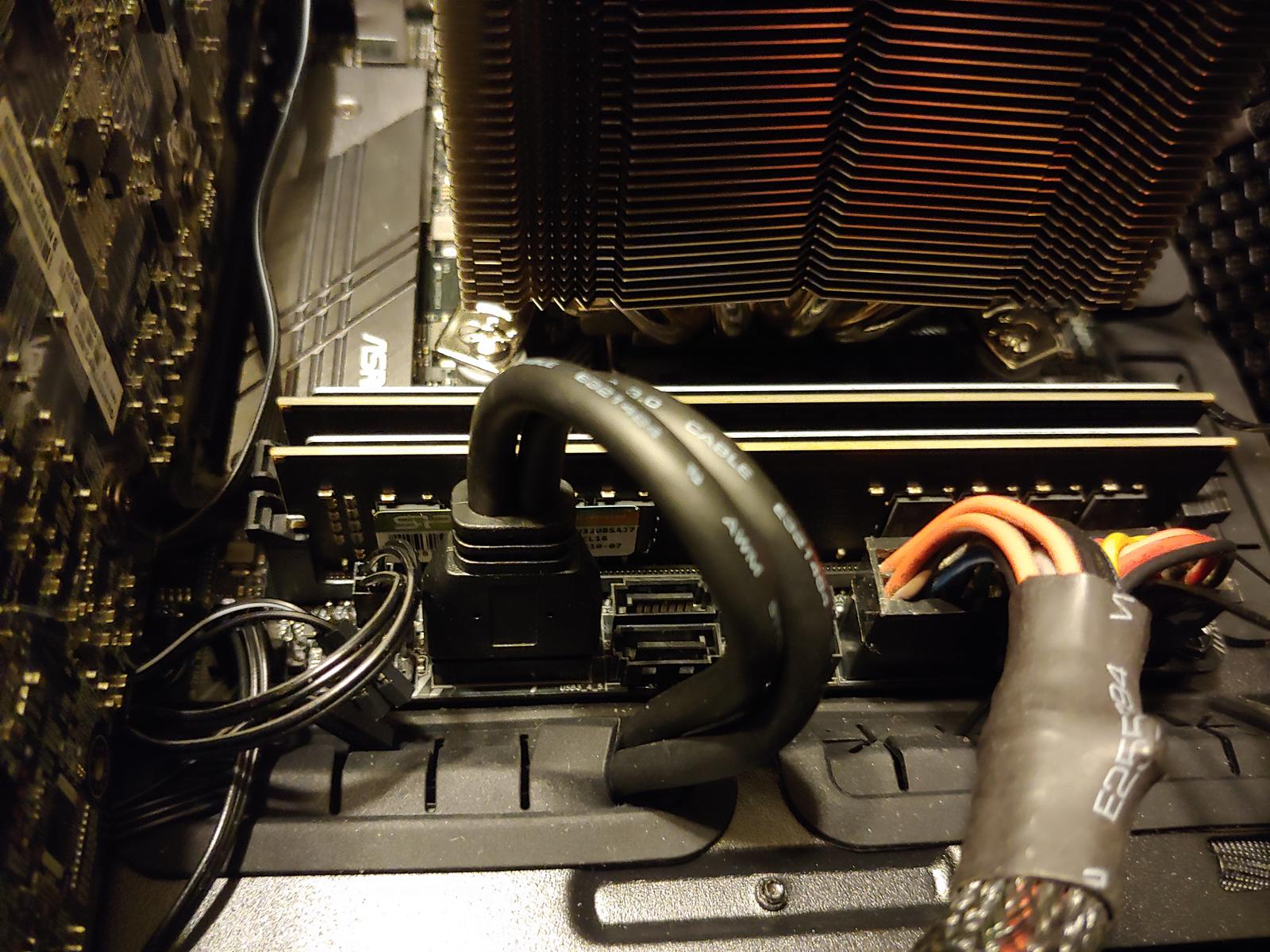
3 years ago 
split copper
dull flint
ok it's a scam
I've been under the idea it was double sided
my mistake
god what would I suggest instead then
split copper
team something idk
dull flint

Silicon Power XPOWER Turbine 32 GB (2 x 16 GB) DDR4-3200 CL16 Memory (SP032GXLZU320BDA)
these
split copper
🤮
dull flint
or these
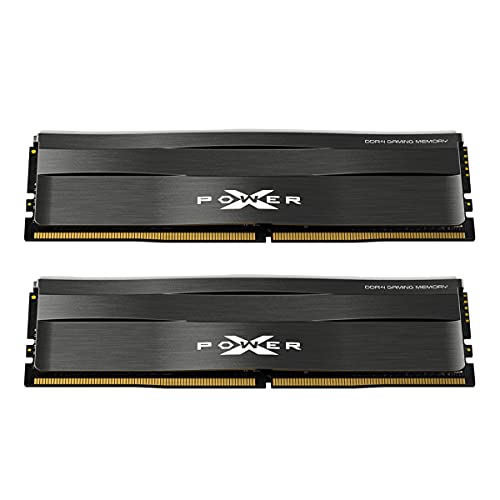
Silicon Power XPOWER Zenith Gaming 32 GB (2 x 16 GB) DDR4-3200 CL16 Memory (SP032GXLZU320BDC)
beyond that you're like $10 from ddr5 lol
Silicon Power SP032GBLVU560FD2AD 32 GB (2 x 16 GB) DDR5-5600 CL46 Memory (SP032GBLVU560FD2AD)
 slender otter
To be completely honest I'm not sure, all I know is that I have the blue x power turbine ram
Lol
 rugged grove
Hello, i just got a new asus prime wifi mobo for my i7 13700f and then 24 pin cable wont go all the way in. So can someone tell me what should I do. I trying harder to put it in but it wont go.
grizzled bloom
rugged grove
Hello, i just got a new asus prime wifi mobo for my i7 13700f and then 24 pin ca...
That can be a tight fit sometimes. The way it usually goes for me is I have to wiggle it a bit to defeat the friction force keeping it from going in. It also helps to put the 4 pin extension in first and the other 20 pins second.
rugged grove
grizzled bloom
That can be a tight fit sometimes. The way it usually goes for me is I have to w...
Oh thanks
scenic solar
Is it possible to set the bottom x1 pcie slot on a msi b550 to 2.0 instead of 3.0?
 marble bough
ASRock is not impressing me. Brand new MB has issues.
I have never seen anything like this. First I had to flash the BIOS, which I expected because I was using new DDR5-6400 G.Skill 96GB kit, plus a n i7-14700. I tried with nu bios update first, which led to nothing but post situation. Anyway I flashed the bios and was able to get to the setup screen, but that's it. This thing sees my CPU and RAM, has it properly configured, and sees my system drive (I only set up MB, CPU, RAM, Noctua NH-D15 cooler, and my system boot SSD so I can see if anything was DOA). Anyway, it does nothing but boot straight to setup. I can try rebooting, but it just loops back into setup page.
@burnt spear The ASRock Z690 Steel Legend D5 motherboard is having issues. I have never seen anything like this. First I had to flash the BIOS, which I expected because I was using new DDR5-6400 G.Skill 96GB kit, plus a n i7-14700. I tried with nu bios update first, which led to nothing but post situation. Anyway I flashed the bios and was able to get to the setup screen, but that's it. This thing sees my CPU and RAM, has it properly configured, and sees my system drive (I only set up MB, CPU, RAM, Noctua NH-D15 cooler, and my system boot SSD so I can see if anything was DOA). Anyway, it does nothing but boot straight to setup. I can try rebooting, but it just loops back into setup page.
burnt spear
marble bough
<@654444344274845698> The ASRock Z690 Steel Legend D5 motherboard is having is...
Wdym setup page
marble bough
bios
burnt spear
Have you installed windows yet, or will it not let you even get to that point
Make sure boot priority is set to the USB with windows on it if you haven't installed windows yet
marble bough
Windows is already installed on the boot drive I inserted, but it won't let me set boot priority at all. The drive shows up in the list of drives, but the Boot Priority section is blank,even if I insert 5 drives.
The strange thing is one of the times I updated the bios, I left the flash drive in the usb port, and when it booted to bios, it saw the usb flash drive listed inthe boot priority section, but still none of the ssds

I contacted ASRock support and they gave me the level 1 tech support script, all things I have been doing for 30 years in builds. They did mention that the board may have "some bad chips on it". I contacted Newegg for RMA.
burnt spear
Yeah rma sounds like the best option, unfortunately
Qc just can never be 100%, which sucks
marble bough
The picture of the bios screen does verify that the ram and CPU are good, so I'm keeping them. I haven't had a chance to install the RTX 4070 TI Super yet, since I want to make sure mare bones system was right before adding other peripherals.
I still appreciate your help in formulating this system. I hope this is just a one-off.
burnt spear
Yeah, also did newegg say how long the rma would take?
It might just be better to return and order a new one, even if it's a diff model
I think pg velocita fits the bill of what you need, correct me if I'm wrong
https://pcpartpicker.com/product/rKGbt6/asrock-z690-pg-velocita-atx-lga1700-motherboard-z690-pg-velocita
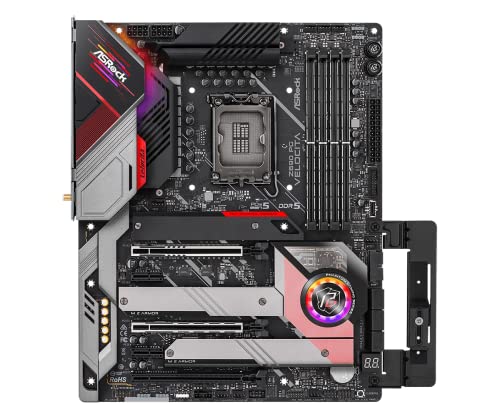
ASRock Z690 PG Velocita ATX LGA1700 Motherboard (Z690 PG Velocita)
marble bough
no. they sent me a label for return. I'm headed to UPS in a few. That velocita effectively only has 4 PCIEs because one GPU will cover up the one next to it. I've never used ASRock before, only MSI since 2004 and Gigabyte prior to that.
I like this Steel Legend because they smartly spaced the other slots apart from the GPU slot. The card will only cover the CMOS battery and an m.2 wifi slot. That will still give me 5 PCIEs.
I did find a 16 port SATA controller that, when combined with the 8 onboard SATA ports, will fill my needs. That means I could possibly do with just 4 PCIE slots (GPU, Capture Card, SATA controller, and 7 port USB). I need 2 internal USP ports, so that card is necessary. I was trying to use all of the above with 2 USB expansion cards because I have 23 USB devices hooked to the PC (including a 10 port external hub). My old MSI board had 10 onboard USB rear ports, this one has 6.
burnt spear
Yeah the usb ports on that one are a bit disappointing, but fortunately there's alternatives (as you know)
marble bough
I will say that the Noctua NH-D15 is still keeping temps at 29.5-31 C for now, but I'm not rendering video obviously. The combo with the thermal paste you recommended is great!
burnt spear
Nice, glad it's working out aside from that mobo!
Hopefully it won't take long to get you a new one
marble bough
I hope it comes quickly too. I'm normally 2 days away from them in CA.
burnt spear
Wegg does not have the best history with their rma service to be honest, but you hear more about the issues than what's done right
I am not a fan of newegg, but its one of the main places to get pc parts from, there's not many alternatives, and it's not like Amazon is any better
marble bough
Meanwhile, I will put old trusty MSI board back in and test the GPU. I know it will be bottlenecked, being that my old CPU is a i7-4790K at 4.4gHz overclocked.
burnt spear
Good idea, and gives you a usable pc in the meantime
And a far better gpu which will still be a massive improvement for your rendering (iirc?)
marble bough
Amazon is scary when geting GPUs. Not only that, if I had waited 1 more hour when I ordered my 4070TI Super, it would have been out of stock.
Yes. My Existing GTX 1080Ti is still pretty good, but Davinci Resolve's Relight and Depth Map effects are of primary concern, and they make the 1080TI struggle a bit.
Anyway, thanks again for your help. I will keep you posted.
dull flint
@marble bough can you manually select the windows from that bios?
marble bough
Not at all. MSI Bios was so much better. I sent it back for replacement. It that doesn’t work, I’ll be looking for another Z690 or Z790
I put the old build back in and changed out the GTX 1080TI for the RTX 4070 TI Super. That is running great, for now. I know the bottleneck is there (with the i7-4790K), but it’s only temporary until I can get the i7-14700 back in a stable motherboard.
dull flint
Interesting
What's more surprising to me is it wasn't the ram I was thinking was the chance of issues
It was the windows
Lol
dull flint
PSA:
All MSI Zen 3 users (And all current zen 3 users)
Regarding the new roll out of agesa 1.2.0.B. More of a forewarning, we've just witnessed a case of high voltage under load with Zen 3. To anyone running a B550 or X570, check your voltage is at normal levels under 100% CPU usage (should be @ 1.35v or less) via the "SVI2" voltage reading, which can be found in the sensors-only section in HWinfo64:
https://www.hwinfo.com/download/
This may be an isolated case, but it's a warning to all who may have updated to this, make sure to check your CPU is behaving normally. If your readings are displaying much higher than expected or really abnormal (High voltage under load, low voltage under idle), please roll back to 1.2.0.A or earlier until a new AGESA is released, using the support site provided found by typing in the name of your motherboard and clicking to the manufacturers "Support" section.
Regards to the BIOS being flagged in question:
https://wccftech.com/amd-discovers-new-vulnerabilities-affecting-zen-1-2-3-4-cpus-bios-mitigations-released/
https://www.techspot.com/news/101890-amd-ryzen-cpus-impacted-all-serious-vulnerabilities.html

Start to analyze your hardware right now! HWiNFO has available as an Installer and Portable version for Windows (32/64-bit) and Portable version for DOS.
Wccftech
AMD has disclosed new BIOS vulnerabilities across all of its Zen CPU generations, which has particularly impacted the SPI connection.
TechSpot
All four vulnerabilities AMD has acknowledged are marked as high-severity. The chart below lists the minimum AGESA version needed to mitigate all issues for each processor generation....

 grizzled bloom
dull flint
PSA:
All MSI Zen 3 users (And all current zen 3 users)
Regarding the new roll ou...
dull flint
grizzled bloom
dull flint
PSA:
All MSI Zen 3 users (And all current zen 3 users)
Regarding the new roll ou...
dull flint
Thank 

 sudden creek
welp, still with AMD's support team.... Anyways at least my random reboots went from every 1-24hrs up to every 2 days or so now.
marble bough
@dull flint @burnt spear Newegg refunded my money for the MB because they were out of the Steel Legend D5. I really liked the fact that the board had 2 USB3.2 headers, the spacing of the PCI-E slots not being covered up by the GPU, the DDR5 compatibility, and 14th gen Intel compatibility so I took a chance on another one. Had to get it from Amazon. Anyway, looking forward to this build being complete. The difference between my GTX 1080Ti and this RTX 4070Ti Super is ridiculous! I re-rendered a video just to check the difference. This was a 14 layer video with tons of effects and titling so I wanted you to see the difference. The 1080 Ti took 98 minutes. The 4070 Ti Super took 6 minutes 14 seconds. And that’s on the old MSI Z97 Gaming 7 board with i7-4790K with 32GB Corsair Vengeance DDR3. New MB coming Tuesday. Can’t wait to see what new build will do with the i7-14700 and 96GB DDR5. Thanks again guys for your help!
burnt spear
especially for workstation use, new gen is far better
marble bough
The kicker is that the Noctua NH-D15 cooler kept cpu temps at 43C and the GPU without an external cooler never went above 46C.
burnt spear
since it's not just the performance difference, but the architecture too
marble bough
Absolutely!
You guys were very instrumental in helping me with this new build. That’s why I keep referring to you both! Knowledge is extremely valuable to me.
Davinci Resolve renders much faster than Adobe products because it takes full advantage of GPUs.
burnt spear
happy to see it's working out for you, and glad you got a new mobo on the way
marble bough
Thanks so much! I only hope I can be of help to both of you one day. If you ever need advice on Video Production or live streaming equipment, feel free to ask.
burnt spear
if i ever need the help, will do, i really appreciate the offer!
marble bough
What’s funny about the Amazon deal is I got the WIFI 6E version of the board this time, and only $5 more.
For simple celebrity interview videos with lower thirds titling, Resolve renders pretty much in 2-10 minutes with just a few layers. After effects will take 40 minutes for the same thing. That’s with the 1080 Ti. I can’t wait to see what the full new build will do. It will help me to be able to put out more than 2-3 videos a day.
You guys looked out for an old man. Thank you. May life bring you joy!
dull flint

It was an interesting learning experience for me as well tbh. There were a lot of factors to keep in mind there
distant gulch
the fact the help you both offer is free is absurd, yall are such a boon to the tech community
marble bough
Well, like I said. I am indebted to you both. I mean it!
@dull flint did you ever download the free version of Resolve?
dull flint
Heh. I've still yet to look at it sorry
I got a bit of a hectic time going on but Adobe is now charging by the month so I will be cancelling it before March
marble bough
I just got tired of Premiere and After Effects crashing all the time. Each year, the “new version” is worse. I dropped Creative Cloud after 5 years and went back to CS6 that I already paid $1200 for in 2014. Not as flashy, but stable. Davinci Resolve puts all of them to shame for free, but the $295 version is absolutely incredible. It’s a little learning curve, but the Relight feature, the Magic Mask, and the Noise Reduction features are astonishing.
And you own it forever still. They made an iPhone Camera app that as soon as you finish filming, it starts uploading the footage to your PC or Mac while you drive home from the even you filmed.
The app is free too.
Plus you can shoot in Adobe ProRes Log too.
Real easy to turn landscape footage into vertical, even will track the object so it will never move out of frame.
Just let me know if you need help with it. I have tons of lessons on it, organized too.
dull flint
I really appreciate that man
Yeah I will be looking at it soon, definitely before march
marble bough
The free exchange of ideas is what makes me tick.
I have to get some sleep. You guys take care.
dull flint
And likewise btw @marble bough , let us know if you run into any other complications we might be able to work out
marble bough
Thank you!
dull flint
No worries
 olive totem

R9 7900 vs R7 7800X3D - RTX 4090 and RTX 3080 - 1080p and 1440p Benchmarks
0:00 - CPU Spec's
↓↓ Productivity Benchmarks ↓↓
0:08 - Cinebench R23 Score
0:17 - Corona 1.3 Benchmark
0:26 - CPU-Z Bench Score
0:35 - Geekbench 5 Score
0:44 - V-Ray Benchmark Score
0:53 - Handbrake x264/265
1:02 - Blender Benchmark
1:11 - Puget System Benchmark
1:20 - ...
 grizzled bloom
More threads does not mean more better (in gaming)
 potent dew
dull flint
potent dew
dull flint
AM5 moment
grizzled bloom
It just kinda does that. As long as it's not throttling you're good.
olive totem
grizzled bloom
More threads does not mean more better (in gaming)
I can’t remember if I asked this or not but every time I’ve asked about the 7900 you’ve recommended me something else which is fine, but then what’s the purpose of the 7900?
I imagine it’d work well for small form factor builds and stuff
I’d eventually like to learn the “productivity” uses of PCs which id like to think the 7900 benefits due to the extra cores over say the 7800x3d
hollow thorn
With the 7900 tdp, it's not going to be that good for sff, in reality, it's only for like vms or containers where you assign one core per vm or container, where the singular cores don't matter as much as just having more cores
But then they might as well get something older from the server side
vast meadow
Or for things like editing etc, compiling large code bases etc
scenic solar
Can something like this be replaced? Is it possible that there is pin damage underneath?
 grizzled bloom
scenic solar
Can something like this be replaced? Is it possible that there is pin damage und...
grizzled bloom
scenic solar
Can something like this be replaced? Is it possible that there is pin damage und...
Yes and yes, but paste is unlikely to damage it. Generally you can scrape enough paste off to make contact by just inserting and removing the CPU a few times.
scenic solar
It's not just the paste, the plastic part of the socket is cracked
grizzled bloom
Oh that looked like a shadow at first glance
sudden creek
Welp seems AMD support finally gave up and asked me to contact their warranty team for a return.
marble bough
@burnt spear @dull flint Hi guys. Well I got the replacement board, of course Amazon took all freaking day to get it here after promising between 10am and Noon. It got here about 6pm. I had the same problem and ASRock wouldn’t let me get to legacy mode without installing a GPU. The problem is, the GPU was installed, however the PCIE5 slot wouldn’t recognize it as being in there. I switched it to a PCIE4 slot and everything worked. The problem now is that the 4070TI Super is 2 1/4 slots wide, so I effectively lost two slots. I went to put my SDI capture card in SLOT 5 to no avail. I’m just running the driver disc in hopes that the PCIE5 slot will come to life. I made sure no bent CPU pins, also that the motherboard screws weren’t too tight. ASRock’s manuals suck, big time. I’m not using any m.2 slots that would disable SATA ports. The only one in use is the one for WIFI/Bluetooth, but there is nothing that says using it will disable anything. This is some weird mess. How can the PCIE5 slot not work, but the PCIE4 does? Crazy
burnt spear
id try updating bios
marble bough
I did, but will retry after drivers are finished. The CPU and ram work perfectly. Windows system page shows them working fine. I hope that fixes it. Trying to be patient. I will try moving GPU if successful.
dull flint
marble bough
<@654444344274845698> <@101107951401455616> Hi guys. Well I got the replaceme...
Pcie 5 isn't a concern anyway
There isn't a gpu that exists that fully utilises pcie 4
So we're a good way from anything like that
The gpu being 2 1/4 slots to me is honestly impressive
Most cards now at the high end are 3 slots or more
So it's just the top pcie slot issue?
Cos if it is that's at least decent news
marble bough
Success! The first bios update did not take. The flash drive was not all the way in.
dull flint
Pcie 5 works?
marble bough
All devices working!!!
marble bough
5 works too!!! GPU is running on it right now!!!
dull flint
I have a solution if the GPU is in the way
marble bough
Now I have all 5 slots back!!! Thank God, and thank you guys as well!
Everything is in its right place now
marble bough
 dull flint
Oml 
marble bough
Everything is fine now! GPU in PCIE5 slot!
dull flint
Ok awesome
Should be smooth sailing now
Nice psu btw
Idk if we suggested it but hx is great
I'm taking a look at davinci tomorrow btw, I haven't forgotten
Just been hectic lol
marble bough
Thanks. I still have 2 1200 watt HXI PSUs left.

 marble bough
Just 2 more drives to hook up, but they are Blu Ray burners.
dull flint
When you got so many drives it's like the windows user files
Got a drive called documents
marble bough
Yes.
Wow! So glad it’s up and running.
Plus I have a 40TB Nas and an 18TB one. I have to store extra footage.
dull flint
Oh damn
See I mention that to a lot of people nowadays and they don't believe it
Use HDD's for video storage
marble bough
The only thing is Windows doesn’t let you go past Z drive, so the cloud drives and NAS drives come into play there.
dull flint
The professional here is doing it lol
marble bough
Absolutely.
marble bough
My mistake was having started with 4TB drives instead of larger. It’s a 10 bay NAS
dull flint
40TB is still a lot
But I'm sure in the scale of things over time
It probably adds up quick
marble bough
I will start swapping out drives in the fall for larger ones. Black Friday is perfect for that.
I don’t know why this temp monitor is only showing 6 cores, but then again it’s from the old PSU. I have to change the software. That big Noctua cooler is working though…
 hollow thorn
Blame Corsair for being wacky and use hwinfo64 if you want better info
marble bough
Yes. With this MB, the clearance isn’t enough to mount as back exhaust, so I opened up the top
burnt spear
I've never seen that before, certainly isn't the most beautiful thing but if it works it works, aesthetics come last imo
hollow thorn
There have been some boards that have really tall vrm heatsinks that get in the way of a d15
marble bough
With my old MSI, I could mount it the other way.
hollow thorn
Sometimes you can just move the fan up but some interfere with where the heatsink goes
burnt spear
marble bough
With my old MSI, I could mount it the other way.
Could you mount it normally and just move the fan that's by the back of the case to the opposite side of the heatsink?
marble bough
If you did, it would block RAM access
Oh. I see what you mean. No. The motherboard is pretty tall near the back
Now I have to tie up some cables and tidy up.
This GPU isn’t lit or anything, but damn it’s fast!
burnt spear
Ah alr
Yeah I had a similar upgrade, gt 1030 i5-3470 to 3600 and 3060 ti, was like night and day
marble bough
I just tried the render that I spoke about the other day. This is ridiculous. The 1080TI took 98 minutes. This card on my old Mb took 6:28. No. My bad this 4070TI Super in my old Z97 motherboard took 5:56 ( not 6:28). Now with this setup it took 3:14.
 burnt spear
That's insane
marble bough
Is a really heavily effect laiden video too
burnt spear
That's what, 32x faster?
marble bough
Absolutely!
It just will truly help me to be more productive! You guys are lifesavers! Thanks again, so much!
My videos have a lot of glyph effects, particle effects, multiple layers, titling, 3D, closed captioning, etc. this is truly a dream setup now. Thanks @burnt spear and @dull flint
sudden creek
oddly enough i haven't had a crash in two days now.
getting in contact AMD's warranty team and I am going to just get this cpu returned for a new one for peace of mind.
pale fox
I have a 5600x and I want to oc my cpu manually how can I do it safely?
vast meadow
pale fox
I have a 5600x and I want to oc my cpu manually how can I do it safely?
Just use pbo it's gonna do it better than you
sudden creek
Not sure how, but I think my CPU has stopped crashing since this new finicky windows install.
sudden creek
pale fox
I have a 5600x and I want to oc my cpu manually how can I do it safely?
pain and suffering. Manual OC can take weeks to do right (assuming a couple hours a day)
vast meadow
Uh it shouldn't
dull flint
don't manual oc unless you intend to do it for like a handful of benchmarks and in a controlled environment
otherwise use pbo
unless you want to degrade your cpu
at the rate of anywhere between a couple of HOURS to a few months
to as bad as immediate death with the wrong settings
sudden creek
Felix. I am not sure how but it seems my PC has indeed fixed itself since my new windows install combined with reinstalling every driver and updating bios. It's been about 5 days with no crashes.
Man this has been quite the wild ride. Just glad it's over and hoping it stays that way.
dull flint
That's good to hear
I feel like everyone I know who's owned a 7950x3d has experienced this pain tho
Doesn't compel me to a good review
But AM5 is really nice when it works
grizzled bloom
I've said it before and I'll say it again.
I personally never buy the first model on a new platform. There are ALWAYS growing pains and subtle flaws.
sudden creek
grizzled bloom
I've said it before and I'll say it again.
I personally never buy the first mode...
True. this pain was on a whole new level though.
sudden creek
dull flint
Doesn't compel me to a good review
Yeah same. Personally after my experience I would not recommend a 7950x3D. When it works it's great like you said however it's a complete nightmare come true when it doesn't.
 cyan raft
Intel>>>
 finite elm
Do Gigabite motherboards still have issues with DDR5?
grizzled bloom
Not that I've heard recently
sudden creek
That's it. I have had it up to here with this CPU. Submitting a RMA to get this thing replaced.
sudden creek
submitted. Hopefully AMD warranty support can get this thing replaced quickly.
 sage quail
Would anyone be able to help me I just got a new ASROCK B550m pro4 with a power spec 500w peer supply both are all new I got to day and have a red light on my motherboard board
burnt spear
What cpu
cyan raft
finite elm
Do Gigabite motherboards still have issues with DDR5?
Nope
At least Z790s don’t
sudden creek
Really hopping AMD gets back to me with a approved RMA soon. I am now experiencing random system stutters on occasion.
tender sleet
@sudden creek mind a quick question?
sudden creek
sure.
I only got about 2m before I go to the grocery store though. just a heads up.
tender sleet
What was the idea for getting a 7950X3D with a 3070?
Like I'm curious what the logic was
I'd assume video editing or such
grizzled bloom
It was a combination of work and gaming, that's why X3D instead of regular
tender sleet
Ah
Yeah that's fair enough
I just find it really hard to justify the higher end X3Ds
Even with that in mind
Isn't Windows scheduler still broken?
grizzled bloom
Sort of, but process lasso fixes most issues
tender sleet
Fair enough
dull flint
Just not worth touching the 2 ccd skus unless you're a little unhinged imo
sudden creek
tender sleet
Isn't Windows scheduler still broken?
I use process lasso for anything I actually use so I haven't had any problems with that.
Hold up. How likely is it that Windows Scheduler is the thing that keeps giving the erorr: Error setting traits on provider xxxxxxxxxxxxx numbers? I see that pretty often in the Windows Event Viewer but when I see it there is no crash so I don't think that's the cause.
sudden creek
tender sleet
What was the idea for getting a 7950X3D with a 3070?
I already had a 3070 which worked fine for my gaming needs but I needed a better CPU and decided to go with the X3D since I plan to pair it with a 4090 or 5090 in the future for better game performance.
 crisp citrus
Hi, I'm hoping to get some advice on AM5, I haven't really paid attention to the PC hardware world since the 3000 series gpus came out. I'm starting to notice my old reliable r7 2700 and 16gb of ram is a little underpowered for solidworks and I'm thinking it might be time to upgrade. I'm considering either getting a 5800x3d or 5700x3d and 16gb more ram, but for about the same price I could get a bundle like this: https://www.microcenter.com/product/5006647/amd-ryzen-7-7700x,-msi-b650-p-pro-wifi,-gskill-flare-x5-series-32gb-ddr5-6000-kit,-computer-build-bundle
For context, I have a 3070 that is way more than enough for me, a 750w psu, plenty of storage etc. The only additional upgrade would be a cooler, since I'm assuming my cooler master tower cooler would be a little on the small side. Thoughts?
Or alternatively I could just get 16gb of extra ram since that's the real limiter, and wait until the newest round of AM5 stuff comes out? I had no idea the 7700x has been around since 2022 already
sudden creek
crisp citrus
Or alternatively I could just get 16gb of extra ram since that's the real limite...
Personally after the mess of things I have been going through with AM5 along with all the articles and reddits of people experiencing similar issues I would not recommend AM5 due to stabillity issues.
dull flint
I would, just not 7950X3D/7900X3D
crisp citrus
sudden creek
Personally after the mess of things I have been going through with AM5 along wit...
I'm not familiar with those, is it just issues with productivity or the platform in general?
dull flint
AMD has a lot of problems revolving around agesa
AM5 is not immune to these, but definitely less prevalent than AM4
AM5 when it has problems, like AM4 can be a nightmare
But when it works it's incredibly stable
5700X3D might be a viable option tho imo
Just don't go adding more ram
Buy a whole separate new kit and only use that
Mixing will lead to problems
sudden creek
dull flint
I would, just not 7950X3D/7900X3D
I am seeing forums of people with a 7800x3d and 7950x also experiencing the same issue.
dull flint
Yes and a lot of AM5, but you can say the same with intel
The problems with the 2ccd x3d though seem very consistent
Unlike all the others
sudden creek
crisp citrus
I'm not familiar with those, is it just issues with productivity or the platform...
Random crashes, stuttering, etc. I am suffering from the first one.
sudden creek
dull flint
The problems with the 2ccd x3d though seem very consistent
Especially since this past month. Far more AMD forums have been opened regarding this problem.
Seeing them all over the place now.
dull flint
Yes for the 2ccd x3d chips
I've met maybe one person who's been problem free
On a 7900x3d
Everyone else including us have had issues, but most of the others on AM5 are usually problem free
sudden creek
jesus. really?
dull flint
Yes
I took your complaints seriously
My 7950x3d works great, but I'm an isolated case and won't recommend on my own experience

crisp citrus
Thats definitely good to know, I'll probably try to stick it out until 8000 series drops this fall if I can (assuming thats when it will be) and if not I'll buy a cheap 32gb set
sudden creek
That's good at least. I am just honestly getting depressed from this *** that I keep having to deal with after as you and a few other know spent nearly two years saving up.
dull flint
When AM5 works, it's amazing to use imo
crisp citrus
I'll just cover the little pop up solidworks gives me saying critical low resources and pray lol
crisp citrus
I'm surprised it had that many issues, am4 has been flawless for me
sudden creek
crisp citrus
I'm surprised it had that many issues, am4 has been flawless for me
Oh g0d don't get me started on my AM4 experience.
horrible USB and Audio issues.
dull flint
crisp citrus
I'm surprised it had that many issues, am4 has been flawless for me
It varies by user. A lot are problem free, some are unusable levels of bad
I've been on both sides of the spectrum
 limber dragon
dull flint
I get a completely quiet system
limber dragon
dull flint
I get a completely quiet system
Mine is too, 7800x3d+4090. Iirc my coworker has a 7950x3d+3080ti and no issues
sudden creek
.....
sudden creek
 dull flint
I pity for you apex, again why I take the points of criticism seriously
sudden creek
thank you.
I am just praying AMD's RMA team passes it tonight and that I can get a new chip within a week and the problems are gone..
Have you guys seen anyone resolve their AM5 issues especially crashing ones by replacing the cpu?
dull flint
Yes
limber dragon
Its happened a lot on am4, yeah
sudden creek
that gives me a bit of hope at least. Was it usually the fix?

 limber dragon
sudden creek
that gives me a bit of hope at least. Was it usually the fix?
limber dragon
sudden creek
that gives me a bit of hope at least. Was it usually the fix?
Just for reference, I work as a pc tech. "Customer states computer randomly crashes in games", if its am4, then its a solid 50% chance its a cpu issue
sudden creek
One thing is for sure. going forward I am getting extended warranties with all tech components when buying from amazon so I can just get something replaced quickly.
sudden creek
limber dragon
Just for reference, I work as a pc tech. "Customer states computer randomly cras...
that is genuinely frightening.
limber dragon
I have a whole pile of 1600/x, 2700x and 3600/xs, ask me why
sudden creek
unstable customer cpus from work I am guessing.
limber dragon
Yup
sudden creek
well wrost case scenario MSI has at least 1 year warranty as well right?
limber dragon

sudden creek
I bought my ram, board, and cpu at the same time.
well I take that back. my ram was more recent cause the first kit I bought had a problem during shipping and never arrived.
limber dragon
I don't bother with trying to RMA unless its a part I replaced for someone because rma dept look for any reason to deny rma
dull flint
Real
limber dragon
Even then, we just send back the replaced part because if its still having issues, its something else
Work has absolutely done the rma with questionable ethics before because of companies denying rma
sudden creek
worst worst worst worst worst case scenario hounding the amazon store for a couple weeks usually works.
 glossy wave
Hey all got a question
Does it really matter if OS is installed into a m.2 drive for better performance or will its just perform the same as a storage device?
dull flint
as long as it's on any ssd
then it will be pretty fast
faster can be better but it is in equal arguments both extremely faster and also not faster at all (depending on the workload/who you talk to/alignment of the planets/cosmic rays etc etc)
but if it's on a HDD then swapping to any SSD makes an enormous difference
glossy wave
I guess ill shoot for the stars on this and take a chance with my current SSD and use it as a Storage array, maybe that'll keep the aliens from finding out where my hideout is......
limber dragon
dull flint
faster can be better but it is in equal arguments both extremely faster and also...
may be placebo (I dont have an explination for it), but rog ally going from the micron 2400 500gb to a 1tb 990 pro increased fps 5-10% 
but also very possible its page filing between win11, 1080p med/high settings and 16gb ram that an apu is also eating into
grizzled bloom
Do I take a chance? https://www.ebay.com/itm/395176726163

eBay
Processor Model : Ryzen 7 7800X3D. Processor Type : Ryzen 7. Be advised that other problems could arise that we are not aware of. Clock Speed : 4.2 GHz. Boost Clock Speed : 5 GHz. Order Cancellations.
It simply says "will not boot" and that could just be the bios if I'm lucky
burnt spear
Looks like some scuffs on the back of it
grizzled bloom
I think that's just the lighting because you can't see it in the other pics
grizzled bloom
For the most part they're going to perform the same
It's the other features that matter, like number of USB, PCIe, and M.2 slots
naive pendant
Im interested on msi x670 ace or asus x670 hero
grizzled bloom
If I had to pick between them, the MSI
burnt spear
Unless you're doing multi gpu and a lot of nvme drives, there's absolutely no benefit to x670
limber dragon
grizzled bloom
Do I take a chance? https://www.ebay.com/itm/395176726163
1 of 2 sold, so most likely one is super broken, the other only partially broken. These could easily be failed delids too
my gut is saying one has issues on die side, the other has issues on pad side
grizzled bloom
Hmm that would make sense
sudden creek
AMD just approved the RMA request.
dull flint
naive pendant
Best motherboard for 7950x3d?
Fair warning, this cpu can be quite annoying to deal with
Also agreeing with everyone else, unless you have needs for tons of pcie lanes for multi-gpu, lots of pcie cards and nics, and a crap ton of m.2, stick to b650
X670 is just two b650 chipsets linked together, it's not inherently any better performance at all (especially on a locked cpu)
See this for context
https://wccftech.com/asrock-110-us-b650-motherboard-sets-overclocking-world-record-amd-ryzen-9-7950x-cpu/

Wccftech
ASRock's $110 US entry-level B650 motherboard has achieved record OC performance for a 16-core CPU using the AMD Ryzen 9 7950X.
One of the cheapest offerings for AM5 is quite literally one of the best boards period
Performance wise will be basically no difference between the cheapest b650 and the highest X670E (save for revision 1 prime boards which are disgustingly bad)
dull flint
grizzled bloom
It simply says "will not boot" and that could just be the bios if I'm lucky
The seller profile seems quite big enough to say the odds aren't great lol
But you never know
It could work, but it is X3D at the same time
You sneeze on it and it breaks the vcache
sudden creek
naive pendant
Best motherboard for 7950x3d?
Be warned. Very few afaik have actually gotten a 7950x3D and had it work perfectly out of the box.
sudden creek
only use the 7950x3D if you are prepared to be tossed into a hellish nightmare and actually need the extra cores. Or just get a 7950x.
grizzled bloom
And then there's me. I just bought a 7900X3D and I'm fully prepared for the nightmare.
dull flint

grizzled bloom
At least the person I bought it used from is trustworthy and if I have serious issues he'll replace it
dull flint
Oh, cheap?
grizzled bloom
$233
sudden creek
grizzled bloom
At least the person I bought it used from is trustworthy and if I have serious i...
that's good at least.
dull flint
DAMN
sudden creek
Nice!
sudden creek
by the way. What ever happened to all that stuff about never touching dual CCD ever again?
But yeah, same as Felix hoping it works out for you.
grizzled bloom
Look if I can get a dual CCD for cheaper than a 5800X3D... I'll just disable a CCD for sensitive things
dull flint
I was gonna say the same thing
But the price man
That's like 7600 money
If it works out that was a solid buy even if he runs only 6 cores
sudden creek
grizzled bloom
Look if I can get a dual CCD for cheaper than a 5800X3D... I'll just disable a ...
Ahh okay.
sudden creek
dull flint
If it works out that was a solid buy even if he runs only 6 cores
Agreed.
olive totem
grizzled bloom
And then there's me. I just bought a 7900X3D and I'm fully prepared for the nigh...
when I asked about it didnt you tell me NOT to get it
dull flint
olive totem
when I asked about it didnt you tell me NOT to get it
Yes
Don't
His reasoning does not change
Until the price tag is $230
Which changes everything
The 7600 brand new, is $230
In which case he can just turn off the second ccd even and just have a 7600X3D
Which is still better than a 7600
Brand new? Don't
olive totem
i dont understand cpus that well so I apologize and I think ive asked before but
whats the point of the 7900X3D
over the 7900 non x or X
dull flint
The 3D part is the addition of vcache
Makes it way faster in games and specific workloads
grizzled bloom
It's got more cores for people that will use them and the option of 3D or high clocking cores
dull flint
The 7900 and 7900X are the same chips
The non-X is a downbin and has a 65W power limit
And yeah it's extra cores for people who will actively use said cores
Most games run on 8 or less cores by design, so something like say, 7800X3D, 11900K for example, are pretty much capped out on their gen for gaming performance. It's the same reason 12th, 13th and 14th gen stop at 8 P cores
grizzled bloom
grizzled bloom
It's got more cores for people that will use them and the option of 3D or high c...
Without the $600 price tag of the 7950X3D
cyan raft
What makes the X3D chips so finicky?
olive totem
cyan raft
What makes the X3D chips so finicky?
this
dull flint
They're temperamental
grizzled bloom
They're VERY sensitive to voltage changes
cyan raft
Ahh so basically the intel DDR5 of CPUs?
dull flint
I've met way too many people at this point with issues related either to i/o or the boost behaviour at this point to pretend like it's not a *common issue
dull flint
cyan raft
Ahh so basically the intel DDR5 of CPUs?
That's a nice way to put it but I'd put intel higher
grizzled bloom
cyan raft
Ahh so basically the intel DDR5 of CPUs?
Yeah, it needs to be set exactly right for that exact CPU
olive totem
dull flint
I've met way too many people at this point with issues related either to i/o or ...
then why does everyone and their mother who does highend have a 7800x3d
dull flint
That said, when 7950X3D/7900X3D works, it's excellent
cyan raft
I’m back to debating an ITX build
dull flint
olive totem
then why does everyone and their mother who does highend have a 7800x3d
Not the same
7800X3D is a single ccd
And overwhelmingly it runs really well
cyan raft
Dual CCD is annoying
grizzled bloom
olive totem
then why does everyone and their mother who does highend have a 7800x3d
Because it's more stable when it's only one CCD. There's no second CCD begging for more voltage.
cyan raft
5900x and 3700x were fun but a pain in the ass
dull flint
Real
cyan raft
My gold bin 3700x is dead because of my damn dog 
olive totem
the ccd is where the actual cores are correct
dull flint
Ye
dull flint
Ye
For now
Future gens will have larger ccd's
On threadripper these are called ccx's
grizzled bloom
grizzled bloom
Because it's more stable when it's only one CCD. There's no second CCD begging f...
Also the reason that 1% lows are better on the 7800X3D
dull flint
As a whole though, when ryzen 7000X3D works, it's phenomenal
sudden creek
grizzled bloom
Also the reason that 1% lows are better on the 7800X3D
wouldn't telling the game to all just use one CCD fix that?
dull flint
sudden creek
wouldn't telling the game to all just use one CCD fix that?
In my case this both did and didn't work until much later
Until you find the source of the problems ryzen in general can be WILD
sudden creek
yeah....
Honestly depending on how this goes I am likely switching to Intel come my next upgrade CPU wise..
grizzled bloom
First gen on the new platform is always like this
dull flint
I don't use Lasso anymore on my 7950x3d rig tho
Now that it's good, it does work itself out
And any time I test for performance degradation with lasso, nothing changes or improves
sudden creek
grizzled bloom
First gen on the new platform is always like this
first time I've had a first gen adoption feel this rough in any market.
dull flint
So the driver is competent, but again, it's just the temperament of the chip itself
sudden creek
cause of the X3D side I am guessing?
dull flint
I can't really say that
I'm more blaming agesa for all this tbh
Agesa has a long history of being just plain disgusting to deal with at times
dull flint
Firmware
Most of the problems I've experienced on Ryzen lead their way back to AGESA in some form or another
sudden creek
14th is just a refresh or 13th with a overclock right?
dull flint
They're both a refresh really
But one was an actual step up and core layout change
The other introduces one new cpu
And bins existing older gen
Heh I should correct myself there
Not bins, but rather, better yield over time due to manufacturing improvements
sudden creek
What are the known issues with 13th/14th? Anything like the X3D fiasco we have now with AMD?
dull flint
But overall it's minor to basically no improvement with 14th
Yes
14th gen has lots of memory support issues
sudden creek
really? is that at 7000+ or?
dull flint
And a tons of existing boards don't have bios flash buttons or native 14th gen bios support
Higher side yes
But even still
It's just, not really an improvement
Lipstick on the pig
sudden creek
gotcha
Been wondering if I should've gone teamm blue since the cost was only about $40 more to get a 14th gen setup. (13th was more expensive at the time)
dull flint
Tbh I'm still in the camp of, if you can get it to work then stick to it
I've honestly liked AM5 so much I'm considering my second system to switch over
It was a pain to get running well but now that I'm here, my pc runs almost too well
sudden creek
i see.
dull flint
I have really liked 13th gen, I loved 12th gen
cyan raft
Intel>
sudden creek
Currently after weeks of tampering I got this chip to stay stable for about 1-2 days at a time.
dull flint
But my problem with intel is the power density is becoming stupid
sudden creek
updating bios definitely helped stablize it more it seems.
dull flint
It may even be the motherboard tho
Wouldn't be the first time swapping motherboard fixes crazy stability
sudden creek
if it is that's better then the chip imo far less expensive to replace if I can't get it RMA
dull flint
Which one is it btw