#cpus-mobo-and-memory
1 messages · Page 46 of 1
 burnt spear
 dull flint
@marble bough can you put your current pc into this pls
burnt spear
I'd cancel it imo
dull flint
We will be at this for hours without some organisation
 marble bough
I prefer to load the board up to max, or at least 128GB
burnt spear
Ah
dull flint
If we can't see what your full current pc looks like, this will just be a ton of back and forth
I'm genuinely thinking for your needs, used x299 or threadripper
burnt spear
What about 96gb? There's 2x48 for ddr5
marble bough
I finished pickingout the parts on the link. How do i send it to you?
burnt spear
If you dont use all 128gb 96gb would perform better, quad channel is hard to run on ddr5
marble bough
dull flint
No no
I want what you have in your current pc
Cos you have like
Ten thousand different plugins
There's a very specific need here
So I'm talking
Z97
1080 ti
23 ssd's
Etc etc
We can shorthand some of it if you tell me what's in a large number and what isn't
marble bough
My current PCIE SATA controllers (2) are Marvell based, and have 8 ports each (2 slots). I have a Blackmagic Decklink Capture card (1 slot),. I have a 2.5GB nic card, wiich I can get rid of with another MB. I have 2 USB expansion cards, but I have the USB external hubs (still in the box) that will take their place.
burnt spear
How many pcie slots do you need
marble bough
Then I have the 1080TI sc (last slot)
burnt spear
And how many nvme slots/sata slots do you need
dull flint
So you need at least 3 slots, is this correct?
marble bough
5, as long as the battery separates the GPU slot from the others.
burnt spear
Ok, good start there. Do you know how many pcie lanes each slot will be needing?
dull flint
Wait sorry, what's the 5th slot
marble bough
right now I have 7, but one is blocked by the gpu. That is why I looked at this board I preveiously linked to.
dull flint
2 sata controllers, a capture card
burnt spear
Bc if some of those are running in x1 that would be good
marble bough
the USB cards are running at 1x
My bad. 1 USB expansion card, 1 capture card, 2 SATA controllers, 1 NIC, and 1 GPU that blocks up the 6th slot.
The board I had in mind has the GPU slot separated from the other 4 by the CMOS battery
that way I don't waste a slot
burnt spear
This looks like it'd work I think
https://pcpartpicker.com/product/CsvD4D/msi-pro-z790-a-max-wifi-atx-lga1700-motherboard-pro-z790-a-max-wifi

MSI PRO Z790-A MAX WIFI ATX LGA1700 Motherboard (PRO Z790-A MAX WIFI)
Wait no
One short mb
marble bough
so I'm using 6 of the 7 on the Z97 Gaming 7. but I won't need the NIC card if the MB has at least one 2.5
burnt spear
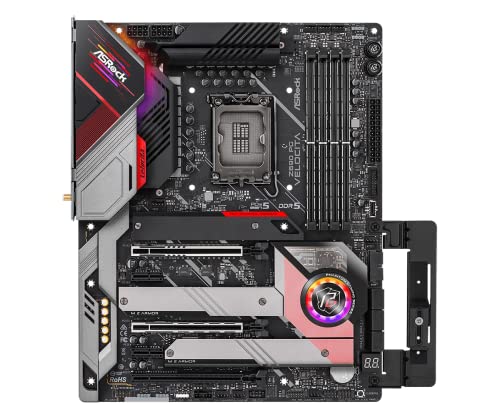
ASRock Z690 PG Velocita ATX LGA1700 Motherboard (Z690 PG Velocita)
That should do it

ASRock Z690 STEEL LEGEND/D5 ATX LGA1700 Motherboard (Z690 STEEL LEGEND/D5)
That too
dull flint
marble bough
My bad. 1 USB expansion card, 1 capture card, 2 SATA controllers, 1 NIC, and 1...
We can discount the nic and usb expansion surely
So 4 slots
Sorry, I'm helping 2 people at once rn
 marble bough
absolutely
burnt spear
Wait holdup, this has 6 for some reason lol
https://pcpartpicker.com/product/8ncG3C/gigabyte-z790-ud-ac-atx-lga1700-motherboard-z790-ud-ac

Gigabyte Z790 UD AC ATX LGA1700 Motherboard (Z790 UD AC)
Do any of the boards linked look like they'd work for you?
marble bough
the one with six will only have 5 useable since the GPU covers 2 slots
burnt spear
Ah alr
marble bough
The Steel legend d5 looks like it would do the trick
burnt spear
For cpu imo https://pcpartpicker.com/product/jXFmP6/intel-core-i5-14600k-35-ghz-14-core-processor-bx8071514600k
Or https://pcpartpicker.com/product/TWP8TW/intel-core-i7-14700kf-34-ghz-20-core-processor-bx8071514700kf

Intel Core i5-14600K 3.5 GHz 14-Core Processor (BX8071514600K)

Intel Core i7-14700KF 3.4 GHz 20-Core Processor (BX8071514700KF)
marble bough
Ok. The i7-14700 may be what I'm looking for

 burnt spear
Ye it's very noticeably better than 12900k in multi core, and still has a nice boost in single core
burnt spear
marble bough
now, about the MB, what ram is best suited for that?
If 96gb would be sufficient
https://pcpartpicker.com/product/jn26Mp/gskill-ripjaws-s5-96-gb-2-x-48-gb-ddr5-6400-cl32-memory-f5-6400j3239f48gx2-rs5k

G.Skill Ripjaws S5 96 GB (2 x 48 GB) DDR5-6400 CL32 Memory (F5-6400J3239F48GX2-RS5K)
That's ideal
marble bough
Wow!
That may just be perfect.
Thanks so much. So I don't have to fill up all four dimm slots
marble bough
ok. Thank you both for your help. I truly appreciate it. As an old man now, I am trying to keep up.
burnt spear
Anytime, happy to
burnt spear
Oh gp
dull flint
Cos noctua nh d15
burnt spear
marble bough
ok. Thank you both for your help. I truly appreciate it. As an old man now, I...
Also side note
https://www.zotacstore.com/us/zt-d40810d-10p-o

2 years warranty (shipped in generic box with no accessories)
burnt spear
Dual ccd won't cause issues?
burnt spear
Also is am5 fine with 96gb ram? I know one of the two was wonky with the 24/48gb sticks
burnt spear
Kk I'll check out options
dull flint
Just have a poke in
marble bough
Who makes the 7950?
marble bough
My GPUs are always NVidia because when I have to use After Effects, they utilize CUDA cores still
dull flint
Intel has quick sync tech but since you'll be using a 4080s it's worth considering if it breaks cheaper
No no not gpu
Cpu
marble bough
Oh. OK.
dull flint
For full video prod I agree with nvidia
You have cuda, nvenc, and gfx and blender advantages
Full blown video production amd can't keep up gpu-wise
burnt spear
https://pcpartpicker.com/product/42hFf7/asrock-x670e-pg-lightning-atx-am5-motherboard-x670e-pg-lightning
https://pcpartpicker.com/product/4jKscf/msi-x670e-gaming-plus-wifi-atx-am5-motherboard-x670e-gaming-plus-wifi
The first one gpu might cover a second slot, im not sure

ASRock X670E PG Lightning ATX AM5 Motherboard (X670E PG Lightning)

MSI X670E GAMING PLUS WIFI ATX AM5 Motherboard (X670E GAMING PLUS WIFI)
marble bough
I'm partial to MSI, but was thinking i had to go in another direction
marble bough
No microcenters nearby, only crap Best Buy
burnt spear
Ah alr
https://pcpartpicker.com/product/XccgXL/amd-ryzen-9-7900x3d-44-ghz-12-core-processor-100-100000909wof
https://pcpartpicker.com/product/bwxRsY/amd-ryzen-9-7900x-47-ghz-12-core-processor-100-100000589wof
https://pcpartpicker.com/product/22XJ7P/amd-ryzen-9-7950x-45-ghz-16-core-processor-100-100000514wof

AMD Ryzen 9 7900X3D 4.4 GHz 12-Core Processor (100-100000909WOF)

AMD Ryzen 9 7900X 4.7 GHz 12-Core Processor (100-100000589WOF)
AMD Ryzen 9 7950X 4.5 GHz 16-Core Processor (100-100000514WOF)
marble bough
I am in Arizona. Not much to see here but mountains and wildlife
burnt spear
Cpu options for am5 imo
dull flint
Also, for note
Ddr5
Huge upgrade for video production
Like
Massive
ENORMOUS
The bandwidth increase makes it a huge jump
burnt spear
7900x and 7900x3d perform the same for multi core loads, but the x3d is some 15-20% better in gaming
7950x has similar gaming perf to the 7900x, but twice the cores
No not twice
dull flint
7900 also exists
dull flint
I could go either way
burnt spear

AMD Ryzen 9 7950X3D 4.2 GHz 16-Core Processor (100-100000908WOF)
dull flint
Fair enough
But if any of those can be cheaper than 14700K +z790 ud ac it might be nicer
burnt spear
Or, if you went for the 14700k, you could get a 360mm aio for around $55-60
marble bough
Wow! I do see that my Noctua may have an issue with the ASRock Steel Legend on that parts picker site
dull flint
Would need an adapter yes
I was just typing that
It's free
Afaik
But am5 can work with am4 or even am3+ iirc

 dull flint
Multi is what matters
marble bough
True
dull flint
Unless it's like photoshop which basically runs on a toaster now
burnt spear
So 14700k is cheaper than 7900x and a bit better, but you'd need to swap cooler
Only $30 less
marble bough
I run DaVinci Resolve, and Adobe CS6 for everything. I dropped the more current Adobe CC becaue I already paid $1200 for CS6, and CC crashed all the time. Plus I aready spend more than 3K on Adobe's subscription.
Sounds like a plan. Thanks alot guys.
Where could I get the adapter for the Noctua?
dull flint
Yeah I'm considering committing to just a full adobe suite soon
They keep raising the price absurdly
marble bough
I I purchased the CS6 back in 2013, and it makes me mad that Adobe keeps raising the price, but not the quality. Resolve Studio (paid version) was $295 flat, with free upgrades for life. Even the free version is killing Adobe.
marble bough
go ahead
dull flint
Would you say resolve is better overall
I would be glad to pay what is 1 year of adobe for resolve and just change camp
marble bough
ABSOLUTELY! No crashes, live saves, and seamless interaction with their cameras and iPhone apps.
The Blackmagic Camera app can upload video to your specified server even while you are driving home from an event. Proxies are much faster too
I did an event at the Boxing Hall of Fame (well my brother did the shooting), and before he got home, I was already editing the footage.
let me show you...

The 7th annual Atlantic City Boxing Hall of Fame Induction Weekend was Fire!!! Inductees included @GeorgeForemanOfficial @shannonbriggs540 @PinklonThomasWBC @davidtuafights @busterdrayton4920 Tracy Harris-Patterson, Doug DeWitt, @shamonealvarez8545 Darroll Wilson, Jamillia Lawrence, Joseph Santoliquito, Rudy Battle, @benjyestevesjr.7959 Mar...

SWAG Magazine/SWAG Radio was at the 2022 Induction Ceremony of the Atlantic City Boxing Hall of Fame! Inductees included Lennox Lewis, Frank Fletcher, Chuck "The Professor" Mussachio, Kathy Collins Globushulz, James Toney, Julio Cesar Chaves Sr, Dave Tiberi, James Broad, Kevin Rooney, Lynn Carter, Dr. Domenic Coletta, Pat Lynch, Tom Casino, Har...
dull flint
So what would you say are the drawbacks to resolve over adobe
marble bough
the first one is 2023. My brother can't work the camera that good, so I had to settle for what he got. The second one is from 2022. Now he is on his way from New Jersey to learn the iPhone Camera app from me. The footage will be crystal clear 4K 60 on the iPhone 15 Pro Max. It rivals the studio cameras I have here.
dull flint
And vice versa
dull flint
marble bough
I did an event at the Boxing Hall of Fame (well my brother did the shooting), an...
That's actually kinda awesome lol
marble bough
Adobe runs the game in software, but Blackmagic doesn't sell subscriptions. Their hardware studio equipment is so good that they give away DaVinci Resolve, hoping that you will buy some of their hardware. It is used by the NBA, NFL, and MLB, plus several studios have converted.
dull flint
Oooo that's very interesting info
marble bough
Adobe only runs the software game because they have been there longer. DaVinci Resolve is better for editing, color, and music
marble bough
I have 2 speed editors, a Blackmagic Editing Keyboard, A Micro Panel (color correction), several Hyperdecks, 3 Atem switchers of varying levels, and cameras.
dull flint
Jesus this man's stacked
I think you're the first real video editor we've had in a while here
marble bough
I seem to recall AV1 somewhere, but I encode in Adobe ProRes.
dull flint
Ah
marble bough
I went to college in the 80s for TV Production, but this surpasses anything we had back then.
dull flint
Yeah av1 is the new encode, I'm not looking for like, major production stuff but the new gpus carry av1
It's very clean for end results
marble bough
AV1 has been supported since V17.2. They are on 18.6 I believe.
marble bough
You have to see the PRORES. It rivals Arris
dull flint
I'd love to stay and chat but I gotta jet. Let us know if you have any problems with the pc mate
Glad to help
marble bough

DaVinci Resolve 17.2 had a lot packed into this update but the key things to note for content creators is that it now includes AV1 and MKV support which is excellent news for your workflow (no more remuxing) and for future content.
Source referenced:
https://twitter.com/blackmagic_news/status/1392375156262064131
🎶 Music by Backing Track: htt...
dull flint
I learned a fair bit today. Much appreciated
marble bough
Thanks so much guys.
dull flint
No worries, be sure to double check everything with pcpartpicker
It helps sort compatibility out
Good luck 
marble bough
Thank you. As for Resolve, try out the free version first, but the paid version ($295) had features like RELIGHT, Magic Mask, and even works with 3D objects natively. I learned alot from you both. I appreciate it.
 long geyser
dull flint
Do they have AV1 yet?
long geyser
dull flint
Do they have AV1 yet?
From my understanding free version has AV1 encode for AMD only and paid version has AV1 encode for Nvidia/AMD.
marble bough
You are correct.
marble bough
I can tell you this though... With my GTX 1080Ti, what used to take me 10 minutes to render in Adobe takes me 45 seconds to a minute in DaVinci Resolve.
Can anybody tell me how to save this discussion? I'm new to Discord
 cursive epoch
You can't, but it's always gonna be there
marble bough
ok, Thanks
long geyser
marble bough
Can anybody tell me how to save this discussion? I'm new to Discord
Closest you'll get is saving the message link somewhere.
 dull flint
long geyser
From my understanding free version has AV1 encode for AMD only and paid version ...
dull flint
long geyser
From my understanding free version has AV1 encode for AMD only and paid version ...
This works in my favour as my editing pc is amd

 rotund rivet
Thoughts / opinions on Corsair vengeance vs dominator? Recommendations for something similar? https://www.newegg.com/corsair-32gb/p/N82E16820982003?Item=N82E16820982003 https://www.newegg.com/corsair-64gb/p/N82E16820982081?Item=N82E16820982081
burnt spear
rotund rivet
Thoughts / opinions on Corsair vengeance vs dominator? Recommendations for somet...
I would avoid corsair for ram, they lock a voltage on ddr5 that makes it worse than most other brands, and they have some quality control issues
It seemed they had left those issues with ddr4, but I found out recently they have the same exact issue on ddr5. They sometimes sell kits with mixed ram dies, which means they won't run at their rated speeds
Also what are you using the pc for? If you're just gaming, 64gb actually hurts performance. And what cpu?
 vast meadow
what bacca said also ram is ram so honeslty just get the cheapest for the same speed/latency/capacity you want
dull flint
rotund rivet
Thoughts / opinions on Corsair vengeance vs dominator? Recommendations for somet...
Any of these instead really
https://pcpartpicker.com/product/dFMMnQ/silicon-power-xpower-zenith-rgb-gaming-64-gb-2-x-32-gb-ddr5-6000-cl30-memory-su064gxlwu60afdhsw
https://pcpartpicker.com/product/yXyH99/teamgroup-t-create-expert-64-gb-2-x-32-gb-ddr5-6000-cl34-memory-ctced564g6000hc34bdc01
https://pcpartpicker.com/product/FTMMnQ/teamgroup-t-create-expert-64-gb-2-x-32-gb-ddr5-6000-cl34-memory-ctcwd564g6000hc34bdc01
https://pcpartpicker.com/product/xJV2FT/oloy-blade-rgb-64-gb-2-x-32-gb-ddr5-6400-cl32-memory-nd5u3264320irkde

Silicon Power XPOWER Zenith RGB Gaming 64 GB (2 x 32 GB) DDR5-6000 CL30 Memory (SU064GXLWU60AFDHSW)

TEAMGROUP T-Create Expert 64 GB (2 x 32 GB) DDR5-6000 CL34 Memory (CTCED564G6000HC34BDC01)

TEAMGROUP T-Create Expert 64 GB (2 x 32 GB) DDR5-6000 CL34 Memory (CTCWD564G6000HC34BDC01)

OLOy Blade RGB 64 GB (2 x 32 GB) DDR5-6400 CL32 Memory (ND5U3264320IRKDE)
Not a day I'd ever recommend corsair even if they have the fastest 64gb kits
Not worth it for like, 1% speed and 30%+ cash
burnt spear
^
dull flint
They're all the same underneath, just a different heatsink, and to parrot what bacca said, locked pmic voltages in some cases
Which for something somewhat heavy like 6600 C32, on some boards you'd want to adjust voltage to make them work
rotund rivet
This is my current PC. Built a couple of months ago. Wanting to switch to 2 sticks from 4 Shared List https://newegg.io/6b9df0a
burnt spear
rotund rivet
This is my current PC. Built a couple of months ago. Wanting to switch to 2 stic...
So your alr have all that but the ram?
Imo either
https://pcpartpicker.com/product/9CcgXL/teamgroup-t-force-delta-rgb-32-gb-2-x-16-gb-ddr5-6400-cl32-memory-ff3d532g6400hc32adc01
Or https://pcpartpicker.com/product/RV4Zxr/gskill-ripjaws-s5-48-gb-2-x-24-gb-ddr5-6400-cl32-memory-f5-6400j3239f24gx2-rs5k

TEAMGROUP T-Force Delta RGB 32 GB (2 x 16 GB) DDR5-6400 CL32 Memory (FF3D532G6400HC32ADC01)

G.Skill Ripjaws S5 48 GB (2 x 24 GB) DDR5-6400 CL32 Memory (F5-6400J3239F24GX2-RS5K)
rotund rivet
I have the ram. That’s current PC I built couple months ago. Wanting to reduce the amount of cards. Or should I just take 2 out and run with 32gb?
 finite sigil
hi can i get help
burnt spear
rotund rivet
I have the ram. That’s current PC I built couple months ago. Wanting to reduce t...
Take out two.
 shy knoll
Why isn't this built in to current motherboards?
https://www.amazon.com/CERRXIAN-Degree-Adapter-Desktop-Motherboard/dp/B0B4JMHW26/ref=asc_df_B0B4JMHW26/?tag=hyprod-20&linkCode=df0&hvadid=647118588855&hvpos=&hvnetw=g&hvrand=4114083364191282352&hvpone=&hvptwo=&hvqmt=&hvdev=c&hvdvcmdl=&hvlocint=&hvlocphy=9010545&hvtargid=pla-1949504560203&psc=1&mcid=458d808fcff738bda30d5a28227d7a3b

Please note: "ATX POWER 90°TURN" is printed on the back of the product. The 90 degree atx24pin adapter solves the problem of PSU installation in limited height chassis, you can use this adapter to install the 24PIN power cord from vertical to horizontal. Specification: 1.Connector A: ATX 24PIN Ma...
dull flint
Because not all cases can fit that
In the same way they only have reverse plug mobos for reverse plug cases now
shy knoll
How would that not fit? A bank of 6 SATA data connectors mounted sideways on that side is already standard
dull flint
Sata is not necessarily needed these days and also a lot of boards don't bank them sideways lol
But the option is there, I have a 90 degree 24 pin adapter myself
Mine has extra capacitors in it for better power flow into the board (Unlike pcie one's, 24pin isn't very high power)
shy knoll
Sounds like it would be more expensive
dull flint
It was like $10 or something lol
Back from when I was more obsessed with accessories and pc knick knacks
shy knoll
You bought graphics card support stands in bulk
 shy knoll
Had? Did it collapse under the weight?
dull flint
Took it apart a few times
Resprayed it
Now no longer use it
Most of those can be kinda hopeless as they're made really thin and don't really hold up the gpu
shy knoll
I'm just going to cut a length of pipe to put in there
dull flint
Honestly yes, much more effective
 sudden creek
My pc crashed again....
This is genuinely starting to piss me off...
Windows Event Viewer has traced a few different errors?
Most recent crash and one that seems to be recurring is something called Kernel Power
Is it likely my CPU is faulty?
sudden creek
Just reinstalled my GPU drivers cause there was a OpenGL error in Event Viewer.
Do you guys think I should try to return and get a new cpu sent to me or keep trying to resolve these problems by tracking them down in Event Viewer as they show up?
 scenic solar
It is so darn difficult to unbend those pins
15 done and 3 more to go (they will likely not survive)
 scenic solar
fixed a few more lightly bent pins and i've found some that cannot be recovered (the ones I circled in yellow), the one on the bottom left is a VCC, foud adjacent ones are (top to bottom) GND, VCCSA, VCCIO, GND. unsure about the ones i circled in purple, they can be bent back but it's rather difficult, they look like they could work, those are PEG_TXP[14] & PEG_TXP[13].

would it be safe to put a cpu in? i'm assuming i'll have to test with different ram slots as one may not work
- also the VCCGT pin under the 2x3 empy zone on the left
unsure
sudden creek
Well good news, for the first time in days my PC managed to survive being on over-night without a crash.
I had changed what mode the PCIe slots were set to so they were correct and reinstalled gpu drivers via Geforce Experience.
 grizzled bloom
scenic solar
fixed a few more lightly bent pins and i've found some that cannot be recovered ...
grizzled bloom
scenic solar
fixed a few more lightly bent pins and i've found some that cannot be recovered ...
Two of those you have in yellow are VCCSA and VCCIO which are kinda critical. Ground is one thing, but actual power to the things that keep the processor from spiraling into blue screen hell is another.
Maybe it'll work, maybe it won't.
As far as PEG_TX that'll be the PCIe slot that gets it's lanes from the CPU. It'll run in x8 mode probably instead of x16.
scenic solar
So, do I just try?
I wanted to know if maybe a combination of missing pins could actually cause damage to the cpu, only that, i still got some more pins back to a better shape so I'll tell you which ones are the most damaged ones that will likely not work
See if anything changes, just a few minutes and I'll send you the scheme
grizzled bloom
Missing pins probably won't damage the CPU, bent pins might if there's an arc.
scenic solar
yellow - non repairable, purple - maybe working

i have a few other pins that are not perfectly aligned but nothing that should cause shorts or non functioning stuff
grizzled bloom
The one VCC pin is a non-concern, there's plenty of others. VCCIO would only have 4 other working ones so that's a toss up. VCCSA... try not to overclock memory on this board and it should be ok.
scenic solar
oc? hehe i don't think so (it's a h310)
just a sec, is the top left of the scheme where the triangle is?
if i'm looking at it correctly i can say i just unbent the vcc one rn
grizzled bloom
If you're going to try it I'd say put the GPU in a chipset PCIe slot first to see ifthe rest of the CPU works, then you can move it to the CPU slot later and see if it's stable.
scenic solar
it's just one x16 slot anyways, sort of itx mobo + 1x pcie
igpu
that's it for testing
grizzled bloom
Well, use the igpu then yeah
scenic solar
only problem i don't really have any 1151 cpus... i do have an i5 7400 but i never checked if it works
jk, i do have a 6400
i forgor
so i just try it now...?
last check at all the pins
shy knoll
Would Newegg reject my motherboard refund if I don't return the m.2 heatsink protective film I peeled off for the slots I used?
grizzled bloom
No
If it's able to be resold then they'll be selling as "open box" anyway, which has the disclaimer of "accessories may be missing"
grizzled bloom

Sponsor: Get 10% off Squarespace purchases (https://geni.us/BqEpf)
This review & benchmark of the new AMD R7 5700X3D Ryzen CPU tests the 2024 launch vs. AMD's R7 5800X3D, the modern 7800X3D, Intel's 14600K, and plenty of other CPUs. The primary focus is on the R7 5700X3D vs. the 5800X3D, as many AM4 owners may be seeking one final upgrade before...
dull flint
OH NO SPOILERS!! >>> ||It's exactly what you and everyone else expected||
grizzled bloom

It does finally make sense for an upgrade path at least
$350 was a tough ask when you could almost do a full platform upgrade for that
sudden creek
Okay, so while I am not 100% if it's stable yet but so far 24+ hours with no crashes.
Changes were:
- Manually set PCIE modes
- Disabled iGPU
- Reinstalled GPU drivers using custom install via geforce experience.
scenic solar
grizzled bloom
Well, use the igpu then yeah
I put the 6400 in as well as the non tested 7400. Nothing bad happened except for the fact that both 6th and 7th gen are not compatible with this mobo, thus resulting in a immediate shutdown because that's how asrock handles uncompatible cpus
scenic solar
Asrock and their cheap stuff lol
Btw I should have known that since I have that same mobo on my 2nd budget build
scenic solar
Also there's a motherboard I got (asrock h81) described as "untested" and i guess they thought "nah for parts just doesn't sound right enough" cuz it's straight up not working
sudden creek
SWEET! 2 days no crashes.
 dusk tide
Im currently using a i7-8700 on a Asus Prime z390-A. I just bought a i7-13700k and a MSI Pro z790-A Max Wifi with DDR5 ram sticks. The only parts Im transfering over is my SSD/HDD along with fans and cooler. Im using windows 10 and its OEM so i figure ill have to buy windows again for the new set up. Im just wanting some advice on what i should be ready for when it comes to booting up the first time on a new CPU and Motherboard with hard drives from my old computer? still new to pc tech stuff. Also when it comes to getting windows again should i go for windows 11 or stick with 10?
grizzled bloom
scenic solar
Also there's a motherboard I got (asrock h81) described as "untested" and i gues...
If you got it on ebay and the seller won't refund you just start a dispute because that's "item not as described" 100%
scenic solar
Well, it is as described... kind of
"Untested" as they may not have know if it was working or not, but I know other people that bought untested items and they were straight up not working at all, that's how some sellers are able to get the most money out of non working items.
I still got a 4160 with the mobo, I'll diagnose it someday... it was 20 bucks. If I get it working, I can still use it as a testing motherboard
They always try to sell them for more money, and people who want to buy those items have just more hope for them to work, even if they later come up as completley broken.
grizzled bloom
I had a similar dispute with a seller. I bought a PS4 controller and the charge port was completely broken, it wouldn't acknowledge that it was plugged in. They had it listed as "used" and "untested", ebay sided with me because it was miscategorized, "untested" should be listed as "for parts" every time.
scenic solar
I saw a untested 2060 for a starting price of 80 euro, I really feel like they're just trying to get the most money out of a broken card, like cmon... if you know what you're selling you may also know if it's working or not, unless you really don't have the time or tools to test it
That's why I basically never bought untested items for such high prices but this one included a cpu, worth at least 15 bucks
- if I get the mb to work I can use it as a small upgrade for my hp computer - testbenck
scenic solar
grizzled bloom
I had a similar dispute with a seller. I bought a PS4 controller and the charge ...
So, in this case, I'm the one that took the risk for the untested mobo
And i still feel like people are using the term "untested" waaay too much to cover up the actual non-working state of the items
grizzled bloom
Exactly why ebay policy is "untested" means "for parts"
sudden creek
dusk tide
Im currently using a i7-8700 on a Asus Prime z390-A. I just bought a i7-13700k a...
Pretty much no one is going to read a giant block of text.
In any case, you are going to need to do a clean install of Windows 11 cause of the 13700K.
scenic solar
Cpus arrived in sussy looking package

 amber canopy
Cocaine
 distant gulch
Smarties dust
sudden creek
Please help.... I moved placed today and when I opened my PC I had another crash (same as before). This was the error that showed up in Event Viewer.
 grizzled bloom
That's the nvidia driver so you know it's somehow related to the GPU
grizzled bloom
nvlddmkm is part of the GPU driver, nvidia specifically
sudden creek
What would you recommend I do?
I've been using Geforce Experience to update my drivers. Should I use a older driver?
grizzled bloom
DDU and try an older driver yeah
sudden creek
What is DDU?
grizzled bloom
?ddu
 silk jungleBOT
DDU (Display Driver Uninstaller) Guide by Pato
https://github.com/NeweggTechie/Graphics-cards/wiki/How-to-use-DDU

GitHub
Contribute to NeweggTechie/Graphics-cards development by creating an account on GitHub.
sudden creek
Is nvlddmkm usually a fixable issue?
Also, thank you Fal'cie and everyone else who has been so kind and helping me out.
grizzled bloom
Depends on the root cause, that's just the error reporting part of the driver
sudden creek
i can grab the lvl info
grizzled bloom
Could be a misbehaving new driver version in which case it's easy, or it could be hardware in which case it's not
First thing to try is a new driver though
sudden creek
I am on the newest game ready driver in Geforce Experience.
Sorry, Fallen I did not mean to ping you.
The error info

@grizzled bloom
Yay.... PC is frozen.
this error has been popping up as well and just caused a BSOD I think.


Welp this is getting frustrating. Yet another crash.
sudden creek
Currently on step 6 of DDU.
grizzled bloom
sudden creek
I am on the newest game ready driver in Geforce Experience.
By new driver I mean a new old driver 🙃
I'm on a version from September that's been pretty stable. Don't update your drivers unless you're having problems or there's new features or games you want in the new version.
grizzled bloom
The late December driver is good I think
sudden creek
From 2023?
grizzled bloom
Yes
sudden creek
grizzled bloom
Yes
Do I reinstall my GPU drivers now using GeForce Experience?
Or is there another expected way?
sudden creek
grizzled bloom
The late December driver is good I think
@grizzled bloom, are you referring to a Game Ready Driver or Studio driver?
grizzled bloom
sudden creek
<@396513761550270464>, are you referring to a Game Ready Driver or Studio driver...

Download the English (US) GeForce Game Ready Driver for Windows 10 64-bit, Windows 11 systems. Released 2023.12.12
sudden creek
Just got back as well.
sudden creek
grizzled bloom
https://www.nvidia.com/download/driverResults.aspx/216928/en-us/
How did you find this? I tried using that site but did not get anything except the latest version. Also, does it work with the 3070 or version does not matter?
forget my question about the 3070...
grizzled bloom
Yeah they do make it kind of useless for some reason
There's a link for "beta and older drivers"
 sudden creek
welp time to wait 5 years cause I am using hotspot via my phone rn for wifi.
dull flint

sudden creek
wifi at the new place I moved into is horrible.
 split copper
best case scenario
grizzled bloom
grizzled bloom
There's a link for "beta and older drivers"
Once you hit that
 sudden creek
I missed that then.
It's interesting watching thread use in process lasso after I had dedicate all my day to day apps and rgb stuff to 4 cores.
grizzled bloom
sudden creek
I missed that then.
Not your fault, they hide it in the fine print on the main download search page
 sudden creek
Just occurred to me. While I dread this idea, if I need to for testing or if gpu is bad. The 7950x3D has an iGPU, can that handle day to day tasks?
sudden creek
And also, think it can handle MW Warzone on ultra low settings?
grizzled bloom
No
sudden creek
rip.
dull flint
It will do windows things
sudden creek
I got a GT 720 sitting around (not sure if it works).
dull flint
Not game things
grizzled bloom
The 8700G APU can
sudden creek
dull flint
Do you like age of empires?
Never played it, heard of it being mentioned here and there though.
dull flint
How about DOS games
grizzled bloom
Undertale would run
grizzled bloom
Gameboy emulators
dull flint
Ppsspp?
grizzled bloom
Maybe
grizzled bloom
I haven't checked on how that one runs lately
sudden creek
The games I play lately are mostly modern ones such as Minecraft, Halo Franchise, Ark Survival Evolved, Call Of Duty, and on occasion horror games like Ghost Watchers or Phasmaphobia.
grizzled bloom
I mostly just use retroarch now unless there's specific settings I want to use
Or for more powerful consoles that need specific game tweaks
grizzled bloom
Really? It's stupid simple, you just have to remember to download the cores and data files
sudden creek
what is retroarch, Ppsspp or Epsxe?
sudden creek
ahh okay.
grizzled bloom
Retroarch is a collection of emulators intended to unify your game collection into one menu
sudden creek
I never really got into those cause they were a pain in the ass to setup and run back In china unless you had a vpn in which case latency became unbareable.
grizzled bloom
Dump your own games and you don't need to download anything (like you're supposed to do in the first place)
sudden creek
My biggest issue was latency cause I would try to emulate PUBG mobile for example on my pc.
US version.
grizzled bloom
Oh yeah that would be an issue. Android emulation in general is rough.
sudden creek
yeah... barely worked.
the driver is now half way done
and so far no crashes since uninstalling drivers.
grizzled bloom
That's a good sign at least
sudden creek
hopefully so.
Come to think of it.
My pc was working fine for the first couple weeks with the only crashes being due to RAM OC and it wasn't until around the time I updated my drivers that these crashes started occurring.
 obsidian tinsel
Is 17227 score in cinebench for a r7 7800x3d fine? Max temp was 85C, and I have not tweaked anything in the bios, only enabled real-time prio in task manager. Checked reddit, most had 18k and above
cursive epoch
that's probably pbo enabled
obsidian tinsel
yup, but could pbo add 1000 to the score? saw that it's a slight performance increase
grizzled bloom
Stock scores are always lower than what you'll see posted online because people that want to post it online are usually overclocking it
Yes pbo can easily add 1000 points
grizzled bloom
I can do a quick run on my 5800X stock vs pbo to show you if you like
obsidian tinsel
yeah they have a lot of stuff tweaked, at least it seems like that for me. pbo, expo, curve optimizer yada yada
grizzled bloom
Curve optimizer is the only one of those three that requires more than 2 clicks
obsidian tinsel
grizzled bloom
I can do a quick run on my 5800X stock vs pbo to show you if you like
nah youre good Ill enable it and rerun the bench
obsidian tinsel
grizzled bloom
Curve optimizer is the only one of those three that requires more than 2 clicks
Yeah, I have the ram running at its advertised speed
not sure if that is expo or not
grizzled bloom
Some brands will call it differently, memory profiles is another name
burnt spear
obsidian tinsel
Yeah, I have the ram running at its advertised speed
What ram do you have?
cursive epoch
good kit
obsidian tinsel
yup, people here guided me what to look out for
cursive epoch
oh felix did the helping
burnt spear
Yeah that wouldn't be the issue
cursive epoch
good
obsidian tinsel
yess
burnt spear
6000c30 pog. Though you could spend 10 min or so in bios changing a few settings for ram (ram tuning) and get a decent boost in perf
It's not as huge of a difference for an x3d chip, but it would still boost performance
You could like set it to something like 6000c28-30-30-68 instead of 6000c30-32-32-74 (I'd imagine that's what it's running at rn? Or similar anyways)
The die is hynix, which is as good as it gets for ram tuning on ddr5, and it's dead easy (at least for some simple stuff)
obsidian tinsel
burnt spear
You could like set it to something like 6000c28-30-30-68 instead of 6000c30-32-3...
no clue 
burnt spear
If you ever want help with it, ask over in the overclocking chat. I haven't tuned ddr5 myself so I don't know exactly what to do, but someone could give you instructions pretty easily
Like, it took me 15 min to do the equivalent with my ddr4 kit and I had no idea what I was doing
obsidian tinsel
yeah sounds good
so the score if fine for a stock cpu? just curious if it's underperforming in any way
grizzled bloom
Yeah that's about what you'd expect stock
cursive epoch
don't see the need to run pbo anyway
excess heat for small gains
tuning ram is more worth it
grizzled bloom
It's one of things where you can see the difference in a benchmark but in the real world it's not anything of note, maybe 2 fps
cursive epoch
ye
sudden creek
My pc crashed again just now.... I am losing my mind over this.
split copper
grizzled bloom
It's one of things where you can see the difference in a benchmark but in the re...
isn't that just overclocking in general lol
grizzled bloom

Memory overclocking can make a very noticeable difference in games because it directly affects the frame time smoothness
sudden creek
......
long geyser
Memory tunings hasnt been killed as hard as CPU/GPU tuning due to the fact that there is no good automatic RAM tuner for first POST, let alone realtime (boost behavior).
sudden creek
Do you guys have any suggestions as what I should do.... I am genuinely losing my mind over this random crash that keeps happening.
grizzled bloom
I'm leaning towards hardware issue personally. Assuming I'm remembering correctly and you tried a clean install of windows already.
sudden creek
already did.
I am also noticing this error showing up with the reboots. Kernal Power (41)
grizzled bloom
That's normal after an abnormal shutdown
It's just windows saying "hey I didn't get to clean up"
sudden creek

these are all the error/critical logs that have shown up, anything stand out to you? If not, should I try running just the iGPU for a day or two to see if the error still comes up?
grizzled bloom
I notice that NetBT has the same number of errors as you have unsafe shutdowns
That sounds like your bluetooth to me
sudden creek
Where do you see the shutdowns? Also, if it is bluetooth how would I go about fixing it and can it really cause this?
grizzled bloom
It wouldn't be the weirdest thing I've seen bluetooth do
I've seen bluetooth prevent the ethernet from working
Unsafe shutdowns would be that ID 41
Bluetooth issues can usually be solved by upgrading or downgrading the driver
sudden creek
At this point anything is worth a try, I really can't afford to replace this chip rn.
How do I upgrade the driver?
sudden creek
MSI X670-P
grizzled bloom
Ok that has an AMD wifi card
Do you know what version of the driver it's using right now?
sudden creek
No.
grizzled bloom
Device manager can tell you. Find it under bluetooth and right click, properties. The driver tab will give a version and driver compile date.
 grizzled bloom
Ok that is the latest one
sudden creek
Disable it or change it to an older version?
grizzled bloom
Are you using it often?
sudden creek
Haven't used it once.
grizzled bloom
Disable it then
sudden creek
Guess I restart the pc now then wait to see what happens?
sudden creek
Well I gotta go to bed. I pray to g0d this fixes the issue. Again, thank you for always helping me out.
grizzled bloom

Support us on Patreon: https://www.patreon.com/hardwareunboxed
Join us on Floatplane: https://www.floatplane.com/channel/HardwareUnboxed
Buy relevant products from Amazon, Newegg and others below:
GeForce RTX 4090 - https://geni.us/puJry
GeForce RTX 4080 - https://geni.us/wpg4zl
GeForce RTX 4070 Ti - https://geni.us/AVijBg
GeForce RTX 4070 - ht...
TL:DW
DO NOT BUY THE 5700 (non X)
It is not a cut down 5700X as the name implies, but a 5700G with the iGPU disabled.
grizzled bloom
They called it "the most anti consumer product from AMD in many years"
dull flint
They should change that
To whatever that other version is
5500GT?
5700GT
Although AMD might really listen to that criticism
grizzled bloom
But there's no G so it would be just T?
dull flint
They have the 5900 and 5600
cursive epoch
it's 5700g with no igpu
cursive epoch
should've just been ryzen 7 5600
cursive epoch
but that's still not easy to tell
cursive epoch
people will mistake it as 5700x but non x
split copper
5650
cursive epoch
oh yeah
dull flint
5700F should be the name
grizzled bloom
grizzled bloom
They called it "the most anti consumer product from AMD in many years"
Consider that this is also comparing against laptop parts where 7240 and 7245 are totally different generations
grizzled bloom
We all know what these are really for. Scamming OEMs.
dull flint
5700 Gluten Free
cursive epoch
"look! our pc has 5700!'
split copper
 cursive epoch
wth
split copper
checkmade atiets
cursive epoch
how
dull flint
Really hope they fix that naming nomenclature
 dull flint
5600 is a downbin
5700 should be downbin
5600g...

This is so goofy
They can't decide what to call it clearly
grizzled bloom
split copper
We always have to disclaimer that site too, it's just a "rough guide" and only marginally better than ubm because at least it doesn't shill as hard.
split copper
ther cpu is single
cursive epoch
i call these
laptop derived cpus
same cache amount
same igp
same architecture
dull flint
Can't wait for 5600V (Vegetarian)
split copper
it's only vegetarian if the sand is plant based
dull flint
wh-
sudden creek
My pc just rebooted twice back to back, and here are the errors that popped up in EventViewer (all listed as 2 within the last hour).


Installing AMD drivers right now.
sudden creek
dull flint
DPC watchdog violation
which one is the DPC watchdog violation?
Also note, the crashes are happening randomly and almost always under low load like just browing, using discord, etc.
long geyser
split copper
5650
5669GF
The gods hated this name so much they turned off the power to my house just as I was about to type it
sudden creek
Just experienced another crash,....
long geyser
grizzled bloom
Consider that this is also comparing against laptop parts where 7240 and 7245 ar...
Honestly I think this is fine. AMD has done the funni multi generation for some time now and will continue doing the funni. Having a way to know when they are doing the funni is good. It'll be the best we are ever getting in today's market, in terms of names that represent the product.
dull flint
sudden creek
Just experienced another crash,....
Change psu behaviour in bios to "Typical current idle"
No I don't know where it is
It's in a different place for every board
sudden creek
Got it.
dull flint
Reminds me of my 5900x random reboots
Same deal, rebooted at idle or low draw
That was the fix
sudden creek
I really hope you are right.... This issue has caused me so many problems and delays in work.
dull flint
Could try disabling c states after
That usually fixes most agesa problems
But also disables boost
sudden creek
Gonna go into bios and try the psu resolution.
dull flint
If it gets you somewhere though initially then you'd at least have the fallback
Anyway good luck with it I'm out
Tired af
sudden creek
aight.
ty for the suggestions
For once, the search bar actually was helpful.
Just set the Power Supply Idle State to "Typical Current Idle"
 pale fox
Any good wifi 5 micro atx mobo for amd?
 hollow thorn
Which CPU specifically?
grizzled bloom
Why not WiFi 6? They're cross compatible, it just rubs at the speed of the slowest link in the chain.
hollow thorn
B550m pro vdh wifi should work well
hollow thorn
That doesn't have wifi..?
pale fox
hollow thorn
B550m pro vdh wifi should work well
is it micro atx?
dont answer it i just had a look
grizzled bloom
If there's an "m" at the end of the chipset model, like B550m, that denotes a micro ATX model. WiFi models will usually include AC for Wi-Fi 5 or AX for Wi-Fi 6.
split copper
m is for micro atx and i is for mini itx :)
burnt spear
amber canopy
i am me
And you are for mini itx
shy knoll
What's the name of the little "wings" on the sides of an Intel CPU, where the bracket presses down on? It normal for those to be scuffed on a used CPU?
shy knoll
They have a function, so I assumed they had a name. I couldn't think of anything else to call them
grizzled bloom
The back of your knee also has a function but no official name
shy knoll
It SHOULD have a name! It's like an armpit!
dull flint
shy knoll
It SHOULD have a name! It's like an armpit!
Wings is a good name for it
Or like
Divot
Protrusion
 limber dragon
you guys mean tabs?
shy knoll
Ooh divot
shy knoll
Why didn't I think of TABS
dull flint
Lmao
sudden creek
Anyone here have experiences where Process Lasso is not showing active processes?
burnt spear
@dull flint obviously you need to spend $250+ for a mobo on am5, the cheap ones just aren't good enough
https://wccftech.com/asrock-110-us-b650-motherboard-sets-overclocking-world-record-amd-ryzen-9-7950x-cpu/

Wccftech
ASRock's $110 US entry-level B650 motherboard has achieved record OC performance for a 16-core CPU using the AMD Ryzen 9 7950X.
shy knoll
Wow, where can I buy that cooler? 
sudden creek
Anyone know why Process Lasso is not showing anything in Active Processes?
dull flint
burnt spear
<@101107951401455616> obviously you need to spend $250+ for a mobo on am5, the c...

grizzled bloom
burnt spear
<@101107951401455616> obviously you need to spend $250+ for a mobo on am5, the c...
BuT X670EEEEEEEEE iS bEsT
sudden creek
@dull flint, I think your advice on the PSU typical-current-idle may've worked. I have not had any crashes, instabillities, etc.
dull flint
sudden creek
<@101107951401455616>, I think your advice on the PSU typical-current-idle may'v...
That fix took me months to find when I first started on AM4, same behaviour, same result ig
sudden creek
yeah
sudden creek
dull flint
That fix took me months to find when I first started on AM4, same behaviour, sam...
Is it a problem related to the PSU or Mobo? Or no clue?
dull flint
sudden creek
Is it a problem related to the PSU or Mobo? Or no clue?
If I told you weeks of turning knobs until something worked would you believe me 💀
That same system has been stable for years
sudden creek
Yeah...
Cause my symptoms sound so damn similar. Works no problems then all of a sudden random reboots
dull flint
Yep
For me I'd be like, idling on desktop 99% of the time
Wallpaper engine going
Suddenly immediate reboot
What mobo have you got
sudden creek
MSI X670-P
dull flint
Ok so mine was a gigabyte board
sudden creek
Should be on latest drivers (updated it about a month ago when I upgraded).
dull flint
So unrelated to manu
I really couldn't pin it down to anything
Agesa is such a loot box of possible problems you could be at it for years
If it's fixed, don't break it
Imo
sudden creek
agreed. I gotta wonder if we're just unlucky or AMD and other part manufacturers need to seriously better qualify their stuff before shipping.
Never had these problems even once when I was with Intel.
dull flint
No it's just agesa
Agesa is deserving of a lot of expletives that I would get banned for saying
sudden creek
Alright.
Are you able to at least say who designs/makes agesa?
nevermind just looked it up.
 tender sleet
how well does Hynix M-die OC?
burnt spear
Very well for amd
tender sleet
found a discounted 2×16Gb 5600 CL36-38-38 guaranteed Hynix M kit
tender sleet
I was wondering if 6000 CL36 would be feasible
burnt spear
You could do 6000c30-32-32-68 almost for certain
burnt spear
Likely far better too
tender sleet
Pog
burnt spear
If you ask for some easy M die settings in #overclocking someone should give you some basic settings to change in bios
tender sleet
burnt spear
If you ask for some easy M die settings in <#610602203849162772> someone should ...
also quick fun fact
The cost difference between the 2×16Gb 5600 CL36-38-38 guaranteed Hynix M
And a 2×16Gb 6000 CL36-38-38 guaranteed Hynix M
Is like 5% in price
sudden creek
tender sleet
how well does Hynix M-die OC?
I have A die 2x32 6000c32. At 1.5v I can do 6400cl28 (assuming you do primaries first)
burnt spear
sudden creek
I have A die 2x32 6000c32. At 1.5v I can do 6400cl28 (assuming you do primaries...
What's the rest of the primaries?
sudden creek
lemme check, I am running the xmp rn.
tender sleet
Personally I'd not be very comfortable running 1.5v, but that is impressive
sudden creek
xD, I run 1.6v
burnt spear
I'd imagine smthn like 28-32-30-72 or something along those lines
burnt spear
tender sleet
Personally I'd not be very comfortable running 1.5v, but that is impressive
1.5v is very safe
At least for ddr5
tender sleet
Yeah I guess the old DDR4 safe numbers feel more familiar to me
IIRC over 1.4v there used to be danger territory
sudden creek
A/M die you can shove voltage in them just fine
burnt spear
1.55 I think is the highest I'd go for a daily, but maybe it's 1.6 that's fine and over that is dangerous to daily
tender sleet
okay DDR5 is way more impressive than I thought
sudden creek
Problem with M die is thermals.
Apparently it gets way hotter and is more sensitive to temps then my A die.
tender sleet
sudden creek
Problem with M die is thermals.
Yeah I'm not gonna shove it into my current crapbox lmao
burnt spear
Ddr5 is dope for tuning
tender sleet
and by crapbox I mean
no intake, no fans, plexi side panel
burnt spear
I'm on ddr4 rev e which is second best for tuning buy I haven't done much w it
tender sleet
If I put the side panel on the CPU power draw falls by 30+ watts
burnt spear
I dont know when I'll get to swap to ddr5, since my current limiter is my gpu for sure
tender sleet
which basically kills perf
dull flint
tender sleet
also quick fun fact
The cost difference between the 2×16Gb 5600 CL36-38-38 guara...
How are you sure these are guaranteed
burnt spear
And I won't swap to d5 till I upgrade my cpu too, since I'm not going to buy a mobo and ram just for my current cpu
tender sleet
dull flint
How are you sure these are guaranteed
checked by QVL list on the mobo page then cross-referenced part number to confirm it is the same kit
dull flint
QVL is not a confirmation
QVL, like how it is in the real world, is a lottery of random kits
cursive epoch
qvl is just a list lol
tender sleet
I mean it'd be pretty scummy to advertise it as Hynix M for sure when it isn't
dull flint
It demonstrating a kit of hynix only means that kit can have hynix
sudden creek
burnt spear
I'd imagine smthn like 28-32-30-72 or something along those lines
I no longer have the bios config cause I did a clean wipe of my system.
But it was somewhere along these lines: 1.5v @ 6400cl28-32-32-66
dull flint
tender sleet
I mean it'd be pretty scummy to advertise it as Hynix M for sure when it isn't
It's not
It's just stating that the kit they had was hynix
It's not a guarantee
tender sleet
dull flint
It demonstrating a kit of hynix only means that kit can have hynix
oh no it outright said exclusively Hynix M die
like specifically
sudden creek
keep in mind I am running 2x32 so it doesn't OC as well.
dull flint
tender sleet
oh no it outright said exclusively Hynix M die
I understand but you're misunderstanding
tender sleet
sudden creek
keep in mind I am running 2x32 so it doesn't OC as well.
Oh 64 gigs at those speeds?
That is pretty good
dull flint
I can buy a 4800 CL40 kit and it could have micron, samsung or hynix
tender sleet
dull flint
I understand but you're misunderstanding
well the alternative is misleading the customer on Gigabyte's fault then
dull flint
5600 cl36 is usually 5S16B
sudden creek
Note, on A die past 1.45v I'd recommend a ram fan.
dull flint
tender sleet
well the alternative is misleading the customer on Gigabyte's fault then
Lmfao
sudden creek
I think Felix has the M die?
tender sleet
sudden creek
I think Felix has the M die?
No, I think Felix actually has the W die
tender sleet
Sure would be useful to have a database where you punch in a part # and it spits out the dies used for it
dull flint
A mobo qvl is just a statement of x kits tested at y speeds
sudden creek
tender sleet
Oh 64 gigs at those speeds?
That is pretty good
Either my CPU has a really good IMC or my ram I got super lucky with it. idk which one though, xD.
dull flint
tender sleet
Sure would be useful to have a database where you punch in a part # and it spits...
People have made these before
sudden creek
Not enough samples on hand to test
dull flint
Like the fabled "b die finder"
I make the guidelines for finding hynix so people don't make the mistake of playing the lottery with their sticks
There are very specific xmp's
If it's 36-36-36 it's a high guarantee for samsung
sudden creek
btw Felix, you have any idea as to what Chipset Voltage and Chipset P1 Voltage is?
tender sleet
dull flint
If it's 36-36-36 it's a high guarantee for samsung
IIRC flat timings in general are 99% Samsung
tender sleet
36-38-38 would probably be Hynix at least iirc
dull flint
You can get hynix in a CL36 kit, but you can (and most of the time will) get samsung
sudden creek
Idk what the price is for you but the D5 2x32 Kingston Fury kit I bought is pretty good.
tender sleet
like 75% chance of Hynix die
dull flint
tender sleet
36-38-38 would *probably* be Hynix at least iirc
That's still good chance of samsung
6000 cl36-38-38 still sammies possible
tender sleet
I hardly ever see any Samsung dies for some reason
sudden creek
tender sleet
I hardly ever see any Samsung dies for some reason
Lucky.
dull flint
Micro center basically lives off of samsung ddr5
sudden creek
Possible.
dull flint
They give it away with like every bundle
sudden creek
Are samsung's chip cheaper to produce?
dull flint
Idk
cursive epoch
free ddr5 is free ddr5
dull flint
Samsung is a choice and samsung can run up to a speed far less than that of hynix
sudden creek
cursive epoch
free ddr5 is free ddr5
Yep, and with it being free I won't be bothered when I chug 2V dram into it, xD
sudden creek
My board idk if it should be a concern lets me do that lmao.
dull flint
Some ram brands exclusively buy hynix ddr5 and advertise it on their articles
sudden creek
dull flint
Some ram brands exclusively buy hynix ddr5 and advertise it on their articles
Like Teamgroup right?
sudden creek
Ahh thought it was Hynix only.
dull flint
And micron
V-color is an example of basically hynix exclusive
Every article in big bold letters
HYNIX A DIE

And they bin it too
Oloy bins as well but I'd be unaware if hynix exclusive
Galax would be hynix exclusive if they have any sticks
Yeah I can't think of any others rn
sudden creek
dull flint
Galax would be hynix exclusive if they have any sticks
apparently they do
dull flint
Teamgroup is supposed to hate micron but there are observable sticks with micron in the wild with ddr5 iirc
dull flint
sudden creek
apparently they do
If you want best of the best you'd go galax
Their HoF sticks are no joke
sudden creek
No DDR5 unfortunately.
dull flint
Ah well their ddr4 was very much samsung B
16 gbit B A2 sticks
Binned to stupid lengths
sudden creek
No point in me buying without a CPU that can do like 7k+ stable though.
sudden creek
dull flint
Binned to stupid lengths
that's good.
burnt spear
sudden creek
No point in me buying without a CPU that can do like 7k+ stable though.
Just do 10000mhz desynced
I wonder at what point desynced is actually better
sudden creek
Was about to ask, at what speed does de-sync actually overcome the latency issues and etc that I keep hearing about.
dull flint
There are details about this out there
Without trying to be like, too on the nose and be a bit generalised
On AM4 it's something like 4400 desynced overcomes 3800 synced
And on AM5 8000 desynced overcomes some 6400 synced
It's something to that rough effect
burnt spear
I've never really looked through it much
Sips gave me some easy settings to get my rev e to 3600c16 and I haven't done much else
But at least I'm not running it at xmp anymore
sudden creek
what are the downsides to de-sync?
dull flint
Latency penalty iirc
sudden creek
burnt spear
Just do 10000mhz desynced
didn't someone break the world record recently at around 10k?
dull flint
But by tuning the ram to be just better, you overcome the penalty
sudden creek
I always forget, what does iirc mean?
dull flint
sudden creek
didn't someone break the world record recently at around 10k?
The am5 record yes, not the ddr5 record
dull flint
sudden creek
I always forget, what does iirc mean?
If i remember correctly
sudden creek
Ngl I wonder if my ram can do 8k
Man it feels good to not crash every 5m-8hrs or so.
Ty, Felix.
dull flint
Lol np
sudden creek
How much Dram voltage do you think I'd need for 7k on my A die?
I feel tempted to see what the highest frequency I can boot with is.
burnt spear
You'd likely have to do worse timings, but you could likely do 8k+ at 1.65, though I'm not certain that's safe to daily
Felix is the ram oc guy, I defer to him here
sudden creek
I was comfortable at 1.6v
From what I read online, it's past 1.65/1.7 that A die starts risking degration?
dull flint
sudden creek
I was comfortable at 1.6v
I really think if you loosened the timings a little bit you could run 6400 CL30 without sweating at like 1.5V
Hell 1.4V probably works on 6400 CL30
sudden creek
dull flint
I really think if you loosened the timings a little bit you could run 6400 CL30 ...
My most recent oc at 1.6v was either cl30 or cl32. Apparently it seems tertiaries affect my primaries.
dull flint
Yes but I'm running 1.4v for 6400 CL32
dull flint
Like I'm not even close to your voltage
sudden creek
True.
Out of curiosity, are you running 2x32 or 2x16?
I wonder if it could be a capacity thing.
sudden creek
Is A or M die newer?
dull flint
A is newer
sudden creek
oh I thought it was the other way.
I am gonna start redoing my ocs again I think.
Gonna start by seeing if 6400 boots at 1.35v
brb
dull flint
Alr
sudden creek
dull flint
Alr
Back, went into bios again cause I wanted to re-enable some stuff.
6400 does indeed boot at 1.35v just fine
dull flint
Yes it should
Because you're running the mem controller way harder than the ram
The ram should be doing 1.6V at like, north of 7000 lmao
sudden creek
Is there anyway to make 6600 work? It was like semi-stable before.
Like boots but not stable.
sudden creek
Would it be related to SOC voltages or?
sudden creek
Yeah no ty there, xD also my board limits me to 1.3v either way
 sudden creek
Nvm on second thought I just remembered last time I tried to get 6600 to work it was never stable despite hours upon hours of tuning.
sudden creek
dull flint
The ram should be doing 1.6V at like, north of 7000 lmao
1.6v did make 65k TRFC stable though.
 dull flint
 glossy wave
How do i fix this
glossy wave
How do i fix this
Try #general-chat
sudden creek
dull flint
It's way too late for me to keep awake sorry
Aight, have a good one Felix.
dull flint
Gn
sudden creek
applied 1.6v, 6400mhz and tReFI 65k
scenic solar
Had 44 bent pins + 5 broken on a rog z270e, managed to get back 42 of them, two snapped due to excessive damage.
The missing pins are the highlighted ones, 3vccgt (igpu?), one Vss and a reserved pin.
Is it safe to put a cpu in now?

Maybe I'll have to use dedicated gpu if it doesn't work off the igpu
There's also another vccgt broken pin on the lower right side
sudden creek
I am running TM5 and I notice this show up even when I run it with Administrator. Any idea why this is.
 sudden creek
How hard would it be to run 96/128GB of D5 ram on a 7950x3D?
cursive epoch
harder than 64
sudden creek
Was thinking for future use it'd be nice to have 96GB+.
about 15-20gigs of my ram is being gobbled up by servers.
split copper
Build a server cluster
sudden creek
You mean like a 2nd pc?
sudden creek
true, just lack the parts rn
grizzled bloom
48GB is generally the most you can run without compromising performance
long geyser
sudden creek
This was a ML translated note I made from I believe it was the creator of TM5 on an online forum post some years ago: "AWE mode is unlocked after the first run of the program, BUT it is applied only after a reboot-relogin. It is difficult, and therefore not treated. That is, the program must be launched, and then immediately reloaded. You don't have to do that again until a new windows reshuffle."
So basically, run admin then restart
scenic solar
scenic solar
Had 44 bent pins + 5 broken on a rog z270e, managed to get back 42 of them, two ...
Please someone tell me if it is safe to test this mb
grizzled bloom
scenic solar
Please someone tell me if it is safe to test this mb
"Safe" sure, you're not going to kill the CPU with a few missing pins, as long as nothing is bridging ground to VSS. Whether it works at all is the question, and if it's stable is another thing entirely.
scenic solar
I always make sure there are no shorted pins, let's see if it works now
scenic solar
grizzled bloom
"Safe" sure, you're not going to kill the CPU with a few missing pins, as long a...
Just to avoid throwing away money, I use the i5 6400, which costs just 20-25 euro used
Just to know, what would happen if I had a pin that supplies power connected to a cpu gnd pad and a gnd pin connected to a pad that should receive power instead
?
scenic solar
Is "reserved" just a non used pin or a data reporting one, like temperature?
scenic solar
@grizzled bloom
 split copper
that's a power supply
scenic solar
Yeah kind of
Should by my servers secondary psu
As you can see I added a bunch of sata connectors
grizzled bloom
scenic solar
Is "reserved" just a non used pin or a data reporting one, like temperature?
Not used, reserved for future use (like a socket refresh)
scenic solar
Oh ok
When it powers up it shows the rog logo a bit squashed like if it was a 4:3 aspect ratio. Is that normal? maybe it just acts strange with the tv...?
Haven't gone into bios yet, but the other screen seems ok
The AMI screen looks good. I should probably check uefi
sudden creek
long geyser
So basically, run admin then restart
Gotcha will try it when I am home.
sudden creek
grizzled bloom
48GB is generally the most you can run without compromising performance
Think I could run 96GB at 6,000mhz? Currently able to do 6,400mhz at 2x32
 cerulean wadi
Doubt it
grizzled bloom
With 2x48GB maybe, you'd have to be lucky for that. Not with any combination of 4 sticks.
sudden creek
Saw the thumbnail of a article say that IPC gains of ryzen 8000 series may be as high as +50% anyone have knowledge on if this information might be true?
grizzled bloom
Not a chance
First of all they're probably skipping 8000 and going to 9000, second of all the most optimistic estimate I've seen is 15% ipc plus a 10% clock speed bump for about a 20-25% overall gain. Basically matching the 7800X3D in gaming with the regular series, with 9000X3D coming later.
burnt spear
grizzled bloom
First of all they're probably skipping 8000 and going to 9000, second of all the...
I mean we already have 8000 series
I think it'll be like 4000 series
grizzled bloom
Yes but I mean for regular next gen parts.
I agree, the same as 4000 where is treated as a mid cycle refresh series.
burnt spear
4000 series/5000 series both launched same year, right?
grizzled bloom
Yes, May 4000 November 5000 (2020)
scenic solar
Just checked out some things in the rog motherboard uefi. No graphics artifacts of anything. Tomorrow, I'll try windows and see if the igpu can sustain a bigger load than the uefi gui.
Looking good so far
It's mainly igpu power pins missing after all so nothing else should have problems
And the stretched POST image was caused by the tv btw
sudden creek
grizzled bloom
First of all they're probably skipping 8000 and going to 9000, second of all the...
Ahh okay.
marble bough
burnt spear
If 96gb would be sufficient
https://pcpartpicker.com/product/jn26Mp/gskill-ripja...
Not sure if you get this message. You really helped me with my build. I purchased the 17-14700 CPU
burnt spear
marble bough
Not sure if you get this message. You really helped me with my build. I purcha...
Oh I'm sorry I didn't recognize your name
One sec
I got a friend request but no dm, but happy to have helped!
Do you have it up and running?
marble bough
I am waiting to purchase the MB and RAM. I got the 1500W PSU, the i7-14700, and an Nvidia 4070TI Super this week. I want to test the MB and ram at the same time since the return clock starts ticking
burnt spear
Yeah, from what I've seen mobo and ram are the most often doa
Followed by gpus and psus
marble bough
You and @dull flint really gave me some good advice
Yes. I have a couple of 1200W PSUs that I know are work great, so I be able to test quickly.
grizzled bloom
burnt spear
Yeah, from what I've seen mobo and ram are the most often doa
And CPU is almost never
marble bough
The MB that you recommended has had a couple of DOAs, but most love it.
It is perfect for my needs, so I'm going for it.
I still have two 17-4970Ks that still show no signs of stopping
grizzled bloom
Check the motherboard for bulging capacitors on chips that old
The CPU is likely fine but the board often fails first
marble bough
I just have them sitting in anti static bags. I'm not building with them. They are only spares for my system that I currently run. @burnt spear helped me set up a system based on the i7-14700
Once I get the MB and ram ordered, then I will set up my new build.
marble bough
burnt spear
Yeah, from what I've seen mobo and ram are the most often doa
I did want to ask about the best thermal compound for current builds. Do you have any suggestions?
Noctua sent me the mount adapter for the NH-D15
grizzled bloom
Arctic MX-4 is usually the best for the price. The best ones are usually at least twice as expensive for maybe 2 degrees better.
burnt spear
marble bough
I did want to ask about the best thermal compound for current builds. Do you ha...
Mx-4 and mx-6 are plenty
Mx-6 slightly better and normally very similarly priced, but realistically it doesn't matter
marble bough
right now I have Noctua NT-H1 and Corsair XTM50, but I used that on my old build with the i7-4790K. Im not sure if they will work for current builds
burnt spear
The cooler also comes with some, which would be fine
It wouldn't make much of a difference
marble bough
Ok. Thanks. I've been out of this game for quite a while, so any help is greatly appreciated.
I still have most of the NT-H1 left.
grizzled bloom
As long as it's not dried out it's still good stuff
marble bough
Its in good shape. I just checked. The NH-D15 keeps my CPU pretty cool with it. The 4790K is running at 4.4 gHz and between 37-50 degrees C when pushed for rendering video.
Thanks
 olive totem
can someone explain the differences between these


 dull flint
From left to right:
One has 65W limit (can be unlocked), comes with box cooler
One is unlocked with no cooler, can be power limited to 90-ish watts with eco mode
One has the edition of a 3d vcache ccd, 105W limit, no cooler
olive totem
dull flint
From left to right:
One has 65W limit (can be unlocked), comes with box cooler
O...
what is the vcache good for specifically on the 7900x3d
obv everyone praises the 7800x3d
dull flint
7900 if I needed a low profile, high MT rig
7900X3D if I was specifically interested in 6 core X3D OC (5600X3D exists however)
7900X....
Kinda never?
Cheaper than 7900 maybe
cursive epoch
gavin
dull flint
Sim games is x3d haven
cursive epoch
same one
cursive epoch
right
the cache is used for calculations
moar maffs at a given moment
moar speeb
olive totem
cursive epoch
like beamng and stuff
beamng is whenver i feel like buying it
the main sim game i play rn is stormworks
olive totem
so then like whats the point of the 7900s
cursive epoch
cores
grizzled bloom
More cores means more can be done at once, but only in programs designed to use them
You'll notice that most of the gaming charts have the 7900X3D below the 7800X3D because the weird core layout causes extra latency
sudden creek
I think I am at my wits end with this PC. Gonna try DDU again cause I think the newest drivers might be what's causing the crash.
If I can't get this fixed by next week I think I am gonna try to get Amazon to refund or send me a new CPU or do you guys think this is a board issue?
I am at the point where I feel compelled to take a sledge hammer and smash this CPU into bits.
A cpu should not require this much work to make stable at stock bloody settings.
limber dragon
so RMA it
sudden creek
Gonna try disabling C-States tomorrow if that doesn't work then yeah I am returning this.
Debating on if I'd be willing to give AMD one last chance if I do end up returning this.
scenic solar
Bruh
A chipped edge on a cpu? Do people really drop them that often...
 distant gulch
I wanna ask in what world does someone drop their cpu
 distant gulch
sudden creek
https://tenor.com/view/linus-linus-drop-linustechtips-linusdroptips-drop-gif-245...
distant gulch
sudden creek
https://tenor.com/view/linus-linus-drop-linustechtips-linusdroptips-drop-gif-245...
Nah im coddling my gpu like a newborn
grizzled bloom
Linus is special. He dropped (and actually broke) a $10,000 server that was meant for someone else.
 midnight pollen
wait which one was that