#cpus-mobo-and-memory
1 messages · Page 31 of 1
 grizzled bloom
 sudden creek
Fair.
 dull flint
That's big
dull flint
5950X is still a flagship class multicore cpu imo
grizzled bloom
And when you're only gaming you can avoid the latency penalty of the dual CCD by disabling CCD 1
dull flint
7950X isn't that far in front
sudden creek
grizzled bloom
And when you're only gaming you can avoid the latency penalty of the dual CCD by...
On the 5950x?
grizzled bloom
Yes, that way it acts like a higher clocked 5800X and you don't get the infamous stuttering
grizzled bloom
It can be done in ryzen master with a single click and restart
sudden creek
I see.
Thanks for the info guys and with that I will be going back to bed hopefully I can sleep this time around.
 formal bolt
What would be a good CPU for skyrim? (120+fps)
sudden creek
formal bolt
What would be a good CPU for skyrim? (120+fps)
13600K is kinda the standard go to CPU currently for any game.
Lots of performance for a very nice price.
Should be able to handle skyrim at 120 fps just fine so long as you have a gpu to keep up.
formal bolt
Building for a friend and his budget is around 600
sudden creek
formal bolt
Building for a friend and his budget is around 600
For the whole build?:
sudden creek
13600K would still be my choice.
13600K, B660 or B760 motherboard, cheap DDR5 (like $60 gets you 32GB), and probably fit a RTX 3070 in there if he would like to try ray tracing.
I don't know much about budget cases though so I can't help out there.
I really only look at enthusiast type PC cases.
 burnt spear
sudden creek
13600K is kinda the standard go to CPU currently for any game.
burnt spear
sudden creek
13600K is kinda the standard go to CPU currently for any game.
Not really
5600 is fine for even a 3090/6950xt/4070 ti at 1440p
13400f fine with a 4080 at 4k
For a $1000 budget, them wanting to keep it on the lower end, 5600 is the logical choice
$120 for a great cpu with cheap mobo choices
And can drop a 5800x3d in down the road
I'd go 5600 till about $1100 or so
sudden creek
Fair.
grizzled bloom
formal bolt
What would be a good CPU for skyrim? (120+fps)
Skyrim is locked to 60 FPS
 cyan raft
It can be unlocked through some ini file iirc
grizzled bloom
Sure but then you get a bunch of bugs
grizzled bloom
You got lucky then
cyan raft
Oh there’s also a mod on nexus that fixes the bugs
grizzled bloom
I got a weird one where my jump animation completed in half the time
cyan raft
That’s actually kinda funny

Nexus Mods :: Skyrim Special Edition
Applies the high fps physics engine fix using an esp instead of directly editing your ini file. Allows you to easily change your desired fps by turning the mod on or off.
grizzled bloom
It was, until I died because of it lol
Good to know there's an engine fix now though
cyan raft
Damn
Every Bethesda game I play I unlock the FPS, never had issues tho
Now that I think about it, never really had any bugs in Bethesda games other than your usual crashing in fo3 and NV
sudden creek
I've never had any at all.
grizzled bloom
cyan raft
Now that I think about it, never really had any bugs in Bethesda games other tha...
I hate you
I've had so many game breaking bugs
cyan raft
Wait no I had one in fo4 but it wasn’t that game breaking and I think a mod caused it
Forget her name but there was that one nuka world obsessed girl that just wouldn’t talk to me
sudden creek
I played FO4, FO76, and Skyrim without ever having a bug.
sudden creek
It had some according to people but I never experienced them.
cyan raft
waiting for Fal’cie’s list of every bug he got
sudden creek
yep lmao
grizzled bloom
My friend had the game on Xbox 360 but got such a weird glitch he just stopped playing and never touched it again.
He got to Sheogorath, got the Wabbajack, and upon exiting that area there was a portal in front of him. Not knowing what it was he entered it. It went back into the area with Sheogorath. Except the only way out of there is scripted, so he's stuck now. "No problem" you probably think. "Just reload a save!" Well he tried that. All his previous saves were corrupted. He lost everything and never played the game again.
cyan raft
Oh yeah that happened to me in Fo3 where you went into the vault to get the GECK and when I was leaving, the enclave never jumped me so I couldn’t continue the game at all
Tried different saves, nothing worked. Tried moving the quest forward using console commands, still nothing
grizzled bloom
I'd call that game breaking lol
cyan raft
Yeah I just remembered that one
grizzled bloom
So I hate you less now
sudden creek
Does this mean you hate me?
cyan raft
Yes
grizzled bloom
Fallout bugs get fixed faster than Elder Scrolls bugs in my experience, no idea why
sudden creek
Is it weird, my L-Alt key is my sprint and my shift key is my crouch lmao?
cyan raft
L-alt always is bound by default to sprint
sudden creek
cyan raft
L-alt always is bound by default to sprint
We play very different games then.
grizzled bloom
I didn't have too many issues with Fallout 4 either, never touched 76, and if you started with the special edition on Skyrim you were mercifully spared most of the bugs.
sudden creek
Every game I've ever seen or played has shift as sprint.
cyan raft
Every old fallout game sprint was bound to Left ALT
 amber canopy
unsurprisingly, the games were most buggy at release lol
sudden creek
Sounds like every game in existense afaik.
amber canopy
🥴
 long geyser
I remember first playing one of the Skyrim (Original, SE, idk) that didnt have an FPS cap. Took me bit of time to learn that it doesnt like >60FPS.
 solar marsh
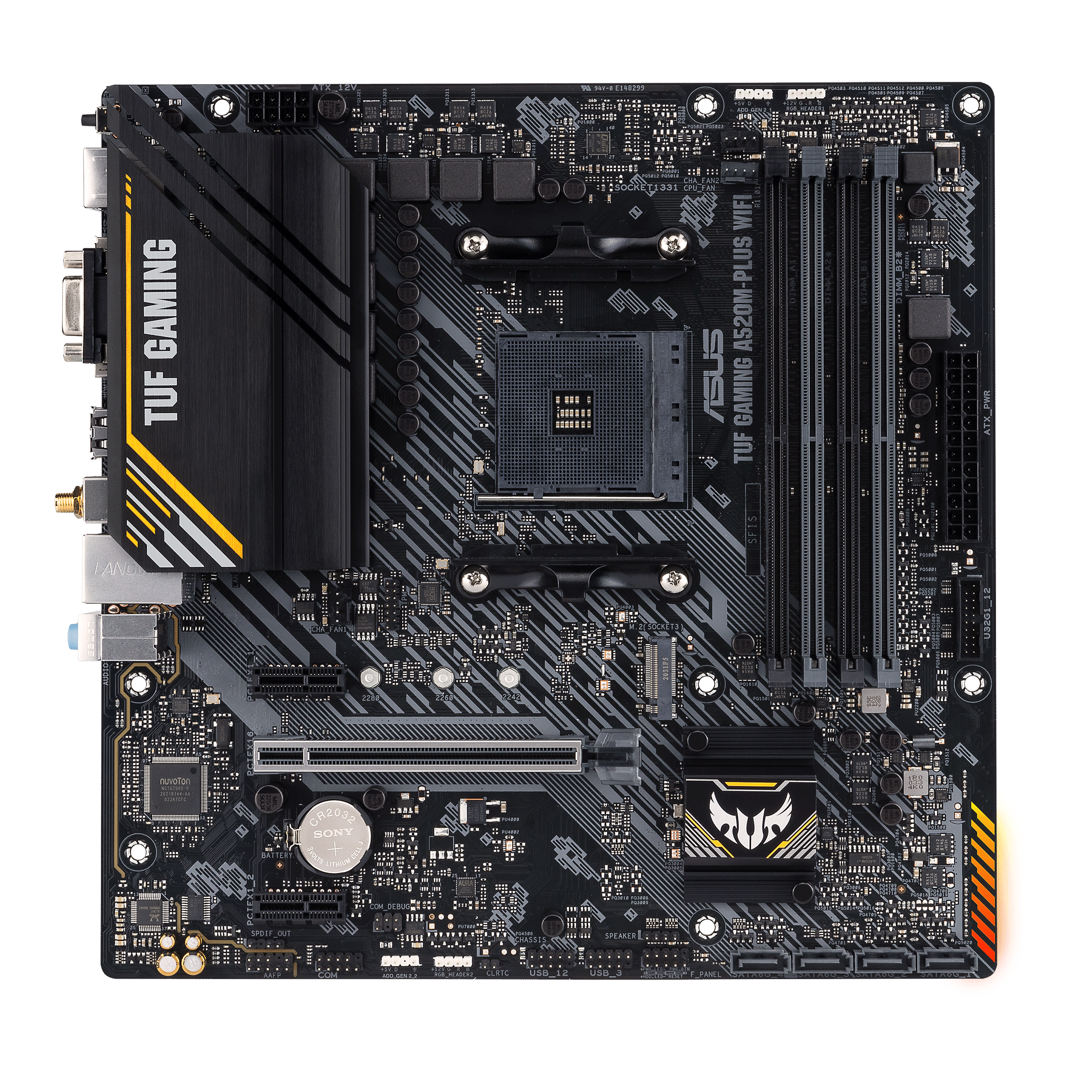
could anyone help me? im trying to install the stock cooler on this tuf motherboard but the screws wont secure because the capacitors are on the way, is there any way i can put it so it dosent obstruct the screws and the fan so i can secure it?
 grizzled bloom
You don't happen to have a dremel? lol
AMD says they're supposed to leave that area clear for this reason but I guess Asus decided they were too good to listen
sudden creek
Anyone know which AM5 motherboards have a T-topology so there isn't signal loss from running 4 sticks of DDR5?
 vast meadow
sudden creek
Anyone know which AM5 motherboards have a T-topology so there isn't signal loss ...
vast meadow
sudden creek
Anyone know which AM5 motherboards have a T-topology so there isn't signal loss ...
Basically no boards have t top and 4 sticks to my knowledge
dull flint
No ddr5 consumer board rn reasonably supports 4 sticks apart from the evga classified
That's like, the only board in my memory that does 4 sticks well enough to call it reliable
vast meadow
Most t top boards are 2 sticks ( i thought all but maybe classified is)
sudden creek
there's a classified AM5 board?
vast meadow
Afaik no am5 boards yet from evga
sudden creek
Okay I was confused when you EVGA was mentioned.
vast meadow
I just meant in general across platforms
sudden creek
My bad, when I said you I was referring to Felix.
Are there any major differences between the X670E Aorus Master and Aorus Extreme board?
My birthday is coming up soon so I may be able to split some of the costs and get the dream build done sooner rather then later.
vast meadow
nothing youll notice, also theyre bothe exteremely overpriced
 gritty patio
should i go ddr5 or 4?
vast meadow
Depends on the budget and country
sudden creek
vast meadow
nothing youll notice, also theyre bothe exteremely overpriced
What is the difference though?
vast meadow
sudden creek
What is the difference though?
probably vrms and ln2 ocability
sudden creek
forgot their site had a compare feature.
Looking at the two side by side.
In many ways the two are exactly the same.
So the Aorus Extreme has better VRMs, VRM cooling, 4x5.0 vs 2x5.0 ssd slots, more IO, built in audio dac, better lan, and a animated display on the motherboard.
Also it seems AM5 is planned to be around till 2026 based on the video from gamermeld earlier.
sudden creek
How do I calculate how many watts VRMs can handle?
Checking out other boards such as the MEG Ace, and Taichi.
thanks in advance.
ngl the Meg Ace is looking real tempting.
vast meadow
sudden creek
How do I calculate how many watts VRMs can handle?
already a way too stupid amount on any of these boards youre looking at
vast meadow
dont think theres a formula you can use
sudden creek
Ooof that's a shame.
Currently thinking about the Meg Ace or Aorus Master for my dream build (yes I know it's WAY OVERKILL).
vast meadow
honestly a huge waste of money
 limber dragon
vast meadow
dont think theres a formula you can use
limber dragon
vast meadow
dont think theres a formula you can use
A*V = W
vast meadow
Oh right
limber dragon
so vrm rated for 50A per stage, 10 stages -> 500A
vast meadow
Yeyey so #SAV=w
limber dragon
1.2v vout (cpu would be closer to 1.0-1.1v from socket) *500 = 600W
but its also dumb because that's not at all what is the governing factor for the vrms
sudden creek
How many watts can a 7950x3D draw?
limber dragon
depends on how much you can cool it
sudden creek
Like under load.
sudden creek
limber dragon
depends on how much you can cool it
LT720
limber dragon
I'd guess 150-200w
vast meadow
Well am5 ihs sucks i guess
sudden creek
Doesn't lapping + lm fix that?
vast meadow
You can take off the ihs basically insta fix
sudden creek
Isn't that far riskier and cause most coolers to not fit?
grizzled bloom
A simple washer on the cooler screws fixes the fitment issues usually
sudden creek
Ahh ok.
vast meadow
Noctua/thermal grizzly are releasing/maybe already released a kit
sudden creek
vast meadow
Noctua/thermal grizzly are releasing/maybe already released a kit
Kit for delidding?
amber canopy
 grizzled bloom

 royal elk
amber canopy
royal elk
amber canopy
I love this
vast meadow
sudden creek
Kit for delidding?
Yep
sudden creek
Once delidded do you put the cooler directly on the chip's parts or is it still like another piece of flat thin copper?
vast meadow
sudden creek
Once delidded do you put the cooler directly on the chip's parts or is it still ...
direct

Switch up your camera set up! Check out the SwitchPod at https://lmg.gg/SwitchPod
Learn more about NexiGo's family of webcams here: https://viraln.link/LTTWebcams23
In this video we visit Noctua's booth at Computex 2023 where they're showing off some really cool pieces of plastic that can knock double-digits off of your CPU temps! PLUS a new v...
that should explain most things about it
sudden creek
thanks.
 lyric turret
Would I get bottleneck with my cpu which is a i7 12700KF if I got a 7900xtx
burnt spear
unless you're playing at 1080p, not a noticeable one
lyric turret
1440p
 hexed solar
Anyone with any experience with the GIGABYTE Z790I AORUS ULTRA LGA 1700 Intel Z790 - using Registered ECC Ram?
hexed solar
 cursive epoch
No, ecc ram won't work on that board
cursive epoch
No, ecc ram won't work on that board
According to the Gigabyte website - In bold below.
Support for DDR5 8000(O.C) / 7950(O.C) / 7900(O.C) / 7800(O.C) / 7600(O.C.) / 7400(O.C.) / 7200(O.C.) / 7000(O.C.) / 6800(O.C.) / 6600(O.C.) / 6400(O.C.) / 6200(O.C.) / 6000(O.C.) / 5800(O.C.) / 5600(O.C.) / 5400(O.C.) / 5200(O.C.) / 4800 / 4000 memory modules
4 x DDR5 DIMM sockets supporting up to 192 GB (48 GB single DIMM capacity) of system memory
Dual channel memory architecture
Support for ECC Un-buffered DIMM 1Rx8/2Rx8 memory modules (operate in non-ECC mode)
Support for non-ECC Un-buffered DIMM 1Rx8/2Rx8/1Rx16 memory modules
Support for Extreme Memory Profile (XMP) memory modules
(The CPU and memory configuration may affect the supported memory types, data rate (speed), and number of DRAM modules, please refer to "Memory Support List" for more information.)
grizzled bloom
Right, unbuffered, not registered
hexed solar
cursive epoch
No, ecc ram won't work on that board
supportIt is one of few itx motherboards that actually suporrts ECC. Most of the others do not.
cursive epoch
Not for registered at least
hexed solar
grizzled bloom
Right, unbuffered, not registered
Ok - I can learn something new tonight I am cool with that.
cursive epoch
Sorry for the omission of this little bit
grizzled bloom
3 types technically.
UNBUFFERED – No buffer the memory is connected directly to the chipset controller. Memory modules that are used in desktops or notebooks are mostly unbuffered.
BUFFERED – A buffer is used to help the system control large amount of memory.
REGISTERED – Registered modules do not have a buffer but do contain a register that delays all information transferred to the module by one clock cycle, this increases reliability and the main application is for servers.
hexed solar
So is ECC unbugged a bad thing?
cursive epoch
It's essentially ecc off
grizzled bloom
It's not good or bad, it has a different purpose
hexed solar
classicsI wanted the registred ECC for the purpose of CAD/3D Worstation. I use it for the stability in the system. The system I use now is rock solid. I want to cary some of the same characterists to a smaller ITX motherboard. The only way I did find a ITX board is by getting a AsrockRack server board. BUT then I looose out on a lot of the outputs, but I get the use of the ECC - Registered Ram on the board. The only jacked up thing about the asrock board - it is deep itx and a lot of the smaller cases do not like this for sure.
W680D4ID-2T/G5/X550 - https://www.asrockrack.com/general/productdetail.asp?Model=W680D4ID-2T/G5/X550#Specifications
System Memory
Supported DIMM Quantity 4 DIMM slots (2DPC)
Supported Type DDR5 288-pin ECC/non-ECC UDIMM
Max. Capacity per DIMM 32GB
Max. DIMM Frequency 4400MT/s (2DPC-1DIMM) / 4000MT/s (2DPC-2DIMM 1R) / 3600MT/s (2DPC-2DIMM 2R)
Voltage 1.1V
dull flint
hexed solar
classicsI wanted the registred ECC for the purpose of CAD/3D Worstation. I use i...
If you want ECC you'd be better off sticking with ddr4 imo
Just for capacity's sake
hexed solar
dull flint
If you want ECC you'd be better off sticking with ddr4 imo
Why do you say DD4?
dull flint
More mature platform, runs high capacity more easily
 royal elk
😱
cyan raft
Wow, surprised it wasn’t another gpu upgrade
 stark violet
it is for a gpu upgrade
very much soo looking forward to getting a 4090 or 5090 even in the future
royal elk
🗿🗿🗿🗿🗿🗿🗿
amber canopy
stark violet
turning red soon
Good movie
amber canopy
actual L opinion, sorry bro
royal elk
Any other opinions are wrong
royal elk
amber canopy
actual L opinion, sorry bro
I haven't even watched it through lmao
 royal elk
I've just heard it playing too many times cause of my sisters
 midnight pollen
I only seen it in memes, mostly comparing to puss in boots
royal elk
If I see someone compare turning red to puss and boots im beating their ass
There's no comparison
midnight pollen
lol
grizzled bloom
Turning red was ok for what it is. Not my thing, sappy family movies and such. Not really a fan of coming of age stories either.
amber canopy
royal elk
If I see someone compare turning red to puss and boots im beating their ass
It's obvious you didn't watch the movie 🗿

 stark violet
I was wondering if I could run 64gb ddr5 at 6000mhz on a 7600
 frosty depot
midnight pollen
https://tenor.com/view/death-puss-in-boots-door-gatito-lobo-gif-27616937
frosty depot
midnight pollen
https://tenor.com/view/death-puss-in-boots-door-gatito-lobo-gif-27616937
my fave iteration of death by far
amber canopy
Do you mean representation?
frosty depot
amber canopy
Do you mean representation?
You aren't wrong, but neither was I
midnight pollen
agreed
amber canopy

sudden creek
stark violet
I was wondering if I could run 64gb ddr5 at 6000mhz on a 7600
So long as it's 1dpc then probably.
dull flint
2dpc could do it
Zen 4 is almost all down to the imc not the board or dimms
128gb tho? Yeah nah, not without some luck and proper settings
vast meadow
You could deff do it 1dpc tho i feel 2dpc it'll struggle more
frosty depot
So, I put this PC together and it booted no problem. I installed windows and about 10 minutes being on the desktop it froze. I turned the PC off and now it's doing this. Fans will spin for a few seconds the light blinks real quick from CPU to RAM back to CPU then it shuts off and does it again. Etc. Is this a cpu issue?
vast meadow
frosty depot
So, I put this PC together and it booted no problem. I installed windows and abo...
Tried clearing cmos?
frosty depot
vast meadow
Tried clearing cmos?
Yeah. Several times now
I reseated RAM as well
I loosened/tightened cooler as well
I checked cables
dull flint
Checked cable directions?
Like, not back to front?
That's the psu detecting a short methinks
frosty depot
dull flint
Like, not back to front?
Non modular
dull flint
Kekw
Try shuffling the cables in the back
They might be touching the case and grounding
frosty depot
Alright I'll look
vast meadow
I'd also try reseating ram etc
dull flint
No need to look just shuffle them around
vast meadow
Nvm I'm blind
 vast meadow
dull flint
Checked cable directions?
vast meadow
dull flint
Checked cable directions?
Those cables do not look like they belong on a modular psu so
dull flint
It coulda been corsair 
 vast meadow
Noo
dull flint
- turns you into a beach
 frosty depot
dull flint
No need to look just shuffle them around
frosty depot
dull flint
No need to look just shuffle them around
I pulled them all out to eliminate any touching of metal, but still same issue.
dull flint
It's definitely picking up on a short tho
frosty depot
Hopefully not in the psu
frosty depot
dull flint
Or at least not turn off
No to both of those.
dull flint
Ah jeez
Try changing cpu cable
If that doesn't work it's either psu shorting or the mobo is a dud
You'd have to try a second psu to be sure
If you're really lucky, taking one of the ram sticks out might do something
frosty depot
dull flint
If you're really lucky, taking one of the ram sticks out might do something
With 1 stick of ram it stays on, but it still flashes back and forth,
frosty depot
Yeah
dull flint
See what it does
frosty depot
Stays on with a different set, but still blinks back and forth
dull flint
Turn off pc
Flip off psu
Drain power with power button for 10 secs
Reset cmos
Specifically this way
frosty depot
Yeah I've been doing that before every step
dull flint
Ah
Ok I have a theory
Psu might be faulty
But I don't know how bad
If it's damaged anything
It's very similar to the problems I had with my first 12th gen rig
If you haven't tried swapping PSU now's the time
frosty depot
I don't have another PSU to try
dull flint
Eh? Can't grab one from your other rig?
frosty depot
Just the one in my PC and I'm totally not going to undo my cable management.
vast meadow
This is why you just shove the cables into the shroud and call it a day
dull flint
It's hard to know what's wrong without trying a new psu at this point tho
 dull flint
If you cut the psu out of the equation now we can determine if it's board or psu and then you're good
frosty depot
I'll just order a new PSU. I could use another one anyways.
dull flint
It could even be a dead cpu imc but it's really rare
frosty depot
Ill probably reseat the CPU tomorrow. The one thing I didn't do since getting this Mobo was take the CPU out.
frosty depot
I don't have another CPU to put into it
If it comes down to it, I'll just have to use the 12100, but I really don't want to because the only board I have for it is the pro z690a
dull flint
frosty depot
I don't have another CPU to put into it
You do but you don't want to change your other rig 
frosty depot
dull flint
You do but you don't want to change your other rig <:kekw:741678350791081994>
The mobo I have in the PC I'm working on is a 9600k
dull flint
Wait isn't this 12100?
Oh
Nvm I thought this was a new system
Le oof
So the psu most likely ded
frosty depot
Nah, I've already built uwu's pc
dull flint

frosty depot
Which is weird because I pulled that PSU out of my girls build.
And it's worked fine all the way up until now?
 frosty depot
Yeah, I got about 20 min before I go to bed, but I'll pull it out rq
frosty depot
Nope
dull flint
Not at all?
frosty depot
I blew it
dull flint
I was wondering if maybe there's something in a slot causing the g
Wha
Oh
I thought you meant the psu exploded

dull flint
Maybe something is bridging in the slots?
Have you got a vacuum
It's not the gpu, ram, probably not the psu? Wondering if build up could be the cause
frosty depot
Yeah, but it's a tad late in the night. I have thin walls
dull flint
One of 3 parts in question are previously working
So I'm back to thinking it's a bit of metal dust or something
Could you try this psu in your other rig? If you feel safe
💀
dull flint
frosty depot
PSU is out of the case
Wanting me to look in while I turn on to see sparking or anything?
dull flint
No don't look in
If anything stand back if it pops

Man was about to dwayne johnson sus his psu
 frosty depot
dull flint
If anything stand back if it pops
frosty depot
dull flint
If anything stand back if it pops
That's no fun
dull flint
Any luck?
frosty depot
Nope
frosty depot
The fans stay on and the RGB comes on, but the ram light is still the one that lights up
frosty depot
The one I swapped out
I pulled it from uwu's build
I just had her PC on before I started working on this one
frosty depot
Ok so
I put the old ram back in
It turned on and held a steady ram light. Then it went back to the weird loop where fans turn on/off with no rgb
dull flint

Can you take pictures of the ram stickers on each kit
Might glean something from it
After this I got nothing lol
But I'm willing to wager the cpu is not happy
frosty depot
Ok so I put 1 of the old stick into a b dimm
dull flint
Oh haven't you tried a1 b1 yet?
frosty depot
No. I didn't think it would post
vast meadow
@frosty depot you said you never took the cpu out right? Might be worth a shot reseating and checking mobo for bent pins
frosty depot
vast meadow
<@913267599779971133> you said you never took the cpu out right? Might be worth ...
Pins look good. I gotta go to bed now though so I'll have to continue that after work.
royal elk
5600x3d when

AMD working on a 6-core Ryzen with 3D V-Cache for the AM4 socket According to the leak from chi11eddog, AMD might be considering introducing a new AM4 CPU. The 8-core Ryzen 7 5800X3D, which has just marked its lowest price since launch last year, might soon have a younger sibling. The leak alleges that a […]
stark violet
Am4 is soo based
grizzled bloom
That would actually be an amazing CPU. It should have the same size 3D vcache as the 5800X3D too because of how they stack it.
vast meadow
Don't think it makes financial sense for them to do a r5 x3d tbh
amber canopy
 grizzled bloom
It hurts but it's true


The best that DDR4 has to offer only manages to match the same priced current gen CPU
amber canopy
my 2016 ddr4 isnt legacy just yet 😔
grizzled bloom
Give it 3 months for Threadripper 7000 to come out
amber canopy
stark violet
Can't wait to beat the 5800x3d owners with 7600
Damn I would need a 4090 for that tho 😕
grizzled bloom
Yeah you'll be GPU bound most of the time, since you were doing 1440p ultra iirc.
stark violet
yes sir
grizzled bloom
Yeah so at best you'll match the 5800X3D because of that bottleneck, which is still a flex since cheaper CPU and same perf overall
stark violet
i reckon in spider man remastered ,jedi survivor and hogwarts legacy will still see good improvements at 1440p
those are games that really like ddr5
grizzled bloom
Hogwarts favored the 7700 at 1440p but jedi and spider man favored the cache on the 5800X3D
stark violet
i mean compared to my current 10400f
grizzled bloom
Another fun comparison to see the effect of the 3D cache
 stark violet
i mean compared to my current 10400f
stark violet
stark violet
i mean compared to my current 10400f
those are three games i see some limitations of this cpu
grizzled bloom
Yes those are pretty CPU heavy games, you'll def get some nice gains
And getting the 7600 now means you should be able to get a 9800X3D when it comes out later, if all goes as planned. Ryzen 8000 is shaping up nicely, estimated at 25% IPC improvement and a clock bump.
(RIP Intel, meteor lake could have competed with that but Raptor refresh can't)
grizzled bloom
I want to see another budget offering on AM5, like a quad core 7500X or something. That would still be plenty for most people, and would be a smart move for AMD since they don't really have anything to compete with Intel on the low end right now.
The more people AMD can convince to move platforms, the better for them in the long run.
stark violet
they have over 50% marketshare now in the cpu space iirc
grizzled bloom
Maybe out of current gen sales but Intel still dominates overall
Since most people aren't on the latest gen stuff
stark violet
i think diy is all amd
Notice how almost nobody mentions anything Intel related
https://www.reddit.com/r/nvidia/comments/144bmef/is_5950x_is_enough_to_run_with_the_4090/
grizzled bloom
I saw one person the other day that wanted to upgrade their 7700 to a 7700
sudden creek
What's the best CPU for Minecraft? 13900K or 7950x?
royal elk
Bruh
sudden creek
Minecraft doesn't benefit much at all from the extra cache on 3D chips.
sudden creek
sudden creek
What's the best CPU for Minecraft? 13900K or 7950x?
Wondering for modded MC specifically.
Which makes the game run horrifically slow on heavy packs.
burnt spear
Whichever has better multi core score, pretty sure minecraft Java uses multi core
I could be completely wrong though
royal elk
Im pretty sure its single
long geyser
burnt spear
Whichever has better multi core score, pretty sure minecraft Java uses multi cor...
Will mainly be limited by single threaded perf. Esp on Forge, where most modpacks are done on, due to less well done perf mods existing for Forge.
burnt spear
ah ok
stark violet
7800x3d has both
burnt spear
ty for correcting me
stark violet
Cache and excellent single core perf
sudden creek
burnt spear
Whichever has better multi core score, pretty sure minecraft Java uses multi cor...
Heavily single threaded
Minecraft is like 90% single threaded and just a few things like audio and the such are handled on other threads.
So I guess the better question is 13900KS vs 7950x which has better single threaded perf?
burnt spear
13900ks i think
cyan raft
13900k by a good margin iirc
sudden creek
gotcha.
stark violet
how great would you guys think this would be for 250$?
 royal elk
I would call u a troll
cyan raft
stark violet
how great would you guys think this would be for 250$?
Pretty bad
sudden creek
stark violet
how great would you guys think this would be for 250$?
If it was legit, it would be pretty darn good.
But I doubt it's legit.
royal elk
Its a b650
sudden creek
oh.
royal elk
LOL
sudden creek
Thought it was the X670.
Nevermind then.
oh lmao your right, 🤦♂️
just noticed the box.
dull flint
royal elk
https://videocardz.com/newz/amd-ryzen-5-5600x3d-6-core-cpu-with-3d-v-cache-is-re...
OH MY GODDDDD

 upper aspen
do i go windows 10 or 11 for 7800x3d
burnt spear
10
upper aspen
does 11 still have issues with ryzen chips
upper aspen
10 still better for gaming?
grizzled bloom
It's effectively identical as far as fps
upper aspen
I could only fine one video online for 7800x3d and it was very mixed
cyan raft
7800x3d for $250? Yay or nay
PCB is slightly chipped in the corner but it shouldn’t be a big deal
dull flint
cyan raft
7800x3d for $250? Yay or nay
Didn't you just make a custom loop
cyan raft
dull flint
Didn't you just make a custom loop
🙂
cyan raft
But SFF is calling me
grizzled bloom
Send it to voicemail
cyan raft

amber canopy

 gentle acorn
so me and a few people are moving in together in a year and want to put together some PCs for iracing and i was wondering would the i5-13600k do good for max settings?
grizzled bloom
Yep that's good for just about anything
gentle acorn
alright cool thanks!
just wanted to make sure since they recommend an 8 core CPU or higher and then the CPU has 14 cores but then 6 powerful and 8 efficient
grizzled bloom
If you're worried you could go AMD instead, the 7700 is great too. But the 13600k will be fine.
gentle acorn
alright
im just used to using intel never used an AMD platform
i actually did intend to switch but then id have to practically rebuild my entire PC for it and even get new RAM for DDR5
grizzled bloom
At least DDR5 is cheap now
grizzled bloom
$1000?!
burnt spear
fixed
grizzled bloom
💀
burnt spear
what's the pc for?
stark violet
I racing they said above
grizzled bloom
48GB of memory is more than most people need still and can get faster than 64GB easily
And for the price of the 4060 ti 16GB you can get a brand new 6800 XT that completely destroys it in gaming, it compares to the 3080 while the 4060 ti compares to the 3060 ti.
gentle acorn
does AMD have a feature similar to ansel?
grizzled bloom
The photo mode thing yeah
That feature specifically requires game devs to support it so AMD doesn't have it
grizzled bloom
Yeah 6800 XT is 16GB
gentle acorn
cool
also if i were to change to that id want to use DDU to remove my current gpu drivers right?
grizzled bloom
Ideally yes
gentle acorn
grizzled bloom
48GB of memory is more than most people need still and can get faster than 64GB ...
also the RAM is due to the game recommending 32GB
grizzled bloom
32GB recommended only means that they expect it to exceed 16GB at ultra settings, not 60.
gentle acorn
alright
frosty depot
@vast meadow @dull flint after reseating the cpu.. I have windows up.
In the future, I'm def going to make sure I reseat first lol
vast meadow
Good to hear lol
frosty depot
vast meadow
Good to hear lol
yep and so far an hour in and no hiccups. Getting her updooted and fine tuned
vast meadow
Woop
 fallen sluice
Anybody has had any issue with the AsRock Rack SPC621D8-2T error code FF and no display?
cursive epoch
fallen sluice
Anybody has had any issue with the AsRock Rack SPC621D8-2T error code FF and no ...
Try checking if the cpu you're using with the board is compatible with the board, and also try seating the cpu properly. The code means no cpu detected
grizzled bloom
Too much or too little mounting pressure can be an issue sometimes too with those Xeons
Here's the list of supported CPUs too just in case https://www.asrockrack.com/general/productdetail.asp?Model=SPC621D8-2T#CPU
fallen sluice
I did verify that my cpu was on the list of supported cpu. I try to torque it a little more and see what happens. Thanks for the advise
 dry patio
Hi, I might be overthinking this, but I'm scared that I might have damaged a pin on the motherboard.
When I was in the process of securing the CPU by lowering the handle, I pushed down but then pulled back after trying to push it down because I was nervous, I did that around 3-4 times before I firmly pushed down and the plastic popped off.
Its my first PC build, should I remove the CPU and check the motherboard for any broken pins, or is it unlikely that any damage happened?
The parts are ASUS ROG Strix B650E-F Motherboard and the AMD Ryzen 9 7950X CPU.
burnt spear
if it works, it works
dry patio
I have only done the CPU, M.2 and RAM so far, can't turn it on yet
 ashen pulsar
I have a Ryzen 9 5900X. I cannot for the life of me figure out what is a decent board to use
I like expandability but storage isn’t necessary
The more max RAM the better
burnt spear
If you're just gaming, over 32gb is pointless
cursive epoch
^
Any decent B550 board will die honestly
And consumer boards these days supports like 128 gigs or more, which is still useless if you don't actually utilize it all
burnt spear
The a520m plus wifi is $90 for a cheap solution' otherwise this is a much nicer option but tbh you won't notice a big difference https://pcpartpicker.com/product/yKVG3C/msi-mpg-b550-gaming-plus-atx-am4-motherboard-mpg-b550-gaming-plus

MSI MPG B550 GAMING PLUS ATX AM4 Motherboard (MPG B550 GAMING PLUS)
cursive epoch
32 is plenty
frosty depot
dry patio
Hi, I might be overthinking this, but I'm scared that I might have damaged a pin...
Ah the "holy crap there's so much tension I'm gonna break it!!!!" feeling. Yeah I got that too my first time. I bet it's fine.
grizzled bloom
For what purpose?
cursive epoch
Then any decent boards will work, cause consumer side of things only takes 128 max
ashen pulsar
Rendering
Yeah I am going for 64GB
I just want the option of expanding later if I need it
I also do cad
grizzled bloom
In that case you can get any B550 board with VRM heatsinks and 4 slots for RAM, and get a set of 2x32GB memory. Probably 3200 speed.
ashen pulsar
not sure what would be the benefit of more speed
grizzled bloom
That way you can always get another kit of memory later to add on if you need it
ashen pulsar
Actually not sure what the current speed of mine is to compare
Just dont have a comparison in my mind that makes sense
grizzled bloom
3200 is still pretty slow and I'd expect it to struggle doing that much, especially once you have 4 sticks
ashen pulsar
Not worried about storage because I will have a separate server computer for that
grizzled bloom
There's even DDR3 sticks that have gotten to 3200 pretty easily
ashen pulsar
As in high latency slow?
grizzled bloom
As in slower than DDR4 slow
cursive epoch
^
ashen pulsar
Damn son
real reason i want more ram is because firefox and adobe keeps eating it all
cursive epoch
Father, I crave RAM
ashen pulsar
About to give firefox its own computer because it is so greedy
Cant be worse than when I used chrome
grizzled bloom
 ashen pulsar
B550 might be fine
That MSI board recommended seems to have a good selection of ports
grizzled bloom
B550 is fine. It has a newer VRM and memory trace layout so it often performs better than X570 when you push it.
ashen pulsar
PC part picker seems to not like the BIOS stuff
grizzled bloom
Outdated warnings yeah
ashen pulsar
I am not familiar with BIOS updating
grizzled bloom
It's really easy and you probably won't have to do it
vast meadow
It literally requires building the computer and putting a usb in the dedicated slot with the bios downloaded on it and then pressing a button and waiting a few minutes but the chances you have to do it are tinyyyy, just get a board with flashback
Also of you're in the US and going am4, just get the a520m tuf wifi for 100$ tbh

 frosty depot
yeah chipset I knew about, I never seen the ME before though.
alright this isn't to important right?

I'm getting all the drivers now before I start tearing into the pc.
vast meadow

THE LIST: https://www.patreon.com/posts/84547490
My Patreon: https://www.patreon.com/buildzoid
Teespring: https://teespring.com/stores/actually-hardcore-overclocking
Bandcamp: https://machineforscreams.bandcamp.com/music
Twitch: https://www.twitch.tv/buildzoid
Twitter: https://twitter.com/Buildzoid1
Facebook: https://www.facebook.com/actuallyh...
grizzled bloom
frosty depot
alright this isn't to important right?
Not really important unless you want all those yellow exclamation points in task manager to go away. I know they bug me.
 unique roost
yo can someone help me with finding new ram for my laptop, idk what speed to get and what it can handle
 meager elbow
What laptop
unique roost
meager elbow
What laptop
old hp gaming laptop like 2016-2018 one
meager elbow
Need the model and specs
 graceful terrace
Heyo! I recently replaced my HD with an SSD and doubled my RAM. Now I'm thinking it's time for a new mobo and cpu. I've attached my current specs and links to the products I'm considering. Any advice?
https://www.newegg.ca/amd-ryzen-7-5800x/p/N82E16819113665
https://www.newegg.ca/p/N82E16813145412?Item=N82E16813145412

Actually, I don't need wifi on my mobo so maybe this one instead?
https://www.newegg.ca/gigabyte-b650m-ds3h/p/N82E16813145414
burnt spear
The 5800x is an am4 cpu, the mobo you linked is am5
I would keep the motherboard you have and throw a 5800x3d in
graceful terrace
Idk what that is
cyan raft
It’s a setting in your bios that will allow you to install win11
burnt spear
B450s are 100% compatible
Same with 3600
My partners build is a 3600 on a b550 running w11
graceful terrace
Okay sweet, I'm watching a vid on how to enable it lol
graceful terrace
windows update still says it's not eligible but pc health check says it is 😄
meager elbow
graceful terrace
Okay, so my mobo isn't win11 compatible which is why I want to upgrade
"Windows 11" marketed motherboard are just simply compatible, but other mobos that aren't marked as so are also compatible
Make sure tpm 2.0 and secure boot are enabled in the bios
Just double check
Or maybe windows update being goofy
Though honestly I'd personally recommend using a fresh install rather than an upgrade
 eternal helm
^ agree. I did windows upgrade to W11 and ended up eventually having to clean install with how unbearable all the bugs became
Works great now
graceful terrace
Good to know!
Thinking of just going with this for now https://www.newegg.ca/amd-ryzen-7-5700x-ryzen-7-5000-series/p/N82E16819113735?Item=N82E16819113735
 eternal turtle
COMPUTER WORK?
 meager elbow
Computer not work
 rigid condor
Would anyone have any idea why my pc just started to randomly turn off the monitor and not even blue screen but restart the whole system entirely. I’ve had issues with my ram (ddr5) and am currently in the RMA process to return a dead stick is it possible that the other stick is basically dying as well?
meager elbow
Possible, do some ram tests
rigid condor
The thing is my pc doesn’t stay on for more than 10 seconds could a program be corrupted and when is boots it all dies
rigid condor
Not sure what that is
Like I have my ram defaulted to the base frequency
No XMP has been applied yet
meager elbow
Base frequency is what I meant by jedec yes
rigid condor
Yes lmao
meager elbow
Welp
rigid condor
Trident z5 ddr5 6000mhz cl38
I could just have a defective kit
Wait I finally booted
It looks like it only wants to use half of my stick
meager elbow
💀☠️
rigid condor
Chrome tab time
meager elbow
Get memtest
rigid condor
I think it’s in my bios
cyan raft
@stiff kraken you might know this, do you know if an X470 Taichi is any good for OC?
meager elbow

MemTest86 is the original self booting memory testing software for x86 and ARM computers. Supporting both BIOS and UEFI, with options to boot from USB.
Hmmm
rigid condor
It seems to have fixed itself
 stiff kraken
cyan raft
<@122901618369757184> you might know this, do you know if an X470 Taichi is any ...
stiff kraken
cyan raft
<@122901618369757184> you might know this, do you know if an X470 Taichi is any ...
i can't really recommend getting an x470 in general
unless you're getting it for really cheap
rigid condor
Oh wait never mind there goes my pc again
meager elbow
rigid condor
It seems to have fixed itself
Run a memory test
rigid condor
I’ll try
cyan raft
stiff kraken
i can't really recommend getting an x470 in general
I already have it
Bought it for $40 way back
rigid condor
meager elbow
Run a memory test
Ok the test is going
stiff kraken
cyan raft
I already have it
should be decent if you want to run 4 dimm
it's t-top
don't expect it to be amazing in anything though
cyan raft
That’s fair
The ram I’m slapping in it is already bad soooo
This whole build is cursed
I’ll throw together a pcpp real quick
Part List - AMD Ryzen 7 3700X, GeForce RTX 2070
Case is my Lenovo legion case, boot drive is a 256gb USB I had lying around
And that 2070 is artifacting AF
rigid condor
meager elbow
Run a memory test
So the memtest86 finished with no errors I think it has to be a software issue and it only happens on booting into windows
rigid condor
Is that through bios?
meager elbow
Tho normally windows would automatically do that after a few failed attempts to boot
rigid condor
Yeah like delete everything
I don’t really have much on it just discord and a few games which profiles are saved online
 ruby basin
My friend gets buzzing sound in his headsets whenever he plays demanding games
He's tried plugging it in the rear/front but nothings changed. Tried different headsets, still nothing
cursive epoch
Sounds like pc noise issue
The only way to fix it is with money, which will be buying a dac
midnight pollen
you can try a external output device such as a usb c apple dongle or external dac amp 
 peak sail
AM5 bios fixed yet?
grizzled bloom
peak sail
AM5 bios fixed yet?
If you're referring to the voltage issues, yes. It has been for a while now.
dull flint
I'll update the pin soon
vast meadow
peak sail
AM5 bios fixed yet?
Although you still might need to update your board as it might've been sitting on a shelf for a while
ruby basin
cursive epoch
The only way to fix it is with money, which will be buying a dac
It just started today, can something be done other than buyinf a dac?
cursive epoch
Find the source of ground static
midnight pollen
do you have the pc connected straight into an outlet or do you have it on a power strip
ashen pulsar

Asus TUF GAMING B550M-PLUS Micro ATX AM4 Motherboard (TUF GAMING B550M-PLUS)
for an AM4 chip the price seemed right, or should i just get an X570 board? size doesnt matter, just that memory capacity.
dull flint
@ashen pulsar is this an upgrade
ashen pulsar
no getting a board to start
ashen pulsar
I really dont think i need extra storage
ashen pulsar
it is ryzen 9
dull flint
So it's a 5900x then
ashen pulsar
yes
ashen pulsar
a samsung m.2 of some sort i need to look where i put it
dull flint
Ima save you all the trouble and finish your list off
ashen pulsar
yeah usa
dull flint
Hopefully not a 980 pro
ashen pulsar
970 Evo Plus
ashen pulsar

Mushkin Redline Lumina 64 GB (2 x 32 GB) DDR4-3600 CL16 Memory (MLA4C360GKKP32GX2)
this RAM
ashen pulsar
price was right
ashen pulsar
not getting a PSU until i know how much voltage i need
vast meadow
i think you mean wattage btw
dull flint
dull flint
So what have you purchased yet
^?
vast meadow
voltages are standard
ashen pulsar
vast meadow
i think you mean wattage btw
yeah that
vast meadow
what have you bought yet and if so what can you return
ashen pulsar
I already have the gpu, cpu, and the storage
ashen pulsar
the gpu and cpu about 9 months ago
dull flint
Ok
Alright so we should just finish this pc off then
One minute I'll show you what I think you should do
ashen pulsar
actually more time prolly has passed with the GPU
got it before the 40 series released and EVGA pulled out
but i dont really think that matters
vast meadow
it doesnt
ashen pulsar
sometime in the future i probably will stick with EVGA but with the AMD side of things
cursive epoch
^
cursive epoch
evga is gone now for gpus
dull flint
@ashen pulsar like this lad
https://pcpartpicker.com/list/V3cGsL
Part List - AMD Ryzen 9 5900X, GeForce RTX 3080 10GB, Montech AIR 100 ARGB MicroATX Mid Tower
vast meadow
ashen pulsar
it needs to be 2x32
why do you need 64gb ram btw?
cursive epoch
That whole list is poorly optimized for the money 
vast meadow
dull flint
<@280880543757762563> like this lad
https://pcpartpicker.com/list/V3cGsL
gf1 is cheaper and better bonk
dull flint
Gf1 850w?
vast meadow
sí
dull flint
Oh it changed
cursive epoch
Ah already bought some parts, welp
ashen pulsar
vast meadow
why do you need 64gb ram btw?
irrelevant
dull flint
Alr
cursive epoch
We were asking because we want to make a valid suggestion
Not because we're getting into your business
ashen pulsar
as long as there is 4 slots
vast meadow
ashen pulsar
irrelevant
i think it is, most people dont even need 32gb having can be a waste of money and also larger ram capacities run slower
ashen pulsar
and can handle up to 128GB
cursive epoch
Filling slots hurts performance
dull flint
No but why do you need 64gb
vast meadow
why in the world would you need 128gb
dull flint
cursive epoch
Filling slots hurts performance
This^^^
ashen pulsar
my current pc is like ddr3 16gb and 2333mHz
cursive epoch
Then you don't need 64
dull flint
16gb is still usable in this day and age
ashen pulsar
and adobe is eating up all my ram
cursive epoch
Ah
dull flint
We have an answer
cursive epoch
That I understand
dull flint
Part List - AMD Ryzen 9 5900X, GeForce RTX 3080 10GB, Montech AIR 100 ARGB MicroATX Mid Tower
I fixed the list
cursive epoch
Adobe ram hungri
dull flint
Premiere ram go brrr
ashen pulsar
i had to kill firefox through messing with the settings because that too ate up a lot of ram
dull flint
Yes, web browsers are like that
vast meadow
yeah adobe are ram hungry
all we wanted was to make sure you werent wasting your money on ram for no good reason
a lot of ppl think they need more ram than they need
dull flint
Ya our whole intention was to gauge your needs and make proper suggestions
We help people with this stuff every day
ashen pulsar
More so having queried before and still not able to decide the mobo
dull flint
The one I linked is more than enough for a 5900x
It's a surprisingly good, no frills board
ashen pulsar
I will save that list
 ashen pulsar
thanks
dull flint
Np man
ashen pulsar
Last thing is ensuring the PSU minimizes waste
dull flint
Waste?
ashen pulsar
Energy lost to heat
vast meadow
ashen pulsar
Last thing is ensuring the PSU minimizes waste
the psu doesnt draw the amount constantly that it says, thats what its rated to pull, energy is pulled rather than pushed, if youre not using all the power then itll only draw what it needs, and the power supply linked is in error with every other high efficiency ones (theyre all really good at efficiency these days because its easy to reach)
 mild jackal
Any 80% gold is fine, pick the next A tier unit that shows up in #tech-deals
ashen pulsar
Good then no worry
mild jackal
e.g. 850 g7
 mild jackal
If you want a bit more efficiency, run 240v
dull flint
The GF1 850W in the list I sent you @ashen pulsar is very good
vast meadow
mild jackal
Any 80% gold is fine, pick the next A tier unit that shows up in <#5001029697028...
honestly the gf1 for 110 is a pretty good deal
 tidal hound
Just kinda getting into building my own rig piecewise, I finally got a decent motherboard! But it’s amd and I know next to nothing about and cards, power is not an issue but price is, what are good budget amd cpus for gaming and music production?
eternal helm
Well the cpus we recommend will depend on the specific board you got. Boards only support certain generations of cpus
tidal hound
Oh I didn’t realize that, I got a mxi b650 tomahawk
Looks like it supports 7000 series amd
tidal hound
I’ll look into it, thanks so much
Realistically how much better would a 7700 be? It looks like 8cores instead of 6 and 16 threads instead of 12 but it’s about $100 difference
grizzled bloom
Most games don't care about core count at all
The 7600 matches the 13600k in most games
tidal hound
What does thread count affect?
cursive epoch
7700 matches 7600 in gaming too
grizzled bloom
All core game loads like some emulators or production stuff like blender
cursive epoch
tbf emulators would still be fast af on any 7000
Cause AVX-512
The very thing Intel had been marketing so hard
Only to lose it
grizzled bloom
Not the 7600 on RPCS3, it really does use all 16 threads
cursive epoch
True
And they don't care about cache it seems
But tho 7800X3D is one heck of a gaming cpu
grizzled bloom
Nope not one bit
cursive epoch
The best bar none
grizzled bloom
Easily. And for way less money and power draw than the 13900ks while beating it usually.
Some exceptions apply like csgo
tidal hound
It sounds like for most normal applications the 7600 is more than enough then?
grizzled bloom
Yep
tidal hound
Swag
What were you meaning about csgo? Is it really that intense? Tbh I barely play but my current pc (thinkpad e15 with some ryzen4500 in it) handles it fine?
grizzled bloom
No it's the opposite. csgo is so old it doesn't use any of the modern features so it prefers raw power over anything else. Intel offers the most power in that regard.
grizzled bloom
Not like it makes much difference when you're running 400+ fps anyway
ashen pulsar
Looking at the mobo I was recommended
ASUS USA
ASUS TUF Gaming motherboards distill essential elements of the latest Intel® platform and combine them with game-ready features and proven durability. Engineered with military-grade components, an upgraded power solution and a comprehensive set of cooling options, each ASUS TUF Gaming motherboard delivers rock-solid performance with unwavering g...
grizzled bloom
New Epyc chips are going to have up to 1.1GB of cache lol
cursive epoch
And 16c per CCD
ashen pulsar
 grizzled bloom
No I've used a PS/2 keyboard on my ryzen 5000 system
 ashen pulsar
B550m seems like what I would need
grizzled bloom
Whatever you get make sure it has flashback
ashen pulsar
flashback, decent wifi. Idk my ethernet is useless anyway they spraypainted over my ethernet ports in the walls
grizzled bloom
How nice of them
I have a bunch of ethernet ends I use when I do cabling, I'd have left one in while they were painting lol
ashen pulsar
Yeah I dont think I can get a paint thinner that isnt toxic
I tried to install a new faceplate but as it turns out it is hardwired
so wifi matters more
grizzled bloom
smh some people
eternal helm
ashen pulsar
flashback, decent wifi. Idk my ethernet is useless anyway they spraypainted over...
Landlord style
ashen pulsar
I probably would at most have 2 SATA drives and the m.2 that contains the OS
grizzled bloom
ashen pulsar
https://www.asus.com/us/motherboards-components/motherboards/tuf-gaming/tuf-gami...
So what exactly was this one missing that you needed? It has wifi and flashback
grizzled bloom
Well yes but they cost a lot more
It's not like they take resources by simply existing
grizzled bloom

Gigabyte B550 UD AC ATX AM4 Motherboard (B550 UD AC)
ashen pulsar
Perfect
tidal hound
grizzled bloom
New Epyc chips are going to have up to 1.1GB of cache lol

is that confirmed or?
cause wow we are in the future
ashen pulsar

Probably will use this old guy i found in the trash for a minecraft server or something i dont know
 tidal hound
surely thats not for general consumer use
grizzled bloom
Not one bit lol
That's for things like servers doing lots of cache hits and AI processing
1152MB of L3 cache
tidal hound
realistically though i never understood whats stopping youi from using that as just a gamer or whatever?
other than that price lmao
ashen pulsar
ashen pulsar
Asus P8Z77-I DELUXE Desktop Motherboard Intel Z77
grizzled bloom
The clock speeds are lower so it doesn't game as well. Games don't like cores as much as clocks.
ashen pulsar
I found it in a university ewaste bin
grizzled bloom
You could game on it if you really wanted
ashen pulsar
It has an intel i7 5th gen iirc
tidal hound
oh whack, clocking speeds are the speed the data moves through the gates or?? still unclear on all that
grizzled bloom
Not bad. That would be an ok homelab server.
ashen pulsar
Came with 8gb ram
tidal hound
ashen pulsar
I found it in a university ewaste bin
incredible find
grizzled bloom
Clock speeds are directly related to how many instructions it can process per second. The more it can process per second, the better.
tidal hound
i need to hit up my uni for scrap
ashen pulsar
Although I am not certain if I should just sell it off for whatever
grizzled bloom
The other part of that formula is instructions per clock, which newer generations tend to improve
tidal hound
grizzled bloom
Clock speeds are directly related to how many instructions it can process per se...
how does having more cores (more computations running in parallel i assume) not affect that then?
ashen pulsar
A computer could probably be smaller than this
tidal hound
if 1 core makes one calculation/instruction and you have two than youve doubled right?
grizzled bloom
tidal hound
how does having more cores (more computations running in parallel i assume) not ...
The issue is the calculations are not parallel usually. In order to avoid desynchronizing your output there's generally one or two cores that run the main world thread, and other tasks like NPC processing and music can be done on other cores.
tidal hound
im sorry to bother btw, i need to go watch some hour long deep dive into the way this stuff works XD
cursive epoch
So having more cores still helps
grizzled bloom
There's only so many things you can offload to other cores though
cursive epoch
But only to an extent
tidal hound
i never thought about the fact that there would be a mother core(S)
grizzled bloom
6 cores/12 threads seems to be the current sweet spot, and will be for the forseeable future
cursive epoch
I want to have 8 because I love running background stuff with my games
Like a song on youtube
ashen pulsar
Was thinking of using a separate computer for that kind of stuff
tidal hound
on that note the 7500x has .2 more max GHz than the 7500 and 4.7 instead of 3.8
grizzled bloom
I do emulators a lot so I often use all 8 cores as well.
ashen pulsar
and hook that up to a mini projector I also found in the trash
tidal hound
is the x worth?
cursive epoch
No
grizzled bloom
No it's the same but more power
ashen pulsar
grizzled bloom
https://pcpartpicker.com/product/wjXV3C/gigabyte-b550-ud-ac-atx-am4-motherboard-...
Looks like this didnt come up as compatible in the parts list. Shame.
cursive epoch
Which you can still give on non-x
grizzled bloom
Like actual power, not strength
tidal hound
cursive epoch
I want to have 8 because I love running background stuff with my games
same tbh
cursive epoch
ashen pulsar
Looks like this didnt come up as compatible in the parts list. Shame.
It's just a generic pcpp warning
B550 should have bios for all AM4 cpus by now
Bar X3D models
ashen pulsar
Oh it was because there was a case included in the build
I removed that and the problem is gone
I am making my own “case”
cursive epoch
Though 7600 has enough cores and strong ones for you to do other tasks
tidal hound
i am already used to stopping some of my other tasks but sometimes ill like stream to discord and have youtube for music and maybe obx depending on what im up to
6 should be fine for that right? not like im running vms on the side
tidal hound
swag
grizzled bloom
Yeah. The game will use up to ~6 threads, which leaves 6 for the other tasks.
tidal hound
once again thank you all for the incredibly helpful insight, time to hunt for a good deal now
cursive epoch
Minimum 6 cores for a modern gaming pc imo
Unless you have very tight budget
Then i3 12100f is a great option
tidal hound
my budget is ideally <300 but ill go up to like 350 if its really a big diff
cursive epoch
Budget for cpu?
tidal hound
yea
cursive epoch
Stick with 7600 then
Maybe get a cheap thermalright tower cooler
It's not needed, but an option
tidal hound
i still need to get my cooling system in order too lol
cursive epoch
Only for non-x ryzens
And the ones that comes with boxes, not tray cpus
They don't use a tower cooler, hut rather a downdraft heatsink with a fan on top
That's stock coolers for ya
Chespest possible without letting the cpu heat up too much
tidal hound
i think ive got a heat sink like that just laying around somewhere lol
cursive epoch
just don't be silly and slap them on something like a ryzen 9
tidal hound
She’s a lil dusty tho XD
 tidal hound
cursive epoch
~~just don't be silly and slap them on something like a ryzen 9~~
tidal hound
cursive epoch
~~just don't be silly and slap them on something like a ryzen 9~~
Ryzen 9 has that weird cage on top right?
tidal hound
oh i meant the card itself
cursive epoch
The cpu?
tidal hound
yeah
cursive epoch
It's the integrated heat spreader
Looks like this on all AM5 cpus
Or well at least 7000 for now
grizzled bloom
tidal hound
Ryzen 9 has that weird cage on top right?
The octopus IHS yeah lol
Paste can get underneath that so don't use too much
grizzled bloom
Most™️
 scenic solar
Not really, they have had that price for a long time, could be a bit lower than average but nothing too special
tidal hound
bet
any decent 32gb ram i should keep a look out for? lower price end hopefully less than $100
cursive epoch
tidal hound
any decent 32gb ram i should keep a look out for? lower price end hopefully less...
There's team group 5600 c32 kits
$81 for 32gb
Don't buy corsair
dull flint
tidal hound
this is a crazy good deal right?
Horrible deal
Also horrible Corsair bin. Like, guaranteed to be a lottery of bad to worse lol
As above, you can get way faster ddr5 (and top shelf stuff at that) for the same price or less, and similar speed ram from silicon power clocks in at just under 50$
And nowadays a ddr5 board barely costs any more than a ddr4 motherboard so, the investment in ddr5 is especially worth doing with $80 of ram